
Visualização de leitura

Rokarolla Android malware can take over your phone and steal banking logins

Researchers have analyzed a new Android banking Trojan called Rokarolla. It can effectively take over a device, steal banking and crypto login details from more than 200 apps, and quietly monitor much of what you do on your phone.

On an infected device, Rokarolla steals banking and crypto login details. It also uses fake lock-screen overlays to capture your PIN, pattern, or password.

When you open one of the banking or crypto apps on Rokarolla’s target list, the malware downloads and displays a matching fake login page over the real app. Anything you type into the fake page, including usernames, passwords, and card numbers, is sent to the attackers.

Separately, Rokarolla abuses Android’s Accessibility features to monitor activity across the device. It can recognize WhatsApp screens by looking for familiar labels such as “Chats” and “Calls,” extract contact information, read SMS messages, and send new ones. These capabilities can help it intercept one-time passwords (OTPs) and two-factor authentication (2FA) codes.

Rokarolla can take control of text messages and phone calls, helping it block security alerts and hide signs of fraud.

It can also record everything you type and see on the screen. If you copy and paste a cryptocurrency wallet address, the malware can secretly replace it with one belonging to the attackers.

Other features help the malware stay hidden, including the ability to hide its icon, silence the device, turn off Google Play Protect, and prevent the screen from going to sleep.

How it spreads

Rokarolla is distributed through rogue websites, where it is offered as fake versions of popular apps like TikTok or Chrome.
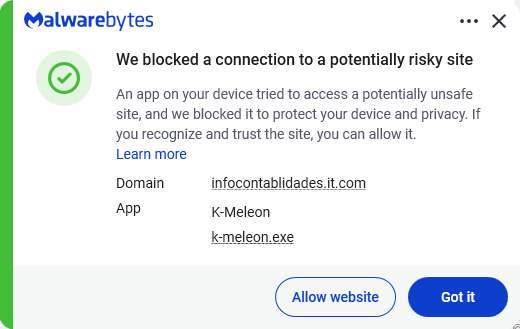
Malwarebytes blocks the download site

Instead of sending you to the official Google Play Store, these malicious sites push you to download the app directly, a process known as sideloading. After you install it, the fake app poses as Google Play Protect and quietly downloads and installs the malware that carries out the attack.

To gain the access it needs, the fake app asks for powerful permissions, including Accessibility access, the permission to read SMS messages, and access to notifications. Because these requests can look legitimate, many users may approve them without realizing the risks.

How to stay safe

To avoid banking Trojans like Rokarolla, there are a few guidelines you should follow:

  • Don’t trust apps that claim to be Google Play Protect or another system component. You should never need to install these manually.
  • Use up-to-date, real-time anti-malware protection with web protection on your devices.
  • Don’t sideload apps that are available on the Google Play Store. While malware can sometimes slip into official stores, the risk is much greater elsewhere.
  • Deny powerful permissions to apps downloaded from links or websites, especially if they ask for Accessibility access, SMS permissions, or the ability to handle calls, even though that doesn’t match their stated purpose.
  • In fact, any request for Accessibility access should be treated with caution. If an app that is not clearly an accessibility tool asks for it, deny the request and reconsider whether you trust the source.
  • Scrutinize banking and crypto login screens. If something looks off, or you see multiple login prompts, close the app and relaunch it from its official icon.

Scammers know more about you than you think. 

Malwarebytes Mobile Security protects you from phishing, scam texts, malicious sites, and more. With real-time AI-powered Scam Guard built right in. 

Download for iOS → Download for Android → 

New Rokarolla Android Trojan Targets 217 Banking and Crypto Apps

Rokarolla Android malware targets 217 banking and crypto apps, steals credentials, blocks bank calls, intercepts SMS, and disables Play Protect.

Zimperium’s zLabs researchers have published a detailed analysis of Rokarolla, a new Android banking trojan named after its command-and-control infrastructure. It spreads through malicious websites masquerading as TikTok and Chrome, one confirmed distribution point being hxxps://infocontablidades[.]it[.]com/. The first thing a victim installs is a dropper that masquerades as Google Play Protect, a choice intended to avoid raising suspicion.

“Primarily distributed through malicious websites such as hxxps[://]infocontablidades[.]it[.]com/, where it masquerades as popular applications like TikTok or Google Chrome, this highly invasive malware is specifically designed to target and compromise 217 distinct cryptocurrency and banking applications.” reads the report published by Zimperium. “Furthermore, the trojan actively conceals its operations and disrupts user intervention by blocking incoming calls, deploying fraudulent screen overlays, suppressing device audio, and deactivating Google Play Protect.”

The dropper’s job is simple: get the second-stage payload installed and grab Accessibility Services access. Once Accessibility is granted, everything else follows. The malware can simulate user taps, parse on-screen UI elements, inject overlays on top of legitimate apps, and execute automated actions without touching the screen. One of its 137 commands then disables Google Play Protect, removing the protection the dropper impersonated to get installed in the first place.

The target list is pulled dynamically from the C2 server. For each flagged app, the malware downloads a fake HTML login page and stores it in a local SQLite database. When the victim opens the real app, Rokarolla drops the fake page on top and captures every credential entered, card numbers included.

The lock screen gets the same treatment. The malware deploys a fake PIN entry screen that mimics Android’s legitimate lock screen interface. Whatever the victim types gets sent to attacker infrastructure.

“Any credentials entered by the user are captured by this deceptive UI (Figure 6) and subsequently exfiltrated to attacker-controlled infrastructure for further exploitation.” continues the report. “This information allows the malicious actor to execute commands even if the device is locked.”

That’s the detail that makes this more than a credential stealer: the operator can interact with the phone whether the owner is actively using it or not.

SMS handling is another pillar of the attack. Rokarolla reads every message on the device and can send messages on the victim’s behalf, which is enough to intercept the one-time codes banks send to approve logins and transactions. It also requests default call handler status, which lets it block incoming calls silently. A warning call from a fraud detection team never rings. The malware also mutes all device audio and vibrations during active operations, so notification sounds that might alert the user don’t fire either.

“Complementing this visual evasion, the malware is capable of muting all device audio and vibrations, ensuring it operates in complete silence during fraudulent activities. This audio suppression effectively masks critical cues, such as security alert notifications or incoming verification calls from banking institutions, significantly reducing the likelihood of the user noticing or interrupting the transaction process.” continues the analysis. “To maintain operational persistence, the malware also forces the device screen to remain on indefinitely. This mechanism ensures that its fraudulent UI overlays, automated actions, and background processes are not disrupted by screen timeouts or the device locking.”

The clipboard gets rewritten silently. When a user copies a cryptocurrency wallet address to paste into a transaction, Rokarolla swaps it for an attacker-controlled address with no visible indication anything changed. The keylogger and screen content logger run in parallel, capturing everything typed and everything displayed. WhatsApp contact data gets scraped by parsing on-screen UI nodes and comparing them against known WhatsApp interface terms like “Chats” and “Calls.”

For screen surveillance, Rokarolla avoids the MediaProjection API, which throws a visible recording notification that would tip off the user.

“Unlike conventional Android malware that relies on the MediaProjection API for continuous screen casting (VNC), this variant employs an alternative snapshot-based surveillance mechanism.” states the report. “The malware systematically captures screenshots of the victim’s device, compresses them into PNG format, and exfiltrates the image data alongside a precise timestamp. Following each transmission, the execution state is reset and a cleanup routine is invoked, ensuring the system maintains operational stability and is ready for the subsequent capture cycle.”

Frame by frame, quietly, with no visible indicator.

The C2 infrastructure is built with resilience in mind. The malware ships with multiple fallback domains hardcoded and can receive a fresh list of active C2 addresses at any time via the server’s configuration response. Taking one server down doesn’t interrupt operations. The four domains observed in traffic analysis are beralisvc.info, blestorians.cfd, abiorime.cfd, and morevoms.cfd, with the C2 domain registered at hxxps://beralisvc[.]info confirmed as active during analysis.

The experts noted that no product flaw is involved here, so there’s no patch to apply. The defenses are the standard ones: install apps only from Google Play, never grant Accessibility Services to anything that isn’t a known assistive tool, and treat any app that asks to become your default SMS or call handler as an immediate red flag. Zimperium says its Mobile Threat Defense and zDefend products detect Rokarolla, and the full IOC list including APK hashes is published on the company’s GitHub repository. No attribution to a named group has been made.

“The malware demonstrates strong stealth, evasion, and persistence techniques designed to avoid detection and prevent user-initiated removal.” concludes the report. “Furthermore, the malware employs multiple techniques to operate completely under the radar”

Follow me on Twitter: @securityaffairs and Facebook and Mastodon

Pierluigi Paganini

(SecurityAffairs – hacking, FishMonger)

❌