The U.S. offers up to $10M for information on Russian hackers targeting Signal and WhatsApp accounts of officials and journalists.
The U.S. government is offering rewards of up to $10 million for information leading to the identification of members of the Russian-linked groups UNC5792 and UNC4221.
The hackers target government officials, military personnel, journalists, and political figures through phishing attacks on Signal and WhatsApp. U.S. agencies warn the groups have evolved their tactics and now trick victims into revealing Signal Backup Recovery Keys, giving them access to past conversations and account data.
“Rewards for Justice is offering a reward of up to $10 million for information leading to the identification or location of any person who, while acting at the direction or under the control of a foreign government, participates in malicious cyber activities against U.S. critical infrastructure in violation of the Computer Fraud and Abuse Act.” reads the announcement published by the US Government.
The attackers rely on social engineering rather than breaking encryption. They abuse legitimate device-linking features in secure messaging apps such as Signal to trick victims into connecting an attacker-controlled device to their accounts.
Once they have gained access to the target’s account, they can read sensitive conversations, access contact lists and group chats, and use the compromised account to launch new phishing attacks. In some cases, the hackers modified legitimate Signal group invite pages to redirect users to malicious links.
According to U.S. authorities, these tactics have already compromised thousands of messaging accounts.
“Targets of this cyber scheme include U.S. government officials, diplomatic personnel and foreign affairs officials, defense and national security personnel, policy analysts and advisors, NATO member-state officials and diplomats, allied intelligence and defense partners, investigative journalists covering Russia, Ukraine, and international affairs, non-governmental organizations providing support and assistance to Ukraine, and academic researchers in security studies and Russian affairs.” continues the announcement.
The U.S. Rewards for Justice program is seeking information that could identify members of UNC5792 and expose how the group operates. Authorities are interested in the hackers’ identities, their links to Russian intelligence, supporting personnel and contractors, the infrastructure and tools used in attacks, as well as the financial networks, bank accounts, cryptocurrency wallets, and funding sources that sustain the group’s operations.
This week, the FBI and CISA updated their March 2026 warning about Russian intelligence phishing campaigns, and the new advisory adds a detail that wasn’t in the original: the operators have shifted their primary objective from stealing verification codes to stealing Signal Backup Recovery Keys.
The March warning covered FSB-linked groups targeting government officials, military personnel, journalists, and Ukrainian officials through fake Signal support messages. The June update gives those groups public tracking names: UNC5792 and UNC4221, both linked to Russian Federal Security Service officers including those embedded with FSB Border Guards and others working on behalf of Russian military services.
WhatsApp is letting users reserve usernames before its 2026 launch, giving people a way to chat without sharing phone numbers. Here is how it works, why it matters, and the security limits to know
Ukraine’s SSU and the FBI Just Confirmed Russian Intelligence Has Been Systematically Hacking Messenger Accounts for Years.
The Security Service of Ukraine (SSU), working jointly with the FBI, has formally exposed a sustained Russian intelligence campaign targeting the messaging accounts of government officials, military personnel, politicians, and activists across Ukraine, Europe, and the United States.
The operation is ongoing. The goal isn’t disruption; it’s intelligence collection.
“Cyber experts of the Security Service of Ukraine together with the Federal Bureau of Investigation exposed Russian special services in systematic cyberattacks on messengers of officials, military personnel, politicians and activists from Ukraine, Europe and the USA.” read the alert by SSU.
“The purpose of these ‘hacks’ is to gain access to sensitive information of a military, political and economic nature that was exchanged between users, as well as to steal their personal data.”
The attack method is low-tech by design. Operators send SMS messages impersonating platform support bots, asking targets to hand over account credentials, confirmation codes, PINs, or account recovery keys. The SBU notes that these messages tend to arrive in the morning hours, when targets are physically and emotionally less guarded. Timing is a social engineering choice, not an accident.
The scope is broader than most people assume.
“The SBU emphasizes that Russian special services and hackers associated with them attack not only organizations, officials or public figures, but also personal accounts of Ukrainians.” continues the alert.
This isn’t a targeted elite program. It’s a mass collection operation with a tiered approach: high-value targets get more sophisticated techniques, ordinary citizens get the SMS impersonation play. The SBU didn’t attribute the campaign to a specific group by name, but prior reporting from Google, the FBI, and CISA ties similar activity to clusters tracked as UNC5792 and UNC4221, both linked to FSB operations, as well as Star Blizzard.
The FBI’s June 26 advisory added a new technique to what the March warning described. Russian operators have evolved from chasing one-time verification codes to specifically targeting Signal Backup Recovery Keys, which unlock an account’s entire message history and remain valid even if the user creates a new account with the same phone number afterward. This is a meaningful escalation: a stolen verification code expires, a stolen Recovery Key doesn’t.
QR codes are another active vector the SBU specifically calls out. Scanning a QR code received from an unknown bot or user can silently link the attacker’s device to the victim’s account, a technique Google’s Threat Intelligence Group documented against Signal’s linked-devices feature in early 2025.
“Russian hackers use a variety of tools and methods for such cyberattacks. For example, to extract passwords to an account, the enemy most often uses SMS messages on behalf of ‘support teams.'” states SSU.
The variety matters: blocking one delivery mechanism doesn’t stop the campaign, because the operators rotate techniques and targeting lists continuously.
The SBU’s practical guidance covers the basics that still fail most users in practice. Check active sessions in your messenger regularly and end anything you don’t recognize. Enable two-factor authentication with a complex alphanumeric PIN, not a four-digit code. Never provide confirmation codes, PINs, passwords, or recovery keys to anyone, regardless of how legitimate the request appears. Don’t scan QR codes from unknown sources. Don’t follow suspicious links even from accounts you know, because that account may already be compromised. Anyone who receives a suspicious message in a messenger can report it to the SBU’s Cybersecurity Situation Center at incident@dis.gov.ua.
Last week, the FBI and CISA updated their March 2026 warning about Russian intelligence phishing campaigns, and the new advisory adds a detail that wasn’t in the original: the operators have shifted their primary objective from stealing verification codes to stealing Signal Backup Recovery Keys.
FBI warns Russian spies now target Signal Backup Recovery Keys, enabling access to message history and long-term account takeover.
The FBI and CISA updated their March 2026 warning about Russian intelligence phishing campaigns, and the new advisory adds a detail that wasn’t in the original: the operators have shifted their primary objective from stealing verification codes to stealing Signal Backup Recovery Keys.
The March warning covered FSB-linked groups targeting government officials, military personnel, journalists, and Ukrainian officials through fake Signal support messages. The June update gives those groups public tracking names: UNC5792 and UNC4221, both linked to Russian Federal Security Service officers including those embedded with FSB Border Guards and others working on behalf of Russian military services.
“RIS cyber threat actors have compromised individual CMA accounts, but not the CMA’s encryption or the application itself. To date, this activity has been publicly tracked as UNC5792 and UNC4221.” reads the PSA alert published by the FBI.. “RIS cyber threat actors continue to masquerade as automated CMA support accounts in updated phishing messages but have evolved their tactics to attempt to elicit victims’ Backup Recovery Keys.”
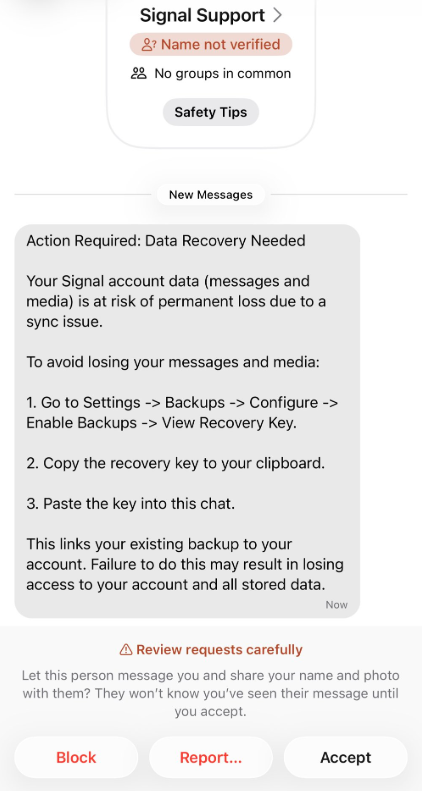
The earlier version of this campaign asked targets for SMS verification codes, account PINs, or tricked them into clicking doctored group invite links that silently linked an attacker’s device to the account. The new version is more damaging. The phishing message walks the target step by step through enabling Signal backups, navigating to the Recovery Key, and pasting it into the chat. Two sample messages are printed in the advisory: one dressed as a mandatory two-factor rollout announcement, the other as an urgent data recovery warning claiming messages are at risk of permanent loss.
The Recovery Key is what makes this particularly serious.
“RIS cyber threat actors continue to elicit victims’ verification codes and account PINs (see Figure 1). If a targeted user backs up their CMA messages as directed in Figure 1 and later provides their Backup Recovery Key (see Figure 2), RIS cyber threat actors can view the account’s historical messages, private and group messages, and take over the victim’s account.” continues the alert.
A backup recovery key doesn’t just unlock one session. It unlocks the entire message archive, and unlike a stolen code that expires, this key keeps working.
“If a victim inadvertently shares their Backup Recovery Key, that same key remains valid even if they create a new account following the compromise using the same phone number.” continues the report. “Consequently, the actor could potentially use the compromised key to take over the new account in the future as well.”
Making a new account doesn’t help if the old key still works against it. The only fix is generating a new key through Settings, which invalidates the old one for future backup downloads. That doesn’t recover anything the attacker already pulled, and the advisory is clear about that.
The FBI and CISA are unambiguous on one point that tends to get lost in coverage of these incidents: none of this breaks Signal’s encryption or the application itself. The attackers aren’t cracking anything. They’re walking through a legitimate feature with a key the user handed them, which is a completely different problem with a completely different solution.
Alongside the advisory, the State Department’s Rewards for Justice program announced it’s offering up to $10 million for information on UNC5792. The activity overlaps with warnings issued earlier this year by Dutch intelligence, Germany’s BfV and BSI, and France’s ANSSI, and it builds on Google Threat Intelligence Group’s documentation of UNC5792 abusing Signal’s linked-device feature in early 2025. The same tradecraft has since been observed against WhatsApp and Telegram.
For anyone using Signal who works in government, security, journalism, or military-adjacent roles, the advisory’s guidance is direct. Treat any in-app message claiming to be Signal support as hostile: real support doesn’t contact users inside the app to ask for codes, PINs, or Recovery Keys.
Open Settings, check Linked Devices, remove anything unrecognized. If you think you handed over your Recovery Key at any point, generate a new one now and assume anything backed up before that moment is already in someone else’s possession.
The encryption holds. The account is the weak point, and the advisory makes clear that the targeting is deliberate, sustained, and still active.
“To mitigate this risk, the user must generate a new Backup Recovery Key within the Settings control; this action will invalidate the previous key for all future backup downloads. However, please note that this does not prevent the actor from having already downloaded a backup of the original account.” concludes the alert.
Pavel Durov e seu aplicativo de mensagens “privadas” têm um novo rival: ninguém menos do que Elon Musk e seu XChat. Explicamos várias vezes no nosso blog que as alegações de Durov sobre a privacidade e a segurança do Telegram são exageradas, para dizer o mínimo. Aqui, vou apenas lembrar ao leitor que as conversas padrão (não secretas) no Telegram não são protegidas por criptografia de ponta a ponta, que é o requisito mínimo para que os dados do usuário permaneçam privados.
Mas voltemos a Musk. No final de abril de 2026, o aplicativo XChat foi lançado para usuários do iOS. O magnata da tecnologia vinha exaltando as qualidades do seu aplicativo de mensagens há muito tempo, alegando desde o início que se tratava de uma maneira incrivelmente privada e segura de se comunicar, representando uma ameaça direta ao Signal, WhatsApp, Telegram e iMessage. Hoje, analisamos se é prudente confiar nas <s>promessas de Musk</s> em relação a este novo serviço, detalhamos seus principais recursos e o comparamos à concorrência.
Criptografia no estilo Bitcoin
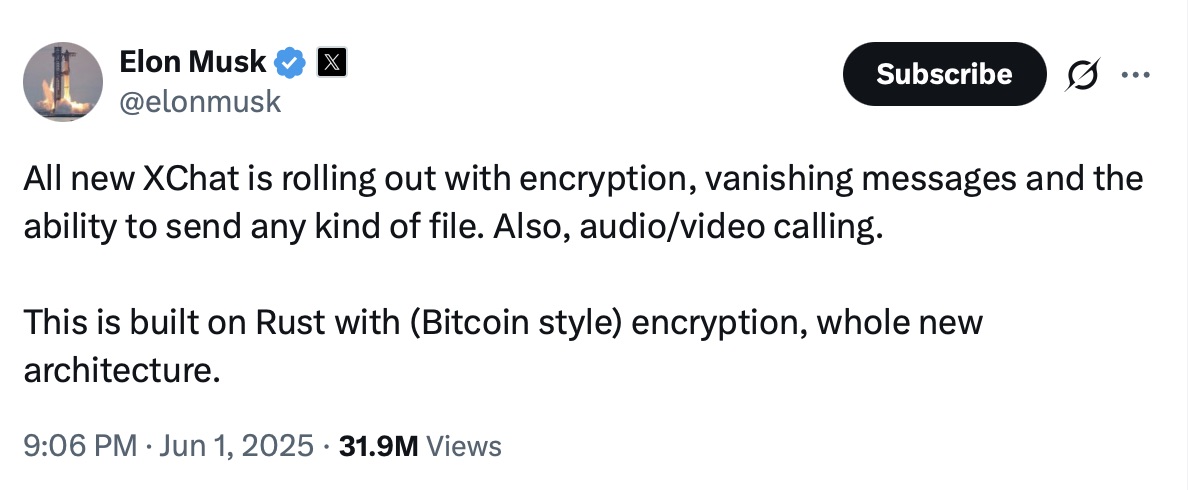
Musk falou sobre o XChat pela primeira vez em 1º de junho de 2025, naturalmente por meio da sua conta no X (o antigo Twitter). Quando um usuário perguntou quando o novo serviço seria lançado, Musk respondeu: “Essa semana, se não houver problemas de escalabilidade”.
Aparentemente, havia problemas de escalabilidade: a versão beta do aplicativo só foi lançada em setembro de 2025 e os usuários do iOS só obtiveram acesso total ao serviço em abril de 2026. Até o momento da publicação deste artigo, não havia informações sobre quando essa versão será lançada para o Android. Apesar disso, uma página do XChat já está ativa no Google Play, onde os usuários podem <s>enfileirar-se</s> para fazer um “pré-registro”, o que quer que isso signifique.
Mas, vamos voltar à postagem de Musk anunciando o XChat. Essa postagem específica chamou a atenção da comunidade de especialistas em privacidade e cibersegurança, e aqui está o motivo: o magnata da tecnologia informou que o serviço seria construído em uma “arquitetura totalmente nova” e apresentaria “criptografia no estilo Bitcoin”, além de ser escrito em Rust.
Elon Musk anuncia o lançamento do XChat, alegando que o novo aplicativo de mensagens é escrito em Rust e usa “criptografia no estilo Bitcoin”. Fonte
A comunidade de especialistas passou muito tempo tentando descobrir o que Musk quis dizer com isso. Afinal, o Bitcoin não é um sistema criptografado e anônimo de troca de dados. A blockchain utiliza chaves criptográficas públicas e privadas, mas para um propósito totalmente distinto: a assinatura de transações. Além disso, essas transações não estão escondidas de olhares indiscretos; elas estão disponíveis para qualquer um ver, para sempre. Simplificando: a fim de proteger os seus usuários, o Bitcoin não garante a privacidade deles, mas faz exatamente o oposto, ou seja, oferece transparência máxima.
É provável que Musk tenha usado a “criptografia no estilo Bitcoin” como uma estratégia de marketing. Na época do anúncio, o Bitcoin estava sendo negociado próximo de suas máximas históricas, e as criptomoedas dominavam as conversas. Tecnicamente, a versão beta do XChat, lançada em setembro de 2025, protegia as conversas dos usuários com um “tipo” de criptografia de ponta a ponta, mas isso foi implementado de uma forma que levantou sérias dúvidas entre os especialistas em criptografia.
E não sem uma razão. Normalmente, ao configurar um chat com criptografia de ponta a ponta, é gerado automaticamente um par de chaves criptográficas: uma pública e uma privada. A chave pública é usada para criptografar mensagens, enquanto a chave privada as descriptografa. Como outros usuários precisam da sua chave pública para iniciar uma conversa segura com você, essas chaves geralmente são armazenadas nos servidores do aplicativo.
A chave privada, no entanto, deveria ser armazenada somente no dispositivo do usuário, que é exatamente o que o Signal faz. Isso serve como uma garantia simples e firme de que nem a própria empresa nem qualquer terceiro que viole a infraestrutura dela possa acessar as conversas dos usuários, mesmo que realmente desejem.
Mas os projetos de Elon Musk seguem uma cartilha própria: os desenvolvedores do XChat decidiram que seria uma ótima ideia armazenar as chaves privadas dos usuários nos servidores do XChat. O X afirma que utilizará módulos de segurança de hardware (HSMs) para armazenar essas chaves privadas, dispositivos especializados projetados para impedir que até mesmo o proprietário do sistema tenha acesso fácil aos dados armazenados nele. No entanto, os especialistas também estão questionando a confiabilidade dessa configuração, e chegaram a uma conclusão sombria: se o X realmente quiser obter a chave privada de um usuário, é provável que consiga.
Entenda como as mensagens criptografadas do XChat funcionam na prática
Depois que os problemas de escalabilidade foram resolvidos quase um ano após o anúncio de Musk, o X lançou oficialmente o aplicativo XChat para iOS em abril de 2026. Agora, qualquer pessoa pode usá-lo. Mas do ponto de vista prático, a situação envolvendo conversas criptografadas parece ainda mais complicada do que no Telegram.
De acordo com a Central de Ajuda da rede social, para usar a criptografia de conversas de ponta a ponta no XChat, ambos os usuários devem ter uma conta no X e configurar o XChat. Além disso, deve haver algum tipo de conexão entre eles:
Seguir um ao outro ou estar inscrito na conta um do outro
Ter trocado mensagens anteriormente
Ter aceito uma solicitação de mensagem direta
Ser membros da mesma assinatura Premium Business/Premium Organization no X
Se os usuários não seguem um ao outro e não interagiram antes, pode ser que o XChat ainda permita que eles enviem uma solicitação de mensagem. No entanto, essa solicitação inicial não estará abrangida pela criptografia de ponta a ponta.
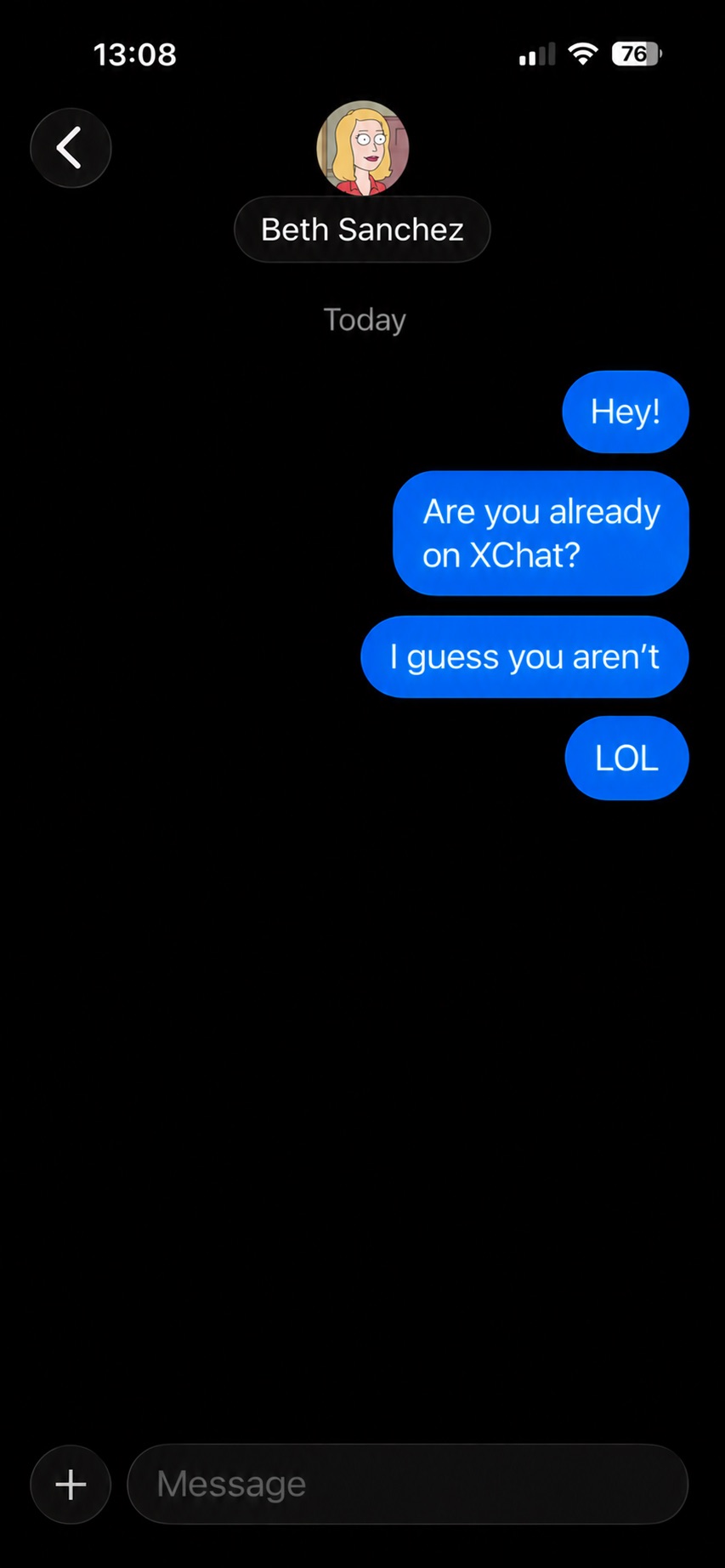
Pelo menos é assim que o processo é descrito na documentação da ajuda oficial do aplicativo de mensagens. Parece complicado demais? Não se preocupe: isso funciona de forma completamente diferente na prática. Ou melhor, não funciona. Eu consegui enviar uma mensagem para outro usuário que NÃO havia configurado o XChat. O aplicativo em si, é claro, não me avisou sobre isso.
O aplicativo permite iniciar uma conversa com um usuário que ainda nem configurou o XChat, sem qualquer aviso.
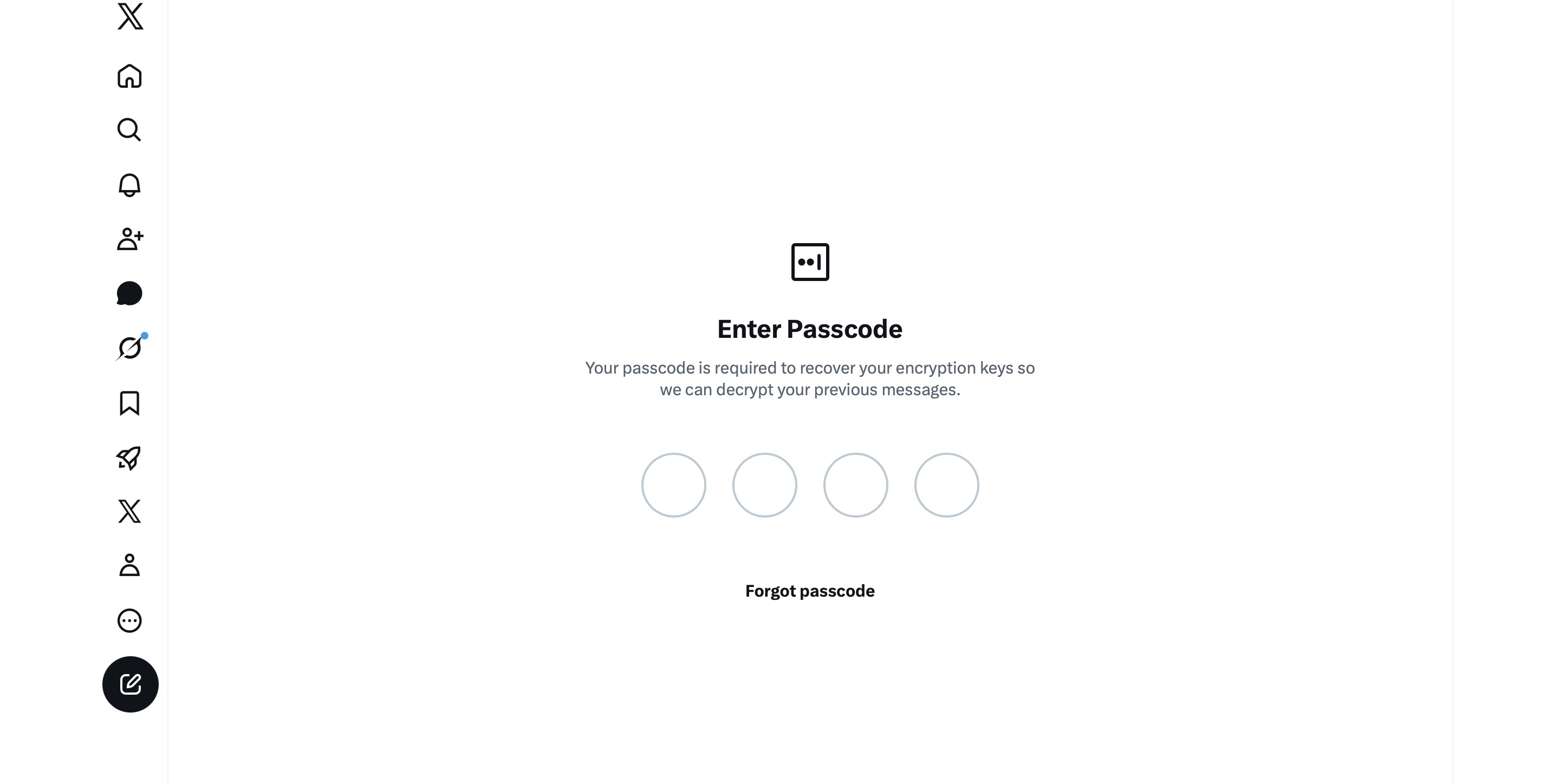
A história fica ainda melhor. O usuário para o qual eu enviei uma mensagem recebeu uma notificação na versão da Web do X, mas não conseguiu acessar a mensagem. Aqui está o motivo: antes de usar o XChat, é necessário criar um PIN de quatro dígitos. No entanto, o PIN é solicitado na primeira vez que o usuário tenta acessar o aplicativo, ou seja, antes mesmo dele ter a chance de criar um PIN. Além disso, o usuário recebe um aviso de que, sem o PIN, não será possível visualizar conversas anteriores criptografadas.
O usuário deve inserir um PIN para descriptografar mensagens anteriores antes mesmo de concluir a configuração inicial do XChat.
A única solução que encontrei para poder usar o XChat foi tocar em “Esqueceu o PIN?” (ainda que esse PIN nunca tenha existido), confirmar a minha identidade e criar um novo PIN (ou melhor, o primeiro). Conforme já mencionado, isso faz com que você perca o acesso ao histórico de conversas, não podendo ler nenhuma mensagem enviada a você no XChat antes de ter configurado oficialmente o aplicativo.
XChat: o novo Telegram, WhatsApp, Signal… ou talvez o novo Facebook Messenger?
Todos esses obstáculos com relação ao PIN existem por um motivo. Lembre-se, ao contrário do WhatsApp e do Signal, os desenvolvedores do XChat decidiram armazenar as chaves privadas dos usuários no próprio servidor do aplicativo. Sendo assim, o aplicativo usa esses PINs de quatro dígitos para criptografar essas chaves.
De acordo com a documentação da ajuda do XChat, esse mecanismo foi projetado para garantir a integração “perfeita” entre vários dispositivos. É difícil ignorar o fato de que WhatsApp e Signal resolveram esse problema sem recorrer a artifícios questionáveis, como requisitos de PIN ou o armazenamento de chaves privadas em servidores.
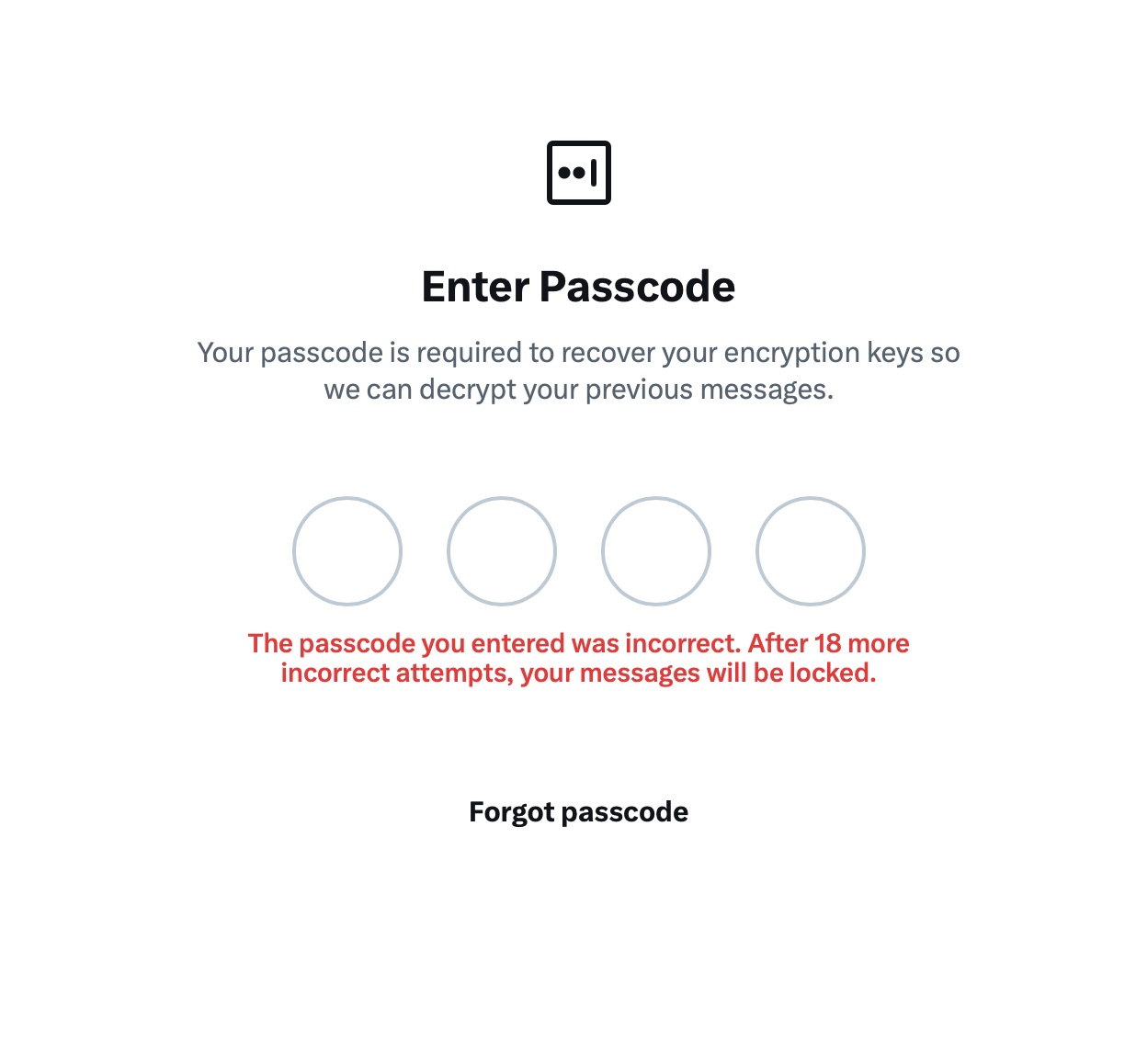
O problema é que soluções alternativas como essas invalidam qualquer alegação de privacidade e segurança do aplicativo. Um PIN (a principal solução alternativa adotada) não é considerado a maneira mais segura de proteger dados confidenciais. Mencionamos várias vezes que combinações de quatro dígitos são fáceis de decifrar usando técnicas de força bruta, especialmente porque o XChat oferece 20 tentativas generosas para inserir o código certo.
O aplicativo permite até 20 tentativas para inserir o PIN de quatro dígitos. Após o limite ser atingido, o XChat avisa que o acesso às mensagens será perdido permanentemente.
Como se não bastasse a implementação confusa de criptografia de ponta a ponta quando comparada à de outros aplicativos, a impressão geral é de que não faz sentido usar o XChat. Um jornalista da Wired fez um comentário certeiro: o aplicativo se parece mais com o Facebook Messenger do que com o WhatsApp, Signal ou Telegram. Mas enquanto as pessoas geralmente abrem o Messenger para ler mensagens enviadas pela mãe ou pela avó, o XChat parece destinado a três tipos de pessoas: as que querem investigar o seu sobrinho estranho que passa todo o tempo livre no X, as que ainda acreditam na promessa de US$ 500 mil em Bitcoin feita por John McAfee e fãs de Elon Musk.
Então, qual é a conclusão sobre o XChat?
A melhor maneira de encerrar esta postagem é com uma citação de um especialista em cibersegurança: “Se o que você busca é segurança, use o Signal. Se o que você quer é falar com praticamente qualquer pessoa usando mensagens criptografadas, use o WhatsApp. Se toda a sua vida gira em torno do X, suponho que isso seja melhor do que nada.”
Se você usar o XChat, a regra número um é não criar um PIN previsível: jamais use o ano do seu nascimento ou, pior, a sequência 1234. Também é importante não esquecer esse código, porque se isso acontecer, todo o seu histórico de conversas desaparecerá para sempre. Por fim, assim como acontece com suas outras senhas, você não deve armazená-la no aplicativo de notas, mas sim em um gerenciador de senhas seguro. Isso não apenas evitará que você tenha de memorizar dezenas de combinações de caracteres, como também reduzirá o risco de perder o acesso a dados e conversas importantes.
Para saber mais sobre mensagens seguras em outros aplicativos, confira nossas outras postagens:
A new phishing campaign is targeting Signal users by attempting to steal their backup recovery keys to access encrypted message archives.
The attack is initiated by a text message pretending to come from Signal Support.
“Action Required: Data Recovery Needed Your Signal account data (message and media) Is at risk of permanent loss due to a sync issue. To avoid losing your messages and media: 1. Go to Settings -> Backups -> Configure -> Enable backups -> View Recovery Key. 2. Copy the recovery key to your clipboard. 3. Paste the key into this chat. This links your existing backup to your account. Failure to do this may result in losing access to your account and all stored data.”
There are a few red flags in this message:
The “Name not verified” label under the sender
Repeated threats of losing all your data
Pasting the key into the chat. Signal Support would never ask for your recovery key
The attack exploits Signal’s Secure Backups feature, which allows users to store encrypted archives of their conversations on Signal’s servers. These backups are protected by a 64-character recovery key.
That key should never leave the user’s device and is never shared with Signal’s servers. If hackers obtain this key and gain control of a victim’s account, they can download and decrypt the entire message history.
For an attacker, that’s even better than hijacking an account, which would only give them access to future messages.
Signal explicitly states that it will never reach out to users first and will never request registration codes, PINs, or recovery keys.
Treat unsolicited messages from “Support” as suspicious by default. Legitimate support for apps like Signal and WhatsApp do not ask you, in a chat message, to send back verification codes, PINs, or passwords. If you receive a warning about account problems, do not follow links in the message. Open the app’s settings directly or visit the official website through other means.
Never share any secret codes, multi-factor authentication keys, or app PINs. SMS codes are there to prove that you control a phone number. Anyone who has the code can pretend to be you. App‑specific PINs or passcodes are there to protect account changes. Consider anyone asking for them to be a scammer.
Use the extra security features these apps offer. Enable options like registration lock, registration PIN and device‑change alerts so that your account cannot be silently re‑registered without an extra secret. Store your PIN in a password manager instead of choosing something easy to guess or reusing a code. This reduces the risk of social engineering or shoulder‑surfing.
Another useful feature is disappearing messages. Short‑timer and disappearing messages reduce how much content is available if an attacker gains access to a chat later, or obtains long‑term access to a device or backup. They are not a complete solution, but they can limit the damage.
Use Malwarebytes Scam Guard on your device or online to check messages. Malwarebytes Scam Guard identified this message as a phishing attempt and provided further information about how to proceed.
Scammers know more about you than you think.
Malwarebytes Mobile Security protects you from phishing, scam texts, malicious sites, and more. With real-time AI-powered Scam Guard built right in.
The FBI was able to forensically extract copies of incoming Signal messages from a defendant’s iPhone, even after the app was deleted, because copies of the content were saved in the device’s push notification database….
The news shows how forensic extraction—when someone has physical access to a device and is able to run specialized software on it—can yield sensitive data derived from secure messaging apps in unexpected places. Signal already has a setting that blocks message content from displaying in push notifications; the case highlights why such a feature might be important for some users to turn on.
“We learned that specifically on iPhones, if one’s settings in the Signal app allow for message notifications and previews to show up on the lock screen, [then] the iPhone will internally store those notifications/message previews in the internal memory of the device,” a supporter of the defendants who was taking notes during the trial told 404 Media.
EDITED TO ADD (4/24): Apple has patched this vulnerability.

 Entrar