OpenAI is buying Pierre Computer Company in order to incorporate the San Francisco-based software developer’s Code.Storage infrastructure layer for Git into its Codex AI-powered programming tool.
Pierre Computer, whose employees number just barely in the double digits, has got plenty of clout for its small size. It’s well-known for Code.Storage offering, as well as for its open-source software libraries, Trees and Diffs, which OpenAI already uses in Codex.
OpenAI has experienced some of the limitations of Git itself, and its in-house engineering teams are already working to improve its support for human coders and AI agents working in parallel. Earlier this week the company described how it built a new back end for Git repositories, Pando, to enable concurrent working at scale.
The AI developer has been pushing Codex more aggressively this year: offering it to Mac users and expanding it to Windows. It cited Pierre Computer’s ability to help developers review code as one of the reasons for the acquisition. OpenAI highlighted the Diffs’ Edit mode and the recently released Highlights as components that were particularly helpful to development teams.
Announcing the deal on its news page, OpenAI set out how it would integrate the company into its existing offerings. “With the Pierre team, we wish to set the standard for modern software development: from the first branch an agent creates to that magic moment when code is deployed to the world. We want to make Codex the place where developers and agents take on their most ambitious projects.”
Neither company disclosed details of the acquisition price. OpenAI said that Code.Storage customers will be able to continue using the product until it brings the features into Codex, while Pierre Computer’s open-source projects will remain open, and OpenAI will continue to contribute to them.
Google said today it worked with industry partners to dismantle a botnet made up of more than 1.3 million Android TV set-top boxes that ship with malicious software which secretly rents the user’s Internet connection out to strangers and conducts advertising fraud. Experts involved in the takedown say the action is likely to sever the botnet’s access to more than 10 million additional compromised systems, including other Internet of Things (IoT) products such as Android-based healthcare devices and karaoke machines.
A report from the Google Threat Intelligence Group (GTIG) said Google has severed ties with Videostrong Technology Co., a TV box manufacturer in China that GTIG and other industry experts concluded was responsible for including malware that enrolled more than 1.3 million set-top boxes in a botnet dubbed “XCPE” (named after one of the malware’s core code components).
The global distribution of XCPE botnet infections. Image: Google Threat Intelligence Group.
The report said the XCPE botnet loaded the user’s device with software that makes their Internet address available for resale by multiple “residential proxy” services, which allow customers to rent Internet addresses as a way to anonymize their web traffic or spoof their true location. As detailed in several stories here over the past year, residential proxy services are a major source of unwanted and often malicious traffic, including account takeover activity, advertising fraud, and mass content scraping for AI projects.
“Videostrong monetized the backdoor by selling access to criminal affiliates and loading those affiliates’ malware modules onto infected devices,” the GTIG post reads, noting that Google took legal action to take down the domains and servers Videostrong used to control the botnet and install additional malware. “A device manufacturer intentionally infecting their users with malware is an unacceptable breach of trust, and represents a serious risk to those users. Without users’ knowledge or consent, infected devices were offered as a distribution mechanism for a wide array of criminal actors.”
The report notes that while TV boxes made up the the majority of the botnet, the same XCPE malware was found in other Android-based IoT products, including telehealth devices, karaoke machines, and even digital signage systems.
Google said it requires all Android device makers to pass compatibility and security tests to ensure their products don’t harm users, but that Videostrong nevertheless found a way to load their malicious software immediately after a user boots up one of these devices for the first time (Google says it has since addressed that weakness).
The GTIG report calls out a number of residential proxy providers whose software development kits were routinely downloaded by devices infected by the XCPE botnet. Those include AppSalt, also known as Honeygain, which was developed by the Vilnius, Lithuania-based Oxylabs. In October 2026, Oxylabs and Honeygain were reorganized as independent platforms under an umbrella entity called Source, which received $130 million in funding from private equity firm Warburg Pincus that reportedly valued the business at $3.6 billion.
Another provider linked to the botnet was NetNut, a once sprawling residential proxy company operated by the publicly-traded Israeli company Alarum Technologies. In July 2026, the FBI worked with industry partners to seize hundreds of domains associated with NetNut, saying the company was responsible for operating a separate botnet called Popa that enslaved TV boxes as residential proxies. Other proxy providers named in the GTIG report include EarnFM, Traffmonetizer, Jaguar, LINKFOG, BMW/IPWeb and GaGaNode.
Google’s announcement credits a number of industry partners, including Synthient, a startup that tracks proxy providers. In January 2026, Synthient published research into the rapid spread of the Kimwolf botnet, which at the time was hammering networks worldwide with record-smashing DDoS attacks. Synthient documented how Kimwolf infected millions of Android set-top boxes virtually overnight, using a widespread vulnerability in these residential proxy services to compromise other Android-based devices inside the local networks of unsuspecting TV box users.
Synthient’s research caused dozens of residential proxy providers to patch their networks, which helped to fragment the Kimwolf botnet into much smaller pieces that made its incessant and disruptive DDoS attacks far easier for network operators to manage. It also attracted the attention of the Motion Picture Association (MPA), a trade group representing the major Hollywood studios, which partnered with Synthient to purchase and tear apart a number of popular Android TV set-top boxes — including some that were being infected by Kimwolf and other IoT botnets.
In a report published today, Synthient examined a popular, pre-infected TV box sold under the brand MECOOL by a publicly traded company in China called Skyworth Technology, concluding that MECOOL also bundled the malware from Videostrong Technology Co. and likewise installed AppSalt/Honeygain and other proxy components.
The MECOOL storefront and marketing. Image: Synthient.com.
Synthient founder Ben Brundage told KrebsOnSecurity that Videostrong’s malware also distributed software for the proxy service Grass. In our November 2025 story, “Is Your Android TV Streaming Box Part of a Botnet?” we quoted a researcher from Censys who found the popular Superbox TV streaming device bundled Grass’s residential proxy software. We also quoted the Grass founder, who denied any affiliation with the TV box maker.
That November 2025 story noted that Superbox and similar Android TV set-top boxes gain new customers primarily by engaging influencers on Tiktok and other social networks who praise the product’s ability to offer hundreds of (pirated) pay TV streaming services for a one-time fee.
Likewise, Synthient’s report observes that the MECOOL set-top boxes exploded in popularity after the product was mentioned in 2023 by the Youtube channel Linus Tech Tips, which has an audience of nearly 17 million subscribers [Linus Tech Tips said in a statement shared with Synthient that it has since updated the video to explicitly frame the product as a scam and have removed all associated affiliate links].
The popular Youtube channel Linus Tech Tips discussing MECOOL TV streaming boxes.
The GTIG report estimates the XCPE botnet takedown should sever access to at least 10 million additional compromised devices, noting that the various proxy and ad fraud affiliates of Videostrong “each have diversified distribution channels for their modules beyond XCPE.”
Synthient’s Brundage echoed that conclusion, calling the 1.3 million number “highly conservative.”
“The scale of affected devices is likely way higher,” he said. “This is probably the largest operation against backdoored TV boxes that we’ve seen.”
Update, Nov. 5, 11:07 a.m. ET: In a statement shared post-publication, Oxylabs said that while its system is built so that a device can’t be used as a proxy exit node unless they receive a signal that it has consented, the developer faked these signals.
“We have been conducting regular audits of the applications provided by our partners,” the statement reads. “However, following this incident, we will improve the application and application’s build fingerprinting logic to better detect cases where the SDK is running on an unapproved build of an originally authorized application.”
The statement said Oxylabs has no record of any company called Videostrong Technology Co., but it did find between is suppliers the domain “com.abc[.]nexus,” mentioned in the GTIG report as an external malware loader.
“As soon as we saw that, we suspended the relationship and sent them a formal legal inquiry,” the statement reads. “This supplier accounts for less than 1% of our IP address pool. We had a signed contract with them, they assured our QA team that users had given consent, and we saw the consent flow ourselves.”
Denmark ends Collabora pilot testing across its public sector after formatting errors disrupted case workflows, securing a quiet victory for Microsoft.
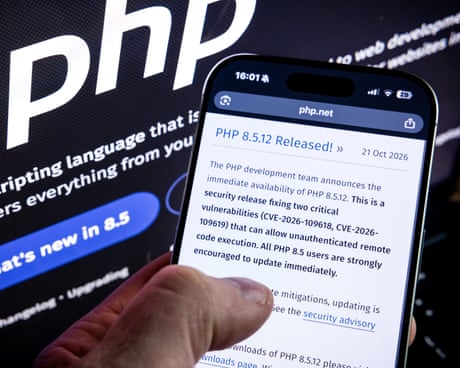
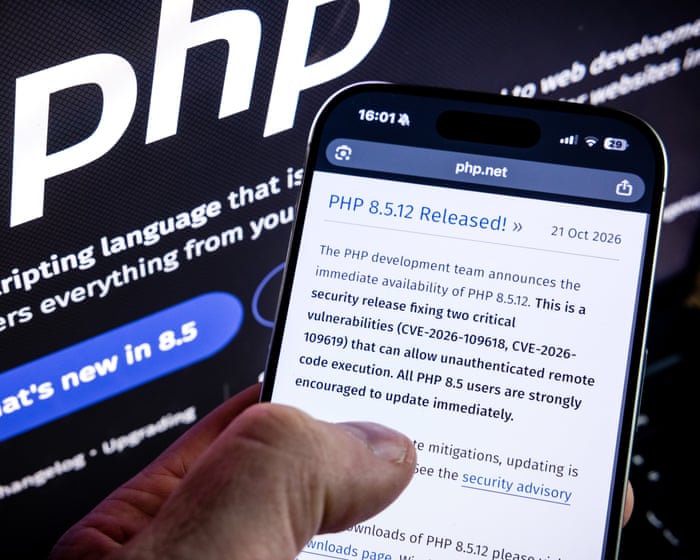
An estimated 70% of websites use the open-source language. What is the identified vulnerability in it?
Website owners faced millions of attempts to exploit a serious security vulnerability in their programming language, it has emerged, triggering a rush by governments and businesses to fix the problem.
The newly discovered vulnerabilities in PHP, a programming language that underpins most websites, allows hackers to carry out cyber-attacks and steal data if not fixed. What were the vulnerabilities and why did they affect so many sites?
Today Fox-IT is publicly releasing its full Cobalt Strike Beacon Corpus, containing 56,843 raw beacons and their parsed configurations, from 190,182 sightings collected from 30,604 unique IP addresses running a Team Server (the Cobalt Strike command-and-control server that beacons connect back to) between 4 July 2018 and 29 September 2026, over eight years of beacon data. The corpus is available on Hugging Face: https://huggingface.co/datasets/fox-srt/cobaltstrike-beacon-corpus
Back in March 2022 we published Mining Data from Cobalt Strike Beacons. That post covered 128,340 beacon sightings collected from July 2018 to February 2022, and it introduced our Python project dissect.cobaltstrike for parsing them.
Since then, public scanning for Team Servers has become routine, and Cobalt Strike has shipped versions 4.6 through 4.13. Researchers have regularly asked us for an updated dataset. And here it is, a large, consistent, long-running dataset for the infosec community to build on. The corpus includes the raw beacon payloads, not just our parsed output, so anyone can reproduce our results or improve on them.
We also see publishing this corpus as an act of preservation. C2 infrastructure is short-lived, as the median Team Server is reachable for just 14 days, and the beacons it serves vanish with it. Eight years of collection captures things that can no longer be observed today, like the waves of cracked 4.0 builds or the adoption of leaked versions. By publishing the raw beacons alongside the parsed data, we keep that record available for anyone to study, long after the servers themselves are gone.
What’s in the corpus
The corpus is published on Hugging Face as two Parquet files:
File
Size
Rows
Contents
beacons.parquet
52 MB
190,182
Every sighting of a beacon, with collection metadata, network context and the parsed beacon configuration.
payloads.parquet
9.7 GB
56,843
The raw beacon payloads, wrapped in CaRT as an extra safety layer so the samples are neutered until you deliberately unpack them.
All beacons were downloaded directly from internet-facing Team Servers, mostly on TCP ports 80 and 443 (HTTP and HTTPS) and UDP port 53 (DNS), with a small number on other ports. We deliberately didn’t include samples from other sources such as VirusTotal, so the corpus reflects the Cobalt Strike landscape as it was visible on the internet.
How we collected it
The collection method matches our 2022 post. We fingerprint likely Team Servers on the internet, then request a beacon payload from each one using a URI that passes Cobalt Strike’s checksum8 check. Every beacon that comes back is parsed with dissect.cobaltstrike, which decodes the configuration block. The result is stored as a sighting.
Discovery: candidate hosts from our own internet-wide scanning. As in 2022, we’re keeping our fingerprints private so they stay effective; writing your own is left as an exercise for the reader.
Download: x86 beacons over HTTP(S) and DNS.
DNS: for DNS listeners we’re not publishing that fingerprint either, but it’s not rocket science. The beacon is fetched as a series of TXT record lookups sent over UDP port 53 directly to the Team Server’s DNS listener.
Parse: Use dissect.cobaltstrike to parse the beacon and export the configuration
Enrich: TLS certificate data captured at collection time (where available) and GeoIP/ASN via historical GeoIP databases.
Note that there might be some small gaps in the collection due to automation issues that we did not catch in time.
Getting started
Most research only needs the beacons.parquet dataset. The payloads.parquet dataset containing raw beacon payloads is only required if you want to re-parse the beacons or look into the ones that failed parsing.
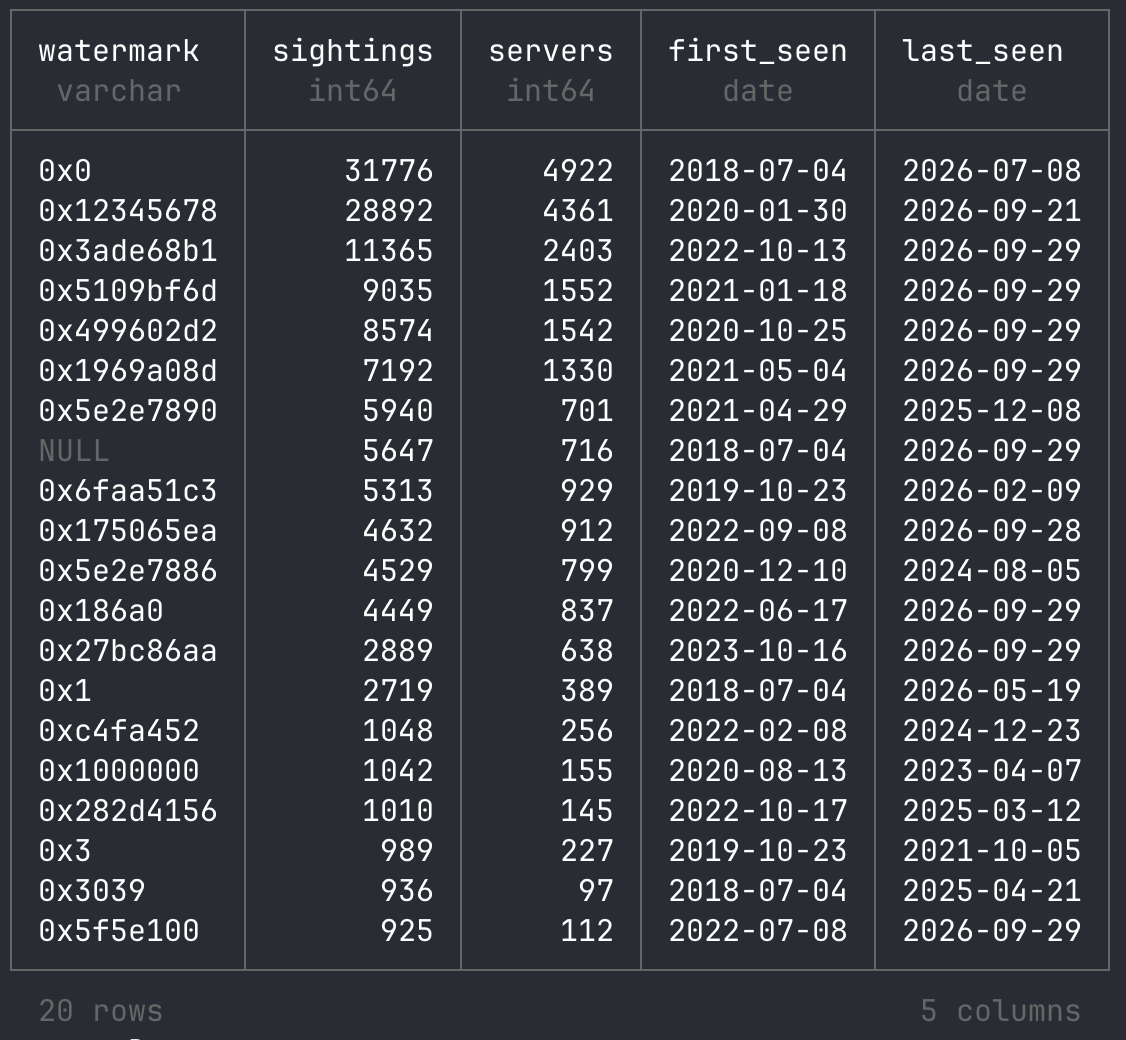
I’m a big fan of DuckDB (and SQLite), and over time I’ve become fond of SQL for querying data as well. DuckDB is very fast, and AI assistants are very good at writing SQL queries. These days, that beats hand-writing pandas code and the matching matplotlib charts. That’s why I recommend exploring the data with DuckDB, for example in a Jupyter notebook.
An example of using DuckDB to query the dataset on Hugging Face directly:
SELECT watermark,
       count(*)                          AS sightings,
       count(DISTINCT collected_from_ip) AS servers,
       min(collected_on)                 AS first_seen,
       max(collected_on)                 AS last_seen
FROM 'hf://datasets/fox-srt/cobaltstrike-beacon-corpus/data/beacons.parquet'
GROUP BY watermark
ORDER BY sightings DESC
LIMIT 20;
Take a look at our Jupyter notebook in the Hugging Face repository as a starting point. It contains every query and chart from the sections below, so you can rerun them or adapt them to your own research questions.
A first look at the data
Here are a few quick results to show what the corpus can answer. They’re a starting point, not a full analysis. As with our 2022 post, we invite researchers to explore the data; see also “Research ideas” below.
Old versions never die
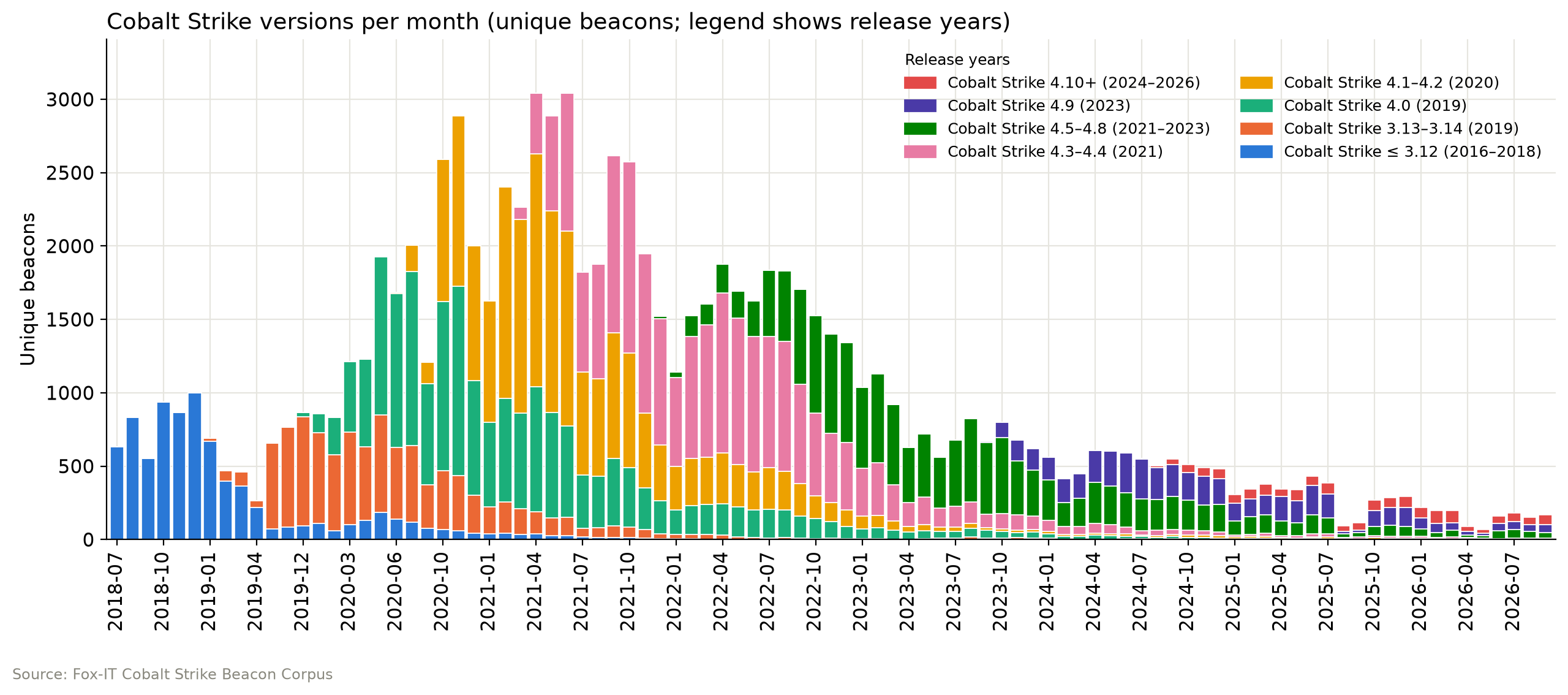
Each Cobalt Strike release takes over from the last, but old versions linger. Cobalt Strike 4.0 dominated most of 2020, 4.1–4.2 drove the early 2021 peak of about 3,000 beacons a month, 4.3–4.4 led from mid-2021 through 2022, and 4.5–4.8 took over in 2023. Since 2024, 4.9 and 4.5–4.8 have shared the lead, while 4.10+ remains a small share. Volume has since dropped to around 200 beacons a month, partly because fewer servers stage their beacon, which brings us to the next graph.
No beacon for you
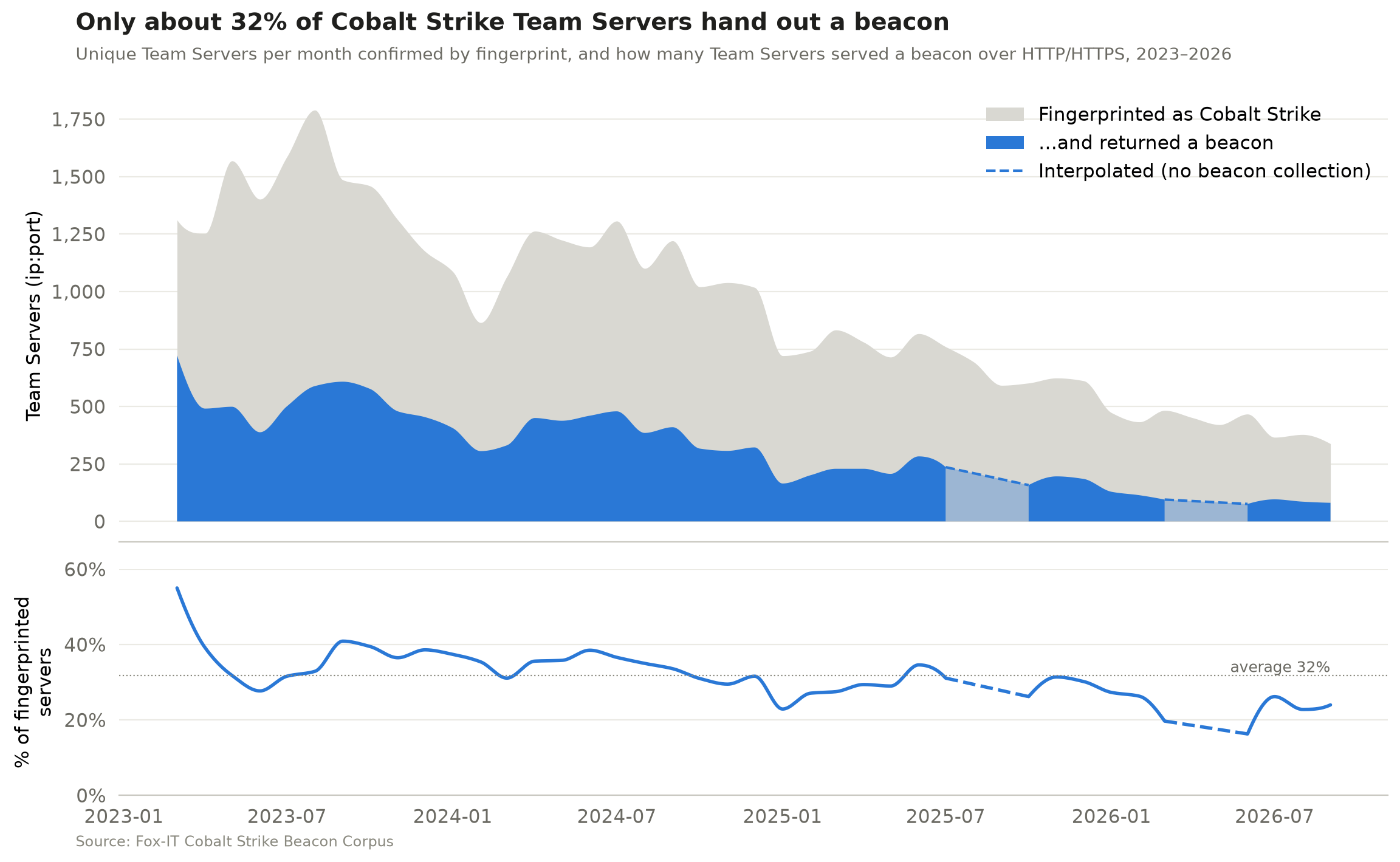
Our collection relies on beacon staging, meaning a Team Server can serve its beacon as a downloadable payload to anyone who requests the right URI or DNS record. Operators can turn this off (the host_stage option in the Malleable C2 profile), and disabling it is common OPSEC advice. To measure how much this affects our beacon collection, we counted two numbers per month:
The unique Team Servers (ip:port) confirmed by our high-confidence HTTP fingerprint
The unique Team Servers (ip:port) that handed out a beacon over HTTP(S)
These are monthly totals, not a server-by-server match. On average, the Team Servers that handed out a beacon were only about 32% of those we fingerprinted, and that share has drifted down from around 40% in 2023 to 20–25% in 2026. In other words, because not every server hands out a beacon, the corpus shows only part of the Cobalt Strike landscape, and that part is getting smaller. Disabled beacon staging is the most likely reason, but not the only one. Servers can go offline between fingerprinting and download or block our scanners, and our fingerprint doesn’t catch every Team Server.
The dashed sections mark months when beacon collection wasn’t running, because of an automation error that went unnoticed for a while.
The short life of a Cobalt Strike Team Server
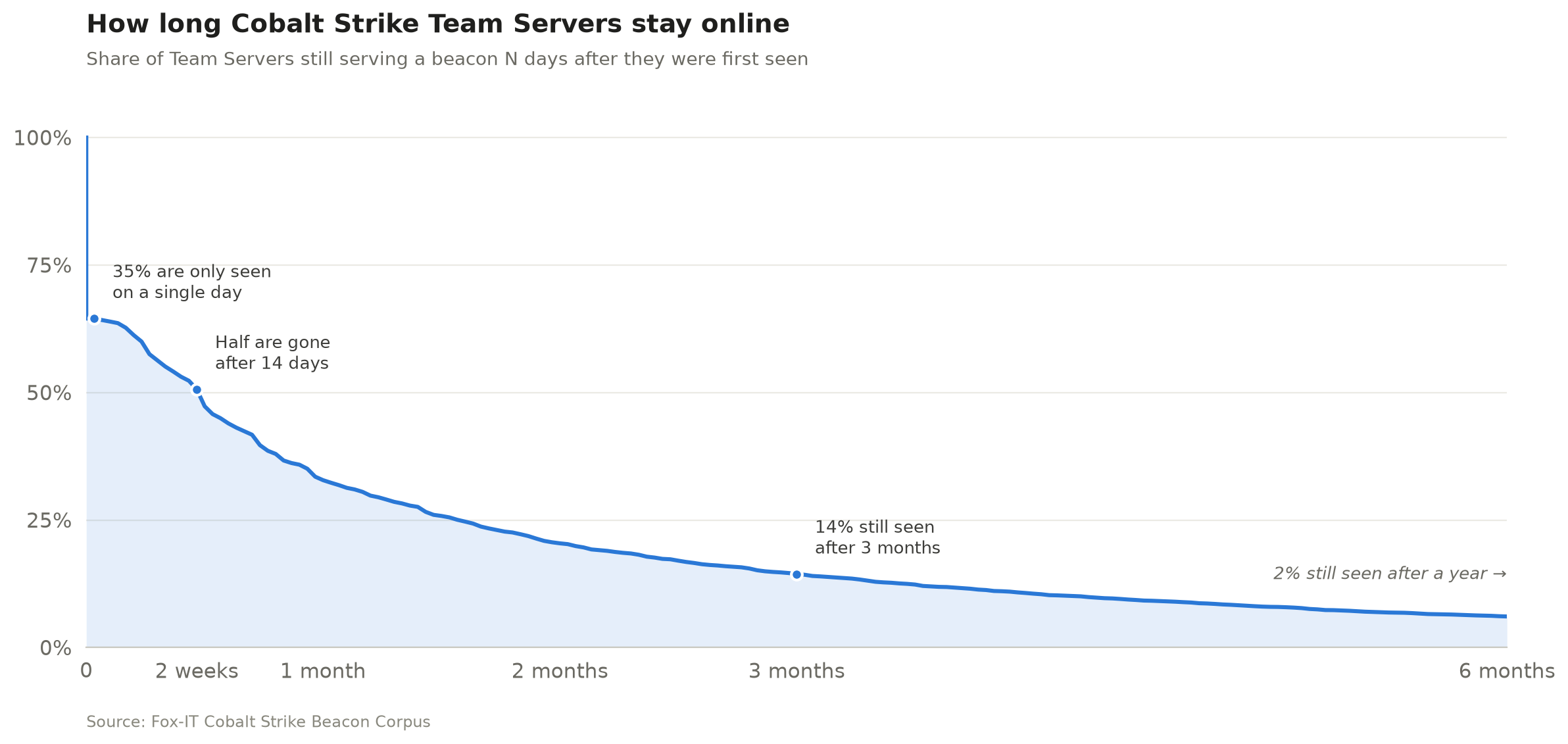
The median Team Server was reachable for 14 days. 35% were seen on a single day only, just 14% were still serving a beacon after three months, and only 2% after a year.
We identify a Team Server by its public key and C2 domains from the beacon configuration (or its IP address when the configuration contains no domains), so a server that moves to a new IP is still counted once. This allows us to measure how long a Team Server typically stays online. Identifying servers by public key alone or by ip:port gives almost the same result, a median lifetime of 14–15 days. These are first-to-last-sighting spans, so a server may have been online before our first and after our last sighting. Servers still active in the last 30 days are left out.
It’s always DNS
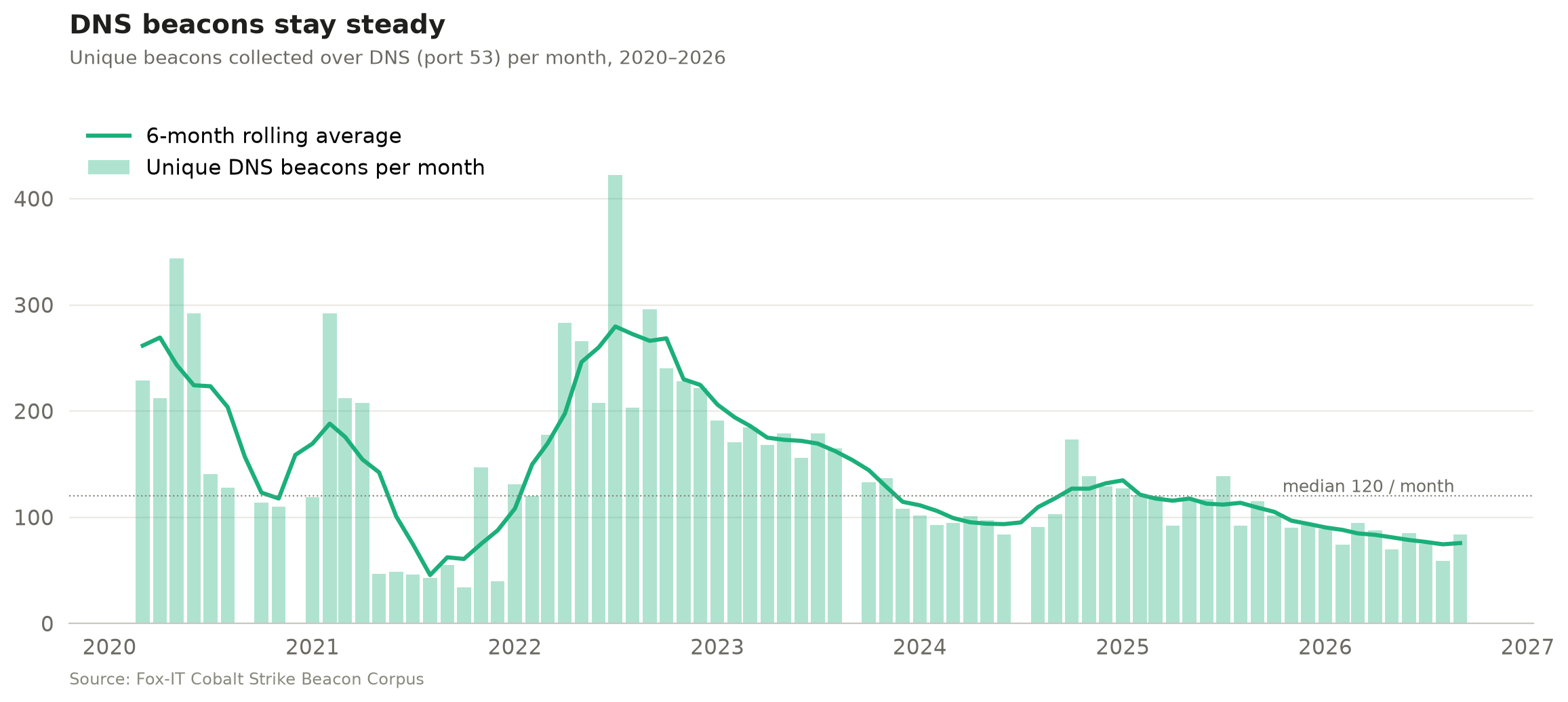
Most public scanning focuses only on HTTP(S) beacons, but we’ve also collected DNS beacons since 2020 (apart from the months when our automation broke). DNS beacons have declined much less steeply than HTTP(S) ones, perhaps because they get far less attention in public research and OPSEC advice, so fewer operators think to lock them down. After a peak in 2022, they have mostly hovered around 100 a month since 2024, with a median of 120 over the whole period.
Parse me if you can
The corpus also includes 128 unique beacons (0.23%) that we downloaded but couldn’t parse. Note that the corpus doesn’t contain HTML pages or other responses that were unlikely to be a beacon. We excluded those before publishing. At first glance, most are beacons with custom modifications that dissect.cobaltstrike can’t parse yet. And some payloads from the early years aren’t Cobalt Strike at all, but Metasploit Meterpreter payloads. We’ve deliberately left them in for researchers to analyse. You can find all unparsed beacons with: WHERE config_json IS NULL
The unparsed count used to be higher, but we managed to bring that down. We noticed some operators customised their beacon configs, for example by shuffling the order of the configuration settings or changing their type values, which broke our parser (and probably most others). The corpus helped us find these cases, so we made the config scanning of dissect.cobaltstrike independent of layout and added many other features and fixes along the way. See the dissect.cobaltstrike v1.3.0 release notes.
Research ideas
Some other research questions that could be answered using the corpus:
Clustering: Group operators by config features (watermark, SPAWNTO/PROCINJ hash, C2 profile, certificate, sleep/jitter, specific beacon modifications)
Classification: Separate red team from criminal infrastructure. Build and publish labelled subsets.
Infrastructure: Top hosting providers that are hosting a Cobalt Strike Team Server.
Certificates: Pivot on x509 reuse across servers and time or find how many are running the default Cobalt Strike keystore certificate.
Benchmarks: Use the corpus as a shared test set for config extractors and ML models.
Parser failures: 128 beacons can’t be parsed by dissect.cobaltstrike. Figure out why.
Over to you
Eight years of Cobalt Strike beacons are now one download away on Hugging Face. Run your own queries, pick up one of the research ideas above or come up with your own, dig into the beacons we couldn’t parse, and share what you find.
Before you start, read the Limitations section on the dataset card. The raw payloads are real Cobalt Strike beacons, so handle them like any other malware sample.
Discover the new Bitwarden app store license changes. Learn how the shift from GPLv3 to a commercial model affects future updates and self-hosted versions.
The Dutch Tax and Customs Administration is reversing a planned Microsoft 365 cloud migration as officials seek greater control over sensitive government data.
It's Birthday Week, when we traditionally ship presents to the Internet. This year, two of them come from Europe: EuroLLM, which covers all 24 official EU languages, and Apertus, Switzerland's fully open model, trained on more than 1,500 languages. Both were built by public universities and research institutions. Both are coming to Workers AI, and you can request access today.
We're also launching hands-on workshops that help government cyber agencies and critical infrastructure operators build AI defenses that work with any model. The first runs in Singapore in October.
Today's announcements follow from an argument we made a year ago, when questions about AI access and sovereignty were swirling in national capitals. Our answer was choice: the freedom to pick the right tools for the job, and to switch when you need to.
Since then, those conversations have hardened. Attackers have used frontier models to run cyber attacks. Access to some frontier models now depends on where you are. Calls to restrict open models are getting louder. Put it all together and it's easy to conclude that AI sovereignty is zero-sum: every model another country controls is one you can't count on, so the safe move is to build walls.
We think the past year can point the other way. India, Japan and Singapore focused on open-sourced models, and people across Asia-Pacific built tools on them for rural citizens, elderly patients and the nurses who care for them. Our own security team built AI defenses that work with any model, so losing access to one doesn't mean losing your defenses.
Helping build a better Internet has always meant more options, not fewer. That's why we work on open standards that prevent vendor lock-in, why so much of what we build is free to start with, and why our network runs in more than 335 cities across 125+ countries, with GPUs for AI inference in more than 230 of them. We don't think any country should have to depend on one company for its AI. That includes us.
Two European open models on Workers AI
In February, Matthew Prince told the India AI Impact Summit 2026 in New Delhi that decentralized, affordable access to AI is a matter of national resilience. The models from India, Japan and Singapore we'd added a few months earlier were our first proof. The summit series moves to Geneva in June 2027, with a mission of "prosperity and progress for all."
EuroLLM supports 35 languages, including all 24 official EU languages, many of which are underserved by existing open models. It was developed with support from Horizon Europe, the European Research Council and EuroHPC by a consortium that includes Instituto Superior Técnico, the University of Edinburgh, Instituto de Telecomunicações, Université Paris-Saclay, Unbabel, Sorbonne University, Naver Labs and the University of Amsterdam. It was trained on the MareNostrum 5 supercomputer and, according to the consortium, outperforms similar-sized models on EU multilingual benchmarks and machine translation.
You can request access to EuroLLM on Workers AI here.
Apertus (Latin for "open") is Switzerland's first large-scale, fully open, multilingual language model. It was trained on more than 15 trillion tokens across more than 1,500 languages, with 40% of training data in languages other than English. It was developed by ETH Zurich, EPFL and the Swiss National Supercomputing Centre (CSCS) as part of the Swiss AI Initiative: built by public institutions, for the public good. Its architecture, weights, training data and methods are all published. It was designed with Swiss and European rules such as the EU AI Act and GDPR in mind, which means respecting training opt-outs, removing personal data and preventing memorization. It was trained on CSCS's Alps supercomputer (more than 10,000 GH200 GPUs), and its developers report that it significantly outperforms leading closed and open models on rare and regional languages, from Romansh and Swiss German to low-resource languages across Asia and Africa.
You can request access to Apertus on Workers AI here.
What people built last year
Last year's national models didn't sit on a shelf. Since we added them to Workers AI, hundreds of students, startups, small businesses and public servants across Asia-Pacific have built on them, many at buildathons we ran with local partners. Three of them:
Government forms, no reading required – Form Mitra (India): Benefit forms written in dense English shut out many of the rural, low-literacy and visually impaired citizens they're meant for. Students at the Indian Institute of Technology Delhi built Form Mitra at a buildathon we ran with CyberPeace: a voice-guided assistant that walks people through the form in any of 22 Indian languages, using AI4Bharat's IndicTrans2 model.
Care in the patient's own dialect – MedBridge (Singapore): Many of the nurses caring for Singapore's elderly patients come from across Southeast Asia and don't speak the local dialects, so critical clinical information can get lost in translation. MedBridge guides patients through health conversations in 14 languages, including Hokkien and Cantonese.
The right public service, in one tap – Anshin Concierge (Japan): For elderly residents, people with disabilities and anyone less comfortable with digital tools, working out which public service to call in a moment of need can be overwhelming. Built as a hackathon prototype, Anshin Concierge lets people describe the problem in their own words ("my knees hurt", "a strange screen appeared on my phone") and connects them to the right Tokyo Metropolitan Government support desk, by phone or web page, in one tap.
AI defenses that don't depend on one model
Governments want to use AI to defend essential services and national infrastructure. The frontier models that can find vulnerabilities at scale can find them for defenders too. But a defense built on one model is only as dependable as your access to that model, and governments have watched access to critical models get constrained with little warning.
We had the same problem, and in security we are always our own first customer. Over the past year, our Security team, working with teams across the company, set out to build AI defenses that don't depend on any one model. We built a harness: an orchestration layer that coordinates multiple AI models working in parallel to hunt for vulnerabilities, verify findings and prioritize threats. We published what we learned about using frontier and open models together, open-sourced the harness so any organization can run it with the models of its choice, and laid out the layered architecture we use to stop attackers armed with frontier models from finding vulnerabilities in the first place.
Because the harness works with any model, closed or open, losing access to one provider doesn't switch your defenses off. When we walked governments through it, the most common reaction was relief. Then came the practical questions: how to stand it up in their own environments, under their own rules. Briefings quickly turned into requests for hands-on training.
So today we're launching a program of hands-on workshops for government cybersecurity agencies and critical infrastructure operators. Participants build their own AI security harness and layered defenses, and leave knowing how to adapt both to their organization. The modules are plug-and-play, designed to slot into national AI skilling and cyber resilience programs. The first workshop runs in Singapore this October, at Singapore International Cyber Week.
Come build with us
None of this happened alone. Partners like CyberPeace in India and Code for Japan helped turn open models into working tools. If you run a national AI program, a cyber agency or critical infrastructure, and you'd like more options than you have today, write to us at policy-team@cloudflare.com. Request access to EuroLLM and Apertus, or start with the harness.
A year ago, we said choice is the path to AI sovereignty. This year showed it's the path to AI security, too.
If you’re new to fuzzing and want to learn the fundamentals first, check out our Fuzzing 101 course at gh.io/fuzzing101.
Continuous fuzzing is not a magic solution that solves all your problems . Even projects that have been enrolled in OSS-Fuzz for years can still hide critical bugs, and the reason is almost always the same: someone needs to keep an eye on coverage, write new harnesses for the code that nobody is reaching, and triage the crashes that come out the other end. In other words, fuzzing still needs a human in the loop.
So the natural question I kept asking myself was: how much of that human work can we actually hand over to an LLM agent?
That is what led me to build the Fuzzing Taskflow, an autonomous fuzzing pipeline for C/C++ projects. You only need to point it at a GitHub repository, and it does the rest: it identifies the suitable entrypoints, analyzes the build system, writes the harnesses, runs AFL++, reads the coverage reports, improves the harnesses, triages every crash, and writes a vulnerability report for each unique bug, all without a human babysitting it.
The Fuzzing Taskflow is built on top of the GitHub Security Lab Taskflow Agent, our framework for writing LLM-driven security automation, so the pipeline is expressed as a set of taskflows that an agent runs end to end.
In this post, I’ll walk you through how it works and the design decisions behind it. Let’s get going!
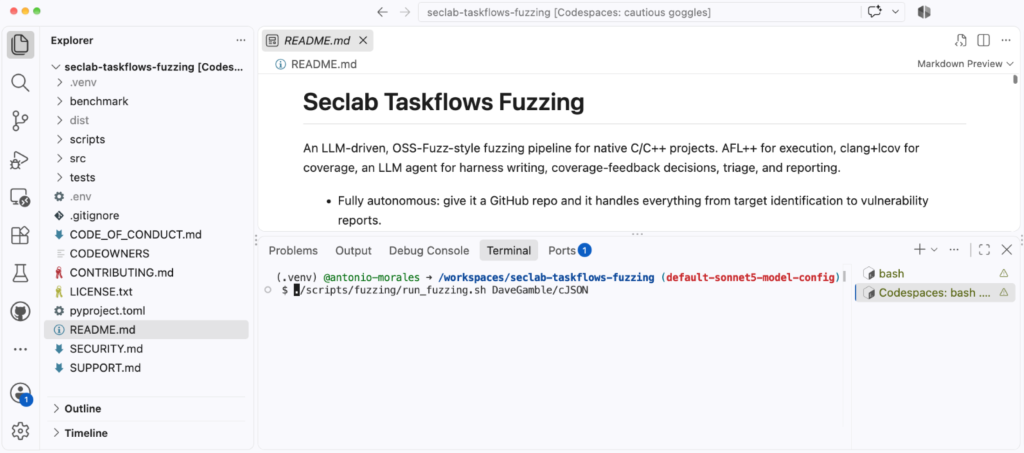
That’s it. The argument is just a GitHub owner/repo slug. Then, the agent, takes care of all the preliminary steps on its own:
Installing software such as AFL
Cloning the repository
Identifying the most relevant functions in the code
Creating fuzz targets for those functions
If you just want a quick smoke test before committing to a long campaign, point it at something small:
./scripts/fuzzing/run_fuzzing.sh DaveGamble/cJSON
A word of warning before you run it: this taskflow runs afl-fuzz, clang, and arbitrary build commands chosen by the LLM directly on the host, with no container in between. A prompt-injected agent could, in principle, do anything your user can. So please run it only inside a disposable environment (e.g., a Codespace or a throwaway VM), without elevated privileges.
Model selection
Some frontier models impose security guardrails on their outputs. For the fuzzing task flow, we use Claude Sonnet 5 by default because it passed all of our internal tests without issues. You can choose a different model by modifying the following file: src/seclab_taskflows_fuzzing/configs/model_config.yaml.
The architecture in one minute
Before getting into the interesting parts, it helps to know how the pieces fit together. There are three layers:
A shell driver (run_fuzzing.sh) that chains the pipeline stages together.
A set of taskflow YAMLs, one per stage, which are essentially the prompts that tell the LLM agent what to do at each step.
A set of MCP tools that the agent calls to actually do the work: run AFL, compile a harness, store a crash, read a coverage report, and so on.
The design rule I cared about most is a clean separation of responsibility: the LLM agent owns the decisions, and the MCP tools own the execution. The agent decides what to fuzz, what harness to write, and what coverage gap to chase next. The tools just expose primitives like run_afl_for or compile_harness. The agent never calls AFL or clang directly; it composes the pipeline out of these building blocks. All the state lives in a SQLite database (fuzz_context.db), so the stages never hand data to each other in memory, only through the database.
One small but important detail: each harness is built twice. AFL’s edge instrumentation is great for guiding the fuzzer but useless for human-readable coverage reports. So every harness becomes both a .afl binary (built with afl-clang-lto -fsanitize=address,undefined) and a .cov binary (built with clang -fprofile-instr-generate -fcoverage-mapping). The .afl binary does the fuzzing; the .cov binary replays AFL’s queue afterwards to produce real source-line and branch coverage.
The coverage-feedback loop
This is the heart of the whole pipeline, and it’s the part that most directly automates the manual workflow I described at the start.
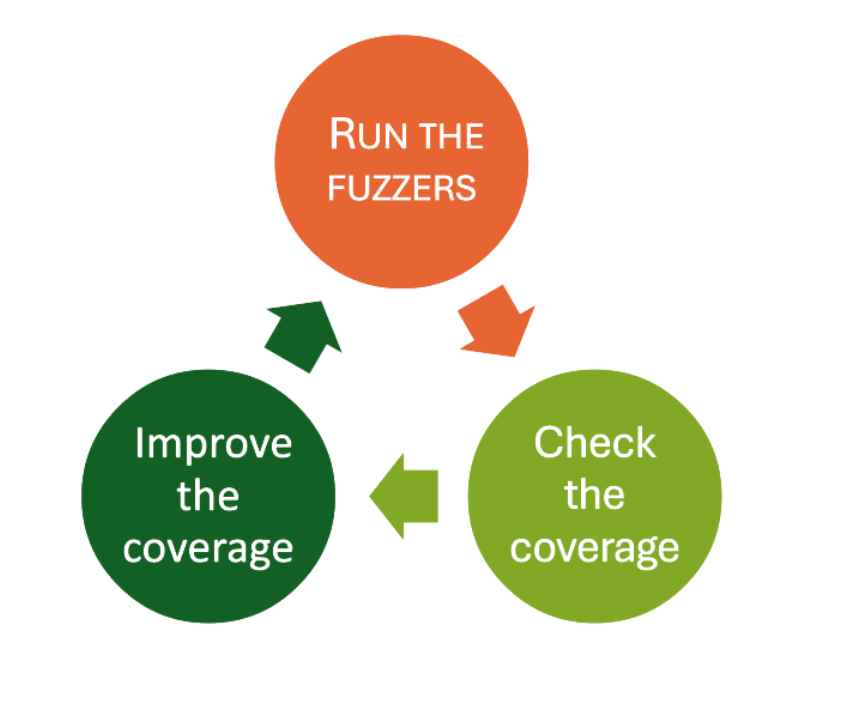
If you have ever tried to improve fuzzing coverage by hand, you’ll know that it’s an iterative process that looks like this:
The “check the coverage” step used to be completed by me, manually reading an LCOV report looking for uncovered branches. The “improve the coverage” step was also completed by me, this time, writing a new harness or crafting a new input. The Fuzzing Taskflow hands both of those steps to the agent.
Each iteration, for each harness, the agent runs AFL for a time budget, replays the queue against the .cov binary to get a real coverage report, and then reads the list of uncovered branches. Based on what it finds, it picks one of a handful of actions:
Add a new seed crafted to reach an uncovered branch
Edit the harness source to call an additional API
Auto-enrich the AFL dictionary with the magic constants a guard is comparing against
Simply skip the gap if it’s a cold error path or vendor code that isn’t worth chasing
The idea is to spend cheap, short rounds early (when there’s lots of low-hanging coverage to grab) and longer rounds later (when the fuzzer needs more time to break through a hard guard).
And just like in my manual workflow, I need an answer to the question: when do we stop? Here, the loop uses plateau detection: once two consecutive iterations each gain less than a configurable threshold (1% absolute line coverage by default), the loop decides it has hit diminishing returns and moves on. This keeps the agent from burning hours of compute squeezing out the last fraction of a percent.
Structure-aware fuzzing
AFL’s default byte-level mutators (bit flips, arithmetic, block splicing) do a great job on binary formats but struggle with structured, text-based inputs. The classic solution is to hand-write custom mutators for each format, which is tedious work. This time I want the pipeline to do that work for me, so it ships four complementary mechanisms for producing structure-aware inputs.
1. Per-format dictionaries and custom mutators. For targets whose input format is recognized (JSON, XML, regex, PNG, length-prefixed binary TLV), the taskflow ships pre-built AFL dictionaries and LLVMFuzzerCustomMutator C files. The JSON mutator does token splicing and balanced-bracket duplication; the XML one knows about tags, entities, and billion-laughs tokens; the regex one carries real ReDoS patterns. Each mutator delegates half of its mutations back to AFL’s default byte mutator, so we keep the engine’s randomization instead of fighting it.
2. A source level dictionary. For formats the pipeline doesn’t recognize, it generates a custom mutator on the fly by scanning the target’s own .c/.h files. It extracts string literals and 32-bit numeric constants (from #define, case, and enum), filters out the noise, and uses them as splice tokens. The intuition is simple: the most interesting magic values that a parser checks for are usually written down somewhere in its own source.
3. A dynamically generated AFL dictionary with coverage-driven enrichment. The same source-token set is also emitted as an AFL classic dictionary before iteration 1 (numeric constants in both endiannesses, so the fuzzer can satisfy a memcmp against a 4-byte magic regardless of host byte order). Then, after every coverage step, the pipeline looks at the guards near the uncovered lines (strncmp, memcmp, case 0xN, == ‘X’) and appends any new tokens it finds. The dictionary literally grows toward the code the fuzzer can’t yet reach.
4. A corpus-splice operator. The smart mutator can also load files from a corpus directory and splice random sub-regions of them into the input, a recombination-style operator that AFL’s stock havoc doesn’t do well.
Evolving corpus
One of the things that quietly kills fuzzing efficiency is throwing away progress. If every run starts from the original seeds, you re-pay the cost of rediscovering the same paths over and over.
To avoid that, every harness gets a stable corpus directory that survives across iterations and across entire campaigns:
<workspace>/corpus/harness_<id>/
At the end of each iteration, AFL’s queue is merged into this directory and run through afl-cmin to keep its size bounded. The effect is that yesterday’s interesting inputs carry into today’s run, and the inputs you found in last week’s campaign carry into this one. If you stop and restart a campaign, you lose nothing.
Triage and vulnerability reports
Finding a crash is only half the job. As anyone who has done root-cause analysis knows, triaging is often the most tedious part of the whole process. This is the other place where the agent shines.
After the fuzzing loop finishes, three stages run automatically. First, every crash is minimized with afl-tmin, replayed under ASan to capture a stack trace, and deduplicated by a stack-top hash (the top normalized frames, with templates, inline namespaces, and LTO suffixes stripped so semantically identical crashes collapse together). Second, previously known crashes are replayed against the current binary to see whether an upstream fix has resolved them. Third, the agent reads the harness source and the crashing function, walks the call chain back from the public API, and writes a per-crash markdown report.
Each report assigns one of the following verdicts:
vulnerability
library_hardening
harness_bug
OOM
timeout
assertion_failure
duplicate
The distinction between a real vulnerability (reachable and exploitable through a public API) and a mere harness_bug (the bug is in our own harness, not the library) is exactly the kind of judgment call that used to require me to sit down and trace the code by hand. Every report includes a root-cause analysis with file:line references, a reachability argument, an exploitability assessment, a suggested fix as a unified diff and a regression-test sketch.
Just as clarification: the suggested patches are marked “review required” for a reason. The agent’s analysis is limited by the model’s understanding of the target code, and it does get things wrong. Treat the verdicts as a very well-prepared starting point for a human, not as final result.
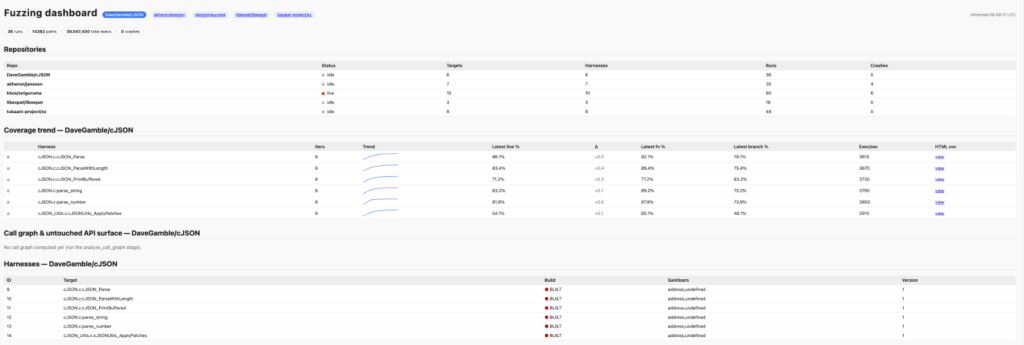
Live dashboard
Running an autonomous campaign and not being able to see what it’s doing is uncomfortable, so the pipeline publishes everything to a live HTML dashboard. It auto-starts in the background as soon as you launch a campaign, on port 8765. In a Codespace that port is auto-forwarded, so you can open it in any browser and watch the campaign progress in real time on the dashboard.
The page shows amongst others:
a per-harness “running” pulse
a coverage-trend table with inline sparklines
a crash heatmap
an iteration timeline
Conclusion
I started this project motivated by the limitations that any security researcher knows well: fuzzing works, but it doesn’t scale without human attention, and that human attention is the bottleneck. The Fuzzing Taskflow is my attempt to push that bottleneck back by handing the repetitive parts (writing harnesses, reading coverage, chasing gaps, triaging crashes) to an LLM agent, while keeping a clean separation between the agent’s judgment and the tools that do the real work.
If you’re the maintainer of C/C++ project, then please give it a try. If your project has never been fuzzed before, then this tool will help you to get started quickly. Or if your project has been fuzzed before, then this tool might help to find new bugs by increasing your fuzzing coverage.
The source code is open source, so please create an issue if you encounter any bugs. Contributions are also welcome!

 Entrar