❌

Visualização de leitura

Email threat landscape: Q3 2026 trends and insights

Microsoft Threat Intelligence detected approximately 7.3 billion email-based phishing threats from July through September, including a sharp increase to nearly 3 billion in September alone, up 41% from August. Yet the increase did not extend across the techniques that had driven threat actor activity earlier in the year. QR code phishing remained far below its early-year peak, while CAPTCHA-gated phishing reversed several months of decline, driven in part by renewed use of SVG attachments.

Line graph showing the number of phishing emails sent over several months, showing a steady decline in Q3 until a sharp increase in September.
Figure 1. Monthly detected email threat volume (January – September 2026)

The quarter also highlighted how sender identity and security exceptions can shape the outcome of detected threats. Microsoft detected approximately 129 million malicious messages spoofing the sender domains of tracked business services. Many were delivered because organization- or user-configured exceptions overrode security protections, even after the messages failed authentication checks and were identified as malicious, showing how overly broad exceptions intended to preserve legitimate workflows can also expose them to impersonation. In Microsoft Teams, attackers increasingly used ordinary personal names rather than explicit help desk identities while continuing to use live interactions for social engineering. Across malicious attachment activity more broadly, credential theft remained the dominant objective in Q3.

Two campaigns observed during the quarter illustrate the range of activity behind these trends. An August campaign targeting legal organizations used personalized salary review documents and QR codes to lead recipients into device code phishing, despite the broader decline in QR code attacks. In September, purchase order and payroll lures used disguised archives to deliver Agent Tesla, malware commonly used to collect credentials and other information. Together, the campaigns show how familiar business requests remained effective lures across distinct attack paths.

The effects of the March disruption of the Tycoon2FA phishing-as-a-service (PhaaS) platform also remained evident. By July, Microsoft detected approximately 21,000 phishing messages linked to the platform, down 99.8% from 8.9 million in February, the last full month before the operation.
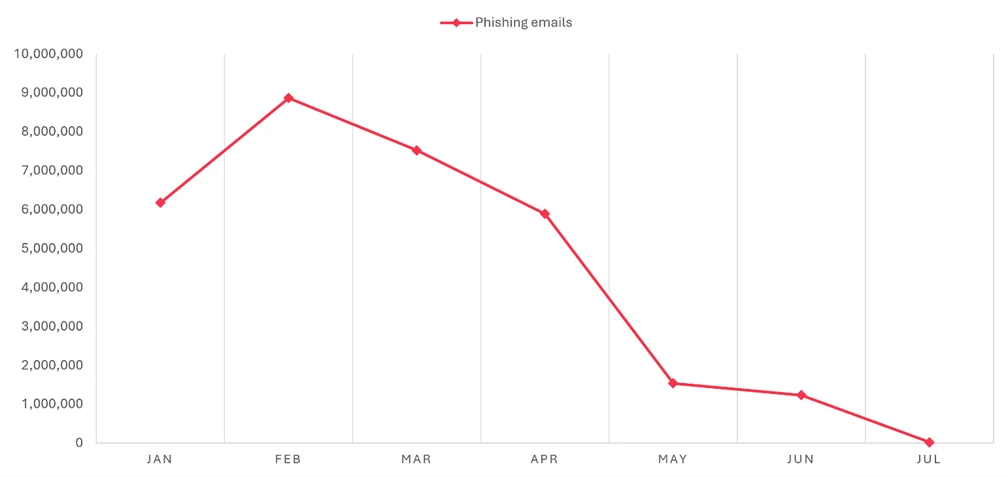
A decreasing number of phishing emails from January to July, starting at 10 million and dropping to nearly zero.
Figure 2. Tycoon2FA-linked phishing email volume (January 2026 – July 2026)

This blog provides a view of email threat activity across Q3 2026, examining shifts in phishing techniques, malicious payloads, business contact impersonation (BCI), and Teams-based threats. We also highlight spoofed business-service sender domains and two campaigns that show how attackers used familiar work requests to make malicious messages appear credible. Together with recommendations, Microsoft Defender detections, and hunting queries, these findings can help defenders assess where existing protections may be weakened and investigate activity across email and collaboration platforms.

Spoofed sender domains

Requests to sign a document, review an invoice, or respond to a survey are routine business communications. Attackers exploit that familiarity by spoofing the sender domains of the legitimate services that deliver them. Rather than relying only on a misleading display name or a lookalike domain, these messages claim the service’s actual domain as their sender identity.

Microsoft detected approximately 129 million malicious messages spoofing the business-service domains tracked in this analysis during Q3. Activity had remained consistently high since at least May, at roughly 41 million to 46 million messages a month. DocuSign was the most frequently spoofed brand in September, accounting for 29% of that month’s total. Adobe, SurveyMonkey, and Barracuda also saw increases toward the end of the quarter, even as overall spoofing volume remained broadly steady.

A downward trend in phishing emails from 46 million in June to closer to 42 million in September.
Figure 3. Malicious messages spoofing tracked business-service sender domains (May – September 2026)

The more consequential finding was how security exceptions affected these messages after detection. Despite failing email authentication checks and being identified as malicious, many were associated with tenant- or user-level overrides. In September, overrides applied to 63% of messages with a recorded security outcome, with tenant-level overrides accounting for most of them.

The figures do not establish that recipients opened the messages or that accounts were compromised. They do show why exception policies deserve attention alongside detection coverage. An organization may create an exception to avoid interrupting a legitimate business workflow, but an overly broad exception can also weaken protection against messages impersonating that workflow. Familiar branding is not a substitute for an authenticated sender.

QR code phishing attacks

QR code phishing ended Q3 far below the levels seen during its early-year surge. Microsoft detected approximately 12.1 million attacks over the quarter, down 67% from Q2. The decline continued through September despite the broader increase in email threats, leaving monthly QR code volume 86% below its March peak.

A downward trend in phishing email occurrences, with counts decreasing from 19 million in March to less than 4 million by September.
Figure 4. Monthly QR code phishing volume (January – September 2026)

Much of the volume reduction came from the attachments that had supported that earlier growth:

  • PDF attachments remained the most common delivery format in Q3, accounting for 78% of QR code attacks in July and August before dropping to 61% in September. Nonetheless, the volume of PDFs carrying malicious QR codes fell by roughly 65% by the end of the quarter.
  • DOC/DOCX attachments accounted for 14% of QR code attacks in July and August before rising to 20% in September. Word document delivery volume similarly contracted in Q3, falling 39% between July and September following a sharp drop at the start of the quarter.
  • Email-embedded QR codes increased from 5% of attacks in July to 12% in September. After dropping to near-zero in Q2, the volume of malicious QR codes embedded in email bodies more than tripled by the end of Q3, although the method remained a smaller delivery category than attachments.
A line graph showing the   percentage of documents processed through various methods, with PDFs remaining the top method throughout Q3 followed by DOC attachments, email-embedded URLs, and other delivery methods.
Figure 5. QR code phishing delivery method share by month (January – September 2026)

The distinction between delivery methods matters for inspection coverage, but not for the recipient’s experience: either attachment or embedded formats can move a user from a message on a managed device to a phishing page on a personal phone. The reduction in volume has not changed that underlying challenge.

CAPTCHA-gated phishing tactics

CAPTCHA-gated phishing began to recover while QR code attacks continued to fall. By September, Microsoft detected 3.1 million CAPTCHA-gated attacks, nearly twice the volume seen at July’s low. Activity remained well below its March peak, but the recovery ended several months of sustained decline.

A declining trend in phishing emails, depicting over 12 million in March, dropping to 2 million in July, and closer to 4 million by September.
Figure 6. CAPTCHA-gated phishing volume (January – September 2026)

The increase in CAPTCHA-gated phishing attacks was not confined to a single attachment format as delivery methods shifted throughout Q3, though SVG attachments were central to the initial recovery.

  • SVG attachment volume increased sixfold in August, accounting for almost half of September’s total CAPTCHA-gated phishing attacks. Up from 17% of attacks in July, SVGs represented 65% of CAPTCHA-gated phishing attacks in August, remained elevated at 49% in September, and were the leading delivery method at the quarter end.
  • Email-embedded URLs accounted for 49% of attacks in July before falling to 19% in August as SVG activity surged. URL-delivered attacks more than doubled in September, reclaiming 30% of attacks.
  • PDF attachments declined from 22% of attacks in July to 12% in August, remaining at 12% in September.
  • HTML attachments declined from 9% of attacks in July to 2% in August, then more than tripled in volume in September to account for 6% of attacks.
  • DOC/DOCX attachments remained comparatively uncommon throughout Q3, representing only 1% of attacks each month.
A bar chart illustrating the percentage distribution of different document formats, with SVG attachments on top for Q3, generally followed by URL, PDF, HTML, and DOC or Other distribution methods by the end of the quarter.
Figure 7. CAPTCHA-gated phishing distribution method share by month (April – September 2026)

Malicious payloads

The dominant risk from malicious attachments continued to be credential theft, not malware installation. Approximately 94-96% of payload-based attacks during Q3 directed recipients toward a phishing site or presented a fraudulent sign-in page locally. An attachment did not need to install software to put an account at risk.

HTML and PDF attachments remained the two most common malicious payload types during Q3, together accounting for approximately 56–62% of payload-based attacks each month, while the more significant change was the return of SVG files:

A pie chart representing the distribution of various file types: 29% HTML and PDF, 4% DOCX, 16% SVG, 4% ZIP/GZIP, 3% RAR, 15% other
Figure 8. Malicious payloads by type
  • HTML attachments accounted for nearly two-thirds of malicious payloads and remained relatively steady across the quarter. HTML files ranked first in July at 32% of attacks before declining to 26% in August and recovering to 29% in September.
  • PDF attachments accounted for 27–30% of attacks and were the leading payload type in August and September. Volume remained comparatively stable, declining only 2% between July and September.
  • SVG attachments increased from 13% of attacks in July to 20% in August, when volume reached 10.1 million—the highest monthly volume in more than a year. Volume then fell 34% in September, although SVGs still represented 13% of attacks and remained roughly 50% higher than the monthly average for the first half of 2026.
  • DOC/DOCX attachments declined from approximately 5% of attacks in July and August to less than 3% in September, falling 76% below its monthly average volume for the first half of 2026.
  • ZIP/GZIP attachments declined from 5% of attacks in July to 3% in August before recovering slightly to 4% in September. Raw volume remained 24% below July.

The reduced use of Word documents alongside the renewed use of SVG files left a different mix of attachment threats, though credential theft remained the dominant objective.
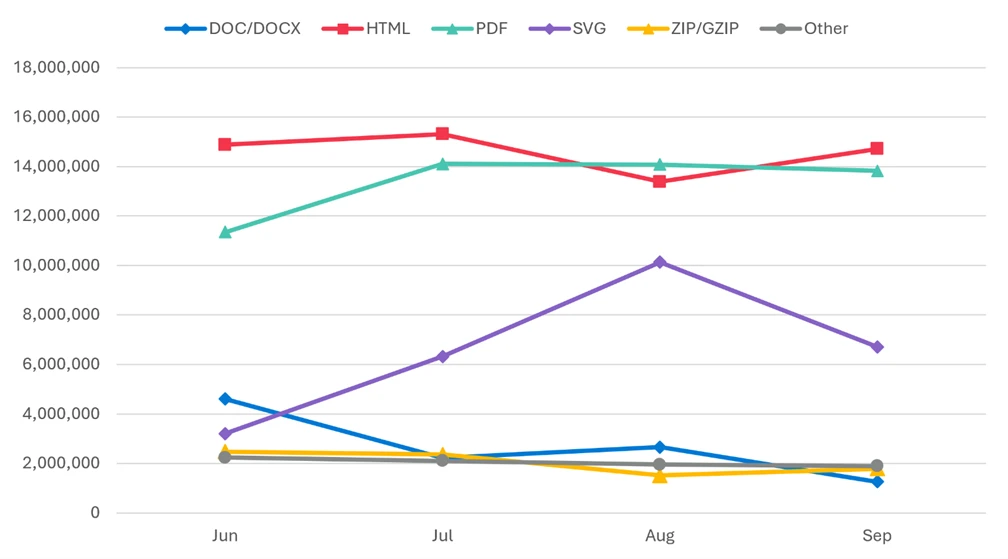
A line graph depicting a trend in the number of file types, with HTML on top followed closely by PDFs, then SVG files, and DOC, ZIP, and other files all hovering around 2 million by the end of the quarter.
Figure 9. Malicious payload file type distribution by month (June – September 2026)

CAPTCHA-gated phishing accounted for only part of the malicious SVG activity. The resurgence was therefore broader than the use of SVG files to deliver that particular technique.

Business contact impersonation

Microsoft defines business contact impersonation (BCI) as a text-based attack targeting enterprise users that impersonates a trusted entity for the purpose of persuading a recipient into initiating a fraudulent financial transaction or sending the attacker sensitive documents.

BCI volume declined throughout Q3, totaling approximately 6.2 million attacks. That was substantially below Q2, although the comparison is influenced by the unusually large spike in April. By September, monthly activity had fallen to its lowest level since at least July 2025.

A downward trend that peaked at 9 million attacks in April before dropping sharply down to between 2-3 million for all of the third quarter.
Figure 10. Monthly BCI attack volume (January – September 2026)

The reduction in overall volume also concealed differences among financial lures. Generic messages continued to dominate initial BCI contact during Q3, but explicit task and financial requests gained share as overall attack volume declined:

  • Generic outreach messages, such as “Are you at your desk?”, accounted for 82% of attacks in July and August before declining to 79% in September. Raw volume fell 14% across the quarter, reinforcing that operators still overwhelmingly favored establishing contact before introducing a fraudulent request.
  • Generic task requests represented 8–10% of attacks during Q3, increasing from 9% in July to 10% in September despite a 9% decline in raw volume.

Within the smaller subset of explicit financial requests:

  • Payroll update requests were the most common financial lure, accounting for 6% of attacks in July and August and 7% in September. Raw volume remained broadly stable at approximately 126,000–130,000 attacks per month.
  • Invoice payment requests recovered from June’s low. Volume increased 34% in July, 25% in August, and 89% in September, more than tripling between June and September. Their share reached 3% in September, its highest level since March.
  • Gift card requests remained at 2% of attacks each month, while raw volume declined 9% from July to September.
Pie chart depicting BEI lures; 81% generic outreach contacts, 9% generic task requests, 2% payroll updates, 2% gift card requests, 6% invoice payments, and less than 1% for other types.
Figure 11. Initial BCI email content by type (Q3 2026)

The decline in BCI overall did not extend equally to the requests reaching payment and payroll staff.

Microsoft Teams threats

Microsoft observed approximately 141,000 malicious Teams call attempts during Q3. Activity peaked in July before declining 31% by September, although September volume remained 38% above the monthly average for the first half of 2026. Teams-based attacks continued to use live interactions across chat, voice, screen sharing, and remote-support tools to facilitate remote access, credential theft, and hands-on-keyboard compromise.

A trend line of call attempts, displaying a peak of over 50,000 attempts in July to about 35,000 by September.
Figure 12. Monthly observed malicious Microsoft Teams calls (January – September 2026)

Attackers increasingly moved away from display names that explicitly announced an IT- or tech-related support role. Ordinary personal-name display names rose from 46% of the observed July sample to 88% in September, while explicit help desk identities fell from 17% to 2%.

Bar chart comparing call impersonation types in Q3, with username impersonations rising from 46% in July to 88% by September, IT support impersonations ultimately decreasing from 17% to 10% after a spike in August, Help desk impersonations dropped from 17% to 2%, and Other impersonations dropped from 20% to virtually 0 by September.
Figure 13. Malicious Teams call impersonation comparison (Q3 2026)

This shift does not necessarily mean attackers abandoned IT support stories. A personal name can accompany a claim to work for the help desk, while the underlying account address retains technical or service-related wording. More targeted attempts also used domains resembling the intended victim organization’s domain, emphasizing that the visible name is only one part of the impersonation.

Voice phishing attempts peaked in July and then receded, but September volume remained above the levels observed early in 2026. Calls were concentrated during recipients’ weekday working hours, when a live response was more likely. These attempts included unanswered, rejected, and short-lived calls, partly reflecting Microsoft’s expanding visibility and ongoing efforts to strengthen protective measures against social engineering abuse. Attemps should not be interpreted as successful attacker interactions.

Notable phishing campaigns

The following campaigns were observed during the quarter and highlight notable credential phishing, BCI, and malware delivery activity. For analysis of a separate Teams-based IT-support impersonation campaign observed in August, see Impersonating IT support: Threat actors turn remote session into enterprise-wide access.

Salary review lure delivers personalized QR code attachment for device code credential capture targeting legal organizations

On August 19, 2026, Microsoft Defender Research observed a phishing campaign targeting more than 10,000 users across more than 4,800 organizations, almost exclusively located in the United States. While most phishing attacks typically don’t focus on a single vertical, this campaign targeted the professional services sector, specifically law firms and legal organizations. Messages in this campaign were sent out over a 13-hour period between 13:27 UTC on August 19, 2026, and 2:59 UTC on August 20, 2026.

Pie chart depicting 72.1% of campaign targets were professional services, 22.5% were technology and software, and 5.4% were other.
Figure 14. Intended campaign targets by industry

Emails in this campaign were sent with the subject line “Salary Review” from smtp[@]wekash[.]net via Amazon Simple Email Service. The email body carried no visible text and the sole payload was a Word document attachment named Your-Q3-Compensation-Summary.docx.

A notification regarding a revised compensation package for an employee, emphasizing the employee's exceptional performance and requesting confidentiality.
Figure 15. Sample of the campaign document attachment

The Word document impersonated the recipient’s own organization, displaying company branding and addressing the recipient by name. The message claimed that the recipient’s compensation had been revised following a Q2 performance review and that updated details were ready for review. A QR code in the document carried an instruction to scan it to access the revised details. This approach moved the phishing URL out of the email body and into an image, bypassing email gateway controls that scan text-based links but do not decode QR code images.

Scanning the QR code would have directed users to an attacker-controlled phishing page impersonating a Microsoft OneDrive sign-in portal hosted on the domain splace[.]co[.]za. The page presented an alphanumeric code and instructed recipients to copy it and proceed to the Microsoft sign-in portal.
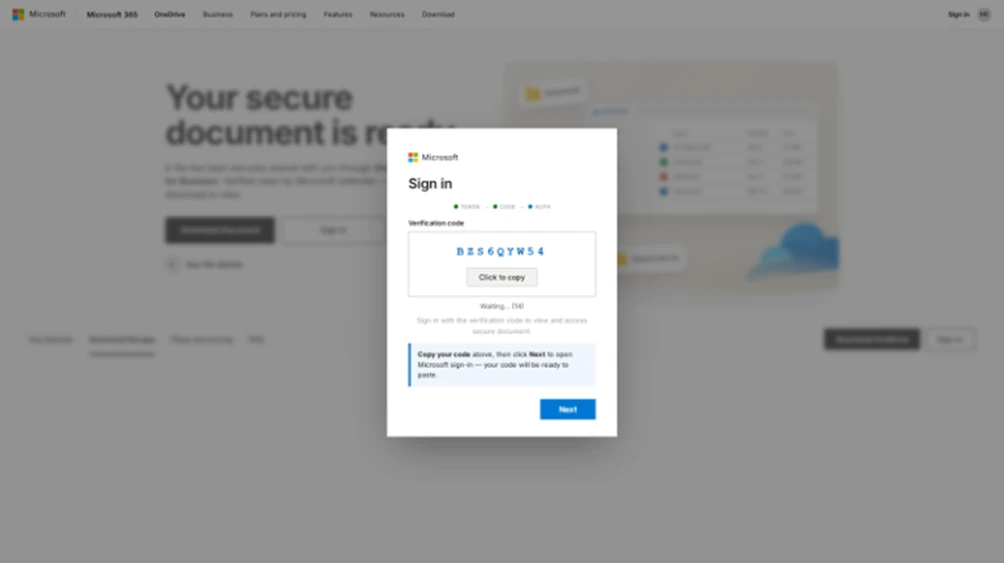
Screenshot of a phishing landing page depicting a sign in pop up asking the user to copy the code and then click Next
Figure 16. Sample phishing landing page

The phishing page used a device code phishing technique, which works by making an authentication request to Microsoft’s device authentication service before the recipient arrived, receiving a user code in return, and embedding that code into the page. When a recipient copied the code and proceeded, the page redirected them to the legitimate Microsoft device authentication portal at microsoft.com/devicelogin, where they entered the code and signed in. Completing that sign in would have transferred a valid session token to the attacker. The token granted persistent access to the recipient’s Microsoft 365 account without ever exposing the password and without re-triggering multifactor authentication (MFA). A countdown timer on the page signaled that each code had a limited validity window, pressing recipients to act quickly.

Spanish-language purchase order and payroll campaign leads to Agent Tesla malware

On September 21, 2026, Microsoft Defender Research observed a phishing campaign targeting more than 56,000 users across more than 8,100 organizations. The campaign primarily targeted users in Spanish-speaking countries, with Colombia accounting for the largest share of intended recipients (15%), followed by the United States (12%), Mexico (12%), Chile (11%), and Spain (8%). Like most large-scale phishing attacks, this campaign did not focus on a single vertical, but instead targeted a broad range of industries, most notably retail and consumer goods (27%), manufacturing and agriculture (19%), and financial services (13%). Messages in this campaign were sent out over an almost nine-hour period between 14:57 UTC and 23:35 UTC on September 21, 2026.
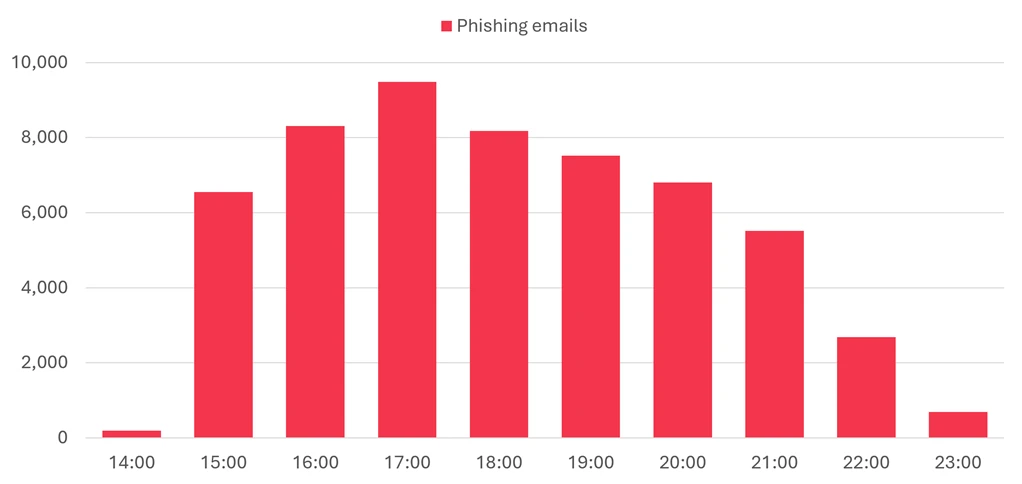
Figure 17. Timeline of campaign message volume

Two lure variations were observed throughout the duration of the campaign: a purchase order theme, which was used in 63% of messages, and a payroll theme, which was used in the remaining 37%. Both variations were sent from the address contacto06[@]carloxmextos[.]org. Sender Policy Framework (SPF), DomainKeys Identified Mail (DKIM), and Domain-based Message Authentication, Reporting, and Conformance (DMARC) all passed for that domain, so the messages did not depend on simple address forgery. The actor changed the display name to resemble a sales or human resources identity associated with the recipient’s organization. That combination gave the messages technically valid authentication while using the visible sender identity and familiar business context to support the impersonation.

The purchase order lure variation used the reply-style subject “Re: solicitud de cotización”. Its body said, “Buen Dia”, claimed that a purchase order was attached, and asked the recipient to confirm receipt before closing with the lowercase “saludos”. The abrupt wording, inconsistent capitalization, and copied professional signature made the message look like a short continuation of an existing commercial exchange while avoiding details that a recipient could easily challenge.

The attached file, Nuevo orden de compra – 21092026.pdf.uu, was a RAR archive despite its uncommon .uu ending and PDF-like name. Inside it was Nuevo orden de compra – 21092026.pdf.js, a JavaScript downloader whose second extension exposed the executable script type only after extraction. If run, the script fetched a file named Lincoln.ps1 from a campaign-controlled object in Firebase Storage, and that PowerShell payload led to Agent Tesla malware. The nested archive and misleading extensions separated the visible business document theme from the code that executed, while the cloud-hosted download gave the actor a remotely accessible staging point.

Screenshot of a Spanish-language email with the subject “Re: solicitud de cotización.” The sender is shown as a sales-themed display name with the address contacto06@carloxmextos.org; the recipient and signature are redacted. The message says an order is attached and asks the recipient to confirm receipt. The attachment is labeled “Nuevo orden de compra - 21092026.pdf.uu.”
Figure 18. Redacted rendering of the purchase order lure email

The payroll-themed lure used the subject “Nomina 21.09.2026”. It addressed the recipient by name, said the September 21 payroll list was attached, and signed off as a human resources manager. The date-specific payroll pretext created an immediate work-related reason to open the file, while the personalized greeting made a bulk message appear locally relevant.

The payroll lure’s attachment, Nomina 21.09.2026.xml.001, was also a RAR archive. Extraction produced Nomina 21.09.2026.xml.exe, an Agent Tesla executable disguised with an XML-themed double extension. Unlike the purchase order delivery chain, this branch did not require a separate downloader in the supplied evidence, but both paths used the same sender infrastructure, attachment camouflage, date, and malware family. Agent Tesla is commonly used to collect credentials and other information from an infected host, so the shared final payload suggested that credential and information theft were the campaign’s likely objective.

Screenshot of a Spanish-language email from an HR-themed display name at contacto06@carloxmextos.org to a redacted recipient. The subject is “Nomina 21.09.2026.” The message says a payroll document for September 21, 2026, is attached and is signed “Gerente de Recursos Humanos.” The attachment is labeled “Nomina 21.09.2026.xml.001.”
Figure 19. Redacted rendering of the payroll lure email

Defending against email and collaboration threats

Microsoft recommends the following mitigations to reduce the impact of this threat. Check the recommendations card for the deployment status of monitored mitigations.

  • Microsoft helps organizations reduce the risk of phishing and social engineering in Teams through user awareness and layered, built-in protections. Users should exercise caution with external connection requests and messages, including verifying a sender’s identity and requests before acting on them. Administrators can also block external Teams users and specify which users in their organization are permitted to chat or meet with people outside the enterprise. These flexible controls help organizations manage risk for employees in sensitive roles and departments. Teams will also be introducing AI-powered phishing detection that uses conversation context to identify phishing and social engineering in higher-risk messaging scenarios, particularly first-contact chats with external users. Together, these measures help organizations collaborate more securely in Teams.
  • Review the recommended settings for Exchange Online Protection and Microsoft Defender for Office 365 to ensure your organization has established essential defenses and knows how to monitor and respond to threat activity.
  • Invest in user awareness training and phishing simulations. Attack simulation training in Microsoft Defender for Office 365, which also includes simulating phishing messages in Microsoft Teams, is one approach to running realistic attack scenarios in your organization.
  • Enable Zero-hour auto purge (ZAP) in Defender for Office 365 to quarantine sent mail in response to newly acquired threat intelligence and retroactively neutralize malicious phishing, spam, or malware messages that have already been delivered to mailboxes.
  • Responders can also manually check for and purge unwanted emails containing URLs and/or Subject fields that are similar, but not identical, to those of known bad messages. Investigate malicious email that was delivered in Microsoft 365 and use Threat Explorer to find and delete phishing emails.
  • Turn on Safe Links and Safe Attachments in Microsoft Defender for Office 365.
  • Enable network protection in Microsoft Defender for Endpoint.
  • Encourage users to use Microsoft Edge and other web browsers that support Microsoft Defender SmartScreen, which identifies and blocks malicious websites, including phishing sites, scam sites, and sites that host malware.
  • Enable passwordless authentication methods (for example, Windows Hello, FIDO keys, or Microsoft Authenticator) for accounts that support passwordless. For accounts that still require passwords, use authenticator apps like Microsoft Authenticator for MFA. Refer to this article for the different authentication methods and features.
  • Configure automatic attack disruption in Microsoft Defender XDR. Automatic attack disruption is designed to contain attacks in progress, limit the impact on an organization’s assets, and provide more time for security teams to remediate the attack fully.

Microsoft Defender detections

Microsoft Defender customers can refer to the list of applicable detections below. Microsoft Defender coordinates detection, prevention, investigation, and response across endpoints, identities, email, and apps to provide integrated protection against attacks like the threat discussed in this blog.

Microsoft Defender for Endpoint

The following alert might indicate threat activity associated with this threat. The alert, however, can be triggered by unrelated threat activity.

  • Suspicious activity likely indicative of a connection to an adversary-in-the-middle (AiTM) phishing site

Microsoft Defender for Office 365

The following alerts might indicate threat activity associated with this threat. These alerts, however, can be triggered by unrelated threat activity.

  • A potentially malicious URL click was detected
  • A user clicked through to a potentially malicious URL
  • Suspicious email sending patterns detected
  • Email messages containing malicious URL removed after delivery
  • Email messages removed after delivery
  • Email reported by user as malware or phish

Microsoft Security Copilot

Microsoft Security Copilot is embedded in Microsoft Defender and provides security teams with AI-powered capabilities to summarize incidents, analyze files and scripts, summarize identities, use guided responses, and generate device summaries, hunting queries, and incident reports.

Customers can also deploy AI agents, including the following Microsoft Security Copilot agents, to perform security tasks efficiently:

Security Copilot is also available as a standalone experience where customers can perform specific security-related tasks, such as incident investigation, user analysis, and vulnerability impact assessment. In addition, Security Copilot offers developer scenarios that allow customers to build, test, publish, and integrate AI agents and plugins to meet unique security needs.

Threat intelligence reports

Microsoft Defender XDR customers can use the following threat analytics reports in the Defender portal (requires license for at least one Defender XDR product) to get the most up-to-date information about the activity and techniques discussed in this blog. These reports provide intelligence, protection information, and recommended actions to prevent, mitigate, or respond to associated threats found in customer environments.

Microsoft Security Copilot customers can also use the Microsoft Security Copilot integration in Microsoft Defender Threat Intelligence, either in the Security Copilot standalone portal or in the embedded experience in the Microsoft Defender portal to get more information about this threat actor.

Hunting queries

Microsoft Defender XDR

Microsoft Defender XDR customers can run the following advanced hunting queries to find related activity in their networks:

Salary review campaign emails by sender address

The following query identifies emails associated with the August 19 campaign using a message’s sending email address.

EmailEvents
| where SenderMailFromAddress == “smtp@wekash.net”

Spanish-language purchase order and payroll campaign emails by sender address

The following query identifies emails associated with the September 21 campaign using a message’s sending email address.

EmailEvents 
| where SenderMailFromAddress == "contacto06@carloxmextos.org"

Indicators of compromise (IOCs)

IndicatorTypeDescriptionFirst seenLast seen
wekash[.]net Domain Sender domain used to distribute campaign emails via Amazon SES 2026-08-19 2026-08-20
smtp@wekash[.]net Email address Sender email address observed in campaign messages 2026-08-19 2026-08-20
Your-Q3-Compensation-Summary.docx File name Word document attachment carrying the compensation lure and QR code 2026-08-19 2026-08-20
splace[.]co[.]za Domain Domain hosting phishing content 2026-08-19 2026-08-20
https://splace[.]co[.]za/0987643345678908765421234567890987654320987654321223456787654/onedrive/ URL URL hosting phishing content 2026-08-19 2026-08-20
carloxmextos[.]org Domain Authenticated domain used to send both campaign variations 2026-09-21 2026-09-21
contacto06@carloxmextos[.]org Email address Sender address used for both observed lure variations 2026-09-21 2026-09-21
Nuevo orden de compra – 21092026.pdf.uu File name RAR attachment used in the purchase order variation 2026-09-21 2026-09-21
Nuevo orden de compra – 21092026.pdf.js File name JavaScript downloader contained in the purchase order archive 2026-09-21 2026-09-21
Lincoln.ps1 File name PowerShell payload downloaded by the purchase order branch 2026-09-21 2026-09-21
Nomina 21.09.2026.xml.001 File name RAR attachment used in the payroll variation 2026-09-21 2026-09-21
Nomina 21.09.2026.xml.exe File name Agent Tesla executable contained in the payroll archive 2026-09-21 2026-09-21
BEDD2297739632DA8EE470367295FE976E55BE74D628DCAEE7FA98121EE530F1 SHA-256 SHA-256 of the purchase order RAR attachment 2026-09-21 2026-09-21
CE832350C165522DB03DB040CA07917976D1A91F97E7016EA36DCC6B53E0EB13 SHA-256 SHA-256 of the JavaScript downloader 2026-09-21 2026-09-21
F8B49891D15A578E4DE28FECF99D0D78DB6B2C3DA81CD51C931B8D128E60C187 SHA-256 SHA-256 of the PowerShell payload associated with Agent Tesla delivery 2026-09-21 2026-09-21
C438B9A3BB67E2C10EFF0D01513422DC17DCE7C5508303A680E46F3DCEC886EF SHA-256 SHA-256 of the payroll RAR attachment 2026-09-21 2026-09-21
72966B30BBD87E42C683D2AC7A42BB62021FC14389D508551432FFD70D62F33A SHA-256 SHA-256 of the Agent Tesla executable from the payroll variation 2026-09-21 2026-09-21

Learn more

For the latest security research from the Microsoft Threat Intelligence community, check out the Microsoft Threat Intelligence Blog.

To get notified about new publications and to join discussions on social media, follow us on LinkedIn, X (formerly Twitter), and Bluesky.

To hear stories and insights from the Microsoft Threat Intelligence community about the ever-evolving threat landscape, listen to the Microsoft Threat Intelligence podcast.

The post Email threat landscape: Q3 2026 trends and insights appeared first on Microsoft Security Blog.

UK Cybercrime Journal: Police Cryptocurrency Crime Operations in 2026

What Happened

Four key UK enforcement actions have showcased the diversifying spectrum of cryptocurrency crime in the UK in 2026. This ranges from violent home invasions to sophisticated police impersonation and seed phrase social engineering. UK law enforcement also cracked down on P2P exchanges to help prevent cryptocurrency laundering and cashing out.

Cryptocurrency Theft via Physical Violence (February 2026)

  • Three individuals from Sheffield executed a targeted home invasion in London. Posing as Amazon delivery drivers, the teenagers ambushed the victim with physical violence, forced him to transfer $4.5 million (£3.1 million) in cryptocurrency to their accounts, and stole his vehicle.
  • The offenders recorded their escape and boasted about the crime on Snapchat. The Metropolitan Police tracked the vehicle down and detained all three suspects within hours of the crime taking place.
  • The trio was sentenced at Sheffield Crown Court to a combined total of 16 years in youth detention, with the victim's assets recovered within 72 hours.

OCG Arrested for Seed Phrase Vishing (May 2026)

  • Ten suspects were arrested and charged following a coordinated multi-force operation led by the Eastern Region Special Operations Unit (ERSOU) alongside the Met, City of London Police, Kent Police, and YHROCU.
  • The organised crime group (OCG) targeted victims via fraudulent phone calls, posing as police officers or cryptocurrency platform representatives. Victims were tricked into disclosing critical wallet credentials, including private wallet seed phrases, allowing the attackers to drain the contents of their wallets.
  • One victim alone lost over £300,000. Simultaneous search warrants across Kent, Essex, London, and Yorkshire resulted in ten individuals being charged with conspiracy to defraud.

Impersonation Gang Jailed Over £4 Million Police Impersonation Fraud (July 2026) 

  • At Southwark Crown Court, three men in their twenties, were jailed for up to six years for defrauding eight victims out of over £4 million in cryptocurrency.
  • The gang impersonated police officers over the phone, informing victims their assets were compromised and convincing them to move funds to "secure police accounts" or share account access. To reinforce the ruse, the group also constructed fake police websites.
  • The Met Police Cryptocurrency Team dismantled the OCG, seizing 40 mobile devices, luxury vehicles, and recovering £1 million in direct victim funds.

FCA and Partners Crackdown on Illegal P2P Crypto Trading (September 2026):

  • In a joint operation, the UK Financial Conduct Authority (FCA), HM Revenue & Customs (HMRC), and the Metropolitan Police targeted three London premises operating as unregistered peer-to-peer (P2P) cryptocurrency exchanges, serving cease-and-desist letters to halt their unauthorised commercial activities under the Money Laundering Regulations 2017.
  • Because carrying out P2P crypto trading "by way of business" legally requires FCA authorisation, and zero P2P crypto businesses are currently registered in the UK, these firms operated outside mandatory Anti-Money Laundering (AML) and Counter-Terrorist Financing (CTF) frameworks, establishing a critical, unregulated liquidity channel for criminals to move and launder illicit funds.

Analyst Comment

The operational shift in UK-based cryptocurrency targeting indicates a dangerous blend of high-tech social engineering and low-tech physical coercion.

The first case involving the home invasion highlights to risks of showing off rich lifestyles on social media. Unfortunately, we live in an age whereby criminals can research their targets and gather the information necessary to attack their homes. High net-work individuals are prime targets and can be relatively trivial to locate due to posting their lives on social media.

Both the cryptocurrency vishing cases highlight the effectiveness of police impersonation. Threat actors exploit the high trust and compliance associated with law enforcement branding to bypass technical two-factor authentication (2FA) mechanisms, inducing panic in victims to voluntarily surrender seed phrases or authorise wallet transfers.

In the UK, unlawful gains are rapidly off ramped into physical luxury items (designer clothing, jewellery, high-end vehicles) or moved to foreign jurisdictions. However, as demonstrated by the Snapchat post in the Sheffield home invasion case, cybercriminal operational security (OPSEC) remains a primary vulnerability for law enforcement to exploit.

Unregistered P2P cryptocurrency exchanges continue to operate as a liquidity channel where illicit virtual funds can be converted into physical cash or clean bank transfers. By targeting the physical infrastructure where shadow financial activity meets the mainstream economy, law enforcement can starve wider cybercrime ecosystems of accessible liquidity.

Defensive Takeaways

Security teams, high-net-worth individuals, and institutional custodians must update defence models to protect against hybrid physical/digital vectors:

  • Operational Security (OPSEC) & Privacy: Minimise public disclosure of crypto holdings, wallet addresses, and physical locations. Threat actors frequently leverage social media OSINT to target victims for home invasions or vishing campaigns.
  • Absolute Protection of Seed Phrases: Never disclose seed phrases, recovery keys, or private keys to anyone. Legitimate financial institutions, exchanges, and law enforcement agencies will never request seed phrases or ask users to transfer funds to a "safe account".
  • Out-of-Band Verification: If contacted by someone claiming to be a police officer or exchange representative regarding asset security, hang up immediately. Independently verify the call by calling the official institution number.
  • Multi-Signature (Multi-Sig) & Time-Locked Storage: Implement multi-sig wallets requiring authorisations across geographically separated keys, alongside time-locked vaults. This mitigates the immediate risk of forced transfers during physical home invasions.

Relevant Sources

  1. https://www.independent.co.uk/tv/news/amazon-delivery-thief-londoncrytpcurrency-met-police-video-b2914193.html
  2. https://x.com/metpoliceuk/status/2019078494227997095
  3. https://www.rocu.police.uk/news/2026/may/ten-arrests-arrested-linked-to-alleged-crypto-currency-scam/
  4. https://news.met.police.uk/news/men-who-stole-more-than-4-pounds-million-of-crypto-are-jailed-511271
  5. https://www.fca.org.uk/news/press-releases/fca-and-partners-continues-crackdown-illegal-crypto-trading
Relevant CTI Sources

Smishing e vishing: como os golpes por SMS e telefone funcionam

Smishing e Vishing // decodificando os golpes por SMS e telefone
decode --threats smishing vishing

Smishing e Vishing: decodificando os golpes por SMS e telefone

GUIA DE SEGURANÇA DIGITAL · ATUALIZADO 09/2026 · 10 MIN DE LEITURA

Um SMS avisando que sua encomenda está retida. Uma ligação de uma suposta "central antifraude" pedindo para confirmar seus dados. São variações do mesmo exploit: engenharia social explorando o canal que você mais confia — o seu celular. Este guia decodifica como funcionam o smishing e o vishing, os sinais de alerta e como se blindar.

O que os dois golpes têm em comum

Smishing (SMS + phishing) e vishing (voice + phishing) são variações do mesmo golpe de engenharia social, adaptadas para o celular. Em vez de um e-mail falso, o criminoso usa uma mensagem de texto ou uma ligação para se passar por banco, órgão público, operadora ou serviço de entrega, criar urgência e induzir a vítima a entregar dados sensíveis, autorizar uma transação ou instalar um programa malicioso.

A diferença está no canal: o SMS aposta num link malicioso clicado sem pensar; a ligação aposta na pressão de uma voz humana ao vivo, que improvisa respostas e mantém a vítima na linha até completar o golpe.

[ parte 1 :: canal = sms ]

Smishing: o golpe por SMS

Você recebe uma mensagem de texto (SMS, WhatsApp, iMessage) parecendo vir de um remetente conhecido, com um problema urgente: encomenda retida, fatura em aberto, conta bloqueada. O link leva a uma página clonada que rouba login, senha ou dados de cartão.

execução do golpe

etapadescrição
01_iscaSMS urgente, parecendo vir de banco, Correios ou operadora.
02_urgênciaPrazo curto ou ameaça de bloqueio para você agir sem pensar.
03_link_falsoDomínio parecido com o real leva a uma página clonada.
04_capturaOs dados digitados chegam ao golpista na hora.

sinais de alerta

  • Urgência artificial e prazos de poucas horas
  • Link encurtado ou domínio quase igual ao oficial
  • Pedido direto de senha, código de verificação (OTP) ou dados de cartão
  • Mensagem chega mesmo sem você ter pendência com aquela empresa

contramedidas

  • Nunca clique em links de SMS não solicitados
  • Acesse o site ou app oficial digitando o endereço direto
  • Nunca compartilhe código de verificação por telefone ou mensagem
  • Encaminhe o SMS suspeito para o 7726 e bloqueie o remetente
[ parte 2 :: canal = voz ]

Vishing: o golpe por telefone

O criminoso liga se passando por funcionário de banco, operadora ou suporte técnico, cria um cenário de ameaça e mantém a vítima na linha pedindo sigilo — muitas vezes fazendo a própria vítima transferir o dinheiro ou aprovar algo no app do banco.

execução do golpe

etapadescrição
01_contatoLigação se identificando como banco ou suporte; número pode ser falsificado (spoofing).
02_confiançaUsa dados vazados para parecer legítimo e cria ameaça de fraude.
03_isolamentoPede sigilo ("não desligue") e mantém a vítima ao telefone.
04_extraçãoPede senha, código, ou instalação de app de acesso remoto.

sinais de alerta

  • Pedido de sigilo: "não desligue", "não conte para ninguém"
  • Pressão para agir imediatamente, sem tempo para checar
  • Pedido de código de verificação ou dados de cartão por telefone
  • Pedido para instalar um aplicativo de acesso remoto

contramedidas

  • Desligue e ligue de volta usando o número oficial do cartão ou fatura
  • Nunca informe senha, código de verificação ou CPF completo por telefone
  • Combine uma "palavra de segurança" com familiares para pedidos de socorro
  • Desconfie de pedidos para instalar acesso remoto numa ligação não solicitada
/////////////////////

Resumo: como se blindar dos dois

Regra prática: nenhuma instituição séria pede senha, código de verificação ou transferência "para proteger sua conta" — nem por SMS, nem por telefone.
  • Desconfie de qualquer contato não solicitado que cria urgência e pede sigilo
  • Confirme sempre pelo canal oficial: site digitado direto ou número impresso no cartão
  • Nunca compartilhe código de verificação (OTP), senha ou dados completos de cartão
  • Ative a autenticação em duas etapas nas contas importantes
  • Se já caiu no golpe: troque senhas, contate o banco pelo canal oficial e registre um B.O.
smishing vishing golpes_digitais seguranca_digital phishing
Conteúdo educativo sobre golpes digitais. Em caso de dúvida sobre uma mensagem ou ligação específica, confirme diretamente com a instituição citada por um canal oficial conhecido.
Precisa de ajuda? Fale no WhatsApp
[novo] Cursos gratuitos de cybersecurity no ar. acessar >_

IT Help Desk Impersonation Lets Hackers Bypass MFA

Attackers bypass endpoint security by posing as IT staff, stealing Microsoft 365 sessions, draining SaaS data and demanding extortion.

Forget installing malware because today’s extortionists just pick up the phone instead of writing code. A widespread threat cluster tracked as PREY-0058 bypasses endpoint security entirely by targeting Microsoft 365 and SaaS environments through pure social engineering.

Attackers pose as internal IT help desk staff via phone calls and direct executives toward rogue authentication portals.

“The threat actors impersonate internal IT or helpdesk personnel by phone and direct them to an authentication-themed URL, often formatted as <victim organization>.<lure domain>.” reads the report published by Artic Wolf. “These attacks most frequently target Directors, Vice Presidents, and other executive staff.”

Once victims land on these pages, adversary-in-the-middle panels intercept credentials and multi-factor approvals in real time.

Stolen session tokens are then replayed using residential proxy networks that match the victim’s exact geographic location.

“Stolen sessions are replayed from residential proxy infrastructure, most notably NodeMaven, often from IP addresses that resolve to the same geo-location and network (ASN) as the victim.” states Artic Wolf. “Initial sign-in activity involves applications such as “My Signins”, “My Profile”, “My Apps”, which reveal account details and the applications available to the victim.”

This clever trick blinds standard impossible travel alerts and leaves defenders scratching their heads.

Intruders waste no time once they slip past the front door, immediately shifting focus to massive data harvesting.

“After initial access, the threat actors perform discovery techniques against SharePoint and Entra ID.” continues the report. “SharePoint discovery includes SearchQueryPerformed events with contentclass:STS_Site, contentclass:STS_Web, and wildcard searches using indexdocid for pagination.”

They map out repositories and drain sensitive files from OneDrive, Exchange, and Box before dropping a heavy extortion demand.

To detect these attacks, monitor Microsoft 365 sign-ins coming from residential proxies or hosting networks such as NodeMaven. Suspicious activity is more likely when several common Microsoft account pages are accessed at the start of a session, especially OfficeHome, My Signins, My Profile, My Apps and Microsoft Account Controls.

Alerts should also consider changes from a user’s normal sign-in pattern, such as a different location, ISP, browser, operating system or user agent.

In SharePoint, look for unusual SearchQueryPerformed events that map or enumerate sites and files. In Exchange, watch for large numbers of MailItemsAccessed events in a short time, especially when they come from hosting or proxy IPs. Also monitor heavy SharePoint and OneDrive file access or downloads from one user, particularly when scripting tools such as Python requests or Microsoft Graph are used. Finally, watch for new phishing domains that imitate your organization and target passkey or MFA registration.

To reduce the risk, require managed devices for Microsoft 365 and block or challenge access from proxy and hosting networks. Use phishing-resistant MFA such as FIDO2 keys or device-bound passkeys, which can stop AiTM attacks. Limit users’ access to sensitive SharePoint data, enable Continuous Access Evaluation, and train employees and help-desk teams to verify unexpected IT calls through a trusted channel.

Artic Wolf also released Indicators of Compromise (IoCs) for these attacks.

Follow me on Twitter: @securityaffairs and Facebook and Mastodon

Pierluigi Paganini

(SecurityAffairs – hacking, IT Help Desk)

Point72 Among Major Hedge Funds Targeted in Cyberattack on Wall Street Through Voice Phishing Campaign

Point72

A cyberattack on Wall Street recently targeted several leading hedge funds, including Point72 Asset Management, Millennium Management, Two Sigma Investments, and Citadel. The attackers used voice phishing, or "vishing," to trick employees into revealing sensitive information or granting access to internal systems.  Cybersecurity experts say such attempts are common because financial institutions store highly sensitive data. However, the latest incidents highlight how cybercriminals are increasingly combining traditional social engineering tactics with artificial intelligence to make impersonation attempts more convincing. 

Point72 Says No Client Data Was Compromised 

According to reports, Point72 Asset Management informed investors on August 5 that it had been targeted in the latest cyberattack on Wall Street. Bloomberg first reported the communication, citing a source familiar with the matter.  The firm said it was reviewing the incident and that no client information had been stolen. Point72 declined to comment publicly.  The campaign extended beyond Point72, with hackers also attempting to breach the information systems of Millennium Management, Two Sigma Investments, and Citadel, according to sources. 

Voice Phishing Remains an Effective Attack Method 

The attackers relied on voice phishing, a social engineering technique in which criminals impersonate trusted individuals—often IT support staff—to persuade employees to disclose confidential information or provide system access.  Cybersecurity experts told Reuters that these attacks are routine because of the valuable information held by financial firms. Rather than exploiting software vulnerabilities, voice phishing succeeds by manipulating human behaviour.  The tactic has also been used successfully by the cybercriminal group "Scattered Spider," a loosely organized network of young hackers that has targeted numerous companies in recent years. 

AI Is Increasing the Sophistication of Cyberattacks 

Security experts say the attempted cyberattack on Wall Street demonstrates how artificial intelligence is making social engineering campaigns more persuasive and difficult to detect.  A similar trend was highlighted in June, when Google's cybersecurity unit published a report detailing a campaign targeting U.S. law firms and other professional and financial services organizations.   According to the report, attackers posed as IT support personnel through voice phishing calls and, in some cases, even visited offices while pretending to be IT maintenance staff. 

Growing Cyber Risks for Financial Firms 

The attempted cyberattack on Wall Street comes as organizations worldwide face a rise in AI-powered cyberattacks and ransomware incidents that disrupt operations and steal sensitive data.  In response to the growing threat, the White House announced a working group earlier this year that brings together AI developers and critical infrastructure operators to share threat intelligence and strengthen cyber defenses.  Although Point72 said no customer information was compromised, the attempted attacks on several prominent hedge funds underscore the persistent cybersecurity risks facing the financial sector and the increasing use of AI-enhanced social engineering by threat actors. 

Defending SaaS-based applications against ShinyHunters OAuth abuse

In a series of campaigns observed between mid-2025 and mid-2026, Microsoft identified threat actor activity with overlapping tradecraft commonly associated with ShinyHunters, including voice phishing (vishing) and supply chain compromise, to target customer SaaS-based applications such as Salesforce instances. The threat actors abused trusted OAuth relationships for unauthorized access, data exfiltration, and persistence.

Two primary intrusion paths were observed including vishing techniques targeting OAuth consent and supply chain compromise through trusted workflows and integrations such as Salesloft and Gainsight. Abuse of these access paths led to inherited user and application privileges, allowing successful enumeration and querying of customer relationship management (CRM) records while evading conventional authentication detections. These intrusion paths often led to persistent access and exfiltration of data at scale. This tradecraft highlights how a single entry point can rapidly expand to greater enterprise impacts.

Microsoft observed activity associated with these techniques in many tenants from various industries such as retail, education and manufacturing. These findings reinforce the importance of monitoring OAuth-connected applications, validating third-party integrations, reviewing configurations, and enabling Salesforce event monitoring. Leveraging this data, Microsoft consulted with Salesforce to improve granularity in telemetry for Defender for Cloud Apps with near-real-time detection, offering connected application attribution and expanded application permission insights. This activity was not the result of a vulnerability inherent to Salesforce. Rather, the threat actors abused trusted OAuth relationships for unauthorized access, data exfiltration, and persistence.

Attack chain overview

Threat actor campaigns targeting Salesforce customers and using tradecraft associated with ShinyHunters pose a high-impact risk to sensitive data and downstream SaaS ecosystems. These campaigns abuse OAuth trust relationships to operate within pre-existing, legitimate workflows.

Figure 1. Commonly observed attack paths for SaaS applications.

Observed activity can be grouped into two primary intrusion paths:

Voice‑phishing-driven OAuth consent abuse

In campaigns beginning in mid-2025, the threat actors conducted vishing attacks impersonating IT support personnel. Threat actors socially engineered employees into authorizing attacker-controlled connected apps within their Salesforce tenant. In several confirmed cases, threat actors guided users through the OAuth consent workflow to grant access to a malicious application disguised as a legitimate Salesforce Data Loader tool. After users granted consent, these highly privileged OAuth applications enabled threat actors to perform API calls on behalf of the victim user, facilitating:

  • Enumeration of Salesforce instances belonging to targeted organizations
  • Persistent access to Salesforce CRM data
  • Possible lateral movement into other SaaS platforms through discovered credentials

This intrusion path exploits the OAuth authorization flow of trusted SaaS services rather than relying on malware or credential replay. Threat actors exfiltrate data through sanctioned application access inherited from user privileges.

SaaS supply‑chain compromise targeting trusted integrations

Following initial access campaigns, threat actors  escalated into supply‑chain-driven attacks targeting third‑party SaaS vendors offering popular solutions that integrate with Salesforce, often using OAuth tokens. In August 2025, compromised Salesloft Drift credentials enabled attackers to obtain connection secrets used by downstream SaaS applications, enabling the use of OAuth tokens in multiple customer Salesforce instances.

A subsequent campaign in November 2025 targeted Gainsight-published applications integrated with Salesforce, allowing attackers to leverage trusted external connections to maintain persistent API access in multiple Salesforce customer instances. These activities often appeared indistinguishable from legitimate integration behavior. Threat actors performed discovery, bulk data queries, and mass exfiltration of sensitive CRM records, including accounts, contacts, and service case data, without generating traditional sign-in anomalies.
More recently, in June 2026, the market intelligence platform Klue experienced an incident where a threat actor, Storm-3138, gained access to its system.  Credentials used to access Salesforce customer instances were used in the same fashion, to discover, query, and exfiltrate data.

Improving visibility into Salesforce OAuth abuse

For customers using Salesforce Shield: Event Monitoring, the upgraded Microsoft Defender for Cloud Apps Salesforce connector onboards the Real-Time Event Monitoring (RTEM) framework, enabling faster detection and investigation of Salesforce-based attacks.

Investigations into these campaigns exposed a recurring challenge for security teams: malicious activity often appeared indistinguishable from legitimate Salesforce usage because threat actors operated through trusted identities, approved OAuth applications, and authorized integrations. Traditional authentication-focused detections frequently provided limited visibility into the resulting application activity.

To improve investigation and detection of these scenarios, Microsoft expanded Salesforce visibility in Defender for Cloud Apps through additional event telemetry, connected application attribution, and enhanced application permissions insights. These capabilities help security teams identify suspicious OAuth activity, investigate potentially compromised integrations, and better understand how access was obtained and used within customer Salesforce instances.

Key capabilities include:

  • Near-real-time visibility into Salesforce security and activity events.
  • Connected application attribution, including application identity and granted OAuth scopes.
  • Expanded identity, session, and API activity context to support investigations.
  • Improved correlation within Microsoft Defender to help identify suspicious activity spanning identities, applications, and SaaS environments.

Together with Salesforce Shield: Event Monitoring, these capabilities help security teams investigate suspicious OAuth activity, validate the legitimacy of connected applications, and better understand the potential impact of a compromise.

New posture and governance capabilities for connected OAuth apps

While improved detection is critical, recent incidents have also highlighted the need for stronger preventive controls and ongoing governance of OAuth-connected applications. To address this, Microsoft Defender introduces new posture capabilities for connected and external client apps in Salesforce. Security teams can gain visibility into each OAuth app and its non-human identity, prioritize risk, and reduce the attack surface.

Deep visibility into app permissions and access

Microsoft Defender provides comprehensive visibility into all Salesforce-integrated connected and external client apps, including granted OAuth scopes and privileges.

Figure 2. Complete permission visibility for Salesforce connected apps and external client apps.

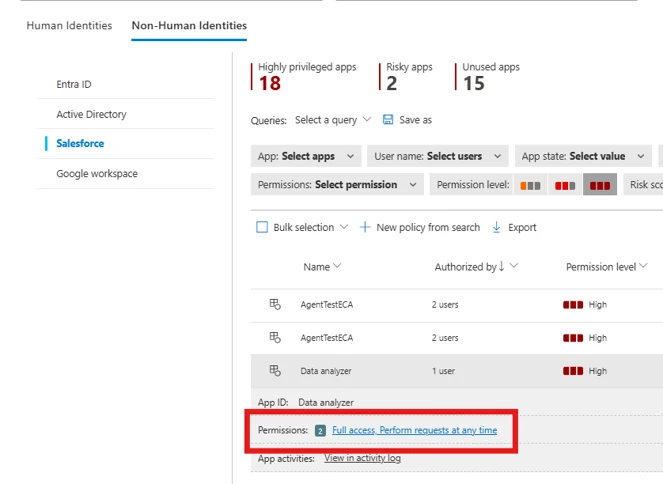
Highly privileged apps

Security teams often struggle to identify applications with powerful administrative or sensitive permissions. The highly privileged apps insight highlights applications that have been granted elevated scopes, enabling quick identification of apps that may pose significant risk.

Additionally, security teams can use permission-based filters to identify apps with specific high-risk scopes and validate whether such access is justified.

Figure 3. Identity inventory to identify highly privileged Salesforce apps.

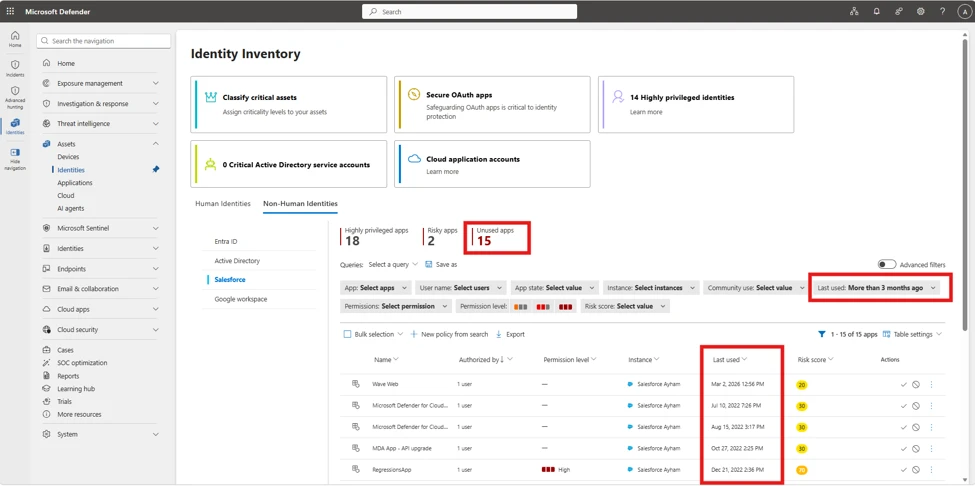
Unused apps

Organizations often create applications for temporary or one-time use, but those applications are rarely removed afterward. These unused apps continue to retain permissions, creating unnecessary exposure. With the recent changes, Defender now allows security teams to identify applications that have been inactive for extended periods (for example, 90 days or more), making it easy to review and revoke access where appropriate to reduce the attack surface.

Figure 4. Identity inventory to discover unused Salesforce apps.

Risk-based prioritization of connected apps

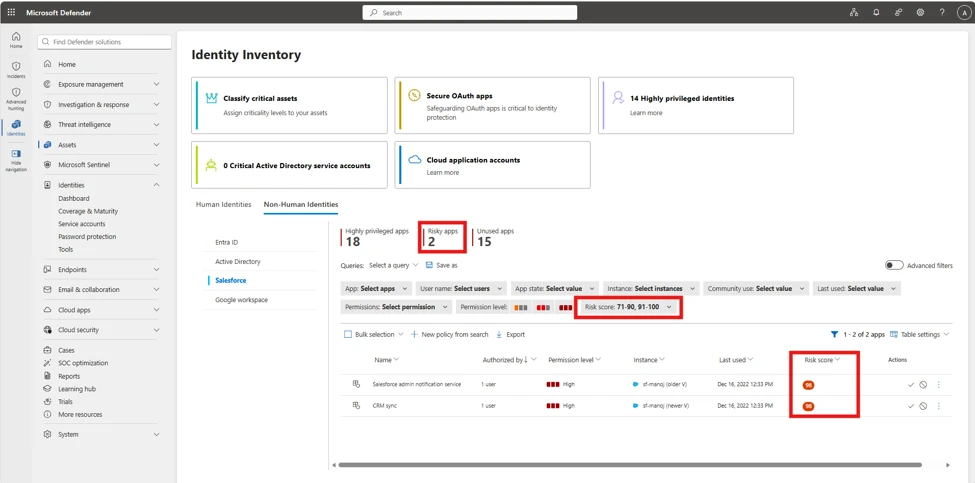
To further streamline investigation and response, Defender introduces a comprehensive risk scoring model for connected applications. Each application is assigned a numerical risk score [0-100] based on multiple risk indicators, such as usage patterns, permission sensitivity, and behavioral signals. This allows security teams to prioritize efforts effectively and focus on applications that require immediate attention. Security teams can create custom policies based on risk thresholds to trigger alerts, actions, and notifications.

Figure 5. Use actionable insights to identify apps exceeding a defined risk threshold.

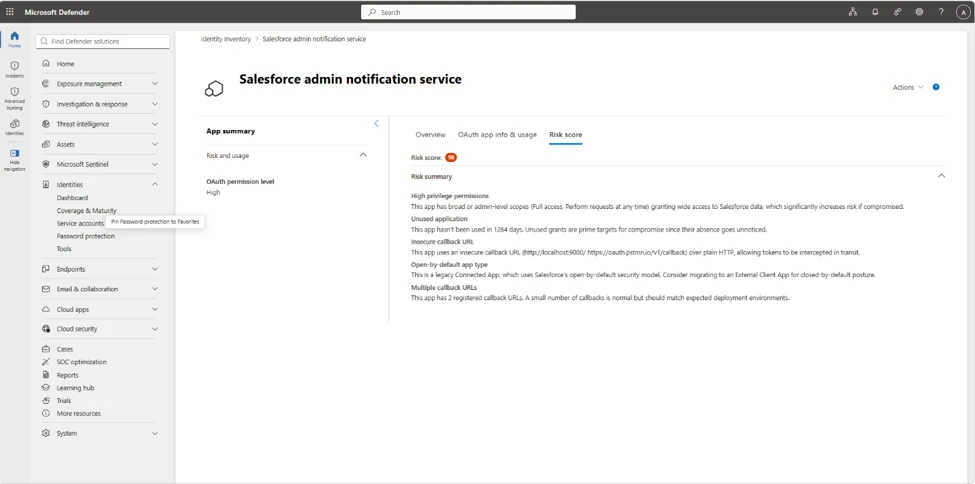
Risk score investigation

To further investigate the specific Non-Human identity risk details, the factors contributing to the risk score are available in Non-Human Identities Risk score tab.

Figure 6. Detailed risk insights explaining factors contributing to the risk score.

Mitigation and protection guidance

Microsoft recommends the following mitigations to reduce the impact of this threat. Check the recommendations card for the deployment status of monitored mitigations.  

Microsoft Defender detections

Microsoft Defender customers can refer to the list of applicable detections including new detections powered by the upgraded Microsoft Defender for Cloud Apps Salesforce connector. Microsoft Defender coordinates detection, prevention, investigation, and response for endpoints, identities, email, and apps to provide integrated protection against attacks like the threat discussed in this blog.

Customers with provisioned access can also use Microsoft Security Copilot in Microsoft Defender to investigate and respond to incidents, hunt for threats, and protect their organization with relevant threat intelligence.

Tactic Observed activity Microsoft Defender coverage 
Initial AccessA user’s Salesforce session was hijacked and usedSalesforce detected a possibly hijacked user session
Credential AccessA user was the target of credential stuffing activitySalesforce detected a successful credential stuffing attack
Lateral MovementA user with a very high risk score is signing into Salesforce via SSOSalesforce SSO sign-in by high-risk user
Collection / ExfiltrationAPI-heavy access, report export, and scraping patterns; potential multi-SaaS expansion depending on victim footprint.– Possible Salesforce scraping activity
– Salesforce detected a user performing anomalous API activity
– Salesforce detected a user performing anomalous report activity
Collection / ExfiltrationAnomalous behavior from Salesforce Connected Apps– Salesforce Connected App activity from a new IP address
– Salesforce Connected App activity involving new Salesforce entity
– Salesforce Connected App activity involving new endpoint(s)
Collection / ExfiltrationGuest user activity associated with the AuraInspector frameworkSuspicious Salesforce Aura Activity
Collection / ExfiltrationAnomalous behavior from a guest userSalesforce detected a guest user performing anomalous activity

Threat intelligence reports 

Microsoft customers can use the following reports in Microsoft products to get the most up-to-date information about the threat actor, malicious activity, and techniques discussed in this blog. These reports provide intelligence, protection information, and recommended actions to prevent, mitigate, or respond to associated threats found in customer Salesforce instances.

Advanced hunting

NOTE: The sample queries let you search one week of events. To inspect events and hunt for threat actor-related indicators over a longer period, go to the Advanced Hunting page > Query tab, and use the calendar dropdown to set the time range to Last 30 days (the maximum for raw data).

Hunt for Salesforce connected-app activity from suspicious infrastructure

CloudAppEvents
| where Application == "Salesforce"
| where ActionType in ("ApiTotalUsage", "API Event")
| extend ConnectedAppId = tostring(
    coalesce(
        RawEventData.CONNECTED_APP_ID, // from ApiTotalUsage 
        RawEventData.ConnectedAppId // from API Event
    )
)
| where isnotempty(ConnectedAppId)
| where array_length(UncommonForUser) > 0 // at least 1 attribute is flagged as uncommon

Hunt for API activity associated with connected apps and relevant user ids

CloudAppEvents
| where Application == "Salesforce"
| where ActionType in ("ApiTotalUsage", "API Event")
| extend SalesforceUserId=coalesce(tostring(RawEventData.USER_ID), tostring(RawEventData.UserId))
| extend ConnectedAppName=tostring(RawEventData.CONNECTED_APP_NAME)  // Connected App Name is not available on the ApiEvent event
| summarize count() by AccountObjectId, AccountId, AccountDisplayName, SalesforceUserId, IPAddress, UserAgent, ConnectedAppName

Hunt for anomalous report export / large data access

CloudAppEvents
| where Application == "Salesforce"
| where ActionType  == "ReportExport"
| extend SalesforceUserId = tostring(RawEventData.USER_ID)
| summarize Events=count() by AccountObjectId, AccountId, AccountName, SalesforceUserId, IPAddress, UserAgent

Pivot from a suspicious connected app (name/id) to impacted users and actions

CloudAppEvents
| where Application == "Salesforce"
| where RawEventData has ""
| project Timestamp, AccountId, AccountDisplayName, ActionType, IPAddress, UserAgent, RawEventData
| order by Timestamp desc

Audit queries to verify what objects users are accessing

CloudAppEvents
| where Application == "Salesforce"
| where ActionType == "UniqueQuery"
| extend 
    QueryText = tostring(RawEventData.QUERY_IDENTIFIER), // Full query text
    QueryObject = extract(@"(?i)\bfrom\s+([^\s]+)", 1, tostring(RawEventData.QUERY_IDENTIFIER)), // Extract just the target object
    SalesforceUserId = tostring(RawEventData.USER_ID)
| where QueryText != "SOQL"
| project Timestamp, AccountDisplayName, SalesforceUserId, QueryObject, QueryText

Hunt for users with very high Defender risk score signing into Salesforce

let VeryRiskyUsers = IdentityInfo
| where RiskScore >= 90
| distinct AccountObjectId
CloudAppEvents
| where Application == "Salesforce"
| where ActionType has "sso" or ActionType has "saml"
| where AccountObjectId in (VeryRiskyUsers)
| project Timestamp, AccountObjectId, AccountDisplayName, ActionType, UserAgent
| order by Timestamp desc

Indicators of compromise (IOC)

After further investigation, Microsoft has discovered that two of the reported IP addresses belong to a researcher conducting attack research. We have removed the IOCs from this report.

Indicator  Type  Description  
138.226.246.94 IP address Used by the Klue integration to call Salesforce API to perform CRM queries on June 11. Previously disclosed by Klue in their notification about the breach.
212.86.125.24 IP address 
213.111.148.90 IP address 
94.154.32.160 IP address 

MITRE ATT&CK techniques observed

Initial Access

  • T1566.004 Phishing: Voice Phishing: Impersonating IT support to get victims to grant access.
  • T1528 Steal Application Access Token: Using stolen OAuth tokens from Salesloft and Gainsight.

Persistence

  • T1671 Cloud Application Integration: Leveraging Connected Apps for access to a customer Salesforce environment.

Collection

  • T1213.004 Data from Information Repositories: Customer Relationship Management Software: Stealing data from a customer Salesforce environment.

Exfiltration

  • T1567 Exfiltration Over Web Service: Usage of the fake Data Loader application to steal data.

This research is provided by Microsoft Defender Security Research, Shruti Ranjit, Doug Cranston, Anand Deshpande, Ronen Rafaeli, and with contributions from members of Microsoft Threat Intelligence.

Learn more

For the latest security research from the Microsoft Threat Intelligence community, check out the Microsoft Threat Intelligence Blog.

To get notified about new publications and to join discussions on social media, follow us on LinkedIn, X (formerly Twitter), and Bluesky.

To hear stories and insights from the Microsoft Threat Intelligence community about the ever-evolving threat landscape, listen to the Microsoft Threat Intelligence podcast.

Review our documentation to learn more about our real-time protection capabilities and see how to enable them within your organization.   

The post Defending SaaS-based applications against ShinyHunters OAuth abuse appeared first on Microsoft Security Blog.
Eles estão lendo você como um livro: os truques favoritos dos golpistas | Blog oficial da Kaspersky

Infelizmente, não são apenas as pessoas ingênuas que caem em golpes e ataques de phishing. Hoje, literalmente qualquer pessoa pode se tornar uma vítima. Os criminosos virtuais passam anos aperfeiçoando suas táticas para aumentar suas chances de sucesso, recorrendo a sofisticadas técnicas de manipulação psicológica que, muitas vezes, são difíceis de perceber. No universo da cibersegurança, esse tipo de jogos psicológicos tem até um nome: engenharia social.

Neste artigo, explicamos os truques psicológicos que os golpistas usam para enganar suas vítimas, os sinais de alerta aos quais você deve ficar atento e exatamente o que fazer se perceber que está sendo manipulado.

As emoções usadas como armas pelos golpistas

A engenharia social funciona justamente porque desperta nossas emoções mais profundas. Quando uma vítima está ansiosa, apavorada ou envolvida emocionalmente em uma situação, tende a tomar decisões impulsivas, sem refletir sobre as consequências. E é exatamente nisso que os hackers apostam.

Por isso, em um momento de tensão, enquanto conversa por telefone ou troca mensagens com alguém que faz exigências, você precisa parar por um instante e se perguntar: “O que exatamente estou sentindo neste momento? O que eu estava sentindo há alguns instantes? Essa pessoa está tentando explorar meu estado emocional?”

Na maioria das vezes, os golpistas tentam explorar emoções como:

  • Medo e ansiedade
  • Entusiasmo
  • Vergonha e culpa
  • Surpresa e choque

Antes de tudo, confirme com quem você está realmente lidando

Antes mesmo de procurar sinais de alerta, verifique um aspecto fundamental: com quem você realmente está falando? Se você estiver conversando, por exemplo, com alguém que afirma ser um “representante do banco”, a melhor opção é pesquisar o número de telefone e o endereço de e-mail oficiais da instituição. Ligue para o banco ou envie uma mensagem para um endereço que você saiba ser 100% legítimo. É sempre melhor prevenir do que remediar.

Redobre a atenção se alguém entrar em contato com você por um aplicativo de mensagens ou pelas redes sociais. Em geral, grandes empresas simplesmente não utilizam esses canais para esse tipo de abordagem.

Sinais claros de que você está lidando com um golpista

Ele coloca você em uma verdadeira montanha-russa emocional

Imagine que você receba um e-mail da “equipe de suporte” de um serviço de streaming que utiliza. A mensagem informa que alguém acabou de tentar fazer login na sua conta de outro país: o suficiente para provocar um susto imediato. Logo em seguida, porém, vem o alívio: “Não se preocupe. Bloqueamos a tentativa de login suspeita a tempo. Sua conta está segura”.

Mas os golpistas não param por aí. No parágrafo seguinte, eles fazem você entrar novamente em estado de alerta: “Infelizmente, durante nossa verificação de segurança, descobrimos que suas informações de pagamento podem ter sido comprometidas”. Por fim, oferecem uma aparente solução: “Estamos prontos para ajudá-lo a resolver isso agora mesmo. Basta clicar neste link para verificar sua identidade”.

Ao final da leitura dessa suposta “atualização urgente”, você passou por uma sucessão de emoções em poucos instantes. O objetivo dessa montanha-russa emocional é desestabilizar você para que deixe de pensar de forma crítica e passe simplesmente a reagir. E, no momento em que o golpista apresenta uma suposta solução para o problema, sua capacidade de julgamento fica seriamente comprometida.

Eles sabem um pouco demais sobre você

Os golpistas costumam bombardear deliberadamente suas vítimas com informações pessoais para dar a impressão de que realmente sabem do que estão falando e têm acesso legítimo aos seus dados confidenciais.

O simples fato da pessoa do outro lado conhecer detalhes sobre sua identidade, suas finanças ou seus contratos não significa que ela seja confiável. Graças aos inúmeros vazamentos de dados já ocorridos, existe um enorme volume de informações pessoais disponível sobre praticamente todos nós. Para um hacker, pode ser surpreendentemente fácil descobrir quanto você gastou com entregas de supermercado no ano passado, qual é a sua operadora de telefonia móvel ou qual endereço de e-mail está vinculado à sua conta bancária.

Eles tentam intimidar você, às vezes, com ameaças e extorsão

Provavelmente, a forma mais fácil de desestabilizar alguém é provocar medo ou aumentar seu nível de ansiedade. Quando promessas boas demais para serem verdade deixam de funcionar, os criminosos virtuais recorrem a táticas de intimidação: “Sua conta foi comprometida”, “Você será acusado de sonegação fiscal, a menos que forneça a frase-semente da sua carteira de criptomoedas”, “Você perderá o acesso aos nossos serviços se não entrar em contato conosco imediatamente” ou “Seu nome foi incluído no cadastro de criminosos sexuais. Entre em contato para resolver essa situação; caso contrário, apresentaremos uma denúncia e divulgaremos suas informações para a imprensa”. E esses são apenas alguns exemplos.

Em alguns casos, essas mensagens podem parecer completamente neutras e reproduzir com perfeição um e-mail legítimo da equipe de suporte. No entanto, se o tom for excessivamente dramático e você sentir que está sendo pressionado, há cerca de 99,9% de chance de estar diante de um golpista. E, se a pessoa exigir que você tome alguma providência, como transferir dinheiro para uma conta aleatória ou fornecer informações confidenciais, sob ameaça de violência física, exposição pública ou processo criminal, essa probabilidade sobe para 100%.

Para saber mais sobre o funcionamento desse tipo de golpe, leia nossa postagem sobre Extorsão por e-mail: como os golpistas usam a chantagem.

Uma “pessoa muito importante” está entrando em contato com você

Para aumentar ainda mais sua ansiedade, os golpistas costumam assinar suas mensagens com o nome de autoridades de alto escalão. Quando isso acontecer, pare por um instante e pergunte a si mesmo: você realmente acredita que o chefe da Receita Federal ou o comandante da polícia local entraria em contato diretamente com você por telefone ou mensagem? Autoridades e investigadores de alto escalão normalmente têm questões muito mais importantes para tratar. E, se você receber uma mensagem acusando-o de um crime grave, supostamente assinada pelo procurador-geral da sua cidade, esse é um forte indício de que se trata de um golpe.

Você recebeu uma oferta boa demais para ser verdade

Desconfie de demonstrações inesperadas de generosidade ou de presentes que simplesmente aparecem do nada. Veja uma pequena lista do que pode acontecer com você:

  • Você recebe um pacote inesperado com um código QR impresso na caixa. Informam que basta escaneá-lo para descobrir quem enviou o presente, resgatar um cupom do vendedor ou confirmar a entrega para evitar uma taxa de frete. Não é difícil imaginar que o código QR, na verdade, levará para um site de phishing. A partir daí, é a vez dos golpistas brilharem: eles podem tentar roubar os dados do seu cartão, convencê-lo a baixar um aplicativo com malware ou induzi-lo a informar um código de verificação do seu aplicativo bancário.
  • “Olá! Estou ligando da central de entregas. Você tem um pacote (ou um buquê de flores) a caminho. Poderia informar o código de verificação que acabamos de enviar por SMS para que possamos liberar seu presente?”. Veja, todo mundo gosta de receber um presente surpresa. Mas, no entusiasmo do momento, é fácil baixar a guarda e acidentalmente dar aos golpistas um presente ainda maior: o código de acesso à sua conta de serviços governamentais.
  • Você teve muita sorte! Diversas celebridades anunciam um sorteio gratuito de NFTs que promete render uma fortuna. Para resgatar seu novo criptoativo, você abre um miniaplicativo, insere seus dados e pronto: sua conta do Telegram desaparece. E, pensando bem, aqueles perfis de celebridades que divulgavam o sorteio realmente pareciam um pouco estranhos…

Eles pressionam você e tentam isolá-lo do mundo exterior

“Não desligue! Esta é sua última chance de recuperar o acesso à sua conta.”, “Se você não responder a este e-mail em até oito horas, tomaremos medidas judiciais contra você.”, “Vá imediatamente ao banco para proteger o dinheiro que ainda resta na sua conta e transfira-o para uma conta segura.” Se frases como essas forem usadas para levar você a agir imediatamente, pare um segundo. Os golpistas estão apenas tentando assustá-lo e criar uma falsa sensação de urgência.

Essa é uma tática clássica. Imagine receber uma ligação de um golpista que se apresenta como representante do banco ou até mesmo um funcionário do Departamento de Comércio, alegando que suas contas bancárias foram invadidas. Em seguida, essa pessoa pede que você assine um acordo de confidencialidade, supostamente para facilitar a recuperação do seu dinheiro, e ameaça processá-lo caso você conte o que está acontecendo a qualquer pessoa, inclusive aos seus familiares mais próximos. Ela insistirá que o caso é “muito sério”, exige providências imediatas e que a cooperação com as autoridades “deve permanecer em absoluto sigilo”.

Lembre-se: representantes legítimos de empresas ou autoridades governamentais jamais pediriam que você mantivesse segredo, a menos que você lide com dados governamentais sigilosos ou tenha assinado um acordo de confidencialidade (NDA) corporativo formal. Os golpistas procuram isolar suas vítimas de qualquer rede de apoio, voz da razão ou opinião externa. E eles não apenas afastam você das pessoas: também impedem seu acesso à informação. Eles fazem questão de mantê-lo em uma ligação contínua ou enviam uma sequência de mensagens carregadas de apelo emocional para que você não tenha sequer alguns segundos para respirar, muito menos para pesquisar o assunto na internet.

Quando você está em um estado de ansiedade intensa, torna-se muito mais fácil cair nessas manipulações e tomar decisões precipitadas, mesmo quando acha que está apenas tentando resolver o problema. Nunca tenha receio de pedir ajuda. Buscar uma segunda opinião sobre o que está acontecendo é sempre uma atitude sensata.

Eles tentam fazer você se sentir culpado

Imagine que você receba uma notificação informando que sua conta foi comprometida, juntamente com uma solicitação para entrar em contato com o suporte. Durante o atendimento, porém, o suposto “representante do suporte” começa a fazer perguntas para despertar um sentimento de culpa: “Quando foi a última vez que você trocou sua senha? Faz muito tempo? Você não viu nossos avisos urgentes para atualizar suas credenciais?”. Ou então: “Veja bem, a mensagem de texto dizia claramente para não compartilhar esse código com ninguém! Por que você o informou?”. Essa é uma tática deliberada para fisgá-lo com um sentimento de culpa, fazendo com que você sinta que perdeu o controle e precisa da experiência e da ajuda do golpista.

Mesmo que você realmente tenha cometido um erro, não se culpe. Cair em uma armadilha desse tipo é muito mais fácil do que parece. Basta um dia particularmente estressante no trabalho e uma ligação chegando exatamente no pior momento possível.

De repente, você recebe um alerta dizendo que estava conversando com golpistas

Os golpistas adoram aplicar golpes complexos, com várias etapas. Por exemplo, primeiro eles podem tentar convencer você a fornecer o código de acesso do seu aplicativo bancário sob o pretexto de atualizar as informações da sua conta. Mas, de repente, a ligação cai ou você recebe, em seguida, uma mensagem dizendo que acabou de conversar com um golpista, que sua conta foi comprometida e que, para sua própria segurança, é necessário entrar em contato com o suporte imediatamente. Em alguns casos, pessoas que se apresentam como “agentes federais” ou “autoridades policiais” entram em cena para participar da conversa.

O problema é que essa suposta “equipe de segurança” faz parte exatamente da mesma quadrilha que está aplicando o golpe. Eles começam a insistir que todo o seu dinheiro está prestes a cair nas mãos de criminosos, a menos que você o transfira para uma “conta segura”, ou dizem que empréstimos já foram contratados em seu nome.

Não entre em contato com números ou endereços de e-mail desconhecidos enviados em mensagens, mesmo que prometam ajudá-lo. Procure o site oficial da empresa ou do órgão, localize os canais oficiais de atendimento e utilize apenas esses meios de contato.

Lembre-se: nenhum órgão governamental (e muito menos uma empresa privada) monitora suas ligações para verificar se você está conversando com golpistas. Sua melhor defesa contra golpistas telefônicos é um aplicativo de identificação de chamadas com um vasto banco de dados que avisa se a chamada é suspeita antes mesmo de você atender.

O que fazer se você caiu em um golpe

Antes de qualquer coisa: não se culpe. Qualquer pessoa pode ser pega de surpresa e acabar sendo enganada em um momento de vulnerabilidade. Tente não entrar em pânico e lembre-se exatamente de quais informações você forneceu. As providências a tomar dependem disso:

  • Você informou um código de verificação enviado por SMS ou a senha de uma conta → Altere imediatamente sua senha para esse serviço, bem como para quaisquer outras contas onde você a tenha reutilizado. Ative a autenticação de dois fatores, caso ainda não tenha feito isso.
  • Você forneceu os dados do seu cartão → Entre em contato imediatamente com o banco e solicite o bloqueio do cartão. Se já houve um débito ou transferência não autorizada, pergunte como contestar a transação.
  • Você clicou em um link suspeito ou baixou um arquivo de um remetente desconhecido → Faça uma verificação do dispositivo com um antivírus confiável. Tentar descobrir por conta própria se o dispositivo foi infectado por malware é praticamente impossível, pois essas ameaças costumam permanecer ocultas, sem apresentar sinais evidentes.

Não dê ouvidos aos golpistas

Veja algumas medidas que ajudam a proteger suas contas, seus dados e seu dinheiro:

  • Não tenha pressa. Se alguém estiver pressionando você para agir imediatamente (informar dados, fornecer um código ou enviar dinheiro), há uma grande chance de você estar falando com um criminoso virtual. Pare por um momento, ligue para a empresa usando o telefone oficial disponível no site e confirme se realmente há alguma solicitação.
  • Deixe a proteção por conta do Kaspersky Premium. Ao contrário de uma pessoa, nosso pacote de segurança, com Machine Learning e IA, é totalmente imparcial e identifica e-mails de phishing e arquivos maliciosos justamente nos momentos em que um usuário pode ter dúvidas ou hesitar. Ele bloqueia o acesso a sites suspeitos, impede tentativas de infecção do dispositivo, neutraliza malwares detectados e ajuda a manter seus dados e seu dinheiro protegidos.
  • Ative a autenticação de dois fatores nas contas mais importantes. Com o Kaspersky Password Manager, você pode gerar códigos de login de uso único que mudam a cada 30 segundos, tornando-os muito mais difíceis de serem interceptados por golpistas do que códigos enviados por e-mail ou mensagem de texto.
  • Se está cansado de verificar constantemente quem está ligando, obtenha um aplicativo de identificação de chamadas com um banco de dados extenso. Ele avisa você instantaneamente se quem está do outro lado da linha é um golpista ou operador de telemarketing.
  • Siga uma regra de ouro: nunca reutilize uma senha. Se você usa a mesma senha em vários serviços, basta que um hacker descubra a senha de uma conta para obter acesso automático a todas as outras. Pequenas variações, como “Senha123” e “Senha1234!”, também não são suficientes, pois são extremamente fáceis de adivinhar. É claro que memorizar dezenas ou até centenas de senhas diferentes está longe de ser uma tarefa simples. É justamente por isso que um gerenciador de senhas é tão útil: ele armazena seus dados com segurança em um cofre criptografado e gera senhas fortes e exclusivas.

Confira também nossas outras postagens para obter mais dicas de segurança:

❌