Cloudflare’s AI Security for Apps detects and mitigates threats to AI-powered applications. Today, we're announcing that it is generally available.
We’re shipping with new capabilities like detection for custom topics, and we're making AI endpoint discovery free for every Cloudflare customer—including those on Free, Pro, and Business plans—to give everyone visibility into where AI is deployed across their Internet-facing apps.
We're also announcing an expanded collaboration with IBM, which has chosen Cloudflare to deliver AI security to its cloud customers. And we’re partnering with Wiz to give mutual customers a unified view of their AI security posture.
A new kind of attack surface
Traditional web applications have defined operations: check a bank balance, make a transfer. You can write deterministic rules to secure those interactions.
AI-powered applications and agents are different. They accept natural language and generate unpredictable responses. There's no fixed set of operations to allow or deny, because the inputs and outputs are probabilistic. Attackers can manipulate large language models to take unauthorized actions or leak sensitive data. Prompt injection, sensitive information disclosure, and unbounded consumption are just a few of the risks cataloged in the OWASP Top 10 for LLM Applications.
These risks escalate as AI applications become agents. When an AI gains access to tool calls—processing refunds, modifying accounts, providing discounts, or accessing customer data—a single malicious prompt becomes an immediate security incident.
Customers tell us what they’re up against. "Most of Newfold Digital's teams are putting in their own Generative AI safeguards, but everybody is innovating so quickly that there are inevitably going to be some gaps eventually,” says Rick Radinger, Principal Systems Architect at Newfold Digital, which operates Bluehost, HostGator, and Domain.com.
What AI Security for Apps does
We built AI Security for Apps to address this. It sits in front of your AI-powered applications, whether you're using a third-party model or hosting your own, as part of Cloudflare's reverse proxy. It helps you (1) discover AI-powered apps across your web property, (2) detect malicious or off-policy behavior to those endpoints, and (3) mitigate threats via the familiar WAF rule builder.
Discovery — now free for everyone
Before you can protect your LLM-powered applications, you need to know where they're being used. We often hear from security teams who don’t have a complete picture of AI deployments across their apps, especially as the LLM market evolves and developers swap out models and providers.
AI Security for Apps automatically identifies LLM-powered endpoints across your web properties, regardless of where they’re hosted or what the model is. Starting today, this capability is free for every Cloudflare customer, including Free, Pro, and Business plans.
Cloudflare’s dashboard page of web assets, showing 2 example endpoints labelled as cf-llm
Discovering these endpoints automatically requires more than matching common path patterns like /chat/completions. Many AI-powered applications don't have a chat interface: think product search, property valuation tools, or recommendation engines. We built a detection system that looks at how endpoints behave, not what they're called. To confidently identify AI-powered endpoints, sufficient valid traffic is required.
AI-powered endpoints that have been discovered will be visible under Security → Web Assets, labeled as cf-llm. For customers on a Free plan, endpoint discovery is initiated when you first navigate to the Discovery page. For customers on a paid plan, discovery occurs automatically in the background on a recurring basis. If your AI-powered endpoints have been discovered, you can review them immediately.
Detection
AI Security for Apps detections follow the always-on approach for traffic to your AI-powered endpoints. Each prompt is run through multiple detection modules for prompt injection, PII exposure, and sensitive or toxic topics. The results—whether the prompt was malicious or not—are attached as metadata you can use in custom WAF rules to enforce your policies. We are continuously exploring ways to leverage our global network, which sees traffic from roughly 20% of the web, to identify new attack patterns across millions of sites before they reach yours.
New in GA: Custom topics detection
The product ships with built-in detection for common threats: prompt injections, PII extraction, and toxic topics. But every business has its own definition of what's off-limits. A financial services company might need to detect discussions of specific securities. A healthcare company might need to flag conversations that touch on patient data. A retailer might want to know when customers are asking about competitor products.
The new custom topics feature lets you define these categories. You specify the topic, we inspect the prompt and output a relevance score that you can use to log, block, or handle however you decide. Our goal is to build an extensible tool that flexes to your use cases.
Prompt relevance score inside of AI Security for Apps
New in GA: Custom prompt extraction
AI Security for Apps enforces guardrails before unsafe prompts can reach your infrastructure. To run detections accurately and provide real-time protection, we first need to identify the prompt within the request payload. Prompts can live anywhere in a request body, and different LLM providers structure their APIs differently. OpenAI and most providers use $.messages[*].content for chat completions. Anthropic's batch API nests prompts inside $.requests[*].params.messages[*].content. Your custom property valuation tool might use $.property_description.
Out of the box, we support the standard formats used by OpenAI, Anthropic, Google Gemini, Mistral, Cohere, xAI, DeepSeek, and others. When we can't match a known pattern, we apply a default-secure posture and run detection on the entire request body. This can introduce false positives when the payload contains fields that are sensitive but don't feed directly to an AI model, for example, a $.customer_name field alongside the actual prompt might trigger PII detection unnecessarily.
Soon, you'll be able to define your own JSONPath expressions to tell us exactly where to find the prompt. This will reduce false positives and lead to more accurate detections. We're also building a prompt-learning capability that will automatically adapt to your application's structure over time.
Mitigation
Once a threat is identified and scored, you can block it, log it, or deliver custom responses, using the same WAF rules engine you already use for the rest of your application security. The power of Cloudflare’s shared platform is that you can combine AI-specific signals with everything else we know about a request, represented by hundreds of fields available in the WAF. A prompt injection attempt is suspicious. A prompt injection attempt from an IP that’s been probing your login page, using a browser fingerprint associated with previous attacks, and rotating through a botnet is a different story. Point solutions that only see the AI layer can’t make these connections.
This unified security layer is exactly what they need at Newfold Digital to discover, label, and protect AI endpoints, says Radinger: “We look forward to using it across all these projects to serve as a fail-safe."
Growing ecosystem
AI Security for Applications will also be available through Cloudflare's growing ecosystem, including through integration with IBM Cloud. Through IBM Cloud Internet Services (CIS), end users can already procure advanced application security solutions and manage them directly through their IBM Cloud account.
We're also partnering with Wiz to connect AI Security for Applications with Wiz AI Security, giving mutual customers a unified view of their AI security posture, from model and agent discovery in the cloud to application-layer guardrails at the edge.
How to get started
AI Security for Apps is available now for Cloudflare’s Enterprise customers. Contact your account team to get started, or see the product in action with a self-guided tour.
If you're on a Free, Pro, or Business plan, you can use AI endpoint discovery today. Log in to your dashboard and navigate to Security → Web Assets to see which endpoints we've identified. Keep an eye out — we plan to make all AI Security for Apps capabilities available for customers on all plans soon.
A few weeks ago, we wrote about Project Glasswing and what we observed when we pointed cyber frontier models at our own code. Since then, we’ve seen that the part of the post that has resonated most deeply is the argument that the architecture around the vulnerability matters more than the speed of the patch.
In the conversations we've had with CISOs and security teams since, the questions have been consistent: what does our architecture actually look like, what should we monitor for, where do we start, and how can Cloudflare help?
Before getting into the details: the architecture below is built almost entirely from Cloudflare's own products, because Cloudflare security is customer zero for the security products we build. The Cloudflare stack already exists in front of our code, employees, and customer-facing applications. If you're a Cloudflare customer, every layer below is available to you today. If you're not, the principles still apply to whatever stack you've built.
What a cyber frontier model actually changes
In the previous post, we showed how a cyber frontier model like Mythos changes the attacker’s timeline. It can find vulnerabilities, reason through exploit chains, and generate working proofs faster than earlier models. While models like Mythos do not change the shape of an intrusion — reconnaissance, initial access, lateral movement, persistence, and exfiltration still have to happen — the difference is in the speed and scale. When pointed at the open web, a model can find and hit low-hanging fruit quickly. Against a hardened target, it still has to probe, and adapt, and it often produces more noise than a careful human operator would.
Discovery, exploit chain construction, and proof-of-concept generation used to be the gating constraints on producing a working attack. A frontier model handles all three in a fraction of the time. Work that used to be slow and methodical is now fast and indiscriminate.
While AI is accelerating how fast developer teams at Cloudflare and many other companies can ship code, the security team’s work has not compressed the same way. An attacker only needs one opening to get in, while security teams need to find and close them all. Writing a fix, regressing it, and shipping it without breaking the code around it has constraints that AI doesn't remove. We learned this the hard way when we let an AI coding assistant write its own patches against our own bugs, as we described at the end of the previous post. Some of those patches fixed the original bug while quietly breaking something else the code depended on.
As these models become more competent and capable, our main focus from a threat standpoint comes down to three things. Each one shapes the architecture we walk through in the rest of this post.
The first is the speed of discovery. Frontier models make it easier to search large bodies of public code, including the open-source libraries that many companies depend on. That does not mean every bug in a library is exploitable, or that library bugs are where most vulnerabilities live. Exploitability still depends on how the code is used, whether attacker-controlled input can reach the vulnerable path, and the protections that sit around it. But widely used open-source libraries and frameworks give attackers a shared surface to study at scale. When a real, reachable vulnerability exists there, a model can help find it, reason about possible exploit paths, and generate proof-of-concept variants faster than maintainers and defenders can review every downstream use. The gap between when an attacker discovers a vulnerability and when defenders learn it exists is what worries us most. If you are not running these models against your own code, it is safe to assume someone else is.
The second is exploitvolume and adaptation. A model can produce thousands of variations of a single exploit and run reconnaissance at the same scale. All that volume gives an attacker an advantage, but it won’t necessarily get them past signature-based detections. Many of those iterations will have the same underlying signature, so a rule that catches the first one will catch the rest. Adaptation is how they will get past signature-based detections. Ask a model to show you a SQL injection, and it will return a textbook example. Tell it there is a WAF in the way, and it will start probing, learning what gets blocked, and rewriting the payload until it can slip past the rule blocking it.
The third is the impact when a vulnerability is inevitably exploited. No architecture catches everything. After the vulnerability is exploited, the question we ask ourselves is: where can the attacker get to with one identity, one path, or one credential, before something else stops them? If the answer is "anywhere they want," the vulnerability was never the problem. The architecture around the vulnerability was.
Cloudflare’s superpower: visibility
We see roughly a fifth of the web and that tells us, in real time, which payloads are mutating, which patterns are picking up, and where attacker tooling is moving next. Two teams turn that visibility into defense.
First is Cloudforce One, our threat intelligence, research, and operations team, which sits within the Cloudflare security organization. They turn what we see across the network into insights the rest of the stack can act on: tracked adversaries, emerging campaigns, and indicators of compromise (IOCs). The hard part of this work was never knowing what is malicious — it was the delay in mitigation. Knowledge of a new threat normally has to travel from a threat report, into a feed, and then into a company’s defense before it can be used to block anything. Attackers have learned to move faster than that. Our network closes that gap: Cloudflare customers can now use Cloudforce One threat intelligence directly within the WAF to block high-risk traffic.
Second is the team that owns the WAF engine that does the actual detecting: the managed rulesets that run in front of our own properties and are available to every Cloudflare customer, the machine learning behind WAF Attack Score, and the relationships that sometimes let us ship a rule before a CVE is publicly disclosed. The team is globally distributed and moves fast, releasing rules within hours of a proof-of-concept of an attack becoming known. Once a detection is deployed, it reaches our entire network, along with every Cloudflare customer, in under 30 seconds. React2Shell is a recent example: a managed WAF rule was protecting our own properties, and everyone else's on Cloudflare, hours before the official advisory was published.
The scoring layer, the defenses we put in front of the application, and the containment around the vulnerability all build on what these two teams see.
Scores over signatures
Signature-based defenses were built for a world where novel exploits were scarce and variations took weeks. Cloudflare's traditional SLA from a fresh proof-of-concept to a live, deployed rule has been 12 hours. With the advent of frontier models, this is not good enough anymore. Detections need to be in place before a CVE is discovered. This is why we layer ML-based detection in front of the traditional signature-based WAF.
The model is trained on a large body of past attack traffic, and it catches new variants of vulnerabilities before they're publicly known. A novel SQL injection or remote code execution chain is almost always a rearrangement of attack shapes the model has seen before, even when the specific exploit is brand new. We run the model on every request and assign a WAF Attack Score between 1 and 99, based on how closely the request resembles those underlying shapes, not against a list of known-bad signatures. The lower the score, the more aggressively we treat the request. That score determines whether we let the request through. We apply a similar scoring methodology to AI prompts with AI Security for Apps: rather than check each prompt against a list of known malicious prompts, we score how closely a prompt resembles an actual attack.
The architecture around the vulnerability
Those capabilities only matter once they're stacked in front of an application, and the first layer in our defense-in-depth approach is the WAF. Anything that matches a known-bad pattern gets dropped before it reaches the application, which clears the bulk of the obvious traffic and lets the more specialized layers below focus on what's left.
On the API surface, we run a positive security model through API Shield. Instead of trying to anticipate every bad request, we describe what a valid request to each API looks like, either from the API's own definition or learned from our real traffic, and anything that doesn't fit doesn't get through. This neutralizes the advantage of frontier AI models: because we only permit validated traffic, generating thousands of new attack variations fails to bypass the system.
Cloudflare’s layered architecture
Bot Management catches probing traffic on our network before frontier models can build a map. It scores every request on how likely it is to be automated, using the same signals across our whole network: how the client behaves, whether it looks like a real browser, and whether the connection matches a known-bad pattern. An attack only lands if it can find a soft spot.
Zero Trust Network Access is used for every internal application. The implicit trust of being inside the network is replaced with explicit per-request identity and policy for every employee accessing every tool. The value of this was clear when one of our engineers shipped a misconfigured tool. A flat network would have exposed everything on the same segment, but in our deployment, the exposure stopped at the tool itself. We built Require Access Protection afterwards so newly deployed or misconfigured applications can't be reachable before an access policy is in place.
IdP Federation makes that secure by default posture easier to keep consistent across every Cloudflare account — which becomes even more necessary when more people are shipping internal tools quickly. Instead of asking each team to wire up SSO separately, we configure our identity provider (IdP) once and share it across the organization. New accounts get SSO automatically, recipient-side IdP connections are read-only, and Access policies in each account still evaluate the resulting identity as part of the normal request flow.
MCP Server Portal gives teams a controlled way to connect AI agents to enterprise systems. Agents access MCP servers that are centrally managed through a single portal, with every action logged. That way when an agent acts on someone's behalf, we know what it did, what it touched, and whether it should have been allowed to. The full picture of how we built it is in our post on enterprise MCP.
AI Gateway runs in front of our internal AI tools the same way AI Security for Apps runs in front of customer-facing AI features, with the same scoring and the same visibility. Inside the company, the visibility piece is more useful than the blocking, because we needed to see what engineers were actually building before we could write meaningful policy on it.
Where your teams can start
Frontier models can help attackers find vulnerabilities, adapt payloads, and move faster, but they still have to pass through the layered defense you deploy in front of your application. That is where teams should start:
Put inspection in front of public applications.
Define what valid API traffic looks like.
Use bot detection to limit automated probing.
Require identity and access policy before any internal tool is reachable.
For AI and agentic systems:
Route model traffic through a gateway.
Keep agents connected through approved MCP servers.
Log what they do.
The goal is to make sure that when one layer misses, the next layer limits what the attacker can see, reach, or change.
That is the point of the architecture around the vulnerability: to limit the scope of an attack. The vulnerability may be what starts the attack, but the architecture determines how far it can go.
How do we know this approach works?
Plenty of security stacks look impenetrable on a whiteboard but fall over in practice. That is why we test ours continuously, both at the perimeter and inside our environment, with our red team involved across both.
At the perimeter, frontier models are one tool we use to test our application security stack as an adaptive attacker. These models sit alongside the rest of our red team and detection workflows including: manual testing, threat intelligence, observed traffic patterns, proof-of-concept analysis, and signals from our own network. Together, those inputs help us decide where to aim testing: newly launched products, recently changed surfaces, and the paths an attacker is most likely to probe first. The most important part is the process that follows. When something gets through, we identify the gap, use the right mix of tools to understand it, write the rule or mitigation, ship the update, and test again to make sure the gap is closed.
Inside the environment, our red team starts from the assumption that the perimeter has already failed. They look at what has changed, where sensitive systems carry risk, and whether one compromised identity, path, or credential can reach farther than it should. When we change the architecture based on what they find, they run the scenario again against the new version to confirm the gap is actually closed.
We confirm that this architecture is working by continuously testing its behavior during failures, rather than relying on the perfection of individual layers.
Cloudflare’s Threat Events provides security analysts with a window into the global threat landscape. The platform offers a peek into the immense traffic that Cloudflare processes every day, so you can see in real time which IPs are attacking specific industries or which threat actors are trending globally. However, translating that visibility into active mitigation has often been a manual, reactive process.
Security teams have faced a recurring frustration: knowing that certain IP addresses were associated with specific threat actors (like Tycoon 2FA or RaccoonO365) or had been seen targeting their specific industry in other regions, but they couldn't easily automate the blocking of these high-risk IPs within their own WAF unless they manually configured the rules.
We are excited to announce a new integration that brings Cloudflare’s vast threat intelligence directly into your WAF engine: you can now write proactive rules using live intelligence data. This means you can add more intelligence context to protect your application against known bad actors — before they even attempt to touch your infrastructure.
By populating specialized fields during the early stages of a request, the WAF can now screen traffic based on:
Who is attacking by matching specific threat actor names
Who they are targeting via the industry or country filters to see who the IP has targeted in the past
What type of attack using enriched threat context, filtering by attack type (DDoS, WAF, cybercrime, etc.) and the timeframe it was last seen
Always-on detection
This new capability is built on the samealways-on detection framework we recently introduced for Attack Signature Detection, a system that identifies common attack patterns in real time without requiring pre-configured rules. By separating detection from mitigation, we ensure that threat intelligence is constantly running in the background, enriching your HTTP request analytics with insightful threat metadata before you even decide to take an action.
The primary advantage of an "always-on" model is the elimination of the traditional "log vs. block" trade-off: visibility in log mode, or protection in block mode. That’s because when a rule blocks a request, you lose visibility into how other signatures would have assessed it — insight that could have helped you strengthen your defenses.
If you have a Cloudforce One subscription, these insights appear in your analytics automatically. You can see which threat actors are hitting your site and which industries those IPs usually target, allowing you to verify traffic patterns before "flipping the switch" to block.
These detections execute with negligible latency, ensuring your performance remains lightning-fast while providing the high-confidence data needed to build robust security policies. While this initial release focuses on IP-based matching, we are already looking toward extending these capabilities to JA3 fingerprints and domain-based matching. This will allow you to block malicious traffic even when attackers rotate IPs, by identifying the unique software signatures or malicious destination links they use in their payloads.
New WAF fields
To make this possible, we've exposed the following specific signals directly to the WAF engine:
Example rule expressions
Because a single IP address could be associated with multiple threat actors or targeted industries simultaneously, these fields are represented as arrays. We use the any() function and [*] wildcard to check whether any value within that threat profile matches your criteria:
Block known DDoS participants targeting your region: any(cf.intel.ip.target_countries[*] == "FR") and any(cf.intel.ip.datasets[*] == "ddos")
Protect against specific threat actors targeting the Finance sector: any(cf.intel.ip.target_industries[*] == "Banking & Financial Services") and any(cf.intel.ip.attacker_names[*] == "BLACKBASTA")
Broad protection against specific high-risk origin countries: any(cf.intel.ip.attacker_countries[*] == "IR")
How to use Threat Events data in your workflows
Whether you prefer a UI-driven approach or Infrastructure as Code, these fields are integrated into your existing workflows.
The WAF rule builder (API & Terraform)
For teams that prefer Infrastructure as Code, the new cf.intel fields are fully integrated into the WAF rule builder for WAF custom rules and rate limiting. You can write complex expressions using the same syntax you use today. Because these are standard WAF fields, they are fully supported via the Cloudflare API and Terraform, allowing you to automate threat blocking across your selected domains or even on your whole account.
New fields added to the WAF rule builder to allow users to choose the relevant configuration based on the Threat Events indicators.
Visibility in Security Analytics
Deployment is only half the battle. All matches triggered by these threat intelligence fields are logged in Security Analytics. You can drill down into your traffic to see exactly which rule was triggered and which specific indicator matched. These enriched logs allow for faster auditing and postmortem analysis when a rule triggers.
Threat event matches surface in Security Analytics, with full context and a one-click option to create a custom security rule.
One-click rule from the Threat Events dashboard
If you are already using the Threat Intelligence Dashboard to investigate trends, you don't have to copy and paste IP lists. You can create Saved Views based on your specific filters, such as "IPs seen attacking the Financial sector in the last seven days." With a single click, you can export these filters directly into a WAF rule.
Saved Views now allow users to easily create WAF rules to match the saved view configuration.
Global intelligence across our network
Visibility and ease of use are only possible if the underlying engine is fast. How do we handle millions of threat indicators without slowing down your traffic?
These threat intelligence datasets are compressed into a high-performance format and distributed to every single Cloudflare data center globally. When a request hits our network, the Cloudflare WAF performs an O(1) constant-time lookup against these local datasets. This ensures that whether we are checking against ten indicators or ten million, the latency overhead remains effectively zero (measured in microseconds).
Because an IP can be associated with multiple threat vectors, our engine doesn't stop at the first match. It evaluates the set of all signals associated with that IP simultaneously. This ensures that a rule looking for "Attacker = RU" AND "Target Industry = Banking" will trigger correctly by evaluating the intersection of these attributes in a single pass, providing maximum coverage against multi-vector actors without increasing computational complexity.
Cloudforce One Essentials allows customers to access the default datasets in Threat Events, search for indicators, and conduct threat-hunting investigations
Cloudforce One Advantage allows customers to access our Threat Intelligence Analyst custom insights via requests for information
Cloudforce One Elite — our most complete package — includes brand protection, a high number of requests for information, and access to all Threat Events datasets
Ready to turn global insights into local defense? Head over to Threat Events or the WAF section of your Cloudflare Dashboard to start building your first Threat Intel rule, or contact your account team to learn more about subscribing to Cloudforce One.
Cloudflare’s AI Security for Apps detects and mitigates threats to AI-powered applications. Today, we're announcing that it is generally available.
We’re shipping with new capabilities like detection for custom topics, and we're making AI endpoint discovery free for every Cloudflare customer—including those on Free, Pro, and Business plans—to give everyone visibility into where AI is deployed across their Internet-facing apps.
We're also announcing an expanded collaboration with IBM, which has chosen Cloudflare to deliver AI security to its cloud customers. And we’re partnering with Wiz to give mutual customers a unified view of their AI security posture.
A new kind of attack surface
Traditional web applications have defined operations: check a bank balance, make a transfer. You can write deterministic rules to secure those interactions.
AI-powered applications and agents are different. They accept natural language and generate unpredictable responses. There's no fixed set of operations to allow or deny, because the inputs and outputs are probabilistic. Attackers can manipulate large language models to take unauthorized actions or leak sensitive data. Prompt injection, sensitive information disclosure, and unbounded consumption are just a few of the risks cataloged in the OWASP Top 10 for LLM Applications.
These risks escalate as AI applications become agents. When an AI gains access to tool calls—processing refunds, modifying accounts, providing discounts, or accessing customer data—a single malicious prompt becomes an immediate security incident.
Customers tell us what they’re up against. "Most of Newfold Digital's teams are putting in their own Generative AI safeguards, but everybody is innovating so quickly that there are inevitably going to be some gaps eventually,” says Rick Radinger, Principal Systems Architect at Newfold Digital, which operates Bluehost, HostGator, and Domain.com.
What AI Security for Apps does
We built AI Security for Apps to address this. It sits in front of your AI-powered applications, whether you're using a third-party model or hosting your own, as part of Cloudflare's reverse proxy. It helps you (1) discover AI-powered apps across your web property, (2) detect malicious or off-policy behavior to those endpoints, and (3) mitigate threats via the familiar WAF rule builder.
Discovery — now free for everyone
Before you can protect your LLM-powered applications, you need to know where they're being used. We often hear from security teams who don’t have a complete picture of AI deployments across their apps, especially as the LLM market evolves and developers swap out models and providers.
AI Security for Apps automatically identifies LLM-powered endpoints across your web properties, regardless of where they’re hosted or what the model is. Starting today, this capability is free for every Cloudflare customer, including Free, Pro, and Business plans.
Cloudflare’s dashboard page of web assets, showing 2 example endpoints labelled as cf-llm
Discovering these endpoints automatically requires more than matching common path patterns like /chat/completions. Many AI-powered applications don't have a chat interface: think product search, property valuation tools, or recommendation engines. We built a detection system that looks at how endpoints behave, not what they're called. To confidently identify AI-powered endpoints, sufficient valid traffic is required.
AI-powered endpoints that have been discovered will be visible under Security → Web Assets, labeled as cf-llm. For customers on a Free plan, endpoint discovery is initiated when you first navigate to the Discovery page. For customers on a paid plan, discovery occurs automatically in the background on a recurring basis. If your AI-powered endpoints have been discovered, you can review them immediately.
Detection
AI Security for Apps detections follow the always-on approach for traffic to your AI-powered endpoints. Each prompt is run through multiple detection modules for prompt injection, PII exposure, and sensitive or toxic topics. The results—whether the prompt was malicious or not—are attached as metadata you can use in custom WAF rules to enforce your policies. We are continuously exploring ways to leverage our global network, which sees traffic from roughly 20% of the web, to identify new attack patterns across millions of sites before they reach yours.
New in GA: Custom topics detection
The product ships with built-in detection for common threats: prompt injections, PII extraction, and toxic topics. But every business has its own definition of what's off-limits. A financial services company might need to detect discussions of specific securities. A healthcare company might need to flag conversations that touch on patient data. A retailer might want to know when customers are asking about competitor products.
The new custom topics feature lets you define these categories. You specify the topic, we inspect the prompt and output a relevance score that you can use to log, block, or handle however you decide. Our goal is to build an extensible tool that flexes to your use cases.
Prompt relevance score inside of AI Security for Apps
New in GA: Custom prompt extraction
AI Security for Apps enforces guardrails before unsafe prompts can reach your infrastructure. To run detections accurately and provide real-time protection, we first need to identify the prompt within the request payload. Prompts can live anywhere in a request body, and different LLM providers structure their APIs differently. OpenAI and most providers use $.messages[*].content for chat completions. Anthropic's batch API nests prompts inside $.requests[*].params.messages[*].content. Your custom property valuation tool might use $.property_description.
Out of the box, we support the standard formats used by OpenAI, Anthropic, Google Gemini, Mistral, Cohere, xAI, DeepSeek, and others. When we can't match a known pattern, we apply a default-secure posture and run detection on the entire request body. This can introduce false positives when the payload contains fields that are sensitive but don't feed directly to an AI model, for example, a $.customer_name field alongside the actual prompt might trigger PII detection unnecessarily.
Soon, you'll be able to define your own JSONPath expressions to tell us exactly where to find the prompt. This will reduce false positives and lead to more accurate detections. We're also building a prompt-learning capability that will automatically adapt to your application's structure over time.
Mitigation
Once a threat is identified and scored, you can block it, log it, or deliver custom responses, using the same WAF rules engine you already use for the rest of your application security. The power of Cloudflare’s shared platform is that you can combine AI-specific signals with everything else we know about a request, represented by hundreds of fields available in the WAF. A prompt injection attempt is suspicious. A prompt injection attempt from an IP that’s been probing your login page, using a browser fingerprint associated with previous attacks, and rotating through a botnet is a different story. Point solutions that only see the AI layer can’t make these connections.
This unified security layer is exactly what they need at Newfold Digital to discover, label, and protect AI endpoints, says Radinger: “We look forward to using it across all these projects to serve as a fail-safe."
Growing ecosystem
AI Security for Applications will also be available through Cloudflare's growing ecosystem, including through integration with IBM Cloud. Through IBM Cloud Internet Services (CIS), end users can already procure advanced application security solutions and manage them directly through their IBM Cloud account.
We're also partnering with Wiz to connect AI Security for Applications with Wiz AI Security, giving mutual customers a unified view of their AI security posture, from model and agent discovery in the cloud to application-layer guardrails at the edge.
How to get started
AI Security for Apps is available now for Cloudflare’s Enterprise customers. Contact your account team to get started, or see the product in action with a self-guided tour.
If you're on a Free, Pro, or Business plan, you can use AI endpoint discovery today. Log in to your dashboard and navigate to Security → Web Assets to see which endpoints we've identified. Keep an eye out — we plan to make all AI Security for Apps capabilities available for customers on all plans soon.
On October 13, 2025, security researchers from FearsOff identified and reported a vulnerability in Cloudflare's ACME (Automatic Certificate Management Environment) validation logic that disabled some of the WAF features on specific ACME-related paths. The vulnerability was reported and validated through Cloudflare’s bug bounty program.
The vulnerability was rooted in how our edge network processed requests destined for the ACME HTTP-01 challenge path (/.well-known/acme-challenge/*).
Here, we’ll briefly explain how this protocol works and the action we took to address the vulnerability.
Cloudflare has patched this vulnerability and there is no action necessary for Cloudflare customers. There is no evidence of any malicious actor abusing this vulnerability.
How ACME works to validate certificates
ACME is a protocol used to automate the issuance, renewal, and revocation of SSL/TLS certificates. When an HTTP-01 challenge is used to validate domain ownership, a Certificate Authority (CA) will expect to find a validation token at the HTTP path following the format of http://{customer domain}/.well-known/acme-challenge/{token value}.
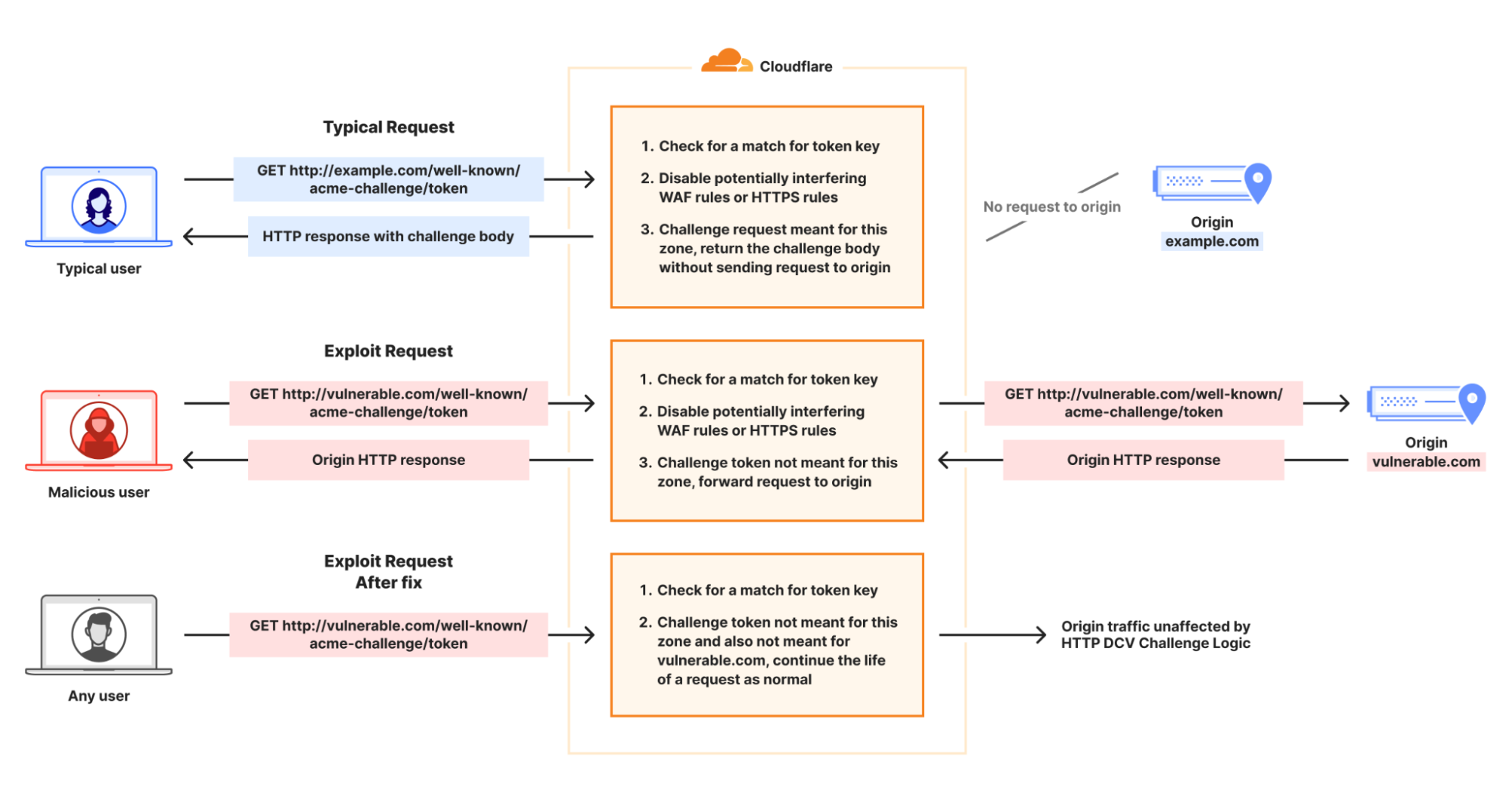
If this challenge is used by a certificate order managed by Cloudflare, then Cloudflare will respond on this path and provide the token provided by the CA to the caller. If the token provided does not correlate to a Cloudflare managed order, then this request would be passed on to the customer origin, since they may be attempting to complete domain validation as a part of some other system. Check out the flow below for more details — other use cases are discussed later in the blog post.
The underlying logic flaw
Certain requests to /.well-known/acme-challenge/* would cause the logic serving ACME challenge tokens to disable WAF features on a challenge request, and allow the challenge request to continue to the origin when it should have been blocked.
Previously, when Cloudflare was serving a HTTP-01 challenge token, if the path requested by the caller matched a token for an active challenge in our system, the logic serving an ACME challenge token would disable WAF features, since Cloudflare would be directly serving the response. This is done because those features can interfere with the CA’s ability to validate the token values and would cause failures with automated certificate orders and renewals.
However, in the scenario that the token used was associated with a different zone and not directly managed by Cloudflare, the request would be allowed to proceed onto the customer origin without further processing by WAF rulesets.
How we mitigated this vulnerability
To mitigate this issue, a code change was released. This code change only allows the set of security features to be disabled in the event that the request matches a valid ACME HTTP-01 challenge token for the hostname. In that case, Cloudflare has a challenge response to serve back.
Cloudflare customers are protected
As we noted above, Cloudflare has patched this vulnerability and Cloudflare customers do not need to take any action. In addition, there is no evidence of any malicious actor abusing this vulnerability.
Moving quickly with vulnerability transparency
As always, we thank the external researchers for responsibly disclosing this vulnerability. We encourage the Cloudflare community to submit any identified vulnerabilities to help us continually improve the security posture of our products and platform.
We also recognize that the trust you place in us is paramount to the success of your infrastructure on Cloudflare. We consider these vulnerabilities with the utmost concern and will continue to do everything in our power to mitigate impact. We deeply appreciate your continued trust in our platform and remain committed not only to prioritizing security in all we do, but also acting swiftly and transparently whenever an issue does arise.
IP addresses have historically been treated as stable identifiers for non-routing purposes such as for geolocation and security operations. Many operational and security mechanisms, such as blocklists, rate-limiting, and anomaly detection, rely on the assumption that a single IP address represents a cohesive, accountableentity or even, possibly, a specific user or device.
But the structure of the Internet has changed, and those assumptions can no longer be made. Today, a single IPv4 address may represent hundreds or even thousands of users due to widespread use of Carrier-Grade Network Address Translation (CGNAT), VPNs, and proxymiddleboxes. This concentration of traffic can result in significant collateral damage – especially to users in developing regions of the world – when security mechanisms are applied without taking into account the multi-user nature of IPs.
This blog post presents our approach to detecting large-scale IP sharing globally. We describe how we build reliable training data, and how detection can help avoid unintentional bias affecting users in regions where IP sharing is most prevalent. Arguably it's those regional variations that motivate our efforts more than any other.
Why this matters: Potential socioeconomic bias
Our work was initially motivated by a simple observation: CGNAT is a likely unseen source of bias on the Internet. Those biases would be more pronounced wherever there are more users and few addresses, such as in developing regions. And these biases can have profound implications for user experience, network operations, and digital equity.
The reasons are understandable for many reasons, not least because of necessity. Countries in the developing world often have significantly fewer available IPs, and more users. The disparity is a historical artifact of how the Internet grew: the largest blocks of IPv4 addresses were allocated decades ago, primarily to organizations in North America and Europe, leaving a much smaller pool for regions where Internet adoption expanded later.
To visualize the IPv4 allocation gap, we plot country-level ratios of users to IP addresses in the figure below. We take online user estimates from the World Bank Group and the number of IP addresses in a country from Regional Internet Registry (RIR) records. The colour-coded map that emerges shows that the usage of each IP address is more concentrated in regions that generally have poor Internet penetration. For example, large portions of Africa and South Asia appear with the highest user-to-IP ratios. Conversely, the lowest user-to-IP ratios appear in Australia, Canada, Europe, and the USA — the very countries that otherwise have the highest Internet user penetration numbers.
The scarcity of IPv4 address space means that regional differences can only worsen as Internet penetration rates increase. A natural consequence of increased demand in developing regions is that ISPs would rely even more heavily on CGNAT, and is compounded by the fact that CGNAT is common in mobile networks that users in developing regions so heavily depend on. All of this means that actions known to be based on IP reputation or behaviour would disproportionately affect developing economies.
Cloudflare is a global network in a global Internet. We are sharing our methodology so that others might benefit from our experience and help to mitigate unintended effects. First, let’s better understand CGNAT.
When one IP address serves multiple users
Large-scale IP address sharing is primarily achieved through two distinct methods. The first, and more familiar, involves services like VPNs and proxies. These tools emerge from a need to secure corporate networks or improve users' privacy, but can be used to circumvent censorship or even improve performance. Their deployment also tends to concentrate traffic from many users onto a small set of exit IPs. Typically, individuals are aware they are using such a service, whether for personal use or as part of a corporate network.
Separately, another form of large-scale IP sharing often goes unnoticed by users: Carrier-Grade NAT (CGNAT). One way to explain CGNAT is to start with a much smaller version of network address translation (NAT) that very likely exists in your home broadband router, formally called a Customer Premises Equipment (or CPE), which translates unseen private addresses in the home to visible and routable addresses in the ISP. Once traffic leaves the home, an ISP may add an additional enterprise-level address translation that causes many households or unrelated devices to appear behind a single IP address.
The crucial difference between large-scale IP sharing is user choice: carrier-grade address sharing is not a user choice, but is configured directly by Internet Service Providers (ISPs) within their access networks. Users are not aware that CGNATs are in use.
The primary driver for this technology, understandably, is the exhaustion of the IPv4 address space. IPv4's 32-bit architecture supports only 4.3 billion unique addresses — a capacity that, while once seemingly vast, has been completely outpaced by the Internet's explosive growth. By the early 2010s, Regional Internet Registries (RIRs) had depleted their pools of unallocated IPv4 addresses. This left ISPs unable to easily acquire new address blocks, forcing them to maximize the use of their existing allocations.
While the long-term solution is the transition to IPv6, CGNAT emerged as the immediate, practical workaround. Instead of assigning a unique public IP address to each customer, ISPs use CGNAT to place multiple subscribers behind a single, shared IP address. This practice solves the problem of IP address scarcity. Since translated addresses are not publicly routable, CGNATs have also had the positive side effect of protecting many home devices that might be vulnerable to compromise.
CGNATs also create significant operational fallout stemming from the fact that hundreds or even thousands of clients can appear to originate from a single IP address. This means an IP-based security system may inadvertently block or throttle large groups of users as a result of a single user behind the CGNAT engaging in malicious activity.
This isn't a new or niche issue. It has been recognized for years by the Internet Engineering Task Force (IETF), the organization that develops the core technical standards for the Internet. These standards, known as Requests for Comments (RFCs), act as the official blueprints for how the Internet should operate. RFC 6269, for example, discusses the challenges of IP address sharing, while RFC 7021 examines the impact of CGNAT on network applications. Both explain that traditional abuse-mitigation techniques, such as blocklisting or rate-limiting, assume a one-to-one relationship between IP addresses and users: when malicious activity is detected, the offending IP address can be blocked to prevent further abuse.
In shared IPv4 environments, such as those using CGNAT or other address-sharing techniques, this assumption breaks down because multiple subscribers can appear under the same public IP. Blocking the shared IP therefore penalizes many innocent users along with the abuser. In 2015 Ofcom, the UK's telecommunications regulator, reiterated these concerns in a report on the implications of CGNAT where they noted that, “In the event that an IPv4 address is blocked or blacklisted as a source of spam, the impact on a CGNAT would be greater, potentially affecting an entire subscriber base.”
While the hope was that CGNAT was only a temporary solution until the eventual switch to IPv6, as the old proverb says, nothing is more permanent than a temporary solution. While IPv6 deployment continues to lag, CGNAT deployments have become increasingly common, and so do the related problems.
CGNAT detection at Cloudflare
To enable a fairer treatment of users behind CGNAT IPs by security techniques that rely on IP reputation, our goal is to identify large-scale IP sharing. This allows traffic filtering to be better calibrated and collateral damage minimized. Additionally, we want to distinguish CGNAT IPs from other large-scale sharing (LSS) IP technologies, such as VPNs and proxies, because we may need to take different approaches to different kinds of IP-sharing technologies.
To do this, we decided to take advantage of Cloudflare’s extensive view of the active IP clients, and build a supervised learning classifier that would distinguish CGNAT and VPN/proxy IPs from IPs that are allocated to a single subscriber (non-LSS IPs), based on behavioural characteristics. The figure below shows an overview of our supervised classifier:
While our classification approach is straightforward, a significant challenge is the lack of a reliable, comprehensive, and labeled dataset of CGNAT IPs for our training dataset.
Detecting CGNAT using public data sources
Detection begins by building an initial dataset of IPs believed to be associated with CGNAT. Cloudflare has vast HTTP and traffic logs. Unfortunately there is no signal or label in any request to indicate what is or is not a CGNAT.
To build an extensive labelled dataset to train our ML classifier, we employ a combination of network measurement techniques, as described below. We rely on public data sources to help disambiguate an initial set of large-scale shared IP addresses from others in Cloudflare’s logs.
Distributed Traceroutes
The presence of a client behind CGNAT can often be inferred through traceroute analysis. CGNAT requires ISPs to insert a NAT step that typically uses the Shared Address Space (RFC 6598) after the customer premises equipment (CPE). By running a traceroute from the client to its own public IP and examining the hop sequence, the appearance of an address within 100.64.0.0/10 between the first private hop (e.g., 192.168.1.1) and the public IP is a strong indicator of CGNAT.
Traceroute can also reveal multi-level NAT, which CGNAT requires, as shown in the diagram below. If the ISP assigns the CPE a private RFC 1918 address that appears right after the local hop, this indicates at least two NAT layers. While ISPs sometimes use private addresses internally without CGNAT, observing private or shared ranges immediately downstream combined with multiple hops before the public IP strongly suggests CGNAT or equivalent multi-layer NAT.
Although traceroute accuracy depends on router configurations, detecting private and shared IP ranges is a reliable way to identify large-scale IP sharing. We apply this method to distributed traceroutes from over 9,000 RIPE Atlas probes to classify hosts as behind CGNAT, single-layer NAT, or no NAT.
Scraping WHOIS and PTR records
Many operators encode metadata about their IPs in the corresponding reverse DNS pointer (PTR) record that can signal administrative attributes and geographic information. We first query the DNS for PTR records for the full IPv4 space and then filter for a set of known keywords from the responses that indicate a CGNAT deployment. For example, each of the following three records matches a keyword (cgnat, cgn or lsn) used to detect CGNAT address space:
WHOIS and Internet Routing Registry (IRR) records may also contain organizational names, remarks, or allocation details that reveal whether a block is used for CGNAT pools or residential assignments.
Given that both PTR and WHOIS records may be manually maintained and therefore may be stale, we try to sanitize the extracted data by validating the fact that the corresponding ISPs indeed use CGNAT based on customer and market reports.
Collecting VPN and proxy IPs
Compiling a list of VPN and proxy IPs is more straightforward, as we can directly find such IPs in public service directories for anonymizers. We also subscribe to multiple VPN providers, and we collect the IPs allocated to our clients by connecting to a unique HTTP endpoint under our control.
Modeling CGNAT with machine learning
By combining the above techniques, we accumulated a dataset of labeled IPs for more than 200K CGNAT IPs, 180K VPNs & proxies and close to 900K IPs allocated that are not LSS IPs. These were the entry points to modeling with machine learning.
Feature selection
Our hypothesis was that aggregated activity from CGNAT IPs is distinguishable from activity generated from other non-CGNAT IP addresses. Our feature extraction is an evaluation of that hypothesis — since networks do not disclose CGNAT and other uses of IPs, the quality of our inference is strictly dependent on our confidence in the training data. We claim the key discriminator is diversity, not just volume. For example, VM-hosted scanners may generate high numbers of requests, but with low information diversity. Similarly, globally routable CPEs may have individually unique characteristics, but with volumes that are less likely to be caught at lower sampling rates.
In our feature extraction, we parse a 1% sampled HTTP requests log for distinguishing features of IPs compiled in our reference set, and the same features for the corresponding /24 prefix (namely IPs with the same first 24 bits in common). We analyse the features for each of the VPNs, proxies, CGNAT, or non LSS IP. We find that features from the following broad categories are key discriminators for the different types of IPs in our training dataset:
Client-side signals: We analyze the aggregate properties of clients connecting from an IP. A large, diverse user base (like on a CGNAT) naturally presents a much wider statistical variety of client behaviors and connection parameters than a single-tenant server or a small business proxy.
Network and transport-level behaviors: We examine traffic at the network and transport layers. The way a large-scale network appliance (like a CGNAT) manages and routes connections often leaves subtle, measurable artifacts in its traffic patterns, such as in port allocation and observed network timing.
Traffic volume and destination diversity: We also model the volume and "shape" of the traffic. An IP representing thousands of independent users will, on average, generate a higher volume of requests and target a much wider, less correlated set of destinations than an IP representing a single user.
Crucially, to distinguish CGNAT from VPNs and proxies (which is absolutely necessary for calibrated security filtering), we had to aggregate these features at two different scopes: per-IP and per /24 prefixes. CGNAT IPs are typically allocated large blocks of IPs, whereas VPNs IPs are more scattered across different IP prefixes.
Classification results
We compute the above features from HTTP logs over 24-hour intervals to increase data volume and reduce noise due to DHCP IP reallocation. The dataset is split into 70% training and 30% testing sets with disjoint /24 prefixes, and VPN and proxy labels are merged due to their similarity and lower operational importance compared to CGNAT detection.
Then we train a multi-class XGBoost model with class weighting to address imbalance, assigning each IP to the class with the highest predicted probability. XGBoost is well-suited for this task because it efficiently handles large feature sets, offers strong regularization to prevent overfitting, and delivers high accuracy with limited parameter tuning. The classifier achieves 0.98 accuracy, 0.97 weighted F1, and 0.04 log loss. The figure below shows the confusion matrix of the classification.
Our model is accurate for all three labels. The errors observed are mainly misclassifications of VPN/proxy IPs as CGNATs, mostly for VPN/proxy IPs that are within a /24 prefix that is also shared by broadband users outside of the proxy service. We also evaluate the prediction accuracy using k-fold cross validation, which provides a more reliable estimate of performance by training and validating on multiple data splits, reducing variance and overfitting compared to a single train–test split. We select 10 folds and we evaluate the Area Under the ROC Curve (AUC) and the multi-class logloss. We achieve a macro-average AUC of 0.9946 (σ=0.0069) and log loss of 0.0429 (σ=0.0115). Prefix-level features are the most important contributors to classification performance.
Users behind CGNAT are more likely to be rate limited
The figure below shows the daily number of CGNAT IP inferences generated by our CDN-deployed detection service between December 17, 2024 and January 9, 2025. The number of inferences remains largely stable, with noticeable dips during weekends and holidays such as Christmas and New Year’s Day. This pattern reflects expected seasonal variations, as lower traffic volumes during these periods lead to fewer active IP ranges and reduced request activity.
Next, recall that actions that rely on IP reputation or behaviour may be unduly influenced by CGNATs. One such example is bot detection. In an evaluation of our systems, we find that bot detection is resilient to those biases. However, we also learned that customers are more likely to rate limit IPs that we find are CGNATs.
We analyze bot labels by analyzing how often requests from CGNAT and non-CGNAT IPs are labeled as bots. Cloudflare assigns a bot score to each HTTP request using CatBoost models trained on various request features, and these scores are then exposed through the Web Application Firewall (WAF), allowing customers to apply filtering rules. The median bot rate is nearly identical for CGNAT (4.8%) and non-CGNAT (4.7%) IPs. However, the mean bot rate is notably lower for CGNATs (7%) than for non-CGNATs (13.1%), indicating different underlying distributions. Non-CGNAT IPs show a much wider spread, with some reaching 100% bot rates, while CGNAT IPs cluster mostly below 15%. This suggests that non-CGNAT IPs tend to be dominated by either human or bot activity, whereas CGNAT IPs reflect mixed behavior from many end users, with human traffic prevailing.
Interestingly, despite bot scores that indicate traffic is more likely to be from human users, CGNAT IPs are subject to rate limiting three times more often than non-CGNAT IPs. This is likely because multiple users share the same public IP, increasing the chances that legitimate traffic gets caught by customers’ bot mitigation and firewall rules.
This tells us that users behind CGNAT IPs are indeed susceptible to collateral effects, and identifying those IPs allows us to tune mitigation strategies to disrupt malicious traffic quickly while reducing collateral impact on benign users behind the same address.
A global view of the CGNAT ecosystem
One of the early motivations of this work was to understand if our knowledge about IP addresses might hide a bias along socio-economic boundaries—and in particular if an action on an IP address may disproportionately affect populations in developing nations, often referred to as the Global South. Identifying where different IPs exist is a necessary first step.
The map below shows the fraction of a country’s inferred CGNAT IPs over all IPs observed in the country. Regions with a greater reliance on CGNAT appear darker on the map. This view highlights the geodiversity of CGNATs in terms of importance; for example, much of Africa and Central and Southeast Asia rely on CGNATs.
As further evidence of continental differences, the boxplot below shows the distribution of distinct user agents per IP across /24 prefixes inferred to be part of a CGNAT deployment in each continent.
Notably, Africa has a much higher ratio of user agents to IP addresses than other regions, suggesting more clients share the same IP in African ASNs. So, not only do African ISPs rely more extensively on CGNAT, but the number of clients behind each CGNAT IP is higher.
While the deployment rate of CGNAT per country is consistent with the users-per-IP ratio per country, it is not sufficient by itself to confirm deployment. The scatterplot below shows the number of users (according to APNIC user estimates) and the number of IPs per ASN for ASNs where we detect CGNAT. ASNs that have fewer available IP addresses than their user base appear below the diagonal. Interestingly the scatterplot indicates that many ASNs with more addresses than users still choose to deploy CGNAT. Presumably, these ASNs provide additional services beyond broadband, preventing them from dedicating their entire address pool to subscribers.
What this means for everyday Internet users
Accurate detection of CGNAT IPs is crucial for minimizing collateral effects in network operations and for ensuring fair and effective application of security measures. Our findings underscore the potential socio-economic and geographical variations in the use of CGNATs, revealing significant disparities in how IP addresses are shared across different regions.
At Cloudflare we are going beyond just using these insights to evaluate policies and practices. We are using the detection systems to improve our systems across our application security suite of features, and working with customers to understand how they might use these insights to improve the protections they configure.
Our work is ongoing and we’ll share details as we go. In the meantime, if you’re an ISP or network operator that operates CGNAT and want to help, get in touch at ask-research@cloudflare.com. Sharing knowledge and working together helps make better and equitable user experience for subscribers, while preserving web service safety and security.
Security teams are racing to secure a new attack surface: AI-powered applications. From chatbots to search assistants, LLMs are already shaping customer experience, but they also open the door to new risks. A single malicious prompt can exfiltrate sensitive data, poison a model, or inject toxic content into customer-facing interactions, undermining user trust. Without guardrails, even the best-trained model can be turned against the business.
Today, as part of AI Week, we’re expanding our AI security offerings by introducing unsafe content moderation, now integrated directly into Cloudflare Firewall for AI. Built with Llama, this new feature allows customers to leverage their existing Firewall for AI engine for unified detection, analytics, and topic enforcement, providing real-time protection for Large Language Models (LLMs) at the network level. Now with just a few clicks, security and application teams can detect and block harmful prompts or topics at the edge — eliminating the need to modify application code or infrastructure.
This feature is immediately available to current Firewall for AI users. Those not yet onboarded can contact their account team to participate in the beta program.
AI protection in application security
Cloudflare's Firewall for AI protects user-facing LLM applications from abuse and data leaks, addressing several of the OWASP Top 10 LLM risks such as prompt injection, PII disclosure, and unbound consumption. It also extends protection to other risks such as unsafe or harmful content.
Unlike built-in controls that vary between model providers, Firewall for AI is model-agnostic. It sits in front of any model you choose, whether it’s from a third party like OpenAI or Gemini, one you run in-house, or a custom model you have built, and applies the same consistent protections.
Just like our origin-agnostic Application Security suite, Firewall for AI enforces policies at scale across all your models, creating a unified security layer. That means you can define guardrails once and apply them everywhere. For example, a financial services company might require its LLM to only respond to finance-related questions, while blocking prompts about unrelated or sensitive topics, enforced consistently across every model in use.
Unsafe content moderation protects businesses and users
Effective AI moderation is more than blocking “bad words”, it’s about setting boundaries that protect users, meeting legal obligations, and preserving brand integrity, without over-moderating in ways that silence important voices.
Because LLMs cannot be fully scripted, their interactions are inherently unpredictable. This flexibility enables rich user experiences but also opens the door to abuse.
Key risks from unsafe prompts include misinformation, biased or offensive content, and model poisoning, where repeated harmful prompts degrade the quality and safety of future outputs. Blocking these prompts aligns with the OWASP Top 10 for LLMs, preventing both immediate misuse and long-term degradation.
One example of this isMicrosoft’s Tay chatbot. Trolls deliberately submitted toxic, racist, and offensive prompts, which Tay quickly began repeating. The failure was not only in Tay’s responses; it was in the lack of moderation on the inputs it accepted.
Detecting unsafe prompts before reaching the model
Cloudflare has integrated Llama Guard directly into Firewall for AI. This brings AI input moderation into the same rules engine our customers already use to protect their applications. It uses the same approach that we created for developers building with AI in our AI Gateway product.
Llama Guard analyzes prompts in real time and flags them across multiple safety categories, including hate, violence, sexual content, criminal planning, self-harm, and more.
With this integration, Firewall for AI not only discovers LLM traffic endpoints automatically, but also enables security and AI teams to take immediate action. Unsafe prompts can be blocked before they reach the model, while flagged content can be logged or reviewed for oversight and tuning. Content safety checks can also be combined with other Application Security protections, such as Bot Managementand Rate Limiting, to create layered defenses when protecting your model.
The result is a single, edge-native policy layer that enforces guardrails before unsafe prompts ever reach your infrastructure — without needing complex integrations.
How it works under the hood
Before diving into the architecture of Firewall for AI engine and how it fits within our previously mentioned module to detect PII in the prompts, let’s start with how we detect unsafe topics.
Detection of unsafe topics
A key challenge in building safety guardrails is balancing a good detection with model helpfulness. If detection is too broad, it can prevent a model from answering legitimate user questions, hurting its utility. This is especially difficult for topic detection because of the ambiguity and dynamic nature of human language, where context is fundamental to meaning.
Simple approaches like keyword blocklists are interesting for precise subjects — but insufficient. They are easily bypassed and fail to understand the context in which words are used, leading to poor recall. Older probabilistic models such as Latent Dirichlet Allocation (LDA) were an improvement, but did not properly account for word ordering and other contextual nuances.
Recent advancements in LLMs introduced a new paradigm. Their ability to perform zero-shot or few-shot classification is uniquely suited for the task of topic detection. For this reason, we chose Llama Guard 3, an open-source model based on the Llama architecture that is specifically fine-tuned for content safety classification. When it analyzes a prompt, it answers whether the text is safe or unsafe, and provides a specific category. We are showing the default categories, as listed here. Because Llama 3 has a fixed knowledge cutoff, certain categories — like defamation or elections — are time-sensitive. As a result, the model may not fully capture events or context that emerged after it was trained, and that’s important to keep in mind when relying on it.
For now, we cover the 13 default categories. We plan to expand coverage in the future, leveraging the model’s zero-shot capabilities.
A scalable architecture for future detections
We designed Firewall for AI to scale without adding noticeable latency, including Llama Guard, and this remains true even as we add new detection models.
To achieve this, we built a new asynchronous architecture. When a request is sent to an application protected by Firewall for AI, a Cloudflare Worker makes parallel, non-blocking requests to our different detection modules — one for PII, one for unsafe topics, and others as we add them.
Thanks to the Cloudflare network, this design scales to handle high request volumes out of the box, and latency does not increase as we add new detections. It will only be bounded by the slowest model used.
We optimize to keep the model utility at its maximum while keeping the guardrail detection broad enough.
Llama Guard is a rather large model, so running it at scale with minimal latency is a challenge. We deploy it on Workers AI, leveraging our large fleet of high performance GPUs. This infrastructure ensures we can offer fast, reliable inference throughout our network.
To ensure the system remains fast and reliable as adoption grows, we ran extensive load tests simulating the requests per second (RPS) we anticipate, using a wide range of prompt sizes to prepare for real-world traffic. To handle this, the number of model instances deployed on our network scales automatically with the load. We employ concurrency to minimize latency and optimize for hardware utilization. We also enforce a hard 2-second threshold for each analysis; if this time limit is reached, we fall back to any detections already completed, ensuring your application's requests latency is never further impacted.
From detection to security rules enforcement
Firewall for AI follows the same familiar pattern as other Application Security features like Bot Management and WAF Attack Score, making it easy to adopt.
Once enabled, the new fields appear in Security Analytics and expanded logs. From there, you can filter by unsafe topics, track trends over time, and drill into the results of individual requests to see all detection outcomes, for example: did we detect unsafe topics, and what are the categories. The request body itself (the prompt text) is not stored or exposed; only the results of the analysis are logged.
After reviewing the analytics, you can enforce unsafe topic moderation by creating rules to log or block based on prompt categories in Custom rules.
For example, you might log prompts flagged as sexual content or hate speech for review.
You can use this expression:
If (any(cf.llm.prompt.unsafe_topic_categories[*] in {"S10" "S12"})) then Log
Or deploy the rule with the categories field in the dashboard as in the below screenshot.
You can also take a broader approach by blocking all unsafe prompts outright:
If (cf.llm.prompt.unsafe_topic_detected)then Block
These rules are applied automatically to all discovered HTTP requests containing prompts, ensuring guardrails are enforced consistently across your AI traffic.
What’s Next
In the coming weeks, Firewall for AI will expand to detect prompt injection and jailbreak attempts. We are also exploring how to add more visibility in the analytics and logs, so teams can better validate detection results. A major part of our roadmap is adding model response handling, giving you control over not only what goes into the LLM but also what comes out. Additional abuse controls, such as rate limiting on tokens and support for more safety categories, are also on the way.
Firewall for AI is available in beta today. If you’re new to Cloudflare and want to explore how to implement these AI protections, reach out for a consultation. If you’re already with Cloudflare, contact your account team to get access and start testing with real traffic.
Cloudflare is also opening up a user research program focused on AI security. If you are curious about previews of new functionality or want to help shape our roadmap, express your interest here.

 Entrar