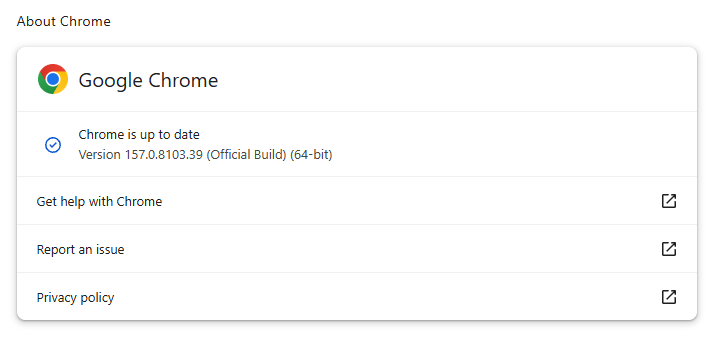
On November 3, Google issued Chrome 157 to the stable channel for Windows, Mac and Linux. The update is rolling out over the coming days and weeks.
Most users are on Chrome’s Stable channel. The desktop update brings Chrome to versions 157.0.8103.38/.39 for Windows and Mac and 157.0.8103.38 for Linux. It includes 213 security fixes, including seven vulnerabilities rated Critical by Google.
Chrome for Android was also updated to 157.0.8103.38. It will become available on Google Play over the coming days.
How to update Chrome
The easiest option is to allow Chrome to update automatically. But you can end up lagging behind on updates if you never close your browser or if something goes wrong, such as an extension preventing the update.
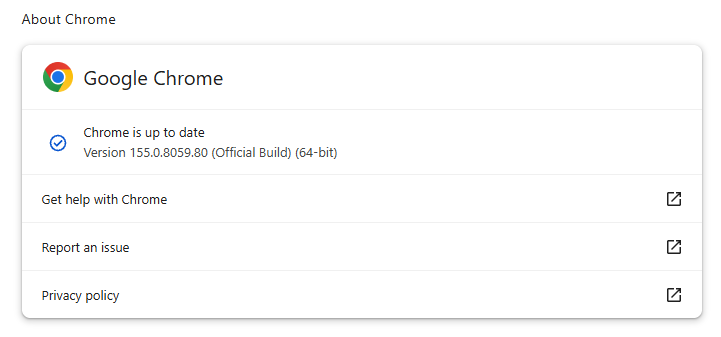
If you don’t want to wait for the rollout to reach you, you can update manually. Open About Google Chrome from Chrome’s settings or Help menu. Chrome will check for updates. If one is available, click Relaunch to apply it.
Google rates seven vulnerabilities in the update as Critical. One, a memory corruption flaw in ANGLE, affects Chrome for Android. It could potentially allow a remote attacker to run code outside the sandbox through a specially crafted HTML page.
ul.menu .wp-block-kadence-advancedbtn .kb-btn400740_68fb6a-2d.kb-button{width:initial;}.wp-block-kadence-advancedbtn .kb-btn400740_68fb6a-2d.kb-button{color:var(--color-neutral-10);background:var(--color-brand-blue-60);border-top-left-radius:40px;border-top-right-radius:40px;border-bottom-right-radius:40px;border-bottom-left-radius:40px;padding:var(--kb-btn-padding);margin:var(--kb-btn-margin);box-shadow:1px 1px 2px 0px rgba(0, 0, 0, 0.2);}.wp-block-kadence-advancedbtn .kb-btn400740_68fb6a-2d.kb-button:hover, .wp-block-kadence-advancedbtn .kb-btn400740_68fb6a-2d.kb-button:focus{box-shadow:0px 4px 0px 0px var(--color-brand-blue-90);}Try it now
CVE-2026-121229: Memory corruption in ANGLE, which could allow a remote attacker to potentially execute arbitrary code outside the sandbox via a crafted HTML page.
ANGLE is Chrome’s graphics translation layer. A buffer overflow occurs when a program puts more data into an area of memory than it can hold, overwriting data in adjoining memory. An attacker can exploit this to make the vulnerable process run malicious code.
Chrome vulnerabilities that enable remote code execution outside the browser sandbox are particularly valuable to attackers because they can turn a visit to a malicious or compromised website into direct code running on the underlying operating system, often without requiring additional exploitation steps.
Chrome’s Prerender component helps pages open faster by loading and preparing a page in the background before you navigate to it. If you then visit that page, Chrome can display the prepared version almost instantly instead of loading it from scratch.
This goes beyond just downloading content: Chrome also starts rendering the page and running its JavaScript.
A use-after-free vulnerability occurs when a program attempts to access a memory location after it has been freed. That can cause crashes or, in some cases, allow an attacker to run their own code.
Dawn powers WebGPU in Chrome, allowing websites to use a device’s graphics processor for rendering and computational tasks. It checks and translates WebGPU instructions into commands that the device’s underlying graphics system can understand.
A buffer overflow occurs when a program writes more data to a block of memory than it can hold. This can cause a crash or, in some cases, allow an attacker to run code.
Stop threats before they can do any harm.
Malwarebytes Browser Guard blocks phishing pages and malicious sites automatically. Free, one click to install. Add it to your browser →
An investigation into browser extensions identified 319 suspicious extensions linked to about 13.4 million reported users, exposing a search-hijacking ecosystem operating since 2016. Marketed as manual finders, PDF converters, safe search utilities, and AI search tools, the extensions funnel queries through operator-controlled infrastructure before delivering Yahoo or Bing results. The Searchjacked investigation expands earlier research […]
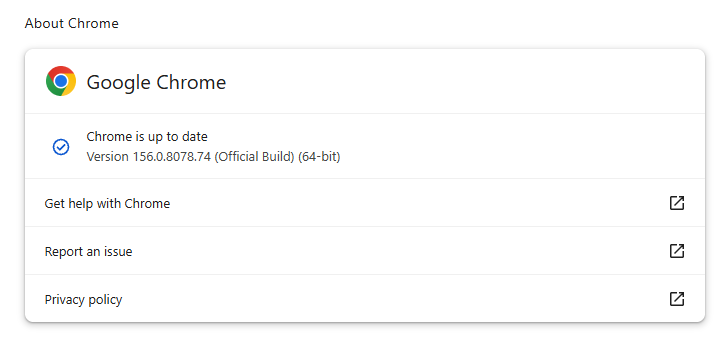
On October 27, Google issued a new Stable channel update for Chrome.
Most users are on Chrome’s Stable channel. The desktop update brings Chrome to versions 156.0.8078.73/.74 for Windows and Mac and 156.0.8078.73 for Linux. The update includes 52 security fixes, including four rated Critical.
On the same day, Mozilla issued Security Advisory 2026-118, which fixes 167 vulnerabilities. Firefox 159 also introduces several new features.
Both updates will roll out over the coming days and weeks.
How to update Chrome
The easiest option is to allow Chrome to update automatically. But you can end up lagging behind on updates if you never close your browser or if something goes wrong, such as an extension preventing the update.
If you don’t want to wait for the rollout to reach you, manually updating is easy. Open About Google Chrome from Chrome’s settings or Help menu. Chrome will check for updates. If one is available, click Relaunch to apply it.
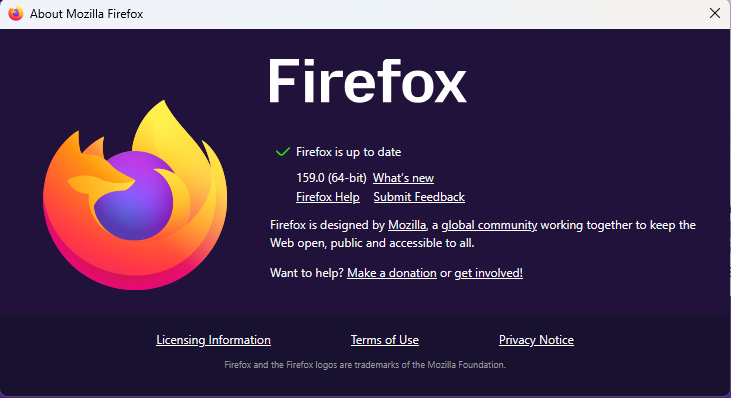
To update Firefox, open the browser and click the menu button at the right side of the Firefox toolbar, then go to Help and select About Firefox. The About Mozilla Firefox window will open.
Firefox will automatically check for updates. If one is available, it will be downloaded. Once done, you’ll be prompted to click Relaunch. After Firefox restarts, it will be up to date.
After the update, the version should be 159.0 or later
Technical details
These Chrome and Firefox updates address a familiar problem: browser code mishandling memory while processing web content. Both releases fix use-after-free vulnerabilities, including flaws in page layout, JavaScript processing, and SVG graphics.
A use-after-free vulnerability occurs when a program attempts to access a memory location after it has been freed. That can cause crashes or, in some cases, allow an attacker to run their own code.
There’s another connection between these updates: both Google and Mozilla credit OpenAI Codex Security with finding bugs fixed in these releases. AI can help security teams examine browser code for weaknesses, alongside human code reviews and automated tests that check how software handles unexpected inputs.
Mozilla’s collaboration with Anthropic shows how AI-discovered findings can lead to fixes: researchers validated vulnerabilities before reporting them, giving Mozilla’s team reproducible bugs to investigate, repair, and deliver to users.
Browse like no one’s watching.
Malwarebytes Privacy VPN encrypts your connection and never logs what you do, so the next story you read doesn’t have to feel personal. Try it free →
Anthropic announced that an unreleased research model called Claude successfully developed working exploit chains for Chrome, Safari, Android, Windows, and Linux. The company’s Frontier Red Team shared these findings on October 27, 2026. Many exploit chains required minimal or no user interaction, and the team reported every identified flaw to the respective vendor before publication. […]
OpenAI expands ChatGPT's Chrome integration with tab access and browser automation. Learn what the update means for productivity, privacy, and enterprise security.
Google released Chrome version 156 to the stable channel for Windows, macOS, and Linux, addressing 353 security vulnerabilities, including six critical flaws. Announced on October 20, 2026, this update addresses memory corruption, use-after-free errors, input validation issues, and other weaknesses across various browser components. Google stated that the deployment will continue over the coming days […]
Google released a Chrome Stable security update fixing 10 vulnerabilities across Windows, Mac, and Linux, including a high-severity DOM memory corruption flaw reported by Xinyang Ge of Anthropic with Claude AI.
The update also addresses one critical, six high-severity, and three medium-severity vulnerabilities. Google announced the update on October 15, 2026.
Google is rolling out Chrome versions 155.0.8059.84/.85 for Windows and Mac, and version 155.0.8059.84 for Linux over the coming days and weeks. Users should install the update when it becomes available and check Chrome’s About page to prompt an update check.
A use-after-free bug occurs when software tries to use memory after it has been released. Depending on how an attacker can reach the flaw, this type of error may cause a crash or allow memory corruption. Google has not published further technical details and has not said the issue is being exploited.
CVE-2026-110913 is a high-severity memory corruption flaw in Chrome’s DOM, the browser system that represents and manages the structure of web pages.
Google Fixes 10 Chrome Vulnerabilities
Ge reported the bug on September 29, with Claude’s assistance. Google’s release note does not explain how the issue was found, whether Claude identified the flaw or helped with analysis, or what steps were involved. It does, however, publicly credit the AI’s assistance in the report.
The other high-severity fixes affect V8, Chrome’s JavaScript engine, as well as Core and SVG. They include two additional use-after-free flaws in V8, CVE-2026-110919 and CVE-2026-110921, and memory corruption issues CVE-2026-110918, CVE-2026-110917, and CVE-2026-110920. The reports came from Ge, Google, and researcher C0rk1.
The three medium-severity bugs involve improper input validation in Desktop, a use-after-free issue in Compositing, and memory corruption in Workers.
Google credited its own researchers with reporting these flaws. Together, the list shows that this release addresses problems in separate browser components rather than a single feature or subsystem.
Google says detailed bug information may remain restricted until most users have installed the fixes. This can limit what researchers and users can learn about the vulnerabilities while the update is spreading.
CVE
Severity
Affected component
Reported by
CVE-2026-110922
Critical
Prerender
Xinyang Ge
CVE-2026-110913
High
DOM
Xinyang Ge, Anthropic, assisted by Claude
CVE-2026-110919
High
V8
Xinyang Ge
CVE-2026-110918
High
Core
Google
CVE-2026-110917
High
SVG
C0rk1
CVE-2026-110921
High
V8
Xinyang Ge
CVE-2026-110920
High
V8
Xinyang Ge
CVE-2026-110916
Medium
Desktop
Google
CVE-2026-110915
Medium
Compositing
Google
CVE-2026-110914
Medium
Workers
Google
The company also said it uses tools such as AddressSanitizer, MemorySanitizer, libFuzzer, and AFL to find security bugs during development.
Chrome updates are delivered gradually, so users may not receive the new version at the same time. Check the browser’s About Google Chrome page and restart it if prompted to complete installation. Organizations should follow their normal browser update process and confirm that managed devices receive the fixed release.
This update follows other recent Chrome security coverage, including Google’s earlier report on a large Chrome vulnerability update and coverage of multiple Chrome flaws. Google’s Stable Channel announcement and Chrome Security page provide the primary release information.
Most users are on Chrome’s Stable channel. The desktop update brings Chrome to versions 155.0.8059.79/.80 for Windows and Mac and 155.0.8059.79 for Linux. The update includes 37 security fixes, including seven rated Critical.
On the same day, Google released version155.0.8059.79 for Android. It may not be available on Google Play for everyone yet but keep an eye out for it. Google says it also includes stability and performance improvements.
Updates will roll out over the coming days and weeks.
How to update Chrome
The easiest option is to allow Chrome to update automatically. But you can end up lagging behind on updates if you never close your browser or if something goes wrong, such as an extension preventing the update.
If you don’t want to wait for the rollout to reach you, manually updating is easy. Open About Google Chrome from Chrome’s settings or Help menu. Chrome will check for updates. If one is available, click Relaunch to apply it.
ul.menu .wp-block-kadence-advancedbtn .kb-btn400740_68fb6a-2d.kb-button{width:initial;}.wp-block-kadence-advancedbtn .kb-btn400740_68fb6a-2d.kb-button{color:var(--color-neutral-10);background:var(--color-brand-blue-60);border-top-left-radius:40px;border-top-right-radius:40px;border-bottom-right-radius:40px;border-bottom-left-radius:40px;padding:var(--kb-btn-padding);margin:var(--kb-btn-margin);box-shadow:1px 1px 2px 0px rgba(0, 0, 0, 0.2);}.wp-block-kadence-advancedbtn .kb-btn400740_68fb6a-2d.kb-button:hover, .wp-block-kadence-advancedbtn .kb-btn400740_68fb6a-2d.kb-button:focus{box-shadow:0px 4px 0px 0px var(--color-brand-blue-90);}Try it now
The first is tracked as CVE-2026-110152, a buffer overflow in ANGLE in Google Chrome on Android. It could allow a remote attacker to execute arbitrary code outside the sandbox via a crafted HTML page.
ANGLE is Chrome’s graphics-translation layer. A buffer overflow occurs when a program puts more data into an area of memory than it can hold, overwriting data in adjoining memory. An attacker can exploit this to make the vulnerable process run malicious code.
Chrome vulnerabilities that enable remote code execution outside the browser sandbox are particularly valuable to attackers because they can turn a visit to a malicious or compromised website into direct code running on the underlying operating system, often without requiring additional exploitation steps.
Then I spotted two use-after-free vulnerabilities in the PDF component. CVE-2026-110136, rated Critical, could allow a remote attacker to execute arbitrary code outside the sandbox via a crafted HTML page. CVE-2026-110147, rated High, could allow an attacker to execute arbitrary code inside the sandbox via a crafted HTML page.
A use-after-free vulnerability occurs when a program attempts to access a memory location after it has been freed. That can cause crashes or, in some cases, allow an attacker to run their own code.
Inside the sandbox means the malicious code would run in a restricted, sealed-off environment designed to limit access to the rest of your device. That limits what the attacker can do as it constrains them to the browser, lowering the impact compared with code running outside the sandbox. However, attackers often chain multiple vulnerabilities together to escape the sandbox and achieve a more serious compromise. So, the phrase describes an important security limitation, but it does not mean the vulnerability is harmless.
Stop threats before they can do any harm.
Malwarebytes Browser Guard blocks phishing pages and malicious sites automatically. Free, one click to install. Add it to your browser →
Google restructures its Chrome VRP rewards, raising baseline payouts for memory corruption bugs to $2,000 and offering up to $20,000 for critical exploits.

 Entrar