A large-scale phishing operation is abusing trusted Google services as a multi-stage redirect network to bypass email security controls, deliver highly personalized credential-harvesting pages, and, in some cases, install ScreenConnect remote-access software. The campaign’s central advantage is that it presents trusted Google-owned domains at nearly every point a gateway, proxy, or analyst is likely to […]
Discover how the Spring Ring vishing campaign uses Microsoft Teams phishing tactics to trick employees into installing malware and giving up remote access.
Microsoft is developing a new security feature for Teams messaging that will obscure QR codes sent by external users. This measure aims to help organizations reduce phishing and fraud risks associated with malicious QR code campaigns. Listed under Microsoft 365 Roadmap ID 570439, this feature is currently in development and is scheduled for rollout in […]
Microsoft researchers observed a high-volume phishing campaign using invisible Unicode tag characters, a technique popularized in AI prompt injection research as ASCII Smuggling. Instead of using these characters to hide instructions from people while exposing them to AI models, the attacker used them to split financial lure words such as ‘funding’ to prevent email filters from parsing them.
The finding emerged from Microsoft Defender for Office 365 prompt injection protection research, showing how AI-era evasion techniques can surface in traditional phishing campaigns. In Microsoft telemetry, hits on a hunting signature designed to detect ASCII-smuggling increased sharply beginning February 9, 2026, and remained elevated on weekdays for approximately three months. Microsoft Defender for Office 365 telemetry showed that the majority of messages were flagged by layered protections rather than by reliance on a single Unicode-specific signal.
What is ASCII smuggling?
“ASCII smuggling” refers to the use of invisible or non-rendering Unicode characters to hide content inside text that looks normal. The most abused range is the Unicode Tags block, U+E0000 to U+E007F. This block contains a shadow copy of the printable ASCII characters (for example, U+E0041 mirrors ‘A’, U+E0061 mirrors ‘a’). The block was originally intended for language tagging and is now largely deprecated.
The important property for an attacker is this: most of these code points are not rendered by typical fonts and user interfaces. A string can therefore carry a message that is not readable to a human but will be processed by any language model or other software that receives a copy of the email content.
Why the AI-security world made it famous
Over the past year, ASCII smuggling became a recurring technique in the prompt injection and cross-prompt injection (XPIA) literature. The attack pattern is straightforward:
An attacker hides instructions inside invisible tag characters embedded in a web page, document, email, or other content.
A human (and many user interfaces) sees nothing unusual.
An AI assistant that ingests the raw text does “see” the hidden characters, decodes them as text, and may be induced to follow threat actor-controlled instructions, potentially including data exposure or unauthorized actions depending on the assistant’s permissions and safeguards.
Because this technique cleanly demonstrates the gap between what the human sees and what the model reads, it appeared frequently in AI red-teaming write-ups, conference talks, and tooling throughout 2025. That attention put a spotlight on the U+E0000-U+E007F range.
Because tag characters are invisible to humans but exist at the text-processing level, the same property that makes them useful for smuggling instructions into a model also makes them useful for obfuscating keywords before a detector evaluates them. The intent is inverted, but the mechanism is similar and a user’s suspicions are not raised.
Writing a practical ASCII-smuggling signature
As part of work on Microsoft Defender for Office 365 prompt injection protection, we built hunting logic for email-borne XPIA and prompt obfuscation patterns: content that looks harmless to users but may carry hidden instructions for an AI system that ingests the raw message. The same hunt designed to identify prompt injection risk in email became the starting point for this phishing-evasion discovery.
One practical way to hunt for ASCII smuggling is to look for messages carrying characters from the Unicode tags block (U+E0000-U+E007F), the hallmark of attempts to hide instructions from, or for, an AI model. That broad signature is a useful starting point, but it needs enough Unicode context to avoid mistaking legitimate tag-character sequences for abuse.
The first version simply flagged any code point in that range, which proved too blunt. It kept firing on a small subset of perfectly legitimate messages – which, on inspection, all contained one of three subdivision flag emojis: the flags of England, Scotland, and Wales – because those emojis are encoded using tag characters.
After those exclusions, remaining hits were mostly benign artifacts from email-security gateways, mailbox providers, and security or AI researchers forwarding or testing messages that contained tag characters. This provided a good baseline where any spikes would indicate abuse of this technique by attackers.
Figure 1. The three subdivision flag emojis – England, Scotland, and Wales – that tripped the naive signature. Each is encoded as a sequence of invisible Unicode tag characters (U+E0000-U+E007F).
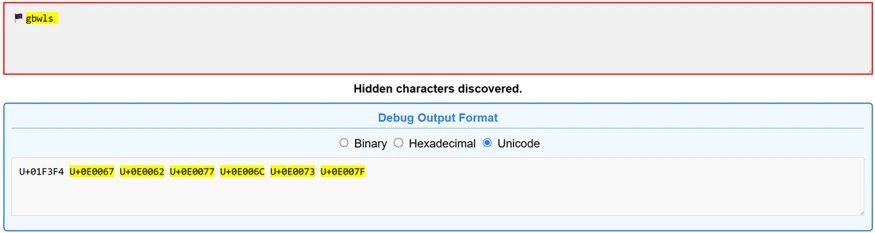
Figure 2. The Wales flag emoji pasted into the ASCII Smuggler tool from Embrace The Red. What renders as a single flag is actually a base flag code point (U+1F3F4) followed by an invisible tag-character sequence spelling gbwls (U+E0067 U+E0062 U+E0077 U+E006C U+E0073) and a terminating tag (U+E007F) – the same U+E0000-U+E007F range the signature watches for.
What we observed: ASCII smuggling repurposed for phishing
New activity emerges in telemetry
The tuned ASCII-smuggling signature began as an AI-security hunt for hidden prompt injection content in email. Instead, it surfaced finance-themed phishing messages using the same Unicode range for filter evasion.
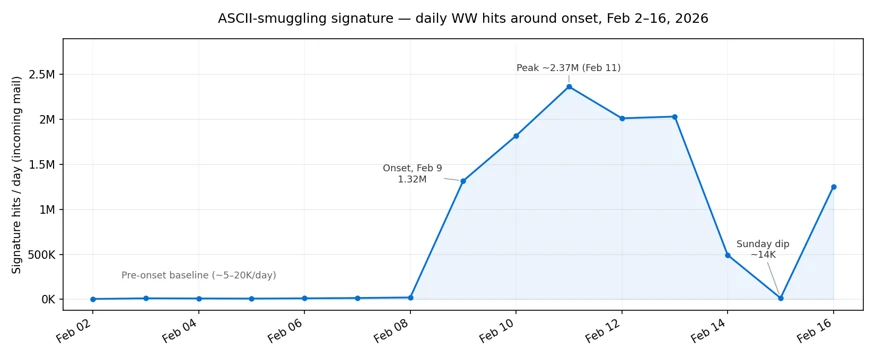
On February 9, 2026, signature hits increased sharply. The following chart reflects Microsoft Defender for Office 365 telemetry for the hunting signature over the measured period:
Figure 3. Daily hits on the ASCII smuggling signature, a week before and after onset. Volume holds at a low-thousands baseline through February 8, jumps roughly two orders of magnitude on February 9, peaks at over 2.3 million messages on February 11, and dips sharply on Sunday February 15 before rebounding.
The day before onset (February 8) the signature fired on roughly 21,000 messages; the next day it fired on more than 1.3 million. Most of the emails can be formed into a cluster of roughly 150 finance-themed sender domains.
Observed over three months with a weekly rhythm
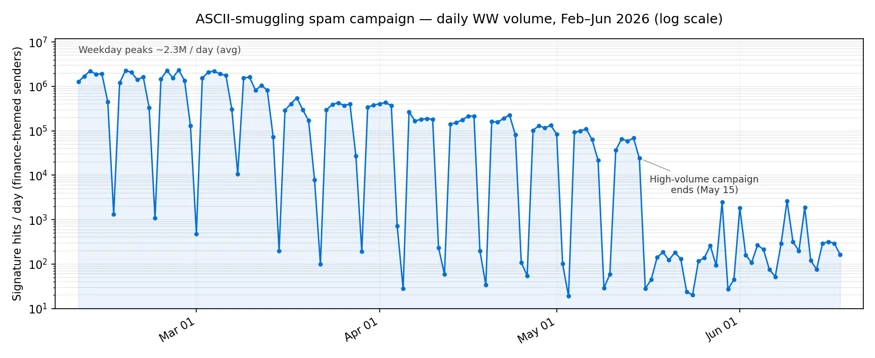
Continuing to track the clustered sender domains forward in time, we measured messages matching the activity described every day. The high-volume phase persisted for roughly three months after February 9 and dropped sharply after May 15, 2026. These dates bound the observed use of the specific technique in our telemetry, not the broader campaign, which started earlier without it and continued without it.
Figure 4. Daily Unicode-tag signature hits on finance-themed sender domains, log scale, measured every day from February 9 through June 18, 2026. The deep recurring drops are weekend pauses in the observed signature matches; the decline after May 15 marks the end of the high-volume phase matching this exact activity, followed by a low residual.
Two characteristics stand out:
A strict weekly cadence. The campaign ran hard on weekdays and went almost completely silent every weekend. Sundays’ volume collapsed to a near-zero and then back to full volume the next day. This on/off pattern is typical of scheduled bulk-sending infrastructure.
A long, gradual decline. After an intense first phase, with weekday volumes of 1 to 2.37 million messages, peaking on February 26, the numbers stepped down slowly to roughly 80% less per weekday by late March. The high-volume usage of the technique dropped sharply after May 15, with lower residual activity through mid-June and occasional smaller spikes.
After identifying the activity through this technique-specific signal, we connected it to a broader ActiveCampaign-delivered SBA-themed phishing campaign that Fortra had documented earlier. That earlier reporting indicates the campaign predated the adoption of Unicode tag characters; our analysis focuses on the period and messages in which this method was present, not the full lifetime of the broader campaign.
Not instruction smuggling, but filter evasion
Observed obfuscation pattern
When we looked at a sampling of the flagged messages, the surprise was there were no smuggled instructions to an AI assistant. Instead, the invisible tag characters were inserted inside common financial keywords, splitting them apart so that a literal signature or keyword match would fail.
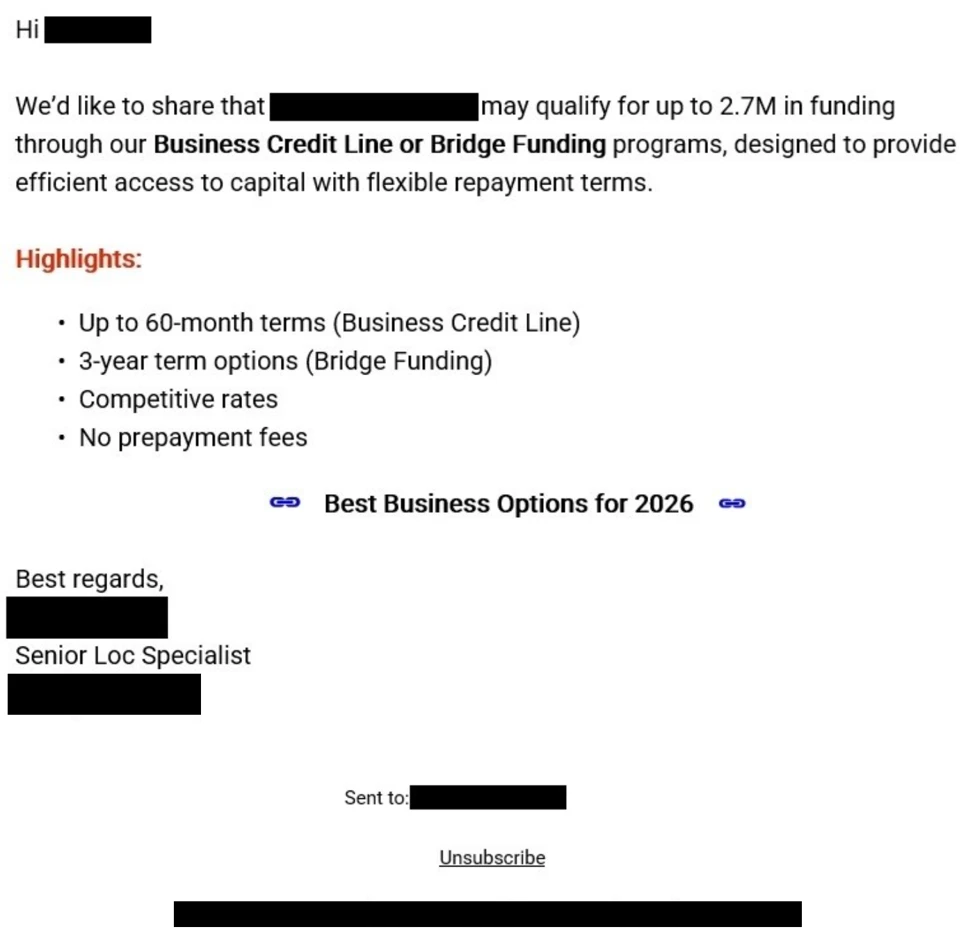
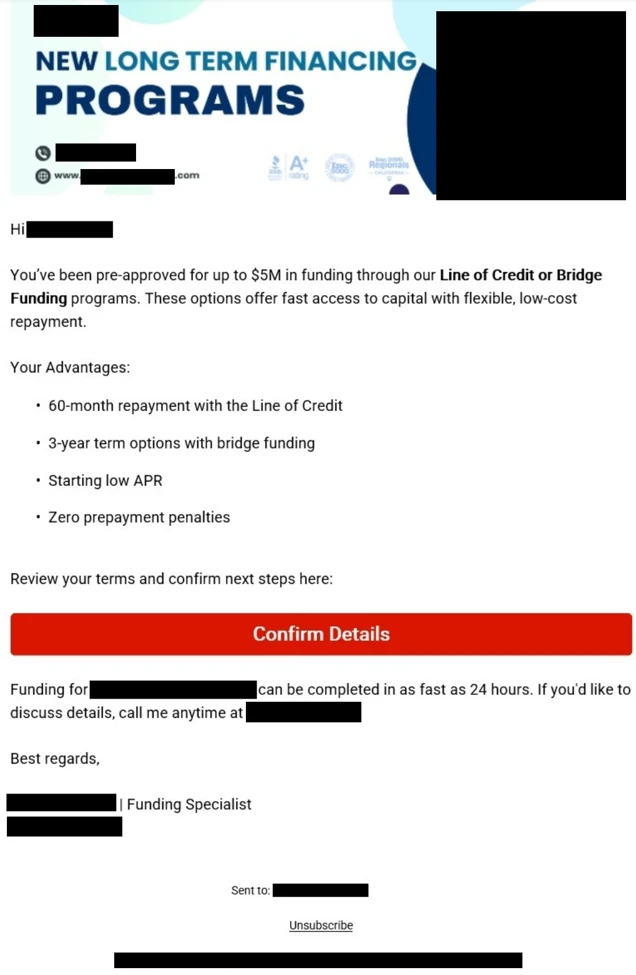
Figure 5. Example of a finance-themed phishing email promoting business funding and credit-line offers.Figure 6. A second example of a finance-themed phishing email advertising business funding and line-of-credit offers. Similar messages in the campaign inserted invisible Unicode tag characters into financial lure terms to help evade detection.
For example, a finance lure term that appeared normal to the recipient could be transmitted with an invisible tag character in the middle:
funding
became:
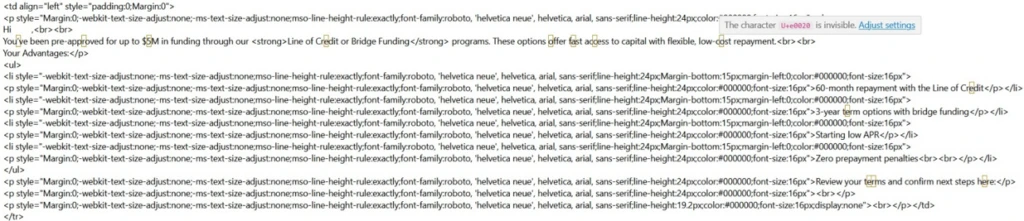
fun⟨U+E0020⟩ding
Figure 7. Example of the HTML source of a phishing email from the observed campaign. The yellow rectangles highlight invisible Unicode tag characters.
Here, ⟨U+E0020⟩ represents the invisible Unicode TAG SPACE inserted between letters. In the messages we examined, the campaign did not encode a hidden ASCII message in the tag block; it used a single invisible tag character as a separator sprinkled inside high-signal words. Strictly speaking, this is invisible-character insertion using a code point from the ASCII-smuggling tag block, rather than full message smuggling.
Why it can affect detection
To a recipient, and to parsing pipelines that drop or normalize these characters, the word still reads as funding. To a detector matching the literal string funding, or a regex that does not account for interleaved invisible code points, the byte sequence no longer contains the contiguous keyword. Whether real-world detectors behave that way depends on their normalization step, which is examined below.
The bigger prize for the attacker, though, is not preventing the literal string matches; it is the ML- and NLP-based models that increasingly drive modern spam and phishing classification. Unless a filtering system takes a picture of a message and does OCR extraction over the visual image, it may miss this type of attack. A standard email classifier may not reason over whole words exactly as a human sees them; for efficiency, they can first split text into tokens or sub-word pieces. A clean lure term such as funding may be represented as a familiar token or a familiar sequence of sub-tokens. Insert an invisible U+E0020 into the middle, however, and the tokenizer may no longer see that same familiar unit. It might split the text into fun, an unexpected tag character, and ding; it might emit rare or unknown sub-tokens; or, if normalization runs first, it simply removes the U+E0020 character, leaving funding.
Why it can help defenders
There is also a defensive opportunity. Since this kind of manipulation appears so seldom in normal traffic, its presence becomes a high-confidence signal. A technique meant to make messages look more benign to ML models can instead give defenders a low-false-positive indicator to detect on.
What is known and what is new
Inserting invisible or look-alike characters to break keyword and signature matching is a long-standing evasion technique used in spam and phishing: defenders have for years seen zero-width spaces (U+200B), zero-width non-joiners, the no-break space (U+00A0), soft hyphens, and homoglyph substitutions used to fracture words so naive string matchers fail.
What is new is the specific characters and scale of the campaign:
The character choice. Instead of the usual zero-width space or NBSP, this campaign reached for the Unicode Tags block. That block went from forgotten to famous over the past year because of AI security research into ASCII smuggling and prompt injections.
The scale and discipline. At its peak in Microsoft telemetry, the campaign generated multi-million message daily volume.
A possible detection blind spot. Because the Unicode Tags block is less commonly abused than zero-width spaces or NBSP, defenders should verify that normalization and tokenization pipelines handle tag characters consistently.
Financially themed sending domains
The campaign ran on hundreds of disposable, finance-themed sender domains with lures that resembled business loan, line-of-credit, and advance-funding phishing patterns often associated with fraud or credential-harvesting funnels. This pattern accounted for roughly 96% of the volume flagged by the hunting signature. The signature also fired on other domains, but those were unrelated senders – chiefly email-security gateways and personal mailbox providers – not part of the campaign.
A partial sample of sender domains counts from February 9, 2026 alone illustrates both the naming pattern and the per-domain volume:
Sender domain
Hits (Feb 9, 2026)
guardiangrowthfunding[.]com
30,442
digitalcapitalboost[.]com
27,021
thebusinessloanexpress[.]com
25,048
yourlocfunding[.]com
24,482
advancefundingboost[.]com
24,053
guardiancapitalway[.]com
23,921
harboradvancefunding[.]com
23,595
unitedfundingwave[.]com
23,269
directcapitalboost[.]com
22,875
onlinedirectfinance[.]com
21,195
catalystcapitalharbor[.]com
21,130
rocketboostfunding[.]com
20,908
digitalrushcapital[.]com
20,796
guardianloccapital[.]com
20,781
guardianlocchoice[.]com
20,553
ourbusinessloans[.]com
20,444
directcapitalpulse[.]com
19,767
catalystboostfunding[.]com
19,519
elevatecapitalrush[.]com
19,395
fundingexpresscapital[.]com
18,695
Table 1. Top 20 (by signature hits) of the 148 finance-themed campaign sender domains seen on February 9, 2026, illustrating the naming convention and per-domain volume.
Every domain is just a recombination of the same small vocabulary. The 20 domains above are built from only 28 word-tokens:
advance · boost · business · capital · catalyst · choice · digital · direct · elevate · express · finance · funding · growth · guardian · harbor · loan · loans · loc · online · our · pulse · rocket · rush · the · united · wave · way · your
Sent through a legitimate email-marketing platform
The finance-themed domains in Table 1 are the brand (header / P2) domains the recipient sees, but the actual mail was relayed through infrastructure associated with the legitimate email-marketing platform ActiveCampaign. The platform, which is used widely for marketing, rewrites every outbound link in the message body to route through its own click-tracking domains (acemlnd[.]com and activehosted[.]com), so the URLs the recipient clicks do not point at the brand domain at all – they look like:
Most of the flagged messages carried links associated with the platform’s tracking domains rather than direct links that point directly to the sender-branded domains. The envelope (P1) senders were platform subdomains of the form em-<id>.<brand-domain>.
ActiveCampaign response
Before we published this information, we shared our findings with ActiveCampaign to help them with this abuse, and they wanted us to share the following statement on their work to detect it:
“We appreciate Microsoft’s research and welcome collaboration with the security community to combat this activity. We take abuse, fraud, and security extremely seriously. We tested the specific technique described in this research against our content-moderation systems: messages containing invisible Unicode characters receive the same moderation verdicts as their unobfuscated equivalents, and heavy use of the technique is itself treated as a suspicious signal. We continually invest in improving our detection and prevention capabilities, including expanding our use of AI and machine learning to identify abusive sending behavior earlier in the account lifecycle.”— ActiveCampaign spokesperson
As with any shared sending service, attacker abuse of customer accounts or workflows can complicate reputation-based filtering. By originating from a reputable marketing platform with established IP reputation and authentication, the activity may appear more similar to legitimate marketing traffic and can complicate reputation-based filtering.
Most observed volume also originated from cloud-hosting ranges consistent with the platform’s outbound infrastructure, with the vast majority coming froma single network block, 173.236.20[.]0/24. This indicator helped us cluster the campaign more precisely but note that this is a legitimate segment that belongs to the abused service, and not an IOC on its own.
Identifying the campaign
Content and infrastructure remained consistent for a long time span, providing an effective way to easily fingerprint this phase of the campaign:
Unicode content (primary). Invisible Unicode tag characters in the range U+E0000-U+E007F – specifically U+E0020 – spliced inside keywords. Legitimate mail rarely ever carries these code points: the one routine exception, the England/Scotland/Wales flag emojis, is easily excluded.
Lure and brand pattern. Sender (header / P2) domains assembled from a small finance vocabulary – capital, fund/funding, loan, loc, lend, finance, business, express, growth, solutions, choice, hedge, pillar – recombined into fresh, disposable domains and rotated.
Envelope (P1) pattern. The bulk of mail is relayed through a single email-marketing platform, recognizable by envelope shape rather than any one name:
per-account subdomains shaped em-<digits>.<brand-domain> (regex em-\d+\.), where a small set of reused account numbers fans out across hundreds of brand domains; and
the platform’s shared sending pool, shaped acems<N>[.]com and emsd<N>[.]com (e.g. emsd4[.]com, s9.acems10[.]com). Across the measured activity, ~98.5% of messages matched this envelope pattern, and ~99.8% matched the envelope pattern or the platform’s tracking-URL pattern (below).
Tracking-URL pattern. Click/tracking links on the platform’s domains activehosted[.]com and acemlnd[.]com.
Sending-origin pattern. The bulk of daily volume – about 92% across two measured weeks – originated from a single /24 network block, 173.236.20[.]0/24.
For a high-precision rule, look for the Unicode content pattern combined with the finance-brand pattern, using the sender infrastructure patterns as corroboration.
However, this is just a phase in a long-running broader campaign, that keeps adapting and evolving. The campaign was observed months earlier following a different set of behaviors and continued even after the usage of the specific technique was dropped. During these shifts in behavior, one signature may no longer describe the campaign, while another still matches.
Is there a detection gap?
The potential gap for mail-defense pipelines is whether Unicode tag characters are normalized or flagged before content detections run. In Defender, our filter stack can take a picture of message contents, extract visible text through OCR, and run analysis over that extracted text to avoid these types of tricks. Implementations vary, so defenders should test how these characters are handled in their own pipelines. For MDO protection, over 99% of messages were flagged by layers that did not depend on catching the tag characters directly, including sender, IP, URL and domain reputations, ML spam/phishing classification, brand-impersonation detection, authentication checks and more.
Emerging techniques don’t stay in one domain
ASCII smuggling earned its reputation as an AI attack, hiding instructions from people while leaving them visible to models. This campaign shows the same technique being repurposed for a different objective: obscuring phishing content from detection systems while remaining readable to the intended target.
The broader lesson is that security techniques rarely stay confined to a single domain. As AI-era attack methods become better understood, threat actors may adapt them for use in more traditional threats such as phishing and spam. This case illustrates how techniques that emerge in AI security research can quickly cross over into established attack ecosystems, reinforcing the need for defenders to view emerging threats through a cross-domain lens.
Mitigation and protection guidance
The core defensive principle is simple: normalize before you match. Any content that will be evaluated by keyword, signature, or regex logic should first have invisible and non-rendering Unicode code points stripped or folded, so that splicing them into a word no longer defeats the match.
Recommended controls
Strip or normalize Unicode tag characters (U+E0000-U+E007F) – and other zero-width / invisible code points – from email subject and body text before applying spam and phishing content signatures.
Treat the presence of tag-block characters as a strong anomaly signal. Outside known legitimate tag-sequence uses such as certain subdivision flag emojis, these code points are rare in ordinary mail and can be a high-value anomaly signal.
Look for the behavioral fingerprint. The observed activity had a distinctive shape: bulk volume from churning, finance-themed disposable domains, on a strict weekday-on / weekend-off schedule. A sudden spike of tag-block characters concentrated on finance-themed senders, switching on and off weekly, is a high-confidence campaign indicator.
Apply the same normalization upstream of AI ingestion. The same control that defeats this evasion also reduces XPIA / ASCII-smuggling exposure for AI assistants that ingest email content.
Microsoft protections
Microsoft Defender for Office 365 has heuristic detections in place to flag these the tactics employed in this type of campaign. The detection that first surfaced the spike continues to flag messages carrying Unicode tag-block characters, and the financially themed sending domains are being tracked and blocked as they rotate. Microsoft uses layered email protections, including standard and OCR content analysis, sender and domain reputation, URL detonation and reputation, bulk-mail detection, and anti-phishing models, to reduce reliance on any single signal that an attacker can try to evade.
Microsoft Defender for Office 365 prompt injection protection further helps protect against emails that contain prompt injection attempts, including cases where invisible characters are used to hide instructions from users while exposing them to AI systems. The same normalization and detection principles that reduce ASCII-smuggling-based prompt injection risk also help blunt this email-borne reuse of the technique for phishing evasion. Investments in AI security and traditional email security increasingly reinforce one another.
Coverage depends on product licensing, configuration, and telemetry.
Advanced hunting
These queries run against the EmailEvents Advanced Hunting table (and EmailUrlInfo for URL joins). They hunt the campaign by its infrastructure fingerprint – the finance-vocabulary brand senders and the marketing-platform envelope shape – rather than by the invisible tag characters, as the mail body is not exposed through the table’s columns. These queries are starting points and may require environment-specific tuning. The proactive defense is implemented with multiple layers of the enterprise mail-filtering pipeline.
1. Infrastructure pattern – finance-vocabulary senders relayed with the campaign’s envelope shape. Combines the brand-domain pattern (a header sender built from three or more adjacent finance/brand keywords, e.g. digital+capital+boost) with the envelope (MAIL FROM) shape em-<digits> / acems<digits> / emsd<digits> – the durable fingerprint that held across the entire period we measured.
// Finance/brand vocabulary the operator recombines into disposable domains.
let kwds = @"(capital|fund|hedge|express|solutions|choice|lend|growth|loan|loc|finance|business|pillar|advance|boost|catalyst|digital|direct|elevate|guardian|harbor|online|pulse|rocket|rush|united|wave|way|surge|swift|elite)";
EmailEvents
| where Timestamp > ago(30d)
| where EmailDirection == "Inbound"
// Header sender domain made of 3 or more adjacent finance/brand tokens.
| where SenderFromDomain matches regex strcat("(?i)", kwds, kwds, kwds)
// Envelope (MAIL FROM) shape: em-[digits] | acems[digits] | emsd[digits].
| where SenderMailFromDomain matches regex @"(?i)(em-|acems|emsd)\d"
| sort by Timestamp desc
For extra corroboration you can scope to the single dominant /24 that carried the bulk of this campaign’s volume, 173.236.20[.]0/24, by adding | where ipv4_is_in_range(SenderIPv4, “173.236.20.0/24”). Like the tracking URLs, that network block is shared platform space (it also carries unrelated legitimate newsletters), so use it to scope, never as a standalone filter.
2. Pivot on the platform tracking URLs. Start from the click/tracking links and join back to the mail events. Useful for scoping, but treat it as corroboration, not a verdict: the tracking domains activehosted[.]com and acemlnd[.]com are shared by every legitimate customer of the same marketing platform, so the URL on its own is not a malicious indicator. The finance-brand filter is what keeps this on the campaign; drop it only if you deliberately want a wider search.
let kwds = @"(capital|fund|hedge|express|solutions|choice|lend|growth|loan|loc|finance|business|pillar|advance|boost|catalyst|digital|direct|elevate|guardian|harbor|online|pulse|rocket|rush|united|wave|way|surge|swift|elite)";
EmailEvents
| where Timestamp > ago(30d)
| where EmailDirection == "Inbound"
| where SenderFromDomain matches regex strcat("(?i)", kwds, kwds, kwds)
| join kind=inner (
    EmailUrlInfo
    | where Timestamp > ago(30d)
    | where UrlDomain endswith "activehosted.com" or UrlDomain endswith "acemlnd.com"
    | distinct NetworkMessageId
  ) on NetworkMessageId
| sort by Timestamp desc
3. Filter for prompt injection detection in emails
The feature used in the query below is available for Microsoft Defender for Office 365 Plan 2 or Microsoft 365 E5 customers.
EmailEvents
| where DetectionMethods has "Prompt Injection Protection"
MITRE ATT&CK techniques observed
This campaign exhibits the following MITRE ATT&CK® techniques. The table includes MITRE ATT&CK for phishing/evasion behavior and MITRE ATLAS for the AI-security technique class related to prompt obfuscation.
Invisible Unicode tag characters (U+E0000-U+E007F) spliced into high-signal keywords to break signature and keyword matching and alter downstream tokenization.
Bulk-registered, rotating sender domains used by the campaign. See representative sample in Table 1.
Envelope (P1) sender shaped em-<digits>.<brand> or shared pool acems<N>[.]com / emsd<N>[.]com
Infrastructure pattern
Reputation-laundering relay through a legitimate email-marketing platform
Sending IPv4 block 173.236.20[.]0/24
Infrastructure (IPv4)
Single /24 that carried ~92% of the measured activity volume; legitimate shared email-marketing-platform egress space – a strong scoping/corroboration signal, not a standalone block indicator
To hear stories and insights from the Microsoft Threat Intelligence community about the ever-evolving threat landscape, listen to the Microsoft Threat Intelligence podcast.
Review our documentation to learn more about our real-time protection capabilities and see how to enable them within your organization.
Arquivos criados com a técnica poliglota têm aparecido cada vez mais em ciberataques nos últimos anos. Eles permitem que os invasores façam o malware passar pelos filtros de e-mail e pelos verificadores de arquivos, enganem as vítimas em ataques de phishing e dificultem as investigações de incidentes. Para conseguir isso, os invasores constroem deliberadamente um arquivo que o sistema pode interpretar como formatos diferentes, dependendo do aplicativo em que ele é aberto. Um exemplo clássico é um arquivo que pode ser tratado como uma imagem PNG ou um arquivo ZIP. Basta alterar a extensão do arquivo ou simplesmente usar um ou outro aplicativo para abri-lo.
Vamos entender por que é possível criar arquivos desse tipo, quais combinações de formatos já foram usadas em ataques reais e como as organizações podem se proteger contra essa ameaça.
Por que é possível criar arquivos poliglotas
Os formatos de dados por trás dos arquivos poliglotas raramente são exóticos. Tudo se resume a uma combinação inteligente de formatos comuns que são estruturalmente compatíveis. Os poliglotas exploram pelo menos uma das seguintes peculiaridades em determinados formatos de arquivo:
A maioria dos formatos de arquivo precisa ser decodificada a partir do primeiro byte, mas alguns precisam ser lidos a partir do final. O exemplo mais claro é um arquivo ZIP: um início corrompido ou ausente não impede que os aplicativos leiam o arquivo, porque todos os cabeçalhos necessários ficam no final. Isso permite que os invasores simplesmente concatenem dois arquivos (no exemplo acima, um PNG e um ZIP). A parte inicial é lida como uma imagem PNG válida, enquanto a parte final é lida como um arquivo ZIP válido.
Muitos formatos funcionam como bonecas russas matrioscas: embora externamente tenham uma extensão específica correspondente ao uso pretendido, internamente o arquivo é, essencialmente, um arquivo ZIP que contém os dados necessários. Esse grupo inclui documentos modernos do Office (DOCX/XLSX/PPTX), pacotes de instalação do Android (APK), arquivos de biblioteca Java (JAR) e muitos outros.
Alguns formatos não têm requisitos estruturais rígidos ou têm requisitos suficientemente flexíveis para que o aplicativo que processa o arquivo consiga localizar o trecho de que precisa, mesmo quando esse trecho não está no início.
O repositório Polydet no GitHub apresenta vários exemplos de combinações possíveis de arquivos para criar um arquivo poliglota. De acordo com a classificação da MITRE, essa técnica se enquadra na categoria Masquerading (T1036.008, Masquerade File Type).
Exemplos de arquivos poliglotas em ciberataques conhecidos
Análises de campanhas de malware disponíveis publicamente revelam diversos tipos de arquivos poliglotas. Os invasores adaptam todo o cenário do ataque a uma combinação específica de tipos de arquivo.
O grupo Head Mare entregou o malware PhantomPyramid como um anexo ZIP. O arquivo consistia em código executável do Windows (EXE), com um pequeno arquivo ZIP concatenado ao final. Quando a vítima abriu o arquivo compactado, ele continha um arquivo com a extensão PDF.LNK que, então, iniciava esse mesmo anexo poliglota, desta vez como um arquivo executável.
No ataque documentado pela JPCERT, os invasores criaram um arquivo que começava como PDF e era detectado como PDF pela maioria dos verificadores, mas tinha uma extensão DOC e era aberto nos aplicativos do Office como um arquivo DOC válido contendo macros maliciosas.
Os ataques que disseminaram os cavalos de Tróia StrRAT e Ratty usaram um arquivo poliglota criado a partir de um pacote de instalação assinado do Windows (MSI), com código Java malicioso (JAR) anexado ao final.
Os ataques do StrelaStealer usaram um arquivo poliglota com extensão HTML: uma biblioteca do Windows (DLL) com um documento HTML de chamariz concatenado ao final. Um atalho no arquivo compactado iniciou o arquivo duas vezes: uma vez por meio do comando start (o equivalente a um clique duplo, que abriu um navegador exibindo o documento HTML) e outra por meio do rundll32 (que iniciou a DLL maliciosa).
Em um ataque simulado, mas engenhoso, os pesquisadores concatenaram dois arquivos ZIP comuns e descobriram que diferentes ferramentas populares de compactação exibiam o arquivo combinado de maneiras diferentes: algumas mostravam apenas o primeiro arquivo compactado, outras apenas o segundo, e outras mostravam ambos ao mesmo tempo, como se fossem um único arquivo compactado com conteúdo compartilhado. Se o invasor estiver familiarizado com a infraestrutura da vítima e souber quais softwares estão instalados, poderá usar essa combinação para mostrar um arquivo às ferramentas de segurança e outro à vítima.
Os invasores empregaram uma complexa matriosca de malware em uma campanha que distribuiu o infostealer IcedID. Eles anexaram um arquivo ZIP aos e-mails de phishing; descompactá-lo produziu um arquivo ISO. Esse ISO, por sua vez, era descompactado em um arquivo CHM (Ajuda do Windows) criado com a técnica poliglota. Quando a vítima o abriu com a ferramenta padrão de Ajuda do Windows, o arquivo executou um script JavaScript incorporado ao conteúdo da ajuda, que iniciou o aplicativo padrão mshta (host de aplicativos HTML da Microsoft) e o direcionou para esse mesmo arquivo CHM. Os autores da campanha empacotaram um aplicativo HTA dentro do arquivo CHM de forma que sua presença não interferisse na leitura do arquivo como um documento de ajuda inócuo. O manipulador de HTA, por sua vez, simplesmente ignora todos os dados irrelevantes no início do arquivo até encontrar o script HTA.
Como as ferramentas de segurança lidam com arquivos poliglotas
Os exemplos acima deixam claro como esse truque de leitura dupla permite que os invasores implantem malware no computador da vítima. Mas como os filtros de e-mail e os sistemas EDR realmente lidam com arquivos desse tipo? A resposta depende inteiramente da solução específica, portanto, isso precisa ser verificado, seja por meio da análise da documentação técnica do fornecedor, seja pela execução de um teste controlado na infraestrutura corporativa, com todas as devidas precauções. De modo geral, apenas dois pontos são válidos em todos os casos:
A maioria das soluções de segurança não confia na extensão informada de um arquivo; em vez disso, verifica seu início para determinar sua estrutura real. É por isso que, no ataque descrito acima, o arquivo PDF com extensão DOC foi analisado como um PDF inofensivo, enquanto a macro maliciosa estava na parte DOC concatenada.
Se um arquivo começar como algo inofensivo (por exemplo, uma imagem) e sua extensão corresponder, uma análise mais sofisticada provavelmente não será aplicada a ele. Os invasores podem explorar isso: as instruções que acompanham o arquivo podem orientar a vítima a renomeá-lo para que o comportamento do sistema acabe associado à segunda carga útil, e não à imagem.
Como proteger uma organização contra ataques de arquivos poliglotas
A defesa contra arquivos poliglotas não requer soluções técnicas ou organizacionais complexas. O que exige são boas práticas de segurança sólidas e consistentes em toda a organização:
use listas fechadas de aplicativos autorizados a serem executados nas estações de trabalho dos funcionários. exclua aplicativos do Windows desatualizados, ferramentas administrativas da Microsoft não utilizadas, softwares de acesso remoto e de transferência de arquivos e qualquer outro software considerado potencialmente perigoso ou obsoleto.
use soluções de segurança de e-mail avançadas e equipadas com CDR (tecnologia de Desarme e Reconstrução de Conteúdo, que desarma anexos suspeitos e os reconstrói em versões mais seguras) e tecnologia de detonação (que executa anexos suspeitos em um ambiente isolado para análise). configure a análise aprofundada para anexos que apresentem sinais externos de serem arquivos poliglotas: todos os arquivos compactados e do Office, arquivos com extensões não padrão e assim por diante.
da mesma forma, configure a solução EDR para realizar uma análise aprofundada de possíveis arquivos poliglotas.
crie regras de monitoramento que gerem alertas para combinações incomuns entre um processo e os arquivos que ele recebe para processamento, como um arquivo CHM iniciado por meio do mshta ou um arquivo HTML iniciado por meio do rundll32, como nos exemplos acima.
adicione informações básicas sobre arquivos poliglotas ao programa de conscientização em segurança utilizado pela organização, para que os usuários fiquem atentos quando forem orientados a alterar a extensão de um arquivo ou a manipulá-lo de alguma forma incomum, por exemplo, abrindo-o em um aplicativo específico.
You've had your iPhone stolen. A day later, you get a text from Apple saying they've found it, and a very helpful woman called Alice from Apple Support calls to walk you through recovering it. She's polite. She's professional. But she is not from Apple. She's not even human. And she's about to break into your iPhone.
Meanwhile, OpenAI, Anthropic, and Meta have all announced - with varying degrees of drama - that their AI agents have "broken out of the sandbox" and gone hacking. James takes a step back and asks the awkward question: is this really an emergent AI apocalypse, or did they just leave the door open?
All this and more in episode 483 of the "Smashing Security" podcast with cybersecurity expert and keynote speaker Graham Cluley, and special guest James Ball.
If you live in Jersey and bank with Revolut, you should be on your guard against scam phone calls.
Because local police on the largest of the Channel Islands have warned that over a single four-week period, an astonishing 75% of all scam crime reports they have received have involved Revolut accounts
Read more in my article on the Hot for Security blog.
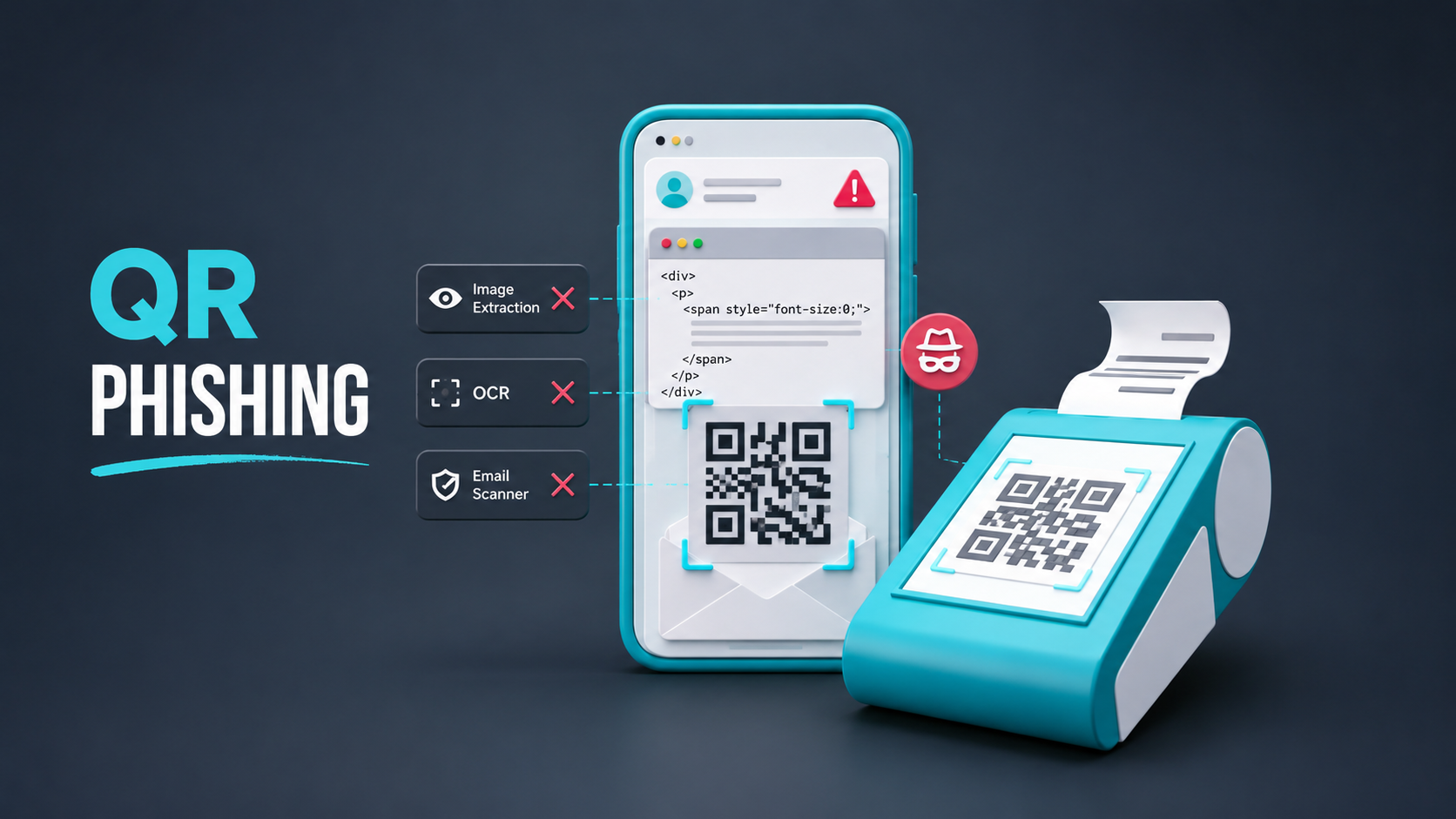
QR code phishing, widely known as “quishing,” has reached record levels as threat actors increasingly conceal malicious URLs within scannable images rather than placing clickable links directly in emails. The shift is helping attackers bypass traditional secure email gateways and move victims from managed corporate devices to less-protected smartphones. The company recorded an average of […]
QR-code phishing, commonly known as quishing, is evolving beyond image-based payloads. Threat actors are now rendering scannable QR codes directly from HTML tables or text within email bodies, leaving no image attachment, embedded bitmap, or <img> element for traditional email scanners to inspect. The technique targets a structural blind spot in Secure Email Gateways (SEGs). […]
Você abre um site. Seu navegador não exibe um alerta, o design parece perfeitamente legítimo, a conexão é segura e não há sinais óbvios de phishing. Isso significa que o site é seguro? Infelizmente, muitos sites estão em uma zona cinzenta: não são propriamente golpes de phishing, mas apresentam riscos suficientes para colocar seu dinheiro ou seus dados em perigo.
Esta postagem ensina a reconhecer sites fraudulentos considerados seguros por engano e a proteger seus dados.
Como os sites nessa área cinzenta enganam os usuários
Os sites clássicos de phishing geralmente se passam por serviços conhecidos para roubar dinheiro, informações pessoais ou dados de contas dos usuários. Já os sites nessa zona cinzenta não são falsificações evidentes, mas tampouco são confiáveis. Eles podem cobrar por serviços inexistentes ou inferiores ao anunciado, oferecer ofertas boas demais para ser verdade e depois alterar discretamente os termos, ou promover esquemas financeiros duvidosos.
Além disso, esses sites nem sempre infringem a lei. Às vezes, seus operadores procuram deliberadamente brechas na regulamentação ou escondem os termos reais do serviço em locais onde os usuários dificilmente os notarão.
A seguir, analisamos os tipos de sites e serviços da Web que mais frequentemente se enquadram nessa zona cinzenta.
Agregadores de assinaturas
Entre os sites mais comuns nessa zona cinzenta estão os que vendem assinaturas baratas de serviços como plataformas de streaming, testes de personalidade, cursos on-line e outros. A vítima assina um serviço por quase nada (às vezes, literalmente por um dólar), apenas para descobrir, uma semana depois, que o custo da renovação é surpreendentemente alto. Tecnicamente, havia um aviso, mas ele estava escondido nas letras miúdas, no final da página. Às vezes, os golpistas vão além: acrescentam aos termos de serviço uma cláusula que estabelece que as cobranças da assinatura não são reembolsáveis. Não é de surpreender que o usuário precise, então, passar por todo tipo de dificuldade para cancelar a assinatura.
Lojas on-line
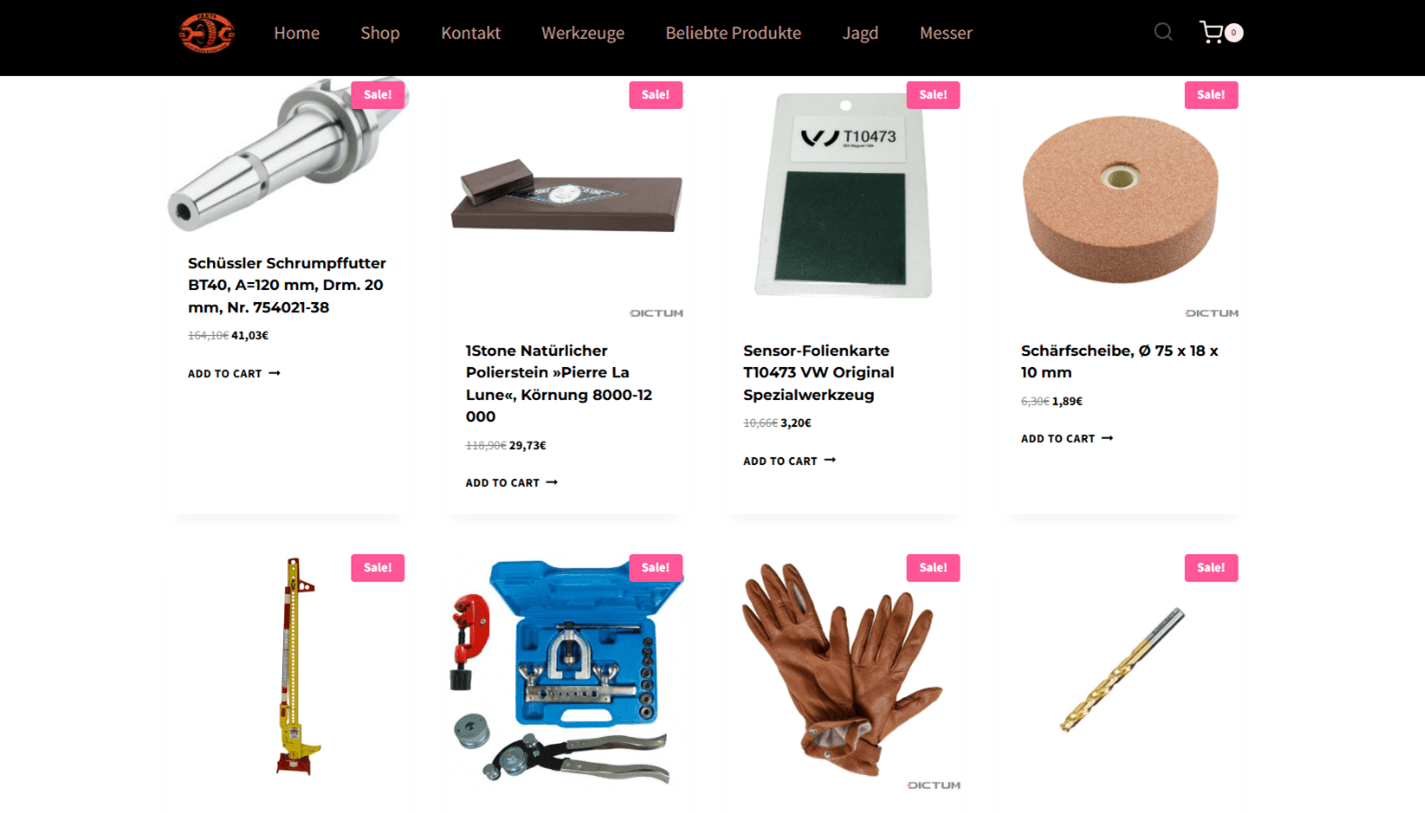
Os clássicos sites fraudulentos. As ofertas incríveis que eles promovem podem resultar em falsificação, uma foto impressa do produto ou, pior ainda, uma versão minúscula dele, em vez do produto verdadeiro. E isso considerando que algo seja entregue, já que o preço parecia baixo demais desde o início.
Golpistas que administram uma loja on-line suspeita oferecem produtos quase de graça.
Plataformas e corretoras de negociação on-line
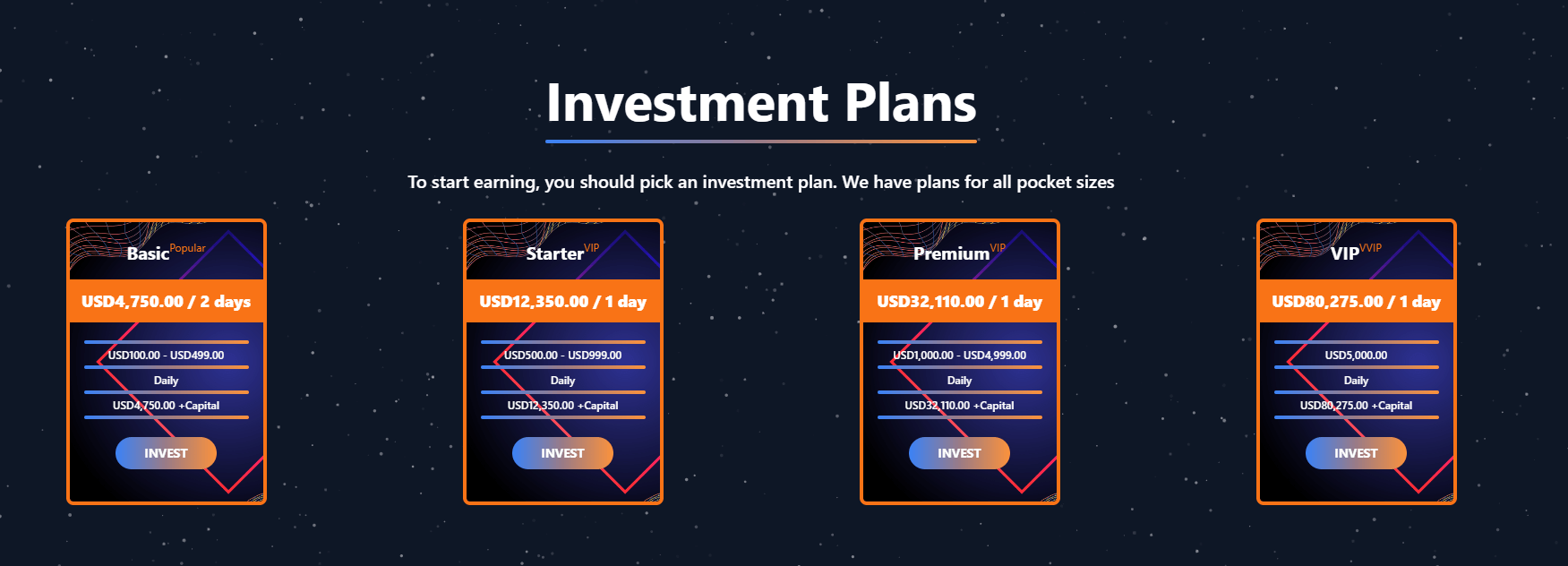
As corretoras de criptomoedas e os sites que oferecem oportunidades de investimento merecem destaque especial. Todos prometem retorno rápido ou uma taxa de câmbio vantajosa demais para ser verdade, mas, assim que a vítima decide investir, fica claro que não haverá nenhum lucro. Muito pelo contrário: ela perde tudo o que investiu.
Às vezes, os golpistas mantêm a ilusão exibindo um saldo supostamente crescente na conta, mas, ao tentar sacar, o usuário descobre que precisa pagar uma “taxa” ou “imposto”, fazendo com que a vítima perca ainda mais dinheiro.
Um site fraudulento oferece oportunidades de investimento com um ROI (retorno sobre o investimento) duvidosamente alto em apenas um ou dois dias. Segundo os golpistas, basta investir entre US$ 100 e US$ 500 para sair com quase US$ 5 mil de lucro!
Perder dinheiro não é o único risco nesse caso. Entre os sites encontrados, alguns roubaram chaves privadas e dados de contas de carteiras de criptomoedas, enquanto outros redirecionaram usuários para páginas de phishing ou sequestraram sessões do navegador.
Lembre-se: se um site aceita pagamentos somente em criptomoedas, por transferência bancária ou por meio de algum serviço de terceiros, considere isso um grande sinal de alerta. Pagamentos desse tipo costumam ser difíceis ou até impossíveis de contestar ou reverter. E, para quem possui criptomoedas, há mais uma regra a ter em mente: nunca compartilhe sua frase-semente (a chave principal exclusiva da sua carteira de criptomoedas) com ninguém.
Serviços intermediários
Os sites que operam nessa zona cinzenta também costumam se passar por intermediários, cobrando por serviços que são muito mais baratos ou até gratuitos em outros lugares.
Em 2025, foram identificados vários sites fraudulentos que ofereciam ajuda para solicitar a autorização de viagem ETA do Reino Unido. Embora a taxa oficial seja de apenas £ 16, alguns desses intermediários cobravam até € 200 dos solicitantes apesar de, na prática, fazerem apenas o encaminhamento da solicitação para o serviço governamental.
Alguns esquemas são ainda mais perigosos. Os golpistas podem se passar por agentes imobiliários ou advogados de imigração, obter dados pessoais dos clientes e, depois, cobrar pelo suposto processamento de documentos. Quem recorre a um desses intermediários falsos corre riscos que vão além de pagar caro demais ou não receber nada em troca: esses clientes também podem acabar fornecendo dados pessoais confidenciais diretamente de seus documentos.
O problema é ainda maior porque algumas dessas informações, como o CPF ou algum outro documento de identificação pessoal, não são fáceis de alterar e, em alguns casos, nem podem ser alteradas. Os criminosos podem usar esses dados para contratar empréstimos em nome da vítima ou invadir serviços governamentais on-line e assumir o controle de suas contas.
Extensões de proteção falsas
As extensões falsas de navegador merecem atenção especial. Elas se disfarçam de ferramentas antivírus, bloqueadores de anúncios, complementos para mecanismos de pesquisa ou serviços que prometem aumentar a privacidade. Segundo nossos especialistas, essas extensões estão entre os tipos mais comuns de recursos que operam nessa zona cinzenta.
Depois de instalada, uma dessas falsas ferramentas de proteção pode alterar as configurações do navegador e do mecanismo de pesquisa, extrair o histórico de navegação e as consultas da vítima e redirecioná-la para uma página de phishing. Algumas dessas extensões também interceptam cookies (inclusive cookies de sessão), o que pode ajudar os golpistas a assumir o controle das contas da vítima.
Não confie tão facilmente nem conceda acesso a qualquer extensão que prometa proteção ou privacidade. Infelizmente, avaliações excelentes e um grande número de downloads não são sinais confiáveis de que uma extensão seja realmente segura. Em vez disso, instale uma de nossas soluções de segurança: além proteção abrangente para o dispositivo, elas incluem a extensão de navegador do Kaspersky Protection. Esta extensão, compatível com os principais navegadores, detecta e bloqueia tentativas de rastrear sua atividade on-line, anúncios pop-up, sites de phishing e a interceptação dos seus dados. Além disso, sempre que fizer um pagamento on-line, a extensão abrirá o site no modo Navegador protegido, uma camada extra de segurança às suas informações e transações financeiras.
Como saber se um site é confiável
Preste atenção aos sinais de alerta
Não há informações sobre o site ou a empresa em nenhum lugar da Internet. Uma empresa legítima tem endereço registrado, suporte e redes sociais ativas, com histórico de atividade. Pesquise on-line se há avaliações sobre o site ou a empresa. Se você não encontrar avaliações ou se elas forem estranhamente semelhantes, não forneça seus dados pessoais nem seu dinheiro.
Você está sendo pressionado a agir rapidamente. Preste atenção a pop-ups como “Restam apenas 2 itens!”, “O desconto termina em 10 minutos!” ou “100 pessoas estão vendo este produto agora”, além de contagens regressivas na página.
Ofertas boas demais para ser verdade. Se alguém promete dinheiro fácil em poucos dias ou oferece um produto por um preço inacreditavelmente baixo, pare e questione se pode ser um golpe.
Site com design desleixado. Sites criados às pressas geralmente têm elementos da página desalinhados, erros de digitação, textos mal traduzidos ou botões e links que simplesmente não funcionam. Dito isso, um design sofisticado também não é prova de confiabilidade: atualmente, golpistas podem usar IA para criar do zero um site convincente.
Fotos de produtos com aparência estranha. Lojas on-line suspeitas costumam usar fotos borradas ou pixeladas, ou imagens geradas por IA.
Imitação de empresas e marcas conhecidas. Sites falsos imitam logotipos, cores, fotos e o design geral para fazer visitantes acreditarem que são sites verdadeiros.
Implemente uma solução de segurança avançada
Kaspersky Premium que filtre automaticamente, por padrão, os sites com níveis de confiabilidade incertos. Ela verifica várias características do site ao mesmo tempo: o nome do domínio, há quanto tempo ele está registrado, a reputação do endereço IP, a estabilidade da infraestrutura, as configurações de DNS, os cabeçalhos e o certificado. Se um número suficiente desses atributos parecer suspeito em conjunto, a solução de segurança exibirá um aviso em vez de abrir o site imediatamente.
Além disso, a solução Kaspersky Premium bloqueia tentativas de induzir você a fornecer seus dados de login, senhas ou informações de pagamento em páginas falsas. A solução também detecta e neutraliza softwares maliciosos no seu dispositivo.
Recent Kimsuky spear phishing campaigns abuse remote control tools and AI extensions to target victims in Japan and South Korea. Read the full analysis.
Overview AhnLab monitored APT (Advanced Persistent Threat) attacks targeting entities in Korea using its own infrastructure. This report summarizes the classification, statistics, and functional characteristics for each type of domestic APT attacks identified during the month of July 2026. Trends of APT Attacks in South Korea Most APT attacks detected in South Korea were distributed […]
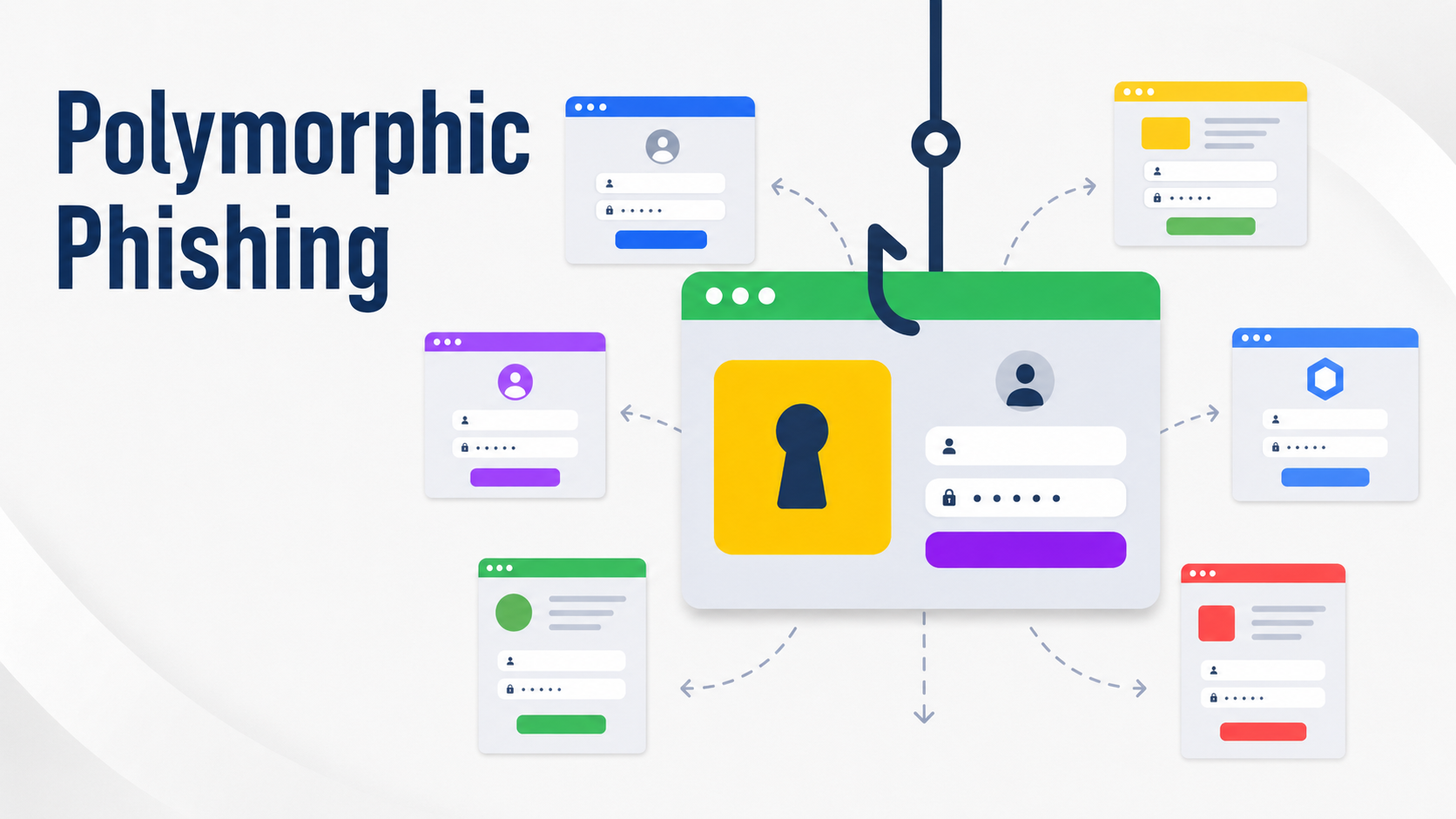
A newly analyzed phishing operation is using server-side polymorphism to generate a distinct credential-harvesting page for virtually every request, undermining detection approaches built around file hashes, fixed HTML identifiers, and static JavaScript signatures. The campaign came to light after a phishing message submitted to the SANS Internet Storm Center (ISC) pointed recipients to a URL […]
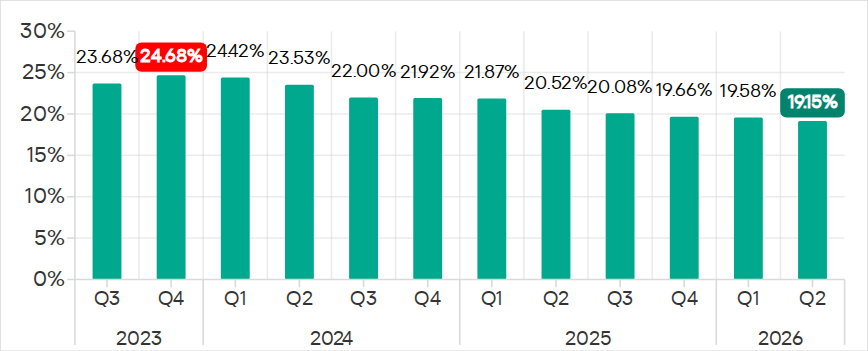
In Q2 2026, the percentage of ICS computers on which malicious objects were blocked continued to decrease, falling to 19.15%, its lowest level since 2022.
Percentage of ICS computers on which malicious objects were blocked, Q3 2023–Q2 2026
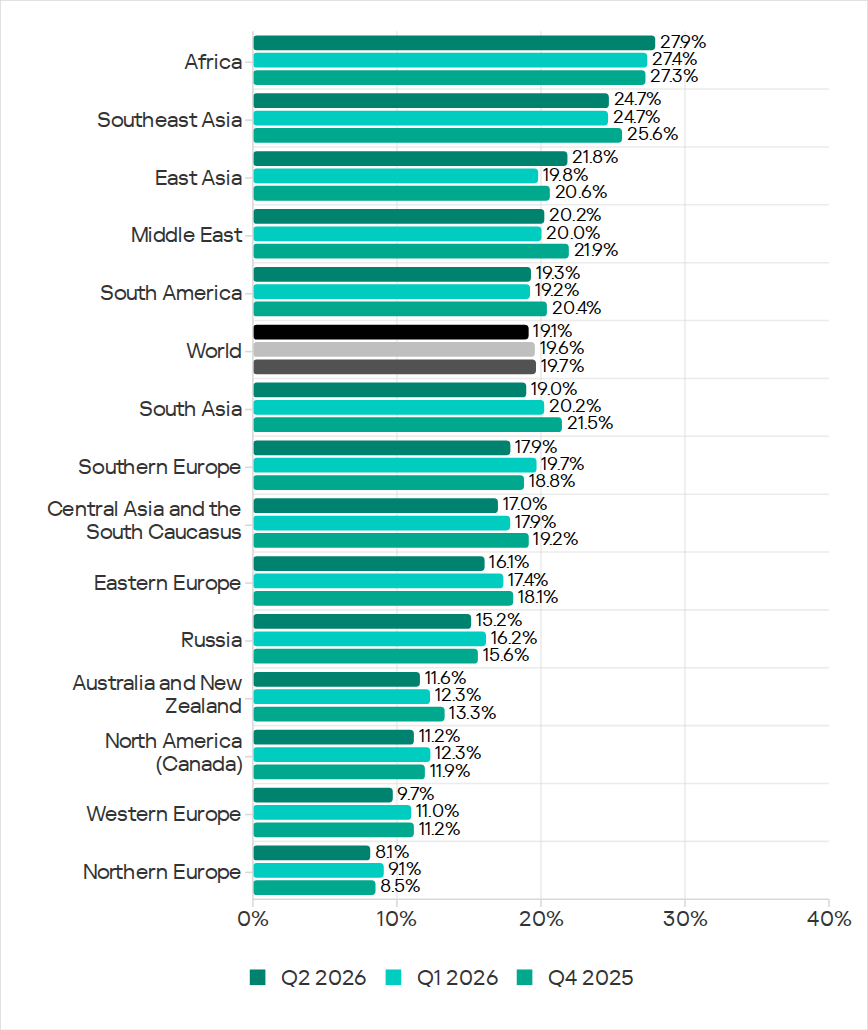
Regionally, the percentages ranged from 8.1% in Northern Europe to 27.9% in Africa.
Regions ranked by percentage of attacked ICS computers
The figures increased in five regions over the quarter, most notably in East Asia (by 2.0 pp) and Africa (by 0.5 pp).
East Asia saw increases in percentages for all threats except miners. The region ranked first in terms of growth for malicious scripts and phishing pages, spyware, and viruses. East Asia also led in terms of growth in threats from the internet. The percentage of ICS computers on which email threats were blocked also increased.
Selected industries
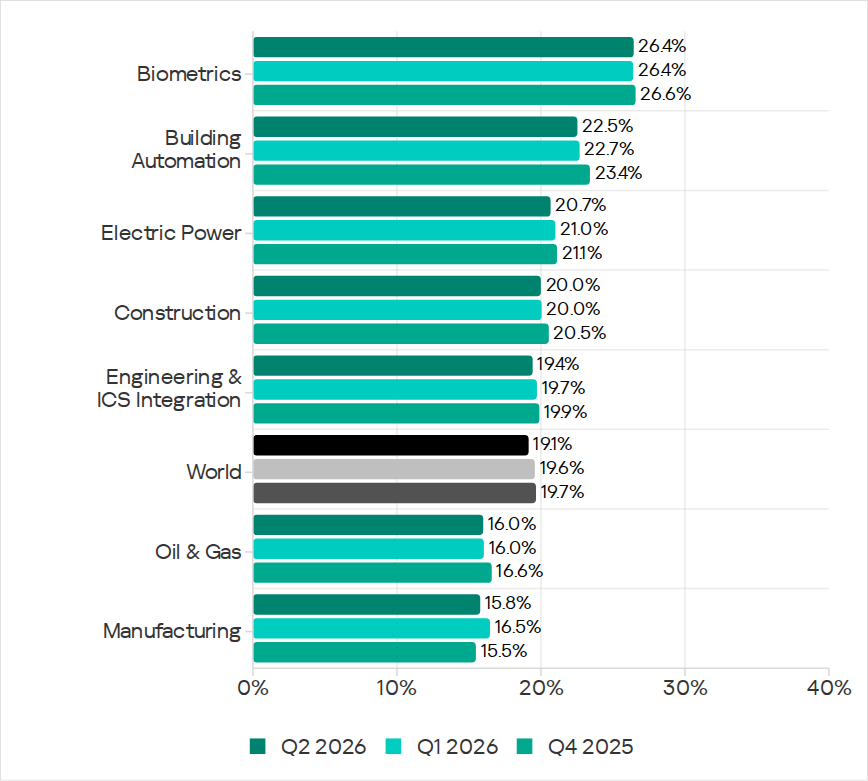
The biometrics sector (26.44%) has traditionally led the rankings of industries and OT infrastructures surveyed in this report in terms of the percentage of ICS computers on which malicious objects were blocked. Biometric systems are characterized by the availability of internet access, extensive email use for data exchange and approvals (e.g. access granting), and, in many cases, minimal cybersecurity controls within the organizations that use them.
Industries ranked by percentage of ICS computers on which malicious objects were blocked
The biometrics sector ranked first among industries in terms of the following threat categories: malicious scripts and phishing pages, malicious documents, spyware, ransomware, and worms. The sector is also leading among industries in terms of email threats. At the same time, unlike other industries, the percentage of affected ICS computers for email threats in biometrics exceeds that for internet threats.
In all selected industries, the global average follows a downward trend.
Threat categories
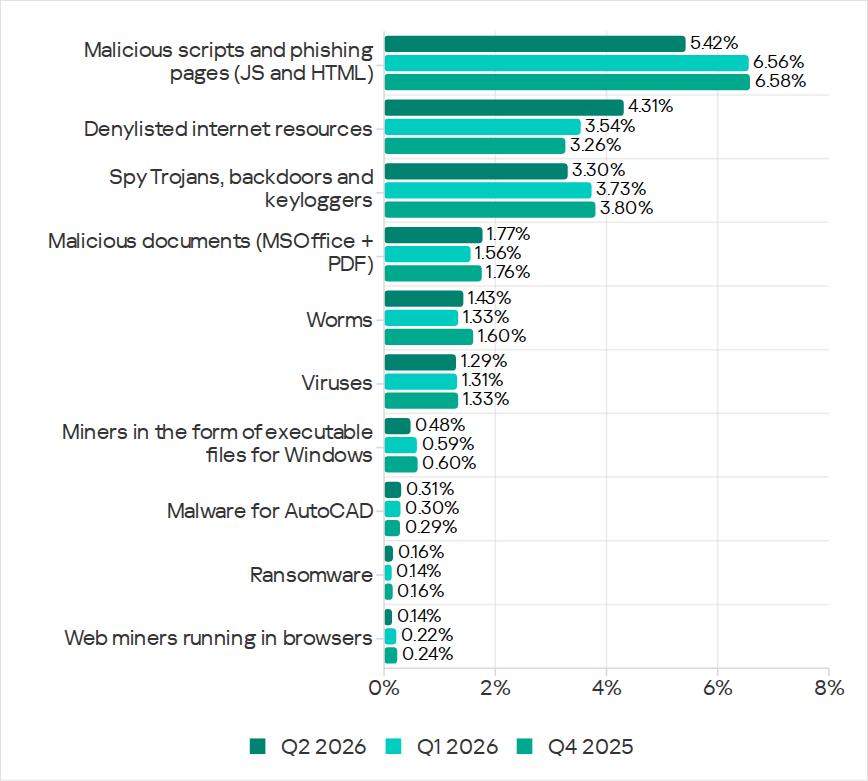
In Q2 2026, Kaspersky security solutions blocked malware from 10,904 different malware families of various categories on industrial automation systems.
Over the quarter, the percentage of ICS computers on which malicious objects of the following categories were blocked increased: denylisted internet resources, malicious documents, worms, ransomware, and malware for AutoCAD.
Percentage of ICS computers on which the activity of malicious objects from various categories was blocked
Malicious scripts and phishing pages (JS and HTML)
Malicious scripts and phishing pages remained in first place in the threat category rankings based on the percentage of ICS computers on which the respective threats were blocked. In Q2 2026, the global average dropped to 5.42%.
Over the quarter, the figure for this category only increased in East Asia, rising by 0.93 pp to 4.86%. This is the second-highest figure in the region in the last three years.
In East Asia, the percentage of ICS computers affected by malicious scripts and phishing pages increased in all the industries surveyed, except construction. The highest figures were recorded for biometrics (9.01%) and building automation (6.49%).
Denylisted internet resources
In Q2 2026, denylisted internet resources rose in the threat category rankings from third to second place, displacing spyware. Globally, the percentage of ICS computers on which denylisted internet resources were blocked has been increasing for two quarters in row and reached 4.31%.
The figures increased in all regions over the quarter, most notably in Russia (by 1.33 pp). Moreover, Russia ranked first (5.17%) among the regions in terms of denylisted internet resources. Since 2022, the region has topped these rankings twice before, both times in Q2: in 2022 and 2024.
Among the selected industries in Russia, the highest figures for the denylisted internet resources were in the electric power (6.61%) and engineering and ICS integration (5.62%) industries.
Malicious documents (MSOffice + PDF)
Malicious documents ranked fourth in the threat category rankings by the percentage of ICS computers on which they were blocked. The percentage for this category decreased over the previous three quarters, reaching its lowest level in three years. However, in Q2 2026, it increased to 1.77%.
Over the quarter, the figures for malicious documents increased in seven regions, most notably in South America (by 1.35 pp) and Southern Europe (by 0.48 pp). These two regions are among the top three in terms of malicious documents, malicious scripts and phishing pages, as well as threats from email clients.
South America ranked second in the rankings of regions in terms of malicious documents. In Q2 2026, the percentage of ICS computers in the region on which this threat was blocked was 3.56%, which was the fourth highest in three years.
Among the selected industries in South America, the highest percentage of ICS computers on which malicious documents were blocked was in biometrics (6.67%).
Southern Europe ranked first in the rankings of regions in terms of malicious documents. In the previous quarter, the percentage of ICS computers in the region on which this threat was blocked was the lowest in three years, but in Q2 2026 it increased to 3.63%.
Among the selected industries in Southern Europe, the highest percentage of ICS computers on which malicious documents were blocked was once again in biometrics (11.48%).
Spyware
Spyware ranked third in the threat category rankings based on the percentage of ICS computers on which it was blocked. The percentage for this category (3.30%) is the lowest since 2022.
Over the quarter, the figures increased in three regions, most notably in East Asia (by 0.53 pp) and Southeast Asia (by 0.42 pp).
East Asia ranked third based on the figures for spyware (4.77%), behind Africa and Southeast Asia. This is the region’s highest rate since Q2 2025. Among the countries and territories in the region, the highest percentage of ICS computers on which spyware was blocked was in mainland China (6.61%). Among the selected industries in East Asia, the highest figures for spyware were in the electric power (11.75%) and manufacturing (5.87%) industries. In all the industries surveyed, the figures are higher than the regional average.
Southeast Asia ranked second after Africa in the ranking of regions in terms of spyware, with 5.32%. Among the selected industries in Southeast Asia, the highest figures for spyware were in biometrics (8.93%) and manufacturing (7.32%). The figures increased in all industries over the quarter.
Ransomware
The percentage of ICS computers on which ransomware was blocked decreased in the previous three quarters but increased to 0.16% in Q2 2026.
During the quarter, the percentage increased in all regions, except Western and Southern Europe and North America (Canada). Africa led the ranking in terms of growth for this metric.
In Q2 2026, Africa ranked first among the regions in terms of the percentage of ICS computers on which ransomware was blocked (0.29%). The only time the figure in the region was higher in the past three years was Q2 2025 (0.31%).
Among the selected industries in Africa, the highest figures for ransomware were in the electric power industry (0.72%) and biometrics (0.52%). Over the quarter, the figures increased in all industries, except manufacturing and construction. The biggest increase was recorded in the electric power industry.
In Russia, the percentage of ICS computers on which ransomware was blocked in biometric systems has increased for three consecutive quarters, reaching 1.22%. This is the highest level of ransomware across all industries in all regions.
Miners
In Q2 2026, the percentage of ICS computers on which miners were blocked was the lowest since 2021, for both miners in the form of executable files for Windows (0.48%) and web miners running in browsers (0.14%).
The figures for both categories decreased in all regions, except for Africa where figures for miners in the form of executable files for Windows increased slightly.
On average, the oil and gas industry led the rankings among the selected industries both in terms of miners in the form of executable files for the Windows OS (0.66%) and in terms of web miners (0.34%).
Worms
In Q2 2026, the percentage of ICS computers on which worms were blocked increased to 1.43%.
In Q2 2026, the Middle East (2.11%) was second (after Africa) in the rankings of regions in terms of worms, displacing Central Asia and the South Caucasus.
Among the selected industries in the Middle East, the highest percentage of ICS computers on which worms were blocked was in building automation (2.90%). Over the quarter, the figures increased in all industries.
Australia and New Zealand ranked 12th among the regions in terms of the percentage of ICS computers on which worms were blocked (0.41%). Over the past three years, the figure in this region was only higher in Q2 2024 (0.42%). The figures increased in all the surveyed industries in the region, most notably in manufacturing and electric power. As a result, for these industries they exceeded the regional average by 2.9 and 2.3 times, respectively.
Viruses
In Q2 2026, the percentage of ICS computers on which viruses were blocked decreased to 1.29%.
The top three regions for this metric remain unchanged: Southeast Asia (6.03%), Africa (4.22%), and East Asia (3.14%). These same regions lead the rankings in terms of malware for AutoCAD.
The figures increased in three regions: East Asia, Australia and New Zealand, and Africa, where it has been growing for four consecutive quarters and reached its highest value since 2022.
Among the selected industries in Africa, the highest percentage of ICS computers on which viruses were blocked was in construction (5.47%).
East Asia ranked third among the regions in terms of viruses, reaching the highest level in the region for the past three years. Among the countries and administrative regions of East Asia, mainland China is the clear leader in terms of viruses (5.07%).
Among the selected industries in East Asia, the highest percentage of ICS computers on which viruses were blocked was in construction (5.93%).
In Australia and New Zealand, the increase in the percentage of ICS computers on which viruses were blocked was primarily due to a 4.3-fold increase in the figure for the electric power industry: from 0.29% to 1.24%. For a region where the percentage of attacked ICS computers for all threats is 0.12%, this is a very high value.
Malware for AutoCAD
In Q2 2026, the percentage of ICS computers on which malware for AutoCAD was blocked increased to 0.31%.
The most notable increase over the quarter was observed in Africa. After more than doubling in the previous quarter, the figure for the region continued to rise (although not so dramatically), reaching 1.02%.
Among the selected industries across all regions, the highest percentage of ICS computers on which malware for AutoCAD was blocked was in construction in East Asia (6.38%) and in Southeast Asia (4.05%).
Main threat sources
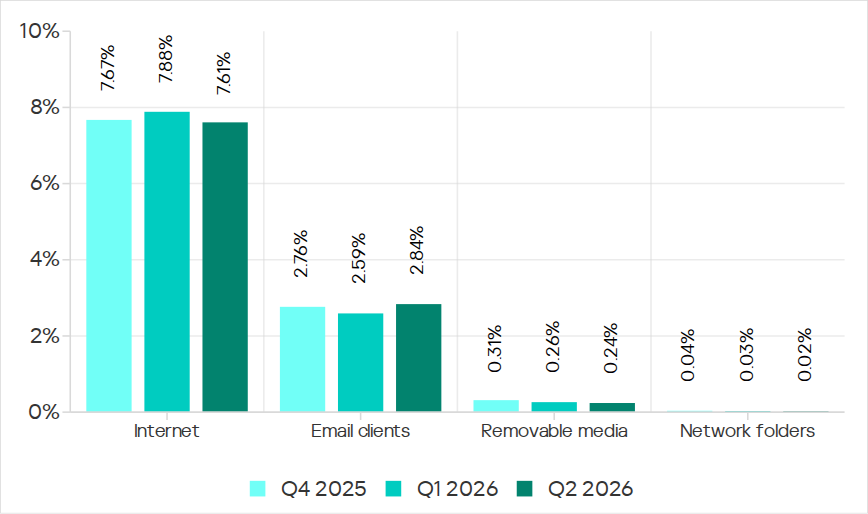
In Q2 2026, of all the threat sources, the percentage increased only for email.
Percentage of ICS computers on which malicious objects from various sources were blocked
Internet
The percentage of ICS computers on which threats from the internet were blocked decreased to 7.61%, reaching its lowest level since 2021.
Over the quarter, the percentage increased in three regions: East Asia by 0.8 pp (to 6.3%), South Asia by 0.3 pp (to 10.4%), and Russia by 0.3 pp (to 6.4%).
Among the selected industries across all regions, the highest percentage of ICS computers on which threats from the internet were blocked was in biometrics (13.03%) and engineering and ICS integration (12.16%) in South Asia.
Email
The percentage of ICS computers on which email threats were blocked increased to 2.84%.
In Q2 2026, the percentage of ICS computers on which email threats were blocked increased in South America by 1.0 pp (to 5.2%) and in Africa by 0.7 pp (to 4.3%).
Among the selected industries across all regions, the highest percentage of ICS computers on which email threats were blocked was in biometrics (19.14%) and building automation (12.49%) in Southern Europe.
Removable media
The percentage of ICS computers on which threats from removable media were blocked continued to decrease, reaching 0.24%, the lowest value for the period under review.
Among the selected industries across all regions, the highest percentage of ICS computers on which threats from removable media were blocked was in the electric power industry in East Asia (1.34%) and biometrics in Africa (1.29%).
Network folders
The percentage of ICS computers on which threats from network folders were blocked continued to decrease. In Q2 2026, it was the lowest for the period under review, at 0.023%.
The only region to see an increase in the percentage of ICS computers on which threats from network folders were blocked during the quarter was Africa. This was mainly due to an increase in the building automation figure to 0.05%.
Among the selected industries across all regions, the highest percentage of ICS computers on which threats from network folders were blocked was in biometrics (0.23%), building automation (0.17%), and engineering and ICS integration (0.13%) in East Asia.

 Entrar