There are plenty of phish in the sea.
Millions of bogus phishing emails land in millions of inboxes each day with one purpose in mind—to rip off the recipient. Whether they’re out to crack your bank account, steal personal information, or both, you can learn how to spot phishing emails and keep yourself safe.
And some of today’s phishing emails are indeed getting tougher to spot.
They seem like they come from companies you know and trust, like your bank, your credit card company, or services like Netflix, PayPal, and Amazon. And some of them look convincing. The writing and the layout are crisp, and the overall presentation looks professional. Yet still, there’s still something off about them.
And there’s certainly something wrong with that email. It was written by a scammer. Phishing emails employ a bait-and-hook tactic, where an urgent or enticing message is the bait and malware or a link to a phony login page is the hook.
Once the hook gets set, several things might happen. That phony login page may steal account and personal information. Or that malware might install keylogging software that steals information, viruses that open a back door through which data can get hijacked, or ransomware that holds a device and its data hostage until a fee is paid.
Again, you can sidestep these attacks if you know how to spot them. There are signs.
Let’s look at how prolific these attacks are, pick apart a few examples, and then break down the things you should look for.
Phishing attack statistics—the millions of attempts made each year.
In the U.S. alone, more than 300,000 victims reported a phishing attack to the FBI in 2022. Phishing attacks topped the list of reported complaints, roughly six times greater than the second top offender, personal data breaches. The actual figure is undoubtedly higher, given that not all attacks get reported.
Looking at phishing attacks worldwide, one study suggests that more than 255 million phishing attempts were made in the second half of 2022 alone. That marks a 61% increase over the previous year. Another study concluded that 1 in every 99 mails sent contained a phishing attack.
Yet scammers won’t always cast such a wide net. Statistics point to a rise in targeted spear phishing, where the attacker goes after a specific person. They will often target people at businesses who have the authority to transfer funds or make payments. Other targets include people who have access to sensitive information like passwords, proprietary data, and account information.
As such, the price of these attacks can get costly. In 2022, the FBI received 21,832 complaints from businesses that said they fell victim to a spear phishing attack. The adjusted losses were over $2.7 billion—an average cost of $123,671 per attack.
So while exacting phishing attack statistics remain somewhat elusive, there’s no question that phishing attacks are prolific. And costly.
What does a phishing attack look like?
Nearly every phishing attack sends an urgent message. One designed to get you to act.
Some examples …
- “You’ve won our cash prize drawing! Send us your banking information so we can deposit your winnings!”
- “You owe back taxes. Send payment immediately using this link or we will refer your case to law enforcement.”
- “We spotted what might be unusual activity on your credit card. Follow this link to confirm your account information.”
- “There was an unauthorized attempt to access your streaming account. Click here to verify your identity.”
- “Your package was undeliverable. Click the attached document to provide delivery instructions.”
When set within a nice design and paired some official-looking logos, it’s easy to see why plenty of people click the link or attachment that comes with messages like these.
And that’s the tricky thing with phishing attacks. Scammers have leveled up their game in recent years. Their phishing emails can look convincing. Not long ago, you could point to misspellings, lousy grammar, poor design, and logos that looked stretched or that used the wrong colors. Poorly executed phishing attacks like that still make their way into the world. However, it’s increasingly common to see far more sophisticated attacks today. Attacks that appear like a genuine message or notice.
Case in point:
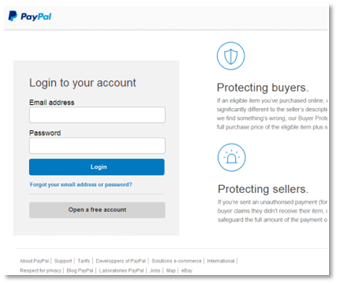
Say you got an email that said your PayPal account had an issue. Would you type your account information here if you found yourself on this page? If so, you would have handed over your information to a scammer.
We took the screenshot above as part of following a phishing attack to its end—without entering any legitimate info, of course. In fact, we entered a garbage email address and password, and it still let us in. That’s because the scammers were after other information, as you’ll soon see.
As we dug into the site more deeply, it looked pretty spot on. The design mirrored PayPal’s style, and the footer links appeared official enough. Yet then we looked more closely.
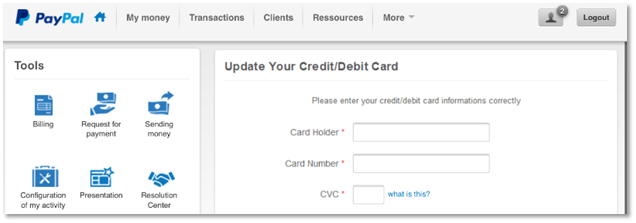
Note the subtle errors, like “card informations” and “Configuration of my activity.” While companies make grammatical errors on occasion, spotting them in an interface should hoist a big red flag. Plus, the site asks for credit card information very early in the process. All suspicious.
Here’s where the attackers really got bold.
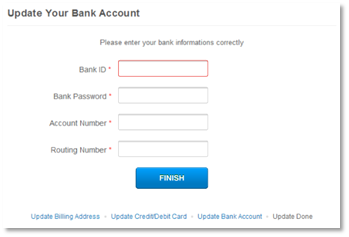
They ask for bank “informations,” which not only includes routing and account numbers, but they ask for the account password too. As said, bold. And entirely bogus.
Taken all together, the subtle errors and the bald-faced grab for exacting account information clearly mark this as a scam.
Let’s take a few steps back, though. Who sent the phishing email that directed us to this malicious site? None other than “paypal at inc dot-com.”
Clearly, that’s a phony email. And typical of a phishing attack where an attacker shoehorns a familiar name into an unassociated email address, in this case “inc dot-com.” Attackers may also gin up phony addresses that mimic official addresses, like “paypalcustsv dot-com.” Anything to trick you.
Likewise, the malicious site that the phishing email sent us to used a spoofed address as well. It had no official association with PayPal at all—which is proof positive of a phishing attack.
Note that companies only send emails from their official domain names, just as their sites only use their official domain names. Several companies and organizations will list those official domains on their websites to help curb phishing attacks.
For example, PayPal has a page that clearly states how it will and will not contact you. At McAfee, we have an entire page dedicated to preventing phishing attacks, which also lists the official email addresses we use.
Other examples of phishing attacks
Not every scammer is so sophisticated, at least in the way that they design their phishing emails. We can point to a few phishing emails that posed as legitimate communication from McAfee as examples.
There’s a lot going on in this first email example. The scammers try to mimic the McAfee brand, yet don’t pull it off. Still, they do several things to try to act convincing.
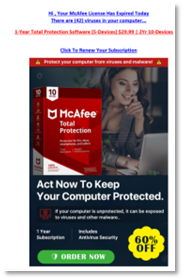
Note the use of photography and the box shot of our software, paired with a prominent “act now” headline. It’s not the style of photography we use. Not that people would generally know this. However, some might have a passing thought like, “Huh. That doesn’t really look like what McAfee usually sends me.”
Beyond that, there are a few capitalization errors, some misplaced punctuation, and the “order now” and “60% off” icons look rather slapped on. Also note the little dash of fear it throws in with a mention of “There are (42) viruses on your computer …”
Taken all together, someone can readily spot that this is a scam with a closer look.
This next ad falls into the less sophisticated category. It’s practically all text and goes heavy on the red ink. Once again, it hosts plenty of capitalization errors, with a few gaffes in grammar as well. In all, it doesn’t read smoothly. Nor is it easy on the eye, as a proper email about your account should be.
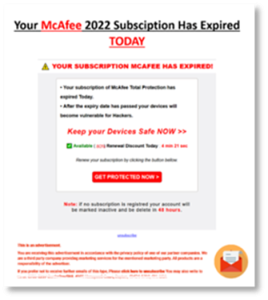
What sets this example apart is the “advertisement” disclaimer below, which tries to lend the attack some legitimacy. Also note the phony “unsubscribe” link, plus the (scratched out) mailing address and phone, which all try to do the same.
This last example doesn’t get our font right, and the trademark symbol is awkwardly placed. The usual grammar and capitalization errors crop up again, yet this piece of phishing takes a slightly different approach. 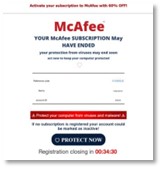
The scammers placed a little timer at the bottom of the email. That adds a degree of scarcity. They want you to think that you have about half an hour before you are unable to register for protection. That’s bogus, of course.
Seeing any recurring themes? There are a few for sure. With these examples in mind, get into the details—how you can spot phishing attacks and how you can avoid them altogether.
How to spot and prevent phishing attacks.
Just as we saw, some phishing attacks indeed appear fishy from the start. Yet sometimes it takes a bit of time and a particularly critical eye to spot.
And that’s what scammers count on. They hope that you’re moving quickly or otherwise a little preoccupied when you’re going through your email or messages. Distracted enough so that you might not pause to think, is this message really legit?
One of the best ways to beat scammers is to take a moment to scrutinize that message while keeping the following in mind …
They play on your emotions.
Fear. That’s a big one. Maybe it’s an angry-sounding email from a government agency saying that you owe back taxes. Or maybe it’s another from a family member asking for money because there’s an emergency. Either way, scammers will lean heavily on fear as a motivator.
If you receive such a message, think twice. Consider if it’s genuine. For instance, consider that tax email example. In the U.S., the Internal Revenue Service (IRS) has specific guidelines as to how and when they will contact you. As a rule, they will likely contact you via physical mail delivered by the U.S. Postal Service. (They won’t call or apply pressure tactics—only scammers do that.) Likewise, other nations will have similar standards as well.
They ask you to act—NOW.
Scammers also love urgency. Phishing attacks begin by stirring up your emotions and getting you to act quickly. Scammers might use threats or overly excitable language to create that sense of urgency, both of which are clear signs of a potential scam.
Granted, legitimate businesses and organizations might reach out to notify you of a late payment or possible illicit activity on one of your accounts. Yet they’ll take a far more professional and even-handed tone than a scammer would. For example, it’s highly unlikely that your local electric utility will angrily shut off your service if you don’t pay your past due bill immediately.
They want you to pay a certain way.
Gift cards, cryptocurrency, money orders—these forms of payment are another sign that you might be looking at a phishing attack. Scammers prefer these methods of payment because they’re difficult to trace. Additionally, consumers have little or no way to recover lost funds from these payment methods.
Legitimate businesses and organizations won’t ask for payments in those forms. If you get a message asking for payment in one of those forms, you can bet it’s a scam.
They use mismatched addresses.
Here’s another way you can spot a phishing attack. Take a close look at the addresses the message is using. If it’s an email, look at the email address. Maybe the address doesn’t match the company or organization at all. Or maybe it does somewhat, yet it adds a few letters or words to the name. This marks yet another sign that you might have a phishing attack on your hands.
Likewise, if the message contains a web link, closely examine that as well. If the name looks at all unfamiliar or altered from the way you’ve seen it before, that might also mean you’re looking at a phishing attempt.
Protect yourself from phishing attacks
- Go directly to the source. Some phishing attacks can look convincing. So much so that you’ll want to follow up on them, like if your bank reports irregular activity on your account or a bill appears to be past due. In these cases, don’t click on the link in the message. Go straight to the website of the business or organization in question and access your account from there. Likewise, if you have questions, you can always reach out to their customer service number or web page.
- Follow up with the sender. Keep an eye out for emails that might be a spear phishing attack. If an email that looks like it came from a family member, friend, or business associate, follow up with them to see if they sent it. Particularly if asks for money, contains a questionable attachment or link, or simply doesn’t sound quite like them. Text, phone, or check in with them in person. Don’t follow up by replying to the email, as it may have been compromised.
- Don’t download attachments. Some phishing attacks send attachments packed with malware like the ransomware, viruses, and keyloggers we mentioned earlier. Scammers may pass them off as an invoice, a report, or even an offer for coupons. If you receive a message with such an attachment, delete it. And most certainly don’t open it. Even if you receive an email with an attachment from someone you know, follow up with that person. Particularly if you weren’t expecting an attachment from them. Scammers will often hijack or spoof email accounts of everyday people to spread malware.
- Hover over links to verify the URL. On computers and laptops, you can hover your cursor over links without clicking on them to see the web address. If the URL looks suspicious in any of the ways we mentioned just above, delete the message, and don’t ever click.
Protect yourself from email attacks even further
Online protection software can protect you from phishing attacks in several ways.
For starters, it offers web protection that warns you when links lead to malicious websites, such as the ones used in phishing attacks. In the same way, online protection software can warn you about malicious downloads and email attachments so that you don’t end up with malware on your device. And, if the unfortunate does happen, antivirus can block and remove malware.
Online protection software like ours can also address the root of the problem. Scammers must get your email address from somewhere. Often, they get it from online data brokers, sites that gather and sell personal information to any buyer—scammers included.
Data brokers source this information from public records and third parties alike that they sell in bulk, providing scammers with massive mailing lists that can target thousands of potential victims. You can remove your personal info from some of the riskiest data broker sites with our Personal Data Cleanup, which can lower your exposure to scammers by keeping your email address out of their hands.
In all, phishing emails have telltale signs, some more difficult to see than others. Yet you can spot them when you know what to look for and take the time to look for them. With these attacks so prevalent and on the rise, looking at your email with a critical eye is a must today.
The post How to Spot Phishing Emails and Scams appeared first on McAfee Blog.

 Entrar
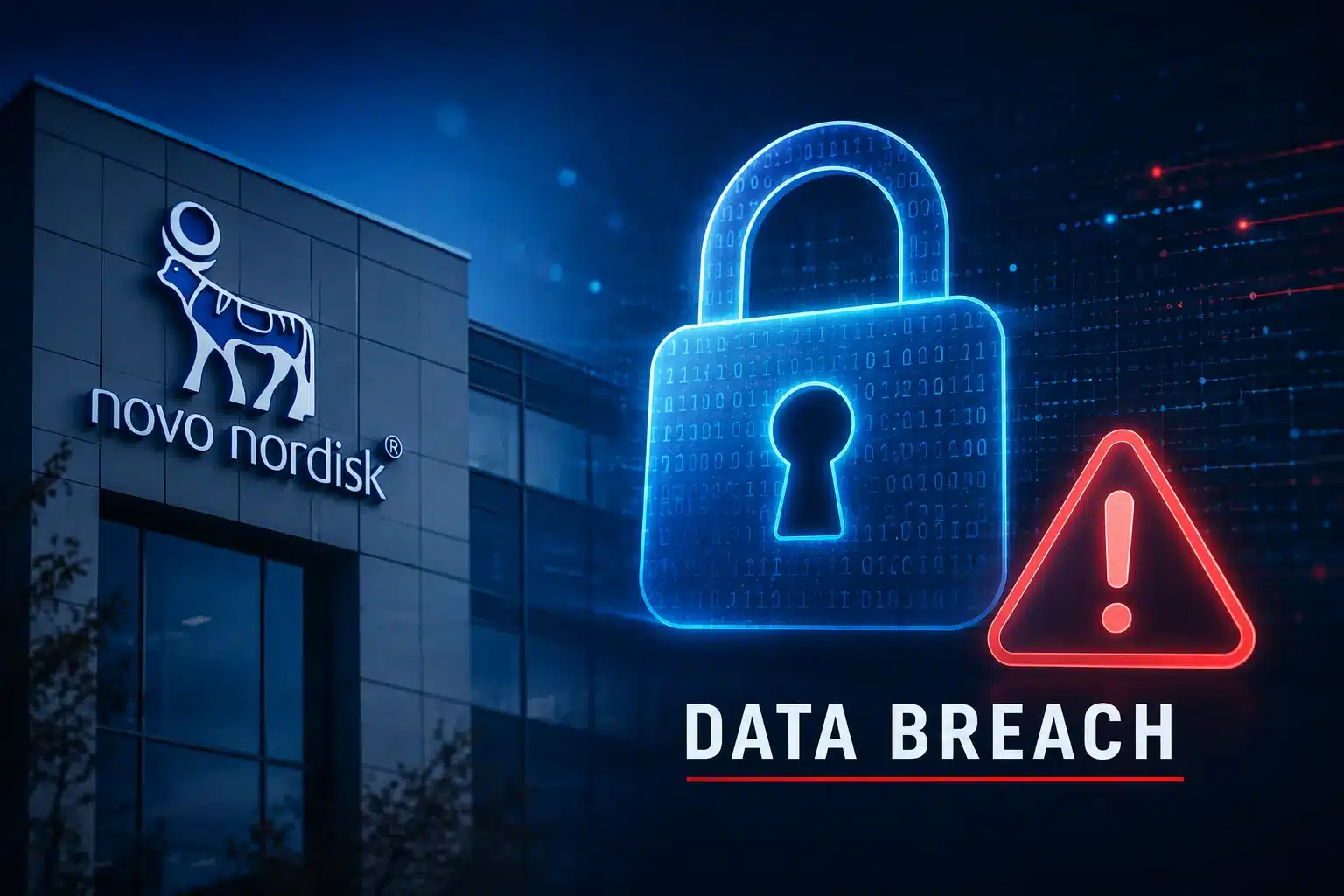
 The healthcare company also confirmed that non-public data, including personal information, was copied externally without authorization. Impacted parties are being notified as appropriate.