Graham gets a phone call from the police. Well, someone who sounds convincingly like the police. There's just one small problem: what they really want is the 24-word seed key to Graham's cryptocurrency wallet.
Meanwhile, if you've stayed in a hotel recently, the free Wi-Fi you connected to might have come with an unexpected extra: an all-you-can-eat buffet of "Captive Crunch" for a Russian intelligence-linked hacking group.
And a group calling itself the "ExFilSquad" has walked off with 600,000 records of the UK's teachers and head teachers from the Department for Education — sending an unusually polite ransom demand.
All this and more in episode 479 of the "Smashing Security" podcast with cybersecurity expert and keynote speaker Graham Cluley, and special guest Danny Palmer.
Microsoft has warned that hotel, conference, and other hospitality Wi-Fi networks are being actively abused by a Russian group to target travelers worldwide. The campaign, dubbed “CaptiveCrunch” turns a routine Wi-Fi login moment into an opportunity to compromise corporate accounts and devices.
From the user’s perspective, nothing looks out of the ordinary: they connect to hotel Wi-Fi, get the usual captive portal prompt, and perhaps see a familiar‑looking message about needing to update something before they can browse. However, behind the scenes, the allegedly state-linked group position themselves in the network path and manipulate DNS (Domain Name System) and HTTP traffic from captive‑portal Wi-Fi.
From there, several things can happen:
Logins are stolen: The user’s browser session is redirected to attacker‑controlled phishing pages, like fake Microsoft login prompts, where credentials, device codes, or OAuth tokens are harvested.
Malware is downloaded: The user is presented with fake update or ClickFix dialogs that download malware. In these cases, usually a remote access trojan (RAT) plus an infostealer.
A machine-in-the-middle attack (MitM) where traffic is quietly proxied through attacker infrastructure, putting the user in a position for further credential theft.
Reportedly, one of the main malware strains used in these attacks is called CornFlake, a remote access trojan (RAT) that can capture webcam images, microphone audio, and keystrokes.
The infostealer was identified as ChocoShell, a fileless Powershell-based information stealer which primarily goes after browser session cookies, saved passwords, Microsoft 365 Single Sign-On (SSO) tokens, and Wi-Fi credentials from compromised systems.
Microsoft lists a set of fake dialogs that may appear once you connect to compromised Wi‑Fi:
winupdate: A bogus Windows Update window with “Working on updates… Don’t turn off your computer.”
defender: A fake Windows Security virus scan.
directx: “DirectX End‑User Runtime Web Installer.”
vcredist: A Microsoft Visual C++ redistributable installer.
sysopt: A disk optimization utility.
netfix: A Windows Network Diagnostics ‘fix’ tool.
browser: A browser update prompt.
pdfview: A document/PDF viewer installer.
How to stay safe
Malwarebytes has long warned about the safety of public Wi-Fi. Here’s how you can stay safe while traveling:
Use your own phone’s hotspot instead of using the public Wi‑Fi. A mobile connection, especially with an eSIM and a reputable carrier, significantly reduces the likelihood of an attack compared to an unknown hotel network.
If you’re forced to use public Wi‑Fi, use a VPN with an active Kill Switch: Complete the authentication on the hotel portal first, then launch your VPN before opening any website or app. The Kill Switch feature will instantly block all internet traffic if the VPN disconnects even for a second, preventing cybercriminals from injecting malicious code out in the open. While CaptiveCrunch operates around captive portals and pre‑VPN flows, a VPN still reduces other risks and limits passive data collection once you’re online.
Always inspect the certificate of any public Wi‑Fi login or ‘security’ portal that asks for more than a room number or basic credentials. These aren’t always a straight‑up giveaway, but sometimes they can be an obvious clue: mismatched hostnames, untrusted issuers, or plain HTTP are red flags that should stop you from proceeding.
Many captive portals ask for an email address for registration or marketing. Even in benign cases, there is little value in handing over your real inbox. If you must provide an address, consider giving a fake one or a throwaway alias that is unrelated to your primary accounts.
If you are asked to download software, a certificate, a browser update, or a fix tool in order to connect, stop. You should never have to download anything just to log into Wi‑Fi.
Don’t rush to follow instructions on a webpage or prompt, especially if it asks you to run commands on your device or copy-paste code. Be cautious of pages urging immediate action: sophisticated ClickFix pages add countdowns, user counters, or other pressure tactics to make you act quickly.
Secure your devices. Use an up-to-date, real-time anti-malware solution with a web protection component.
Avoid entering Microsoft 365, Google Workspace, or other high‑value credentials directly into any page reached via captive portal redirection. If you need to check corporate mail, follow known URLs rather than clicking through prompts.
And last but not least, update your browser, operating systems, and other important software before you travel. That reduces the chance of getting legitimate update requests while you’re away.
From reporting threats to removing them.
Cybersecurity risks should never spread beyond a headline. Keep threats off your devices by downloading Malwarebytes today.
Microsoft says Russian hackers hijacked hotel Wi-Fi portals to spread malware and steal Microsoft 365 tokens from travelers.
Microsoft Threat Intelligence disclosed CaptiveCrunch, a campaign it attributes to Storm-2945, an operational sub-cluster of Midnight Blizzard, the Russian SVR-linked group also known as APT29 and Cozy Bear. Since early May 2026, Storm-2945 has been manipulating DNS and HTTP traffic on captive portal networks at hotels, conference centers, and shared venues worldwide to redirect guests toward malware and credential theft operations. If you connected to hotel Wi-Fi while traveling in the past few months, this report is worth reading carefully.
“Since early May 2026, Microsoft Threat Intelligence has observed Storm-2945 manipulating DNS and HTTP traffic from networks served by captive portals to redirect user traffic through actor-controlled infrastructure.” reads the report published by Microsoft. “To date, Microsoft has identified widespread compromise of Wi-Fi networks at hospitality-related organizations and other networks serviced by captive portal equipment in several countries. ReliaQuest has identified this activity not only at hotels, but also conference centers and other shared venues, and assesses that the goal of this activity is to access the accounts of corporate travelers.”
That last point matters: the shared infrastructure patterns suggest this may not be a series of individual venue compromises but rather access to something shared across portions of the captive portal ecosystem. Microsoft hasn’t named any provider.
The malware delivered through these networks is CornFlake, a full-featured Windows remote access trojan written in Go.
“CornFlake registers as a Windows service named svchost32 with the display name “Cloud Sync Service” and description “Synchronizes files with the cloud storage provider”, deliberately mimicking the legitimate svchost.exe process.” continues the report. “It establishes redundant persistence mechanisms: Windows service registrations, Registry Run keys, named scheduled tasks, and a persistence watchdog routine that runs continuously to restore any persistence mechanism that is removed by defenders or endpoint protection.”
CornFlake establishes an encrypted C2 channel using ECDH P-256 key exchange and supports dynamic reconfiguration without redeployment. Once installed, the RAT can log keystrokes, monitor the clipboard, capture screenshots, audio and webcam feeds, steal browser credentials, exfiltrate files, monitor USB devices, collect detailed system information, and execute remote commands. It also exposes a local HTTP API, allowing companion malware such as ChocoShell to reuse its secure C2 channel for file theft, configuration updates, and connectivity checks.
“For command and control (C2), CornFlake performs an Elliptic Curve Diffie-Hellman (ECDH) P-256 ephemeral key exchange with the C2 server, derives a session key via SHA-256, and communicates over a custom JSON protocol framed within the encrypted channel.” states the report. “This provides an encrypted channel to the C2 server, with each C2 session using a unique ephemeral key, making decryption of captured traffic impossible without the session-specific private key. “
Each C2 session uses a unique ephemeral key, which means captured traffic can’t be decrypted without that session’s private key. The malware also supports a runtime configuration file that lets the attacker reconfigure C2 servers and targeting without redeploying the implant.
CornFlake is delivered via ClickFix-style pages that impersonate Windows Update screens, Google verification pages, DirectX installers, browser update prompts, and disk optimization utilities — whatever looks most plausible for the venue. The victim still has to execute the payload, but the captive portal controls exactly what they see when they try to connect. Microsoft also found indications that Storm-2945 may be targeting Android devices through the same landing pages, which include instructions to download and install an APK.
The second tool, ChocoShell, is a PowerShell infostealer that runs entirely in memory. Its primary target is credentials.
“ChocoShell collects Microsoft 365 and Azure Active Directory (AD) access tokens, refresh tokens, and Web Account Manager (WAM) tokens from .tbres files in the Token Broker cache. Collection of these tokens represents a significant threat to enterprise environments, as threat actors could replay SSO sessions without browser cookies.” states Microsoft. “Additionally, Wi-Fi credentials are harvested via netsh wlan show profile with key=clear.”
ChocoShell also implements three silent UAC bypass techniques with ordered fallback, disables Windows Defender signature updates, and uses Chrome DevTools Protocol to extract browser cookies by launching the browser with a remote debugging port. This technique bypasses Chrome’s App-Bound Encryption entirely.
Since July 16, some CaptiveCrunch landing pages have added device code phishing to the mix, redirecting guests into Microsoft’s legitimate device code authentication flow. The attacker initiates the authentication request and presents the user with a code to enter at Microsoft’s real sign-in page. When the user enters it, they authenticate the attacker’s session instead of their own — an MFA-satisfied session, since the user just completed the factor. Microsoft recommends blocking the device code flow through Conditional Access policies everywhere it isn’t explicitly required.
Researchers also detailed FruitStone, the web-based C2 panel used by Storm-2945 operators to manage the CaptiveCrunch campaign. It provides a centralized interface to control CornFlake implants, deploy payloads, collect stolen data, and manage compromised devices. Disguised as a legitimate “CloudSync Console,” it supports multi-operator access, agent monitoring, remote commands, file theft, credential collection, configuration updates, and campaign infrastructure management.
The practical advice for travelers is blunt: treat hotel, conference, and airport Wi-Fi as hostile. Use a mobile hotspot or cellular data instead wherever possible. Don’t download or execute anything a captive portal presents as an update, certificate, troubleshooting tool, or security utility. Don’t enter corporate credentials on venue registration pages. And if your organization hasn’t already blocked device code flow in Conditional Access, now is a reasonable time to check.
Recently, ReliaQuest’s threat research team also documented attackers compromising the Wi-Fi gateways at hotels and conference centers, then quietly rerouting guests toward fake Microsoft login pages.
There’s a pattern connecting all this to previous campaigns. The tradecraft echoes a Russian-linked operation called FrostArmada, which hit home routers the same way earlier this year, and researchers tie both to the group known as APT28 (aka UAC-0001, aka Fancy Bear, Pawn Storm, Sofacy Group, Sednit, BlueDelta, and STRONTIUM). The link isn’t a smoking gun; it’s shared technique, not shared infrastructure, and the researchers say so plainly.
Hackers compromised hotel Wi-Fi gateways to redirect users to fake Microsoft 365 login pages and steal credentials.
ReliaQuest’s threat research team just documented attackers compromising the Wi-Fi gateways at hotels and conference centers, then quietly rerouting guests toward fake Microsoft login pages. No phishing email required. No malicious attachment. Just bad luck about which hotel you picked.
“Adversaries have been compromising public Wi-Fi gateways at hotels, conference centers, and other shared venues to hijack the accounts of traveling corporate employees.” reads the report published by ReliaQuest. “Once they control the Wi-Fi gateway, they quietly redirect users to attacker-controlled infrastructure to steal credentials, in activity ongoing since at least June 2026.”
The mechanism is simple once you see it. These gateways handle DNS for every device that connects, so whoever controls the gateway controls where your traffic actually goes, even when the address bar looks completely normal. ReliaQuest found compromised devices across several US cities plus India and Saudi Arabia, hitting employees from finance, law, healthcare, energy, and retail, which tells you this isn’t aimed at one industry. It’s aimed at anyone who travels for work.
Researchers think the entry point was weak or reused admin credentials on internet-facing management interfaces, things like exposed SSH or web consoles.
“ReliaQuest assesses with low-to-medium confidence that initial access into these devices exploited exposed management interfaces (including internet-facing SSH, SNMP, and web administration consoles) in combination with weak or reused administrative credentials.” continues the report. “We encountered visibility constraints into the individual devices that prevented confirmation of this hypothesis, but this methodology would be consistent with the gateway targeting and DNS poisoning patterns documented in recent reporting on an APT28-linked campaign known as “FrostArmada.””
Once inside, the attackers pointed DNS toward domains built to look like Microsoft’s login pages, including m365-owa.com and ms365-live.com. The whole thing runs on trust, since a device joining a network just assumes the DNS resolver it’s handed is telling the truth.
That trust gets abused in a way that dodges the DNS protections people already have. Switching to a hardcoded resolver like 8.8.8.8 doesn’t save you, because the query still leaves the laptop unencrypted and the gateway can rewrite the answer before it ever reaches Google’s server. Encrypted DNS tools help only if they run in strict mode; the default “opportunistic” mode quietly falls back to plaintext the moment encryption fails, and that fallback is exactly what gets hijacked.
“Two configurations do stop it. A full-tunnel VPN routes all DNS through the corporate tunnel before the gateway can touch the request. Encrypted DNS in strict mode (DNS over HTTPS or DNS over TLS with plaintext fallback disabled) ensures the gateway can’t forge a response.” states the cybersecurity firm. “Most DNS encryption tools default to opportunistic mode, which permits plaintext fallback when encrypted resolution fails. That fallback is what the gateway redirects, making opportunistic mode insufficient; only strict mode closes the gap.”
ReliaQuest also caught something extra in about a third of cases: an attempt to abuse Windows’ automatic proxy discovery feature, known as WPAD.
WPAD is a Windows feature that automatically discovers proxy settings when a device connects to a network. In this campaign, attackers abused it by controlling DNS responses, potentially tricking Windows into loading a malicious proxy configuration. If successful, they could intercept traffic from browsers, authentication services, and enterprise apps. Because the traffic still uses HTTPS, the attack can blend in with normal network activity and be difficult to detect.
Pull that off and the attacker routes a much wider slice of an employee’s traffic, not just login attempts, through their own proxy. In a smaller number of cases, the attackers skipped credential theft entirely and went after Microsoft’s device-code sign-in flow instead, tricking users into approving a login they didn’t realize belonged to someone else. Approve that prompt and the attacker walks away with a valid, MFA-cleared session token, no password needed.
“In roughly one-third of observed cases—Windows devices that didn’t have Web Proxy Auto-Discovery (WPAD) disabled, or Mac devices—the attacker also attempted WPAD abuse. If successful, it routes all Windows application traffic through the attacker’s proxy, broadening the redirection surface well beyond authentication traffic.” continues the report. “This technique wasn’t documented in prior FrostArmada-linked reporting, making it one of the clearest distinctions between this campaign and previously observed APT28 activity.”
There’s a pattern connecting all this to previous campaigns. The tradecraft echoes a Russian-linked operation called FrostArmada, which hit home routers the same way earlier this year, and researchers tie both to the group known as APT28 (aka UAC-0001, aka Fancy Bear, Pawn Storm, Sofacy Group, Sednit, BlueDelta, and STRONTIUM). The link isn’t a smoking gun; it’s shared technique, not shared infrastructure, and the researchers say so plainly.
The fix is almost boringly simple, which is rare in this line of work. Force every corporate device onto an always-on VPN with full-tunnel routing, so DNS never touches the hotel network at all, and shut off split-tunnel exceptions that would let it sneak through anyway. Disable WPAD where nobody needs it, block Microsoft’s device-code flow at the identity provider unless someone has a real reason to keep it, and train people to check the certificate before they type a password on airport or hotel Wi-Fi.
None of this requires new budget or a six-month project. It requires someone actually flipping the switches that already exist.
A Copa do Mundo de 2026 é um dos eventos de futebol mais aguardados do ano. O torneio será sediado em três países: EUA, Canadá e México. Infelizmente, eventos desse porte atraem não apenas torcedores, mas também golpistas de todo o mundo. Já revelamos como os cibercriminosos estão se preparando para a Copa do Mundo e hoje estamos falando sobre segurança digital para os torcedores no México.
O país sediará 13 partidas e receberá milhões de turistas. Eles ficarão hospedados em hotéis, assistirão a jogos, frequentarão restaurantes, transitarão por aeroportos e visitarão pontos turísticos populares, e em todos os lugares que forem, a tentação de se conectar a redes Wi-Fi públicas será grande.
Avaliamos mais de 84.500 (!) pontos de acesso Wi-Fi públicos na Cidade do México, em Guadalajara e em Monterrey, e temos muitas informações para compartilhar sobre a segurança deles. Alerta de spoiler: muitas redes ainda usam padrões de segurança desatualizados, então, você realmente não deve sair de férias sem proteção confiável e um eSIM.
O que foi testado e de que forma
Percorrer o México a pé à procura de pontos de acesso Wi-Fi públicos teria sido um pouco complicado, embora tenha sido exatamente isso que fizemos num estudo semelhante sobre a segurança de redes Wi-Fi em Paris. Você pode conferir os resultados desse estudo na postagem Como é a segurança das redes Wi-Fi em Paris?
Dessa vez, a missão era muito mais desafiadora: mapear o cenário de redes sem fio de três grandes metrópoles. Foi por isso que recorremos ao wardriving, ou seja, usamos um smartphone ou notebook para buscar e registrar redes sem fio de dentro de um veículo em movimento. Isso é parecido com o que seu telefone faz ao procurar redes Wi-Fi próximas constantemente. Porém, em vez de nos conectarmos a elas, apenas coletamos dados.
Todas as informações foram estritamente usadas para observação passiva e análise de infraestrutura. Os especialistas da Equipe de Pesquisa e Análise Global da Kaspersky (GReAT) coletaram apenas informações de serviço transmitidas publicamente. Não houve tentativas de autenticação, interceptação de tráfego, exploração de sistemas ou interação com as redes sem fio detectadas. Os pontos de acesso móveis implementados em carros e em dispositivos móveis foram excluídos da amostra.
Nosso principal alvo era a Cidade do México, a capital do país e uma das cidades com maior densidade demográfica da América Latina. Percorremos de carro alguns dos pontos turísticos mais populares da cidade: Estádio da Cidade do México, Aeroporto Internacional, Zócalo, Paseo de la Reforma, Colonia Roma, La Condesa, Polanco e Coyoacán.
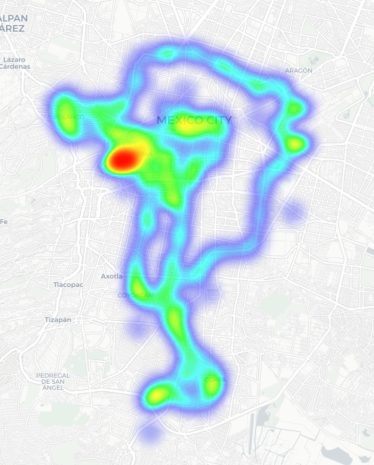
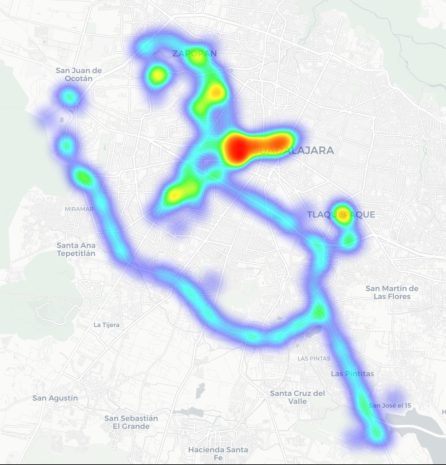
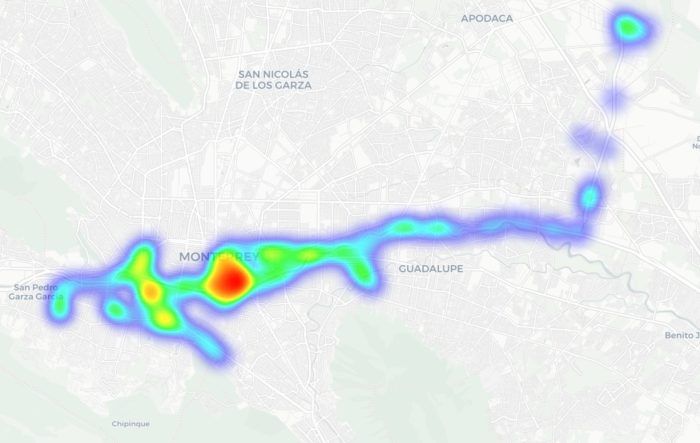
Percorremos rotas semelhantes em Guadalajara e Monterrey: estádios, avenidas principais, aeroportos e bairros populares. Abaixo, é possível ver um mapa de calor das áreas que percorremos. As regiões em vermelho representam as áreas de maior densidade de pontos de acesso público, passando pelas regiões em amarelo e verde, até chegar nas azuis, que representam a concentração mais baixa.
Mapa de calor mostrando a localização de todos os pontos de acesso Wi-Fi encontrados na Cidade do México
Mapa de calor mostrando a localização de todos os pontos de acesso Wi-Fi encontrados em Guadalajara
Mapa de calor mostrando a localização de todos os pontos de acesso Wi-Fi encontrados em Monterrey
Usamos reconhecimento passivo por rádio para registrar 84.500 sinais e 69.500 identificadores de rede exclusivos nessas três cidades. A maioria dos sinais foi captada na Cidade do México (61,4%), seguida por Guadalajara (23,6%) e Monterrey (14,8%).
O que analisamos:
Identificadores de rede sem fio (SSIDs): os nomes que aparecem na lista de redes Wi-Fi disponíveis
Informações obtidas desses identificadores
Configurações padrão do roteador e como os ISPs implementam suas redes
Frequências usadas e características do sinal
Carga dos canais e uso do espectro de radiofrequência
Configurações de segurança das redes sem fio:
Redes abertas e inseguras
Redes com WPS ativado
Redes seguras (WPA2/WPA3) com WPS ativado
Você pode encontrar a versão completa do estudo no blog Securelist.
Nomes de pontos de acesso Wi-Fi públicos reveladores
Os nomes das redes (SSIDs) podem revelar muitas informações de forma involuntária sobre os fabricantes do hardware, ISPs e métodos de implementação, além de revelar se um ponto de acesso pertence a uma empresa ou a um usuário.
Cerca de 34% das redes Wi-Fi públicas registradas nem sequer alteraram seus nomes, mantendo os SSIDs originais dos fabricantes dos roteadores ou usando convenções de nomenclatura padrão dos seus ISPs. Essa pode ser uma informação bastante útil para atacantes, pois esse tipo de nome de rede permite que eles saibam qual ponto de acesso pertence a determinado provedor, qual hardware está sendo usado e a sua configuração padrão provável.
Outro fato preocupante é o grande número de redes Wi-Fi (mais de 30%) que usam o endereço MAC do ponto de acesso (BSSID) como nome da rede visível. Os primeiros bytes de um BSSID contêm um Identificador organizacional único (OUI) que revela quem é o fabricante do roteador. Essa é uma informação útil para pessoas mal-intencionadas: elas podem descobrir quem fabricou o hardware e testar vulnerabilidades específicas relativas aos modelos dessa marca.
O Wi-Fi do México está bem protegido?
Pode-se considerar que um ponto de acesso protegido com WPA2/WPA3 está mais ou menos seguro. Todos os outros mecanismos de autenticação produzem resultados muito mais fracos. Agrupamos as redes Wi-Fi públicas em quatro categorias:
Seguras (WPA2/WPA3)
Inseguras (abertas/WEP)
Fracas (WPA)
Indeterminadas
Os resultados obtidos nas três cidades são muito parecidos: cerca de 82% de todos os pontos de acesso analisados estão protegidos por padrões seguros. O protocolo WPA, que é inseguro e está desatualizado, quase não é utilizado. No entanto, mais de 10% dos pontos de acesso são completamente inseguros. Quem se conecta a essas redes corre o risco de ser vítima de interceptação de tráfego e vigilância oculta.
Mas a segurança não é avaliada apenas pelos protocolos WPA. Também verificamos a presença do WPS, o conhecido recurso que possibilita a conexão rápida a uma rede sem necessidade de senha e que é altamente vulnerável a ataques. Descobriu-se que o WPS está ativado em 47% dos pontos de acesso na Cidade do México (quase a metade), 43% em Guadalajara e 41% em Monterrey. Em média, 45% dos pontos de acesso são potencialmente vulneráveis a ataques relacionados ao WPS, o que representa um sacrifício à segurança em nome da conveniência.
Além disso, esse recurso permaneceu ativo com frequência até mesmo em redes WPA2/WPA3 aparentemente seguras (cerca de metade delas utilizava WPS). Isso mostra que, para que um ponto de acesso Wi-Fi seja considerado seguro, não basta ter WPA2/WPA3, pois recursos adicionais, como o WPS, ainda podem viabilizar ataques.
O que mais os turistas precisam saber
Os riscos digitais em uma viagem não se limitam apenas a redes Wi-Fi públicas, especialmente porque muitas pessoas estão migrando do Wi-Fi público para um eSIM. Ainda há muitas ameaças em lugares com grande movimentação de pessoas: carregadores USB públicos, códigos QR com links trocados, ataques por meio de NFC e Bluetooth e, é claro, táticas de engenharia social. Vamos nos aprofundar em cada um desses fatores.
Estações de carregamento. Os carregadores USB públicos também podem ser perigosos: pessoas mal-intencionadas podem obter acesso aos dados no seu dispositivo ou tentar instalar um malware. Detalhamos esses ataques na nossa postagem Roubo de dados durante o carregamento do smartphone.
Códigos QR perigosos. Os criminosos podem disseminar códigos QR contendo phishing em pontos turísticos populares. Os pretextos podem variar bastante; por exemplo, anúncios de “eventos” para torcedores de um time específico ou links que supostamente oferecem descontos ou exibem cardápios de restaurantes. Na realidade, qualquer código QR postado na rua pode ser considerado inseguro por padrão, e você não deve utilizar seu smartphone para lê-los, a menos que tenha um Analisador de ameaças de códigos QR instalado.
Transmissões, ingressos e bolões falsos. Em postagens anteriores, descrevemos casos em que pessoas mal-intencionadas estavam distribuindo malware por meio de aplicativos IPTV falsos para aproveitar da empolgação em torno da Copa do Mundo de 2026. Lembre-se, mesmo que você planeje assistir aos jogos em casa, ainda precisa ficar alerta e não confiar em qualquer site que anuncie transmissões gratuitas, ofereça bolões ou prometa pagamentos bastante generosos.
Apesar da prevalência de pontos de acesso Wi-Fi públicos WPA2/WPA3 seguros na Cidade do México, em Guadalajara e em Monterrey, nosso estudo mostra que as redes Wi-Fi públicas continuam vulneráveis. Também é importante lembrar que os invasores podem criar redes falsas (as chamadas gêmeas do mal) disfarçadas de redes Wi-Fi públicas legítimas em aeroportos, hotéis, cafeterias e pontos turísticos.
É quase impossível para um usuário comum dizer o quanto um ponto de acesso específico é seguro ao tentar se conectar a ele. É por isso que a opção mais segura é usar dados móveis para acessar a Internet, eliminando por completo a necessidade de Wi-Fi. Além disso, não há necessidade de pesquisar as leis locais, tarifas e outras informações relativas a redes móveis para cada país que você planeja visitar. Basta comprar um cartão eSIM global on-line em dois cliques. Explicamos como facilitar todo esse processo na postagem Internet móvel com a Kaspersky eSIM Store.
Se você ainda planeja usar uma rede Wi-Fi pública, sempre use uma VPN para proteger seu dispositivo e dados ao se conectar a redes Wi-Fi desconhecidas e desprotegidas. Isso cria um túnel criptografado entre o seu dispositivo e o servidor VPN, impossibilitando a interceptação dos seus dados ao longo do caminho. Ainda não escolheu uma VPN? Experimente a Kaspersky Secure Connection, que está incluída nas assinaturas do Kaspersky Premium e do Kaspersky Plus.
Agora, se você ainda planeja participar da Copa do Mundo sem nenhuma solução de segurança cibernética, pelo menos siga estas regras básicas de higiene digital:
Não use carregadores USB públicos
Não envie informações confidenciais por conexões que não são seguras
Não faça login em contas bancárias, e-mail ou redes sociais por meio de redes Wi-Fi inseguras
Desative o Bluetooth e o NFC ao frequentar lugares com grande movimentação de pessoas
Não confie nos códigos QR postados na rua
Somente se conecte a um Wi-Fi público quando for absolutamente necessário
Leia também os seguintes artigos e garanta que torcer pelo seu time favorito não seja apenas emocionante, mas também seguro:
Mexico is one of the host countries for the 2026 FIFA World Cup, with matches to be played in three major cities: Mexico City, Monterrey, and Guadalajara. These locations are expected to see a large influx of international visitors, increasing the potential security risks. Many of those risks arise from users connecting to public wireless networks.
To better understand the wireless environments that visitors may encounter, we at Kaspersky GReAT conducted a wardriving assessment in the three host cities. The aim of the study was to analyze characteristics, deployment patterns, security configurations and potential exposure risks of public Wi-Fi infrastructure in urban wireless environments.
The information collected during the assessment was used exclusively for passive observation and infrastructure analysis. No attempts were made to authenticate, intercept communications, exploit systems or interact with the detected wireless networks beyond the publicly broadcast management information.
During processing of the collected data, one step involved filtering out networks belonging to cars or cell phones categorized as mobile hotspots because they do not represent networks that can be considered part of the assessment.
Research scope
The cities included in the study have high population density and extensive wireless infrastructure deployments. We chose areas with the most prominent wireless network activity and highly concentrated public access points. We carried out wardriving research in Monterrey back in 2008, but the city’s hotspot landscape has changed since then.
We chose the following analysis areas for each of the cities:
Mexico City: México City Stadium, Mexico City International Airport, Zócalo, Paseo de la Reforma, Colonia Roma, La Condesa, Polanco, and Coyoacán.
Guadalajara: Guadalajara Stadium, Guadalajara International Airport, the city center, Zapopan, Providencia, Avenida Chapultepec, Colonia Americana, Tlaquepaque, and the area around Andares.
Monterrey: Monterrey Stadium, Monterrey International Airport, Fundidora Park, Cintermex Monterrey, the downtown area, Barrio Antiguo, MacroPlaza, and the San Pedro financial district.
The wireless information was collected using passive wireless reconnaissance techniques. The collected information included:
SSID analysis and information exposure, including BSSID-derived SSIDs
Default router configurations and ISP deployments
Frequency and signal characteristics
Channel congestion and spectrum usage
Wireless security configurations, including:
Open and insecure wireless networks
WPS-enabled networks
Secure networks (WPA2/WPA3) with WPS enabled
We performed a wireless infrastructure analysis in Mexico City, Guadalajara, and Monterrey. We drove through the areas surrounding the World Cup stadiums, tourist zones, and other places where fan concentrations are likely to be largest. Our goal was to evaluate the security status, deployment characteristics and operational exposure of detected wireless networks.
In total, we recorded 84,588 signals with 69,473 unique Service Set Identifiers (SSIDs) in busy locations and World Cup zones across the three cities. Mexico City accounted for 61.4% of the signals, Guadalajara for 23.6%, and Monterrey for 14.8%. Approximately 82% of the signals had a single SSID (81.9%, 81.34%, and 84% respectively). Notably, they all operate under the IEEE 802.11 standard protocol.
Particular attention was given to identifying standard deployment patterns, legacy configurations, default vendor settings and information disclosure through publicly broadcast wireless identifiers.
The following sections present the results that were obtained by analyzing wireless infrastructure across the three locations.
Our findings
SSID analysis and information exposure
SSID analysis was conducted to evaluate naming conventions, deployment standardization and potential information exposure.
Only a few networks (0.0047%) have an invisible SSID, meaning the names of these networks are not broadcast. Some users prefer to hide the SSID for various reasons, such as the network’s purpose, the profile of its users, internal policies, etc. In contrast, the rest of the networks maintained active SSID broadcasting.
SSID structures may unintentionally disclose operational details about internet service providers (ISPs), device manufacturers, deployment practices, organizational ownership or user identity. The repeated presence of default SSID naming patterns across the analyzed locations indicates a significant degree of infrastructure homogeneity and reuse of default wireless configurations. It may also facilitate passive infrastructure profiling by revealing standard characteristics in use.
Approximately 34% of the detected networks retained the default SSID naming conventions provided by the manufacturer or ISP, while 66% used customized identifiers.
Distribution of SSID naming conventions (download)
Several recurring SSID naming conventions associated with ISP-provided deployments were identified in the three cities. The most frequently observed patterns include identifiers such as “Club_Totalplay_WiFi”, “izzi WiFi”, and “Megacable WiFi”, which suggests extensive standardization of wireless infrastructure deployment. Additionally, we observed distinctive location-specific SSIDs in each area of analysis, such as “XXXX-Internet para Todos-CDMX” or “RED JALISCO”.
Sequential SSID naming structures were also identified during the analysis. Patterns such as “INFINITUMXX” and “IZZI-XX” suggest automated ISP deployment and large-scale deployment strategies.
We identified 33 unique sequential naming structures among the 137 sequential SSIDs in total, representing approximately 0.16% of the detected wireless networks.
The following graph shows the top five sequential SSID patterns found in the largest number of networks:
Five most frequently observed sequential patterns (download)
Several customized SSIDs contained personal or organizational identifiers, including family names, professions, addresses or internal department references. Although personalized SSIDs may simplify local network identification for users, they may also expose sensitive information that could be useful for social engineering, physical targeting, or organizational profiling.
BSSID-derived SSID
During the analysis, multiple networks were identified that used the physical MAC address of a Wi-Fi access point (BSSID) as the visible SSID. This practice exposes hardware-level information that could facilitate vendor fingerprinting and targeted reconnaissance activities.
The organizationally unique identifier (OUI) contained in the first bytes of the BSSID identifies the equipment manufacturer. Threat actors can correlate exposed manufacturers with device-specific vulnerabilities.
Notably, we found that more than 30% of networks in all three cities reuse the MAC address as the SSID.
Default router configurations and ISP deployments
We performed wireless infrastructure profiling to identify the most common wireless equipment manufacturers and ISP deployments across the three locations.
Large-scale ISP deployments frequently use standardized wireless configurations and vendor-specific hardware platforms. Identifying dominant manufacturers and ISP naming conventions can provide insight into infrastructure and deployment practices facilitating the mapping of standardized attack surfaces.
The following figure shows the distribution of the most commonly used manufacturers.
Most frequently observed wireless equipment manufacturers (download)
The manufacturer analysis revealed a strong concentration of wireless infrastructure among a limited number of vendors. Across the three locations, Huawei Technologies, MediaTek-based devices, and other manufacturers’ equipment that is distributed through ISP channels represented a significant portion of the detected deployments. Mexico City had the most diverse infrastructure, while Monterrey and Guadalajara had a greater concentration of wireless equipment known as SOHO (small office/home office) or residential-grade hardware. The widespread presence of standard vendor platforms may facilitate infrastructure fingerprinting and large-scale targeting of known device-specific vulnerabilities.
Most frequently observed wireless equipment manufacturers across the three cities (download)
ISP deployments frequently exhibited standardized configuration patterns and recurring manufacturer identifiers. Our ISP deployment analysis revealed a high concentration of access points associated with major residential internet providers. Deployments associated with Infinitum, Totalplay and Izzi represented a substantial portion of the detected wireless infrastructure across all locations. These findings suggest a high degree of deployment standardization across networks associated with major residential internet providers. This observation was supported by the repeated presence of ISP-associated SSIDs such as “Infinitum”, “Totalplay”, and “Izzi”, combined with manufacturer identifiers frequently associated with consumer equipment, including Huawei, ZTE and other residential wireless equipment vendors.
It is important to note that, for this analysis, ISPs were primarily inferred from SSID naming conventions and manufacturer fingerprint data. A significant portion of the detected wireless networks fell into the “UNKNOWN/CUSTOM” category. This classification includes custom hotspots and networks whose naming conventions did not expose identifiable ISP-associated patterns. The findings suggest that many users and organizations (as we saw previously, approximately 66%) use custom network names, limiting direct provider attribution.
The following figure illustrates the distribution of ISP-associated wireless deployments in general.
To better understand this distribution, we took the most frequently observed ISPs by city.
Most frequently observed ISPs across the three cities (download)
Frequency and signal characteristics
We also analyzed wireless signal characteristics to evaluate coverage quality, signal strength, and frequency band utilization in the three cities. In dense urban environments, signal quality and frequency spectrum distribution can affect wireless reliability, client connectivity, roaming performance, and overall network efficiency.
Signal quality analysis revealed that a substantial portion of the detected access points operated under weak or very weak signal conditions. Monterrey had the highest percentage of very weak signals, with approximately 50% of detected deployments. Similar patterns were observed in Guadalajara and Mexico City, suggesting high-density wireless environments with overlapping coverage areas. Only a limited percentage of networks were classified within the very good or excellent signal categories across the three locations.
Signal stability analysis revealed that most detected wireless deployments exhibited stable beacon transmission behavior. More than 96% of the detected access points across all locations were classified as stable, while only a small percentage exhibited unstable or indeterminate signal behavior.
These findings imply that the majority of the wireless infrastructure observed during the assessment corresponded to permanently deployed access points rather than transient or intermittent wireless devices.
Frequency band analysis revealed the strong prevalence of 2.4 GHz wireless deployments across the three locations. More than 95% of the detected wireless networks operated within the 2.4 GHz spectrum, while only a small percentage of deployments were classified under the unknown or non-standard frequency categories. This uneven distribution reflects the continued prevalence of legacy-compatible wireless infrastructure and SOHO deployments.
These findings are consistent with dense urban wireless environments with large numbers of access points in restricted spectrum allocations.
Channel congestion and spectrum usage
Next, we analyzed wireless channel utilization to evaluate frequency spectrum congestion and channel allocation patterns across the three cities. Our analysis focused on the 2.4 GHz spectrum, where channel overlap and high access point density commonly produce interference and degraded wireless performance. In densely populated wireless environments, an excessive concentration of access points on a limited number of channels can lead to co-channel interference, packet collisions, reduced throughput, and degraded network stability.
Spectrum congestion analysis revealed that the 2.4 GHz band consistently experienced elevated congestion levels across the three cities. The detailed results showed a strong concentration of deployments on channels 11, 6 and 1, which are traditionally recommended as non-overlapping channels within the 2.4 GHz spectrum. Channel 11 was the most utilized channel, accounting for 25.2% of the detected access points, followed by channel 6 with 22.5% and channel 1 with 19.5%. This distribution indicates that most wireless deployments adhere to standard channel allocation practices for 2.4 GHz Wi-Fi environments.
The following figure illustrates the overall distribution of the most frequently utilized wireless channels.
To further assess wireless spectrum saturation, the detected access points were grouped according to channel congestion levels: VERY_HIGH, HIGH, UNKNOWN, MEDIUM, LOW and NONE.
Mexico City had the highest proportion of heavily congested wireless channels, with approximately 7% of detected access points operating under HIGH congestion conditions. Guadalajara followed with nearly 5% of deployments categorized as HIGH congestion, while Monterrey had the lowest percentage at approximately 3.29%.
These findings suggest that wireless spectrum saturation increases proportionally with urban infrastructure density and access point concentration. Despite the presence of congested deployments, most detected access points were categorized as LOW or MEDIUM congestion, suggesting severe spectrum saturation was localized rather than uniformly distributed.
A thorough analysis of individual channel utilization revealed that channels 11, 6 and 1 consistently experienced the highest congestion levels across the three cities, which correlates with our previous findings. These channels accounted for the majority of VERY_HIGH congestion classifications, particularly within the 2.4 GHz band.
In Mexico City, channel 11 alone accounted for more than 25% of detected deployments and consistently exhibited VERY_HIGH congestion levels.
This behavior reflects the limited availability of non-overlapping channels within the 2.4 GHz spectrum and the widespread reliance on default wireless configurations.
Overall, the channel utilization analysis showed that wireless deployments are concentrated heavily within the traditional, non-overlapping 2.4 GHz channels. While this strategy reduces adjacent-channel interference, excessive access point density on the same channels can still produce significant co-channel contention and poor wireless performance in high-density urban environments.
Wireless security configurations
The next thing we evaluated was the security posture of the detected wireless networks. We analyzed the wireless security configurations advertised by access points in each of the locations.
Overall security configuration distribution
The analysis revealed that WPA2 was the dominant wireless authentication mechanism across the three cities. Mexico City had the highest WPA2 adoption rate at 81.19%, followed by Monterrey at 79.19% and Guadalajara at 77.59%.
The study found that every 6th open access point (17%) was unsafe, namely 16.5% in Mexico City, 18.5% in Guadalajara, and 17.2% in Monterrey. Open wireless deployments were consistently present across all locations, ranging between 10% and 12% of detected access points. These findings show that despite the widespread deployment of modern wireless security standards, encryption adoption remains incomplete.
Distribution of wireless authentication mechanisms across the three locations (download)
To simplify the interpretation of wireless security posture, we grouped detected networks into four categories:
Secure (WPA2/WPA3)
Insecure (Open/WEP)
Weak (WPA)
Unknown
Across the three locations, secure networks comprised most of detected deployments, accounting for approximately 82% of all access points. However, insecure open networks still account for between 10% and 12% of detected wireless infrastructure, consistent with our previous findings. It is important to mention that networks within the unknown category are not considered secure.
Mexico City had the highest percentage of secure deployments at 83.54%, while Guadalajara had the highest percentage of insecure open networks at 12.46%. Although Monterrey had the lowest percentage of insecure networks, open deployments still accounted for more than 10% of the detected access points.
Wireless security posture grouping across the three locations (download)
Although modern WPA2/WPA3 encryption standards dominate current wireless deployments, the continued presence of open and legacy WPA deployments indicates that insecure wireless configurations remain relevant from an operational standpoint. These networks may expose users to passive traffic interception, unauthorized monitoring, rogue access point attacks, and credential harvesting techniques.
WPS-enabled networks
We also analyzed Wi-Fi Protected Setup (WPS) in all the locations to evaluate additional attack surfaces. WPS is a standard feature on wireless routers that enables devices such as printers, repeaters or mobile phones to connect to a secure Wi-Fi network without manually entering a long password, typically through a PIN-based enrolled mechanism. Although WPA2 and WPA3 provide strong encryption mechanisms, the presence of WPS can introduce security weaknesses due to inherently vulnerable PIN-based enrollment methods.
By combining detections from the three locations, we found that 55% of all detected access points did not advertise WPS capabilities, leaving 45% of deployments vulnerable to WPS-based abuse. These results suggest that, despite the adoption of modern encryption standards, a significant portion of wireless infrastructure continues to expose legacy convenience features.
During the analysis, we found that Mexico City had the highest proportion of WPS-enabled networks, with 46.61% of the detected access points advertising WPS capabilities. Guadalajara was second with 43.45%, while Monterrey had the lowest proportion at 40.93%.
The percentage of detected access points advertising WPS capabilities across the three locations (download)
Almost half of the detected wireless networks in each city continued to advertise WPS, indicating that WPS prevalence is consistently high across the three cities.
Secure networks with WPS enabled
In many cases, networks classified as secure because of WPA2/WPA3 encryption still had WPS functionality enabled, which effectively increased the available attack surface.
To further assess the relationship between encryption strength and WPS exposure, we conducted a secondary analysis of secure networks (WPA2/WPA3) only. The results showed that around half of all secure deployments still exposed WPS, with the following breakdown for each city:
Mexico City: 53.7%
Guadalajara: 50.9%
Monterrey: 47.5%
The proportion of secure networks with WPS enabled across the three locations (download)
These findings indicate that encryption strength alone is not enough to evaluate wireless security posture because additional protocol features, such as WPS, may still expose exploitable attack vectors.
Additional security considerations
Overall, travelers operating within dense public environments are exposed not only to insecure wireless infrastructure but also to various risks associated with digital interactions. These risks include many threats, from public USB charging systems and phishing QR codes to proximity-based protocols and exposure to shared public devices, such as interactive totems or kiosks. One particular point that should be taken into account in light of our research is the issue of rogue wireless deployments.
Rogue access points are not necessarily malicious; they may be set up accidentally by misconfiguring router settings. An entry point for potential compromise might be caused by various misconfigurations, from a weak password to an insecure protocol. However, attackers deploy such unauthorized hotspots with malicious intent to infiltrate a network. Threat actors may deploy rogue access points posing as legitimate public wireless networks in airports, hotels, cafés and tourist areas. These deployments are called “evil twins” and can trick users into connecting to attacker-controlled infrastructure capable of intercepting traffic, harvesting credentials, or performing man-in-the-middle attacks. Further risk lies in the potential compromise of local network devices or even malware distribution. Such threats complement our findings, underscoring the importance of implementing traffic encryption, using a security solution and exercising extreme caution while browsing via public networks.
Conclusion
The wardriving assessment conducted in Mexico City, Guadalajara, and Monterrey revealed that modern wireless infrastructure continues to present multiple forms of operational exposure despite the widespread adoption of WPA2 and WPA3 security standards. The analysis demonstrated that wireless environments are highly standardized in all the locations, with recurring ISP deployments, default SSID naming conventions, homogeneous manufacturer distribution, and predictable channel allocation practices observed in all three cities.
Although most of the detected networks were classified as secure under WPA2/WPA3 authentication mechanisms, a significant proportion were exposing additional attack surfaces through enabled WPS functionality, default configurations, sequential SSID structures, and infrastructure metadata disclosure. This demonstrates that encryption strength alone is insufficient for evaluating the overall security posture of wireless infrastructure. Additionally, the prevalence of open networks and legacy wireless configurations indicates that insecure deployments are still operationally relevant in all the locations.
The results also showed that wireless infrastructure is heavily concentrated within the 2.4 GHz spectrum, particularly around channels 11, 6, and 1. This leads to elevated congestion and increased co-channel interference in densely populated urban environments.
SSID analysis further revealed that publicly broadcast wireless identifiers frequently expose valuable operational information about ISPs, equipment manufacturers, deployment templates, organizational ownership, and user-defined naming practices. The identification of default ISP naming conventions, sequential SSID structures, and BSSID-derived SSIDs demonstrated that many deployments prioritize operational convenience and simplicity over exposure minimization and privacy.
The scope of the threats stemming from vulnerable wireless configurations poses serious digital exposure risks for users. The widespread presence of standard deployments, predictable SSID naming and publicly exposed infrastructure identifiers can facilitate passive reconnaissance, infrastructure fingerprinting and opportunistic targeting.
Recommendations
To minimize the risks of wireless-based exposure and the attack surface related to hotspot infrastructure, we recommend taking the following measures:
Disable WPS functionality on wireless routers whenever possible, particularly within WPA2/WPA3 deployments.
Avoid using default SSID naming conventions that disclose ISP providers, router manufacturers, or deployment templates.
Refrain from using personal, organizational, or location-based identifiers in wireless network names.
Avoid configuring SSID using BSSID or naming conventions derived from MAC addresses, as these may expose hardware fingerprinting information.
Promote migration toward modern WPA3-capable infrastructure while removing legacy wireless protocols when operationally feasible.
Reduce wireless congestion by optimizing channel allocation strategies and minimizing excessive dependence on the 2.4 GHz spectrum.
Encourage adoption of 5 GHz and newer wireless technologies to reduce interference and improve spectrum efficiency.
The findings presented in this assessment emphasize the importance of combining strong wireless encryption standards, secure deployment practices, exposure minimization strategies, and user awareness to enhance the overall security posture of wireless environments.
Not identifying people based on their use of Wi-Fi routers, but identifying people using Wi-Fi signals.
This is accomplished through what is known as WiFi sensing, or the use of WiFi signals to infer information about a physical environment. When radio signals like WiFi travel through a space, they interact with the objects and people around them. Those signals can be reflected, scattered, or absorbed. By analyzing how the signal is expected to behave compared with how it is actually received, researchers can infer details about the surrounding environment.
“By observing the propagation of radio waves, we can create an image of the surroundings and of persons who are present,” said Thorsten Strufe, a KIT professor and study co-author, in a press release. “This works similar to a normal camera, the difference being that in our case, radio waves instead of light waves are used for the recognition.”
Na conferência de segurança da informação NDSS Symposium 2026, realizada em fevereiro em San Diego, um renomado grupo de pesquisadores apresentou um estudo que revelou o ataque AirSnitch, capaz de contornar o recurso de isolamento de clientes Wi-Fi, também conhecido como rede de visitantes ou isolamento de dispositivos. Esse ataque permite conectar-se a uma rede sem fio por meio de um ponto de acesso e, a partir daí, acesse outros dispositivos conectados, inclusive os que usam identificadores de rede (SSIDs) diferentes no mesmo hardware. Os dispositivos-alvo podem facilmente estar em sub-redes sem fio protegidas por WPA2 ou WPA3. Na verdade, o ataque não quebra a criptografia; ele explora a maneira como os pontos de acesso lidam com chaves de grupo e roteamento de pacotes.
Na prática, isso significa que redes de visitantes oferecem um nível muito baixo de segurança real. Se as redes corporativa e de visitantes estiverem no mesmo dispositivo físico, o AirSnitch permite que um invasor conectado injete tráfego malicioso em SSIDs vizinhos. Em alguns casos, ele pode até realizar um ataque man-in-the-middle (MitM) completo.
A segurança do Wi-Fi e o papel do isolamento
A segurança do Wi-Fi está em constante evolução. Sempre que surge um ataque viável contra a geração de proteção mais recente, o setor responde com algoritmos e processos mais complexos. Esse ciclo começou com os ataques FMS, usados para quebrar chaves de criptografia WEP, e continua até hoje. Exemplos recentes incluem os ataques KRACK ao WPA2 e os FragAttacks, que afetam todas as versões do protocolo de segurança WEP até WPA3.
Atacar redes Wi-Fi modernas de forma eficaz (e discreta) não é uma tarefa simples. A maioria dos profissionais considera que usar WPA2/WPA3 com chaves complexas e separar redes por finalidade costuma ser suficiente para a proteção. No entanto, apenas especialistas sabem que o isolamento de clientes nunca foi padronizado nos protocolos IEEE 802.11. Fabricantes diferentes implementam esse isolamento de formas distintas, usando a Camada 2 ou 3 da arquitetura de rede (ou seja, no roteador ou no controlador Wi-Fi), o que significa que o comportamento de sub-redes isoladas varia bastante dependendo do ponto de acesso específico ou do modelo do roteador.
Embora o marketing afirme que o isolamento de clientes é ideal para impedir que visitantes de restaurantes ou hotéis ataquem uns aos outros, ou para garantir que visitantes corporativos não possam acessar nada além da Internet, na prática, esse isolamento muitas vezes depende do fato de ninguém tentar explorá-lo. É justamente isso que a pesquisa sobre o AirSnitch demonstra.
Tipos de ataques AirSnitch
O nome AirSnitch não se refere a uma única vulnerabilidade, mas a toda uma família de falhas de arquitetura em pontos de acesso Wi-Fi. Também é o nome de uma ferramenta de código aberto usada para testar roteadores quanto a esses pontos fracos específicos. Ainda assim, os profissionais de segurança precisam lembrar que a linha entre teste e ataque é bastante tênue.
O modelo desses ataques é sempre parecido: um cliente malicioso se conecta a um ponto de acesso com isolamento ativado. Outros usuários (as vítimas) estão conectados ao mesmo SSID ou a SSIDs diferentes no mesmo ponto de acesso. Esse cenário é comum; por exemplo, uma rede de visitantes pode estar aberta e sem criptografia, ou um invasor pode simplesmente obter a senha do Wi-Fi de visitante se passando por um visitante legítimo.
Para determinados ataques AirSnitch, o invasor precisa saber previamente o endereço MAC ou o IP da vítima. Em última análise, a eficácia de cada ataque depende do fabricante do hardware (veja mais detalhes abaixo).
Ataque de GTK
Após o handshake do WPA2/WPA3, o ponto de acesso e os clientes compartilham uma Group Transient Key (GTK) para lidar com o tráfego de broadcast. Nesse cenário, o invasor encapsula os pacotes destinados a uma vítima específica dentro de um pacote de tráfego de transmissão. Em seguida, ele envia esses pacotes diretamente à vítima, falsificando o endereço MAC do ponto de acesso. Esse ataque permite apenas a injeção de tráfego, o que significa que o invasor não recebe uma resposta. Mesmo assim, já é suficiente para enviar anúncios de roteamento ICMPv6 maliciosos ou mensagens DNS e ARP ao cliente, ignorando efetivamente o isolamento. Essa é a forma mais universal do ataque, funcionando em redes WPA2/WPA3 que usam uma GTK compartilhada. Alguns pontos de acesso corporativos, no entanto, permitem a randomização da GTK por cliente, o que neutraliza esse método.
Redirecionamento de pacotes de transmissão
Nessa versão do ataque, o invasor nem precisa se autenticar primeiro no ponto de acesso. Ele envia pacotes ao ponto de acesso com um endereço de destino de transmissão (FF:FF:FF:FF:FF:FF) e a sinalização ToDS definida como 1. Como resultado, muitos pontos de acesso tratam esse pacote como tráfego de transmissão legítimo, o criptografam usando a GTK e o enviam para todos os clientes na sub-rede, incluindo a vítima. Assim como no método anterior, é possível encapsular o tráfego especificamente destinado a uma única vítima dentro dos pacotes.
Redirecionamento via roteador
Esse ataque explora uma falha de arquitetura entre as Camadas de segurança 2 e 3 presente no hardware de alguns fabricantes. O invasor envia um pacote ao ponto de acesso, definindo o endereço IP da vítima como destino na camada de rede (L3). No entanto, na camada sem fio (L2), o destino é definido como o próprio endereço MAC do ponto de acesso, evitando que o filtro de isolamento seja acionado. O subsistema de roteamento (L3) depois encaminha o pacote de volta à vítima, contornando completamente o isolamento da L2. Assim como nos métodos anteriores, trata-se de um ataque apenas de transmissão em que o invasor não vê a resposta.
Roubo de porta para interceptação de pacotes
O invasor se conecta à rede usando uma versão falsificada do endereço MAC da vítima e inunda a rede com respostas ARP dizendo: “este endereço MAC está na minha porta e SSID”. O roteador da rede alvo atualiza suas tabelas MAC e começa a enviar o tráfego da vítima para essa nova porta. Com isso, o tráfego destinado à vítima acaba sendo recebido pelo invasor, mesmo que a vítima esteja conectada a outro SSID.
Se o invasor estiver em uma rede aberta e sem criptografia, isso significa que o tráfego destinado a um cliente em uma rede protegida por WPA2/WPA3 pode acabar sendo transmitido “em claro”, permitindo que qualquer pessoa próxima o capture.
Roubo de porta para envio de pacotes
Nessa versão, o invasor se conecta diretamente ao adaptador Wi-Fi da vítima e o bombardeia com solicitações ARP, falsificando o endereço MAC do ponto de acesso. Como resultado, o computador da vítima passa a enviar seu tráfego ao invasor em vez da rede. Ao combinar essas duas técnicas de roubo de porta, um invasor pode, em vários cenários, realizar um ataque completo de MitM.
Consequências práticas dos ataques AirSnitch
Ao combinar várias dessas técnicas, um hacker pode realizar algumas ações bastante graves:
Interceptação completa de tráfego bidirecional para um ataque MitM. Isso significa que o invasor pode capturar e modificar dados entre a vítima e o ponto de acesso sem que ela perceba.
Movimentação entre SSIDs. Um invasor em uma rede de visitantes pode alcançar hosts em uma rede corporativa restrita, desde que ambas usem o mesmo ponto de acesso físico.
Ataques ao RADIUS. Como muitas empresas usam a autenticação via RADIUS no Wi-Fi corporativo, um invasor pode falsificar o endereço MAC do ponto de acesso para interceptar os pacotes iniciais de autenticação RADIUS. A partir daí, ele pode tentar descobrir o segredo compartilhado por força bruta. Com isso em mãos, ele pode criar um servidor RADIUS e um ponto de acesso falsos para capturar dados de qualquer dispositivo que se conecte a eles.
Exposição de dados não criptografados em sub-redes “seguras”: o tráfego que deveria estar protegido por WPA2/WPA3 pode ser retransmitido a um cliente em uma rede de visitantes aberta, ficando exposto a qualquer pessoa próxima.
Para executar esses ataques com eficiência, um hacker precisa de um dispositivo capaz de transmitir e receber dados simultaneamente com o adaptador e o ponto de acesso da vítima. Em um cenário do mundo real, isso geralmente envolve um notebook com dois adaptadores Wi-Fi usando drivers Linux configurados especificamente para esse tipo de operação. Vale destacar que o ataque não é totalmente discreto: ele gera um grande volume de pacotes ARP, pode causar pequenas instabilidades no Wi-Fi quando é iniciado e reduzir a velocidade para cerca de 10 Mbps. Mesmo com esses sinais, ainda representa uma ameaça real em muitos ambientes.
Dispositivos vulneráveis
Como parte do estudo, vários pontos de acesso e roteadores corporativos e domésticos foram testados. A lista incluiu produtos da Cisco, Netgear, Ubiquiti, Tenda, D-Link, TP-Link, LANCOM e ASUS, além de roteadores com firmwares populares na comunidade, como DD-WRT e OpenWrt. Todos os dispositivos testados apresentaram vulnerabilidade a pelo menos algumas das técnicas descritas. Mais preocupante ainda: os modelos D-Link DIR-3040 e LANCOM LX-6500 foram vulneráveis a todas as variações do AirSnitch.
Curiosamente, alguns roteadores já contam com mecanismos de proteção que bloqueiam esses ataques, mesmo que as falhas de arquitetura de base continuem presentes. Por exemplo, o Tenda RX2 Pro desconecta automaticamente qualquer cliente cujo endereço MAC apareça simultaneamente em dois BSSIDs, o que na prática impede o roubo de porta.
Os pesquisadores destacam que qualquer administrador de rede ou equipe de segurança de TI que leve a proteção a sério deve testar suas próprias configurações. Essa é a única maneira de identificar exatamente quais ameaças se aplicam ao ambiente da organização.
Como proteger a rede corporativa contra o AirSnitch
O risco é maior para organizações que operam redes Wi-Fi de visitantes e corporativa no mesmo ponto de acesso, sem segmentação adicional por VLAN. Também há riscos significativos para empresas que utilizam RADIUS com configurações desatualizadas ou segredos compartilhados fracos para autenticação sem fio.
Em resumo, é preciso deixar de tratar o isolamento de clientes como uma medida real de segurança e passar a vê-lo apenas como um recurso de conveniência. A segurança real precisa ser tratada de outra forma:
Segmentar a rede com VLANs. Cada SSID deve ter sua própria VLAN, com marcação de pacotes 802.1Q aplicada de ponta a ponta: do ponto de acesso até o firewall ou roteador.
Implementar inspeção de pacotes mais rigorosa no nível de roteamento, dependendo dos recursos de hardware. Recursos como Inspeção dinâmica de ARP, DHCP snooping e limitação do número de endereços MAC por porta ajudam a proteger contra a falsificação de IP/MAC.
Ativar chaves GTK individuais por cliente, se o equipamento for compatível.
Usar configurações mais robustas de RADIUS e 802.1X, incluindo conjuntos de cifras modernos e segredos compartilhados robustos.
Registrar e analisar anomalias de autenticação EAP/RADIUS no SIEM. Isso ajuda a identificar diversas tentativas de ataque além do AirSnitch. Outros sinais de alerta a serem observados incluem um mesmo endereço MAC aparecendo em diferentes SSIDs, picos de solicitações ARP ou clientes alternando rapidamente entre BSSIDs ou VLANs.
Aplicar segurança em camadas superiores na topologia de rede. Muitos desses ataques perdem força se a organização tiver implementado TLS e HSTS de forma abrangente em todo o tráfego de aplicações corporativas, exigir o uso de VPN ativa em todas as conexões Wi-Fi ou tiver adotado plenamente uma arquitetura de confiança zero.
Unlike previous Wi-Fi attacks, AirSnitch exploits core features in Layers 1 and 2 and the failure to bind and synchronize a client across these and higher layers, other nodes, and other network names such as SSIDs (Service Set Identifiers). This cross-layer identity desynchronization is the key driver of AirSnitch attacks.
The most powerful such attack is a full, bidirectional machine-in-the-middle (MitM) attack, meaning the attacker can view and modify data before it makes its way to the intended recipient. The attacker can be on the same SSID, a separate one, or even a separate network segment tied to the same AP. It works against small Wi-Fi networks in both homes and offices and large networks in enterprises...
It’s hard to overstate the role that Wi-Fi plays in virtually every facet of life. The organization that shepherds the wireless protocol says that more than 48 billion Wi-Fi-enabled devices have shipped since it debuted in the late 1990s. One estimate pegs the number of individual users at 6 billion, roughly 70 percent of the world’s population.
Despite the dependence and the immeasurable amount of sensitive data flowing through Wi-Fi transmissions, the history of the protocol has been littered with security landmines stemming both from the inherited confidentiality weaknesses of its networking predecessor, Ethernet (it was once possible for anyone on a network to read and modify the traffic sent to anyone else), and the ability for anyone nearby to receive the radio signals Wi-Fi relies on.
Ghost in the machine
In the early days, public Wi-Fi networks often resembled the Wild West, where ARP spoofing attacks that allowed renegade users to read other users' traffic were common. The solution was to build cryptographic protections that prevented nearby parties—whether an authorized user on the network or someone near the AP (access point)—from reading or tampering with the traffic of any other user.

 Entrar